
MQL5交易策略自动化(第十六部分):基于结构突破(BoS)价格行为的午夜区间突破策略
 709
709
 7
7

概述
在前一篇文章(第15部分)中,我们通过密码(Cypher)谐波形态交易策略,实现了对市场反转行情的捕捉。而在本篇第16部分中,我们将聚焦于在MetaQuotes Language 5(MQL5)中自动化实现午夜区间突破结合BoS策略,开发一款能够识别午夜至凌晨6点价格区间、检测BoS并执行交易的智能交易系统(EA)。我们将涵盖以下主题:
到本文结尾时,您将拥有一款功能完备的MQL5程序——该程序可视化关键价格水平、确认突破信号,并依据预设风险参数执行交易。让我们开始吧!
理解午夜区间突破结合BOS策略
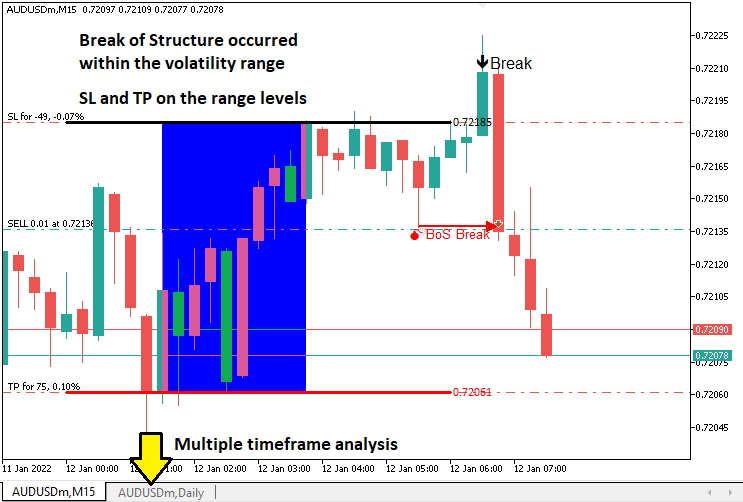
午夜区间突破结合BOS策略的核心逻辑是:利用午夜至凌晨6点形成的低波动区间(以最高价和最低价作为突破边界),同时通过BOS确认交易信号的有效性。BOS通过识别价格突破关键摆动高点(看涨信号)或摆动低点(看跌信号)来捕捉趋势反转,从而过滤虚假突破,确保交易方向与市场契机一致。该策略尤其适用于市场时段转换期(如伦敦开盘时段),或您关注的任何其他时段。不过,使用时需注意时区对齐,并在重大新闻事件期间谨慎操作,以避免价格剧烈波动导致的止损触发。
我们将实现一款MQL5的EA,其功能包括:计算午夜至凌晨6点的价格区间;在设定时间窗口内监测突破;在指定时间框架(通常为5、10或15分钟,用户可动态选择输入参数)上通过BOS确认突破。系统将根据区间范围设置止损和止盈水平,在图表上可视化关键水平,提升操作透明度,并且严格实施风险管理,确保策略在不同市场环境下保持稳健的表现。简言之,这就是我们的核心思路。
在MQL5中的实现
要在MQL5中创建该程序,请打开MetaEditor,进入导航器,找到“指标”文件夹,点击“新建”选项卡,并按照提示创建文件。文件创建完成后,在编码环境中,我们需要声明一些将在整个程序中使用到的全局变量。
//+------------------------------------------------------------------+
//|                   Midnight Range Break of Structure Breakout.mq5 |
//|                           Copyright 2025, Allan Munene Mutiiria. |
//|                                   https://t.me/Forex_Algo_Trader |
//+------------------------------------------------------------------+
#property copyright "Copyright 2025, Allan Munene Mutiiria."
#property link      "https://t.me/Forex_Algo_Trader"
#property version   "1.00"

#include <Trade/Trade.mqh> //--- Include the Trade library for handling trade operations
CTrade obj_Trade;          //--- Create an instance of the CTrade class for trade execution

double maximum_price = -DBL_MAX;      //--- Initialize the maximum price variable to negative infinity
double minimum_price = DBL_MAX;       //--- Initialize the minimum price variable to positive infinity
datetime maximum_time, minimum_time;  //--- Declare variables to store the times of maximum and minimum prices
bool isHaveDailyRange_Prices = false; //--- Initialize flag to indicate if daily range prices are calculated
bool isHaveRangeBreak = false;        //--- Initialize flag to indicate if a range breakout has occurred
bool isTakenTrade = false;            //--- Initialize flag to indicate if a trade is taken for the current day

#define RECTANGLE_PREFIX "RANGE RECTANGLE " //--- Define a prefix for rectangle object names
#define UPPER_LINE_PREFIX "UPPER LINE "     //--- Define a prefix for upper line object names
#define LOWER_LINE_PREFIX "LOWER LINE "     //--- Define a prefix for lower line object names

// bos
input ENUM_TIMEFRAMES timeframe_bos = PERIOD_M5; // Input the timeframe for Break of Structure (BoS) analysis
这里,我们开始通过搭建程序的基础组件来实现该策略。我们引入<Trade/Trade.mqh>库以支持交易操作,并实例化"CTrade"类为"obj_Trade"对象,该对象将负责执行交易指令(例如:以指定参数开立多头或空头头寸)。
我们定义了多个全局变量,用于跟踪策略所需的关键数据。其中,"maximum_price"和"minimum_price"变量分别初始化为-DBL_MAX和DBL_MAX,用于存储午夜至凌晨6点区间内的最高价和最低价,从而确定该区间的边界。"maximum_time"和"minimum_time"变量为日期时间型,用于记录上述极值价格出现的具体时间,这样对于在图表上可视化区间范围至关重要。此外,我们还使用布尔标识变量:"isHaveDailyRange_Prices"指示是否已计算出当日区间价格;"isHaveRangeBreak"跟踪是否已发生突破;"isTakenTrade"确保每日仅执行一笔交易,避免过度交易。
为便于图表可视化,我们定义用于对象命名的常量:将"RECTANGLE_PREFIX"设为"RANGE RECTANGLE"(区间矩形);将"UPPER_LINE_PREFIX"设为 "UPPER LINE"(上边界线);将"LOWER_LINE_PREFIX"设为 "LOWER LINE"(下边界线)。这些前缀确保图表中的矩形和线条对象具有唯一名称,从而清晰地标记区间范围及突破水平,使策略操作一目了然。此外,我们引入了一个用户输入参数 "timeframe_bos",默认值为PERIOD_M5(5分钟周期),允许交易者指定用于BOS分析的时间框架(如5分钟图),以检测摆动高点和低点。至此,前期准备已就绪。接下来,我们需要定义两个函数,以实现在新交易日和新K线出现时控制交易实例。
//+------------------------------------------------------------------+
//| Function to check for a new bar                                  |
//+------------------------------------------------------------------+
bool isNewBar(){ //--- Define a function to detect a new bar on the current timeframe
   static int prevBars = 0;                //--- Store the previous number of bars
   int currBars = iBars(_Symbol,_Period);  //--- Get the current number of bars
   if (prevBars==currBars) return (false); //--- Return false if no new bar has formed
   prevBars = currBars;                    //--- Update the previous bar count
   return (true);                          //--- Return true if a new bar has formed
}

//+------------------------------------------------------------------+
//| Function to check for a new day                                  |
//+------------------------------------------------------------------+
bool isNewDay(){ //--- Define a function to detect a new trading day
   bool newDay = false;  //--- Initialize the new day flag

   MqlDateTime Str_DateTime;                 //--- Declare a structure to hold date and time information
   TimeToStruct(TimeCurrent(),Str_DateTime); //--- Convert the current time to the structure

   static int prevDay = 0;         //--- Store the previous day's date
   int currDay = Str_DateTime.day; //--- Get the current day's date

   if (prevDay == currDay){ //--- Check if the current day is the same as the previous day
      newDay = false;       //--- Set the flag to false (no new day)
   }
   else if (prevDay != currDay){ //--- Check if a new day has started
      Print("WE HAVE A NEW DAY WITH DATE ",currDay); //--- Log the new day
      prevDay = currDay;                             //--- Update the previous day
      newDay = true;                                 //--- Set the flag to true (new day)
   }

   return (newDay); //--- Return the new day status
}
这里,我们实现"isNewBar"和"isNewDay"函数,使MQL5中的午夜区间突破结合BOS策略与市场时间同步。在"isNewBar"函数中,我们通过静态变量"prevBars"结合iBars(_Symbol,_Period)函数记录K线数量,当新K线形成时返回true,触发价格更新逻辑。在"isNewDay"函数中,我们利用MqlDateTime结构体、 TimeToStruct (TimeCurrent)函数及静态变量"prevDay"检测新交易日。如果当前日期"currDay"发生变化,重置区间计算并通过Print函数记录日志。借助以上函数,我们可直接在OnTick事件处理器中定义策略逻辑。
//+------------------------------------------------------------------+
//| Expert tick function                                             |
//+------------------------------------------------------------------+
void OnTick(){
   //---
   static datetime midnight = iTime(_Symbol,PERIOD_D1,0);            //--- Store the current day's midnight time
   static datetime sixAM = midnight + 6 * 3600;                      //--- Calculate 6 AM time by adding 6 hours to midnight
   static datetime scanBarTime = sixAM + 1 * PeriodSeconds(_Period); //--- Set the time of the next bar after 6 AM for scanning
   static double midnight_price = iClose(_Symbol,PERIOD_D1,0);       //--- Store the closing price at midnight

   static datetime validBreakTime_start = scanBarTime;               //--- Set the start time for valid breakout detection
   static datetime validBreakTime_end = midnight + (6+5) * 3600;     //--- Set the end time for valid breakouts to 11 AM

   if (isNewDay()){ //--- Check if a new trading day has started
      midnight = iTime(_Symbol,PERIOD_D1,0);                          //--- Update midnight time for the new day
      sixAM = midnight + 6 * 3600;                                    //--- Recalculate 6 AM time for the new day
      scanBarTime = sixAM + 1 * PeriodSeconds(_Period);               //--- Update the scan bar time to the next bar after 6 AM
      midnight_price = iClose(_Symbol,PERIOD_D1,0);                   //--- Update the midnight closing price
      Print("Midnight price = ",midnight_price,", Time = ",midnight); //--- Log the midnight price and time

      validBreakTime_start = scanBarTime;           //--- Reset the start time for valid breakouts
      validBreakTime_end = midnight + (6+5) * 3600; //--- Reset the end time for valid breakouts to 11 AM

      maximum_price = -DBL_MAX; //--- Reset the maximum price to negative infinity
      minimum_price = DBL_MAX;  //--- Reset the minimum price to positive infinity

      isHaveDailyRange_Prices = false; //--- Reset the flag indicating daily range calculation
      isHaveRangeBreak = false;        //--- Reset the flag indicating a range breakout
      isTakenTrade = false;            //--- Reset the flag indicating a trade is taken
   }
}
这里,我们在OnTick函数中开发策略的核心逻辑——该函数是程序的主事件处理器,会在每个价格tick到来时执行。我们初始化静态变量以跟踪关键时间点:使用 iTime(_Symbol, PERIOD_D1, 0) 将“midnight”作为当日零点时间;在"midnight"的基础上增加6小时(21,600秒)计算“sixAM”;通过PeriodSeconds (_Period)确定6点后的下一根K线时间"scanBarTime";通过iClose函数获取零点收盘价并保存为“midnight_price”。我们还定义:将"validBreakTime_start"设置为"scanBarTime",将"validBreakTime_end"设置为上午11点(零点加11小时),确保突破信号仅在该时段内有效。
当"isNewDay"函数检测到新交易日开始时,我们会更新这些时间变量以反映当日最新数据,确保区间计算始终基于当前交易日。通过iTime和iClose函数重置"midnight"、"sixAM"、"scanBarTime"和"midnight_price",使用Print函数记录零点时间细节,以便调试。另外,我们重置"validBreakTime_start"和"validBreakTime_end",定义新突破有效时间窗口,将"maximum_price"重置为-DBL_MAX、"minimum_price"重置为DBL_MAX,并且将布尔标识"isHaveDailyRange_Prices"、"isHaveRangeBreak"和"isTakenTrade"设为false,确保EA能重新计算午夜至6点的价格区间,持续监测新突破信号。至此,我们已经完成时间范围的计算逻辑验证。
if (isNewBar()){ //--- Check if a new bar has formed on the current timeframe
   datetime currentBarTime = iTime(_Symbol,_Period,0); //--- Get the time of the current bar

   if (currentBarTime == scanBarTime && !isHaveDailyRange_Prices){              //--- Check if it's time to scan for daily range and range is not yet calculated
      Print("WE HAVE ENOUGH BARS DATA FOR DOCUMENTATION. MAKE THE EXTRACTION"); //--- Log that the scan for daily range is starting
      int total_bars = int((sixAM - midnight)/PeriodSeconds(_Period))+1;        //--- Calculate the number of bars from midnight to 6 AM
      Print("Total Bars for scan = ",total_bars);                               //--- Log the total number of bars to scan
      int highest_price_bar_index = -1;                                         //--- Initialize the index of the bar with the highest price
      int lowest_price_bar_index = -1;                                          //--- Initialize the index of the bar with the lowest price

      for (int i=1; i<=total_bars ; i++){ //--- Loop through each bar from midnight to 6 AM
         double open_i = open(i);   //--- Get the open price of the i-th bar
         double close_i = close(i); //--- Get the close price of the i-th bar

         double highest_price_i = (open_i > close_i) ? open_i : close_i; //--- Determine the highest price (open or close) of the bar
         double lowest_price_i = (open_i < close_i) ? open_i : close_i;  //--- Determine the lowest price (open or close) of the bar

         if (highest_price_i > maximum_price){ //--- Check if the bar's highest price exceeds the current maximum
            maximum_price = highest_price_i;   //--- Update the maximum price
            highest_price_bar_index = i;       //--- Store the bar index of the maximum price
            maximum_time = time(i);            //--- Store the time of the maximum price
         }
         if (lowest_price_i < minimum_price){ //--- Check if the bar's lowest price is below the current minimum
            minimum_price = lowest_price_i; //--- Update the minimum price
            lowest_price_bar_index = i;     //--- Store the bar index of the minimum price
            minimum_time = time(i);         //--- Store the time of the minimum price
         }
      }
      Print("Maximum Price = ",maximum_price,", Bar index = ",highest_price_bar_index,", Time = ",maximum_time); //--- Log the maximum price, its bar index, and time
      Print("Minimum Price = ",minimum_price,", Bar index = ",lowest_price_bar_index,", Time = ",minimum_time);  //--- Log the minimum price, its bar index, and time

      isHaveDailyRange_Prices = true; //--- Set the flag to indicate that the daily range is calculated
   }
}
当有新K线形成时(通过"isNewBar"函数检测),我们计算午夜至凌晨6点的价格区,使用iTime(_Symbol,_Period, 0)获取当前K线时间,存储于"currentBarTime"中。如果"currentBarTime"等于"scanBarTime"且"isHaveDailyRange_Prices"为false,则通过Print记录区间扫描启动;使用PeriodSeconds (_Period) 计算"total_bars" ,循环遍历K线,使用"open"和"close"函数找出最高/最低价格,并更新"maximum_price"、"minimum_price"、"maximum_time"、"minimum_time"及其索引。记录结果后将"isHaveDailyRange_Prices"设为true,即可启用突破监控。
为简化代码,此处直接调用预定义函数获取价格数据,具体如下:
//+------------------------------------------------------------------+
//| Helper functions for price and time data                         |
//+------------------------------------------------------------------+
double open(int index){return (iOpen(_Symbol,_Period,index));}   //--- Return the open price of the specified bar index on the current timeframe
double high(int index){return (iHigh(_Symbol,_Period,index));}   //--- Return the high price of the specified bar index on the current timeframe
double low(int index){return (iLow(_Symbol,_Period,index));}     //--- Return the low price of the specified bar index on the current timeframe
double close(int index){return (iClose(_Symbol,_Period,index));} //--- Return the close price of the specified bar index on the current timeframe
datetime time(int index){return (iTime(_Symbol,_Period,index));} //--- Return the time of the specified bar index on the current timeframe

double high(int index,ENUM_TIMEFRAMES tf_bos){return (iHigh(_Symbol,tf_bos,index));}   //--- Return the high price of the specified bar index on the BoS timeframe
double low(int index,ENUM_TIMEFRAMES tf_bos){return (iLow(_Symbol,tf_bos,index));}     //--- Return the low price of the specified bar index on the BoS timeframe
datetime time(int index,ENUM_TIMEFRAMES tf_bos){return (iTime(_Symbol,tf_bos,index));} //--- Return the time of the specified bar index on the BoS timeframe
我们通过定义辅助函数来高效获取价格和时间数据,分别定义"open"、"high"、"low"、"close"、"time"函数,各接收一个"index"参数,分别调用"iOpen"、iHigh、"iLow"、"iClose"、iTime,传入"_Symbol"与 _Period,返回指定K线索引对应的开盘价、最高价、最低价、收盘价或K线时间。
此外,我们还重载"high"、"low"和"time"函数,使其接受ENUM_TIMEFRAMES参数"tf_bos",以便通过"iHigh"、"iLow"和"iTime",配合_Symbol与"tf_bos",获取用于BOS时间框架的最高价、最低价或K线时间。定义好区间后,让我们在图表上将其可视化。为此,我们还需定义一些附加的辅助函数。
//+------------------------------------------------------------------+
//| Function to create a rectangle object                            |
//+------------------------------------------------------------------+
void create_Rectangle(string objName,datetime time1,double price1,
               datetime time2,double price2,color clr){ //--- Define a function to draw a rectangle on the chart
   if (ObjectFind(0,objName) < 0){                                       //--- Check if the rectangle object does not already exist
      ObjectCreate(0,objName,OBJ_RECTANGLE,0,time1,price1,time2,price2); //--- Create a rectangle object with specified coordinates

      ObjectSetInteger(0,objName,OBJPROP_TIME,0,time1);  //--- Set the first time coordinate of the rectangle
      ObjectSetDouble(0,objName,OBJPROP_PRICE,0,price1); //--- Set the first price coordinate of the rectangle
      ObjectSetInteger(0,objName,OBJPROP_TIME,1,time2);  //--- Set the second time coordinate of the rectangle
      ObjectSetDouble(0,objName,OBJPROP_PRICE,1,price2); //--- Set the second price coordinate of the rectangle
      ObjectSetInteger(0,objName,OBJPROP_FILL,true);     //--- Enable filling the rectangle with color
      ObjectSetInteger(0,objName,OBJPROP_COLOR,clr);     //--- Set the color of the rectangle
      ObjectSetInteger(0,objName,OBJPROP_BACK,false);    //--- Ensure the rectangle is drawn in the foreground

      ChartRedraw(0); //--- Redraw the chart to display the rectangle
   }
}

//+------------------------------------------------------------------+
//| Function to create a line object with text                       |
//+------------------------------------------------------------------+
void create_Line(string objName,datetime time1,double price1,
               datetime time2,double price2,int width,color clr,string text){ //--- Define a function to draw a trend line with text
   if (ObjectFind(0,objName) < 0){                                   //--- Check if the line object does not already exist
      ObjectCreate(0,objName,OBJ_TREND,0,time1,price1,time2,price2); //--- Create a trend line object with specified coordinates

      ObjectSetInteger(0,objName,OBJPROP_TIME,0,time1);  //--- Set the first time coordinate of the line
      ObjectSetDouble(0,objName,OBJPROP_PRICE,0,price1); //--- Set the first price coordinate of the line
      ObjectSetInteger(0,objName,OBJPROP_TIME,1,time2);  //--- Set the second time coordinate of the line
      ObjectSetDouble(0,objName,OBJPROP_PRICE,1,price2); //--- Set the second price coordinate of the line
      ObjectSetInteger(0,objName,OBJPROP_WIDTH,width);   //--- Set the width of the line
      ObjectSetInteger(0,objName,OBJPROP_COLOR,clr);     //--- Set the color of the line
      ObjectSetInteger(0,objName,OBJPROP_BACK,false);    //--- Ensure the line is drawn in the foreground

      long scale = 0; //--- Initialize a variable to store the chart scale
      if(!ChartGetInteger(0,CHART_SCALE,0,scale)){                                   //--- Attempt to get the chart scale
         Print("UNABLE TO GET THE CHART SCALE. DEFAULT OF ",scale," IS CONSIDERED"); //--- Log if the chart scale cannot be retrieved
      }

      int fontsize = 11; //--- Set the default font size for the text
      if (scale==0){fontsize=5;} //--- Adjust font size for minimized chart scale
      else if (scale==1){fontsize=6;}  //--- Adjust font size for scale 1
      else if (scale==2){fontsize=7;}  //--- Adjust font size for scale 2
      else if (scale==3){fontsize=9;}  //--- Adjust font size for scale 3
      else if (scale==4){fontsize=11;} //--- Adjust font size for scale 4
      else if (scale==5){fontsize=13;} //--- Adjust font size for maximized chart scale

      string txt = " Right Price";         //--- Define the text suffix for the price label
      string objNameDescr = objName + txt; //--- Create a unique name for the text object
      ObjectCreate(0,objNameDescr,OBJ_TEXT,0,time2,price2);        //--- Create a text object at the line's end
      ObjectSetInteger(0,objNameDescr,OBJPROP_COLOR,clr);          //--- Set the color of the text
      ObjectSetInteger(0,objNameDescr,OBJPROP_FONTSIZE,fontsize);  //--- Set the font size of the text
      ObjectSetInteger(0,objNameDescr,OBJPROP_ANCHOR,ANCHOR_LEFT); //--- Set the text anchor to the left
      ObjectSetString(0,objNameDescr,OBJPROP_TEXT," "+text);       //--- Set the text content (price value)
      ObjectSetString(0,objNameDescr,OBJPROP_FONT,"Calibri");      //--- Set the font type to Calibri

      ChartRedraw(0); //--- Redraw the chart to display the line and text
   }
}
为了可视化价格区间,我们定义两个函数。在"create_Rectangle"函数中,我们通过绘制填充矩形来表示零点至凌晨6点的价格区间,支持自定义参数s "objName"、"time1"、"price1"、"time2"、"price2"和"clr"。我们首先通过ObjectFind函数检测图表(ID为0)中是否已存在同名对象,以避免重复绘制。
如果对象不存在,我们使用ObjectCreate创建矩形,类型为OBJ_RECTANGLE,并通过ObjectSetInteger设置OBJPROP_TIME、ObjectSetDouble设置"OBJPROP_PRICE"来定义坐标。随后用"ObjectSetInteger"开启"OBJPROP_FILL"填充,设置矩形颜色,并将"OBJPROP_BACK"设置为false确保其显示在前端,最后调用ChartRedraw更新图表。
在"create_Line"函数中,我们绘制一条带描述文本的趋势线,用于标记区间边界,参数包括"objName"、"time1"、"price1"、"time2"、"price2"、"width"、"clr"和"text"。先用"ObjectFind"确认线条不存在,再用"ObjectCreate"创建 OBJ_TREND 对象,并通过"ObjectSetInteger"与"ObjectSetDouble"设置坐标、线宽和颜色。为确保文本可读,我们用"ChartGetInteger"获取图表比例(失败时用"Print"记录),并据此动态调整字体大小(5-13)。
我们使用"ObjectCreate"创建名为"objNameDescr"的文本对象,类型为"OBJ_TEXT",并通过"ObjectSetInteger"设置颜色、字体大小和左对齐锚点,再通过ObjectSetString设置字体为 "Calibri" 和价格文本,最后使用 "ChartRedraw"重绘图表。借助这些函数,我们即可在定义区间时调用。
create_Rectangle(RECTANGLE_PREFIX+TimeToString(maximum_time),maximum_time,maximum_price,minimum_time,minimum_price,clrBlue);                       //--- Draw a rectangle to mark the daily range
create_Line(UPPER_LINE_PREFIX+TimeToString(midnight),midnight,maximum_price,sixAM,maximum_price,3,clrBlack,DoubleToString(maximum_price,_Digits)); //--- Draw the upper line for the range
create_Line(LOWER_LINE_PREFIX+TimeToString(midnight),midnight,minimum_price,sixAM,minimum_price,3,clrRed,DoubleToString(minimum_price,_Digits));   //--- Draw the lower line for the range
我们通过调用"create_Rectangle"完成零点至凌晨6点价格区间的可视化:参数为"RECTANGLE_PREFIX+TimeToString(maximum_time)"、"maximum_time"、"maximum_price"、"minimum_time"、"minimum_price"和"clrBlue",绘制标记区间的矩形。随后,我们两次调用"create_Line":上轨线相关"UPPER_LINE_PREFIX+TimeToString(midnight)"、"midnight"、"maximum_price"、"sixAM"、线宽3、"clrBlack"、DoubleToString(maximum_price,_Digits);下轨线 相关"LOWER_LINE_PREFIX"、"minimum_price"、"clrRed",其余参数对应匹配。当前结果如下:
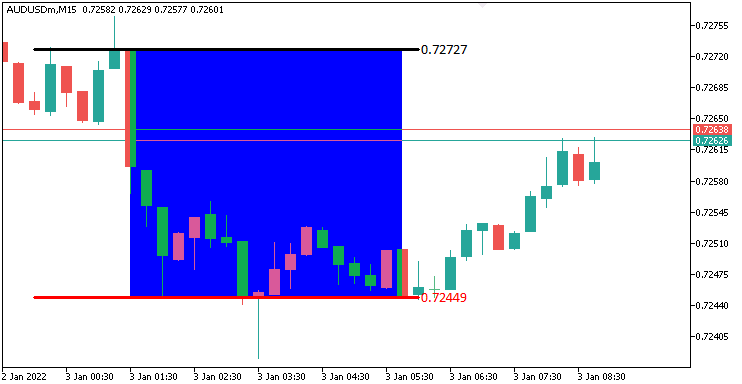
由图可见,我们已经成功可视化价格区间。接下来需要实现的功能是:在预设的时间范围内监测价格突破,并同步在图表上可视化。为此,我们需要编写一个自定义函数,专门用于在图表上绘制突破标识。
//+------------------------------------------------------------------+
//| Function to draw a breakpoint marker                             |
//+------------------------------------------------------------------+
void drawBreakPoint(string objName,datetime time,double price,int arrCode,
   color clr,int direction){ //--- Define a function to draw a breakpoint marker
   if (ObjectFind(0,objName) < 0){ //--- Check if the breakpoint object does not already exist
      ObjectCreate(0,objName,OBJ_ARROW,0,time,price);        //--- Create an arrow object at the specified time and price
      ObjectSetInteger(0,objName,OBJPROP_ARROWCODE,arrCode); //--- Set the arrow code for the marker
      ObjectSetInteger(0,objName,OBJPROP_COLOR,clr);         //--- Set the color of the arrow
      ObjectSetInteger(0,objName,OBJPROP_FONTSIZE,12);       //--- Set the font size for the arrow
      if (direction > 0) ObjectSetInteger(0,objName,OBJPROP_ANCHOR,ANCHOR_TOP);    //--- Set the anchor to top for upward breaks
      if (direction < 0) ObjectSetInteger(0,objName,OBJPROP_ANCHOR,ANCHOR_BOTTOM); //--- Set the anchor to bottom for downward breaks

      string txt = " Break"; //--- Define the text suffix for the breakpoint label
      string objNameDescr = objName + txt; //--- Create a unique name for the text object
      ObjectCreate(0,objNameDescr,OBJ_TEXT,0,time,price);   //--- Create a text object at the breakpoint
      ObjectSetInteger(0,objNameDescr,OBJPROP_COLOR,clr);   //--- Set the color of the text
      ObjectSetInteger(0,objNameDescr,OBJPROP_FONTSIZE,12); //--- Set the font size of the text
      if (direction > 0) { //--- Check if the breakout is upward
         ObjectSetInteger(0,objNameDescr,OBJPROP_ANCHOR,ANCHOR_LEFT_UPPER); //--- Set the text anchor to left upper
         ObjectSetString(0,objNameDescr,OBJPROP_TEXT, " " + txt);           //--- Set the text content
      }
      if (direction < 0) { //--- Check if the breakout is downward
         ObjectSetInteger(0,objNameDescr,OBJPROP_ANCHOR,ANCHOR_LEFT_LOWER); //--- Set the text anchor to left lower
         ObjectSetString(0,objNameDescr,OBJPROP_TEXT, " " + txt);           //--- Set the text content
      }
   }
   ChartRedraw(0); //--- Redraw the chart to display the breakpoint
}
这里,我们定义"drawBreakPoint"函数,用于在图表上直观地标记突破点。先通过ObjectFind检查对象是否存在,如果不存在,则使用参数"objName"、"time"、"price"、"arrCode"、"clr"和"direction",并调用ObjectCreate创建类型为OBJ_ARROW箭头对象,通过 "ObjectSetInteger"设置箭头样式、颜色和固定字体大小12,并且根据"direction"将锚点设置为"ANCHOR_TOP"或"ANCHOR_BOTTOM"。
我们再用"ObjectCreate"与"OBJ_TEXT"创建文本标签"Break",命名为"objNameDescr",通过"ObjectSetInteger"与ObjectSetString设置颜色、字体大小,并依据方向选择锚点ANCHOR_LEFT_UPPER或ANCHOR_LEFT_LOWER。最后,调用"ChartRedraw"显示这些标记,确保突破点清晰可见。现在即可用此函数在图表上标注突破位。
double barClose = close(1); //--- Get the closing price of the previous bar
datetime barTime = time(1); //--- Get the time of the previous bar

if (barClose > maximum_price && isHaveDailyRange_Prices && !isHaveRangeBreak
    && barTime >= validBreakTime_start && barTime <= validBreakTime_end
){ //--- Check for a breakout above the maximum price within the valid time window
   Print("CLOSE Price broke the HIGH range. ",barClose," > ",maximum_price); //--- Log the breakout above the high range
   isHaveRangeBreak = true;                                                //--- Set the flag to indicate a range breakout has occurred
   drawBreakPoint(TimeToString(barTime),barTime,barClose,234,clrBlack,-1); //--- Draw a breakpoint marker for the high breakout
}
else if (barClose < minimum_price && isHaveDailyRange_Prices && !isHaveRangeBreak
         && barTime >= validBreakTime_start && barTime <= validBreakTime_end
){ //--- Check for a breakout below the minimum price within the valid time window
   Print("CLOSE Price broke the LOW range. ",barClose," < ",minimum_price); //--- Log the breakout below the low range
   isHaveRangeBreak = true;                                              //--- Set the flag to indicate a range breakout has occurred
   drawBreakPoint(TimeToString(barTime),barTime,barClose,233,clrBlue,1); //--- Draw a breakpoint marker for the low breakout
}
为检测并可视化有效突破,我们先通过"close(1)"获取前一根K线的收盘价到"barClose",并用"time(1)"获取其时间到"barTime"。如果同时满足"barClose"大于"maximum_price","isHaveDailyRange_Prices"为true,"isHaveRangeBreak"为false,并且"barTime"在"validBreakTime_start"与"validBreakTime_end"之间,我们通过"Print"记录高位突破信息,设置"isHaveRangeBreak"为true,并且调用"drawBreakPoint",参数为"TimeToString(barTime)"、"barClose", 箭头代码234、"clrBlack"和-1。
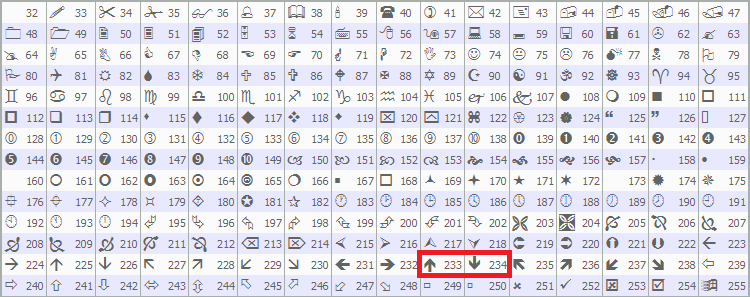
如果"barClose"小于"minimum_price"且其他条件相同,我们则记录低位突破,设置"isHaveRangeBreak",并调用"drawBreakPoint",箭头代码233、"clrBlue"和1。这样即可在图表上标注有效突破。我们使用MQL5预定义的箭头233和234,如下所示,您也可以换成自己喜欢的箭头样式。
程序运行后,输出结果如下:
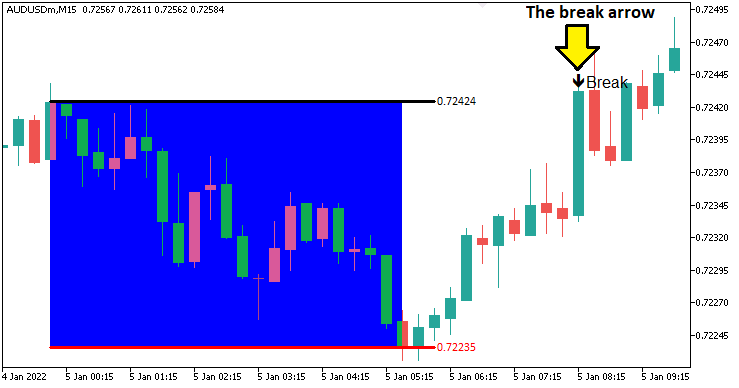
由图可见,我们能够精准识别并可视化价格突破信号。接下来需要完成的任务是定义趋势结构转变和突破中断的判定逻辑。为此,我们需要编写一个函数,用于在图表上绘制已识别的关键拐点。
//+------------------------------------------------------------------+
//| Function to draw a swing point marker                            |
//+------------------------------------------------------------------+
void drawSwingPoint(string objName,datetime time,double price,int arrCode,
   color clr,int direction){ //--- Define a function to draw a swing point marker
   if (ObjectFind(0,objName) < 0){ //--- Check if the swing point object does not already exist
      ObjectCreate(0,objName,OBJ_ARROW,0,time,price);        //--- Create an arrow object at the specified time and price
      ObjectSetInteger(0,objName,OBJPROP_ARROWCODE,arrCode); //--- Set the arrow code for the marker
      ObjectSetInteger(0,objName,OBJPROP_COLOR,clr);         //--- Set the color of the arrow
      ObjectSetInteger(0,objName,OBJPROP_FONTSIZE,10);       //--- Set the font size for the arrow

      if (direction > 0) {ObjectSetInteger(0,objName,OBJPROP_ANCHOR,ANCHOR_TOP);}    //--- Set the anchor to top for swing lows
      if (direction < 0) {ObjectSetInteger(0,objName,OBJPROP_ANCHOR,ANCHOR_BOTTOM);} //--- Set the anchor to bottom for swing highs

      string text = "BoS";                   //--- Define the text label for Break of Structure
      string objName_Descr = objName + text; //--- Create a unique name for the text object
      ObjectCreate(0,objName_Descr,OBJ_TEXT,0,time,price);   //--- Create a text object at the swing point
      ObjectSetInteger(0,objName_Descr,OBJPROP_COLOR,clr);   //--- Set the color of the text
      ObjectSetInteger(0,objName_Descr,OBJPROP_FONTSIZE,10); //--- Set the font size of the text

      if (direction > 0) { //--- Check if the swing is a low
         ObjectSetString(0,objName_Descr,OBJPROP_TEXT,"  "+text);            //--- Set the text content
         ObjectSetInteger(0,objName_Descr,OBJPROP_ANCHOR,ANCHOR_LEFT_UPPER); //--- Set the text anchor to left upper
      }
      if (direction < 0) { //--- Check if the swing is a high
         ObjectSetString(0,objName_Descr,OBJPROP_TEXT,"  "+text);            //--- Set the text content
         ObjectSetInteger(0,objName_Descr,OBJPROP_ANCHOR,ANCHOR_LEFT_LOWER); //--- Set the text anchor to left lower
      }
   }
   ChartRedraw(0); //--- Redraw the chart to display the swing point
}
我们通过实现"drawSwingPoint"函数来标记已识别的关键高低点。该函数使用这些参数:"objName"、"time"、"price"、"arrCode"、"clr"和"direction",我们先通过ObjectFind验证图表中是否已存在同名对象,确定不存在后,通过调用ObjectCreate并指定类型为 OBJ_ARROW绘制箭头,设置箭头样式、颜色及字体大小(如10),并根据"ANCHOR_TOP"(低点)和"ANCHOR_BOTTOM"(高点)锚定位置。我们还通过"ObjectCreate"创建"OBJ_TEXT"类型的文本标签"BoS",通过"ObjectSetInteger"与"ObjectSetString"设置颜色、字体大小和锚点(ANCHOR_LEFT_UPPER或ANCHOR_LEFT_LOWER)。我们调用ChartRedraw来显示这些标记,突出关键的拐点。通过此函数,我们将继续构建拐点识别逻辑。
// bos logic
if (isHaveDailyRange_Prices){ //--- Proceed with BoS logic only if the daily range is calculated
   static bool isNewBar_bos = false;            //--- Initialize flag to indicate a new bar on the BoS timeframe
   int currBars = iBars(_Symbol,timeframe_bos); //--- Get the current number of bars on the BoS timeframe
   static int prevBars = currBars;              //--- Store the previous number of bars for comparison

   if (prevBars == currBars){isNewBar_bos = false;}                          //--- Set flag to false if no new bar has formed
   else if (prevBars != currBars){isNewBar_bos = true; prevBars = currBars;} //--- Set flag to true and update prevBars if a new bar has formed

   const int length = 4;                         //--- Define the number of bars to check for swing high/low (must be > 2)
   int right_index, left_index;                  //--- Declare variables to store indices for bars to the right and left
   int curr_bar = length;                        //--- Set the current bar index for swing analysis
   bool isSwingHigh = true, isSwingLow = true;   //--- Initialize flags to determine if the current bar is a swing high or low
   static double swing_H = -1.0, swing_L = -1.0; //--- Initialize variables to store the latest swing high and low prices

   if (isNewBar_bos){ //--- Check if a new bar has formed on the BoS timeframe
      for (int a=1; a<=length; a++){ //--- Loop through the specified number of bars to check for swings
         right_index = curr_bar - a; //--- Calculate the right-side bar index
         left_index = curr_bar + a;  //--- Calculate the left-side bar index
         if ( (high(curr_bar,timeframe_bos) <= high(right_index,timeframe_bos)) || (high(curr_bar,timeframe_bos) < high(left_index,timeframe_bos)) ){ //--- Check if the current bar's high is not the highest
            isSwingHigh = false; //--- Set flag to false if the bar is not a swing high
         }
         if ( (low(curr_bar,timeframe_bos) >= low(right_index,timeframe_bos)) || (low(curr_bar,timeframe_bos) > low(left_index,timeframe_bos)) ){ //--- Check if the current bar's low is not the lowest
            isSwingLow = false; //--- Set flag to false if the bar is not a swing low
         }
      }

      if (isSwingHigh){ //--- Check if the current bar is a swing high
         swing_H = high(curr_bar,timeframe_bos); //--- Store the swing high price
         Print("WE DO HAVE A SWING HIGH @ BAR INDEX ",curr_bar," H: ",high(curr_bar,timeframe_bos)); //--- Log the swing high details
         drawSwingPoint(TimeToString(time(curr_bar,timeframe_bos)),time(curr_bar,timeframe_bos),high(curr_bar,timeframe_bos),77,clrBlue,-1); //--- Draw a marker for the swing high
      }
      if (isSwingLow){ //--- Check if the current bar is a swing low
         swing_L = low(curr_bar,timeframe_bos); //--- Store the swing low price
         Print("WE DO HAVE A SWING LOW @ BAR INDEX ",curr_bar," L: ",low(curr_bar,timeframe_bos)); //--- Log the swing low details
         drawSwingPoint(TimeToString(time(curr_bar,timeframe_bos)),time(curr_bar,timeframe_bos),low(curr_bar,timeframe_bos),77,clrRed,+1); //--- Draw a marker for the swing low
      }
   }
}
一旦我们获取了日内价格(即已定义好日级价格区间),我们便用静态标识"isNewBar_bos"跟踪BOS时间框架的新K线,将当前iBars结合_Symbol和"timeframe_bos"获取的K线数与静态变量"prevBars"比较。如果出现新K线,则将"isNewBar_bos"设置为true并更新"prevBars"。
当"isNewBar_bos"为 true时,我们对索引为"curr_bar"(设置length = 4)的K线进行波段分析,用"right_index"与"left_index"分别检查其左右各"length"根K线,。通过"timeframe_bos"的"high"与"low"函数,比较当前K线的高/低是否分别为最高或最低,如果不符合则把"isSwingHigh"或"isSwingLow"设置为false。
如果"isSwingHigh"为true,则将价格存入"swing_H",用"Print"记录,并调用"drawSwingPoint",参数为"TimeToString"、K线时间、价格、箭头代码 77、"clrBlue"和-1;如果"isSwingLow"为true,则更新"swing_L"记录,并调用"drawSwingPoint",参数为"clrRed"和+1。编译后,呈现如下效果:
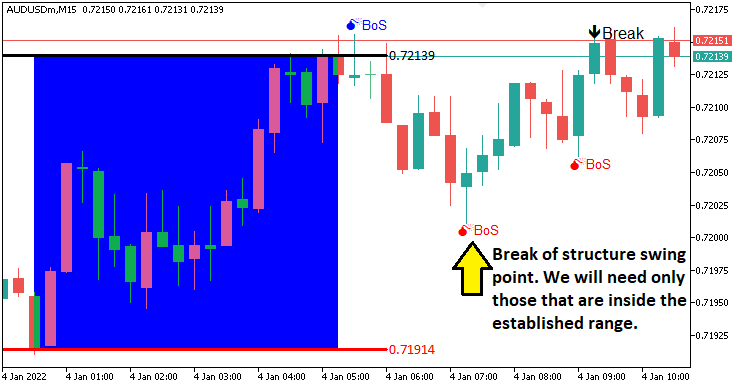
由图可见,我们已标注出关键拐点。接下来需实现的功能是跟踪这些拐点的突破情况——即当价格有效突破拐点时,视为BOS。为了清晰可视化效果,我们需要编写以下自定义函数。
//+------------------------------------------------------------------+
//| Function to draw a break level line                              |
//+------------------------------------------------------------------+
void drawBreakLevel(string objName,datetime time1,double price1,
   datetime time2,double price2,color clr,int direction){ //--- Define a function to draw a break level line
   if (ObjectFind(0,objName) < 0){ //--- Check if the break level object does not already exist
      ObjectCreate(0,objName,OBJ_ARROWED_LINE,0,time1,price1,time2,price2); //--- Create an arrowed line object
      ObjectSetInteger(0,objName,OBJPROP_TIME,0,time1);                     //--- Set the first time coordinate of the line
      ObjectSetDouble(0,objName,OBJPROP_PRICE,0,price1);                    //--- Set the first price coordinate of the line
      ObjectSetInteger(0,objName,OBJPROP_TIME,1,time2);                     //--- Set the second time coordinate of the line
      ObjectSetDouble(0,objName,OBJPROP_PRICE,1,price2);                    //--- Set the second price coordinate of the line

      ObjectSetInteger(0,objName,OBJPROP_COLOR,clr); //--- Set the color of the line
      ObjectSetInteger(0,objName,OBJPROP_WIDTH,2);   //--- Set the width of the line

      string text = "Break";                 //--- Define the text label for the break
      string objName_Descr = objName + text; //--- Create a unique name for the text object
      ObjectCreate(0,objName_Descr,OBJ_TEXT,0,time2,price2); //--- Create a text object at the line's end
      ObjectSetInteger(0,objName_Descr,OBJPROP_COLOR,clr);   //--- Set the color of the text
      ObjectSetInteger(0,objName_Descr,OBJPROP_FONTSIZE,10); //--- Set the font size of the text

      if (direction > 0) { //--- Check if the break is upward
         ObjectSetString(0,objName_Descr,OBJPROP_TEXT,text+"  ");             //--- Set the text content
         ObjectSetInteger(0,objName_Descr,OBJPROP_ANCHOR,ANCHOR_RIGHT_UPPER); //--- Set the text anchor to right upper
      }
      if (direction < 0) { //--- Check if the break is downward
         ObjectSetString(0,objName_Descr,OBJPROP_TEXT,text+"  ");             //--- Set the text content
         ObjectSetInteger(0,objName_Descr,OBJPROP_ANCHOR,ANCHOR_RIGHT_LOWER); //--- Set the text anchor to right lower
      }
   }
   ChartRedraw(0); //--- Redraw the chart to display the break level
}
我们已定义了"drawBreakLevel"函数,用于可视化BOS的关键价位。该函数的可视化逻辑与之前开发的标注函数类似,因此无需重复赘述具体实现细节。我们将调用此函数,以可视化支撑/阻力位。
double Ask = NormalizeDouble(SymbolInfoDouble(_Symbol,SYMBOL_ASK),_Digits); //--- Get and normalize the current Ask price
double Bid = NormalizeDouble(SymbolInfoDouble(_Symbol,SYMBOL_BID),_Digits); //--- Get and normalize the current Bid price

if (swing_H > 0 && Ask > swing_H){ //--- Check if the Ask price breaks above the swing high
   Print("$$$$$$$$$ BUY SIGNAL NOW. BREAK OF SWING HIGH"); //--- Log a buy signal due to swing high breakout
   int swing_H_index = 0;                //--- Initialize the index of the swing high bar
   for (int i=0; i<=length*2+1000; i++){ //--- Loop through bars to find the swing high
      double high_sel = high(i,timeframe_bos); //--- Get the high price of the i-th bar
      if (high_sel == swing_H){ //--- Check if the high matches the swing high
         swing_H_index = i;     //--- Store the bar index
         Print("BREAK HIGH FOUND @ BAR INDEX ",swing_H_index); //--- Log the swing high bar index
         break;                 //--- Exit the loop once found
      }
   }
   drawBreakLevel(TimeToString(time(0,timeframe_bos)),time(swing_H_index,timeframe_bos),high(swing_H_index,timeframe_bos),
   time(0,timeframe_bos),high(swing_H_index,timeframe_bos),clrBlue,-1); //--- Draw a line to mark the swing high breakout

   if (isTakenTrade == false){                                     //--- Check if no trade is taken yet
      obj_Trade.Buy(0.01,_Symbol,Ask,minimum_price,maximum_price); //--- Execute a buy trade with 0.01 lots, using minimum price as SL and maximum as TP
      isTakenTrade = true;                                         //--- Set the flag to indicate a trade is taken
   }

   swing_H = -1.0; //--- Reset the swing high price
   return;         //--- Exit the OnTick function to avoid further processing
}
if (swing_L > 0 && Bid < swing_L){ //--- Check if the Bid price breaks below the swing low
   Print("$$$$$$$$$ SELL SIGNAL NOW. BREAK OF SWING LOW"); //--- Log a sell signal due to swing low breakout
   int swing_L_index = 0; //--- Initialize the index of the swing low bar
   for (int i=0; i<=length*2+1000; i++){ //--- Loop through bars to find the swing low
      double low_sel = low(i,timeframe_bos); //--- Get the low price of the i-th bar
      if (low_sel == swing_L){ //--- Check if the low matches the swing low
         swing_L_index = i;    //--- Store the bar index
         Print("BREAK LOW FOUND @ BAR INDEX ",swing_L_index); //--- Log the swing low bar index
         break;                //--- Exit the loop once found
      }
   }
   drawBreakLevel(TimeToString(time(0,timeframe_bos)),time(swing_L_index,timeframe_bos),low(swing_L_index,timeframe_bos),
   time(0,timeframe_bos),low(swing_L_index,timeframe_bos),clrRed,+1); //--- Draw a line to mark the swing low breakout

   if (isTakenTrade == false){ //--- Check if no trade is taken yet
      obj_Trade.Sell(0.01,_Symbol,Bid,maximum_price,minimum_price); //--- Execute a sell trade with 0.01 lots, using maximum price as SL and minimum as TP
      isTakenTrade = true;                                          //--- Set the flag to indicate a trade is taken
   }

   swing_L = -1.0; //--- Reset the swing low price
   return;         //--- Exit the OnTick function to avoid further processing
}
这里,当出现有效突破信号时,我们实现自动执行交易订单的逻辑。我们通过SymbolInfoDouble和NormalizeDouble结合_Symbol和 _Digits,对交易品种的卖出价和买入价进行标准化处理,确保精度符合交易规则。
如果当前检测到的"swing_H"为正值,且当前卖出价超出高点价位,我们使用"Print"记录突破事件,通过"high"数组和"timeframe_bos"找出该波段高点的索引,调用"drawBreakLevel"结合TimeToString和"time",标记突破水平位,如果当前未持仓("isTakenTrade"为false),则通过"obj_Trade.Buy"以0.01手开仓买入,并设置止损价位"minimum_price"与止盈价位"maximum_price",将"isTakenTrade"标记为 true(防止重复开仓),并重置"swing_H"值(清除已突破的拐点)。
如果"swing_L"为正值且当前买入价跌破低点价位,我们则记录日志,通过"low"找到该波段低点索引,调用"drawBreakLevel"标记突破水平位,通过"obj_Trade.Sell"开仓卖出,并重置"swing_L"值(清除已突破的拐点)。我们在每次交易后均以"return"退出,确保精准的BOS交易。以下是输出结果:
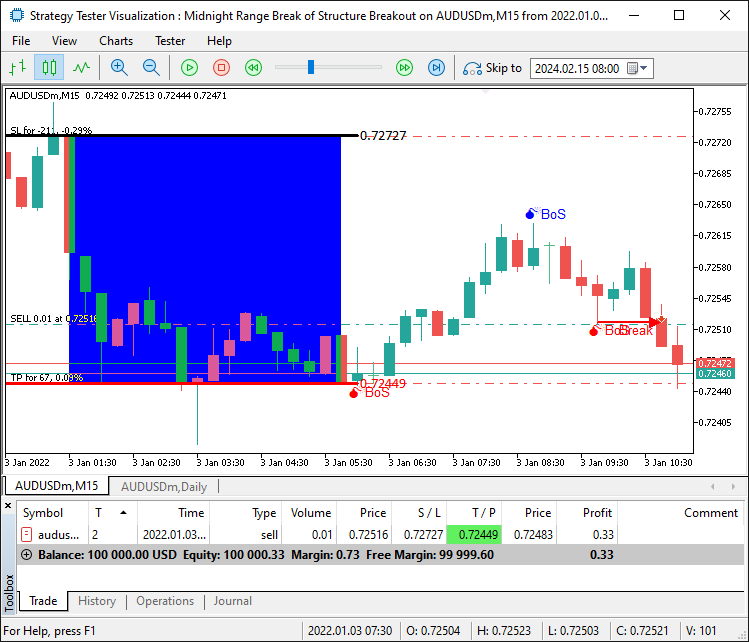
我们现已能够针对确认有效的交易形态自动开仓。然而,如果出现突破行情但未发生在既定区间内的情况,也就是价格从区间边界外发起突破。我们需要等待价格重新回至区间内,方可认定该突破为有效信号。为实现这一逻辑,需提取区间的最高价与最低价,并以此构建更严格的筛选条件,从而避免虚假突破信号的干扰。
if (swing_H > 0 && Ask > swing_H && swing_H <= maximum_price && swing_H >= minimum_price){ //--- Check if the Ask price breaks above the swing high within the range
   Print("$$$$$$$$$ BUY SIGNAL NOW. BREAK OF SWING HIGH WITHIN RANGE"); //--- Log a buy signal due to swing high breakout
   int swing_H_index = 0;                                               //--- Initialize the index of the swing high bar
   for (int i=0; i<=length*2+1000; i++){                                //--- Loop through bars to find the swing high
      double high_sel = high(i,timeframe_bos); //--- Get the high price of the i-th bar
      if (high_sel == swing_H){                //--- Check if the high matches the swing high
         swing_H_index = i; //--- Store the bar index
         Print("BREAK HIGH FOUND @ BAR INDEX ",swing_H_index); //--- Log the swing high bar index
         break;             //--- Exit the loop once found
      }
   }
   drawBreakLevel(TimeToString(time(0,timeframe_bos)),time(swing_H_index,timeframe_bos),high(swing_H_index,timeframe_bos),
   time(0,timeframe_bos),high(swing_H_index,timeframe_bos),clrBlue,-1); //--- Draw a line to mark the swing high breakout

   if (isTakenTrade == false){ //--- Check if no trade is taken yet
      obj_Trade.Buy(0.01,_Symbol,Ask,minimum_price,maximum_price); //--- Execute a buy trade with 0.01 lots, using minimum price as SL and maximum as TP
      isTakenTrade = true;                                         //--- Set the flag to indicate a trade is taken
   }

   swing_H = -1.0; //--- Reset the swing high price
   return;         //--- Exit the OnTick function to avoid further processing
}
if (swing_L > 0 && Bid < swing_L && swing_L <= maximum_price && swing_L >= minimum_price){ //--- Check if the Bid price breaks below the swing low within the range
   Print("$$$$$$$$$ SELL SIGNAL NOW. BREAK OF SWING LOW WITHIN RANGE"); //--- Log a sell signal due to swing low breakout
   int swing_L_index = 0;                //--- Initialize the index of the swing low bar
   for (int i=0; i<=length*2+1000; i++){ //--- Loop through bars to find the swing low
      double low_sel = low(i,timeframe_bos); //--- Get the low price of the i-th bar
      if (low_sel == swing_L){ //--- Check if the low matches the swing low
         swing_L_index = i;    //--- Store the bar index
         Print("BREAK LOW FOUND @ BAR INDEX ",swing_L_index); //--- Log the swing low bar index
         break;                //--- Exit the loop once found
      }
   }
   drawBreakLevel(TimeToString(time(0,timeframe_bos)),time(swing_L_index,timeframe_bos),low(swing_L_index,timeframe_bos),
   time(0,timeframe_bos),low(swing_L_index,timeframe_bos),clrRed,+1); //--- Draw a line to mark the swing low breakout

   if (isTakenTrade == false){ //--- Check if no trade is taken yet
      obj_Trade.Sell(0.01,_Symbol,Bid,maximum_price,minimum_price); //--- Execute a sell trade with 0.01 lots, using maximum price as SL and maximum as TP
      isTakenTrade = true;                                          //--- Set the flag to indicate a trade is taken
   }

   swing_L = -1.0; //--- Reset the swing low price
   return;         //--- Exit the OnTick function to avoid further processing
}
我们能够有效过滤虚假信号,并仅在确认有效的交易形态出现时开仓,从而成功实现了既定目标:识别、可视化并执行该策略。接下来需完成的工作是程序回测,相关内容将在下一章节详细阐述。
回测
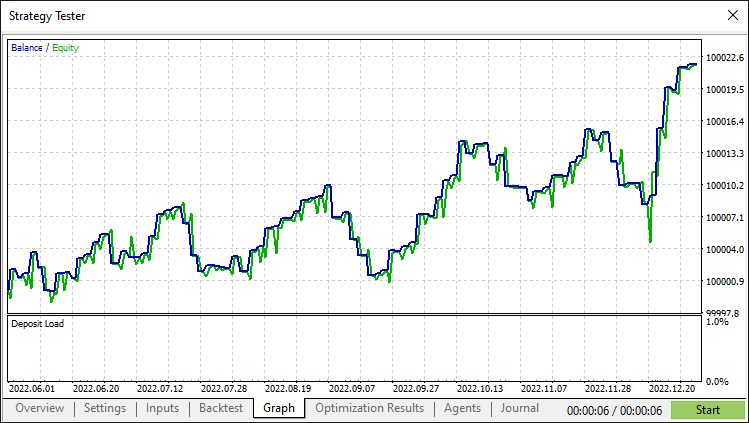
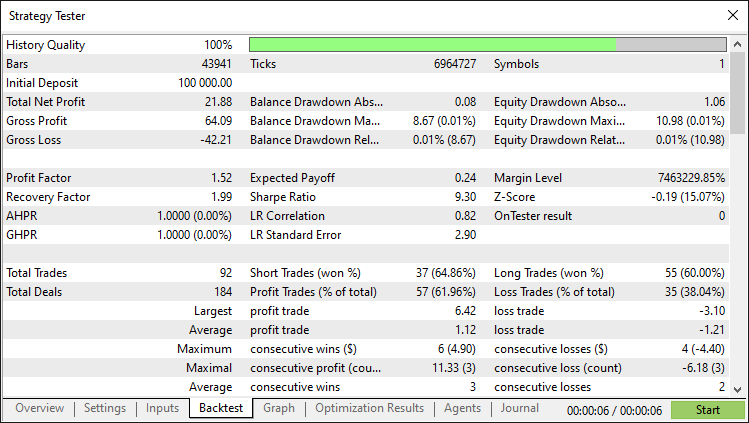
经过全面回测后,我们得到以下结果:
回测图:
回测报告:
结论
综上所述,我们已成功开发了一款基于MQL5的EA,该系统实现了午夜区间突破结合BOS策略,通过当日关键拐点确认午夜区间内的突破信号,并自动执行交易。凭借精准的区间检测与可视化功能,您可以做进一步扩展,并定义更多策略,使其更加稳健,从而适应您的交易风格。
免责声明:本文仅用于教学目的。交易涉及重大财务风险,市场剧烈波动可能导致资金损失。在将此EA投入实盘交易前,务必进行全面回测并制定严谨的风险管理策略。
通过掌握这些技术,您可以提升算法交易能力,以更从容的姿态应对市场波动。祝您交易顺利!
本文由MetaQuotes Ltd译自英文
原文地址: https://www.mql5.com/en/articles/17876
注意: MetaQuotes Ltd.将保留所有关于这些材料的权利。全部或部分复制或者转载这些材料将被禁止。
本文由网站的一位用户撰写,反映了他们的个人观点。MetaQuotes Ltd 不对所提供信息的准确性负责,也不对因使用所述解决方案、策略或建议而产生的任何后果负责。

 在交易图表上通过资源驱动的双三次插值图像缩放技术创建动态 MQL5 图形界面

 MQL5 简介(第 15 部分):构建自定义指标的初学者指南(四)
 皇冠同花顺优化(RFO)

你好,艾伦。
我准备下载你的系统并开始测试。 有趣的是,策略测试报告 既没有确定交易货币对,也没有确定时间框架。 由于你说明了 AUUSD M15,我想这就是你使用的,我将开始测试。 你对使用其他货币对或时间框架有什么感觉吗? 我怀疑这个 Ea 在亚洲交易货币对上可能会更好用,我说的对吗?
干杯,科达角
测试失败了,我尝试了澳元兑美元、澳元兑日元和美元兑日元,结果全部亏损,夏普比率为 -3.00 至 -5.00。除美元兑日元外,其他货币均立即转为负值,且再也没有恢复。 美元兑日元曾有过两次正收益,但最终转为负值,且再也没有恢复。
再见
工作出色。谢谢你,艾伦
当然,欢迎感谢您的反馈。
谢谢你,艾伦! 你是最棒的