

Торговые инструменты MQL5 (Часть 27): Отрисовка параметрической кривой-бабочки на холсте Canvas
 258
258
 1
1

Введение
На графике MetaTrader 5 доступны статистические инструменты и торговые анализаторы. Однако ничто так не демонстрирует чистую визуальную мощь canvas в MQL5: стандартными средствами здесь нельзя ни отрисовывать плавные параметрические кривые, ни создавать интерактивные плавающие окна, ни показывать, как математическое искусство оживает внутри терминала. Эта статья предназначена для разработчиков MQL5 и креативных программистов, желающих исследовать рендеринг на основе canvas за пределами традиционных индикаторов. Расширим границы того, что терминал может визуально воспроизвести.
В своей предыдущей статье (Часть 26) мы интегрировали частотный биннинг, энтропию и анализ критерия хи-квадрат в визуальный анализатор на MQL5. Мы рассмотрели статистическое распределение данных о ценах, измерение случайности на основе энтропии и проверку критерия согласия хи-квадрат. Весь анализ визуализировался через интерактивную панель на canvas с возможностью перетаскивания и изменения размера окон для анализа внутри терминала. В этой статье мы отрисуем кривую-бабочку, математическую кривую, задаваемую параметрическим уравнением, на canvas MQL5 с суперсэмплированием, градиентным фоном, сеткой осей, метками делений и панелью легенды с цветовой сегментацией. В статье рассмотрим следующие темы:
В итоге у вас будет полнофункциональный визуальный инструмент на основе canvas, который отрисовывает кривую-бабочку на графике MetaTrader 5 с плавным сглаживанием, интерактивным перетаскиванием и изменением размера, а также понятным математическим представлением. Приступим к реализации!
Кривая-бабочка — параметрическая красота в движении
Кривая-бабочка — это параметрическое уравнение, открытое Темплом Х. Фэем (Temple H. Fay) в 1989 году. Оно создает характерный график в форме бабочки с помощью удивительно компактной математической формулы. Оно определяется в полярной форме, где радиальное расстояние от начала координат определяется комбинацией экспоненциальных, тригонометрических и степенных членов, формируя сложную крыловидную фигуру по мере изменения параметра в его диапазоне. Уравнение, которое им управляет, выглядит следующим образом:
r = e^cos(t) − 2cos(4t) − sin⁵(t/12)
Здесь r — радиальное расстояние, t — параметр, изменяющийся от 0 до 12π, и эти три члена взаимодействуют, создавая характерные лопасти крыла и тонкие внутренние детали кривой. Для отображения на двумерном canvas мы преобразуем эту полярную форму в декартовы координаты, используя:
x = sin(t) · r
y = cos(t) · r
Это преобразование отображает каждое значение t в точную точку двумерного пространства, и по мере того, как t изменяется небольшими шагами по всему диапазону, соединенные точки описывают полную форму бабочки. Кривая особенно интересна, потому что небольшие изменения размера шага или диапазона t могут существенно изменить детализацию и полноту формы, что делает параметры рендеринга столь же важными, как и само уравнение.
На практике полный проход по диапазону 12π делится на четыре равных сегмента, каждому из которых присваивается свой цвет. Это позволяет нам наблюдать, как кривая постепенно строится — от первых контуров крыльев до тонких внутренних петель — и придает окончательному отображению визуально четкую сегментированную структуру. Для получения плавных, точных кривых без зазубренных краев пикселей мы выполняем рендеринг с более высоким внутренним разрешением, а затем уменьшаем разрешение результата — этот метод известен как суперсэмплинг. Этот метод усредняет соседние пиксели высокого разрешения в каждый конечный пиксель, в результате чего получается чистое изображение с эффектом сглаживания.
Мы создадим полноценную систему canvas с плавающим окном с возможностью перетаскивания и изменения размера, отрисуем кривую-бабочку по четырем цветным сегментам, используя этот конвейер суперсэмплирования, наложим калиброванную сетку осей с метками делений и представим панель легенды, идентифицирующую каждый сегмент. В результате получим полную интерактивную математическую визуализацию в MetaTrader 5. Вкратце, вот что мы стремимся создать.

Реализация средствами MQL5
Настройка включенных файлов (includes), перечислений, входных данных и глобальных переменных
Для начала реализации настроим основные строительные блоки — директивы include и необходимые библиотеки, перечисление изменения размера, все входные параметры и глобальные переменные, которые будут управлять системой canvas и рендерингом кривой-бабочки на протяжении всей работы в программе.
//+------------------------------------------------------------------+
//|                      Canvas Drawing PART 1 - Butterfly Curve.mq5 |
//|                           Copyright 2026, Allan Munene Mutiiria. |
//|                                   https://t.me/Forex_Algo_Trader |
//+------------------------------------------------------------------+
#property copyright "Copyright 2026, Allan Munene Mutiiria."
#property link      "https://t.me/Forex_Algo_Trader"
#property version   "1.00"
#property strict

//+------------------------------------------------------------------+
//| Includes                                                         |
//+------------------------------------------------------------------+
#include <Canvas\Canvas.mqh> // Include canvas drawing library

//+------------------------------------------------------------------+
//| Enumerations                                                     |
//+------------------------------------------------------------------+
enum ResizeDirectionEnum
  {
   RESIZE_NONE,        // None
   RESIZE_BOTTOM_EDGE, // Bottom Edge
   RESIZE_RIGHT_EDGE,  // Right Edge
   RESIZE_CORNER       // Corner
  };

//+------------------------------------------------------------------+
//| Inputs                                                           |
//+------------------------------------------------------------------+
input group "=== CANVAS DISPLAY SETTINGS ==="
input int   initialCanvasXPosition = 20;  // Initial Canvas X Position
input int   initialCanvasYPosition = 30;  // Initial Canvas Y Position
input int   initialCanvasWidth     = 600; // Initial Canvas Width
input int   initialCanvasHeight    = 400; // Initial Canvas Height
input int   plotAreaPadding        = 10;  // Plot Area Internal Padding (px)

input group "=== THEME COLOR (SINGLE CONTROL!) ==="
input color masterThemeColor = clrDodgerBlue; // Master Theme Color
input bool  showBorderFrame   = true;          // Show Border Frame

input group "=== CURVE SETTINGS ==="
input color blueCurveColor   = clrBlue;   // Blue Curve Color
input color redCurveColor    = clrRed;    // Red Curve Color
input color orangeCurveColor = clrOrange; // Orange Curve Color
input color greenCurveColor  = clrGreen;  // Green Curve Color

input group "=== BACKGROUND SETTINGS ==="
input bool   enableBackgroundFill  = true;     // Enable Background Fill
input color  backgroundTopColor    = clrWhite; // Background Top Color
input double backgroundOpacityLevel = 0.95;    // Background Opacity (0-1)

input group "=== TEXT AND LABELS ==="
input int   titleFontSize     = 14;       // Title Font Size
input color titleTextColor    = clrBlack; // Title Text Color
input int   labelFontSize     = 11;       // Label Font Size
input color labelTextColor    = clrBlack; // Label Text Color
input int   axisLabelFontSize = 12;       // Axis Labels Font Size

input group "=== LEGEND PANEL SETTINGS ==="
input int legendXPosition = 70; // Legend X Position
input int legendYOffset   = 10; // Legend Y Offset (from header)
input int legendWidth     = 90; // Legend Width
input int legendHeight    = 75; // Legend Height
input int legendFontSize  = 13; // Legend Font Size

input group "=== GRID SETTINGS ==="
input color gridLineColor = clrLightGray; // Grid Line Color
input color zeroLineColor = clrDarkGray;  // Zero Line Color

input group "=== INTERACTION SETTINGS ==="
input bool enableCanvasDragging = true; // Enable Canvas Dragging
input bool enableCanvasResizing = true; // Enable Canvas Resizing
input int  resizeGripSize       = 8;    // Resize Grip Size (pixels)

input group "=== RENDERING SETTINGS ==="
input int supersamplingFactor = 4; // Supersampling Factor (1=off, 4=4x)

//+------------------------------------------------------------------+
//| Global Variables - Canvas Objects                                |
//+------------------------------------------------------------------+
CCanvas mainCanvas;               // Main background canvas object
CCanvas curveCanvas;              // Curve drawing canvas object
CCanvas legendCanvas;             // Legend panel canvas object
CCanvas plotHighResolutionCanvas; // High-resolution offscreen plot canvas

string mainCanvasName   = "ButterflyMainCanvas";   // Name of the main canvas bitmap label
string curveCanvasName  = "ButterflyCurveCanvas";  // Name of the curve canvas bitmap label
string legendCanvasName = "ButterflyLegendCanvas"; // Name of the legend canvas bitmap label

int currentCanvasXPosition    = initialCanvasXPosition; // Current canvas X position on chart
int currentCanvasYPosition    = initialCanvasYPosition; // Current canvas Y position on chart
int currentCanvasWidthPixels  = initialCanvasWidth;     // Current canvas width in pixels
int currentCanvasHeightPixels = initialCanvasHeight;    // Current canvas height in pixels

//+------------------------------------------------------------------+
//| Global Variables - Interaction                                   |
//+------------------------------------------------------------------+
bool isDraggingCanvas   = false; // Flag indicating canvas is being dragged
bool isResizingCanvas   = false; // Flag indicating canvas is being resized

int dragStartXPosition  = 0, dragStartYPosition  = 0;   // Mouse position when drag began
int canvasStartXPosition = 0, canvasStartYPosition = 0; // Canvas position when drag began

int resizeStartXPosition  = 0, resizeStartYPosition  = 0;  // Mouse position when resize began
int resizeInitialWidth    = 0, resizeInitialHeight    = 0; // Canvas dimensions when resize began

ResizeDirectionEnum activeResizeMode = RESIZE_NONE; // Currently active resize direction
ResizeDirectionEnum hoverResizeMode  = RESIZE_NONE; // Resize direction under mouse hover

bool isHoveringCanvas     = false; // Flag for mouse hovering over the canvas
bool isHoveringHeader     = false; // Flag for mouse hovering over the header bar
bool isHoveringResizeZone = false; // Flag for mouse hovering over a resize grip

int lastMouseXPosition       = 0; // Last recorded mouse X coordinate
int lastMouseYPosition       = 0; // Last recorded mouse Y coordinate
int previousMouseButtonState = 0; // Previous mouse button pressed state

const int MIN_CANVAS_WIDTH  = 300; // Minimum allowed canvas width in pixels
const int MIN_CANVAS_HEIGHT = 200; // Minimum allowed canvas height in pixels
const int HEADER_BAR_HEIGHT = 35;  // Height of the draggable header bar in pixels

//+------------------------------------------------------------------+
//| Butterfly Drawing Constants                                      |
//+------------------------------------------------------------------+
const double butterflyMinX  = -3.0;          // Minimum X value of the butterfly curve domain
const double butterflyMaxX  =  3.0;          // Maximum X value of the butterfly curve domain
const double butterflyMinY  = -2.0;          // Minimum Y value of the butterfly curve range
const double butterflyMaxY  =  3.5;          // Maximum Y value of the butterfly curve range
const double butterflyTStart =  0.0;         // Parametric T start value
const double butterflyTEnd   = 12.0 * M_PI;  // Parametric T end value (12π full traversal)
const double butterflyTStep  =  0.01;        // Parametric T increment per step
Мы начинаем с включения библиотеки "Canvas.mqh", которая предоставляет класс CCanvas и все функции рисования на уровне пикселей, на которые мы будем полагаться на протяжении всей программы. Далее мы определяем перечисление "ResizeDirectionEnum", представляющее четыре возможных состояния изменения размера окна canvas — нет, нижний край, правый край и угол — что дает нам удобный способ отслеживать и реагировать на действия пользователя по изменению размера.
Затем мы объявляем группы входных параметров, охватывающие положение и размеры canvas, основной цвет темы с переключателем границы, четыре цвета отдельных сегментов кривой, параметры заливки фона, размеры шрифтов текста и меток, геометрию панели легенды, цвета сетки, переключатели взаимодействия для перетаскивания и изменения размера, а также коэффициент суперсэмплирования для качества рендеринга кривых.
В разделе глобальных переменных мы объявляем четыре объекта "CCanvas" — основной фоновый canvas, canvas кривой, canvas панели легенды и внеэкранный canvas с высоким разрешением, используемый во время рендеринга с суперсэмплированием. Соответствующие им строковые имена сохраняются для управления объектами. Далее мы отслеживаем текущее положение canvas и размеры в пикселях, а затем переменные состояния взаимодействия, включающие флаги перетаскивания и изменения размера, начальные положения, начальные размеры, активный режим и режим изменения размера при наведении курсора, флаги состояния при наведении курсора для canvas, заголовка и зоны изменения размера, а также последние координаты мыши относительно предыдущего состояния кнопки. Константы задают минимальные размеры canvas и фиксированную высоту строки заголовка. Наконец, константы, используемые для построения бабочки, определяют границы декартовой области, диапазон параметров от 0 до 12π и шаг приращения, который контролирует точность построения кривой. Далее мы рассмотрим вспомогательные функции для работы с цветом и рендерингом для сохранения модульности нашего кода.
Цветовые утилиты и вспомогательные функции рендеринга
Прежде чем углубиться в логику отрисовки кривой, мы определим набор вспомогательных функций, которые обрабатывают манипуляции с цветами, вычисление делений, форматирование меток делений и суперсэмплирование с уменьшением разрешения результата — все они вызываются многократно на протяжении всего процесса рендеринга.
//+------------------------------------------------------------------+
//| Lighten color by blending toward white                           |
//+------------------------------------------------------------------+
color LightenColor(color baseColor, double factor)
  {
   //--- Extract red channel from base color
   uchar red   = (uchar)((baseColor >> 16) & 0xFF);
   //--- Extract green channel from base color
   uchar green = (uchar)((baseColor >>  8) & 0xFF);
   //--- Extract blue channel from base color
   uchar blue  = (uchar)( baseColor        & 0xFF);

   //--- Blend red channel toward 255 by factor
   red   = (uchar)MathMin(255, red   + (255 - red)   * factor);
   //--- Blend green channel toward 255 by factor
   green = (uchar)MathMin(255, green + (255 - green) * factor);
   //--- Blend blue channel toward 255 by factor
   blue  = (uchar)MathMin(255, blue  + (255 - blue)  * factor);

   //--- Recompose and return the lightened color
   return (red << 16) | (green << 8) | blue;
  }

//+------------------------------------------------------------------+
//| Darken color by scaling channels toward black                    |
//+------------------------------------------------------------------+
color DarkenColor(color baseColor, double factor)
  {
   //--- Extract red channel from base color
   uchar red   = (uchar)((baseColor >> 16) & 0xFF);
   //--- Extract green channel from base color
   uchar green = (uchar)((baseColor >>  8) & 0xFF);
   //--- Extract blue channel from base color
   uchar blue  = (uchar)( baseColor        & 0xFF);

   //--- Scale red channel down by factor
   red   = (uchar)(red   * (1.0 - factor));
   //--- Scale green channel down by factor
   green = (uchar)(green * (1.0 - factor));
   //--- Scale blue channel down by factor
   blue  = (uchar)(blue  * (1.0 - factor));

   //--- Recompose and return the darkened color
   return (red << 16) | (green << 8) | blue;
  }

//+------------------------------------------------------------------+
//| Interpolate linearly between two colors by a blend factor        |
//+------------------------------------------------------------------+
color InterpolateColors(color startColor, color endColor, double factor)
  {
   //--- Extract red channel of start color
   uchar startRed   = (uchar)((startColor >> 16) & 0xFF);
   //--- Extract green channel of start color
   uchar startGreen = (uchar)((startColor >>  8) & 0xFF);
   //--- Extract blue channel of start color
   uchar startBlue  = (uchar)( startColor        & 0xFF);

   //--- Extract red channel of end color
   uchar endRed     = (uchar)((endColor >> 16) & 0xFF);
   //--- Extract green channel of end color
   uchar endGreen   = (uchar)((endColor >>  8) & 0xFF);
   //--- Extract blue channel of end color
   uchar endBlue    = (uchar)( endColor        & 0xFF);

   //--- Interpolate red channel between start and end
   uchar interpolatedRed   = (uchar)(startRed   + factor * (endRed   - startRed));
   //--- Interpolate green channel between start and end
   uchar interpolatedGreen = (uchar)(startGreen + factor * (endGreen - startGreen));
   //--- Interpolate blue channel between start and end
   uchar interpolatedBlue  = (uchar)(startBlue  + factor * (endBlue  - startBlue));

   //--- Recompose and return the interpolated color
   return (interpolatedRed << 16) | (interpolatedGreen << 8) | interpolatedBlue;
  }

//+------------------------------------------------------------------+
//| Calculate optimal axis tick positions for a given pixel range    |
//+------------------------------------------------------------------+
int CalculateOptimalTicks(double minValue, double maxValue, int pixelRange, double &tickValues[])
  {
   //--- Compute the total value span
   double range = maxValue - minValue;
   //--- Guard against degenerate range or zero pixel span
   if(range == 0 || pixelRange <= 0)
     {
      //--- Resize output array to one element
      ArrayResize(tickValues, 1);
      //--- Set single tick at the minimum value
      tickValues[0] = minValue;
      //--- Return one tick
      return 1;
     }

   //--- Estimate a target tick count based on pixel density
   int targetTickCount = (int)(pixelRange / 50.0);
   //--- Enforce minimum of 3 ticks
   if(targetTickCount <  3) targetTickCount =  3;
   //--- Enforce maximum of 20 ticks
   if(targetTickCount > 20) targetTickCount = 20;

   //--- Compute a rough unrounded step size
   double roughStep = range / (double)(targetTickCount - 1);

   //--- Determine the order of magnitude of the rough step
   double magnitude = MathPow(10.0, MathFloor(MathLog10(roughStep)));

   //--- Normalize rough step to a 1-10 range
   double normalized = roughStep / magnitude;

   //--- Select the nearest "nice" normalized step value
   double niceNormalized;
   if     (normalized <= 1.0) niceNormalized =  1.0;  // Snap to 1.0
   else if(normalized <= 1.5) niceNormalized =  1.0;  // Snap to 1.0
   else if(normalized <= 2.0) niceNormalized =  2.0;  // Snap to 2.0
   else if(normalized <= 2.5) niceNormalized =  2.0;  // Snap to 2.0
   else if(normalized <= 3.0) niceNormalized =  2.5;  // Snap to 2.5
   else if(normalized <= 4.0) niceNormalized =  4.0;  // Snap to 4.0
   else if(normalized <= 5.0) niceNormalized =  5.0;  // Snap to 5.0
   else if(normalized <= 7.5) niceNormalized =  5.0;  // Snap to 5.0
   else                       niceNormalized = 10.0;  // Snap to 10.0

   //--- Compute the final nice step size
   double step = niceNormalized * magnitude;

   //--- Snap minimum tick to the nearest step below minValue
   double tickMin = MathFloor(minValue / step) * step;
   //--- Snap maximum tick to the nearest step above maxValue
   double tickMax = MathCeil(maxValue  / step) * step;

   //--- Compute the resulting tick count
   int numTicks = (int)MathRound((tickMax - tickMin) / step) + 1;

   //--- Reduce tick density if too many ticks would be generated
   if(numTicks > 25)
     {
      //--- Double the step to thin out ticks
      step    *= 2.0;
      //--- Recalculate aligned minimum tick
      tickMin  = MathFloor(minValue / step) * step;
      //--- Recalculate aligned maximum tick
      tickMax  = MathCeil(maxValue  / step) * step;
      //--- Recompute tick count after adjustment
      numTicks = (int)MathRound((tickMax - tickMin) / step) + 1;
     }

   //--- Increase tick density if too few ticks would be generated
   if(numTicks < 3)
     {
      //--- Halve the step to add more ticks
      step    /= 2.0;
      //--- Recalculate aligned minimum tick
      tickMin  = MathFloor(minValue / step) * step;
      //--- Recalculate aligned maximum tick
      tickMax  = MathCeil(maxValue  / step) * step;
      //--- Recompute tick count after adjustment
      numTicks = (int)MathRound((tickMax - tickMin) / step) + 1;
     }

   //--- Allocate the output tick array
   ArrayResize(tickValues, numTicks);
   //--- Populate tick values at evenly spaced intervals
   for(int i = 0; i < numTicks; i++)
     {
      tickValues[i] = tickMin + i * step;
     }

   //--- Return the total number of computed ticks
   return numTicks;
  }

//+------------------------------------------------------------------+
//| Format a tick value as a string based on its numeric range       |
//+------------------------------------------------------------------+
string FormatTickLabel(double value, double range)
  {
   //--- Use 0 decimal places for large ranges
   if(range > 100)  return DoubleToString(value, 0);
   //--- Use 1 decimal place for medium-large ranges
   else if(range > 10)  return DoubleToString(value, 1);
   //--- Use 2 decimal places for medium ranges
   else if(range > 1)   return DoubleToString(value, 2);
   //--- Use 3 decimal places for small ranges
   else if(range > 0.1) return DoubleToString(value, 3);
   //--- Use 4 decimal places for very small ranges
   else                 return DoubleToString(value, 4);
  }

//+------------------------------------------------------------------+
//| Downsample high-resolution canvas into a target canvas           |
//+------------------------------------------------------------------+
void DownsampleCanvas(CCanvas &targetCanvas, CCanvas &highResolutionCanvas)
  {
   //--- Get the pixel width of the target canvas
   int targetWidth  = targetCanvas.Width();
   //--- Get the pixel height of the target canvas
   int targetHeight = targetCanvas.Height();

   //--- Iterate over every row of the target canvas
   for(int pixelY = 0; pixelY < targetHeight; pixelY++)
     {
      //--- Iterate over every column of the target canvas
      for(int pixelX = 0; pixelX < targetWidth; pixelX++)
        {
         //--- Compute the corresponding source X in high-res space
         double sourceX = pixelX * supersamplingFactor;
         //--- Compute the corresponding source Y in high-res space
         double sourceY = pixelY * supersamplingFactor;

         //--- Initialize accumulator channels for averaging
         double sumAlpha = 0, sumRed = 0, sumGreen = 0, sumBlue = 0;
         //--- Initialize total weight accumulator
         double weightSum = 0;

         //--- Loop over each supersampled row contributing to this pixel
         for(int deltaY = 0; deltaY < supersamplingFactor; deltaY++)
           {
            //--- Loop over each supersampled column contributing to this pixel
            for(int deltaX = 0; deltaX < supersamplingFactor; deltaX++)
              {
               //--- Compute exact source pixel X coordinate
               int sourcePixelX = (int)(sourceX + deltaX);
               //--- Compute exact source pixel Y coordinate
               int sourcePixelY = (int)(sourceY + deltaY);

               //--- Verify the source pixel lies within the high-res canvas bounds
               if(sourcePixelX >= 0 && sourcePixelX < highResolutionCanvas.Width() &&
                  sourcePixelY >= 0 && sourcePixelY < highResolutionCanvas.Height())
                 {
                  //--- Read the ARGB value from the high-res canvas
                  uint pixelValue = highResolutionCanvas.PixelGet(sourcePixelX, sourcePixelY);

                  //--- Unpack the alpha channel
                  uchar alpha = (uchar)((pixelValue >> 24) & 0xFF);
                  //--- Unpack the red channel
                  uchar red   = (uchar)((pixelValue >> 16) & 0xFF);
                  //--- Unpack the green channel
                  uchar green = (uchar)((pixelValue >>  8) & 0xFF);
                  //--- Unpack the blue channel
                  uchar blue  = (uchar)( pixelValue        & 0xFF);

                  //--- Assign uniform weight to this sample
                  double weight = 1.0;
                  //--- Accumulate weighted alpha
                  sumAlpha += alpha * weight;
                  //--- Accumulate weighted red
                  sumRed   += red   * weight;
                  //--- Accumulate weighted green
                  sumGreen += green * weight;
                  //--- Accumulate weighted blue
                  sumBlue  += blue  * weight;
                  //--- Accumulate total weight
                  weightSum += weight;
                 }
              }
           }

         //--- Only write the pixel if at least one sample contributed
         if(weightSum > 0)
           {
            //--- Compute averaged alpha channel
            uchar finalAlpha = (uchar)(sumAlpha / weightSum);
            //--- Compute averaged red channel
            uchar finalRed   = (uchar)(sumRed   / weightSum);
            //--- Compute averaged green channel
            uchar finalGreen = (uchar)(sumGreen / weightSum);
            //--- Compute averaged blue channel
            uchar finalBlue  = (uchar)(sumBlue  / weightSum);

            //--- Recompose all channels into a single ARGB value
            uint finalColor = ((uint)finalAlpha << 24) | ((uint)finalRed << 16) |
                              ((uint)finalGreen <<  8) |  (uint)finalBlue;
            //--- Write the averaged pixel to the target canvas
            targetCanvas.PixelSet(pixelX, pixelY, finalColor);
           }
        }
     }
  }
Сначала определяем функцию "LightenColor" для смешивания заданного цвета в сторону белого с коэффициентом, извлекаем каждый красный, зеленый и синий каналы с помощью побитовых сдвигов, приближая каждый канал к значению 255 с помощью MathMin и компонуем результат. Аналогично, функция "DarkenColor" уменьшает каждый канал в сторону черного, умножая на обратный коэффициент, что дает нам более темный оттенок любого входного цвета. Эти две функции используются на протяжении всего процесса рендеринга для состояний при наведении курсора на заголовок, обратной связи границ и фона легенды. Для плавного перехода между двумя цветами функция "InterpolateColors" извлекает начальный и конечный каналы и линейно смешивает каждый из них с заданным коэффициентом, после чего выполняет повторное компоновочное преобразование. Это определяет градиентный фон, заполняющий canvas под заголовком.
Для формирования делений на оси функция "CalculateOptimalTicks" принимает диапазон значений и размер пикселя, оценивает целевое количество тиков на основе плотности в один тик на 50 пикселей, ограничивает его значением от 3 до 20, а затем вычисляет приблизительный шаг на основе диапазона. Она определяет порядок величины этого шага с помощью MathFloor и MathLog10, нормализует его в диапазон от 1 до 10 и привязывает к ближайшему чистому значению из предопределенного набора: 1,0, 2,0, 2,5, 4,0, 5,0 или 10,0 — для обеспечения удобочитаемых меток на оси. Выровненные минимальное и максимальное значения делений вычисляются с помощью функций "MathFloor" и MathCeil, и если полученное значение выходит за допустимые пределы, шаг соответственно удваивается или уменьшается вдвое, прежде чем заполнить и вернуть окончательный массив делений. Далее сопутствующая функция "FormatTickLabel" преобразует каждое значение деления в строку с соответствующим количеством десятичных знаков в зависимости от величины диапазона, используя функцию DoubleToString.
Наиболее технически значимым вспомогательным инструментом здесь является "DownsampleCanvas", который реализует этап усреднения методом суперсэмплирования. Для каждого пикселя целевого canvas функция сопоставляет ему соответствующий блок пикселей на canvas с высоким разрешением — размером, равным коэффициенту суперсэмплинга — считывает каждый образец с помощью метода PixelGet, распаковывает все четыре канала (альфа, красный, зеленый, синий) с помощью побитовых операций и накапливает их с равномерным весом. После суммирования всех образцов в блоке, каждый канал усредняется путем деления на общий вес, каналы объединяются в одно значение "ARGB" и записываются в целевую переменную с помощью PixelSet. Именно этот процесс придает кривой-бабочке плавный, сглаженный вид при конечном разрешении дисплея. Далее мы определим функцию, которая поможет построить кривую.
Трассировка кривой-бабочки по четырем цветным сегментам
Имея вспомогательные функции, мы теперь определяем основную функцию рисования кривой. Здесь уравнение кривой-бабочки вычисляется точка за точкой, преобразуется в пиксельные координаты canvas и рисуется по четырем различным цветным сегментам, которые вместе завершают полный проход по диапазону 12π.
//+------------------------------------------------------------------+
//| Draw all four colored butterfly curve segments onto a canvas     |
//+------------------------------------------------------------------+
void DrawButterflyCurves(CCanvas &canvas, int plotWidth, int plotHeight, double rangeX, double rangeY)
  {
   //--- Define the T boundary separating segment 1 from segment 2
   double segmentEnd1 = 3.0 * M_PI;
   //--- Define the T boundary separating segment 2 from segment 3
   double segmentEnd2 = 6.0 * M_PI;
   //--- Define the T boundary separating segment 3 from segment 4
   double segmentEnd3 = 9.0 * M_PI;
   //--- Define the T end of the final segment
   double segmentEnd4 = butterflyTEnd;

   //--- Convert blue curve color to ARGB format
   uint argbBlue   = ColorToARGB(blueCurveColor,   255);
   //--- Convert red curve color to ARGB format
   uint argbRed    = ColorToARGB(redCurveColor,    255);
   //--- Convert orange curve color to ARGB format
   uint argbOrange = ColorToARGB(orangeCurveColor, 255);
   //--- Convert green curve color to ARGB format
   uint argbGreen  = ColorToARGB(greenCurveColor,  255);

   //--- Initialize previous pixel X for blue segment connectivity
   double previousCurveXPixel = -1;
   //--- Initialize previous pixel Y for blue segment connectivity
   double previousCurveYPixel = -1;

   //--- Traverse the first parametric segment (blue)
   for(double t = butterflyTStart; t <= segmentEnd1; t += butterflyTStep)
     {
      //--- Evaluate the butterfly radial term at parameter T
      double term = MathExp(MathCos(t)) - 2 * MathCos(4 * t) - MathPow(MathSin(t / 12), 5);
      //--- Compute X coordinate of the butterfly curve
      double x = MathSin(t) * term;
      //--- Compute Y coordinate of the butterfly curve
      double y = MathCos(t) * term;
      //--- Proceed only if both coordinates are finite numbers
      if(MathIsValidNumber(x) && MathIsValidNumber(y))
        {
         //--- Map X coordinate to canvas pixel space
         double currentCurveXPixel = (x - butterflyMinX) / rangeX * plotWidth;
         //--- Map Y coordinate to canvas pixel space (inverted Y axis)
         double currentCurveYPixel = (butterflyMaxY - y) / rangeY * plotHeight;
         //--- Round current X to nearest integer pixel
         int intX = (int)MathRound(currentCurveXPixel);
         //--- Round current Y to nearest integer pixel
         int intY = (int)MathRound(currentCurveYPixel);
         //--- Draw line from previous point if a valid previous point exists
         if(previousCurveXPixel >= 0 && previousCurveYPixel >= 0)
           {
            //--- Draw anti-aliased line segment on primary pixel row
            canvas.LineAA((int)MathRound(previousCurveXPixel),     (int)MathRound(previousCurveYPixel),     intX,     intY, argbBlue);
            //--- Draw anti-aliased line segment on offset pixel row for thickness
            canvas.LineAA((int)MathRound(previousCurveXPixel) + 1, (int)MathRound(previousCurveYPixel), intX + 1, intY, argbBlue);
           }
         //--- Store current X as previous for the next iteration
         previousCurveXPixel = currentCurveXPixel;
         //--- Store current Y as previous for the next iteration
         previousCurveYPixel = currentCurveYPixel;
        }
      else
        {
         //--- Reset previous X to signal a break in the curve
         previousCurveXPixel = -1;
         //--- Reset previous Y to signal a break in the curve
         previousCurveYPixel = -1;
        }
     }

   //--- Reset previous pixel X for red segment connectivity
   previousCurveXPixel = -1;
   //--- Reset previous pixel Y for red segment connectivity
   previousCurveYPixel = -1;

   //--- Traverse the second parametric segment (red)
   for(double t = segmentEnd1; t <= segmentEnd2; t += butterflyTStep)
     {
      //--- Evaluate the butterfly radial term at parameter T
      double term = MathExp(MathCos(t)) - 2 * MathCos(4 * t) - MathPow(MathSin(t / 12), 5);
      //--- Compute X coordinate of the butterfly curve
      double x = MathSin(t) * term;
      //--- Compute Y coordinate of the butterfly curve
      double y = MathCos(t) * term;
      //--- Proceed only if both coordinates are finite numbers
      if(MathIsValidNumber(x) && MathIsValidNumber(y))
        {
         //--- Map X coordinate to canvas pixel space
         double currentCurveXPixel = (x - butterflyMinX) / rangeX * plotWidth;
         //--- Map Y coordinate to canvas pixel space (inverted Y axis)
         double currentCurveYPixel = (butterflyMaxY - y) / rangeY * plotHeight;
         //--- Round current X to nearest integer pixel
         int intX = (int)MathRound(currentCurveXPixel);
         //--- Round current Y to nearest integer pixel
         int intY = (int)MathRound(currentCurveYPixel);
         //--- Draw line from previous point if a valid previous point exists
         if(previousCurveXPixel >= 0 && previousCurveYPixel >= 0)
           {
            //--- Draw anti-aliased line segment on primary pixel row
            canvas.LineAA((int)MathRound(previousCurveXPixel),     (int)MathRound(previousCurveYPixel),     intX,     intY, argbRed);
            //--- Draw anti-aliased line segment on offset pixel row for thickness
            canvas.LineAA((int)MathRound(previousCurveXPixel) + 1, (int)MathRound(previousCurveYPixel), intX + 1, intY, argbRed);
           }
         //--- Store current X as previous for the next iteration
         previousCurveXPixel = currentCurveXPixel;
         //--- Store current Y as previous for the next iteration
         previousCurveYPixel = currentCurveYPixel;
        }
      else
        {
         //--- Reset previous X to signal a break in the curve
         previousCurveXPixel = -1;
         //--- Reset previous Y to signal a break in the curve
         previousCurveYPixel = -1;
        }
     }

   //--- Reset previous pixel X for orange segment connectivity
   previousCurveXPixel = -1;
   //--- Reset previous pixel Y for orange segment connectivity
   previousCurveYPixel = -1;

   //--- Traverse the third parametric segment (orange)
   for(double t = segmentEnd2; t <= segmentEnd3; t += butterflyTStep)
     {
      //--- Evaluate the butterfly radial term at parameter T
      double term = MathExp(MathCos(t)) - 2 * MathCos(4 * t) - MathPow(MathSin(t / 12), 5);
      //--- Compute X coordinate of the butterfly curve
      double x = MathSin(t) * term;
      //--- Compute Y coordinate of the butterfly curve
      double y = MathCos(t) * term;
      //--- Proceed only if both coordinates are finite numbers
      if(MathIsValidNumber(x) && MathIsValidNumber(y))
        {
         //--- Map X coordinate to canvas pixel space
         double currentCurveXPixel = (x - butterflyMinX) / rangeX * plotWidth;
         //--- Map Y coordinate to canvas pixel space (inverted Y axis)
         double currentCurveYPixel = (butterflyMaxY - y) / rangeY * plotHeight;
         //--- Round current X to nearest integer pixel
         int intX = (int)MathRound(currentCurveXPixel);
         //--- Round current Y to nearest integer pixel
         int intY = (int)MathRound(currentCurveYPixel);
         //--- Draw line from previous point if a valid previous point exists
         if(previousCurveXPixel >= 0 && previousCurveYPixel >= 0)
           {
            //--- Draw anti-aliased line segment on primary pixel row
            canvas.LineAA((int)MathRound(previousCurveXPixel),     (int)MathRound(previousCurveYPixel),     intX,     intY, argbOrange);
            //--- Draw anti-aliased line segment on offset pixel row for thickness
            canvas.LineAA((int)MathRound(previousCurveXPixel) + 1, (int)MathRound(previousCurveYPixel), intX + 1, intY, argbOrange);
           }
         //--- Store current X as previous for the next iteration
         previousCurveXPixel = currentCurveXPixel;
         //--- Store current Y as previous for the next iteration
         previousCurveYPixel = currentCurveYPixel;
        }
      else
        {
         //--- Reset previous X to signal a break in the curve
         previousCurveXPixel = -1;
         //--- Reset previous Y to signal a break in the curve
         previousCurveYPixel = -1;
        }
     }

   //--- Reset previous pixel X for green segment connectivity
   previousCurveXPixel = -1;
   //--- Reset previous pixel Y for green segment connectivity
   previousCurveYPixel = -1;

   //--- Traverse the fourth parametric segment (green)
   for(double t = segmentEnd3; t <= segmentEnd4; t += butterflyTStep)
     {
      //--- Evaluate the butterfly radial term at parameter T
      double term = MathExp(MathCos(t)) - 2 * MathCos(4 * t) - MathPow(MathSin(t / 12), 5);
      //--- Compute X coordinate of the butterfly curve
      double x = MathSin(t) * term;
      //--- Compute Y coordinate of the butterfly curve
      double y = MathCos(t) * term;
      //--- Proceed only if both coordinates are finite numbers
      if(MathIsValidNumber(x) && MathIsValidNumber(y))
        {
         //--- Map X coordinate to canvas pixel space
         double currentCurveXPixel = (x - butterflyMinX) / rangeX * plotWidth;
         //--- Map Y coordinate to canvas pixel space (inverted Y axis)
         double currentCurveYPixel = (butterflyMaxY - y) / rangeY * plotHeight;
         //--- Round current X to nearest integer pixel
         int intX = (int)MathRound(currentCurveXPixel);
         //--- Round current Y to nearest integer pixel
         int intY = (int)MathRound(currentCurveYPixel);
         //--- Draw line from previous point if a valid previous point exists
         if(previousCurveXPixel >= 0 && previousCurveYPixel >= 0)
           {
            //--- Draw anti-aliased line segment on primary pixel row
            canvas.LineAA((int)MathRound(previousCurveXPixel),     (int)MathRound(previousCurveYPixel),     intX,     intY, argbGreen);
            //--- Draw anti-aliased line segment on offset pixel row for thickness
            canvas.LineAA((int)MathRound(previousCurveXPixel) + 1, (int)MathRound(previousCurveYPixel), intX + 1, intY, argbGreen);
           }
         //--- Store current X as previous for the next iteration
         previousCurveXPixel = currentCurveXPixel;
         //--- Store current Y as previous for the next iteration
         previousCurveYPixel = currentCurveYPixel;
        }
      else
        {
         //--- Reset previous X to signal a break in the curve
         previousCurveXPixel = -1;
         //--- Reset previous Y to signal a break in the curve
         previousCurveYPixel = -1;
        }
     }
  }
Функция "DrawButterflyCurves" принимает в качестве параметров ссылку на canvas, размеры графика и диапазоны осей. Для начала разделяем весь параметрический диапазон на четыре равные границы — каждая размером 3π — и преобразуем все четыре цвета кривых в их эквиваленты "ARGB" с помощью функции ColorToARGB, подготавливая их для операций рисования на уровне пикселей.
Каждый из четырех сегментов следует одному и тому же шаблону. Мы инициализируем пару предыдущих пиксельных координат значением -1, чтобы указать, что предыдущей точки еще нет, затем шагаем по параметру t от начала сегмента до его конечной границы с шагом, равным постоянной величине шага. На каждом шаге мы вычисляем радиальный член "бабочки" с помощью MathExp, "MathCos", "MathPow" и MathSin, а затем вычисляем декартовы координаты как x = sin(t) · r и y = cos(t) · r. Перед продолжением функция MathIsValidNumber предотвращает появление не конечных результатов вблизи вырожденных значений параметров — если какая-либо из координат недействительна, предыдущие ссылки на пиксели сбрасываются до -1, чтобы разорвать линию и предотвратить некорректные вызовы отрисовки.
Для допустимых точек координаты отображаются из математического пространства в пиксельное пространство canvas путем вычитания минимума области определения, деления на диапазон и масштабирования в соответствии с размерами графика. Ось Y намеренно инвертируется — поскольку количество строк пикселей canvas увеличивается вниз, а математическая ось Y увеличивается вверх — путем вычитания y из максимальной границы Y перед масштабированием. Каждая координата округляется до ближайшего целого пикселя с помощью MathRound, и если существует действительная предыдущая точка, рисуются два сглаженных отрезка линии с помощью LineAA — один в основной строке пикселей и один со смещением на один пиксель по горизонтали — чтобы придать кривой немного более толстый и заметный контур. Текущая позиция пикселя далее сохраняется как предыдущая для следующей итерации, поддерживая связность по всему отрезку. Этот же процесс повторяется для всех четырех сегментов с соответствующими цветами, постепенно формируя полную форму бабочки от синего через красный, оранжевый и, наконец, зеленый. Теперь мы создаем полный график.
Строим сетку и создаем полный график
После того, как логика отрисовки кривой готова, мы определяем функцию отрисовки сетки и основную функцию создания графика, которая связывает все визуальные слои воедино — оси, линии сетки, отметки делений, метки и кривую-бабочку с суперсэмплированием.
//+------------------------------------------------------------------+
//| Draw grid lines for both axes onto the main canvas               |
//+------------------------------------------------------------------+
void DrawGrid(int plotAreaLeft, int plotAreaTop, int plotAreaRight, int plotAreaBottom,
              int drawAreaLeft, int drawAreaTop, int plotWidth, int plotHeight,
              double rangeX, double rangeY)
  {
   //--- Compute the bottom edge of the inner draw area
   int drawAreaBottom = plotAreaBottom - plotAreaPadding;

   //--- Convert grid line color to ARGB
   uint argbGrid = ColorToARGB(gridLineColor, 255);
   //--- Convert zero line color to ARGB
   uint argbZero = ColorToARGB(zeroLineColor, 255);

   //--- Declare array to hold X tick positions
   double xTickValues[];
   //--- Compute optimal X axis tick positions
   int numXTicks = CalculateOptimalTicks(butterflyMinX, butterflyMaxX, plotWidth, xTickValues);

   //--- Loop through each X tick and draw a vertical grid line
   for(int i = 0; i < numXTicks; i++)
     {
      //--- Retrieve the X tick value
      double xValue = xTickValues[i];
      //--- Skip ticks that fall outside the butterfly domain
      if(xValue < butterflyMinX || xValue > butterflyMaxX) continue;

      //--- Map X value to pixel column position
      int xPosition = drawAreaLeft + (int)((xValue - butterflyMinX) / rangeX * plotWidth);

      //--- Use zero line color for the origin, grid color for all others
      uint lineColor = (MathAbs(xValue) < 1e-10) ? argbZero : argbGrid;
      //--- Draw vertical grid line from top to bottom of plot area
      mainCanvas.LineVertical(xPosition, plotAreaTop, plotAreaBottom, lineColor);
     }

   //--- Declare array to hold Y tick positions
   double yTickValues[];
   //--- Compute optimal Y axis tick positions
   int numYTicks = CalculateOptimalTicks(butterflyMinY, butterflyMaxY, plotHeight, yTickValues);

   //--- Loop through each Y tick and draw a horizontal grid line
   for(int i = 0; i < numYTicks; i++)
     {
      //--- Retrieve the Y tick value
      double yValue = yTickValues[i];
      //--- Skip ticks that fall outside the butterfly range
      if(yValue < butterflyMinY || yValue > butterflyMaxY) continue;

      //--- Map Y value to pixel row position (inverted Y axis)
      int yPosition = drawAreaBottom - (int)((yValue - butterflyMinY) / rangeY * plotHeight);

      //--- Use zero line color for the origin, grid color for all others
      uint lineColor = (MathAbs(yValue) < 1e-10) ? argbZero : argbGrid;
      //--- Draw horizontal grid line spanning the full plot width
      mainCanvas.LineHorizontal(plotAreaLeft, plotAreaRight, yPosition, lineColor);
     }
  }

//+------------------------------------------------------------------+
//| Draw axes, ticks, labels, and butterfly curves onto main canvas  |
//+------------------------------------------------------------------+
void DrawButterflyPlot()
  {
   //--- Set the left boundary of the plot area
   int plotAreaLeft   = 60;
   //--- Set the right boundary of the plot area
   int plotAreaRight  = currentCanvasWidthPixels - 40;
   //--- Set the top boundary of the plot area (below header)
   int plotAreaTop    = HEADER_BAR_HEIGHT + 10;
   //--- Set the bottom boundary of the plot area
   int plotAreaBottom = currentCanvasHeightPixels - 50;

   //--- Apply internal padding to get the inner draw left edge
   int drawAreaLeft   = plotAreaLeft   + plotAreaPadding;
   //--- Apply internal padding to get the inner draw right edge
   int drawAreaRight  = plotAreaRight  - plotAreaPadding;
   //--- Apply internal padding to get the inner draw top edge
   int drawAreaTop    = plotAreaTop    + plotAreaPadding;
   //--- Apply internal padding to get the inner draw bottom edge
   int drawAreaBottom = plotAreaBottom - plotAreaPadding;

   //--- Compute the drawable plot width in pixels
   int plotWidth  = drawAreaRight - drawAreaLeft;
   //--- Compute the drawable plot height in pixels
   int plotHeight = drawAreaBottom - drawAreaTop;

   //--- Abort if the drawable area is degenerate
   if(plotWidth <= 0 || plotHeight <= 0) return;

   //--- Compute the full X domain span
   double rangeX = butterflyMaxX - butterflyMinX;
   //--- Compute the full Y domain span
   double rangeY = butterflyMaxY - butterflyMinY;

   //--- Prevent division by zero on X axis
   if(rangeX == 0) rangeX = 1;
   //--- Prevent division by zero on Y axis
   if(rangeY == 0) rangeY = 1;

   //--- Set axis line color to black ARGB
   uint argbAxisColor = ColorToARGB(clrBlack, 255);

   //--- Draw Y axis as two adjacent vertical lines for visible thickness
   for(int thickness = 0; thickness < 2; thickness++)
     {
      mainCanvas.Line(plotAreaLeft - thickness, plotAreaTop, plotAreaLeft - thickness, plotAreaBottom, argbAxisColor);
     }

   //--- Draw X axis as two adjacent horizontal lines for visible thickness
   for(int thickness = 0; thickness < 2; thickness++)
     {
      mainCanvas.Line(plotAreaLeft, plotAreaBottom + thickness, plotAreaRight, plotAreaBottom + thickness, argbAxisColor);
     }

   //--- Render background grid lines before drawing curve data
   DrawGrid(plotAreaLeft, plotAreaTop, plotAreaRight, plotAreaBottom,
            drawAreaLeft, drawAreaTop, plotWidth, plotHeight, rangeX, rangeY);

   //--- Set the axis tick label font
   mainCanvas.FontSet("Arial", axisLabelFontSize);
   //--- Set tick label ARGB color to black
   uint argbTickLabel = ColorToARGB(clrBlack, 255);

   //--- Declare array for Y axis tick values
   double yTickValues[];
   //--- Compute optimal Y axis ticks
   int numYTicks = CalculateOptimalTicks(butterflyMinY, butterflyMaxY, plotHeight, yTickValues);

   //--- Loop over Y ticks and render each tick mark and label
   for(int i = 0; i < numYTicks; i++)
     {
      //--- Get the current Y tick value
      double yValue = yTickValues[i];
      //--- Skip ticks outside the visible Y range
      if(yValue < butterflyMinY || yValue > butterflyMaxY) continue;

      //--- Map Y value to pixel row (inverted axis)
      int yPosition = drawAreaBottom - (int)((yValue - butterflyMinY) / rangeY * plotHeight);

      //--- Draw tick mark extending left from the Y axis
      mainCanvas.Line(plotAreaLeft - 5, yPosition, plotAreaLeft, yPosition, argbAxisColor);

      //--- Format the Y tick label string
      string yLabel = FormatTickLabel(yValue, rangeY);
      //--- Render the Y tick label to the left of the tick mark
      mainCanvas.TextOut(plotAreaLeft - 8, yPosition - axisLabelFontSize / 2, yLabel, argbTickLabel, TA_RIGHT);
     }

   //--- Declare array for X axis tick values
   double xTickValues[];
   //--- Compute optimal X axis ticks
   int numXTicks = CalculateOptimalTicks(butterflyMinX, butterflyMaxX, plotWidth, xTickValues);

   //--- Loop over X ticks and render each tick mark and label
   for(int i = 0; i < numXTicks; i++)
     {
      //--- Get the current X tick value
      double xValue = xTickValues[i];
      //--- Skip ticks outside the visible X range
      if(xValue < butterflyMinX || xValue > butterflyMaxX) continue;

      //--- Map X value to pixel column
      int xPosition = drawAreaLeft + (int)((xValue - butterflyMinX) / rangeX * plotWidth);

      //--- Draw tick mark extending below the X axis
      mainCanvas.Line(xPosition, plotAreaBottom, xPosition, plotAreaBottom + 5, argbAxisColor);

      //--- Format the X tick label string
      string xLabel = FormatTickLabel(xValue, rangeX);
      //--- Render the X tick label centered below the tick mark
      mainCanvas.TextOut(xPosition, plotAreaBottom + 7, xLabel, argbTickLabel, TA_CENTER);
     }

   //--- Set the axis name label font to bold
   mainCanvas.FontSet("Arial Bold", labelFontSize);
   //--- Set axis label ARGB color to black
   uint argbAxisLabel = ColorToARGB(clrBlack, 255);

   //--- Define the horizontal axis label text
   string xAxisLabel = "X - Axis";
   //--- Draw the X axis label centered at the bottom of the canvas
   mainCanvas.TextOut(currentCanvasWidthPixels / 2, currentCanvasHeightPixels - 20,
                      xAxisLabel, argbAxisLabel, TA_CENTER);

   //--- Define the vertical axis label text
   string yAxisLabel = "Y - Axis";
   //--- Rotate font 90 degrees for vertical rendering
   mainCanvas.FontAngleSet(900);
   //--- Draw the Y axis label rotated along the left side
   mainCanvas.TextOut(12, currentCanvasHeightPixels / 2, yAxisLabel, argbAxisLabel, TA_CENTER);
   //--- Reset font angle back to horizontal
   mainCanvas.FontAngleSet(0);

   //--- Compute the high-resolution canvas width using supersampling factor
   int highResolutionWidth  = plotWidth  * supersamplingFactor;
   //--- Compute the high-resolution canvas height using supersampling factor
   int highResolutionHeight = plotHeight * supersamplingFactor;
   //--- Create an offscreen high-resolution canvas for smooth curve rendering
   if(!plotHighResolutionCanvas.Create("plotHighRes", highResolutionWidth, highResolutionHeight, COLOR_FORMAT_ARGB_NORMALIZE)) return;
   //--- Clear the high-resolution canvas to transparent
   plotHighResolutionCanvas.Erase(0);

   //--- Draw the butterfly curves at high resolution
   DrawButterflyCurves(plotHighResolutionCanvas, highResolutionWidth, highResolutionHeight, rangeX, rangeY);

   //--- Downsample the high-res canvas into the curve canvas
   DownsampleCanvas(curveCanvas, plotHighResolutionCanvas);

   //--- Release the high-resolution canvas resources
   plotHighResolutionCanvas.Destroy();
  }
Функция "DrawGrid" получает координаты границ графика, внутренние края области отрисовки, размеры в пикселях и диапазоны обеих осей. Мы преобразуем цвета сетки и нулевой линии в "ARGB", затем вызываем "CalculateOptimalTicks" отдельно для обеих осей, чтобы получить позиции делений с корректными интервалами. Для каждого деления по оси X мы сопоставляем значение со столбцом пикселей и рисуем вертикальную линию, охватывающую всю высоту графика, используя LineVertical — используя цвет нулевой линии, когда значение деления находится в начале координат (определяется с помощью порогового значения, близкого к нулю), и обычный цвет сетки в противном случае. Та же логика применима и к делениям по оси Y, где каждое значение сопоставляется с пиксельной строкой с помощью формулы инвертированной оси и отображается в виде горизонтальной линии с помощью метода LineHorizontal .
Функция "DrawButterflyPlot" — это место, где собираются все компоненты рендеринга. Мы начинаем с вычисления границ области построения графика — фиксированных смещений от краев canvas. Далее вычитаем внутренний отступ, чтобы получить внутреннюю область, доступную для отрисовки, из которой выводятся эффективная ширина и высота графика в пикселях. Если какой-либо из параметров становится равным нулю или меньше, функция немедленно завершает работу, чтобы избежать некорректного рендеринга. Диапазоны областей X и Y вычисляются на основе констант "бабочки", с нулевым порогом для каждого параметра, чтобы предотвратить ошибки деления.
Обе оси рисуются в виде линий двойной ширины с помощью метода Line — ось Y в виде двух смежных вертикальных линий, а ось X в виде двух смежных горизонтальных линий. Это придает им визуально сплошной вид на градиентном фоне. Далее создается сетка путем вызова "DrawGrid", после чего для обеих осей отображаются подписи делений и метки. Для делений по оси Y каждая отметка выступает влево от оси, а ее метка выравнивается по правому краю с помощью функции TextOut. Для делений по оси X каждая отметка располагается ниже оси, а ее метка выравнивается по центру под ней. Метки с названиями осей — "X - Axis" и "Y - Axis" — отображаются жирным шрифтом, при этом метка оси Y перед отрисовкой поворачивается на 90 градусов с помощью FontAngleSet, а после отрисовки обнуляется.
Таким образом, процесс рендеринга с суперсэмплированием выполнен. Мы вычисляем размеры canvas высокого разрешения, умножая размеры графика в пикселях на коэффициент суперсэмплирования, создаем внеэкранный canvas с помощью Create, очищаем его до прозрачного состояния и передаем в "DrawButterflyCurves" для отрисовки бабочки с полным высоким разрешением. Далее уменьшаем разрешение результата до canvas кривой с помощью "DownsampleCanvas", а canvas с высоким разрешением освобождается с помощью Destroy для освобождения памяти. Теперь мы займемся обнаружением нажатия кнопки мыши для изменения размера canvas и перетаскивания.
Проверка попадания курсора, изменение размера и перетаскивание
Эти четыре функции управляют всем интерактивным поведением окна canvas — определяют местоположение мыши, реагируют на жесты изменения размера в трех зонах охвата и синхронно перемещают все три слоя canvas во время операции перетаскивания.
//+------------------------------------------------------------------+
//| Check whether mouse cursor is positioned over the header bar     |
//+------------------------------------------------------------------+
bool IsMouseOverHeaderBar(int mouseXPosition, int mouseYPosition)
  {
   //--- Return true if mouse falls within the header bar bounds
   return (mouseXPosition >= currentCanvasXPosition &&
           mouseXPosition <= currentCanvasXPosition + currentCanvasWidthPixels &&
           mouseYPosition >= currentCanvasYPosition &&
           mouseYPosition <= currentCanvasYPosition + HEADER_BAR_HEIGHT);
  }

//+------------------------------------------------------------------+
//| Check whether mouse cursor falls within any resize grip zone     |
//+------------------------------------------------------------------+
bool IsMouseInResizeZone(int mouseXPosition, int mouseYPosition, ResizeDirectionEnum &resizeMode)
  {
   //--- Return immediately if resizing has been disabled by the user
   if(!enableCanvasResizing) return false;

   //--- Compute mouse X relative to canvas left edge
   int relativeX = mouseXPosition - currentCanvasXPosition;
   //--- Compute mouse Y relative to canvas top edge
   int relativeY = mouseYPosition - currentCanvasYPosition;

   //--- Check if mouse is near the right edge resize grip
   bool nearRightEdge  = (relativeX >= currentCanvasWidthPixels  - resizeGripSize &&
                          relativeX <= currentCanvasWidthPixels  &&
                          relativeY >= HEADER_BAR_HEIGHT &&
                          relativeY <= currentCanvasHeightPixels);

   //--- Check if mouse is near the bottom edge resize grip
   bool nearBottomEdge = (relativeY >= currentCanvasHeightPixels - resizeGripSize &&
                          relativeY <= currentCanvasHeightPixels &&
                          relativeX >= 0 &&
                          relativeX <= currentCanvasWidthPixels);

   //--- Check if mouse is near the corner resize grip
   bool nearCorner     = (relativeX >= currentCanvasWidthPixels  - resizeGripSize &&
                          relativeX <= currentCanvasWidthPixels  &&
                          relativeY >= currentCanvasHeightPixels - resizeGripSize &&
                          relativeY <= currentCanvasHeightPixels);

   //--- Prioritize corner detection, then edges
   if(nearCorner)
     {
      //--- Set resize direction to corner
      resizeMode = RESIZE_CORNER;
      return true;
     }
   else if(nearRightEdge)
     {
      //--- Set resize direction to right edge
      resizeMode = RESIZE_RIGHT_EDGE;
      return true;
     }
   else if(nearBottomEdge)
     {
      //--- Set resize direction to bottom edge
      resizeMode = RESIZE_BOTTOM_EDGE;
      return true;
     }

   //--- No resize zone matched; reset mode
   resizeMode = RESIZE_NONE;
   return false;
  }

//+------------------------------------------------------------------+
//| Handle canvas resize based on current mouse delta from start     |
//+------------------------------------------------------------------+
void HandleCanvasResize(int mouseXPosition, int mouseYPosition)
  {
   //--- Compute horizontal mouse displacement from resize start
   int deltaX = mouseXPosition - resizeStartXPosition;
   //--- Compute vertical mouse displacement from resize start
   int deltaY = mouseYPosition - resizeStartYPosition;

   //--- Initialize new width to current canvas width
   int newWidth  = currentCanvasWidthPixels;
   //--- Initialize new height to current canvas height
   int newHeight = currentCanvasHeightPixels;

   //--- Adjust width if dragging the right edge or corner
   if(activeResizeMode == RESIZE_RIGHT_EDGE || activeResizeMode == RESIZE_CORNER)
     {
      newWidth = MathMax(MIN_CANVAS_WIDTH, resizeInitialWidth + deltaX);
     }

   //--- Adjust height if dragging the bottom edge or corner
   if(activeResizeMode == RESIZE_BOTTOM_EDGE || activeResizeMode == RESIZE_CORNER)
     {
      newHeight = MathMax(MIN_CANVAS_HEIGHT, resizeInitialHeight + deltaY);
     }

   //--- Query the current chart width in pixels
   int chartWidth  = (int)ChartGetInteger(0, CHART_WIDTH_IN_PIXELS);
   //--- Query the current chart height in pixels
   int chartHeight = (int)ChartGetInteger(0, CHART_HEIGHT_IN_PIXELS);

   //--- Clamp new width so the canvas does not extend beyond the chart
   newWidth  = MathMin(newWidth,  chartWidth  - currentCanvasXPosition - 10);
   //--- Clamp new height so the canvas does not extend beyond the chart
   newHeight = MathMin(newHeight, chartHeight - currentCanvasYPosition - 10);

   //--- Only rebuild when dimensions have actually changed
   if(newWidth != currentCanvasWidthPixels || newHeight != currentCanvasHeightPixels)
     {
      //--- Update the stored canvas width
      currentCanvasWidthPixels  = newWidth;
      //--- Update the stored canvas height
      currentCanvasHeightPixels = newHeight;

      //--- Resize the main canvas pixel buffer
      mainCanvas.Resize(currentCanvasWidthPixels, currentCanvasHeightPixels);
      //--- Update the object X size property
      ObjectSetInteger(0, mainCanvasName, OBJPROP_XSIZE, currentCanvasWidthPixels);
      //--- Update the object Y size property
      ObjectSetInteger(0, mainCanvasName, OBJPROP_YSIZE, currentCanvasHeightPixels);

      //--- Reposition the curve canvas X distance to match new layout
      ObjectSetInteger(0, curveCanvasName, OBJPROP_XDISTANCE, currentCanvasXPosition + 60 + plotAreaPadding);
      //--- Reposition the curve canvas Y distance to match new layout
      ObjectSetInteger(0, curveCanvasName, OBJPROP_YDISTANCE, currentCanvasYPosition + HEADER_BAR_HEIGHT + 10 + plotAreaPadding);
      //--- Resize the curve canvas pixel buffer
      curveCanvas.Resize(currentCanvasWidthPixels - 100 - 2 * plotAreaPadding,
                         currentCanvasHeightPixels - 70 - 2 * plotAreaPadding);
      //--- Update the curve canvas object X size
      ObjectSetInteger(0, curveCanvasName, OBJPROP_XSIZE, currentCanvasWidthPixels - 100 - 2 * plotAreaPadding);
      //--- Update the curve canvas object Y size
      ObjectSetInteger(0, curveCanvasName, OBJPROP_YSIZE, currentCanvasHeightPixels - 70 - 2 * plotAreaPadding);

      //--- Reposition the legend canvas X distance to match new layout
      ObjectSetInteger(0, legendCanvasName, OBJPROP_XDISTANCE, currentCanvasXPosition + legendXPosition);
      //--- Reposition the legend canvas Y distance to match new layout
      ObjectSetInteger(0, legendCanvasName, OBJPROP_YDISTANCE, currentCanvasYPosition + HEADER_BAR_HEIGHT + legendYOffset);

      //--- Rebuild all visual layers after the dimension change
      RenderMainVisualization();
      //--- Rebuild the legend panel
      RenderLegend();
      //--- Trigger chart redraw to show changes
      ChartRedraw();
     }
  }

//+------------------------------------------------------------------+
//| Handle canvas drag by updating canvas position on chart          |
//+------------------------------------------------------------------+
void HandleCanvasDrag(int mouseXPosition, int mouseYPosition)
  {
   //--- Compute horizontal displacement from drag start
   int deltaX = mouseXPosition - dragStartXPosition;
   //--- Compute vertical displacement from drag start
   int deltaY = mouseYPosition - dragStartYPosition;

   //--- Compute the new candidate canvas X position
   int newXPosition = canvasStartXPosition + deltaX;
   //--- Compute the new candidate canvas Y position
   int newYPosition = canvasStartYPosition + deltaY;

   //--- Query the current chart width for boundary clamping
   int chartWidth  = (int)ChartGetInteger(0, CHART_WIDTH_IN_PIXELS);
   //--- Query the current chart height for boundary clamping
   int chartHeight = (int)ChartGetInteger(0, CHART_HEIGHT_IN_PIXELS);

   //--- Clamp X so the canvas stays within horizontal chart bounds
   newXPosition = MathMax(0, MathMin(chartWidth  - currentCanvasWidthPixels,  newXPosition));
   //--- Clamp Y so the canvas stays within vertical chart bounds
   newYPosition = MathMax(0, MathMin(chartHeight - currentCanvasHeightPixels, newYPosition));

   //--- Store the updated canvas X position
   currentCanvasXPosition = newXPosition;
   //--- Store the updated canvas Y position
   currentCanvasYPosition = newYPosition;

   //--- Move the main canvas bitmap label to the new position
   ObjectSetInteger(0, mainCanvasName, OBJPROP_XDISTANCE, currentCanvasXPosition);
   //--- Update the main canvas Y distance on the chart
   ObjectSetInteger(0, mainCanvasName, OBJPROP_YDISTANCE, currentCanvasYPosition);

   //--- Move the curve canvas to stay aligned with the main canvas
   ObjectSetInteger(0, curveCanvasName, OBJPROP_XDISTANCE, currentCanvasXPosition + 60 + plotAreaPadding);
   //--- Update the curve canvas Y distance to stay aligned
   ObjectSetInteger(0, curveCanvasName, OBJPROP_YDISTANCE, currentCanvasYPosition + HEADER_BAR_HEIGHT + 10 + plotAreaPadding);

   //--- Move the legend canvas to stay aligned with the main canvas
   ObjectSetInteger(0, legendCanvasName, OBJPROP_XDISTANCE, currentCanvasXPosition + legendXPosition);
   //--- Update the legend canvas Y distance to stay aligned
   ObjectSetInteger(0, legendCanvasName, OBJPROP_YDISTANCE, currentCanvasYPosition + HEADER_BAR_HEIGHT + legendYOffset);

   //--- Refresh chart to show the repositioned canvases
   ChartRedraw();
  }
Здесь функция "IsMouseOverHeaderBar" выполняет простую проверку границ — возвращая true, если координаты мыши попадают в горизонтальную и вертикальную область строки заголовка, определяемую положением canvas и константой фиксированной высоты заголовка. Аналогично, функция "IsMouseInResizeZone" сначала проверяет, включено ли изменение размера, а затем вычисляет положение мыши относительно начала координат canvas. Она проверяет три зоны: правую крайнюю полосу, нижнюю крайнюю полосу и зону перекрытия углов, каждая из которых ограничена константой глубины захвата внутрь от краев canvas. Обнаружение углов имеет приоритет над обнаружением краев, поскольку угловая зона перекрывает оба края, а соответствующее направление записывается в переданную ссылку "resizeMode" перед возвратом.
Во время изменения размера "HandleCanvasResize" вычисляет горизонтальное и вертикальное смещение мыши относительно записанной начальной позиции, а затем применяет это изменение к исходным размерам в зависимости от активного направления изменения размера — ширина корректируется для режимов правого края и угла, высота — для режимов нижнего края и угла. Оба новых размера ограничиваются снизу с помощью "MathMax" относительно минимальных констант размера, а сверху — с помощью MathMin относительно границ графика, полученных с помощью функции ChartGetInteger. Если размеры фактически изменились, мы обновляем сохраненные значения, изменяем размер основного буфера canvas с помощью Resize и обновляем свойства размера объекта графика с помощью функции ObjectSetInteger. Canvas кривых аналогично изменяется в размере и перемещается с учетом смещений, учитывающих поля и отступы осей, а canvas легенды перемещается таким образом, чтобы оставаться привязанным относительно новой компоновки. Наконец, вызываются "RenderMainVisualization" и "RenderLegend" для перестроения всех визуальных слоев в новом размере, после чего вызывается ChartRedraw для отображения изменений на экране.
Функция "HandleCanvasDrag" вычисляет дельты положения от начальных координат перетаскивания, добавляет их к положению canvas, записанному в начале перетаскивания, и ограничивает результат в пределах границ графика с помощью "MathMax" и "MathMin" в соответствии с размерами пикселей графика. Затем все три объекта canvas — основной, кривая и легенда — перемещаются с помощью "ObjectSetInteger" по их свойствам OBJPROP_XDISTANCE и "OBJPROP_YDISTANCE", при этом canvas кривой и легенды смещаются на величину своих фиксированных полей компоновки относительно начала координат основного canvas. После этого происходит окончательная перерисовка графика. Теперь остается только объединить элементы для формирования отображаемого графика. Мы будем делать это послойно.
Рендеринг визуальных слоев — фон, рамка, заголовок, маркер изменения размера и финальная композиция
Эти функции отвечают за полный визуальный вид окна canvas, каждая из них отвечает за отдельный слой, но все они объединены в основной функции рендеринга, которая управляет каждой полной перерисовкой изображения.
//+------------------------------------------------------------------+
//| Draw gradient background from header bottom to canvas bottom     |
//+------------------------------------------------------------------+
void DrawGradientBackground()
  {
   //--- Derive the gradient bottom target color from the master theme
   color bottomColor = LightenColor(masterThemeColor, 0.85);

   //--- Iterate over every pixel row below the header bar
   for(int y = HEADER_BAR_HEIGHT; y < currentCanvasHeightPixels; y++)
     {
      //--- Compute normalized vertical blend factor (0.0 at top, 1.0 at bottom)
      double gradientFactor = (double)(y - HEADER_BAR_HEIGHT) /
                              (currentCanvasHeightPixels - HEADER_BAR_HEIGHT);
      //--- Interpolate between top and bottom gradient colors
      color currentRowColor = InterpolateColors(backgroundTopColor, bottomColor, gradientFactor);
      //--- Convert opacity level to an alpha byte value
      uchar alphaChannel = (uchar)(255 * backgroundOpacityLevel);
      //--- Combine row color and alpha into ARGB
      uint argbColor = ColorToARGB(currentRowColor, alphaChannel);

      //--- Paint every pixel across this row with the gradient color
      for(int x = 0; x < currentCanvasWidthPixels; x++)
        {
         mainCanvas.PixelSet(x, y, argbColor);
        }
     }
  }

//+------------------------------------------------------------------+
//| Draw outer border frame around the canvas perimeter              |
//+------------------------------------------------------------------+
void DrawCanvasBorder()
  {
   //--- Skip drawing if border frame has been disabled
   if(!showBorderFrame) return;

   //--- Darken border when hovering over resize zone for visual feedback
   color borderColor = isHoveringResizeZone ? DarkenColor(masterThemeColor, 0.2) : masterThemeColor;
   //--- Convert border color to ARGB
   uint argbBorder = ColorToARGB(borderColor, 255);

   //--- Draw outer border rectangle flush with canvas edges
   mainCanvas.Rectangle(0, 0, currentCanvasWidthPixels - 1, currentCanvasHeightPixels - 1, argbBorder);
   //--- Draw inner border rectangle one pixel inset for double-border effect
   mainCanvas.Rectangle(1, 1, currentCanvasWidthPixels - 2, currentCanvasHeightPixels - 2, argbBorder);
  }

//+------------------------------------------------------------------+
//| Draw and fill the draggable header bar with title text           |
//+------------------------------------------------------------------+
void DrawHeaderBar()
  {
   //--- Declare header fill color variable
   color headerColor;
   //--- Use darkened theme color while actively dragging
   if(isDraggingCanvas)
     {
      headerColor = DarkenColor(masterThemeColor, 0.1);
     }
   //--- Use lightened theme color when hovering the header
   else if(isHoveringHeader)
     {
      headerColor = LightenColor(masterThemeColor, 0.4);
     }
   //--- Use default lightened color when idle
   else
     {
      headerColor = LightenColor(masterThemeColor, 0.7);
     }
   //--- Convert header fill color to ARGB
   uint argbHeader = ColorToARGB(headerColor, 255);

   //--- Fill the entire header bar rectangle
   mainCanvas.FillRectangle(0, 0, currentCanvasWidthPixels - 1, HEADER_BAR_HEIGHT, argbHeader);

   //--- Optionally overlay a border around the header bar
   if(showBorderFrame)
     {
      //--- Convert border color to ARGB
      uint argbBorder = ColorToARGB(masterThemeColor, 255);
      //--- Draw outer border line around the header
      mainCanvas.Rectangle(0, 0, currentCanvasWidthPixels - 1, HEADER_BAR_HEIGHT, argbBorder);
      //--- Draw inner border line for a double-border effect
      mainCanvas.Rectangle(1, 1, currentCanvasWidthPixels - 2, HEADER_BAR_HEIGHT - 1, argbBorder);
     }

   //--- Set the title font and size
   mainCanvas.FontSet("Arial Bold", titleFontSize);
   //--- Convert title text color to ARGB
   uint argbText = ColorToARGB(titleTextColor, 255);

   //--- Define the canvas title string
   string titleText = "BUTTERFLY CURVE LOGO - Parametric Mathematical Art";
   //--- Draw the title text centered in the header bar
   mainCanvas.TextOut(currentCanvasWidthPixels / 2,
                      (HEADER_BAR_HEIGHT - titleFontSize) / 2,
                      titleText, argbText, TA_CENTER);
  }

//+------------------------------------------------------------------+
//| Draw resize grip indicator at active or hovered resize zone      |
//+------------------------------------------------------------------+
void DrawResizeIndicator()
  {
   //--- Set indicator color to the master theme color
   uint argbIndicator = ColorToARGB(masterThemeColor, 255);

   //--- Draw corner grip when corner zone is active or hovered
   if(hoverResizeMode == RESIZE_CORNER || activeResizeMode == RESIZE_CORNER)
     {
      //--- Compute left edge of the corner grip rectangle
      int cornerXPosition = currentCanvasWidthPixels  - resizeGripSize;
      //--- Compute top edge of the corner grip rectangle
      int cornerYPosition = currentCanvasHeightPixels - resizeGripSize;

      //--- Fill the corner resize zone rectangle
      mainCanvas.FillRectangle(cornerXPosition, cornerYPosition,
                               currentCanvasWidthPixels  - 1,
                               currentCanvasHeightPixels - 1, argbIndicator);

      //--- Draw diagonal grip lines within the corner zone
      for(int i = 0; i < 3; i++)
        {
         //--- Compute line offset for each grip stripe
         int offset = i * 3;
         //--- Draw diagonal stripe from lower-left to upper-right of corner grip
         mainCanvas.Line(cornerXPosition + offset, currentCanvasHeightPixels - 1,
                         currentCanvasWidthPixels  - 1, cornerYPosition + offset, argbIndicator);
        }
     }

   //--- Draw right edge grip indicator when right edge zone is active or hovered
   if(hoverResizeMode == RESIZE_RIGHT_EDGE || activeResizeMode == RESIZE_RIGHT_EDGE)
     {
      //--- Vertically center the right edge grip indicator
      int indicatorYPosition = currentCanvasHeightPixels / 2 - 15;
      //--- Fill a thin vertical bar along the right edge
      mainCanvas.FillRectangle(currentCanvasWidthPixels - 3, indicatorYPosition,
                               currentCanvasWidthPixels - 1, indicatorYPosition + 30, argbIndicator);
     }

   //--- Draw bottom edge grip indicator when bottom edge zone is active or hovered
   if(hoverResizeMode == RESIZE_BOTTOM_EDGE || activeResizeMode == RESIZE_BOTTOM_EDGE)
     {
      //--- Horizontally center the bottom edge grip indicator
      int indicatorXPosition = currentCanvasWidthPixels / 2 - 15;
      //--- Fill a thin horizontal bar along the bottom edge
      mainCanvas.FillRectangle(indicatorXPosition,     currentCanvasHeightPixels - 3,
                               indicatorXPosition + 30, currentCanvasHeightPixels - 1, argbIndicator);
     }
  }

//+------------------------------------------------------------------+
//| Compose and update all layers of the main canvas visualization   |
//+------------------------------------------------------------------+
void RenderMainVisualization()
  {
   //--- Clear the main canvas to fully transparent before redrawing
   mainCanvas.Erase(0);

   //--- Draw gradient background if the option is enabled
   if(enableBackgroundFill)
     {
      DrawGradientBackground();
     }

   //--- Draw the outer border frame around the canvas
   DrawCanvasBorder();
   //--- Draw and fill the header bar with title
   DrawHeaderBar();
   //--- Render axes, grid, ticks, labels, and butterfly curves
   DrawButterflyPlot();

   //--- Draw resize grip indicator only when hovering and resizing is enabled
   if(isHoveringResizeZone && enableCanvasResizing)
     {
      DrawResizeIndicator();
     }

   //--- Flush the updated main canvas pixels to the chart
   mainCanvas.Update();
   //--- Flush the updated curve canvas pixels to the chart
   curveCanvas.Update();
  }
Во-первых, функция "DrawGradientBackground" вычисляет нижний целевой цвет градиента, осветляя основной цвет темы в 0,85 раза, в результате чего получается очень светлый оттенок. Далее она перебирает каждую строку пикселей под заголовком, вычисляя нормализованный коэффициент смешивания от 0,0 вверху до 1,0 внизу, и вызывает функцию "InterpolateColors" для плавного перехода от входного цвета фона к этому бледному оттенку. Входные данные прозрачности преобразуются в альфа-байт и объединяются с цветом строки в значение "ARGB" с помощью ColorToARGB, затем наносятся на каждый пиксель в этой строке с помощью PixelSet, создавая плавную вертикальную градиентную заливку под заголовком.
Функция "DrawCanvasBorder" полностью пропускает выполнение, если рамка границы отключена. Если она активна, проверяет, находится ли курсор мыши над зоной изменения размера, и слегка затемняет цвет границы, используя "DarkenColor" в качестве визуальной обратной связи, в противном случае используя непосредственно основной цвет темы. С помощью Rectangle нарисованы два концентрических прямоугольника — один вровень с краями canvas, а другой смещен на один пиксель внутрь. Это образует аккуратную двойную рамку по всему периметру canvas.
Функция "DrawHeaderBar" выбирает цвет заливки заголовка в зависимости от текущего состояния взаимодействия: слегка затемняется при перетаскивании, умеренно осветляется при наведении курсора и становится более светлым в состоянии покоя. Так обеспечивается визуальная тактильная обратная связь для заголовка во всех трех состояниях. Выбранный цвет заполняет весь прямоугольник заголовка с помощью функции FillRectangle, и если включена рамка, то поверх нее накладываются два прямоугольника-границы. Далее текст заголовка устанавливается жирным шрифтом Arial и центрируется внутри заголовка с помощью метода TextOut.
Для маркера изменения размера "DrawResizeIndicator" отображает закрашенный прямоугольник в активной зоне маркера — квадратный блок в углу, тонкую вертикальную полосу у правого края или тонкую горизонтальную полосу у нижнего края — каждый цвет соответствует основной теме. Кроме того, угловой маркер рисует три диагональные полосы по всему блоку с помощью Line для визуального обозначения обработки перетаскивания — распространенный прием в интерфейсах окон с изменяемым размером.
Наконец, "RenderMainVisualization" управляет всей последовательностью перерисовки. Сначала основной canvas полностью очищается до прозрачности с помощью команды Erase, затем градиентный фон, рамка, заголовок, диаграмма "бабочка" и, при необходимости, индикатор изменения размера рисуются в порядке слоев. После того, как все слои скомпонованы, основной canvas и canvas с кривыми выводятся на экран графика с помощью Update. Создание фрейма завершено. Чтобы все это заработало, инициализируем систему и выполним первый рендер.
Инициализация системы Canvas при запуске
Обработчик OnInit отвечает за настройку всей системы canvas при первой загрузке программы — синхронизацию позиций, создание всех трех слоев canvas в правильном порядке наложения и запуск первого полного рендеринга.
//+------------------------------------------------------------------+
//| Expert initialization function                                   |
//+------------------------------------------------------------------+
int OnInit()
  {
//---
   //--- Sync current X position to the initial input value
   currentCanvasXPosition    = initialCanvasXPosition;
   //--- Sync current Y position to the initial input value
   currentCanvasYPosition    = initialCanvasYPosition;
   //--- Sync current width to the initial input value
   currentCanvasWidthPixels  = initialCanvasWidth;
   //--- Sync current height to the initial input value
   currentCanvasHeightPixels = initialCanvasHeight;

   //--- Create the main background canvas bitmap label
   if(!mainCanvas.CreateBitmapLabel(0, 0, mainCanvasName,
      currentCanvasXPosition, currentCanvasYPosition,
      currentCanvasWidthPixels, currentCanvasHeightPixels,
      COLOR_FORMAT_ARGB_NORMALIZE))
     {
      //--- Report creation failure to the journal
      Print("ERROR: Failed to create main canvas");
      //--- Abort initialization
      return(INIT_FAILED);
     }
   //--- Set the Z-order of the main canvas to the back layer
   ObjectSetInteger(0, mainCanvasName, OBJPROP_ZORDER, 0);

   //--- Create the curve canvas bitmap label positioned inside the plot area
   if(!curveCanvas.CreateBitmapLabel(0, 0, curveCanvasName,
      currentCanvasXPosition + 60 + plotAreaPadding,
      currentCanvasYPosition + HEADER_BAR_HEIGHT + 10 + plotAreaPadding,
      currentCanvasWidthPixels  - 100 - 2 * plotAreaPadding,
      currentCanvasHeightPixels -  70 - 2 * plotAreaPadding,
      COLOR_FORMAT_ARGB_NORMALIZE))
     {
      //--- Report creation failure to the journal
      Print("ERROR: Failed to create curve canvas");
      //--- Abort initialization
      return(INIT_FAILED);
     }
   //--- Clear the curve canvas to transparent
   curveCanvas.Erase(0);
   //--- Set the Z-order of the curve canvas above the main canvas
   ObjectSetInteger(0, curveCanvasName, OBJPROP_ZORDER, 1);

   //--- Create the legend canvas bitmap label positioned in the header region
   if(!legendCanvas.CreateBitmapLabel(0, 0, legendCanvasName,
      currentCanvasXPosition + legendXPosition,
      currentCanvasYPosition + HEADER_BAR_HEIGHT + legendYOffset,
      legendWidth, legendHeight,
      COLOR_FORMAT_ARGB_NORMALIZE))
     {
      //--- Report creation failure to the journal
      Print("ERROR: Failed to create legend canvas");
      //--- Abort initialization
      return(INIT_FAILED);
     }
   //--- Set the Z-order of the legend canvas to the top layer
   ObjectSetInteger(0, legendCanvasName, OBJPROP_ZORDER, 2);

   //--- Render the full main visualization on startup
   RenderMainVisualization();

   //--- Enable mouse move events for drag and resize interaction
   ChartSetInteger(0, CHART_EVENT_MOUSE_MOVE, true);
   //--- Force an immediate chart redraw
   ChartRedraw();
//---
   return(INIT_SUCCEEDED);
  }
Начинаем с синхронизации текущего положения canvas и переменных размера с их соответствующими входными значениями. Так мы гарантируем, что состояние среды выполнения отражает все, что пользователь настроил перед подключением программы. После этого все три графические метки canvas создаются последовательно с помощью функции CreateBitmapLabel — сначала основной canvas, размещаемый в заданной позиции и изменяемый по размеру до полных размеров canvas с помощью COLOR_FORMAT_ARGB_NORMALIZE для поддержки альфа-канала. Если какой-либо вызов создания завершится неудачей, в журнал будет выведена ошибка, и немедленно будет возвращено значение INIT_FAILED для корректного завершения запуска.
Основному холсту присваивается Z-порядок 0, что помещает его на фоновый слой. Canvas кривых создается со смещением позиции внутрь на величину значений поля и отступа оси, а его размеры соответственно уменьшаются, чтобы точно соответствовать области построения. Далее он очищается до прозрачности с помощью Erase и ему присваивается Z-порядок 1, и он располагается над основным canvas. Canvas легенды позиционируется относительно начала координат canvas с использованием смещений входных данных легенды, имеет фиксированные размеры легенды и размещается с Z-порядком 2 в качестве самого верхнего слоя, гарантируя, что он всегда отображается поверх фона и кривой.
После того, как все три canvas будут размещены, вызывается функция "RenderMainVisualization" для выполнения первой полной отрисовки. События перемещения мыши на графике включаются с помощью "ChartSetInteger" с CHART_EVENT_MOUSE_MOVE, чтобы перетаскивание и изменение размера обработчиком OnChartEvent эффективно использовались, а заключительная функция "ChartRedraw" принудительно обновляет экран. Далее возвращаем INIT_SUCCEEDED для подтверждения успешной инициализации. После компиляции получаем следующий результат.

На изображении видно, что кривая-бабочка отрисована корректно. Далее нам нужно отобразить легенду, чтобы с первого взгляда было понятно, какой цвет чему соответствует. Для достижения этого результата мы использовали следующую логику.
Рисование панели легенды
Функция "RenderLegend" создает плавающую панель легенды, которая идентифицирует каждый из четырех цветных сегментов кривой-бабочки с помощью палитры цветов и текстовой метки.
//+------------------------------------------------------------------+
//| Draw and set legend with color swatches and segment labels       |
//+------------------------------------------------------------------+
void RenderLegend()
  {
   //--- Clear the legend canvas to fully transparent before redrawing
   legendCanvas.Erase(0);

   //--- Compute legend background color as a highly lightened theme color
   color legendBackgroundColor = LightenColor(masterThemeColor, 0.9);
   //--- Set semi-transparent alpha for the legend background
   uchar backgroundAlpha = 153;
   //--- Convert legend background to ARGB with transparency
   uint argbLegendBackground = ColorToARGB(legendBackgroundColor, backgroundAlpha);
   //--- Convert legend border color to fully opaque ARGB
   uint argbBorder = ColorToARGB(masterThemeColor, 255);
   //--- Convert legend text color to fully opaque ARGB
   uint argbText   = ColorToARGB(clrBlack, 255);

   //--- Fill the legend background rectangle
   legendCanvas.FillRectangle(0, 0, legendWidth - 1, legendHeight - 1, argbLegendBackground);

   //--- Draw outer border rectangle of the legend panel
   legendCanvas.Rectangle(0, 0, legendWidth - 1, legendHeight - 1, argbBorder);
   //--- Draw inner border rectangle for a double-border effect
   legendCanvas.Rectangle(1, 1, legendWidth - 2, legendHeight - 2, argbBorder);

   //--- Set the legend entry font
   legendCanvas.FontSet("Arial", legendFontSize);

   //--- Start the first legend entry at the top with a small margin
   int textYPosition = 8;
   //--- Compute row spacing based on font size plus a small gap
   int lineSpacing   = legendFontSize + 2;

   //--- Convert blue curve color to ARGB
   uint argbBlue = ColorToARGB(blueCurveColor, 255);
   //--- Draw the blue color swatch rectangle for segment 1
   legendCanvas.FillRectangle(8, textYPosition, 18, textYPosition + 10, argbBlue);
   //--- Draw the segment 1 label beside its color swatch
   legendCanvas.TextOut(25, textYPosition, "Segment 1", argbText, TA_LEFT);
   //--- Advance Y position to the next legend row
   textYPosition += lineSpacing;

   //--- Convert red curve color to ARGB
   uint argbRed = ColorToARGB(redCurveColor, 255);
   //--- Draw the red color swatch rectangle for segment 2
   legendCanvas.FillRectangle(8, textYPosition, 18, textYPosition + 10, argbRed);
   //--- Draw the segment 2 label beside its color swatch
   legendCanvas.TextOut(25, textYPosition, "Segment 2", argbText, TA_LEFT);
   //--- Advance Y position to the next legend row
   textYPosition += lineSpacing;

   //--- Convert orange curve color to ARGB
   uint argbOrange = ColorToARGB(orangeCurveColor, 255);
   //--- Draw the orange color swatch rectangle for segment 3
   legendCanvas.FillRectangle(8, textYPosition, 18, textYPosition + 10, argbOrange);
   //--- Draw the segment 3 label beside its color swatch
   legendCanvas.TextOut(25, textYPosition, "Segment 3", argbText, TA_LEFT);
   //--- Advance Y position to the next legend row
   textYPosition += lineSpacing;

   //--- Convert green curve color to ARGB
   uint argbGreen = ColorToARGB(greenCurveColor, 255);
   //--- Draw the green color swatch rectangle for segment 4
   legendCanvas.FillRectangle(8, textYPosition, 18, textYPosition + 10, argbGreen);
   //--- Draw the segment 4 label beside its color swatch
   legendCanvas.TextOut(25, textYPosition, "Segment 4", argbText, TA_LEFT);

   //--- Flush the updated legend pixels to the chart
   legendCanvas.Update();
  }
Мы начинаем с того, что делаем canvas легенды прозрачным, а затем определяем цвет заливки фона, значительно осветляя основной цвет темы в сторону белого. Фон применяется как полупрозрачная заливка с использованием FillRectangle с альфа-каналом 153 — достаточно непрозрачная, чтобы быть читаемой, но при этом позволяющая графику под ней слегка просматриваться. Затем с помощью инструмента Rectangle, используя полностью непрозрачный цвет темы, рисуются два концентрических прямоугольника, образующих рамку, соответствующую стилю двойной границы, используемому на основном canvas.
После того, как фон установлен, шрифт задан, и четыре записи в легенде располагаются последовательно сверху вниз, каждая с интервалом, равным размеру шрифта плюс небольшой зазор. Для каждого сегмента рисуется небольшой закрашенный прямоугольник в качестве образца цвета, используя соответствующий цвет кривой, а справа от него с помощью TextOut отображается текстовая метка — "Segment 1" — "Segment 4" — выровненным по левому краю черным текстом. Вертикальное положение изменяется на межстрочный интервал после каждого элемента, чтобы строки были равномерно распределены внутри панели. После того, как все четыре элемента нарисованы, canvas легенды обновляется на графике с помощью метода Update. При вызове этой функции при инициализации, после завершения остальной отрисовки, мы получаем следующий результат.

Теперь остается только обработать события графика и деинициализацию, поэтому удаляем все наши слои после того, как они больше не нужны. Для получения результата мы использовали следующую логику.
//+------------------------------------------------------------------+
//| Expert chart event function                                      |
//+------------------------------------------------------------------+
void OnChartEvent(const int id, const long &lparam, const double &dparam, const string &sparam)
  {
   //--- Process only mouse move events
   if(id == CHARTEVENT_MOUSE_MOVE)
     {
      //--- Extract the current mouse X coordinate from the event parameter
      int mouseXPosition = (int)lparam;
      //--- Extract the current mouse Y coordinate from the event parameter
      int mouseYPosition = (int)dparam;
      //--- Extract the current mouse button state from the event parameter
      int mouseState     = (int)sparam;

      //--- Snapshot the previous hover states before updating
      bool previousHoverState       = isHoveringCanvas;
      bool previousHeaderHoverState = isHoveringHeader;
      bool previousResizeHoverState = isHoveringResizeZone;

      //--- Determine if the mouse is currently over the canvas area
      isHoveringCanvas = (mouseXPosition >= currentCanvasXPosition &&
                          mouseXPosition <= currentCanvasXPosition + currentCanvasWidthPixels &&
                          mouseYPosition >= currentCanvasYPosition &&
                          mouseYPosition <= currentCanvasYPosition + currentCanvasHeightPixels);

      //--- Determine if the mouse is over the header bar
      isHoveringHeader     = IsMouseOverHeaderBar(mouseXPosition, mouseYPosition);
      //--- Determine if the mouse is over any resize grip zone
      isHoveringResizeZone = IsMouseInResizeZone(mouseXPosition, mouseYPosition, hoverResizeMode);

      //--- Flag a redraw if any hover state has changed
      bool needRedraw = (previousHoverState       != isHoveringCanvas ||
                         previousHeaderHoverState != isHoveringHeader ||
                         previousResizeHoverState != isHoveringResizeZone);

      //--- Handle mouse button press (transition from up to down)
      if(mouseState == 1 && previousMouseButtonState == 0)
        {
         //--- Start a canvas drag if button pressed on header (not resize zone)
         if(enableCanvasDragging && isHoveringHeader && !isHoveringResizeZone)
           {
            //--- Set drag active flag
            isDraggingCanvas   = true;
            //--- Record the mouse position at drag start
            dragStartXPosition = mouseXPosition;
            dragStartYPosition = mouseYPosition;
            //--- Record the canvas position at drag start
            canvasStartXPosition = currentCanvasXPosition;
            canvasStartYPosition = currentCanvasYPosition;
            //--- Disable chart scroll to prevent interference during drag
            ChartSetInteger(0, CHART_MOUSE_SCROLL, false);
            //--- Request a redraw to show drag visual state
            needRedraw = true;
           }
         //--- Start a canvas resize if button pressed on a resize grip zone
         else if(isHoveringResizeZone)
           {
            //--- Set resize active flag
            isResizingCanvas      = true;
            //--- Record which resize direction is active
            activeResizeMode      = hoverResizeMode;
            //--- Record the mouse position at resize start
            resizeStartXPosition  = mouseXPosition;
            resizeStartYPosition  = mouseYPosition;
            //--- Record the canvas dimensions at resize start
            resizeInitialWidth    = currentCanvasWidthPixels;
            resizeInitialHeight   = currentCanvasHeightPixels;
            //--- Disable chart scroll to prevent interference during resize
            ChartSetInteger(0, CHART_MOUSE_SCROLL, false);
            //--- Request a redraw to show resize visual state
            needRedraw = true;
           }
        }
      //--- Handle mouse button held (both previous and current state are pressed)
      else if(mouseState == 1 && previousMouseButtonState == 1)
        {
         //--- Continue dragging the canvas if a drag is in progress
         if(isDraggingCanvas)
           {
            HandleCanvasDrag(mouseXPosition, mouseYPosition);
           }
         //--- Continue resizing the canvas if a resize is in progress
         else if(isResizingCanvas)
           {
            HandleCanvasResize(mouseXPosition, mouseYPosition);
           }
        }
      //--- Handle mouse button release (transition from down to up)
      else if(mouseState == 0 && previousMouseButtonState == 1)
        {
         //--- End any active drag or resize operation
         if(isDraggingCanvas || isResizingCanvas)
           {
            //--- Clear drag active flag
            isDraggingCanvas  = false;
            //--- Clear resize active flag
            isResizingCanvas  = false;
            //--- Reset the active resize direction
            activeResizeMode  = RESIZE_NONE;
            //--- Re-enable chart scroll after interaction ends
            ChartSetInteger(0, CHART_MOUSE_SCROLL, true);
            //--- Request a redraw to restore normal visual state
            needRedraw = true;
           }
        }

      //--- Rebuild the main visualization if any visual state changed
      if(needRedraw)
        {
         RenderMainVisualization();
         //--- Refresh the chart to show updated canvases
         ChartRedraw();
        }

      //--- Update the last known mouse X position
      lastMouseXPosition       = mouseXPosition;
      //--- Update the last known mouse Y position
      lastMouseYPosition       = mouseYPosition;
      //--- Store the current button state for the next event comparison
      previousMouseButtonState = mouseState;
     }
  }

//+------------------------------------------------------------------+
//| Expert deinitialization function                                 |
//+------------------------------------------------------------------+
void OnDeinit(const int reason)
  {
//---
   //--- Destroy the main canvas and release its resources
   mainCanvas.Destroy();
   //--- Destroy the curve canvas and release its resources
   curveCanvas.Destroy();
   //--- Destroy the legend canvas and release its resources
   legendCanvas.Destroy();
   //--- Refresh the chart after all objects have been removed
   ChartRedraw();
  }
Внутри OnChartEvent мы фильтруем данные исключительно по событиям CHARTEVENT_MOUSE_MOVE. Координаты мыши и состояние кнопки извлекаются из параметров события, а предыдущие состояния при наведении курсора на canvas, заголовок и зону изменения размера сохраняются перед обновлением. Затем обновляются три флага наведения: общее наведение на canvas с помощью проверки границ, наведение на заголовок с помощью "IsMouseOverHeaderBar" и наведение на зону изменения размера с помощью "IsMouseInResizeZone". Если какое-либо из этих состояний изменилось по сравнению с предыдущим событием, немедленно запускается перерисовка.
Переходы состояний кнопок управляют тремя различными разделами. При нажатии — определяемом как переход от 0 к 1 — мы проверяем, попал ли щелчок на панель заголовка, но за пределы зоны изменения размера, в этом случае инициируется перетаскивание путем записи начальной позиции мыши, позиции холста в этот момент и отключения прокрутки графика с помощью ChartSetInteger для предотвращения панорамирования графика во время перетаскивания. Если же щелчок мыши пришелся на зону изменения размера, изменение размера инициируется путем записи активного направления, начальной позиции мыши и начальных размеров canvas. Пока кнопка удерживается — как предыдущее, так и текущее состояния равны 1 — мы переходим либо к "HandleCanvasDrag", либо к "HandleCanvasResize" в зависимости от того, какая операция активна, непрерывно обновляя положение или размер при каждом перемещении мыши. При отпускании кнопки — переходе из состояния 1 обратно в состояние 0 — все активные флаги сбрасываются, направление изменения размера устанавливается на "RESIZE_NONE", а прокрутка графика снова включается.
После обработки всех обновлений состояния, если в какой-либо момент события перерисовка отмечена флагом, вызывается "RenderMainVisualization" для восстановления полного визуального вывода и график обновляется. Координаты мыши и состояние кнопки сохраняются в конце каждого события для сравнения при следующем вызове.
Обработчик OnDeinit довольно прост — он вызывает "Destroy" для всех трех объектов canvas, чтобы освободить их пиксельные буферы и удалить объекты графических меток с графика. Далее запускает заключительный метод ChartRedraw, чтобы оставить график чистым после завершения программы. Осталось провести тестирование программы. Это рассматривается в следующем разделе.
Визуализация
Мы скомпилировали программу и подключили ее к графику MetaTrader 5, чтобы проверить результат рендеринга. Ниже приведен результат, запечатленный в виде одного изображения.
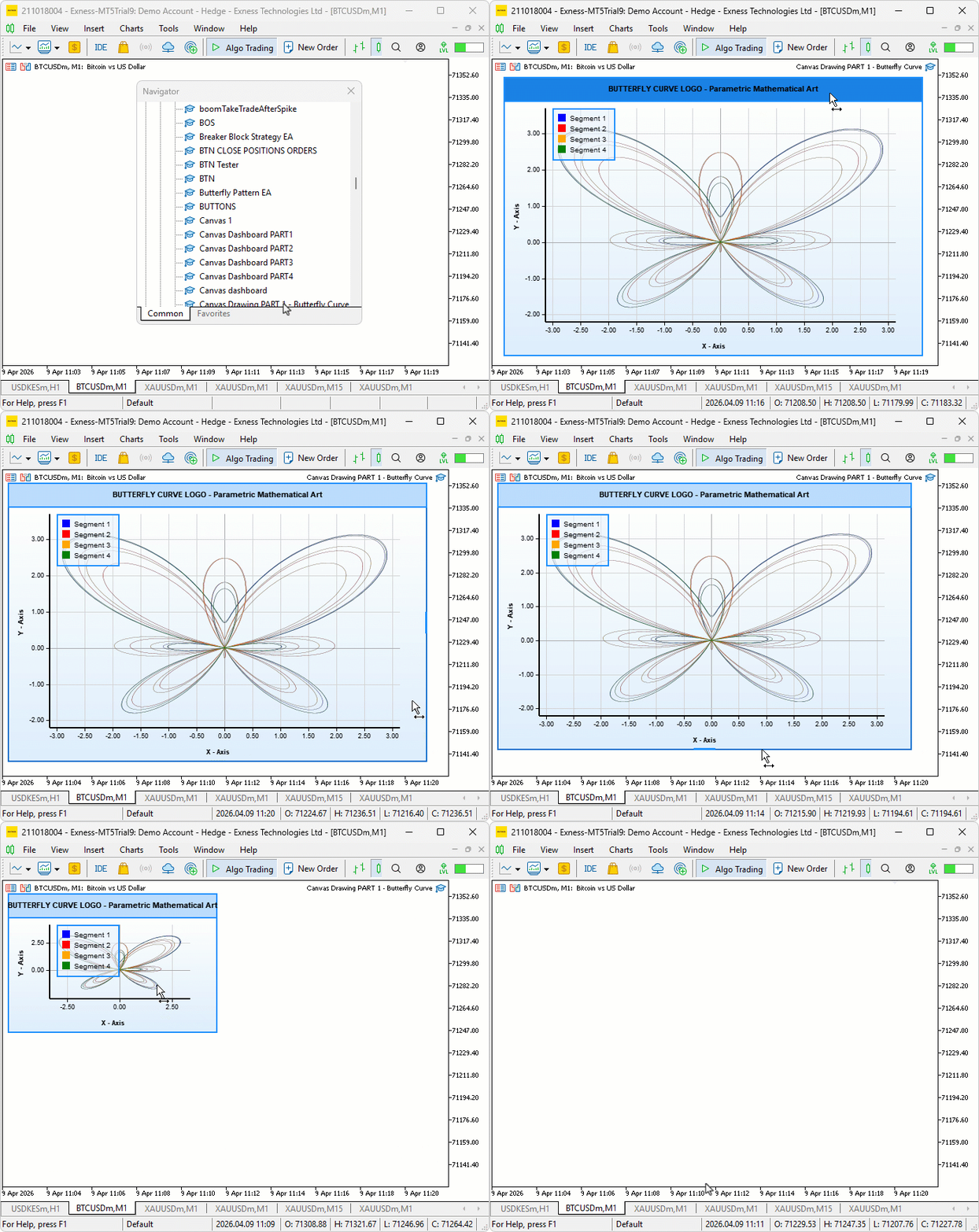
Кривая-бабочка четко отображается на всех четырех цветных сегментах, при этом синий сегмент проходит первые 3π параметрического обхода, за ним следуют красный, оранжевый и зеленый, завершающие оставшиеся три равные части до полных 12π. Процесс суперсэмплирования создает плавные, сглаженные линии без видимых артефактов в виде ступенчатой пикселизации вдоль краев кривых. Сетка осей, отметки делений и метки правильно выравниваются по границам математической области, а панель легенды находится в своем назначенном положении, идентифицируя каждый сегмент по цвету — окно canvas реагирует на перетаскивание и изменение размера, как и ожидалось. При этом все три слоя синхронно перемещаются и масштабируются.
Заключение
В заключение, мы создали визуальный инструмент на основе canvas в MQL5, который отображает кривую-бабочку — параметрическое математическое уравнение — непосредственно на графике MetaTrader 5. Мы реализовали многослойную систему canvas с градиентным фоном, плавающим окном с возможностью перетаскивания и изменения размера, рендерингом кривых с суперсэмплированием и сглаживанием по четырем цветным сегментам, калиброванной сеткой осей с отметками делений и метками, а также плавающей панелью легенды, идентифицирующей каждый сегмент. После прочтения статьи вы сможете:
- Отображать плавные параметрические кривые на canvas MQL5 с использованием конвейера суперсэмплирования для обеспечения чистого и сглаженного конечного изображения
- Создавать полностью интерактивное плавающее окно canvas с возможностью перетаскивания, изменения размера и наложения слоев canvas с использованием управления Z-порядком
- Создавать калиброванную сетку осей с динамически вычисляемыми положениями делений и форматированными метками, адаптирующимися к любому размеру canvas.
В следующей статье мы пойдем дальше, добавив реалистичные заливки бабочки — многослойную раскраску крыльев с вертикальными и радиальными градиентами, линии жилок крыльев, текстурные точки чешуек и детализированное тело с усиками — преобразуя математический контур в визуально насыщенную и реалистичную иллюстрацию бабочки на canvas. Оставайтесь с нами.
Перевод с английского произведен MetaQuotes Ltd.
Оригинальная статья: https://www.mql5.com/en/articles/22105
Предупреждение: все права на данные материалы принадлежат MetaQuotes Ltd. Полная или частичная перепечатка запрещена.
Данная статья написана пользователем сайта и отражает его личную точку зрения. Компания MetaQuotes Ltd не несет ответственности за достоверность представленной информации, а также за возможные последствия использования описанных решений, стратегий или рекомендаций.


 Нейросети в трейдинге: От рыночного шума к устойчивому торговому плану (Основные компоненты)
 От начального до среднего уровня: События в объектах (III)
 Моделирование рынка: Position View (I)
 Торговые инструменты MQL5 (Часть 26): Интеграция частотного биннинга, энтропии и критерия хи-квадрат в визуальный анализатор

- Бесплатные приложения для трейдинга
- 8 000+ сигналов для копирования
- Экономические новости для анализа финансовых рынков
Вы принимаете политику сайта и условия использования