

MQL5 Trading Tools (Part 27): Rendering Parametric Butterfly Curve on Canvas
 1 885
1 885
 1
1

Introduction
You have statistical tools and trading analyzers on your MetaTrader 5 chart. However, nothing demonstrates the raw visual power of the MetaQuotes Language 5 (MQL5) canvas. There is no way to render smooth parametric curves, create interactive floating windows, or reveal how mathematical art can come alive inside the terminal. This article is for MQL5 developers and creative coders who want to explore canvas-based rendering beyond conventional indicators. Push the boundaries of what the terminal can visually produce.
In our previous article (Part 26), we integrated frequency binning, entropy, and chi-square analysis into a visual analyzer in MQL5. We covered the statistical distribution of price data, entropy-based randomness measurement, and chi-square goodness-of-fit testing. All analysis was rendered through an interactive canvas panel with draggable and resizable windows for in-terminal analysis. In this article, we render the butterfly curve—a parametric mathematical equation—onto a MQL5 canvas with supersampling, gradient backgrounds, axis grids, tick labels, and a color-segmented legend panel. We will cover these topics:
By the end, you will have a fully functional canvas-based visual tool that plots the butterfly curve on your MetaTrader 5 chart with smooth anti-aliased rendering, interactive dragging and resizing, and clean mathematical presentation — let's dive in!
The Butterfly Curve — Parametric Beauty in Motion
The butterfly curve is a parametric equation discovered by Temple H. Fay in 1989, producing a distinctive butterfly-shaped plot through a surprisingly compact mathematical formula. It is defined in polar form, where the radial distance from the origin is driven by a combination of exponential, trigonometric, and power terms, tracing a complex winged shape as the parameter sweeps through its range. The equation that governs it is:
r = e^cos(t) − 2cos(4t) − sin⁵(t/12)
Here, r is the radial distance, t is the parameter ranging from 0 to 12π, and the three terms interact to produce the characteristic wing lobes and fine inner details of the curve. To plot it on a two-dimensional canvas, we convert this polar form into Cartesian coordinates using:
x = sin(t) · r
y = cos(t) · r
This conversion maps each value of t to a precise point in two-dimensional space, and as t advances in small steps across its full range, the connected points trace out the full butterfly shape. The curve is particularly interesting because small changes in the step size or the range of t can dramatically alter the detail and completeness of the shape, making the rendering parameters as important as the equation itself.
In practice, the full 12π traversal is divided into four equal segments, each assigned a distinct color, allowing us to observe how the curve builds progressively — from the first wing strokes through to the fine inner loops — and giving the final render a visually clear segmented structure. To achieve smooth, sharp curves without jagged pixel edges, we render at a higher internal resolution and then downsample the result, a technique known as supersampling. This technique averages neighboring high-resolution pixels into each final pixel, resulting in a clean, anti-aliased output.
We will build a full canvas system with a draggable and resizable floating window, render the butterfly curve across its four colored segments using this supersampled pipeline, overlay a calibrated axis grid with tick labels, and present a legend panel identifying each segment, resulting in a complete, interactive mathematical visualization within MetaTrader 5. In brief, this is what we aim to accomplish.

Implementation in MQL5
Setting Up Includes, Enumerations, Inputs, and Global Variables
To kick off the implementation, we set up the foundational building blocks — the library includes, the resize enumeration, all input parameters, and the global variables that will drive the canvas system and butterfly rendering throughout the program.
//+------------------------------------------------------------------+
//|                      Canvas Drawing PART 1 - Butterfly Curve.mq5 |
//|                           Copyright 2026, Allan Munene Mutiiria. |
//|                                   https://t.me/Forex_Algo_Trader |
//+------------------------------------------------------------------+
#property copyright "Copyright 2026, Allan Munene Mutiiria."
#property link      "https://t.me/Forex_Algo_Trader"
#property version   "1.00"
#property strict

//+------------------------------------------------------------------+
//| Includes                                                         |
//+------------------------------------------------------------------+
#include <Canvas\Canvas.mqh> // Include canvas drawing library

//+------------------------------------------------------------------+
//| Enumerations                                                     |
//+------------------------------------------------------------------+
enum ResizeDirectionEnum
  {
   RESIZE_NONE,        // None
   RESIZE_BOTTOM_EDGE, // Bottom Edge
   RESIZE_RIGHT_EDGE,  // Right Edge
   RESIZE_CORNER       // Corner
  };

//+------------------------------------------------------------------+
//| Inputs                                                           |
//+------------------------------------------------------------------+
input group "=== CANVAS DISPLAY SETTINGS ==="
input int   initialCanvasXPosition = 20;  // Initial Canvas X Position
input int   initialCanvasYPosition = 30;  // Initial Canvas Y Position
input int   initialCanvasWidth     = 600; // Initial Canvas Width
input int   initialCanvasHeight    = 400; // Initial Canvas Height
input int   plotAreaPadding        = 10;  // Plot Area Internal Padding (px)

input group "=== THEME COLOR (SINGLE CONTROL!) ==="
input color masterThemeColor = clrDodgerBlue; // Master Theme Color
input bool  showBorderFrame   = true;          // Show Border Frame

input group "=== CURVE SETTINGS ==="
input color blueCurveColor   = clrBlue;   // Blue Curve Color
input color redCurveColor    = clrRed;    // Red Curve Color
input color orangeCurveColor = clrOrange; // Orange Curve Color
input color greenCurveColor  = clrGreen;  // Green Curve Color

input group "=== BACKGROUND SETTINGS ==="
input bool   enableBackgroundFill  = true;     // Enable Background Fill
input color  backgroundTopColor    = clrWhite; // Background Top Color
input double backgroundOpacityLevel = 0.95;    // Background Opacity (0-1)

input group "=== TEXT AND LABELS ==="
input int   titleFontSize     = 14;       // Title Font Size
input color titleTextColor    = clrBlack; // Title Text Color
input int   labelFontSize     = 11;       // Label Font Size
input color labelTextColor    = clrBlack; // Label Text Color
input int   axisLabelFontSize = 12;       // Axis Labels Font Size

input group "=== LEGEND PANEL SETTINGS ==="
input int legendXPosition = 70; // Legend X Position
input int legendYOffset   = 10; // Legend Y Offset (from header)
input int legendWidth     = 90; // Legend Width
input int legendHeight    = 75; // Legend Height
input int legendFontSize  = 13; // Legend Font Size

input group "=== GRID SETTINGS ==="
input color gridLineColor = clrLightGray; // Grid Line Color
input color zeroLineColor = clrDarkGray;  // Zero Line Color

input group "=== INTERACTION SETTINGS ==="
input bool enableCanvasDragging = true; // Enable Canvas Dragging
input bool enableCanvasResizing = true; // Enable Canvas Resizing
input int  resizeGripSize       = 8;    // Resize Grip Size (pixels)

input group "=== RENDERING SETTINGS ==="
input int supersamplingFactor = 4; // Supersampling Factor (1=off, 4=4x)

//+------------------------------------------------------------------+
//| Global Variables - Canvas Objects                                |
//+------------------------------------------------------------------+
CCanvas mainCanvas;               // Main background canvas object
CCanvas curveCanvas;              // Curve drawing canvas object
CCanvas legendCanvas;             // Legend panel canvas object
CCanvas plotHighResolutionCanvas; // High-resolution offscreen plot canvas

string mainCanvasName   = "ButterflyMainCanvas";   // Name of the main canvas bitmap label
string curveCanvasName  = "ButterflyCurveCanvas";  // Name of the curve canvas bitmap label
string legendCanvasName = "ButterflyLegendCanvas"; // Name of the legend canvas bitmap label

int currentCanvasXPosition    = initialCanvasXPosition; // Current canvas X position on chart
int currentCanvasYPosition    = initialCanvasYPosition; // Current canvas Y position on chart
int currentCanvasWidthPixels  = initialCanvasWidth;     // Current canvas width in pixels
int currentCanvasHeightPixels = initialCanvasHeight;    // Current canvas height in pixels

//+------------------------------------------------------------------+
//| Global Variables - Interaction                                   |
//+------------------------------------------------------------------+
bool isDraggingCanvas   = false; // Flag indicating canvas is being dragged
bool isResizingCanvas   = false; // Flag indicating canvas is being resized

int dragStartXPosition  = 0, dragStartYPosition  = 0;   // Mouse position when drag began
int canvasStartXPosition = 0, canvasStartYPosition = 0; // Canvas position when drag began

int resizeStartXPosition  = 0, resizeStartYPosition  = 0;  // Mouse position when resize began
int resizeInitialWidth    = 0, resizeInitialHeight    = 0; // Canvas dimensions when resize began

ResizeDirectionEnum activeResizeMode = RESIZE_NONE; // Currently active resize direction
ResizeDirectionEnum hoverResizeMode  = RESIZE_NONE; // Resize direction under mouse hover

bool isHoveringCanvas     = false; // Flag for mouse hovering over the canvas
bool isHoveringHeader     = false; // Flag for mouse hovering over the header bar
bool isHoveringResizeZone = false; // Flag for mouse hovering over a resize grip

int lastMouseXPosition       = 0; // Last recorded mouse X coordinate
int lastMouseYPosition       = 0; // Last recorded mouse Y coordinate
int previousMouseButtonState = 0; // Previous mouse button pressed state

const int MIN_CANVAS_WIDTH  = 300; // Minimum allowed canvas width in pixels
const int MIN_CANVAS_HEIGHT = 200; // Minimum allowed canvas height in pixels
const int HEADER_BAR_HEIGHT = 35;  // Height of the draggable header bar in pixels

//+------------------------------------------------------------------+
//| Butterfly Drawing Constants                                      |
//+------------------------------------------------------------------+
const double butterflyMinX  = -3.0;          // Minimum X value of the butterfly curve domain
const double butterflyMaxX  =  3.0;          // Maximum X value of the butterfly curve domain
const double butterflyMinY  = -2.0;          // Minimum Y value of the butterfly curve range
const double butterflyMaxY  =  3.5;          // Maximum Y value of the butterfly curve range
const double butterflyTStart =  0.0;         // Parametric T start value
const double butterflyTEnd   = 12.0 * M_PI;  // Parametric T end value (12π full traversal)
const double butterflyTStep  =  0.01;        // Parametric T increment per step
We begin by including the "Canvas.mqh" library, which provides the CCanvas class and all the pixel-level drawing functions we will rely on throughout the program. Following that, we define the "ResizeDirectionEnum" enumeration to represent the four possible resize states of the canvas window — none, bottom edge, right edge, and corner — giving us a clean way to track and respond to the user's resize interactions.
Next, we declare the input groups covering canvas position and dimensions, the master theme color with its border toggle, the four individual curve segment colors, background fill options, text and label font sizes, legend panel geometry, grid colors, interaction toggles for dragging and resizing, and the supersampling factor for curve rendering quality.
On the global variables side, we declare four "CCanvas" objects — the main background canvas, the curve canvas, the legend panel canvas, and an offscreen high-resolution canvas used during supersampled rendering. Their corresponding name strings are stored for object management. We then track the current canvas position and pixel dimensions, followed by the interaction state variables covering drag and resize flags, start positions, initial dimensions, active and hover resize modes, hover state flags for the canvas, header, and resize zone, and the last mouse coordinates with the previous button state. Constants set the minimum canvas dimensions and the fixed header bar height. Finally, the butterfly drawing constants define the Cartesian domain boundaries, the parametric range from 0 to 12π, and the step increment that controls how finely the curve is traced. Next, we will work on color utility and rendering helper functions to keep our code modular.
Color Utilities and Rendering Helpers
Before diving into the curve drawing logic, we define a set of helper functions that handle color manipulation, tick computation, tick label formatting, and supersampled downsampling — all of which are called repeatedly throughout the rendering pipeline.
//+------------------------------------------------------------------+
//| Lighten color by blending toward white                           |
//+------------------------------------------------------------------+
color LightenColor(color baseColor, double factor)
  {
   //--- Extract red channel from base color
   uchar red   = (uchar)((baseColor >> 16) & 0xFF);
   //--- Extract green channel from base color
   uchar green = (uchar)((baseColor >>  8) & 0xFF);
   //--- Extract blue channel from base color
   uchar blue  = (uchar)( baseColor        & 0xFF);

   //--- Blend red channel toward 255 by factor
   red   = (uchar)MathMin(255, red   + (255 - red)   * factor);
   //--- Blend green channel toward 255 by factor
   green = (uchar)MathMin(255, green + (255 - green) * factor);
   //--- Blend blue channel toward 255 by factor
   blue  = (uchar)MathMin(255, blue  + (255 - blue)  * factor);

   //--- Recompose and return the lightened color
   return (red << 16) | (green << 8) | blue;
  }

//+------------------------------------------------------------------+
//| Darken color by scaling channels toward black                    |
//+------------------------------------------------------------------+
color DarkenColor(color baseColor, double factor)
  {
   //--- Extract red channel from base color
   uchar red   = (uchar)((baseColor >> 16) & 0xFF);
   //--- Extract green channel from base color
   uchar green = (uchar)((baseColor >>  8) & 0xFF);
   //--- Extract blue channel from base color
   uchar blue  = (uchar)( baseColor        & 0xFF);

   //--- Scale red channel down by factor
   red   = (uchar)(red   * (1.0 - factor));
   //--- Scale green channel down by factor
   green = (uchar)(green * (1.0 - factor));
   //--- Scale blue channel down by factor
   blue  = (uchar)(blue  * (1.0 - factor));

   //--- Recompose and return the darkened color
   return (red << 16) | (green << 8) | blue;
  }

//+------------------------------------------------------------------+
//| Interpolate linearly between two colors by a blend factor        |
//+------------------------------------------------------------------+
color InterpolateColors(color startColor, color endColor, double factor)
  {
   //--- Extract red channel of start color
   uchar startRed   = (uchar)((startColor >> 16) & 0xFF);
   //--- Extract green channel of start color
   uchar startGreen = (uchar)((startColor >>  8) & 0xFF);
   //--- Extract blue channel of start color
   uchar startBlue  = (uchar)( startColor        & 0xFF);

   //--- Extract red channel of end color
   uchar endRed     = (uchar)((endColor >> 16) & 0xFF);
   //--- Extract green channel of end color
   uchar endGreen   = (uchar)((endColor >>  8) & 0xFF);
   //--- Extract blue channel of end color
   uchar endBlue    = (uchar)( endColor        & 0xFF);

   //--- Interpolate red channel between start and end
   uchar interpolatedRed   = (uchar)(startRed   + factor * (endRed   - startRed));
   //--- Interpolate green channel between start and end
   uchar interpolatedGreen = (uchar)(startGreen + factor * (endGreen - startGreen));
   //--- Interpolate blue channel between start and end
   uchar interpolatedBlue  = (uchar)(startBlue  + factor * (endBlue  - startBlue));

   //--- Recompose and return the interpolated color
   return (interpolatedRed << 16) | (interpolatedGreen << 8) | interpolatedBlue;
  }

//+------------------------------------------------------------------+
//| Calculate optimal axis tick positions for a given pixel range    |
//+------------------------------------------------------------------+
int CalculateOptimalTicks(double minValue, double maxValue, int pixelRange, double &tickValues[])
  {
   //--- Compute the total value span
   double range = maxValue - minValue;
   //--- Guard against degenerate range or zero pixel span
   if(range == 0 || pixelRange <= 0)
     {
      //--- Resize output array to one element
      ArrayResize(tickValues, 1);
      //--- Set single tick at the minimum value
      tickValues[0] = minValue;
      //--- Return one tick
      return 1;
     }

   //--- Estimate a target tick count based on pixel density
   int targetTickCount = (int)(pixelRange / 50.0);
   //--- Enforce minimum of 3 ticks
   if(targetTickCount <  3) targetTickCount =  3;
   //--- Enforce maximum of 20 ticks
   if(targetTickCount > 20) targetTickCount = 20;

   //--- Compute a rough unrounded step size
   double roughStep = range / (double)(targetTickCount - 1);

   //--- Determine the order of magnitude of the rough step
   double magnitude = MathPow(10.0, MathFloor(MathLog10(roughStep)));

   //--- Normalize rough step to a 1-10 range
   double normalized = roughStep / magnitude;

   //--- Select the nearest "nice" normalized step value
   double niceNormalized;
   if     (normalized <= 1.0) niceNormalized =  1.0;  // Snap to 1.0
   else if(normalized <= 1.5) niceNormalized =  1.0;  // Snap to 1.0
   else if(normalized <= 2.0) niceNormalized =  2.0;  // Snap to 2.0
   else if(normalized <= 2.5) niceNormalized =  2.0;  // Snap to 2.0
   else if(normalized <= 3.0) niceNormalized =  2.5;  // Snap to 2.5
   else if(normalized <= 4.0) niceNormalized =  4.0;  // Snap to 4.0
   else if(normalized <= 5.0) niceNormalized =  5.0;  // Snap to 5.0
   else if(normalized <= 7.5) niceNormalized =  5.0;  // Snap to 5.0
   else                       niceNormalized = 10.0;  // Snap to 10.0

   //--- Compute the final nice step size
   double step = niceNormalized * magnitude;

   //--- Snap minimum tick to the nearest step below minValue
   double tickMin = MathFloor(minValue / step) * step;
   //--- Snap maximum tick to the nearest step above maxValue
   double tickMax = MathCeil(maxValue  / step) * step;

   //--- Compute the resulting tick count
   int numTicks = (int)MathRound((tickMax - tickMin) / step) + 1;

   //--- Reduce tick density if too many ticks would be generated
   if(numTicks > 25)
     {
      //--- Double the step to thin out ticks
      step    *= 2.0;
      //--- Recalculate aligned minimum tick
      tickMin  = MathFloor(minValue / step) * step;
      //--- Recalculate aligned maximum tick
      tickMax  = MathCeil(maxValue  / step) * step;
      //--- Recompute tick count after adjustment
      numTicks = (int)MathRound((tickMax - tickMin) / step) + 1;
     }

   //--- Increase tick density if too few ticks would be generated
   if(numTicks < 3)
     {
      //--- Halve the step to add more ticks
      step    /= 2.0;
      //--- Recalculate aligned minimum tick
      tickMin  = MathFloor(minValue / step) * step;
      //--- Recalculate aligned maximum tick
      tickMax  = MathCeil(maxValue  / step) * step;
      //--- Recompute tick count after adjustment
      numTicks = (int)MathRound((tickMax - tickMin) / step) + 1;
     }

   //--- Allocate the output tick array
   ArrayResize(tickValues, numTicks);
   //--- Populate tick values at evenly spaced intervals
   for(int i = 0; i < numTicks; i++)
     {
      tickValues[i] = tickMin + i * step;
     }

   //--- Return the total number of computed ticks
   return numTicks;
  }

//+------------------------------------------------------------------+
//| Format a tick value as a string based on its numeric range       |
//+------------------------------------------------------------------+
string FormatTickLabel(double value, double range)
  {
   //--- Use 0 decimal places for large ranges
   if(range > 100)  return DoubleToString(value, 0);
   //--- Use 1 decimal place for medium-large ranges
   else if(range > 10)  return DoubleToString(value, 1);
   //--- Use 2 decimal places for medium ranges
   else if(range > 1)   return DoubleToString(value, 2);
   //--- Use 3 decimal places for small ranges
   else if(range > 0.1) return DoubleToString(value, 3);
   //--- Use 4 decimal places for very small ranges
   else                 return DoubleToString(value, 4);
  }

//+------------------------------------------------------------------+
//| Downsample high-resolution canvas into a target canvas           |
//+------------------------------------------------------------------+
void DownsampleCanvas(CCanvas &targetCanvas, CCanvas &highResolutionCanvas)
  {
   //--- Get the pixel width of the target canvas
   int targetWidth  = targetCanvas.Width();
   //--- Get the pixel height of the target canvas
   int targetHeight = targetCanvas.Height();

   //--- Iterate over every row of the target canvas
   for(int pixelY = 0; pixelY < targetHeight; pixelY++)
     {
      //--- Iterate over every column of the target canvas
      for(int pixelX = 0; pixelX < targetWidth; pixelX++)
        {
         //--- Compute the corresponding source X in high-res space
         double sourceX = pixelX * supersamplingFactor;
         //--- Compute the corresponding source Y in high-res space
         double sourceY = pixelY * supersamplingFactor;

         //--- Initialize accumulator channels for averaging
         double sumAlpha = 0, sumRed = 0, sumGreen = 0, sumBlue = 0;
         //--- Initialize total weight accumulator
         double weightSum = 0;

         //--- Loop over each supersampled row contributing to this pixel
         for(int deltaY = 0; deltaY < supersamplingFactor; deltaY++)
           {
            //--- Loop over each supersampled column contributing to this pixel
            for(int deltaX = 0; deltaX < supersamplingFactor; deltaX++)
              {
               //--- Compute exact source pixel X coordinate
               int sourcePixelX = (int)(sourceX + deltaX);
               //--- Compute exact source pixel Y coordinate
               int sourcePixelY = (int)(sourceY + deltaY);

               //--- Verify the source pixel lies within the high-res canvas bounds
               if(sourcePixelX >= 0 && sourcePixelX < highResolutionCanvas.Width() &&
                  sourcePixelY >= 0 && sourcePixelY < highResolutionCanvas.Height())
                 {
                  //--- Read the ARGB value from the high-res canvas
                  uint pixelValue = highResolutionCanvas.PixelGet(sourcePixelX, sourcePixelY);

                  //--- Unpack the alpha channel
                  uchar alpha = (uchar)((pixelValue >> 24) & 0xFF);
                  //--- Unpack the red channel
                  uchar red   = (uchar)((pixelValue >> 16) & 0xFF);
                  //--- Unpack the green channel
                  uchar green = (uchar)((pixelValue >>  8) & 0xFF);
                  //--- Unpack the blue channel
                  uchar blue  = (uchar)( pixelValue        & 0xFF);

                  //--- Assign uniform weight to this sample
                  double weight = 1.0;
                  //--- Accumulate weighted alpha
                  sumAlpha += alpha * weight;
                  //--- Accumulate weighted red
                  sumRed   += red   * weight;
                  //--- Accumulate weighted green
                  sumGreen += green * weight;
                  //--- Accumulate weighted blue
                  sumBlue  += blue  * weight;
                  //--- Accumulate total weight
                  weightSum += weight;
                 }
              }
           }

         //--- Only write the pixel if at least one sample contributed
         if(weightSum > 0)
           {
            //--- Compute averaged alpha channel
            uchar finalAlpha = (uchar)(sumAlpha / weightSum);
            //--- Compute averaged red channel
            uchar finalRed   = (uchar)(sumRed   / weightSum);
            //--- Compute averaged green channel
            uchar finalGreen = (uchar)(sumGreen / weightSum);
            //--- Compute averaged blue channel
            uchar finalBlue  = (uchar)(sumBlue  / weightSum);

            //--- Recompose all channels into a single ARGB value
            uint finalColor = ((uint)finalAlpha << 24) | ((uint)finalRed << 16) |
                              ((uint)finalGreen <<  8) |  (uint)finalBlue;
            //--- Write the averaged pixel to the target canvas
            targetCanvas.PixelSet(pixelX, pixelY, finalColor);
           }
        }
     }
  }
First, we define the "LightenColor" function to blend a given color toward white by a factor, extracting each red, green, and blue channel via bitwise shifts, pushing each channel toward 255 using MathMin, and recomposing the result. Similarly, "DarkenColor" scales each channel down toward black by multiplying with the inverse of the factor, giving us a darker shade of any input color. These two are used throughout the rendering pipeline for header hover states, border feedback, and legend backgrounds. To smoothly transition between two colors, the "InterpolateColors" function extracts both start and end channels and linearly blends each one by the given factor before recomposing — this drives the gradient background that fills the canvas below the header.
For axis tick generation, the "CalculateOptimalTicks" function takes a value range and a pixel span, estimates a target tick count based on a density of one tick per 50 pixels, clamps it between 3 and 20, then computes a rough step size from the range. It determines the order of magnitude of that step using MathFloor and MathLog10, normalizes it into a 1–10 range, and snaps it to the nearest clean value from a predefined set: 1.0, 2.0, 2.5, 4.0, 5.0, or 10.0 — to ensure human-readable axis labels. The aligned minimum and maximum ticks are computed with "MathFloor" and MathCeil, and if the resulting count falls outside acceptable bounds, it doubles or halves the step accordingly before populating and returning the final tick array. The companion "FormatTickLabel" function then converts each tick value to a string with an appropriate number of decimal places based on the range magnitude using the DoubleToString function.
The most technically significant helper here is "DownsampleCanvas", which implements the supersampling averaging step. For every pixel in the target canvas, it maps back to a corresponding block of pixels in the high-resolution canvas — sized by the supersampling factor — reads each sample with the PixelGet method, unpacks all four channels (alpha, red, green, blue) via bitwise operations, and accumulates them with uniform weight. Once all samples in the block are summed, each channel is averaged by dividing by the total weight, the channels are recomposed into a single "ARGB" value, and written to the target with PixelSet. This process is what gives the butterfly curve its smooth, anti-aliased appearance at final display resolution. Next, we will define a function to help draw the curve.
Tracing the Butterfly Curve Across Four Colored Segments
With the helpers in place, we now define the core curve drawing function. This is where the butterfly equation is evaluated point by point, converted to canvas pixel coordinates, and painted across four distinct colored segments that together complete the full 12π traversal.
//+------------------------------------------------------------------+
//| Draw all four colored butterfly curve segments onto a canvas     |
//+------------------------------------------------------------------+
void DrawButterflyCurves(CCanvas &canvas, int plotWidth, int plotHeight, double rangeX, double rangeY)
  {
   //--- Define the T boundary separating segment 1 from segment 2
   double segmentEnd1 = 3.0 * M_PI;
   //--- Define the T boundary separating segment 2 from segment 3
   double segmentEnd2 = 6.0 * M_PI;
   //--- Define the T boundary separating segment 3 from segment 4
   double segmentEnd3 = 9.0 * M_PI;
   //--- Define the T end of the final segment
   double segmentEnd4 = butterflyTEnd;

   //--- Convert blue curve color to ARGB format
   uint argbBlue   = ColorToARGB(blueCurveColor,   255);
   //--- Convert red curve color to ARGB format
   uint argbRed    = ColorToARGB(redCurveColor,    255);
   //--- Convert orange curve color to ARGB format
   uint argbOrange = ColorToARGB(orangeCurveColor, 255);
   //--- Convert green curve color to ARGB format
   uint argbGreen  = ColorToARGB(greenCurveColor,  255);

   //--- Initialize previous pixel X for blue segment connectivity
   double previousCurveXPixel = -1;
   //--- Initialize previous pixel Y for blue segment connectivity
   double previousCurveYPixel = -1;

   //--- Traverse the first parametric segment (blue)
   for(double t = butterflyTStart; t <= segmentEnd1; t += butterflyTStep)
     {
      //--- Evaluate the butterfly radial term at parameter T
      double term = MathExp(MathCos(t)) - 2 * MathCos(4 * t) - MathPow(MathSin(t / 12), 5);
      //--- Compute X coordinate of the butterfly curve
      double x = MathSin(t) * term;
      //--- Compute Y coordinate of the butterfly curve
      double y = MathCos(t) * term;
      //--- Proceed only if both coordinates are finite numbers
      if(MathIsValidNumber(x) && MathIsValidNumber(y))
        {
         //--- Map X coordinate to canvas pixel space
         double currentCurveXPixel = (x - butterflyMinX) / rangeX * plotWidth;
         //--- Map Y coordinate to canvas pixel space (inverted Y axis)
         double currentCurveYPixel = (butterflyMaxY - y) / rangeY * plotHeight;
         //--- Round current X to nearest integer pixel
         int intX = (int)MathRound(currentCurveXPixel);
         //--- Round current Y to nearest integer pixel
         int intY = (int)MathRound(currentCurveYPixel);
         //--- Draw line from previous point if a valid previous point exists
         if(previousCurveXPixel >= 0 && previousCurveYPixel >= 0)
           {
            //--- Draw anti-aliased line segment on primary pixel row
            canvas.LineAA((int)MathRound(previousCurveXPixel),     (int)MathRound(previousCurveYPixel),     intX,     intY, argbBlue);
            //--- Draw anti-aliased line segment on offset pixel row for thickness
            canvas.LineAA((int)MathRound(previousCurveXPixel) + 1, (int)MathRound(previousCurveYPixel), intX + 1, intY, argbBlue);
           }
         //--- Store current X as previous for the next iteration
         previousCurveXPixel = currentCurveXPixel;
         //--- Store current Y as previous for the next iteration
         previousCurveYPixel = currentCurveYPixel;
        }
      else
        {
         //--- Reset previous X to signal a break in the curve
         previousCurveXPixel = -1;
         //--- Reset previous Y to signal a break in the curve
         previousCurveYPixel = -1;
        }
     }

   //--- Reset previous pixel X for red segment connectivity
   previousCurveXPixel = -1;
   //--- Reset previous pixel Y for red segment connectivity
   previousCurveYPixel = -1;

   //--- Traverse the second parametric segment (red)
   for(double t = segmentEnd1; t <= segmentEnd2; t += butterflyTStep)
     {
      //--- Evaluate the butterfly radial term at parameter T
      double term = MathExp(MathCos(t)) - 2 * MathCos(4 * t) - MathPow(MathSin(t / 12), 5);
      //--- Compute X coordinate of the butterfly curve
      double x = MathSin(t) * term;
      //--- Compute Y coordinate of the butterfly curve
      double y = MathCos(t) * term;
      //--- Proceed only if both coordinates are finite numbers
      if(MathIsValidNumber(x) && MathIsValidNumber(y))
        {
         //--- Map X coordinate to canvas pixel space
         double currentCurveXPixel = (x - butterflyMinX) / rangeX * plotWidth;
         //--- Map Y coordinate to canvas pixel space (inverted Y axis)
         double currentCurveYPixel = (butterflyMaxY - y) / rangeY * plotHeight;
         //--- Round current X to nearest integer pixel
         int intX = (int)MathRound(currentCurveXPixel);
         //--- Round current Y to nearest integer pixel
         int intY = (int)MathRound(currentCurveYPixel);
         //--- Draw line from previous point if a valid previous point exists
         if(previousCurveXPixel >= 0 && previousCurveYPixel >= 0)
           {
            //--- Draw anti-aliased line segment on primary pixel row
            canvas.LineAA((int)MathRound(previousCurveXPixel),     (int)MathRound(previousCurveYPixel),     intX,     intY, argbRed);
            //--- Draw anti-aliased line segment on offset pixel row for thickness
            canvas.LineAA((int)MathRound(previousCurveXPixel) + 1, (int)MathRound(previousCurveYPixel), intX + 1, intY, argbRed);
           }
         //--- Store current X as previous for the next iteration
         previousCurveXPixel = currentCurveXPixel;
         //--- Store current Y as previous for the next iteration
         previousCurveYPixel = currentCurveYPixel;
        }
      else
        {
         //--- Reset previous X to signal a break in the curve
         previousCurveXPixel = -1;
         //--- Reset previous Y to signal a break in the curve
         previousCurveYPixel = -1;
        }
     }

   //--- Reset previous pixel X for orange segment connectivity
   previousCurveXPixel = -1;
   //--- Reset previous pixel Y for orange segment connectivity
   previousCurveYPixel = -1;

   //--- Traverse the third parametric segment (orange)
   for(double t = segmentEnd2; t <= segmentEnd3; t += butterflyTStep)
     {
      //--- Evaluate the butterfly radial term at parameter T
      double term = MathExp(MathCos(t)) - 2 * MathCos(4 * t) - MathPow(MathSin(t / 12), 5);
      //--- Compute X coordinate of the butterfly curve
      double x = MathSin(t) * term;
      //--- Compute Y coordinate of the butterfly curve
      double y = MathCos(t) * term;
      //--- Proceed only if both coordinates are finite numbers
      if(MathIsValidNumber(x) && MathIsValidNumber(y))
        {
         //--- Map X coordinate to canvas pixel space
         double currentCurveXPixel = (x - butterflyMinX) / rangeX * plotWidth;
         //--- Map Y coordinate to canvas pixel space (inverted Y axis)
         double currentCurveYPixel = (butterflyMaxY - y) / rangeY * plotHeight;
         //--- Round current X to nearest integer pixel
         int intX = (int)MathRound(currentCurveXPixel);
         //--- Round current Y to nearest integer pixel
         int intY = (int)MathRound(currentCurveYPixel);
         //--- Draw line from previous point if a valid previous point exists
         if(previousCurveXPixel >= 0 && previousCurveYPixel >= 0)
           {
            //--- Draw anti-aliased line segment on primary pixel row
            canvas.LineAA((int)MathRound(previousCurveXPixel),     (int)MathRound(previousCurveYPixel),     intX,     intY, argbOrange);
            //--- Draw anti-aliased line segment on offset pixel row for thickness
            canvas.LineAA((int)MathRound(previousCurveXPixel) + 1, (int)MathRound(previousCurveYPixel), intX + 1, intY, argbOrange);
           }
         //--- Store current X as previous for the next iteration
         previousCurveXPixel = currentCurveXPixel;
         //--- Store current Y as previous for the next iteration
         previousCurveYPixel = currentCurveYPixel;
        }
      else
        {
         //--- Reset previous X to signal a break in the curve
         previousCurveXPixel = -1;
         //--- Reset previous Y to signal a break in the curve
         previousCurveYPixel = -1;
        }
     }

   //--- Reset previous pixel X for green segment connectivity
   previousCurveXPixel = -1;
   //--- Reset previous pixel Y for green segment connectivity
   previousCurveYPixel = -1;

   //--- Traverse the fourth parametric segment (green)
   for(double t = segmentEnd3; t <= segmentEnd4; t += butterflyTStep)
     {
      //--- Evaluate the butterfly radial term at parameter T
      double term = MathExp(MathCos(t)) - 2 * MathCos(4 * t) - MathPow(MathSin(t / 12), 5);
      //--- Compute X coordinate of the butterfly curve
      double x = MathSin(t) * term;
      //--- Compute Y coordinate of the butterfly curve
      double y = MathCos(t) * term;
      //--- Proceed only if both coordinates are finite numbers
      if(MathIsValidNumber(x) && MathIsValidNumber(y))
        {
         //--- Map X coordinate to canvas pixel space
         double currentCurveXPixel = (x - butterflyMinX) / rangeX * plotWidth;
         //--- Map Y coordinate to canvas pixel space (inverted Y axis)
         double currentCurveYPixel = (butterflyMaxY - y) / rangeY * plotHeight;
         //--- Round current X to nearest integer pixel
         int intX = (int)MathRound(currentCurveXPixel);
         //--- Round current Y to nearest integer pixel
         int intY = (int)MathRound(currentCurveYPixel);
         //--- Draw line from previous point if a valid previous point exists
         if(previousCurveXPixel >= 0 && previousCurveYPixel >= 0)
           {
            //--- Draw anti-aliased line segment on primary pixel row
            canvas.LineAA((int)MathRound(previousCurveXPixel),     (int)MathRound(previousCurveYPixel),     intX,     intY, argbGreen);
            //--- Draw anti-aliased line segment on offset pixel row for thickness
            canvas.LineAA((int)MathRound(previousCurveXPixel) + 1, (int)MathRound(previousCurveYPixel), intX + 1, intY, argbGreen);
           }
         //--- Store current X as previous for the next iteration
         previousCurveXPixel = currentCurveXPixel;
         //--- Store current Y as previous for the next iteration
         previousCurveYPixel = currentCurveYPixel;
        }
      else
        {
         //--- Reset previous X to signal a break in the curve
         previousCurveXPixel = -1;
         //--- Reset previous Y to signal a break in the curve
         previousCurveYPixel = -1;
        }
     }
  }
The "DrawButterflyCurves" function takes a canvas reference, the plot dimensions, and the axis ranges as parameters. We open by dividing the full parametric range into four equal boundaries — each spanning 3π — and converting all four curve colors to their "ARGB" equivalents using ColorToARGB, making them ready for pixel-level drawing operations.
Each of the four segments follows the same pattern. We initialize a pair of previous pixel coordinates to -1 to signal that no prior point exists yet, then step through the parameter t from the segment's start to its end boundary in increments of the step constant. At each step, we evaluate the butterfly radial term using MathExp, "MathCos", "MathPow", and MathSin, then compute the Cartesian coordinates as x = sin(t) · r and y = cos(t) · r. Before proceeding, MathIsValidNumber guards against any non-finite results that could arise near degenerate parameter values — if either coordinate is invalid, the previous pixel references are reset to -1 to break the line and prevent corrupt draw calls.
For valid points, the coordinates are mapped from mathematical space into canvas pixel space by subtracting the domain minimum, dividing by the range, and scaling by the plot dimensions. The Y axis is intentionally inverted — since canvas pixel rows increase downward while mathematical Y increases upward — by subtracting y from the maximum Y boundary before scaling. Each coordinate is rounded to the nearest integer pixel with MathRound, and if a valid previous point exists, two anti-aliased line segments are drawn using LineAA — one on the primary pixel row and one offset by a single pixel horizontally — to give the curve a slightly thicker, more visible stroke. The current pixel position is then stored as the previous for the next iteration, maintaining connectivity across the full segment. This same process repeats for all four segments with their respective colors, building the complete butterfly shape progressively from blue through red, orange, and finally green. Next, we orchestrate the full plot.
Building the Grid and Orchestrating the Full Plot
With the curve drawing logic ready, we now define the grid rendering function and the main plot orchestration function that ties all visual layers together — axes, grid lines, tick marks, labels, and the supersampled butterfly curve.
//+------------------------------------------------------------------+
//| Draw grid lines for both axes onto the main canvas               |
//+------------------------------------------------------------------+
void DrawGrid(int plotAreaLeft, int plotAreaTop, int plotAreaRight, int plotAreaBottom,
              int drawAreaLeft, int drawAreaTop, int plotWidth, int plotHeight,
              double rangeX, double rangeY)
  {
   //--- Compute the bottom edge of the inner draw area
   int drawAreaBottom = plotAreaBottom - plotAreaPadding;

   //--- Convert grid line color to ARGB
   uint argbGrid = ColorToARGB(gridLineColor, 255);
   //--- Convert zero line color to ARGB
   uint argbZero = ColorToARGB(zeroLineColor, 255);

   //--- Declare array to hold X tick positions
   double xTickValues[];
   //--- Compute optimal X axis tick positions
   int numXTicks = CalculateOptimalTicks(butterflyMinX, butterflyMaxX, plotWidth, xTickValues);

   //--- Loop through each X tick and draw a vertical grid line
   for(int i = 0; i < numXTicks; i++)
     {
      //--- Retrieve the X tick value
      double xValue = xTickValues[i];
      //--- Skip ticks that fall outside the butterfly domain
      if(xValue < butterflyMinX || xValue > butterflyMaxX) continue;

      //--- Map X value to pixel column position
      int xPosition = drawAreaLeft + (int)((xValue - butterflyMinX) / rangeX * plotWidth);

      //--- Use zero line color for the origin, grid color for all others
      uint lineColor = (MathAbs(xValue) < 1e-10) ? argbZero : argbGrid;
      //--- Draw vertical grid line from top to bottom of plot area
      mainCanvas.LineVertical(xPosition, plotAreaTop, plotAreaBottom, lineColor);
     }

   //--- Declare array to hold Y tick positions
   double yTickValues[];
   //--- Compute optimal Y axis tick positions
   int numYTicks = CalculateOptimalTicks(butterflyMinY, butterflyMaxY, plotHeight, yTickValues);

   //--- Loop through each Y tick and draw a horizontal grid line
   for(int i = 0; i < numYTicks; i++)
     {
      //--- Retrieve the Y tick value
      double yValue = yTickValues[i];
      //--- Skip ticks that fall outside the butterfly range
      if(yValue < butterflyMinY || yValue > butterflyMaxY) continue;

      //--- Map Y value to pixel row position (inverted Y axis)
      int yPosition = drawAreaBottom - (int)((yValue - butterflyMinY) / rangeY * plotHeight);

      //--- Use zero line color for the origin, grid color for all others
      uint lineColor = (MathAbs(yValue) < 1e-10) ? argbZero : argbGrid;
      //--- Draw horizontal grid line spanning the full plot width
      mainCanvas.LineHorizontal(plotAreaLeft, plotAreaRight, yPosition, lineColor);
     }
  }

//+------------------------------------------------------------------+
//| Draw axes, ticks, labels, and butterfly curves onto main canvas  |
//+------------------------------------------------------------------+
void DrawButterflyPlot()
  {
   //--- Set the left boundary of the plot area
   int plotAreaLeft   = 60;
   //--- Set the right boundary of the plot area
   int plotAreaRight  = currentCanvasWidthPixels - 40;
   //--- Set the top boundary of the plot area (below header)
   int plotAreaTop    = HEADER_BAR_HEIGHT + 10;
   //--- Set the bottom boundary of the plot area
   int plotAreaBottom = currentCanvasHeightPixels - 50;

   //--- Apply internal padding to get the inner draw left edge
   int drawAreaLeft   = plotAreaLeft   + plotAreaPadding;
   //--- Apply internal padding to get the inner draw right edge
   int drawAreaRight  = plotAreaRight  - plotAreaPadding;
   //--- Apply internal padding to get the inner draw top edge
   int drawAreaTop    = plotAreaTop    + plotAreaPadding;
   //--- Apply internal padding to get the inner draw bottom edge
   int drawAreaBottom = plotAreaBottom - plotAreaPadding;

   //--- Compute the drawable plot width in pixels
   int plotWidth  = drawAreaRight - drawAreaLeft;
   //--- Compute the drawable plot height in pixels
   int plotHeight = drawAreaBottom - drawAreaTop;

   //--- Abort if the drawable area is degenerate
   if(plotWidth <= 0 || plotHeight <= 0) return;

   //--- Compute the full X domain span
   double rangeX = butterflyMaxX - butterflyMinX;
   //--- Compute the full Y domain span
   double rangeY = butterflyMaxY - butterflyMinY;

   //--- Prevent division by zero on X axis
   if(rangeX == 0) rangeX = 1;
   //--- Prevent division by zero on Y axis
   if(rangeY == 0) rangeY = 1;

   //--- Set axis line color to black ARGB
   uint argbAxisColor = ColorToARGB(clrBlack, 255);

   //--- Draw Y axis as two adjacent vertical lines for visible thickness
   for(int thickness = 0; thickness < 2; thickness++)
     {
      mainCanvas.Line(plotAreaLeft - thickness, plotAreaTop, plotAreaLeft - thickness, plotAreaBottom, argbAxisColor);
     }

   //--- Draw X axis as two adjacent horizontal lines for visible thickness
   for(int thickness = 0; thickness < 2; thickness++)
     {
      mainCanvas.Line(plotAreaLeft, plotAreaBottom + thickness, plotAreaRight, plotAreaBottom + thickness, argbAxisColor);
     }

   //--- Render background grid lines before drawing curve data
   DrawGrid(plotAreaLeft, plotAreaTop, plotAreaRight, plotAreaBottom,
            drawAreaLeft, drawAreaTop, plotWidth, plotHeight, rangeX, rangeY);

   //--- Set the axis tick label font
   mainCanvas.FontSet("Arial", axisLabelFontSize);
   //--- Set tick label ARGB color to black
   uint argbTickLabel = ColorToARGB(clrBlack, 255);

   //--- Declare array for Y axis tick values
   double yTickValues[];
   //--- Compute optimal Y axis ticks
   int numYTicks = CalculateOptimalTicks(butterflyMinY, butterflyMaxY, plotHeight, yTickValues);

   //--- Loop over Y ticks and render each tick mark and label
   for(int i = 0; i < numYTicks; i++)
     {
      //--- Get the current Y tick value
      double yValue = yTickValues[i];
      //--- Skip ticks outside the visible Y range
      if(yValue < butterflyMinY || yValue > butterflyMaxY) continue;

      //--- Map Y value to pixel row (inverted axis)
      int yPosition = drawAreaBottom - (int)((yValue - butterflyMinY) / rangeY * plotHeight);

      //--- Draw tick mark extending left from the Y axis
      mainCanvas.Line(plotAreaLeft - 5, yPosition, plotAreaLeft, yPosition, argbAxisColor);

      //--- Format the Y tick label string
      string yLabel = FormatTickLabel(yValue, rangeY);
      //--- Render the Y tick label to the left of the tick mark
      mainCanvas.TextOut(plotAreaLeft - 8, yPosition - axisLabelFontSize / 2, yLabel, argbTickLabel, TA_RIGHT);
     }

   //--- Declare array for X axis tick values
   double xTickValues[];
   //--- Compute optimal X axis ticks
   int numXTicks = CalculateOptimalTicks(butterflyMinX, butterflyMaxX, plotWidth, xTickValues);

   //--- Loop over X ticks and render each tick mark and label
   for(int i = 0; i < numXTicks; i++)
     {
      //--- Get the current X tick value
      double xValue = xTickValues[i];
      //--- Skip ticks outside the visible X range
      if(xValue < butterflyMinX || xValue > butterflyMaxX) continue;

      //--- Map X value to pixel column
      int xPosition = drawAreaLeft + (int)((xValue - butterflyMinX) / rangeX * plotWidth);

      //--- Draw tick mark extending below the X axis
      mainCanvas.Line(xPosition, plotAreaBottom, xPosition, plotAreaBottom + 5, argbAxisColor);

      //--- Format the X tick label string
      string xLabel = FormatTickLabel(xValue, rangeX);
      //--- Render the X tick label centered below the tick mark
      mainCanvas.TextOut(xPosition, plotAreaBottom + 7, xLabel, argbTickLabel, TA_CENTER);
     }

   //--- Set the axis name label font to bold
   mainCanvas.FontSet("Arial Bold", labelFontSize);
   //--- Set axis label ARGB color to black
   uint argbAxisLabel = ColorToARGB(clrBlack, 255);

   //--- Define the horizontal axis label text
   string xAxisLabel = "X - Axis";
   //--- Draw the X axis label centered at the bottom of the canvas
   mainCanvas.TextOut(currentCanvasWidthPixels / 2, currentCanvasHeightPixels - 20,
                      xAxisLabel, argbAxisLabel, TA_CENTER);

   //--- Define the vertical axis label text
   string yAxisLabel = "Y - Axis";
   //--- Rotate font 90 degrees for vertical rendering
   mainCanvas.FontAngleSet(900);
   //--- Draw the Y axis label rotated along the left side
   mainCanvas.TextOut(12, currentCanvasHeightPixels / 2, yAxisLabel, argbAxisLabel, TA_CENTER);
   //--- Reset font angle back to horizontal
   mainCanvas.FontAngleSet(0);

   //--- Compute the high-resolution canvas width using supersampling factor
   int highResolutionWidth  = plotWidth  * supersamplingFactor;
   //--- Compute the high-resolution canvas height using supersampling factor
   int highResolutionHeight = plotHeight * supersamplingFactor;
   //--- Create an offscreen high-resolution canvas for smooth curve rendering
   if(!plotHighResolutionCanvas.Create("plotHighRes", highResolutionWidth, highResolutionHeight, COLOR_FORMAT_ARGB_NORMALIZE)) return;
   //--- Clear the high-resolution canvas to transparent
   plotHighResolutionCanvas.Erase(0);

   //--- Draw the butterfly curves at high resolution
   DrawButterflyCurves(plotHighResolutionCanvas, highResolutionWidth, highResolutionHeight, rangeX, rangeY);

   //--- Downsample the high-res canvas into the curve canvas
   DownsampleCanvas(curveCanvas, plotHighResolutionCanvas);

   //--- Release the high-resolution canvas resources
   plotHighResolutionCanvas.Destroy();
  }
The "DrawGrid" function receives the plot boundary coordinates, the inner draw area edges, the pixel dimensions, and both axis ranges. We convert the grid and zero line colors to "ARGB", then call "CalculateOptimalTicks" separately for both axes to get well-spaced tick positions. For each X tick, we map the value to a pixel column and draw a vertical line spanning the full plot height using LineVertical — using the zero line color when the tick value is at the origin (detected via a near-zero threshold), and the regular grid color otherwise. The same logic applies to Y ticks, where each value is mapped to a pixel row with the inverted axis formula and rendered as a horizontal line with the LineHorizontal method.
The "DrawButterflyPlot" function is where all the rendering pieces are assembled. We open by computing the plot area boundaries — fixed offsets from the canvas edges — then subtract the internal padding to get the inner drawable area, from which the effective plot width and height in pixels are derived. If either dimension collapses to zero or below, we return early to avoid degenerate rendering. The X and Y domain spans are computed from the butterfly constants, with a zero-guard on each to prevent division errors.
Both axes are drawn as double-width lines using Line — the Y axis as two adjacent vertical strokes and the X axis as two adjacent horizontal strokes — giving them a visually solid appearance against the gradient background. The grid is then laid in by calling "DrawGrid", after which tick marks and labels are rendered for both axes. For Y ticks, each mark extends left from the axis, and its label is right-aligned beside it using TextOut. For X ticks, each mark drops below the axis, and its label is centered beneath it. The axis name labels — "X - Axis" and "Y - Axis" — are drawn in bold, with the Y label rotated 90 degrees using FontAngleSet before drawing and reset to zero afterward.
Finally, the supersampled rendering pipeline is executed. We compute the high-resolution canvas dimensions by multiplying the plot pixel dimensions by the supersampling factor, create the offscreen canvas with Create, clear it to transparent, and pass it to "DrawButterflyCurves" to render the butterfly at full high-resolution detail. The result is then downsampled into the curve canvas via "DownsampleCanvas", and the high-resolution canvas is released with Destroy to free its memory. With that done, we will now handle mouse hit detection for the canvas resize and dragging.
Handling Mouse Hit Testing, Resizing, and Dragging
These four functions manage all interactive behavior of the canvas window — detecting where the mouse is, responding to resize gestures across the three grip zones, and repositioning all three canvas layers in sync during a drag operation.
//+------------------------------------------------------------------+
//| Check whether mouse cursor is positioned over the header bar     |
//+------------------------------------------------------------------+
bool IsMouseOverHeaderBar(int mouseXPosition, int mouseYPosition)
  {
   //--- Return true if mouse falls within the header bar bounds
   return (mouseXPosition >= currentCanvasXPosition &&
           mouseXPosition <= currentCanvasXPosition + currentCanvasWidthPixels &&
           mouseYPosition >= currentCanvasYPosition &&
           mouseYPosition <= currentCanvasYPosition + HEADER_BAR_HEIGHT);
  }

//+------------------------------------------------------------------+
//| Check whether mouse cursor falls within any resize grip zone     |
//+------------------------------------------------------------------+
bool IsMouseInResizeZone(int mouseXPosition, int mouseYPosition, ResizeDirectionEnum &resizeMode)
  {
   //--- Return immediately if resizing has been disabled by the user
   if(!enableCanvasResizing) return false;

   //--- Compute mouse X relative to canvas left edge
   int relativeX = mouseXPosition - currentCanvasXPosition;
   //--- Compute mouse Y relative to canvas top edge
   int relativeY = mouseYPosition - currentCanvasYPosition;

   //--- Check if mouse is near the right edge resize grip
   bool nearRightEdge  = (relativeX >= currentCanvasWidthPixels  - resizeGripSize &&
                          relativeX <= currentCanvasWidthPixels  &&
                          relativeY >= HEADER_BAR_HEIGHT &&
                          relativeY <= currentCanvasHeightPixels);

   //--- Check if mouse is near the bottom edge resize grip
   bool nearBottomEdge = (relativeY >= currentCanvasHeightPixels - resizeGripSize &&
                          relativeY <= currentCanvasHeightPixels &&
                          relativeX >= 0 &&
                          relativeX <= currentCanvasWidthPixels);

   //--- Check if mouse is near the corner resize grip
   bool nearCorner     = (relativeX >= currentCanvasWidthPixels  - resizeGripSize &&
                          relativeX <= currentCanvasWidthPixels  &&
                          relativeY >= currentCanvasHeightPixels - resizeGripSize &&
                          relativeY <= currentCanvasHeightPixels);

   //--- Prioritize corner detection, then edges
   if(nearCorner)
     {
      //--- Set resize direction to corner
      resizeMode = RESIZE_CORNER;
      return true;
     }
   else if(nearRightEdge)
     {
      //--- Set resize direction to right edge
      resizeMode = RESIZE_RIGHT_EDGE;
      return true;
     }
   else if(nearBottomEdge)
     {
      //--- Set resize direction to bottom edge
      resizeMode = RESIZE_BOTTOM_EDGE;
      return true;
     }

   //--- No resize zone matched; reset mode
   resizeMode = RESIZE_NONE;
   return false;
  }

//+------------------------------------------------------------------+
//| Handle canvas resize based on current mouse delta from start     |
//+------------------------------------------------------------------+
void HandleCanvasResize(int mouseXPosition, int mouseYPosition)
  {
   //--- Compute horizontal mouse displacement from resize start
   int deltaX = mouseXPosition - resizeStartXPosition;
   //--- Compute vertical mouse displacement from resize start
   int deltaY = mouseYPosition - resizeStartYPosition;

   //--- Initialize new width to current canvas width
   int newWidth  = currentCanvasWidthPixels;
   //--- Initialize new height to current canvas height
   int newHeight = currentCanvasHeightPixels;

   //--- Adjust width if dragging the right edge or corner
   if(activeResizeMode == RESIZE_RIGHT_EDGE || activeResizeMode == RESIZE_CORNER)
     {
      newWidth = MathMax(MIN_CANVAS_WIDTH, resizeInitialWidth + deltaX);
     }

   //--- Adjust height if dragging the bottom edge or corner
   if(activeResizeMode == RESIZE_BOTTOM_EDGE || activeResizeMode == RESIZE_CORNER)
     {
      newHeight = MathMax(MIN_CANVAS_HEIGHT, resizeInitialHeight + deltaY);
     }

   //--- Query the current chart width in pixels
   int chartWidth  = (int)ChartGetInteger(0, CHART_WIDTH_IN_PIXELS);
   //--- Query the current chart height in pixels
   int chartHeight = (int)ChartGetInteger(0, CHART_HEIGHT_IN_PIXELS);

   //--- Clamp new width so the canvas does not extend beyond the chart
   newWidth  = MathMin(newWidth,  chartWidth  - currentCanvasXPosition - 10);
   //--- Clamp new height so the canvas does not extend beyond the chart
   newHeight = MathMin(newHeight, chartHeight - currentCanvasYPosition - 10);

   //--- Only rebuild when dimensions have actually changed
   if(newWidth != currentCanvasWidthPixels || newHeight != currentCanvasHeightPixels)
     {
      //--- Update the stored canvas width
      currentCanvasWidthPixels  = newWidth;
      //--- Update the stored canvas height
      currentCanvasHeightPixels = newHeight;

      //--- Resize the main canvas pixel buffer
      mainCanvas.Resize(currentCanvasWidthPixels, currentCanvasHeightPixels);
      //--- Update the object X size property
      ObjectSetInteger(0, mainCanvasName, OBJPROP_XSIZE, currentCanvasWidthPixels);
      //--- Update the object Y size property
      ObjectSetInteger(0, mainCanvasName, OBJPROP_YSIZE, currentCanvasHeightPixels);

      //--- Reposition the curve canvas X distance to match new layout
      ObjectSetInteger(0, curveCanvasName, OBJPROP_XDISTANCE, currentCanvasXPosition + 60 + plotAreaPadding);
      //--- Reposition the curve canvas Y distance to match new layout
      ObjectSetInteger(0, curveCanvasName, OBJPROP_YDISTANCE, currentCanvasYPosition + HEADER_BAR_HEIGHT + 10 + plotAreaPadding);
      //--- Resize the curve canvas pixel buffer
      curveCanvas.Resize(currentCanvasWidthPixels - 100 - 2 * plotAreaPadding,
                         currentCanvasHeightPixels - 70 - 2 * plotAreaPadding);
      //--- Update the curve canvas object X size
      ObjectSetInteger(0, curveCanvasName, OBJPROP_XSIZE, currentCanvasWidthPixels - 100 - 2 * plotAreaPadding);
      //--- Update the curve canvas object Y size
      ObjectSetInteger(0, curveCanvasName, OBJPROP_YSIZE, currentCanvasHeightPixels - 70 - 2 * plotAreaPadding);

      //--- Reposition the legend canvas X distance to match new layout
      ObjectSetInteger(0, legendCanvasName, OBJPROP_XDISTANCE, currentCanvasXPosition + legendXPosition);
      //--- Reposition the legend canvas Y distance to match new layout
      ObjectSetInteger(0, legendCanvasName, OBJPROP_YDISTANCE, currentCanvasYPosition + HEADER_BAR_HEIGHT + legendYOffset);

      //--- Rebuild all visual layers after the dimension change
      RenderMainVisualization();
      //--- Rebuild the legend panel
      RenderLegend();
      //--- Trigger chart redraw to show changes
      ChartRedraw();
     }
  }

//+------------------------------------------------------------------+
//| Handle canvas drag by updating canvas position on chart          |
//+------------------------------------------------------------------+
void HandleCanvasDrag(int mouseXPosition, int mouseYPosition)
  {
   //--- Compute horizontal displacement from drag start
   int deltaX = mouseXPosition - dragStartXPosition;
   //--- Compute vertical displacement from drag start
   int deltaY = mouseYPosition - dragStartYPosition;

   //--- Compute the new candidate canvas X position
   int newXPosition = canvasStartXPosition + deltaX;
   //--- Compute the new candidate canvas Y position
   int newYPosition = canvasStartYPosition + deltaY;

   //--- Query the current chart width for boundary clamping
   int chartWidth  = (int)ChartGetInteger(0, CHART_WIDTH_IN_PIXELS);
   //--- Query the current chart height for boundary clamping
   int chartHeight = (int)ChartGetInteger(0, CHART_HEIGHT_IN_PIXELS);

   //--- Clamp X so the canvas stays within horizontal chart bounds
   newXPosition = MathMax(0, MathMin(chartWidth  - currentCanvasWidthPixels,  newXPosition));
   //--- Clamp Y so the canvas stays within vertical chart bounds
   newYPosition = MathMax(0, MathMin(chartHeight - currentCanvasHeightPixels, newYPosition));

   //--- Store the updated canvas X position
   currentCanvasXPosition = newXPosition;
   //--- Store the updated canvas Y position
   currentCanvasYPosition = newYPosition;

   //--- Move the main canvas bitmap label to the new position
   ObjectSetInteger(0, mainCanvasName, OBJPROP_XDISTANCE, currentCanvasXPosition);
   //--- Update the main canvas Y distance on the chart
   ObjectSetInteger(0, mainCanvasName, OBJPROP_YDISTANCE, currentCanvasYPosition);

   //--- Move the curve canvas to stay aligned with the main canvas
   ObjectSetInteger(0, curveCanvasName, OBJPROP_XDISTANCE, currentCanvasXPosition + 60 + plotAreaPadding);
   //--- Update the curve canvas Y distance to stay aligned
   ObjectSetInteger(0, curveCanvasName, OBJPROP_YDISTANCE, currentCanvasYPosition + HEADER_BAR_HEIGHT + 10 + plotAreaPadding);

   //--- Move the legend canvas to stay aligned with the main canvas
   ObjectSetInteger(0, legendCanvasName, OBJPROP_XDISTANCE, currentCanvasXPosition + legendXPosition);
   //--- Update the legend canvas Y distance to stay aligned
   ObjectSetInteger(0, legendCanvasName, OBJPROP_YDISTANCE, currentCanvasYPosition + HEADER_BAR_HEIGHT + legendYOffset);

   //--- Refresh chart to show the repositioned canvases
   ChartRedraw();
  }
Here, the "IsMouseOverHeaderBar" function performs a simple boundary check — returning true if the mouse coordinates fall within the horizontal and vertical extent of the header bar, defined by the canvas position and the fixed header height constant. Similarly, "IsMouseInResizeZone" first checks whether resizing is enabled, then computes the mouse position relative to the canvas origin. It tests three zones — the right edge strip, the bottom edge strip, and the corner overlap — each bounded by the grip size constant inward from the canvas edges. Corner detection is prioritized over edge detection since the corner zone overlaps both edges, and the matched direction is written into the passed "resizeMode" reference before returning.
When a resize is in progress, "HandleCanvasResize" computes the horizontal and vertical mouse displacement from the recorded start position, then applies the delta to the initial dimensions depending on the active resize direction — width is adjusted for right edge and corner modes, height for bottom edge and corner. Both new dimensions are clamped from below using "MathMax" against the minimum size constants, and from above using MathMin against the chart boundaries retrieved via the ChartGetInteger function. If the dimensions have actually changed, we update the stored values, resize the main canvas buffer with Resize, and update its chart object size properties with ObjectSetInteger. The curve canvas is similarly resized and repositioned with offsets accounting for the axis margins and padding, and the legend canvas is repositioned to stay anchored relative to the new layout. Finally, "RenderMainVisualization" and "RenderLegend" are called to rebuild all visual layers at the new size, followed by ChartRedraw to push the changes to the screen.
The "HandleCanvasDrag" function computes positional deltas from the drag start coordinates, adds them to the canvas position recorded at drag start, and clamps the result within the chart boundaries using "MathMax" and "MathMin" against the chart pixel dimensions. All three canvas objects — main, curve, and legend — are then repositioned via "ObjectSetInteger" on their OBJPROP_XDISTANCE and "OBJPROP_YDISTANCE" properties, with the curve and legend canvases offset by their fixed layout margins relative to the main canvas origin, before a final redraw refreshes the chart. What now remains is bringing the elements together to form the rendered chart. We will do this in layers.
Rendering the Visual Layers — Background, Border, Header, Resize Grip, and Final Composition
These functions handle the complete visual appearance of the canvas window, each responsible for a distinct layer, all assembled together in the main rendering function that drives every full redraw of the display.
//+------------------------------------------------------------------+
//| Draw gradient background from header bottom to canvas bottom     |
//+------------------------------------------------------------------+
void DrawGradientBackground()
  {
   //--- Derive the gradient bottom target color from the master theme
   color bottomColor = LightenColor(masterThemeColor, 0.85);

   //--- Iterate over every pixel row below the header bar
   for(int y = HEADER_BAR_HEIGHT; y < currentCanvasHeightPixels; y++)
     {
      //--- Compute normalized vertical blend factor (0.0 at top, 1.0 at bottom)
      double gradientFactor = (double)(y - HEADER_BAR_HEIGHT) /
                              (currentCanvasHeightPixels - HEADER_BAR_HEIGHT);
      //--- Interpolate between top and bottom gradient colors
      color currentRowColor = InterpolateColors(backgroundTopColor, bottomColor, gradientFactor);
      //--- Convert opacity level to an alpha byte value
      uchar alphaChannel = (uchar)(255 * backgroundOpacityLevel);
      //--- Combine row color and alpha into ARGB
      uint argbColor = ColorToARGB(currentRowColor, alphaChannel);

      //--- Paint every pixel across this row with the gradient color
      for(int x = 0; x < currentCanvasWidthPixels; x++)
        {
         mainCanvas.PixelSet(x, y, argbColor);
        }
     }
  }

//+------------------------------------------------------------------+
//| Draw outer border frame around the canvas perimeter              |
//+------------------------------------------------------------------+
void DrawCanvasBorder()
  {
   //--- Skip drawing if border frame has been disabled
   if(!showBorderFrame) return;

   //--- Darken border when hovering over resize zone for visual feedback
   color borderColor = isHoveringResizeZone ? DarkenColor(masterThemeColor, 0.2) : masterThemeColor;
   //--- Convert border color to ARGB
   uint argbBorder = ColorToARGB(borderColor, 255);

   //--- Draw outer border rectangle flush with canvas edges
   mainCanvas.Rectangle(0, 0, currentCanvasWidthPixels - 1, currentCanvasHeightPixels - 1, argbBorder);
   //--- Draw inner border rectangle one pixel inset for double-border effect
   mainCanvas.Rectangle(1, 1, currentCanvasWidthPixels - 2, currentCanvasHeightPixels - 2, argbBorder);
  }

//+------------------------------------------------------------------+
//| Draw and fill the draggable header bar with title text           |
//+------------------------------------------------------------------+
void DrawHeaderBar()
  {
   //--- Declare header fill color variable
   color headerColor;
   //--- Use darkened theme color while actively dragging
   if(isDraggingCanvas)
     {
      headerColor = DarkenColor(masterThemeColor, 0.1);
     }
   //--- Use lightened theme color when hovering the header
   else if(isHoveringHeader)
     {
      headerColor = LightenColor(masterThemeColor, 0.4);
     }
   //--- Use default lightened color when idle
   else
     {
      headerColor = LightenColor(masterThemeColor, 0.7);
     }
   //--- Convert header fill color to ARGB
   uint argbHeader = ColorToARGB(headerColor, 255);

   //--- Fill the entire header bar rectangle
   mainCanvas.FillRectangle(0, 0, currentCanvasWidthPixels - 1, HEADER_BAR_HEIGHT, argbHeader);

   //--- Optionally overlay a border around the header bar
   if(showBorderFrame)
     {
      //--- Convert border color to ARGB
      uint argbBorder = ColorToARGB(masterThemeColor, 255);
      //--- Draw outer border line around the header
      mainCanvas.Rectangle(0, 0, currentCanvasWidthPixels - 1, HEADER_BAR_HEIGHT, argbBorder);
      //--- Draw inner border line for a double-border effect
      mainCanvas.Rectangle(1, 1, currentCanvasWidthPixels - 2, HEADER_BAR_HEIGHT - 1, argbBorder);
     }

   //--- Set the title font and size
   mainCanvas.FontSet("Arial Bold", titleFontSize);
   //--- Convert title text color to ARGB
   uint argbText = ColorToARGB(titleTextColor, 255);

   //--- Define the canvas title string
   string titleText = "BUTTERFLY CURVE LOGO - Parametric Mathematical Art";
   //--- Draw the title text centered in the header bar
   mainCanvas.TextOut(currentCanvasWidthPixels / 2,
                      (HEADER_BAR_HEIGHT - titleFontSize) / 2,
                      titleText, argbText, TA_CENTER);
  }

//+------------------------------------------------------------------+
//| Draw resize grip indicator at active or hovered resize zone      |
//+------------------------------------------------------------------+
void DrawResizeIndicator()
  {
   //--- Set indicator color to the master theme color
   uint argbIndicator = ColorToARGB(masterThemeColor, 255);

   //--- Draw corner grip when corner zone is active or hovered
   if(hoverResizeMode == RESIZE_CORNER || activeResizeMode == RESIZE_CORNER)
     {
      //--- Compute left edge of the corner grip rectangle
      int cornerXPosition = currentCanvasWidthPixels  - resizeGripSize;
      //--- Compute top edge of the corner grip rectangle
      int cornerYPosition = currentCanvasHeightPixels - resizeGripSize;

      //--- Fill the corner resize zone rectangle
      mainCanvas.FillRectangle(cornerXPosition, cornerYPosition,
                               currentCanvasWidthPixels  - 1,
                               currentCanvasHeightPixels - 1, argbIndicator);

      //--- Draw diagonal grip lines within the corner zone
      for(int i = 0; i < 3; i++)
        {
         //--- Compute line offset for each grip stripe
         int offset = i * 3;
         //--- Draw diagonal stripe from lower-left to upper-right of corner grip
         mainCanvas.Line(cornerXPosition + offset, currentCanvasHeightPixels - 1,
                         currentCanvasWidthPixels  - 1, cornerYPosition + offset, argbIndicator);
        }
     }

   //--- Draw right edge grip indicator when right edge zone is active or hovered
   if(hoverResizeMode == RESIZE_RIGHT_EDGE || activeResizeMode == RESIZE_RIGHT_EDGE)
     {
      //--- Vertically center the right edge grip indicator
      int indicatorYPosition = currentCanvasHeightPixels / 2 - 15;
      //--- Fill a thin vertical bar along the right edge
      mainCanvas.FillRectangle(currentCanvasWidthPixels - 3, indicatorYPosition,
                               currentCanvasWidthPixels - 1, indicatorYPosition + 30, argbIndicator);
     }

   //--- Draw bottom edge grip indicator when bottom edge zone is active or hovered
   if(hoverResizeMode == RESIZE_BOTTOM_EDGE || activeResizeMode == RESIZE_BOTTOM_EDGE)
     {
      //--- Horizontally center the bottom edge grip indicator
      int indicatorXPosition = currentCanvasWidthPixels / 2 - 15;
      //--- Fill a thin horizontal bar along the bottom edge
      mainCanvas.FillRectangle(indicatorXPosition,     currentCanvasHeightPixels - 3,
                               indicatorXPosition + 30, currentCanvasHeightPixels - 1, argbIndicator);
     }
  }

//+------------------------------------------------------------------+
//| Compose and update all layers of the main canvas visualization   |
//+------------------------------------------------------------------+
void RenderMainVisualization()
  {
   //--- Clear the main canvas to fully transparent before redrawing
   mainCanvas.Erase(0);

   //--- Draw gradient background if the option is enabled
   if(enableBackgroundFill)
     {
      DrawGradientBackground();
     }

   //--- Draw the outer border frame around the canvas
   DrawCanvasBorder();
   //--- Draw and fill the header bar with title
   DrawHeaderBar();
   //--- Render axes, grid, ticks, labels, and butterfly curves
   DrawButterflyPlot();

   //--- Draw resize grip indicator only when hovering and resizing is enabled
   if(isHoveringResizeZone && enableCanvasResizing)
     {
      DrawResizeIndicator();
     }

   //--- Flush the updated main canvas pixels to the chart
   mainCanvas.Update();
   //--- Flush the updated curve canvas pixels to the chart
   curveCanvas.Update();
  }
First, the "DrawGradientBackground" function derives the bottom gradient target color by lightening the master theme color by a factor of 0.85, producing a very pale tint. It then iterates over every pixel row below the header bar, computing a normalized blend factor from 0.0 at the top to 1.0 at the bottom, and calls "InterpolateColors" to smoothly transition from the background top color input toward that pale tint. The opacity input is converted to an alpha byte and combined with the row color into an "ARGB" value via ColorToARGB, then painted across every pixel in that row with PixelSet, producing a smooth vertical gradient fill beneath the header.
"DrawCanvasBorder" skips execution entirely if the border frame is disabled. When active, it checks whether the mouse is hovering over a resize zone and slightly darkens the border color using "DarkenColor" as visual feedback, otherwise using the master theme color directly. Two concentric rectangles are drawn with Rectangle — one flush with the canvas edges and one inset by a single pixel — creating a clean double-border frame around the entire canvas perimeter.
The "DrawHeaderBar" function selects the header fill color based on the current interaction state — darkened slightly while dragging, lightened moderately while hovering, and lightened more heavily when idle — giving the header tactile visual feedback for all three states. The chosen color fills the entire header rectangle via FillRectangle, and if the border frame is enabled, two border rectangles are overlaid. The title text is then set in bold Arial and drawn centered within the header using the TextOut method.
For the resize grip, "DrawResizeIndicator" renders a filled rectangle at the active grip zone — a square block at the corner, a thin vertical bar at the right edge, or a thin horizontal bar at the bottom edge — each colored with the master theme. The corner grip additionally draws three diagonal stripes across its block using Line to visually suggest a drag handle, a common convention in resizable window interfaces.
Finally, "RenderMainVisualization" orchestrates the full repaint sequence. The main canvas is first cleared entirely to transparent with Erase, then the gradient background, border, header, butterfly plot, and, conditionally, the resize indicator are drawn in layer order. Once all layers are composed, both the main canvas and the curve canvas are flushed to the chart display with Update, completing the frame. To bring this to life, we will initialize it, and we will see the progress.
Initializing the Canvas System on Startup
The OnInit event handler is responsible for setting up the entire canvas system when the program is first loaded — syncing positions, creating all three canvas layers in the correct stacking order, and triggering the first full render.
//+------------------------------------------------------------------+
//| Expert initialization function                                   |
//+------------------------------------------------------------------+
int OnInit()
  {
//---
   //--- Sync current X position to the initial input value
   currentCanvasXPosition    = initialCanvasXPosition;
   //--- Sync current Y position to the initial input value
   currentCanvasYPosition    = initialCanvasYPosition;
   //--- Sync current width to the initial input value
   currentCanvasWidthPixels  = initialCanvasWidth;
   //--- Sync current height to the initial input value
   currentCanvasHeightPixels = initialCanvasHeight;

   //--- Create the main background canvas bitmap label
   if(!mainCanvas.CreateBitmapLabel(0, 0, mainCanvasName,
      currentCanvasXPosition, currentCanvasYPosition,
      currentCanvasWidthPixels, currentCanvasHeightPixels,
      COLOR_FORMAT_ARGB_NORMALIZE))
     {
      //--- Report creation failure to the journal
      Print("ERROR: Failed to create main canvas");
      //--- Abort initialization
      return(INIT_FAILED);
     }
   //--- Set the Z-order of the main canvas to the back layer
   ObjectSetInteger(0, mainCanvasName, OBJPROP_ZORDER, 0);

   //--- Create the curve canvas bitmap label positioned inside the plot area
   if(!curveCanvas.CreateBitmapLabel(0, 0, curveCanvasName,
      currentCanvasXPosition + 60 + plotAreaPadding,
      currentCanvasYPosition + HEADER_BAR_HEIGHT + 10 + plotAreaPadding,
      currentCanvasWidthPixels  - 100 - 2 * plotAreaPadding,
      currentCanvasHeightPixels -  70 - 2 * plotAreaPadding,
      COLOR_FORMAT_ARGB_NORMALIZE))
     {
      //--- Report creation failure to the journal
      Print("ERROR: Failed to create curve canvas");
      //--- Abort initialization
      return(INIT_FAILED);
     }
   //--- Clear the curve canvas to transparent
   curveCanvas.Erase(0);
   //--- Set the Z-order of the curve canvas above the main canvas
   ObjectSetInteger(0, curveCanvasName, OBJPROP_ZORDER, 1);

   //--- Create the legend canvas bitmap label positioned in the header region
   if(!legendCanvas.CreateBitmapLabel(0, 0, legendCanvasName,
      currentCanvasXPosition + legendXPosition,
      currentCanvasYPosition + HEADER_BAR_HEIGHT + legendYOffset,
      legendWidth, legendHeight,
      COLOR_FORMAT_ARGB_NORMALIZE))
     {
      //--- Report creation failure to the journal
      Print("ERROR: Failed to create legend canvas");
      //--- Abort initialization
      return(INIT_FAILED);
     }
   //--- Set the Z-order of the legend canvas to the top layer
   ObjectSetInteger(0, legendCanvasName, OBJPROP_ZORDER, 2);

   //--- Render the full main visualization on startup
   RenderMainVisualization();

   //--- Enable mouse move events for drag and resize interaction
   ChartSetInteger(0, CHART_EVENT_MOUSE_MOVE, true);
   //--- Force an immediate chart redraw
   ChartRedraw();
//---
   return(INIT_SUCCEEDED);
  }
We open by syncing the current canvas position and dimension variables to their corresponding input values, ensuring that the runtime state reflects whatever the user configured before attaching the program. From there, all three canvas bitmap labels are created in sequence using CreateBitmapLabel — the main canvas first, placed at the configured position and sized to the full canvas dimensions with COLOR_FORMAT_ARGB_NORMALIZE for alpha support. If any creation call fails, an error is printed to the journal, and INIT_FAILED is returned immediately to abort startup cleanly.
The main canvas is assigned a Z-order of 0, placing it at the back layer. The curve canvas is created with its position offset inward by the axis margin and padding values, and its dimensions reduced accordingly to fit precisely within the plot area — it is then cleared to transparent with Erase and assigned Z-order 1, sitting above the main canvas. The legend canvas is positioned relative to the canvas origin using the legend input offsets, sized to the fixed legend dimensions, and placed at Z-order 2 as the topmost layer, ensuring it always renders above both the background and the curve.
Once all three canvases are in place, "RenderMainVisualization" is called to perform the first full draw, mouse move events are enabled on the chart via "ChartSetInteger" with CHART_EVENT_MOUSE_MOVE so that drag and resize interactions are captured by the OnChartEvent event handler, and a final "ChartRedraw" forces an immediate screen refresh. We then return INIT_SUCCEEDED to confirm successful initialization. Upon compilation, we get the following outcome.

From the image, we can see that the butterfly curve is rendered correctly. What we need to do next is render the legend so we know at a glance what color represents what. Here is the logic we used to achieve that.
Drawing the Legend Panel
The "RenderLegend" function builds the floating legend panel that identifies each of the four colored butterfly curve segments with a color swatch and a text label.
//+------------------------------------------------------------------+
//| Draw and set legend with color swatches and segment labels       |
//+------------------------------------------------------------------+
void RenderLegend()
  {
   //--- Clear the legend canvas to fully transparent before redrawing
   legendCanvas.Erase(0);

   //--- Compute legend background color as a highly lightened theme color
   color legendBackgroundColor = LightenColor(masterThemeColor, 0.9);
   //--- Set semi-transparent alpha for the legend background
   uchar backgroundAlpha = 153;
   //--- Convert legend background to ARGB with transparency
   uint argbLegendBackground = ColorToARGB(legendBackgroundColor, backgroundAlpha);
   //--- Convert legend border color to fully opaque ARGB
   uint argbBorder = ColorToARGB(masterThemeColor, 255);
   //--- Convert legend text color to fully opaque ARGB
   uint argbText   = ColorToARGB(clrBlack, 255);

   //--- Fill the legend background rectangle
   legendCanvas.FillRectangle(0, 0, legendWidth - 1, legendHeight - 1, argbLegendBackground);

   //--- Draw outer border rectangle of the legend panel
   legendCanvas.Rectangle(0, 0, legendWidth - 1, legendHeight - 1, argbBorder);
   //--- Draw inner border rectangle for a double-border effect
   legendCanvas.Rectangle(1, 1, legendWidth - 2, legendHeight - 2, argbBorder);

   //--- Set the legend entry font
   legendCanvas.FontSet("Arial", legendFontSize);

   //--- Start the first legend entry at the top with a small margin
   int textYPosition = 8;
   //--- Compute row spacing based on font size plus a small gap
   int lineSpacing   = legendFontSize + 2;

   //--- Convert blue curve color to ARGB
   uint argbBlue = ColorToARGB(blueCurveColor, 255);
   //--- Draw the blue color swatch rectangle for segment 1
   legendCanvas.FillRectangle(8, textYPosition, 18, textYPosition + 10, argbBlue);
   //--- Draw the segment 1 label beside its color swatch
   legendCanvas.TextOut(25, textYPosition, "Segment 1", argbText, TA_LEFT);
   //--- Advance Y position to the next legend row
   textYPosition += lineSpacing;

   //--- Convert red curve color to ARGB
   uint argbRed = ColorToARGB(redCurveColor, 255);
   //--- Draw the red color swatch rectangle for segment 2
   legendCanvas.FillRectangle(8, textYPosition, 18, textYPosition + 10, argbRed);
   //--- Draw the segment 2 label beside its color swatch
   legendCanvas.TextOut(25, textYPosition, "Segment 2", argbText, TA_LEFT);
   //--- Advance Y position to the next legend row
   textYPosition += lineSpacing;

   //--- Convert orange curve color to ARGB
   uint argbOrange = ColorToARGB(orangeCurveColor, 255);
   //--- Draw the orange color swatch rectangle for segment 3
   legendCanvas.FillRectangle(8, textYPosition, 18, textYPosition + 10, argbOrange);
   //--- Draw the segment 3 label beside its color swatch
   legendCanvas.TextOut(25, textYPosition, "Segment 3", argbText, TA_LEFT);
   //--- Advance Y position to the next legend row
   textYPosition += lineSpacing;

   //--- Convert green curve color to ARGB
   uint argbGreen = ColorToARGB(greenCurveColor, 255);
   //--- Draw the green color swatch rectangle for segment 4
   legendCanvas.FillRectangle(8, textYPosition, 18, textYPosition + 10, argbGreen);
   //--- Draw the segment 4 label beside its color swatch
   legendCanvas.TextOut(25, textYPosition, "Segment 4", argbText, TA_LEFT);

   //--- Flush the updated legend pixels to the chart
   legendCanvas.Update();
  }
We start by clearing the legend canvas to transparent, then derive the background fill color by lightening the master theme color heavily toward white. The background is applied as a semi-transparent fill using FillRectangle with an alpha of 153 — just opaque enough to be readable while still letting the chart beneath show through faintly. Two concentric border rectangles are then drawn with Rectangle using the fully opaque theme color, matching the double-border style used on the main canvas frame.
With the background in place, the font is set, and the four legend entries are laid out sequentially from top to bottom, each spaced by the font size plus a small gap. For every segment, a small filled rectangle is drawn as a color swatch using the respective curve color, and a text label — "Segment 1" through "Segment 4" — is rendered immediately to its right via TextOut in left-aligned black text. The vertical position advances by the line spacing after each entry to keep the rows evenly distributed within the panel. Once all four entries are painted, the legend canvas is flushed to the chart with the Update method. When we call this function in initialization, after the other rendering is done, we get the following outcome.

What now remains is handling the chart events and de-initialization, so we remove all our layers when not needed. To achieve that, we used the following logic.
//+------------------------------------------------------------------+
//| Expert chart event function                                      |
//+------------------------------------------------------------------+
void OnChartEvent(const int id, const long &lparam, const double &dparam, const string &sparam)
  {
   //--- Process only mouse move events
   if(id == CHARTEVENT_MOUSE_MOVE)
     {
      //--- Extract the current mouse X coordinate from the event parameter
      int mouseXPosition = (int)lparam;
      //--- Extract the current mouse Y coordinate from the event parameter
      int mouseYPosition = (int)dparam;
      //--- Extract the current mouse button state from the event parameter
      int mouseState     = (int)sparam;

      //--- Snapshot the previous hover states before updating
      bool previousHoverState       = isHoveringCanvas;
      bool previousHeaderHoverState = isHoveringHeader;
      bool previousResizeHoverState = isHoveringResizeZone;

      //--- Determine if the mouse is currently over the canvas area
      isHoveringCanvas = (mouseXPosition >= currentCanvasXPosition &&
                          mouseXPosition <= currentCanvasXPosition + currentCanvasWidthPixels &&
                          mouseYPosition >= currentCanvasYPosition &&
                          mouseYPosition <= currentCanvasYPosition + currentCanvasHeightPixels);

      //--- Determine if the mouse is over the header bar
      isHoveringHeader     = IsMouseOverHeaderBar(mouseXPosition, mouseYPosition);
      //--- Determine if the mouse is over any resize grip zone
      isHoveringResizeZone = IsMouseInResizeZone(mouseXPosition, mouseYPosition, hoverResizeMode);

      //--- Flag a redraw if any hover state has changed
      bool needRedraw = (previousHoverState       != isHoveringCanvas ||
                         previousHeaderHoverState != isHoveringHeader ||
                         previousResizeHoverState != isHoveringResizeZone);

      //--- Handle mouse button press (transition from up to down)
      if(mouseState == 1 && previousMouseButtonState == 0)
        {
         //--- Start a canvas drag if button pressed on header (not resize zone)
         if(enableCanvasDragging && isHoveringHeader && !isHoveringResizeZone)
           {
            //--- Set drag active flag
            isDraggingCanvas   = true;
            //--- Record the mouse position at drag start
            dragStartXPosition = mouseXPosition;
            dragStartYPosition = mouseYPosition;
            //--- Record the canvas position at drag start
            canvasStartXPosition = currentCanvasXPosition;
            canvasStartYPosition = currentCanvasYPosition;
            //--- Disable chart scroll to prevent interference during drag
            ChartSetInteger(0, CHART_MOUSE_SCROLL, false);
            //--- Request a redraw to show drag visual state
            needRedraw = true;
           }
         //--- Start a canvas resize if button pressed on a resize grip zone
         else if(isHoveringResizeZone)
           {
            //--- Set resize active flag
            isResizingCanvas      = true;
            //--- Record which resize direction is active
            activeResizeMode      = hoverResizeMode;
            //--- Record the mouse position at resize start
            resizeStartXPosition  = mouseXPosition;
            resizeStartYPosition  = mouseYPosition;
            //--- Record the canvas dimensions at resize start
            resizeInitialWidth    = currentCanvasWidthPixels;
            resizeInitialHeight   = currentCanvasHeightPixels;
            //--- Disable chart scroll to prevent interference during resize
            ChartSetInteger(0, CHART_MOUSE_SCROLL, false);
            //--- Request a redraw to show resize visual state
            needRedraw = true;
           }
        }
      //--- Handle mouse button held (both previous and current state are pressed)
      else if(mouseState == 1 && previousMouseButtonState == 1)
        {
         //--- Continue dragging the canvas if a drag is in progress
         if(isDraggingCanvas)
           {
            HandleCanvasDrag(mouseXPosition, mouseYPosition);
           }
         //--- Continue resizing the canvas if a resize is in progress
         else if(isResizingCanvas)
           {
            HandleCanvasResize(mouseXPosition, mouseYPosition);
           }
        }
      //--- Handle mouse button release (transition from down to up)
      else if(mouseState == 0 && previousMouseButtonState == 1)
        {
         //--- End any active drag or resize operation
         if(isDraggingCanvas || isResizingCanvas)
           {
            //--- Clear drag active flag
            isDraggingCanvas  = false;
            //--- Clear resize active flag
            isResizingCanvas  = false;
            //--- Reset the active resize direction
            activeResizeMode  = RESIZE_NONE;
            //--- Re-enable chart scroll after interaction ends
            ChartSetInteger(0, CHART_MOUSE_SCROLL, true);
            //--- Request a redraw to restore normal visual state
            needRedraw = true;
           }
        }

      //--- Rebuild the main visualization if any visual state changed
      if(needRedraw)
        {
         RenderMainVisualization();
         //--- Refresh the chart to show updated canvases
         ChartRedraw();
        }

      //--- Update the last known mouse X position
      lastMouseXPosition       = mouseXPosition;
      //--- Update the last known mouse Y position
      lastMouseYPosition       = mouseYPosition;
      //--- Store the current button state for the next event comparison
      previousMouseButtonState = mouseState;
     }
  }

//+------------------------------------------------------------------+
//| Expert deinitialization function                                 |
//+------------------------------------------------------------------+
void OnDeinit(const int reason)
  {
//---
   //--- Destroy the main canvas and release its resources
   mainCanvas.Destroy();
   //--- Destroy the curve canvas and release its resources
   curveCanvas.Destroy();
   //--- Destroy the legend canvas and release its resources
   legendCanvas.Destroy();
   //--- Refresh the chart after all objects have been removed
   ChartRedraw();
  }
Inside OnChartEvent, we filter exclusively for CHARTEVENT_MOUSE_MOVE events. The mouse coordinates and button state are extracted from the event parameters, and the previous hover states for the canvas, header, and resize zone are snapshotted before updating. The three hover flags are then refreshed — the general canvas hover via a boundary check, the header hover via "IsMouseOverHeaderBar", and the resize zone hover via "IsMouseInResizeZone". If any of these states have changed from the previous event, a redraw is flagged immediately.
The button state transitions drive three distinct branches. On a press — detected as a transition from 0 to 1 — we check whether the click landed on the header bar, but outside any resize zone, in which case dragging is initiated by recording the start mouse position, the canvas position at that moment, and disabling chart scrolling via ChartSetInteger to prevent the chart from panning during the drag. If instead the click landed on a resize grip zone, resizing is initiated by recording the active direction, the start mouse position, and the initial canvas dimensions. While the button remains held — both previous and current states equal to 1 — we route to either "HandleCanvasDrag" or "HandleCanvasResize" depending on which operation is active, continuously updating position or size with each mouse move event. On release — transitioning from 1 back to 0 — all active flags are cleared, the resize direction is reset to "RESIZE_NONE", and chart scrolling is re-enabled.
After all state updates are processed, if a redraw was flagged at any point during the event, "RenderMainVisualization" is called to rebuild the full visual output, and the chart is refreshed. The mouse coordinates and button state are stored at the end of every event for comparison in the next call.
The OnDeinit event handler is straightforward — it calls "Destroy" on all three canvas objects to release their pixel buffers and remove their bitmap label objects from the chart, then triggers a final ChartRedraw to leave the chart clean after the program exits. All that now remains is testing the program, and that is handled in the next section.
Visualization
We compiled the program and attached it to a MetaTrader 5 chart to verify the rendering output. Below is the result captured as a single image.
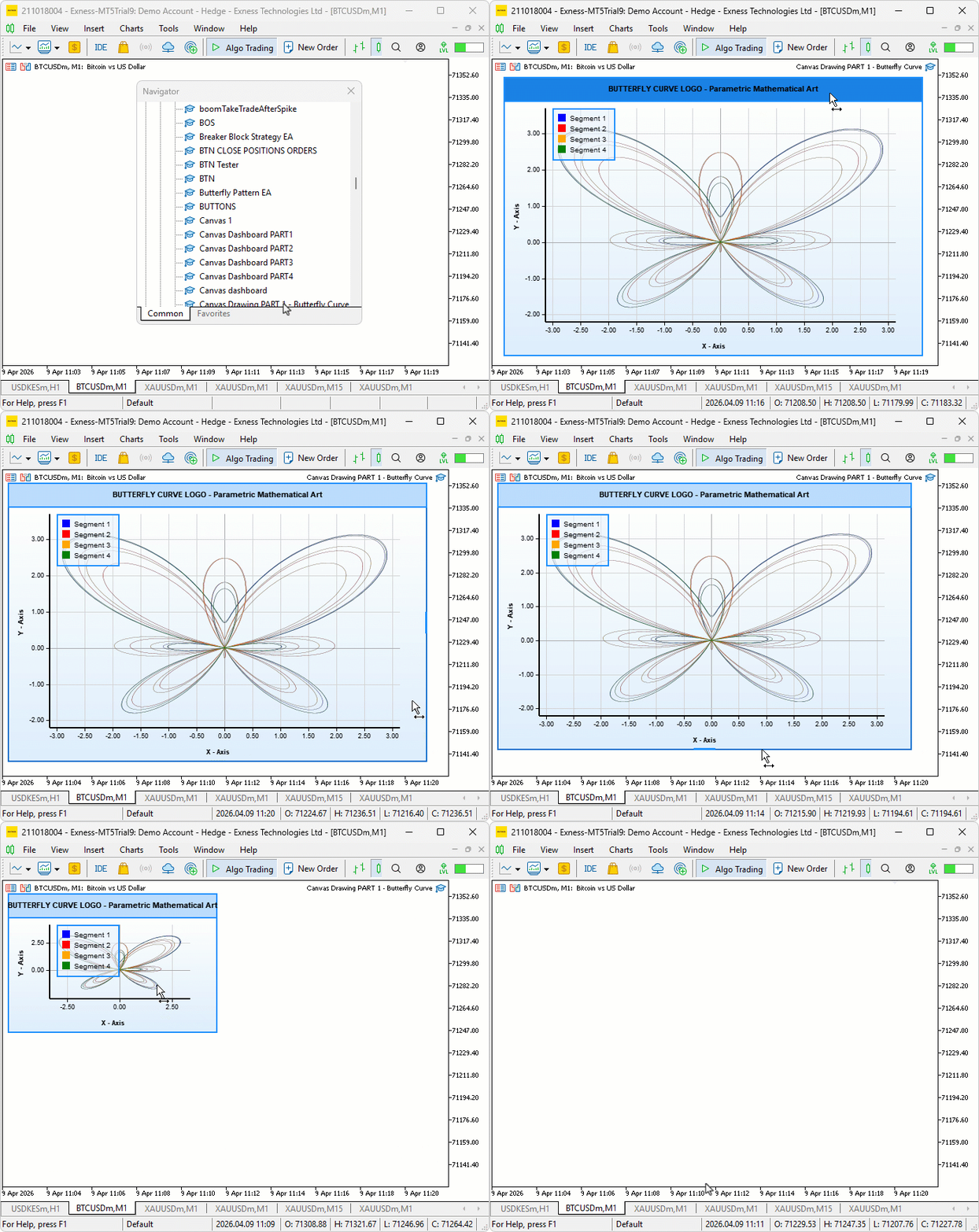
The butterfly curve renders cleanly across all four colored segments, with the blue segment tracing the first 3π of the parametric traversal, followed by red, orange, and green completing the remaining three equal portions through to the full 12π. The supersampled pipeline produces smooth, anti-aliased strokes with no visible pixel staircase artifacts along the curve edges. The axis grid, tick marks, and labels align correctly with the mathematical domain boundaries, and the legend panel sits in its designated position, identifying each segment by color — the canvas window responds to dragging and resizing as expected, with all three layers repositioning and rescaling in sync.
Conclusion
In conclusion, we have built a canvas-based visual tool in MQL5 that renders the butterfly curve — a parametric mathematical equation — directly on the MetaTrader 5 chart. We implemented a full-layered canvas system with a gradient background, a draggable and resizable floating window, supersampled anti-aliased curve rendering across four colored segments, a calibrated axis grid with tick marks and labels, and a floating legend panel identifying each segment. After reading the article, you will be able to:
- Render smooth parametric curves on an MQL5 canvas using the supersampling pipeline for clean anti-aliased output
- Build a fully interactive floating canvas window with dragging, resizing, and layered canvas stacking using Z-order control
- Construct a calibrated axis grid with dynamically computed tick positions and formatted labels that adapt to any canvas size
In the next part, we will take this further by adding realistic butterfly fills — layered wing coloring with vertical and radial gradients, wing vein lines, scale texture dots, and a detailed body with antennae — transforming the mathematical outline into a visually rich and lifelike butterfly illustration on the canvas. Stay tuned!
Warning: All rights to these materials are reserved by MetaQuotes Ltd. Copying or reprinting of these materials in whole or in part is prohibited.
This article was written by a user of the site and reflects their personal views. MetaQuotes Ltd is not responsible for the accuracy of the information presented, nor for any consequences resulting from the use of the solutions, strategies or recommendations described.


 Automating Market Entropy Indicator: Trading System Based on Information Theory
 Foundation Models in Trading: Time Series Forecasting with Google's TimesFM 2.5 in MetaTrader 5
 Hilbert-Schmidt Independence Criterion (HSIC)
 Account Audit System in MQL5 (Part 1): Designing the User Interface

- Free trading apps
- Over 8,000 signals for copying
- Economic news for exploring financial markets
You agree to website policy and terms of use