
AW Smart Grids MT5
- Experts
-
AW Trading Software Limited
 ______________ AW Trading Software ______________
📢 mql5com channel 👉 https://www.mql5.com/en/channels/awtradingsoftware - Version: 1.10
- Updated: 5 July 2026
- Activations: 15
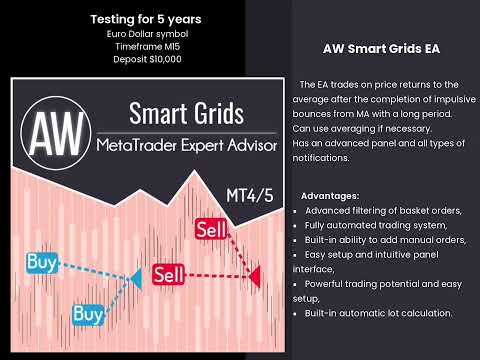
An automated trading advisor for implementing reversal strategies after market impulse movements.
AW Smart Grids is designed to automate trading in situations where the price deviates significantly from the average value and forms a return movement after the impulse ends.
The advisor does not follow the market's momentum and does not attempt to enter the market during periods of high activity. Trading decisions are made after assessing the weakening of momentum and the formation of conditions for a return.
The logic is based on the analysis of the price position relative to a long-period moving average, which allows us to cut out chaotic movements and focus on structural market situations.
The logic of the advisor's work:
• A significant deviation of the price from the average value is determined
• The state of the impulse and its completion are assessed
• Trades are opened at the stage of the return movement
• A position can be accompanied by a group of orders within a single logic
• Exit control is carried out according to the target level calculated for the entire group of orders.
This scheme allows us to formalize work with returns and reduce the influence of subjective decisions when maintaining a position.
Who is NOT suitable for:
• Not for scalping on M1
• Not for news trading
• Not for aggressive deposit overclocking
• Not for trading without understanding grid principles
Recommended conditions:
• Timeframe: H1 and higher
• Instruments: major currency pairs
• Minimum deposit: from $500 (depending on settings and risks)
• Account Type: ECN / Raw Spread
Functional features and benefits
- Working with a group of orders
The advisor views the position as a single structure, rather than a set of disparate transactions.
This allows:
manage the entire position as a whole
correctly calculate target output levels
avoid chaotic closing of individual orders
- Flexible averaging logic
When developing a position, it is allowed to work with a series of orders within the specified limits.
Adding orders is not a mandatory element of the strategy and is used only as a tool for maintaining a position under appropriate market conditions.
- Input filtering
Market entries undergo additional filtering aimed at:
excluding transactions at the moment of active impulse
reducing the number of premature entries
increasing the stability of the strategy in various market phases
- Support for manual orders
The advisor can take into account and manage orders opened manually, applying the same control logic to them as to automated trades.
This allows the product to be used as a tool for automating an existing trading idea.
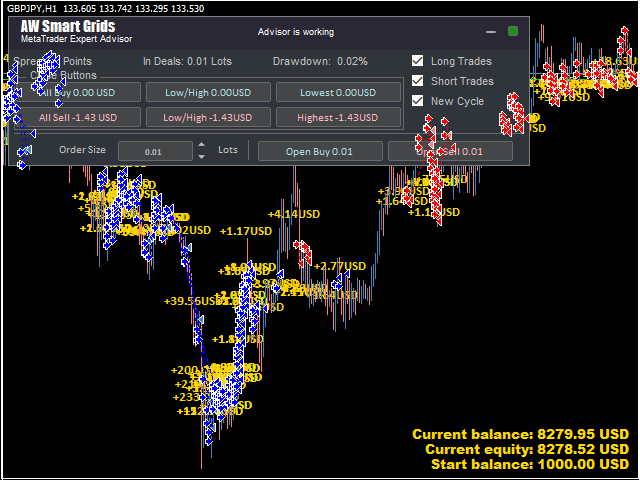
- Dashboard and notifications
The built-in panel provides information on the current position status, the number of orders, and key operating parameters.
Basic notification types are supported, allowing you to monitor the trading process without constantly being present at the terminal.
Input settings:
. Main settings
Size_of_the_first_order - Volume for opening the first order. Used if Enable Autolot calculation disabled.
Enable_Autolot_calculation - Enable autolot. If you use an autolot, you cannot use Size of the first order. Used for the first order.
Autolot_deposit_per_0.01 lots - The amount of the deposit for every 0.01 when using an autolot
Orders_Magic_number - The main identifier of the advisor's orders. Used primarily to identify advisor orders
Comments_of_the_EA's_orders - Commentary on orders opened by the advisor
Allow_to_open_OP_BUY_orders - A variable that allows you to select whether to enable or disable the EA's ability to open BUY orders
Allow_to_open_OP_SELL_orders - A variable that allows you to select whether to enable or disable the EA's ability to open SELL orders
Allow_to_open_new_orders_after_close - Ability to allow opening orders after closing previous ones. At the end of trading, you can disable this function and then the adviser will not be able to open new orders after closing the previous ones
Show_panel_of_advisor - Show or hide the advisor panel
Font_size_in_panels - Change the font size in the panel
. Protection setting
Maximum_slippage_in_points - Maximum allowable slippage in points for opening and closing orders
Maximum_spread_in_points - Maximum allowable spread for opening orders. Measured in points
Maximum_size_of_orders - Maximum volume for one order. Measured in lots
Maximum_number_of_orders - The maximum number of orders in a basket of the same type
. Grids settings
Multiplier_for_size_of_orders - Multiplier for orders. Each subsequent order opened by the advisor in the order grid will be larger than the previous one by a given coefficient
Step_for_grids - The variable that regulates the step between orders is measured in points
. TakeProfit settings
Size_of_Virtual_TakeProfit_(In_points) - The size of the virtual Take Profit. It is calculated for the current group of orders from the breakeven price
Use_overlap_last_and_first_orders - Use the first order overlap by the last
Use_overlap_after_that_number_of_orders - Use the overlap of the first order by the last one after a given number of open orders
. Signais
Minimal_distance_from_MA - The distance (in points) from the moving average that the price must overcome before opening a trade
MA_Period - The period of the moving average, the most important parameter affecting the aggressiveness of the EA. The larger the period parameter, the less often orders are opened
MA_Method - Variable modulating method of the MA indicator
MA_Applied_price - Adjusts the applied price in the MA indicator
Step_SAR - Step for the SAR indicator
Maximum_SAR - the maximum for the SAR indicator



















































Reliable EA that achieves good results with careful risk management.