
Ghost Scalper MT5
- Experts
- Version: 4.0
- Updated: 20 September 2026
- Activations: 12

Ghost Scalper MT5 4.0 is a fully automated Expert Advisor for XAUUSD / Gold on MetaTrader 5.
Ghost was developed for selective breakout and momentum movements in the gold market. The EA waits for the conditions of its four independent strategies and does not open trades constantly.
Version 4.0 adds different trailing profiles, an automatic Auto Offset system for Dynamic Fast, enhanced execution and broker monitoring, and additional dashboard analysis features.
LIVE SIGNALS
Ghost is publicly tracked on several real live accounts with different brokers.
Live results can change at any time and do not guarantee future results.
- Ghost Scalper MT5 TMGM – View live signal
- Ghost Scalper MT5 VT Market – View live signal
- Ghost Scalper MT5 Vantage – View live signal
- Ghost Scalper MT5 Future Lab Ultima – View live signal
4 INDEPENDENT STRATEGIES
Ghost combines four independent trading strategies:
- Ghost A
- Ghost B
- Ghost C
- Ghost D
Each strategy has its own entries, trading parameters, and separate money management.
For each strategy, you can individually select:
- ON / OFF
- BUY & SELL
- ONLY BUY
- ONLY SELL
- its own trailing profile
- its own money management
- its own risk or lot size
This allows Ghost A, B, C, and D to trade independently and be configured individually.
3 TRAILING PROFILES
Ghost Scalper MT5 4.0 offers three different trailing profiles for each of its four strategies:
Old Trail
Classic Ghost trailing with the established fixed parameters.
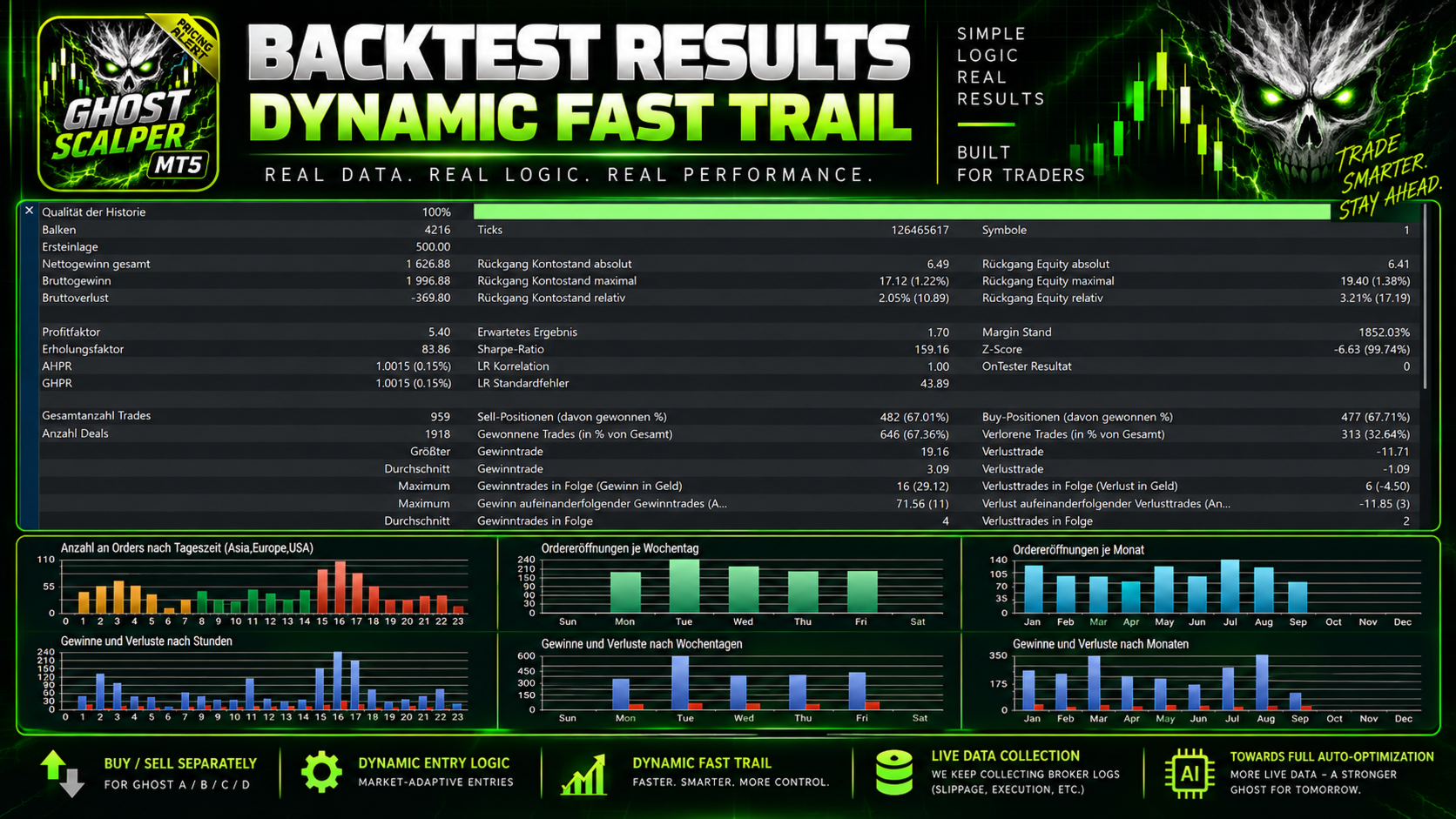
Dynamic Fast Trail
The default mode in Ghost 4.0.
Dynamic Fast uses a profile optimized for faster trade management and combines it with the internal Auto Offset V1.
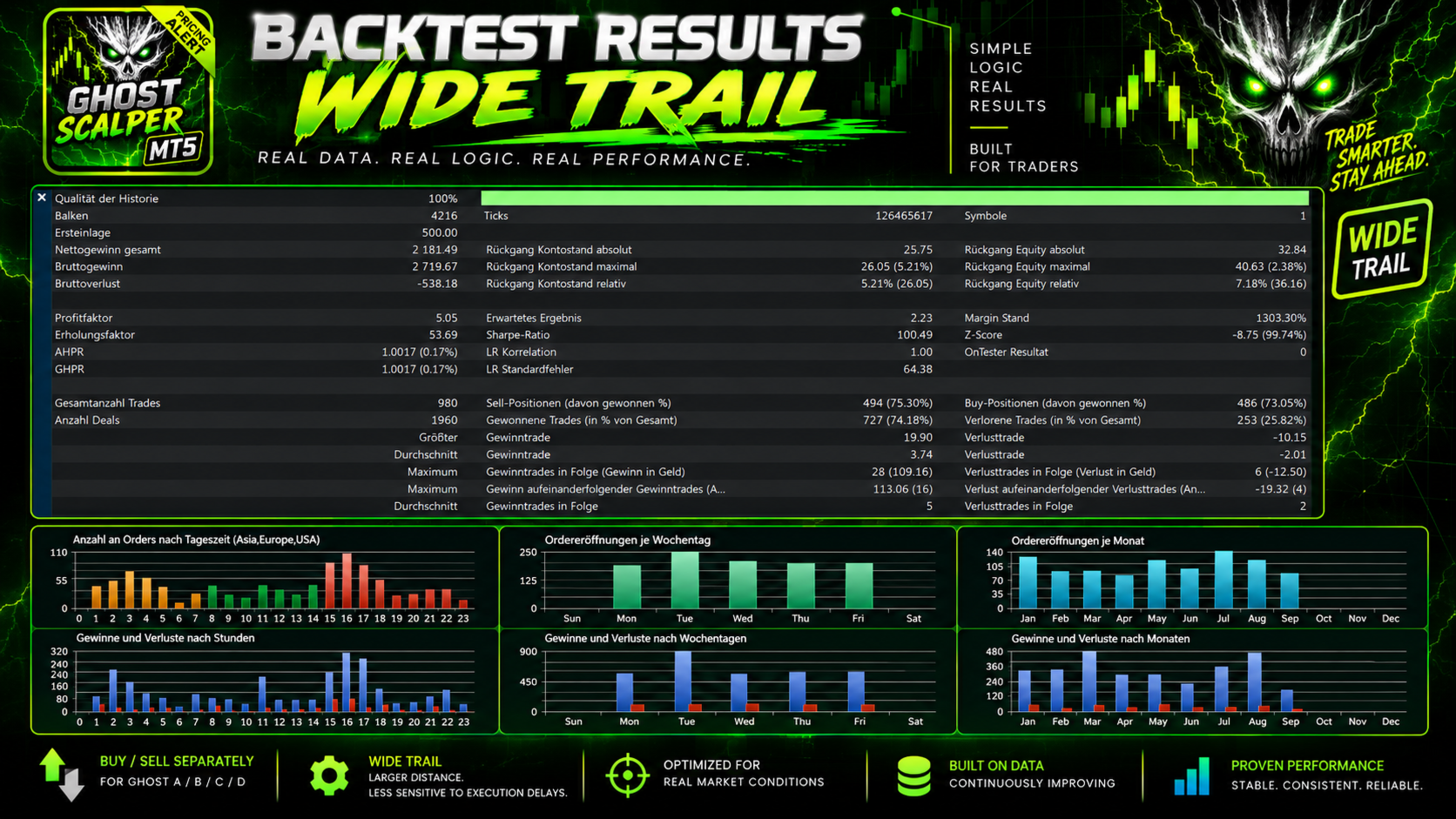
Dynamic Wide Trail
The WIDE profile uses larger trailing distances, giving an ongoing move more room.
Dynamic Wide uses the final WIDE parameters and fixed entry offsets.
You can therefore choose a profile separately for each strategy to suit your broker, VPS, and trading setup.
AUTO OFFSET V1
In version 4.0, Dynamic Fast includes an internal Auto Offset V1 system.
It analyzes only closed Ghost trades and compares recent performance with a larger historical sample. BUY and SELL are evaluated separately.
If short-term trade quality changes relative to the larger sample, the entry offset can be adjusted within predefined limits.
The following applies:
- only closed Ghost trades are used
- BUY and SELL are analyzed separately
- adjustments are limited
- no future data is used
- Old Trail remains unchanged
- Dynamic Wide continues to use fixed WIDE offsets
- Auto Offset works exclusively with Dynamic Fast
The system is designed to let Ghost respond in a controlled way to changes in recently observed trade patterns without constantly reoptimizing the entire strategy.
MONEY MANAGEMENT
Ghost offers three position sizing methods:
- Fixed Lot – a fixed lot size
- Risk Percent – automatic position sizing based on the selected risk percentage
- Risk per Balance – automatic lot scaling according to the current account size
Money management can be set separately for Ghost A, B, C, and D.
As several strategies can trade simultaneously, always consider their combined total risk.
AUTOMATIC TRADE MANAGEMENT
Ghost handles complete trade management:
- BUY and SELL entries
- automatic breakout levels
- pending orders
- Stop Loss
- Take Profit
- Trailing Stop
- position management
- automatic lot and risk calculation
- automatic pending order updates
- automatic news blocks
- weekend protection
In live and demo trading, Ghost pending orders are removed or blocked from Friday at 22:00 broker time.
New Ghost pending orders are allowed again from Monday at 00:00 broker time.
Existing open positions are unaffected and continue to be managed by the normal trading and protection system.
HYBRID TRAILING & PROTECTION SYSTEM
Ghost 4.0 uses a multistage protection system.
During normal operation, Ghost first tries to update the visible Stop Loss directly with the broker.
If the broker temporarily cannot accept the requested Stop Loss adjustment, for example due to:
- stop levels
- freeze levels
- invalid stop distances
- temporary broker errors
- fast market movements
- rejected SL modifications
the existing broker-side Stop Loss remains in place.
Ghost can additionally activate the desired new protection level internally as a virtual fallback.
If the market reaches this virtual protection level, Ghost tries to close the position using a normal market close.
At the same time, the EA continues trying on subsequent ticks to place the desired Stop Loss directly with the broker.
Once the broker-side Stop Loss reaches at least the virtual protection level, the virtual fallback is removed.
An activated virtual fallback is saved during live operation and can be resumed after restarting MT5, the EA, or the VPS.
NEWS FILTER
Ghost includes an integrated news filter for important USD economic news.
By default, Ghost monitors events including:
- FOMC / Fed Rate Decision
- Fed Press Conference
- CPI / Core CPI
- Non-Farm Payrolls
- Unemployment Rate
- Average Hourly Earnings
- PCE / Core PCE
Additional events can be enabled:
- PPI / Core PPI
- US GDP
- Retail Sales
- ISM Manufacturing
- ISM Services
By default, new entries can be blocked 30 minutes before and 30 minutes after selected news events.
Existing Ghost pending orders can also be removed during this news window.
The news filter can be disabled entirely.
NEWS WEEK RISK MODE
Ghost 4.0 also has a manual News Week Risk Mode.
Available settings:
- OFF
- REDUCE 25%
- REDUCE 50%
This lets you reduce overall trading risk during particularly volatile weeks or weeks with important news.
The reduction applies to the available money management modes.
IMPORTANT – NEWS FILTER SETUP
For the external news filter to work, the required WebRequest must be allowed in MetaTrader 5.
In MT5:
Tools → Options → Expert Advisors → Allow WebRequest
Then add the news URL specified in the Ghost EA to the allowed WebRequest list.
BROKER QUALITY & EXECUTION MONITORING
Ghost measures more than broker ping.
Version 4.0 monitors actual trade execution and takes into account:
- actual execution time
- broker rejections
- spread
- slippage
- average slippage
- last slippage
- worst slippage
- slippage costs
- fill information
Ghost calculates its own Broker Quality rating from several of these values.
The rating is therefore not based solely on distance to the broker server.
A low ping does not automatically mean good trade execution.
VPS QUALITY
Ghost 4.0 evaluates broker execution and VPS connectivity separately.
Broker Quality evaluates actual order execution.
VPS Quality evaluates factors including:
- connection to the trading server
- current ping / latency
- connection status
This helps distinguish whether potential execution problems are more likely related to the broker or the server/VPS connection.
LIVE OPTIMIZER
The large dashboard also includes a Live Optimizer.
It analyzes closed trades separately for each strategy and trading direction, using up to 30 of the most recent trades per strategy and direction.
It displays analysis values for:
- ENTRY Δ
- TRAIL START
- TRAIL DISTANCE
- TRAIL STEP
- number of available samples
Ghost A BUY, Ghost A SELL, Ghost B BUY, Ghost B SELL, etc. are evaluated separately.
Important: The Live Optimizer is an analysis and information system. It does not change strategy parameters automatically.
Dynamic Fast's automatic Auto Offset V1 is a separate system.
DASHBOARD MODES
Ghost offers three dashboard modes:
- BIG
- SMALL
- OFF
BIG DASHBOARD
The large dashboard displays information including:
- performance per strategy
- daily result
- total result
- Profit Factor
- number of trades
- win rate
- last trade
- execution quality
- last fill
- last slippage
- average slippage
- worst slippage
- slippage costs
- profit curve
- current drawdown
- maximum drawdown
- money management per strategy
- current lot sizes
- open trades
- total open lot size
- open P/L
- Broker Quality
- VPS Quality
- news status
- Live Optimizer
SMALL DASHBOARD
SMALL mode is much more compact and displays key data with a lower graphics load, including:
- profit per strategy
- maximum drawdown
- latency
- price slippage
- slippage costs
- Broker Quality
- news status
OFF
In OFF mode, the dashboard is disabled.
This reduces the graphics load and is particularly suitable for VPS systems running multiple MetaTrader terminals simultaneously.
RECOMMENDED SETUP
Symbol: XAUUSD / Gold
Timeframe: H1
Algo Trading: ON
VPS: as close as possible to the broker server
News Filter: configure WebRequest permissions correctly
Ghost may remain without a trade for an extended period after starting. Each of the four strategies waits for its own market conditions.
Wait for the setup. Do not force trades.
BROKERS & EXECUTION
Different brokers can produce different results even with identical Ghost settings.
Factors that may affect results include:
- spread
- slippage
- execution time
- broker rejections
- liquidity and market conditions
- account type
- server location
- VPS quality
- XAUUSD contract specifications
A low ping alone does not guarantee good execution.
That is why Ghost monitors actual order execution, slippage, and broker responses directly during trading.
RISK NOTICE
Trading forex and CFDs on margin involves a high level of risk and is not suitable for every investor.
Past results, including backtests and live signals, are not a reliable indicator of future results.
Ghost Scalper MT5 4.0 does not guarantee profits.
Market conditions, broker execution, spread, slippage, liquidity, technical failures, and other factors can affect actual results.
The user is responsible for the selected settings, lot size, and total risk.





































good ea, good support, solid profit, im using on real account