MakingAssistantNetworker

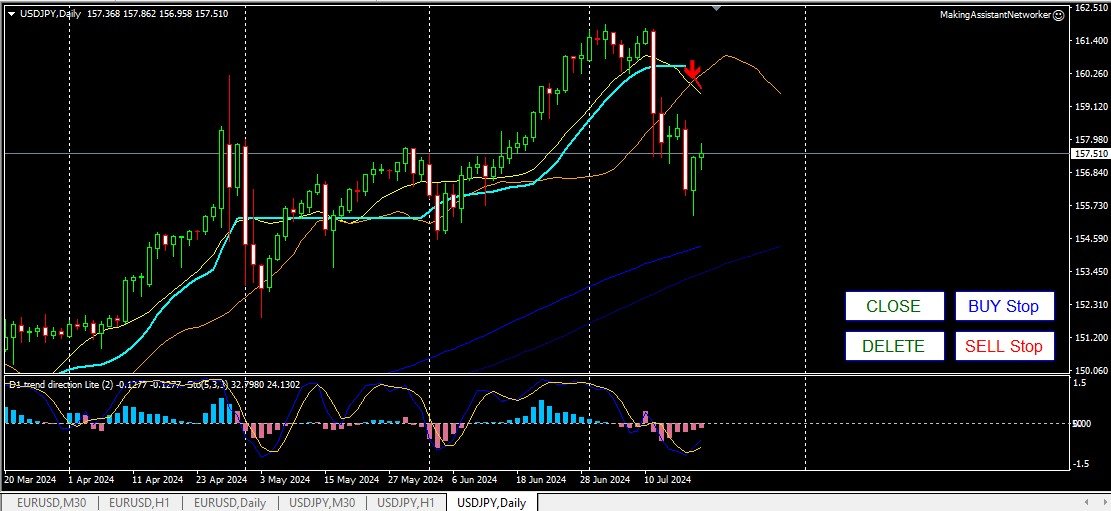
This is a regular panel that places a network of buy and sell orders. This Expert Advisor closes the profit order defined in the settings. Then, there is a parameter called Ladder, which includes that the distance between orders begins to increase by the points indicated by the ladder parameter (here, in the main settings, it is 10 points), which means the second order is 10 points, the third order is 20 points, the fourth order is 40 points, etc.

Then, you need to know what is in this adviser, since this is not in the settings, but it will affect the logic of the proposed strategy by this adviser.. Let's say it is in the settings here that the adviser will open five orders... or for a purchase... or for sale... Good... however, when opening orders, it will increase the lot of the next open order by half of the previously opened order. That is, if you set 0.1 lots in the settings, then five orders will open according to the scheme, the first order closer to the current price will be opened at a price of 0.1 lots. The second, for a given step, here a Step of 50 points will open at a price of 0.15 lots. The third one, after another 50 points, will open at a price of about 0.22 lots. The fourth one, with a set step through 50 points at the price of 0.33 lots. And the fifth, with a set step of 50 points at the price of 0.49 lots. That is, by opening orders, this adviser will increase each subsequent order by half the lot of the previous order each time. What is the logic of such trading? (I usually use day trading and open positions, sometime before 10:00 a.m... sometimes a little later... here it is necessary and the whole point is in the behavior of the market price at the moment. Sometimes I open both buy and sell orders at the same time and wait for the current price to hook an order and then, based on this open order, I then build a further strategy). In the settings, the love item is equal to 10.0 dollars (bucks), this parameter corresponds to the achievement of which profit all market orders will be closed... I put it at (at) $ 25.0 and as soon as open orders reach a positive profit in the terminal in the amount of $ 25.0, the ADVISER closes all market orders. This behavior of the adviser, on top of everything else, gives you the opportunity to open your trades manually... at your discretion... that is, how do you see the market situation for yourself and how do you think that this is how you will achieve profit. It takes me time to trade, give or take a couple of hours and $25.0 in my pocket... for a week, it turns out to be $ 100.0 with a little bit more. We can say that this is scalping... maybe it is, but I use the H1 chart for trading and check, look at the price, using the M30 and D1 charts ...).


extern double Lots   = 0.1;
extern int Magic     = 1234;
extern int Slippage  = 50;
extern int StopLoss  = 200;
extern int Number    = 5; 
extern int Step      = 50;
extern int StepPrice = 50; 
extern double love   = 10.0;
extern bool Ladder   = false;
extern int ladder    = 10;

Recommended products
Exp Swing
Vladislav Andruschenko
4.43 (63)
It uses the model of a famous strategy called Swinger (Pendulum, Cheburashka) - alternate placing of pending orders with increased lot. The strategy lies in placing two opposite pending orders. When the price moves in a certain direction, one pending order is triggered, while the lot size of the other order is increased. The EA provides three types of opening pending orders (TypeofTrade) Auto-opening after placement (Instant opening AutoTrade) Opening and management after manual opening (Manual
FREE
Grid Trading
Waseem Raza
5 (3)
Grid Trading EA is a semi-automated one-click trading EA for both Normal Trading and Grid/Martingale Trading . Normal Trading Simply click Buy or Sell directly from the chart. The EA will automatically manage trades by: Setting Stop Loss and Take Profit Managing Trailing Stop Grid / Martingale Trading When Grid Trading mode is enabled, the EA will automatically open additional grid orders at specified distances while increasing the lot size based on your settings. Inputs & Settings Lots — Initia
The Arrow Scalper
Fawwaz Abdulmantaser Salim Albaker
1 (2)
Dear Friend..  I share with you this simple Expert Adviser .. it is full automatic  this Expert Adviser following the trend of the pair you install on or any stocks or indices , it is works like that: - when the trend on H4 chart show a start of up trend the expert will wait till the 15M & 1H charts show an up trend the EA will open a buy order directly , and do the same for down trend and open a sell order the buy or sell  order lot size and take profit and stop loss will measured manually  by
FREE
Auto Fibo Pro m
DMITRII GRIDASOV
"Auto FIBO Pro"   Crypto_Forex  indicator  - is great auxiliary tool in trading! Indicator automatically calculate and place on chart Fibo levels and local trend lines (red color). Fibonacci levels indicate key areas where price can reverse. Most important levels are 23.6%, 38.2%, 50% and 61.8%. You can use it   for reversal scalping  or for zone grid trading. There are plenty of opportunities to  improve your current system using Auto FIBO Pro indicator as well. It has Info Spread Swap Displa
Spd EA
David Binka Kumatse
THE PRODUCT This Spd Expert is an EA to be used on multiple chosen pairs simultaneously. Every order has a TP and an SL, so there is nothing to fear. You just have to be patient as EA trades to grow your account. After purchasing the EA, you can also message me for my optimized settings.    Recommended TimeFrame is 1H TRADE PLAN Consider a recommended minimum starting capital of $100 and an initial lotsize of 0.01 yielding a minimum profit of $20 over 12 months of trading on a single pair. Then
По факту вы выставляете виртуальные Buy Stop и Sell Stop которые срабатывают после закрытия свечи. Данный помощник позволяет заранее выставить уровень Stop Loss и Take Profit. Так-же имеется демо режим для предварительного расчёта параметра риск/прибыль. Помощник имеет следующие настройки "Лот" по умолчанию "0.01" "Проскальзывание" по умолчанию "60"        (Значение в пунктах) "Номер Ордера" по умолчанию "0"               (Магический номер ордера) "Цвет Комментариев" по умолчанию "Black"  "Шрифт
VR Cub
Vladimir Pastushak
VR Cub is an indicator for getting high-quality entry points. The indicator was developed to facilitate mathematical calculations and simplify the search for entry points into a position. The trading strategy for which the indicator was written has been proving its effectiveness for many years. The simplicity of the trading strategy is its great advantage, which allows even novice traders to successfully trade with it. VR Cub calculates position opening points and Take Profit and Stop Loss targe
Angry bull Option Binary
Fabio Oliveira Magalhaes
1 (1)
Angry Bull Option Binary   This is a Binary Options robot, which contains 7 strategies, you can backtest it to check what the best strategies are Settings Initial Batch Value Dynamic Investment = If activated it will use an automatic lot according to its capital Balance ($) w/ backtest = Starting balance to backtest PorcRiscoInvestment = It will be the value of % for the automatic lot if it is activated Expiration (in minutes) = It will be the expiration time of orders in Binary Options Magic
SwiftEdge Scalper Professional Tick Scalping EA with Full Manual Control Scalping demands split-second decisions, precise risk management, and seamless order execution. Managing breakeven calculations, trailing stops, and multiple positions while watching price action is overwhelming without the right tools. SwiftEdge Scalper is your professional trading assistant designed for active scalpers and day traders. Execute trades with one click or keyboard shortcut, while the EA handles breakeven, tra
Semi Auto Recovery Zone
Sirinya Pakkaman
5 (1)
Details of each condition Type 1. Set no use Hedging Martingale, to open the order by yourself only through the push button. TP and SL follow setting. Set Setting_Hedging =false;     Use_Signal =false;  Type 2. Semi Auto Recovery Zone You have to open the order by yourself only through the push button. If in the wrong direction and Set true on Hedging Martingale, EA will fix the order with the zone system by use Hedging Martingale Set Setting_Hedging =true;     Use_Signal =false;  Type 3. Use

Exp Averager
Vladislav Andruschenko
4.82 (22)
Averager for MetaTrader 4 — advanced trade recovery and position series management system A professional Expert Advisor created for traders who need a controlled way to average losing positions, build a structured trade basket, and manage exits with more flexibility. Averager is designed to open additional trades when positions move into drawdown, helping you improve the average entry price and manage the entire series as one coordinated structure. This is not just another averaging utility. It
News Scalping Executor Pro is an utility which helps to trade high impact and huge volatility news . This utility helps to create two opposite orders with risk management and profit protection. It moves automatically stop loss level to avoid losses as much as possible by using many different algorithms. It helps to avoid trading the news if spread suddenly becomes very huge. It can lock profit by moving stop loss or partially closing of orders. To be profitable with this type of trading you sh
One of the number sequences is called "Forest Fire Sequence". It has been recognized as one of the most beautiful new sequences. Its main feature is that this sequence avoids linear trends, even the shortest ones. It is this property that formed the basis of this indicator. When analyzing a financial time series, this indicator tries to reject all possible trend options. And only if he fails, then he recognizes the presence of a trend and gives the appropriate signal. This approach allows one t
Close_All_Trades_with_TP_SL is a reliable and efficient MQL4 Expert Advisor designed to simplify and automate trade management for all open positions on your MT4 account. This EA is especially useful for traders who open multiple trades quickly or use high-frequency strategies where manual TP/SL placement becomes difficult and time-consuming. The primary purpose of the EA is to ensure that every open trade—whether Buy or Sell—always has a predefined Take Profit (TP) and Stop Loss (SL) applied. M
FREE
This script is designed to automatically open charts for all available forex pairs on the MetaTrader 4 platform, as well as the gold (XAUUSD) chart. The script iterates through all symbols available on the platform, determines which of them are forex pairs, and opens their charts on the M1 (one minute) timeframe. Key Features: Gold Chart Opening: The script automatically opens the XAUUSD (gold/dollar) chart if this symbol is available from your broker. If the gold symbol is not found, an error m
Risk Commander
Adisorn Soodkanueng
Product Name: Risk Commander: Trade Assistant & Strategy Simulator Risk Commander is more than just a trade panel—it is a complete Manual Trading Ecosystem . It serves two powerful purposes: Live Assistant: Helps you execute trades with speed, precision, and perfect risk management in real-time markets. Training Simulator: Fully compatible with the Strategy Tester (Visual Mode) , allowing you to practice manual trading on historical data without risking a cent. NEW! Built-in Simulator Mode Stop
PatternVol EA
Alexandr Gribanov
4.5 (2)
The PatternVol EA is based on its own observations of the market and consists of patterns, candlestick analysis, analysis of candlestick volumes, and also, the EA does not contain indicators. At the moment, the advisor is a small constructor of my non-indicator strategies, you can disable and enable each strategy separately, or make an assembly from several strategies. The work on the advisor continues to this day, new strategies are added, algorithms are improved. In the future, it will be a l
FREE
TSim
Sergey Kruglov
Утилита  TSim   позволяет симулировать ручную торговлю в Тестере Стратегий MetaTrader 4. В панеле можно устанавливать размеры лота, тейпрофита и стоплосса. Панель имеет кнопки Sell   и Buy для выставления рыночных ордеров, а также кнопки CloseSell, CloseBuy и CloseAll для быстрого закрытия ордеров. Под панелью отображается список открытых ордеров. Внимание. Панель работает только в Визуальном режиме Тестера Стратегий MetaTrader 4.
FREE
NAS100 Auto Sl And TP
Moustapha Boulouz
5 (2)
Introducing NAS100 Auto SL and TP Maker for MT4: Never miss setting StopLoss and TakeProfit again with our NAS100 Auto SL and TP Maker, an indispensable assistant for traders navigating the Nasdaq 100 market on MetaTrader 4. This tool is designed for those who seek a seamless solution to automate the management of StopLoss and TakeProfit levels. Key Features: Effortless Automation: Automatically monitors Nasdaq 100 trades without StopLoss and/or TakeProfit. Dynamically adjusts levels based on us
FREE
Virtual OCO Pending
Kenneth Parling
5 (1)
Introduction 'Virtual OCO Pending' - a semi automatic order management utility tool (expert adviser) with risk assessment which let's you quickly place pending stops or limits with a button click at current price with virtual take profit and stop loss using OCO pending rule (One Cancel Other). Visual levels drawn on chart for easy visual confirmation. You can use this utility from one single chart to send orders on any other symbol you want, no need to attach it to the corresponding chart (optio
Lucky Trade Panel MT4
Nina Yermolenko
5 (1)
Trading panel for manual trading. Has a fairly wide functionality. Allows you to automatically calculate the order size, open both market and pending orders. It has a wide range of options for closing orders, it is possible to partially close orders, close orders after reaching a certain profit or loss, separately close profitable and unprofitable, buy and sell, as well as pending orders. The panel also contains a simple implementation of a grid of pending orders, reverse and lock functions, tr
Set TP & SL by Price – Auto Order Modifier for MT4 Automatically set precise TP and SL price levels on any trade ️ Works with all pairs and EAs, filter by symbol or magic number This Expert Advisor lets you define and apply exact Take Profit (TP) and Stop Loss (SL) levels to your trades using direct price values (e.g., 1.12345 on EURUSD). No points, no pips. Just clean, accurate trade management across all orders or filtered by chart or magic number. Key Features: Instantly modify TP
Make grid trading safe again | Built by a grid trader >> for grid traders.    Walkthrough Video  <== Get Grid Rescue up and running in 5 minutes  This is MT4 version, click  here  for  BlueSwift GridRescue MT5  (settings and logics are same in both versions) BlueSwift Grid Rescue MT4  is a risk management utility  EA  (used together with other grid trading experts) that can help you trade aggressive grid systems with manageable drawdown, therefore reduce substanstially margin call risk as we
Order Panel 28
Pablo Sebastian Nequecaur
Order Panel 28 — Professional Manual Execution Panel for MT4 Trade 28 forex pairs from a single on-chart panel — with automatic lot sizing, split entries, auto break-even, and stealth SL management. Order Panel 28 is a precision execution tool built for manual traders who want full control over their entries while eliminating the repetitive calculations that slow you down and cause mistakes. No indicators, no black-box signals — just a clean, fast panel that does the math so you can focus on you
FREE UNTIL FEBRUARY 14, 2023 SPEND MORE TIME WITH YOUR FAMILY. ENJOY LIFE… DO NOTHING. This version is only auto set of Takeprofit and StopLoss Main Version  of  TropangFX:   MT4 Version  |  MT5 Version Recommended timeframe:   H1 Supported currency pairs:  GBPUSD, EURUSD, EURCHF ,   USDCAD, USDCHF ,  AUDCAD, EURCAD, EURAUD and many more... Requirements The EA requires good brokerage conditions:   low spread   and   slippage   during the rollover time. I advise using a really   good ECN brok
FREE
Easy Trade Executor is a tool for fast position sizing, trade execution, and trade management in MT4. Place Open Price, Stop Loss, and Take Profit levels directly on the chart, get automatic position size calculations, and open trades with controlled risk in just a few clicks. Why Easy Trade Executor? Easy Trade Executor is designed for traders who want more than just risk calculations — they want to manage trades quickly and efficiently directly from the chart. The tool combines position sizi
NebularMan
Viktor Shpakovskiy
EA for manual trading with the ability to add new orders with increasing in one lot. You can manage the risk by changing the lot volume, the step between orders, and limiting the number of open positions and the total volume of lots. There is a trailing stop, virtual stop loss and virtual take profit, which can be freely moved around the chart. With the help of the built-in trading simulator, you can check how the EA works in the strategy tester. Benefits the initial lot is opened by a trader or
SFire Gold EA
Jacques Scholtz Fourie
This EA is a grid-based trading system. It incorporates several advanced features to manage trades dynamically and adapt to market conditions. Here's a summary of its functionality: I am happy to provide my settings file. Recomendation would be to run on a 20 000 cent account. Key Features: 1. Grid Trading Strategy:    - The EA uses a grid-based approach to open buy and sell trades at predefined price intervals.    - It dynamically adjusts the grid levels based on market conditions and risk se
Equity Master Stop v2
Frank William Jr Colbert
Trading tool combining a sophisticated equity stop-loss, dynamic take-profit management (Breakeven & Trailing), and symbol-group-based closing logic. It is a complete risk management and trade supervision tool. Features: All features of `Equity Master Stop v1` (floating profit/loss limits, exit protection, skip hours). Take-Profit Override: Can force a TP on any order to lock in a `MAX_FLOATING_PROFIT`. Step Breakeven: Locks in increasing amounts of profit as a trade moves favorably (e.g., aft
Ultimate Trailing Stop EA
BLAKE STEVEN RODGER
4.33 (15)
This EA Utility allows you to manage (with advanced filtering) unlimited open orders (manual or EA) with 16 trailing stop methods: fixed, percent, ATR Exit, Chandelier Exit, Moving Average, Candle High Low Exit, Bollinger Bands, Parabolic, Envelope, Fractal, Ichimoku Kijun-Sen, Alligator, Exit After X Minutes or Bars, RSI and Stochastic. The trailing stop can be either real or virtual, and you can exit fully or with a partial close percent on touch or bar close.  Moreover, you can add (overrid
Buyers of this product also purchase
Strategy Builder offers an incredible amount of functionality. It combines a trade panel with configurable automation (covert indicators into an EA), real-time statistics (profit & draw down) plus automatic optimization of SL, TP/exit, trading hours, indicator inputs. Multiple indicators can be combined into an single alert/trade signal and can include custom indicators, even if just have ex4 file or purchased from Market. The system is easily configured via a CONFIG button and associated pop-up
The product will copy all telegram signal to MT4   ( which you are member  ) , also it can work as remote copier.  Easy to set up, copy order instant, can work with almost signal formats, image signal, s upport to translate other language to English Work with all type of channel or group, even channel have "Restrict Saving Content", work with  multi channel, multi MT5 Work as remote copier: with signal have ticket number, it will copy exactly via ticket number. Support to backtest signal. How to
Custom Alerts AIO: All-in-One Market Scanner – No Setup Required Overview Custom Alerts AIO is the fastest and easiest way to monitor multiple markets for real-time trading signals—without any setup or extra licenses. It comes with all required Stein Investments indicators already embedded, making it the perfect plug-and-play solution for traders who value simplicity and performance. Just load it to any chart and start receiving alerts across Forex, Metals, Crypto, and Indices. Shares can be a
EasyInsight AIO MT4
Alain Verleyen
4 (2)
EASY Insight AIO – All-In-One Power for AI-Driven Trading Want to skip the setup and start scanning the entire market – Forex, Gold, Crypto, Indices, and even Stocks – in seconds? EASY Insight AIO is the complete plug-and-play solution for AI-powered trade analysis. It includes all core Stein Investments indicators built-in and automatically exports clean, structured CSV files – perfect for backtesting, AI prompts, and live market decision-making. No need to install or configure indicators manu
Unlimited Trade Copier Pro is a tool to copy trade remotely to multiple MT4, MT5 and cTrader accounts at different computers/locations over internet. This is an ideal solution for you if you are a signal provider and want to copy your trades to other receivers globally on your own rules. One provider can copy trades to multiple receivers and one receiver can get trade from multiple providers as well. The provider can even set the subscription expiry for each receiver, so that receiver will not b
ManHedger MT4
Peter Mueller
5 (2)
THIS EA IS A SEMI-AUTO EA, IT NEEDS USER INPUT. Manual & Test Version Please TEST this product before   BUYING  and watch my video about it. Contact me for user support or bug reports, or if you want the MT5 version! MT5 Version I do not guarantee any profits or financial success using this EA. With this Expert Advisor, you can: Implement your own   Zone Recovery   strategy to capitalize on trending markets. Create   Grid   trading strategies, to profit from ranging markets. Place orders easil
Smart Channel M4
Vahidreza Heidar Gholami
The trend in the market can be predicted using trend lines but the problem is you don’t know where exactly the price is going to touch the trend line where you can put your pending orders on. Smart Channel Expert Advisor makes it possible to put an advanced channel around the price data, which can be configured to handle placing orders, opening and closing positions, managing risk per trade, spread, slippage, and trailing stop-loss and take-profit automatically. Features Money Management (Calcul
Crystal Trade Manager PRO – Advanced MT4 Risk & Trade Control System Overview Free :- https://www.mql5.com/en/market/product/150632 Crystal Trade Manager PRO (CTM) is a fully–featured trade execution and risk management utility for MetaTrader 4. It is built for traders who require disciplined execution, strong risk protection, and intelligent automation on MT4. The system manages risk, protects equity, enforces daily limits, automates SL/TP logic, and provides a fast one-click trade panel with p
RedFox Copier Pro
Rui Manh Tien
4.7 (10)
Time saving and fast execution Whether you’re traveling or sleeping, always know that Telegram To Mt4 performs the trades for you. In other words, Our   Telegram MT4 Signal Trader  will analyze the trading signals you receive on your selected Telegram channels and execute them to your Telegram to MT4 account. Reduce The Risk Telegram To Mt4   defines the whole experience of copying signals from   Telegram signal copier to mt4 platforms. Users not only can follow all instructions from the signa
The product will copy all  Discord  signal   to MT4   ( which you are member  ) , also it can work as remote copier.  Easy to set up. Work with almost signal formats, support to translate other language to English Work with multi channel, multi MT4. Work with Image signal. Copy order instant, auto detect symbol. Work as remote copier: with signal have ticket number, it will copy exactly via ticket number. How to setup and guide: Let read all details about setup and download Discord To MetaTrader
Dashboard Trade Manager
Moegamat Luqmaan Titus
Dashboard.mq4 – The Ultimate All-In-One Trading Command Center In trading, time is money. Stop wrestling with clunky interfaces, scattered tools, and slow execution. **Dashboard** is not just a trade manager; it is a complete professional trading terminal designed for MT4. It combines execution, risk management, technical analysis, and market news into one lightning-fast, intuitive interface. Designed for the serious manual trader, Dashboard replaces your chart clutter with precision tools that
The FFx Hidden Manager panel will help you to manage easily your orders directly on the chart. Below all features described: TP, SL and TrailingStop are hidden Each order has its own lines on chart Drag & Drop any line to change the TP/SL as per your need Option to move automatically the SL line at breakeven when TP #1 is reached Option to choose the TP/SL type (by pips or price) Option to choose the TrailingStop type (by pips, MA, Fractals, PSAR or ATR) Define which order(s) you want to manage
FFx Risk Calculator
Eric Venturi-Bloxs
FFx Risk Calculator panel will help you to calculate very easily your trades size, SL or the risk directly on the chart. All features are described below: Option to select which parameter to calculate: Risk, Stop Loss or Lot Size The panel will show if the lot size is allowed according to the current account free margin Button to maximize/minimize the panel Drag and Drop the panel anywhere on the chart How to use it? Select the parameter you want to be calculated. It will be based on the 2 other
Trade Copier Pro
Vu Trung Kien
4.29 (14)
Trade Copier Pro is a tool to copy trade remotely to MT4, MT5 and cTrader accounts at different computers/locations over internet. This is an ideal solution for you if you are a signal provider and want to copy your trades to other receivers globally on your own rules. One provider can copy trades to multiple receivers and one receiver can get trade from multiple providers as well. The provider can even set the subscription expiry for each receiver, so that receiver will not be able to receive t
News Trader Pro
Vu Trung Kien
4.38 (16)
News Trader Pro is a unique robot that allows you to trade the news by your predefined strategy. It loads every piece of news from several popular Forex websites. You can choose any news and preset the strategy to trade it, and then News Trader Pro will trade that news by selected strategy automatically when the news comes. News release gives opportunity to have pips since the price usually has big move at that time. Now, with this tool, trading news becomes easier, more flexible and more exciti
FFx Watcher PRO
Eric Venturi-Bloxs
The FFx Watcher PRO is a dashboard displaying on a single chart the current direction of up to 15 standard indicators and up to 9 timeframes. It has 2 different modes: 1. Watcher mode: Multi Indicators User is able to select up to 15 indicators to be displayed User is able to select up to 9 timeframes to be displayed 2. Watcher mode: Multi Pairs User is able to select any number of pairs/symbols User is able to select up to 9 timeframes to be displayed This mode uses one of the standard indicat
Transaction Repeater Full
Alexandr Bryzgalov
5 (4)
Copies transactions between MT4 terminals. Possibilities: quick copy start minimum processor load direct and reverse (reverse) copying. copying Take Profit and Stop Loss levels copying deferred and their changes copy transactions one to many copy trades many to one local copy only Attention: The product is designed for copying trades only within a single computer or VPS with access to the desktop. The product will not work on the built-in Virtual Hosting of the terminal. We will help you set up
The product combines a manual trade panel with the ability to perform actions automatically in a highly configurable way. Actions include capturing indicator values and then based on those values raising alerts, open/close or partially close trades, scale-in, setting up pending orders, adjusting stop loss, take profit and more. On-chart controls can be configured, such as tick boxes and buttons, so can be fully interactive. The EA also handles money management, news events, hidden stop loss, tak
Binary Options Copier Remote is an EA that allows to copy binary options trades between MT4 accounts at different computers. This is an ideal solution for signal provider, who want to share his trade with the others globally on his own rules. Provider can give free bonus license to 10 receivers. That means those 10 receivers can copy from provider by using Binary Options Receiver Free (no cost). From 11th one, receiver have to buy Binary Options Receiver Pro (paid version) in order to copy from
Price Action DashBoard
Chantal Sala
4.17 (6)
The Price Action Dashboard is an innovative tool to help the trader to control a large number of financial instruments. This tool is designed to automatically suggest signals and price conditions. The Dashboard analyzes all major Time Frame suggesting price action conditions with graphic elements. The Dashboard can suggest you the strength of the trend identifying directional movement, it is an indispensable tool for those who want to open position themselves using market trends identifiers. The
Elliott Wave Counter is a panel for rapid and user-friendly manual markup of Elliott waves. One can select a color and a level of marks. There are also functions for removing the last markup and the entire markup made by the tool. Markup is made in one click. Click five times - have five waves! Elliott Wave Counter will be a great instrument both for beginners and professional analysts of Elliott waves. Elliott Wave Counter Installation & Inputs Guide if you want to get   notifications  about th
If you wish to draw Support and Resistance lines, view: daily market opening, classical pivot levels, Fibonacci pivot levels, trend lines, Fibonacci levels, the remaining time to candle closing, and current spread. If you seek to place your orders with the exact lot that meets your desired stop loss risk. If you wish to do all this and more with just one click, then this is the perfect tool to use. This tool will allow you to feel more relaxed when deciding to open orders, as well as predicting
Partial Close Expert
Omar Alkassar
5 (1)
Partial Close Expert is tool combines many functions into one automated system. This EA can help traders manage their positions more effectively by offeringmultiple options for managing risk and maximizing potential gains. With Partial Close Expert, traders can set a   partial close   level to lock in profits, a   trailing stop   level to protect profits and limit losses, a   break-even   level to ensure that the trade will break even if the price moves against them, and several other functions
Master Trend Dashboard
Chantal Sala
4.67 (3)
Master Trend Dashboard is a new generation indicator, compact, light and efficient. Each element of this Dashboard is designed to return specific signals as: Price Action, Breakout, Net Change (performance of the instrument), algorithmic studies, correlations and statistical calculations. This tool will change your way of trading allowing you to receive important information. See the Graphic Signals to understand every single signal below: Graphic Signals Symbol name and arrow color Green = Cur
Trade Copier Agent is designed to copy trades between multi MetaTrader(4/5) accounts/terminals. With this tool, you can act as either a provider (source) or a receiver (destination). All trading actions will be copied from the provider to the receiver with no delay. This tool allows you to copy trades between multiple MetaTrader terminals on the same computer with lightning-fast copying speeds of under 0.5 seconds. Trade Copier Agent Installation & Inputs Guide Please Apply the settings on the
Unlimited Binary Options Copier Remote is a powerful tool to copy binary options trades remotely between multiple accounts at different locations over internet. This is an ideal solution for signal provider, who want to share his binary options trades with the others globally on his own rules. One provider can copy trades to unlimited receivers and one receiver can get trade from unlimited providers as well. The provider can set the subscription expiry for each receiver, so that receiver will no
This is an Expert Adviser use for manual trading as a background EA or combine with external EA to open orders. Loss Recovery Trading is one of your options to handle the lose positions instead of using stop loss by setting a zone recovery area and target to exit the turn rounds sequence. How It Work? If the market goes against your first positions direction at the specific of losing points, the EA will open an opposite direction position with calculated larger lot size and also keep the first
Great for scalper/intraday weapon for your ease daily trading. Scalper weapon will suit's you for any trading condition, whether it's intraday / scalper this tool is important for you which providing the missing function on the native MT4 platform. You have to check Allow Auto Trading by pressing Ctrl+O, going to Expert Advisors tab, and checking " Allow automated trading" . also to ensure the " auto trading " is green. Input Parameters _MINIMIZED_AT_START: to chose whether the panel is minimiz
Market Pressure Dashboard is a new generation utility. Its main function is to assist you and give you operational ideas optimizing your analytical work. Using this utility you could monitor a lots of financial instruments (max 28 symbols FOREX) in a very simple way. The Market Pressure indicator allows you to customize the internal list of the symbols to be monitored. The opening function and position management with this panel will be much more comfortable and navigation charts very powerful.
Contact/message me if you encounter any issue using the product or need extra feature to add on the base version. There is a demo version of this panel Dashboard Trading Made Simple Demo in my product list, please try it out to get familiar with all functionalities free, LINK . This system basically utilizes TDI as the main indicator to generate trading signal mainly on H1 and H4 timeframes. The signal will be further filtered and trimmed. Stochastic; Heiken Ashi candle direction and candle siz
More from author
Hello everyone.  I want to tell you a little bit about this panel for trading in the financial foreign exchange market. The panel is written in the MQL4 programming language and is designed to help open market orders for certain positions. It works with both regular and pending orders. That is, it opens buy and sell orders, such as Buy, Sell, BuyLimit, SellLimit, BuyStop, SellStop. It also opens a network of pending orders and, including grid orders, that is, both limit pending orders and stop
This Expert Advisor uses Moving Average with certain parameters to open orders. He will always open the first deal to buy, but, with certain settings, he can only open deals to sell. To close orders, he uses a profit after which he will close all orders and start his work again. So far, it works as a Martingale and as a networker. extern double Lots                 = 0.20 ; - - From this parameter, which is the value of the currency at which you will to trade, the Expert Advisor begins its work.
The Breaking Trend ADVISOR opens the first position only to buy an order. Next, he looks at if the price goes to a loss, then at a certain loss distance he puts a pending Stop Order Sell for sale with an increased lot in order to cover the loss and fix the profit when closing buy and sell orders. And then the whole trade actually takes place with this logic. These are the settings of the advisor: -- LOT --- extern double lots                       = 0.2 ; - this parameter is responsible for th
This Expert Advisor is actually a martingale and works with trailing only for BUY orders with Magic1. For all other oders, trolling does not work. Depending on the EnteringMarket parameter, the EA will open orders less frequently or more often. It depends on the distance of the moving averages from each other and the greater this distance, the less often a buy order will be opened. The meaning of the strategy is simple: A purchase order is opened, and depending on how the price behaves, which we
MartinZ
Iurii Kuksov
This is an ordinary adviser working on the martingale system. Places orders depending on the intersection of the average price. Here it must be said that the closing price with a profit after the opening of the second and subsequent orders, for example, for sale, is measured in points and does not count. That is, you yourself will have to run the Expert Advisor in the strategy tester and prepare its settings properly for a particular currency pair, etc. of assets provided to you by your broker.
The ADVISOR works using the martingale system. He opens deals according to the Moving Average schedule. To open, it uses PERIOD M15 and a different price calculation period and with a different shift. Here it must be said that the closing price with a profit after the opening of the second and subsequent orders, for example, for sale, is measured in points and does not count. That is, you yourself will have to run the Expert Advisor in the strategy tester and prepare its settings properly for a
Here, this advisor is missing magic numbers. Of a kind, this is a disadvantage, since it will not be possible open two or more Expert Advisors in the same terminal, as they will interfere with each other. But this will not happen on different terminals. They are in the code itself, since the ADVISOR works and uses them in its logic exclusively magical order numbers. That is , it is part of the logic of the work of advisers and without it, no way. When entering the market, the adviser uses a larg
This EA is a continuation of the first one, but it opens many times more orders. Why? Because I added trend search control to him using pending orders. That is, he remembers in which direction the price is moving and where and why he opened the last order... and so this advisor is always moving in the right direction. Its only disadvantage is if you don't set it up correctly and make it work with these settings. He also considers the average of the current price and comes to some conclusions and
The logic of this adviser's work is very ordinary. To enter the market, it uses moving averages with different values and based on these ratios, it opens, always opens the first purchase transaction. And already based on her and her behavior builds the following model of his behavior. Exactly... The Expert Advisor does not use take profit and stop loss, but closes orders to achieve a certain profit, indicating in the settings that no less... maybe more, but not less. extern double Lots     = 0.
The Expert Advisor works with the Alligator indicator. He is always the first to open a buy order and builds his trading behavior from it. As soon as the current price crosses the green line up and the bar closes, the next bar opens a pending stop order to buy.  As soon as the current price crosses the green line down and if the pending order has not been opened, it is deleted. If an order has been opened, the amount for which the order will be closed is set to close it. If, nevertheless,
This Expert Advisor uses two indicators in its work, the Alligator and the Moving Average (I have hidden the settings of these indicators and there are none in the settings). The Adviser's job is to open his first Stop Buy Order (a pending stop order to buy) and from it begins to build a model of Sell and Stop Sell orders if the current price is at a loss the first purchase order that opens. After reaching a certain profit specified in the Adviser's settings, the Adviser closes all his orders lo
MosquitoBite
Iurii Kuksov
The Expert Advisor trades depending on the settings... aggressive is not aggressive - here, as you set it up, it will trade. What should be highlighted as a feature of his strategy? And the fact that the adviser opens deals like this... If he opens a Buy transaction according to the specified parameters, then through certain points in the settings, if as soon as there is a Sell signal, then below the Buy orders, he will open sell transactions. And exactly the opposite. If he has opened a Sell
This advisor is similar in idea to martingale, but not quite martingale. At first, I wanted to hide its logic, but I will introduce the fact that I will still have to partially disclose its characteristics with the settings and in one place I will have to specify its parameters so that buyers do not have confusion in logic, since programmers, in my opinion, differ slightly from ordinary people in their logic of thinking. and, for this reason, personally, I will try to reveal more about the work
Why hedging? Because this advisor's strategy will try to save your invested investments. That is why this adviser does not use stop loss and his strategy is aimed solely at winning, and in critical situations occurring in the foreign exchange market, he will try to save your capital by opening transactions. The screenshot graph for the XAUUSD currency pair shows exactly at what point the adviser went into a hedging state and tried to save capital and at the same time did not even earn badly (the
That Day
Iurii Kuksov
The indicator is ordinary in its creation. It calculates the highs and lows and correlates them with the average price. The only beauty of it is that it correlates the parameters of the past day with the parameters of the present day, and that's why I called it "That Day." It was developed for the time period of the H1-hour chart. And that's where he behaves correctly. In the settings, it is easy to set the parameter: length determines the average price. Parameter: prim indicates which price the
This indicator is a kind of strategy that uses lines to build certain candle readings that will help the trader in his calculations and trading. The indicator itself is a regular Moving Average, which is colored in two colors: light and dark, and thus shows the trader the nature of market behavior in the current situation at a given time and, depending on the color indication, indicates which trades are best opened at this stage of time: either to buy, or for sale. But the vertical and horizo
Wax Candle
Iurii Kuksov
The Expert Advisor trades by levels. That is, levels are set in the Adviser's settings: morning is when the levels will be calculated, evening is when the calculations will be performed, and it is during this period of time that the adviser will calculate the highs and lows of closing and opening bars, and only after that it will open stop pending orders one above the maximum by buy and sell one below the minimum. The nottrade parameter in the Adviser's settings is responsible for the time until
The ADVISER calculates the major players in the market, comes to the conclusion that the major players are ready to place bets, and at this moment the ADVISER opens two pending stop orders to buy and sell with a stop loss, since there may not be one major player in the market and who will pull the blanket in which direction is not known?!, so It is advisable to set a minimum stop loss, since if the current price reverses and a major player bets everything on winning, it is better to close the lo
I changed it a bit. Why? Because it's a bit difficult to deal with a strategy tester, since many brokers have their own personal historical data, where it turns out that the adviser settings at one broker do not match the settings at another broker and the adviser has to be reconfigured to get into the logical structure of transactions. Here, in two screenshots from different brokers, I tried to set up the adviser's work, as I needed it to work, and the adviser's settings at one broker do not ma
Filter:
No reviews
Reply to review