TrailingStop

5

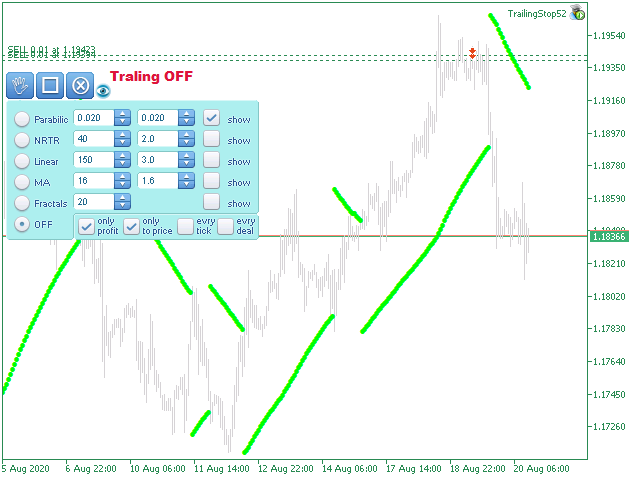
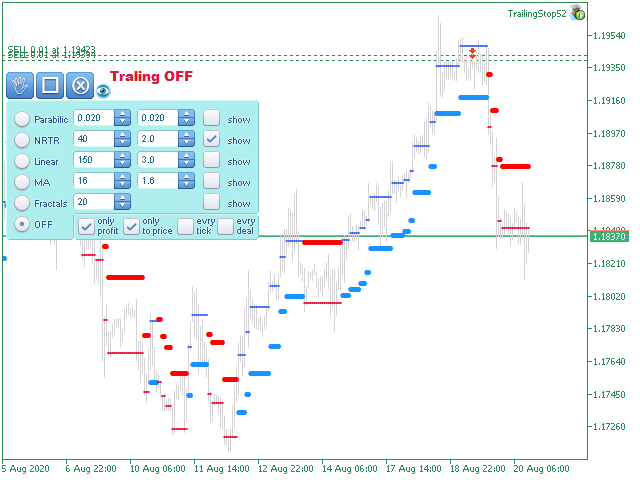
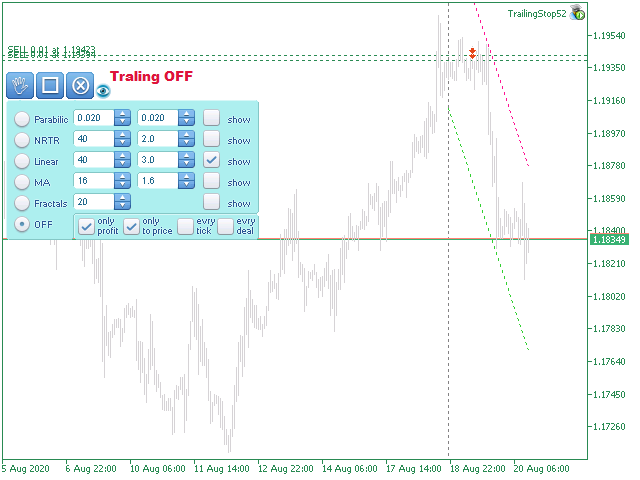
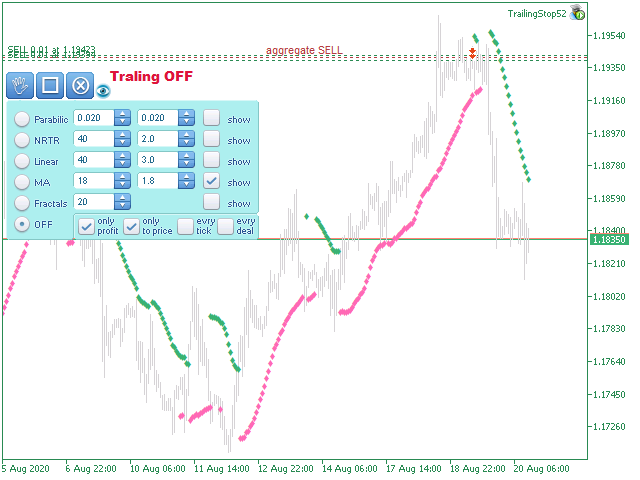
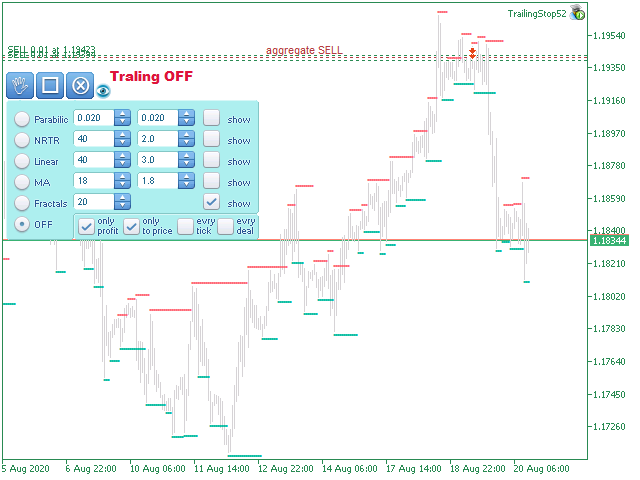
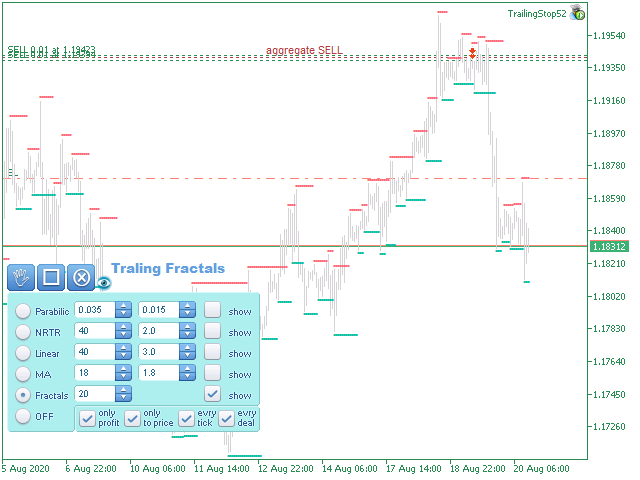
This utility is used to visually choose an indicator for trailing stop and select its parameters.

The Expert Advisor modifies the Stop Loss order position opened for the instrument of the current chart based on indicator values.

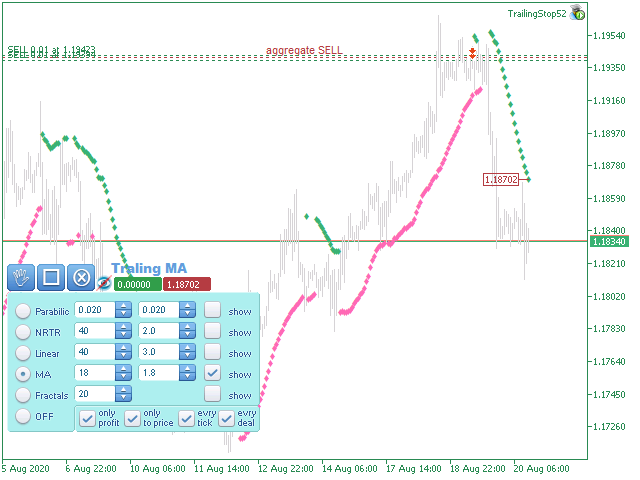
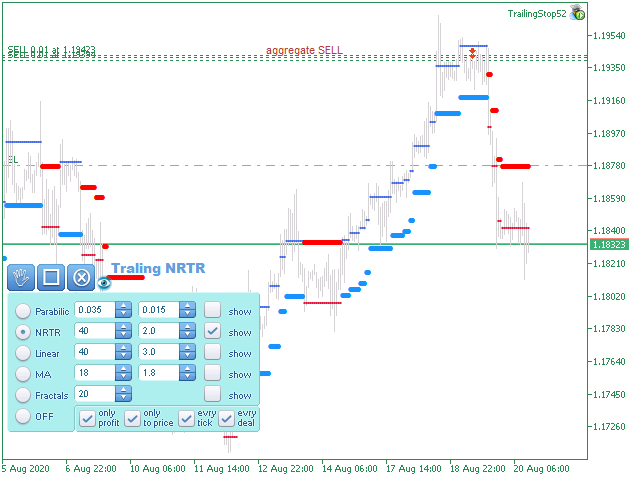
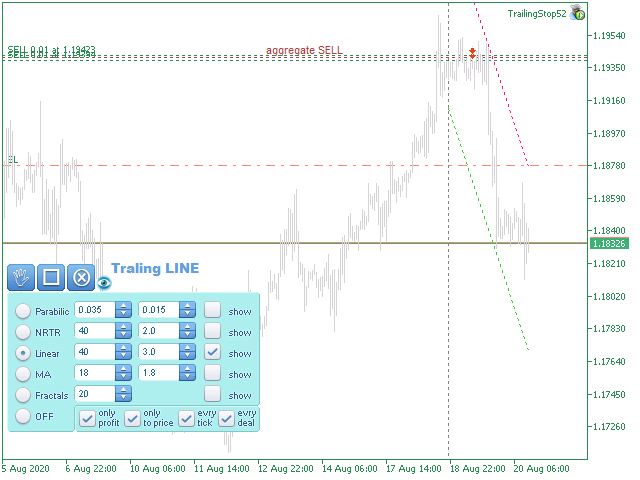
Uses indicators Parabolic SAR, NRTR (Nick Rypock Trailing Reverse), Moving Average or linear regression channel.

The indicators are added to or removed from the chart using the 'show' checkbox.

The following options are available:

  • Parabolic - trailing stop based on the Parabolic SAR indicator.
  • NRTR - trailing stop based on the NRTR indicator.
  • Linear - trailing stop based on the linear regression channel.
  • MA - trailing stop based on the Moving Average indicator.
  • OFF - disable trailing stop.

Trailing stop activation mode can selected using the flags:

  • only profit - trailing stop only when in profit.
  • only to price - trailing stop only to price.
  • every tick - trailing stop on each tick or on completed (formed) bars.
  • every deal - common trailing stop for all positions or separate for each position.
  • Hide Stop - enable/disable the hidden mode (if enabled, Stop Loss is not set).

Edit boxes for monitoring/adjusting the hidden levels:

  • hidden stop level BUY - monitor and adjust the stop loss levels of a long position in the hidden trailing mode.
  • hidden stop level SELL - monitor and adjust the stop loss levels of a short position in the hidden trailing mode.

Group of combo boxes for selecting the indicator parameters.

  • two parameters for each indicator

The main buttons of the form:

  • Move - move the form in the chart window.
  • Resize - hide the form.
  • Exit - unload the EA.

Hotkeys of the utility:

  • SHIFT+'0' - clear the hidden stop levels.
  • SHIFT+'1' - show a trade report for the current symbol.
  • SHIFT+'2' - show a trade report for all symbols, excluding the current symbol.
  • SHIFT+'3' - show a trade report for all symbols.
  • SHIFT+'4' - show a minimized report on account activity.
  • SHIFT+'5' - show a daily trade report on all symbols.
  • SHIFT+'6' - show a daily trade report for the current symbol.
  • SHIFT+'7' - show positions by instruments (symbols).
  • SHIFT+'N' - enable/disable notifications on balance changes.
  • SHIFT+'S' - enable/disable audio notification.

Reviews 7
Bon Bon
100
Bon Bon 2022.02.01 12:17 
 

Much better than ordinary trailing stop and can get more profit rather than using fix tp. Can be used to handle other ea tp as well. really helps a lot

克轩 曾
24
克轩 曾 2021.11.30 14:52 
 

谢谢

Andre Gomes
2941
Andre Gomes 2021.05.16 13:35 
 

Very good. I used it a lot!

Recommended products
Visual Dolphin Indicator
AL MOOSAWI ABDULLAH JAFFER BAQER
Visual Dolphin Indicator Unlock the rhythm of the market with the Visual Dolphin Indicator, your ultimate tool for identifying and capitalizing on market trends with clarity and confidence. Designed for both novice and experienced traders, this indicator eliminates the noise and guesswork, providing crystal-clear buy and sell signals directly on your chart. The Logic Behind the Waves The core of the Visual Dolphin Indicator is a sophisticated yet intuitive dual-wave system based on moving avera
Overview Candle Timer Countdown Pro displays a smooth, accurate countdown to the close of the current candle, accompanied by a circular progress arc that gives you an instant visual sense of time remaining. Unlike other timers that freeze between ticks or drift out of sync, this indicator uses server time interpolation to deliver a stutter-free countdown on every timeframe from M1 to MN. Whether you trade scalping setups on the 1-minute chart or swing positions on H4, knowing exactly when the cu
Hidden SL TP Manager Utility MT5
AL MOOSAWI ABDULLAH JAFFER BAQER
Hidden SL-TP Manager for MT5 Protect Your Trades from Stop Hunting with Invisible SL/TP Levels Price: $30 USD What is Hidden SL-TP Manager? Hidden SL-TP Manager is an advanced MetaTrader 5 utility that creates invisible stop loss and take profit levels for your trades. While traditional SL/TP levels are visible to brokers and can potentially be targeted during market volatility, our stealth technology keeps your risk management strategy completely hidden. Key Features Complete Stealth Mode: Set
Universal Soul Reaper
Pieter Gerhardus Van Zyl
Universal Soul Reaper is an atmospheric market-flow oscillator designed to interpret price behavior as a cycle of spiritual energy. Instead of reacting to raw price alone, it visualizes the state of the market’s soul —revealing when momentum is awakening, stabilizing, or fading. The indicator operates in a separate window and presents three interwoven entities: the Ectoplasmic Veil , the Spirit Boundary , and the Soul Core . Together, they form a living framework that helps traders sense pressu
TradingCoPilot
Viktor Mitrofanov
Trading Co-Pilot for MetaTrader 5 Advanced Position Management for Manual Traders Trading Co-Pilot is a professional trade management assistant designed for traders who open positions manually and want precise, automated control over risk and profit handling. It does not open trades. It manages them intelligently. You focus on entries. The Co-Pilot protects and optimizes the exit. How It Works Once you open a manual position, Trading Co-Pilot automatically: • Applies Stop Loss • Sets Take Profit
FREE
SlopeChannelB MT5
MIKHAIL VINOGRADOV
SlopeChannelB – a technical analysis tool that constructs a sloping price movement channel, offering unique opportunities to assess the current market situation and find trading signals. Main features of the indicator: Sloping price movement channel : The indicator helps visualize support and resistance levels, which may indicate potential reversal points or trend continuations. Various line colors and background highlighting : Sloping support and resistance levels are displayed in differen
##   ONLY GOLD ##   Тiльки Золото ## **Mercaria Professional Trading Zones - Complete Guide** ## **Mercaria Professional Trading Zones - Повний посібник** ### **How Mercaria Zones Work / Як працюють зони Mercaria** **English:** Mercaria Zones is an advanced trading indicator that identifies high-probability support and resistance areas using ZigZag extremes combined with mathematical zone calculations. The indicator works on multiple timeframes simultaneously, providing a comprehensive view
TheRealPrice v3.0 | Ultimate Spread & Ask Visualizer TheRealPrice is a high-precision utility for MetaTrader 5 designed to expose the hidden cost of every trade: The Spread . While standard charts only display the Bid price, professional traders know that buy orders and short-exits happen at the Ask price. TheRealPrice bridges this gap by drawing a dynamic, real-time horizontal line that tracks the exact Ask level, providing a clear visual representation of the current market spread. Why do you
Trend Lines Scalper
Magdalena Estefania Colonna
TREND LINES Scalper Professional Indicator OVERVIEW Trend Lines Scalper is a highly accurate, advanced indicator designed specifically for professional traders looking to maximize their scalping opportunities by automatically detecting trend lines and high-probability signals. This powerful algorithm combines classic technical analysis with modern technology, automatically identifying price patterns and generating accurate, real-time signals for successful scalping trades. MAIN FEATURES
LT Rainbow Trend
Thiago Duarte
5 (1)
Do you, like me, like to trade with the trend? Then this indicator will help you! Rainbow Trend is a trend indicator, which uses several Moving Averages on the chart. It measures different trend strenght zones for different periods: very long term, long term, mid term, short term and very short term. Each zone has its color, and it is possible to have sound alert when the prices leaves a zone and enters another. Its configuration is very simple. If you find any bug or have any suggestions, conta
This indicator is the same as the popular Heiken Ashi Smoothed. The Heikin Ashi indicator for MetaTrader 5 already exists, but it has two disadvantages: It paints the candles not accurate. It's not possible to change the candle width. See also Heikin Ashi in MQL5 Code Base . In this version there are no such disadvantages.
Be notified of every color change of Heiken Ashi (HA) candles. The indicator will trigger past and new signals every time that HA candles change their colors. ( Note : this tool is based on the code of Heiken Ashi indicator developed by MetaQuotes Software Corp.) Features The signals are triggered at closing of last bar/opening of a new bar; Any kind of alerts can be enabled: Dialog Box, Email message, SMS notifications for smartphones and tablets, and Sound alerts; By default, up arrows are pl
One of the number sequences is called "Forest Fire Sequence". It has been recognized as one of the most beautiful new sequences. Its main feature is that this sequence avoids linear trends, even the shortest ones. It is this property that formed the basis of this indicator. When analyzing a financial time series, this indicator tries to reject all possible trend options. And only if he fails, then he recognizes the presence of a trend and gives the appropriate signal. This approach allows one t
Crypto_Forex Indicator "WPR with 2 Moving Averages" for MT5, No Repaint. - WPR itself is one of the best oscillators for scalping. - "WPR and 2 Moving Averages" Indicator allows you to see Fast and Slow Moving Averages of WPR oscillator. - Indicator gives opportunities to see the price corrections very early. - It is very easy to set up this indicator via parameters, it can be used on any time-frame. - You can see Buy and Sell entry conditions on the pictures. - With PC and Mobile alerts on WP
Trade Mate
Sotirios Apostolos Adaloglou
Trade Mate is the trading tool for manual traders who want to take their trading to the next level. Packed with advanced features like automatic trailing stop loss, lot size calculation, pending orders, partial close, open trade management, and daily drawdown protection(makes it easier to stick to your daily equity risk).  Trade Mate offers everything you need to trade with precision and confidence. Don't settle for less - try Trade Mate today and see the difference for yourself! Check it on You
The  Kijun-Sen Envelope  is a powerful trend-following indicator based on the  Kijun-Sen  line from the Ichimoku Kinko Hyo system. This tool creates dynamic upper and lower bands around the Kijun-Sen, forming an envelope that helps traders identify market trends, potential reversals, and overbought/oversold conditions. Key Features: • Trend Confirmation – Helps determine whether the market is in a strong uptrend, downtrend, or ranging phase. • Support & Resistance Zones – The envelope acts as
FREE
Candlestick Pattern Scanner is a multi-timeframe and multi-symbol dashboard and alert system that checks all timeframes and currency pairs for different candlestick patterns that are formed in them. Scanner is integrated   with support and resistance zones so you can check the candlestick patterns in most important areas of the chart to find breakout and reversal patterns in the price chart. Download demo version   (works on M4,M6,M12,H3,H8 timeframes and 20 symbols of Market Watch window) Read
Silver Zebra Trading System
AL MOOSAWI ABDULLAH JAFFER BAQER
Silver Zebra Trading System - Uncover Market Momentum Unlock a powerful new way to visualize market trends and momentum with the Silver Zebra Trading System. This unique MetaTrader 5 indicator is designed to give you a clear and immediate understanding of market dynamics, helping you make more informed trading decisions. For just $30, you can add this indispensable tool to your trading arsenal. What is the Silver Zebra Trading System? The Silver Zebra Trading System is a sophisticated indicator
Order Book, known also as Market Book, market depth, Level 2, - is a dynamically updated table with current volumes of orders to buy and to sell specific financial instument at price levels near Bid and Ask. MetaTrader 5 provides the means for receiving market book from your broker, but in real time only, without access to its history. The indicator OrderBook Cumulative Indicator accumulates market book data online and visualizes them on the chart. In addition, the indicator can show the market
Owl Smart Levels MT5
Sergey Ermolov
4.03 (32)
MT4 version  |   FAQ The Owl Smart Levels Indicator is a complete trading system within the one indicator that includes such popular market analysis tools as Bill Williams' advanced fractals , Valable ZigZag which builds the correct wave structure of the market, and Fibonacci levels which mark the exact levels of entry into the market and places to take profits. Detailed description of the strategy Instructions for working with the indicator Advisor-assistant in trading Owl Helper Private User
TradePilotmt5
Hossein Khalil Alishir
TradePilot Expert Advisor (EA) for MetaTrader 5 TradePilot is a professional and user-friendly Expert Advisor (EA) for MetaTrader 5 (MT5) . It simplifies automated trading , risk management , and trade execution with a smart trading panel . Perfect for beginners and experienced traders looking for a reliable trade manager EA with automated lot size calculation and smart position management. Key Advantages User-Friendly Trading Panel: Customizable panel with buttons and hotkeys for fast ex
ID Trade_Bot BS - an effective tool for automated trading using RSI Trade_Bot BS is an efficient solution for automated trading based on RSI, allowing flexible parameter customization and risk management. Thanks to the ability to choose a trading mode, dynamic Stop-Loss and Take-Profit levels, and trading mode adjustment (buying, selling, or both), it is suitable for various trading strategies. Key Features: Uses the RSI indicator to determine market conditions. Automatically opens an
SmartTrail PRO MT5 — All-in-One Trade Management Panel Your all-in-one trade management companion for MetaTrader 5. SmartTrail PRO takes the stress out of position management. Whether you trade manually or use Expert Advisors, it protects your capital with intelligent, volatility-adaptive stop management — across all symbols, all account types, automatically. Why SmartTrail PRO? Most traders lose not because of bad entries, but because of poor exits. SmartTrail PRO solves this by providing a com
SPIKE Radar Alet
Odete Argelio Simbine
SPIKE DETECTOR RADAR ALERT – Surgical Precision in Explosive Market Movements Master market spikes with early alerts and high probability accuracy. Spike Detector Radar Alert is an advanced indicator for MetaTrader 5, developed to identify sudden price movements (spikes) in advance with enhanced precision. By combining volatility analysis, momentum strength, and price acceleration, the algorithm delivers clear signals at key market moments. Why traders choose Spike Detector Radar Alert: Mul
Codez Hotkeys
Mzwandile Derrick Mkhonza
The best way to place and close trades using your keyboard. Perfect for Scalpers, sniper entries. The default keys are as follows: 8= Buy (Lots set by user) 5= Sell  (Lots set by user) 9= Closes All Buy Positions 6= Closes All Sell Positions 2= Opens a Sell and a Buy position instantly. 0= CLOSES All Positions //These are the default keys, can be changed upon request.
Turbo Close All
Phami Thanh Hoang
Turbo Close All is a powerful and versatile script designed to help traders quickly and efficiently manage their trading positions and pending orders on MetaTrader 5. With its advanced features and customizable settings, this script is an essential tool for traders who want to streamline their trading process and maintain control over their positions and orders. Key Features: Comprehensive Closing Options: Turbo Close All allows you to close all market positions and/or delete pending orders bas
RiskCopilot
Carlos Adrian Feged Zapata
RiskCopilot Utility - Your Intelligent Trading Assistant "See Your Risk. Master Your Trade." RiskCopilot Utility is the ultimate risk management and position sizing solution for MetaTrader 5. This comprehensive trading assistant provides real-time calculations, advanced risk assessment tools, and professional trade analytics without taking control of your trading decisions. Perfect for both novice and professional traders seeking precise risk management across all asset classes. You focus on yo
Size Bars
Viktor Loginov
Size Bars – индикатор отображает на графике максимальный, минимальный, текущий и средний размер баров (свечей) за выбранный период. Отображаемые параметры индикатора Size Bars: 1)       Текущий размер бара в писах (по максимум/минимум, тело бара). 2)       Максимальный, минимальный и средний размер свечей BUY . 3)       Максимальный, минимальный, средний размер свечей SELL . 4)       Количество свечей BUY и количество свечей SELL . 5)       Среднее количество свечей подряд BUY и SELL . 6)     
Margin Call Shield – Defend Your Margin on Your Terms Margin Call Shield is a tool for MetaTrader 5 traders who want to decide for themselves which open positions are closed during margin call situations before the platform does so automatically based on its internal rules. By default, the broker or platform decides which positions to close, often using undisclosed algorithms. Margin Call Shield lets you set this order according to your own strategy. Why Was Margin Call Shield Created? In a mar
Basic working principles of EA will have 2 main systems. 1. Timed order opening means that at the specified time the EA will open 1 Buy order and 1 Sell order. 2. When the graph is strong, the EA will remember the speed of the graph. is the number of points per second which can be determined You can set the number of orders in the function ( Loop Order ). The order closing system uses the trailling moneym Loss system, but I set it as a percentage to make it easier to calculate when the capital
Buyers of this product also purchase
Trade Assistant MT5
Evgeniy Kravchenko
4.42 (208)
It helps to calculate the risk per trade, the easy installation of a new order, order management with partial closing functions, trailing stop of 7 types and other useful functions. Additional materials and instructions Installation instructions - Application instructions - Trial version of the application for a demo account Line function -   shows on the chart the Opening line, Stop Loss, Take Profit. With this function it is easy to set a new order and see its additional characteristics bef
Forex Trade Manager MT5
InvestSoft
4.96 (621)
Welcome to Trade Manager MT5 - the ultimate risk management tool designed to make trading more intuitive, precise, and efficient. This is not just an order placement tool; it's a comprehensive solution for seamless trade planning, position management, and enhanced control over risk. Whether you're a beginner taking your first steps, an advanced trader, or a scalper needing rapid executions, Trade Manager MT5 adapts to your needs, offering flexibility across all markets, from forex and indices t
Local Trade Copier EA MT5
Juvenille Emperor Limited
4.96 (129)
Experience exceptionally fast trade copying with the   Local Trade Copier EA MT5 . With its easy 1-minute setup, this trade copier allows you to copy trades between multiple MetaTrader terminals on the same Windows computer or Windows VPS with lightning-fast copying speeds of under 0.5 seconds. Whether you're a beginner or a professional trader, the   Local Trade Copier EA MT5   offers a wide range of options to customize it to your specific needs. It's the ultimate solution for anyone looking t
TradePanel MT5
Alfiya Fazylova
4.86 (148)
Trade Panel is a multifunctional trading assistant. The application contains more than 50 trading functions for manual trading and allows you to automate most trading operations. Attention, the application does not work in the strategy tester. Before purchasing, you can test the demo version on a demo account. The demo version is here . Full instructions here . Trade. Allows you to perform trading operations in one click: Open pending orders and positions with automatic risk calculation. Open mu
Beta Release The Telegram to MT5 Signal Trader is nearly at the official alpha release. Some features are still under development and you may encounter minor bugs. If you experience issues, please report them, your feedback helps improve the software for everyone. Telegram to MT5 Signal Trader is a powerful tool that automatically copies trading signals from Telegram channels or groups directly to your MetaTrader 5 account. It supports both public and private Telegram channels, and you can conn
Trade Dashboard MT5
Fatemeh Ameri
4.97 (117)
Tired of complex order placement and manual calculations? Trade Dashboard is your solution. With its user-friendly interface, placing orders becomes effortless, by a single click, you can open trades, set stop loss and take profit levels, manage trade lot size, and calculate risk to reward ratios, allowing you to only focus on your strategy. Say goodbye to manual calculations and streamline your trading experience with Trade Dashboard. Download  Demo Version  right now. You can find  Details of
FarmedHedge Pair Trading Dashboard
Tanapisit Tepawarapruek
5 (1)
Farmed Hedge Yield Farming - Professional Pair Trading Dashboard (Manual - Hybrid - Semi/Automated EA) VERSION 3 - WILD HARVEST UPDATE Trading Approach: - Manual Trading: Primary focus - Auto Pilot: Optional supplementary feature - Full Automation: Not the main purpose Recommended Timeframe: H1-H4 DEMO VERSION Download the free demo to test functionality. Use Strategy Tester with Visual Mode to see how it works. VERSION 3 - NEW FEATURES Summary Dashboard (SRA Panel) - Quick pair selection w
Copy Cat More Trade Copier MT5 is a local trade copier and a complete risk management and execution framework designed for today’s trading challenges. From prop firm challenges to personal portfolio management, it adapts to every situation with a blend of robust execution, capital protection, flexible configuration, and advanced trade handling. The copier works in both Master (sender) and Slave (receiver) modes, with real-time synchronization of market and pending orders, trade modifications, pa
Exp COPYLOT CLIENT for MT5
Vladislav Andruschenko
3.82 (34)
Trade copier for MT5 is a trade copier for the МetaТrader 5 platform. It copies forex trades  between any accounts   MT5 - MT5, MT4 - MT5 for the COPYLOT MT5 version (or MT4 - MT4 MT5 - MT4 for the COPYLOT MT4 version)    Reliable copier!         MT4 version Full Description +DEMO +PDF   How To Buy    How To Install     How to get Log Files    How To Test and Optimize    All products from Expforex You can also copy trades in the МТ4 terminal (МТ4 - МТ4, МТ5 - МТ4):     COPYLOT CLIENT for MT4
HINN MagicEntry Extra
ALGOFLOW OÜ
4.69 (13)
HINN MAGIC ENTRY – the ultimate tool for entry and position management! Place orders by selecting a level directly on the chart! full description   ::  demo-version  :: 60-sec-video-description Key features: - Market, limit, and pending orders - Automatic lot size calculation - Automatic spread and commission accounting - Unlimited partitial take-profits  - Breakeven and trailing stop-loss and take-profit  functions - Invalidation leves - Intuitive, adaptive, and customizable interface - Works
Ultimate Extractor
Clifton Creath
5 (9)
Ultimate Extractor - Professional Trading Analytics for MT5 *****this is the local HTML version of Ultimate Extractor. Check out Ultimate Extractor Cloud on mql5 for the Cloud version****** Ultimate Extractor transforms your MetaTrader 5 trading history into actionable insights with comprehensive analytics, interactive charts, and real-time performance tracking. What It Does Automatically analyzes your MT5 trading history across all Expert Advisors and generates detailed HTML reports with inte
Trade Manager DaneTrades
Levi Dane Benjamin
4.36 (28)
DaneTrades Trade Manager is a professional trade panel for MetaTrader 5, designed for fast, accurate execution with built‑in risk control. Place market or pending orders directly from the chart while the panel automatically calculates position size from your chosen risk, helping you stay consistent and avoid emotional decision‑making. The Trade Manager is built for manual traders who want structure: clear risk/reward planning, automation for repeatable management, and safeguards that help reduc
MT5 to Telegram Signal Provider turns your trading account into a signal provider. Every trade action, whether manual, by EA or from your phone, is instantly sent as a message to Telegram. You can fully customize the format or use a ready-made template for quick setup. [ Demo ] [ Manual ] [ MT4 Version ] [ Discord Version ]     New: [ Telegram To MT5 ] Setup A step by step user guide is available. Key Features Ability to customize order details sent to subscribers You can create a tiered subs
Trade copier MT5
Alfiya Fazylova
4.63 (38)
Trade Copier is a professional utility designed to copy and synchronize trades between trading accounts. Copying occurs from the account / terminal of the supplier to the account / terminal of the recipient, which are installed on the same computer or VPS . Before buying, you can test the demo version on a demo account. Demo version here . Full instruction here . Main functionality and benefits: Supports copying MT5> MT5, MT4> MT5, MT5> MT4, including MT5 netting accounts. * Supports copying Dem
Smart Stop Manager MT5
Daniel Stein
4.33 (3)
Smart Stop Manager – Automated Stop-Loss Execution with Professional Precision Overview The Smart Stop Manager is the execution layer of the Smart Stop lineup, built for traders who require structured, reliable, and fully automated stop-loss management across multiple open positions. It continuously monitors active trades, calculates the optimal stop level using Smart Stop market-structure logic, and updates stops automatically with clean, transparent rules. Whether managing a single asset or
Smart Stop Scanner – Multi-Asset Stop-Loss Intelligence for Modern Traders Overview The Smart Stop Scanner brings professional stop-loss monitoring to every chart. It analyzes market structure, detects meaningful breakouts, and identifies the most relevant protective levels across Forex, Gold, Indices, Metals, Crypto, and more. All results appear inside one clean, DPI-aware dashboard designed for clarity, speed, and instant decision-making. How Stop-Loss Levels Are Identified Instead of rely
Equity Protect Pro: Your Comprehensive Account Protection Expert for Worry-Free Trading If you're looking for features like account protection, equity protection, portfolio protection, multi-strategy protection, profit protection, profit harvesting, trading security, risk control programs, automatic risk control, automatic liquidation, conditional liquidation, scheduled liquidation, dynamic liquidation, trailing stop loss, one-click close, one-click liquidation, and one-click restore, Equity P
Pulsar Terminal MT5
Astralys LLC
5 (2)
Pulsar Terminal is a product of Pulsar Technologies, a trademark of Astralys LLC . Pulsar Terminal is a utility add-on for MetaTrader 5. It's a visual interface combined with execution tools in a companion application connected to your MetaTrader 5 account via an Expert Advisor . We use a companion application to maximize the tool's capabilities and provide a more advanced visual interface and workflow than standard MT5 panels. Pulsar Terminal is not a standalone application and requires MetaTr
Trade Manager DashPlus
Henry Lyubomir Wallace
5 (13)
DashPlus is an advanced trade management tool designed to enhance your trading efficiency and effectiveness on the MetaTrader 5 platform. It offers a comprehensive suite of features, including risk calculation, order management, advanced grid systems, chart-based tools, and performance analytics. Key Features 1. Recovery Grid Implements an averaging and flexible grid system to manage trades during adverse market conditions. Allows for strategic entry and exit points to optimize trade recovery
The product will copy all telegram signal to MT5 ( which you are member) , also it can work as remote copier.  Easy to set up, copy order instant, can work with almost signal formats, image signal,  s upport to translate other language to English Work with all type of channel or group, even channel have "Restrict Saving Content", work with  multi channel, multi MT5 Work as remote copier: with signal have ticket number, it will copy exactly via ticket number. Support to backtest signal. How to s
Telegram to MT5 Coppy
Sergey Batudayev
5 (8)
Telegram to MT5: The Ultimate Signal Copying Solution Simplify your trading with Telegram to MT5, the modern tool that copies trading signals directly from Telegram channels and chats to your MetaTrader 5 platform, without the need for DLLs. This powerful solution ensures precise signal execution, extensive customization options, saves time, and boosts your efficiency. [ Instructions and DEMO ] [ FAQ ] Key Features Direct Telegram API Integration Authenticate via phone number and secure code. E
EA Portfolio Analyzer
Jimmy Peter Eriksson
Installation Guide:  Click Here! Analyze Multiple Expert Advisors Together Compare EA Results By Magic Number Track Profitability And Drawdowns Filter Results By Date Range Visual Equity Curve And Detailed Metrics Ready To Use In Under One Minute EA Portfolio Analyzer EA Portfolio Analyzer is a professional analytics tool designed to monitor the live performance of multiple Expert Advisors in a clear and structured way. When running several EAs on the same account, it can be difficult to unders
Custom Alerts AIO: All-in-One Market Scanner – No Setup Required Overview Custom Alerts AIO is the fastest and easiest way to monitor multiple markets for real-time trading signals—without any setup or extra licenses. It comes with all required Stein Investments indicators already embedded, making it the perfect plug-and-play solution for traders who value simplicity and performance. Just load it to any chart and start receiving alerts across Forex, Metals, Crypto, and Indices. Shares can be a
Anchor: The EA Manager A coordination system for traders running multiple EAs. Anchor ensures only one EA can trade at a time, preventing conflicting positions and keeping your portfolio safer. Attach Anchor to any chart. Configure your EAs and their magic numbers. Anchor handles the rest. Built for portfolios. Built for discipline. Built for prop firms. The Problem Running multiple EAs on the same account creates risk. Two gold EAs can open opposite positions on the same candle. Three EA
Seconds Chart MT5
Boris Sedov
4.59 (17)
Seconds Chart is a unique tool for creating second-based charts in MetaTrader 5 . With Seconds Chart , you can construct charts with timeframes set in seconds, providing unparalleled flexibility and precision in analysis that is unavailable with standard minute or hourly charts. For example, the S15 timeframe indicates a chart with candles lasting 15 seconds. You can use any indicators and Expert Advisors that support custom symbols. Working with them is just as convenient as on standard charts.
Timeless Charts
Samuel Manoel De Souza
5 (3)
Timeless Charts is an advanced charting solution designed for professional traders seeking for custom charts / custom timeframes , including seconds charts / seconds timeframe, renko charts / renko bars, cluster charts / footprint charts and advanced tools present in most of the popular platforms. Unlike traditional offline charts or simplistic custom indicators, this solution constructs fully custom bars with true timestamp accuracy , down to miliseconds, allowing for a powerful and precise tr
YuClusters
Yury Kulikov
4.93 (43)
Attention: You can view the program operation in the free version  YuClusters DEMO .  YuClusters is a professional market analysis system. The trader has unique opportunities to analyze the flow of orders, trade volumes, price movements using various charts, profiles, indicators, and graphical objects. YuClusters operates on data based on Time&Sales or ticks information, depending on what is available in the quotes of a financial instrument. YuClusters allows you to build graphs by combining da
Take a Break MT5
Eric Emmrich
4.75 (24)
One tool to protect all your EAs — news filter, equity protection, time filter and more — free demo available Take a Break has evolved from a basic news filter into a comprehensive account protection solution. It pauses your other Expert Advisors during news events or based on custom filters. When trading resumes, it automatically restores your entire chart setup , including all EA settings. Typical use cases: One news filter for all your EAs. Pause trading during news or high volatility — and c
The News Filter MT5
Leolouiski Gan
4.74 (19)
This product filters   all expert advisors and manual charts   during news time.  It is able to remove any of your EA during news and automatically reattach them after news ends. This product also comes with a complete  order management system   that can handle your open positions and pending orders before the release of any news. Once you purchase   The News Filter , you will no longer need to rely on built-in news filters for future expert advisors, as this product can filter them all from her
Telegram To MT5 Receiver
Levi Dane Benjamin
4.53 (15)
Copy trade signals from Telegram channels you already belong to (including private and restricted channels) directly into MetaTrader 5. Set your risk rules once, monitor execution, and manage positions with built-in protections designed to reduce mistakes and overtrading. Fast setup : configure your channels, select what to copy, and start within minutes using a clean on-chart interface. User Guide + Demo | MT4 Version | Discord Version Who this is for Traders who follow one or more signal provi
More from author
Ticks Bars
Andrej Nikitin
4 (2)
This tick indicator draws synthetic bars/candlesticks that contain a definite number of ticks. Parameters: option prices - price option. It can be Bid, Ask or (Ask+Bid)/2. the number of ticks to identify Bar - number of ticks that form OHLC. price levels count - number of displayed price levels (no levels are displayed if set to 0 or a lower value). calculated bar  - number of bars on the chart. Buffer indexes: 0 - OPEN, 1 - HIGH, 2 - LOW, 3 - CLOSE.

FREE
TrailingStop MA
Andrej Nikitin
3.5 (2)
The indicator draws two simple moving averages using High and Low prices. The MA_High line is displayed when the moving average is directed downwards. It can be used for setting a stop order for a sell position. The MA_Low line is displayed when the moving average is directed upwards. It can be used for setting a stop order for a buy position. The indicator is used in the TrailingStop Expert Advisor. Parameters Period - period of calculation of the moving average. Deviation - rate of convergence


FREE
Ticks Bands
Andrej Nikitin
The Bollinger Bands indicator drawn using a tick chart. After launching it, wait for enough ticks to come. Parameters: Period - period of averaging. Deviation - deviation from the main line. Price levels count - number of displayed price levels (no levels are displayed if set to 0). Bar under calculation - number of bars on the chart for the indicator calculation. Buffer indexes: 0 - BASE_LINE, 1 - UPPER_BAND, 2 - LOWER_BAND, 3 - BID, 4 - ASK.

Ticks
Andrej Nikitin
3 (1)
A simple tick indicator of Bid and Ask prices. The period separator (1 minute) is displayed as a histogram. Parameters Show Bid Line - show/hide the Bid line; Show Ask Line - show/hide the Ask line; Show Labels - show/hide the last price values.
FREE
Tick
Andrej Nikitin
4.5 (2)
A simple tick indicator of Bid and Ask prices. The period separator (1 minute) is displayed as a histogram. Parameters Price_levels_count - number of price levels to be displayed. Bar_under_calculation - number of bars of the indicator to be displayed on the chart.
FREE
TrailingStop MA 4
Andrej Nikitin
4 (1)
The indicator draws two simple moving averages using High and Low prices. The MA_High line is displayed when the moving average is directed downwards. It can be used for setting a stop order for a sell position. The MA_Low line is displayed when the moving average is directed upwards. It can be used for setting a stop order for a buy position. The indicator is used in the TrailingStop Expert Advisor. Parameters Period - period of calculation of the moving average. Deviation - rate of convergence


FREE
Ticks RSI 4
Andrej Nikitin
The Relative Strength Index indicator drawn using a tick chart. After launching it, wait for enough ticks to come. Parameters: RSI Period - period of averaging. overbuying level - overbought level. overselling level - oversold level. calculated bar - number of bars on the chart for the indicator calculation. The following parameters are intended for adjusting the weight of RSI signals (from 0 to 100). You can find their description in the Signals of the Oscillator Relative Strength Index section

The Envelopes indicator drawn using a tick chart. After launching it, wait for enough ticks to come. Parameters: Averaging period - period of averaging. Smoothing type - type of smoothing. Can have any values of the enumeration ENUM_MA_METHOD . Option prices - price to be used. Can be Ask, Bid or (Ask+Bid)/2. Deviation of boundaries from the midline (in percents) - deviation from the main line in percentage terms. Price levels count - number of displayed price levels (no levels are displayed if
The Stochastic Oscillator indicator is drawn on the tick price chart. After launching it, wait for enough ticks to come. Parameters: K period - number of single periods used for calculation of the stochastic oscillator; D period - number of single periods used for calculation of the %K Moving Average line; Slowing - period of slowing %K; Calculated bar - number of bars in the chart for calculation of the indicator. The following parameters are intended for adjusting the weight of signals of the
Ticks MACD 4
Andrej Nikitin
The Moving Average Convergence/Divergence(MACD) indicator drawn using a tick chart. After launching it, wait for enough ticks to come. Parameters: Fast EMA period - indicator drawn using a tick chart. Slow EMA period - slow period of averaging. Signal SMA period - period of averaging of the signal line. calculated bar - number of bars on the chart for the indicator calculation. The following parameters are intended for adjusting the weight of MACD signals (from 0 to 100). You can find their desc


The Bollinger Bands indicator drawn using a tick chart. After launching it, wait for enough ticks to come. Parameters: Period - period of averaging. Deviation - deviation from the main line. Price levels count - number of displayed price levels (no levels are displayed if set to 0). Bar under calculation - number of bars on the chart for the indicator calculation. Buffer indexes: 0 - BASE_LINE, 1 - UPPER_BAND, 2 - LOWER_BAND, 3 - BID, 4 - ASK.
Ticks OsMA 4
Andrej Nikitin
The Moving Average of Oscillator(OsMA) indicator drawn using a tick chart. After launching it, wait for enough ticks to come. Parameters: Fast EMA period - fast period of averaging. Slow EMA period - slow period of averaging. Signal SMA period - period of averaging of the signal line. calculated bar - number of bars for the indicator calculation.
Ticks CCI 4
Andrej Nikitin
The Commodity Channel Index(CCI) indicator drawn using a tick chart. After launching it, wait for enough ticks to come. Parameters: period - number of single periods used for the indicator calculation. calculated bar - number of bars for the indicator calculation. The following parameters are intended for adjusting the weight of CCI signals (from 0 to 100). You can find their description in the Signals of the Commodity Channel Index section of MQL5 Reference. The oscillator has required directio
Ticks ADX 4
Andrej Nikitin
The Average Directional Movement Index indicator drawn using a tick chart. After launching it, wait for enough ticks to come. Parameters: Period - period of averaging. Сalculated bar - number of bars on the chart for the indicator calculation. Buffer indexes: 0 - MAIN_LINE, 1 - PLUSDI_LINE, 2 - MINUSDI_LINE.
The Standard Deviation (StdDev) indicator drawn using a tick chart. After launching it, wait for enough ticks to come. Parameters: Period - period of averaging. Method - method of averaging. calculated bar - number of bars for the indicator calculation.
The Momentum indicator drawn using a tick chart. After launching it, wait for enough ticks to come. Parameters: period - period of the indicator calculation. levels count - number of displayed levels (no levels are displayed if set to 0) calculated bar - number of bars for the indicator calculation.
The Bulls Power indicator drawn using a tick chart. After launching it, wait for enough ticks to come. Parameters: Period - period of averaging. The number of ticks to identify high/low - number of single ticks for determining high/low. Calculated bar - number of bars for the indicator calculation. The following parameters are intended for adjusting the weight of Bulls Power signals (from 0 to 100). You can find their description in the Signals of the Bulls Power oscillator section of MQL5 Refer
The  Bears Power indicator drawn using a tick chart. After launching it, wait for enough ticks to come. Parameters: Period - period of averaging. The number of ticks to identify high/low - number of single ticks for determining high/low. Calculated bar - number of bars for the indicator calculation. The following parameters are intended for adjusting the weight of Bears Power signals (from 0 to 100). You can find their description in the Signals of the Bears Power oscillator section of MQL5 Refe
Tiks ATR 4
Andrej Nikitin
The  Average True Range (ATR)  indicator drawn using a tick chart. After launching it, wait for enough ticks to come. Parameters: ATR Period  - number of single periods used for the indicator calculation. The number of ticks to identify Bar  - number of single ticks that form OHLC. Price levels count  - number of displayed price levels (no levels are displayed if set to 0 or a lower value). price mode  - choice of prices under calculation (can be bid, ask or average). Сalculated bar  - number of
Tiks WPR 4
Andrej Nikitin
The  Williams' Percent Range (%R)  indicator drawn using a tick chart. After launching it, wait for enough ticks to come. Parameters: WPR Period  - period of the indicator. Overbuying level  - overbought level. Overselling level  - oversold level. price mode  - choice of prices under calculation (can be bid, ask or average). Сalculated bar  - number of bars for the indicator calculation. The following parameters are intended for adjusting the weight of WPR signals (from 0 to 100). You can find t
The  Price Channel  indicator drawn using a tick chart. After launching it, wait for enough ticks to come. Parameters: Period  - period for determining the channel boundaries. Price levels count  - number of displayed price levels (no levels are displayed if set to 0). price mode  - choice of prices under calculation (can be bid, ask or average). Bar under calculation  - number of bars on the chart for the indicator calculation. Buffer indexes: 0 - Channel upper, 1 - Channel lower, 2 - Channel m
Abigail 4
Andrej Nikitin
Description: Abigail is a medium-term trading system making profit during the price rollback. The Expert Advisor has been optimized for working on EURUSD. However, it can successfully work with other currency pairs as well. You can examine the Expert Advisor's trading statistics for different brokers and symbols at MetaTrader 4 and MetaTrader 5 Trading Signals sections. Parameters: Risk management: enter volume - market entry volume. If the value is greater than 0 - number of lots, if less than
TimeFilter 4
Andrej Nikitin
TimeFilter indicator allows you to visually select bit masks (GoodHourOfDay, BadHoursOfDay, GoodDayOfWeek, BadDaysOfWeek) for the  Intraday Time Filter  module of trading signals of the Standard Library. The use of time filters allows you to take into account the particulars of each trading session in performing trading operations.
TimeFilter simple 4
Andrej Nikitin
1 (1)
The indicator is an inter-week hourly filter. When executing trading operations, the indicator allows considering time features of each trading session. Permissive and restrictive filter intervals are set in string form. The used format is [first day]-[last day]:[first hour]-[last hour]. See the screenshots for examples. Parameters: Good Time for trade - intervals when trading is allowed. Bad Time for trade - intervals when trading is forbidden. time filter shift (hours) - hourly shift. percenta
TrailingStop 4
Andrej Nikitin
4.83 (6)
The Expert Advisor modifies the Stop Loss order position opened for the instrument of the current chart based on indicator values. Uses indicators Parabolic SAR ,  NRTR (Nick Rypock Trailing Reverse) ,  Moving Average  or linear regression channel. Switchable modes: Trailing stop only when in profit; Trailing stop only following the price; On every teak or on formed bars; Trailing for each order separately or for a total position. Has an option of "hidden stop", also you can exclude individual
AccountQuickReport 4
Andrej Nikitin
5 (1)
The script creates account summary report in a separate window. The report can be created for all deals and for deals on selected financial instruments. It is possible to specify a time interval of calculation and save report to an htm file. Script inputs report starting date - initial report generation date. symbols selection for report - select a method of choosing tools for a report generation. allSymbol - report is generated for deals performed on all symbols. onlyCurrentSymbol - report is
PositionGroupClose 4
Andrej Nikitin
5 (1)
The EA performs trade operations of closing position groups. Positions are grouped by type. It is possible to select orders by the profit (loss) value. It is possible to form the closure groups manually. You can set a value for automatic closure of a positions group after reaching a certain profit/loss level or price level. The additional functions of the EA are called using the hot keys: SHIFT+A - show/hide Auto exit options. SHIFT+S - show/hide Settings panel. SHIFT+V - sound ON/OFF. SHIFT+I -
AddPosition 4
Andrej Nikitin
The Expert Advisor for increasing (or opening) market positions. Allows specifying the desired risk, target and searching for the best open price and trade volume. Configurable Parameters: lots - directly the volume of the position increase. % equity - the amount of growth as a percentage of the amount of funds. stop loss - directly the level of the stop loss order. loss - the level of the stop loss order depending on the allowable loss. take profit - directly the take profit level of the o
The Expert Advisor notifies that a price has crossed a line on the chart. It handles two types of lines - horizontal line and a trendline. The number of lines is unlimited. Parameters: prefix of signal line - prefix of object (line) names processed by the indicator. If the parameter is empty, it handles all object types: horizontal lines and trendlines. price Mode - price type (bid or ask). timeout - crossing alert timeout. number of repeats - the limit of crossing alert repeats. number of comme
Tick Advisor
Andrej Nikitin
Tick Advisor is an intraday trading system that tries to profit during the price rollback. Martingale can be enabled, but you should be extremely careful (take profit often and at a proper time!). You can examine the Expert Advisor's trading statistics for different brokers and symbols in the MetaTrader 4 Trading Signals sections. Parameters Risk management: enter volume - a volume for entry If the value is greater than 0 - number of lots, if less than 0 - percentage of available funds, if equa
Filter:
Bon Bon
100
Bon Bon 2022.02.01 12:17 
 

Much better than ordinary trailing stop and can get more profit rather than using fix tp. Can be used to handle other ea tp as well. really helps a lot

克轩 曾
24
克轩 曾 2021.11.30 14:52 
 

谢谢

Andre Gomes
2941
Andre Gomes 2021.05.16 13:35 
 

Very good. I used it a lot!

Drive8
54
Drive8 2020.12.16 17:31 
 

Funktioniert ganz ausgezeichnet und sehr schnell. Die Funktionen sind komfortable und übersichtlich einzustellen und die Anfangshilfestellung vom Programmentwickler kam prompt und kompetent . Vielen Dank für diese gute Arbeit!!!

Conrad Klaasen
171
Conrad Klaasen 2020.06.04 09:10 
 

This is an amazing tool that works very well I'm looking at getting both trailing stops in the near future.

masa0718
202
masa0718 2018.05.31 16:03 
 

Thank you!

Andrei
836
Andrei 2017.05.28 08:10 
 

User didn't leave any comment to the rating

Reply to review