Trade Assistant Risk Calculator MT5

Trade Assistant Risk Calculator is an all-in-one floating trading panel Expert Advisor for MetaTrader 5, built for professional manual traders. It combines visual chart trading, automatic risk calculation, and advanced position management in one compact interface.

Stop calculating lot sizes manually. Stop guessing your Risk:Reward ratio. Drag the planning lines on the chart and the EA calculates the exact lot size for your selected risk percentage, equity, fixed-money risk, or fixed-lot workflow.

Try before you buy: A free Demo build is available at https://www.mql5.com/en/blogs/post/769841. The Demo runs on demo accounts or in the Strategy Tester for 30 days from first run on each terminal; live accounts are blocked. The full product has no time limit and works on both live and demo accounts.

User Guide

Important Notes

  • This product is an Expert Advisor (EA), not an indicator. Attach it to any chart to activate the floating panel.
  • Algo Trading must be enabled in MetaTrader 5 for the EA to place orders and manage positions.
  • The panel is draggable from its title bar and can be minimized with the title-bar minus button.
  • The full product works on live and demo accounts. Because this EA relies on chart mouse/object events for its floating panel, Strategy Tester support is limited on the full build; use a demo account for day-to-day evaluation, or the Demo build (which explicitly allows Strategy Tester).
  • Supports both Hedging and Netting accounts.

Core Features

1. Visual Order Placement & Interactive Chart Overlays

  • Drag-to-Trade Planning: Entry, Stop Loss, and Take Profit planning lines appear directly on the chart. Move the lines to define your setup visually.
  • Instant Risk Calculation: As you move the Stop Loss line, the EA recalculates lot size to keep your selected risk constant.
  • Live R:R Display: Adjust the Take Profit line and see the Risk:Reward ratio update in real time.
  • Market & Pending Orders: Place market orders or pending orders (Buy/Sell Limit and Buy/Sell Stop) from the chart overlay. To reduce accidental market entries, the Entry card now defaults to Pending mode. If VPend is enabled, the Pending command creates a virtual pending order instead of a broker pending order. Pending orders support configurable expiry timers.
  • Order Confirmation: Optional Confirm Trade dialog shows order type, lots, risk, margin, entry, SL, and TP before execution. Use Submit to send the order.
  • Interactive Drag Bars: Entry, TP, SL, and active partial levels have floating bars showing price, pips distance, and money value. Drag the bar instead of the thin chart line.
  • Entry Bar Quick Actions: B/S flips direction, Cmd executes, M/S switches market or pending mode, R cycles risk mode, and X removes the planning lines.
  • Color-Shaded Profit/Loss Zones: Semi-transparent green and red zones between Entry, TP, and SL make the reward and risk areas easy to see at a glance.
  • Order State Colors: Filled positions, broker pending orders, and virtual pending orders use different chart-card colors and markers. Positions filled from virtual pending orders are marked with [VP].
  • Live Floating P/L Badges: Filled positions show real-time floating P/L in both money and pips, including swap and commission.
  • Apply-to-Positions Buttons: The "L" buttons on the main TP / SL bars apply the current planned TP / SL price to all open positions on the current symbol as broker-side TP / SL.
  • Quick Trade Options: OCO, Hide SL/TP, and VPend toggles are available directly on the Trade tab. Hide SL/TP and VPend affect new orders only and never change already-existing tickets.
  • Execution Mode: Three modes are available on the Trade tab. Single places one order at the planned entry. Multi splits the total lot size across multiple entry levels. Grid auto-places a sequence of orders separated by a configurable step in pips, with lot sizes distributed using an ASC, DESC, or EQUAL curve. The grid plan is previewed live on the chart before execution; filled positions appear green, broker pending orders appear purple, and virtual pending orders appear cyan.
  • Per-Ticket Action Menu: Every position, broker pending order, and virtual pending order has a chart-card menu. Depending on ticket type, you can close, reverse, partial-close, edit broker or virtual SL/TP, open Edit Parts, configure per-ticket BE / Trail, run Parts: Copy Applied Panel, or use Parts: Disable This Ticket.
  • Trade Presets: Save and recall up to 32 named panel snapshots covering risk mode, risk value, R:R, Lot Calc on/off, lot size (when Lot Calc is off), BE/Trail, OCO/VPend/vSLTP, execution mode (Single/Multi/Grid), grid parameters, and Entry/SL/TP line positions. Use < / > on the Trade tab to switch and apply instantly; NEW / UPD / DEL manage individual slots. With Lot Calc off, switching presets restores each saved manual lot size; with Lot Calc on, lots are recalculated from that preset's risk settings and SL distance.
  • Panel & Planning Line Persistence: Entry, Stop Loss, and Take Profit planning lines, as well as global BE / Trail panel settings (toggles, Trigger, Offset, Mode, Start, Distance, Step, etc.), remain in place across timeframe switches, chart parameter changes, EA version upgrade, remove + reattach, and even a MetaTrader client abnormal termination. Every SL / TP drag drop or BE / Trail panel adjustment writes the latest value to a hidden chart object immediately, so restore does not depend on a clean shutdown.

2. Buy/Sell Direction Flip & Smart Mirroring

  • One-Click Direction Flip: The B/S button flips the entire setup between Buy and Sell.
  • Automatic Mirror: SL and TP mirror around the entry price, preserving the geometry of your setup.
  • Partial Lines Follow: Active TP1–TP10 and SL1–SL10 levels move to the correct side when the direction flips.
  • Auto-Flip on Drag: Dragging TP or SL across entry flips the trade direction and mirrors the opposite line.

3. Professional Risk Management

  • 9 Risk Modes: % Balance, % Equity, Fixed Money, Fixed Lots, % Free Margin, % Custom Reference (anchored to a user-defined base amount via InpRiskCustomBase ), % Previous Day Balance (locked to the server-day close), % Previous Week Balance (locked to the last completed Mon–Sun week close), and % Previous Month Balance. Each mode remembers its previous value independently.
  • Commission-Inclusive Lot Sizing: When enabled ( InpRiskLotsIncludeComm ), the EA estimates round-turn commission per lot from account history and deducts it from the risk budget, so the actual net loss including commission equals the configured risk amount.
  • Pips or Price Input: Work with absolute price levels or pip distances from entry.
  • Spread Filter: Block new trades when spread exceeds your configured maximum.
  • Custom Comments: Add an order comment from the Trade tab.
  • Daily Loss Lock: Stop new trading, and optionally close positions, when daily loss limits are reached. Lock can apply to the current symbol or all symbols and resets on daily rollover. For comprehensive over-trading controls — per-minute, per-hour, per-week, per-month limits, cooldowns, and multi-period loss locks — see the RISK Tab (section 9).

4. PARTS Tab — Multi-Level Partial Close System

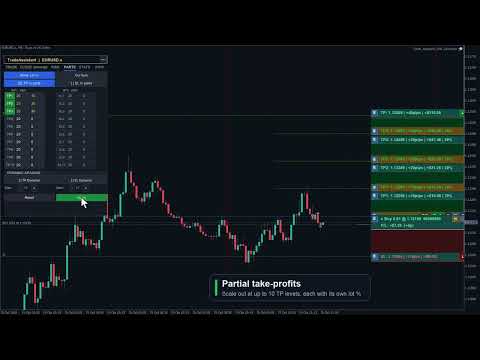
  • Up to 10 TP Levels and 10 SL Levels: Configure TP1–TP10 and SL1–SL10 with independent active state, pips distance, and close percentage.
  • Draft / Apply Workflow: Editing PARTS values or toggling active buttons creates a draft first. The live planning state changes only when you click Apply. If there are unsaved edits, the panel shows APPLY * and a pending-changes prompt.
  • Active Buttons Are Draft Controls: Turning TP1–TP10 or SL1–SL10 active on/off does not immediately draw or remove lines. Click Apply to commit the change.
  • Safe Symbol Scope: PARTS defaults to Cur Sym (blue) and applies only to the current chart symbol. Switching to All Sym requires a second confirmation click (Confirm All uses the warning color, All Sym uses red) and is session-only. Because pip scales differ widely between instruments such as EURUSD, XAUUSD, and indices, All Sym never applies the current chart's global fixed-pip levels directly to other symbols; non-current symbols act only when that ticket has an explicit per-ticket PARTS setup.
  • Chart Visualization: Applied active partial levels draw dotted lines with drag bars showing price, pips, money value, and close percentage.
  • Drag Applied Levels: Dragging an already-applied partial bar updates that live planning value while preserving smart clamps.
  • Smart Clamping: Partial TP levels stay on the profit side, partial SL levels stay on the loss side, and each partial level keeps at least a 1 pip gap from the full TP or SL distance.
  • Input Validation: Invalid pips values turn red and are kept for correction. Invalid draft values are not applied until fixed.
  • Per-Ticket Inheritance / Override Model: Existing positions, broker pending orders, and virtual pending orders inherit the applied panel settings until you explicitly configure that ticket. Explicit disabled state is also an override and blocks later panel changes from re-enabling that ticket.
  • Per-Ticket Edit Parts: Each ticket can open its own Edit Parts sub-panel with Apply / Back semantics, ticket-level validation, and independent TP1–TP10 / SL1–SL10 values. Closing or Back discards temporary edits; Apply saves the ticket override.
  • Copy or Disable One Ticket: Parts: Copy Applied Panel copies the current applied PARTS panel to one ticket. Parts: Disable This Ticket disables that ticket's partial structure without touching other tickets.
  • Placed Ticket Snapshots: Filled positions, broker pending orders, and virtual pending orders can keep independent TP/SL partial structures, and pending-ticket settings migrate to the filled position when triggered.
  • Lines OFF Reset: Turning Lines off resets the PARTS panel planning fields and master toggles for the next setup; already-placed tickets keep their own snapshots.
  • Proportional Money Display: Each partial level shows money value based on that level's close percentage, not the full position size.
  • Dynamic Spacing: Auto-calculate evenly spaced TP and SL partial levels with independent dynamic-spacing controls.

5. BE Tab — Breakeven & Pending Management

  • Auto Breakeven: Move SL to breakeven after a configurable profit trigger with adjustable offset. The trigger supports four units: Pips (favorable pip move from entry), R (a multiple of the initial SL distance, e.g. 1.0 R), % Price (percentage of entry price as a favorable move), and % TP (percentage of the entry-to-TP distance traveled).
  • Auto Offset: Estimate spread and commission costs from history to calculate a practical breakeven offset.
  • Per-Ticket BE Overrides: Positions, broker pending orders, and virtual pending orders can have dedicated BE settings. Pending-ticket settings migrate to the filled position. Explicit ON or OFF blocks the global BE panel from overriding that ticket.
  • Broker Pending Limit Trail: Trail BUY_LIMIT / SELL_LIMIT broker pending orders closer to market as price moves favorably, while preserving pending expiry.
  • Broker Pending Stop Trail: Trail BUY_STOP / SELL_STOP broker pending orders. Virtual pending orders are not moved by this broker pending trail module.
  • OCO: When one pending order on the same symbol triggers, other broker pending orders and virtual pending orders on that symbol are canceled.
  • Hide SL/TP: New market orders or broker pending orders can be sent without broker-side SL/TP while the EA manages virtual SL/TP locally. Existing tickets are not changed by the panel toggle.
  • Virtual Pending Orders: VPend keeps pending entries local until triggered. When triggered, the EA converts the setup to a stealth market position with virtual SL/TP and migrates ticket-specific PARTS / BE / Trail settings. The filled position keeps its [VP] marker and can be rebuilt on a newly opened chart for the same symbol.
  • Persistence Model: Planning lines (Entry / SL / TP), virtual SL/TP, BE / Trail panel settings, PARTS panel settings, ticket partial snapshots, and ticket BE / Trail overrides are restored across EA version upgrade, remove + reattach, and even a MetaTrader client abnormal termination; however, the PARTS All Sym scope is not auto-persisted and returns to the safer Cur Sym scope after reload. Existing stealth positions, broker pending orders with virtual SL/TP, and VP-filled positions can also be rebuilt on a newly opened chart for the same symbol. Only untriggered virtual pending orders remain chart-scoped and are restored from hidden chart mementos on the same chart window only.

6. TRAIL Tab — 8-Mode Trailing Stop Engine

  • 8 Trail Modes: NONE, PIPS, HI/LO, MA, SAR, ATR, FRACTALS, and PARTIAL. The ATR mode has an additional option ( InpTrailATRUseBarHL ): anchor the stop to the previous bar's Low/High offset by ATR × multiplier instead of maintaining a fixed ATR-sized gap from live Bid/Ask.
  • Universal Settings: Start, Distance, and Step control when trailing activates and how often it updates.
  • Per-Ticket Fixed-Pip Trail: Positions, broker pending orders, and virtual pending orders can define ticket-level trail settings. Pending-ticket settings migrate to the filled position. Explicit disabled state blocks global trailing for that ticket.
  • Hidden SL/TP Safe: Breakeven and trailing updates preserve the other hidden SL/TP leg when modifying virtual protection.

7. CLOSE Tab — Bulk Position & Pending Management

  • Close/Cancel All: Close all positions and cancel all broker pending orders and virtual pending orders across all symbols.
  • Close + Pending Symbol: Close current-symbol positions and cancel that symbol's broker pending orders and virtual pending orders.
  • Cancel Pending: Cancel all broker pending orders and virtual pending orders.
  • Close Buy / Sell / Profit / Loss: Close buy positions, sell positions, profitable positions, or losing positions according to the selected rule.
  • Partial Close: Close a configurable percentage of each open position with one click.
  • Auto-Close Targets: Set profit or loss targets in money or percent for the account or current symbol.
  • Trading Locks: Lock all trading or lock only the current symbol to prevent impulsive entries.

8. INFO Tab — Account Dashboard

  • Live Account Data: Balance, Equity, Floating P/L, Free Margin, and Margin % update in real time.
  • Position Summary: See total positions, buy lots, sell lots, and current-symbol P/L.
  • Daily Statistics: Day-start equity, today's P/L, and lock status reset automatically at daily rollover.
  • Symbol Switcher: Configure up to 6 symbols for one-click chart switching through InpSwitcherSymbols .
  • Hotkey Reference: The panel shows quick keyboard shortcuts such as Close/Cancel All, Close/Cancel Symbol, Cancel Pending, Trail, and BE.

9. RISK Tab — Over-Trading & Loss Lock Rules

  • Trade Count Limits: Set maximum trades per minute, hour, day, week, and month. Live counters show used / allowed on the tab. The counting scope can be set to the chart symbol or all symbols, to this EA's magic number or all magic numbers, and to Buy, Sell, or both trade directions.
  • Maximum Open Trades: Block new entries when the number of simultaneously open positions reaches a configured cap.
  • Cooldown After Open: Enforce a minimum wait in minutes before the next entry is allowed after the most recent trade was opened.
  • Cooldown After Close: Enforce a minimum wait in minutes before re-entering after any position closes.
  • Daily Loss $ and %: Stop new trading when today's cumulative realized loss exceeds a fixed dollar amount or a percentage of starting equity.
  • Daily Profit % Lock: Stop new trading once today's profit reaches a configured percentage target, preventing overtrading on a winning day.
  • Advanced Locks (ADV mode): Per-symbol loss lock in $ and %, weekly equity loss lock in $, and monthly equity loss lock in $.
  • Close On Lock: Optionally close all open positions automatically when any loss lock triggers.
  • Unlock Next Day: All risk locks reset automatically at the next server-day rollover.
  • Live Summary: The RISK tab always shows today's closed trade count, today's net P/L, and the current restriction status.
  • Last 10 Blocked Opens: A history list shows the last 10 trade attempts that were blocked, with timestamp and reason, for post-session review.
  • Apply / Reset: RISK tab changes take effect immediately. Click APPLY to persist them to the chart so they survive EA remove + reattach. Click RESET to restore input defaults.

10. STATS Tab — Trading History & CSV Export

  • Period Selector: Toggle between TODAY, 7D, 30D, and ALL to scope the statistics to the chosen history window.
  • Symbol & Magic Filter: Filter statistics to the current chart symbol or all account symbols, and to this EA's magic number or all magic numbers.
  • Performance Metrics: Closed-trade count, win/loss/flat breakdown, win rate, net P/L, profit factor, gross profit, gross loss, average win, and average loss — computed from MetaTrader 5 account history deals.
  • CSV Export: Click EXPORT CSV to save the filtered deal rows to a CSV file in MQL5/Files/ . The full path is logged to the Experts tab.
  • Refresh: Click REFRESH to re-run the statistics scan after new trades close.
  • Floating analytics panel: The STATS button on the TRADE tab LINE ORDERS row opens the wide Performance Analytics panel (see 11f) for chart-rich analysis; it complements this embedded tab's compact report.

11. Tools

  • Screenshot: Capture a full chart screenshot with one click. The file is saved automatically with the symbol name and timestamp.

11a. Alert Tool

  • Place up to 48 price-crossing alert lines (horizontal or angled trend line) directly on the chart. Choose Bid or Ask and an up or down crossing direction from 8 preset combinations.
  • When price crosses the line, the EA plays a sound and shows a visual notification. The alert auto-resets and re-fires on the next qualifying crossing — no recreation needed.
  • Delete individual lines on the chart or use Clear to remove all at once. All alert lines are saved per symbol/timeframe and survive EA reload and MT5 restarts.

11b. Cancel Level (CNCL) Tool

  • Same 8-option model as the Alert tool, but triggers order cancellation instead of a notification: when price crosses the level, all broker and virtual pending orders on the current symbol are cancelled.
  • Up to 48 cancel levels per chart, each with its own Bid/Ask and direction setting. Saved per symbol/timeframe; survive EA reload and MT5 restarts.

11c. Economic Calendar

  • Open from the Trade tab ECON CAL button. Browse Mon–Fri economic events from the MT5 built-in database. Filter by impact level (Low / Med / High) and by currency. Events within 30 minutes are highlighted. Opening Calendar, STATS, or SCHED closes the other floating overlays to reduce clutter.
  • Block Trading: Select events and set a minute window. The EA rejects new orders that many minutes before and after each selected event. Optional Pnd (default ON) also cancels broker and virtual pending orders in scope when Block is active. Choose All Pairs to block all symbols or restrict to symbols matching the event currency.
  • Auto-close on news: Enable Close Pos together with Block Trading to automatically close affected positions when a news block window opens. Close Pos alone does not block new entries — it closes and cancels when the window starts.
  • Block/close rules stay active after the panel is closed. Notification delivery (popup, sound, push, email) is configured via input parameters.
  • Optional chart news markers and block-zone shading (per impact level via inputs) show event times on the chart with hover tooltips, independent of the panel block rules.

11d. Task Scheduler

  • Queue up to 10 tasks that execute automatically. All date and time values use local PC time. Actions span 18 types: Buy, Sell, Buy/Sell Stop, Buy/Sell Limit, Close Buy, Close Sell, Close Profit, Close Loss, Close All, and order deletion (Del Buy/Sell Stop, Del Buy/Sell Limit, Del Stop, Del Limit, Del All Orders).
  • Trigger modes: Time trigger fires at the first tick on or after the scheduled date and local time. Price trigger fires when market price touches a specified level — set manually or linked to the ENTRY, SL, TP drag line, or any named chart object. Both modes can coexist on one task.
  • Task dependencies: A task can be set to fire only after another task in the list has already executed, enabling chained sequences (e.g. close all at 17:00, then place a fresh pending only after the close task completes).
  • Repeat: Check any combination of day-of-week boxes (Su Mo Tu We Th Fr Sa) for a recurring task. Leave all unchecked for a one-shot task that removes itself after firing.
  • Task status tracking: Each task carries a live status — Pending, Wait Trigger (waiting for price touch), Wait Dependency (parent not yet fired), Disabled (paused by user), Success, or Failed — with a last-result and reason field for post-session review.
  • Enable / Disable: Any task can be paused (disabled) and re-enabled without deleting it, so you can build a library of recurring setups and selectively activate them.
  • Execution history: The SCHED panel has a History view tab showing up to 180 recent execution log entries (Symbol, Time, Task#, Event, Status, Lots, Entry, TP, SL, Result / Reason). Filter by the current chart symbol or view all symbols. Paginate with Prev / Next buttons.
  • All tasks are saved to file and restored across EA reload and MT5 restarts. One-shot tasks are removed automatically after execution.

11e. Session Boxes

  • Toggle SESSIONS on the TRADE tab to draw dashed-border session rectangles directly on the chart. Four independent slots are configurable — defaults are Sydney (22:00–07:00), Tokyo (00:00–09:00), London (08:00–17:00), and New York (13:00–22:00), each with its own label, color, and enable switch.
  • Time reference modes: UTC (default) — industry standard GMT session hours shifted onto the broker chart using the server-UTC offset; Server — broker chart clock; Local — PC OS timezone. The UTC offset can be set manually (minutes) or derived automatically each refresh for accurate DST handling.
  • Opacity ( InpSessionFillAlpha ) and pastel-mix level ( InpSessionColorPastel ) are configurable via input parameters. Boxes have a dashed border outline with a label; there is no solid fill so the chart price action underneath remains fully visible.

11f. Stats Analysis Panel (STATS button)

  • Click the STATS button on the TRADE tab LINE ORDERS row (separate from the top STATS tab) to open the wide floating Performance Analytics panel. It visualizes your MT5 account history. The panel is draggable and independent of the main panel; opening it closes other floating overlays (Calendar, Scheduler, etc.).
  • Four views: Overview (KPI cards, radar chart, cumulative/daily P&L charts, P&L calendar, recent closed trades / open positions table), Reports (monthly stats and charts), Compare (period comparison), and Symbols (per-symbol P&L ranking, win rate, cross-month matrix).
  • Calendar drill-down: Click a day on the Overview P&L calendar to open a day-detail panel with per-trade rows, an intraday equity curve, and an optional trade chart snapshot (multi-timeframe bars around entry/exit).
  • Data window: Scans roughly the last 100 trading days of account history by default; refreshes every 5 seconds while the panel is open.
  • vs. the STATS tab: The embedded STATS tab is a compact report (TODAY / 7D / 30D / ALL, symbol and magic filters, win rate / profit factor / net P&L, EXPORT CSV). The floating Stats Panel is the chart-rich analytics view. Both read broker deal history — not an EA event log.

12. Entry Line Proportional Drag

  • Dragging the Entry line moves SL, TP, and active partial levels by the same amount, preserving distances and Risk:Reward geometry.

Hotkeys

  • B / S: Buy / Sell Market
  • U / D: Buy / Sell Pending
  • C: Close positions and cancel all pending orders
  • X: Close current-symbol positions and cancel its pending orders
  • P: Cancel all broker and virtual pending orders
  • L: Lock current-symbol trading
  • A: Lock all trading
  • T: Toggle trailing stop
  • E: Toggle breakeven

Input Parameters

  • Risk Settings: default risk, fixed money risk, R:R, and max spread.
  • Stealth Settings: virtual pending and virtual SL/TP.
  • Management: BE, trailing, OCO, pending expiry, Magic Number, and symbol scope.
  • Auto-Close Rules: profit/loss targets in money or percent.
  • Time Filters: trading sessions, trading days, and crypto-weekend support.
  • Visual Settings: Six built-in color themes — Dark, Darker, Slate, Classic, Light, and Light Modern — selectable via InpColorTheme . Choose CUSTOM to use individual Inp*Color inputs for full manual color control. Panel position, line widths, and label sizes are also configurable.
  • Risk Guards: Commission-inclusive lot sizing ( InpRiskLotsIncludeComm ), virtual order trigger source (Ask / Bid / Mid / Bar Close), and block-alert delivery (popup, sound, push, email).
  • Symbol Switcher & Favorites: Up to 6 quick-jump symbols via InpSwitcherSymbols . A separate favorite-symbols list ( InpFavoriteSymbols ) is merged into the INFO tab's quick-jump panel.
Recommended products
CosmiCLab SMC FIBO CosmiCLab SMC FIBO is a professional trading indicator designed for traders who use Smart Money Concepts (SMC), market structure analysis and Fibonacci retracement levels. The indicator automatically detects market swings and builds Fibonacci levels based on the latest impulse movement. It also identifies market structure changes such as BOS (Break of Structure) and CHOCH (Change of Character), helping traders understand the current market direction. CosmiCLab SMC FIBO also pr
Introduction Welcome to the world of Forex trading, where every tick of the market can be influenced by news events. Introducing our expert advisor for MetaTrader, your ultimate tool for navigating the complexities of news trading. This innovative advisor is specifically designed to automate your trading strategy during key macroeconomic releases, ensuring you never miss an opportunity.  When important indicators are announced, volatility often spikes, creating potential for profit. Our expert
FREE
Follow The Line MT5
Oliver Gideon Amofa Appiah
4.6 (35)
This indicator obeys the popular maxim that: "THE TREND IS YOUR FRIEND" It paints a GREEN line for BUY and also paints a RED line for SELL. (you can change the colors). It gives alarms and alerts of all kinds. IT DOES NOT REPAINT and can be used for all currency pairs and timeframes. Yes, as easy and simple as that. Even a newbie can use it to make great and reliable trades. NB: For best results, get my other premium indicators for more powerful and reliable signals. Get them here: https://www.m
FREE
Order Book, known also as Market Book, market depth, Level 2, - is a dynamically updated table with current volumes of orders to buy and to sell specific financial instument at price levels near Bid and Ask. MetaTrader 5 provides the means for receiving market book from your broker, but in real time only, without access to its history. The indicator OrderBook Cumulative Indicator accumulates market book data online and visualizes them on the chart. In addition, the indicator can show the market
Overview Candle Timer Countdown Pro displays a smooth, accurate countdown to the close of the current candle, accompanied by a circular progress arc that gives you an instant visual sense of time remaining. Unlike other timers that freeze between ticks or drift out of sync, this indicator uses server time interpolation to deliver a stutter-free countdown on every timeframe from M1 to MN. Whether you trade scalping setups on the 1-minute chart or swing positions on H4, knowing exactly when the cu
Donchian Breakout And Rsi
Mattia Impicciatore
4.5 (2)
General Description This indicator is an enhanced version of the classic Donchian Channel , upgraded with practical trading functions. In addition to the standard three lines (high, low, and middle), the system detects breakouts and displays them visually with arrows on the chart, showing only the line opposite to the current trend direction for a cleaner view. The indicator includes: Visual signals : colored arrows on breakout Automatic notifications : popup, push, and email RSI filter : to val
FREE
Price Action Trade Panel EA MT5
Juvenille Emperor Limited
5 (4)
Price Action Trade Panel MT5  calculates the buying/selling force level balance of any symbol/instrument, based on pure price action data of the specified (8 by default) past candles. This will give you the closest market sentiment possible by monitoring the price action of 32 symbols/instruments that are available on the indicator's panel. A buying/selling force level over 60% gives a quite solid level for buy/sell the specific symbol (using the default settings).  Price Action Trade Panel MT5
Price Magnet — Price Density and Attraction Levels Indicator Price Magnet is a professional analytical tool designed to identify key support and resistance levels based on statistical Price Density. The indicator analyzes a specified historical period and detects price levels where the market spent the most time. These zones act as “magnets,” attracting price action or forming a structural base for potential reversals. Unlike traditional Volume Profile tools, Price Magnet focuses on price-time d
The indicator detects and displays М. Gartley's Butterfly pattern. The pattern is plotted by the extreme values of the ZigZag indicator (included in the resources, no need to install). After detecting the pattern, the indicator notifies of that by the pop-up window, a mobile notification and an email. The pattern and wave parameters are displayed on the screenshots. The default parameters are used for demonstration purposes only in order to increase the amount of detected patterns. Parameters z
Important Lines
Terence Gronowski
4.88 (24)
This indicator displays Pivot-Lines, preday high and low, preday close and the minimum and maximum of the previous hour. You just have to put this single indicator to the chart to have all these important lines, no need to setup many single indicators. Why certain lines are important Preday high and low : These are watched by traders who trade in a daily chart. Very often, if price climbs over or falls under a preday low/high there is an acceleration in buying/selling. It is a breakout out of a
FREE
Easy GOLD MT5
Franck Martin
3.87 (45)
Easy Gold is the latest addition to the BotGPT family. It is surprising and very powerful. It is ideal for beginners due to its simplicity.  There is absolutely nothing to do, it's 100% automated, simply indicate the percentage of risk you want to take per trade and the EA is ready. Whatever your capital, the EA takes care of everything. Optimized on (XAUUSD).  Unleash all the power with the professional version (AGI Gold) and its connection to the neural network, available in my store. My othe
FREE
Crypto_Forex Indicator "WPR with 2 Moving Averages" for MT5, No Repaint. - WPR itself is one of the best oscillators for scalping. - "WPR and 2 Moving Averages" Indicator allows you to see Fast and Slow Moving Averages of WPR oscillator. - Indicator gives opportunities to see the price corrections very early. - It is very easy to set up this indicator via parameters, it can be used on any time-frame. - You can see Buy and Sell entry conditions on the pictures. - With PC and Mobile alerts on WP
ROMAN5 Time Breakout Indicator automatically draws the boxes for daily support and resistance breakouts. It helps the user identifying whether to buy or sell. It comes with an alert that will sound whenever a new signal appears. It also features an email facility. Your email address and SMTP Server settings should be specified in the settings window of the "Mailbox" tab in your MetaTrader 5. Blue arrow up = Buy. Red arrow down = Sell. You can use one of my Trailing Stop products that automatical
FREE
Trading Room Indcator
Meshari F M Alkhawaled
Trading Room Indicator is a professional market-structure tool built to give traders a clear, complete trading framework — combining CPR levels, dynamic targets, and trend direction in one clean view. Instead of guessing direction or overloading the chart with indicators, Trading Room Indicator focuses on what actually matters : levels, direction, and potential price expansion. What This Indicator Provides CPR Structure BUY level SELL level Pivot Point (PP) Designed to highlight equilibrium
Caicai L&S Yield Histogram Important Notice: This indicator is an integral tool of the automated EA Caicai Long and Short Pair Trading . This indicator visually displays the percentage deviation (Yield %) of a pair's current spread relative to its own historical mean. It is an excellent tool for quickly visualizing the gross financial potential of a market distortion in Long & Short operations. Main Features: Percentage Visualization: Understand the size of the distortion in palpable percentage
RBreaker
Zhong Long Wu
RBreaker Gold Indicators is a short-term intraday trading strategy for gold futures that combines trend following and intraday reversal approaches. It not only captures profits during trending markets but also enables timely profit-taking and counter-trend trading during market reversals. This strategy has been ranked among the top ten most profitable trading strategies by the American magazine   Futures Truth   for 15 consecutive years. It boasts a long lifecycle and remains widely used and st
Visual Dolphin Indicator
AL MOOSAWI ABDULLAH JAFFER BAQER
Visual Dolphin Indicator Unlock the rhythm of the market with the Visual Dolphin Indicator, your ultimate tool for identifying and capitalizing on market trends with clarity and confidence. Designed for both novice and experienced traders, this indicator eliminates the noise and guesswork, providing crystal-clear buy and sell signals directly on your chart. The Logic Behind the Waves The core of the Visual Dolphin Indicator is a sophisticated yet intuitive dual-wave system based on moving avera
The   Trendlines Oscillator   helps traders identify trends and momentum based on the normalized distances between the current price and the most recently detected bullish and bearish trend lines. The indicator features bullish and bearish momentum, a signal line with crossings, and multiple smoothing options. USAGE The   Trendlines Oscillator   works by systematically: Identifying pivot highs and lows. Connecting pivots to form bullish (support) and bearish (resistance) trendlines. Measuring
Reversal Composite Candles
MetaQuotes Ltd.
3.69 (16)
The idea of the system is to indentify the reversal patterns using the calculation of the composite candle. The reversal patterns is similar to the "Hammer" and "Hanging Man" patterns in Japanese candlestick analysis. But it uses the composite candle instead the single candle and doesn't need the small body of the composite candle to confirm the reversal. Input parameters: Range - maximal number of bars, used in the calculation of the composite candle. Minimum - minimal size of the composite can
FREE
One of the number sequences is called "Forest Fire Sequence". It has been recognized as one of the most beautiful new sequences. Its main feature is that this sequence avoids linear trends, even the shortest ones. It is this property that formed the basis of this indicator. When analyzing a financial time series, this indicator tries to reject all possible trend options. And only if he fails, then he recognizes the presence of a trend and gives the appropriate signal. This approach allows one t
IMPORTANT NOTE: This is a professional Trade Management Utility and on-chart assistant. It is NOT an automated trading robot. It does not open trades on its own. The UltraFast Trade Manager MT5 is the ultimate execution and risk-management suite designed to give you absolute control over your manual and algorithmic trades. When managing multiple positions, calculating complex net break-even points, or constantly monitoring the economic calendar, hesitation can lead to costly mistakes. This utili
FREE
JAC Trend Color Candle
Eduardo Da Costa Custodio Santos
The indicator "JAC Trend Color Candle" for Meta Trader 5, was created to visually facilitate the trend for the trader. It is based on three parameters, which identifies the uptrend, downtrend and non-trending market. The colors are trader-configurable, and the average trader-configurable as well. trend parameters cannot be configured as they are the indicator's differential.
Noize Absorption Index - is the manual trading system that measures the difference of pressure between bears forces and bulls forces. Green line - is a noize free index that showing curent situation. Zero value of index shows totally choppy/flat market.Values above zero level shows how powerfull bullish wave is and values below zero measures bearish forces.Up arrow appears on bearish market when it's ready to reverse, dn arrow appears on weak bullish market, as a result of reverse expectation.
HAS RSI Signal — Professional Trend Indicator with SL/TP Calculation HAS RSI Signal is a powerful trading tool that combines time-tested classics with modern noise-filtering algorithms. The indicator analyzes the market through the prism of Heiken Ashi Smoothed candles and the RSI oscillator, providing clear entry signals at trend reversals or when exiting overbought/oversold zones. Key Advantages: Double Filtration: Using Heiken Ashi Smoothed eliminates market "noise," while RSI confirms the mo
Trade assistant pro v8
Ahmed Mohammed Bakr Bakr
FREE FREE FREE Trade Assistant MT5 – Professional Trading & Risk Management Panel Trade Assistant MT5 is an advanced trading panel designed to help traders execute orders faster, safer, and more professionally . It simplifies manual trading by combining smart order management , precise risk control , and one-click execution , making it ideal for both beginners and advanced traders. This tool does not trade automatically . Instead, it empowers you with full control while applying professional-gra
FREE
Our offer also includes a free panel — Indicator Panel — which allows you to show or hide indicators created by BOToBRACIA. High and Low Points is a practical technical analysis indicator that plots levels corresponding to the highs and lows from previous periods (day / week / month) — levels that, in the Smart Money Concepts (SMC) and ICT approach, are treated as liquidity zones, while in classical technical analysis they serve as potential support and resistance levels. Indicator settings: •
FREE
LT Rainbow Trend
Thiago Duarte
5 (1)
== LT RAINBOW TREND - THE TREND INDICATOR WITH 36 MOVING AVERAGES == OVERVIEW LT Rainbow Trend is an advanced technical trend analysis indicator that utilizes 36 simultaneous Moving Averages with a smart color system (Rainbow). Developed for traders who want to trade in the direction of the main trend with maximum visual clarity, the indicator transforms the complexity of multi-timeframe analysis into a simple, colorful, and highly intuitive visualization. Ideal for traders who understand that
Key Features: 200+ Fully Implemented Patterns   across all categories Advanced Market Structure Analysis Smart Money Integration   (Wyckoff, Order Blocks, Liquidity) Professional Risk Management Multi-Timeframe Analysis AI-Powered Confidence Scoring Advanced Visualization Real-time Alerts Pattern Categories: Single Candle Patterns (Hammer, Doji, Marubozu, etc.) Multi-Candle Patterns (Engulfing, Stars, Harami, etc.) Chart Patterns (Head & Shoulders, Cup & Handle, Triangles, etc.) Harmonic Pattern
FREE
Free automatic Fibonacci is an indicator that automatically plots a Fibonacci retracement based on the number of bars you select on the BarsToScan setting in the indicator. The Fibonacci is automatically updated in real time as new highest and lowest values appears amongst the selected bars. You can select which level values to be displayed in the indicator settings. You can also select the color of the levels thus enabling the trader to be able to attach the indicator several times with differe
FREE
TradingCoPilot
Viktor Mitrofanov
Trading Co-Pilot for MetaTrader 5 Advanced Position Management for Manual Traders Trading Co-Pilot is a professional trade management assistant designed for traders who open positions manually and want precise, automated control over risk and profit handling. It does not open trades. It manages them intelligently. You focus on entries. The Co-Pilot protects and optimizes the exit. How It Works Once you open a manual position, Trading Co-Pilot automatically: • Applies Stop Loss • Sets Take Profit
FREE
Buyers of this product also purchase
Trade Assistant MT5
Evgeniy Kravchenko
4.43 (214)
It helps to calculate the risk per trade, the easy installation of a new order, order management with partial closing functions, trailing stop of 7 types and other useful functions. Additional materials and instructions Installation instructions - Application instructions - Trial version of the application for a demo account Line function -   shows on the chart the Opening line, Stop Loss, Take Profit. With this function it is easy to set a new order and see its additional characteristics bef
Forex Trade Manager MT5
InvestSoft
4.98 (668)
Trade Manager MT5 is an advanced position size calculator and trade management tool for MetaTrader 5, designed to help traders plan trades faster, control risk more precisely, and manage open positions directly from the chart. It combines order placement, risk based lot calculation, Stop Loss and Take Profit management, Break Even, Trailing Stop, Partial Close, Equity Protection, and external trade management in one panel. Whether you trade forex, indices, metals, commodities, crypto, or future

Local Trade Copier EA MT5
Juvenille Emperor Limited
4.95 (143)
Experience exceptionally fast trade copying with the   Local Trade Copier EA MT5 . With its easy 1-minute setup, this trade copier allows you to copy trades between multiple MetaTrader terminals on the same Windows computer or Windows VPS with lightning-fast copying speeds of under 0.5 seconds. Whether you're a beginner or a professional trader, the   Local Trade Copier EA MT5   offers a wide range of options to customize it to your specific needs. It's the ultimate solution for anyone looking t
Beta Release The Telegram to MT5 Signal Trader is nearly at the official alpha release. Some features are still under development and you may encounter minor bugs. If you experience issues, please report them, your feedback helps improve the software for everyone. Telegram to MT5 Signal Trader is a powerful tool that automatically copies trading signals from Telegram channels or groups directly to your MetaTrader 5 account. It supports both public and private Telegram channels, and you can conn
TradePanel MT5
Alfiya Fazylova
4.88 (162)
Trade Panel is a multi-functional trading assistant. The app contains over 50 trading functions for manual trading and allows you to automate most trading tasks. Before making a purchase, you can test the demo version on a demo account. Download the trial version of the application for a demonstration account: https://www.mql5.com/en/blogs/post/750865 . Full instructions here . Trade. Allows you to perform trading operations in one click: Open pending orders and positions with automatic risk cal
FarmedHedge Pair Trading Dashboard
Tanapisit Tepawarapruek
5 (3)
Farmed Hedge Yield Farming | All Markets (Manual - Hybrid - Semi/Automated EA) MULTI-ASSET SUPPORT Trade any asset available on your broker - Forex: Major, Minor, Exotic pairs - Crypto: BTC, ETH, XRP, SOL, BNB - Stocks: Apple, Tesla, Amazon, Google, etc. - Commodities: Gold, Silver, Oil, Gas - Indices: US30, NAS100, SPX500, DAX40 - Any CFD your broker offers VERIFIED TRADING RESULTS - Farmed Hedge Yield Axi Copy:  https://www.mql5.com/en/signals/2356376 - Farmed Hedge Yield Exn Copy:   https:/
Telegram to MT5 Multi-Channel Copier automatically copies trading signals from your Telegram channels directly into MetaTrader 5. No bots, no browser extensions, no manual copying. You receive a signal on Telegram and the EA opens the trade on your terminal in a few seconds. The product includes two components: a Windows application that listens to your Telegram channels, and this Expert Advisor that executes the signals on your MT5 terminal. An MT4 version is also available. Setup guide and app


Power Candles Strategy Scanner - Self-Optimizing Multi-Symbol Setup Finder Power Candles Strategy Scanner runs the same self-optimizing engine that powers the Power Candles indicator - on every symbol in your Market Watch, side by side. One panel tells you which symbols are statistically tradable right now, which strategy wins on each, the optimal Stop Loss / Take Profit pair, and pings you the moment a fresh signal fires. This tool is part of the Stein Investments ecosystem - 18+ tools plus Max
================================================================================ POC BREAKOUT - V20.72. Full Professional Grade Toolkit ================================================================================ POC Breakout is a full MetaTrader 5 trading dashboard for discretionary traders who want breakout signals, Point of Control (POC) context, volume profiles, order flow, market structure, news, alerts, and advanced trade planning in one professional workspace. Attached directly to you
Exp COPYLOT CLIENT for MT5
Vladislav Andruschenko
3.94 (34)
Professional Trade Copier for MetaTrader 5 Fast, professional, and reliable trade copier for MetaTrader . COPYLOT allows you to copy Forex trades between MT4 and MT5 terminals with support for Hedge and Netting accounts. COPYLOT MT5 version supports: - MT5 Hedge to MT5 Hedge - MT5 Hedge to MT5 Netting - MT5 Netting to MT5 Hedge - MT5 Netting to MT5 Netting - MT4 to MT5 Hedge - MT4 to MT5 Netting MT4 version Full Description +DEMO +PDF How To Buy How To Install How to get Log Files H
Anchor Trade Manager
Kalinskie Gilliam
5 (5)
Anchor: The EA Manager Run your full EA portfolio without conflicts, without stacked risk, and without watching every chart yourself. Anchor coordinates up to 64 Expert Advisors on a single account, including daily loss protection built for prop firm rules. Attach Anchor to any chart. Type your EA names and magic numbers in one line. Click OK. Anchor begins coordinating immediately. Built for portfolios. Built for prop firms. Built for discipline. The Problem Running multiple EAs on the same acc
Trade copier MT5
Alfiya Fazylova
4.59 (49)
Trade Copier is a professional utility designed to copy and synchronize trades between trading accounts. Copying occurs from the account / terminal of the supplier to the account / terminal of the recipient, which are installed on the same computer or VPS . PROMOTION - If you have already purchased the "Trade Copier MT5," you can receive the "Trade Copier MT4" for free (for copying MT4 > MT5 and MT4 < MT5). For more detailed information about the conditions, please contact us via private message
Footprint Chart Pro — Professional OrderFlow EA for MetaTrader 5 Version 6.34 | Professional tool for real traders | Institutional-Grade Visualization DEMO USERS - PLEASE SELECT EVERY TICK / REAL TICK WHEN TESTING AND YOU HAVE DOWNLOADED HISTORICAL DATA. IF YOU SEE A WAITING SCREEN AND IT IS NOT DOWNLOADING, IT MEANS YOU HAVE LOW HISTORICAL DATA. TRY 1 MIN AND 5 MIN FIRST ON 1 DAY DATA. ONE DAY DATA SHOULD BE THE NEWEST AND MOST CURRENT DATE. PLEASE WAIT UNTIL THE MARKET HAS ROLLED OVER PERIOD.
VirtualTradePad One Click Trading Panel
Vladislav Andruschenko
4.59 (74)
Trading Panel for MetaTrader 5 — professional one-click trading from chart and keyboard A powerful trading panel for active manual trading, designed to open, manage, and close trades far faster and more efficiently than the standard MetaTrader interface. This panel is built for traders who want full control over positions, pending orders, profit management, and trading execution inside one professional workspace. This is not just another utility. It is a complete trading cockpit for MetaTrader
EasyInsight AIO MT5
Alain Verleyen
4.92 (12)
EASY Insight AIO – All-In-One Power for AI-Driven Trading Want to skip the setup and start scanning the entire market – Forex, Gold, Crypto, Indices, and even Stocks – in seconds? EASY Insight AIO is the complete plug-and-play solution for AI-powered trade analysis. It includes all core Stein Investments indicators built-in and automatically exports clean, structured CSV files – perfect for backtesting, AI prompts, and live market decision-making. No need to install or configure indicators manu
The product will copy all telegram signal to MT5 ( which you are member) , also it can work as remote copier.  Easy to set up, copy order instant, can work with almost signal formats, image signal,  s upport to translate other language to English Work with all type of channel or group, even channel have "Restrict Saving Content", work with  multi channel, multi MT5 Work as remote copier: with signal have ticket number, it will copy exactly via ticket number. Support to backtest signal. How to s
Premium Trade Manager - The Trade Panel With a Coach Built In Premium Trade Manager puts a trading coach inside your chart, with a full execution engine underneath it. Set the trade up the way you always do, then let Max, your AI trading coach, read that exact setup against your live account and give you a straight verdict before you commit: is the stop disciplined, is the risk sane, is a high-impact release minutes away, are you near a prop-firm limit. Below sits the engine that runs everything
Trade Manager DaneTrades
Levi Dane Benjamin
4.28 (29)
DaneTrades Trade Manager is a professional trade panel for MetaTrader 5, designed for fast, accurate execution with built‑in risk control. Place market or pending orders directly from the chart while the panel automatically calculates position size from your chosen risk, helping you stay consistent and avoid emotional decision‑making. The Trade Manager is built for manual traders who want structure: clear risk/reward planning, automation for repeatable management, and safeguards that help reduc
EA Auditor
Stephen J Martret
5 (4)
EA Auditor is an independent analysis tool for traders evaluating Expert Advisors and trading signals on MetaTrader 5. It audits backtest reports, reviews posted developer signals, and cross-verifies the two against each other to help traders assess strategies before committing capital. The MQL5 market offers a wide range of Expert Advisors from many developers, with varying approaches, quality, and transparency. EA Auditor provides a consistent, data-driven framework for reviewing them, answer
Seconds Chart MT5
Boris Sedov
4.61 (18)
Seconds Chart is a unique tool for creating second-based charts in MetaTrader 5 . With Seconds Chart , you can construct charts with timeframes set in seconds, providing unparalleled flexibility and precision in analysis that is unavailable with standard minute or hourly charts. For example, the S15 timeframe indicates a chart with candles lasting 15 seconds. You can use any indicators and Expert Advisors that support custom symbols. Working with them is just as convenient as on standard charts.
HINN Lazy Trader
ALGOFLOW OÜ
5 (1)
LIMITED SUMMER SALE -40% ! ONLY $470 insead of $790!  Maximum real discount! The core idea: using the user interface, you configure the parameters the chart must meet before entering a position (or positions), choose which entry models to use, and set the rules for when trading and planning should end. Lazy Trader  handles the rest: it  takes over all the routine chart watching and execution! full description  :: 3 key videos [1] ->  [2]   ->  [3] What can it do? - Understands Larry Williams
Welcome to ENTRY IN THE ZONE WITH SMC MULTI TIMEFRAME Entry In The Zone with  SMC Multi Timeframe  is a professional trading indicator built on Smart Money Concepts (SMC), combining market structure analysis with a No Repaint BUY / SELL signal system in a single indicator. It helps traders understand market structure more clearly, identify key price zones, and focus on higher-quality trading opportunities. By combining Multi-Timeframe Analysis, Points of Interest (POIs), and real-time signals, t
Working Demo Download Copy Cat More Trade Copier MT5 is a local trade copier and a complete risk management and execution framework designed for today’s trading challenges. From prop firm challenges to personal portfolio management, it adapts to every situation with a blend of robust execution, capital protection, flexible configuration, and advanced trade handling. The copier works in both Master (sender) and Slave (receiver) modes, with real-time synchronization of market and pending orders,
Quant AI Agents
Ho Tuan Thang
5 (1)
Quant AI Agents are independent trading Expert Advisors. Instead of trading using a fixed strategy like other conventional EAs, Quant AI Agents   is a   multi-agent AI trading framework   that turns natural-language strategy prompts into live.  WANT THE SAME RESULTS AS MY LIVE SIGNAL?   Use the exact same brokers I do:   IC MARKETS , IC TRADING   .  Unlike the centralized stock market, Forex has no single, unified price feed.  Every broker sources liquidity from different providers, creating un
EA Performance Tracker
Russell Leeon Tan
5 (2)
EA Performance Tracker (AESTracker) A clean, modern dashboard that shows exactly how your trades and EAs are performing — right on your chart. It reads your full account history automatically and breaks down the numbers by magic number / strategy. Display only — it does not place any trades. What it shows - Account header: live Balance, Equity, and Open (floating) P/L - Profit summary: gross profit, net profit, and the exact commission & swap deducted - Key stats: win rate, profit factor, exp
Trade Dashboard MT5
Fatemeh Ameri
4.95 (131)
Trade Dashboard simplifies how you open, manage, and control your trades, with built-in lot size calculation. It allows you to execute trades, manage risk, and control positions directly on the chart, with tools such as partial close, breakeven, and trailing stop. Designed to reduce manual work and help you stay focused on your trading decisions. A demo version is available for testing. Detailed explanations of features are provided within the MQL5 platform. Installation instructions are include
The News Filter MT5
Leolouiski Gan
4.78 (23)
This product filters   all expert advisors and manual charts   during news time.  It is able to remove any of your EA during news and automatically reattach them after news ends. This product also comes with a complete  order management system   that can handle your open positions and pending orders before the release of any news. Once you purchase   The News Filter , you will no longer need to rely on built-in news filters for future expert advisors, as this product can filter them all from her
Trader Evolution
Siarhei Vashchylka
5 (7)
" Trader Evolution " - A utility designed for traders who use wave and technical analysis in their work. One tab of the utility is capable of money management and opening orders, and the other can help in making Elliott wave and technical analysis. Manual (Be sure to read before purchasing) | Version for MT4 Advantages 1. Trading in a few clicks. Immediate and pending orders are available in the panel 2. Money management. The program automatically selects the appropriate lot size 3. Simplifies
YuClusters
Yury Kulikov
4.93 (43)
Attention: You can view the program operation in the free version  YuClusters DEMO .  YuClusters is a professional market analysis system. The trader has unique opportunities to analyze the flow of orders, trade volumes, price movements using various charts, profiles, indicators, and graphical objects. YuClusters operates on data based on Time&Sales or ticks information, depending on what is available in the quotes of a financial instrument. YuClusters allows you to build graphs by combining da
Timeless Charts
Samuel Manoel De Souza
5 (7)
Timeless Charts is an all-in-one trading utility for professional traders. It combines custom chart types such as Seconds Charts and Renko with advanced order flow analysis using Footprints , Clusters , Volume Profiles , VWAP studies, and anchored analysis tools for deeper market insight. Trading and position management are handled directly from the chart through an integrated trade management panel , while Market Replay and Virtual Accounts provide environments for practicing trading skills and
More from author
SMC Price Action Patterns - MT5 Indicator Product Description MetaTrader 5 custom indicator SMC Price Action Patterns A chart overlay indicator for traders who want a structured view of Smart Money Concepts, market structure shifts, order block patterns, fair value gaps, equal highs and lows, and key multi-timeframe price levels directly inside MetaTrader 5. BOS and CHoCH Internal and Swing Structure Order Block Finder Input-Controlled FVG Colors EQH and EQL Premium and Discount Zones Product Ov
FREE
Prop Firm Risk Manager PRO EA MetaTrader 5 Expert Advisor • v1.01 • Prop Firm Risk Control Layer Prop Firm Risk Manager PRO EA Professional account protection for prop-firm challenges and funded accounts. It monitors drawdown, open risk, news windows, trading sessions, manual trades, profit targets, and challenge progress in real time, then warns, locks, de-risks, deletes orders, or closes managed exposure according to your rules. Two draggable on-chart panels — Economic Calendar and Performance
ICT Market Structure Pro ICT Market Structure Pro is a Smart Money Concepts / ICT trading tool designed to automatically draw the most important structural and liquidity elements directly on the chart. The indicator helps traders read price action through an institutional lens by mapping market structure shifts, liquidity pools, order blocks, imbalances, premium/discount zones, and key ICT session windows in one place. It supports both single-timeframe and multi-timeframe analysis modes, with a
Trade Assistant Risk Calculator is an all-in-one floating trading panel (Expert Advisor) designed for professional manual traders on MetaTrader 5. It combines Visual Chart Trading , Automatic Risk Calculation , and Advanced Position Management into a single, compact interface. Stop calculating lot sizes manually. Stop guessing your Risk:Reward ratio. Simply drag lines on the chart, and the EA calculates the exact lot size to match your risk percentage, equity, or money target. Important Notes Th
MACD Divergence Radar Pro Multi-Symbol Divergence Scanner & Visual Dashboard for MetaTrader 5 Regular & Hidden Divergence 20+ Pairs Simultaneous Scan One-Click Chart Opening Auto MACD Sub-Window Overview MACD Divergence Radar Pro is a professional-grade divergence detection indicator that continuously scans multiple currency pairs and timeframes in real time. It identifies both regular and hidden MACD divergences — bullish and bearish — and presents all findings in a sleek, draggable on-chart d
Momentum Pulse MT5 – Strength-Based Candle Coloring Indicator with Fibonacci Zone TP/SL Momentum Pulse MT5 MT5 Indicator All Markets Non-Repainting Fibonacci TP/SL Momentum Pulse is a professional-grade multi-dimensional momentum strength indicator that colors each candle based on real market power rather than price alone. It classifies every bar into one of nine clearly defined strength states , provides built-in Fibonacci zone-based TP/SL levels , and includes a comprehensive set of signal qua
TrendGuard Pro – Product Description (English) TrendGuard Pro Supertrend core · 11 confirmation guards · ATR-calculated SL/TP · 5,000-bar performance simulation · P&L pip labels · Symbol watermark · Draggable stats panel TrendGuard Pro is a professional-grade MT5 scalping indicator that fortifies every entry signal with up to 11 independent confirmation filters . False breakouts are systematically eliminated before an arrow ever appears on the chart, letting you trade only the highest-probabilit
VoidFlow IFVG Trade Assistant Pro VoidFlow IFVG Trade Assistant Pro VoidFlow IFVG Trade Assistant Pro is a manual-first MetaTrader 5 trading assistant built for traders who want a cleaner Inverse Fair Value Gap (IFVG) workflow with structured trade planning, chart context, and optional automatic execution only when it is explicitly enabled by the user. It scans the selected signal timeframe for raw Fair Value Gaps, confirms true inversions, filters weak setups, draws the full trade plan on the c
Overview SR Confluence Pro is a professional MetaTrader 5 indicator for support & resistance and chart pattern analysis. It combines dual S&R engines (high-volume box engine + multi-timeframe pivot engine), automatic detection of 16+ classic chart patterns , and a confluence scoring system that rates how closely price structure and S&R levels align. Key levels, pattern structures, break/retest events, and high-quality setups are displayed directly on the chart. A draggable dashboard, multi-symbo
Filter:
No reviews
Reply to review