

Larry Williams Market Secrets (Part 12): Context Based Trading of Smash Day Reversals
 3 653
3 653
 0
0

Introduction
Smash Day patterns are appealing, but trading them without structure often leads to noisy signals and unnecessary losses. The pattern can appear frequently, and without clear rules for context, timing, and validity, it becomes difficult to separate meaningful reversals from random price movement. Larry Williams repeatedly emphasized that Smash Day patterns should not be traded in isolation, but as part of a broader decision process.
This article addresses that problem by turning Smash Day reversals into an objective, rule-based system that can be automated and tested. Instead of relying on visual interpretation, every decision is expressed in measurable, consistent logic that can be evaluated across markets and timeframes.
This work is intended for algorithmic traders and MQL5 developers who want to automate, test, and objectively study Smash Day patterns. It is also suitable for traders who want to understand how Larry Williams’ ideas can be translated into precise execution rules without discretion.
In this article, a complete Expert Advisor is built that trades Smash Day reversals with optional context filters. Trend direction can be enforced using the Supertrend indicator, trades can be limited by day of the week, and each setup is given a fixed validity window. These elements are designed to reduce noise, limit unnecessary trades, and make testing results easier to interpret. By the end of the article, Hidden Smash Day patterns are no longer treated as standalone signals, but as part of a structured framework that can be tested, modified, and extended.
Strategy Rules of the Smash Day Expert Advisor
This Expert Advisor applies Larry Williams’ Smash Day reversal concept using strict, testable rules. The goal is not to trade every visible pattern, but to remove ambiguity and define conditions that can be evaluated consistently across different markets and timeframes.
The Smash Day pattern acts as the signal trigger. All additional rules exist to control timing, context, and risk, so that results reflect structured decision-making rather than random execution.
Smash Day Pattern Definition
The system supports two pattern types: Smash Day Buy reversals and Smash Day Sell reversals. A Smash Day Buy setup is identified when a bar closes below the lows of a user-defined number of previous bars. This lookback depth is configurable and allows testing how different breakdown intensities influence reversals. The bar must not be an outside bar, as it can expand in both directions and often represents noise rather than directional intent.
A Smash Day Sell setup follows the same logic in reverse. The bar must close above the highs of a user-defined number of previous bars and must also not be an outside bar. Once detected, a Smash Day bar represents a potential reversal point, not an immediate trade.
Setup Validity and Timing Control
Smash Day setups are not assumed to remain valid indefinitely. Each detected setup is assigned a limited lifespan defined by a user-specified number of future bars. If the price fails to trigger an entry within this window, the setup is automatically discarded. This reflects real market behavior, where reversal pressure weakens over time, and late entries often lose their edge. This rule also allows objective testing of timing sensitivity without altering the core pattern.
Entry Conditions and Confirmation
A trade is considered only when the price breaks the Smash Day level in the expected direction. For Buy reversals, the price must move above the Smash Day bar's high. For Sell reversals, the price must move below the low of the Smash Day bar. Two entry modes are supported. The first enters immediately when the price crosses the breakout level. The second waits for a full bar close beyond the level. This allows comparing faster execution with confirmed entries while keeping the pattern definition unchanged.
Directional Control
The system can be configured to trade only Buy setups, only Sell setups, or both. Regardless of the selected mode, the EA enforces a strict one-position-at-a-time rule. Smash Day reversals are discrete events, and allowing multiple positions would obscure cause-and-effect. This design keeps results clean and easier to interpret during testing.
Context Filters
Contextual filtering is optional but explicit. A Supertrend filter can be enabled to align trades with the dominant market direction. When active, Buy setups are allowed only during bullish Supertrend conditions, while Sell setups are allowed only during bearish conditions. The Supertrend timeframe, ATR period, and ATR multiplier are all configurable through input parameters.
A Trade Day of the Week filter can also be applied. Trades are executed only on selected days, allowing analysis of session-specific or calendar-based behavior. Both filters can be turned on or off independently.
Risk and Trade Management
Risk management follows the Smash Day pattern. For Buy reversals, the stop loss is placed at the low of the Smash Day bar. For Sell reversals, the stop loss is placed at the high of the Smash Day bar. Take profit is calculated using a fixed risk-to-reward ratio defined by the user. This keeps the exits objective and scalable across markets.
Position sizing can be set manually or calculated automatically as a percentage of the account balance. In automatic mode, position size is derived from stop distance, ensuring consistent risk exposure regardless of volatility.
What Is New in This Expert Advisor
This version of the Smash Day Expert Advisor extends earlier implementations by focusing on timing control, contextual filtering, and reproducibility. The most significant addition is the mechanism for validating the setup. Smash Day reversals are no longer treated as immediate opportunities. Each setup remains active only for a defined number of bars, after which it is automatically invalidated if no entry occurs. This prevents late participation and allows structured testing of momentum decay.
Context filtering has been expanded through the optional Supertrend filter. Trades can now be restricted to the dominant market direction, with full control over Supertrend timeframe and calculation parameters. This makes the concept of context explicit and testable rather than discretionary.
Time-based filtering remains available through the Trade Day of the Week mechanism. Trades can be limited to specific days without modifying core logic, allowing focused experimentation.
Execution logic from previous versions is preserved. Entry can occur on a level break or on a confirmed bar close. Directional control allows Buy-only, Sell-only, or combined operations. Risk management supports both fixed and percentage-based position sizing.
Together, these additions transform the EA from a pattern executor into a structured research tool. The Smash Day signal remains the trigger, but timing, context, and risk now determine when and how trades are taken.
Building the Expert Advisor Step by Step
In this section, we begin the practical construction of the Expert Advisor. The goal here is not to rush into trading logic, but to establish a clean and reliable foundation that will support everything that comes later. Each block of code introduced at this stage exists for a reason, even if that reason only becomes clear further down the development process.
Before we proceed, let's clarify a few prerequisites. We assume familiarity with the MQL5 language and its basic syntax. Concepts such as variables, functions, enumerations, loops, and standard libraries should already be comfortable. We also assume prior experience with the MetaTrader 5 terminal, including attaching programs to charts and running tests. Finally, a working knowledge of MetaEditor is required to create, compile, and debug source files when needed.
To support learning through practice, the complete source code for the finished Expert Advisor is attached to this article as lwSmashDayTrendFilteredExpert.mq5. Coding alongside the tutorial and comparing progress with the final version makes it much easier to understand how each piece fits into the whole.
With that in place, we begin by creating a new empty Expert Advisor file in MetaEditor and pasting in the following initial source code.
//+------------------------------------------------------------------+
//|                                lwSmashDayTrendFilteredExpert.mq5 |
//|          Copyright 2026, MetaQuotes Ltd. Developer is Chacha Ian |
//|                          https://www.mql5.com/en/users/chachaian |
//+------------------------------------------------------------------+

#property copyright "Copyright 2026, MetaQuotes Ltd. Developer is Chacha Ian"
#property link      "https://www.mql5.com/en/users/chachaian"
#property version   "1.00"
#resource "\\Indicators\\supertrend.ex5"

//+------------------------------------------------------------------+
//| Standard Libraries                                               |
//+------------------------------------------------------------------+
#include <Trade\Trade.mqh>

//+------------------------------------------------------------------+
//| Custom Enumerations                                              |
//+------------------------------------------------------------------+
enum ENUM_TDW_MODE
{
   TDW_ALL_DAYS,
   TDW_SELECTED_DAYS
};

enum ENUM_SMASH_ENTRY_MODE{
   ENTRY_ON_LEVEL_CROSS,
   ENTRY_ON_BAR_CLOSE
};

enum ENUM_SMASH_TRADE_MODE
{
   SMASH_TRADE_BUY_ONLY,
   SMASH_TRADE_SELL_ONLY,
   SMASH_TRADE_BOTH
};

enum ENUM_LOT_SIZE_INPUT_MODE
{
   MODE_MANUAL,
   MODE_AUTO
};

//+------------------------------------------------------------------+
//| User input variables                                             |
//+------------------------------------------------------------------+
input group "Information"
input ulong magicNumber         = 254700680002;
input ENUM_TIMEFRAMES timeframe = PERIOD_CURRENT;

input group "Smash Day Pattern Rules"
input int smashBuyLookbackBars   = 1;
input int smashSellLookbackBars  = 1;
input int smashSetupValidityBars = 3;

input group "Smash Day Entry Settings"
input ENUM_SMASH_ENTRY_MODE smashEntryMode = ENTRY_ON_LEVEL_CROSS;
input ENUM_SMASH_TRADE_MODE smashTradeMode = SMASH_TRADE_BOTH;

input group "Supertrend configuration parameters"
input bool useSupertrendFilter            = false;
input ENUM_TIMEFRAMES supertrendTimeframe = PERIOD_CURRENT;
input int32_t supertrendAtrPeriod         = 10;
input double  supertrendAtrMultiplier     = 1.5;

input group "TDW filters"
input ENUM_TDW_MODE tradeDayMode = TDW_SELECTED_DAYS;
input bool tradeSunday           = false;
input bool tradeMonday           = true;
input bool tradeTuesday          = false;
input bool tradeWednesday        = false;
input bool tradeThursday         = false;
input bool tradeFriday           = false;
input bool tradeSaturday         = false;

input group "Trade and Risk Management"
input ENUM_LOT_SIZE_INPUT_MODE lotSizeMode  = MODE_AUTO;
input double riskPerTradePercent            = 1.0;
input double positionSize                   = 0.1;
input double riskRewardRatio                = 3.0;

//+------------------------------------------------------------------+
//| Global Variables                                                 |
//+------------------------------------------------------------------+
//--- Create a CTrade object to handle trading operations
CTrade Trade;

//--- To hep track current market prices for Buying (Ask) and Selling (Bid)
double askPrice;
double bidPrice;

//--- To store current time
datetime currentTime;

//--- Supertrend values
int    supertrendIndicatorHandle;
double upperBandValues[];
double lowerBandValues[];

//--- To help track new bar open
datetime lastBarOpenTime;

struct MqlSmashDayPatternState{

   //--- Pattern detection flags
   bool hasBuySmashSetup;
   bool hasSellSmashSetup;

   //--- Reference breakout levels from smash bar
   double buyBreakoutLevel;
   double sellBreakoutLevel;

   //--- Pattern bar reference data
   datetime smashBarTime;

   //--- Entry status tracking
   bool entryPending;

   //--- Tracks the number of bars elapsed after the occurence of the smash bar
   int barsSinceSmash;

   //--- Stop-Loss levels
   double buyStopLoss;
   double sellStopLoss;

};

MqlSmashDayPatternState smashState;

//--- To store minutes data
double closePriceMinutesData [];

//+------------------------------------------------------------------+
//| Expert initialization function                                   |
//+------------------------------------------------------------------+
int OnInit(){

   //---  Assign a unique magic number to identify trades opened by this EA
   Trade.SetExpertMagicNumber(magicNumber);

   // Initialize the Supertrend Indicator
   supertrendIndicatorHandle = iCustom(_Symbol, supertrendTimeframe, "::Indicators\\supertrend.ex5", supertrendAtrPeriod, supertrendAtrMultiplier);
   if(supertrendIndicatorHandle == INVALID_HANDLE){
      Print("Error while initializing the Supertrend indicator", GetLastError());
      return(INIT_FAILED);
   }

   //--- Treat the following arrays as timeseries (index 0 becomes the most recent bar)
   ArraySetAsSeries(closePriceMinutesData, true);
   ArraySetAsSeries(upperBandValues, true);
   ArraySetAsSeries(lowerBandValues, true);

   //--- Initialize global variables
   lastBarOpenTime = 0;

   //--- Reset
   ZeroMemory(smashState);

   return(INIT_SUCCEEDED);
}

//+------------------------------------------------------------------+
//| Expert deinitialization function                                 |
//+------------------------------------------------------------------+
void OnDeinit(const int reason){

   //--- Release Supertrend
   if(supertrendIndicatorHandle != INVALID_HANDLE){
      IndicatorRelease(supertrendIndicatorHandle);
   }

   //--- Notify why the program stopped running
   Print("Program terminated! Reason code: ", reason);

}

//+------------------------------------------------------------------+
//| Expert tick function                                             |
//+------------------------------------------------------------------+
void OnTick(){

   //--- Retrieve current market prices for trade execution
   askPrice    = SymbolInfoDouble (_Symbol, SYMBOL_ASK);
   bidPrice    = SymbolInfoDouble (_Symbol, SYMBOL_BID);
   currentTime = TimeCurrent();

   //--- Get some minutes data
   if(CopyClose(_Symbol, PERIOD_M1, 0, 7, closePriceMinutesData) == -1){
      Print("Error while copying minutes datas ", GetLastError());
      return;
   }
}

//--- UTILITY FUNCTIONS

//+------------------------------------------------------------------+
This code forms the system's structural backbone.
File Header and Program Identity
//+------------------------------------------------------------------+
//|                                lwSmashDayTrendFilteredExpert.mq5 |
//|          Copyright 2026, MetaQuotes Ltd. Developer is Chacha Ian |
//|                          https://www.mql5.com/en/users/chachaian |
//+------------------------------------------------------------------+

#property copyright "Copyright 2026, MetaQuotes Ltd. Developer is Chacha Ian"
#property link      "https://www.mql5.com/en/users/chachaian"
#property version   "1.00"
#resource "\\Indicators\\supertrend.ex5"
The opening section defines the program name, author details, and version information. This is standard practice in MQL5 and helps with long-term maintenance, especially when multiple iterations of an Expert Advisor exist.
The Supertrend indicator is also embedded as a resource. This ensures that the EA can always access the indicator internally without relying on external chart attachments. Since trend filtering is a core feature of this version, making the indicator available at this level is essential.
Standard Libraries and Trade Access
Next, we include the Trade library.
//+------------------------------------------------------------------+
//| Standard Libraries                                               |
//+------------------------------------------------------------------+
#include <Trade\Trade.mqh>
This provides access to the CTrade class, which simplifies order execution, position handling, and error management. Using this library keeps trade logic readable and consistent across different parts of the system.
At this stage, no trades are placed yet. We are only preparing the tools that will later enable safe, controlled execution.
Enumerations for Clear Configuration
//+------------------------------------------------------------------+
//| Custom Enumerations                                              |
//+------------------------------------------------------------------+
enum ENUM_TDW_MODE
{
   TDW_ALL_DAYS,
   TDW_SELECTED_DAYS
};

enum ENUM_SMASH_ENTRY_MODE{
   ENTRY_ON_LEVEL_CROSS,
   ENTRY_ON_BAR_CLOSE
};

enum ENUM_SMASH_TRADE_MODE
{
   SMASH_TRADE_BUY_ONLY,
   SMASH_TRADE_SELL_ONLY,
   SMASH_TRADE_BOTH
};

enum ENUM_LOT_SIZE_INPUT_MODE
{
   MODE_MANUAL,
   MODE_AUTO
};
Several custom enumerations are declared early in the file. These enumerations define how the EA behaves under different configurations. The TDW mode controls whether trading is allowed on all days or only on selected days. The Smash entry mode determines whether entries are triggered immediately on level breaks or only after bar close confirmation. The Smash trade mode controls directional behavior, allowing buy-only, sell-only, or both. The lot size mode determines whether position sizing is manual or risk-based. Using enumerations instead of raw numeric values improves readability and prevents configuration errors later on.
User Input Parameters
//+------------------------------------------------------------------+
//| User input variables                                             |
//+------------------------------------------------------------------+
input group "Information"
input ulong magicNumber         = 254700680002;
input ENUM_TIMEFRAMES timeframe = PERIOD_CURRENT;

input group "Smash Day Pattern Rules"
input int smashBuyLookbackBars   = 1;
input int smashSellLookbackBars  = 1;
input int smashSetupValidityBars = 3;

input group "Smash Day Entry Settings"
input ENUM_SMASH_ENTRY_MODE smashEntryMode = ENTRY_ON_LEVEL_CROSS;
input ENUM_SMASH_TRADE_MODE smashTradeMode = SMASH_TRADE_BOTH;

input group "Supertrend configuration parameters"
input bool useSupertrendFilter            = false;
input ENUM_TIMEFRAMES supertrendTimeframe = PERIOD_CURRENT;
input int32_t supertrendAtrPeriod         = 10;
input double  supertrendAtrMultiplier     = 1.5;

input group "TDW filters"
input ENUM_TDW_MODE tradeDayMode = TDW_SELECTED_DAYS;
input bool tradeSunday           = false;
input bool tradeMonday           = true;
input bool tradeTuesday          = false;
input bool tradeWednesday        = false;
input bool tradeThursday         = false;
input bool tradeFriday           = false;
input bool tradeSaturday         = false;

input group "Trade and Risk Management"
input ENUM_LOT_SIZE_INPUT_MODE lotSizeMode  = MODE_AUTO;
input double riskPerTradePercent            = 1.0;
input double positionSize                   = 0.1;
input double riskRewardRatio                = 3.0;
The input section presents all configurable behavior to the user in a structured, readable way. Basic input information defines the magic number and working timeframe. Smash Day pattern rules control how reversal patterns are detected and how long a setup remains valid after it appears. Entry settings define how and when trades are triggered. Supertrend inputs control whether trend filtering is active and how the trend is calculated. TDW inputs define which days are tradable. Risk management inputs control position sizing and reward expectations. At this stage, nothing is executed. These inputs define the system's rules before it starts reacting to market data.
Global Variables and Shared State
Global variables are declared next to store prices, time, indicator values, and internal state.
//+------------------------------------------------------------------+
//| Global Variables                                                 |
//+------------------------------------------------------------------+
//--- Create a CTrade object to handle trading operations
CTrade Trade;

//--- To hep track current market prices for Buying (Ask) and Selling (Bid)
double askPrice;
double bidPrice;

//--- To store current time
datetime currentTime;

//--- Supertrend values
int    supertrendIndicatorHandle;
double upperBandValues[];
double lowerBandValues[];

//--- To help track new bar open
datetime lastBarOpenTime;

struct MqlSmashDayPatternState{

   //--- Pattern detection flags
   bool hasBuySmashSetup;
   bool hasSellSmashSetup;

   //--- Reference breakout levels from smash bar
   double buyBreakoutLevel;
   double sellBreakoutLevel;

   //--- Pattern bar reference data
   datetime smashBarTime;

   //--- Entry status tracking
   bool entryPending;

   //--- Tracks the number of bars elapsed after the occurence of the smash bar
   int barsSinceSmash;

   //--- Stop-Loss levels
   double buyStopLoss;
   double sellStopLoss;

};

MqlSmashDayPatternState smashState;

//--- To store minutes data
double closePriceMinutesData [];
The CTrade object is created once and reused for all trade operations. Ask and bid prices are stored for execution accuracy. Supertrend buffers are prepared to hold trend data retrieved from the indicator.
A custom structure is also introduced to track the Smash Day setup state. This structure stores information about detected setups, breakout levels, stop-loss levels, and the number of bars since the smash bar formed. This approach keeps the logic organized and prevents scattered global flags.
A small array is reserved to store minute-level close prices. This will later be used for precise level crossing detection.
Expert Initialization Logic
//+------------------------------------------------------------------+
//| Expert initialization function                                   |
//+------------------------------------------------------------------+
int OnInit(){

   //---  Assign a unique magic number to identify trades opened by this EA
   Trade.SetExpertMagicNumber(magicNumber);

   // Initialize the Supertrend Indicator
   supertrendIndicatorHandle = iCustom(_Symbol, supertrendTimeframe, "::Indicators\\supertrend.ex5", supertrendAtrPeriod, supertrendAtrMultiplier);
   if(supertrendIndicatorHandle == INVALID_HANDLE){
      Print("Error while initializing the Supertrend indicator", GetLastError());
      return(INIT_FAILED);
   }

   //--- Treat the following arrays as timeseries (index 0 becomes the most recent bar)
   ArraySetAsSeries(closePriceMinutesData, true);
   ArraySetAsSeries(upperBandValues, true);
   ArraySetAsSeries(lowerBandValues, true);

   //--- Reset
   ZeroMemory(smashState);

   return(INIT_SUCCEEDED);
}
The initialization function is where the EA prepares itself before receiving market data. The magic number is assigned to the trade object to reliably identify positions opened by this EA. The Supertrend indicator is initialized using iCustom and validated immediately. If the indicator cannot be loaded, the EA stops to avoid trading without a trend context. Arrays are configured as time series so that index zero always represents the most recent value. The Smash Day state structure is reset to ensure a clean starting condition.
At the end of this process, the EA is fully prepared but still inactive. No decisions are made until ticks begin to arrive.
Deinitialization and Resource Cleanup
//+------------------------------------------------------------------+
//| Expert deinitialization function                                 |
//+------------------------------------------------------------------+
void OnDeinit(const int reason){

   //--- Release Supertrend
   if(supertrendIndicatorHandle != INVALID_HANDLE){
      IndicatorRelease(supertrendIndicatorHandle);
   }
to identify positions opened by this EA reliably
   //--- Notify why the program stopped running
   Print("Program terminated! Reason code: ", reason);
}
When the EA stops running, the deinitialization function is called. Here, we release the Supertrend indicator handle and log the termination reason. This prevents memory leaks and ensures that resources are properly returned to the terminal.
Tick Handling Skeleton
//+------------------------------------------------------------------+
//| Expert tick function                                             |
//+------------------------------------------------------------------+
void OnTick(){

   //--- Retrieve current market prices for trade execution
   askPrice    = SymbolInfoDouble (_Symbol, SYMBOL_ASK);
   bidPrice    = SymbolInfoDouble (_Symbol, SYMBOL_BID);
   currentTime = TimeCurrent();

   //--- Get some minutes data
   if(CopyClose(_Symbol, PERIOD_M1, 0, 7, closePriceMinutesData) == -1){
      Print("Error while copying minutes datas ", GetLastError());
      return;
   }
}
The tick function is introduced last in the boilerplate. At this stage, it only retrieves current prices and recent minute data. No trading logic is applied yet. This separation is intentional. By keeping the initial tick function simple, we create a clean entry point for adding logic gradually without confusion.
At this point, the Expert Advisor has a solid structural foundation. All configuration, state management, indicator access, and data preparation are in place. In the next steps, this structure will be extended with pattern detection, setup validation, trend filtering, and controlled trade execution.
Each new function added from here onward will connect directly to concepts already introduced in this foundation.
Detecting New Bars and Controlling Daily Execution
The Expert Advisor is designed to make key decisions at the opening of a new daily bar. For this reason, the very first utility we introduce is a reliable way to detect when a new bar has formed on the selected timeframe. We begin by adding a helper function that checks whether the most recent bar timestamp has changed.
//+------------------------------------------------------------------+
//| Function to check if there's a new bar on a given chart timeframe|
//+------------------------------------------------------------------+
bool IsNewBar(string symbol, ENUM_TIMEFRAMES tf, datetime &lastTm){

   datetime currentTm = iTime(symbol, tf, 0);
   if(currentTm != lastTm){
      lastTm       = currentTm;
      return true;
   }
   return false;
}
This function should be placed in the utility functions section of the source file. The function compares the current bar opening time with a stored reference time. If the two values differ, a new bar has formed, and the reference time is updated. This simple mechanism allows the EA to execute daily logic only once per bar, preventing duplicate evaluations on every tick.
To support this logic, a global datetime variable is introduced to store the last known bar opening time.
//--- To help track new bar open
datetime lastBarOpenTime;
This variable must persist across ticks, which is why it is declared globally. During expert initialization, this variable is explicitly set to zero.
//+------------------------------------------------------------------+
//| Expert initialization function                                   |
//+------------------------------------------------------------------+
int OnInit(){

   ...

   //--- Initialize global variables
   lastBarOpenTime = 0;

   return(INIT_SUCCEEDED);
}
This guarantees that the first bar encountered after launch is treated as a new bar, ensuring correct behavior from the start. This mechanism becomes the backbone of the entire execution flow, as all smash pattern detection and setup management will later depend on accurate new bar detection.
Filtering Invalid Smash Bars Using Outside Bar Detection
One of the core design decisions is that a smash bar must not be an outside bar. Outside bars often represent excessive volatility and unreliable price discovery, which contradicts the intent of a smash reversal setup. To enforce this rule, we introduce a function that checks whether a bar fully engulfs the range of the previous bar.
//+-----------------------------------------------------------------------------+
//| Checks whether the bar at the given index fully engulfs the prior bar range |
//+-----------------------------------------------------------------------------+
bool IsOutsideBar(string symbol, ENUM_TIMEFRAMES tf, int index){

   double high0 = iHigh(symbol, tf, index);
   double low0  = iLow (symbol, tf, index);

   double high1 = iHigh(symbol, tf, index + 1);
   double low1  = iLow (symbol, tf, index + 1);

   return (high0 > high1 && low0 < low1);
}
The function compares the current bar high and low against the prior bar values. If the current bar extends both above and below the previous bar, it is classified as an outside bar and excluded from further evaluation. This function is intentionally kept small and focused. It does not detect smash patterns directly; instead, it acts as a filter that other detection functions rely on. By isolating this logic, we improve clarity and avoid repeated code.
Identifying Smash Day Reversal Patterns
With external bars filtered out, we can now define the logic to identify valid smash day reversal patterns. The buy reversal detection function checks whether the smash bar's close breaks below a configurable number of prior lows.
//+-----------------------------------------------------------------------------------+
//| Detects a Smash Day Buy Reversal where the close breaks below multiple prior lows |
//+-----------------------------------------------------------------------------------+
bool IsSmashDayBuyReversal(string symbol,
                           ENUM_TIMEFRAMES tf,
                           int index,
                           int lookbackBars)
{
   // Bar must not be an outside bar
   if(IsOutsideBar(symbol, tf, index))
      return false;

   double close1 = iClose(symbol, tf, index);

   // Validate close breaks below N prior lows
   for(int i = 2; i <= lookbackBars + 1; i++)
   {
      double priorLow = iLow(symbol, tf, i);

      if(close1 >= priorLow)
         return false;
   }

   return true;
}
This lookback period is user-controlled, allowing flexibility in how strictly the pattern definition is enforced. The function first checks whether the bar is an outside bar. It then verifies that the closing price is below each prior low within the lookback window. If any prior low is not breached, the pattern is rejected.
The sell reversal detection function mirrors this logic exactly, but in the opposite direction.
//+-------------------------------------------------------------------------------------+
//| Detects a Smash Day Sell Reversal where the close breaks above multiple prior highs |
//+-------------------------------------------------------------------------------------+
bool IsSmashDaySellReversal(string symbol,
                            ENUM_TIMEFRAMES tf,
                            int index,
                            int lookbackBars)
{
   // Bar must not be an outside bar
   if(IsOutsideBar(symbol, tf, index))
      return false;

   double close1 = iClose(symbol, tf, index);

   // Validate close breaks above N prior highs
   for(int i = 2; i <= lookbackBars + 1; i++)
   {
      double priorHigh = iHigh(symbol, tf, i);

      if(close1 <= priorHigh)
         return false;
   }

   return true;
}
It checks whether the smash bar closes above a series of prior highs. These two functions represent the core signal generation logic. Every trade decision later in the EA can be traced back to these pattern validators.
Updating and Interpreting Supertrend Data
Since this Expert Advisor supports trend filtering, we must retrieve and interpret Supertrend indicator values. A dedicated function is introduced to fetch the recent upper and lower band values of the Supertrend indicator using the indicator handle created during initialization.
//+------------------------------------------------------------------+
//| Fetches recent Supertrend upper and lower band values            |
//+------------------------------------------------------------------+
void UpdateSupertrendBandValues(){

   //--- Get a few Supertrend upper band values
   int copiedUpper = CopyBuffer(supertrendIndicatorHandle, 5, 0, 5, upperBandValues);
   if(copiedUpper == -1)
   {
      Print("Error while copying Supertrend upper band values: ", GetLastError());
      return;
   }

   //--- Get a few Supertrend lower band values
   int copiedLower = CopyBuffer(supertrendIndicatorHandle, 6, 0, 5, lowerBandValues);
   if(copiedLower == -1)
   {
      Print("Error while copying Supertrend lower band values: ", GetLastError());
      return;
   }

   if(copiedUpper < 5 || copiedLower < 5){
      Print("Insufficient Supertrend indicator data!");
      return;
   }
}
This function updates internal arrays that store the most recent indicator output. Data validation is performed immediately to ensure enough values were retrieved. This prevents false trend signals caused by incomplete indicator data.
Two small helper functions are then defined to interpret the Supertrend state.
//+------------------------------------------------------------------+
//| Returns true if Supertrend is currently in a bullish trend state |
//+------------------------------------------------------------------+
bool IsSupertrendCurrentlyBullish(){

   if(lowerBandValues[1] != EMPTY_VALUE){
      return true;
   }

   return false;
}

//+------------------------------------------------------------------+
//| Returns true if Supertrend is currently in a bearish trend state |
//+------------------------------------------------------------------+
bool IsSupertrendCurrentlyBearish(){

   if(upperBandValues[1] != EMPTY_VALUE){
      return true;
   }

   return false;
}
A bullish trend is detected when the lower band is active, while a bearish trend is detected when the upper band is active. Separating data retrieval from interpretation keeps the trend logic clean and reusable. Later, the entry logic asks whether the trend is bullish or bearish without caring how that decision was derived.
Trade Day of the Week Filtering
Larry Williams often emphasized timing and market rhythm. To reflect this, the EA includes optional filtering by day of the week. A helper function converts a datetime value into a numeric day of the week.
//+------------------------------------------------------------------------------------+
//| Returns the day of the week (0 = Sunday, 6 = Saturday) for the given datetime value|
//+------------------------------------------------------------------------------------+
int TimeDayOfWeek(datetime time){
   MqlDateTime timeStruct = {};
   if(!TimeToStruct(time, timeStruct)){
      Print("TimeDayOfWeek: TimeToStruct failed");
      return -1;
   }
   return timeStruct.day_of_week;
}
This value is then used by another function that checks whether trading is allowed based on user input.
//+-----------------------------------------------------------------------------------------------------+
//| Determines whether trading is permitted for the given datetime based on the selected trade-day mode |
//+-----------------------------------------------------------------------------------------------------+
bool IsTradingDayAllowed(datetime time)
{
   // Baseline mode: no filtering
   if(tradeDayMode == TDW_ALL_DAYS){
      return true;
   }

   int day = TimeDayOfWeek(time);

   switch(day)
   {
      case 0: return tradeSunday;
      case 1: return tradeMonday;
      case 2: return tradeTuesday;
      case 3: return tradeWednesday;
      case 4: return tradeThursday;
      case 5: return tradeFriday;
      case 6: return tradeSaturday;
   }

   return false;
}
The filtering logic supports two modes. Trading can either be allowed on all days or restricted to selected days. This design allows the same EA to support both discretionary timing preferences and systematic testing. This logic is intentionally isolated so that day filtering can be applied consistently across all entry conditions later in the code.
Detecting Price Level Crosses for Entry Timing
One of the major design choices in this EA is allowing users to choose how entries are triggered. Some traders prefer to enter immediately when the price crosses a level. Others require confirmation through a bar close beyond that level. To support the first option, we introduce functions for crossover and cross-under detection.
//+------------------------------------------------------------------+
//| To detect a crossover at a given price level                     |
//+------------------------------------------------------------------+
bool IsCrossOver(const double price, const double &closePriceMinsData[]){
   if(closePriceMinsData[1] <= price && closePriceMinsData[0] > price){
      return true;
   }
   return false;
}

//+------------------------------------------------------------------+
//| To detect a crossunder at a given price level                    |
//+------------------------------------------------------------------+
bool IsCrossUnder(const double price, const double &closePriceMinsData[]){
   if(closePriceMinsData[1] >= price && closePriceMinsData[0] < price){
      return true;
   }
   return false;
}
These functions operate on minute-level closed data and detect when the price crosses a given level from below or above. They are simple but precise, ensuring that entries are triggered only once per crossing event. These utilities integrate directly into the entry logic and remain dormant unless the user selects level-based entry mode.
Enforcing One Position at a Time
To prevent overexposure, the EA is designed to hold only one active position at a time. Two utility functions are defined to check whether a buy or sell position already exists for the given magic number.
//+------------------------------------------------------------------+
//| To verify whether this EA currently has an active buy position.  |                                 |
//+------------------------------------------------------------------+
bool IsThereAnActiveBuyPosition(ulong magic){

   for(int i = PositionsTotal() - 1; i >= 0; i--){
      ulong ticket = PositionGetTicket(i);
      if(ticket == 0){
         Print("Error while fetching position ticket ", _LastError);
         continue;
      }else{
         if(PositionGetInteger(POSITION_MAGIC) == magic && PositionGetInteger(POSITION_TYPE) == POSITION_TYPE_BUY){
            return true;
         }
      }
   }

   return false;
}

//+------------------------------------------------------------------+
//| To verify whether this EA currently has an active sell position. |                                 |
//+------------------------------------------------------------------+
bool IsThereAnActiveSellPosition(ulong magic){

   for(int i = PositionsTotal() - 1; i >= 0; i--){
      ulong ticket = PositionGetTicket(i);
      if(ticket == 0){
         Print("Error while fetching position ticket ", _LastError);
         continue;
      }else{
         if(PositionGetInteger(POSITION_MAGIC) == magic && PositionGetInteger(POSITION_TYPE) == POSITION_TYPE_SELL){
            return true;
         }
      }
   }

   return false;
}
Each function scans all open positions and returns true if a matching position is found. Before any trade is opened, these checks are performed. This guarantees strict position control and prevents accidental trade stacking.
Risk-Based Position Sizing and Profit Projection
Risk management is central to the system. A dedicated function calculates position size based on a fixed percentage of account balance.
//+----------------------------------------------------------------------------------+
//| Calculates position size based on a fixed percentage risk of the account balance |
//+----------------------------------------------------------------------------------+
double CalculatePositionSizeByRisk(double stopDistance){
   double amountAtRisk = (riskPerTradePercent / 100.0) * AccountInfoDouble(ACCOUNT_BALANCE);
   double contractSize = SymbolInfoDouble(_Symbol, SYMBOL_TRADE_CONTRACT_SIZE);
   double volume       = amountAtRisk / (contractSize * stopDistance);
   return NormalizeDouble(volume, 2);
}
The calculation uses stop loss distance and contract size to determine a volume that aligns with the desired risk. Separate functions are then defined to calculate buy and sell take-profit levels using a configurable risk-to-reward ratio.
//+--------------------------------------------------------------------------------------------------+
//| Computes the bullish take profit level based on entry price, stop loss, and risk to reward ratio |
//+--------------------------------------------------------------------------------------------------+
double GetBuyTakeProfit(double entryPrice, double stopLoss){
   double riskDistance = entryPrice - stopLoss;
   double rewardDistance = riskDistance * riskRewardRatio;
   rewardDistance = MathAbs(rewardDistance);
   return NormalizeDouble((entryPrice + rewardDistance), Digits());
}

//+--------------------------------------------------------------------------------------------------+
//| Computes the bearish take profit level based on entry price, stop loss, and risk to reward ratio |
//+--------------------------------------------------------------------------------------------------+
double GetSellTakeProfit(double entryPrice, double stopLoss){
   double riskDistance = stopLoss - entryPrice;
   double rewardDistance = riskDistance * riskRewardRatio;
   rewardDistance = MathAbs(rewardDistance);
   return NormalizeDouble((entryPrice - rewardDistance), Digits());
}
These functions ensure consistency across all trades and prevent hard-coded profit targets. By isolating these calculations, the EA remains flexible and easy to extend.
Executing Market Orders
Two execution functions handle buy and sell orders.
//+------------------------------------------------------------------+
//| Function to open a market buy position                           |
//+------------------------------------------------------------------+
bool OpenBuy(double entryPrice, double stopLoss, double takeProfit, double lotSize){

   if(lotSizeMode == MODE_AUTO){
      lotSize = CalculatePositionSizeByRisk(entryPrice - stopLoss);
   }

   if(!Trade.Buy(lotSize, _Symbol, entryPrice, stopLoss, takeProfit)){
      Print("Error while executing a market buy order: ", GetLastError());
      Print(Trade.ResultRetcode());
      Print(Trade.ResultComment());
      return false;
   }
   return true;
}

//+------------------------------------------------------------------+
//| Function to open a market sell position                          |
//+------------------------------------------------------------------+
bool OpenSel(double entryPrice, double stopLoss, double takeProfit, double lotSize){

   if(lotSizeMode == MODE_AUTO){
      lotSize = CalculatePositionSizeByRisk(stopLoss - entryPrice);
   }

   if(!Trade.Sell(lotSize, _Symbol, entryPrice, stopLoss, takeProfit)){
      Print("Error while executing a market sell order: ", GetLastError());
      Print(Trade.ResultRetcode());
      Print(Trade.ResultComment());
      return false;
   }
   return true;
}
Each function supports both manual and automatic lot sizing. When automatic mode is enabled, position size is calculated dynamically using the risk-based function defined earlier. Execution errors are logged clearly to assist with debugging and testing. These functions serve as the final step in the trading pipeline, receiving validated signals and executing trades safely.
Bringing Everything Together Inside the Tick Function
//+------------------------------------------------------------------+
//| Expert tick function                                             |
//+------------------------------------------------------------------+
void OnTick(){

   //--- Retrieve current market prices for trade execution
   askPrice    = SymbolInfoDouble (_Symbol, SYMBOL_ASK);
   bidPrice    = SymbolInfoDouble (_Symbol, SYMBOL_BID);
   currentTime = TimeCurrent();

   //--- Get some minutes data
   if(CopyClose(_Symbol, PERIOD_M1, 0, 7, closePriceMinutesData) == -1){
      Print("Error while copying minutes datas ", GetLastError());
      return;
   }

   //--- Update Supertrend
   UpdateSupertrendBandValues();

   //--- Execute this block on new bar formation
   if(IsNewBar(_Symbol, timeframe, lastBarOpenTime)){

      //---
      if(!smashState.hasBuySmashSetup && !smashState.hasSellSmashSetup){
         if(IsSmashDayBuyReversal(_Symbol, timeframe, 1, smashBuyLookbackBars)){
            smashState.hasBuySmashSetup = true;
            smashState.buyBreakoutLevel = iHigh(_Symbol, timeframe, 1);
            smashState.smashBarTime     = iTime(_Symbol, timeframe, 1);
            smashState.entryPending     = true;
            smashState.buyStopLoss      = iLow(_Symbol, timeframe, 1);
         }

         //---
         if(IsSmashDaySellReversal(_Symbol, timeframe, 1, smashSellLookbackBars)){
            smashState.hasSellSmashSetup = true;
            smashState.sellBreakoutLevel = iLow(_Symbol, timeframe, 1);
            smashState.smashBarTime      = iTime(_Symbol, timeframe, 1);
            smashState.entryPending      = true;
            smashState.sellStopLoss      = iHigh(_Symbol, timeframe, 1);
         }
      }else{

         smashState.barsSinceSmash = smashState.barsSinceSmash + 1;

         if(smashState.barsSinceSmash > smashSetupValidityBars){
            ZeroMemory(smashState);
         }

      }

      //---
      if(smashState.hasBuySmashSetup && smashState.entryPending){
         if(!IsThereAnActiveBuyPosition(magicNumber) && !IsThereAnActiveSellPosition(magicNumber)){
            if(smashTradeMode == SMASH_TRADE_BUY_ONLY || smashTradeMode == SMASH_TRADE_BOTH){
               if(askPrice > smashState.buyBreakoutLevel){
                  if(useSupertrendFilter){
                     if(IsSupertrendCurrentlyBullish()){
                        if(tradeDayMode == TDW_SELECTED_DAYS){
                           if(IsTradingDayAllowed(currentTime)){
                              OpenBuy(askPrice, smashState.buyStopLoss, GetBuyTakeProfit(askPrice, smashState.buyStopLoss), positionSize);
                              ZeroMemory(smashState);
                           }
                        }else{
                           OpenBuy(askPrice, smashState.buyStopLoss, GetBuyTakeProfit(askPrice, smashState.buyStopLoss), positionSize);
                           ZeroMemory(smashState);
                        }
                     }
                  }else{
                     if(tradeDayMode == TDW_SELECTED_DAYS){
                        if(IsTradingDayAllowed(currentTime)){
                           OpenBuy(askPrice, smashState.buyStopLoss, GetBuyTakeProfit(askPrice, smashState.buyStopLoss), positionSize);
                           ZeroMemory(smashState);
                        }
                     }else{
                        OpenBuy(askPrice, smashState.buyStopLoss, GetBuyTakeProfit(askPrice, smashState.buyStopLoss), positionSize);
                        ZeroMemory(smashState);
                     }
                  }
               }
            }
         }
      }

      //---
      if(smashState.hasSellSmashSetup && smashState.entryPending){
         if(!IsThereAnActiveBuyPosition(magicNumber) && !IsThereAnActiveSellPosition(magicNumber)){
            if(smashTradeMode == SMASH_TRADE_SELL_ONLY || smashTradeMode == SMASH_TRADE_BOTH){
               if(bidPrice < smashState.sellBreakoutLevel){
                  if(useSupertrendFilter){
                     if(IsSupertrendCurrentlyBearish()){
                        if(tradeDayMode == TDW_SELECTED_DAYS){
                           if(IsTradingDayAllowed(currentTime)){
                              OpenSel(bidPrice, smashState.sellStopLoss, GetSellTakeProfit(bidPrice, smashState.sellStopLoss), positionSize);
                              ZeroMemory(smashState);
                           }
                        }else{
                              OpenSel(bidPrice, smashState.sellStopLoss, GetSellTakeProfit(bidPrice, smashState.sellStopLoss), positionSize);
                              ZeroMemory(smashState);
                        }
                     }
                  }else{
                     if(tradeDayMode == TDW_SELECTED_DAYS){
                        if(IsTradingDayAllowed(currentTime)){
                           OpenSel(bidPrice, smashState.sellStopLoss, GetSellTakeProfit(bidPrice, smashState.sellStopLoss), positionSize);
                           ZeroMemory(smashState);
                        }
                     }else{
                        OpenSel(bidPrice, smashState.sellStopLoss, GetSellTakeProfit(bidPrice, smashState.sellStopLoss), positionSize);
                        ZeroMemory(smashState);
                     }
                  }
               }
            }
         }
      }
   }

   //---
   if(smashEntryMode == ENTRY_ON_LEVEL_CROSS){

      //---
      if(smashState.hasBuySmashSetup && smashState.entryPending){
         // ---
         if(IsCrossOver(smashState.buyBreakoutLevel, closePriceMinutesData)){
            if(!IsThereAnActiveBuyPosition(magicNumber) && !IsThereAnActiveSellPosition(magicNumber)){
               if(smashTradeMode == SMASH_TRADE_BUY_ONLY  || smashTradeMode == SMASH_TRADE_BOTH){
                  if(useSupertrendFilter){
                     if(IsSupertrendCurrentlyBullish()){
                        if(tradeDayMode == TDW_SELECTED_DAYS){
                           if(IsTradingDayAllowed(currentTime)){
                              OpenBuy(askPrice, smashState.buyStopLoss, GetBuyTakeProfit(askPrice, smashState.buyStopLoss), positionSize);
                              ZeroMemory(smashState);
                           }
                        }else{
                           OpenBuy(askPrice, smashState.buyStopLoss, GetBuyTakeProfit(askPrice, smashState.buyStopLoss), positionSize);
                           ZeroMemory(smashState);
                        }
                     }
                  }else{
                     if(tradeDayMode == TDW_SELECTED_DAYS){
                        if(IsTradingDayAllowed(currentTime)){
                           OpenBuy(askPrice, smashState.buyStopLoss, GetBuyTakeProfit(askPrice, smashState.buyStopLoss), positionSize);
                           ZeroMemory(smashState);
                        }
                     }else{
                        OpenBuy(askPrice, smashState.buyStopLoss, GetBuyTakeProfit(askPrice, smashState.buyStopLoss), positionSize);
                        ZeroMemory(smashState);
                     }
                  }
               }
            }
         }
      }

      //---
      if(smashState.hasSellSmashSetup && smashState.entryPending){
         // ---
         if(IsCrossUnder(smashState.sellBreakoutLevel, closePriceMinutesData)){
            if(!IsThereAnActiveBuyPosition(magicNumber) && !IsThereAnActiveSellPosition(magicNumber)){
               if(smashTradeMode == SMASH_TRADE_SELL_ONLY || smashTradeMode == SMASH_TRADE_BOTH){
                  if(useSupertrendFilter){
                     if(IsSupertrendCurrentlyBearish()){
                        if(tradeDayMode == TDW_SELECTED_DAYS){
                           if(IsTradingDayAllowed(currentTime)){
                              OpenSel(bidPrice, smashState.sellStopLoss, GetSellTakeProfit(bidPrice, smashState.sellStopLoss), positionSize);
                              ZeroMemory(smashState);
                           }
                        }else{
                           OpenSel(bidPrice, smashState.sellStopLoss, GetSellTakeProfit(bidPrice, smashState.sellStopLoss), positionSize);
                           ZeroMemory(smashState);
                        }
                     }
                  }else{
                     if(tradeDayMode == TDW_SELECTED_DAYS){
                        if(IsTradingDayAllowed(currentTime)){
                           OpenSel(bidPrice, smashState.sellStopLoss, GetSellTakeProfit(bidPrice, smashState.sellStopLoss), positionSize);
                           ZeroMemory(smashState);
                        }
                     }else{
                        OpenSel(bidPrice, smashState.sellStopLoss, GetSellTakeProfit(bidPrice, smashState.sellStopLoss), positionSize);
                        ZeroMemory(smashState);
                     }
                  }
               }
            }
         }
      }
   }
}
At this stage, all required building blocks are in place. The tick function is now expanded to orchestrate the entire strategy.
This makes it easier to observe smash bars and price behavior during testing. The function is called during expert initialization to ensure a consistent appearance every time the EA is launched.
Completion of Development Phase
At this point, the Expert Advisor is fully constructed and ready for testing. The complete source code is attached as lwSmashDayTrendFilteredExpert.mq5, allowing readers to inspect the final implementation without overwhelming the article with a full code listing. This concludes the development phase. Every function introduced serves a specific purpose and integrates logically with the rest of the system.
Testing the Strategy on Historical Data
To evaluate how the Expert Advisor behaves under real market conditions, a backtest was conducted using historical price data. This phase is important because it allows us to observe performance characteristics such as profitability, consistency, and drawdown without any subjective interpretation.
The test was performed on Gold using the XAUUSD symbol. The Daily timeframe was selected to remain consistent with the original smash day logic described by Larry Williams. The test period covered one full calendar year, from 1st January 2025 to 30th December 2025. This provides a broad sample of market conditions within a single year.
For this run, only Smash Day Buy setups were enabled. This means the system was restricted to long positions only, allowing us to isolate and evaluate bullish smash day behavior without interference from short trades. Position sizing was set to automatic mode, with each trade risking exactly 1.0 percent of the account balance.
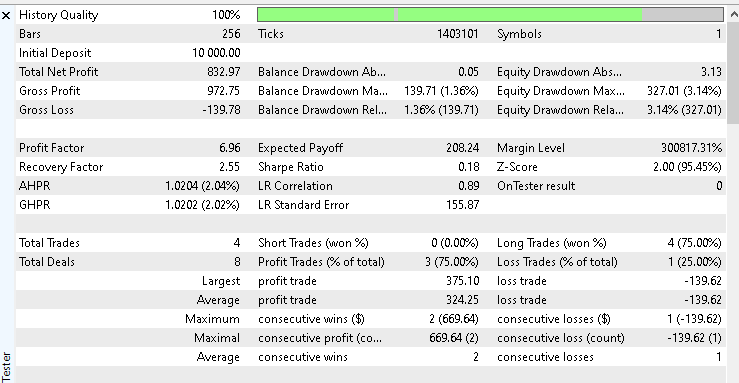
The initial account balance was set to 10000 dollars. At the end of the test period, the system achieved a total net profit of 832.97 dollars, representing a slightly above 8% return on investment. The recorded win rate was 75.00 percent. While the profit figure may appear modest, the equity curve tells a more important story.
It remains smooth throughout the test period and does not exhibit sharp drawdowns or unstable equity swings, which suggests controlled risk and stable execution. A screenshot of the equity curve is included in this section to visually confirm this behavior and make the results easier to interpret at a glance.
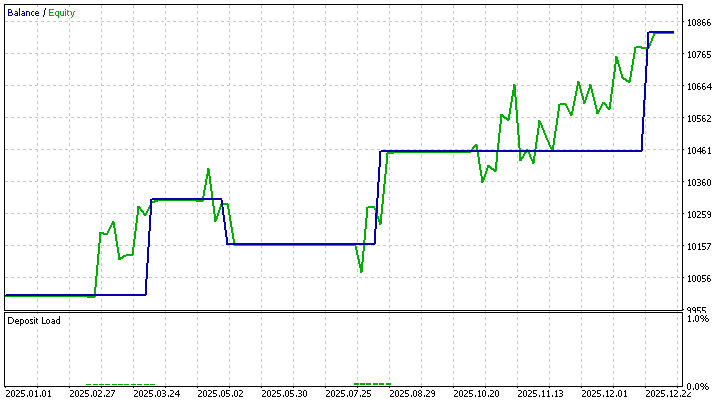
To make replication straightforward, two files have been attached alongside this article. The first file contains the tester environment configuration, while the second file contains the exact input parameter set used during this test. With these files, the same test conditions can be reproduced without ambiguity.
This test represents only one configuration and one market. The Expert Advisor was intentionally designed to be flexible through its input parameters. Different lookback values, entry modes, risk settings, and filters can all be adjusted to explore alternative ideas. Running additional experiments on other symbols or timeframes may reveal behaviors that fit different trading styles or risk preferences.
Any findings, improvements, or observations discovered during independent testing are valuable. Sharing such insights in the article comments helps extend the research beyond this single implementation and turns the system into a collaborative learning tool rather than a fixed solution.
Conclusion
This article set out to solve a specific problem. Trading Smash Day patterns without context produces noisy signals and inconsistent results. The goal was to convert the pattern into a structured, testable system suitable for automation.
That goal has been achieved. The article delivers a complete set of objective Smash Day rules, including pattern identification, confirmation logic, setup validity limits, and controlled entry behavior. Optional context filters, such as Supertrend direction and Trade Day of the Week selection, are integrated directly into the system and can be turned on or off via input parameters.
In practical terms, the reader leaves with a fully functional MQL5 Expert Advisor that automates Smash Day reversals exactly as defined. The EA enforces one position at a time, applies consistent risk management, and exposes all assumptions through configurable inputs. Attached parameter and configuration files allow results to be reproduced and further tested without modifying the source code.
For algorithmic traders, this provides a ready-to-use research tool for studying Smash Day behavior under different conditions. For MQL5 developers, it demonstrates how discretionary price patterns can be translated into clean, testable logic. Most importantly, the article delivers what it promised at the start: a clear path from an isolated pattern to an objective, context-aware trading system that can be tested and evaluated reliably.
Attachments
| File Name | Description |
|---|---|
| lwSmashDayTrendFilteredExpert.mq5 | The EA developed in this article |
| configurations.ini | To help configure the strategy tester environment for the test run in this article |
| parameters.set | To help configure user input variables for the test used in this article |
Warning: All rights to these materials are reserved by MetaQuotes Ltd. Copying or reprinting of these materials in whole or in part is prohibited.
This article was written by a user of the site and reflects their personal views. MetaQuotes Ltd is not responsible for the accuracy of the information presented, nor for any consequences resulting from the use of the solutions, strategies or recommendations described.

 Implementing of a Breakeven Mechanism in MQL5 (Part 1): Base Class and Fixed-Points Breakeven Mode
 From Novice to Expert: Extending a Liquidity Strategy with Trend Filters
 Swing Extremes and Pullbacks in MQL5 (Part 2): Automating the Strategy with an Expert Advisor
 Swing Extremes and Pullbacks in MQL5 (Part 1): Developing a Multi-Timeframe Indicator

- Free trading apps
- Over 8,000 signals for copying
- Economic news for exploring financial markets
You agree to website policy and terms of use