

From Novice to Expert: Extending a Liquidity Strategy with Trend Filters
 3 487
3 487
 0
0

Contents:
- Introduction
- Methods for Filtering Bad Setups
- Implementation
- Testing and Results
- Conclusion
- Key Lessons
- Attachments
Introduction
Imagine having built a solid liquidity-based strategy. It works, but something feels uncomfortable. When the market trends strongly, your system fires signals in both directions, and you find yourself hesitating, unsure whether to trust a pullback or fear a reversal. You came to this article with a working strategy that lacks a directional anchor—and with it, a sense of anxiety every time price moves decisively.
In the terminal chart, countless rules have been invented to work mechanically, and many more are still possible. In many ways, the trading terminal resembles a scientific laboratory. Indicators, price action models, and statistical observations are continuously tested, refined, and recombined, and new strategies are born almost daily. However, through experience and extended observation, one critical issue becomes apparent: most trading rules are not truly independent.
A strategy may appear robust in isolation, but over time it often becomes dependent on additional confirmation. It performs well only when combined with other indicators, filters, or contextual constraints. This is not a weakness of the strategy itself, but rather a reflection of the market’s complexity. Markets are dynamic systems, and single-rule approaches rarely survive prolonged exposure to varying conditions.
In the previous article of this series, we developed a liquidity-based strategy focused on candlestick mechanics and liquidity zones. That system intentionally ignored classical trend concepts. It was designed to function in any market state—trending, ranging, or transitioning—by reacting purely to liquidity behavior. While this flexibility is powerful, it introduces a challenge for traders who prefer structured trend-following logic. Without a directional bias, the strategy may feel difficult to control or trust during strong directional markets.
The objective of this article is to address that limitation. We will extend the original liquidity strategy by introducing a trend-based constraint, allowing the trader to control how and when liquidity setups are taken. By doing so, we preserve the core mechanics of the liquidity model while aligning it with a higher-probability market bias.
This article assumes that you have followed the previous installments of the “From Novice to Expert” series and understand the foundational liquidity strategy discussed earlier. In the next section, we will explore several approaches for filtering bad setups and then select one for practical implementation in MQL5.
Methods for Filtering Bad Setups
To move from anxiety to control, we must first understand why some setups fail despite looking technically valid. Do bad setups exist on forex charts? The short answer is yes. A more accurate answer is that setups exist in different probability environments. A technically valid setup may still be statistically weak if it occurs under unfavorable market conditions. This is why filters are not optional—they are essential.
Consider a strong prevailing trend. If a liquidity indicator identifies a supply zone against that trend, the signal may indicate temporary exhaustion or a minor pullback rather than a full reversal. Whether such a setup succeeds or fails is a matter of probability, not certainty. Consistently trading against dominant momentum increases exposure to drawdowns and reduces expectancy.
The practical solution is to align liquidity opportunities with the dominant market bias. In other words, we trade liquidity in the direction of the trend, not against it. This requires the introduction of constraints—objective rules that define acceptable market conditions.
Common categories of constraints include:
- Trend filters (moving averages, market structure)
- Momentum or oscillator thresholds (RSI, iMACD, stochastic)
- Candlestick sentiment and price behavior
- Time-based or session-based filters
Understanding these concepts is valuable beyond this specific strategy. Once mastered, they can be applied to virtually any trading system to improve consistency and robustness.
To demonstrate the concept, we consider our liquidity zones indicator combined with one of the most widely used trend tools: the 50-period exponential moving average (EMA 50). When liquidity setups form in the direction of the EMA slope, trade outcomes tend to improve noticeably.
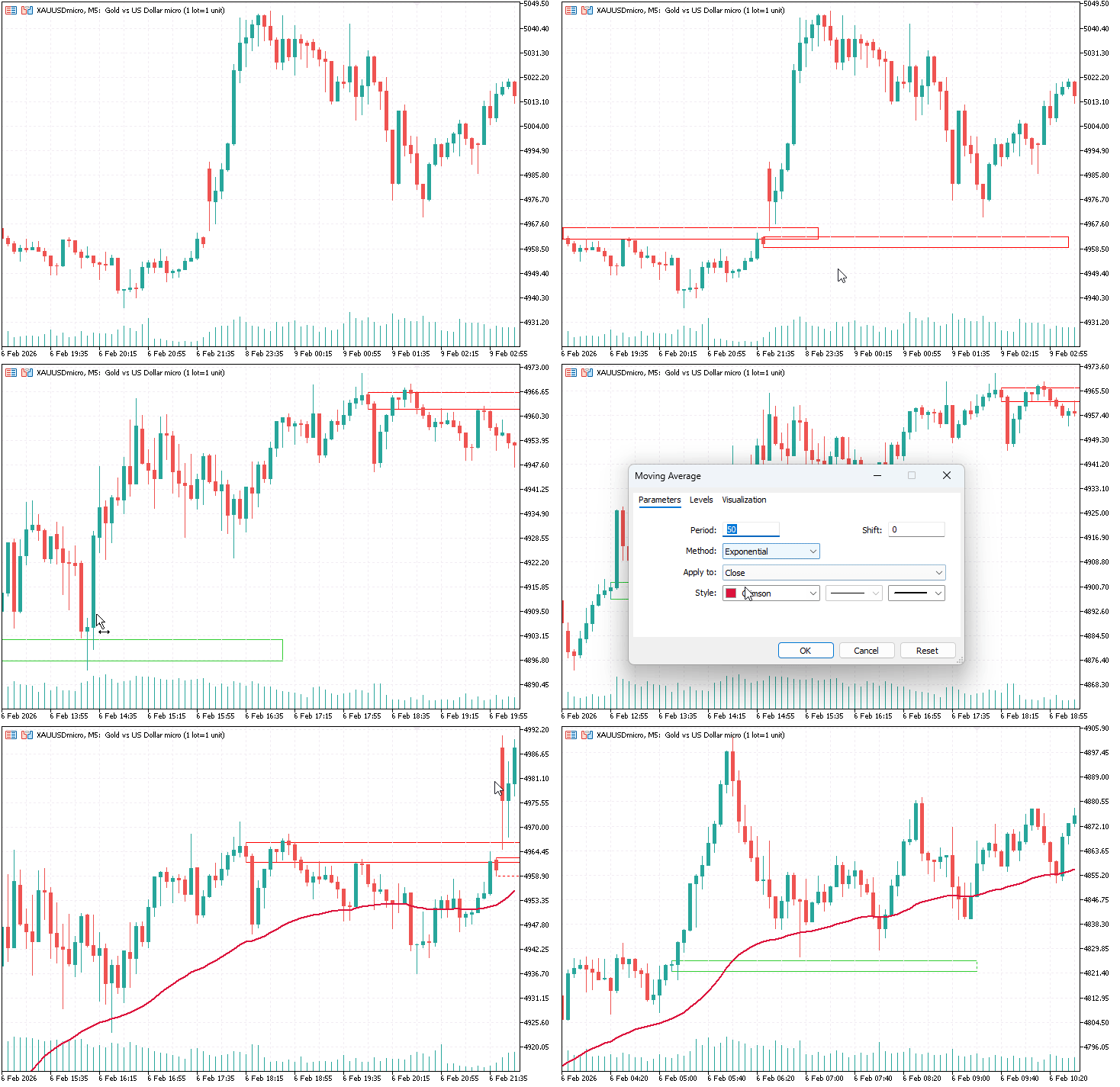
Fig. 1. Attaching the indicators on the chart
This principle is not merely opinion-based. One of the oldest and most frequently repeated principles in market speculation is “follow the trend.” Aligning with the trend does not guarantee success, but it significantly increases the probability that a setup will reach its intended target.
An important detail that was not fully discussed in the previous article is the exit logic. In this enhanced approach, profit targets are prioritized at recent swing highs or swing lows in the direction of the prevailing trend. These levels represent natural areas of interest where price may react. Respecting them aligns the strategy with market structure and acknowledges that a recent peak or trough could be the final extension before a major reversal.
Implementation
In this section, we enhance the original liquidity strategy by integrating a trend filter. Among the filtering methods discussed earlier, we select the 50-period exponential moving average as our trend constraint for its simplicity, clarity, and widespread acceptance.
The implementation rules are intentionally straightforward:
- Buy-limit orders are allowed only when a demand liquidity zone is detected above the EMA 50.
- Sell-limit orders are allowed only when a supply liquidity zone is detected below the EMA 50.
- If a liquidity zone forms on the wrong side of the EMA, the setup is ignored.
This logic effectively forces the system to participate only in trend-aligned pullbacks. Liquidity zones are no longer treated as reversal points, but as continuation opportunities.
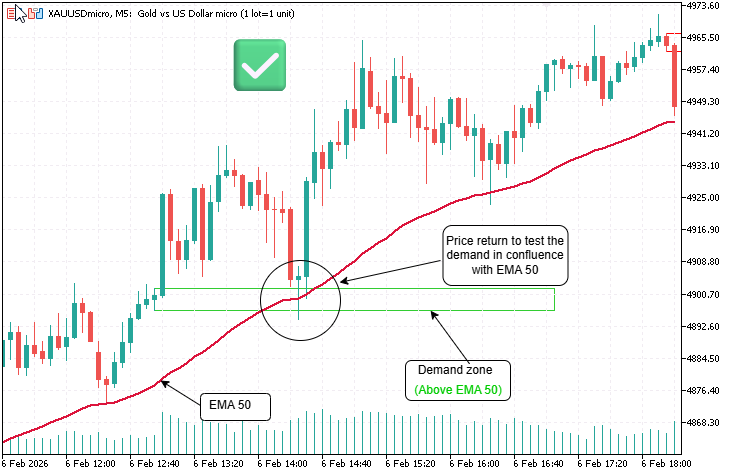
Fig. 2. Trend-aligned liquidity setup
Fig. 2. A typical example of a higher-probability setup after applying the trend filter. In this case, the demand zone forms above the EMA 50, confirming bullish trend alignment. We therefore anticipate buy limit orders on the retest. As shown, price retraces back into the demand zone in confluence with the EMA 50, meaning both structural support and dynamic trend support align at the same area—significantly strengthening the validity of the setup.
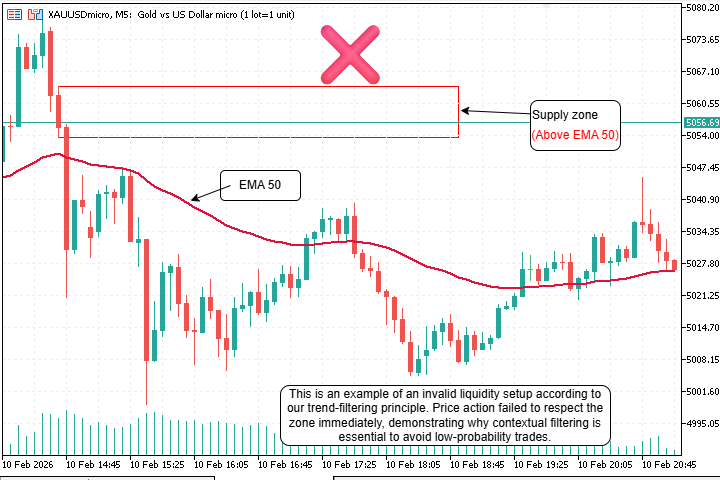
Fig. 3. Invalid trend liquidity setup
Fig. 3. An example of an invalid setup where a supply zone forms above the EMA 50. According to our trend-alignment rule, short opportunities require the supply zone to be positioned below the EMA 50 to confirm bearish bias. Since this condition is not met, the setup lacks directional alignment and is therefore considered lower probability.
Trading Logic Summary (Pseudocode)
For each new bar:
Calculate EMA(50) based on closing prices.
If a bullish liquidity setup is detected (demand zone):
If low of the base candle > EMA value:
Place a buy limit order at the zone.
If a bearish liquidity setup is detected (supply zone):
If high of base candle < EMA value:
Place sell limit order at the zone.
This pseudocode captures the core filtering logic. The following sections show the complete MQL5 implementation for those who wish to code or modify the Expert Advisor. If you are primarily interested in the trading concept and results, you may skip directly to Testing.
From a coding perspective, the EMA is calculated using the standard iMA function in MQL5. On each tick or new bar (depending on the execution model), the current price and the detected liquidity zone level are compared against the EMA value. The trade logic is conditionally enabled or disabled based on this comparison.
This approach has several advantages:
- it reduces overtrading during choppy or counter-trend conditions,
- simplifies decision-making by enforcing directional bias, and
- preserves the original liquidity detection logic without modification.
Designing the Filter as a Dedicated Module
When I begin developing a new component in MetaTrader 5, I always start by clarifying the role that component will play within the overall system. In this case, the requirement was not to rewrite the existing liquidity strategy, but to extend it in a controlled and non-invasive way. The goal was to introduce trend awareness without altering the logic that detects liquidity compression and impulse behavior. That constraint immediately guided the structure of the solution.
Rather than embedding trend checks directly inside the Expert Advisor, I chose to isolate that responsibility into a dedicated filter module. This approach keeps the strategy readable and avoids turning the OnTick() function into a dense collection of conditional rules. It also makes the trend logic reusable in future projects, regardless of the underlying entry model.
To reflect this separation clearly in code, I created a dedicated header file named TrendFilter.mqh. This file would contain nothing related to trading, execution, or risk management. Its only responsibility would be to answer a simple question: is the current market context favorable for buys or sells?
//+------------------------------------------------------------------+
//|                      TrendFilter.mqh                             |
//|   Simple EMA-based trend constraint for strategies               |
//+------------------------------------------------------------------+
#ifndef __TREND_FILTER_MQH__
#define __TREND_FILTER_MQH__
The include guards ensure the file is processed only once, even if it is indirectly included through multiple source files. This is a small structural detail, but it becomes essential as projects grow.
Defining the Filter as a Stateful Class
Rather than exposing free functions, I encapsulated the trend logic inside a class. This allows the filter to manage its own internal state, particularly the indicator handle, without leaking implementation details into the Expert Advisor. It also makes the interface more expressive and easier to reuse.
class CTrendFilter
{
At this stage, the class is intentionally minimal. There is no reference to orders, symbols, other than the chart context, or execution logic. This keeps the filter conceptually pure.
Declaring Internal State VariablesInside the private section of the class, I defined the variables required to calculate and track the moving average. These values represent the configuration and runtime state of the filter.
private:
   int                  m_period;
   ENUM_MA_METHOD       m_method;
   ENUM_APPLIED_PRICE   m_price;
   int                  m_handle;
The most critical variable here is m_handle. This handle represents the EMA indicator instance running inside the terminal. If this handle is invalid, the filter must not produce decisions. Treating the handle as part of the object’s state makes it easier to manage its lifecycle correctly.
Constructor and Safe Initialization
I always initialize indicator handles explicitly. Leaving a handle uninitialized can lead to subtle bugs that only appear during testing or optimization. The constructor’s role is not to create the indicator, but to establish a known safe state.
public:
   CTrendFilter()
   {
      m_handle = INVALID_HANDLE;
   }
By setting the handle to INVALID_HANDLE, I can later check with certainty whether initialization has occurred.
Creating the EMA During Initialization
Indicator creation belongs in a controlled initialization phase, not inside the tick handler. For that reason, I introduced an Init() method that the Expert Advisor calls from its OnInit() function.
bool Init(int period = 50,
          ENUM_MA_METHOD method = MODE_EMA,
          ENUM_APPLIED_PRICE price = PRICE_CLOSE)
{
   m_period = period;
   m_method = method;
   m_price  = price;

   m_handle = iMA(_Symbol, _Period, m_period, 0, m_method, m_price);
   return (m_handle != INVALID_HANDLE);
}
Here, the filter stores its configuration and creates the EMA indicator using the current chart symbol and timeframe. If the indicator cannot be created, the function returns false, allowing the Expert Advisor to abort startup cleanly. This prevents the strategy from running with incomplete dependencies.
Reading the EMA Value Reliably
Once the indicator exists, the filter needs a safe and consistent way to retrieve its value. I implemented this through a dedicated Value() method, which reads from the indicator buffer.
double Value(int shift = 1)
{
   if(m_handle == INVALID_HANDLE)
      return 0.0;

   double buffer[];
   if(CopyBuffer(m_handle, 0, shift, 1, buffer) <= 0)
      return 0.0;

   return buffer[0];
}
The default shift of 1 ensures the value comes from a fully closed candle. This avoids acting on incomplete data from the current bar and keeps the filter behavior stable during live trading and backtesting.
Expressing Trend Logic as Permissions
Rather than exposing the raw EMA value to the strategy, I designed the filter to express its logic as permissions. This keeps the Expert Advisor readable and avoids embedding indicator math directly into trade conditions.
bool AllowBuy(double price)
{
   return (price > Value(1));
}
For buy setups, the logic is intentionally simple: if the price is above the EMA, bullish liquidity setups are allowed.
bool AllowSell(double price)
{
   return (price < Value(1));
}
Similarly, sell setups are permitted only when the price is below the EMA. The filter does not care how the price was chosen or what kind of order will be placed. It only evaluates directional context.
Cleaning Up Indicator Resources
Proper cleanup is an often-overlooked but critical part of professional MQL5 development. When the Expert Advisor is removed or recompiled, any indicator handles it created should be released immediately.void Release() { if(m_handle != INVALID_HANDLE) { IndicatorRelease(m_handle); m_handle = INVALID_HANDLE; } }
This method is designed to be called from the EA’s OnDeinit() function, ensuring the platform can reclaim resources safely and predictably.
Integrating the filter with the EA
The integration begins at the dependency level, where the Expert Advisor declares that it relies on both the trading engine and the trend filtering module. This is not just about compilation; it establishes that trend logic is a first-class constraint in the execution flow. By including TrendFilter.mqh, the EA formally delegates directional authority to a reusable and encapsulated component instead of embedding moving-average logic inline.
#include <Trade/Trade.mqh>
#include <TrendFilter.mqh>
Once the dependency is declared, the EA instantiates the objects that will live for the entire lifetime of the Expert Advisor. The CTrade instance handles execution and order placement, while CTrendFilter becomes a persistent stateful object responsible for managing the indicator handle and trend validation. This separation ensures that trend evaluation is not recalculated blindly on every tick but is managed coherently.
CTrade       trade;
CTrendFilter trend;
Trend filtering requires configuration, and in this system, that configuration is intentionally exposed as a user input. The moving average period is not hardcoded; instead, it is passed from the EA to the filter during initialization. This design allows the trading logic to remain stable while giving the trader control over how strict or loose the trend bias should be.
input int TrendMAPeriod = 50;
The initialization phase is where the trend filter becomes operational. During OnInit, the EA explicitly calls trend.Init(), passing the selected MA period. Internally, this is where the moving average handle is created and validated. If this step fails, the EA refuses to run, which is critical—trading without a valid trend filter would violate the strategy’s core rule.
int OnInit()
{
   if(!trend.Init(TrendMAPeriod))
   {
      Print("Failed to initialize trend filter");
      return INIT_FAILED;
   }
   return INIT_SUCCEEDED;
}
Equally important is clean resource management. When the EA is removed or recompiled, the trend filter must release its indicator handle. This prevents orphaned resources and keeps the terminal stable, especially during frequent strategy testing or optimization runs. The EA delegates this responsibility cleanly back to the filter.
void OnDeinit(const int reason)
{
   trend.Release();
}
With the trend filter initialized and alive, the EA proceeds into its normal execution cycle. The OnTick function is guarded so that all logic runs only on a new bar, ensuring consistency between candle-based logic and trend evaluation. This is important because the moving average used by the trend filter is also bar-based, not tick-noisy.
void OnTick()
{
   if(!IsNewBar())
      return;
Before any trade logic is evaluated, market conditions such as spread are checked. This ensures that the trend filter is only consulted in environments where execution quality is acceptable. Trend alignment alone is not enough—it must coexist with practical trading constraints.
   if(SymbolInfoInteger(_Symbol, SYMBOL_SPREAD) > MaxSpreadPoints)
      return;
As the EA builds the liquidity compression setup, it identifies the impulse candle (A) and the base candle (B), calculating their ranges and validating the compression ratio. At this stage, no trend logic is applied yet—the setup must first be structurally valid on its own.
   int A = 1;   // Impulse candle
   int B = 2;   // Base candle

   double rangeA = CandleRange(A);
   double rangeB = CandleRange(B);

   if(rangeB > rangeA / RatioMultiplier)
      return;
Once the structure is confirmed, the EA reaches the point where directional intent matters. For a bullish setup, price action alone is not sufficient. Even if both candles close bullish, the EA defers the final decision to the trend filter. The call to trend.AllowBuy(lowB) asks a simple but powerful question: is price positioned correctly relative to the dominant trend?
   if(AllowBuy && closeA > openA && closeB > openB)
   {
      if(trend.AllowBuy(lowB))   // trend constraint
      {
         double sl = lowB - offset;
         double tp = highA;

         PlaceBuyLimits(highB, lowB, sl, tp, expiry);
      }
   }
The same delegation applies symmetrically to bearish setups. Even with bearish momentum and valid compression, sell-side liquidity traps are only allowed if the trend filter confirms that the price is positioned below the moving average. This keeps the strategy aligned with continuation logic rather than countertrend speculation.
   if(AllowSell && closeA < openA && closeB < openB)
   {
      if(trend.AllowSell(highB)) // trend constraint
      {
         double sl = highB + offset;
         double tp = lowA;

         PlaceSellLimits(highB, lowB, sl, tp, expiry);
      }
   }
}
What this integration achieves is clean authority separation.
The EA owns structure, execution, and risk.
The trend filter owns directional permission.
No moving-average logic leaks into the strategy. No duplicated calculations exist. The EA simply asks, “Am I allowed to trade in this direction here?”—and the filter answers decisively.
With the conceptual groundwork established, we are now prepared to evaluate the strategy through structured testing.
Testing and Results
Testing was conducted using the MetaTrader 5 Strategy Tester under controlled conditions. The same symbol, timeframe, and historical period used in the previous article were retained to ensure a fair comparison between the original and filtered strategies.
The test procedure followed these steps:
- Enable visual mode to observe trade behavior and zone interaction.
- Run a baseline test using the original liquidity strategy.
- Apply the EMA 50 filter and rerun the test with identical parameters.
- Compare trade frequency, drawdown, and equity curve behavior.

Fig. 4. Strategy Tester Visualization
The results confirm what the logic suggested. The filtered version produced fewer trades—approximately 35% fewer over the test period—but each trade operated within a clearer contextual framework. Drawdowns were smoother, recovering more quickly than in the unfiltered version. Losing streaks, while still present, were shorter and less severe.
Most importantly, trades aligned more consistently with broader market movement. The earlier problem—hesitating between trusting a pullback or fearing a reversal—dissolved because the filter provided a clear answer. If the price was above the EMA, only buys were considered; if below, only sells. The strategy no longer fought the trend.
Conclusion
In this article, we demonstrated how a simple trend filter can resolve the discomfort of trading a liquidity-based strategy without directional bias. By introducing the EMA 50 as a directional constraint, we transformed the system from a neutral liquidity model—reactive to every zone regardless of context—into a controlled, trend-aligned framework. The strategy no longer fights the market; it seeks alignment with the prevailing trend before committing capital.
The key takeaway, however, is not the moving average itself. The EMA 50 serves merely as an example—a practical illustration of a deeper principle: constraint-driven design. A strategy becomes robust not by capturing every possible setup, but by operating within clearly defined boundaries that reflect market structure. Filters are not optional enhancements; they distinguish a system that merely produces signals from one that produces high-probability opportunities.
For a concise summary of the main insights discussed, refer to the Key Lessons table below, as well as the Attachments section containing the source code used throughout this article.
Importantly, this extension preserves the original strategy’s flexibility while providing greater confidence and consistency. The liquidity mechanics remain unchanged: zones are still identified, compression is still measured, and orders are still placed with precision. What has changed is the framework within which these mechanics operate—one that respects the market’s dominant direction.
In the next article in this series, we will explore how additional constraints—such as volatility filters, session-based rules, and multi-timeframe confirmation—can further refine the strategy without compromising its core logic. The path from novice to expert is not about discovering the perfect indicator, but about learning to design systems that operate with structure, discipline, and efficiency.
Key Lessons
| Key Lessons: | Description |
|---|---|
| Filters Matter | Raw entry conditions are rarely sufficient on their own. Introducing filters adds contextual awareness to a strategy, ensuring that signals are evaluated within broader market conditions rather than being triggered mechanically on every pattern occurrence. |
| Trend Alignment: | Aligning trade direction with the prevailing trend improves trade expectancy by favoring momentum continuation over countertrend reactions. In practice, this reduces exposure to false breakouts and low-quality reversals. |
| Constraint Design: | Well-designed constraints act as logical gates that must be satisfied before trade execution. This approach keeps strategies focused, prevents overtrading, and makes decision paths easier to reason about and debug. |
| Modular Strategies: | Strategy enhancements should be implemented as independent modules that extend behavior without altering the core logic. This preserves stability while allowing incremental improvements and easier future maintenance. |
| Lifecycle Control: | Indicators and resources in MQL5 require explicit initialization and release. Managing the lifecycle correctly prevents memory leaks, invalid handles, and unpredictable behavior during long-running sessions. |
| State Awareness: | Strategies must be aware of their execution state, especially in event-driven environments like OnTick. Tracking bar transitions ensures signals are processed once per candle, avoiding duplicated orders and logic races. |
| Encapsulation: | Encapsulating indicator logic inside dedicated classes keeps Expert Advisors clean and readable. This separation reduces code duplication and allows indicators to be reused or replaced without touching execution logic. |
| Fail Fast: | Initialization errors should immediately stop execution rather than allowing the system to run in a partially broken state. Early failure simplifies troubleshooting and prevents unintended trading behavior. |
| Data Timing: | Performing calculations on closed bars rather than live ticks produces more stable and reproducible signals. This approach reduces noise sensitivity and aligns better with backtesting and visual analysis. |
| Permission Logic: | Trade execution should be treated as a permission-based decision. Filters and constraints explicitly grant or deny permission to trade, making strategy intent clear and execution behavior predictable. |
| Separation of Roles: | A robust strategy separates market analysis, trade qualification, and order execution into distinct responsibilities. This reduces complexity and helps isolate errors during development and testing. |
| Input Flexibility: | Exposing critical parameters as inputs allows traders to adapt the strategy to different symbols, timeframes, and market conditions without modifying source code. |
| Risk Anchoring: | Stop-loss and take-profit levels should be anchored to market structure rather than arbitrary distances. Structural anchoring aligns risk management with the logic that generated the trade signal. |
| Context First: | Market context must be validated before applying directional bias. Structure, volatility, and trend conditions define whether a setup is meaningful or should be ignored entirely. |
| Clean Integration: | New components should integrate cleanly into existing systems with minimal changes to execution flow. This reduces regression risk and preserves the original strategy behavior. |
| Execution Discipline: | Strict execution rules ensure trades are placed only when all predefined conditions are met. This discipline is essential for consistency, backtest reliability, and long-term strategy evaluation. |
Attachments
| Source File Name | Type | Version | Description |
|---|---|---|---|
| TrendFilter.mqh | Header Module | 1.00 | Provides a reusable EMA-based trend filtering class that constrains trade execution to the dominant market direction. The module encapsulates indicator handle creation, buffer access, and directional permission logic, allowing strategies to query trend alignment without embedding indicator logic directly into the Expert Advisor. |
| Single_Candle_Liquidity_Trader_Filtered.mq5 | Expert Advisor | 1.10 | implements a liquidity compression and impulse continuation strategy enhanced with a higher-timeframe EMA trend constraint. The Expert Advisor detects base–impulse candle structures, places layered pending limit orders within liquidity zones, manages execution timing on a per-bar basis, and delegates directional validation to the TrendFilter module for improved trade quality. |
Warning: All rights to these materials are reserved by MetaQuotes Ltd. Copying or reprinting of these materials in whole or in part is prohibited.
This article was written by a user of the site and reflects their personal views. MetaQuotes Ltd is not responsible for the accuracy of the information presented, nor for any consequences resulting from the use of the solutions, strategies or recommendations described.

 Larry Williams Market Secrets (Part 12): Context Based Trading of Smash Day Reversals
 Swing Extremes and Pullbacks in MQL5 (Part 1): Developing a Multi-Timeframe Indicator
 Implementing of a Breakeven Mechanism in MQL5 (Part 1): Base Class and Fixed-Points Breakeven Mode
 Creating Custom Indicators in MQL5 (Part 8): Adding Volume Integration for Deeper Market Profile Analysis

- Free trading apps
- Over 8,000 signals for copying
- Economic news for exploring financial markets
You agree to website policy and terms of use