

Swing Extremes and Pullbacks in MQL5 (Part 2): Automating the Strategy with an Expert Advisor
 6 437
6 437
 2
2

Table of contents:
Introduction
If you catch reversals early, enter against momentum, or don’t fully understand where the true extreme is, this article is for you. Price rarely reverses in the middle of nowhere—it stretches, accelerates, and presses into extremes where participation thins out and risk quietly shifts sides. Those moments tend to reveal themselves first on the lower timeframes, where swing highs and lows begin clustering and price pushes beyond its most recent structure. Swing Extremes and the Pullback Indicator is built around this principle: rather than chasing direction, it identifies overextension—the precise moments when price has moved too far, too fast, relative to its immediate market structure.
By focusing on the lower-timeframe swing behavior, the indicator maps where price is trading above or below its recent structural boundaries, signaling conditions where pullbacks and mean reversion become statistically favorable. Rather than predicting tops or bottoms, it reacts to structural evidence as it forms, translating microstructure into actionable reversal zones. The result is a framework that treats reversals not as guesswork, but as a measurable response to price reaching its own extremes.
Indicator Overview and Understanding
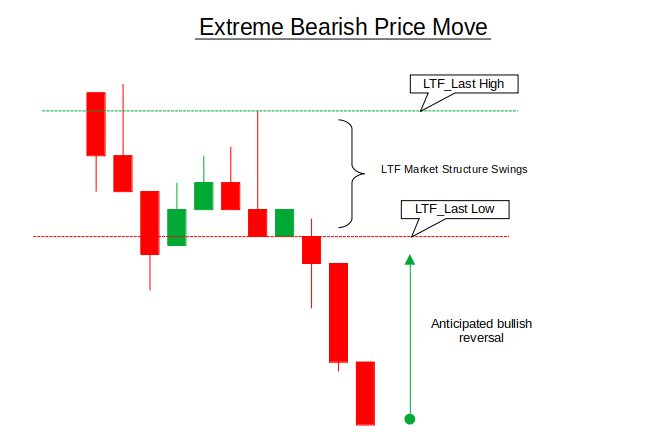
Swing Extremes and Pullbacks: Price reversals tend to emerge after clear overextension beyond recent lower-timeframe structure. In both cases, the indicator first identifies the most recent LTF swing high and swing low, which together define a short-term structural range. This range represents “fair” price behavior on the lower timeframe—where price has previously accepted value and rotated normally.
In the extreme bearish move, price aggressively pushes below the LTF's last low, expanding far beyond the recent structure. This breakdown is not treated as a continuation signal, but rather as evidence of exhaustion. When price trades significantly below both the last swing low and the broader LTF structure zone, the indicator flags conditions where selling pressure is statistically stretched, increasing the probability of a bullish pullback or mean reversion toward the prior structure.
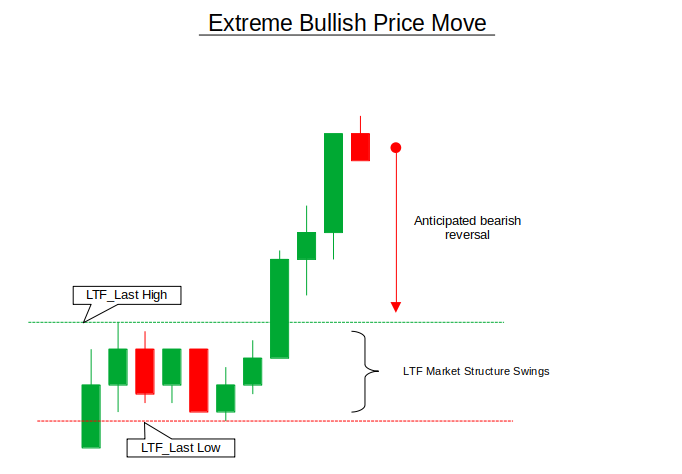
Conversely, the extreme bullish move highlights the opposite behavior. Price accelerates above the LTF last high, leaving the prior structure behind and entering an overextended state. Instead of chasing the breakout, the indicator interprets this displacement as vulnerability—a zone where buying pressure may weaken and a bearish pullback becomes more likely. In both cases, the indicator does not attempt to predict exact tops or bottoms; it focuses on identifying structural imbalance, allowing traders to frame reversals as a response to price reaching its own extremes rather than as arbitrary countertrend trades.
Getting Started
//+------------------------------------------------------------------+
//|                                               Swing Extremes.mq5 |
//|                                  Copyright 2025, MetaQuotes Ltd. |
//|                     https://www.mql5.com/en/users/johnhlomohang/ |
//+------------------------------------------------------------------+
#property copyright "Copyright 2025, MetaQuotes Ltd."
#property link      "https://www.mql5.com/en/users/johnhlomohang/"
#property version   "1.00"
#property indicator_chart_window
#property indicator_buffers 2
#property indicator_plots   2

#property indicator_label1  "Buy Signal"
#property indicator_type1   DRAW_ARROW
#property indicator_color1  clrLime
#property indicator_width1  2

#property indicator_label2  "Sell Signal"
#property indicator_type2   DRAW_ARROW
#property indicator_color2  clrRed
#property indicator_width2  2

//+------------------------------------------------------------------+
//| Inputs                                                           |
//+------------------------------------------------------------------+
input ENUM_TIMEFRAMES HTF = PERIOD_H1;
input ENUM_TIMEFRAMES LTF = PERIOD_M5;
input int             SwingBars = 3;
input int             ATR_Period      = 14;      // ATR calculation period
input double          ATR_Multiplier  = 1.0;     // How extreme price must move beyond swing
input bool            Visualize = true;

//+------------------------------------------------------------------+
//| Indicator Buffers                                                |
//+------------------------------------------------------------------+
double BuyBuffer[];
double SellBuffer[];
Getting started, we define the indicator as a chart-window tool with two output buffers that are dedicated to visual trade signals. These buffers are configured to plot upward and downward arrows representing buy and sell conditions, with clear color coding and sizing to make reversal signals immediately visible on the chart. We then expose the key configuration inputs—the higher and lower timeframes, the swing detection depth, and an optional visualization toggle—allowing the indicator to adapt to different market contexts while keeping its structure-based logic flexible. The ATR_Period and ATR_Multiplier facilitate extreme price moves relative to the structure. Finally, the buy and sell buffers are declared to store and display the signal values generated later by the swing and market-structure calculations.
//+------------------------------------------------------------------+
//| Swing Point Structure                                            |
//+------------------------------------------------------------------+
struct SwingPoint
{
   datetime time;
   double   price;
   int      type;   // 1 = High, -1 = Low
   int               barIndex;

   void Reset()
   {
      time = 0;
      price = 0;
      type = 0;
      barIndex =0;
   }
};

//+------------------------------------------------------------------+
//| Market Structure State                                           |
//+------------------------------------------------------------------+
enum STRUCTURE_STATE
{
   STRUCT_NEUTRAL,
   STRUCT_BULLISH,
   STRUCT_BEARISH
};

//+------------------------------------------------------------------+
//| Globals                                                          |
//+------------------------------------------------------------------+
SwingPoint htf_lastHigh, htf_prevHigh;
SwingPoint htf_lastLow,  htf_prevLow;
SwingPoint ltf_lastHigh, ltf_prevHigh;
SwingPoint ltf_lastLow,  ltf_prevLow;

STRUCTURE_STATE htfBias = STRUCT_NEUTRAL;
STRUCTURE_STATE ltfStructure = STRUCT_NEUTRAL;
int atrHandle;
datetime lastBuySwingTime  = 0;
datetime lastSellSwingTime = 0;
double lastBuySwingPrice = 0;
double lastSellSwingPrice = 0;
In this section we introduce the core data structures used to model market structure in a clean and reusable way. The SwingPoint structure encapsulates everything the indicator needs to know about a swing high or swing low: when it occurred, its price level, whether it represents a high or a low, and the bar index where it was formed. By bundling this information into a single structure and providing a Reset() method, the code makes it easy to safely clear and rebuild swing data whenever the structure is invalidated or recalculated.
The market’s directional state is then expressed through the STRUCTURE_STATE enum, which classifies price behavior as bullish, bearish, or neutral based on the relationship between consecutive swing highs and lows. Using this framework, separate global swing trackers are maintained for both the higher timeframe (HTF) and lower timeframe (LTF), allowing the indicator to compare broader bias with local structure. Additional global variables record the time and price of the most recently used buy or sell swing, ensuring that signals are generated only once per structural event and preventing repeated triggers from the same swing extreme.
//+------------------------------------------------------------------+
//| Indicator Init                                                   |
//+------------------------------------------------------------------+
int OnInit()
{
   atrHandle = iATR(_Symbol, LTF, ATR_Period);

   SetIndexBuffer(0, BuyBuffer, INDICATOR_DATA);
   SetIndexBuffer(1, SellBuffer, INDICATOR_DATA);

   PlotIndexSetInteger(0, PLOT_ARROW, 233); // arrow up
   PlotIndexSetInteger(1, PLOT_ARROW, 234); // arrow down

   ArrayInitialize(BuyBuffer, EMPTY_VALUE);
   ArrayInitialize(SellBuffer, EMPTY_VALUE);

   return INIT_SUCCEEDED;
}

//+------------------------------------------------------------------+
//| Indicator Calculation                                            |
//+------------------------------------------------------------------+
int OnCalculate(const int rates_total,
                const int prev_calculated,
                const datetime &time[],
                const double &open[],
                const double &high[],
                const double &low[],
                const double &close[],
                const long &tick_volume[],
                const long &volume[],
                const int &spread[])
{
   static datetime lastLtfBar = 0;
   datetime currentLtfBar = iTime(_Symbol, LTF, 0);

   if(currentLtfBar == lastLtfBar)
      return rates_total;

   lastLtfBar = currentLtfBar;

   UpdateHTFStructure();
   UpdateLTFStructure();
   CheckStructureBreak();

   int bar = rates_total - 1;

   BuyBuffer[bar]  = EMPTY_VALUE;
   SellBuffer[bar] = EMPTY_VALUE;

   if(CheckBuyCondition())
      BuyBuffer[bar] = low[bar] - (10 * _Point);

   if(CheckSellCondition())
      SellBuffer[bar] = high[bar] + (10 * _Point);

   if(Visualize)
      UpdateVisualization();

   return rates_total;
}
This section initializes and drives the indicator’s execution logic. In OnInit, we initialize the ATR indicator, then the buy and sell buffers are bound to the indicator plots, configured to display up and down arrows, and prefilled with empty values to prevent unwanted signals. The OnCalculate function then processes the indicator only when a new lower-timeframe bar appears, ensuring efficient updates and avoiding repeated recalculations on every tick. On each new LTF bar, the indicator refreshes higher- and lower-timeframe market structure, checks for structure breaks, and evaluates the buy and sell conditions; when a valid setup is detected, it plots a signal arrow slightly above or below the current bar for clarity, while optionally updating all visual structure elements on the chart.
//+------------------------------------------------------------------+
//| Update Higher Timeframe Structure                                |
//+------------------------------------------------------------------+
void UpdateHTFStructure()
{
   // Get HTF data
   MqlRates htfRates[];
   ArraySetAsSeries(htfRates, true);
   CopyRates(_Symbol, HTF, 0, 100, htfRates);

   if(ArraySize(htfRates) < SwingBars * 2 + 1) return;

   // Detect swing points on HTF
   for(int i = SwingBars; i < ArraySize(htfRates) - SwingBars; i++)
   {
      bool isHigh = true;
      bool isLow = true;

      // Check if current bar is swing high
      for(int j = 1; j <= SwingBars; j++)
      {
         if(htfRates[i].high <= htfRates[i-j].high ||
            htfRates[i].high <= htfRates[i+j].high)
         {
            isHigh = false;
         }

         if(htfRates[i].low >= htfRates[i-j].low ||
            htfRates[i].low >= htfRates[i+j].low)
         {
            isLow = false;
         }
      }

      // Update swing highs
      if(isHigh)
      {
         htf_prevHigh = htf_lastHigh;
         htf_lastHigh.time = htfRates[i].time;
         htf_lastHigh.price = htfRates[i].high;
         htf_lastHigh.type = 1;
         htf_lastHigh.barIndex = i;
      }

      // Update swing lows
      if(isLow)
      {
         htf_prevLow = htf_lastLow;
         htf_lastLow.time = htfRates[i].time;
         htf_lastLow.price = htfRates[i].low;
         htf_lastLow.type = -1;
         htf_lastLow.barIndex = i;
      }
   }

   // Update HTF bias
   htfBias = DetectStructure(htf_lastHigh, htf_prevHigh, htf_lastLow, htf_prevLow);
}

//+------------------------------------------------------------------+
//| Update Lower Timeframe Structure                                 |
//+------------------------------------------------------------------+
void UpdateLTFStructure()
{
   // Get LTF data
   MqlRates ltfRates[];
   ArraySetAsSeries(ltfRates, true);
   CopyRates(_Symbol, LTF, 0, 100, ltfRates);

   if(ArraySize(ltfRates) < SwingBars * 2 + 1) return;

   // Detect swing points on LTF
   for(int i = SwingBars; i < ArraySize(ltfRates) - SwingBars; i++)
   {
      bool isHigh = true;
      bool isLow = true;

      // Check if current bar is swing high
      for(int j = 1; j <= SwingBars; j++)
      {
         if(ltfRates[i].high <= ltfRates[i-j].high ||
            ltfRates[i].high <= ltfRates[i+j].high)
         {
            isHigh = false;
         }

         if(ltfRates[i].low >= ltfRates[i-j].low ||
            ltfRates[i].low >= ltfRates[i+j].low)
         {
            isLow = false;
         }
      }

      // Update swing highs
      if(isHigh)
      {
         ltf_prevHigh = ltf_lastHigh;
         ltf_lastHigh.time = ltfRates[i].time;
         ltf_lastHigh.price = ltfRates[i].high;
         ltf_lastHigh.type = 1;
         ltf_lastHigh.barIndex = i;
      }

      // Update swing lows
      if(isLow)
      {
         ltf_prevLow = ltf_lastLow;
         ltf_lastLow.time = ltfRates[i].time;
         ltf_lastLow.price = ltfRates[i].low;
         ltf_lastLow.type = -1;
         ltf_lastLow.barIndex = i;
      }
   }

   // Update LTF structure
   ltfStructure = DetectStructure(ltf_lastHigh, ltf_prevHigh, ltf_lastLow, ltf_prevLow);
}
These two functions are responsible for extracting market structure from price data by identifying swing highs and swing lows on both the higher and lower timeframes. Each function begins by loading a fixed window of historical candles and ensuring there is sufficient data to evaluate swings based on the configured SwingBars depth. The swing detection logic then scans each eligible bar and compares its high and low against neighboring candles on both sides, confirming a swing high or swing low only when price clearly stands out relative to its surrounding structure. When a new swing is detected, the previous swing is preserved and the most recent one is updated, maintaining a rolling structural history rather than a single isolated point.
Once the swing points are updated, the functions translate this raw price information into directional context. For the higher timeframe, the most recent and previous swings are evaluated to determine the broader market bias, while the lower timeframe structure is classified separately to capture short-term behavior. This separation allows the indicator to align micro-level reversals with macro-level structure, using the same swing logic on different timeframes to build a coherent view of trend, consolidation, or overextension without relying on lagging indicators.
//+------------------------------------------------------------------+
//| Detect Market Structure                                          |
//+------------------------------------------------------------------+
STRUCTURE_STATE DetectStructure(SwingPoint &lastHigh, SwingPoint &prevHigh,
                                SwingPoint &lastLow, SwingPoint &prevLow)
{
   // Need at least two highs and two lows
   if(lastHigh.price == 0 || prevHigh.price == 0 ||
      lastLow.price == 0 || prevLow.price == 0)
      return STRUCT_NEUTRAL;

   bool isHigherHigh = lastHigh.price > prevHigh.price;
   bool isHigherLow = lastLow.price > prevLow.price;
   bool isLowerLow = lastLow.price < prevLow.price;
   bool isLowerHigh = lastHigh.price < prevHigh.price;

   if(isHigherHigh && isHigherLow)
      return STRUCT_BULLISH;

   if(isLowerLow && isLowerHigh)
      return STRUCT_BEARISH;

   return STRUCT_NEUTRAL;
}

//+------------------------------------------------------------------+
//| New Sell Condition                                               |
//+------------------------------------------------------------------+
bool CheckSellCondition()
{
   // Only allow sells if HTF bias is BEARISH
   if(htfBias != STRUCT_BEARISH)
      return false;

   // Need valid LTF swing points
   if(ltf_lastHigh.price == 0 || ltf_lastLow.price == 0)
      return false;

   double currentPrice = SymbolInfoDouble(_Symbol, SYMBOL_BID);

   double atr = GetCurrentATR();
   if(atr == 0) return false;

   bool priceAboveHigh = currentPrice > (ltf_lastHigh.price + atr * ATR_Multiplier);
   bool priceAboveLow  = currentPrice > ltf_lastLow.price;

   bool isNewSwing = (ltf_lastHigh.time != lastSellSwingTime) ||
                     (ltf_lastHigh.price != lastSellSwingPrice);

   return (priceAboveHigh && priceAboveLow && isNewSwing);
}

//+------------------------------------------------------------------+
//| New Buy Condition                                                |
//+------------------------------------------------------------------+
bool CheckBuyCondition()
{
   // Only allow buys if HTF bias is BULLISH
   if(htfBias != STRUCT_BULLISH)
      return false;

   // Need valid LTF swing point
   if(ltf_lastLow.price == 0)
      return false;

   double currentPrice = SymbolInfoDouble(_Symbol, SYMBOL_ASK);

   double atr = GetCurrentATR();
   if(atr == 0) return false;

   bool priceBelowLow = currentPrice < (ltf_lastLow.price - atr * ATR_Multiplier);

   bool isNewSwing = (ltf_lastLow.time != lastBuySwingTime) ||
                     (ltf_lastLow.price != lastBuySwingPrice);

   return (priceBelowLow && isNewSwing);
}
This section defines how raw swing data is converted into meaningful market context. The DetectStructure function evaluates the relationship between consecutive swing highs and lows to classify price behavior as bullish, bearish, or neutral. A bullish structure is confirmed only when both a higher high and a higher low are present, while a bearish structure requires both a lower low and a lower high. If these conditions are not met, the market is treated as neutral, preventing directional assumptions when structure is unclear or incomplete.
The buy and sell condition functions build on this structural framework while incorporating both HTF bias alignment and an ATR-based overextension threshold. A sell condition is only considered when the higher-timeframe bias is bearish, and price extends beyond the most recent LTF swing high by more than the defined ATR multiplier (while remaining above the relevant swing structure), signaling a volatility-adjusted extreme rather than a minor breakout. Similarly, a buy condition is only valid when the HTF bias is bullish and price drops below the most recent LTF swing low by an ATR-adjusted distance, identifying meaningful downside overextension. In both cases, the logic ensures that each swing extreme is traded only once by checking against previously recorded swing time and price, maintaining the indicator’s focus on structured, non-repeating reversal opportunities instead of reacting to insignificant price fluctuations.
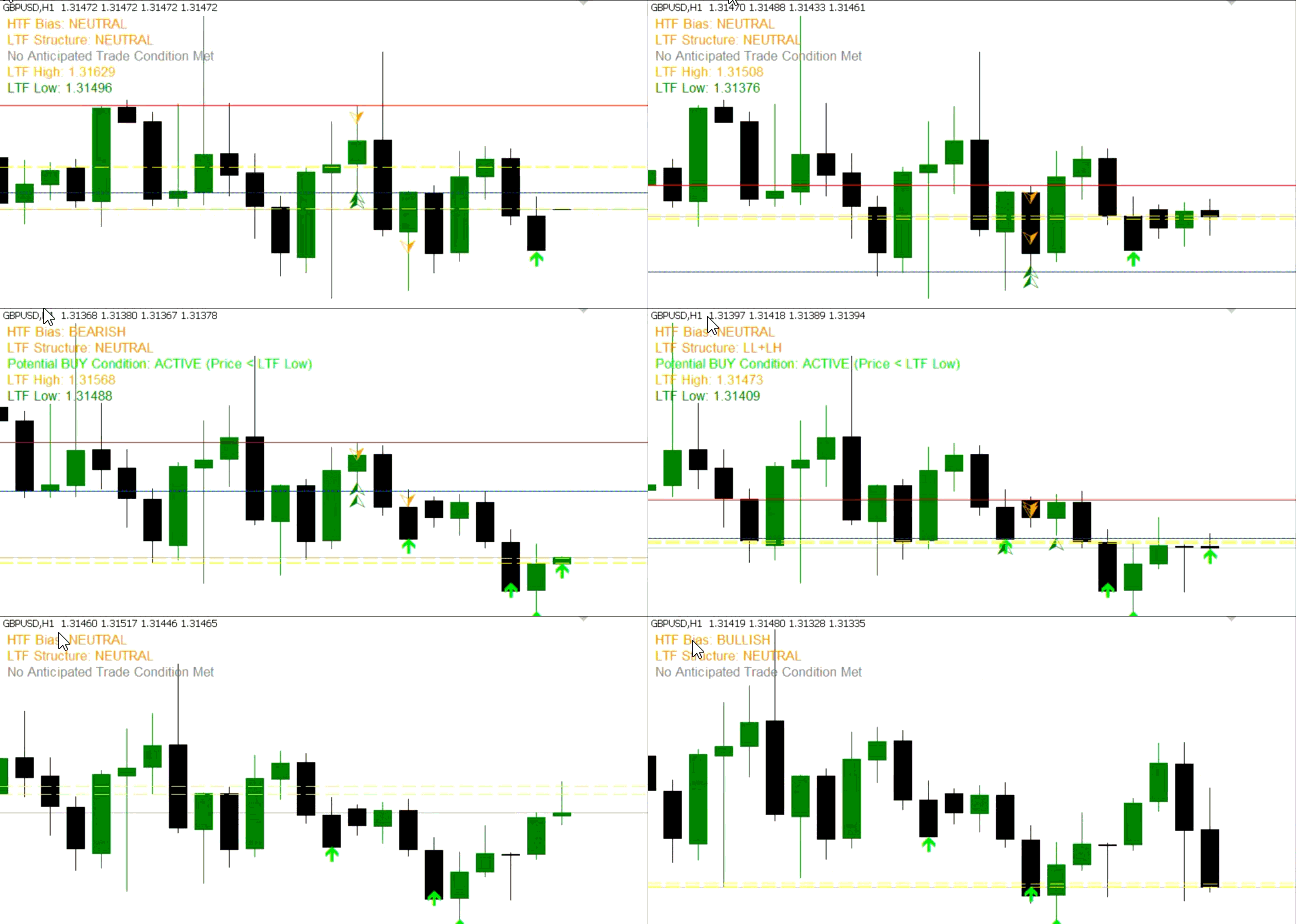
When you get a signal, first wait for alignment with the higher-timeframe (HTF) bias shown on the chart, as trades are only valid in the direction of that bias (a bullish bias allows buys only, and a bearish bias allows sells only). A trade condition becomes active when price extends beyond the relevant lower-timeframe (LTF) swing extreme displayed by the indicator—below the LTF last low for buys or above the LTF last high (and low) for sells—and the condition label confirms an active setup. For risk management, stops can be placed beyond the corresponding LTF swing extreme (for example, above the LTF last high for sells and below the LTF last low for buys), since those levels represent structural invalidation points within the logic of the indicator. For profit targets, sell positions can look toward the LTF last low or the mid-range between swings, while buy positions can target the LTF last high or the mid-range level, depending on risk preference.
//+------------------------------------------------------------------+
//| Check Structure Break                                            |
//+------------------------------------------------------------------+
void CheckStructureBreak()
{
   MqlRates current[];
   ArraySetAsSeries(current, true);
   CopyRates(_Symbol, LTF, 0, 1, current);

   if(ArraySize(current) < 1) return;

   // Bullish structure break
   if(ltfStructure == STRUCT_BULLISH && current[0].close < ltf_lastLow.price)
   {
      ResetLTFStructure();
   }

   // Bearish structure break
   if(ltfStructure == STRUCT_BEARISH && current[0].close > ltf_lastHigh.price)
   {
      ResetLTFStructure();
   }
}

//+------------------------------------------------------------------+
//| Reset LTF Structure                                              |
//+------------------------------------------------------------------+
void ResetLTFStructure()
{
   ltf_lastHigh.Reset();
   ltf_prevHigh.Reset();
   ltf_lastLow.Reset();
   ltf_prevLow.Reset();
   ltfStructure = STRUCT_NEUTRAL;

   // Also reset trade tracking
   lastBuySwingTime = 0;
   lastSellSwingTime = 0;
   lastBuySwingPrice = 0;
   lastSellSwingPrice = 0;
}

//+------------------------------------------------------------------+
//| Update Visualization                                             |
//+------------------------------------------------------------------+
void UpdateVisualization()
{
   ObjectsDeleteAll(0, "MS_");

   // Draw HTF swing points
   if(htf_lastHigh.price > 0)
      DrawSwingPoint(htf_lastHigh, "HTF_High", clrRed, HTF);

   if(htf_prevHigh.price > 0)
      DrawSwingPoint(htf_prevHigh, "HTF_PrevHigh", clrRed, HTF);

   if(htf_lastLow.price > 0)
      DrawSwingPoint(htf_lastLow, "HTF_Low", clrBlue, HTF);

   if(htf_prevLow.price > 0)
      DrawSwingPoint(htf_prevLow, "HTF_PrevLow", clrBlue, HTF);

   // Draw LTF swing points
   if(ltf_lastHigh.price > 0)
      DrawSwingPoint(ltf_lastHigh, "LTF_High", clrOrange, LTF);

   if(ltf_prevHigh.price > 0)
      DrawSwingPoint(ltf_prevHigh, "LTF_PrevHigh", clrOrange, LTF);

   if(ltf_lastLow.price > 0)
      DrawSwingPoint(ltf_lastLow, "LTF_Low", clrGreen, LTF);

   if(ltf_prevLow.price > 0)
      DrawSwingPoint(ltf_prevLow, "LTF_PrevLow", clrGreen, LTF);

   // Draw current price lines for reference
   double currentBid = SymbolInfoDouble(_Symbol, SYMBOL_BID);
   double currentAsk = SymbolInfoDouble(_Symbol, SYMBOL_ASK);

   CreateHorizontalLine("Current_Bid", currentBid, clrYellow, STYLE_DASH);
   CreateHorizontalLine("Current_Ask", currentAsk, clrYellow, STYLE_DASH);

   // Draw trade condition zones
   if(ltf_lastHigh.price > 0)
      CreateHorizontalLine("Sell_Zone_Min", ltf_lastHigh.price, clrRed, STYLE_SOLID);

   if(ltf_lastLow.price > 0)
   {
      CreateHorizontalLine("Buy_Zone_Max", ltf_lastLow.price, clrBlue, STYLE_SOLID);
      CreateHorizontalLine("Sell_TP_Level", ltf_lastLow.price, clrGreen, STYLE_DOT);
   }

   // Draw structure labels
   DrawStructureLabels();
}
In this section we handle structural validation and ensure that the indicator remains aligned with current market behavior. The CheckStructureBreak function continuously monitors the latest lower-timeframe candle and compares its close against the most recent swing levels. If a bullish structure is invalidated by price closing below the last swing low, or a bearish structure is broken by price closing above the last swing high, the existing structure is considered failed. In response, the ResetLTFStructure function resets and updates the signals, preventing outdated swing relationships from influencing future signals and ensuring that only valid, intact structures are used.
Once the structure is confirmed or rebuilt, the UpdateVisualization function translates all internal logic into clear, real-time chart context. It redraws higher- and lower-timeframe swing points, current price references, and key structural levels that define buy and sell zones. By visually separating HTF and LTF swings and overlaying condition-specific levels and labels, the indicator allows traders to immediately see not just where a signal appears, but why it exists—grounding each setup in observable market structure rather than abstract signals.
//+------------------------------------------------------------------+
//| Draw Swing Point                                                 |
//+------------------------------------------------------------------+
void DrawSwingPoint(SwingPoint &sp, string name, color clr, ENUM_TIMEFRAMES tf)
{
   ObjectCreate(0, "MS_" + name, OBJ_ARROW, 0, sp.time, sp.price);
   ObjectSetInteger(0, "MS_" + name, OBJPROP_ARROWCODE, sp.type == 1 ? 218 : 217);
   ObjectSetInteger(0, "MS_" + name, OBJPROP_COLOR, clr);
   ObjectSetInteger(0, "MS_" + name, OBJPROP_WIDTH, 3);
   ObjectSetString(0, "MS_" + name, OBJPROP_TOOLTIP,
                  StringFormat("%s: %.5f", sp.type == 1 ? "High" : "Low", sp.price));
}

//+------------------------------------------------------------------+
//| Draw Structure Labels                                            |
//+------------------------------------------------------------------+
void DrawStructureLabels()
{
   string biasText = "HTF Bias: ";
   switch(htfBias)
   {
      case STRUCT_BULLISH: biasText += "BULLISH"; break;
      case STRUCT_BEARISH: biasText += "BEARISH"; break;
      default: biasText += "NEUTRAL"; break;
   }

   string ltfText = "LTF Structure: ";
   switch(ltfStructure)
   {
      case STRUCT_BULLISH: ltfText += "HH+HL"; break;
      case STRUCT_BEARISH: ltfText += "LL+LH"; break;
      default: ltfText += "NEUTRAL"; break;
   }

   // Current trade conditions
   string conditionText = "";
   if(CheckBuyCondition())
      conditionText = "Potential BUY Condition: ACTIVE (Price < LTF Low)";
   else if(CheckSellCondition())
      conditionText = "Potential SELL Condition: ACTIVE (Price > LTF High & Low)";
   else
      conditionText = "No Anticipated Trade Condition Met";

   // Create label objects
   CreateLabel("MS_BiasLabel", biasText, 10, 20, clrDarkOrange);
   CreateLabel("MS_LTFLabel", ltfText, 10, 40, clrDarkOrange);
   CreateLabel("MS_ConditionLabel", conditionText, 10, 60,
               (CheckBuyCondition() || CheckSellCondition()) ? clrLime : clrGray);

   // Display LTF swing prices
   if(ltf_lastHigh.price > 0)
      CreateLabel("MS_LTFHighLabel", StringFormat("LTF High: %.5f", ltf_lastHigh.price), 10, 80, clrOrange);

   if(ltf_lastLow.price > 0)
      CreateLabel("MS_LTFLowLabel", StringFormat("LTF Low: %.5f", ltf_lastLow.price), 10, 100, clrGreen);
}

//+------------------------------------------------------------------+
//| Create Text Label                                                |
//+------------------------------------------------------------------+
void CreateLabel(string name, string text, int x, int y, color clr)
{
   ObjectCreate(0, "MS_" + name, OBJ_LABEL, 0, 0, 0);
   ObjectSetString(0, "MS_" + name, OBJPROP_TEXT, text);
   ObjectSetInteger(0, "MS_" + name, OBJPROP_XDISTANCE, x);
   ObjectSetInteger(0, "MS_" + name, OBJPROP_YDISTANCE, y);
   ObjectSetInteger(0, "MS_" + name, OBJPROP_COLOR, clr);
   ObjectSetInteger(0, "MS_" + name, OBJPROP_FONTSIZE, 10);
}

//+------------------------------------------------------------------+
//| Create Horizontal Line                                           |
//+------------------------------------------------------------------+
void CreateHorizontalLine(string name, double price, color clr, ENUM_LINE_STYLE style)
{
   ObjectCreate(0, "MS_" + name, OBJ_HLINE, 0, 0, price);
   ObjectSetInteger(0, "MS_" + name, OBJPROP_COLOR, clr);
   ObjectSetInteger(0, "MS_" + name, OBJPROP_STYLE, style);
   ObjectSetInteger(0, "MS_" + name, OBJPROP_WIDTH, 1);
}

//+------------------------------------------------------------------+
//|  Get Current ATR                                                 |
//+------------------------------------------------------------------+
double GetCurrentATR()
{
   double atr[];
   ArraySetAsSeries(atr, true);

   if(CopyBuffer(atrHandle, 0, 0, 1, atr) <= 0)
      return 0;

   return atr[0];
}
This last section is all about turning the internal swing and structure data into a visual representation that traders can immediately interpret on the chart. The DrawSwingPoint function creates arrow objects at each detected swing high or low, with the arrow direction, color, and tooltip reflecting whether it’s a peak or a trough. This makes it easy to see the exact moments where the market formed a significant swing, bridging the gap between raw numerical data and actionable insight. Each swing point is clearly labeled, helping traders understand the price extremes and their timing without having to manually inspect candlestick patterns.
Completing the swing points, the DrawStructureLabels and helper functions like CreateLabel and CreateHorizontalLine provide a dynamic summary of the market state and potential trade conditions. HTF and LTF biases are displayed, showing whether the broader trend is bullish, bearish, or neutral and whether the current price has entered a potential buy or sell zone. Horizontal lines mark critical swing highs and lows, and color-coded labels visually reinforce zones and conditions. Then the GetCurrentATR function retrieves and returns the most recent ATR value from the ATR indicator buffer, or returns 0 if the data cannot be accessed. Together, these elements create a live, interactive map of market structure, helping traders anticipate reversals and pullbacks.
Indicator Demo
Conclusion
In summary, we developed the Swing Extremes and the Pull Back Indicator by combining multi-timeframe swing detection with real-time lower-timeframe market analysis. The indicator identifies key swing highs and lows on both higher and lower timeframes, evaluates the current market structure as bullish, bearish, or neutral, and flags potential overextension zones where price is likely to reverse. Visual cues, including arrows for swing points, horizontal lines for key levels, and dynamic labels for HTF bias, LTF structure, and active trade conditions, make the market’s internal rhythm easy to follow. By integrating structure validation, overextension checks, and swing resets, the indicator ensures signals are timely, relevant, and not repeated on the same swing extremes.
In conclusion, this indicator can enhance trading by turning raw price action into a clear, actionable map of potential reversals and pullbacks. Traders can anticipate price reactions at extreme swings, quickly identify whether conditions favor bullish or bearish setups, and make informed decisions without manually tracking swings across multiple timeframes. By visualizing market structure and trade zones in real time, it reduces guesswork, streamlines analysis, and allows for more confident, precise entries and exits—effectively bridging the gap between observation and execution. After reading this article, you should at least be able to determine the LTF extreme, filter it using HTF bias, and apply a structured entry, stop, and exit rules.
Warning: All rights to these materials are reserved by MetaQuotes Ltd. Copying or reprinting of these materials in whole or in part is prohibited.
This article was written by a user of the site and reflects their personal views. MetaQuotes Ltd is not responsible for the accuracy of the information presented, nor for any consequences resulting from the use of the solutions, strategies or recommendations described.

 Introduction to MQL5 (Part 42): Beginner Guide to File Handling in MQL5 (IV)
 Implementing of a Breakeven Mechanism in MQL5 (Part 1): Base Class and Fixed-Points Breakeven Mode
 Statistical Arbitrage Through Cointegrated Stocks (Final): Data Analysis with Specialized Database
 Larry Williams Market Secrets (Part 12): Context Based Trading of Smash Day Reversals

- Free trading apps
- Over 8,000 signals for copying
- Economic news for exploring financial markets
You agree to website policy and terms of use
the buy and sell arrows disappear .
the fractal objects disappear
for LTF structrure
use internal choch to identify HH /LL
Then after choch LH /HL identify as likely the choch create HH /LL within a HTF trend comes after LTF liquidity sweep.
once no new choch can get more entries on LH /HL
lux algo ultimate smart concept mt5 indicator have a good internal choch / bos formula.
when HTF give bullish
LTF give netrual but the HH and HL is there on chart . ..
i am profitable trader . i love automation and tools to assistance with my trading environment .
one day you will build something solid as you are a very good coder.
thanks .