FXEA365 Mtf Trend Dashboard MT4
- Indicators
-
Kenichiro Sakamoto
 I'm Kenichiro Sakamoto, the developer behind FXEA365 — a studio building transparent, rule-based Expert Advisors for MetaTrader 5.
 - Version: 2.20
- Updated: 20 September 2026
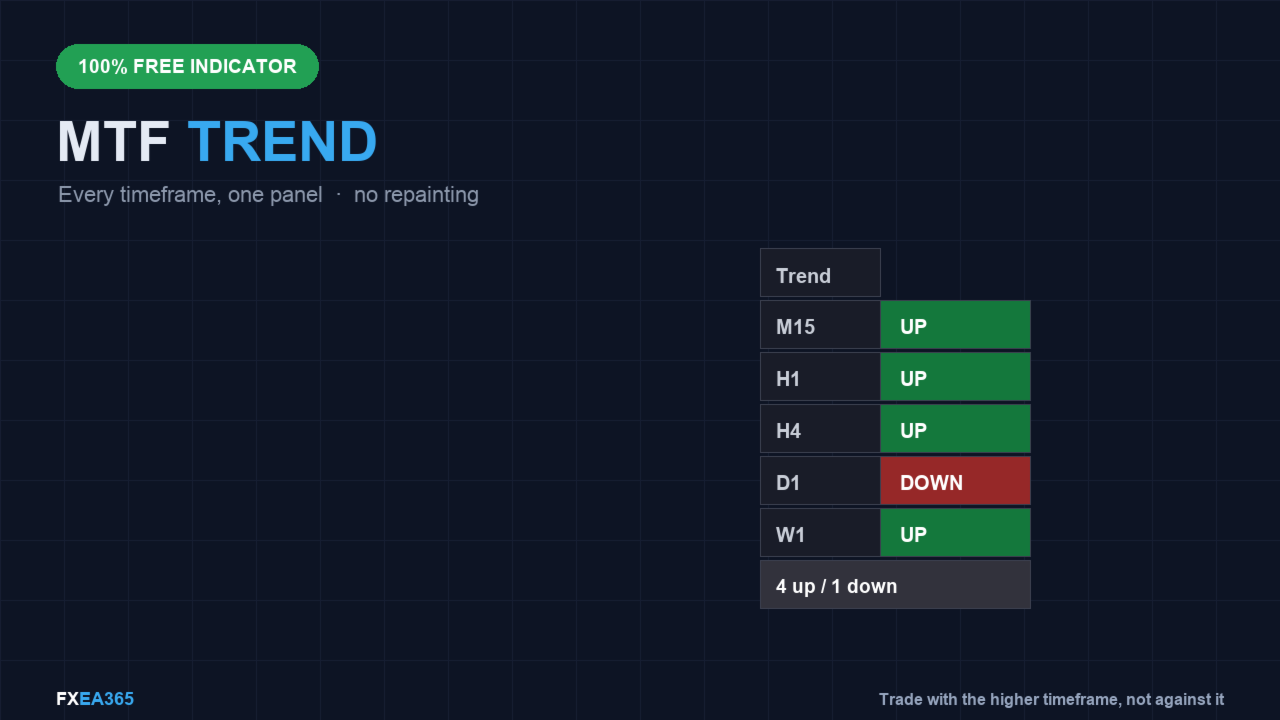
FREE — one small panel that tells you the trend direction on M15, H1, H4, D1 and W1 at the same time, without switching charts.
Want this kind of rule traded automatically? See our paid EA Gold Viper Breakout MT4 (free demo in the Strategy Tester): https://www.mql5.com/en/market/product/182520
100% free, no limitations. If it earns a place on your charts, a short review is the one thing that helps us most — it takes 30 seconds and it is what lets other traders find this tool.
Platform: MetaTrader 4 (this page). MetaTrader 5 edition: https://www.mql5.com/en/market/product/185940
Most losing trades in a trend system are taken against a higher timeframe that was pointing the other way. This panel puts all of them in front of you at once, so you can see whether the timeframes agree before you act.
=== HOW IT DECIDES ===
For each timeframe, the trend is called UP only when two things agree: the last closed price is on the correct side of a moving average, AND that moving average is sloping the same way over the last few bars. If those two disagree, the cell is grey - "no clear trend" is an honest answer, and it is shown as one rather than forced into up or down.
=== NO REPAINTING ===
Everything is read from closed bars: the moving average and the slope are measured at the last completed bar, never the forming one. A cell that turns green does not turn grey again a minute later. You can trust what the panel showed you when you took the trade.
=== WHAT YOU SEE ===
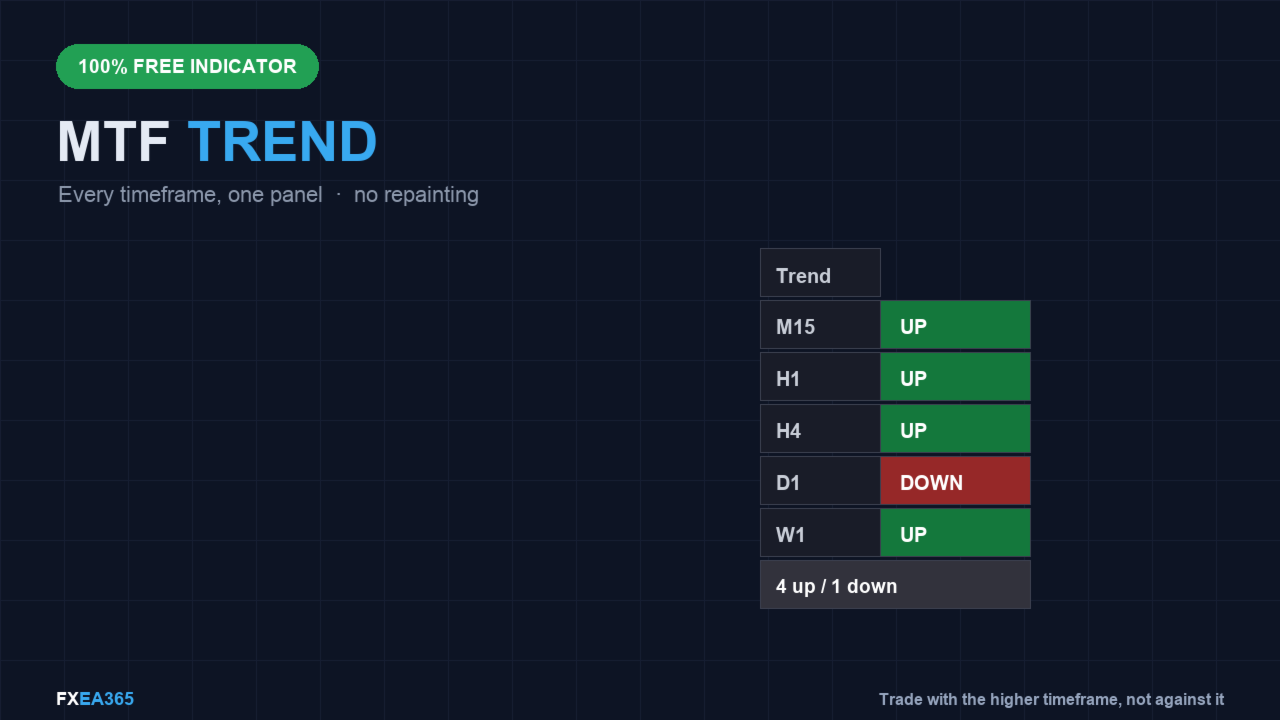
- One row per timeframe (M15, H1, H4, D1, W1), each green (up), red (down) or grey (no agreement).
- A summary line: "ALL UP", "ALL DOWN", or a count like "3 up / 1 down".
- An optional alert the moment all five timeframes line up in the same direction.
=== SETTINGS ===
- MA_Period (default 50): the moving average length used on every timeframe.
- MA_Method (default EMA): SMA, EMA, SMMA or LWMA.
- Slope_Bars (default 3): how many bars back the slope is measured over.
- Corner, XGap, YGap: where the panel sits on the chart.
- AlertOnAlign: alert when all timeframes agree.
=== HONEST NOTES ===
Timeframe alignment is a filter, not a signal. When every timeframe points up, trend-following trades have the wind behind them - but alignment also happens near the end of a move, right before it turns. Use it to avoid trading against the higher timeframe, not as a reason to enter on its own. And on very quiet instruments the higher timeframes will sit grey for long stretches; that is the tool being honest, not broken.
=== WHO THIS IS FOR / NOT FOR ===
Right fit: trend traders who keep getting stopped out because a higher timeframe was pointing the other way, anyone who is tired of clicking through five charts before every entry, and anyone who wants a filter that says "no clear trend" instead of guessing.
Not a fit: counter-trend and mean-reversion traders, anyone who wants an entry signal — alignment is a filter and nothing more — and anyone who will treat "ALL UP" as a reason to buy on its own.
=== 5-MINUTE CHART CHECK ===
1) Attach it to a chart. The panel reads M15, H1, H4, D1 and W1 regardless of which timeframe the chart itself is on.
2) Verify one cell by hand: open the H4 chart, drop a 50 EMA on it, and confirm the panel's colour matches what you see — price on the correct side and the average sloping the same way.
3) Find a grey cell and look at that timeframe. Price should be on one side of the average while the average slopes the other way. Grey is an answer, not a failure.
4) Scroll back over a week and confirm no cell has repainted: everything is read from closed bars, so a green cell from yesterday is still green today.
5) Turn on AlertOnAlign and leave it running. Note how often all five line up — on most instruments it is rarer than people expect.
Alignment also happens near the end of a move, right before it turns. Use it to avoid trading against the higher timeframe, not as a reason to enter.
More free tools from us (FXEA365):
- Donchian Trend Engine MT4 (EA): https://www.mql5.com/en/market/product/185537
- Donchian ATR Trailing Stop MT4 (indicator): https://www.mql5.com/en/market/product/185552
- Crypto Trend Channel Donchian MT4 (indicator): https://www.mql5.com/en/market/product/185645
- Pivot Trend ZigZag Swing MT4 (indicator): https://www.mql5.com/en/market/product/185646
- Spread Guard Live Spread MT4 (indicator): https://www.mql5.com/en/market/product/185749
- Volatility Squeeze BB Keltner MT4 (indicator): https://www.mql5.com/en/market/product/187033
Our other free tools: https://www.mql5.com/en/users/app.develop.sk/seller
=== IF YOU WANT THIS AS AN AUTOMATED SYSTEM ===
Trend following works best when the higher timeframe agrees and every trade has a defined exit. These are the paid EAs where we apply that discipline to gold, with the test conditions published on each page:
- Gold Viper Breakout MT4 (XAUUSD M30): https://www.mql5.com/en/market/product/182520
The MetaTrader 4 build of our gold breakout EA: same core entry logic, a group stop on every basket, no martingale. Our published figures were measured on the MetaTrader 5 build; the MT4 build will differ, so compare on its own page before you decide.
Every EA above has a free demo. Run it in the Strategy Tester with the settings listed at the top of its page before you decide. These are backtest figures, not live trading results, and they do not guarantee future performance.
If this tool is useful in your trading, a short review on this page would help, good or bad, including anything you would like improved. It helps other traders decide and tells us what to fix next.
Want this kind of rule traded automatically? See our paid EA Gold Viper Breakout MT4 (free demo in the Strategy Tester): https://www.mql5.com/en/market/product/182520
100% free, no limitations. If it earns a place on your charts, a short review is the one thing that helps us most — it takes 30 seconds and it is what lets other traders find this tool.
Platform: MetaTrader 4 (this page). MetaTrader 5 edition: https://www.mql5.com/en/market/product/185940
Most losing trades in a trend system are taken against a higher timeframe that was pointing the other way. This panel puts all of them in front of you at once, so you can see whether the timeframes agree before you act.
=== HOW IT DECIDES ===
For each timeframe, the trend is called UP only when two things agree: the last closed price is on the correct side of a moving average, AND that moving average is sloping the same way over the last few bars. If those two disagree, the cell is grey - "no clear trend" is an honest answer, and it is shown as one rather than forced into up or down.
=== NO REPAINTING ===
Everything is read from closed bars: the moving average and the slope are measured at the last completed bar, never the forming one. A cell that turns green does not turn grey again a minute later. You can trust what the panel showed you when you took the trade.
=== WHAT YOU SEE ===
- One row per timeframe (M15, H1, H4, D1, W1), each green (up), red (down) or grey (no agreement).
- A summary line: "ALL UP", "ALL DOWN", or a count like "3 up / 1 down".
- An optional alert the moment all five timeframes line up in the same direction.
=== SETTINGS ===
- MA_Period (default 50): the moving average length used on every timeframe.
- MA_Method (default EMA): SMA, EMA, SMMA or LWMA.
- Slope_Bars (default 3): how many bars back the slope is measured over.
- Corner, XGap, YGap: where the panel sits on the chart.
- AlertOnAlign: alert when all timeframes agree.
=== HONEST NOTES ===
Timeframe alignment is a filter, not a signal. When every timeframe points up, trend-following trades have the wind behind them - but alignment also happens near the end of a move, right before it turns. Use it to avoid trading against the higher timeframe, not as a reason to enter on its own. And on very quiet instruments the higher timeframes will sit grey for long stretches; that is the tool being honest, not broken.
=== WHO THIS IS FOR / NOT FOR ===
Right fit: trend traders who keep getting stopped out because a higher timeframe was pointing the other way, anyone who is tired of clicking through five charts before every entry, and anyone who wants a filter that says "no clear trend" instead of guessing.
Not a fit: counter-trend and mean-reversion traders, anyone who wants an entry signal — alignment is a filter and nothing more — and anyone who will treat "ALL UP" as a reason to buy on its own.
=== 5-MINUTE CHART CHECK ===
1) Attach it to a chart. The panel reads M15, H1, H4, D1 and W1 regardless of which timeframe the chart itself is on.
2) Verify one cell by hand: open the H4 chart, drop a 50 EMA on it, and confirm the panel's colour matches what you see — price on the correct side and the average sloping the same way.
3) Find a grey cell and look at that timeframe. Price should be on one side of the average while the average slopes the other way. Grey is an answer, not a failure.
4) Scroll back over a week and confirm no cell has repainted: everything is read from closed bars, so a green cell from yesterday is still green today.
5) Turn on AlertOnAlign and leave it running. Note how often all five line up — on most instruments it is rarer than people expect.
Alignment also happens near the end of a move, right before it turns. Use it to avoid trading against the higher timeframe, not as a reason to enter.
More free tools from us (FXEA365):
- Donchian Trend Engine MT4 (EA): https://www.mql5.com/en/market/product/185537
- Donchian ATR Trailing Stop MT4 (indicator): https://www.mql5.com/en/market/product/185552
- Crypto Trend Channel Donchian MT4 (indicator): https://www.mql5.com/en/market/product/185645
- Pivot Trend ZigZag Swing MT4 (indicator): https://www.mql5.com/en/market/product/185646
- Spread Guard Live Spread MT4 (indicator): https://www.mql5.com/en/market/product/185749
- Volatility Squeeze BB Keltner MT4 (indicator): https://www.mql5.com/en/market/product/187033
Our other free tools: https://www.mql5.com/en/users/app.develop.sk/seller
=== IF YOU WANT THIS AS AN AUTOMATED SYSTEM ===
Trend following works best when the higher timeframe agrees and every trade has a defined exit. These are the paid EAs where we apply that discipline to gold, with the test conditions published on each page:
- Gold Viper Breakout MT4 (XAUUSD M30): https://www.mql5.com/en/market/product/182520
The MetaTrader 4 build of our gold breakout EA: same core entry logic, a group stop on every basket, no martingale. Our published figures were measured on the MetaTrader 5 build; the MT4 build will differ, so compare on its own page before you decide.
Every EA above has a free demo. Run it in the Strategy Tester with the settings listed at the top of its page before you decide. These are backtest figures, not live trading results, and they do not guarantee future performance.
If this tool is useful in your trading, a short review on this page would help, good or bad, including anything you would like improved. It helps other traders decide and tells us what to fix next.