Aifw AI Framework for MT5
- Experts
-
Kenichiro Sakamoto
 I'm Kenichiro Sakamoto, the developer behind FXEA365 — a studio building transparent, rule-based Expert Advisors for MetaTrader 5.
 - Version: 1.20
- Updated: 29 September 2026
- Activations: 5
=== LAUNCH PRICE: 3 OF 3 LEFT AT $35 (65% OFF the regular $99) ===
The price rises after every 3 purchases. When these copies are sold, the next price is $49.
AIFW is an Expert Advisor that lets a large language model (OpenAI or Anthropic,
using your own API key) act as a decision layer on top of a deterministic
rules engine. The rules engine is the default: it runs with no key, no credit
and no network. The AI can override its decisions only inside the limits the
rules define.
What it does
- Default decision layer: an H1 moving-average trend filter (H4 agreement
optional), an M15 RSI cross for timing, and ATR-relative stop loss and take
profit. Every open order has a stop loss.
- AI overlay: at a fixed interval the EA sends a compact state summary
(price, spread, account, positions, indicator values on the timeframes you
choose) to the model and receives a structured proposal: hold, open, close
or modify, with stop loss and take profit.
- AI gate: an AI open order is executed only when it agrees with the rules
engine trend direction. Its stop loss and take profit are replaced by the
same ATR-relative distances the rules use. After a losing trade, same-side
AI entries are paused for a configurable time.
- Cost cap: you set a monthly API budget in USD. The EA counts tokens, slows
its interval as the budget runs down and stops calling the API when the cap
is reached. Trading continues on the rules engine.
- Backtesting: live responses are recorded. In the Strategy Tester the EA
replays recorded responses that match the same market situation and falls
back to the rules engine otherwise. The tester shows the coverage
(exact / approximate / rules) so you know what part of the test was AI.
- Terminal-side safety: max positions, max lot, max executions per day,
cooldown, daily-loss and drawdown retreat, trading sessions, weekend
cut-off, spread limit, news pause, max holding time, break-even, trailing,
partial close. These run without the AI and keep running if the AI becomes
unavailable.
- Approval mode: instead of auto execution, every proposal can wait in a
queue until you confirm it on the chart panel.
- Chart panel in 30 languages: live status, proposals, profile, rules,
connection and budget. API keys are stored locally in the terminal only.
What it does not do
- It does not promise profit. The rules engine and the AI overlay are tools;
results depend on the market, the model, the profile and your settings.
- It does not send your data anywhere except to the API provider you choose.
There is no licence server, no telemetry, no update system.
- The AI is not a risk-management layer. Risk limits are enforced by the
terminal-side rules, not by the model.
How the layers work
1. Rules engine (always on) – decides direction and SL/TP from indicators.
2. AI overlay (optional) – may replace the decision when a response arrives.
3. AI gate – keeps the AI inside the rules engine's trend and SL/TP frame.
4. Policy / guards / approval – decide whether an order is allowed at all.
Requirements
- MetaTrader 5, build 4000 or later. Hedging or netting account.
- For AI decisions: an API key from OpenAI or Anthropic and the provider
domain added under Tools > Options > Expert Advisors > Allow WebRequest
(api.openai.com or api.anthropic.com). Without a key the EA trades on the
rules engine only.
- A VPS is recommended for continuous operation.
- Manual (install, allowed-URL steps, key entry, error messages and fixes):
https://fxea365.com/ea/aifw#manual
Strategy Tester note
The tester cannot call web APIs. In the tester AIFW replays recorded AI
responses when available and otherwise uses the rules engine. A tester run
therefore shows the rules engine, plus whatever recordings you have made
on a live chart. It is not a forecast of AI performance.
Inputs (main groups)
- Decision: interval in seconds.
- Rules engine: mode, MA fast/slow, RSI period and level, ATR period,
SL and TP as ATR multiples.
- AI gate: trend gate on/off, SL/TP normalisation on/off, post-loss lock
in minutes.
- LLM connection: provider, endpoint, API key, model, timeout, max tokens,
reasoning effort, record live responses.
- Budget: monthly cap in USD, token prices, max interval under budget
pressure.
- Trading constitution: allow open/close/modify, symbols, min/max lot, max
positions, max total lot, drawdown stop, cooldown, max executions per day,
require stop loss.
- Approval: auto approve on/off, approval time-to-live.
- Decision profile: name, timeframes, style (conservative / standard /
aggressive), autonomy, risk mode (fixed lot or % of balance), memory,
strategy (market data sent to the model).
- Safety: daily loss %, max drawdown %, action when AI is unavailable,
notification delay, sessions, weekend cut-off, max spread, news pause,
max holding time, break-even, trailing, partial close.
- Display: panel on/off and position, verbose log.
Recommended first setup
1. Attach to one chart (for example XAUUSD M5). Keep the default inputs.
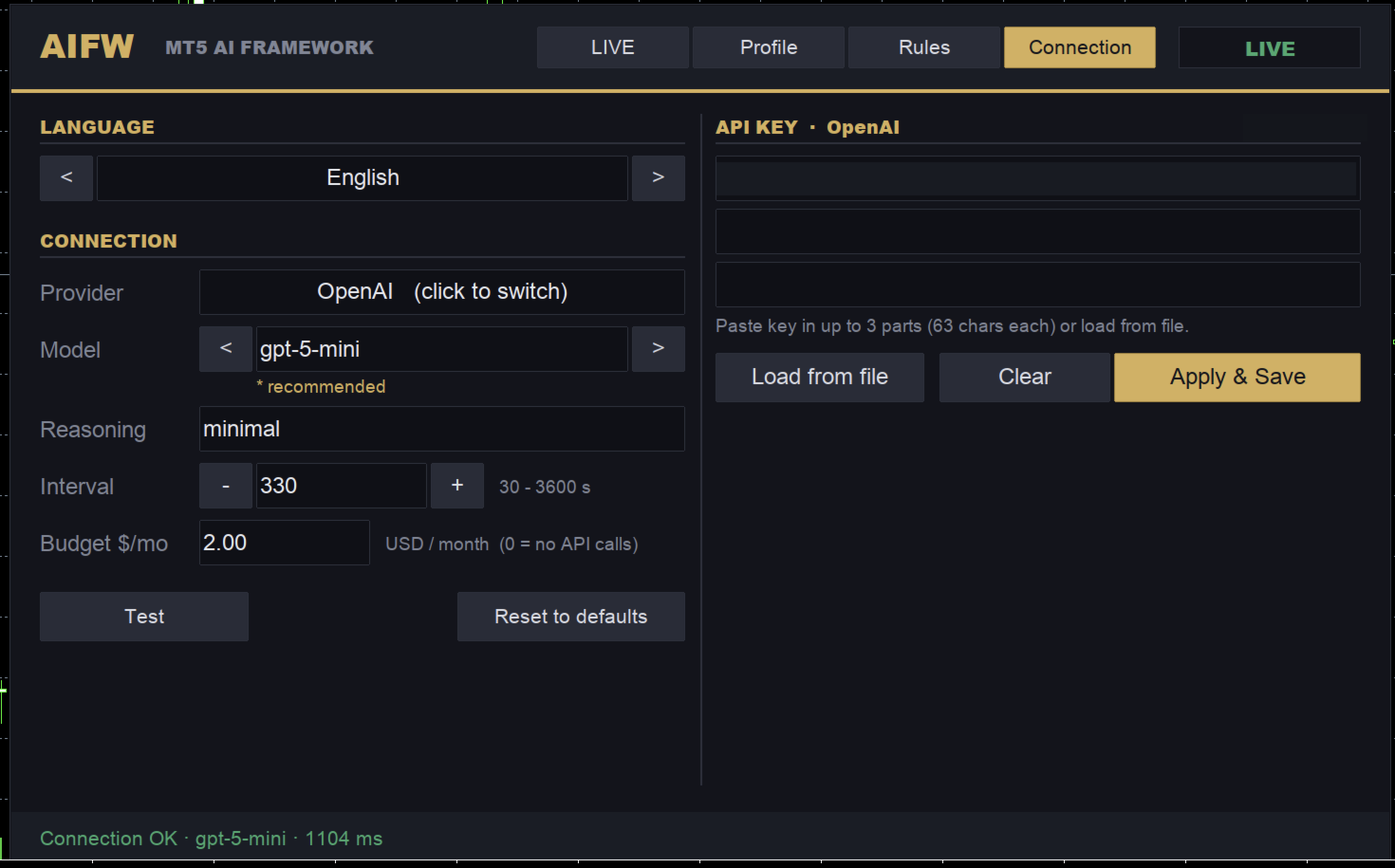
2. Open the panel, choose the provider and model, paste your API key, set a
monthly budget you are comfortable with, and save.
3. For the first days set Autonomy to "Propose only" (Profile tab) and confirm proposals by hand. The default is "Full auto".
4. Run the Strategy Tester later with the recordings the live chart made.
Support
Documentation and updates are published on the product page. Questions are
answered in the Comments tab.
The price rises after every 3 purchases. When these copies are sold, the next price is $49.
AIFW is an Expert Advisor that lets a large language model (OpenAI or Anthropic,
using your own API key) act as a decision layer on top of a deterministic
rules engine. The rules engine is the default: it runs with no key, no credit
and no network. The AI can override its decisions only inside the limits the
rules define.
What it does
- Default decision layer: an H1 moving-average trend filter (H4 agreement
optional), an M15 RSI cross for timing, and ATR-relative stop loss and take
profit. Every open order has a stop loss.
- AI overlay: at a fixed interval the EA sends a compact state summary
(price, spread, account, positions, indicator values on the timeframes you
choose) to the model and receives a structured proposal: hold, open, close
or modify, with stop loss and take profit.
- AI gate: an AI open order is executed only when it agrees with the rules
engine trend direction. Its stop loss and take profit are replaced by the
same ATR-relative distances the rules use. After a losing trade, same-side
AI entries are paused for a configurable time.
- Cost cap: you set a monthly API budget in USD. The EA counts tokens, slows
its interval as the budget runs down and stops calling the API when the cap
is reached. Trading continues on the rules engine.
- Backtesting: live responses are recorded. In the Strategy Tester the EA
replays recorded responses that match the same market situation and falls
back to the rules engine otherwise. The tester shows the coverage
(exact / approximate / rules) so you know what part of the test was AI.
- Terminal-side safety: max positions, max lot, max executions per day,
cooldown, daily-loss and drawdown retreat, trading sessions, weekend
cut-off, spread limit, news pause, max holding time, break-even, trailing,
partial close. These run without the AI and keep running if the AI becomes
unavailable.
- Approval mode: instead of auto execution, every proposal can wait in a
queue until you confirm it on the chart panel.
- Chart panel in 30 languages: live status, proposals, profile, rules,
connection and budget. API keys are stored locally in the terminal only.
What it does not do
- It does not promise profit. The rules engine and the AI overlay are tools;
results depend on the market, the model, the profile and your settings.
- It does not send your data anywhere except to the API provider you choose.
There is no licence server, no telemetry, no update system.
- The AI is not a risk-management layer. Risk limits are enforced by the
terminal-side rules, not by the model.
How the layers work
1. Rules engine (always on) – decides direction and SL/TP from indicators.
2. AI overlay (optional) – may replace the decision when a response arrives.
3. AI gate – keeps the AI inside the rules engine's trend and SL/TP frame.
4. Policy / guards / approval – decide whether an order is allowed at all.
Requirements
- MetaTrader 5, build 4000 or later. Hedging or netting account.
- For AI decisions: an API key from OpenAI or Anthropic and the provider
domain added under Tools > Options > Expert Advisors > Allow WebRequest
(api.openai.com or api.anthropic.com). Without a key the EA trades on the
rules engine only.
- A VPS is recommended for continuous operation.
- Manual (install, allowed-URL steps, key entry, error messages and fixes):
https://fxea365.com/ea/aifw#manual
Strategy Tester note
The tester cannot call web APIs. In the tester AIFW replays recorded AI
responses when available and otherwise uses the rules engine. A tester run
therefore shows the rules engine, plus whatever recordings you have made
on a live chart. It is not a forecast of AI performance.
Inputs (main groups)
- Decision: interval in seconds.
- Rules engine: mode, MA fast/slow, RSI period and level, ATR period,
SL and TP as ATR multiples.
- AI gate: trend gate on/off, SL/TP normalisation on/off, post-loss lock
in minutes.
- LLM connection: provider, endpoint, API key, model, timeout, max tokens,
reasoning effort, record live responses.
- Budget: monthly cap in USD, token prices, max interval under budget
pressure.
- Trading constitution: allow open/close/modify, symbols, min/max lot, max
positions, max total lot, drawdown stop, cooldown, max executions per day,
require stop loss.
- Approval: auto approve on/off, approval time-to-live.
- Decision profile: name, timeframes, style (conservative / standard /
aggressive), autonomy, risk mode (fixed lot or % of balance), memory,
strategy (market data sent to the model).
- Safety: daily loss %, max drawdown %, action when AI is unavailable,
notification delay, sessions, weekend cut-off, max spread, news pause,
max holding time, break-even, trailing, partial close.
- Display: panel on/off and position, verbose log.
Recommended first setup
1. Attach to one chart (for example XAUUSD M5). Keep the default inputs.
2. Open the panel, choose the provider and model, paste your API key, set a
monthly budget you are comfortable with, and save.
3. For the first days set Autonomy to "Propose only" (Profile tab) and confirm proposals by hand. The default is "Full auto".
4. Run the Strategy Tester later with the recordings the live chart made.
Support
Documentation and updates are published on the product page. Questions are
answered in the Comments tab.