Falcon Trailing Stop Manager MT4

★ 100% FREE — full version, no limitations, no registration.

100% free, no limitations. If it earns a place on your charts, a short review is the one thing that helps us most — it takes 30 seconds and it is what lets other traders find this tool.
If Falcon helps your trading, please take a second to leave a review — it helps us a lot and keeps the tool free.

Our best seller for MT4 — Gold Viper Breakout (XAUUSD, MT4 version):
https://www.mql5.com/en/market/product/182520

Want it traded automatically? Megamax Donchian Trend does exactly this, hands off:
https://www.mql5.com/en/market/product/182526

More tools from the same developer:
- Aegis Account Protector (account-wide equity guard): https://www.mql5.com/en/market/product/188539
- Donchian Trend Engine (our trend EA, also 100% free): https://www.mql5.com/en/market/product/185537
- All our EAs and tools: https://www.mql5.com/en/users/app.develop.sk/seller

Trailing Manager — Universal Trailing Stop & Break-Even for Any Position

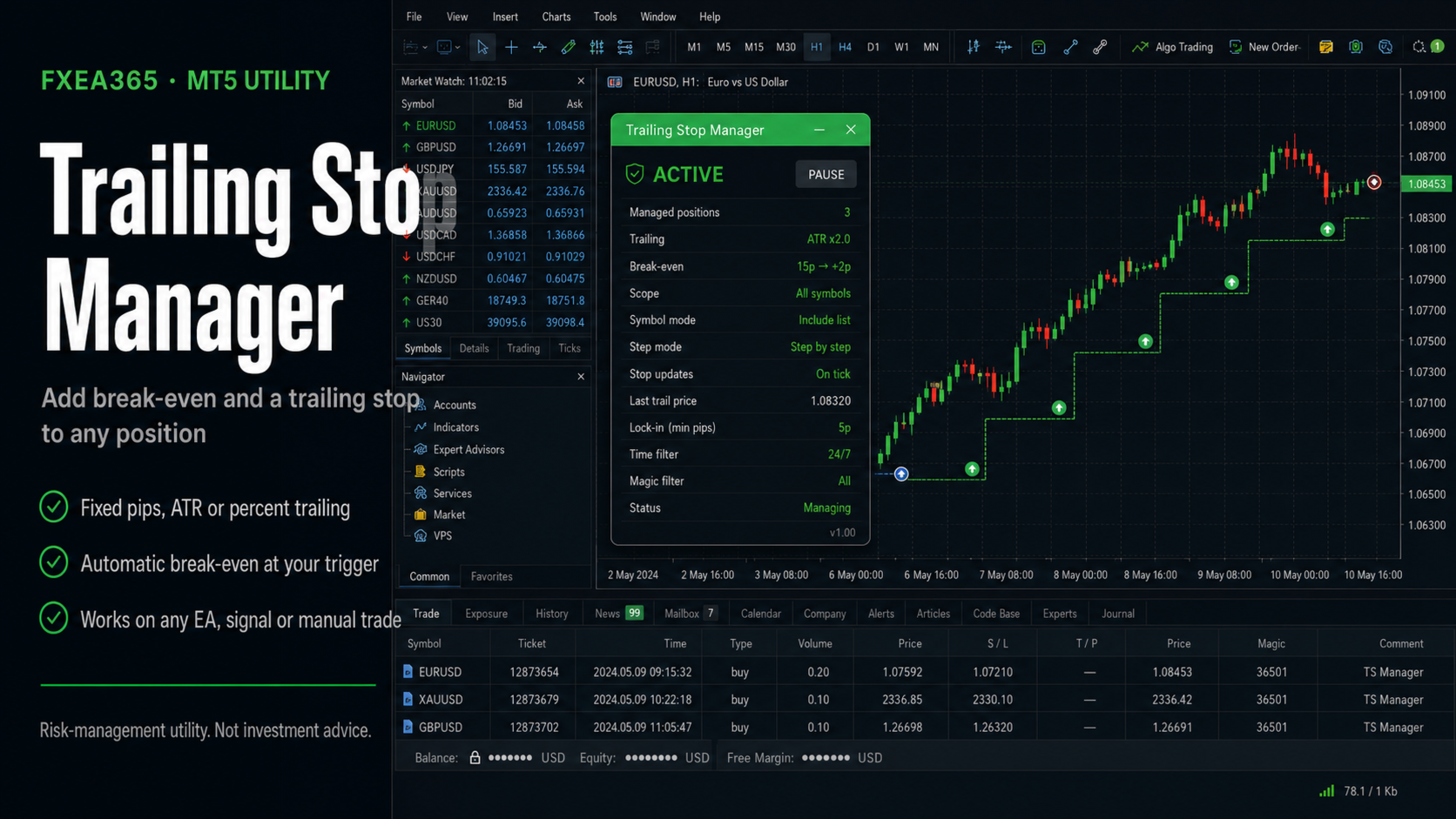
Trailing Manager is a standalone utility. It does NOT open trades. Attach it to a chart and it manages the stop-loss of positions opened by ANY EA, signal, or by hand — adding break-even and a trailing stop to strategies that don't have one, and protecting manual trades automatically.

This is a tool, not investment advice. Stops are sent to your broker and are subject to slippage, gaps, and the broker's minimum stop distance.

WHAT IT DOES

- Break-even — once a position is a set number of pips in profit, the stop is moved to entry plus a small locked offset, so the trade can no longer turn into a loss.
- Trailing stop, three methods:
- Fixed pips — a constant distance behind price.
- ATR — distance = ATR x multiplier, so it widens in volatility and tightens in calm.
- Percent — distance as a percentage of price (scale-invariant, handy for gold and crypto).
- Step trailing — only advance the stop when it improves by at least a set number of pips, to avoid over-modifying.
- Initial SL/TP enforcement — optionally attach a stop-loss and/or take-profit to "naked" positions that were opened without one.
- Broker stop-distance aware — modifications that would violate the broker's minimum stop level are skipped instead of rejected.

SCOPE

Manage just the chart symbol or the whole account, with an optional magic-number filter so it trails only one strategy and leaves the rest untouched.

ON-CHART PANEL

A compact panel shows the active break-even and trailing settings, the number of positions being managed, and the floating P/L in your account currency.

WORKS IN THE STRATEGY TESTER

The management logic runs in the Strategy Tester, so you can attach it together with a trading EA and watch break-even and trailing operate on historical data.

=== WHO THIS IS FOR / NOT FOR ===
Right fit: anyone running an EA or a signal that has no trailing stop of its own, manual traders who want break-even applied without watching the screen, and anyone holding positions on several symbols who wants one instance to manage them all.
Not a fit: anyone looking for entries — it opens nothing, it only moves stops on positions that already exist — anyone who wants a trail so tight it survives normal noise, and anyone who will point it at the whole account without setting a magic filter first.

=== 5-MINUTE DEMO CHECKLIST ===
1) On a DEMO account, attach it to one chart and keep AutoTrading enabled. It cannot modify a stop without that.
2) Set the scope before anything else: chart symbol or all symbols, plus InpMagicFilter if you want it to leave your other strategies alone. This is the setting that decides which positions it touches.
3) Open a position by hand, let it move into profit past InpBE_TriggerPips, and confirm the stop jumps to entry plus your offset — not to entry exactly, or the spread takes you out flat.
4) Try each trailing method on a symbol that suits it: fixed pips on a major, ATR where volatility swings, percent on gold or crypto where a pip distance means nothing at different price levels.
5) Set InpTrailStepPips and watch the stop advance in steps rather than on every tick. Over-modifying achieves nothing and annoys the broker.
6) Open a position with no stop at all and confirm InpForceSL attaches one. Then check the journal: modifications that would violate the broker's minimum stop distance are skipped rather than rejected, so a quiet log is the expected result, not a failure.
The management logic also runs in the Strategy Tester, so you can attach it alongside a trading EA and watch break-even and trailing work on historical data first.

RECOMMENDED SETUP

- Attach to one chart per symbol you want managed, or set scope to ALL symbols to cover the whole account from a single chart.
- Use the magic filter to trail only a specific EA's positions.
- Keep AutoTrading enabled so the utility can modify stops.
- Broker-agnostic; pip size and stop levels are read from each symbol's contract specs.

KEY INPUTS

- InpAllSymbols / InpMagicFilter: scope
- InpUseBreakEven / InpBE_TriggerPips / InpBE_OffsetPips: break-even
- InpUseTrailing / InpTrailMethod (0 fixed / 1 ATR / 2 percent)
- InpTrailPips / InpATRperiod / InpATRmult / InpTrailPct: per-method distance
- InpTrailStepPips: minimum stop advance
- InpForceSL / InpForceSLPips, InpForceTP / InpForceTPPips: SL/TP enforcement for naked positions

=== THE EAs THESE TOOLS WERE BUILT FOR ===
We build this utility for ourselves first: it is the risk plumbing around our own Expert Advisors. Those EAs are paid, and every number below is a real-tick backtest with equity drawdown, not balance drawdown.
- Megamax Donchian Trend (USDJPY H1) — profit factor 1.50, maximum equity drawdown 7.3%, 631 trades over 9.4 years: https://www.mql5.com/en/market/product/182526
- Nasdaq Dip Buyer (USTEC) — profit factor 1.43, maximum equity drawdown 7.5%, 61 trades over 5 years: https://www.mql5.com/en/market/product/182528
Hard stop-loss on every trade, one position at a time, no martingale and no grid. If that is not the kind of EA you want, this free tool still works with whatever you already run.
Recommended products
Lot Calculate
Maksim Neimerik
This simple but useful script calculates the lot in % of the deposit. It is indispensable for risk management. There is only one customizable parameter: MaxRisk - risk in % for lot calculation. The product works as a standard script. Launch it once on an appropriate chart and start trading using the calculated lot value. Genious is simplicity! Happy trading!
FREE
Account Info EA It is a tool that presents on the graph all the positions of the account, and specific information concerning the positions, but also the account. It enables the user to have an image of his account at a glance. Use like any expert advisor. You can't attach it in the same chart with other expert advisor. It does not have the ability to open or manage positions. You can attach it on any chart and any timeframe.
FREE
Show Pips
Roman Podpora
4.27 (59)
This information indicator will be useful for those who always want to be aware of the current situation on the account. The indicator displays data such as profit in points, percentage and currency, as well as the spread for the current pair and the time until the bar closes on the current timeframe. VERSION MT5 - More useful indicators There are several options for placing the information line on the chart: 1. To the right of the price (runs behind the price); 2. As a comment (in the upper
FREE
PZ Trade Pad EA
PZ TRADING SLU
4.29 (31)
This simple visual expert advisor allows you to trade easily from the chart. It handles risk management for you and can perform several useful tasks with your existing trades, saving time and making risk-management for each individual trade easier.  [ Installation Guide | Update Guide | Troubleshooting | FAQ | All Products   |  Get Help ] Trade easily from the chart Trade with precise risk management, hassle free Trade pending order with drag and drop price selection Set SL and TP levels with
FREE
Scalping Day Trading Support Utility Scalping One MT4 free One position is displayed with one button. View P & L, Lot, and Point in real time. It is possible to switch the display of positions of only chart currencies and all currency pairs.  (The free version has only 3 positions) Supports automatic identification in Japanese and English   Account currency notation corresponds to dollar, euro, pound, yen (automatic identification) The timeline drawing function can be linked with the clock disp
FREE
This is a DEMO version of the Smarter Trade Manager Smarter Trade Manager  is an advanced trade management tool that can monitor and manage your manual and EA trades according to the settings you choose. It works as an Expert Advisor (EA), it does not open any trades but it closes trades as per the auto closing settings or when manually pressing any of the close buttons. FEATURES: Three-dimensional  interactive  view of your trades Trade Summary, P/L, Alerts, Closure by  Currency Trade Summary,
FREE
The Matrix Arrow Indicator Multi Timeframe Panel MT4 is a free add on and a great asset for your Matrix Arrow Indicator MT4 . It shows the current Matrix Arrow Indicator MT4 signal for 5 user customized timeframes and for 16 modifiable symbols/instruments in total. The user has the option to enable/disable any of the 10 standard indicators, that the Matrix Arrow Indicator MT4 consists of. All of the 10 standard indicators attributes are also adjustable, as in the Matrix Arrow Indicator MT4 . The
FREE
Tired of manually adjusting stops?   This powerful EA   automatically secures your profits   with dynamic trailing stops,   protecting gains   while letting winners run. No trade openings – just   effortless risk management   for your existing positions. Why Traders Love This EA Never Miss Profits Again Auto-locks gains   as price moves in your favor. Eliminates emotional decisions   – sticks to your predefined rules. Three Smart Trailing Modes Choose the method that fits your strategy: F
FREE
IceFX TradeInfo
Norbert Mereg
4.77 (44)
IceFX’s TradeInfo is an utility indicator which displays the most important information of the current account and position. Displayed information: Information about the current account (Balance, Equity, Free Margin). Current spread, current drawdown (DD), planned profit, expected losses, etc. Number of open position(s), volume (LOT), profit. Today’s and yesterday’s range. Remaining time to the next candle. Last day profit information (with integrated IceFX ProfitInfo indicator). Risk-based LOT
FREE
This utility keeps a watchful eye on your trading terminals and ensures that you are notified if any of them are disconnected. Simply attach the utility to a chart and connect to a monitoring service who can notify you. We use UptimeRobot for both VPS and terminal monitoring; however, any service supporting heartbeat monitoring can be employed. Many such services offer free plans and various notification methods, such as Cronitor.io
FREE
Neonplox Trade Manager
Mr Roberto Carlos Ferreira Silva
n3oNpLoX Trade Manager Market Order. Stop Order. Limit Order. To help you Place trades based on the amount of Money in Dollars you want to risk. As it will show in the screenshots you can calculate the right Lot size for the money you want to risk. Calculates Lot Size based on the distance between Stop Loss and Entry Point. 5 Options for TP - (1RR,2RR,3RR,4RR,5RR) It will help you manage your risk and Place trades with the correct Lot Size. So you will not over expose yourself and your money
FREE
Period Change Button
Rainer Albrecht
3 (1)
Fastest way to change the period. Suitable for traders who use many charts and timeframes. Size, shape and color can be customized. Inputs Parameters Corner — Choose corner placement Standart is "Right lower chart corner" Color — Background color of the button ColorText — Text color of the button ColorOn — Background color of the button for the current period ColorOnText — Text color of the button for the current period Font — Arial, Verdana... FontSize — Size of the font in pixels DistanceX —
FREE
VR Color Levels MT4
Vladimir Pastushak
5 (2)
VR Color Levels is a handy tool for those who apply technical analysis using elements such as trendline, rectangle and text. It is possible to add text directly to the chart and take screenshots. You can find settings, set files, demo versions, instructions, problem solving, at [blog] You can read or write reviews at [link] Version for [MetaTrader 5] Working with the indicator is carried out in one click . To do this, click on the button with the line, after which a trend line will appear unde
FREE
SL and TP Setter
Giacomo Barone
4 (1)
You can manually open a trade (one click), and this EA will take care of setting the SL and TP. SL and TP are set based on the number of pips you specify in the input screen. You can also choose monetary SL and TP. SL and TP are determined based on the weighted average price (WAP), so if you open a new trade, SL and TP will be updated according to the new WAP. The WAP is not unique but differentiated between buy and sell trades (this is useful only if you open opposite trades on the same chart)
FREE
MQLTA Auto Close Demo
MQL4 Trading Automation
Auto Close is an expert advisor that can assist you with your money and risk management rules. The EA can monitor your Balance, Equity, Margin, Global Profit and Global Loss and alert you in case any of these reaches a specified threshold. This Demo Version has Notification and Close features disabled, full version can be found https://www.mql5.com/en/market/product/29141 How does it work? Load the Auto Close EA in the chart and set the parameters you want to keep monitored. If any of the risk
FREE
Ind4 InfoPad Information Panel
Vladislav Andruschenko
4.78 (9)
INFOPad is an information panel that creates information on the selected currency pair in the MetaTrader 4 terminal. There are 5 functions of this indicator: Shows the main and main information on the selected symbol: Ask BID, Spread, Stop Level, Swap, Tick value, Commission prices; Shows the future targets of SL target and TP Target (The number of points of the established stop loss and take profit, the dollar amount); It shows the profit received for the periods: Today, Week, Month, Year, Tot
FREE
Profitstat free
Tonny Obare
4 (2)
Profitstat is a free indicator that scans your history and displays it on the chart. The free version shows the number of trades and profit made on the current and previous day. The data is updated instantly as soon as a trade closes. Simply attach it to any chart and it gives the account data irrespective of the chart currency nor timeframe.

FREE
Levels and risk calculator for the Antimartingale (or Antimartingala) technique Totally visual, setup everything from control panel Decide your risk and margin, it will calculate and show trading lavels on the chart Free version of the orginal Antimartingale EA:  https://www.mql5.com/en/market/product/53653 Public Signals using the Antimartingale's technique: https://www.mql5.com/en/signals/1016250 https://www.mql5.com/en/signals/1018964 This EA does not open trades, it only shows the trading le
FREE
Countdown Bar Timer
Makarii Gubaydullin
Countdown timer till the bar closure, + % Progress status:  #1 multifunctional utility :   66+ features, including this tool  |   Contact me  if you have any questions   |    MT5 version In the settings of the indicator, you can configure: Timeframe for Calulculation; true / false: Higher TimeFrame option (next from the currently used: M15->M30, H4->D1...) Position: 1 = Bottom Left corner; 2 = Bottom Right corner; 3 = Top Left corner; 4 = Top Right corner; Font Size; Color; Font Style;
FREE
Lot by Risk
Sergey Vasilev
4.83 (23)
The Lot by Risk trading panel is designed for manual trading. This is an alternative means for sending orders. The first feature of the panel is convenient placing of orders using control lines. The second feature is the calculation of the order volume for a given risk in the presence of a stop loss line.   Control lines are set using hot keys: take profit – T key by default; price – P key by default; stop loss – S key by default; You can configure the keys in the settings of the trading panel.
FREE
This indicator alerts you when/before new 1 or 5 minute bar candle formed. In other words,this indicator alerts you every 1/5 minutes. This indicator is especially useful for traders who trade when new bars formed. *This indicator don't work propery in strategy tester.Use this in live trading to check functionality. There is more powerful Pro version .In Pro version,you can choose more timeframe and so on. Input Parameters Alert_Or_Sound =Sound ----- Choose alert or sound or both to notify y
FREE
Symbol Cycler is a lightweight on-chart utility that lets you quickly switch between symbols in your Market Watch list using two simple arrow buttons (). With a single click, you can scroll forward or backward through your predefined symbols without leaving the chart. Key Features: One-click symbol switching from the chart Works with your Market Watch list order Buttons can be placed in any chart corner or even the center Timeframe remains locked while switching symbols Clean, responsive UI
FREE
SX Theme Setter MT4
Mojtaba Sarikhani
5 (1)
SX Theme Setter is intended for changing chart appearance in 2 modes: - Gradient background mode: In this mode, the indicator creates a gradient background for your chart. Colors, steps and gradient type can be selected by user. - Color theme: Color theme mode provides more than 50 built-in different color themes which can be selected from a list. Most of these themes are converted from official color themes of real trading platforms of the past and present. Try them out and see if they suit
FREE
Arrow indicator to EA
Sofiia Butenko
5 (6)
If you need an advisor on any arrow indicator signals - this utility will definitely help you.  What does the utility do?  It creates a EA file with your indicator signals in a few easy steps: install the indicator with the needed settings on the chart; Select a signal for buy;  Select a signal for sell;  get the clicker file ! Then you install the file of the EA in the folder Experts and update the terminal.  Attention! Set the indicator settings as you need and the same settings will be tak
FREE
Phone Trade Assistant
Krutik Piyushkumar Parekh
Smart Lot-Size Calculator And Trade Assistant for Mobile Trading Overview: This is the tool every trader in the market must have no matter if you are scalper, swing traders, day trader, or long term trader. This On-The-Go trading tool will help you stay disciplined and also stay free from daily trade management chores, Most traders face common problems like   1. Calculation of proper lot-size of a position to take controlled risk  2. Managing every trade and trailing stop-loss if trades goes in
FREE
InnovaDash Smart Sync is the official data connector designed to bridge your MetaTrader terminal directly to your InnovaDash Analytics dashboard. Built for professional traders, this lightweight utility runs silently in the background, automatically pushing your live equity updates, open positions, and historical trading data to InnovaDash. Why InnovaDash? InnovaDash is a premium, cloud-based quantitative analytics suite that transforms your raw trade data into actionable insights to improve
FREE
UltraFast Trade Manager V2.60 - The Ultimate "True Break-Even" Utility The UltraFast Trade Manager is not an auto-trading robot that opens trades. It is a professional Trade Manager . Whether you use a Grid/Martingale EA, or trade manually, this tool manages your open trades, calculates your real profits, hides your targets from the broker, and closes your trades with one click. Version 2.60 is completely dummy-proof. It calculates everything for you, so you never have to guess your profit again
FREE
RelicusRoad CopyTrader is a free trade copier for MetaTrader 4 . It copies trades between MT4 terminals on the same computer, so you can trade one account and have the others follow it, each at its own size and risk. Full version, no limitations, no trial period. Trade one account. Let the rest follow. How it works One terminal runs as the Leader (master) and shares the orders it holds. Any number of terminals run as Followers (slaves) and mirror them. Terminals are paired by a Channel name, so
FREE
ManageEquity
Hadj Ahmed Slimani
ManageEquity - A Powerful Trading Utility for Risk Management ManageEquity is a simple yet powerful trading utility designed to enhance risk management strategies. By attaching this utility to a single chart and specifying the maximum dollar amount for both profit and loss, traders can effectively manage their open orders. With ManageEquity, traders can easily set their desired profit target and maximum acceptable loss for all open trades. Once the profit target is reached or the maximum loss th
FREE
IceFX ProfitInfo
Norbert Mereg
4.64 (11)
The goal of this indicator is to give you a quick & comprehensive view of your current profit. IceFX’s ProfitInfo is a utility indicator which displays the profit which is calculated from the actual trades on the chart(s). The indicator displays on a daily / weekly / monthly and yearly breakdown and shows the profit in pips / currency and percentage. Main features: You can easily adjust IceFX’s ProfitInfo to display profit on the current open chart / current trade or even the profit of the enti
FREE
Buyers of this product also purchase
Trade Indicator Assistant is a powerful MT4 utility designed to turn indicators into automated trading systems. Its main feature is the ability to automatically detect an indicator’s   BUY and SELL signal buffers , without requiring you to know the buffer numbers, search through indicator settings, or modify the indicator source code. Bonus Indicator: After purchasing Trade Indicator Assistant, contact me to receive Trade Signal Pro completely free as a bonus indicator. [Download Demo Version]
Local Trade Copier EA MT4
Juvenille Emperor Limited
4.96 (112)
Local Trade Copier EA MT4 is a fast and flexible trade copier for copying and managing trades between multiple MetaTrader 4 accounts on the same Windows computer or Windows VPS. It combines local trade synchronization with Receiver-side controls for lot sizing, risk management, trade filtering, symbol mapping, trade management and account protection. Set up your Transmitter and Receiver terminals in about 1 minute and copy manual or EA trades between accounts at the same or different brokers. U
Forex Trade Manager MT4
InvestSoft
4.98 (445)
Trade Manager MT4 is an advanced position size calculator and trade management tool for MetaTrader 4, designed to help traders plan trades faster, control risk more precisely, and manage open positions directly from the chart. It combines order placement, risk based lot calculation, Stop Loss and Take Profit management, Break Even, Trailing Stop, Partial Close, Equity Protection, and external trade management in one panel. Whether you trade forex, indices, metals, commodities, or crypto, Trade M
Exp COPYLOT CLIENT for MT4
Vladislav Andruschenko
4.69 (65)
Professional Trade Copier for MetaTrader 4 Fast, professional, and reliable trade copier for MetaTrader 4 . COPYLOT helps you copy Forex trades between MetaTrader 4 and MetaTrader 5 terminals with flexible synchronization for different account setups. COPYLOT MT4 version supports: MetaTrader 4 to MetaTrader 4 MetaTrader 5 Hedge to MetaTrader 4 MetaTrader 5 Netting to MetaTrader 4   MT5 version Full Description + DEMO + PDF How To Buy How To Install How to get Log Files How To Test and Optimize A
Trade Assistant MT4
Evgeniy Kravchenko
4.43 (197)
It helps to calculate the risk per trade, the easy installation of a new order, order management with partial closing functions, trailing stop of 7 types and other useful functions. Additional materials and instructions Installation instructions   -   Application instructions   -   Trial version of the application for a demo account Line function -   shows on the chart the Opening line, Stop Loss, Take Profit. With this function it is easy to set a new order and see its additional characteris
TradePanel MT4
Alfiya Fazylova
4.84 (95)
Trade Panel is a multi-functional trading assistant. The app contains over 50 trading functions for manual trading and allows you to automate most trading tasks. Application instructions + video instructions: https://www.mql5.com/en/blogs/post/772292 Trial version of the application for a demo account: https://www.mql5.com/en/blogs/post/750865 How to install the application: https://www.mql5.com/en/blogs/post/756239 How to test the application in visual mode: https://www.mql5.com/en/blogs/post/7
Telegram to MT4 Multi-Channel Copier   automatically copies trading signals from your Telegram channels straight to MetaTrader 4. No bots, no browser extensions, no manual copying. A signal arrives in Telegram and the EA opens the trade in your terminal within seconds. And before you copy a channel, the built-in backtester shows you what that channel would have done in your account. The product has two components: a Windows application that listens to your Telegram channels, and this Expert Advi
Currency strength meter for MetaTrader 4 This currency strength indicator reads up to 28 major pairs and turns them into one number per currency, for the 8 majors: USD, EUR, GBP, JPY, CHF, CAD, AUD and NZD. Instead of opening chart after chart to work out who is leading, you read one panel on your MetaTrader 4 chart and you know which currency is being bought and which one is being sold. What you see on the chart A ranked strength bar for each of the 8 currencies, with its percentage A multi-tim
Partial Closure EA MT4
Juvenille Emperor Limited
5 (3)
Partial Closure EA MT4   allows you to partially close any trade on your account, manually by a chosen percentage of the lot size and/or by trade ticket, or automatically at specified percentages of the TP/SL level, closing a percentage of the initial lot size across up to 10 take profit and 10 stop loss levels.  It can manage all or selected trades in your account by specifying or excluding certain magic numbers, comments, or symbols. Tip: Download the free demo version of the Partial Closure E
The product will copy all telegram signal to MT4   ( which you are member  ) , also it can work as remote copier.  Easy to set up, copy order instant, can work with almost signal formats, image signal, s upport to translate other language to English Work with all type of channel or group, even channel have "Restrict Saving Content", work with  multi channel, multi MT5 Work as remote copier: with signal have ticket number, it will copy exactly via ticket number. Support to backtest signal. How to
King Trade Copier MT4
Mohammed Maher Al-sayed Mohammed Ahmed Saleh
5 (1)
King Trade Copier MT4 – Lightning-Fast Local Trade Copier (Master + Slave in ONE file) King Trade Copier is a professional local trade copier that mirrors every trading action from one Master account to unlimited Slave accounts on the same PC or VPS — with an internal copy latency of just a few milliseconds. It was built by a real trader for daily real-money use, with one goal: whatever happens on the Master must happen on the Slave, instantly and without exceptions. Watch the demo video to s
Second and Custom Timeframe Charts See the market between standard timeframes. Second and Custom Timeframe Charts is a professional chart utility for MetaTrader 4 that creates synthetic candles for non-standard timeframes directly from market data. It is designed for traders who need more flexibility than the default MT4 timeframe set can provide. Standard charts show only fixed periods. But the market does not always move in standard blocks. Sometimes the most important structure is visible on
Telegram to MT4 Coppy
Sergey Batudayev
4.09 (11)
Telegram to MT4: The Ultimate Signal Copying Solution Streamline your trading with Telegram to MT4 , the cutting-edge utility designed to copy trading signals directly from Telegram channels and chats to your MetaTrader 4 platform—without the need for DLLs. This robust solution ensures seamless execution of signals with unparalleled precision and customization options, saving you time and boosting your efficiency. [ Instructions and DEMO ] [ FAQ ] [ How atach logs properly ] [Settings descrition
Trade Manager MT4 DaneTrades
Levi Dane Benjamin
4.09 (11)
DaneTrades Trade Manager is a professional trade panel for MetaTrader 4, designed for fast, accurate execution with built‑in risk control. Place market or pending orders directly from the chart while the panel automatically calculates position size from your chosen risk, helping you stay consistent and avoid emotional decision‑making. The Trade Manager is built for manual traders who want structure: clear risk/reward planning, automation for repeatable management, and safeguards that help reduc
Trade copier MT4
Alfiya Fazylova
4.61 (36)
Trade Copier is a professional utility designed to copy and synchronize trades between trading accounts. Copying occurs from the account / terminal of the supplier to the account / terminal of the recipient, which are installed on the same computer or VPS . PROMOTION - If you have already purchased the "Trade Copier MT4," you can receive the "Trade Copier MT5" for free (for copying MT4 > MT5 and MT4 < MT5). For more detailed information about the conditions, please contact us via private message
Manual Trade Panel EA MT4
Juvenille Emperor Limited
5 (5)
Manual Trade Panel EA MT4 is the most straightforward and easy to use trade panel you can find for MT4. It has all its options and functions in one surface, without the need of opening additional windows or panels. It is an order management, risk calculator, partial closure and account protector utility all in one extremely convenient to use interface! By using Manual Trade Panel EA MT4 you can trade many times faster and more accurate than traditional manual trading methods and that gives you m
Trailing Stop and Breakeven Manager - Trail Architect MT4 Auto Trailing Stop and Breakeven Manager for MT4. Protect profit with automatic break even, then trail your stop loss using Classic, Step, ATR or Candle trailing - all from one professional panel. Every trader knows the pain: a winning trade turns into a loss because the stop loss was never moved. Watching the chart all day just to move your stop to break even and trail the stop loss by hand is exhausting - and one missed move can wipe o
Shepherd Safety EA
AW Trading Software Limited
4.92 (13)
The work of the utility is directed at opening new market orders, maintaining them, transferring the unprofitable orders into profit using an internal loss handling algorithm, trend filtering and various types of trailing stop and take profit. Suitable for any instruments and timeframes. The algorithm works separately for buys and sells, which allows simultaneously working in both directions as well. For the event when the additional orders opened by the utility do not become profitable, a Stop
Bar Replay MT4
Hoang The Manh
3.43 (7)
Don't purchase before testing the Demo version first. DEMO version:   https://www.mql5.com/en/market/product/76917 __________________________________________________ This EA  - Tool allow you replay bar in Meta Trader 4 for back test. This Tool can back test in multi timeframe in only one chart. This Tool is very useful for Price action trader. It can work with Indicators, some indicators cannot works. So please download Demo to test before purchase.  Demo Version We do not accept refund in any
This product can be used to synchronize multiple Charts, and each Chart can be set to a different sync mode. With this product you can better view and manipulate charts: different time frames for a single Symbol, the same time frame for multiple Symbols... and more. PS: The link below is the FreeDemo product, you can use it on EURUSD/XUAUSD/USDCNH symbol: https://www.mql5.com/en/market/product/38557 Feature: Chart settings  can be synchronized, including : background, indentation, size, etc. M
Working Trial Download Copy Cat More Trade Copier MT4 is not just a simple local trade copier; it is a complete risk management and execution framework designed for today’s trading challenges. From prop firm challenges to personal portfolio management, it adapts to every situation with its blend of robust execution, capital protection, flexible configuration, and advanced trade handling. The copier works in both   Master (sender) and Slave (receiver)   modes, with real-time synchronization of
Copier->Convenient and fast interface interaction, users can use it right away   ->>>> Recommended to use on Windows computers or VPS Windows Features: Diversified and personalized copy trading settings: 1. Different lot modes can be set for different signal sources 2. Different signal sources can be set for forward and reverse copy trading 3. Signals can be set with comments 4. Whether to calibrate the lot according to the contract lot Diversified and personalized copy order settings 2: 1. Dif
News Filter EA MT4
Rashed Samir
5 (10)
News Filter EA: Advanced Algo Trading Assistant News Filter EA is an advanced algo trading assistant designed to enhance your trading experience. By using the   News Filter EA , you can integrate a Forex economic news filter into your existing expert advisor, even if you do not have access to its source code. In addition to the news filter, you can also specify   trading days   and   hours   for your expert. The News Filter EA also includes   risk management   and   equity protection   features
Prop Guardian Risk Manager MT4 – Drawdown, Risk & Hedge Protection for Prop Firm and Managed Accounts Prop Guardian Risk Manager is a professional risk-control utility for MetaTrader 4, designed for prop firm traders, money managers and anyone who wants strict account-level risk protection. It does not generate trading signals, strategy entries or trading decisions. Instead, it runs in the background, monitors your account risk and can automatically block new exposure, close managed trades or ac
X2 Copy MT4
Liubov' Shkandrii
Fast. Accurate. Innovative. Tech-Driven. Discover instant trade copying with the revolutionary X2 Copy MT4. With just a 10-second simple setup, you'll get a powerful tool for syncing trades between MetaTrader terminals on a single computer or Windows VPS with unprecedented speed. Whether you're managing multiple accounts, following signals, or scaling your strategy, X2 Copy MT4 adapts to your workflow with unparalleled precision and control. Work faster and more reliably with the most tech-drive
Multi Copy
Kaijun Wang
5 (1)
Copier->Convenient and fast interface interaction, users can use it right away   ->>>> Recommended to use on Windows computers or VPS Windows Basic functions: The normal interaction speed of copy trading is less than 0.5s Automatically detect signal sources and display a list of signal source accounts Automatically match symbols, 95% of commonly used trading symbols on different platforms (special cases such as different suffixes) are automatically matched, basically no manual settings are requ
Trend Line Optimizer
Evgenii Aksenov
4.11 (19)
This is an automatic parameter optimizer for the   Trend Line PRO   indicator Easily and quickly you will select the optimal parameters for your favorite Trend Line PRO indicator.  Optimization takes only a few seconds. The optimizer allows you to find the best parameters for each pair and period: Amplitude, TP1-TP3, StopLoss, as well as values for Time Filter and HTF Filter on the selected history section (Days)  To optimize different timeframes, you need a different range of history: M5-M15
Risk manager Risk manager - it will simplify the tracking of drawdown and will notify you (alert) when the specified risk is reached, and close/lock orders when the critical DD risk level is reached. If the specified drawdown is exceeded, you can choose two options for actions: All orders will be closed that mean loss will be fixed on depo. The terminal also closes. Instead of fixing the loss on depo, the opposite order will be opened - orders locking will occure. Not a single order will be c
Trade Copier Local MT4 is a fast local trade copier for copying trades between multiple MT4 and MT5 accounts. One EA works in both Master and Slave modes. Simply select the required Copier Mode and use the same product on your MetaTrader terminals. Copy trades between: • MT5 → MT5 • MT5 → MT4 • MT4 → MT5 • MT4 → MT4 Perfect for: • Trading multiple accounts at once • Linking multiple trading accounts • Personal account mirroring • Signal providers • Account managers • Prop trading setups #
TPSpro Risk Manager
Roman Podpora
3.67 (3)
TPSpro Risk Manager       – is a unique system of professional risk control for traders of any level and any capital. Allows you to avoid losses in trading and serious mistakes in transactions. TPSpro Risk Manager is a must have for risk management and is primarily used by scalpers and day traders, but is successfully used by traders of any trading style. The panel has 3 columns, each of which contains useful information. The first column displays information about the account as of the beginn
More from author
Gold Viper Breakout
Kenichiro Sakamoto
5 (1)
GOLD VIPER — Volatility-Regime Gold Breakout (XAUUSD M30) MT5 EDITION — This is the MetaTrader 5 build of Gold Viper Breakout. An MT4 edition is published separately on this account. The two builds share the same core entry logic. The MetaTrader 5 build additionally offers USD-denominated basket stop and take-profit; the MetaTrader 4 build does not. The figures in this description were measured on MetaTrader 5 with 100% real tick data; the MT4 build will differ, because tick model, spread and e
Donchian Trend Engine
Kenichiro Sakamoto
FREE — the complete Donchian trend engine we use in our paid EAs. No demo limit, no trial period, no crippled features. MT5 EDITION — This is the MetaTrader 5 build of Donchian Engine. An MT4 edition is published separately on this account. Each build is native to its own platform. The MetaTrader 5 build additionally offers a selectable trading timeframe; the MetaTrader 4 build does not. Pick the one that matches the terminal you trade on. IMPORTANT — attach the EA to a USDJPY H1 chart. The st
FREE
FREE — the complete Donchian trend engine we use in our paid EAs. No demo limit, no trial period, no crippled features. MT4 EDITION — This is the MetaTrader 4 build of Donchian Engine. An MT5 edition is published separately on this account. Each build is native to its own platform. The MetaTrader 5 build additionally offers a selectable trading timeframe; this build does not. Pick the one that matches the terminal you trade on. IMPORTANT — attach the EA to a USDJPY H1 chart. The strategy reads
FREE
FREE — the volatility squeeze: orange dots while the Bollinger band is compressed inside the Keltner channel, and an arrow when the compression releases. This is the visual logic of our Bitcoin Coil EA. 100% free, no limitations. If it earns a place on your charts, a short review is the one thing that helps us most — it takes 30 seconds and it is what lets other traders find this tool. Our best seller for MT4 — Gold Viper Breakout (XAUUSD, MT4 version): https://www.mql5.com/en/market/product/1
FREE
FREE — one small panel that tells you the trend direction on M15, H1, H4, D1 and W1 at the same time, without switching charts. 100% free, no limitations. If it earns a place on your charts, a short review is the one thing that helps us most — it takes 30 seconds and it is what lets other traders find this tool. Our best seller for MT4 — Gold Viper Breakout (XAUUSD, MT4 version): https://www.mql5.com/en/market/product/182520 Want it traded automatically? Megamax Donchian Trend does exactly t
FREE
FREE — highlights RSI-oversold pullbacks that occur WHILE price is above a rising trend SMA: the long-only dip-buy setup for up-biased markets such as stock indices. 100% free, no limitations. If it earns a place on your charts, a short review is the one thing that helps us most — it takes 30 seconds and it is what lets other traders find this tool. Our two best sellers right now — Gold Neuron EA (AI model on XAUUSD) and Atlas Diversified Trend Portfolio (5 markets, one EA): https://www.mql5.c
FREE
FREE — the Donchian breakout channel and the ATR trailing stop that manages the trade after the break, drawn on one chart. 100% free, no limitations. If it earns a place on your charts, a short review is the one thing that helps us most — it takes 30 seconds and it is what lets other traders find this tool. Our two best sellers right now — Gold Neuron EA (AI model on XAUUSD) and Atlas Diversified Trend Portfolio (5 markets, one EA): https://www.mql5.com/en/market/product/187329 https://www.mq
FREE
FREE — ZigZag swing pivots plus a moving-average trend filter, drawn together. It shows the pivot levels and trend context that a pivot-breakout system trades on. Tuned for gold (XAUUSD). 100% free, no limitations. If it earns a place on your charts, a short review is the one thing that helps us most — it takes 30 seconds and it is what lets other traders find this tool. Our two best sellers right now — Gold Neuron EA (AI model on XAUUSD) and Atlas Diversified Trend Portfolio (5 markets, one E
FREE
FREE — the Donchian breakout channel and the ATR trailing stop that manages the trade after the break, drawn on one chart. 100% free, no limitations. If it earns a place on your charts, a short review is the one thing that helps us most — it takes 30 seconds and it is what lets other traders find this tool. Our best seller for MT4 — Gold Viper Breakout (XAUUSD, MT4 version): https://www.mql5.com/en/market/product/182520 Want it traded automatically? Megamax Donchian Trend does exactly this,
FREE
FREE — highlights RSI-oversold pullbacks that occur WHILE price is above a rising trend SMA: the long-only dip-buy setup for up-biased markets such as stock indices. 100% free, no limitations. If it earns a place on your charts, a short review is the one thing that helps us most — it takes 30 seconds and it is what lets other traders find this tool. Our best seller for MT4 — Gold Viper Breakout (XAUUSD, MT4 version): https://www.mql5.com/en/market/product/182520 Want it traded automatically?
FREE
Rapid Trade Panel
Kenichiro Sakamoto
100% FREE — full version, no limitations, no registration. WHAT IT DOES - One-click BUY / SELL on the chart symbol, with SL and TP placed automatically in pips. - Risk-based position sizing — type a risk % and the panel computes the lot from your stop distance and the symbol's tick value, so each trade risks the same fraction of balance. Or switch to a fixed lot. - Safe lot handling — the lot is automatically clamped to the broker's minimum, maximum, step and volume limit, and capped by your
FREE
FREE — ZigZag swing pivots plus a moving-average trend filter, drawn together. It shows the pivot levels and trend context that a pivot-breakout system trades on. Tuned for gold (XAUUSD). 100% free, no limitations. If it earns a place on your charts, a short review is the one thing that helps us most — it takes 30 seconds and it is what lets other traders find this tool. Our best seller for MT4 — Gold Viper Breakout (XAUUSD, MT4 version): https://www.mql5.com/en/market/product/182520 Want it
FREE
100% FREE — full version, no limitations, no registration. 100% free, no limitations. If it earns a place on your charts, a short review is the one thing that helps us most — it takes 30 seconds and it is what lets other traders find this tool. If Aegis helps your trading, please take a second to leave a review — it helps us a lot and keeps the tool free. Our two best sellers right now — Gold Neuron EA (AI model on XAUUSD) and Atlas Diversified Trend Portfolio (5 markets, one EA): https://ww
FREE
ATLAS PORTFOLIO is a single Expert Advisor that manages a diversified trend-following portfolio across USDJPY, GBPJPY, EURJPY, BTCUSD and ETHUSD from one chart. The JPY pairs are traded with a Donchian breakout engine. The crypto markets are traded with a Donchian breakout plus a long-term trend filter. There is no grid, no martingale and no averaging down. The EA holds at most one position per symbol, and every position carries a defined stop-loss from the moment it is opened. The default Run
100% FREE — full version, no limitations, no registration. WHAT IT DOES - Chart markers — vertical lines for upcoming events over the next few days, color-coded by importance, with the event name in the tooltip. - Countdown panel — shows the next event, its currency/importance, and how long until the pause window begins. - Pause flag for your EAs — during the window it sets a Global Variable (default name FXEA_NEWS_PAUSE = 1). Your own EAs can read it with GlobalVariableGet and skip new entr
FREE
FREE — the Donchian breakout channel, an SMA trend filter, and the ATR trailing stop that manages the trade, drawn together. Tuned for crypto majors (BTC, ETH). 100% free, no limitations. If it earns a place on your charts, a short review is the one thing that helps us most — it takes 30 seconds and it is what lets other traders find this tool. Our best seller for MT4 — Gold Viper Breakout (XAUUSD, MT4 version): https://www.mql5.com/en/market/product/182520 Want it traded automatically? Bitc
FREE
FREE — highlights RSI-oversold pullbacks that occur WHILE price is above a rising trend SMA: the long-only dip-buy setup for up-biased markets such as stock indices. 100% free, no limitations. If it earns a place on your charts, a short review is the one thing that helps us most — it takes 30 seconds and it is what lets other traders find this tool. Our best seller for MT4 — Gold Viper Breakout (XAUUSD, MT4 version): https://www.mql5.com/en/market/product/182520 Want it traded automatically?
FREE
FREE — the Donchian breakout channel, an SMA trend filter, and the ATR trailing stop that manages the trade, drawn together. Tuned for crypto majors (BTC, ETH). 100% free, no limitations. If it earns a place on your charts, a short review is the one thing that helps us most — it takes 30 seconds and it is what lets other traders find this tool. Our two best sellers right now — Gold Neuron EA (AI model on XAUUSD) and Atlas Diversified Trend Portfolio (5 markets, one EA): https://www.mql5.com/en
FREE
100% FREE — full version, no limitations, no registration. 100% free, no limitations. If it earns a place on your charts, a short review is the one thing that helps us most — it takes 30 seconds and it is what lets other traders find this tool. If Falcon helps your trading, please take a second to leave a review — it helps us a lot and keeps the tool free. Our two best sellers right now — Gold Neuron EA (AI model on XAUUSD) and Atlas Diversified Trend Portfolio (5 markets, one EA): https://w
FREE
FREE — see your spread the way your backtest never showed it: per bar, against its own average, and against a ceiling you set. 100% free, no limitations. If it earns a place on your charts, a short review is the one thing that helps us most — it takes 30 seconds and it is what lets other traders find this tool. Our two best sellers right now — Gold Neuron EA (AI model on XAUUSD) and Atlas Diversified Trend Portfolio (5 markets, one EA): https://www.mql5.com/en/market/product/187329 https://ww
FREE
100% FREE — full version, no limitations, no registration. 100% free, no limitations. If it earns a place on your charts, a short review is the one thing that helps us most — it takes 30 seconds and it is what lets other traders find this tool. If Aegis helps your trading, please take a second to leave a review — it helps us a lot and keeps the tool free. Our best seller for MT4 — Gold Viper Breakout (XAUUSD, MT4 version): https://www.mql5.com/en/market/product/182520 Want it traded automa
FREE
FREE — see your spread the way your backtest never showed it: per bar, against its own average, and against a ceiling you set. 100% free, no limitations. If it earns a place on your charts, a short review is the one thing that helps us most — it takes 30 seconds and it is what lets other traders find this tool. Our best seller for MT4 — Gold Viper Breakout (XAUUSD, MT4 version): https://www.mql5.com/en/market/product/182520 Want it traded automatically? Megamax Donchian Trend does exactly th
FREE
GOLD VIPER — Volatility-Regime Gold Breakout (XAUUSD M30) MT4 EDITION — This is the MetaTrader 4 build of Gold Viper Breakout. An MT5 edition is published separately on this account. The two builds share the same core entry logic. The MetaTrader 5 build additionally offers USD-denominated basket stop and take-profit; this build does not. All performance figures quoted in this description were produced on MetaTrader 5 with 100% real tick data. MT4 results will differ, because tick model, spread
AUREUS GOLD — Momentum Breakout with Recovery Grid for XAUUSD (M30) MT4 EDITION — This is the MetaTrader 4 build of AUREUS GOLD. An MT5 edition is published separately on this account. The two builds share the same core entry logic. The MetaTrader 5 build additionally offers USD-denominated basket stop and take-profit; this build does not. All performance figures quoted in this description were produced on MetaTrader 5 with 100% real tick data. MT4 results will differ, because tick model, sprea
BITCOIN COMET — Donchian Trend Follower for BTCUSD and ETHUSD MT4 EDITION — This is the MetaTrader 4 build of BITCOIN COMET. An MT5 edition is published separately on this account. The two builds share the same core entry logic. The MetaTrader 5 build additionally offers an over-extension entry filter; this build does not. Some defaults also differ between the two builds (ATRMult, BreakMargin), so compare the settings side by side before running either one. All performance figures quoted in thi
GOLD KING v6 — Session-Scheduled Basket Grid for XAUUSD (AGGRESSIVE) FORWARD TEST — a live account running GOLD KING v6 has been verified on Myfxbook since 25 August 2026 (real trades, updated automatically). Stats and the link to the public account are in our blog post: https://www.mql5.com/en/blogs/post/775306 MT4 EDITION — This is the MetaTrader 4 build of GOLD KING v6. From version 6.23 it runs the same strategy as the MetaTrader 5 edition: the same seven scheduled entry slots, the same e
MEGAMAX DONCHIAN — USDJPY H1 Trend Follower MT4 EDITION — This is the MetaTrader 4 build of MEGAMAX DONCHIAN. An MT5 edition is published separately on this account. The two builds share the same core entry logic. The MetaTrader 5 build additionally offers cent-account support, built-in per-asset presets and a selectable trading timeframe; this build does not. All performance figures quoted in this description were produced on MetaTrader 5 with 100% real tick data. MT4 results will differ, beca
Nasdaq Dip Buyer MT4
Kenichiro Sakamoto
NASDAQ DIP BUYER — USTEC H4 RSI Pullback (long-only) MT4 EDITION — This is the MetaTrader 4 build of NASDAQ DIP BUYER. An MT5 edition is published separately on this account. The two builds run the same entry logic and the same exit management. All performance figures quoted in this description were produced on MetaTrader 5 with 100% real tick data. MT4 results will differ, because tick model, spread and execution differ between the two platforms and between brokers. IMPORTANT — attach the EA
BITCOIN GLACIER — Patient Daily Trend Follower for BTCUSD MT4 EDITION — This is the MetaTrader 4 build of BITCOIN GLACIER. An MT5 edition is published separately on this account. The two builds run the same entry logic and the same exit management. All performance figures quoted in this description were produced on MetaTrader 5 with 100% real tick data. MT4 results will differ, because tick model, spread and execution differ between the two platforms and between brokers. IMPORTANT — attach the
ETHEREUM TREND — Donchian Trend Follower for ETHUSD MT4 EDITION — This is the MetaTrader 4 build of ETHEREUM TREND. An MT5 edition is published separately on this account. The two builds share the same core entry logic. The MetaTrader 5 build additionally offers a partial take-profit stage; this build does not. All performance figures quoted in this description were produced on MetaTrader 5 with 100% real tick data. MT4 results will differ, because tick model, spread and execution differ betwee
Filter:
No reviews
Reply to review