MFI dashboard
- Indicators
-
Makarii Gubaydullin
 Multifunctional Trade Assistant:
MT5: https://www.mql5.com/en/market/product/71145 - Version: 1.0
- Activations: 20
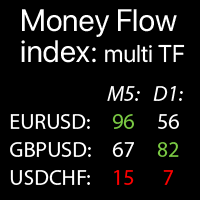
Multi-timeframe Money Flow Index: data on the selected Symbols: compare the current market trends
The indicator displays MTF (Money Flow Index) indicator data from all selected timeframes and Symbols in a single table, which allows you to quickly analyze current market price trends.
Each Symbol can be customized: removed / replaced. You can add up to 40 Symbols.
Panel can be moved to any place of the chart (drag anywhere).
In the settings you can configure:
- MFI indicator settings: Period, Volume type (real / tick).
- Each timeframe may be enabled / disabled.
- Highlight option: if enabled - key levels will be highlighted in the custom colors.
- Extremes (key levels): high and low values;
- Alerts: may be enabled for Extreme levels: high MFI / low MFI / both.
-
Visual styles: size, dark / white theme, highlight colors.
How MFI Works: it's an indicator that combines price and volume data to measure the strength of money flow and identify overbought/oversold conditions. Money Flow Index is similar to the RSI but incorporates trading volume. It is calculated using the following steps:
- Calculate the Typical Price (TP).
- Determine Raw Money Flow (RMF).
- Separate Positive and Negative Money Flow:
Positive Money Flow (PMF) – if the current TP > previous TP;
Negative Money Flow (NMF) – if the current TP < previous TP; - Sum PMF and NMF Over the Period (Usually 14 Candles).
- Calculate the Money Flow Ratio (MFR).
- Compute the Money Flow Index (MFI)
Interpreting MFI in MetaTrader:
- Overbought: MFI > 80 (strong money inflow, potential reversal downward).
- Oversold: MFI < 20 (weak money inflow, potential reversal upward).
- Divergence: If price rises while MFI falls – a possible reversal signal.