

MQL5 Trading Tools (Part 25): Expanding to Multiple Distributions with Interactive Switching
 1 815
1 815
 0
0

Introduction
You have a binomial distribution graphing tool. However, limiting analysis to a single model prevents you from comparing fits across distributions, exploring tail behavior across families, or switching between discrete and continuous models without rebuilding the tool from scratch. This article is for MetaQuotes Language 5 (MQL5) developers and algorithmic traders looking to build a versatile multi-distribution visualization tool with interactive switching for broader probabilistic analysis.
In our previous article (Part 24), we enhanced the three-dimensional binomial distribution viewer by adding a segmented curve, pan mode, and an interactive view cube with animated camera transitions. In Part 25, we expand the graphing tool to support multiple statistical distributions including Poisson, normal, Weibull, gamma, and others. We add interactive cycling via a header switch icon, type-specific data loading and histogram computation, and dynamic titles, axis labels, and parameter panels that adapt to discrete and continuous models. We will cover the following topics:
By the end, you’ll have a versatile MQL5 tool supporting multiple distributions with interactive switching, ready for customization—let’s dive in!
Understanding the Multi-Distribution Switching Framework
Each statistical distribution describes a different pattern of uncertainty: discrete distributions like Poisson and the negative binomial describe count-based outcomes such as the number of trades hitting a target in a session, while continuous distributions like normal, Weibull, and gamma describe real-valued phenomena like returns, drawdown durations, or volatility levels. Interactive switching lets a trader overlay theoretical density functions on the same sampled data and quickly see which model best fits the observed histogram, without reloading the tool or changing hardcoded parameters. The framework uses a distribution type enumeration and a single dispatch point to route data loading, histogram computation, density calculation, and panel labeling. To add a new distribution, only a new loading function and a new enum entry are required.
In live trading, use the normal distribution to model daily return distributions and flag bars that fall beyond two standard deviations as potential mean-reversion entries. Switch to exponential to analyze time between significant price moves and calibrate stop distances. Use gamma or Weibull to model drawdown duration and assess recovery probability before sizing positions.
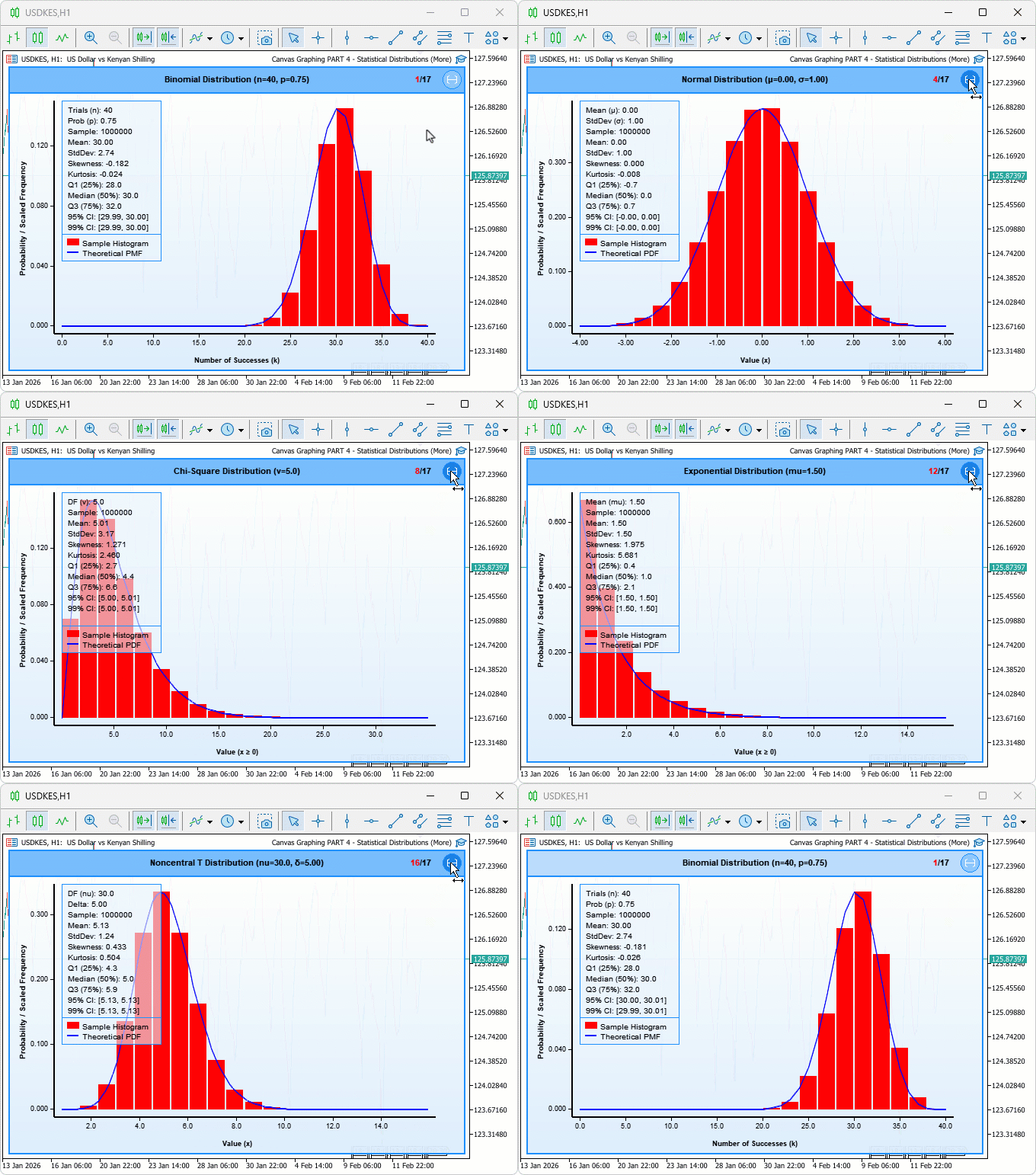
We will define an enumeration for all supported types, add dedicated input groups for each distribution's parameters, implement type-specific data loading functions that handle sample generation, histogram computation variants, and density calculations, and integrate a header switch icon with hover feedback and click handling to cycle through types. In brief, here is a visualization of the framework we will be building.
Implementation in MQL5
We begin the implementation by including all required statistical libraries, defining the distribution type enumeration, adding dedicated input groups for each distribution's parameters, and declaring the global variables that manage switching state.
Including Libraries, Defining the Distribution Enumeration, and Setting Up Inputs
To make the tool distribution-agnostic from the start, we include a library for each supported model, define a single enumeration that lists all seventeen distribution types, add a separate input group per distribution so parameters are always visible in the settings dialog, and declare the global switching state variables and icon constants that the rest of the implementation will rely on.
//+------------------------------------------------------------------+
//|  Canvas Graphing PART 4 - Statistical Distributions (More).mq5   |
//|                           Copyright 2026, Allan Munene Mutiiria. |
//|                                   https://t.me/Forex_Algo_Trader |
//+------------------------------------------------------------------+
#property copyright "Copyright 2026, Allan Munene Mutiiria."
#property link      "https://t.me/Forex_Algo_Trader"
#property version   "1.00"
#property strict

//+------------------------------------------------------------------+
//| Includes                                                         |
//+------------------------------------------------------------------+
#include <Canvas\Canvas.mqh>              // Include canvas drawing library
#include <Math\Stat\Binomial.mqh>         // Include binomial distribution library
#include <Math\Stat\Hypergeometric.mqh>   // Include hypergeometric distribution library
#include <Math\Stat\Poisson.mqh>          // Include Poisson distribution library
#include <Math\Stat\Normal.mqh>           // Include normal distribution library
#include <Math\Stat\Weibull.mqh>          // Include Weibull distribution library
#include <Math\Stat\NoncentralChiSquare.mqh> // Include noncentral Chi-Square library
#include <Math\Stat\Gamma.mqh>            // Include gamma distribution library
#include <Math\Stat\ChiSquare.mqh>        // Include Chi-Square distribution library
#include <Math\Stat\Cauchy.mqh>           // Include Cauchy distribution library
#include <Math\Stat\Math.mqh>             // Include statistical math utilities
#include <Math\Stat\F.mqh>                // Include F distribution library
#include <Math\Stat\NegativeBinomial.mqh> // Include negative binomial library
#include <Math\Stat\Exponential.mqh>      // Include exponential distribution library
#include <Math\Stat\Beta.mqh>             // Include beta distribution library
#include <Math\Stat\NoncentralBeta.mqh>   // Include noncentral beta library
#include <Math\Stat\T.mqh>                // Include T distribution library
#include <Math\Stat\NoncentralT.mqh>      // Include noncentral T library
#include <Math\Stat\Uniform.mqh>          // Include uniform distribution library

enum DistributionType
  {
   BINOMIAL_DISTRIBUTION,             // Binomial distribution type
   HYPERGEOMETRIC_DISTRIBUTION,       // Hypergeometric distribution type
   POISSON_DISTRIBUTION,              // Poisson distribution type
   NORMAL_DISTRIBUTION,               // Normal distribution type
   WEIBULL_DISTRIBUTION,              // Weibull distribution type
   NONCENTRAL_CHISQUARE_DISTRIBUTION, // Noncentral Chi-Square distribution type
   GAMMA_DISTRIBUTION,                // Gamma distribution type
   CHISQUARE_DISTRIBUTION,            // Chi-Square distribution type
   CAUCHY_DISTRIBUTION,               // Cauchy distribution type
   F_DISTRIBUTION,                    // F distribution type
   NEGATIVEBINOMIAL_DISTRIBUTION,     // Negative Binomial distribution type
   EXPONENTIAL_DISTRIBUTION,          // Exponential distribution type
   BETA_DISTRIBUTION,                 // Beta distribution type
   NONCENTRALBETA_DISTRIBUTION,       // Noncentral Beta distribution type
   T_DISTRIBUTION,                    // T distribution type
   NONCENTRALT_DISTRIBUTION,          // Noncentral T distribution type
   UNIFORM_DISTRIBUTION               // Uniform distribution type
  };

input group "=== HYPERGEOMETRIC DISTRIBUTION SETTINGS ==="
input double           hypergeometricTotalObjects   = 60; // Total Objects (m)
input double           hypergeometricSuccessObjects = 30; // Objects with Characteristic (k)
input double           hypergeometricDraws          = 30; // Number of Draws (n)

input group "=== POISSON DISTRIBUTION SETTINGS ==="
input double           poissonLambda = 10; // Lambda (mean)

input group "=== NORMAL DISTRIBUTION SETTINGS ==="
input double           normalMean              = 0; // Mean (μ)
input double           normalStandardDeviation = 1; // Standard Deviation (σ)

input group "=== WEIBULL DISTRIBUTION SETTINGS ==="
input double           weibullShape = 1; // Shape Parameter (a)
input double           weibullScale = 5; // Scale Parameter (b)

input group "=== NONCENTRAL CHI-SQUARE SETTINGS ==="
input double           noncentralChiSquareDegreesOfFreedom = 8; // Degrees of Freedom (ν)
input double           noncentralChiSquareNoncentrality    = 1; // Noncentrality Parameter (σ)

input group "=== GAMMA DISTRIBUTION SETTINGS ==="
input double           gammaShape = 9;   // Shape Parameter (α)
input double           gammaRate  = 0.5; // Rate Parameter (β)

input group "=== CHI-SQUARE DISTRIBUTION SETTINGS ==="
input double           chiSquareDegreesOfFreedom = 5; // Degrees of Freedom (ν)

input group "=== CAUCHY DISTRIBUTION SETTINGS ==="
input double           cauchyLocation = -2; // Location Parameter (a)
input double           cauchyScale    =  1; // Scale Parameter (b)

input group "=== F DISTRIBUTION SETTINGS ==="
input double           fDegreesOfFreedom1 = 100; // First Degrees of Freedom (nu1)
input double           fDegreesOfFreedom2 = 100; // Second Degrees of Freedom (nu2)

input group "=== NEGATIVE BINOMIAL DISTRIBUTION SETTINGS ==="
input double           negativeBinomialSuccesses    = 40;   // Number of Successes (r)
input double           negativeBinomialProbability  = 0.75; // Success Probability (p)

input group "=== EXPONENTIAL DISTRIBUTION SETTINGS ==="
input double           exponentialMean = 1.5; // Mean (mu)

input group "=== BETA DISTRIBUTION SETTINGS ==="
input double           betaShape1 = 2; // Shape1 (alpha)
input double           betaShape2 = 5; // Shape2 (beta)

input group "=== NONCENTRAL BETA DISTRIBUTION SETTINGS ==="
input double           noncentralBetaShape1        = 2; // Shape1 (a)
input double           noncentralBetaShape2        = 5; // Shape2 (b)
input double           noncentralBetaNoncentrality = 1; // Noncentrality (lambda)

input group "=== T DISTRIBUTION SETTINGS ==="
input double           tDegreesOfFreedom = 10; // Degrees of Freedom (nu)

input group "=== NONCENTRAL T DISTRIBUTION SETTINGS ==="
input double           noncentralTDegreesOfFreedom = 30; // Degrees of Freedom (nu)
input double           noncentralTNoncentrality    =  5; // Noncentrality (delta)

input group "=== UNIFORM DISTRIBUTION SETTINGS ==="
input double           uniformLowerBound =  0; // Lower Bound (a)
input double           uniformUpperBound = 10; // Upper Bound (b)

input DistributionType initialDistributionType = BINOMIAL_DISTRIBUTION; // Initial Distribution

bool isHoveringSwitchIcon = false;                                      // Flag for mouse hovering over switch icon

const int SWITCH_ICON_SIZE  = 24;                                       // Pixel size of the switch icon
const int SWITCH_ICON_MARGIN = 6;                                       // Margin around switch icon in pixels
const int TOTAL_DISTRIBUTIONS = (int)UNIFORM_DISTRIBUTION + 1;          // Total number of supported distributions

DistributionType currentDistributionType = BINOMIAL_DISTRIBUTION;       // Active distribution type being displayed
We start the implementation by including a wide range of statistical libraries with directives like "#include <Math\Stat\Binomial.mqh>" for binomial functions, up to "#include <Math\Stat\Uniform.mqh>" for uniform, providing access to generation and density calculations for various distributions. Next, we define the "DistributionType" enumeration listing types from "BINOMIAL_DISTRIBUTION" to "UNIFORM_DISTRIBUTION", enabling type-safe switching between models. We then add input groups for parameters specific to each distribution, such as "hypergeometricTotalObjects" for hypergeometric or "poissonLambda" for Poisson, allowing us to customize via the program's settings dialog.
The "initialDistributionType" input sets the starting type, defaulting to "BINOMIAL_DISTRIBUTION". For globals, we declare the CCanvas instance "mainCanvas" for rendering, string "canvasObjectName" as "DistributionCanvas_Main", position and dimension variables initialized from inputs, interaction flags like "isDraggingCanvas" to false, mouse trackers to 0, constants for minimum sizes and header height, data arrays like "sampleData", minimum/maximum values to 0.0, load flag to false, and statistics like "sampleMean" to 0.0. We also set "isHoveringSwitchIcon" to false for the type switch hover, define icon constants, compute "TOTAL_DISTRIBUTIONS" as enum size plus one, and initialize "currentDistributionType" to "BINOMIAL_DISTRIBUTION" for startup. With the inputs and globals declared, we now define the type-specific data loading functions, starting with the discrete distributions.
Loading Data for Discrete and Continuous Distributions
Each loading function follows the same structure: seed the random generator, generate samples, compute a histogram, build the theoretical density array, scale frequencies to the theoretical peak, compute statistics, and set the success flag. The implementation differs by distribution — discrete models use integer-aligned histograms with forced ranges, while continuous models use step-based theoretical arrays over a real-valued range.
//+------------------------------------------------------------------+
//| Load binomial distribution data                                  |
//+------------------------------------------------------------------+
bool loadBinomialData()
  {
   //--- Seed and generate binomial random samples
   MathSrand(GetTickCount());
   ArrayResize(sampleData, sampleSize);
   MathRandomBinomial(numTrials, successProbability, sampleSize, sampleData);

   //--- Build discrete histogram over the full trial range [0, n]
   if (!computeHistogramDiscrete(sampleData, histogramIntervals, histogramFrequencies,
                                 maxDataValue, minDataValue, histogramCells, 0, numTrials))
     {
      Print("ERROR: Failed to calculate binomial histogram");
      return false;
     }

   //--- Generate theoretical PMF values at each integer in [0, n]
   ArrayResize(theoreticalXValues, numTrials + 1);
   ArrayResize(theoreticalYValues, numTrials + 1);
   MathSequence(0, numTrials, 1, theoreticalXValues);
   MathProbabilityDensityBinomial(theoreticalXValues, numTrials, successProbability, false, theoreticalYValues);

   //--- Find peaks to compute the scale factor that aligns histogram and curve
   maxFrequency        = histogramFrequencies[ArrayMaximum(histogramFrequencies)];
   maxTheoreticalValue = theoreticalYValues[ArrayMaximum(theoreticalYValues)];

   //--- Rescale histogram frequencies so they match the theoretical curve's peak
   double scaleFactor = maxFrequency / maxTheoreticalValue;
   for (int i = 0; i < histogramCells; i++)
      histogramFrequencies[i] /= scaleFactor;

   computeAdvancedStatistics();
   dataLoadedSuccessfully = true;
   Print("SUCCESS: Loaded binomial distribution data");
   return true;
  }

//+------------------------------------------------------------------+
//| Load hypergeometric distribution data                            |
//+------------------------------------------------------------------+
bool loadHypergeometricData()
  {
   //--- Seed and generate hypergeometric random samples
   MathSrand(GetTickCount());
   ArrayResize(sampleData, sampleSize);
   MathRandomHypergeometric(hypergeometricTotalObjects, hypergeometricSuccessObjects,
                            hypergeometricDraws, sampleSize, sampleData);

   //--- Build discrete histogram over the range [0, n draws]
   if (!computeHistogramDiscrete(sampleData, histogramIntervals, histogramFrequencies,
                                 maxDataValue, minDataValue, histogramCells,
                                 0, (int)hypergeometricDraws))
     {
      Print("ERROR: Failed to calculate hypergeometric histogram");
      return false;
     }

   //--- Generate theoretical PMF values at each integer in [0, maxK]
   int maxK = (int)hypergeometricDraws;
   ArrayResize(theoreticalXValues, maxK + 1);
   ArrayResize(theoreticalYValues, maxK + 1);
   MathSequence(0, maxK, 1, theoreticalXValues);
   MathProbabilityDensityHypergeometric(theoreticalXValues, hypergeometricTotalObjects,
                                        hypergeometricSuccessObjects, hypergeometricDraws,
                                        false, theoreticalYValues);

   //--- Find peaks and rescale histogram to align with theoretical curve
   maxFrequency        = histogramFrequencies[ArrayMaximum(histogramFrequencies)];
   maxTheoreticalValue = theoreticalYValues[ArrayMaximum(theoreticalYValues)];

   double scaleFactor = maxFrequency / maxTheoreticalValue;
   for (int i = 0; i < histogramCells; i++)
      histogramFrequencies[i] /= scaleFactor;

   computeAdvancedStatistics();
   dataLoadedSuccessfully = true;
   Print("SUCCESS: Loaded hypergeometric distribution data");
   return true;
  }

//+------------------------------------------------------------------+
//| Load Poisson distribution data                                   |
//+------------------------------------------------------------------+
bool loadPoissonData()
  {
   //--- Seed and generate Poisson random samples
   MathSrand(GetTickCount());
   ArrayResize(sampleData, sampleSize);
   MathRandomPoisson(poissonLambda, sampleSize, sampleData);

   //--- Determine the observed range before building the histogram
   double tempMin = sampleData[ArrayMinimum(sampleData)];
   double tempMax = sampleData[ArrayMaximum(sampleData)];

   //--- Build discrete histogram over [0, observed max]
   if (!computeHistogramDiscrete(sampleData, histogramIntervals, histogramFrequencies,
                                 maxDataValue, minDataValue, histogramCells,
                                 0, (int)MathCeil(tempMax)))
     {
      Print("ERROR: Failed to calculate Poisson histogram");
      return false;
     }

   //--- Generate theoretical PMF values over the observed integer range
   int maxRange = (int)MathCeil(tempMax);
   ArrayResize(theoreticalXValues, maxRange + 1);
   ArrayResize(theoreticalYValues, maxRange + 1);
   MathSequence(0, maxRange, 1, theoreticalXValues);
   MathProbabilityDensityPoisson(theoreticalXValues, poissonLambda, false, theoreticalYValues);

   //--- Find peaks and rescale histogram to align with theoretical curve
   maxFrequency        = histogramFrequencies[ArrayMaximum(histogramFrequencies)];
   maxTheoreticalValue = theoreticalYValues[ArrayMaximum(theoreticalYValues)];

   double scaleFactor = maxFrequency / maxTheoreticalValue;
   for (int i = 0; i < histogramCells; i++)
      histogramFrequencies[i] /= scaleFactor;

   computeAdvancedStatistics();
   dataLoadedSuccessfully = true;
   Print("SUCCESS: Loaded Poisson distribution data");
   return true;
  }

//+------------------------------------------------------------------+
//| Load normal distribution data                                    |
//+------------------------------------------------------------------+
bool loadNormalData()
  {
   //--- Seed and generate normal random samples
   MathSrand(GetTickCount());
   ArrayResize(sampleData, sampleSize);
   MathRandomNormal(normalMean, normalStandardDeviation, sampleSize, sampleData);

   //--- Build continuous histogram using the data's natural range
   if (!computeHistogramContinuous(sampleData, histogramIntervals, histogramFrequencies,
                                   maxDataValue, minDataValue, histogramCells))
     {
      Print("ERROR: Failed to calculate Normal histogram");
      return false;
     }

   //--- Generate a dense set of theoretical PDF points across the data range
   double step      = (maxDataValue - minDataValue) / (histogramCells * 5);
   int    numPoints = (int)((maxDataValue - minDataValue) / step) + 1;
   ArrayResize(theoreticalXValues, numPoints);
   ArrayResize(theoreticalYValues, numPoints);
   MathSequence(minDataValue, maxDataValue, step, theoreticalXValues);
   MathProbabilityDensityNormal(theoreticalXValues, normalMean, normalStandardDeviation,
                                false, theoreticalYValues);

   //--- Find peaks and rescale histogram to align with theoretical curve
   maxFrequency        = histogramFrequencies[ArrayMaximum(histogramFrequencies)];
   maxTheoreticalValue = theoreticalYValues[ArrayMaximum(theoreticalYValues)];

   double scaleFactor = maxFrequency / maxTheoreticalValue;
   for (int i = 0; i < histogramCells; i++)
      histogramFrequencies[i] /= scaleFactor;

   computeAdvancedStatistics();
   dataLoadedSuccessfully = true;
   Print("SUCCESS: Loaded Normal distribution data");
   return true;
  }
First, we define the "loadBinomialData" function to generate and prepare binomial distribution data. We seed the random generator with MathSrand using GetTickCount for variability, resize "sampleData" to "sampleSize" via ArrayResize, and generate samples with MathRandomBinomial based on "numTrials" and "successProbability". We compute a discrete histogram using "computeHistogramDiscrete" with forced range from 0 to "numTrials", resize and populate theoretical arrays with "MathSequence" for X and MathProbabilityDensityBinomial for Y densities, find max values via ArrayMaximum, scale frequencies to align with theoretical max, call "computeAdvancedStatistics" for metrics, set "dataLoadedSuccessfully" to true, print success, and return true.
Similarly, for hypergeometric, we implement "loadHypergeometricData": seed random, resize samples, generate with MathRandomHypergeometric using "hypergeometricTotalObjects", "hypergeometricSuccessObjects", and "hypergeometricDraws", compute discrete histogram forced to 0-(int)"hypergeometricDraws", set theoretical X/Y with "MathSequence" and MathProbabilityDensityHypergeometric, scale, compute stats, flag success, and return. For Poisson in "loadPoissonData", we generate samples with MathRandomPoisson based on "poissonLambda", find temp min/max from data with "ArrayMinimum" and "ArrayMaximum", compute discrete histogram forced to 0-ceil tempMax using MathCeil, prepare theoretical up to that range with MathProbabilityDensityPoisson, and follow the scaling, stats, flag, print pattern.
Next, "loadNormalData" handles normal distribution: generate with MathRandomNormal using "normalMean" and "normalStandardDeviation", compute continuous histogram via "computeHistogramContinuous" without forced range, set theoretical with finer step (histogram range/(cells*5)) using MathProbabilityDensityNormal, and complete with scaling, stats, and success. These functions follow a consistent pattern for each distribution, adapting histogram type (discrete for count-based, like binomial, continuous for real-valued, like normal) and theoretical computations to the model, ensuring uniform data preparation for rendering while handling specific parameter inputs. The remaining continuous distributions follow the same pattern, with the exception of Cauchy which requires a forced range due to its heavy tails.
//+------------------------------------------------------------------+
//| Load Weibull distribution data                                   |
//+------------------------------------------------------------------+
bool loadWeibullData()
  {
   //--- Seed and generate Weibull random samples
   MathSrand(GetTickCount());
   ArrayResize(sampleData, sampleSize);
   MathRandomWeibull(weibullShape, weibullScale, sampleSize, sampleData);

   //--- Build continuous histogram using the data's natural range
   if (!computeHistogramContinuous(sampleData, histogramIntervals, histogramFrequencies,
                                   maxDataValue, minDataValue, histogramCells))
     {
      Print("ERROR: Failed to calculate Weibull histogram");
      return false;
     }

   //--- Generate a dense set of theoretical PDF points across the data range
   double step      = (maxDataValue - minDataValue) / (histogramCells * 5);
   int    numPoints = (int)((maxDataValue - minDataValue) / step) + 1;
   ArrayResize(theoreticalXValues, numPoints);
   ArrayResize(theoreticalYValues, numPoints);
   MathSequence(minDataValue, maxDataValue, step, theoreticalXValues);
   MathProbabilityDensityWeibull(theoreticalXValues, weibullShape, weibullScale,
                                 false, theoreticalYValues);

   //--- Find peaks and rescale histogram to align with theoretical curve
   maxFrequency        = histogramFrequencies[ArrayMaximum(histogramFrequencies)];
   maxTheoreticalValue = theoreticalYValues[ArrayMaximum(theoreticalYValues)];

   double scaleFactor = maxFrequency / maxTheoreticalValue;
   for (int i = 0; i < histogramCells; i++)
      histogramFrequencies[i] /= scaleFactor;

   computeAdvancedStatistics();
   dataLoadedSuccessfully = true;
   Print("SUCCESS: Loaded Weibull distribution data");
   return true;
  }

//+------------------------------------------------------------------+
//| Load noncentral Chi-Square distribution data                     |
//+------------------------------------------------------------------+
bool loadNoncentralChiSquareData()
  {
   //--- Seed and generate noncentral Chi-Square random samples
   MathSrand(GetTickCount());
   ArrayResize(sampleData, sampleSize);
   MathRandomNoncentralChiSquare(noncentralChiSquareDegreesOfFreedom,
                                 noncentralChiSquareNoncentrality, sampleSize, sampleData);

   //--- Build continuous histogram using the data's natural range
   if (!computeHistogramContinuous(sampleData, histogramIntervals, histogramFrequencies,
                                   maxDataValue, minDataValue, histogramCells))
     {
      Print("ERROR: Failed to calculate Noncentral Chi-Square histogram");
      return false;
     }

   //--- Generate a dense set of theoretical PDF points across the data range
   double step      = (maxDataValue - minDataValue) / (histogramCells * 5);
   int    numPoints = (int)((maxDataValue - minDataValue) / step) + 1;
   ArrayResize(theoreticalXValues, numPoints);
   ArrayResize(theoreticalYValues, numPoints);
   MathSequence(minDataValue, maxDataValue, step, theoreticalXValues);
   MathProbabilityDensityNoncentralChiSquare(theoreticalXValues,
                                             noncentralChiSquareDegreesOfFreedom,
                                             noncentralChiSquareNoncentrality,
                                             false, theoreticalYValues);

   //--- Find peaks and rescale histogram to align with theoretical curve
   maxFrequency        = histogramFrequencies[ArrayMaximum(histogramFrequencies)];
   maxTheoreticalValue = theoreticalYValues[ArrayMaximum(theoreticalYValues)];

   double scaleFactor = maxFrequency / maxTheoreticalValue;
   for (int i = 0; i < histogramCells; i++)
      histogramFrequencies[i] /= scaleFactor;

   computeAdvancedStatistics();
   dataLoadedSuccessfully = true;
   Print("SUCCESS: Loaded Noncentral Chi-Square distribution data");
   return true;
  }

//+------------------------------------------------------------------+
//| Load gamma distribution data                                     |
//+------------------------------------------------------------------+
bool loadGammaData()
  {
   //--- Seed and generate gamma random samples
   MathSrand(GetTickCount());
   ArrayResize(sampleData, sampleSize);
   MathRandomGamma(gammaShape, gammaRate, sampleSize, sampleData);

   //--- Build continuous histogram using the data's natural range
   if (!computeHistogramContinuous(sampleData, histogramIntervals, histogramFrequencies,
                                   maxDataValue, minDataValue, histogramCells))
     {
      Print("ERROR: Failed to calculate Gamma histogram");
      return false;
     }

   //--- Generate a dense set of theoretical PDF points across the data range
   double step      = (maxDataValue - minDataValue) / (histogramCells * 5);
   int    numPoints = (int)((maxDataValue - minDataValue) / step) + 1;
   ArrayResize(theoreticalXValues, numPoints);
   ArrayResize(theoreticalYValues, numPoints);
   MathSequence(minDataValue, maxDataValue, step, theoreticalXValues);
   MathProbabilityDensityGamma(theoreticalXValues, gammaShape, gammaRate,
                               false, theoreticalYValues);

   //--- Find peaks and rescale histogram to align with theoretical curve
   maxFrequency        = histogramFrequencies[ArrayMaximum(histogramFrequencies)];
   maxTheoreticalValue = theoreticalYValues[ArrayMaximum(theoreticalYValues)];

   double scaleFactor = maxFrequency / maxTheoreticalValue;
   for (int i = 0; i < histogramCells; i++)
      histogramFrequencies[i] /= scaleFactor;

   computeAdvancedStatistics();
   dataLoadedSuccessfully = true;
   Print("SUCCESS: Loaded Gamma distribution data");
   return true;
  }

//+------------------------------------------------------------------+
//| Load Chi-Square distribution data                                |
//+------------------------------------------------------------------+
bool loadChiSquareData()
  {
   //--- Seed and generate Chi-Square random samples
   MathSrand(GetTickCount());
   ArrayResize(sampleData, sampleSize);
   MathRandomChiSquare(chiSquareDegreesOfFreedom, sampleSize, sampleData);

   //--- Build continuous histogram using the data's natural range
   if (!computeHistogramContinuous(sampleData, histogramIntervals, histogramFrequencies,
                                   maxDataValue, minDataValue, histogramCells))
     {
      Print("ERROR: Failed to calculate Chi-Square histogram");
      return false;
     }

   //--- Generate a dense set of theoretical PDF points across the data range
   double step      = (maxDataValue - minDataValue) / (histogramCells * 5);
   int    numPoints = (int)((maxDataValue - minDataValue) / step) + 1;
   ArrayResize(theoreticalXValues, numPoints);
   ArrayResize(theoreticalYValues, numPoints);
   MathSequence(minDataValue, maxDataValue, step, theoreticalXValues);
   MathProbabilityDensityChiSquare(theoreticalXValues, chiSquareDegreesOfFreedom,
                                   false, theoreticalYValues);

   //--- Find peaks and rescale histogram to align with theoretical curve
   maxFrequency        = histogramFrequencies[ArrayMaximum(histogramFrequencies)];
   maxTheoreticalValue = theoreticalYValues[ArrayMaximum(theoreticalYValues)];

   double scaleFactor = maxFrequency / maxTheoreticalValue;
   for (int i = 0; i < histogramCells; i++)
      histogramFrequencies[i] /= scaleFactor;

   computeAdvancedStatistics();
   dataLoadedSuccessfully = true;
   Print("SUCCESS: Loaded Chi-Square distribution data");
   return true;
  }

//+------------------------------------------------------------------+
//| Load Cauchy distribution data                                    |
//+------------------------------------------------------------------+
bool loadCauchyData()
  {
   //--- Seed and generate Cauchy random samples
   MathSrand(GetTickCount());
   ArrayResize(sampleData, sampleSize);
   MathRandomCauchy(cauchyLocation, cauchyScale, sampleSize, sampleData);

   //--- Force a finite display range because Cauchy has extremely heavy tails
   minDataValue = -20;
   maxDataValue =  20;

   //--- Build continuous histogram using the forced range to exclude tail outliers
   if (!computeHistogramContinuousForced(sampleData, histogramIntervals, histogramFrequencies,
                                         maxDataValue, minDataValue, histogramCells))
     {
      Print("ERROR: Failed to calculate Cauchy histogram");
      return false;
     }

   //--- Generate a dense set of theoretical PDF points across the forced range
   double step      = (maxDataValue - minDataValue) / (histogramCells * 5);
   int    numPoints = (int)((maxDataValue - minDataValue) / step) + 1;
   ArrayResize(theoreticalXValues, numPoints);
   ArrayResize(theoreticalYValues, numPoints);
   MathSequence(minDataValue, maxDataValue, step, theoreticalXValues);
   MathProbabilityDensityCauchy(theoreticalXValues, cauchyLocation, cauchyScale,
                                false, theoreticalYValues);

   //--- Find peaks and rescale histogram to align with theoretical curve
   maxFrequency        = histogramFrequencies[ArrayMaximum(histogramFrequencies)];
   maxTheoreticalValue = theoreticalYValues[ArrayMaximum(theoreticalYValues)];

   double scaleFactor = maxFrequency / maxTheoreticalValue;
   for (int i = 0; i < histogramCells; i++)
      histogramFrequencies[i] /= scaleFactor;

   computeAdvancedStatistics();
   dataLoadedSuccessfully = true;
   Print("SUCCESS: Loaded Cauchy distribution data");
   return true;
  }

//+------------------------------------------------------------------+
//| Load F distribution data                                         |
//+------------------------------------------------------------------+
bool loadFData()
  {
   //--- Seed and generate F random samples
   MathSrand(GetTickCount());
   ArrayResize(sampleData, sampleSize);
   MathRandomF(fDegreesOfFreedom1, fDegreesOfFreedom2, sampleSize, sampleData);

   //--- Build continuous histogram using the data's natural range
   if (!computeHistogramContinuous(sampleData, histogramIntervals, histogramFrequencies,
                                   maxDataValue, minDataValue, histogramCells))
     {
      Print("ERROR: Failed to calculate F histogram");
      return false;
     }

   //--- Generate a dense set of theoretical PDF points across the data range
   double step      = (maxDataValue - minDataValue) / (histogramCells * 5);
   int    numPoints = (int)((maxDataValue - minDataValue) / step) + 1;
   ArrayResize(theoreticalXValues, numPoints);
   ArrayResize(theoreticalYValues, numPoints);
   MathSequence(minDataValue, maxDataValue, step, theoreticalXValues);
   MathProbabilityDensityF(theoreticalXValues, fDegreesOfFreedom1, fDegreesOfFreedom2,
                           false, theoreticalYValues);

   //--- Find peaks and rescale histogram to align with theoretical curve
   maxFrequency        = histogramFrequencies[ArrayMaximum(histogramFrequencies)];
   maxTheoreticalValue = theoreticalYValues[ArrayMaximum(theoreticalYValues)];

   double scaleFactor = maxFrequency / maxTheoreticalValue;
   for (int i = 0; i < histogramCells; i++)
      histogramFrequencies[i] /= scaleFactor;

   computeAdvancedStatistics();
   dataLoadedSuccessfully = true;
   Print("SUCCESS: Loaded F distribution data");
   return true;
  }

//+------------------------------------------------------------------+
//| Load negative binomial distribution data                         |
//+------------------------------------------------------------------+
bool loadNegativeBinomialData()
  {
   //--- Seed and generate negative binomial random samples
   MathSrand(GetTickCount());
   ArrayResize(sampleData, sampleSize);
   MathRandomNegativeBinomial(negativeBinomialSuccesses, negativeBinomialProbability,
                              sampleSize, sampleData);

   //--- Determine the observed range before building the histogram
   double tempMin = sampleData[ArrayMinimum(sampleData)];
   double tempMax = sampleData[ArrayMaximum(sampleData)];

   //--- Build discrete histogram over [0, observed max]
   if (!computeHistogramDiscrete(sampleData, histogramIntervals, histogramFrequencies,
                                 maxDataValue, minDataValue, histogramCells,
                                 0, (int)MathCeil(tempMax)))
     {
      Print("ERROR: Failed to calculate Negative Binomial histogram");
      return false;
     }

   //--- Generate theoretical PMF values over the observed integer range
   int maxRange = (int)MathCeil(tempMax);
   ArrayResize(theoreticalXValues, maxRange + 1);
   ArrayResize(theoreticalYValues, maxRange + 1);
   MathSequence(0, maxRange, 1, theoreticalXValues);
   MathProbabilityDensityNegativeBinomial(theoreticalXValues, negativeBinomialSuccesses,
                                          negativeBinomialProbability, false, theoreticalYValues);

   //--- Find peaks and rescale histogram to align with theoretical curve
   maxFrequency        = histogramFrequencies[ArrayMaximum(histogramFrequencies)];
   maxTheoreticalValue = theoreticalYValues[ArrayMaximum(theoreticalYValues)];

   double scaleFactor = maxFrequency / maxTheoreticalValue;
   for (int i = 0; i < histogramCells; i++)
      histogramFrequencies[i] /= scaleFactor;

   computeAdvancedStatistics();
   dataLoadedSuccessfully = true;
   Print("SUCCESS: Loaded Negative Binomial distribution data");
   return true;
  }

//+------------------------------------------------------------------+
//| Load exponential distribution data                               |
//+------------------------------------------------------------------+
bool loadExponentialData()
  {
   //--- Seed and generate exponential random samples
   MathSrand(GetTickCount());
   ArrayResize(sampleData, sampleSize);
   MathRandomExponential(exponentialMean, sampleSize, sampleData);

   //--- Build continuous histogram using the data's natural range
   if (!computeHistogramContinuous(sampleData, histogramIntervals, histogramFrequencies,
                                   maxDataValue, minDataValue, histogramCells))
     {
      Print("ERROR: Failed to calculate Exponential histogram");
      return false;
     }

   //--- Generate a dense set of theoretical PDF points across the data range
   double step      = (maxDataValue - minDataValue) / (histogramCells * 5);
   int    numPoints = (int)((maxDataValue - minDataValue) / step) + 1;
   ArrayResize(theoreticalXValues, numPoints);
   ArrayResize(theoreticalYValues, numPoints);
   MathSequence(minDataValue, maxDataValue, step, theoreticalXValues);
   MathProbabilityDensityExponential(theoreticalXValues, exponentialMean,
                                     false, theoreticalYValues);

   //--- Find peaks and rescale histogram to align with theoretical curve
   maxFrequency        = histogramFrequencies[ArrayMaximum(histogramFrequencies)];
   maxTheoreticalValue = theoreticalYValues[ArrayMaximum(theoreticalYValues)];

   double scaleFactor = maxFrequency / maxTheoreticalValue;
   for (int i = 0; i < histogramCells; i++)
      histogramFrequencies[i] /= scaleFactor;

   computeAdvancedStatistics();
   dataLoadedSuccessfully = true;
   Print("SUCCESS: Loaded Exponential distribution data");
   return true;
  }

//+------------------------------------------------------------------+
//| Load beta distribution data                                      |
//+------------------------------------------------------------------+
bool loadBetaData()
  {
   //--- Seed and generate beta random samples
   MathSrand(GetTickCount());
   ArrayResize(sampleData, sampleSize);
   MathRandomBeta(betaShape1, betaShape2, sampleSize, sampleData);

   //--- Build continuous histogram using the data's natural range
   if (!computeHistogramContinuous(sampleData, histogramIntervals, histogramFrequencies,
                                   maxDataValue, minDataValue, histogramCells))
     {
      Print("ERROR: Failed to calculate Beta histogram");
      return false;
     }

   //--- Generate a dense set of theoretical PDF points across the data range
   double step      = (maxDataValue - minDataValue) / (histogramCells * 5);
   int    numPoints = (int)((maxDataValue - minDataValue) / step) + 1;
   ArrayResize(theoreticalXValues, numPoints);
   ArrayResize(theoreticalYValues, numPoints);
   MathSequence(minDataValue, maxDataValue, step, theoreticalXValues);
   MathProbabilityDensityBeta(theoreticalXValues, betaShape1, betaShape2,
                              false, theoreticalYValues);

   //--- Find peaks and rescale histogram to align with theoretical curve
   maxFrequency        = histogramFrequencies[ArrayMaximum(histogramFrequencies)];
   maxTheoreticalValue = theoreticalYValues[ArrayMaximum(theoreticalYValues)];

   double scaleFactor = maxFrequency / maxTheoreticalValue;
   for (int i = 0; i < histogramCells; i++)
      histogramFrequencies[i] /= scaleFactor;

   computeAdvancedStatistics();
   dataLoadedSuccessfully = true;
   Print("SUCCESS: Loaded Beta distribution data");
   return true;
  }

//+------------------------------------------------------------------+
//| Load noncentral beta distribution data                           |
//+------------------------------------------------------------------+
bool loadNoncentralBetaData()
  {
   //--- Seed and generate noncentral beta random samples
   MathSrand(GetTickCount());
   ArrayResize(sampleData, sampleSize);
   MathRandomNoncentralBeta(noncentralBetaShape1, noncentralBetaShape2,
                            noncentralBetaNoncentrality, sampleSize, sampleData);

   //--- Build continuous histogram using the data's natural range
   if (!computeHistogramContinuous(sampleData, histogramIntervals, histogramFrequencies,
                                   maxDataValue, minDataValue, histogramCells))
     {
      Print("ERROR: Failed to calculate Noncentral Beta histogram");
      return false;
     }

   //--- Generate a dense set of theoretical PDF points across the data range
   double step      = (maxDataValue - minDataValue) / (histogramCells * 5);
   int    numPoints = (int)((maxDataValue - minDataValue) / step) + 1;
   ArrayResize(theoreticalXValues, numPoints);
   ArrayResize(theoreticalYValues, numPoints);
   MathSequence(minDataValue, maxDataValue, step, theoreticalXValues);
   MathProbabilityDensityNoncentralBeta(theoreticalXValues, noncentralBetaShape1,
                                        noncentralBetaShape2, noncentralBetaNoncentrality,
                                        false, theoreticalYValues);

   //--- Find peaks and rescale histogram to align with theoretical curve
   maxFrequency        = histogramFrequencies[ArrayMaximum(histogramFrequencies)];
   maxTheoreticalValue = theoreticalYValues[ArrayMaximum(theoreticalYValues)];

   double scaleFactor = maxFrequency / maxTheoreticalValue;
   for (int i = 0; i < histogramCells; i++)
      histogramFrequencies[i] /= scaleFactor;

   computeAdvancedStatistics();
   dataLoadedSuccessfully = true;
   Print("SUCCESS: Loaded Noncentral Beta distribution data");
   return true;
  }

//+------------------------------------------------------------------+
//| Load T distribution data                                         |
//+------------------------------------------------------------------+
bool loadTData()
  {
   //--- Seed and generate Student's T random samples
   MathSrand(GetTickCount());
   ArrayResize(sampleData, sampleSize);
   MathRandomT(tDegreesOfFreedom, sampleSize, sampleData);

   //--- Build continuous histogram using the data's natural range
   if (!computeHistogramContinuous(sampleData, histogramIntervals, histogramFrequencies,
                                   maxDataValue, minDataValue, histogramCells))
     {
      Print("ERROR: Failed to calculate T histogram");
      return false;
     }

   //--- Generate a dense set of theoretical PDF points across the data range
   double step      = (maxDataValue - minDataValue) / (histogramCells * 5);
   int    numPoints = (int)((maxDataValue - minDataValue) / step) + 1;
   ArrayResize(theoreticalXValues, numPoints);
   ArrayResize(theoreticalYValues, numPoints);
   MathSequence(minDataValue, maxDataValue, step, theoreticalXValues);
   MathProbabilityDensityT(theoreticalXValues, tDegreesOfFreedom, false, theoreticalYValues);

   //--- Find peaks and rescale histogram to align with theoretical curve
   maxFrequency        = histogramFrequencies[ArrayMaximum(histogramFrequencies)];
   maxTheoreticalValue = theoreticalYValues[ArrayMaximum(theoreticalYValues)];

   double scaleFactor = maxFrequency / maxTheoreticalValue;
   for (int i = 0; i < histogramCells; i++)
      histogramFrequencies[i] /= scaleFactor;

   computeAdvancedStatistics();
   dataLoadedSuccessfully = true;
   Print("SUCCESS: Loaded T distribution data");
   return true;
  }

//+------------------------------------------------------------------+
//| Load noncentral T distribution data                              |
//+------------------------------------------------------------------+
bool loadNoncentralTData()
  {
   //--- Seed and generate noncentral T random samples
   MathSrand(GetTickCount());
   ArrayResize(sampleData, sampleSize);
   MathRandomNoncentralT(noncentralTDegreesOfFreedom, noncentralTNoncentrality,
                         sampleSize, sampleData);

   //--- Build continuous histogram using the data's natural range
   if (!computeHistogramContinuous(sampleData, histogramIntervals, histogramFrequencies,
                                   maxDataValue, minDataValue, histogramCells))
     {
      Print("ERROR: Failed to calculate Noncentral T histogram");
      return false;
     }

   //--- Generate a dense set of theoretical PDF points across the data range
   double step      = (maxDataValue - minDataValue) / (histogramCells * 5);
   int    numPoints = (int)((maxDataValue - minDataValue) / step) + 1;
   ArrayResize(theoreticalXValues, numPoints);
   ArrayResize(theoreticalYValues, numPoints);
   MathSequence(minDataValue, maxDataValue, step, theoreticalXValues);
   MathProbabilityDensityNoncentralT(theoreticalXValues, noncentralTDegreesOfFreedom,
                                     noncentralTNoncentrality, false, theoreticalYValues);

   //--- Find peaks and rescale histogram to align with theoretical curve
   maxFrequency        = histogramFrequencies[ArrayMaximum(histogramFrequencies)];
   maxTheoreticalValue = theoreticalYValues[ArrayMaximum(theoreticalYValues)];

   double scaleFactor = maxFrequency / maxTheoreticalValue;
   for (int i = 0; i < histogramCells; i++)
      histogramFrequencies[i] /= scaleFactor;

   computeAdvancedStatistics();
   dataLoadedSuccessfully = true;
   Print("SUCCESS: Loaded Noncentral T distribution data");
   return true;
  }

//+------------------------------------------------------------------+
//| Load uniform distribution data                                   |
//+------------------------------------------------------------------+
bool loadUniformData()
  {
   //--- Seed and generate uniform random samples
   MathSrand(GetTickCount());
   ArrayResize(sampleData, sampleSize);
   MathRandomUniform(uniformLowerBound, uniformUpperBound, sampleSize, sampleData);

   //--- Build continuous histogram using the data's natural range
   if (!computeHistogramContinuous(sampleData, histogramIntervals, histogramFrequencies,
                                   maxDataValue, minDataValue, histogramCells))
     {
      Print("ERROR: Failed to calculate Uniform histogram");
      return false;
     }

   //--- Generate a dense set of theoretical PDF points across the data range
   double step      = (maxDataValue - minDataValue) / (histogramCells * 5);
   int    numPoints = (int)((maxDataValue - minDataValue) / step) + 1;
   ArrayResize(theoreticalXValues, numPoints);
   ArrayResize(theoreticalYValues, numPoints);
   MathSequence(minDataValue, maxDataValue, step, theoreticalXValues);
   MathProbabilityDensityUniform(theoreticalXValues, uniformLowerBound, uniformUpperBound,
                                 false, theoreticalYValues);

   //--- Find peaks and rescale histogram to align with theoretical curve
   maxFrequency        = histogramFrequencies[ArrayMaximum(histogramFrequencies)];
   maxTheoreticalValue = theoreticalYValues[ArrayMaximum(theoreticalYValues)];

   double scaleFactor = maxFrequency / maxTheoreticalValue;
   for (int i = 0; i < histogramCells; i++)
      histogramFrequencies[i] /= scaleFactor;

   computeAdvancedStatistics();
   dataLoadedSuccessfully = true;
   Print("SUCCESS: Loaded Uniform distribution data");
   return true;
  }
Here, we define the "loadWeibullData" function for the Weibull distribution: seed random, resize samples, generate with MathRandomWeibull using "weibullShape" and "weibullScale", compute continuous histogram via "computeHistogramContinuous", prepare theoretical with step-based MathSequence and MathProbabilityDensityWeibull, scale frequencies, compute stats, flag success, print, and return true.
For noncentral Chi-Square in "loadNoncentralChiSquareData", we generate with MathRandomNoncentralChiSquare based on "noncentralChiSquareDegreesOfFreedom" and "noncentralChiSquareNoncentrality", use continuous histogram, theoretical with MathProbabilityDensityNoncentralChiSquare, and follow the standard scaling, stats, success pattern. "loadGammaData" handles gamma: generate via MathRandomGamma with "gammaShape" and "gammaRate", continuous histogram, densities from "MathProbabilityDensityGamma", scaling, etc. "loadChiSquareData" for Chi-Square: MathRandomChiSquare with "chiSquareDegreesOfFreedom", continuous histogram, "MathProbabilityDensityChiSquare" for theory.
For Cauchy in "loadCauchyData", generate with MathRandomCauchy using "cauchyLocation" and "cauchyScale", force range -20 to 20 due to heavy tails, use "computeHistogramContinuousForced", densities via "MathProbabilityDensityCauchy". "loadFData" for F: "MathRandomF" with "fDegreesOfFreedom1" and "fDegreesOfFreedom2", continuous histogram, "MathProbabilityDensityF". "loadNegativeBinomialData" for negative binomial: MathRandomNegativeBinomial with "negativeBinomialSuccesses" and "negativeBinomialProbability", discrete histogram to ceil max, MathProbabilityDensityNegativeBinomial. "loadExponentialData" for exponential: MathRandomExponential with "exponentialMean", continuous histogram, "MathProbabilityDensityExponential". "loadBetaData" for beta: MathRandomBeta with "betaShape1" and "betaShape2", continuous, MathProbabilityDensityBeta.
"loadNoncentralBetaData" for noncentral beta: "MathRandomNoncentralBeta" with shapes and noncentrality, continuous, "MathProbabilityDensityNoncentralBeta". "loadTData" for T: "MathRandomT" with "tDegreesOfFreedom", continuous, "MathProbabilityDensityT". "loadNoncentralTData" for noncentral T: "MathRandomNoncentralT" with DF and noncentrality, continuous, "MathProbabilityDensityNoncentralT". "loadUniformData" for uniform: MathRandomUniform with "uniformLowerBound" and "uniformUpperBound", continuous, the MathProbabilityDensityUniform function.
Each adapts to the distribution's nature, using continuous histograms for real-valued data and discrete histograms for counts, with forced ranges where needed, like Cauchy, to handle outliers, ensuring consistent preparation for multi-type support. With all type-specific loaders defined, we now replace the single binomial load call with a central dispatch function that routes to the correct loader based on the active type.
Dispatching Data Loading by Distribution Type
Rather than calling a specific loading function directly, this single entry point uses a switch statement on "currentDistributionType" to delegate to the correct loader, keeping the rest of the rendering and event-handling code independent of which distribution is currently active.
//+------------------------------------------------------------------+
//| Load distribution data based on type                             |
//+------------------------------------------------------------------+
bool loadDistributionData()
  {
   //--- Dispatch to the correct loader based on the active distribution type
   switch(currentDistributionType)
     {
      case BINOMIAL_DISTRIBUTION:              return loadBinomialData();
      case HYPERGEOMETRIC_DISTRIBUTION:        return loadHypergeometricData();
      case POISSON_DISTRIBUTION:               return loadPoissonData();
      case NORMAL_DISTRIBUTION:                return loadNormalData();
      case WEIBULL_DISTRIBUTION:               return loadWeibullData();
      case NONCENTRAL_CHISQUARE_DISTRIBUTION:  return loadNoncentralChiSquareData();
      case GAMMA_DISTRIBUTION:                 return loadGammaData();
      case CHISQUARE_DISTRIBUTION:             return loadChiSquareData();
      case CAUCHY_DISTRIBUTION:                return loadCauchyData();
      case F_DISTRIBUTION:                     return loadFData();
      case NEGATIVEBINOMIAL_DISTRIBUTION:      return loadNegativeBinomialData();
      case EXPONENTIAL_DISTRIBUTION:           return loadExponentialData();
      case BETA_DISTRIBUTION:                  return loadBetaData();
      case NONCENTRALBETA_DISTRIBUTION:        return loadNoncentralBetaData();
      case T_DISTRIBUTION:                     return loadTData();
      case NONCENTRALT_DISTRIBUTION:           return loadNoncentralTData();
      case UNIFORM_DISTRIBUTION:               return loadUniformData();
      default:                                 return false;
     }
  }
To centralize data preparation by selecting the appropriate loading method based on the current distribution type, we define the "loadDistributionData" function. We use a switch statement on "currentDistributionType" to call the corresponding type-specific function, such as "loadBinomialData" for binomial or "loadUniformData" for uniform, allowing modular handling of diverse models. If the type is unrecognized, we return false to indicate failure, ensuring robust error handling while enabling seamless switching without redundant code. With the dispatch function in place, we now define the two continuous histogram utilities that the loading functions rely on.
Computing Continuous Histograms with and without Forced Range
Two variants handle continuous histogram computation: the standard version derives the data range from the sample extremes and bins all points, while the forced variant accepts a caller-specified range and silently discards out-of-range samples, which is necessary for heavy-tailed distributions like Cauchy where extreme outliers would otherwise collapse all bins into a single spike.
//+------------------------------------------------------------------+
//| Compute continuous histogram                                     |
//+------------------------------------------------------------------+
bool computeHistogramContinuous(const double &data[], double &intervals[], double &frequency[],
                                double &maxv, double &minv, const int cells)
  {
   //--- Validate cell count and data size before proceeding
   if (cells <= 1) return false;
   int size = ArraySize(data);
   if (size < 1) return false;

   //--- Derive range directly from the data extremes
   minv = data[ArrayMinimum(data)];
   maxv = data[ArrayMaximum(data)];
   double range = maxv - minv;
   double width = range / cells;
   //--- Abort if the bin width degenerates to zero
   if (width == 0) return false;

   //--- Initialize all bins to zero frequency
   ArrayResize(intervals, cells);
   ArrayResize(frequency, cells);
   for (int i = 0; i < cells; i++)
     {
      intervals[i] = minv + (i + 0.5) * width; // Place interval label at bin center
      frequency[i] = 0;
     }

   //--- Bin each data point, clamping to the valid index range
   for (int i = 0; i < size; i++)
     {
      int ind = (int)((data[i] - minv) / width);
      if (ind >= cells) ind = cells - 1;
      if (ind < 0)      ind = 0;
      frequency[ind]++;
     }
   return true;
  }

//+------------------------------------------------------------------+
//| Compute continuous histogram with forced range                   |
//+------------------------------------------------------------------+
bool computeHistogramContinuousForced(const double &data[], double &intervals[], double &frequency[],
                                      double &maxv, double &minv, const int cells)
  {
   //--- Validate cell count and data size before proceeding
   if (cells <= 1) return false;
   int size = ArraySize(data);
   if (size < 1) return false;

   //--- Use the range already set by the caller (minv and maxv pre-assigned)
   double range = maxv - minv;
   double width = range / cells;
   //--- Abort if the bin width degenerates to zero
   if (width == 0) return false;

   //--- Initialize all bins to zero frequency
   ArrayResize(intervals, cells);
   ArrayResize(frequency, cells);
   for (int i = 0; i < cells; i++)
     {
      intervals[i] = minv + (i + 0.5) * width; // Place interval label at bin center
      frequency[i] = 0;
     }

   //--- Bin each data point, skipping values outside the forced range
   for (int i = 0; i < size; i++)
     {
      if (data[i] < minv || data[i] > maxv) continue;
      int ind = (int)((data[i] - minv) / width);
      if (ind >= cells) ind = cells - 1;
      if (ind < 0)      ind = 0;
      frequency[ind]++;
     }
   return true;
  }
First, we define the "computeHistogramContinuous" function to generate a histogram for continuous data distributions. We check for invalid cell counts or empty data and return false if so, then set min and max from the array extremes using ArrayMinimum and "ArrayMaximum", compute range and bin width, resize intervals and frequencies with ArrayResize, initialize centers as midpoints, and loop through data to bin indices, clamping and incrementing frequencies, returning true on success. Similarly, for cases requiring predefined ranges like heavy-tailed distributions, we implement "computeHistogramContinuousForced", skipping min/max from data and using provided values, skipping out-of-range points in the binning loop, while following the same structure for intervals, frequencies, and returns. With the histogram utilities ready, we now add the switch icon to the header that the user clicks to cycle through distribution types.
Drawing the Distribution Switch Icon
To give the user a visible control for cycling distributions, we render a circular icon in the header's right area displaying left and right arrows with a horizontal connecting line. The icon darkens on hover and brightens at rest, providing clear feedback before a click triggers the type switch.
//+------------------------------------------------------------------+
//| Draw switch icon                                                 |
//+------------------------------------------------------------------+
void drawSwitchIcon()
  {
   //--- Compute the icon's top-left position in canvas-local coordinates
   int iconX = currentWidthPixels - SWITCH_ICON_SIZE - SWITCH_ICON_MARGIN;
   int iconY = (HEADER_BAR_HEIGHT - SWITCH_ICON_SIZE) / 2;

   //--- Choose a lighter background when hovered, darker when not
   color iconBgColor;
   if (isHoveringSwitchIcon)
      iconBgColor = DarkenColor(themeColor, 0.1);
   else
      iconBgColor = LightenColor(themeColor, 0.5);
   uint argbIconBg = ColorToARGB(iconBgColor, 255);

   //--- Fill the circular button background
   mainCanvas.FillCircle(iconX + SWITCH_ICON_SIZE / 2, iconY + SWITCH_ICON_SIZE / 2,
                         SWITCH_ICON_SIZE / 2, argbIconBg);

   //--- Draw the circular border in the theme color
   uint argbBorder = ColorToARGB(themeColor, 255);
   mainCanvas.Circle(iconX + SWITCH_ICON_SIZE / 2, iconY + SWITCH_ICON_SIZE / 2,
                     SWITCH_ICON_SIZE / 2, argbBorder);

   //--- Draw the double-arrow glyph in white
   uint argbArrow = ColorToARGB(clrWhite, 255);
   int  centerX   = iconX + SWITCH_ICON_SIZE / 2;
   int  centerY   = iconY + SWITCH_ICON_SIZE / 2;

   //--- Draw right-pointing arrow shaft and arrowhead pixels
   for (int i = -4; i <= 4; i++)
      mainCanvas.PixelSet(centerX + 6, centerY + i, argbArrow);
   mainCanvas.PixelSet(centerX + 5, centerY - 4, argbArrow);
   mainCanvas.PixelSet(centerX + 4, centerY - 5, argbArrow);
   mainCanvas.PixelSet(centerX + 5, centerY + 4, argbArrow);
   mainCanvas.PixelSet(centerX + 4, centerY + 5, argbArrow);

   //--- Draw left-pointing arrow shaft and arrowhead pixels
   for (int i = -4; i <= 4; i++)
      mainCanvas.PixelSet(centerX - 6, centerY + i, argbArrow);
   mainCanvas.PixelSet(centerX - 5, centerY - 4, argbArrow);
   mainCanvas.PixelSet(centerX - 4, centerY - 5, argbArrow);
   mainCanvas.PixelSet(centerX - 5, centerY + 4, argbArrow);
   mainCanvas.PixelSet(centerX - 4, centerY + 5, argbArrow);

   //--- Draw the horizontal connecting bar between both arrow shafts
   for (int i = -6; i <= 6; i++)
      mainCanvas.PixelSet(centerX + i, centerY, argbArrow);
  }
Here, we define the "drawSwitchIcon" function to create an interactive switch icon in the header bar for cycling through distributions, positioned to the right using "currentWidthPixels", "SWITCH_ICON_SIZE", and "SWITCH_ICON_MARGIN". We determine the background color conditionally: darken "themeColor" with "DarkenColor" if "isHoveringSwitchIcon" for feedback, or lighten it otherwise via "LightenColor", then convert to ARGB with ColorToARGB. To draw the icon, we fill a circle at the center with FillCircle using the background ARGB, add a border circle via Circle in theme ARGB, and use white ARGB pixels set with PixelSet to form left/right arrows and a middle line, creating a bidirectional switch symbol. With the icon drawn, we now update the header to show a dynamic title reflecting the active distribution and a position counter indicating where we are in the full list.
Generating the Dynamic Title, Counter, and Updated Header
The title function returns a formatted string for each distribution type including its key parameters, the counter displays the current index out of the total in the header right of the title with the active number highlighted in red, and the header drawing function calls both to assemble the complete header bar for whichever distribution is currently displayed.
//+------------------------------------------------------------------+
//| Get distribution title                                           |
//+------------------------------------------------------------------+
string getDistributionTitle()
  {
   //--- Return a parameter-annotated title string for the active distribution
   switch(currentDistributionType)
     {
      case BINOMIAL_DISTRIBUTION:
         return StringFormat("Binomial Distribution (n=%d, p=%.2f)",
                             numTrials, successProbability);
      case HYPERGEOMETRIC_DISTRIBUTION:
         return StringFormat("Hypergeometric Distribution (m=%.0f, k=%.0f, n=%.0f)",
                             hypergeometricTotalObjects, hypergeometricSuccessObjects, hypergeometricDraws);
      case POISSON_DISTRIBUTION:
         return StringFormat("Poisson Distribution (λ=%.2f)", poissonLambda);
      case NORMAL_DISTRIBUTION:
         return StringFormat("Normal Distribution (μ=%.2f, σ=%.2f)",
                             normalMean, normalStandardDeviation);
      case WEIBULL_DISTRIBUTION:
         return StringFormat("Weibull Distribution (a=%.2f, b=%.2f)",
                             weibullShape, weibullScale);
      case NONCENTRAL_CHISQUARE_DISTRIBUTION:
         return StringFormat("Noncentral χ² (ν=%.1f, σ=%.1f)",
                             noncentralChiSquareDegreesOfFreedom, noncentralChiSquareNoncentrality);
      case GAMMA_DISTRIBUTION:
         return StringFormat("Gamma Distribution (α=%.2f, β=%.2f)",
                             gammaShape, gammaRate);
      case CHISQUARE_DISTRIBUTION:
         return StringFormat("Chi-Square Distribution (ν=%.1f)", chiSquareDegreesOfFreedom);
      case CAUCHY_DISTRIBUTION:
         return StringFormat("Cauchy Distribution (a=%.2f, b=%.2f)",
                             cauchyLocation, cauchyScale);
      case F_DISTRIBUTION:
         return StringFormat("F Distribution (nu1=%.1f, nu2=%.1f)",
                             fDegreesOfFreedom1, fDegreesOfFreedom2);
      case NEGATIVEBINOMIAL_DISTRIBUTION:
         return StringFormat("Negative Binomial Distribution (r=%.1f, p=%.2f)",
                             negativeBinomialSuccesses, negativeBinomialProbability);
      case EXPONENTIAL_DISTRIBUTION:
         return StringFormat("Exponential Distribution (mu=%.2f)", exponentialMean);
      case BETA_DISTRIBUTION:
         return StringFormat("Beta Distribution (alpha=%.2f, beta=%.2f)",
                             betaShape1, betaShape2);
      case NONCENTRALBETA_DISTRIBUTION:
         return StringFormat("Noncentral Beta Distribution (a=%.2f, b=%.2f, λ=%.2f)",
                             noncentralBetaShape1, noncentralBetaShape2, noncentralBetaNoncentrality);
      case T_DISTRIBUTION:
         return StringFormat("T Distribution (nu=%.1f)", tDegreesOfFreedom);
      case NONCENTRALT_DISTRIBUTION:
         return StringFormat("Noncentral T Distribution (nu=%.1f, δ=%.2f)",
                             noncentralTDegreesOfFreedom, noncentralTNoncentrality);
      case UNIFORM_DISTRIBUTION:
         return StringFormat("Uniform Distribution (a=%.2f, b=%.2f)",
                             uniformLowerBound, uniformUpperBound);
      default:
         return "Unknown Distribution";
     }
  }

//+------------------------------------------------------------------+
//| Draw header bar                                                  |
//+------------------------------------------------------------------+
void drawHeaderBar()
  {
   //--- Choose a color that reflects the current interaction state
   color headerColor;
   if (isDraggingCanvas)
      headerColor = DarkenColor(themeColor, 0.1);
   else if (isHoveringHeader)
      headerColor = LightenColor(themeColor, 0.4);
   else
      headerColor = LightenColor(themeColor, 0.7);
   uint argbHeader = ColorToARGB(headerColor, 255);

   //--- Fill the header rectangle with the state-dependent color
   mainCanvas.FillRectangle(0, 0, currentWidthPixels - 1, HEADER_BAR_HEIGHT, argbHeader);

   //--- Overlay the border lines on top of the header fill if enabled
   if (showBorderFrame)
     {
      uint argbBorder = ColorToARGB(themeColor, 255);
      mainCanvas.Rectangle(0, 0, currentWidthPixels - 1, HEADER_BAR_HEIGHT, argbBorder);
      mainCanvas.Rectangle(1, 1, currentWidthPixels - 2, HEADER_BAR_HEIGHT - 1, argbBorder);
     }

   //--- Draw the distribution title centered in the header bar
   mainCanvas.FontSet("Arial Bold", titleFontSize);
   uint   argbText   = ColorToARGB(titleTextColor, 255);
   string titleText  = getDistributionTitle();
   mainCanvas.TextOut(currentWidthPixels / 2, (HEADER_BAR_HEIGHT - titleFontSize) / 2,
                      titleText, argbText, TA_CENTER);

   //--- Draw the distribution counter (e.g. "3/17") to the left of the switch icon
   string countStr      = StringFormat("%d/%d", (int)currentDistributionType + 1, TOTAL_DISTRIBUTIONS);
   string currentNumStr = IntegerToString((int)currentDistributionType + 1); // Active index in red
   string remainingStr  = "/" + IntegerToString(TOTAL_DISTRIBUTIONS);        // Total count in normal color
   int    countX        = currentWidthPixels - SWITCH_ICON_SIZE - SWITCH_ICON_MARGIN - 15;
   int    countY        = (HEADER_BAR_HEIGHT - titleFontSize) / 2;
   int    fullWidth     = mainCanvas.TextWidth(countStr);
   int    leftPos       = countX - fullWidth;

   //--- Render the active index in red and the remainder in the default text color
   uint redArgb = ColorToARGB(clrRed, 255);
   mainCanvas.TextOut(leftPos, countY, currentNumStr, redArgb, TA_LEFT);
   int slashPos = leftPos + mainCanvas.TextWidth(currentNumStr);
   mainCanvas.TextOut(slashPos, countY, remainingStr, argbText, TA_LEFT);
  }
We define the "getDistributionTitle" function to generate a customized title string for the header based on the current distribution type. We use a switch statement on "currentDistributionType" to format and return a string that includes the distribution name and its key parameters, such as "Binomial Distribution" for binomial or "Normal Distribution" for normal, handling all types with appropriate formatting and defaults for unknown. Next, we update the "drawHeaderBar" function to render the dynamic title and the count formatting. We draw the title from "getDistributionTitle" and center it with the TextOut method. To indicate progress, we format a count string like "1/17", draw the current number in red ARGB and the rest in standard text color, positioning it left of the switch icon for visual feedback on the active distribution among totals. Upon compilation, we get the following outcome.

With the header updated, we now define the hover detection, switching logic, name lookup, and dynamic axis labeling functions that complete the interactive cycling system.
Detecting Hover, Cycling Types, and Adapting Axis Labels
These four functions work together: hover detection checks whether the cursor falls within the switch icon bounds, the cycle function increments the type index and calls the appropriate loader on click, the name lookup returns a plain string for each type used in logging, and the axis label function returns a type-appropriate X-axis label so the plot accurately describes whether the horizontal axis represents counts, real values, or non-negative quantities.
//+------------------------------------------------------------------+
//| Check if mouse over switch icon                                  |
//+------------------------------------------------------------------+
bool isMouseOverSwitchIcon(int mouseX, int mouseY)
  {
   //--- Compute the icon's top-left corner in screen coordinates
   int iconX = currentPositionX + currentWidthPixels - SWITCH_ICON_SIZE - SWITCH_ICON_MARGIN;
   int iconY = currentPositionY + (HEADER_BAR_HEIGHT - SWITCH_ICON_SIZE) / 2;

   //--- Return true if the mouse falls inside the icon bounding box
   return (mouseX >= iconX && mouseX <= iconX + SWITCH_ICON_SIZE &&
           mouseY >= iconY && mouseY <= iconY + SWITCH_ICON_SIZE);
  }

//+------------------------------------------------------------------+
//| Switch to next distribution type                                 |
//+------------------------------------------------------------------+
void switchDistributionType()
  {
   //--- Advance to the next type, wrapping back to the first after the last
   int nextDist = (int)currentDistributionType + 1;
   if (nextDist > UNIFORM_DISTRIBUTION)
      nextDist = BINOMIAL_DISTRIBUTION;
   currentDistributionType = (DistributionType)nextDist;

   //--- Log the switch and reload data for the new distribution
   string distName = getDistributionName(currentDistributionType);
   Print("Switched to ", distName);

   if (loadDistributionData())
     {
      renderVisualization();
      ChartRedraw();
     }
  }

//+------------------------------------------------------------------+
//| Get name of distribution type                                    |
//+------------------------------------------------------------------+
string getDistributionName(DistributionType dist)
  {
   //--- Return the human-readable name for each supported distribution type
   switch(dist)
     {
      case BINOMIAL_DISTRIBUTION:             return "Binomial Distribution";
      case HYPERGEOMETRIC_DISTRIBUTION:       return "Hypergeometric Distribution";
      case POISSON_DISTRIBUTION:              return "Poisson Distribution";
      case NORMAL_DISTRIBUTION:               return "Normal Distribution";
      case WEIBULL_DISTRIBUTION:              return "Weibull Distribution";
      case NONCENTRAL_CHISQUARE_DISTRIBUTION: return "Noncentral Chi-Square Distribution";
      case GAMMA_DISTRIBUTION:                return "Gamma Distribution";
      case CHISQUARE_DISTRIBUTION:            return "Chi-Square Distribution";
      case CAUCHY_DISTRIBUTION:               return "Cauchy Distribution";
      case F_DISTRIBUTION:                    return "F Distribution";
      case NEGATIVEBINOMIAL_DISTRIBUTION:     return "Negative Binomial Distribution";
      case EXPONENTIAL_DISTRIBUTION:          return "Exponential Distribution";
      case BETA_DISTRIBUTION:                 return "Beta Distribution";
      case NONCENTRALBETA_DISTRIBUTION:       return "Noncentral Beta Distribution";
      case T_DISTRIBUTION:                    return "T Distribution";
      case NONCENTRALT_DISTRIBUTION:          return "Noncentral T Distribution";
      case UNIFORM_DISTRIBUTION:              return "Uniform Distribution";
      default:                                return "Unknown Distribution";
     }
  }

//+------------------------------------------------------------------+
//| Get X-axis label based on type                                   |
//+------------------------------------------------------------------+
string getXAxisLabel()
  {
   //--- Return an appropriate X-axis label describing the variable measured
   switch(currentDistributionType)
     {
      case BINOMIAL_DISTRIBUTION:
      case HYPERGEOMETRIC_DISTRIBUTION:
      case POISSON_DISTRIBUTION:
      case NEGATIVEBINOMIAL_DISTRIBUTION:
         return "Number of Successes (k)"; // Discrete count distributions
      case NORMAL_DISTRIBUTION:
      case CAUCHY_DISTRIBUTION:
      case T_DISTRIBUTION:
      case NONCENTRALT_DISTRIBUTION:
         return "Value (x)"; // Symmetric continuous distributions
      case WEIBULL_DISTRIBUTION:
      case GAMMA_DISTRIBUTION:
      case CHISQUARE_DISTRIBUTION:
      case NONCENTRAL_CHISQUARE_DISTRIBUTION:
      case F_DISTRIBUTION:
      case EXPONENTIAL_DISTRIBUTION:
      case BETA_DISTRIBUTION:
      case NONCENTRALBETA_DISTRIBUTION:
         return "Value (x ≥ 0)"; // Non-negative continuous distributions
      case UNIFORM_DISTRIBUTION:
         return "Value (x)";
      default:
         return "Value";
     }
  }
Here, we define the "isMouseOverSwitchIcon" function to detect if the mouse is hovering over the switch icon area in the header. We compute the icon's bounding box using globals like "currentPositionX", "currentWidthPixels", "SWITCH_ICON_SIZE", and "SWITCH_ICON_MARGIN", then return true if the mouse coordinates fall within it, enabling hover feedback for the distribution switch. Next, we implement the "switchDistributionType" function to cycle through distribution types on icon click. We increment "currentDistributionType" by one, reset to "BINOMIAL_DISTRIBUTION" if exceeding "UNIFORM_DISTRIBUTION", get the new name with "getDistributionName", print the switch, and if "loadDistributionData" succeeds, re-render with "renderVisualization" and ChartRedraw for immediate update.
To provide human-readable names, we create "getDistributionName" which switches on the type enum to return strings like "Binomial Distribution" or "Uniform Distribution", used for logging and potentially UI. For adaptive labeling, we define "getXAxisLabel" to return type-specific X-axis labels via switch: "Number of Successes (k)" for count-based distributions, "Value (x)" for symmetric or general, or "Value (x >= 0)" for non-negative, ensuring plot accuracy without hardcoding. This will help us create a dynamic plot. In the "drawDistributionPlot", we will change "yAxisLabel" to a fixed "Probability / Scaled Frequency", and "xAxisLabel" to use the "getXAxisLabel" function as follows.
//--- the previous was: "Number of Successes (k)";

string xAxisLabel = getXAxisLabel();
This change makes the X-axis label dynamic based on the active distribution — for example, "Value (x ≥ 0)" for non-negative continuous types — replacing the previous hardcoded label. The next thing we will do is update the panels that don't have static values. We will update the statistics dynamically by calling the following function in the panel creation.
Rendering Type-Specific Parameters in the Statistics Panel
Rather than showing binomial-only parameters at all times, this function switches on the active distribution type and draws only the relevant parameter lines — for example, lambda alone for Poisson, or shape and scale for Weibull — incrementing the vertical text cursor after each line so the general statistics that follow are always positioned correctly below the parameters.
//+------------------------------------------------------------------+
//| Draw distribution parameters                                     |
//+------------------------------------------------------------------+
void drawDistributionParameters(int panelX, int &textY, int lineSpacing, uint argbText)
  {
   //--- Render the parameter rows specific to each distribution type
   switch(currentDistributionType)
     {
      case BINOMIAL_DISTRIBUTION:
         mainCanvas.TextOut(panelX + 8, textY,
                            StringFormat("Trials (n): %d", numTrials), argbText, TA_LEFT);
         textY += lineSpacing;
         mainCanvas.TextOut(panelX + 8, textY,
                            StringFormat("Prob (p): %.2f", successProbability), argbText, TA_LEFT);
         textY += lineSpacing;
         break;

      case HYPERGEOMETRIC_DISTRIBUTION:
         mainCanvas.TextOut(panelX + 8, textY,
                            StringFormat("Total (m): %.0f", hypergeometricTotalObjects), argbText, TA_LEFT);
         textY += lineSpacing;
         mainCanvas.TextOut(panelX + 8, textY,
                            StringFormat("Success (k): %.0f", hypergeometricSuccessObjects), argbText, TA_LEFT);
         textY += lineSpacing;
         mainCanvas.TextOut(panelX + 8, textY,
                            StringFormat("Draws (n): %.0f", hypergeometricDraws), argbText, TA_LEFT);
         textY += lineSpacing;
         break;

      case POISSON_DISTRIBUTION:
         mainCanvas.TextOut(panelX + 8, textY,
                            StringFormat("Lambda: %.2f", poissonLambda), argbText, TA_LEFT);
         textY += lineSpacing;
         break;

      case NORMAL_DISTRIBUTION:
         mainCanvas.TextOut(panelX + 8, textY,
                            StringFormat("Mean (μ): %.2f", normalMean), argbText, TA_LEFT);
         textY += lineSpacing;
         mainCanvas.TextOut(panelX + 8, textY,
                            StringFormat("StdDev (σ): %.2f", normalStandardDeviation), argbText, TA_LEFT);
         textY += lineSpacing;
         break;

      case WEIBULL_DISTRIBUTION:
         mainCanvas.TextOut(panelX + 8, textY,
                            StringFormat("Shape (a): %.2f", weibullShape), argbText, TA_LEFT);
         textY += lineSpacing;
         mainCanvas.TextOut(panelX + 8, textY,
                            StringFormat("Scale (b): %.2f", weibullScale), argbText, TA_LEFT);
         textY += lineSpacing;
         break;

      case NONCENTRAL_CHISQUARE_DISTRIBUTION:
         mainCanvas.TextOut(panelX + 8, textY,
                            StringFormat("DF (ν): %.1f", noncentralChiSquareDegreesOfFreedom), argbText, TA_LEFT);
         textY += lineSpacing;
         mainCanvas.TextOut(panelX + 8, textY,
                            StringFormat("NC (σ): %.1f", noncentralChiSquareNoncentrality), argbText, TA_LEFT);
         textY += lineSpacing;
         break;

      case GAMMA_DISTRIBUTION:
         mainCanvas.TextOut(panelX + 8, textY,
                            StringFormat("Alpha (α): %.2f", gammaShape), argbText, TA_LEFT);
         textY += lineSpacing;
         mainCanvas.TextOut(panelX + 8, textY,
                            StringFormat("Beta (β): %.2f", gammaRate), argbText, TA_LEFT);
         textY += lineSpacing;
         break;

      case CHISQUARE_DISTRIBUTION:
         mainCanvas.TextOut(panelX + 8, textY,
                            StringFormat("DF (ν): %.1f", chiSquareDegreesOfFreedom), argbText, TA_LEFT);
         textY += lineSpacing;
         break;

      case CAUCHY_DISTRIBUTION:
         mainCanvas.TextOut(panelX + 8, textY,
                            StringFormat("Location (a): %.2f", cauchyLocation), argbText, TA_LEFT);
         textY += lineSpacing;
         mainCanvas.TextOut(panelX + 8, textY,
                            StringFormat("Scale (b): %.2f", cauchyScale), argbText, TA_LEFT);
         textY += lineSpacing;
         break;

      case F_DISTRIBUTION:
         mainCanvas.TextOut(panelX + 8, textY,
                            StringFormat("DF1 (nu1): %.1f", fDegreesOfFreedom1), argbText, TA_LEFT);
         textY += lineSpacing;
         mainCanvas.TextOut(panelX + 8, textY,
                            StringFormat("DF2 (nu2): %.1f", fDegreesOfFreedom2), argbText, TA_LEFT);
         textY += lineSpacing;
         break;

      case NEGATIVEBINOMIAL_DISTRIBUTION:
         mainCanvas.TextOut(panelX + 8, textY,
                            StringFormat("Successes (r): %.1f", negativeBinomialSuccesses), argbText, TA_LEFT);
         textY += lineSpacing;
         mainCanvas.TextOut(panelX + 8, textY,
                            StringFormat("Prob (p): %.2f", negativeBinomialProbability), argbText, TA_LEFT);
         textY += lineSpacing;
         break;

      case EXPONENTIAL_DISTRIBUTION:
         mainCanvas.TextOut(panelX + 8, textY,
                            StringFormat("Mean (mu): %.2f", exponentialMean), argbText, TA_LEFT);
         textY += lineSpacing;
         break;

      case BETA_DISTRIBUTION:
         mainCanvas.TextOut(panelX + 8, textY,
                            StringFormat("Alpha: %.2f", betaShape1), argbText, TA_LEFT);
         textY += lineSpacing;
         mainCanvas.TextOut(panelX + 8, textY,
                            StringFormat("Beta: %.2f", betaShape2), argbText, TA_LEFT);
         textY += lineSpacing;
         break;

      case NONCENTRALBETA_DISTRIBUTION:
         mainCanvas.TextOut(panelX + 8, textY,
                            StringFormat("Shape1 (a): %.2f", noncentralBetaShape1), argbText, TA_LEFT);
         textY += lineSpacing;
         mainCanvas.TextOut(panelX + 8, textY,
                            StringFormat("Shape2 (b): %.2f", noncentralBetaShape2), argbText, TA_LEFT);
         textY += lineSpacing;
         mainCanvas.TextOut(panelX + 8, textY,
                            StringFormat("Lambda: %.2f", noncentralBetaNoncentrality), argbText, TA_LEFT);
         textY += lineSpacing;
         break;

      case T_DISTRIBUTION:
         mainCanvas.TextOut(panelX + 8, textY,
                            StringFormat("DF (nu): %.1f", tDegreesOfFreedom), argbText, TA_LEFT);
         textY += lineSpacing;
         break;

      case NONCENTRALT_DISTRIBUTION:
         mainCanvas.TextOut(panelX + 8, textY,
                            StringFormat("DF (nu): %.1f", noncentralTDegreesOfFreedom), argbText, TA_LEFT);
         textY += lineSpacing;
         mainCanvas.TextOut(panelX + 8, textY,
                            StringFormat("Delta: %.2f", noncentralTNoncentrality), argbText, TA_LEFT);
         textY += lineSpacing;
         break;

      case UNIFORM_DISTRIBUTION:
         mainCanvas.TextOut(panelX + 8, textY,
                            StringFormat("Lower (a): %.2f", uniformLowerBound), argbText, TA_LEFT);
         textY += lineSpacing;
         mainCanvas.TextOut(panelX + 8, textY,
                            StringFormat("Upper (b): %.2f", uniformUpperBound), argbText, TA_LEFT);
         textY += lineSpacing;
         break;
     }
  }
We define the "drawDistributionParameters" function to render type-specific parameters in the statistics panel, adapting the display to the current distribution for relevant info at the top. We use a switch on "currentDistributionType" to handle each case: for binomial, draw "Trials (n)" and "Prob (p)" with TextOut using StringFormat for values, incrementing "textY" by "lineSpacing"; for hypergeometric, add lines for total, success, and draws; for Poisson, just lambda; and similarly for others like normal (mean and std dev), Weibull (shape and scale), noncentral Chi-Square (DF and NC), gamma (alpha and beta), Chi-Square (DF), Cauchy (location and scale), F (DF1 and DF2), negative binomial (successes and prob), exponential (mean), beta (alpha and beta), noncentral beta (shape1, shape2, lambda), T (DF), noncentral T (DF and delta), uniform (lower and upper), skipping unknown types.
This dynamic approach will ensure the panel shows only pertinent parameters, enhancing clarity without clutter, and positions subsequent general stats below by updating the reference "textY". With the parameter panel complete, we now update the chart event handler to track switch icon hover state and route icon clicks to the cycling function.
Updating the Chart Event Handler for Icon Hover and Click
Two targeted additions extend the existing mouse handling: the previous icon hover state is stored before updating it with "isMouseOverSwitchIcon", the result is included in the redraw condition, and a check at the top of the mouse-down block calls "switchDistributionType" if the icon was clicked, before falling through to the existing drag and resize logic.
//+------------------------------------------------------------------+
//| Handle chart events                                              |
//+------------------------------------------------------------------+
void OnChartEvent(const int id, const long &lparam, const double &dparam, const string &sparam)
  {
   if (id == CHARTEVENT_MOUSE_MOVE)
     {
      //--- Store previous icon hover
      bool previousIconHoverState = isHoveringSwitchIcon;
      //--- Update icon hover
      isHoveringSwitchIcon = isMouseOverSwitchIcon(mouseX, mouseY);
      //--- Add to needRedraw check
      bool needRedraw = (... || previousIconHoverState != isHoveringSwitchIcon);

      //--- Handle mouse button press (transition from 0 to 1)
      if (mouseState == 1 && previousMouseButtonState == 0)
        {
         if (isHoveringSwitchIcon)
           {
            //--- Cycle to the next distribution on icon click
            switchDistributionType();
           }
         else if ... // Existing drag/resize logic
  }
In the OnChartEvent event handler, we add storage for the previous switch icon hover state with "previousIconHoverState" set to "isHoveringSwitchIcon", update the current state using "isMouseOverSwitchIcon" with mouse coordinates, and include this in the "needRedraw" check to refresh on hover changes. In the mouse-down block (state 1 from 0), we prioritize checking if "isHoveringSwitchIcon", calling "switchDistributionType" to cycle types if true, before falling to existing drag or resize logic, enabling icon-based switching with redraw. With that, the implementation is complete. What remains is testing the system, covered in the next section.
Backtesting
We conducted the testing, and below is the resulting visualization in a single Graphics Interchange Format (GIF) image.
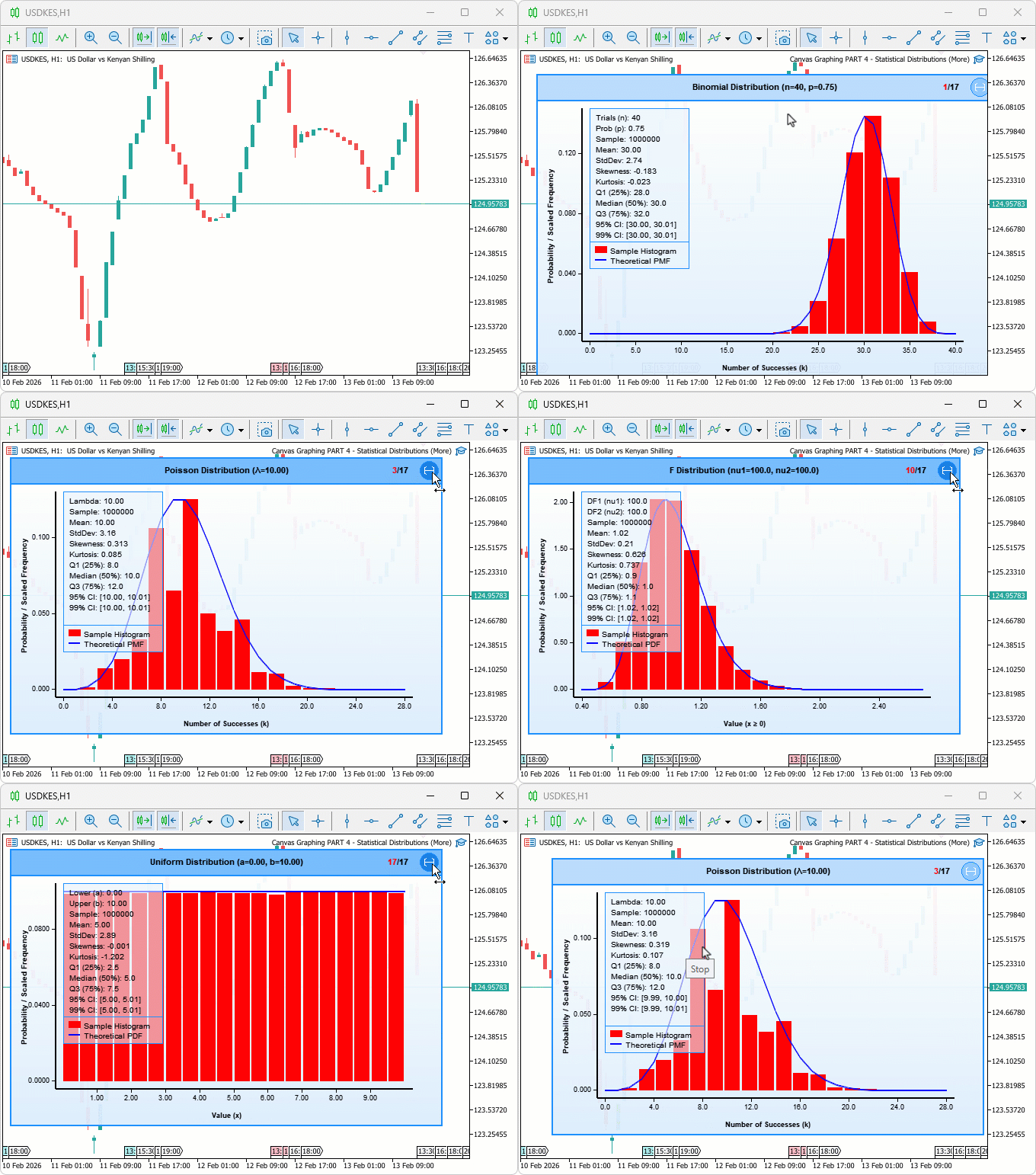
During testing, all seventeen distribution types loaded and rendered correctly on switch, discrete distributions displayed integer-aligned histograms while continuous ones produced smooth density-matched curves, and the Cauchy forced range successfully suppressed outlier distortion that would otherwise collapse the histogram bins.
Conclusion
In conclusion, we have expanded the MQL5 graphing tool to support seventeen statistical distributions with interactive cycling via a header switch icon. The implementation covered type-specific data loading functions for both discrete and continuous models, two histogram computation variants including a forced-range version for heavy-tailed distributions, a central dispatch function for routing, and dynamic header titles, axis labels, and statistics panel parameters that adapt automatically to the active distribution type. After the article, you will be able to:
- Switch between seventeen distribution types on a single chart and visually compare how well each theoretical density curve fits the sampled histogram, identifying the most appropriate model for your data at a glance
- Use the normal distribution overlay to flag returns beyond two standard deviations as mean-reversion candidates, and the exponential distribution to estimate time between significant price moves for stop calibration
- Recognize when a forced histogram range is necessary for heavy-tailed distributions like Cauchy, and apply the same principle when extending the tool with additional distribution types
In the next part, we will explore frequency analysis of a single distribution function for enhanced statistical analysis features. Stay tuned.
Warning: All rights to these materials are reserved by MetaQuotes Ltd. Copying or reprinting of these materials in whole or in part is prohibited.
This article was written by a user of the site and reflects their personal views. MetaQuotes Ltd is not responsible for the accuracy of the information presented, nor for any consequences resulting from the use of the solutions, strategies or recommendations described.

 From Novice to Expert: Detecting Liquidity Zone Flips Using MQL5
 Neural Networks in Trading: Dual Clustering of Multivariate Time Series (Final Part)
 Creating Custom Indicators in MQL5 (Part 9): Order Flow Footprint Chart with Price Level Volume Tracking
 The MQL5 Standard Library Explorer (Part 10): Polynomial Regression Channel

- Free trading apps
- Over 8,000 signals for copying
- Economic news for exploring financial markets
You agree to website policy and terms of use