

MQL5 Trading Tools (Part 28): Filling Sweep Polygons for Butterfly Curve in MQL5
 1 874
1 874
 0
0

Introduction
You have a parametric butterfly curve plotted cleanly on your MetaTrader 5 canvas. Four colored segments trace the mathematical outline with smooth, anti-aliased strokes. However, the wings are empty, and there is no body, no texture—nothing that makes it feel like more than a bare mathematical diagram. This article is for MetaQuotes Language 5 (MQL5) developers and creative coders who want to go beyond the outline and fill the butterfly with layered color, realistic wing detail, and a complete anatomical structure.
In our previous article (Part 27), we built a canvas-based visual tool in MQL5. It rendered the butterfly curve—a parametric mathematical equation—directly on the MetaTrader 5 chart. We implemented a fully layered canvas system with a gradient background, a draggable and resizable floating window, and supersampled anti-aliased curve rendering across four colored segments. The tool featured a calibrated axis grid with tick marks and labels, as well as a floating legend panel that identified each segment. This article enhances that foundation. We introduce layered gradient wing fills, wing vein lines, scale texture dots, and a fully detailed anatomical body with segmented abdomen, thorax, head, compound eyes, and curved antennae—all rendered through the same supersampled pipeline. We will cover the following topics:
- Understanding Butterfly Wing Fills, Texture, and Anatomical Structure
- Implementation in MQL5
- Visualization
- Conclusion
By the end, you will have transformed the plain parametric curve outline into a visually rich and lifelike butterfly illustration rendered directly on the MetaTrader 5 chart. Let's dive in!
Understanding Butterfly Wing Fills, Texture, and Anatomical Structure
A real butterfly wing is not a flat, uniform color. It is a layered structure made of thousands of overlapping scales that reflect light differently. This produces gradients that shift from saturated hues near the body to lighter, more translucent tones at the edges. This natural layering gives butterfly wings depth and iridescence. We replicate the same principle on the canvas by filling the wing from the outside inward with progressively smaller layers. Each layer uses different colors and overlaps the previous one.
To fill a wing shape defined by a parametric curve, we use scanline polygon filling. This is a standard technique for rasterizing closed shapes on a pixel grid. For each horizontal row of pixels within the wing's vertical extent, we find where the wing boundary crosses that row, then paint every pixel between those crossing points. The color of each pixel is determined either by its vertical position within the wing — producing a smooth top-to-bottom gradient — or by its radial distance from the wing center, producing a gradient that expands outward like a real color pattern radiating from the body. We apply three fill layers in total: the outermost wing shape with a vertical gradient, a first inner layer scaled inward and filled with a different color set, and a second innermost layer filled with a radial gradient for a glowing central effect.
Wing veins are then drawn as thin lines radiating from the body center out to sampled points along the wing boundary, mimicking the structural veins that give real wings their rigidity. Wing scales are rendered as small filled dots placed densely along the wing edge, each colored to match its parametric segment and slightly lightened toward the outer edge for a shimmering appearance, with a second inward dot added for depth. The body sits at the center of the whole composition — a thorax ellipse, ten tapered abdomen segments narrowing to a tip, a round head with a highlight, compound eyes with shine dots, and two arcing antennae built from overlapping circles ending in club tips.
We implement each layer as a separate function. We collect all parametric points upfront, convert them to pixel space, and render them through the same supersampled pipeline as in the previous part. This ensures consistent anti-aliased quality for fills, veins, scales, and body details. In brief, here is a visual representation of what we will achieve.

Implementation in MQL5
Extending the Inputs for Wing Fills, Body, and Wing Detail
To support the new visual layers, we extend the input section with five new groups that give full control over every aspect of the butterfly's appearance — from the outermost wing fill down to the body colors and wing detail toggles.
//+------------------------------------------------------------------+
//|                      Canvas Drawing PART 2 - Butterfly Curve.mq5 |
//|                           Copyright 2026, Allan Munene Mutiiria. |
//|                                   https://t.me/Forex_Algo_Trader |
//+------------------------------------------------------------------+
#property copyright "Copyright 2026, Allan Munene Mutiiria."
#property link      "https://t.me/Forex_Algo_Trader"
#property version   "1.00"
#property strict

//---

input group "=== BUTTERFLY FILL SETTINGS ==="
input bool   enableButterflyFill    = true;          // Enable Coloring (Fill)
input double butterflyFillOpacity   = 0.7;           // Butterfly Fill Opacity (0-1)
input color  fillBottomColor        = clrDarkOrange; // Fill Bottom Color
input color  fillMiddleColor        = clrGreen;      // Fill Middle Color
input color  fillTopColor           = clrBlue;       // Fill Top Color

input group "=== INNER BUTTERFLY FILL SETTINGS ==="
input bool   enableInnerButterflyFill    = true;       // Enable Inner Fill
input double innerButterflyScale         = 0.85;       // Inner Scale Factor (0-1)
input double innerButterflyFillOpacity   = 0.8;        // Inner Fill Opacity (0-1)
input color  innerFillBottomColor        = clrYellow;  // Inner Fill Bottom Color
input color  innerFillMiddleColor        = clrDarkRed; // Inner Fill Middle Color
input color  innerFillTopColor           = clrPurple;  // Inner Fill Top Color

input group "=== SECOND INNER BUTTERFLY FILL SETTINGS ==="
input bool   enableSecondInnerButterflyFill    = true;     // Enable Second Inner Fill
input double secondInnerButterflyScale         = 0.6;      // Second Inner Scale Factor (0-1)
input double secondInnerButterflyFillOpacity   = 0.75;     // Second Inner Fill Opacity (0-1)
input color  secondInnerFillBottomColor        = clrBrown; // Second Inner Fill Bottom Color
input color  secondInnerFillMiddleColor        = clrTan;   // Second Inner Fill Middle Color
input color  secondInnerFillTopColor           = clrPlum;  // Second Inner Fill Top Color

input group "=== BUTTERFLY BODY SETTINGS ==="
input color butterflyBodyColor    = C'50,30,20';   // Body Color (Dark Brown)
input color butterflyEyeColor     = clrBlack;      // Eye Color
input color butterflyAntennaColor = C'40,25,15';   // Antenna Color

input group "=== BUTTERFLY WING SETTINGS ==="
input bool   showButterflyWingVeins  = true; // Show Wing Veins
input bool   showButterflyWingScales = true; // Show Wing Scales
input double butterflyWingOpacity    = 0.85; // Wing Opacity (0-1)
The first group controls the outermost wing fill — a toggle to enable or disable it entirely, an opacity value, and three colors defining the bottom, middle, and top of the vertical gradient that sweeps across the full wing shape. The second group mirrors this for the first inner fill layer, adding a scale factor that shrinks the wing outline inward toward the body center before filling it, giving the layered depth effect. The third group does the same for the second inner fill — this time with its own scale factor set even smaller and its own three-color set, which will be applied as a radial gradient rather than a vertical one for the innermost glowing core.
The body settings group defines the three color components of the butterfly's anatomy — the main body color set to a deep dark brown using a custom red, green, blue triplet, the eye color, and the antenna color set to a slightly lighter brown. Finally, the wing detail group provides toggles for enabling or disabling vein lines and scale dots independently, along with a unified opacity value that controls how prominently both detail layers render over the wing fills beneath them. Next, we will expand the helper functions.
Resolving Wing Color by Parametric Segment
Before drawing wing scales, we need a way to determine which color belongs to any given point along the curve based on where it falls in the parametric traversal. The "GetWingColorForT" function serves exactly that purpose.
//+------------------------------------------------------------------+
//| Resolve wing curve color for a given parametric T value          |
//+------------------------------------------------------------------+
color GetWingColorForT(double tParameter)
  {
   //--- Define the T boundary ending segment 1 (blue)
   double segmentEnd1 = 3.0 * M_PI;
   //--- Define the T boundary ending segment 2 (red)
   double segmentEnd2 = 6.0 * M_PI;
   //--- Define the T boundary ending segment 3 (orange)
   double segmentEnd3 = 9.0 * M_PI;

   //--- Return blue for the first parametric segment
   if(tParameter <= segmentEnd1) return blueCurveColor;
   //--- Return red for the second parametric segment
   else if(tParameter <= segmentEnd2) return redCurveColor;
   //--- Return orange for the third parametric segment
   else if(tParameter <= segmentEnd3) return orangeCurveColor;
   //--- Return green for the fourth parametric segment
   else return greenCurveColor;
  }
We define the three segment boundary values at 3π, 6π, and 9π — the same divisions used when drawing the curve outlines — and use a simple conditional chain to return the corresponding curve color for whichever segment the given parameter falls into. Points up to 3π return blue, up to 6π return red, up to 9π return orange, and anything beyond returns green. This ensures that when scale dots are placed along the wing boundary, each one inherits the correct color of the curve segment it belongs to, keeping the scale texture visually consistent with the outline colors beneath it. Next, we will define the helpers for drawing filled circles and ellipse shapes.
//+------------------------------------------------------------------+
//| Draw a solid filled circle at a given canvas position            |
//+------------------------------------------------------------------+
void DrawFilledCircle(CCanvas &canvas, int centerX, int centerY, int radius, uint argbColor)
  {
   //--- Iterate over every row within the bounding box of the circle
   for(int deltaY = -radius; deltaY <= radius; deltaY++)
     {
      //--- Iterate over every column within the bounding box
      for(int deltaX = -radius; deltaX <= radius; deltaX++)
        {
         //--- Test if the current offset falls inside the circle
         if(deltaX * deltaX + deltaY * deltaY <= radius * radius)
           {
            //--- Compute the absolute pixel X coordinate
            int pixelX = centerX + deltaX;
            //--- Compute the absolute pixel Y coordinate
            int pixelY = centerY + deltaY;
            //--- Write the pixel only if it lies within the canvas bounds
            if(pixelX >= 0 && pixelX < canvas.Width() &&
               pixelY >= 0 && pixelY < canvas.Height())
              {
               canvas.PixelSet(pixelX, pixelY, argbColor);
              }
           }
        }
     }
  }

//+------------------------------------------------------------------+
//| Draw a solid filled ellipse at a given canvas position           |
//+------------------------------------------------------------------+
void DrawFilledEllipse(CCanvas &canvas, int centerX, int centerY, int radiusX, int radiusY, uint argbColor)
  {
   //--- Iterate over every row within the vertical extent of the ellipse
   for(int deltaY = -radiusY; deltaY <= radiusY; deltaY++)
     {
      //--- Iterate over every column within the horizontal extent
      for(int deltaX = -radiusX; deltaX <= radiusX; deltaX++)
        {
         //--- Compute the normalized distance squared from ellipse center
         double normalized = (double)(deltaX * deltaX) / (radiusX * radiusX) +
                             (double)(deltaY * deltaY) / (radiusY * radiusY);
         //--- Write the pixel only if it lies inside the ellipse boundary
         if(normalized <= 1.0)
           {
            //--- Compute the absolute pixel X coordinate
            int pixelX = centerX + deltaX;
            //--- Compute the absolute pixel Y coordinate
            int pixelY = centerY + deltaY;
            //--- Validate the pixel is within canvas bounds before writing
            if(pixelX >= 0 && pixelX < canvas.Width() &&
               pixelY >= 0 && pixelY < canvas.Height())
              {
               canvas.PixelSet(pixelX, pixelY, argbColor);
              }
           }
        }
     }
  }
Here, the "DrawFilledCircle" function iterates over every pixel within the square bounding box defined by the radius in both directions, testing each offset position against the standard circle equation — the sum of the squared horizontal and vertical offsets must be less than or equal to the squared radius. Pixels that pass the test are mapped to absolute canvas coordinates by adding the center position, bounds-checked against the canvas dimensions, and written with the PixelSet method. This function is used throughout the body drawing code for the head, eyes, eye shine highlights, antenna shaft dots, and antenna club tips.
"DrawFilledEllipse" follows the same scanline bounding box approach but replaces the circle test with the normalized ellipse equation — dividing each squared offset by its respective squared radius before summing, and accepting any pixel where that sum is 1.0 or less. This allows independent horizontal and vertical radii, producing shapes that can be wider or taller than a circle. It is used to draw the thorax as a vertically stretched oval and each of the ten tapered abdomen segments, where the horizontal radius shrinks progressively toward the abdomen tip to create the natural tapering silhouette. Next, using the scanline algorithm, we will define a function to fill a polygon, which will fill the curve interior.
Filling the Wing Shape With Vertical and Radial Gradients
With the primitive shape drawers in place, we now define the most significant new function in this upgrade — "FillPolygon", which takes the butterfly curve outline as a polygon and floods it with color using a scanline rasterization approach, supporting both vertical and radial gradient modes.
//+------------------------------------------------------------------+
//| Fill a polygon with vertical or radial gradient using scanlines  |
//+------------------------------------------------------------------+
void FillPolygon(CCanvas &canvas, double &verticesX[], double &verticesY[],
                 color bottomColor, color middleColor, color topColor,
                 double fillOpacity, bool isRadial = false,
                 double centerX = 0, double centerY = 0, double maxDistance = 1)
  {
   //--- Get the number of polygon vertices
   int numVertices = ArraySize(verticesX);
   //--- Abort if the polygon has fewer than 3 vertices
   if(numVertices < 3) return;

   //--- Initialize vertical bounds to the first vertex Y
   double minY = verticesY[0], maxY = verticesY[0];
   //--- Scan all vertices to find the true vertical extents
   for(int i = 1; i < numVertices; i++)
     {
      //--- Update minimum Y if this vertex is lower
      if(verticesY[i] < minY) minY = verticesY[i];
      //--- Update maximum Y if this vertex is higher
      if(verticesY[i] > maxY) maxY = verticesY[i];
     }

   //--- Compute the first scanline row to process
   int yStart = (int)MathCeil(minY);
   //--- Compute the last scanline row to process
   int yEnd   = (int)MathFloor(maxY);

   //--- Convert fill opacity to an alpha byte value
   uchar alpha = (uchar)(255 * fillOpacity);

   //--- Declare arrays to hold X intersections and winding deltas per scanline
   double intersectionX[];
   int    edgeDeltas[];
   //--- Allocate intersection and delta arrays to hold up to numVertices entries
   ArrayResize(intersectionX, numVertices);
   ArrayResize(edgeDeltas,    numVertices);

   //--- Process each horizontal scanline between the polygon's vertical bounds
   for(int y = yStart; y <= yEnd; y++)
     {
      //--- Offset the scanline to the pixel center for sub-pixel accuracy
      double scanlineY = (double)y + 0.5;
      //--- Reset the intersection count for this scanline
      int intersectionCount = 0;

      //--- Test every polygon edge for intersection with the current scanline
      for(int i = 0; i < numVertices; i++)
        {
         //--- Compute the index of the next vertex (wrap around)
         int    nextIndex = (i + 1) % numVertices;
         //--- Get the X and Y of the current edge start vertex
         double x0 = verticesX[i],         y0 = verticesY[i];
         //--- Get the X and Y of the current edge end vertex
         double x1 = verticesX[nextIndex],  y1 = verticesY[nextIndex];

         //--- Determine the vertical extent of this edge
         double edgeMinY = MathMin(y0, y1);
         double edgeMaxY = MathMax(y0, y1);

         //--- Skip this edge if the scanline does not cross its vertical range
         if(scanlineY < edgeMinY || scanlineY > edgeMaxY) continue;
         //--- Skip horizontal edges to avoid division by zero
         if(MathAbs(y1 - y0) < 1e-12) continue;

         //--- Compute the linear interpolation factor along the edge
         double interpolationFactor = (scanlineY - y0) / (y1 - y0);
         //--- Skip if the factor falls outside the valid edge range
         if(interpolationFactor < 0.0 || interpolationFactor > 1.0) continue;

         //--- Compute and store the X coordinate of the intersection
         intersectionX[intersectionCount] = x0 + interpolationFactor * (x1 - x0);
         //--- Record the winding delta for this edge direction
         edgeDeltas[intersectionCount]    = (y1 > y0) ? -1 : 1;
         //--- Increment the intersection counter
         intersectionCount++;
        }

      //--- Skip scanlines with no intersections
      if(intersectionCount == 0) continue;

      //--- Sort intersections in ascending X order using bubble sort
      for(int a = 0; a < intersectionCount - 1; a++)
        {
         for(int b = a + 1; b < intersectionCount; b++)
           {
            //--- Swap if left intersection is greater than right
            if(intersectionX[a] > intersectionX[b])
              {
               //--- Swap X intersection values
               double tempX       = intersectionX[a];
               intersectionX[a]   = intersectionX[b];
               intersectionX[b]   = tempX;
               //--- Swap corresponding winding deltas
               int tempDelta    = edgeDeltas[a];
               edgeDeltas[a]    = edgeDeltas[b];
               edgeDeltas[b]    = tempDelta;
              }
           }
        }

      //--- Initialize the nonzero winding number accumulator
      int    winding   = 0;
      //--- Start just before the first intersection
      double previousX = intersectionX[0] - 1;

      //--- Walk through each intersection span and fill inside regions
      for(int k = 0; k < intersectionCount; k++)
        {
         //--- Compute the leftmost pixel column to fill in this span
         int xLeft  = (int)MathCeil(previousX);
         //--- Compute the rightmost pixel column to fill in this span
         int xRight = (int)MathFloor(intersectionX[k]);

         //--- Fill the span only when inside the polygon (nonzero winding)
         if(winding != 0 && xLeft <= xRight)
           {
            //--- Apply vertical gradient: color determined once per row
            if(!isRadial)
              {
               //--- Compute normalized vertical position within the polygon bounds
               double factor   = (scanlineY - minY) / (maxY - minY);
               //--- Declare the color for this scanline row
               color  rowColor;
               //--- Interpolate between bottom and middle colors for the lower half
               if(factor <= 0.5)
                 {
                  rowColor = InterpolateColors(bottomColor, middleColor, factor / 0.5);
                 }
               //--- Interpolate between middle and top colors for the upper half
               else
                 {
                  rowColor = InterpolateColors(middleColor, topColor, (factor - 0.5) / 0.5);
                 }
               //--- Convert the row color to ARGB with the fill alpha
               uint fillColor = ColorToARGB(rowColor, alpha);
               //--- Paint every pixel in the horizontal span with the row color
               for(int x = xLeft; x <= xRight; x++)
                 {
                  canvas.PixelSet(x, y, fillColor);
                 }
              }
            //--- Apply radial gradient: color determined per pixel by distance from center
            else
              {
               //--- Iterate over every pixel in the span individually
               for(int x = xLeft; x <= xRight; x++)
                 {
                  //--- Compute Euclidean distance from this pixel to the radial center
                  double distance = MathSqrt(MathPow(x - centerX, 2) + MathPow(y - centerY, 2));
                  //--- Normalize distance to a 0-1 factor using the max radius
                  double factor   = (maxDistance > 0) ? distance / maxDistance : 0;
                  //--- Declare the color for this pixel
                  color  rowColor;
                  //--- Interpolate between bottom and middle for the inner half
                  if(factor <= 0.5)
                    {
                     rowColor = InterpolateColors(bottomColor, middleColor, factor / 0.5);
                    }
                  //--- Interpolate between middle and top for the outer half
                  else
                    {
                     rowColor = InterpolateColors(middleColor, topColor, (factor - 0.5) / 0.5);
                    }
                  //--- Convert the pixel color to ARGB with the fill alpha
                  uint fillColor = ColorToARGB(rowColor, alpha);
                  //--- Write the gradient pixel
                  canvas.PixelSet(x, y, fillColor);
                 }
              }
           }
         //--- Accumulate the winding number using the edge direction delta
         winding   += edgeDeltas[k];
         //--- Advance the previous X to the current intersection boundary
         previousX  = intersectionX[k];
        }
     }
  }
We open by reading the vertex count from the passed arrays and aborting if fewer than three vertices are present. We then scan all vertex Y coordinates to find the vertical extent of the polygon, computing the first and last scanline rows to process with the MathCeil and MathFloor functions. The fill opacity is converted to an alpha byte value upfront, and intersection arrays are allocated to hold up to one entry per vertex per scanline.
For each horizontal scanline within the vertical bounds, we offset it by 0.5 pixels toward the pixel center for sub-pixel accuracy, then walk every polygon edge, testing whether the scanline crosses it. Horizontal edges are skipped to avoid division by zero. For edges that do cross, we compute the interpolation factor along the edge and derive the exact X coordinate of the intersection, storing it alongside a winding delta that records whether the edge travels upward or downward. Once all intersections for the scanline are collected, we sort them in ascending X order using a bubble sort, swapping both the intersection values and their corresponding winding deltas together to keep them paired.
We then walk the sorted intersections using a nonzero winding rule — accumulating the winding number at each boundary and filling the horizontal span between consecutive intersections only when the winding number is nonzero, meaning we are inside the polygon. This correctly handles the complex self-intersecting shape of the butterfly curve, where the outline crosses itself multiple times and naive even-odd filling would produce incorrect results.
Inside each filled span, the color is determined by the gradient mode. For the vertical gradient, we compute a normalized factor from the scanline's position between the polygon's minimum and maximum Y, then use "InterpolateColors" to blend from the bottom color toward the middle color in the lower half and from the middle toward the top color in the upper half — producing a smooth three-stop gradient across the full wing height, computed once per row and applied uniformly across the span. For the radial gradient, we instead compute the color per pixel individually — calculating the Euclidean distance from each pixel to the provided center using MathSqrt, normalizing it against the maximum distance, and applying the same three-stop interpolation outward from the center — producing a glowing pattern that radiates from the wing origin rather than sweeping top to bottom. In both modes, the final color is converted to "ARGB" with the opacity alpha and written with the PixelSet method.
If you are wondering what the scanline algorithm is, here is a brief explanation. This algorithm processes the image from left to right, scanning one horizontal line at a time rather than operating on individual pixels. It records all edge intersection points along each scan line and fills the polygon by coloring the regions between pairs of intersections.
You can think of it like drawing a straight line across a shape on paper with a single pen: starting from the left boundary and moving to the right, you draw continuously, but whenever you encounter an intersection with the polygon boundary, you stop or resume drawing accordingly. The algorithm follows this same principle. In the figure below, this behavior is illustrated: the red dots represent the polygon’s vertices, while the blue dots indicate the intersection points along the scan line.

With that done, we can define the helpers for drawing the veins and scales.
Drawing Wing Veins and Scale Texture
With the polygon fill laying down the color layers, we now add the fine surface detail that gives the wings their organic, naturalistic appearance — radiating vein lines and densely packed scale dots, each handled by its own dedicated function.
//+------------------------------------------------------------------+
//| Draw anti-aliased wing vein lines radiating from the body center |
//+------------------------------------------------------------------+
void DrawWingVeins(CCanvas &canvas, double &xPoints[], double &yPoints[], int pointCount,
                   double rangeX, double rangeY, int plotWidth, int plotHeight)
  {
   //--- Skip drawing if wing veins have been disabled by the user
   if(!showButterflyWingVeins) return;

   //--- Map the world-space body center X to a pixel column
   int centerX = (int)((0 - butterflyMinX) / rangeX * plotWidth);
   //--- Map the world-space body center Y to a pixel row (inverted axis)
   int centerY = (int)((butterflyMaxY - 0) / rangeY * plotHeight);

   //--- Set vein color as a darkened body color with wing opacity applied
   uint argbVein = ColorToARGB(DarkenColor(butterflyBodyColor, 0.2), (uchar)(150 * butterflyWingOpacity));

   //--- Sample wing edge points at regular intervals to define vein endpoints
   for(int i = 0; i < pointCount; i += 50)
     {
      //--- Map this wing edge point X to a pixel column
      int pixelX = (int)((xPoints[i] - butterflyMinX) / rangeX * plotWidth);
      //--- Map this wing edge point Y to a pixel row (inverted axis)
      int pixelY = (int)((butterflyMaxY - yPoints[i]) / rangeY * plotHeight);

      //--- Draw an anti-aliased vein line from the body center to the wing edge
      canvas.LineAA(centerX, centerY, pixelX, pixelY, argbVein);
     }
  }

//+------------------------------------------------------------------+
//| Draw wing scale texture dots along and inside the wing boundary  |
//+------------------------------------------------------------------+
void DrawWingScales(CCanvas &canvas, double &xCoordinates[], double &yCoordinates[],
                    int pointCount, double rangeX, double rangeY,
                    int plotWidth, int plotHeight,
                    double centerX, double centerY, double maxDistance)
  {
   //--- Skip drawing if wing scales have been disabled by the user
   if(!showButterflyWingScales) return;

   //--- Sample wing edge points at a dense interval for scale placement
   for(int i = 0; i < pointCount; i += 4)
     {
      //--- Map the sampled wing edge point X to a pixel column
      double pixelX = (xCoordinates[i] - butterflyMinX) / rangeX * plotWidth;
      //--- Map the sampled wing edge point Y to a pixel row (inverted axis)
      double pixelY = (butterflyMaxY - yCoordinates[i]) / rangeY * plotHeight;

      //--- Reconstruct the approximate T parameter for this point index
      double tParameter = butterflyTStart + (double)i * butterflyTStep;
      //--- Resolve the wing segment color for this T value
      color baseColor   = GetWingColorForT(tParameter);

      //--- Compute the radial distance of this scale from the wing center
      double distance = MathSqrt(MathPow(pixelX - centerX, 2) + MathPow(pixelY - centerY, 2));
      //--- Normalize distance to a 0-1 blend factor
      double factor   = distance / maxDistance;
      //--- Blend the base color slightly toward white for a shimmering edge effect
      color scaleColor = InterpolateColors(baseColor, LightenColor(baseColor, 0.2), factor);

      //--- Convert scale color to ARGB with wing opacity applied
      uint argbScale = ColorToARGB(scaleColor, (uchar)(180 * butterflyWingOpacity));

      //--- Vary scale dot radius slightly based on point index for organic texture
      int radius = 2 + (i % 3);
      //--- Draw the primary scale dot on the wing boundary
      DrawFilledCircle(canvas, (int)pixelX, (int)pixelY, radius, argbScale);

      //--- Compute a vector from the wing center to this scale point
      double deltaX = pixelX - centerX;
      double deltaY = pixelY - centerY;
      //--- Compute the vector magnitude for normalization
      double norm = MathSqrt(deltaX * deltaX + deltaY * deltaY);
      //--- Add a second inward-offset scale dot only if the vector is non-degenerate
      if(norm > 0)
        {
         //--- Normalize the X component of the inward direction
         deltaX /= norm;
         //--- Normalize the Y component of the inward direction
         deltaY /= norm;
         //--- Compute the inward-offset X position for the secondary scale
         double inwardPixelX = pixelX - deltaX * (radius * 2);
         //--- Compute the inward-offset Y position for the secondary scale
         double inwardPixelY = pixelY - deltaY * (radius * 2);
         //--- Draw the secondary inward scale dot slightly smaller for depth
         DrawFilledCircle(canvas, (int)inwardPixelX, (int)inwardPixelY, radius - 1, argbScale);
        }
     }
  }
In "DrawWingVeins", we first check the vein toggle and return immediately if veins have been disabled. We then map the world-space origin — the mathematical center of the butterfly curve — to its pixel column and row, which serves as the root point from which all veins radiate. The vein color is derived by darkening the body color slightly and applying a partial opacity scaled by the wing opacity input, keeping the veins subtle and integrated with the fill beneath. We then sample the wing boundary points at every 50th index and draw an anti-aliased line from the body center out to each sampled edge point using LineAA, producing a fan of fine structural lines spreading naturally across the wing surface.
The "DrawWingScales" function samples the boundary much more densely — every 4th point — to place a tight pattern of scale dots across the entire wing edge. For each sampled position, we map its coordinates to pixel space, reconstruct the approximate parametric t value from the point index, and pass it to "GetWingColorForT" to retrieve the correct segment color. We then compute the radial distance of that pixel from the wing center using MathSqrt, normalize it against the maximum distance, and use "InterpolateColors" to blend the base color slightly toward a lightened version of itself — producing a subtle shimmer that brightens toward the outer wing edges. The radius of each scale dot is varied slightly using the modulo of the point index to introduce an organic irregularity rather than a uniform texture.
For each scale position, we draw a primary dot with "DrawFilledCircle", then compute the inward direction vector from the wing center to that point, normalize it, and step inward by twice the dot radius to place a second slightly smaller dot behind the first. This paired dot arrangement mimics the overlapping structure of real butterfly scales and adds a sense of depth to the wing surface. That completes the wing detailing. We now move on to the body. We used the following approach to render the body.
Constructing the Butterfly Body From Thorax to Antenna Tips
With the wing layers complete, we now draw the anatomical body that sits at the center of the composition — the "DrawButterflyBody" function builds the full butterfly structure from the abdomen tip up through the thorax, head, eyes, and finally the two curving antennae.
//+------------------------------------------------------------------+
//| Draw segmented abdomen, thorax, head, eyes, and antennae         |
//+------------------------------------------------------------------+
void DrawButterflyBody(CCanvas &canvas, double centerX, double centerY,
                       double rangeX, double rangeY, int plotWidth, int plotHeight)
  {
   //--- Map the body center X world coordinate to a pixel column
   int centerPixelX = (int)((centerX - butterflyMinX) / rangeX * plotWidth);
   //--- Map the body center Y world coordinate to a pixel row (inverted axis)
   int centerPixelY = (int)((butterflyMaxY - centerY) / rangeY * plotHeight);

   //--- Apply a vertical pixel offset to shift the body upward on the canvas
   int bodyPixelYOffset = -50;
   //--- Adjust the center pixel Y by the vertical offset
   centerPixelY += bodyPixelYOffset;

   //--- Compute the abdomen length as a proportion of plot height
   int abdomenLength  = (int)(plotHeight * 0.20);
   //--- Compute the abdomen width as a proportion of plot width
   int abdomenWidth   = (int)(plotWidth  * 0.02);
   //--- Compute the thorax radius as a proportion of plot width
   int thoraxRadius   = (int)(plotWidth  * 0.022);
   //--- Compute the head radius as a proportion of plot width (larger than thorax)
   int headRadius     = (int)(plotWidth  * 0.035);
   //--- Compute the eye radius as a proportion of plot width
   int eyeRadius      = (int)(plotWidth  * 0.015);
   //--- Compute the antenna length as a proportion of plot width
   int antennaLength  = (int)(plotWidth  * 0.10);

   //--- Convert body color to fully opaque ARGB
   uint argbBody          = ColorToARGB(butterflyBodyColor, 255);
   //--- Convert eye color to fully opaque ARGB
   uint argbEye           = ColorToARGB(butterflyEyeColor,  255);
   //--- Convert antenna color to fully opaque ARGB
   uint argbAntenna       = ColorToARGB(butterflyAntennaColor, 255);
   //--- Compute a lightened highlight color for the head and convert to ARGB
   uint argbBodyHighlight = ColorToARGB(LightenColor(butterflyBodyColor, 0.3), 255);

   //--- Compute the vertical center of the thorax oval
   int thoraxYPosition = centerPixelY - (int)(0.5 * thoraxRadius);
   //--- Draw the thorax as a vertically stretched filled ellipse
   DrawFilledEllipse(canvas, centerPixelX, thoraxYPosition,
                     thoraxRadius, thoraxRadius * 3 / 2, argbBody);

   //--- Set the number of abdomen segments for a detailed segmented look
   int segmentCount   = 10;
   //--- Compute the Y pixel where the abdomen begins (below the thorax)
   int abdomenStartY  = thoraxYPosition + (thoraxRadius * 3 / 2) - 10;

   //--- Draw each abdomen segment as a tapered ellipse
   for(int i = 0; i < segmentCount; i++)
     {
      //--- Compute the normalized progress along the abdomen (0=top, 1=tip)
      double segmentProgress = (double)i / (segmentCount - 1);
      //--- Compute the Y pixel position for this segment
      int segmentY           = abdomenStartY + (int)(segmentProgress * abdomenLength);
      //--- Taper the segment width toward the abdomen tip
      int segmentWidth       = (int)(abdomenWidth * (1.0 - segmentProgress * 0.5));

      //--- Draw this abdomen segment as a small ellipse
      DrawFilledEllipse(canvas, centerPixelX, segmentY,
                        segmentWidth, abdomenWidth / 2, argbBody);

      //--- Draw a horizontal segment divider line for interior segments
      if(i > 0 && i < segmentCount - 1)
        {
         canvas.LineHorizontal(centerPixelX - segmentWidth, centerPixelX + segmentWidth,
                               segmentY,
                               ColorToARGB(DarkenColor(butterflyBodyColor, 0.3), 255));
        }
     }

   //--- Compute the Y pixel position for the head (above the thorax)
   int headYPosition = thoraxYPosition - (int)(1.8 * headRadius);
   //--- Draw the main head circle
   DrawFilledCircle(canvas, centerPixelX, headYPosition, headRadius, argbBody);
   //--- Draw a small highlight circle on the head for a rounded appearance
   DrawFilledCircle(canvas,
                    centerPixelX - headRadius / 3,
                    headYPosition - headRadius / 3,
                    headRadius / 4, argbBodyHighlight);

   //--- Compute the horizontal offset for positioning each compound eye
   int eyeOffsetX = headRadius * 3 / 4;
   //--- Draw the left compound eye
   DrawFilledCircle(canvas, centerPixelX - eyeOffsetX, headYPosition, eyeRadius, argbEye);
   //--- Draw the right compound eye
   DrawFilledCircle(canvas, centerPixelX + eyeOffsetX, headYPosition, eyeRadius, argbEye);

   //--- Set eye shine color as semi-transparent white
   uint argbShine = ColorToARGB(clrWhite, 200);
   //--- Draw the shine highlight on the left eye
   DrawFilledCircle(canvas,
                    centerPixelX - eyeOffsetX + eyeRadius / 3,
                    headYPosition - eyeRadius / 3,
                    eyeRadius / 3, argbShine);
   //--- Draw the shine highlight on the right eye
   DrawFilledCircle(canvas,
                    centerPixelX + eyeOffsetX + eyeRadius / 3,
                    headYPosition - eyeRadius / 3,
                    eyeRadius / 3, argbShine);

   //--- Compute the Y pixel where both antennae originate from the head
   int antennaStartY = headYPosition - headRadius / 2;

   //--- Draw the left antenna as a series of overlapping filled circles
   for(int i = 0; i <= 27; i++)
     {
      //--- Compute normalized progress along the antenna shaft
      double t       = (double)i / 27.0;
      //--- Compute the X position curving outward to the left
      int antennaX   = centerPixelX - headRadius / 2 - (int)(t * antennaLength * 0.4);
      //--- Compute the Y position curving upward with a sine arc
      int antennaY   = antennaStartY - (int)(t * antennaLength * MathSin(t * M_PI * 0.5));
      //--- Vary thickness slightly near the club tip
      int thickness  = (i < 18) ? 5 : 6;
      //--- Draw a filled circle at this antenna shaft point
      DrawFilledCircle(canvas, antennaX, antennaY, thickness, argbAntenna);
     }

   //--- Draw the right antenna as a series of overlapping filled circles
   for(int i = 0; i <= 27; i++)
     {
      //--- Compute normalized progress along the antenna shaft
      double t       = (double)i / 27.0;
      //--- Compute the X position curving outward to the right
      int antennaX   = centerPixelX + headRadius / 2 + (int)(t * antennaLength * 0.4);
      //--- Compute the Y position curving upward with a sine arc
      int antennaY   = antennaStartY - (int)(t * antennaLength * MathSin(t * M_PI * 0.5));
      //--- Vary thickness slightly near the club tip
      int thickness  = (i < 18) ? 5 : 6;
      //--- Draw a filled circle at this antenna shaft point
      DrawFilledCircle(canvas, antennaX, antennaY, thickness, argbAntenna);
     }

   //--- Compute the X and Y position of the left antenna club
   int clubXLeft  = centerPixelX - headRadius / 2 - (int)(antennaLength * 0.4);
   int clubYLeft  = antennaStartY - antennaLength;
   //--- Draw the left antenna club as a larger filled circle
   DrawFilledCircle(canvas, clubXLeft, clubYLeft, thoraxRadius / 3 + 1, argbAntenna);

   //--- Compute the X and Y position of the right antenna club
   int clubXRight = centerPixelX + headRadius / 2 + (int)(antennaLength * 0.4);
   int clubYRight = antennaStartY - antennaLength;
   //--- Draw the right antenna club as a larger filled circle
   DrawFilledCircle(canvas, clubXRight, clubYRight, thoraxRadius / 3 + 1, argbAntenna);
  }
We begin by mapping the world-space body center coordinates to pixel space and applying a fixed upward offset of 50 pixels to shift the body into a visually centered position over the wing fills. All body dimensions — abdomen length and width, thorax radius, head radius, eye radius, and antenna length — are computed as proportions of the plot dimensions so the body scales naturally when the canvas is resized. The body, eye, antenna, and highlight colors are all converted to fully opaque "ARGB" values upfront, with the highlight derived by lightening the body color by 30 percent.
The thorax is drawn first as a vertically stretched ellipse, positioned slightly above the computed center and given a height of one and a half times its radius to produce a natural oval chest shape. Immediately below it, we draw ten abdomen segments in a loop — each one a small ellipse whose vertical position advances progressively downward and whose horizontal width tapers by up to 50 percent toward the final segment, producing the characteristic narrowing abdomen. Between each interior segment pair, a darkened horizontal divider line is drawn using LineHorizontal to give the segmented appearance of a real insect abdomen.
Above the thorax, the head is drawn as a filled circle positioned at 1.8 times the head radius above the thorax center, with a smaller lightened highlight circle offset toward the upper left to simulate a rounded, three-dimensional surface. Two compound eyes are placed symmetrically on either side of the head using an offset of three-quarters of the head radius, and each eye receives a small, semi-transparent white shine dot offset toward its upper right for a glassy reflection effect.
Both antennae are built from 28 overlapping filled circles each, stepping outward and upward along a sine-curved arc — the left antenna curves to the left and the right mirrors it symmetrically. The horizontal position advances linearly outward while the vertical position rises following MathSin applied to a quarter-pi arc, producing a natural, gentle upward curve. The circle thickness increases slightly in the final ten steps to suggest the thickening toward the club. Once the shaft loops are complete, a single larger filled circle is placed at the computed tip position of each antenna to form the characteristic club end that real butterfly antennae terminate in. We will bring this all together now in the final drawing function.
Replacing the Curve-Only Renderer With the Full Realistic Butterfly Pipeline
In the previous part, we had a simple "DrawButterflyCurves" function that only traced the four colored outline segments onto the canvas. We now replace it entirely with "DrawRealisticButterfly", which orchestrates the complete layered rendering pipeline — fills, outlines, veins, scales, and body — all in the correct draw order.
//+------------------------------------------------------------------+
//| Render filled, outlined, and detailed realistic butterfly        |
//+------------------------------------------------------------------+
void DrawRealisticButterfly(CCanvas &canvas, int plotWidth, int plotHeight,
                             double rangeX, double rangeY)
  {
   //--- Declare arrays to store X world coordinates of all curve points
   double xPoints[];
   //--- Declare arrays to store Y world coordinates of all curve points
   double yPoints[];
   //--- Declare array to store the T parameter value for each curve point
   double tValues[];
   //--- Initialize the point counter before collecting curve data
   int pointCount = 0;

   //--- Estimate the maximum number of points to pre-allocate arrays
   int estimatedPoints = (int)((butterflyTEnd - butterflyTStart) / butterflyTStep) + 1;
   //--- Pre-allocate the X coordinate array
   ArrayResize(xPoints, estimatedPoints);
   //--- Pre-allocate the Y coordinate array
   ArrayResize(yPoints, estimatedPoints);
   //--- Pre-allocate the T parameter array
   ArrayResize(tValues, estimatedPoints);

   //--- Traverse the full parametric domain to collect valid curve points
   for(double t = butterflyTStart; t <= butterflyTEnd; t += butterflyTStep)
     {
      //--- Evaluate the butterfly radial term at this T
      double term = MathExp(MathCos(t)) - 2 * MathCos(4 * t) - MathPow(MathSin(t / 12), 5);
      //--- Compute the X world coordinate
      double x    = MathSin(t) * term;
      //--- Compute the Y world coordinate
      double y    = MathCos(t) * term;

      //--- Store the point only if both coordinates are finite
      if(MathIsValidNumber(x) && MathIsValidNumber(y))
        {
         //--- Store the X world coordinate
         xPoints[pointCount] = x;
         //--- Store the Y world coordinate
         yPoints[pointCount] = y;
         //--- Store the T parameter value
         tValues[pointCount] = t;
         //--- Increment the valid point count
         pointCount++;
        }
     }

   //--- Trim X array to the exact number of valid points collected
   ArrayResize(xPoints, pointCount);
   //--- Trim Y array to the exact number of valid points collected
   ArrayResize(yPoints, pointCount);
   //--- Trim T array to the exact number of valid points collected
   ArrayResize(tValues, pointCount);

   //--- Declare arrays for pixel-space X and Y coordinates
   double xPixels[], yPixels[];
   //--- Allocate pixel X array
   ArrayResize(xPixels, pointCount);
   //--- Allocate pixel Y array
   ArrayResize(yPixels, pointCount);

   //--- Initialize the maximum radial distance from center
   double maxDistance = 0;
   //--- Compute the pixel-space X coordinate of the wing center (world origin)
   double centerX = (0 - butterflyMinX) / rangeX * plotWidth;
   //--- Compute the pixel-space Y coordinate of the wing center (inverted axis)
   double centerY = (butterflyMaxY - 0) / rangeY * plotHeight;

   //--- Convert all world-space points to pixel-space and track max distance
   for(int i = 0; i < pointCount; i++)
     {
      //--- Map X world coordinate to pixel column
      xPixels[i] = (xPoints[i] - butterflyMinX) / rangeX * plotWidth;
      //--- Map Y world coordinate to pixel row (inverted axis)
      yPixels[i] = (butterflyMaxY - yPoints[i]) / rangeY * plotHeight;
      //--- Compute distance of this pixel point from the wing center
      double distance = MathSqrt(MathPow(xPixels[i] - centerX, 2) +
                                 MathPow(yPixels[i] - centerY, 2));
      //--- Update the maximum distance for gradient normalization
      maxDistance = MathMax(maxDistance, distance);
     }

   //--- Draw all fill layers if the butterfly fill feature is enabled
   if(enableButterflyFill)
     {
      //--- Fill the outermost wing shape with a vertical three-color gradient
      FillPolygon(canvas, xPixels, yPixels,
                  fillBottomColor, fillMiddleColor, fillTopColor,
                  butterflyFillOpacity, false);

      //--- Draw the first inner fill layer if enabled
      if(enableInnerButterflyFill)
        {
         //--- Declare scaled pixel arrays for the inner butterfly outline
         double innerX[], innerY[];
         //--- Allocate inner X array
         ArrayResize(innerX, pointCount);
         //--- Allocate inner Y array
         ArrayResize(innerY, pointCount);

         //--- Scale each point toward the wing center by the inner scale factor
         for(int i = 0; i < pointCount; i++)
           {
            //--- Compute the X displacement from the center
            double deltaX = xPixels[i] - centerX;
            //--- Compute the Y displacement from the center
            double deltaY = yPixels[i] - centerY;
            //--- Apply the inner scale factor to X
            innerX[i] = centerX + innerButterflyScale * deltaX;
            //--- Apply the inner scale factor to Y
            innerY[i] = centerY + innerButterflyScale * deltaY;
           }
         //--- Fill the inner wing shape with a vertical three-color gradient
         FillPolygon(canvas, innerX, innerY,
                     innerFillBottomColor, innerFillMiddleColor, innerFillTopColor,
                     innerButterflyFillOpacity, false);

         //--- Draw the second inner fill layer if enabled
         if(enableSecondInnerButterflyFill)
           {
            //--- Declare scaled pixel arrays for the second inner butterfly outline
            double secondInnerX[], secondInnerY[];
            //--- Allocate second inner X array
            ArrayResize(secondInnerX, pointCount);
            //--- Allocate second inner Y array
            ArrayResize(secondInnerY, pointCount);
            //--- Initialize the max distance for the second inner radial gradient
            double secondMaxDistance = 0;

            //--- Scale each point toward the wing center by the second inner scale
            for(int i = 0; i < pointCount; i++)
              {
               //--- Compute X displacement from the center
               double deltaX    = xPixels[i] - centerX;
               //--- Compute Y displacement from the center
               double deltaY    = yPixels[i] - centerY;
               //--- Apply the second inner scale factor to X
               secondInnerX[i] = centerX + secondInnerButterflyScale * deltaX;
               //--- Apply the second inner scale factor to Y
               secondInnerY[i] = centerY + secondInnerButterflyScale * deltaY;
               //--- Compute distance from center for this scaled point
               double distance  = MathSqrt(MathPow(secondInnerX[i] - centerX, 2) +
                                           MathPow(secondInnerY[i] - centerY, 2));
               //--- Update the second inner max distance
               secondMaxDistance = MathMax(secondMaxDistance, distance);
              }
            //--- Fill the second inner wing shape with a radial three-color gradient
            FillPolygon(canvas, secondInnerX, secondInnerY,
                        secondInnerFillBottomColor, secondInnerFillMiddleColor, secondInnerFillTopColor,
                        secondInnerButterflyFillOpacity, true, centerX, centerY, secondMaxDistance);
           }
        }
     }

   //--- Define the T boundary separating segment 1 from segment 2
   double segmentEnd1 = 3.0 * M_PI;
   //--- Define the T boundary separating segment 2 from segment 3
   double segmentEnd2 = 6.0 * M_PI;
   //--- Define the T boundary separating segment 3 from segment 4
   double segmentEnd3 = 9.0 * M_PI;
   //--- Define the T end of the final segment
   double segmentEnd4 = butterflyTEnd;

   //--- Convert blue curve color to fully opaque ARGB
   uint argbBlue   = ColorToARGB(blueCurveColor,   255);
   //--- Convert red curve color to fully opaque ARGB
   uint argbRed    = ColorToARGB(redCurveColor,    255);
   //--- Convert orange curve color to fully opaque ARGB
   uint argbOrange = ColorToARGB(orangeCurveColor, 255);
   //--- Convert green curve color to fully opaque ARGB
   uint argbGreen  = ColorToARGB(greenCurveColor,  255);

   //--- Initialize previous pixel coordinates for blue segment connectivity
   double previousCurveXPixel = -1;
   double previousCurveYPixel = -1;

   //--- Draw the first wing outline segment (blue)
   for(double t = butterflyTStart; t <= segmentEnd1; t += butterflyTStep)
     {
      //--- Evaluate the butterfly radial term
      double term = MathExp(MathCos(t)) - 2 * MathCos(4 * t) - MathPow(MathSin(t / 12), 5);
      //--- Compute X world coordinate
      double x = MathSin(t) * term;
      //--- Compute Y world coordinate
      double y = MathCos(t) * term;
      //--- Process only finite coordinate pairs
      if(MathIsValidNumber(x) && MathIsValidNumber(y))
        {
         //--- Map X to pixel column
         double currentCurveXPixel = (x - butterflyMinX) / rangeX * plotWidth;
         //--- Map Y to pixel row (inverted axis)
         double currentCurveYPixel = (butterflyMaxY - y) / rangeY * plotHeight;
         //--- Round pixel X to nearest integer
         int intX = (int)MathRound(currentCurveXPixel);
         //--- Round pixel Y to nearest integer
         int intY = (int)MathRound(currentCurveYPixel);
         //--- Draw the segment only if a previous valid point exists
         if(previousCurveXPixel >= 0 && previousCurveYPixel >= 0)
           {
            //--- Draw anti-aliased primary outline line
            canvas.LineAA((int)MathRound(previousCurveXPixel),
                          (int)MathRound(previousCurveYPixel), intX, intY, argbBlue);
            //--- Draw anti-aliased offset line for additional thickness
            canvas.LineAA((int)MathRound(previousCurveXPixel) + 1,
                          (int)MathRound(previousCurveYPixel), intX + 1, intY, argbBlue);
           }
         //--- Store current pixel X for next iteration
         previousCurveXPixel = currentCurveXPixel;
         //--- Store current pixel Y for next iteration
         previousCurveYPixel = currentCurveYPixel;
        }
      else
        {
         //--- Reset previous X on an invalid point (curve break)
         previousCurveXPixel = -1;
         //--- Reset previous Y on an invalid point (curve break)
         previousCurveYPixel = -1;
        }
     }

   //--- Reset previous pixel coordinates for red segment connectivity
   previousCurveXPixel = -1;
   previousCurveYPixel = -1;

   //--- Draw the second wing outline segment (red)
   for(double t = segmentEnd1; t <= segmentEnd2; t += butterflyTStep)
     {
      //--- Evaluate the butterfly radial term
      double term = MathExp(MathCos(t)) - 2 * MathCos(4 * t) - MathPow(MathSin(t / 12), 5);
      //--- Compute X world coordinate
      double x = MathSin(t) * term;
      //--- Compute Y world coordinate
      double y = MathCos(t) * term;
      //--- Process only finite coordinate pairs
      if(MathIsValidNumber(x) && MathIsValidNumber(y))
        {
         //--- Map X to pixel column
         double currentCurveXPixel = (x - butterflyMinX) / rangeX * plotWidth;
         //--- Map Y to pixel row (inverted axis)
         double currentCurveYPixel = (butterflyMaxY - y) / rangeY * plotHeight;
         //--- Round pixel X to nearest integer
         int intX = (int)MathRound(currentCurveXPixel);
         //--- Round pixel Y to nearest integer
         int intY = (int)MathRound(currentCurveYPixel);
         //--- Draw the segment only if a previous valid point exists
         if(previousCurveXPixel >= 0 && previousCurveYPixel >= 0)
           {
            //--- Draw anti-aliased primary outline line
            canvas.LineAA((int)MathRound(previousCurveXPixel),
                          (int)MathRound(previousCurveYPixel), intX, intY, argbRed);
            //--- Draw anti-aliased offset line for additional thickness
            canvas.LineAA((int)MathRound(previousCurveXPixel) + 1,
                          (int)MathRound(previousCurveYPixel), intX + 1, intY, argbRed);
           }
         //--- Store current pixel X for next iteration
         previousCurveXPixel = currentCurveXPixel;
         //--- Store current pixel Y for next iteration
         previousCurveYPixel = currentCurveYPixel;
        }
      else
        {
         //--- Reset previous X on an invalid point (curve break)
         previousCurveXPixel = -1;
         //--- Reset previous Y on an invalid point (curve break)
         previousCurveYPixel = -1;
        }
     }

   //--- Reset previous pixel coordinates for orange segment connectivity
   previousCurveXPixel = -1;
   previousCurveYPixel = -1;

   //--- Draw the third wing outline segment (orange)
   for(double t = segmentEnd2; t <= segmentEnd3; t += butterflyTStep)
     {
      //--- Evaluate the butterfly radial term
      double term = MathExp(MathCos(t)) - 2 * MathCos(4 * t) - MathPow(MathSin(t / 12), 5);
      //--- Compute X world coordinate
      double x = MathSin(t) * term;
      //--- Compute Y world coordinate
      double y = MathCos(t) * term;
      //--- Process only finite coordinate pairs
      if(MathIsValidNumber(x) && MathIsValidNumber(y))
        {
         //--- Map X to pixel column
         double currentCurveXPixel = (x - butterflyMinX) / rangeX * plotWidth;
         //--- Map Y to pixel row (inverted axis)
         double currentCurveYPixel = (butterflyMaxY - y) / rangeY * plotHeight;
         //--- Round pixel X to nearest integer
         int intX = (int)MathRound(currentCurveXPixel);
         //--- Round pixel Y to nearest integer
         int intY = (int)MathRound(currentCurveYPixel);
         //--- Draw the segment only if a previous valid point exists
         if(previousCurveXPixel >= 0 && previousCurveYPixel >= 0)
           {
            //--- Draw anti-aliased primary outline line
            canvas.LineAA((int)MathRound(previousCurveXPixel),
                          (int)MathRound(previousCurveYPixel), intX, intY, argbOrange);
            //--- Draw anti-aliased offset line for additional thickness
            canvas.LineAA((int)MathRound(previousCurveXPixel) + 1,
                          (int)MathRound(previousCurveYPixel), intX + 1, intY, argbOrange);
           }
         //--- Store current pixel X for next iteration
         previousCurveXPixel = currentCurveXPixel;
         //--- Store current pixel Y for next iteration
         previousCurveYPixel = currentCurveYPixel;
        }
      else
        {
         //--- Reset previous X on an invalid point (curve break)
         previousCurveXPixel = -1;
         //--- Reset previous Y on an invalid point (curve break)
         previousCurveYPixel = -1;
        }
     }

   //--- Reset previous pixel coordinates for green segment connectivity
   previousCurveXPixel = -1;
   previousCurveYPixel = -1;

   //--- Draw the fourth wing outline segment (green)
   for(double t = segmentEnd3; t <= segmentEnd4; t += butterflyTStep)
     {
      //--- Evaluate the butterfly radial term
      double term = MathExp(MathCos(t)) - 2 * MathCos(4 * t) - MathPow(MathSin(t / 12), 5);
      //--- Compute X world coordinate
      double x = MathSin(t) * term;
      //--- Compute Y world coordinate
      double y = MathCos(t) * term;
      //--- Process only finite coordinate pairs
      if(MathIsValidNumber(x) && MathIsValidNumber(y))
        {
         //--- Map X to pixel column
         double currentCurveXPixel = (x - butterflyMinX) / rangeX * plotWidth;
         //--- Map Y to pixel row (inverted axis)
         double currentCurveYPixel = (butterflyMaxY - y) / rangeY * plotHeight;
         //--- Round pixel X to nearest integer
         int intX = (int)MathRound(currentCurveXPixel);
         //--- Round pixel Y to nearest integer
         int intY = (int)MathRound(currentCurveYPixel);
         //--- Draw the segment only if a previous valid point exists
         if(previousCurveXPixel >= 0 && previousCurveYPixel >= 0)
           {
            //--- Draw anti-aliased primary outline line
            canvas.LineAA((int)MathRound(previousCurveXPixel),
                          (int)MathRound(previousCurveYPixel), intX, intY, argbGreen);
            //--- Draw anti-aliased offset line for additional thickness
            canvas.LineAA((int)MathRound(previousCurveXPixel) + 1,
                          (int)MathRound(previousCurveYPixel), intX + 1, intY, argbGreen);
           }
         //--- Store current pixel X for next iteration
         previousCurveXPixel = currentCurveXPixel;
         //--- Store current pixel Y for next iteration
         previousCurveYPixel = currentCurveYPixel;
        }
      else
        {
         //--- Reset previous X on an invalid point (curve break)
         previousCurveXPixel = -1;
         //--- Reset previous Y on an invalid point (curve break)
         previousCurveYPixel = -1;
        }
     }

   //--- Draw wing detail layers only when fill is enabled
   if(enableButterflyFill)
     {
      //--- Draw vein lines radiating from the body center across the wings
      DrawWingVeins(canvas, xPoints, yPoints, pointCount, rangeX, rangeY, plotWidth, plotHeight);
      //--- Draw scale texture dots along the wing boundary
      DrawWingScales(canvas, xPoints, yPoints, pointCount, rangeX, rangeY,
                     plotWidth, plotHeight, centerX, centerY, maxDistance);
      //--- Draw the body components over the wing fill layers
      DrawButterflyBody(canvas, 0, 0, rangeX, rangeY, plotWidth, plotHeight);
     }
  }
The first significant change from the old approach is that we no longer evaluate the butterfly equation on the fly during drawing alone. Instead, we open by pre-allocating three coordinate arrays for the world-space X, Y, and T values, traverse the full parametric domain once to collect all valid points into those arrays, then trim them to the exact valid count with the ArrayResize function. This upfront collection is necessary because the fill, vein, and scale functions all need access to the complete set of curve points simultaneously, whereas the old function only needed one point at a time.
We then convert all collected world-space points into a second set of pixel-space arrays in a single pass, simultaneously tracking the maximum radial distance from the wing center using MathMax — a value needed later to normalize the radial gradient in the second inner fill layer.
With all coordinate data prepared, the fill layers are drawn first if the fill feature is enabled. We call "FillPolygon" on the full pixel-space outline with the outermost vertical gradient colors, then conditionally build a first inner outline by scaling every pixel displacement from the center by the inner scale factor and filling it with its own vertical gradient, and then a second even smaller inner outline scaled further inward and filled with the radial gradient — passing the separately tracked maximum distance for that scaled outline as the normalization reference. This three-layer fill stack is what gives the wings their depth and glowing core.
After the fills, the four colored outline segments are drawn over them in exactly the same way as the previous part — evaluating the butterfly equation step by step across each 3π boundary and connecting points with paired LineAA calls for thickness. Drawing the outlines after the fills ensures the colored boundary strokes sit cleanly on top of the gradient interior rather than being buried beneath it.
Finally, if the fill feature is enabled, we call "DrawWingVeins" and "DrawWingScales" passing the world-space point arrays and the pixel-space center and maximum distance, followed by "DrawButterflyBody" centered at the world origin. The body is drawn last, so it sits on top of every wing layer, just as it would on a real butterfly, where the body overlaps the wing roots. We just need to replace the existing function where it is called with the new function for changes to take effect.
// In DrawButterflyPlot(), replace the existing function
//---
// DrawButterflyCurves(plotHighResolutionCanvas, highResolutionWidth, highResolutionHeight, rangeX, rangeY);

// New call:

DrawRealisticButterfly(plotHighResolutionCanvas, highResolutionWidth, highResolutionHeight, rangeX, rangeY);
Upon compilation, we get the following outcome.

The screenshot shows that the realistic drawing is complete. What remains is testing the program, and that is handled in the next section.
Visualization
We compiled the program and attached it to a MetaTrader 5 chart to verify the full rendering output. Below is the result captured as a single image.
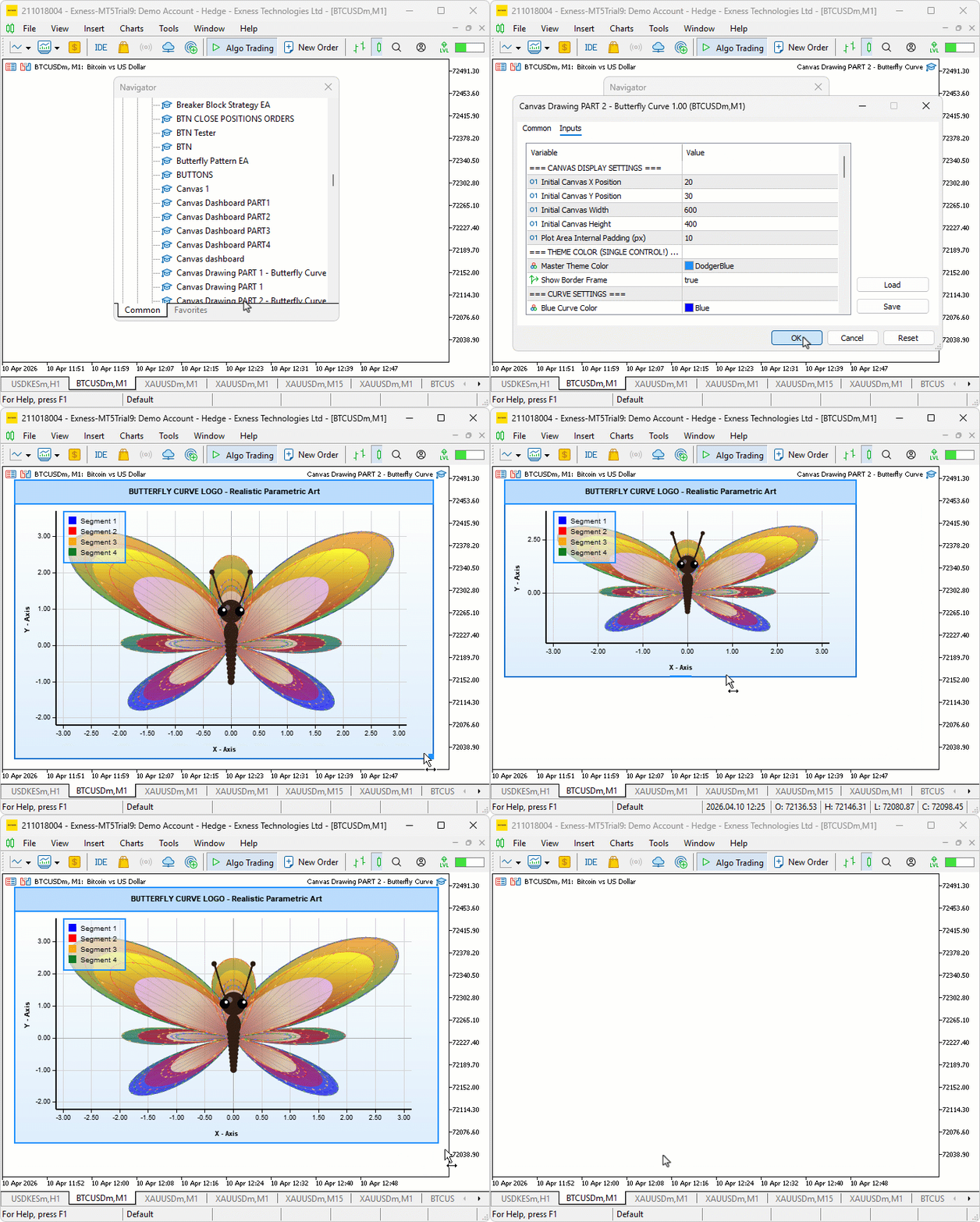
The three-layer gradient fills render cleanly across the wing shape, with each inner layer sitting progressively inward and the radial core glowing distinctly at the center. The four colored outlines remain crisp over the fills, vein lines radiate naturally from the body center, and the scale dots run densely along the wing boundary with a visible shimmer toward the edges. The body sits correctly at the center with a tapering segmented abdomen, thorax, highlighted head, compound eyes with shine dots, and two naturally arcing antennae ending in club tips.
Conclusion
In conclusion, we have transformed the plain parametric butterfly curve outline into a fully detailed and lifelike butterfly illustration by adding three-layered gradient wing fills, radiating vein lines, densely packed scale texture dots, and a complete anatomical body with a segmented abdomen, thorax, head, compound eyes, and arcing antennae — all rendered through the same supersampled canvas pipeline. After reading the article, you will be able to:
- Fill any parametric curve shape on an MQL5 canvas using scanline polygon rasterization with both vertical and radial three-color gradients
- Build layered wing fills by scaling the curve outline inward toward its center and applying progressively different color sets at each depth level
- Add surface texture and anatomical structure to canvas drawings using filled circles and ellipse primitives, vein lines, and scale dot patterns
In the next part, we will add a four-phase animation system. It will draw the outline, fade in the fills, reveal surface details, and then transition into continuous flight (wing flapping, bobbing, sway, tilt, neon glow, and color cycling).
Warning: All rights to these materials are reserved by MetaQuotes Ltd. Copying or reprinting of these materials in whole or in part is prohibited.
This article was written by a user of the site and reflects their personal views. MetaQuotes Ltd is not responsible for the accuracy of the information presented, nor for any consequences resulting from the use of the solutions, strategies or recommendations described.

 Engineering Trading Discipline into Code (Part 4): Enforcing Trading Hours and News Disabling in MQL5
 MetaTrader 5 Machine Learning Blueprint (Part 13): Implementing Bet Sizing in MQL5
 From Novice to Expert: Automating Base-Candle Geometry for Liquidity Zones in MQL5
 Self-Learning Expert Advisor with a Neural Network Based on a Markov State-Transition Matrix

- Free trading apps
- Over 8,000 signals for copying
- Economic news for exploring financial markets
You agree to website policy and terms of use