

MQL5 Trading Tools (Part 30): Class-Based Tool Palette Sidebar
 1 698
1 698
 0
0

Introduction
You already have a drawing tools panel on an MetaTrader 5 chart, but it is built flat: rendering, layout, theme values, and handlers are mixed together, so every new feature becomes a cross-cutting change. Want to add a category, and you edit the main render loop. Want a light or dark theme, and you hunt through scattered color values. Want clean rounded corners, and you trade off visual quality. The panel works functionally, but it does not scale — the more tools, themes, and modes you add, the greater the risk that a small change breaks layout, rendering, or behavior.
This article is for MetaQuotes Language 5 (MQL5) developers and algorithmic traders who want a practical path out of that mess. We refactor the panel into a layered, single-responsibility class architecture so that extending the palette becomes "register a definition" instead of "rewrite the renderer". You will get a clear statement of the problem, an implementation that compiles and runs on the chart, and a repeatable pattern for adding categories, themes, and visual improvements without spreading changes across the codebase.
In our previous article (Part 29), we animated a butterfly on the chart with progressive drawing, wing fading, and flight motion. In Part 30, we revisit the Tools Palette we originally built in Part 19 and rebuild it from the ground up using an object-oriented, class-layered sidebar architecture with supersampled canvas rendering, theme management, and a category registry. We will cover the following topics:
By the end, you will have a cleanly structured MQL5 sidebar with anti-aliased rounded corners, dual-theme support, and a modular category system ready for tool selection, fly-out panels, and drag interaction in future parts.
From Flat Panel to Layered Sidebar
The original Tools Palette built in Part 19 placed all logic in standalone functions and global variables. The header, tool buttons, drawing handlers, and theme colors lived at the same level with no separation of concerns. This worked for a small set of eight tools, but scaling further meant that modifying one area often required adjusting several others, making the codebase increasingly difficult to maintain and extend.
The redesign replaces the flat structure with a vertical sidebar built on a layered class hierarchy. Each class has a single responsibility. For example: primitives handle anti-aliased drawing, the theme manager controls color sets, the registry stores categories, the canvas layer manages resizing, the layout class computes geometry, and the renderer composes the final sidebar. Adding a new tool category becomes a matter of registering a definition rather than reworking the entire rendering loop.
On the chart, this compact vertical sidebar gives you quick access to drawing categories during live sessions without obstructing price action. Snap alignment pins it flush to a chart edge, and theme toggling instantly matches the palette to your chart background. As you add custom tool groups for your own analysis, the sidebar grows cleanly without layout conflicts. We will define icon mappings and enumerations, declare input parameters, and construct the class hierarchy. The top-level sidebar shell will initialize, render, and forward events. In a nutshell, here is a visualization of what we will be creating.

Implementation in MQL5
Including the Canvas Library, Defining Icons, Enumerations, Inputs, and Structures
To begin the implementation, we include the canvas library and establish the foundational definitions that the entire sidebar architecture depends on, from icon mappings and enumerations to user inputs and data structures.
//+------------------------------------------------------------------+
//|                                         Tools Palette Part 2.mq5 |
//|                           Copyright 2026, Allan Munene Mutiiria. |
//|                                   https://t.me/Forex_Algo_Trader |
//+------------------------------------------------------------------+
#property copyright "Copyright 2026, Allan Munene Mutiiria."
#property link      "https://t.me/Forex_Algo_Trader"
#property version   "1.00"
#property strict

//--- Include canvas drawing library
#include <Canvas/Canvas.mqh>

//+------------------------------------------------------------------+
//| Icon definitions — category sidebar buttons only                 |
//+------------------------------------------------------------------+
struct SIconDefinition { string fontName; uchar charCode; }; // Store icon font and character code

//--- Define icon for each tool category using font/char pairs
SIconDefinition ICON_CATEGORY_CURSORS     = { "Wingdings",   (uchar)'v' }; // Cursors category icon
SIconDefinition ICON_CATEGORY_LINES       = { "Wingdings 3", (uchar)'&' }; // Lines category icon
SIconDefinition ICON_CATEGORY_CHANNELS    = { "Wingdings 3", (uchar)'2' }; // Channels category icon
SIconDefinition ICON_CATEGORY_PITCHFORK   = { "Wingdings 3", (uchar)'H' }; // Pitchfork category icon
SIconDefinition ICON_CATEGORY_GANN        = { "Wingdings",   (uchar)'T' }; // Gann category icon
SIconDefinition ICON_CATEGORY_FIBONACCI   = { "Wingdings",   (uchar)'z' }; // Fibonacci category icon
SIconDefinition ICON_CATEGORY_SHAPES      = { "Wingdings",   (uchar)'o' }; // Shapes category icon
SIconDefinition ICON_CATEGORY_ANNOTATIONS = { "Webdings",    (uchar)'>' }; // Annotations category icon

//+------------------------------------------------------------------+
//| Enumerations                                                     |
//+------------------------------------------------------------------+
enum ENUM_SNAP_STATE
  {
   SNAP_LEFT,  // Snap sidebar to left edge
   SNAP_RIGHT, // Snap sidebar to right edge
   SNAP_FLOAT  // Allow sidebar to float freely
  };

enum ENUM_CATEGORY
  {
   CAT_CURSORS     = 0, // Cursors category index
   CAT_LINES,           // Lines category index
   CAT_CHANNELS,        // Channels category index
   CAT_PITCHFORK,       // Pitchfork category index
   CAT_GANN,            // Gann category index
   CAT_FIBONACCI,       // Fibonacci category index
   CAT_SHAPES,          // Shapes category index
   CAT_ANNOTATIONS,     // Annotations category index
   CAT_COUNT            // Total number of categories
  };

//+------------------------------------------------------------------+
//| Inputs                                                           |
//+------------------------------------------------------------------+
input int    CanvasY           = 50;   // Canvas Y Position
input double BackgroundOpacity = 0.92; // Background Opacity (0.0 - 1.0)
input bool   StartDark         = true; // Start In Dark Theme
input int    BorderWidth       = 1;    // Border Width (px)
input int    CategoryIconSize  = 26;   // Category Icon Size (pt)
input int    SnapThreshold     = 40;   // Edge Snap Threshold (px)

//+------------------------------------------------------------------+
//| Category definition structure                                    |
//+------------------------------------------------------------------+
struct CategoryDefinition
  {
   string categoryLabel;    // Display label for the category
   string iconFontName;     // Font name used to render the icon
   uchar  iconCharCode;     // Character code of the icon glyph
   bool   hasMultipleTools; // Flag indicating category has sub-tools
  };

//+------------------------------------------------------------------+
//| Theme color set structure                                        |
//+------------------------------------------------------------------+
struct ThemeColorSet
  {
   color sidebarBackground; // Background fill color of the sidebar panel
   color sidebarBorder;     // Outline border color of the sidebar panel
   color buttonIconColor;   // Color used to render category icons
   color gripDotsColor;     // Color of the drag-grip dot indicators
   color separatorColor;    // Color of the horizontal separator lines
  };
We start by including the "Canvas/Canvas.mqh" header file, which provides the CCanvas class used throughout the program for bitmap drawing, text rendering, and pixel manipulation on chart objects. Next, we define the "SIconDefinition" structure to pair a font name with a character code, giving each tool category a visual icon. We then declare eight global instances of this structure, one for each category, such as cursors, lines, channels, pitchfork, Gann, Fibonacci, shapes, and annotations, each mapped to a specific glyph from the Wingdings, Wingdings 3, or Webdings font families. You can use any font or characters you like. See the list we are using below.
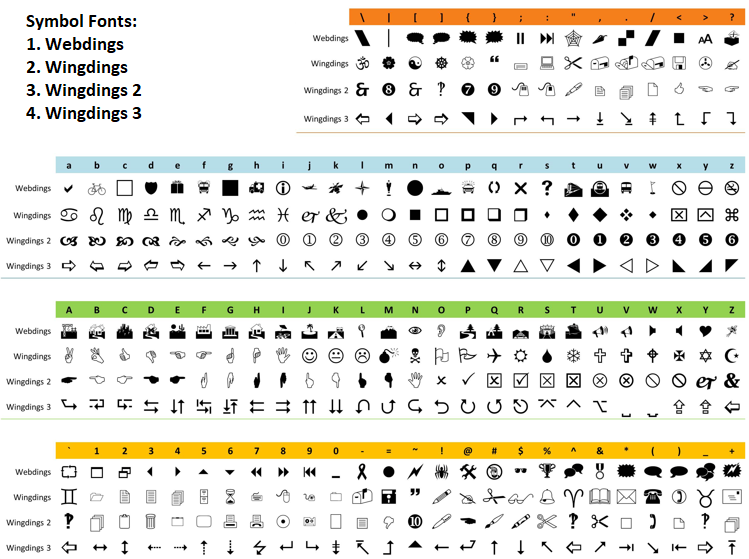
We then declare two enumerations. The "ENUM_SNAP_STATE" enumeration defines three snap modes controlling whether the sidebar pins to the left edge, right edge, or floats freely on the chart. The "ENUM_CATEGORY" enumeration assigns an index to each of the eight tool categories and includes a terminal "CAT_COUNT" entry that automatically holds the total number of categories, making loops and array sizing straightforward.
Following the enumerations, we declare the input parameters that allow the user to customize the sidebar at load time. These include the vertical position, background opacity, starting theme, border thickness, icon size, and the pixel threshold that determines how close the panel must be to a chart edge before it snaps into place.
Finally, we define two structures. The "CategoryDefinition" structure holds everything needed to describe a tool category: its display label, icon font, character code, and a flag indicating whether it contains multiple sub-tools. The "ThemeColorSet" structure groups the five colors that define a visual theme, covering the sidebar background, border, icon color, grip dot color, and separator line color. Together, these structures form the data backbone that the class hierarchy will populate and reference throughout the rendering pipeline. Next, we will declare the primitives class and define it.
Declaring the Canvas Primitives Class
The first class in our hierarchy serves as the low-level rendering engine, providing all the primitive drawing methods that the higher-level classes will rely on to produce anti-aliased, supersampled visuals.
//+------------------------------------------------------------------+
//| CLASS 1 — Blend and draw low-level canvas primitives             |
//+------------------------------------------------------------------+
class CCanvasPrimitives
  {
protected:
   //--- Blend a single pixel onto the canvas using alpha compositing
   void BlendPixelSet(CCanvas &canvas, int x, int y, uint sourceARGB);
   //--- Downsample a high-res canvas into a lower-res destination
   void DownsampleCanvas(CCanvas &dst, CCanvas &src, int factor);
   //--- Fill a single corner quadrant of a rounded rectangle at high res
   void FillCornerQuadrantHR(CCanvas &canvas, int cx, int cy, int radius, uint argb, int signX, int signY);
   //--- Fill a full rounded rectangle at high resolution
   void FillRoundRectHR(CCanvas &canvas, int x, int y, int w, int h, int radius, uint argb);
   //--- Fill a rounded rectangle with per-corner rounding control at high res
   void FillSelectiveRoundRectHR(CCanvas &canvas, int x, int y, int w, int h, int radius, uint argb,
                                  bool rTL, bool rTR, bool rBL, bool rBR);
   //--- Fill a quadrilateral shape using scanline rasterization
   void FillQuadrilateralBorder(CCanvas &canvas, double &vx[], double &vy[], uint argb);
   //--- Draw a single thick border edge between two points
   void DrawBorderEdge(CCanvas &canvas, double x0, double y0, double x1, double y1, int thickness, uint argb);
   //--- Check whether an angle falls within a given arc range
   bool IsAngleBetween(double angle, double startAngle, double endAngle);
   //--- Draw a corner arc segment with specified thickness and angle range
   void DrawCornerArc(CCanvas &canvas, int cx, int cy, int radius, int thickness, uint argb, double startAngle, double endAngle);
   //--- Draw a rounded rectangle border with per-corner rounding control at high res
   void DrawSelectiveRoundRectBorderHR(CCanvas &canvas, int x, int y, int w, int h, int radius, uint argb, int thickness,
                                        bool rTL, bool rTR, bool rBL, bool rBR);
  };
We declare the "CCanvasPrimitives" class with all its methods under the protected access level, meaning they are available to derived classes but not accessible from outside the hierarchy. The class groups ten core rendering methods that cover the full range of drawing operations the sidebar needs.
The "BlendPixelSet" method handles alpha compositing of a single pixel onto the canvas, blending a source color over an existing destination pixel. The "DownsampleCanvas" method averages pixel blocks to convert the high-resolution canvas into the final size. This is the key step that produces smooth edges. The "FillCornerQuadrantHR" method fills one quadrant of a rounded corner using sub-pixel sampling for anti-aliased curves, while "FillRoundRectHR" combines four of these quadrants with rectangular strips to produce a fully rounded rectangle at high resolution. Building on that, "FillSelectiveRoundRectHR" adds per-corner control so we can selectively round only specific corners, which is essential when the sidebar snaps flush against a chart edge.
For border rendering, the "FillQuadrilateralBorder" method rasterizes an arbitrary four-sided shape using scanline filling, and "DrawBorderEdge" uses it to draw a thick line segment between two points by constructing a perpendicular quad. The "IsAngleBetween" method is a utility that checks whether an angle falls within an arc range, supporting the "DrawCornerArc" method, which renders anti-aliased arc segments at specified thickness for rounded border corners. Finally, "DrawSelectiveRoundRectBorderHR" ties these border methods together to draw a complete rounded rectangle outline with per-corner rounding control. Together, these primitives form the rendering foundation that every visual element in the sidebar is built upon. We will now define these methods using the scope resolution operator. We use double colons (::) to access the defined members. Here is an illustration example:

Implementing the Canvas Primitives Methods
These methods form the rendering core of the sidebar, handling pixel blending, supersampled and downscaling, anti-aliased rounded rectangle fills, scanline rasterization, and arc-based border drawing.
//+------------------------------------------------------------------+
//| Blend source pixel onto canvas using alpha compositing           |
//+------------------------------------------------------------------+
void CCanvasPrimitives::BlendPixelSet(CCanvas &canvas, int x, int y, uint src)
  {
   //--- Skip pixels outside canvas bounds
   if (x < 0 || x >= canvas.Width() || y < 0 || y >= canvas.Height()) return;
   //--- Read existing destination pixel
   uint dst = canvas.PixelGet(x, y);
   //--- Unpack source ARGB channels to normalized floats
   double sA = ((src >> 24) & 0xFF) / 255.0, sR = ((src >> 16) & 0xFF) / 255.0;
   double sG = ((src >>  8) & 0xFF) / 255.0, sB = ( src        & 0xFF) / 255.0;
   //--- Unpack destination ARGB channels to normalized floats
   double dA = ((dst >> 24) & 0xFF) / 255.0, dR = ((dst >> 16) & 0xFF) / 255.0;
   double dG = ((dst >>  8) & 0xFF) / 255.0, dB = ( dst        & 0xFF) / 255.0;
   //--- Compute output alpha using standard over-compositing formula
   double oA = sA + dA * (1.0 - sA);
   //--- Write fully transparent pixel and exit if output alpha is zero
   if (oA == 0.0) { canvas.PixelSet(x, y, 0); return; }
   //--- Write blended ARGB pixel to canvas
   canvas.PixelSet(x, y,
      ((uint)(uchar)(oA * 255 + 0.5) << 24) |
      ((uint)(uchar)((sR * sA + dR * dA * (1.0 - sA)) / oA * 255 + 0.5) << 16) |
      ((uint)(uchar)((sG * sA + dG * dA * (1.0 - sA)) / oA * 255 + 0.5) <<  8) |
       (uint)(uchar)((sB * sA + dB * dA * (1.0 - sA)) / oA * 255 + 0.5));
  }

//+------------------------------------------------------------------+
//| Downsample high-res canvas into destination by averaging pixels  |
//+------------------------------------------------------------------+
void CCanvasPrimitives::DownsampleCanvas(CCanvas &dst, CCanvas &src, int factor)
  {
   //--- Cache destination dimensions and squared sample count
   int dW = dst.Width(), dH = dst.Height(), ss2 = factor * factor;
   //--- Iterate over every destination pixel
   for (int py = 0; py < dH; py++)
      for (int px = 0; px < dW; px++)
        {
         //--- Accumulate channel sums across the source sample block
         double sA = 0, sR = 0, sG = 0, sB = 0, wc = 0;
         for (int dy = 0; dy < factor; dy++)
            for (int dx = 0; dx < factor; dx++)
              {
               //--- Compute source sample coordinates
               int sx = px * factor + dx, sy = py * factor + dy;
               //--- Skip samples outside source bounds
               if (sx >= src.Width() || sy >= src.Height()) continue;
               //--- Read source pixel and extract alpha
               uint p = src.PixelGet(sx, sy); uchar a = (uchar)((p >> 24) & 0xFF);
               //--- Accumulate alpha unconditionally
               sA += a;
               //--- Accumulate color channels only for non-transparent samples
               if (a > 0) { sR += (p >> 16) & 0xFF; sG += (p >> 8) & 0xFF; sB += p & 0xFF; wc += 1.0; }
              }
         //--- Compute averaged output alpha
         uchar fa = (uchar)(sA / ss2);
         //--- Write transparent pixel and skip if result is fully transparent
         if (fa == 0 || wc == 0) { dst.PixelSet(px, py, 0); continue; }
         //--- Write averaged ARGB pixel to destination canvas
         dst.PixelSet(px, py, ((uint)fa << 24) | ((uint)(uchar)(sR / wc) << 16) |
                               ((uint)(uchar)(sG / wc) << 8) | (uint)(uchar)(sB / wc));
        }
  }

//+------------------------------------------------------------------+
//| Fill one corner quadrant of a rounded rect at high resolution    |
//+------------------------------------------------------------------+
void CCanvasPrimitives::FillCornerQuadrantHR(CCanvas &canvas, int cx, int cy, int radius, uint argb, int signX, int signY)
  {
   //--- Cache radius as double and extract alpha and RGB components
   double rd = (double)radius;
   uchar  bA = (uchar)((argb >> 24) & 0xFF);
   uint   rgb = argb & 0x00FFFFFF;
   //--- Set sub-pixel sample count and derived values
   int sub = 4; double step = 1.0 / sub; int subSq = sub * sub;
   //--- Iterate over pixel neighbourhood around corner center
   for (int dy = -(radius + 1); dy <= (radius + 1); dy++)
      for (int dx = -(radius + 1); dx <= (radius + 1); dx++)
        {
         //--- Check pixel belongs to the target quadrant
         bool inQ = ((signX > 0) ? (dx >= 0) : (dx <= 0)) && ((signY > 0) ? (dy >= 0) : (dy <= 0));
         if (!inQ) continue;
         //--- Compute distance from corner center
         double dist = MathSqrt((double)(dx * dx + dy * dy));
         //--- Skip pixels too far outside radius
         if (dist > rd + 1.0) continue;
         //--- Fill pixels fully inside radius without anti-aliasing
         if (dist <= rd - 1.0) { canvas.PixelSet(cx + dx, cy + dy, argb); continue; }
         //--- Count sub-pixel samples falling inside the circle
         int inside = 0;
         for (int sy = 0; sy < sub; sy++)
            for (int sx = 0; sx < sub; sx++)
              {
               //--- Compute sub-pixel offsets from pixel center
               double sdx = (double)dx - 0.5 + (sx + 0.5) * step;
               double sdy = (double)dy - 0.5 + (sy + 0.5) * step;
               if (sdx * sdx + sdy * sdy <= rd * rd) inside++;
              }
         //--- Skip pixel if no sub-samples are inside
         if (inside == 0) continue;
         //--- Blend anti-aliased pixel using coverage fraction
         BlendPixelSet(canvas, cx + dx, cy + dy, (((uint)(uchar)((int)bA * inside / subSq)) << 24) | rgb);
        }
  }

//+------------------------------------------------------------------+
//| Fill a fully rounded rectangle at high resolution                |
//+------------------------------------------------------------------+
void CCanvasPrimitives::FillRoundRectHR(CCanvas &canvas, int x, int y, int w, int h, int radius, uint argb)
  {
   //--- Clamp radius to half the smallest dimension
   radius = MathMin(radius, MathMin(w / 2, h / 2));
   //--- Fall back to plain rectangle when radius is zero or negative
   if (radius <= 0) { canvas.FillRectangle(x, y, x + w - 1, y + h - 1, argb); return; }
   //--- Fill horizontal center strip
   canvas.FillRectangle(x + radius, y, x + w - radius - 1, y + h - 1, argb);
   //--- Fill left vertical strip
   canvas.FillRectangle(x, y + radius, x + radius - 1, y + h - radius - 1, argb);
   //--- Fill right vertical strip
   canvas.FillRectangle(x + w - radius, y + radius, x + w - 1, y + h - radius - 1, argb);
   //--- Fill top-left corner quadrant
   FillCornerQuadrantHR(canvas, x + radius,     y + radius,     radius, argb, -1, -1);
   //--- Fill top-right corner quadrant
   FillCornerQuadrantHR(canvas, x + w - radius, y + radius,     radius, argb,  1, -1);
   //--- Fill bottom-left corner quadrant
   FillCornerQuadrantHR(canvas, x + radius,     y + h - radius, radius, argb, -1,  1);
   //--- Fill bottom-right corner quadrant
   FillCornerQuadrantHR(canvas, x + w - radius, y + h - radius, radius, argb,  1,  1);
  }

//+------------------------------------------------------------------+
//| Fill rounded rectangle with per-corner rounding at high res      |
//+------------------------------------------------------------------+
void CCanvasPrimitives::FillSelectiveRoundRectHR(CCanvas &canvas, int x, int y, int w, int h, int radius, uint argb,
                                                  bool rTL, bool rTR, bool rBL, bool rBR)
  {
   //--- Clamp radius to half the smallest dimension
   radius = MathMin(radius, MathMin(w / 2, h / 2));
   //--- Fall back to plain rectangle when radius is zero or negative
   if (radius <= 0) { canvas.FillRectangle(x, y, x + w - 1, y + h - 1, argb); return; }
   //--- Fill horizontal center strip spanning full width
   canvas.FillRectangle(x + radius, y, x + w - radius - 1, y + h - 1, argb);
   //--- Fill left strip, respecting top-left and bottom-left rounding
   canvas.FillRectangle(x,          y + (rTL ? radius : 0), x + radius - 1,  y + h - 1 - (rBL ? radius : 0), argb);
   //--- Fill right strip, respecting top-right and bottom-right rounding
   canvas.FillRectangle(x + w - radius, y + (rTR ? radius : 0), x + w - 1,   y + h - 1 - (rBR ? radius : 0), argb);
   //--- Fill or square top-left corner based on rounding flag
   if (rTL) FillCornerQuadrantHR(canvas, x + radius,     y + radius,     radius, argb, -1, -1);
   else     canvas.FillRectangle(x, y, x + radius - 1, y + radius - 1, argb);
   //--- Fill or square top-right corner based on rounding flag
   if (rTR) FillCornerQuadrantHR(canvas, x + w - radius, y + radius,     radius, argb,  1, -1);
   else     canvas.FillRectangle(x + w - radius, y, x + w - 1, y + radius - 1, argb);
   //--- Fill or square bottom-left corner based on rounding flag
   if (rBL) FillCornerQuadrantHR(canvas, x + radius,     y + h - radius, radius, argb, -1,  1);
   else     canvas.FillRectangle(x, y + h - radius, x + radius - 1, y + h - 1, argb);
   //--- Fill or square bottom-right corner based on rounding flag
   if (rBR) FillCornerQuadrantHR(canvas, x + w - radius, y + h - radius, radius, argb,  1,  1);
   else     canvas.FillRectangle(x + w - radius, y + h - radius, x + w - 1, y + h - 1, argb);
  }

//+------------------------------------------------------------------+
//| Fill a quadrilateral using scanline rasterization                |
//+------------------------------------------------------------------+
void CCanvasPrimitives::FillQuadrilateralBorder(CCanvas &canvas, double &vx[], double &vy[], uint argb)
  {
   //--- Find vertical bounding extent of the quad
   double minY = vy[0], maxY = vy[0];
   for (int i = 1; i < 4; i++) { if (vy[i] < minY) minY = vy[i]; if (vy[i] > maxY) maxY = vy[i]; }
   //--- Iterate over each horizontal scanline within the bounding box
   for (int scanY = (int)MathCeil(minY); scanY <= (int)MathCeil(maxY) - 1; scanY++)
     {
      //--- Compute scanline center Y and prepare intersection buffer
      double cy = (double)scanY + 0.5; double xi[8]; int nc = 0;
      //--- Compute X intersections with each edge of the quad
      for (int i = 0; i < 4; i++)
        {
         int ni = (i + 1) % 4;
         //--- Determine edge vertical extents
         double eMin = (vy[i] < vy[ni]) ? vy[i] : vy[ni], eMax = (vy[i] > vy[ni]) ? vy[i] : vy[ni];
         //--- Skip edges that do not cross the current scanline
         if (cy < eMin || cy > eMax || MathAbs(vy[ni] - vy[i]) < 1e-12) continue;
         //--- Compute intersection parameter along the edge
         double t = (cy - vy[i]) / (vy[ni] - vy[i]);
         if (t < 0.0 || t > 1.0) continue;
         //--- Record intersection X coordinate
         xi[nc++] = vx[i] + t * (vx[ni] - vx[i]);
        }
      //--- Sort intersections left to right
      for (int a = 0; a < nc - 1; a++)
         for (int b = a + 1; b < nc; b++)
            if (xi[a] > xi[b]) { double tmp = xi[a]; xi[a] = xi[b]; xi[b] = tmp; }
      //--- Fill pixels between paired intersection spans
      for (int p = 0; p + 1 < nc; p += 2)
         for (int fx = (int)MathCeil(xi[p]); fx <= (int)MathCeil(xi[p + 1]) - 1; fx++)
            canvas.PixelSet(fx, scanY, argb);
     }
  }

//+------------------------------------------------------------------+
//| Draw a thick border edge between two endpoints                   |
//+------------------------------------------------------------------+
void CCanvasPrimitives::DrawBorderEdge(CCanvas &canvas, double x0, double y0, double x1, double y1, int thickness, uint argb)
  {
   //--- Compute edge direction vector and length
   double dx = x1 - x0, dy = y1 - y0, len = MathSqrt(dx * dx + dy * dy);
   //--- Skip degenerate edges with near-zero length
   if (len < 1e-6) return;
   //--- Compute perpendicular and unit direction vectors
   double px = -dy / len, py = dx / len, ex = dx / len, ey = dy / len;
   //--- Compute half-thickness and end cap extension
   double ht = thickness / 2.0, ext = 0.23 * thickness;
   //--- Extend start and end points slightly for mitre cap effect
   double sx = x0 - ex * ext, sy = y0 - ey * ext, ex2 = x1 + ex * ext, ey2 = y1 + ey * ext;
   //--- Build quad vertices offset perpendicular to edge direction
   double tvx[4] = { sx - px*ht, sx + px*ht, ex2 + px*ht, ex2 - px*ht };
   double tvy[4] = { sy - py*ht, sy + py*ht, ey2 + py*ht, ey2 - py*ht };
   //--- Fill the resulting quad as the border edge shape
   FillQuadrilateralBorder(canvas, tvx, tvy, argb);
  }

//+------------------------------------------------------------------+
//| Check whether an angle falls within a start-to-end arc range     |
//+------------------------------------------------------------------+
bool CCanvasPrimitives::IsAngleBetween(double angle, double start, double end)
  {
   //--- Normalize all angles to the [0, 2π) range
   double tp = 2.0 * M_PI;
   angle = MathMod(angle + tp, tp); start = MathMod(start + tp, tp); end = MathMod(end + tp, tp);
   //--- Return true if angle lies within the arc from start to end
   return MathMod(angle - start + tp, tp) <= MathMod(end - start + tp, tp);
  }

//+------------------------------------------------------------------+
//| Draw an anti-aliased corner arc with specified thickness         |
//+------------------------------------------------------------------+
void CCanvasPrimitives::DrawCornerArc(CCanvas &canvas, int cx, int cy, int radius, int thickness, uint argb, double startAngle, double endAngle)
  {
   //--- Compute outer and inner radii for the arc ring
   double oR = (double)radius, iR = MathMax(0.0, (double)radius - thickness);
   //--- Extract alpha and RGB components from packed color
   uchar  bA = (uchar)((argb >> 24) & 0xFF); uint rgb = argb & 0x00FFFFFF;
   //--- Set sub-pixel sample count and pixel scan radius
   int sub = 4; double step = 1.0 / sub; int subSq = sub * sub, pr = (int)(oR + 2.0);
   //--- Iterate over pixels in the bounding box of the arc
   for (int dy = -pr; dy <= pr; dy++)
      for (int dx = -pr; dx <= pr; dx++)
        {
         //--- Compute distance from arc center
         double dist = MathSqrt((double)(dx * dx + dy * dy));
         //--- Skip pixels clearly outside the ring or wrong angle
         if (dist > oR + 1.0 || dist < iR - 1.0) continue;
         if (!IsAngleBetween(MathArctan2((double)dy, (double)dx), startAngle, endAngle)) continue;
         //--- Fill pixels fully inside the ring without anti-aliasing
         if (dist <= oR - 1.0 && dist >= iR + 1.0) { canvas.PixelSet(cx + dx, cy + dy, argb); continue; }
         //--- Count sub-pixel samples inside the arc ring and angle range
         int inside = 0;
         for (int sy = 0; sy < sub; sy++)
            for (int sx = 0; sx < sub; sx++)
              {
               double sdx = (double)dx - 0.5 + (sx + 0.5) * step, sdy = (double)dy - 0.5 + (sy + 0.5) * step;
               double sd = MathSqrt(sdx * sdx + sdy * sdy);
               if (sd >= iR && sd <= oR && IsAngleBetween(MathArctan2(sdy, sdx), startAngle, endAngle)) inside++;
              }
         //--- Skip pixel if no sub-samples qualify
         if (inside == 0) continue;
         //--- Write fully opaque pixel if all sub-samples qualify
         if (inside >= subSq) canvas.PixelSet(cx + dx, cy + dy, argb);
         //--- Blend anti-aliased pixel using coverage fraction
         else BlendPixelSet(canvas, cx + dx, cy + dy, (((uint)(uchar)((int)bA * inside / subSq)) << 24) | rgb);
        }
  }

//+------------------------------------------------------------------+
//| Draw rounded rect border with per-corner rounding at high res    |
//+------------------------------------------------------------------+
void CCanvasPrimitives::DrawSelectiveRoundRectBorderHR(CCanvas &canvas, int x, int y, int w, int h, int radius, uint argb, int thickness,
                                                        bool rTL, bool rTR, bool rBL, bool rBR)
  {
   //--- Skip drawing when border width is disabled
   if (BorderWidth <= 0) return;
   //--- Clamp radius to half the smallest dimension
   radius = MathMin(radius, MathMin(w / 2, h / 2));
   //--- Compute per-corner radii based on rounding flags and half-thickness offset
   int tlR = rTL ? radius : 0, trR = rTR ? radius : 0, blR = rBL ? radius : 0, brR = rBR ? radius : 0, h2 = thickness / 2;
   //--- Draw top edge
   DrawBorderEdge(canvas, x + tlR,     y + h2,     x + w - trR, y + h2,     thickness, argb);
   //--- Draw right edge if any right corner is rounded
   if (rTR || rBR) DrawBorderEdge(canvas, x + w - h2, y + trR, x + w - h2, y + h - brR, thickness, argb);
   //--- Draw bottom edge
   DrawBorderEdge(canvas, x + w - brR, y + h - h2, x + blR,     y + h - h2, thickness, argb);
   //--- Draw left edge if any left corner is rounded
   if (rTL || rBL) DrawBorderEdge(canvas, x + h2, y + h - blR, x + h2, y + tlR, thickness, argb);
   //--- Draw top-left corner arc if rounded
   if (rTL) DrawCornerArc(canvas, x + radius,     y + radius,     radius, thickness, argb, M_PI,       M_PI * 1.5);
   //--- Draw top-right corner arc if rounded
   if (rTR) DrawCornerArc(canvas, x + w - radius, y + radius,     radius, thickness, argb, M_PI * 1.5, M_PI * 2.0);
   //--- Draw bottom-left corner arc if rounded
   if (rBL) DrawCornerArc(canvas, x + radius,     y + h - radius, radius, thickness, argb, M_PI * 0.5, M_PI);
   //--- Draw bottom-right corner arc if rounded
   if (rBR) DrawCornerArc(canvas, x + w - radius, y + h - radius, radius, thickness, argb, 0.0,        M_PI * 0.5);
  }
We begin with the "BlendPixelSet" method, which performs alpha compositing on a single pixel. It bounds-checks the coordinates, unpacks both the source and destination pixels into normalized float channels, applies the standard over-compositing formula, and writes the blended result back using the PixelSet method. Every anti-aliased edge in the sidebar relies on this method to merge partially transparent pixels smoothly.
The "DownsampleCanvas" method handles the second half of the supersampling pipeline. For each destination pixel, it averages a square block of samples from the high-resolution source canvas, accumulating alpha unconditionally while only counting color channels from non-transparent pixels. This averaging converts the oversized rendering into a smooth, anti-aliased result at display resolution.
Next, "FillCornerQuadrantHR" fills a single quadrant of a rounded corner by scanning pixels around the corner center, filtering by quadrant using sign parameters, and applying four-by-four sub-pixel sampling along the curved edge to determine coverage. The coverage fraction scales the alpha, producing smooth curves without jagged steps.
The "FillRoundRectHR" method assembles a complete rounded rectangle from three rectangular strips and four corner quadrants, while "FillSelectiveRoundRectHR" extends it with four boolean flags controlling whether each corner is rounded or squared off. This selective rounding is how the sidebar achieves flush edges when snapped against the chart boundary.
For border rendering, "FillQuadrilateralBorder" rasterizes a four-sided polygon using scanline sweeping with sorted edge intersections, and "DrawBorderEdge" builds a perpendicular quad from two endpoints to render a thick line segment through it. The "IsAngleBetween" utility supports "DrawCornerArc", which renders thick arc segments using an inner and outer radius ring with sub-pixel sampling for anti-aliased curved borders. Finally, "DrawSelectiveRoundRectBorderHR" ties everything together, drawing four straight edges and four conditional corner arcs to produce a complete rounded border respecting per-corner rounding flags. With that done, we can define a second class to manage the theme modes of the tool.
Declaring and Implementing the Theme Manager Class
The second class in the hierarchy centralizes all theme-related state and color assignments into a single manageable layer, inheriting the rendering capabilities from the primitives class below it.
//+------------------------------------------------------------------+
//| CLASS 2 — Manage and apply light and dark theme color sets       |
//+------------------------------------------------------------------+
class CThemeManager : public CCanvasPrimitives
  {
protected:
   bool          m_isDarkTheme;   // Active theme flag: true = dark, false = light
   ThemeColorSet m_themeColors;   // Active color set for the current theme
protected:
   //--- Apply color values matching the current theme state
   void ApplyTheme();
  };
We declare the "CThemeManager" class, which inherits from "CCanvasPrimitives" and introduces two protected members: a boolean flag tracking whether the dark theme is active, and a "ThemeColorSet" instance holding the current color values. It also declares a single protected method, "ApplyTheme", responsible for populating the color set based on the active theme state. The method is implemented as follows:
//+------------------------------------------------------------------+
//| Apply color values matching the current theme state              |
//+------------------------------------------------------------------+
void CThemeManager::ApplyTheme()
  {
   //--- Apply dark theme color assignments
   if (m_isDarkTheme)
     {
      m_themeColors.sidebarBackground = C'30,34,45';  // Dark navy background
      m_themeColors.sidebarBorder     = C'200,210,225'; // Light blue-gray border
      m_themeColors.buttonIconColor   = C'220,225,235'; // Near-white icon color
      m_themeColors.gripDotsColor     = C'90,100,120';  // Muted slate grip dots
      m_themeColors.separatorColor    = C'44,50,64';    // Dark separator line
     }
   else
     {
      //--- Apply light theme color assignments
      m_themeColors.sidebarBackground = clrWhite;        // White background
      m_themeColors.sidebarBorder     = C'30,35,45';     // Dark border
      m_themeColors.buttonIconColor   = C'40,45,58';     // Dark icon color
      m_themeColors.gripDotsColor     = C'160,170,185';  // Light gray grip dots
      m_themeColors.separatorColor    = C'210,215,225';  // Light separator line
     }
  }
We implement the "ApplyTheme" method, which checks the dark theme flag and assigns five color values to the theme color set. When dark mode is active, the sidebar receives a dark navy background, light blue-gray border, near-white icons, muted slate grip dots, and a dark separator line. When light mode is active, the colors switch to a white background with darker tones for the border, icons, grip dots, and separators. Any class further up the hierarchy simply reads from this color set when rendering, so toggling the theme is just a matter of flipping the flag and calling this method again. To make the tools usable, we will need to register them. Let's define a class for that too.
Declaring the Category Registry Class
The third class in the hierarchy manages the registration of all tool categories, giving the sidebar a structured way to store and access each category's definition.
//+------------------------------------------------------------------+
//| CLASS 3 — Register and initialise all tool category definitions  |
//+------------------------------------------------------------------+
class CCategoryRegistry : public CThemeManager
  {
protected:
   CategoryDefinition m_categories[CAT_COUNT]; // Array of all category definitions
protected:
   //--- Populate all category definitions with labels, icons, and tool flags
   void InitAllCategories();
  };
We declare the "CCategoryRegistry" class, which inherits from "CThemeManager" and introduces a protected array of "CategoryDefinition" structures sized by "CAT_COUNT" to hold all category entries. We also declare the "InitAllCategories" method, which will be responsible for populating each entry in the array with its label, icon font, character code, and multi-tool flag. Implementation of this method is as follows:
//+------------------------------------------------------------------+
//| Populate all category definitions with labels, icons, flags      |
//+------------------------------------------------------------------+
void CCategoryRegistry::InitAllCategories()
  {
   //--- Assign Cursors category definition
   m_categories[CAT_CURSORS].categoryLabel     = "Cursors";
   m_categories[CAT_CURSORS].iconFontName      = ICON_CATEGORY_CURSORS.fontName;
   m_categories[CAT_CURSORS].iconCharCode      = ICON_CATEGORY_CURSORS.charCode;
   m_categories[CAT_CURSORS].hasMultipleTools  = false;
   //--- Assign Lines category definition
   m_categories[CAT_LINES].categoryLabel       = "Lines";
   m_categories[CAT_LINES].iconFontName        = ICON_CATEGORY_LINES.fontName;
   m_categories[CAT_LINES].iconCharCode        = ICON_CATEGORY_LINES.charCode;
   m_categories[CAT_LINES].hasMultipleTools    = true;
   //--- Assign Channels category definition
   m_categories[CAT_CHANNELS].categoryLabel    = "Channels";
   m_categories[CAT_CHANNELS].iconFontName     = ICON_CATEGORY_CHANNELS.fontName;
   m_categories[CAT_CHANNELS].iconCharCode     = ICON_CATEGORY_CHANNELS.charCode;
   m_categories[CAT_CHANNELS].hasMultipleTools = true;
   //--- Assign Pitchfork category definition
   m_categories[CAT_PITCHFORK].categoryLabel    = "Pitchfork";
   m_categories[CAT_PITCHFORK].iconFontName     = ICON_CATEGORY_PITCHFORK.fontName;
   m_categories[CAT_PITCHFORK].iconCharCode     = ICON_CATEGORY_PITCHFORK.charCode;
   m_categories[CAT_PITCHFORK].hasMultipleTools = true;
   //--- Assign Gann category definition
   m_categories[CAT_GANN].categoryLabel        = "Gann";
   m_categories[CAT_GANN].iconFontName         = ICON_CATEGORY_GANN.fontName;
   m_categories[CAT_GANN].iconCharCode         = ICON_CATEGORY_GANN.charCode;
   m_categories[CAT_GANN].hasMultipleTools     = true;
   //--- Assign Fibonacci category definition
   m_categories[CAT_FIBONACCI].categoryLabel    = "Fibonacci";
   m_categories[CAT_FIBONACCI].iconFontName     = ICON_CATEGORY_FIBONACCI.fontName;
   m_categories[CAT_FIBONACCI].iconCharCode     = ICON_CATEGORY_FIBONACCI.charCode;
   m_categories[CAT_FIBONACCI].hasMultipleTools = true;
   //--- Assign Shapes category definition
   m_categories[CAT_SHAPES].categoryLabel      = "Shapes";
   m_categories[CAT_SHAPES].iconFontName       = ICON_CATEGORY_SHAPES.fontName;
   m_categories[CAT_SHAPES].iconCharCode       = ICON_CATEGORY_SHAPES.charCode;
   m_categories[CAT_SHAPES].hasMultipleTools   = true;
   //--- Assign Annotations category definition
   m_categories[CAT_ANNOTATIONS].categoryLabel    = "Annotate";
   m_categories[CAT_ANNOTATIONS].iconFontName     = ICON_CATEGORY_ANNOTATIONS.fontName;
   m_categories[CAT_ANNOTATIONS].iconCharCode     = ICON_CATEGORY_ANNOTATIONS.charCode;
   m_categories[CAT_ANNOTATIONS].hasMultipleTools = true;
  }
Here, we implement the "InitAllCategories" method, where we populate each slot in the categories array with its corresponding definition. For every category, we assign a display label, pull the icon font name and character code from the global icon definitions we declared earlier, and set the multi-tool flag. The cursors category is the only one marked as single-tool since it does not expand into sub-tools, while all remaining categories, including lines, channels, pitchfork, Gann, Fibonacci, shapes, and annotations, are flagged as having multiple tools. This means that when we later render the sidebar, those categories will display a small indicator dot signaling that they contain additional tools the user can expand into. This indicator will be useful in the future when we are expanding the palette, but you can ignore it if you like. We can move on to the actual category registration now.
Declaring the Canvas Layer Class
The fourth class in the hierarchy owns the canvas objects and manages their lifecycle, providing the drawing surfaces that the renderer will paint onto.
//+------------------------------------------------------------------+
//| CLASS 4 — Create, destroy, and resize all canvas layers          |
//+------------------------------------------------------------------+
class CCanvasLayer : public CCategoryRegistry
  {
protected:
   int     m_supersampleFactor;       // Supersampling multiplier for high-res rendering
   long    m_chartId;                 // Chart identifier this layer belongs to
   CCanvas m_canvasSidebar;           // Final display-resolution sidebar canvas
   CCanvas m_canvasSidebarHighRes;    // High-resolution sidebar canvas for supersampling
   string  m_nameSidebar;             // Object name of the sidebar bitmap label

protected:
   //--- Create all canvas objects at the given dimensions
   bool CreateAllCanvases(int w, int h);
   //--- Destroy all canvas objects and remove chart objects
   void DestroyAllCanvases();
   //--- Resize both sidebar canvases to the given dimensions
   void ResizeSidebarCanvases(int w, int h);
  };
We declare the "CCanvasLayer" class, which inherits from "CCategoryRegistry" and introduces the protected members needed for canvas management. These include the supersampling multiplier that controls the high-resolution scaling factor, the chart identifier, two CCanvas instances for the display-resolution sidebar and its high-resolution counterpart used during supersampled rendering, and a string holding the bitmap label object name. We also declare three protected methods: "CreateAllCanvases" for building both canvases at given dimensions, "DestroyAllCanvases" for cleaning up the canvases and removing their chart objects, and "ResizeSidebarCanvases" for adjusting both canvases when the panel dimensions change. The implementation of these methods is as follows:
//+------------------------------------------------------------------+
//| Create all canvas objects at the given dimensions                |
//+------------------------------------------------------------------+
bool CCanvasLayer::CreateAllCanvases(int w, int h)
  {
   //--- Create the display-resolution sidebar bitmap label canvas
   if (!m_canvasSidebar.CreateBitmapLabel(0, 0, m_nameSidebar, 0, 0, w, h, COLOR_FORMAT_ARGB_NORMALIZE))
     { Print("CCanvasLayer: Failed to create sidebar canvas"); return false; }
   //--- Create the high-resolution sidebar canvas for supersampled drawing
   if (!m_canvasSidebarHighRes.Create("ToolsPalette_SidebarHR", w * m_supersampleFactor, h * m_supersampleFactor, COLOR_FORMAT_ARGB_NORMALIZE))
     { Print("CCanvasLayer: Failed to create sidebar HR canvas"); return false; }
   return true;
  }

//+------------------------------------------------------------------+
//| Destroy all canvas objects and remove chart objects              |
//+------------------------------------------------------------------+
void CCanvasLayer::DestroyAllCanvases()
  {
   //--- Destroy display canvas and remove its chart object
   m_canvasSidebar.Destroy();
   ObjectDelete(0, m_nameSidebar);
   //--- Destroy the high-resolution working canvas
   m_canvasSidebarHighRes.Destroy();
  }

//+------------------------------------------------------------------+
//| Resize both sidebar canvases to the given dimensions             |
//+------------------------------------------------------------------+
void CCanvasLayer::ResizeSidebarCanvases(int w, int h)
  {
   //--- Resize the display-resolution sidebar canvas
   m_canvasSidebar.Resize(w, h);
   //--- Update the chart object dimensions to match
   ObjectSetInteger(0, m_nameSidebar, OBJPROP_XSIZE, w);
   ObjectSetInteger(0, m_nameSidebar, OBJPROP_YSIZE, h);
   //--- Resize the high-resolution canvas scaled by the supersample factor
   m_canvasSidebarHighRes.Resize(w * m_supersampleFactor, h * m_supersampleFactor);
  }
We implement the "CreateAllCanvases" method, where we first create the display-resolution sidebar canvas as a bitmap label on the chart using "CreateBitmapLabel". If that fails, we print an error message and return false. We then create the high-resolution canvas using the Create method, scaling the dimensions by the supersample factor so it serves as the oversized working surface for anti-aliased rendering. If either creation fails, the method exits early to prevent the program from running with incomplete canvases.
The "DestroyAllCanvases" method handles cleanup by destroying the display canvas, removing its corresponding chart object with ObjectDelete, and then destroying the high-resolution canvas. This ensures no orphaned objects remain on the chart when the program is removed.
Finally, we implement "ResizeSidebarCanvases", where we resize the display canvas with Resize, update the chart object dimensions using ObjectSetInteger to keep them in sync, and resize the high-resolution canvas by the supersample factor. This allows the sidebar to adapt its drawing surfaces dynamically whenever the panel dimensions change. Next, we will need to manage the created palette, so we create a class for the layout and geometry management.
Declaring the Sidebar Layout Class
The fifth class in the hierarchy is responsible for computing and maintaining all the spatial dimensions and positioning that define how the sidebar appears on the chart.
//+------------------------------------------------------------------+
//| CLASS 5 — Compute and maintain sidebar layout and geometry       |
//+------------------------------------------------------------------+
class CSidebarLayout : public CCanvasLayer
  {
protected:
   int             m_panelX;                  // Horizontal position of the sidebar panel
   int             m_panelY;                  // Vertical position of the sidebar panel
   int             m_sidebarWidth;            // Width of the sidebar panel in pixels
   int             m_sidebarHeight;           // Height of the sidebar panel in pixels
   int             m_categoryButtonSize;      // Size of each category button in pixels
   int             m_categoryButtonPadding;   // Vertical gap between category buttons
   int             m_panelCornerRadius;       // Corner rounding radius of the panel
   int             m_headerGripHeight;        // Height of the top header and grip area
   ENUM_SNAP_STATE m_snapState;               // Current snap alignment state
   int             m_sidebarMaxVisibleCats;   // Maximum number of visible category buttons

protected:
   //--- Compute and set the sidebar panel height based on available chart space
   void CalcSidebarHeight();
   //--- Compute the Y pixel position of a category button by index
   int  CalcCategoryButtonY(int idx);
   //--- Compute the top clipping boundary for the category button area
   int  CalcClipTop();
   //--- Compute the bottom clipping boundary for the category button area
   int  CalcClipBottom();
  };
We declare the "CSidebarLayout" class, which inherits from "CCanvasLayer" and introduces the protected members that define the sidebar geometry. These include the panel position, sidebar width and height, category button size and vertical padding between them, the corner rounding radius, the header grip area height, the current snap alignment state, and a count of the maximum visible category buttons that fit within the available space. We also declare four protected methods: "CalcSidebarHeight" for computing the panel height based on chart space, "CalcCategoryButtonY" for determining the vertical position of a button by its index, and "CalcClipTop" and "CalcClipBottom" for defining the top and bottom clipping boundaries of the category button area. The implementation of these methods is as follows:
//+------------------------------------------------------------------+
//| Compute and set sidebar height based on available chart space    |
//+------------------------------------------------------------------+
void CSidebarLayout::CalcSidebarHeight()
  {
   //--- Get current chart height in pixels
   int chartH = (int)ChartGetInteger(0, CHART_HEIGHT_IN_PIXELS);
   //--- Define vertical padding constants
   int topPad = 8, botPad = 10;
   //--- Set button gap spacing
   m_categoryButtonPadding = 6;
   //--- Pin panel to fixed Y offset below chart top
   m_panelY = 30;
   ObjectSetInteger(0, m_nameSidebar, OBJPROP_YDISTANCE, m_panelY);
   //--- Compute maximum available height below panel top offset
   int availH   = chartH - m_panelY - 8;
   //--- Compute ideal natural height to fit all category buttons
   int naturalH = m_headerGripHeight + topPad + CAT_COUNT * (m_categoryButtonSize + m_categoryButtonPadding) - m_categoryButtonPadding + botPad;
   //--- Compute minimum height to show at least three category buttons
   int minH     = m_headerGripHeight + topPad + 3 * (m_categoryButtonSize + m_categoryButtonPadding) - m_categoryButtonPadding + botPad;
   //--- Clamp sidebar height between minimum and available space
   m_sidebarHeight = MathMax(minH, MathMin(naturalH, availH));
   //--- Compute usable height for the button area
   int btnAreaH = m_sidebarHeight - m_headerGripHeight - topPad - botPad;
   //--- Compute total height needed for all buttons at natural spacing
   int fullBtnH = CAT_COUNT * (m_categoryButtonSize + m_categoryButtonPadding) - m_categoryButtonPadding;
   //--- Compute how many buttons fit within the available button area
   m_sidebarMaxVisibleCats = (fullBtnH <= btnAreaH) ? CAT_COUNT
      : MathMax(3, MathMin(CAT_COUNT, btnAreaH / (m_categoryButtonSize + m_categoryButtonPadding)));
  }

//+------------------------------------------------------------------+
//| Compute Y pixel position of a category button by index           |
//+------------------------------------------------------------------+
int CSidebarLayout::CalcCategoryButtonY(int idx)
  {
   //--- Return Y offset below the header grip area
   return m_headerGripHeight + 8 + idx * (m_categoryButtonSize + m_categoryButtonPadding);
  }

//+------------------------------------------------------------------+
//| Compute top clip boundary for the category button area           |
//+------------------------------------------------------------------+
int CSidebarLayout::CalcClipTop()
  {
   //--- Return Y position just below the header grip bottom edge
   return m_headerGripHeight + 8;
  }

//+------------------------------------------------------------------+
//| Compute bottom clip boundary for the category button area        |
//+------------------------------------------------------------------+
int CSidebarLayout::CalcClipBottom()
  {
   //--- Return Y position leaving bottom padding inside the panel
   return m_sidebarHeight - 10;
  }
We implement the "CalcSidebarHeight" method, where we first retrieve the current chart height using ChartGetInteger, then define vertical padding constants and set the button gap spacing. We pin the panel to a fixed vertical offset and update the chart object position accordingly. From there, we compute three height values: the ideal natural height needed to fit all category buttons, the minimum height that accommodates at least three buttons, and the maximum available height based on remaining chart space. We clamp the sidebar height between the minimum and available values using MathMax and MathMin, ensuring the panel always fits on the chart without overflowing. Finally, we calculate how many category buttons can fit within the usable button area and store that count for later use during rendering.
The "CalcCategoryButtonY" method returns the vertical pixel position of a category button by its index, computed as an offset below the header grip area plus the cumulative button size and padding. The "CalcClipTop" and "CalcClipBottom" methods define the top and bottom clipping boundaries of the button area, ensuring that rendering stays within the visible region of the panel. Next, we draw the tool elements.
Declaring and Implementing the Sidebar Renderer Class
The sixth class in the hierarchy brings all the visual elements together, compositing the background, header, category buttons, icons, and borders into the final sidebar display.
//+------------------------------------------------------------------+
//| CLASS 6 — Draw and composite all sidebar visual elements         |
//+------------------------------------------------------------------+
class CSidebarRenderer : public CSidebarLayout
  {
protected:
   //--- Draw and composite the full sidebar onto its canvas
   void DrawSidebar();
   //--- Draw the header grip strip at high resolution
   void DrawHeaderStripHR(int canvasW, int canvasH);
   //--- Draw a single category button indicator at high resolution
   void DrawCategoryButtonHR(CCanvas &target, int xHR, int yHR, int sizeHR, bool hasDot);
   //--- Draw icon glyphs and separator lines onto the display canvas
   void DrawSidebarIconLabels();
  };

//+------------------------------------------------------------------+
//| Draw and composite the full sidebar onto its canvas              |
//+------------------------------------------------------------------+
void CSidebarRenderer::DrawSidebar()
  {
   //--- Compute high-resolution canvas dimensions
   int ws = m_sidebarWidth * m_supersampleFactor, hs = m_sidebarHeight * m_supersampleFactor;
   //--- Resize high-res canvas if dimensions have changed
   if (m_canvasSidebarHighRes.Width() != ws || m_canvasSidebarHighRes.Height() != hs)
      m_canvasSidebarHighRes.Resize(ws, hs);
   //--- Clear the high-res canvas to fully transparent
   m_canvasSidebarHighRes.Erase(0x00000000);
   //--- Compute background alpha from opacity input
   uchar bgA = (uchar)(255 * BackgroundOpacity);
   //--- Determine which corners are rounded based on snap state
   bool rTL = (m_snapState != SNAP_LEFT), rBL = rTL;
   bool rTR = (m_snapState != SNAP_RIGHT), rBR = rTR;
   //--- Fill sidebar background with selective rounded corners
   FillSelectiveRoundRectHR(m_canvasSidebarHighRes, 0, 0, ws, hs,
                             m_panelCornerRadius * m_supersampleFactor,
                             ColorToARGB(m_themeColors.sidebarBackground, bgA), rTL, rTR, rBL, rBR);
   //--- Draw left snap flush edge using foreground chart color
   if (m_snapState == SNAP_LEFT)
      m_canvasSidebarHighRes.FillRectangle(0, 0, m_supersampleFactor - 1, hs - 1,
         ColorToARGB((color)ChartGetInteger(0, CHART_COLOR_FOREGROUND), 255));
   //--- Draw right snap flush edge using foreground chart color
   else if (m_snapState == SNAP_RIGHT)
      m_canvasSidebarHighRes.FillRectangle(ws - m_supersampleFactor, 0, ws - 1, hs - 1,
         ColorToARGB((color)ChartGetInteger(0, CHART_COLOR_FOREGROUND), 255));
   //--- Draw the header grip strip onto the high-res canvas
   DrawHeaderStripHR(ws, hs);
   //--- Draw each category button indicator at high resolution
   for (int c = 0; c < CAT_COUNT; c++)
      DrawCategoryButtonHR(m_canvasSidebarHighRes,
         (m_sidebarWidth - m_categoryButtonSize) / 2 * m_supersampleFactor,
         CalcCategoryButtonY(c) * m_supersampleFactor,
         m_categoryButtonSize * m_supersampleFactor,
         m_categories[c].hasMultipleTools);
   //--- Draw the panel border at high resolution if enabled
   if (BorderWidth > 0)
      DrawSelectiveRoundRectBorderHR(m_canvasSidebarHighRes, 0, 0, ws, hs,
                                      m_panelCornerRadius * m_supersampleFactor,
                                      ColorToARGB(m_themeColors.sidebarBorder, 255),
                                      BorderWidth * m_supersampleFactor, rTL, rTR, rBL, rBR);
   //--- Downsample high-res canvas into the display-resolution canvas
   DownsampleCanvas(m_canvasSidebar, m_canvasSidebarHighRes, m_supersampleFactor);
   //--- Overlay icon glyphs and separator lines onto the display canvas
   DrawSidebarIconLabels();
   //--- Flush the display canvas to the chart
   m_canvasSidebar.Update();
  }

//+------------------------------------------------------------------+
//| Draw the header grip strip at high resolution                    |
//+------------------------------------------------------------------+
void CSidebarRenderer::DrawHeaderStripHR(int canvasW, int canvasH)
  {
   //--- Compute scaled header height and border inset
   int headerH = m_headerGripHeight * m_supersampleFactor;
   int brd = BorderWidth * m_supersampleFactor;
   //--- Compute horizontal insets based on snap state
   int inL = (m_snapState == SNAP_LEFT) ? 0 : brd, inR = (m_snapState == SNAP_RIGHT) ? 0 : brd;
   //--- Compute header fill rectangle position and size
   int hx = inL, hy = brd, hw = canvasW - inL - inR, hh = headerH - brd;
   //--- Compute inner corner radius inset from border
   int innerR = MathMax(0, m_panelCornerRadius * m_supersampleFactor - brd);
   //--- Determine top corner rounding based on snap state
   bool rTL = (m_snapState != SNAP_LEFT), rTR = (m_snapState != SNAP_RIGHT);
   //--- Select header fill color based on active theme
   color hdrFill = m_isDarkTheme ? C'25,29,40' : C'245,247,252';
   //--- Fill the upper portion of the header strip with rounded top corners
   FillSelectiveRoundRectHR(m_canvasSidebarHighRes, hx, hy, hw, hh, innerR, ColorToARGB(hdrFill, 255), rTL, rTR, false, false);
   //--- Fill the lower half of the header to square off the bottom
   m_canvasSidebarHighRes.FillRectangle(hx, hy + hh / 2, hx + hw - 1, headerH - 1, ColorToARGB(hdrFill, 255));
   //--- Compute grip dot row position and height
   int row2Y = m_categoryButtonSize * m_supersampleFactor, row2H = 20 * m_supersampleFactor;
   //--- Compute dot spacing and radius at high resolution
   int gapX = 6 * m_supersampleFactor, dotR = 2 * m_supersampleFactor;
   uint dotColor = ColorToARGB(m_themeColors.gripDotsColor, 255);
   //--- Draw three horizontally centered grip dots
   for (int col = 0; col < 3; col++)
      m_canvasSidebarHighRes.FillCircle(canvasW / 2 + (col - 1) * gapX, row2Y + row2H / 2, dotR, dotColor);
  }

//+------------------------------------------------------------------+
//| Draw a single category button dot indicator at high resolution   |
//+------------------------------------------------------------------+
void CSidebarRenderer::DrawCategoryButtonHR(CCanvas &target, int xHR, int yHR, int sizeHR, bool hasDot)
  {
   //--- Draw the multi-tool indicator dot in the bottom-right corner if applicable
   if (hasDot)
      target.FillCircle(xHR + sizeHR - 6 * m_supersampleFactor, yHR + sizeHR - 6 * m_supersampleFactor,
                         2 * m_supersampleFactor, ColorToARGB(m_themeColors.gripDotsColor, 180));
  }

//+------------------------------------------------------------------+
//| Draw icon glyphs and separator lines onto the display canvas     |
//+------------------------------------------------------------------+
void CSidebarRenderer::DrawSidebarIconLabels()
  {
   //--- Iterate over all category slots to draw icons
   for (int c = 0; c < CAT_COUNT; c++)
     {
      //--- Compute button top-left position in display-resolution coordinates
      int btnY = CalcCategoryButtonY(c), btnX = (m_sidebarWidth - m_categoryButtonSize) / 2;
      //--- Set font to the category icon font at configured size
      m_canvasSidebar.FontSet(m_categories[c].iconFontName, CategoryIconSize);
      //--- Build the icon glyph string from its character code
      string sym = CharToString(m_categories[c].iconCharCode);
      //--- Measure icon glyph dimensions for centring
      int iw = m_canvasSidebar.TextWidth(sym), ih = m_canvasSidebar.TextHeight(sym);
      //--- Draw the icon centred within the button area
      m_canvasSidebar.TextOut(btnX + (m_categoryButtonSize - iw) / 2, btnY + (m_categoryButtonSize - ih) / 2, sym, ColorToARGB(m_themeColors.buttonIconColor, 255));
     }
   //--- Compute separator line left and right extents based on snap and border
   int brd = BorderWidth;
   int sepL = (m_snapState == SNAP_LEFT) ? 0 : brd, sepR = m_sidebarWidth - 1 - ((m_snapState == SNAP_RIGHT) ? 0 : brd);
   //--- Pack separator line colors for primary and secondary lines
   uint sepCol  = ColorToARGB(m_themeColors.separatorColor, 255);
   uint sepCol2 = ColorToARGB(m_isDarkTheme ? C'45,52,66' : C'195,202,215', 255);
   //--- Draw primary separator below the header strip
   m_canvasSidebar.Line(sepL, m_headerGripHeight - 1,    sepR, m_headerGripHeight - 1,    sepCol);
   //--- Draw first secondary separator below the header row
   m_canvasSidebar.Line(sepL, m_categoryButtonSize,      sepR, m_categoryButtonSize,      sepCol2);
   //--- Draw second secondary separator below the theme toggle row
   m_canvasSidebar.Line(sepL, m_categoryButtonSize + 20, sepR, m_categoryButtonSize + 20, sepCol2);
   //--- Set font to Webdings for the close button icon
   m_canvasSidebar.FontSet("Webdings", CategoryIconSize);
   string closeSym = CharToString((uchar)114); // Webdings char 114 = close/X glyph
   //--- Measure close icon dimensions for centring
   int clW = m_canvasSidebar.TextWidth(closeSym), clH = m_canvasSidebar.TextHeight(closeSym);
   //--- Draw the close icon centred in the top header button slot
   m_canvasSidebar.TextOut((m_sidebarWidth - clW) / 2, (m_categoryButtonSize - clH) / 2, closeSym, ColorToARGB(m_themeColors.buttonIconColor, 255));
   //--- Compute row extents for the theme toggle button slot
   int row3Y = m_categoryButtonSize + 20, row3H = m_headerGripHeight - m_categoryButtonSize - 20;
   //--- Set font to Wingdings for the theme toggle icon
   m_canvasSidebar.FontSet("Wingdings", CategoryIconSize);
   string themeSym = CharToString((uchar)91); // Wingdings char 91 = sun/moon glyph
   //--- Measure theme icon dimensions for centring
   int thW = m_canvasSidebar.TextWidth(themeSym), thH = m_canvasSidebar.TextHeight(themeSym);
   //--- Draw the theme toggle icon centred in its row slot
   m_canvasSidebar.TextOut((m_sidebarWidth - thW) / 2, row3Y + (row3H - thH) / 2, themeSym, ColorToARGB(m_themeColors.buttonIconColor, 255));
  }
First, we declare the "CSidebarRenderer" class, which inherits from "CSidebarLayout" and introduces four protected rendering methods: "DrawSidebar" for the full compositing pipeline, "DrawHeaderStripHR" for the header grip area, "DrawCategoryButtonHR" for individual button indicators, and "DrawSidebarIconLabels" for overlaying icon glyphs and separator lines onto the display canvas.
Then, we implement the "DrawSidebar" method as the main rendering entry point. We compute the high-resolution canvas dimensions, resize it if needed, and clear it to fully transparent. We then determine which corners should be rounded based on the current snap state, so that a side snapped flush against the chart edge gets square corners while the opposite side stays rounded. We fill the sidebar background using "FillSelectiveRoundRectHR" with the theme background color and opacity, and if the panel is snapped, we draw a thin flush edge line using the chart foreground color. From there, we call the header strip drawing method, loop through all categories to draw their button indicators, and draw the panel border if enabled. Finally, we downsample the high-resolution canvas into the display canvas, overlay the icon glyphs and separators, and flush the result to the chart with the Update method.
The "DrawHeaderStripHR" method renders the header grip area at high resolution. We compute the scaled header dimensions and border insets adjusted for snap state, fill the upper portion with rounded top corners using a theme-appropriate header color, then square off the lower half with a plain rectangle fill. We finish by drawing three horizontally centered grip dots using FillCircle to give the user a visual drag handle.
The "DrawCategoryButtonHR" method is a small utility that draws a multi-tool indicator dot in the bottom-right corner of a category button when the category contains sub-tools. Categories without multiple tools simply receive no dot.
The "DrawSidebarIconLabels" method works on the display-resolution canvas directly. We loop through all categories, setting the font to each category's icon font using FontSet, measuring the glyph dimensions, and drawing the icon centered within its button area using the TextOut method. We then draw three separator lines at key positions using the Line method, with colors pulled from the theme. Finally, we draw the close button icon centered in the top header slot and the theme toggle icon centered in its row below, giving the sidebar its interactive header controls. With all that done, we now need to initialize and render the entire palette with all the elements.
Declaring the Top-Level Sidebar Shell Class
The seventh and final class in the hierarchy serves as the public-facing shell that ties the entire class chain together, exposing the interface that the rest of the program interacts with.
//+------------------------------------------------------------------+
//| CLASS 7 — Top-level sidebar shell exposing the public interface  |
//+------------------------------------------------------------------+
class CToolsSidebar : public CSidebarRenderer
  {
public:
   CToolsSidebar()  { InitDefaults(); }  // Construct and apply default state
   ~CToolsSidebar() { Destroy(); }       // Destruct and clean up all resources

   //--- Initialise the sidebar and build all canvas objects
   bool Init(long chartId);
   //--- Destroy all canvas objects and release resources
   void Destroy();
   //--- Handle incoming chart events (reserved for future interaction)
   void OnEvent(const int id, const long &lp, const double &dp, const string &sp) {}

private:
   //--- Set all member variables to their compile-time default values
   void InitDefaults();
  };
We declare the "CToolsSidebar" class, which inherits from "CSidebarRenderer" and provides the public entry points for the sidebar lifecycle. The constructor calls "InitDefaults" to set all member variables to their compile-time defaults, while the destructor calls "Destroy" to clean up all resources. We declare the public "Init" method for initializing the sidebar and building the canvas objects, "Destroy" for tearing everything down, and "OnEvent" for handling incoming chart events, which is currently empty and reserved for future interaction logic. A private "InitDefaults" method handles resetting all members to their default values before initialization begins. We define these methods using the following logic:
//+------------------------------------------------------------------+
//| Set all member variables to their compile-time default values    |
//+------------------------------------------------------------------+
void CToolsSidebar::InitDefaults()
  {
   //--- Reset chart reference to default
   m_chartId               = 0;
   //--- Set the sidebar bitmap label object name
   m_nameSidebar           = "ToolsPalette_Sidebar";
   //--- Set supersampling factor for high-res rendering
   m_supersampleFactor     = 4;
   //--- Set default button size and spacing
   m_categoryButtonSize    = 36;
   m_categoryButtonPadding = 6;
   //--- Set panel corner rounding radius
   m_panelCornerRadius     = 10;
   //--- Set header and grip strip height
   m_headerGripHeight      = 92;
   //--- Set sidebar panel width
   m_sidebarWidth          = 48;
   //--- Reset computed height and visible category count
   m_sidebarHeight         = 0;
   m_sidebarMaxVisibleCats = 0;
   //--- Reset panel position to origin
   m_panelX                = 0;
   m_panelY                = CanvasY;
   //--- Default snap state to left edge
   m_snapState             = SNAP_LEFT;
   //--- Apply the starting theme from user input
   m_isDarkTheme           = StartDark;
  }

//+------------------------------------------------------------------+
//| Initialise the sidebar and build all canvas objects              |
//+------------------------------------------------------------------+
bool CToolsSidebar::Init(long chartId)
  {
   //--- Reset all members to defaults before initialising
   InitDefaults();
   //--- Store the target chart identifier
   m_chartId = chartId;
   //--- Populate all category definitions
   InitAllCategories();
   //--- Apply the active theme color set
   ApplyTheme();
   //--- Compute and set the sidebar panel height
   CalcSidebarHeight();
   //--- Create all canvas layers; abort on failure
   if (!CreateAllCanvases(m_sidebarWidth, m_sidebarHeight)) return false;
   //--- Position the sidebar panel on the chart
   ObjectSetInteger(0, m_nameSidebar, OBJPROP_XDISTANCE, m_panelX);
   ObjectSetInteger(0, m_nameSidebar, OBJPROP_YDISTANCE, m_panelY);
   //--- Set the sidebar Z-order to render above chart objects
   ObjectSetInteger(0, m_nameSidebar, OBJPROP_ZORDER, 100);
   //--- Draw the initial sidebar frame
   DrawSidebar();
   return true;
  }

//+------------------------------------------------------------------+
//| Destroy all canvas objects and release resources                 |
//+------------------------------------------------------------------+
void CToolsSidebar::Destroy()
  {
   //--- Delegate canvas cleanup to the layer base class
   DestroyAllCanvases();
  }
We implement the "InitDefaults" method, where we reset all member variables to their baseline values. We clear the chart identifier, set the bitmap label object name, configure a supersampling factor of four for high-resolution rendering, and define the default button size, padding, corner radius, header grip height, and sidebar width. We reset the computed height and visible category count to zero, position the panel at the left origin with the vertical offset from the user input, default the snap state to the left edge, and apply the starting theme preference.
The "Init" method orchestrates the full startup sequence. We first call "InitDefaults" to ensure a clean state, then store the chart identifier and call "InitAllCategories" to populate the category registry. We apply the active theme colors, compute the sidebar height based on available chart space, and create both canvas layers. If canvas creation fails, we return false to signal the failure. Otherwise, we position the sidebar on the chart using ObjectSetInteger, set its z-order so it renders above other chart objects, and call "DrawSidebar" to paint the initial frame.
The Destroy method simply delegates to "DestroyAllCanvases" to clean up both canvases and remove the chart object, keeping the teardown path straightforward. That marks the end of our classes' architecture, and to make the classes usable, we will need to instantiate a global instance of the class, which will give us access to the class's members and methods we defined.
Declaring the Global Sidebar Instance
Here we create the single instance that the event handlers will interact with throughout the program's lifetime.
//+------------------------------------------------------------------+
//| Global variables                                                 |
//+------------------------------------------------------------------+
CToolsSidebar g_sidebar; // Global sidebar instance
We declare a global instance of the "CToolsSidebar" class, which serves as the sole sidebar object for the entire program. Because the constructor automatically calls "InitDefaults", the instance is ready for initialization as soon as the program loads. We can use this instance to get access to all class members using a dot operator. Here is an illustration sample.

With that in mind, we can now move on to initializing the program.
//+------------------------------------------------------------------+
//| Expert initialization function                                   |
//+------------------------------------------------------------------+
int OnInit()
  {
//---
   //--- Initialise the sidebar and fail if canvas creation fails
   if (!g_sidebar.Init(ChartID())) return INIT_FAILED;
   //--- Force a chart redraw to display the sidebar immediately
   ChartRedraw();
//---
   return(INIT_SUCCEEDED);
  }
We call the "Init" method on our global sidebar instance, passing in the chart identifier from ChartID. If initialization fails, we return "INIT_FAILED" to prevent the program from running with incomplete canvases. Otherwise, we force a chart redraw with ChartRedraw to display the sidebar immediately and return INIT_SUCCEEDED to confirm proper setup. Upon compilation, we get the following outcome.

With that done, we will need to handle the chart events and deinitialization logic.
Handling Deinitialization and Chart Events
These event handlers manage the program's cleanup and forward user interactions to the sidebar.
//+------------------------------------------------------------------+
//| Expert deinitialization function                                 |
//+------------------------------------------------------------------+
void OnDeinit(const int reason)
  {
//---
   //--- Destroy the sidebar and remove all canvas objects
   g_sidebar.Destroy();
   //--- Force a chart redraw to clear the sidebar from view
   ChartRedraw();
  }

//+------------------------------------------------------------------+
//| Expert chart event function                                      |
//+------------------------------------------------------------------+
void OnChartEvent(const int id, const long &lp, const double &dp, const string &sp)
  {
//---
   //--- Forward the chart event to the sidebar event handler
   g_sidebar.OnEvent(id, lp, dp, sp);
  }
In the OnDeinit event handler, we call "Destroy" on the global sidebar instance to clean up all canvas objects and remove them from the chart. We then force a chart redraw with "ChartRedraw" to clear the sidebar from view.
The OnChartEvent event handler forwards all incoming chart events directly to the sidebar's "OnEvent" method, which is currently reserved for future interaction logic such as tool selection, dragging, and theme toggling. This delegation keeps the event handler clean and ensures all interaction logic will live inside the class hierarchy as we expand the sidebar in upcoming parts. We handle testing the program in the next section.
Backtesting
We compiled the program and attached it to the chart. Below is the resulting visualization in a single Graphics Interchange Format (GIF) image.
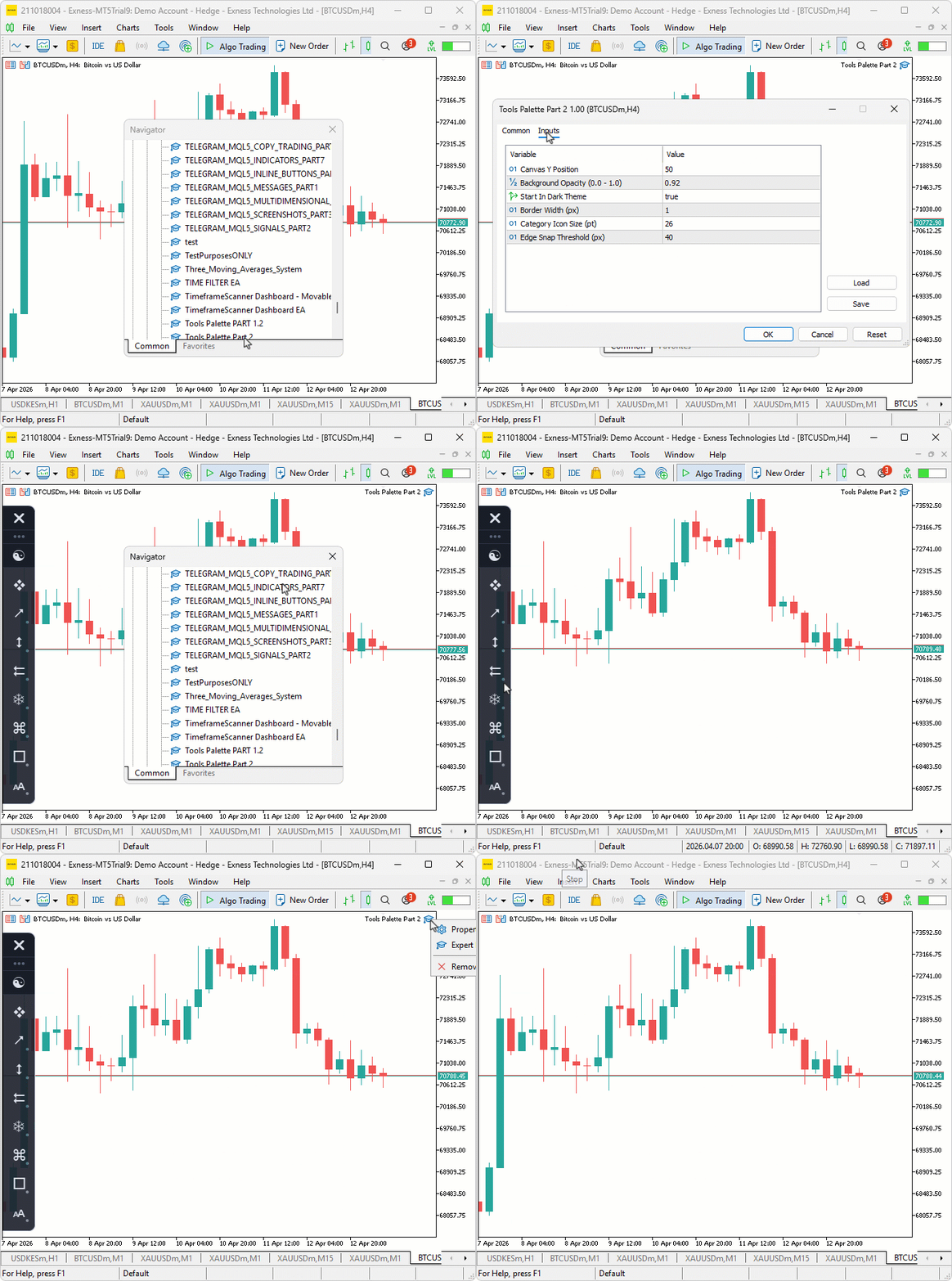
During testing, the sidebar rendered cleanly with anti-aliased rounded corners on both dark and light themes, the category icons displayed correctly in their centered positions, and the snap alignment kept the panel flush against the left chart edge with squared-off corners on the snapped side.
Conclusion
In conclusion, we have replaced the ad-hoc, function-heavy palette with a layered, class-based sidebar architecture that enforces clear responsibilities and a clean lifecycle. The end result is a compilable MQL5 module that initializes in the OnInit event handler and fully tears down in the OnDeinit event handler, rendering a vertical sidebar palette on the chart with supersampled high-resolution rendering and downsampling for anti-aliased rounded corners and borders, selective per-corner rounding when snapped to the left or right chart edge, centralized light and dark theme sets applied from a single manager, a category registry where adding a new tool group is a single definition entry rather than multiple edits across files, and predictable canvas creation and resizing under a single public shell class that owns initialization and drawing.
These outcomes are measurable: the project compiles, creates bitmap labels, displays the sidebar with the features above, responds to chart redraw, and removes its objects cleanly on deinitialization. Architecturally, each layer exposes only what the next requires — primitives feed into the theme manager, which feeds into the registry, then into the canvas layer, the layout, the renderer, and finally the shell. After reading this article, you will be able to:
- Structure canvas-based chart utilities using a layered class hierarchy where each class owns a single rendering or layout concern
- Produce anti-aliased rounded corners and borders through supersampled high-resolution rendering with selective per-corner rounding
- Implement a category registry system that makes adding new tool groups a matter of filling in a definition rather than reworking rendering logic
In the next part, we will build directly on this stable foundation by adding full interactivity, including flyout panels for tool selection, mouse-driven dragging and resizing, scrollable lists with thumb pill indicators, hover highlights, active state accent bars, and a chart drawing engine that places objects from single-click, two-click, and three-click tools. Stay tuned.
Warning: All rights to these materials are reserved by MetaQuotes Ltd. Copying or reprinting of these materials in whole or in part is prohibited.
This article was written by a user of the site and reflects their personal views. MetaQuotes Ltd is not responsible for the accuracy of the information presented, nor for any consequences resulting from the use of the solutions, strategies or recommendations described.

 MetaTrader 5 Machine Learning Blueprint (Part 14): Transaction Cost Modeling for Triple-Barrier Labels in MQL5
 Market Microstructure in MQL5 (Part 1): Robust Foundation
 MetaTrader 5 and the MQL5 Economic Calendar: How to Turn News into a Reproducible Trading System
 Three MACD Filters on US_TECH100: Five Years of Broker Data

- Free trading apps
- Over 8,000 signals for copying
- Economic news for exploring financial markets
You agree to website policy and terms of use