

MQL5 Trading Tools (Part 24): Depth-Perception Upgrades with 3D Curves, Pan Mode, and ViewCube Navigation
 2 538
2 538
 5
5

Introduction
You have a three-dimensional binomial distribution viewer with rotation and zoom, but without a depth-accurate curve, a way to shift the scene's focus point, or quick orientation resets, inspecting probability mass function shapes requires constant manual rotation, off-center regions stay out of reach, and returning to a standard view means dragging blindly. This article is for MetaQuotes Language 5 (MQL5) developers and algorithmic traders looking to extend interactive three-dimensional statistical tools with intuitive navigation controls for deeper probabilistic analysis.
In our previous article (Part 23), we integrated Direct3D into the MQL5 binomial distribution viewer, enabling switchable 2D/3D modes and camera control for rotation, zoom, and auto-fit. In Part 24, we enhance the tool by adding a segmented three-dimensional curve for improved depth perception of the probability mass function, integrating pan mode for view target shifting, and implementing an interactive view cube with hover zones and animated camera transitions for quick orientation changes. We will cover the following topics:
- Understanding the 3D Curve, Pan Mode, and ViewCube Framework
- Implementation in MQL5
- Backtesting
- Conclusion
By the end, you’ll have an advanced MQL5 tool with enhanced 3D navigation for distribution analysis, ready for customization—let’s dive in!
Understanding the 3D Curve, Pan Mode, and ViewCube Framework
Representing the probability mass function as a flat projected line in three-dimensional space loses the depth that makes three-dimensional rendering valuable — a segmented tubular curve, built from oriented box primitives aligned to consecutive data points, gives the curve physical presence in the scene so height differences between bins read naturally in perspective. Pan mode addresses a different limitation: rotation and zoom keep the scene anchored to a fixed target, so off-center distributions or wide trial counts push the region of interest toward the edge; shifting the view target via camera-relative vector arithmetic lets us explore the full scene without disturbing the current angle or zoom level. The view cube is a compact orientation widget that mirrors the camera's current rotation in real time, subdivided into clickable faces, edges, and corners that each map to a predefined angle pair, triggering a smooth interpolated transition rather than an instant jump.
In the market, use the depth-accurate curve alongside the histogram to judge whether the probability mass function peak aligns with the highest-frequency bin, signaling a well-calibrated model. Pan to center low-probability tails for closer inspection before sizing positions near extreme outcomes. Use the view cube's top view to compare bar heights across all bins simultaneously, and the front view to read individual bar values cleanly.
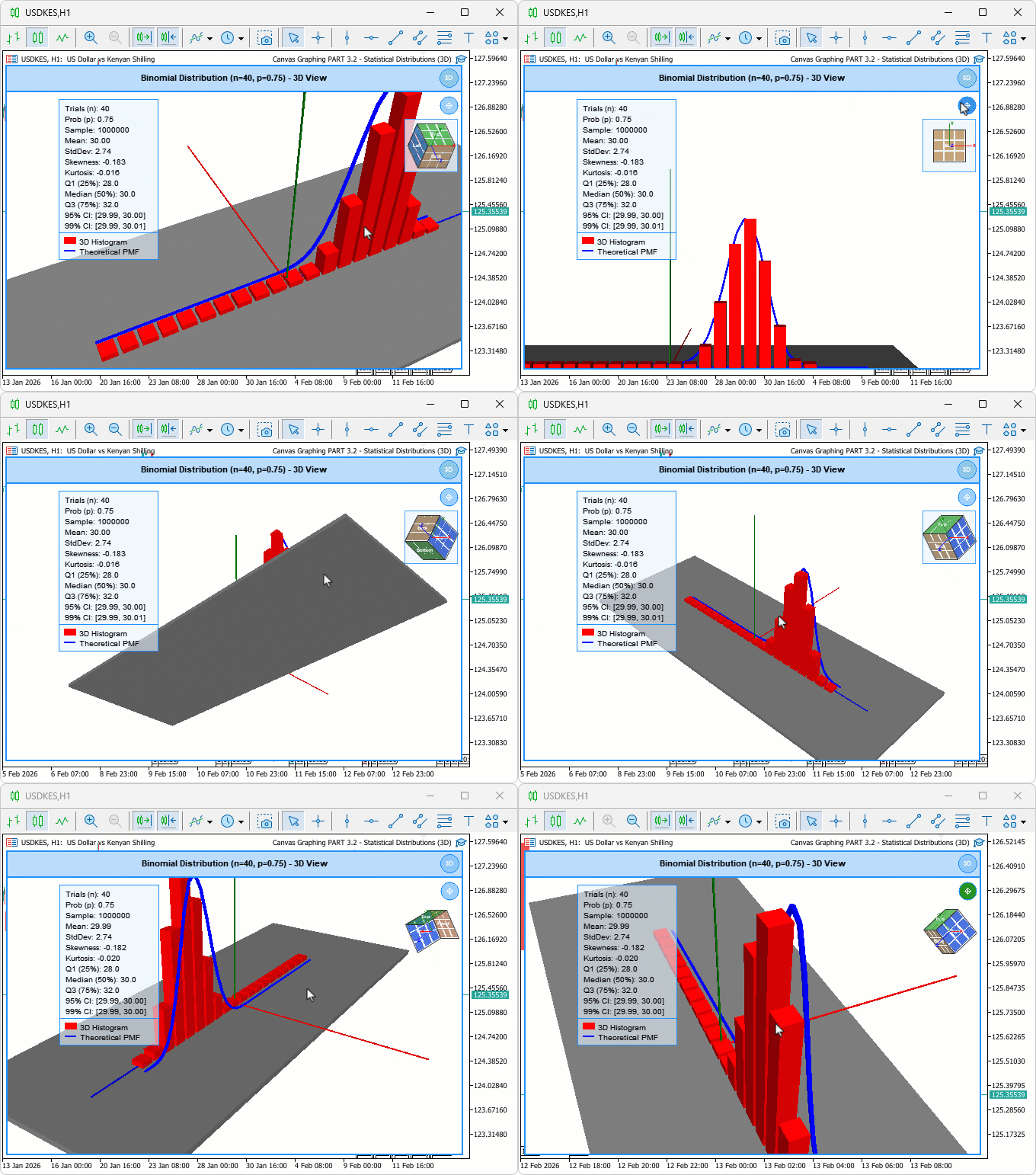
We will extend the tool by creating box-based curve segments scaled and rotated to form a continuous tube, implement pan logic using camera-relative vector calculations, and render the view cube with projected vertices, face sorting for correct drawing order, and bilinear interpolation for subdivided hover zones. We will also integrate timer-driven animations for view transitions, blended pixel overlays for icons and the cube, and event handling for clicks and hovers to make the interface fully responsive. Have a look below at our objectives.
Implementation in MQL5
Extending Inputs, Constants, and Class Members for Pan and View Cube Support
To support the new pan mode and view cube widget, we first extend the inputs with a view cube background toggle, define constants that govern icon and cube sizing, introduce new protected member variables into the visualizer class for hover states, curve segments, panning, and animation tracking, initialize them all in the constructor, and update the destructor to cleanly release the new curve segment array alongside the existing scene objects.
//+------------------------------------------------------------------+
//|    Canvas Graphing PART 3.2 - Statistical Distributions (3D).mq5 |
//|                           Copyright 2026, Allan Munene Mutiiria. |
//|                                   https://t.me/Forex_Algo_Trader |
//+------------------------------------------------------------------+
#property copyright "Copyright 2026, Allan Munene Mutiiria."
#property link      "https://t.me/Forex_Algo_Trader"
#property version   "1.00"
#property strict

input group "=== VIEW CUBE SETTINGS ==="
input bool             showViewCubeBackground = false;       // Show View Cube Background Panel

//--- Add new constants for pan icon and view cube dimensions

const int PAN_ICON_SIZE     = 24;   // Size of the pan mode toggle icon
const int PAN_ICON_MARGIN   = 6;    // Margin around the pan icon
const int VCUBE_SIZE        = 70;   // Pixel size of the view cube widget
const int VCUBE_MARGIN      = 6;    // Margin around the view cube widget

//--- Add new member variables in the "DistributionVisualizer" class for hovering states, curve segments, panning, animation, and view cube.

//+------------------------------------------------------------------+
//| Distribution visualization window class                          |
//+------------------------------------------------------------------+
class DistributionVisualizer
  {
protected:

   bool              m_isHoveringPanIcon;     // True when mouse is over the pan mode icon
   bool              m_isHoveringViewCube;    // True when mouse is over the view cube widget
   int               m_lastMouseX;            // Last recorded mouse X coordinate
   int               m_lastMouseY;            // Last recorded mouse Y coordinate
   int               m_previousMouseButtonState; // Mouse button state on previous event

   ViewModeType      m_currentViewMode;       // Active view mode (2D or 3D)
   bool              m_are3DObjectsCreated;   // True once 3D scene objects have been built

   CDXBox            m_histogramBars[];       // Array of 3D boxes representing histogram bars
   CDXBox            m_groundPlane;           // 3D box used as the ground reference plane
   CDXBox            m_axisX;                 // 3D box representing the X axis
   CDXBox            m_axisY;                 // 3D box representing the Y axis
   CDXBox            m_axisZ;                 // 3D box representing the Z axis
   CDXBox            m_curveSegments[];       // Array of 3D boxes representing PMF curve tube segments
   int               m_curveSegmentCount;     // Number of active curve segment boxes

   double            m_cameraDistance;        // Distance from camera to scene target
   double            m_cameraAngleX;          // Camera elevation angle (radians)
   double            m_cameraAngleY;          // Camera azimuth angle (radians)
   int               m_mouse3DStartX;         // Mouse X when 3D orbit drag began
   int               m_mouse3DStartY;         // Mouse Y when 3D orbit drag began
   bool              m_isRotating3D;          // True while user is orbiting the 3D scene
   bool              m_panMode;               // True when pan mode is active (vs orbit mode)
   bool              m_isPanning;             // True while a pan drag is in progress
   int               m_panStartX;             // Mouse X when pan drag began
   int               m_panStartY;             // Mouse Y when pan drag began
   DXVector3         m_viewTarget;            // World-space point the camera looks at

   double            m_sampleData[];                  // Raw binomial sample values
   double            m_histogramIntervals[];           // Histogram bin centre positions
   double            m_histogramFrequencies[];         // Scaled frequency per histogram bin
   double            m_theoreticalXValues[];           // X values for the theoretical PMF curve
   double            m_theoreticalYValues[];           // Y values for the theoretical PMF curve
   double            m_minDataValue;                   // Minimum value in data range
   double            m_maxDataValue;                   // Maximum value in data range
   double            m_maxFrequency;                   // Peak raw frequency across all bins
   double            m_maxTheoreticalValue;            // Peak theoretical PMF value
   bool              m_isDataLoaded;                   // True once distribution data is ready

   double            m_sampleMean;                     // Computed sample mean
   double            m_sampleStandardDeviation;        // Computed sample standard deviation
   double            m_sampleSkewness;                 // Computed sample skewness
   double            m_sampleKurtosis;                 // Computed sample excess kurtosis
   double            m_percentile25;                   // 25th percentile (Q1)
   double            m_percentile50;                   // 50th percentile (median)
   double            m_percentile75;                   // 75th percentile (Q3)
   double            m_confidenceInterval95Lower;      // Lower bound of 95% confidence interval
   double            m_confidenceInterval95Upper;      // Upper bound of 95% confidence interval
   double            m_confidenceInterval99Lower;      // Lower bound of 99% confidence interval
   double            m_confidenceInterval99Upper;      // Upper bound of 99% confidence interval

   double            m_targetAngleX;          // Target camera elevation angle for animation
   double            m_targetAngleY;          // Target camera azimuth angle for animation
   bool              m_isAnimating;           // True while a camera snap animation is running
   int               m_animSteps;             // Total number of animation interpolation steps
   int               m_animStep;              // Current animation step index
   double            m_animStartAngleX;       // Camera elevation angle at animation start
   double            m_animStartAngleY;       // Camera azimuth angle at animation start
   string            m_vcubeHoverZone;        // Name of the view cube zone under the cursor
   int               m_vcubeCenterX;          // Screen X of the view cube widget centre
   int               m_vcubeCenterY;          // Screen Y of the view cube widget centre

public:
   //+------------------------------------------------------------------+
   //| Initialise all member variables to safe defaults                 |
   //+------------------------------------------------------------------+
   DistributionVisualizer(void)
     {
      //--- Reset canvas hover flag
      m_isHoveringCanvas = false;
      //--- Reset header hover flag
      m_isHoveringHeader = false;
      //--- Reset resize zone hover flag
      m_isHoveringResizeZone = false;
      //--- Reset switch icon hover flag
      m_isHoveringSwitchIcon = false;
      //--- Reset pan icon hover flag
      m_isHoveringPanIcon = false;
      //--- Reset view cube hover flag
      m_isHoveringViewCube = false;
      //--- Reset last mouse X
      m_lastMouseX = 0;
      //--- Reset last mouse Y
      m_lastMouseY = 0;
      //--- Reset previous mouse button state
      m_previousMouseButtonState = 0;

      //--- Set view mode from input
      m_currentViewMode = viewMode;
      //--- Mark 3D objects as not yet created
      m_are3DObjectsCreated = false;

      //--- Set camera distance from input
      m_cameraDistance = initialCameraDistance;
      //--- Set camera elevation angle from input
      m_cameraAngleX = initialCameraAngleX;
      //--- Set camera azimuth angle from input
      m_cameraAngleY = initialCameraAngleY;
      //--- Reset 3D orbit drag origin X
      m_mouse3DStartX = -1;
      //--- Reset 3D orbit drag origin Y
      m_mouse3DStartY = -1;
      //--- Mark 3D orbit as inactive
      m_isRotating3D = false;
      //--- Start in orbit mode (not pan)
      m_panMode = false;
      //--- Mark pan drag as inactive
      m_isPanning = false;
      //--- Reset pan drag origin X
      m_panStartX = 0;
      //--- Reset pan drag origin Y
      m_panStartY = 0;
      //--- Initialise view target at scene origin
      m_viewTarget = DXVector3(0.0f, 0.0f, 0.0f);

      //--- Reset data range minimum
      m_minDataValue = 0.0;
      //--- Reset data range maximum
      m_maxDataValue = 0.0;
      //--- Reset peak histogram frequency
      m_maxFrequency = 0.0;
      //--- Reset peak theoretical PMF value
      m_maxTheoreticalValue = 0.0;
      //--- Mark data as not yet loaded
      m_isDataLoaded = false;

      //--- Reset sample mean
      m_sampleMean = 0.0;
      //--- Reset standard deviation
      m_sampleStandardDeviation = 0.0;
      //--- Reset skewness
      m_sampleSkewness = 0.0;
      //--- Reset kurtosis
      m_sampleKurtosis = 0.0;
      //--- Reset 25th percentile
      m_percentile25 = 0.0;
      //--- Reset median
      m_percentile50 = 0.0;
      //--- Reset 75th percentile
      m_percentile75 = 0.0;
      //--- Reset 95% CI lower bound
      m_confidenceInterval95Lower = 0.0;
      //--- Reset 95% CI upper bound
      m_confidenceInterval95Upper = 0.0;
      //--- Reset 99% CI lower bound
      m_confidenceInterval99Lower = 0.0;
      //--- Reset 99% CI upper bound
      m_confidenceInterval99Upper = 0.0;

      //--- Reset animation target elevation
      m_targetAngleX = 0.0;
      //--- Reset animation target azimuth
      m_targetAngleY = 0.0;
      //--- Mark animation as inactive
      m_isAnimating = false;
      //--- Set default animation step count
      m_animSteps = 20;
      //--- Reset current animation step
      m_animStep = 0;
      //--- Reset animation start elevation
      m_animStartAngleX = 0.0;
      //--- Reset animation start azimuth
      m_animStartAngleY = 0.0;
      //--- Clear view cube hover zone
      m_vcubeHoverZone = "";
      //--- Reset view cube centre X
      m_vcubeCenterX = 0;
      //--- Reset view cube centre Y
      m_vcubeCenterY = 0;
      //--- Reset curve segment count
      m_curveSegmentCount = 0;
     }

   //--- Update destructor to shutdown new curve segments array

   //+------------------------------------------------------------------+
   //| Release all 3D scene objects on destruction                      |
   //+------------------------------------------------------------------+
   ~DistributionVisualizer(void)
     {
      //--- Get total number of histogram bar boxes
      int count = ArraySize(m_histogramBars);
      //--- Release DirectX resources for every histogram bar
      for(int i = 0; i < count; i++)
         m_histogramBars[i].Shutdown();
      //--- Release DirectX resources for every curve tube segment
      for(int i = 0; i < m_curveSegmentCount; i++)
         m_curveSegments[i].Shutdown();
      //--- Release ground plane DirectX resources
      m_groundPlane.Shutdown();
      //--- Release X axis DirectX resources
      m_axisX.Shutdown();
      //--- Release Y axis DirectX resources
      m_axisY.Shutdown();
      //--- Release Z axis DirectX resources
      m_axisZ.Shutdown();
     }
   }
First, we add a new input group "=== VIEW CUBE SETTINGS ===" with "showViewCubeBackground" defaulting to false, allowing us to toggle a background for the view cube overlay. Next, we define constants for the pan icon and the view cube: "PAN_ICON_SIZE" and "PAN_ICON_MARGIN" for the pan toggle dimensions, "VCUBE_SIZE" and "VCUBE_MARGIN" for the view cube placement. In the "DistributionVisualizer" class protected section, we introduce members for enhanced interactions: "m_isHoveringPanIcon" and "m_isHoveringViewCube" for hover detection, "m_curveSegments" array and "m_curveSegmentCount" for 3D curve management, "m_panMode" and "m_isPanning" booleans with "m_panStartX" and "m_panStartY" for panning state, "m_viewTarget" as DXVector3 for camera focus, "m_targetAngleX" and "m_targetAngleY" for animation targets, "m_isAnimating" with "m_animSteps", "m_animStep", "m_animStartAngleX", and "m_animStartAngleY" for smooth transitions, "m_vcubeHoverZone" string for detected cube areas, and "m_vcubeCenterX" and "m_vcubeCenterY" for cube positioning.
In the constructor, we initialize these: set "m_isHoveringPanIcon" and "m_isHoveringViewCube" to false, "m_curveSegmentCount" to 0, "m_panMode" and "m_isPanning" to false, "m_panStartX" and "m_panStartY" to 0, "m_viewTarget" to origin vector, target angles to 0.0, "m_isAnimating" to false, "m_animSteps" to 20, "m_animStep" to 0, start angles to 0.0, "m_vcubeHoverZone" to empty string, and cube centers to 0. We update the destructor to shut down the new "m_curveSegments" array by looping through "m_curveSegmentCount" and calling "Shutdown" on each, alongside existing cleanups for bars, plane, and axes. With that done, we update the three-dimensional context initialization to use the new member variable as follows. We have highlighted the specific change for clarity.
Updating the Three-Dimensional Context Initialization for Dynamic View Target
The single change here replaces the hard-coded origin vector passed to "ViewTargetSet" with the "m_viewTarget" member variable, so that pan operations which update "m_viewTarget" are reflected immediately when the camera is repositioned.
//+------------------------------------------------------------------+
//| Set up projection, lighting and initial camera for 3D rendering  |
//+------------------------------------------------------------------+
bool initialize3DContext()
  {
   //--- Set perspective projection matrix with 30-degree FOV
   m_mainCanvas.ProjectionMatrixSet((float)(DX_PI / 6.0),
                                    (float)m_currentWidth / (float)m_currentHeight,
                                    0.1f, 1000.0f);
   //--- Point the camera at the current view target
   m_mainCanvas.ViewTargetSet(m_viewTarget);
   //--- Define world up direction as positive Y
   m_mainCanvas.ViewUpDirectionSet(DXVector3(0.0f, 1.0f, 0.0f));
   //--- Set directional light colour to near-white
   m_mainCanvas.LightColorSet(DXColor(1.0f, 1.0f, 1.0f, 0.9f));
   //--- Set ambient light colour for soft fill
   m_mainCanvas.AmbientColorSet(DXColor(0.6f, 0.6f, 0.6f, 0.5f));

   //--- Auto-fit camera if enabled and data is already available
   if(autoFitCamera && m_isDataLoaded)
      autoFitCameraPosition();
   //--- Recompute and apply the camera transform
   updateCameraPosition();

   Print("SUCCESS: 3D context initialized");
   return true;
  }
With the context updated, we now create the three-dimensional curve segments to replace the flat projected spline.
Creating the Three-Dimensional Curve Segments
Rather than projecting the probability mass function as a flat line onto the scene, we build a series of oriented box primitives that form a continuous tube aligned to consecutive theoretical data points, giving the curve physical depth in the three-dimensional scene so height differences between bins read naturally in perspective.
//+------------------------------------------------------------------+
//| Allocate one DXBox tube segment per PMF curve interval           |
//+------------------------------------------------------------------+
bool create3DCurveSegments()
  {
   //--- Get the total number of PMF sample points
   int numPoints = ArraySize(m_theoreticalXValues);
   Print("DEBUG: create3DCurveSegments called, numPoints=", numPoints);
   //--- Need at least two points to form a segment
   if(numPoints < 2) return false;

   //--- Shutdown any previously created segments before rebuilding
   for(int i = 0; i < m_curveSegmentCount; i++)
      m_curveSegments[i].Shutdown();

   //--- One segment per adjacent pair of PMF points
   m_curveSegmentCount = numPoints - 1;
   ArrayResize(m_curveSegments, m_curveSegmentCount);

   //--- Decompose PMF curve colour into RGB byte components
   uchar cr = (uchar)((theoreticalCurveColor)       & 0xFF);
   uchar cg = (uchar)((theoreticalCurveColor >> 8)  & 0xFF);
   uchar cb = (uchar)((theoreticalCurveColor >> 16) & 0xFF);

   //--- Create and configure each tube segment box
   for(int i = 0; i < m_curveSegmentCount; i++)
     {
      //--- Create unit box; actual transform applied in update step
      if(!m_curveSegments[i].Create(m_mainCanvas.DXDispatcher(), m_mainCanvas.InputScene(),
                                    DXVector3(0.0f, -0.5f, -0.5f),
                                    DXVector3(1.0f,  0.5f,  0.5f)))
        {
         Print("ERROR: Failed to create curve segment ", i);
         return false;
        }
      //--- Set the segment diffuse colour from the curve colour input
      m_curveSegments[i].DiffuseColorSet(DXColor(cr / 255.0f, cg / 255.0f, cb / 255.0f, 1.0f));
      //--- Add a specular highlight to the tube surface
      m_curveSegments[i].SpecularColorSet(DXColor(0.3f, 0.3f, 0.3f, 0.5f));
      //--- Set specular shininess exponent
      m_curveSegments[i].SpecularPowerSet(32.0f);
      //--- Add a faint self-emission for visibility in shadowed areas
      m_curveSegments[i].EmissionColorSet(DXColor(cr / 255.0f * 0.25f,
                                                   cg / 255.0f * 0.25f,
                                                   cb / 255.0f * 0.25f, 1.0f));
      //--- Register the segment with the 3D scene
      m_mainCanvas.ObjectAdd(GetPointer(m_curveSegments[i]));
     }

   Print("DEBUG: Created ", m_curveSegmentCount, " curve segments successfully");
   return true;
  }
Here, we define the "create3DCurveSegments" function to generate a series of 3D box primitives that form a tubular representation of the theoretical probability mass function curve. In this context, the tubular approach means representing the curve as a sequence of connected box-shaped segments that together resemble a continuous tube, giving the curve depth and smooth visual continuity in the 3D scene. The tubular approach is the best straightforward way we thought of for this presentation. You can use any approach you like. We first retrieve the number of theoretical points with ArraySize on "m_theoreticalXValues" and print a debug message. If fewer than two points, return false as no segments can be created. We loop to shut down any existing segments in "m_curveSegments" using "Shutdown", set "m_curveSegmentCount" to points minus one, and resize the array with the ArrayResize function.
Next, extract RGB components from "theoreticalCurveColor" via bit operations. In a loop for each segment, we call the "Create" method on the box with the DX dispatcher, input scene, and vector dimensions for a unit cylinder-like shape, handling failure with error print and false return. We set material properties: diffuse color with "DiffuseColorSet" using normalized RGB, specular via "SpecularColorSet" for shine, power with "SpecularPowerSet" at 32.0f, and emission slightly tinted for glow using "EmissionColorSet". Add each segment to the canvas with "ObjectAdd" passing a pointer, print debug success, and return true.
This segmented approach approximates the curve as connected tubes, where each box is later transformed to match curve points, enabling rotation and depth perception without complex geometry, which is key for visualizing smooth probability transitions in three dimensions while keeping performance efficient. With the segments created, we now need to position and orient them to match the actual curve data.
Updating Curve Segment Transforms to Follow Data Points
With the segment boxes created as unit primitives, this function computes and applies a custom transform matrix to each one, stretching it to the correct length, rotating it to align with the direction between consecutive probability mass function points, and placing it at the right position in the three-dimensional scene.
//+------------------------------------------------------------------+
//| Reposition and orient every PMF curve tube segment to match data |
//+------------------------------------------------------------------+
void update3DCurveSegments()
  {
   //--- Abort if data or segments are not ready
   if(!m_isDataLoaded || m_curveSegmentCount == 0) return;

   //--- Compute data ranges for world-space mapping
   double rangeX = m_maxDataValue - m_minDataValue;
   double rangeY = m_maxTheoreticalValue;
   if(rangeX == 0) rangeX = 1;
   if(rangeY == 0) rangeY = 1;

   //--- Match the total scene width used for the histogram bars
   float totalWidth  = 30.0f;
   float offsetX     = -totalWidth / 2.0f;
   float barSpacing  = totalWidth / (float)histogramCells;
   float bw          = barSpacing * 0.8f;
   //--- Tube radius controls the 3D thickness of each curve segment
   float tubeRadius  = 0.2f;
   //--- Place the curve in front of the histogram bars along Z
   float zPos        = bw / 2.0f + 0.5f;

   //--- Limit debug logging to the first call only
   static bool firstDebug = true;

   //--- Build and apply a custom transform matrix for each segment
   for(int i = 0; i < m_curveSegmentCount; i++)
     {
      //--- Map PMF X and Y values to 3D world space coordinates
      float x1 = offsetX + (float)((m_theoreticalXValues[i]     - m_minDataValue) / rangeX * totalWidth);
      float y1 = (float)(m_theoreticalYValues[i]     / rangeY * 15.0);
      float x2 = offsetX + (float)((m_theoreticalXValues[i + 1] - m_minDataValue) / rangeX * totalWidth);
      float y2 = (float)(m_theoreticalYValues[i + 1] / rangeY * 15.0);

      //--- Compute the segment direction vector components
      float dx = x2 - x1;
      float dy = y2 - y1;
      //--- Compute segment length for normalisation
      float segLen = (float)MathSqrt(dx * dx + dy * dy);
      if(segLen < 0.0001f) segLen = 0.0001f;
      //--- Normalise the direction vector
      float dirX = dx / segLen;
      float dirY = dy / segLen;

      //--- Log the first segment only for diagnostics
      if(firstDebug && i == 0)
         Print("DEBUG curve seg0: x1=", x1, " y1=", y1, " x2=", x2, " y2=", y2,
               " len=", segLen, " z=", zPos);

      //--- Build a custom transform that scales, rotates and translates the unit box
      //--- The transform rows encode: [right, up, depth, translation]
      DXMatrix transform;
      transform.m[0][0] = dirX * segLen;      transform.m[0][1] = dirY * segLen;      transform.m[0][2] = 0.0f;         transform.m[0][3] = 0.0f;
      transform.m[1][0] = -dirY * tubeRadius; transform.m[1][1] = dirX * tubeRadius;  transform.m[1][2] = 0.0f;         transform.m[1][3] = 0.0f;
      transform.m[2][0] = 0.0f;               transform.m[2][1] = 0.0f;               transform.m[2][2] = tubeRadius;   transform.m[2][3] = 0.0f;
      transform.m[3][0] = x1;                 transform.m[3][1] = y1;                 transform.m[3][2] = zPos;         transform.m[3][3] = 1.0f;

      //--- Apply the combined transform to this curve segment
      m_curveSegments[i].TransformMatrixSet(transform);
     }
   //--- Suppress first-call debug logging after the first pass
   firstDebug = false;
  }
Here, we define the "update3DCurveSegments" function to dynamically position and orient each 3D box segment representing the probability mass function curve, ensuring it follows the data points with a tubular appearance for enhanced depth. We return early if data is unloaded or no segments exist, then compute X and Y ranges with minimum safeguards, set a total width matching the histogram for alignment, and derive offset, bar spacing, width, tube radius, and a z-position slightly behind bars for layering. In a loop over "m_curveSegmentCount", we scale coordinates x1, y1, x2, y2 to fit the 3D space up to 15.0f height, calculate direction vector from deltas normalized by segment length (with a tiny minimum to avoid zero division), and optionally print debug info for the first segment on initial call using a static flag.
To transform each unit box into an oriented tube, we construct a "DXMatrix" transform: row 0 stretches along the direction by length, row 1 rotates perpendicular for radius thickness, row 2 sets depth radius, and row 3 translates to the starting position at zPos, then apply it with "TransformMatrixSet" for precise placement. Finally, we reset the debug flag after the first run, completing the update that turns flat curve data into a rotatable three-dimensional structure, improving perception of probability variations across the distribution. With both creation and update functions ready, we wire them into the existing scene setup as follows.
Wiring Curve Segment Creation and Updates into the Scene Pipeline
Three targeted additions connect the new curve functions to the existing setup: segments are created during initial object construction if data is already loaded, recreated when entering three-dimensional mode if none exist, and updated alongside the histogram bars each time distribution data is reloaded.
//--- Update "create3DObjects" to attempt creating curve segments if data is loaded

//--- Attempt to create PMF curve tube segments (non-fatal if it fails)
if(m_isDataLoaded && !create3DCurveSegments())
   Print("WARNING: Failed to create 3D curve segments");

//--- Update "setup3DMode" to create and update curve segments if needed

//--- Build curve segments if they were not created during init
if(m_isDataLoaded && m_curveSegmentCount == 0)
   create3DCurveSegments();

//--- Update "loadDistributionData" to update curve segments in 3D mode

if(m_curveSegmentCount == 0)
   create3DCurveSegments();
//--- Reposition every curve segment in 3D space
update3DCurveSegments();
Upon compilation, the three-dimensional curve segments appear alongside the histogram bars as follows.

With the curve in place, we now add the pan icon overlay that lets the user toggle pan mode on and off directly from the three-dimensional view.
Drawing the Pan Mode Toggle Icon
To give the user a visible control for activating pan mode, we render a circular icon positioned just below the mode switch button. The icon fills green when pan mode is active, darkens on hover, and displays a cross-with-arrows symbol drawn from blended pixels to communicate its drag-to-pan purpose.
//+------------------------------------------------------------------+
//| Draw the pan mode toggle button overlaid on the 3D canvas        |
//+------------------------------------------------------------------+
void drawPanIconOverlay()
  {
   //--- Pan icon is only drawn in 3D mode
   if(m_currentViewMode != VIEW_3D_MODE) return;

   //--- Compute icon position below the header on the right side
   int iconX = m_currentWidth  - PAN_ICON_SIZE - PAN_ICON_MARGIN;
   int iconY = HEADER_BAR_HEIGHT + PAN_ICON_MARGIN;
   int cx    = iconX + PAN_ICON_SIZE / 2;
   int cy    = iconY + PAN_ICON_SIZE / 2;
   int rad   = PAN_ICON_SIZE / 2;

   //--- Compute icon background colour based on interaction state
   color iconBgColor;
   if(m_panMode)
      iconBgColor = clrGreen;                         // Active pan mode: green
   else if(m_isHoveringPanIcon)
      iconBgColor = DarkenColor(themeColor, 0.1);     // Hover: slightly darker
   else
      iconBgColor = LightenColor(themeColor, 0.5);    // Default: lighter shade

   uint argbBg     = ColorToARGB(iconBgColor, 220);
   uint argbBorder = ColorToARGB(themeColor, 255);
   uint argbWhite  = ColorToARGB(clrWhite, 255);

   //--- Fill the circular icon background
   for(int py = cy - rad; py <= cy + rad; py++)
      for(int px = cx - rad; px <= cx + rad; px++)
        {
         int dx = px - cx;
         int dy = py - cy;
         if(dx * dx + dy * dy <= rad * rad)
            blendPixelSet(m_mainCanvas, px, py, argbBg);
        }

   //--- Draw the circular icon border ring
   for(int py = cy - rad; py <= cy + rad; py++)
      for(int px = cx - rad; px <= cx + rad; px++)
        {
         int dx = px - cx;
         int dy = py - cy;
         int distSq = dx * dx + dy * dy;
         if(distSq <= rad * rad && distSq >= (rad - 1) * (rad - 1))
            blendPixelSet(m_mainCanvas, px, py, argbBorder);
        }

   //--- Draw the four-arrow pan icon symbol in white
   int arrLen  = 4;
   int arrHead = 2;
   //--- Draw the horizontal crosshair bar
   for(int i = -arrLen; i <= arrLen; i++)
      blendPixelSet(m_mainCanvas, cx + i, cy, argbWhite);
   //--- Draw the vertical crosshair bar
   for(int i = -arrLen; i <= arrLen; i++)
      blendPixelSet(m_mainCanvas, cx, cy + i, argbWhite);
   //--- Draw the four arrowheads at each end of the crosshair
   for(int i = 0; i <= arrHead; i++)
     {
      blendPixelSet(m_mainCanvas, cx + arrLen - i, cy - i, argbWhite); // Right arrow top
      blendPixelSet(m_mainCanvas, cx + arrLen - i, cy + i, argbWhite); // Right arrow bottom
      blendPixelSet(m_mainCanvas, cx - arrLen + i, cy - i, argbWhite); // Left arrow top
      blendPixelSet(m_mainCanvas, cx - arrLen + i, cy + i, argbWhite); // Left arrow bottom
      blendPixelSet(m_mainCanvas, cx - i, cy - arrLen + i, argbWhite); // Up arrow left
      blendPixelSet(m_mainCanvas, cx + i, cy - arrLen + i, argbWhite); // Up arrow right
      blendPixelSet(m_mainCanvas, cx - i, cy + arrLen - i, argbWhite); // Down arrow left
      blendPixelSet(m_mainCanvas, cx + i, cy + arrLen - i, argbWhite); // Down arrow right
     }
  }
We define the "drawPanIconOverlay" function to render a circular toggle icon for pan mode in the 3D view, positioned below the header using constants like "PAN_ICON_SIZE" and "PAN_ICON_MARGIN". We select the background color: green if "m_panMode" is active, darkened "themeColor" on hover with "DarkenColor", or lightened otherwise via "LightenColor", then convert to ARGB with partial opacity. To create the button, we loop over a square area and blend pixels inside the radius with "blendPixelSet" for the fill, and separately for the border by checking the outer ring, using the theme ARGB for outline.
For the icon graphics, we set arrow length and head size, draw horizontal and vertical lines through the center with "blendPixelSet" in white ARGB, and add triangular arrowheads at each end by blending offset pixels, forming a cross with pointers for intuitive pan indication. This overlay provides visual feedback and toggle access, drawn after the three-dimensional scene render so it sits on top without interfering with DirectX output. Upon calling the function, the pan overlay renders as follows.

With the pan overlay in place, we now build the view cube overlay that mirrors the camera orientation and provides clickable navigation zones.
Projecting and Rendering the View Cube Overlay
The view cube is drawn as a two-dimensional overlay by projecting a unit cube's eight vertices through the current camera angles, sorting its six faces back-to-front for correct occlusion, subdividing each visible face into a three-by-three grid of clickable sub-zones with bilinear interpolation, filling each sub-quad with brightness-based shading, and drawing colored axis lines from the projected origin for orientation reference.
//+------------------------------------------------------------------+
//| Project a 3D view cube vertex into 2D screen coordinates         |
//+------------------------------------------------------------------+
void vcubeProject(double x, double y, double z, double angX, double angY, int &sx, int &sy)
  {
   //--- Pre-compute trigonometric values for both rotation angles
   double cosAX = MathCos(angX), sinAX = MathSin(angX);
   double cosAY = MathCos(angY), sinAY = MathSin(angY);
   //--- Rotate the point around the X axis (elevation)
   double y2 = y * cosAX - z * sinAX;
   double z2 = y * sinAX + z * cosAX;
   //--- Rotate the result around the Y axis (azimuth)
   double x2 = x * cosAY + z2 * sinAY;
   //--- Apply a fixed orthographic scale relative to the cube widget size
   double scale = VCUBE_SIZE * 0.30;
   //--- Map to screen pixels relative to the view cube centre
   sx = m_vcubeCenterX + (int)(x2 * scale);
   sy = m_vcubeCenterY - (int)(y2 * scale);
  }

//+------------------------------------------------------------------+
//| Draw and label the interactive 3D view cube overlay widget       |
//+------------------------------------------------------------------+
void drawViewCubeOverlay()
  {
   //--- View cube is only drawn in 3D mode
   if(m_currentViewMode != VIEW_3D_MODE) return;

   //--- Compute the view cube bounding area below the pan icon
   int areaX       = m_currentWidth  - VCUBE_SIZE - VCUBE_MARGIN;
   int areaY       = HEADER_BAR_HEIGHT + PAN_ICON_MARGIN + PAN_ICON_SIZE + VCUBE_MARGIN;
   m_vcubeCenterX  = areaX + VCUBE_SIZE / 2;
   m_vcubeCenterY  = areaY + VCUBE_SIZE / 2;

   //--- Optionally draw a semi-transparent background panel behind the cube
   if(showViewCubeBackground)
     {
      uint argbPanelBg     = ColorToARGB(LightenColor(themeColor, 0.92), 200);
      uint argbPanelBorder = ColorToARGB(themeColor, 200);
      //--- Fill the background panel
      for(int py = areaY; py < areaY + VCUBE_SIZE; py++)
         for(int px = areaX; px < areaX + VCUBE_SIZE; px++)
            blendPixelSet(m_mainCanvas, px, py, argbPanelBg);
      //--- Draw top and bottom borders
      for(int px = areaX; px < areaX + VCUBE_SIZE; px++)
        {
         blendPixelSet(m_mainCanvas, px, areaY, argbPanelBorder);
         blendPixelSet(m_mainCanvas, px, areaY + VCUBE_SIZE - 1, argbPanelBorder);
        }
      //--- Draw left and right borders
      for(int py = areaY; py < areaY + VCUBE_SIZE; py++)
        {
         blendPixelSet(m_mainCanvas, areaX, py, argbPanelBorder);
         blendPixelSet(m_mainCanvas, areaX + VCUBE_SIZE - 1, py, argbPanelBorder);
        }
     }

   //--- Use the current camera angles as the cube orientation
   double angX = m_cameraAngleX;
   double angY = m_cameraAngleY;

   //--- Define the 8 vertices of the unit cube in local space
   double verts[8][3];
   verts[0][0] = -1; verts[0][1] = -1; verts[0][2] = -1;
   verts[1][0] =  1; verts[1][1] = -1; verts[1][2] = -1;
   verts[2][0] =  1; verts[2][1] =  1; verts[2][2] = -1;
   verts[3][0] = -1; verts[3][1] =  1; verts[3][2] = -1;
   verts[4][0] = -1; verts[4][1] = -1; verts[4][2] =  1;
   verts[5][0] =  1; verts[5][1] = -1; verts[5][2] =  1;
   verts[6][0] =  1; verts[6][1] =  1; verts[6][2] =  1;
   verts[7][0] = -1; verts[7][1] =  1; verts[7][2] =  1;

   //--- Project all 8 vertices to screen space
   int sv[8][2];
   for(int i = 0; i < 8; i++)
      vcubeProject(verts[i][0], verts[i][1], verts[i][2], angX, angY, sv[i][0], sv[i][1]);

   //--- Define the 6 faces by their vertex indices (counter-clockwise)
   int faces[6][4];
   faces[0][0]=0; faces[0][1]=1; faces[0][2]=2; faces[0][3]=3; // Front
   faces[1][0]=5; faces[1][1]=4; faces[1][2]=7; faces[1][3]=6; // Back
   faces[2][0]=3; faces[2][1]=2; faces[2][2]=6; faces[2][3]=7; // Top
   faces[3][0]=0; faces[3][1]=1; faces[3][2]=5; faces[3][3]=4; // Bottom
   faces[4][0]=1; faces[4][1]=5; faces[4][2]=6; faces[4][3]=2; // Right
   faces[5][0]=4; faces[5][1]=0; faces[5][2]=3; faces[5][3]=7; // Left

   //--- Face label strings for text overlay
   string faceNames[6];
   faceNames[0] = "Front";
   faceNames[1] = "Back";
   faceNames[2] = "Top";
   faceNames[3] = "Bottom";
   faceNames[4] = "Right";
   faceNames[5] = "Left";

   //--- Face outward normals for back-face culling
   double faceNormals[6][3];
   faceNormals[0][0]= 0; faceNormals[0][1]= 0; faceNormals[0][2]=-1;
   faceNormals[1][0]= 0; faceNormals[1][1]= 0; faceNormals[1][2]= 1;
   faceNormals[2][0]= 0; faceNormals[2][1]= 1; faceNormals[2][2]= 0;
   faceNormals[3][0]= 0; faceNormals[3][1]=-1; faceNormals[3][2]= 0;
   faceNormals[4][0]= 1; faceNormals[4][1]= 0; faceNormals[4][2]= 0;
   faceNormals[5][0]=-1; faceNormals[5][1]= 0; faceNormals[5][2]= 0;

   //--- Camera direction vector for depth sorting and back-face culling
   double camDir[3];
   camDir[0] =  MathCos(angX) * MathSin(angY);
   camDir[1] = -MathSin(angX);
   camDir[2] = -MathCos(angX) * MathCos(angY);

   //--- Sort faces back-to-front using their projected depth (painter's algorithm)
   int    faceOrder[6];
   double faceDepth[6];
   for(int i = 0; i < 6; i++)
     {
      faceOrder[i] = i;
      double cx = 0, cy2 = 0, cz = 0;
      //--- Compute the face centre as the average of its four vertices
      for(int j = 0; j < 4; j++)
        {
         cx  += verts[faces[i][j]][0];
         cy2 += verts[faces[i][j]][1];
         cz  += verts[faces[i][j]][2];
        }
      cx /= 4.0; cy2 /= 4.0; cz /= 4.0;
      //--- Project the centre onto the camera direction for depth
      faceDepth[i] = cx * camDir[0] + cy2 * camDir[1] + cz * camDir[2];
     }
   //--- Bubble-sort the face order from farthest to nearest
   for(int i = 0; i < 5; i++)
      for(int j = i + 1; j < 6; j++)
         if(faceDepth[faceOrder[i]] > faceDepth[faceOrder[j]])
           {
            int tmp = faceOrder[i];
            faceOrder[i] = faceOrder[j];
            faceOrder[j] = tmp;
           }

   //--- Assign a distinct base colour to each face for identification
   color faceColors[6];
   faceColors[0] = clrCornflowerBlue; // Front
   faceColors[1] = clrSteelBlue;      // Back
   faceColors[2] = clrLimeGreen;      // Top
   faceColors[3] = clrDarkGreen;      // Bottom
   faceColors[4] = clrOrangeRed;      // Right
   faceColors[5] = clrDarkOrange;     // Left

   //--- Sub-face zone names for all 6 faces (3x3 grid per face)
   string faceSubNames[6][3][3];
   // Front face sub-zones
   faceSubNames[0][0][0] = "BottomFrontLeft";   faceSubNames[0][1][0] = "BottomFront";   faceSubNames[0][2][0] = "BottomFrontRight";
   faceSubNames[0][0][1] = "FrontLeft";          faceSubNames[0][1][1] = "Front";         faceSubNames[0][2][1] = "FrontRight";
   faceSubNames[0][0][2] = "TopFrontLeft";       faceSubNames[0][1][2] = "TopFront";      faceSubNames[0][2][2] = "TopFrontRight";
   // Back face sub-zones
   faceSubNames[1][0][0] = "BottomBackLeft";     faceSubNames[1][1][0] = "BottomBack";    faceSubNames[1][2][0] = "BottomBackRight";
   faceSubNames[1][0][1] = "BackLeft";           faceSubNames[1][1][1] = "Back";          faceSubNames[1][2][1] = "BackRight";
   faceSubNames[1][0][2] = "TopBackLeft";        faceSubNames[1][1][2] = "TopBack";       faceSubNames[1][2][2] = "TopBackRight";
   // Top face sub-zones
   faceSubNames[2][0][0] = "TopFrontLeft";       faceSubNames[2][1][0] = "TopFront";      faceSubNames[2][2][0] = "TopFrontRight";
   faceSubNames[2][0][1] = "TopLeft";            faceSubNames[2][1][1] = "Top";           faceSubNames[2][2][1] = "TopRight";
   faceSubNames[2][0][2] = "TopBackLeft";        faceSubNames[2][1][2] = "TopBack";       faceSubNames[2][2][2] = "TopBackRight";
   // Bottom face sub-zones
   faceSubNames[3][0][0] = "BottomFrontLeft";   faceSubNames[3][1][0] = "BottomFront";   faceSubNames[3][2][0] = "BottomFrontRight";
   faceSubNames[3][0][1] = "BottomLeft";         faceSubNames[3][1][1] = "Bottom";        faceSubNames[3][2][1] = "BottomRight";
   faceSubNames[3][0][2] = "BottomBackLeft";     faceSubNames[3][1][2] = "BottomBack";    faceSubNames[3][2][2] = "BottomBackRight";
   // Right face sub-zones
   faceSubNames[4][0][0] = "BottomFrontRight";  faceSubNames[4][1][0] = "BottomRight";   faceSubNames[4][2][0] = "BottomBackRight";
   faceSubNames[4][0][1] = "FrontRight";         faceSubNames[4][1][1] = "Right";         faceSubNames[4][2][1] = "BackRight";
   faceSubNames[4][0][2] = "TopFrontRight";      faceSubNames[4][1][2] = "TopRight";      faceSubNames[4][2][2] = "TopBackRight";
   // Left face sub-zones
   faceSubNames[5][0][0] = "BottomFrontLeft";   faceSubNames[5][1][0] = "BottomLeft";    faceSubNames[5][2][0] = "BottomBackLeft";
   faceSubNames[5][0][1] = "FrontLeft";          faceSubNames[5][1][1] = "Left";          faceSubNames[5][2][1] = "BackLeft";
   faceSubNames[5][0][2] = "TopFrontLeft";       faceSubNames[5][1][2] = "TopLeft";       faceSubNames[5][2][2] = "TopBackLeft";

   //--- Shrink factor creates a small visible gap between sub-face tiles
   double shrink = 0.03;

   //--- Render visible faces in back-to-front order
   for(int fi = 0; fi < 6; fi++)
     {
      int f = faceOrder[fi];
      //--- Compute the dot product to cull back-facing faces
      double dot = faceNormals[f][0] * camDir[0] +
                   faceNormals[f][1] * camDir[1] +
                   faceNormals[f][2] * camDir[2];
      if(dot >= 0) continue;

      //--- Compute Lambert diffuse brightness from the dot product
      double brightness = MathAbs(dot);
      brightness = 0.4 + 0.6 * brightness;

      //--- Apply brightness to the base face colour
      color fc = faceColors[f];
      uchar fr_base = (uchar)MathMin(255, (int)(((fc >> 16) & 0xFF) * brightness));
      uchar fg_base = (uchar)MathMin(255, (int)(((fc >> 8)  & 0xFF) * brightness));
      uchar fb_base = (uchar)MathMin(255, (int)(( fc        & 0xFF) * brightness));

      uchar alpha = 180;

      //--- Get the four projected screen vertices for this face
      int fx[4], fy[4];
      for(int j = 0; j < 4; j++)
        {
         fx[j] = sv[faces[f][j]][0];
         fy[j] = sv[faces[f][j]][1];
        }

      //--- Draw each 3x3 sub-face tile using bilinear interpolation
      for(int i = 0; i < 3; i++)
         for(int j = 0; j < 3; j++)
           {
            //--- Compute the UV bounds for this sub-tile with shrink margin
            double u1 = i / 3.0 + shrink;
            double u2 = (i + 1) / 3.0 - shrink;
            double v1 = j / 3.0 + shrink;
            double v2 = (j + 1) / 3.0 - shrink;
            if(u1 >= u2 || v1 >= v2) continue;

            //--- Compute the four screen-space corners of this sub-tile
            int sub_fx[4], sub_fy[4];
            sub_fx[0] = (int)bilinear(fx[0], fx[1], fx[3], fx[2], u1, v1);
            sub_fy[0] = (int)bilinear(fy[0], fy[1], fy[3], fy[2], u1, v1);
            sub_fx[1] = (int)bilinear(fx[0], fx[1], fx[3], fx[2], u2, v1);
            sub_fy[1] = (int)bilinear(fy[0], fy[1], fy[3], fy[2], u2, v1);
            sub_fx[2] = (int)bilinear(fx[0], fx[1], fx[3], fx[2], u2, v2);
            sub_fy[2] = (int)bilinear(fy[0], fy[1], fy[3], fy[2], u2, v2);
            sub_fx[3] = (int)bilinear(fx[0], fx[1], fx[3], fx[2], u1, v2);
            sub_fy[3] = (int)bilinear(fy[0], fy[1], fy[3], fy[2], u1, v2);

            //--- Look up the zone name for this sub-tile
            string subZone  = faceSubNames[f][i][j];
            //--- Check if this tile is the one currently hovered
            bool isHovered = (m_vcubeHoverZone == subZone);

            //--- Copy base colour channels for potential brightening
            uchar fr = fr_base;
            uchar fg = fg_base;
            uchar fb = fb_base;
            //--- Increase alpha and brighten colour when hovered
            uchar subAlpha = isHovered ? (uchar)240 : alpha;
            if(isHovered)
              {
               fr = (uchar)MathMin(255, fr + 40);
               fg = (uchar)MathMin(255, fg + 40);
               fb = (uchar)MathMin(255, fb + 40);
              }
            //--- Pack ARGB colour for this sub-tile
            uint argbFace = ((uint)subAlpha << 24) | ((uint)fr << 16) | ((uint)fg << 8) | (uint)fb;
            //--- Fill the sub-tile quad with the computed colour
            fillQuad(sub_fx, sub_fy, argbFace);
           }

      //--- Draw the four black outline edges of the face
      uint argbEdge = ColorToARGB(clrBlack, 200);
      for(int j = 0; j < 4; j++)
        {
         int next = (j + 1) % 4;
         m_mainCanvas.LineAA(fx[j], fy[j], fx[next], fy[next], argbEdge);
        }

      //--- Compute the face screen-space centre for text placement
      int fcx = (fx[0] + fx[1] + fx[2] + fx[3]) / 4;
      int fcy = (fy[0] + fy[1] + fy[2] + fy[3]) / 4;

      //--- Draw the face name label only for well-lit faces
      if(brightness > 0.5)
        {
         m_mainCanvas.FontSet("Arial Bold", 7);
         uint textCol = ColorToARGB(clrWhite, 220);
         m_mainCanvas.TextOut(fcx, fcy - 4, faceNames[f], textCol, TA_CENTER);
        }
     }

   //--- Draw the three coordinate axis indicators on the view cube
   uint argbAxis;
   int  ox, oy;
   vcubeProject(0, 0, 0, angX, angY, ox, oy);

   //--- Draw the X axis indicator and label
   int axEnd;
   argbAxis = ColorToARGB(clrRed, 220);
   vcubeProject(1.4, 0, 0, angX, angY, axEnd, oy);
   m_mainCanvas.LineAA(ox, oy, axEnd, oy, argbAxis);
   m_mainCanvas.FontSet("Arial Bold", 7);
   m_mainCanvas.TextOut(axEnd + 2, oy - 4, "X", ColorToARGB(clrRed, 255), TA_LEFT);

   //--- Draw the Y axis indicator and label
   int dummy;
   argbAxis = ColorToARGB(clrGreen, 220);
   vcubeProject(0, 1.4, 0, angX, angY, dummy, axEnd);
   m_mainCanvas.LineAA(ox, oy, dummy, axEnd, argbAxis);
   m_mainCanvas.TextOut(dummy + 2, axEnd - 4, "Y", ColorToARGB(clrGreen, 255), TA_LEFT);

   //--- Draw the Z axis indicator and label
   argbAxis = ColorToARGB(clrBlue, 220);
   vcubeProject(0, 0, 1.4, angX, angY, axEnd, dummy);
   m_mainCanvas.LineAA(ox, oy, axEnd, dummy, argbAxis);
   m_mainCanvas.TextOut(axEnd + 2, dummy - 4, "Z", ColorToARGB(clrBlue, 255), TA_LEFT);
  }

//+------------------------------------------------------------------+
//| Bilinearly interpolate between four corner values                |
//+------------------------------------------------------------------+
double bilinear(double p00, double p10, double p01, double p11, double u, double v)
  {
   //--- Compute the weighted blend of the four corner values
   return (1 - u) * (1 - v) * p00 + u * (1 - v) * p10 +
          (1 - u) *      v  * p01 + u *       v  * p11;
  }

//+------------------------------------------------------------------+
//| Scanline-fill a convex quadrilateral with the given ARGB colour  |
//+------------------------------------------------------------------+
void fillQuad(int &px[], int &py[], uint clr)
  {
   //--- Determine the vertical span of the quad
   int minY = py[0], maxY = py[0];
   for(int i = 1; i < 4; i++)
     {
      if(py[i] < minY) minY = py[i];
      if(py[i] > maxY) maxY = py[i];
     }

   //--- Scanline-fill the quad row by row
   for(int y = minY; y <= maxY; y++)
     {
      int minX = 99999, maxX = -99999;
      //--- Find the left and right intersection X for this scanline
      for(int i = 0; i < 4; i++)
        {
         int j  = (i + 1) % 4;
         int y1 = py[i], y2 = py[j];
         int x1 = px[i], x2 = px[j];
         //--- Process edges that cross this scanline
         if((y1 <= y && y2 >= y) || (y2 <= y && y1 >= y))
           {
            if(y1 == y2)
              {
               //--- Horizontal edge: include both endpoints
               if(x1 < minX) minX = x1;
               if(x2 < minX) minX = x2;
               if(x1 > maxX) maxX = x1;
               if(x2 > maxX) maxX = x2;
              }
            else
              {
               //--- Non-horizontal edge: interpolate the X intersection
               int ix = x1 + (y - y1) * (x2 - x1) / (y2 - y1);
               if(ix < minX) minX = ix;
               if(ix > maxX) maxX = ix;
              }
           }
        }
      //--- Paint every pixel on this scanline row
      for(int x = minX; x <= maxX; x++)
         blendPixelSet(m_mainCanvas, x, y, clr);
     }
  }
First, we define the "vcubeProject" function to project a 3D point (x, y, z) to 2D screen coordinates (sx, sy) based on rotation angles angX and angY, simulating an isometric view for the view cube. We compute cosines and sines with MathCos and MathSin, rotate around X by transforming y and z to y2 and z2, then around Y by adjusting x with z2 to x2, scale by a factor derived from "VCUBE_SIZE", and offset by "m_vcubeCenterX" and "m_vcubeCenterY" for centering, enabling accurate 2D mapping of cube vertices.
To render the interactive view cube as an overlay in 3D mode, we implement the "drawViewCubeOverlay" function, positioning it below the pan icon using constants like "VCUBE_SIZE" and "VCUBE_MARGIN", and setting centers "m_vcubeCenterX" and "m_vcubeCenterY". If "showViewCubeBackground" is true, we blend a semi-transparent panel with "blendPixelSet" for fill and borders using lightened "themeColor". We sync angles to the current camera, define cube vertices as an array of doubles, project each with "vcubeProject" to integer pairs in sv. We set up face indices, names, normals, compute camera direction vector from angles, calculate depth for each face by averaging projected centers and dot product with normals, sort faceOrder by ascending depth for back-to-front drawing to handle occlusion. For colors, we assign distinct clrs to faces, adjust brightness based on absolute dot for shading.
With a shrink factor for subdivisions, we loop 3x3 grid per face, compute sub-quad coordinates using "bilinear", check hover on subZone from "faceSubNames" array (a large static 6x3x3 string array defining zones like "TopFrontLeft"), brighten and increase alpha if hovered, compose ARGB, and fill with "fillQuad". We add black edges via LineAA loops, center labels on brighter faces with TextOut and small bold font, then project and draw colored axis lines from the origin with labels "X", "Y", "Z" for orientation.
We create the "bilinear" function for interpolating 2D quad values at (u,v) from corners p00 to p11, using weighted sums, which supports smooth subdivision in the view cube for precise hover detection without jagged edges. Finally, we define the "fillQuad" function to rasterize and fill arbitrary quadrilaterals given px and py arrays, finding min/max Y, scanning horizontal lines to compute min/max X via edge intersections (handling horizontal edges separately), and blending each pixel in the row with "blendPixelSet", enabling solid face rendering in the cube overlay. When we call this function, the view cube renders as follows.

With the view cube rendering correctly, we now implement the interaction logic for zone detection, click handling, and camera animation.
Detecting Hover Zones and Handling View Cube Clicks
Zone detection works by projecting the centers of all faces, edges, and corners and finding whichever projected point sits closest to the cursor within a zone-specific distance threshold, storing the result in "m_vcubeHoverZone". A click on any detected zone maps that zone name to a target angle pair and launches a timer-driven animation toward that orientation.
//+------------------------------------------------------------------+
//| Detect which face, edge or corner of the view cube is hovered    |
//+------------------------------------------------------------------+
void detectViewCubeZone(int localX, int localY)
  {
   //--- Use the current camera angles for the cube orientation
   double angX = m_cameraAngleX;
   double angY = m_cameraAngleY;

   //--- Compute the camera direction for back-face filtering
   double camDir[3];
   camDir[0] =  MathCos(angX) * MathSin(angY);
   camDir[1] = -MathSin(angX);
   camDir[2] = -MathCos(angX) * MathCos(angY);

   //--- Face name and normal lookup tables
   string faceNames[6];
   faceNames[0] = "Front"; faceNames[1] = "Back"; faceNames[2] = "Top";
   faceNames[3] = "Bottom"; faceNames[4] = "Right"; faceNames[5] = "Left";

   double faceNormals[6][3];
   faceNormals[0][0]= 0; faceNormals[0][1]= 0; faceNormals[0][2]=-1;
   faceNormals[1][0]= 0; faceNormals[1][1]= 0; faceNormals[1][2]= 1;
   faceNormals[2][0]= 0; faceNormals[2][1]= 1; faceNormals[2][2]= 0;
   faceNormals[3][0]= 0; faceNormals[3][1]=-1; faceNormals[3][2]= 0;
   faceNormals[4][0]= 1; faceNormals[4][1]= 0; faceNormals[4][2]= 0;
   faceNormals[5][0]=-1; faceNormals[5][1]= 0; faceNormals[5][2]= 0;

   //--- Face centre lookup table
   double faceCenters[6][3];
   faceCenters[0][0]= 0; faceCenters[0][1]= 0; faceCenters[0][2]=-1;
   faceCenters[1][0]= 0; faceCenters[1][1]= 0; faceCenters[1][2]= 1;
   faceCenters[2][0]= 0; faceCenters[2][1]= 1; faceCenters[2][2]= 0;
   faceCenters[3][0]= 0; faceCenters[3][1]=-1; faceCenters[3][2]= 0;
   faceCenters[4][0]= 1; faceCenters[4][1]= 0; faceCenters[4][2]= 0;
   faceCenters[5][0]=-1; faceCenters[5][1]= 0; faceCenters[5][2]= 0;

   //--- Initialise the best match distance and clear the zone
   double bestDist = 99999;
   m_vcubeHoverZone = "";

   //--- Check each visible face centre against the cursor position
   for(int i = 0; i < 6; i++)
     {
      //--- Skip back-facing faces (they cannot be clicked)
      double dot = faceNormals[i][0] * camDir[0] +
                   faceNormals[i][1] * camDir[1] +
                   faceNormals[i][2] * camDir[2];
      if(dot >= 0) continue;
      int sx, sy;
      vcubeProject(faceCenters[i][0], faceCenters[i][1], faceCenters[i][2], angX, angY, sx, sy);
      double dx = localX - sx;
      double dy = localY - sy;
      double d  = MathSqrt(dx * dx + dy * dy);
      //--- Update the closest zone within a 15-pixel radius
      if(d < 15 && d < bestDist)
        {
         bestDist = d;
         m_vcubeHoverZone = faceNames[i];
        }
     }

   //--- Edge midpoint lookup tables
   double edgeCenters[12][3];
   string edgeNames[12];
   edgeCenters[0][0]= 0;  edgeCenters[0][1]= 1;  edgeCenters[0][2]=-1;  edgeNames[0]  = "TopFront";
   edgeCenters[1][0]= 0;  edgeCenters[1][1]= 1;  edgeCenters[1][2]= 1;  edgeNames[1]  = "TopBack";
   edgeCenters[2][0]= 1;  edgeCenters[2][1]= 1;  edgeCenters[2][2]= 0;  edgeNames[2]  = "TopRight";
   edgeCenters[3][0]=-1;  edgeCenters[3][1]= 1;  edgeCenters[3][2]= 0;  edgeNames[3]  = "TopLeft";
   edgeCenters[4][0]= 0;  edgeCenters[4][1]=-1;  edgeCenters[4][2]=-1;  edgeNames[4]  = "BottomFront";
   edgeCenters[5][0]= 0;  edgeCenters[5][1]=-1;  edgeCenters[5][2]= 1;  edgeNames[5]  = "BottomBack";
   edgeCenters[6][0]= 1;  edgeCenters[6][1]=-1;  edgeCenters[6][2]= 0;  edgeNames[6]  = "BottomRight";
   edgeCenters[7][0]=-1;  edgeCenters[7][1]=-1;  edgeCenters[7][2]= 0;  edgeNames[7]  = "BottomLeft";
   edgeCenters[8][0]= 1;  edgeCenters[8][1]= 0;  edgeCenters[8][2]=-1;  edgeNames[8]  = "FrontRight";
   edgeCenters[9][0]=-1;  edgeCenters[9][1]= 0;  edgeCenters[9][2]=-1;  edgeNames[9]  = "FrontLeft";
   edgeCenters[10][0]= 1; edgeCenters[10][1]= 0; edgeCenters[10][2]= 1; edgeNames[10] = "BackRight";
   edgeCenters[11][0]=-1; edgeCenters[11][1]= 0; edgeCenters[11][2]= 1; edgeNames[11] = "BackLeft";

   //--- Check each edge midpoint against the cursor position (10-pixel radius)
   for(int i = 0; i < 12; i++)
     {
      int sx, sy;
      vcubeProject(edgeCenters[i][0], edgeCenters[i][1], edgeCenters[i][2], angX, angY, sx, sy);
      double dx = localX - sx;
      double dy = localY - sy;
      double d  = MathSqrt(dx * dx + dy * dy);
      if(d < 10 && d < bestDist)
        {
         bestDist = d;
         m_vcubeHoverZone = edgeNames[i];
        }
     }

   //--- Corner position and name lookup tables
   double cornerCenters[8][3];
   string cornerNames[8];
   cornerCenters[0][0]=-1; cornerCenters[0][1]= 1; cornerCenters[0][2]=-1; cornerNames[0]="TopFrontLeft";
   cornerCenters[1][0]= 1; cornerCenters[1][1]= 1; cornerCenters[1][2]=-1; cornerNames[1]="TopFrontRight";
   cornerCenters[2][0]= 1; cornerCenters[2][1]= 1; cornerCenters[2][2]= 1; cornerNames[2]="TopBackRight";
   cornerCenters[3][0]=-1; cornerCenters[3][1]= 1; cornerCenters[3][2]= 1; cornerNames[3]="TopBackLeft";
   cornerCenters[4][0]=-1; cornerCenters[4][1]=-1; cornerCenters[4][2]=-1; cornerNames[4]="BottomFrontLeft";
   cornerCenters[5][0]= 1; cornerCenters[5][1]=-1; cornerCenters[5][2]=-1; cornerNames[5]="BottomFrontRight";
   cornerCenters[6][0]= 1; cornerCenters[6][1]=-1; cornerCenters[6][2]= 1; cornerNames[6]="BottomBackRight";
   cornerCenters[7][0]=-1; cornerCenters[7][1]=-1; cornerCenters[7][2]= 1; cornerNames[7]="BottomBackLeft";

   //--- Check each corner against the cursor position (8-pixel radius)
   for(int i = 0; i < 8; i++)
     {
      int sx, sy;
      vcubeProject(cornerCenters[i][0], cornerCenters[i][1], cornerCenters[i][2], angX, angY, sx, sy);
      double dx = localX - sx;
      double dy = localY - sy;
      double d  = MathSqrt(dx * dx + dy * dy);
      if(d < 8 && d < bestDist)
        {
         bestDist = d;
         m_vcubeHoverZone = cornerNames[i];
        }
     }
  }

//+------------------------------------------------------------------+
//| Snap the camera to the orientation indicated by a cube zone click|
//+------------------------------------------------------------------+
void handleViewCubeClick(int mouseX, int mouseY)
  {
   //--- Abort if no valid zone is hovered
   if(m_vcubeHoverZone == "") return;

   //--- Diagonal tilt angle used for isometric corner/edge views
   double isoTilt = MathArctan(1.0 / MathSqrt(2.0));
   //--- Near-vertical angle used for top/bottom face views
   double nearPole = DX_PI / 2.0 - 0.0001;

   //--- Look up the target camera angles for the clicked zone
   double tX = 0, tY = 0;
   if     (m_vcubeHoverZone == "Front")              { tX = 0.0;        tY = 0.0; }
   else if(m_vcubeHoverZone == "Back")               { tX = 0.0;        tY = DX_PI; }
   else if(m_vcubeHoverZone == "Top")                { tX = nearPole;   tY = 0.0; }
   else if(m_vcubeHoverZone == "Bottom")             { tX = -nearPole;  tY = 0.0; }
   else if(m_vcubeHoverZone == "Right")              { tX = 0.0;        tY =  DX_PI / 2.0; }
   else if(m_vcubeHoverZone == "Left")               { tX = 0.0;        tY = -DX_PI / 2.0; }
   else if(m_vcubeHoverZone == "TopFront")           { tX = isoTilt;    tY = 0.0; }
   else if(m_vcubeHoverZone == "TopBack")            { tX = isoTilt;    tY = DX_PI; }
   else if(m_vcubeHoverZone == "TopRight")           { tX = isoTilt;    tY =  DX_PI / 2.0; }
   else if(m_vcubeHoverZone == "TopLeft")            { tX = isoTilt;    tY = -DX_PI / 2.0; }
   else if(m_vcubeHoverZone == "BottomFront")        { tX = -isoTilt;   tY = 0.0; }
   else if(m_vcubeHoverZone == "BottomBack")         { tX = -isoTilt;   tY = DX_PI; }
   else if(m_vcubeHoverZone == "BottomRight")        { tX = -isoTilt;   tY =  DX_PI / 2.0; }
   else if(m_vcubeHoverZone == "BottomLeft")         { tX = -isoTilt;   tY = -DX_PI / 2.0; }
   else if(m_vcubeHoverZone == "FrontRight")         { tX = 0.0;        tY =  DX_PI / 4.0; }
   else if(m_vcubeHoverZone == "FrontLeft")          { tX = 0.0;        tY = -DX_PI / 4.0; }
   else if(m_vcubeHoverZone == "BackRight")          { tX = 0.0;        tY =  DX_PI * 3.0 / 4.0; }
   else if(m_vcubeHoverZone == "BackLeft")           { tX = 0.0;        tY = -DX_PI * 3.0 / 4.0; }
   else if(m_vcubeHoverZone == "TopFrontRight")      { tX = isoTilt;    tY =  DX_PI / 4.0; }
   else if(m_vcubeHoverZone == "TopFrontLeft")       { tX = isoTilt;    tY = -DX_PI / 4.0; }
   else if(m_vcubeHoverZone == "TopBackRight")       { tX = isoTilt;    tY =  DX_PI * 3.0 / 4.0; }
   else if(m_vcubeHoverZone == "TopBackLeft")        { tX = isoTilt;    tY = -DX_PI * 3.0 / 4.0; }
   else if(m_vcubeHoverZone == "BottomFrontRight")   { tX = -isoTilt;   tY =  DX_PI / 4.0; }
   else if(m_vcubeHoverZone == "BottomFrontLeft")    { tX = -isoTilt;   tY = -DX_PI / 4.0; }
   else if(m_vcubeHoverZone == "BottomBackRight")    { tX = -isoTilt;   tY =  DX_PI * 3.0 / 4.0; }
   else if(m_vcubeHoverZone == "BottomBackLeft")     { tX = -isoTilt;   tY = -DX_PI * 3.0 / 4.0; }
   else return;

   //--- Store the target angles for the animation
   m_targetAngleX    = tX;
   m_targetAngleY    = tY;
   //--- Record the current angles as the animation start
   m_animStartAngleX = m_cameraAngleX;
   m_animStartAngleY = m_cameraAngleY;
   //--- Reset and start the animation
   m_animStep        = 0;
   m_animSteps       = 20;
   m_isAnimating     = true;
   //--- Start the millisecond timer to drive the animation
   EventSetMillisecondTimer(30);
  }
We define the "detectViewCubeZone" function to identify the specific sub-zone (face, edge, or corner) under the mouse cursor in local coordinates for interactive feedback on the view cube. We sync angles to the current camera, compute the camera direction vector using MathCos and MathSin, define arrays for face names, normals, and centers as fixed cube properties, and initialize best distance high while resetting "m_vcubeHoverZone". Looping over faces, we skip back-facing ones via dot product with normals, project centers with "vcubeProject", calculate Euclidean distance to cursor, and update zone if closest within 15 units.
Similarly, for 12 edges with predefined centers and names like "TopFront", checking within 10 units, and 8 corners like "TopFrontLeft" within 8 units, prioritizing the smallest distance to accurately detect fine-grained hover areas for precise navigation. This zone detection is crucial for user-friendly interaction, as it divides the cube into clickable regions using simple distance thresholds without ray casting, enabling quick identification of orientation targets while handling perspective projection.
To respond to clicks, we implement the "handleViewCubeClick" function, returning early if there is no zone. We precompute isometric tilt with MathArctan on 1/sqrt(2) for 35-degree views and near-pole value close to PI/2, then map "m_vcubeHoverZone" to target angles tX and tY via a large conditional chain for standard orientations (e.g., "Front" at (0,0), "Top" at near-pole on X, edges at PI/4 variants, corners at isoTilt combined with quadrants). We set "m_targetAngleX" and "m_targetAngleY", capture current angles as animation starts, reset step to 0 with "m_animSteps" at 20, enable "m_isAnimating", and start a 30ms timer using EventSetMillisecondTimer to drive smooth transitions. This click handler facilitates intuitive view resets by animating to predefined angles, enhancing usability in 3D navigation without abrupt jumps. With click handling in place, we now add the animation tick and update the mouse event handler to route pan and view cube interactions correctly.
Animating Camera Transitions and Routing Pan and View Cube Mouse Events
The animation tick advances the camera angles each timer interval using a smooth-step curve so transitions decelerate naturally. The mouse event handler is extended to track pan icon and view cube hover states, branch between rotation and pan drag based on "m_panMode", and route left-click presses to the view cube handler or pan toggle before falling through to the existing drag and resize logic.
//+------------------------------------------------------------------+
//| Advance the camera snap animation by one timer tick              |
//+------------------------------------------------------------------+
void tickAnimation()
  {
   //--- Abort if no animation is running
   if(!m_isAnimating) return;

   //--- Advance to the next animation step
   m_animStep++;
   //--- Compute normalised interpolation parameter [0, 1]
   double t = (double)m_animStep / (double)m_animSteps;
   //--- Apply smoothstep easing for a natural deceleration curve
   t = t * t * (3.0 - 2.0 * t);

   //--- Interpolate the elevation angle toward the target
   m_cameraAngleX = m_animStartAngleX + (m_targetAngleX - m_animStartAngleX) * t;
   //--- Interpolate the azimuth angle toward the target
   m_cameraAngleY = m_animStartAngleY + (m_targetAngleY - m_animStartAngleY) * t;

   //--- Snap to the exact target on the final step
   if(m_animStep >= m_animSteps)
     {
      m_cameraAngleX = m_targetAngleX;
      m_cameraAngleY = m_targetAngleY;
      m_isAnimating = false;
     }

   //--- Re-render and push the frame to the chart
   renderVisualization();
   ChartRedraw();
  }

//--- Update "handleMouseEvent" with new hover checks, panning logic, and view cube handling


bool previousPanHoverState    = m_isHoveringPanIcon;
bool previousVCubeHoverState  = m_isHoveringViewCube;
string previousVCubeZone      = m_vcubeHoverZone;

//--- Update all hover flags for the current cursor position
m_isHoveringCanvas = (mouseX >= m_currentPositionX &&
                      mouseX <= m_currentPositionX + m_currentWidth &&
                      mouseY >= m_currentPositionY &&
                      mouseY <= m_currentPositionY + m_currentHeight);
m_isHoveringHeader      = isMouseOverHeaderBar(mouseX, mouseY);
m_isHoveringSwitchIcon  = isMouseOverSwitchIcon(mouseX, mouseY);
m_isHoveringPanIcon     = isMouseOverPanIcon(mouseX, mouseY);
m_isHoveringResizeZone  = isMouseInResizeZone(mouseX, mouseY, m_hoverResizeMode);

//--- Update view cube hover only in 3D mode
if(m_currentViewMode == VIEW_3D_MODE)
   m_isHoveringViewCube = isMouseOverViewCube(mouseX, mouseY);
else
   m_isHoveringViewCube = false;

//--- Determine if any hover state change requires a redraw
bool needRedraw = (previousHoverState       != m_isHoveringCanvas      ||
                   previousHeaderHoverState != m_isHoveringHeader      ||
                   previousResizeHoverState != m_isHoveringResizeZone  ||
                   previousSwitchHoverState != m_isHoveringSwitchIcon  ||
                   previousPanHoverState    != m_isHoveringPanIcon     ||
                   previousVCubeHoverState  != m_isHoveringViewCube    ||
                   previousVCubeZone        != m_vcubeHoverZone);

//--- Handle 3D orbit and pan drags when over the canvas body (not header or cube)
if(m_currentViewMode == VIEW_3D_MODE && m_isHoveringCanvas &&
   !m_isHoveringHeader && !m_isHoveringViewCube)
  {
   //--- Orbit mode: rotate the camera around the target
   if(!m_panMode)
     {
      //--- Begin orbit on fresh left-button press
      if(mouseState == 1 && m_previousMouseButtonState == 0)
        {
         m_isRotating3D  = true;
         m_mouse3DStartX = mouseX;
         m_mouse3DStartY = mouseY;
         ChartSetInteger(0, CHART_MOUSE_SCROLL, false);
        }
      //--- Continue orbit while button is held
      else if(mouseState == 1 && m_previousMouseButtonState == 1 && m_isRotating3D)
        {
         //--- Update azimuth proportional to horizontal mouse delta
         m_cameraAngleY += (mouseX - m_mouse3DStartX) / 300.0;
         //--- Update elevation proportional to vertical mouse delta
         m_cameraAngleX += (mouseY - m_mouse3DStartY) / 300.0;
         //--- Clamp elevation to avoid gimbal lock at poles
         if(m_cameraAngleX < -DX_PI * 0.499) m_cameraAngleX = -DX_PI * 0.499;
         if(m_cameraAngleX >  DX_PI * 0.499) m_cameraAngleX =  DX_PI * 0.499;
         //--- Update anchor for next delta computation
         m_mouse3DStartX = mouseX;
         m_mouse3DStartY = mouseY;
         //--- Cancel any running snap animation
         m_isAnimating = false;
         needRedraw = true;
        }
      //--- End orbit on button release
      else if(mouseState == 0 && m_previousMouseButtonState == 1)
        {
         m_isRotating3D = false;
         ChartSetInteger(0, CHART_MOUSE_SCROLL, true);
        }
     }
   else
     {
      //--- Pan mode: translate the camera target in the view plane
      if(mouseState == 1 && m_previousMouseButtonState == 0)
        {
         //--- Begin pan drag
         m_isPanning = true;
         m_panStartX = mouseX;
         m_panStartY = mouseY;
         ChartSetInteger(0, CHART_MOUSE_SCROLL, false);
        }
      else if(mouseState == 1 && m_previousMouseButtonState == 1 && m_isPanning)
        {
         //--- Compute mouse delta since last event
         int deltaX = mouseX - m_panStartX;
         int deltaY = mouseY - m_panStartY;

         //--- Reconstruct the camera position vector in world space
         DXVector4 camera(0.0f, 0.0f, (float)-m_cameraDistance, 1.0f);
         DXMatrix rotX;
         DXMatrixRotationX(rotX, (float)m_cameraAngleX);
         DXVec4Transform(camera, camera, rotX);
         DXMatrix rotY;
         DXMatrixRotationY(rotY, (float)m_cameraAngleY);
         DXVec4Transform(camera, camera, rotY);
         DXVector3 cameraPos(camera.x, camera.y, camera.z);

         //--- Compute and normalise the forward direction toward the target
         DXVector3 forward;
         DXVec3Subtract(forward, m_viewTarget, cameraPos);
         float len = DXVec3Length(forward);
         if(len > 0.0f) DXVec3Scale(forward, forward, 1.0f / len);

         //--- Compute the camera right vector via cross product
         DXVector3 worldUp(0.0f, 1.0f, 0.0f);
         DXVector3 right;
         DXVec3Cross(right, worldUp, forward);
         len = DXVec3Length(right);
         if(len > 0.0f) DXVec3Scale(right, right, 1.0f / len);

         //--- Compute the camera up vector orthogonal to forward and right
         DXVector3 camUp;
         DXVec3Cross(camUp, forward, right);
         len = DXVec3Length(camUp);
         if(len > 0.0f) DXVec3Scale(camUp, camUp, 1.0f / len);

         //--- Scale the pan movement proportional to camera distance
         float panFactor = (float)m_cameraDistance / 500.0f;
         DXVector3 moveRight;
         DXVec3Scale(moveRight, right,  (float)(-deltaX) * panFactor);
         DXVector3 moveUp;
         DXVec3Scale(moveUp,   camUp,   (float)( deltaY) * panFactor);

         //--- Translate the view target by the computed pan offset
         DXVector3 temp;
         DXVec3Add(temp,        m_viewTarget, moveRight);
         DXVec3Add(m_viewTarget, temp,        moveUp);

         //--- Update pan anchor for next delta computation
         m_panStartX = mouseX;
         m_panStartY = mouseY;
         needRedraw = true;
        }
      //--- End pan drag on button release
      else if(mouseState == 0 && m_previousMouseButtonState == 1)
        {
         m_isPanning = false;
         ChartSetInteger(0, CHART_MOUSE_SCROLL, true);
        }
     }
  }

//--- In the mouse down block:

//--- Handle view cube face/edge/corner click in 3D mode
if(m_isHoveringViewCube && m_currentViewMode == VIEW_3D_MODE && m_vcubeHoverZone != "")
  {
   handleViewCubeClick(mouseX, mouseY);
   needRedraw = true;
   m_previousMouseButtonState = mouseState;
   return;
  }
//--- Toggle pan mode when the pan icon is clicked
else if(m_isHoveringPanIcon && m_currentViewMode == VIEW_3D_MODE)
  {
   m_panMode = !m_panMode;
   needRedraw = true;
   m_previousMouseButtonState = mouseState;
   return;
  }

//+------------------------------------------------------------------+
//| Return true when the cursor is over the pan mode toggle icon     |
//+------------------------------------------------------------------+
bool isMouseOverPanIcon(int mouseX, int mouseY)
  {
   //--- Pan icon is only visible in 3D mode
   if(m_currentViewMode != VIEW_3D_MODE) return false;
   //--- Align pan icon with the right edge below the header
   int iconX = m_currentPositionX + m_currentWidth - PAN_ICON_SIZE - PAN_ICON_MARGIN;
   int iconY = m_currentPositionY + HEADER_BAR_HEIGHT + PAN_ICON_MARGIN;
   //--- Return true if the cursor falls within the icon bounding box
   return (mouseX >= iconX && mouseX <= iconX + PAN_ICON_SIZE &&
           mouseY >= iconY && mouseY <= iconY + PAN_ICON_SIZE);
  }

//+------------------------------------------------------------------+
//| Return true when the cursor is over the view cube widget         |
//+------------------------------------------------------------------+
bool isMouseOverViewCube(int mouseX, int mouseY)
  {
   //--- View cube is only visible in 3D mode
   if(m_currentViewMode != VIEW_3D_MODE) return false;
   //--- Compute the view cube bounding area below the pan icon
   int cubeAreaX = m_currentPositionX + m_currentWidth - VCUBE_SIZE - VCUBE_MARGIN;
   int cubeAreaY = m_currentPositionY + HEADER_BAR_HEIGHT + PAN_ICON_MARGIN + PAN_ICON_SIZE + VCUBE_MARGIN;
   int cubeAreaW = VCUBE_SIZE;
   int cubeAreaH = VCUBE_SIZE;

   //--- Check if the cursor is within the bounding box
   if(mouseX >= cubeAreaX && mouseX <= cubeAreaX + cubeAreaW &&
      mouseY >= cubeAreaY && mouseY <= cubeAreaY + cubeAreaH)
     {
      //--- Detect the specific cube face, edge or corner under the cursor
      detectViewCubeZone(mouseX - m_currentPositionX, mouseY - m_currentPositionY);
      return (m_vcubeHoverZone != "");
     }
   //--- Cursor is outside the view cube; clear hover zone
   m_vcubeHoverZone = "";
   return false;
  }

//+------------------------------------------------------------------+
//| Deactivate pan mode and trigger a redraw                        |
//+------------------------------------------------------------------+
void exitPanMode()
  {
   //--- Only act if pan mode is currently active
   if(m_panMode)
     {
      m_panMode = false;
      renderVisualization();
      ChartRedraw();
     }
  }
To pinpoint the hovered sub-zone on the view cube using local coordinates, we define the "detectViewCubeZone" function. We align angles to the current camera, compute direction vector with "MathCos" and "MathSin", define arrays for face names, normals, and centers as cube facets. Starting with the highest distance and an empty "m_vcubeHoverZone", we loop faces, skip back-facing via dot product, project centers using "vcubeProject", calculate distance to cursor with MathSqrt, and update if closest within 15 units. We repeat for 12 edges with predefined centers and names like "TopFront", checking within 10 units, and 8 corners like "TopFrontLeft" within 8 units, selecting the nearest to enable granular interaction.
In "handleMouseEvent", we add previous states for pan and view cube hovers, including zone, update "m_isHoveringPanIcon" via "isMouseOverPanIcon" and "m_isHoveringViewCube" with "isMouseOverViewCube" (resetting if not 3D), and include these in needRedraw checks. For 3D canvas hover without header or cube, if "m_panMode" off, retain rotation logic; if on, on press set "m_isPanning" true with starts and disable scroll; on drag, compute deltas, transform camera vector through rotations, derive normalized forward, right via "DXVec3Cross" and "DXVec3Length", camUp similarly, scale movements by pan factor from distance, add to "m_viewTarget" with "DXVec3Add", update starts, flag redraw; on release, reset panning and enable scroll. In press block, if over view cube in 3D with zone, call "handleViewCubeClick", flag redraw, update state, return; if over pan icon in 3D, toggle "m_panMode", flag redraw, update state, return.
We create the "isMouseOverPanIcon" function to detect hover over the pan toggle, returning false if not 3D, else computing icon bounds from position and constants, and checking if the mouse is inside. Next, "isMouseOverViewCube" checks 3D mode or returns false, computes area from position and margins, if the mouse is inside, calls "detectViewCubeZone" with local offsets, returns true if zone set, else resets zone to empty and returns false. To disable panning, we define "exitPanMode," which, if "m_panMode" is active, resets it, re-renders with "renderVisualization", and redraws the chart, allowing escape key exit as per event handling. To enable the animations, we will call the animations function in the timer event handler.
Wiring the Timer, Deinitialization, and Chart Event Handlers
The final step connects the animation tick to the timer event handler, adds timer cleanup to deinitialization, and extends the chart event handler with a keyboard branch that calls "exitPanMode" when the Escape key is pressed.
//+------------------------------------------------------------------+
//| Advance the camera snap animation on each timer tick             |
//+------------------------------------------------------------------+
void OnTimer()
  {
   //--- Delegate to the visualizer's per-tick animation updater
   if(distributionVisualizer != NULL)
      distributionVisualizer.tickAnimation();
  }

//--- Add "EventKillTimer()" in "OnDeinit"

//+------------------------------------------------------------------+
//| Release all resources when the EA is removed                     |
//+------------------------------------------------------------------+
void OnDeinit(const int reason)
  {
   //--- Stop the animation timer
   EventKillTimer();
   //--- Destroy the visualizer object if it still exists
   if(distributionVisualizer != NULL)
     {
      delete distributionVisualizer;
      distributionVisualizer = NULL;
     }
   //--- Redraw the chart to remove the canvas bitmap object
   ChartRedraw();
   Print("Distribution window deinitialized");
  }

//--- Update "OnChartEvent" to handle ESC key for exiting pan mode
//--- We added this for enhanced simplicity


//+------------------------------------------------------------------+
//| Route chart mouse, wheel and key events to the visualizer        |
//+------------------------------------------------------------------+
void OnChartEvent(const int id, const long &lparam, const double &dparam, const string &sparam)
  {
   //--- Abort if the visualizer has not been initialised
   if(distributionVisualizer == NULL) return;

   //--- Handle mouse move and button events
   if(id == CHARTEVENT_MOUSE_MOVE)
     {
      int mouseX     = (int)lparam;       // Horizontal cursor position in pixels
      int mouseY     = (int)dparam;       // Vertical cursor position in pixels
      int mouseState = (int)sparam;       // Bitmask of pressed mouse buttons

      distributionVisualizer.handleMouseEvent(mouseX, mouseY, mouseState);
     }

   //--- Handle mouse wheel scroll events
   if(id == CHARTEVENT_MOUSE_WHEEL)
     {
      //--- Unpack cursor X from the low 16 bits of lparam
      int mouseX = (int)(short) lparam;
      //--- Unpack cursor Y from the high 16 bits of lparam
      int mouseY = (int)(short)(lparam >> 16);
      distributionVisualizer.handleMouseWheel(mouseX, mouseY, dparam);
     }

   //--- Handle Escape key press to exit pan mode
   if(id == CHARTEVENT_KEYDOWN && lparam == 27)
      distributionVisualizer.exitPanMode();
  }
Here, we define the OnTimer event handler to advance animations periodically. We check if "distributionVisualizer" is not NULL, then call "tickAnimation" on it to update the view cube transition or other timed effects. In OnDeinit, we add EventKillTimer to stop the timer, ensuring no lingering events after deinitialization. We update OnChartEvent to include key handling: if id is CHARTEVENT_KEYDOWN and lparam is 27 (ESC key), call "exitPanMode" on the visualizer to toggle off pan mode if active, providing a keyboard shortcut for convenience. With that, the implementation is complete. What remains is testing the system, covered in the next section.
Backtesting
We did the testing, and below is the compiled visualization in a single Graphics Interchange Format (GIF) image.
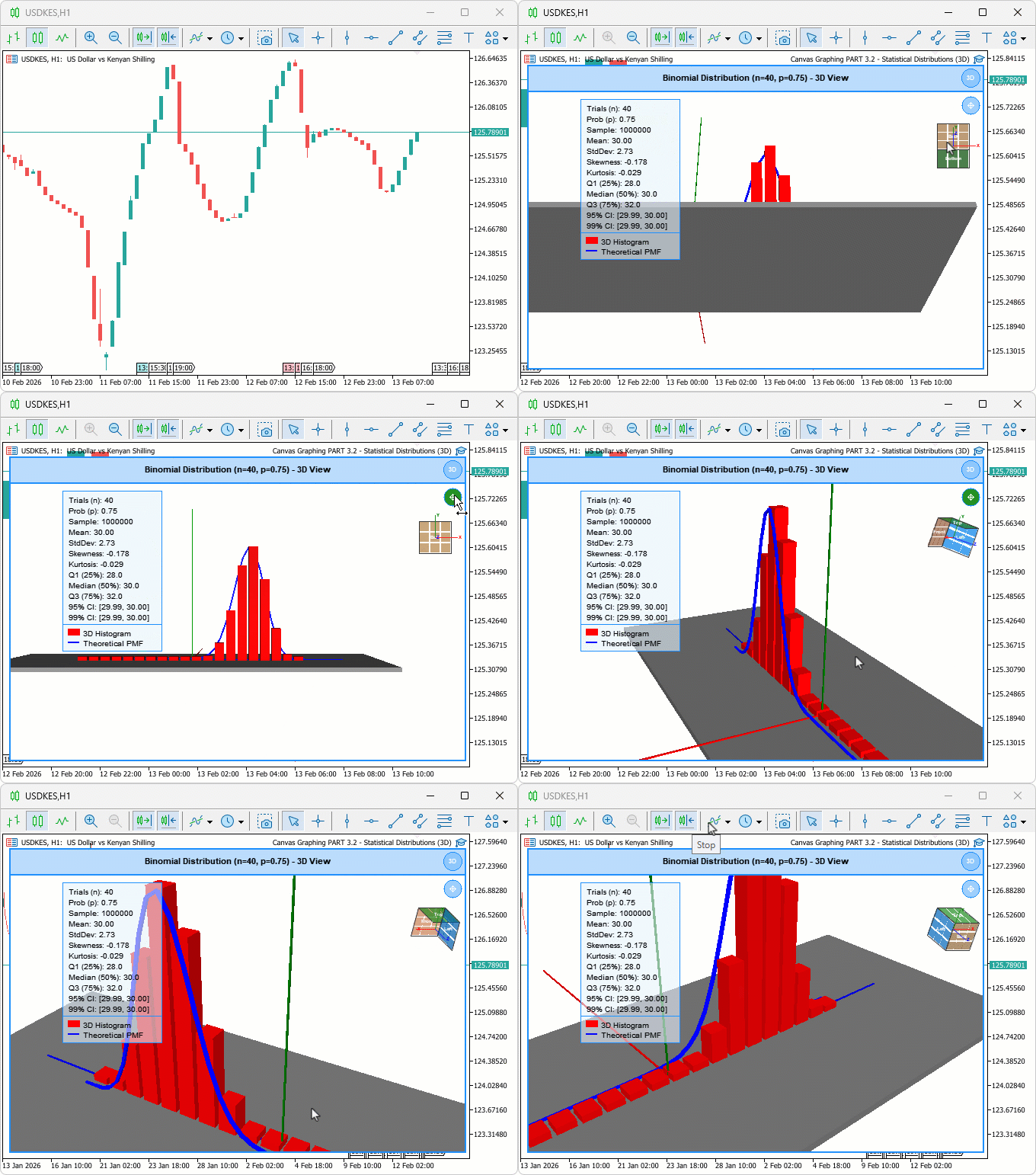
During testing, the segmented three-dimensional curve aligned consistently with histogram bar peaks across varying trial counts, pan mode shifted the view target smoothly without disrupting the current rotation or zoom level, and view cube clicks animated the camera cleanly to the correct standard orientation for all tested face, edge, and corner zones.
Conclusion
In conclusion, we have enhanced the three-dimensional binomial distribution viewer in MQL5 by adding a segmented tubular curve for depth-accurate probability mass function visualization, integrating pan mode for camera-relative view target shifting, and implementing an interactive view cube with face, edge, and corner hover zones that animate the camera to standard orientations. The implementation covered box-based curve segment construction and transform-matrix orientation, bilinear subdivision for hover zone detection, timer-driven smooth-step camera transitions, and updated event handling for clicks, panning, and keyboard shortcuts. After the article, you will be able to:
- Use the three-dimensional curve to visually confirm whether the probability mass function peak aligns with the highest-frequency histogram bin, identifying model fit directly from the scene without switching to two-dimensional mode
- Activate pan mode to shift the scene focus toward low-probability tails or wide off-center trial ranges without losing your current rotation angle or zoom level
- Click any face, edge, or corner on the view cube to animate the camera to a standard orientation, using top view for full bar height comparison and front view for reading individual bin values cleanly
In the next parts, we will embark on the 2D statistical distributions and plot more of the distributions. Stay tuned!
Warning: All rights to these materials are reserved by MetaQuotes Ltd. Copying or reprinting of these materials in whole or in part is prohibited.
This article was written by a user of the site and reflects their personal views. MetaQuotes Ltd is not responsible for the accuracy of the information presented, nor for any consequences resulting from the use of the solutions, strategies or recommendations described.

 Neuro-Structural Trading Engine — NSTE (Part I): How to Build a Prop-Firm-Safe Multi-Account System
 Integrating MQL5 with Data Processing Packages (Part 8): Using Graph Neural Networks for Liquidity Zone Recognition
 The MQL5 Standard Library Explorer (Part 10): Polynomial Regression Channel
 Price Action Analysis Toolkit Development (Part 64): Synchronizing Manually Drawn Trendlines with Automated Monitoring

- Free trading apps
- Over 8,000 signals for copying
- Economic news for exploring financial markets
You agree to website policy and terms of use
I can't see the 3D curves
Currently, we position the 3D curve segments one step after the scene renders, so they're not in place on the first static frame. Just orbit (left-click drag) or zoom (scroll wheel) once over the canvas — that forces another render and the curve shows up.
If you want the curve rendered instantly when you switch to 3D, just move the curve rendering function before the render call. See below:
Before:
After:
Thanks for catching this. I hope this helps. Thanks.
I can't see the 3D curves
Currently, we place the segments of the 3D curve one step after the scene is rendered, so they are not yet visible in the first static frame. Simply rotate (by dragging with the left mouse button) or zoom (using the scroll wheel) over the canvas once — this will trigger a re-render, and the curve will appear.
If you want the curve to render instantly when switching to 3D, simply move the curve rendering function before the render call. See below:
Before:
After:
Thank you for pointing this out. I hope this helps. Thank you.
Or rather, you didn’t hear me correctly.
You don’t have 3D curves, only 2D curves. It is important to use the correct terminology, especially in articles.
Here is an example of a 3D curve. When a curve is in three-dimensional space, the projection of such a curve onto any plane will never result in a straight line, as in your case
You didn’t hear me.
Or rather, you didn’t hear me correctly.
You don’t have 3D curves, only 2D curves. It is important to use the correct terminology, especially in articles.
Here is an example of a 3D curve. When a curve is in three-dimensional space, the projection of such a curve onto any plane will never result in a straight line, as in your case
Now i get what you mean. Fair enough; you're right on the terminology. Strictly speaking it's a planar curve (fixed Z; only the success count and probability vary), so it isn't a 3D curve in the proper sense, and I take the point.
The intention was to render the PMF as a real object in the 3D scene; rotatable, with tube geometry, sitting alongside the 3D histogram bars so it stays aligned with them as they render and you can track the two together in the same space. So "3D" was meant in the sense of rendered in the 3D view rather than a true space curve. Thanks for pointing it out.