

Creating Custom Indicators in MQL5 (Part 11): Enhancing the Footprint Chart with Market Structure and Order Flow Layers
 5 121
5 121
 1
1

Introduction
A footprint chart displays volume at each price level, but without market structure context it is difficult to identify where the most volume traded within a bar, where aggressive one-sided pressure occurred across consecutive levels, or whether a bar absorbed heavy volume without moving. This article is for MetaQuotes Language 5 (MQL5) developers and algorithmic traders looking to enhance the footprint chart with structural and order flow analytical layers.
In our previous article (Part 10), we enhanced the MQL5 footprint chart indicator by adding a per-bar volume sentiment information box with delta-intensity color coding, supersampled rounded corners, and alpha compositing. In Part 11, we introduce volume profile bars, point of control and value area highlighting, stacked imbalance detection, absorption zone classification, single print markers, a cumulative volume delta panel, and a delta histogram. This article will cover the following topics:
- Layering the Market — How Structure and Order Flow Combine Inside Each Bar
- Implementation in MQL5
- Backtesting
- Conclusion
By the end, you'll have an enhanced MQL5 footprint chart indicator. It will include a full set of market structure and order flow layers, ready for customization. Let's dive in!
Layering the Market — How Structure and Order Flow Combine Inside Each Bar
The distribution of volume across price levels shows where participants were most active. The level with the highest combined volume is the point of control. It often acts as the bar's center of activity and a likely reaction level. The value area is the price range around the point of control that contains a configurable share of the bar's volume, typically seventy percent. It represents accepted value — prices outside it are more likely to be rejected. Single prints are levels touched only briefly with minimal volume, representing impulsive price movement through an area of little interest, while unfinished business marks extreme levels where only one side traded, signaling that price left without completing the auction and may return.
Stacked imbalances occur when ask volume at a level significantly outweighs bid volume at the level directly below it, or vice versa, across multiple consecutive rows. When this pattern stacks three or more levels deep, it signals a directional pressure zone where one side was repeatedly aggressive without meaningful opposition. Absorption is the opposite condition — a bar with high total volume but a net delta close to zero, meaning that one side absorbed the aggression of the other without allowing the price to move, often preceding a reversal. The cumulative volume delta tracks the running sum of net delta across all bars, revealing whether buying or selling pressure is building or fading over time, while the delta histogram provides a per-bar visual of that net imbalance scaled to the chart.
In live trading, use the point of control as a reference for mean-reversion entries — price returning to a prior bar's point of control after a deviation is a high-probability area for reaction. Watch for value area overlaps between consecutive bars to identify accepted price zones worth defending. Use stacked ask imbalances as directional fuel indicators, entering longs when price holds above a stacked ask zone. Flag absorption bars at key levels as potential reversal candidates, especially when the cumulative volume delta diverges from price direction. Use single prints as acceleration zones where price may move quickly on a revisit, and unfinished business levels as magnetic targets that the market tends to return to complete the auction.
To implement these features, we will extend the bar data structure with metadata covering point of control, value area bounds, imbalances, cumulative delta, and absorption, add dedicated computation functions for each layer, build a layered rendering pipeline with a fixed draw order, and add dynamic font scaling and a mini delta bar inside the information box. In brief, here is a visual representation of what we intend to build.

Implementation in MQL5
We begin the implementation by expanding and reorganizing the input groups to support all new analytical layers.
Expanding and Reorganizing Input Groups for New Analytical Layers
The previous indicator had a single settings group covering display mode, ticks per level, bar limits, font size, and strict positioning. Here we expand and reorganize the inputs into dedicated groups that each govern a specific analytical layer, giving independent control over every feature we are adding.
//+------------------------------------------------------------------+
//| Inputs                                                           |
//+------------------------------------------------------------------+
input group "Core Settings"
input FootprintDisplayMode displayMode             = DELTA; // Display Mode
input int                  ticksPerPriceLevel      = 5;     // Ticks Per Price Level
input int                  maxBarsToRender         = 50;    // Max Bars to Display
input int                  priceLevelFontSize      = 11;    // Price Level Font Size (base)
input double               minPriceLevelSpacing    = 1.1;   // Min Spacing Between Price Levels
input bool                 useStrictPricePositions = true;  // Strict Price Positions

input group "Volume Profile"
input bool   showVolumeProfileBars    = true;  // Show Volume Profile Bars (behind levels)
input double volBarMaxWidthRatio      = 0.85;  // Max Bar Width as Fraction of Bar Width
input int    volBarOpacityPercent     = 30;    // Volume Bar Opacity (0-100)
input bool   showPOC                  = true;  // Show Point of Control Line
input bool   showValueArea            = true;  // Show Value Area (70% volume zone)
input int    valueAreaPercent         = 70;    // Value Area % (default 70)
input int    valueAreaOpacityPercent  = 12;    // Value Area Opacity

input group "Imbalance Detection"
input bool   showStackedImbalance     = true;  // Show Stacked Imbalance Highlight
input int    stackedImbalanceLevels   = 3;     // Min Consecutive Levels for Stack
input double imbalanceRatioThreshold  = 3.0;   // Imbalance Ratio Threshold (ask/bid or bid/ask)
input int    imbalanceOpacityPercent  = 18;    // Imbalance Row Highlight Opacity
input bool   showImbalanceIcon        = true;  // Show Icon on Stacked Imbalance
input bool   showAbsorptionZone       = true;  // Show Absorption Zone (high vol, low delta)
input double absorptionDeltaRatio     = 0.15;  // Absorption: delta/total < this = absorption
input bool   showSinglePrints         = true;  // Show Single Print Levels (dashed border)
input bool   showUnfinishedBusiness   = true;  // Show Unfinished Business (zero vol at edge)

input group "Cumulative Delta"
input bool   showCVDLine              = true;      // Show Cumulative Volume Delta Line
input int    cvdPanelHeightPixels     = 60;        // CVD Panel Height (pixels, below candles)
input color  cvdPositiveColor         = 0x0077ff;  // CVD Line Color (positive)
input color  cvdNegativeColor         = 0xfe3300;  // CVD Line Color (negative)
input bool   showDeltaHistogram       = true;      // Show Delta Histogram (below candle)
input int    histogramHeightPixels    = 30;        // Delta Histogram Height (pixels)

input group "Colors"
input color upColor1       = 0x8d8d8d;
input color upColor2       = 0x6b8bb6;
input color upColor3       = 0x5289d3;
input color upColor4       = 0x2e7de6;
input color upColor5       = 0x0077ff;
input color downColor1     = 0x8d8d8d;
input color downColor2     = 0xb87b6c;
input color downColor3     = 0xd46d53;
input color downColor4     = 0xec5732;
input color downColor5     = 0xfe3300;
input color volumeColor1   = 0x636363;
input color volumeColor2   = 0x858585;
input color volumeColor3   = 0xa3a3a3;
input color volumeColor4   = 0xc9c9c9;
input color volumeColor5   = 0x000000;
input color candleWickColor = 0x666666;
input color pocLineColor    = 0xEF9F27; // POC Line Color
input color valueAreaColor  = 0x185FA5; // Value Area Fill Color
input color stackedAskColor = 0x0077ff; // Stacked Ask Imbalance Color
input color stackedBidColor = 0xfe3300; // Stacked Bid Imbalance Color
input color absorptionColor = 0x9932CC; // Absorption Zone Color
input color singlePrintColor= 0xFFD700; // Single Print Border Color

input group "Info Box"
input bool showInfoBox                   = true;
input int  infoBoxPaddingWidthPixels     = 4;
input int  infoBoxPaddingHeightPixels    = 2;
input int  infoBoxBaseFontSize           = 6;
input int  backgroundTransparencyPercent = 15;
input int  borderTransparencyPercent     = 20;
input int  infoBoxGapPixels              = 10;
input bool showMiniDeltaBar              = true; // Show buy/sell % bar in info box

input group "Info Box Corners"
input bool enableRoundedCorners  = true;
input int  cornerRadiusPixels    = 6;
input int  borderThicknessPixels = 1;
input int  supersamplingFactor   = 4;

input group "Filters"
input bool   dynamicFontSize      = true; // Dynamic Font Size (scales with zoom)
input double minVolumeToShowLevel = 0.0;  // Min Volume to Show Level (0 = show all)
Here, we retain the core settings group with the existing inputs and add a minimum price level spacing control for finer vertical label separation. The volume profile group introduces toggles for the horizontal volume bars drawn behind each level, maximum bar width as a fraction of the candle width, bar transparency, point of control line visibility, value area fill toggle, coverage percentage defaulting to 70, and fill transparency.
The imbalance detection group adds toggles and thresholds for stacked row highlights, the minimum consecutive levels required to qualify as a stack, the ask-to-bid ratio that triggers detection, highlight transparency, directional triangle icons, absorption zone overlays, the delta-to-total ratio threshold for absorption classification, single print dashed borders, and unfinished business dotted markers at extreme one-sided levels.
The cumulative delta group introduces the cumulative volume delta panel toggle, panel height, positive and negative line colors, the per-bar delta histogram toggle, and its height. The colors group retains all existing inputs and adds dedicated colors for the point of control line, value area fill, stacked ask and bid imbalance highlights, absorption zones, and single print borders. The information box group retains all previous inputs and adds a toggle for the mini buy and sell percentage bar inside the box. Finally, the filters group adds a dynamic font size toggle that scales labels with zoom level, and a minimum volume threshold that hides levels below a configurable activity floor. With all inputs declared, we now extend the data structures to carry the new per-bar metadata these layers require.
Extending the Data Structures and Global Variables for Market Structure Metadata
With the new analytical layers in place, the data structures that hold per-level and per-bar information need to carry additional metadata so the rendering pipeline can access precomputed results without recalculating during every redraw.
//+------------------------------------------------------------------+
//| Structures                                                       |
//+------------------------------------------------------------------+
// Store per-level bid/ask volume and print metadata
struct FootprintPriceLevel
  {
   double price;        // Price of this level
   double upVolume;     // Ask (buy) volume at level
   double downVolume;   // Bid (sell) volume at level
   bool   isSinglePrint; // Flag: single print level
   bool   isUnfinished;  // Flag: unfinished business level
  };

// Store all footprint data aggregated per bar
struct BarFootprintData
  {
   datetime            time;               // Bar open time
   FootprintPriceLevel priceLevels[];      // Array of price levels for bar
   double              totalUpVolume;      // Total ask volume for bar
   double              totalDownVolume;    // Total bid volume for bar
   double              maxDeltaValue;      // Max absolute delta across levels
   double              maxTotalVolumeValue; // Max total volume across levels
   double              maxAskValue;        // Max ask volume across levels
   double              maxBidValue;        // Max bid volume across levels
   color               boxColor;           // Info box background color
   color               textColor;          // Info box text color
   double              delta;              // Net delta (ask - bid) for bar
   double              upPercentage;       // Ask volume as % of total
   double              downPercentage;     // Bid volume as % of total
   int                 pocLevelIndex;      // Index of POC level in priceLevels
   int                 valueAreaLow;       // Lower bound index of value area
   int                 valueAreaHigh;      // Upper bound index of value area
   double              cumulativeDelta;    // Running cumulative delta up to bar
   bool                hasStackedAskImbalance; // Flag: stacked ask imbalance present
   bool                hasStackedBidImbalance; // Flag: stacked bid imbalance present
   int                 stackedAskStart;    // Start index of stacked ask imbalance
   int                 stackedBidStart;    // Start index of stacked bid imbalance
   bool                isAbsorptionBar;    // Flag: bar classified as absorption
  };

double           runningCVD           = 0.0;        // Cumulative delta running total
We extend the "FootprintPriceLevel" structure with two boolean flags alongside the existing price and volume fields. The "isSinglePrint" flag marks levels where the combined volume is so small relative to the bar maximum that the price is passed through without meaningful participation. The "isUnfinished" flag marks extreme levels at the bar high or low where only one side of the market traded, signaling an incomplete auction that the price may return to resolve.
The "BarFootprintData" structure retains all fields from the previous version and gains nine new ones to support the additional layers. We add the point of control index to reference the highest-volume level directly, value area high and low indices to define the accepted value boundary, and the cumulative delta to carry the running net delta total forward from bar to bar. Four fields track stacked imbalance detection: boolean flags for ask and bid stacking, and integer start indices that tell the renderer exactly where the imbalance zone begins. Finally, the absorption bar flag marks bars where high total volume produced a near-zero net delta, classifying them for the absorption overlay. The new fields are listed in the structure above.
We also declare the "runningCVD" global variable initialized to zero to maintain the cumulative delta running total across all processed bars, which feeds into each bar's cumulative delta field on every tick. With the structures and globals updated, we now define the new helper functions that compute the additional analytical values.
Adding a Color Blending Utility
The new visual layers require smooth color transitions between states — for example, graduating volume profile bar colors or blending imbalance highlights against existing canvas content. Rather than snapping between fixed color values, we introduce a linear interpolation function that produces any shade between two colors based on a normalized factor.
//+------------------------------------------------------------------+
//| Blend two colors by interpolation factor t (0=a, 1=b)            |
//+------------------------------------------------------------------+
color BlendColors(color a, color b, double t)
  {
   //--- Unpack channels of color a
   uchar ar = uchar(a & 0xFF), ag = uchar((a >> 8) & 0xFF), ab_ = uchar((a >> 16) & 0xFF);
   //--- Unpack channels of color b
   uchar br = uchar(b & 0xFF), bg = uchar((b >> 8) & 0xFF), bb_ = uchar((b >> 16) & 0xFF);
   //--- Interpolate red channel
   uchar r  = uchar(ar + t * (br - ar));
   //--- Interpolate green channel
   uchar g  = uchar(ag + t * (bg - ag));
   //--- Interpolate blue channel
   uchar bl = uchar(ab_ + t * (bb_ - ab_));
   //--- Repack blended channels into BGR color
   return (color)((bl << 16) | (g << 8) | r);
  }
We define the "BlendColors" function to linearly interpolate between two colors using a factor "t" where zero returns the first color, and one returns the second. We unpack the red, green, and blue channels from both input colors using bitwise operations, then interpolate each channel independently by adding the scaled difference between the two channel values to the first color's channel. The three blended channels are then repacked into a single color value in the correct byte order and returned. With this utility available, we now define the remaining helper functions carried over from the previous version alongside the new analytical computation functions.
Adding a Rectangle Drawing Utility and Computing Point of Control and Value Area
The layered canvas rendering requires a reliable way to draw filled rectangles regardless of how coordinates are passed in, and the point of control and value area computation needs to happen once per tick, so the rendering loop can simply read the cached results rather than scanning all levels on every redraw.
//+------------------------------------------------------------------+
//| Draw filled rectangle on canvas with ARGB color                  |
//+------------------------------------------------------------------+
void DrawFilledRect(CCanvas &cv, int x1, int y1, int x2, int y2, uint argb)
  {
   //--- Normalize coordinates so x1 < x2
   if(x1 > x2) { int t = x1; x1 = x2; x2 = t; }
   //--- Normalize coordinates so y1 < y2
   if(y1 > y2) { int t = y1; y1 = y2; y2 = t; }
   //--- Fill normalized rectangle
   cv.FillRectangle(x1, y1, x2, y2, argb);
  }

//+------------------------------------------------------------------+
//| Compute POC and Value Area indices for footprint bar             |
//+------------------------------------------------------------------+
void ComputePOCAndValueArea(BarFootprintData &fp)
  {
   //--- Get level count; early-exit on empty bar
   int sz = ArraySize(fp.priceLevels);
   if(sz == 0)
     {
      fp.pocLevelIndex = -1;
      fp.valueAreaLow  = -1;
      fp.valueAreaHigh = -1;
      return;
     }

   //--- Find level with highest total volume as POC
   int    pocIdx = 0;
   double pocVol = 0;
   for(int i = 0; i < sz; i++)
     {
      double tv = fp.priceLevels[i].upVolume + fp.priceLevels[i].downVolume;
      if(tv > pocVol) { pocVol = tv; pocIdx = i; }
     }
   //--- Assign POC level index
   fp.pocLevelIndex = pocIdx;

   //--- Skip value area expansion when disabled
   if(!showValueArea)
     {
      fp.valueAreaLow  = pocIdx;
      fp.valueAreaHigh = pocIdx;
      return;
     }

   //--- Calculate target volume coverage for value area
   double totalVol   = fp.totalUpVolume + fp.totalDownVolume;
   double targetVol  = totalVol * valueAreaPercent / 100.0;
   double coveredVol = pocVol;

   //--- Initialize value area bounds at POC
   int vaHigh = pocIdx;
   int vaLow  = pocIdx;

   //--- Expand value area upward and downward until target is covered
   while(coveredVol < targetVol)
     {
      //--- Sample volume one level above current upper bound
      double aboveVol = 0;
      if(vaHigh > 0)
         aboveVol = fp.priceLevels[vaHigh-1].upVolume + fp.priceLevels[vaHigh-1].downVolume;

      //--- Sample volume one level below current lower bound
      double belowVol = 0;
      if(vaLow < sz - 1)
         belowVol = fp.priceLevels[vaLow+1].upVolume + fp.priceLevels[vaLow+1].downVolume;

      //--- Exit loop if no volume available on either side
      if(aboveVol == 0 && belowVol == 0) break;

      //--- Expand toward whichever side has more volume
      if(aboveVol >= belowVol && vaHigh > 0)
        { coveredVol += aboveVol; vaHigh--; }
      else if(vaLow < sz - 1)
        { coveredVol += belowVol; vaLow++; }
      else if(vaHigh > 0)
        { coveredVol += aboveVol; vaHigh--; }
      else break;
     }

   //--- Store final value area boundaries
   fp.valueAreaHigh = vaHigh;
   fp.valueAreaLow  = vaLow;
  }
First, we define the "DrawFilledRect" function as a thin wrapper around "FillRectangle" that normalizes the coordinate pairs before drawing, swapping x1 with x2 or y1 with y2 whenever the first value exceeds the second. This ensures all rectangle fill calls in the rendering pipeline produce valid output regardless of the direction in which coordinates are computed.
Then, to locate the point of control and expand the value area, we define the "ComputePOCAndValueArea" function. If the bar has no price levels, all three indices are set to -1, and we return early. Otherwise, we scan every level and track the one with the highest combined volume, storing its index as the point of control. If the value area toggle is off, both bounds are set to the point of control index, and we return.
When value area expansion is enabled, we compute the target volume as the configured percentage of the bar's total volume, initialize both bounds at the point of control, and enter an expansion loop. On each iteration, we sample the volume one level above the current upper bound and one level below the current lower bound, then extend whichever boundary would add more volume. This continues until the accumulated coverage meets or exceeds the target, or no further expansion is possible. The final upper and lower bound indices are stored in the structure for the rendering pipeline to use directly. With the point of control and value area computed, we now define the imbalance and absorption detection function.
Detecting Stacked Imbalances, Absorption Zones, and Single Prints
Before rendering overlays, we run one function per bar to classify stacked imbalances on the ask and bid sides, absorption, single prints, and unfinished business. The results are stored in the bar structure so the renderer reads cached flags rather than repeating the analysis on every redraw.
//+------------------------------------------------------------------+
//| Detect stacked imbalances and absorption zones for bar           |
//+------------------------------------------------------------------+
void DetectImbalancesAndAbsorption(BarFootprintData &fp)
  {
   //--- Reset all imbalance and absorption flags
   fp.hasStackedAskImbalance = false;
   fp.hasStackedBidImbalance = false;
   fp.stackedAskStart        = -1;
   fp.stackedBidStart        = -1;
   fp.isAbsorptionBar        = false;

   //--- Skip detection if not enough levels
   int sz = ArraySize(fp.priceLevels);
   if(sz < stackedImbalanceLevels) return;

   //--- Initialize consecutive counters for stacking
   int consecutiveAsk = 0;
   int consecutiveBid = 0;

   for(int i = 0; i < sz - 1; i++)
     {
      //--- Check diagonal ask imbalance: ask at level i vs bid at level i+1
      double ask      = fp.priceLevels[i].upVolume;
      double bidBelow = fp.priceLevels[i+1].downVolume;

      if(bidBelow > 0 && ask / bidBelow >= imbalanceRatioThreshold)
        {
         //--- Increment consecutive ask imbalance streak
         consecutiveAsk++;
         //--- Record first occurrence of stacked ask imbalance
         if(consecutiveAsk >= stackedImbalanceLevels && !fp.hasStackedAskImbalance)
           {
            fp.hasStackedAskImbalance = true;
            fp.stackedAskStart        = i - stackedImbalanceLevels + 1;
           }
        }
      else consecutiveAsk = 0;

      //--- Check diagonal bid imbalance: bid at level i+1 vs ask at level i
      double bid      = fp.priceLevels[i+1].downVolume;
      double askAbove = fp.priceLevels[i].upVolume;

      if(askAbove > 0 && bid / askAbove >= imbalanceRatioThreshold)
        {
         //--- Increment consecutive bid imbalance streak
         consecutiveBid++;
         //--- Record first occurrence of stacked bid imbalance
         if(consecutiveBid >= stackedImbalanceLevels && !fp.hasStackedBidImbalance)
           {
            fp.hasStackedBidImbalance = true;
            fp.stackedBidStart        = i - stackedImbalanceLevels + 1;
           }
        }
      else consecutiveBid = 0;
     }

   //--- Check for absorption: high volume with very low net delta
   double total = fp.totalUpVolume + fp.totalDownVolume;
   if(total > 0)
     {
      double absDelta = MathAbs(fp.delta);
      //--- Mark bar as absorption if delta-to-total ratio is below threshold
      if(absDelta / total <= absorptionDeltaRatio)
         fp.isAbsorptionBar = true;
     }

   //--- Classify single prints and unfinished business at bar extremes
   double barHigh = fp.priceLevels[0].price;
   double barLow  = fp.priceLevels[sz-1].price;
   for(int i = 0; i < sz; i++)
     {
      double tv = fp.priceLevels[i].upVolume + fp.priceLevels[i].downVolume;
      //--- Flag level as single print if volume is very small relative to max
      fp.priceLevels[i].isSinglePrint = (tv > 0 && tv <= fp.maxTotalVolumeValue * 0.05);
      //--- Check if level sits at bar extreme
      bool atExtreme = (MathAbs(fp.priceLevels[i].price - barHigh) < _Point / 2 ||
                        MathAbs(fp.priceLevels[i].price - barLow)  < _Point / 2);
      //--- Flag unfinished business: extreme level with one-sided volume
      fp.priceLevels[i].isUnfinished = atExtreme &&
                                       (fp.priceLevels[i].upVolume   == 0 ||
                                        fp.priceLevels[i].downVolume == 0);
     }
  }
We define the "DetectImbalancesAndAbsorption" function to classify all structural conditions for a given bar. We reset all flags and start indices to their default states, then exit early if the bar has fewer levels than the configured minimum stack depth.
For imbalance detection, we walk adjacent level pairs and check the diagonal ask condition — ask volume at the upper level divided by bid volume at the level directly below it — against the configured ratio threshold. A consecutive streak counter increments on each passing pair and resets to zero on any failure. When the streak reaches the minimum stack depth, and no ask imbalance has been recorded yet, we set the flag and calculate the start index by offsetting back from the current position. The same process runs independently for the bid side, checking bid volume at the lower level against ask volume at the level above.
Absorption detection runs after the imbalance scan. We compute the absolute delta using MathAbs and divide it by the bar's total volume. If this ratio falls at or below the configured absorption threshold, the bar is marked as an absorption bar, indicating that one side absorbed the other's aggression without allowing meaningful price movement.
Single print and unfinished business classification runs in a final pass over all levels. A level is marked as a single print if its combined volume is greater than zero but does not exceed five percent of the bar's maximum level volume, identifying briefly visited areas of minimal interest. We then check whether the level sits at the bar high or low using a half-point tolerance, and mark it as unfinished if it is at an extreme and either the ask or bid volume is zero, signaling a one-sided auction that price left incomplete. With all structural flags populated, we now define a helper function to draw a dashed line.
Drawing Horizontal Dashed Lines for Point of Control and Single Print Markers
The point of control line and single print borders both require a dashed horizontal line rather than a solid one, since a dashed style visually distinguishes these structural markers from the solid fills and borders used by other layers without adding visual noise.
//+------------------------------------------------------------------+
//| Draw a horizontal dashed line on canvas                          |
//+------------------------------------------------------------------+
void DrawDashedHLine(CCanvas &cv, int x1, int x2, int y, uint col, int dashLen = 4, int gapLen = 3)
  {
   //--- Skip lines outside vertical canvas bounds
   if(y < 0 || y >= cv.Height()) return;
   //--- Ensure left-to-right ordering
   if(x1 > x2) { int t = x1; x1 = x2; x2 = t; }
   //--- Initialize dash state
   bool drawing = true;
   int  count   = 0;
   //--- Iterate pixels and alternate between dash and gap
   for(int x = x1; x <= x2; x++)
     {
      if(drawing) cv.PixelSet(x, y, col);
      count++;
      //--- Switch from dash to gap after dashLen pixels
      if(drawing  && count >= dashLen) { drawing = false; count = 0; }
      //--- Switch from gap to dash after gapLen pixels
      if(!drawing && count >= gapLen)  { drawing = true;  count = 0; }
     }
  }
We define the "DrawDashedHLine" function to draw a horizontal dashed line between two x coordinates at a given y position. We first discard the call entirely if the y coordinate falls outside the canvas height, then normalize the x coordinates to ensure left-to-right traversal. We initialize a drawing state flag to true and a counter to zero, then walk every pixel in the horizontal span. When the drawing flag is active, we set the pixel with PixelSet, increment the counter, and switch to gap mode once the counter reaches the configured dash length.
When in gap mode, we skip the pixel, increment the counter, and switch back to drawing mode once the gap length is reached. The default dash and gap lengths of four and three pixels, respectively, produce a clean dashed appearance at typical chart zoom levels, and both can be overridden per call for the different use cases across the rendering pipeline. With this utility defined, we now build the full layered canvas redraw function that assembles all the new visual output.
Building the Full Layered Canvas Redraw Pipeline
All computation results feed into a single redraw function that renders layers in a fixed order: background fills, structural overlays, price level labels, then the information box and sub-chart panels.
//+------------------------------------------------------------------+
//| Redraw entire main canvas with all footprint visual layers       |
//+------------------------------------------------------------------+
void RedrawCanvas(int ratesTotal)
  {
   //--- Skip if canvas dimensions are not yet valid
   if(currentChartWidth <= 0 || currentChartHeight <= 0) return;

   //--- Allocate buffers for price data copy
   double highs[], lows[];
   datetime times[];
   //--- Copy high prices for all bars
   if(CopyHigh(_Symbol, _Period, 0, ratesTotal, highs)  != ratesTotal) return;
   //--- Copy low prices for all bars
   if(CopyLow(_Symbol,  _Period, 0, ratesTotal, lows)   != ratesTotal) return;
   //--- Copy bar timestamps for all bars
   if(CopyTime(_Symbol, _Period, 0, ratesTotal, times)   != ratesTotal) return;

   //--- Clear canvas to fully transparent before redraw
   mainCanvas.Erase(0);

   //--- Determine bar width in pixels at current scale
   int barPx = GetBarWidth(currentChartScale);
   //--- Compute effective font size, clamping to readable range
   int fSize = priceLevelFontSize;
   if(dynamicFontSize)
     {
      fSize = (int)(barPx / 8.5);
      fSize = MathMax(7, MathMin(16, fSize));
     }

   //--- Convert spacing multiplier to chart price units
   double minSpacing = minPriceLevelSpacing * fSize * _Point;

   //--- Prepare CVD data arrays if panel is enabled
   double cvdValues[];
   int    cvdBarIndices[];
   int    cvdCount = 0;
   if(showCVDLine)
     {
      ArrayResize(cvdValues,     visibleBarsCount);
      ArrayResize(cvdBarIndices, visibleBarsCount);
     }

   //--- Iterate all visible bars from right to left
   for(int i = 0; i < visibleBarsCount; i++)
     {
      //--- Compute absolute bar index from visible offset
      int barIndex = firstVisibleBarIndex - i;
      //--- Skip bars outside valid data range
      if(barIndex < 0 || barIndex >= ratesTotal) continue;

      //--- Map bar index to rates buffer index
      int      bufIdx  = ratesTotal - 1 - barIndex;
      datetime barTime = times[bufIdx];
      //--- Look up footprint data for this bar time
      int fpIdx = GetBarFootprintIndex(barTime);
      if(fpIdx < 0) continue;

      //--- Skip bars with no price levels
      int sz = ArraySize(barFootprints[fpIdx].priceLevels);
      if(sz == 0) continue;

      //--- Compute bar center and side coordinates in pixels
      int cx        = BarToXCoordinate(barIndex);
      int bw        = GetBarWidth(currentChartScale);
      int halfBW    = bw / 2;
      int gap       = MathMax(1, bw / 4);
      int xLeft     = cx - gap;
      int xRight    = cx + gap;
      int xBarLeft  = cx - halfBW;
      int xBarRight = cx + halfBW;

      //--- Build display price array, optionally applying minimum spacing
      double displayPrices[];
      ArrayResize(displayPrices, sz);
      for(int j = 0; j < sz; j++) displayPrices[j] = barFootprints[fpIdx].priceLevels[j].price;
      //--- Apply minimum spacing between levels when strict mode is off
      if(!useStrictPricePositions)
         for(int j = 1; j < sz; j++)
           {
            double diff = displayPrices[j-1] - displayPrices[j];
            if(diff < minSpacing && diff >= 0) displayPrices[j] = displayPrices[j-1] - minSpacing;
           }

      // --- Layer 1: Value Area background fill
      if(showValueArea && barFootprints[fpIdx].valueAreaHigh >= 0 &&
         barFootprints[fpIdx].valueAreaLow  >= 0)
        {
         //--- Get value area bound indices
         int vaHigh = barFootprints[fpIdx].valueAreaHigh;
         int vaLow  = barFootprints[fpIdx].valueAreaLow;
         //--- Convert VA price bounds to pixel Y coordinates
         double priceTop    = barFootprints[fpIdx].priceLevels[vaHigh].price + priceLevelStep;
         double priceBottom = barFootprints[fpIdx].priceLevels[vaLow].price  - priceLevelStep;
         int    yTop        = PriceToYCoordinate(priceTop);
         int    yBottom     = PriceToYCoordinate(priceBottom);
         //--- Draw semi-transparent value area background
         uint vaArgb = ColorToArgbWithOpacity(valueAreaColor, valueAreaOpacityPercent);
         DrawFilledRect(mainCanvas, xBarLeft, yTop, xBarRight, yBottom, vaArgb);
        }

      // --- Layer 2: Volume Profile bars behind price levels
      if(showVolumeProfileBars && barFootprints[fpIdx].maxTotalVolumeValue > 0)
        {
         //--- Compute maximum profile bar width in pixels
         int maxBarW = (int)(bw * volBarMaxWidthRatio);
         for(int j = 0; j < sz; j++)
           {
            //--- Calculate combined level volume and bar-relative width
            double tv    = barFootprints[fpIdx].priceLevels[j].upVolume +
                           barFootprints[fpIdx].priceLevels[j].downVolume;
            double ratio = tv / barFootprints[fpIdx].maxTotalVolumeValue;
            int    bwPx  = (int)(maxBarW * ratio);
            if(bwPx < 1) bwPx = 1;

            //--- Get level Y pixel span
            int yL = PriceToYCoordinate(displayPrices[j] + priceLevelStep * 0.45);
            int yH = PriceToYCoordinate(displayPrices[j] - priceLevelStep * 0.45);
            if(yH <= yL) yH = yL + 2;

            //--- Split bar width between ask and bid proportionally
            double upV  = barFootprints[fpIdx].priceLevels[j].upVolume;
            double downV= barFootprints[fpIdx].priceLevels[j].downVolume;
            int upPx    = (tv > 0) ? (int)(bwPx * upV   / tv) : 0;
            int dnPx    = (tv > 0) ? (int)(bwPx * downV / tv) : 0;

            //--- Draw ask (right) and bid (left) volume bars with opacity
            uint argbAsk = ColorToArgbWithOpacity(upColor4,   volBarOpacityPercent);
            uint argbBid = ColorToArgbWithOpacity(downColor4, volBarOpacityPercent);
            DrawFilledRect(mainCanvas, cx,        yL, cx + upPx, yH, argbAsk);
            DrawFilledRect(mainCanvas, cx - dnPx, yL, cx,        yH, argbBid);
           }
        }

      // --- Layer 3: Stacked imbalance row highlights
      if(showStackedImbalance)
        {
         //--- Prepare ask and bid imbalance highlight colors
         uint argbAsk = ColorToArgbWithOpacity(stackedAskColor, imbalanceOpacityPercent);
         uint argbBid = ColorToArgbWithOpacity(stackedBidColor, imbalanceOpacityPercent);

         //--- Highlight stacked ask imbalance rows if detected
         if(barFootprints[fpIdx].hasStackedAskImbalance)
           {
            int s = barFootprints[fpIdx].stackedAskStart;
            for(int j = s; j < MathMin(sz, s + stackedImbalanceLevels + 2); j++)
              {
               int yT = PriceToYCoordinate(displayPrices[j] + priceLevelStep * 0.5);
               int yB = PriceToYCoordinate(displayPrices[j] - priceLevelStep * 0.5);
               DrawFilledRect(mainCanvas, xBarLeft, yT, xBarRight, yB, argbAsk);
              }
           }
         //--- Highlight stacked bid imbalance rows if detected
         if(barFootprints[fpIdx].hasStackedBidImbalance)
           {
            int s = barFootprints[fpIdx].stackedBidStart;
            for(int j = s; j < MathMin(sz, s + stackedImbalanceLevels + 2); j++)
              {
               int yT = PriceToYCoordinate(displayPrices[j] + priceLevelStep * 0.5);
               int yB = PriceToYCoordinate(displayPrices[j] - priceLevelStep * 0.5);
               DrawFilledRect(mainCanvas, xBarLeft, yT, xBarRight, yB, argbBid);
              }
           }
        }

      // --- Layer 4: Absorption zone highlight with border lines
      if(showAbsorptionZone && barFootprints[fpIdx].isAbsorptionBar)
        {
         //--- Compute full bar vertical extent
         double priceTop    = barFootprints[fpIdx].priceLevels[0].price + priceLevelStep;
         double priceBottom = barFootprints[fpIdx].priceLevels[sz-1].price - priceLevelStep;
         int    yT = PriceToYCoordinate(priceTop);
         int    yB = PriceToYCoordinate(priceBottom);
         //--- Fill absorption zone with low-opacity tint
         uint ac = ColorToArgbWithOpacity(absorptionColor, 8);
         DrawFilledRect(mainCanvas, xBarLeft, yT, xBarRight, yB, ac);
         //--- Draw top and bottom border lines at higher opacity
         uint aBorder = ColorToArgbWithOpacity(absorptionColor, 40);
         mainCanvas.LineAA(xBarLeft, yT, xBarRight, yT, aBorder);
         mainCanvas.LineAA(xBarLeft, yB, xBarRight, yB, aBorder);
        }

      // --- Layer 5: POC dashed horizontal line
      if(showPOC && barFootprints[fpIdx].pocLevelIndex >= 0)
        {
         //--- Get POC level pixel position
         int pocIdx  = barFootprints[fpIdx].pocLevelIndex;
         int yPOC    = PriceToYCoordinate(displayPrices[pocIdx]);
         //--- Draw dashed POC line with high opacity
         uint pocArgb = ColorToArgbWithOpacity(pocLineColor, 90);
         DrawDashedHLine(mainCanvas, xBarLeft, xBarRight, yPOC, pocArgb, 3, 2);
        }

      // --- Layer 6: Build label text and color arrays for all levels
      string leftTexts[], rightTexts[];
      color  leftColors[], rightColors[];
      ArrayResize(leftTexts,  sz);
      ArrayResize(leftColors, sz);
      ArrayResize(rightTexts, sz);
      ArrayResize(rightColors, sz);

      for(int j = 0; j < sz; j++)
        {
         double uv = barFootprints[fpIdx].priceLevels[j].upVolume;
         double dv = barFootprints[fpIdx].priceLevels[j].downVolume;

         //--- Format labels as delta and total volume for delta mode
         if(displayMode == DELTA)
           {
            double dval  = uv - dv;
            double total = uv + dv;
            //--- Compute delta level color from max delta ratio
            color dc = downColor1;
            if(barFootprints[fpIdx].maxDeltaValue > 0 && total > 0)
               dc = GetVolumeColor(dval >= 0, MathAbs(dval) / barFootprints[fpIdx].maxDeltaValue);
            //--- Compute total volume color from max volume ratio
            color tc = volumeColor1;
            if(barFootprints[fpIdx].maxTotalVolumeValue > 0)
               tc = GetTotalVolumeColor(total / barFootprints[fpIdx].maxTotalVolumeValue);
            //--- Format delta with sign and total without sign
            leftTexts[j]   = StringFormat("%+.0f", dval);
            leftColors[j]  = dc;
            rightTexts[j]  = StringFormat("%.0f", total);
            rightColors[j] = tc;
           }
         else
           {
            //--- Format labels as bid (left) and ask (right) for BID_VS_ASK mode
            leftTexts[j]   = StringFormat("%.0f", dv);
            leftColors[j]  = downColor1;
            rightTexts[j]  = StringFormat("%.0f", uv);
            rightColors[j] = upColor1;
           }
        }

      //--- Apply diagonal imbalance coloring in BID_VS_ASK mode
      if(displayMode == BID_VS_ASK)
         for(int j = 0; j < sz - 1; j++)
           {
            double higherAsk = barFootprints[fpIdx].priceLevels[j].upVolume;
            double lowerBid  = barFootprints[fpIdx].priceLevels[j+1].downVolume;
            //--- Color ask side of higher level if significant relative to bar max
            if(barFootprints[fpIdx].maxAskValue > 0 &&
               higherAsk / barFootprints[fpIdx].maxAskValue >= 0.3)
               rightColors[j] = GetDiagonalVolumeColor(true, higherAsk / (lowerBid + 0.0001));
            //--- Color bid side of lower level if significant relative to bar max
            if(barFootprints[fpIdx].maxBidValue > 0 &&
               lowerBid / barFootprints[fpIdx].maxBidValue >= 0.3)
               leftColors[j+1] = GetDiagonalVolumeColor(false, lowerBid / (higherAsk + 0.0001));
           }

      // --- Layer 7: Draw price level text labels on canvas
      mainCanvas.FontSet("Consolas", fSize, FW_NORMAL);
      for(int j = 0; j < sz; j++)
        {
         double tv = barFootprints[fpIdx].priceLevels[j].upVolume +
                     barFootprints[fpIdx].priceLevels[j].downVolume;
         //--- Skip level if below minimum volume threshold
         if(minVolumeToShowLevel > 0 && tv < minVolumeToShowLevel) continue;

         //--- Get Y pixel for this level's price
         int yPos = PriceToYCoordinate(displayPrices[j]);

         //--- Draw dashed border around single print levels
         if(showSinglePrints && barFootprints[fpIdx].priceLevels[j].isSinglePrint)
           {
            int  yT     = PriceToYCoordinate(displayPrices[j] + priceLevelStep * 0.4);
            int  yB     = PriceToYCoordinate(displayPrices[j] - priceLevelStep * 0.4);
            uint spArgb = ColorToArgbWithOpacity(singlePrintColor, 60);
            DrawDashedHLine(mainCanvas, xBarLeft, xBarRight, yT, spArgb, 3, 2);
            DrawDashedHLine(mainCanvas, xBarLeft, xBarRight, yB, spArgb, 3, 2);
           }

         //--- Draw dotted line for unfinished business levels at bar extremes
         if(showUnfinishedBusiness && barFootprints[fpIdx].priceLevels[j].isUnfinished)
           {
            uint ubArgb = ColorToArgbWithOpacity(singlePrintColor, 80);
            int  yU     = PriceToYCoordinate(displayPrices[j]);
            //--- Place dots at every fourth pixel across bar width
            for(int px = xBarLeft; px <= xBarRight; px += 4)
               mainCanvas.PixelSet(px, yU, ubArgb);
           }

         //--- Render left label (delta or bid) right-aligned at gap position
         mainCanvas.TextOut(xLeft,  yPos, leftTexts[j],  ColorToARGB(leftColors[j],  255), TA_RIGHT | TA_VCENTER);
         //--- Render right label (total or ask) left-aligned at gap position
         mainCanvas.TextOut(xRight, yPos, rightTexts[j], ColorToARGB(rightColors[j], 255), TA_LEFT  | TA_VCENTER);
        }

      // --- Layer 8: Stacked imbalance direction icon overlay
      if(showImbalanceIcon)
        {
         //--- Draw upward triangle icon at ask imbalance start level
         if(barFootprints[fpIdx].hasStackedAskImbalance && barFootprints[fpIdx].stackedAskStart >= 0)
           {
            int s  = barFootprints[fpIdx].stackedAskStart;
            int yI = PriceToYCoordinate(displayPrices[s]);
            mainCanvas.FontSet("Arial", 9, FW_BOLD);
            mainCanvas.TextOut(xBarRight + 2, yI, "▲", ColorToARGB(stackedAskColor, 220), TA_LEFT | TA_VCENTER);
           }
         //--- Draw downward triangle icon at bid imbalance start level
         if(barFootprints[fpIdx].hasStackedBidImbalance && barFootprints[fpIdx].stackedBidStart >= 0)
           {
            int s  = barFootprints[fpIdx].stackedBidStart;
            int yI = PriceToYCoordinate(displayPrices[s]);
            mainCanvas.FontSet("Arial", 9, FW_BOLD);
            mainCanvas.TextOut(xBarRight + 2, yI, "▼", ColorToARGB(stackedBidColor, 220), TA_LEFT | TA_VCENTER);
           }
        }

      // --- Layer 9: Collect CVD data point for panel rendering
      if(showCVDLine && cvdCount < visibleBarsCount)
        {
         cvdValues[cvdCount]     = barFootprints[fpIdx].cumulativeDelta;
         cvdBarIndices[cvdCount] = barIndex;
         cvdCount++;
        }

      // --- Layer 10: Info Box rendering above bar high
      if(!showInfoBox) continue;
      //--- Fetch delta and volume summary for info box
      double delta    = barFootprints[fpIdx].delta;
      double totalVol = barFootprints[fpIdx].totalUpVolume + barFootprints[fpIdx].totalDownVolume;
      //--- Skip info box on zero-volume bars
      if(totalVol == 0) continue;

      //--- Get display values for info box content
      double upPct   = barFootprints[fpIdx].upPercentage;
      double downPct = barFootprints[fpIdx].downPercentage;
      color  boxClr  = barFootprints[fpIdx].boxColor;
      color  txtClr  = barFootprints[fpIdx].textColor;

      //--- Calculate info box font size scaled to chart zoom
      int iFontSize = (int)(infoBoxBaseFontSize + currentChartScale * 1.5);
      iFontSize     = MathMax(8, MathMin(18, iFontSize));

      //--- Build info box text lines
      string line1 = StringFormat("Δ %+.0f", delta);
      string line2 = StringFormat("V %.0f",  totalVol);
      string line3 = StringFormat("↓%.0f%% ↑%.0f%%", downPct, upPct);
      //--- Add absorption label if applicable
      string line4 = barFootprints[fpIdx].isAbsorptionBar ? "◈ ABSORB" : "";

      //--- Measure text dimensions for each line
      mainCanvas.FontSet("Arial Bold", (uint)iFontSize, FW_BOLD);
      int tw1 = mainCanvas.TextWidth(line1), th1 = mainCanvas.TextHeight(line1);
      mainCanvas.FontSet("Arial", (uint)iFontSize, FW_NORMAL);
      int tw2 = mainCanvas.TextWidth(line2), th2 = mainCanvas.TextHeight(line2);
      int tw3 = mainCanvas.TextWidth(line3), th3 = mainCanvas.TextHeight(line3);
      int tw4 = 0, th4 = 0;
      if(line4 != "")
        {
         mainCanvas.FontSet("Arial", (uint)(iFontSize - 1), FW_NORMAL);
         tw4 = mainCanvas.TextWidth(line4); th4 = mainCanvas.TextHeight(line4);
        }

      //--- Compute mini delta bar dimensions
      int miniBarW   = showMiniDeltaBar ? MathMax(tw1, MathMax(tw2, tw3)) : 0;
      int miniBarH   = showMiniDeltaBar ? 5 : 0;
      int miniBarGap = showMiniDeltaBar ? 4 : 0;

      //--- Compute info box total dimensions
      int maxTW  = MathMax(miniBarW, MathMax(tw1, MathMax(tw2, MathMax(tw3, tw4))));
      int totalH = th1 + 2 + th2 + 2 + th3 + (line4 != "" ? th4 + 2 : 0) + miniBarH + miniBarGap;
      int rW     = maxTW + infoBoxPaddingWidthPixels  * 2;
      int rH     = totalH + infoBoxPaddingHeightPixels * 2 + 4;

      //--- Position info box centered above bar high
      int xRect = BarToXCoordinate(barIndex) - rW / 2;
      int yRect = PriceToYCoordinate(highs[bufIdx]) - rH - infoBoxGapPixels;

      //--- Build ARGB values for fill and border
      uint  argbFill   = ColorToArgbWithOpacity(boxClr, backgroundTransparencyPercent);
      color borderClr  = DarkenColor(boxClr, 0.7);
      uint  argbBorder = ColorToArgbWithOpacity(borderClr, borderTransparencyPercent);
      uint  argbText   = ColorToARGB(txtClr, 255);

      //--- Compute supersampling parameters
      int ssFactor     = enableRoundedCorners ? MathMax(1, supersamplingFactor) : 1;
      int scaledW      = rW * ssFactor, scaledH  = rH * ssFactor;
      int scaledR      = cornerRadiusPixels * ssFactor;
      int scaledBorder = borderThicknessPixels * ssFactor;

      //--- Create high-res and low-res temp canvases for supersampled rendering
      CCanvas tempHi, tempLo;
      if(ssFactor > 1 && !tempHi.Create("thi_" + IntegerToString(i), scaledW, scaledH,
                                         COLOR_FORMAT_ARGB_NORMALIZE)) continue;
      if(!tempLo.Create("tlo_" + IntegerToString(i), rW, rH, COLOR_FORMAT_ARGB_NORMALIZE)) continue;
      //--- Clear both canvases
      if(ssFactor > 1) tempHi.Erase(0);
      tempLo.Erase(0);

      //--- Select target canvas based on supersampling mode
      CCanvas *dc = (ssFactor > 1) ? &tempHi : &tempLo;
      int dW      = (ssFactor > 1) ? scaledW : rW;
      int dH      = (ssFactor > 1) ? scaledH : rH;
      int dR      = (ssFactor > 1) ? scaledR : cornerRadiusPixels;
      int dB      = (ssFactor > 1) ? scaledBorder : borderThicknessPixels;

      //--- Draw box shape with rounded or straight corners
      if(enableRoundedCorners)
        {
         RenderRoundedRectangleFill(*dc, 0, 0, dW, dH, dR, argbFill);
         if(borderThicknessPixels > 0)
            RenderRoundedRectangleBorder(*dc, 0, 0, dW, dH, dR, dB, argbBorder);
        }
      else
        {
         //--- Fill and optionally border with straight edges
         dc.FillRectangle(0, 0, dW - 1, dH - 1, argbFill);
         if(borderThicknessPixels > 0)
           {
            dc.LineAA(0,  0,  dW, 0,  argbBorder);
            dc.LineAA(dW, 0,  dW, dH, argbBorder);
            dc.LineAA(dW, dH, 0,  dH, argbBorder);
            dc.LineAA(0,  dH, 0,  0,  argbBorder);
           }
        }

      //--- Downsample high-res canvas to final size when supersampling is active
      if(ssFactor > 1) DownsampleBicubic(tempLo, tempHi, ssFactor);

      //--- Draw text content into the low-res canvas
      int tX = rW / 2;
      int tY = infoBoxPaddingHeightPixels + 2;
      //--- Render delta line in bold
      tempLo.FontSet("Arial Bold", (uint)iFontSize, FW_BOLD);
      tempLo.TextOut(tX, tY, line1, argbText, TA_CENTER | TA_TOP); tY += th1 + 2;
      //--- Render volume and percentage lines in normal weight
      tempLo.FontSet("Arial", (uint)iFontSize, FW_NORMAL);
      tempLo.TextOut(tX, tY, line2, argbText, TA_CENTER | TA_TOP); tY += th2 + 2;
      tempLo.TextOut(tX, tY, line3, argbText, TA_CENTER | TA_TOP); tY += th3 + miniBarGap;

      //--- Render mini delta bar if enabled
      if(showMiniDeltaBar && miniBarW > 0)
        {
         int  barX  = (rW - miniBarW) / 2;
         //--- Draw background track of mini bar
         uint bgBar = ColorToArgbWithOpacity(downColor1, 40);
         uint fgBar = ColorToArgbWithOpacity(upColor4,   80);
         tempLo.FillRectangle(barX, tY, barX + miniBarW, tY + miniBarH, bgBar);
         //--- Fill ask percentage portion of mini bar
         int fillW = (int)(miniBarW * upPct / 100.0);
         if(fillW > 0) tempLo.FillRectangle(barX, tY, barX + fillW, tY + miniBarH, fgBar);
         tY += miniBarH + 2;
        }

      //--- Render absorption label if present
      if(line4 != "")
        {
         tempLo.FontSet("Arial", (uint)(iFontSize - 1), FW_NORMAL);
         uint absArgb = ColorToArgbWithOpacity(absorptionColor, 230);
         tempLo.TextOut(tX, tY, line4, absArgb, TA_CENTER | TA_TOP);
        }

      //--- Alpha-blend the info box temp canvas onto the main canvas at bar position
      for(int dy = 0; dy < rH; dy++)
         for(int dx = 0; dx < rW; dx++)
            BlendPixelSet(mainCanvas, xRect + dx, yRect + dy, tempLo.PixelGet(dx, dy));

      //--- Release supersampling canvas memory
      if(ssFactor > 1) tempHi.Destroy();
      tempLo.Destroy();
     }

   // --- Layer 11: CVD Panel rendering below candles
   if(showCVDLine && cvdCount >= 2)
     {
      //--- Position CVD panel below visible area, above histogram if enabled
      int panelY = currentChartHeight - cvdPanelHeightPixels -
                   (showDeltaHistogram ? histogramHeightPixels + 4 : 0);
      int panelH = cvdPanelHeightPixels;

      //--- Draw separator line at panel top
      uint sepCol = ColorToArgbWithOpacity(0x444444, 50);
      for(int px = 0; px < currentChartWidth; px++) mainCanvas.PixelSet(px, panelY, sepCol);

      //--- Find CVD min and max for vertical scaling
      double cvdMin = cvdValues[0], cvdMax = cvdValues[0];
      for(int k = 0; k < cvdCount; k++)
        {
         cvdMin = MathMin(cvdMin, cvdValues[k]);
         cvdMax = MathMax(cvdMax, cvdValues[k]);
        }
      //--- Guard against flat CVD range
      double cvdRange = cvdMax - cvdMin;
      if(cvdRange == 0) cvdRange = 1;

      //--- Draw zero reference line in panel
      int zeroY = panelY + panelH - (int)((-cvdMin / cvdRange) * (panelH - 4)) - 2;
      uint zeroCol = ColorToArgbWithOpacity(0x888888, 40);
      for(int px = 0; px < currentChartWidth; px++)
         mainCanvas.PixelSet(px, MathMin(panelY + panelH - 1, MathMax(panelY, zeroY)), zeroCol);

      //--- Draw CVD label in panel
      mainCanvas.FontSet("Arial", 8, FW_NORMAL);
      mainCanvas.TextOut(4, panelY + 3, "CVD", ColorToARGB(cvdPositiveColor, 180), TA_LEFT | TA_TOP);

      //--- Connect CVD data points with color-coded line segments
      for(int k = 0; k < cvdCount - 1; k++)
        {
         double v1 = cvdValues[k],     v2 = cvdValues[k + 1];
         int    b1 = cvdBarIndices[k], b2 = cvdBarIndices[k + 1];
         //--- Convert bar indices to pixel X coordinates
         int x1 = BarToXCoordinate(b1);
         int x2 = BarToXCoordinate(b2);
         //--- Convert CVD values to pixel Y coordinates within panel
         int y1 = panelY + panelH - (int)(((v1 - cvdMin) / cvdRange) * (panelH - 4)) - 2;
         int y2 = panelY + panelH - (int)(((v2 - cvdMin) / cvdRange) * (panelH - 4)) - 2;
         //--- Clamp Y coordinates to panel bounds
         y1 = MathMin(panelY + panelH - 1, MathMax(panelY + 1, y1));
         y2 = MathMin(panelY + panelH - 1, MathMax(panelY + 1, y2));
         //--- Choose line color based on rising or falling CVD
         color lineCol = v2 >= cvdValues[MathMax(0, k - 1)] ? cvdPositiveColor : cvdNegativeColor;
         uint  lArgb   = ColorToArgbWithOpacity(lineCol, 90);
         mainCanvas.LineAA(x1, y1, x2, y2, lArgb);
        }
     }

   // --- Layer 12: Delta Histogram rendering at bottom of chart
   if(showDeltaHistogram)
     {
      //--- Position histogram at bottom of canvas
      int histY = currentChartHeight - histogramHeightPixels;
      //--- Draw separator line above histogram
      uint sepCol = ColorToArgbWithOpacity(0x444444, 40);
      for(int px = 0; px < currentChartWidth; px++) mainCanvas.PixelSet(px, histY, sepCol);

      //--- Find maximum absolute delta across all visible bars
      double maxAbsDelta = 0;
      for(int i = 0; i < visibleBarsCount; i++)
        {
         int barIndex = firstVisibleBarIndex - i;
         if(barIndex < 0 || barIndex >= ratesTotal) continue;
         int bufIdx = ratesTotal - 1 - barIndex;
         int fpIdx  = GetBarFootprintIndex(times[bufIdx]);
         if(fpIdx >= 0) maxAbsDelta = MathMax(maxAbsDelta, MathAbs(barFootprints[fpIdx].delta));
        }
      //--- Guard against all-zero deltas
      if(maxAbsDelta == 0) maxAbsDelta = 1;

      //--- Draw histogram label
      mainCanvas.FontSet("Arial", 8, FW_NORMAL);
      mainCanvas.TextOut(4, histY + 3, "Δ", ColorToARGB(0x888888, 180), TA_LEFT | TA_TOP);

      //--- Draw delta histogram bar for each visible bar
      for(int i = 0; i < visibleBarsCount; i++)
        {
         int barIndex = firstVisibleBarIndex - i;
         if(barIndex < 0 || barIndex >= ratesTotal) continue;
         int bufIdx = ratesTotal - 1 - barIndex;
         int fpIdx  = GetBarFootprintIndex(times[bufIdx]);
         if(fpIdx < 0) continue;

         //--- Get bar delta and compute bar dimensions
         double d    = barFootprints[fpIdx].delta;
         int    bw   = GetBarWidth(currentChartScale);
         int    cx   = BarToXCoordinate(barIndex);
         //--- Scale bar height by delta proportion of maximum
         int    barH = (int)(MathAbs(d) / maxAbsDelta * (histogramHeightPixels - 4));
         if(barH < 1) barH = 1;
         int    barW = MathMax(1, bw - 2);

         //--- Choose color based on positive or negative delta
         color bc  = d >= 0 ? upColor4 : downColor4;
         uint  ba  = ColorToArgbWithOpacity(bc, 70);
         int   yTop = currentChartHeight - barH;
         //--- Draw histogram bar from bottom up
         DrawFilledRect(mainCanvas, cx - barW / 2, yTop, cx + barW / 2, currentChartHeight - 1, ba);
        }
     }

   //--- Flush canvas to screen
   mainCanvas.Update();
  }
We begin the "RedrawCanvas" function by guarding against invalid canvas dimensions, then copy the high, low, and time arrays for all bars using CopyHigh, "CopyLow", and CopyTime, aborting if any copy returns incomplete data. We erase the canvas to fully transparent, compute the active bar width in pixels, and derive the effective font size — either fixed or scaled dynamically from the bar width using MathMax and "MathMin" to clamp it between 7 and 16 pixels. We also convert the minimum spacing multiplier to price units and, if the cumulative volume delta panel is enabled, resize the collection arrays to the visible bar count.
The main loop iterates every visible bar, computing the canvas center x, bar left and right edges, label gap anchors, and the display price array. If strict positioning is off, adjacent labels that would overlap are pushed apart by the minimum spacing. With coordinates ready, we draw the bar's layers in sequence:
Layer 1 draws the value area background fill when enabled and valid bounds exist, converting the price bounds of the upper and lower value area levels to pixel coordinates and filling the span with a semi-transparent rectangle using "DrawFilledRect". Layer 2 draws the volume profile bars behind the price levels. For each level, we compute the combined volume, derive the bar width as a proportion of the maximum level volume scaled to the configured maximum width ratio, then split the width between ask and bid sides proportionally and draw two filled rectangles — ask extending right from the center and bid extending left — each with its own opacity.
Layer 3 draws stacked imbalance row highlights when detected. For both the ask and bid sides, we loop from the imbalance start index through the configured number of levels plus a small extension, filling each row with a semi-transparent rectangle in the corresponding imbalance color. Layer 4 draws the absorption zone overlay when the bar is classified as absorption. We fill the full bar vertical extent with a very low opacity tint, then draw top and bottom border lines at higher opacity using LineAA to frame the zone without obscuring the levels beneath. Layer 5 draws the point of control dashed line at the highest-volume level's pixel position using "DrawDashedHLine" at high opacity.
Layer 6 builds the left and right label text and color arrays for all levels, formatting them for delta mode or bid versus ask mode exactly as in the previous version, then applies diagonal imbalance color overrides in bid versus ask mode. Layer 7 draws the price level text labels, but first checks the minimum volume threshold and skips any level below it. For single print levels, it draws dashed top and bottom borders using "DrawDashedHLine". For unfinished business levels, it places dots at every fourth pixel across the bar width using the PixelSet method. The left and right labels are then drawn with TextOut at their respective anchor positions. Layer 8 draws the directional triangle icons next to bars with detected stacked imbalances, placing an upward triangle for ask stacks and a downward triangle for bid stacks using bold "TextOut" at the bar's right edge.
Layer 9 collects the cumulative delta value and bar index for each visible bar into the panel arrays for later rendering. Layer 10 handles the information box, which now gains two additions over the previous version. A fourth text line showing the absorption label is built when the bar is classified as absorption, and a mini delta bar is drawn at the bottom of the box content area — a fixed-height horizontal strip where the background track spans the full box width and the ask percentage portion is filled proportionally from the left. The box dimensions, supersampling pipeline, rounded corner rendering, downsampling, text drawing, and alpha compositing all follow the same structure as before.
Layer 11 renders the cumulative volume delta panel below the chart area when at least two data points were collected. We position the panel above the histogram if that is also enabled, draw a separator pixel row, find the minimum and maximum cumulative delta values for vertical scaling with MathMin and "MathMax", draw a zero reference line, label the panel with "CVD", and connect consecutive data points with anti-aliased line segments colored by whether the cumulative delta is rising or falling. Layer 12 renders the delta histogram at the very bottom of the canvas. We draw a separator, scan all visible bars to find the maximum absolute delta for scaling, label the panel, then for each bar draw a filled rectangle scaled by its delta proportion of the maximum, colored by sign direction. Once all layers are complete, we call Update on the canvas to push the finished frame to the screen.
With all that done, we just need to call the functions where needed. In the OnCalculate event handler, we will need to initialize the new fields and call the new analysis functions after volume update, and we are done.
Updating the Calculation Event Handler for New Analytical Functions and Cumulative Delta Tracking
The calculation event handler retains its full structure from the previous version with two targeted additions: the new bar initialization block sets all the extra structure fields to clean starting values, and the per-tick volume processing block calls the two new analytical functions and updates the running cumulative delta after every volume change.
//+------------------------------------------------------------------+
//| Process incoming ticks and trigger canvas redraw                 |
//+------------------------------------------------------------------+
int OnCalculate(const int rates_total,
                const int prev_calculated,
                const datetime &time[],
                const double &open[],
                const double &high[],
                const double &low[],
                const double &close[],
                const long &tick_volume[],
                const long &volume[],
                const int &spread[])
  {
   //--- Require at least two bars before processing
   if(rates_total < 2) return 0;

   //--- Get current bar time and detect new bar formation
   datetime curBarTime = time[rates_total - 1];
   bool     isNewBar   = (curBarTime != lastBarTime);

   //--- Initialize new bar footprint entry on bar change
   if(isNewBar)
     {
      //--- Append slot to footprints array
      int ns = ArraySize(barFootprints);
      ArrayResize(barFootprints, ns + 1);
      currentBarIndex = ns;

      //--- Initialize new bar entry with default values
      barFootprints[currentBarIndex].time              = curBarTime;
      barFootprints[currentBarIndex].totalUpVolume     = 0;
      barFootprints[currentBarIndex].totalDownVolume   = 0;
      barFootprints[currentBarIndex].boxColor          = upColor1;
      barFootprints[currentBarIndex].textColor         = upColor1;
      barFootprints[currentBarIndex].delta             = 0;
      barFootprints[currentBarIndex].upPercentage      = 0;
      barFootprints[currentBarIndex].downPercentage    = 0;
      barFootprints[currentBarIndex].pocLevelIndex     = -1;
      barFootprints[currentBarIndex].valueAreaLow      = -1;
      barFootprints[currentBarIndex].valueAreaHigh     = -1;
      barFootprints[currentBarIndex].cumulativeDelta   = runningCVD;
      barFootprints[currentBarIndex].hasStackedAskImbalance = false;
      barFootprints[currentBarIndex].hasStackedBidImbalance = false;
      barFootprints[currentBarIndex].stackedAskStart   = -1;
      barFootprints[currentBarIndex].stackedBidStart   = -1;
      barFootprints[currentBarIndex].isAbsorptionBar   = false;
      ArrayResize(barFootprints[currentBarIndex].priceLevels, 0);

      //--- Purge oldest bars when array exceeds double the render limit
      if(ns > maxBarsToRender * 2)
        {
         int toRemove = ns - maxBarsToRender;
         //--- Delete candle objects for purged bars
         for(int i = 0; i < toRemove; i++)
           {
            string ts = TimeToString(barFootprints[i].time);
            ObjectDelete(0, objectPrefix + "Body_"      + ts);
            ObjectDelete(0, objectPrefix + "UpperWick_" + ts);
            ObjectDelete(0, objectPrefix + "LowerWick_" + ts);
           }
         //--- Remove purged entries from footprints array
         ArrayRemove(barFootprints, 0, toRemove);
         currentBarIndex -= toRemove;
        }

      //--- Update bar tracking state variables
      lastBarTime    = curBarTime;
      lastClosePrice = open[rates_total - 1];
      lastTickVolume = 0;
     }

   //--- Guard against invalid current bar index
   if(currentBarIndex < 0 || currentBarIndex >= ArraySize(barFootprints)) return rates_total;

   //--- Calculate volume change since last tick
   double volDiff = (double)(tick_volume[rates_total - 1] - lastTickVolume);
   lastTickVolume = tick_volume[rates_total - 1];

   bool dataChanged = false;

   //--- Process volume increment if non-zero
   if(volDiff > 0)
     {
      dataChanged = true;
      double curClose = close[rates_total - 1];
      double upDiff = 0, downDiff = 0;

      //--- Classify tick direction by close price movement
      if(curClose > lastClosePrice)      { upDiff   = volDiff; lastTradeAtAsk = true; }
      else if(curClose < lastClosePrice) { downDiff = volDiff; lastTradeAtAsk = false; }
      //--- Maintain previous direction on unchanged close
      else { if(lastTradeAtAsk) upDiff = volDiff; else downDiff = volDiff; }

      lastClosePrice = curClose;

      //--- Quantize close price to footprint level grid
      double qp = QuantizePriceToLevel(curClose);
      //--- Update level volumes and bar totals
      UpdatePriceLevel(barFootprints[currentBarIndex], qp, upDiff, downDiff);
      barFootprints[currentBarIndex].totalUpVolume   += upDiff;
      barFootprints[currentBarIndex].totalDownVolume += downDiff;

      //--- Recompute derived statistics for current bar
      ComputeMaxValues(barFootprints[currentBarIndex]);
      SortPriceLevelsDescending(barFootprints[currentBarIndex]);
      CalculateBarColorsAndPercentages(barFootprints[currentBarIndex]);
      ComputePOCAndValueArea(barFootprints[currentBarIndex]);
      DetectImbalancesAndAbsorption(barFootprints[currentBarIndex]);

      //--- Update running cumulative delta with new bar delta
      runningCVD = barFootprints[currentBarIndex].cumulativeDelta +
                   barFootprints[currentBarIndex].delta;
      barFootprints[currentBarIndex].cumulativeDelta = runningCVD;
     }

   //--- Render candle objects for bars within render window
   int firstBar = MathMax(0, rates_total - maxBarsToRender);
   for(int i = firstBar; i < rates_total; i++)
     {
      int fpIdx = GetBarFootprintIndex(time[i]);
      if(fpIdx >= 0)
         RenderFootprint(fpIdx, rates_total - 1 - i, time[i], rates_total);
     }

   //--- Check for chart dimension or viewport changes
   bool changed = false;
   int  nW = (int)ChartGetInteger(0, CHART_WIDTH_IN_PIXELS);
   int  nH = (int)ChartGetInteger(0, CHART_HEIGHT_IN_PIXELS);
   int  nS = (int)ChartGetInteger(0, CHART_SCALE);
   int  nF = (int)ChartGetInteger(0, CHART_FIRST_VISIBLE_BAR);
   int  nV = (int)ChartGetInteger(0, CHART_VISIBLE_BARS);
   double nMin = ChartGetDouble(0, CHART_PRICE_MIN, 0);
   double nMax = ChartGetDouble(0, CHART_PRICE_MAX, 0);

   //--- Resize canvas if chart pixel dimensions changed
   if(nW != currentChartWidth || nH != currentChartHeight)
     {
      mainCanvas.Resize(nW, nH);
      currentChartWidth  = nW;
      currentChartHeight = nH;
      changed = true;
     }

   //--- Update viewport state if scale, scroll, or price range changed
   if(nS != currentChartScale || nF != firstVisibleBarIndex || nV != visibleBarsCount ||
      nMin != minVisiblePrice  || nMax != maxVisiblePrice)
     {
      currentChartScale    = nS;
      firstVisibleBarIndex = nF;
      visibleBarsCount     = nV;
      minVisiblePrice      = nMin;
      maxVisiblePrice      = nMax;
      changed = true;
     }

   //--- Trigger full canvas redraw on any state change or new data
   if(changed || rates_total > prev_calculated || dataChanged)
      RedrawCanvas(rates_total);

   //--- Force chart to repaint after all updates
   ChartRedraw(0);
   return rates_total;
  }
When a new bar is detected, we initialize all the additional fields introduced in the extended structure alongside the existing ones — setting the point of control index, value area bounds, and imbalance start indices to -1, the imbalance and absorption flags to false, and seeding the cumulative delta from the current running total. The bar trimming logic, time, and close price seeding, and bounds check all remain unchanged.
In the volume processing block, we retain the tick direction classification, price quantization, level update, cumulative total accumulation, "ComputeMaxValues" call, "SortPriceLevelsDescending" call, and "CalculateBarColorsAndPercentages" call exactly as before. We add two new calls: "ComputePOCAndValueArea" to update the point of control index and value area bounds, and "DetectImbalancesAndAbsorption" to refresh all structural flags after the latest volume increment. After these calls, we update the running cumulative delta by adding the current bar's net delta to its seeded starting value and writing the result back into the structure, ensuring the cumulative delta carried forward to the next bar reflects all volume processed so far.
The candle rendering loop, chart geometry sampling, canvas resize, viewport state synchronization, conditional redraw trigger, and final ChartRedraw call all remain identical to the previous version, completing the event handler with the minimum additions needed to support all new analytical layers. With the implementation complete, what remains is testing the system — handled in the next section.
Backtesting
We conducted the testing, and below is the consolidated visualization in a single Graphics Interchange Format (GIF) image.
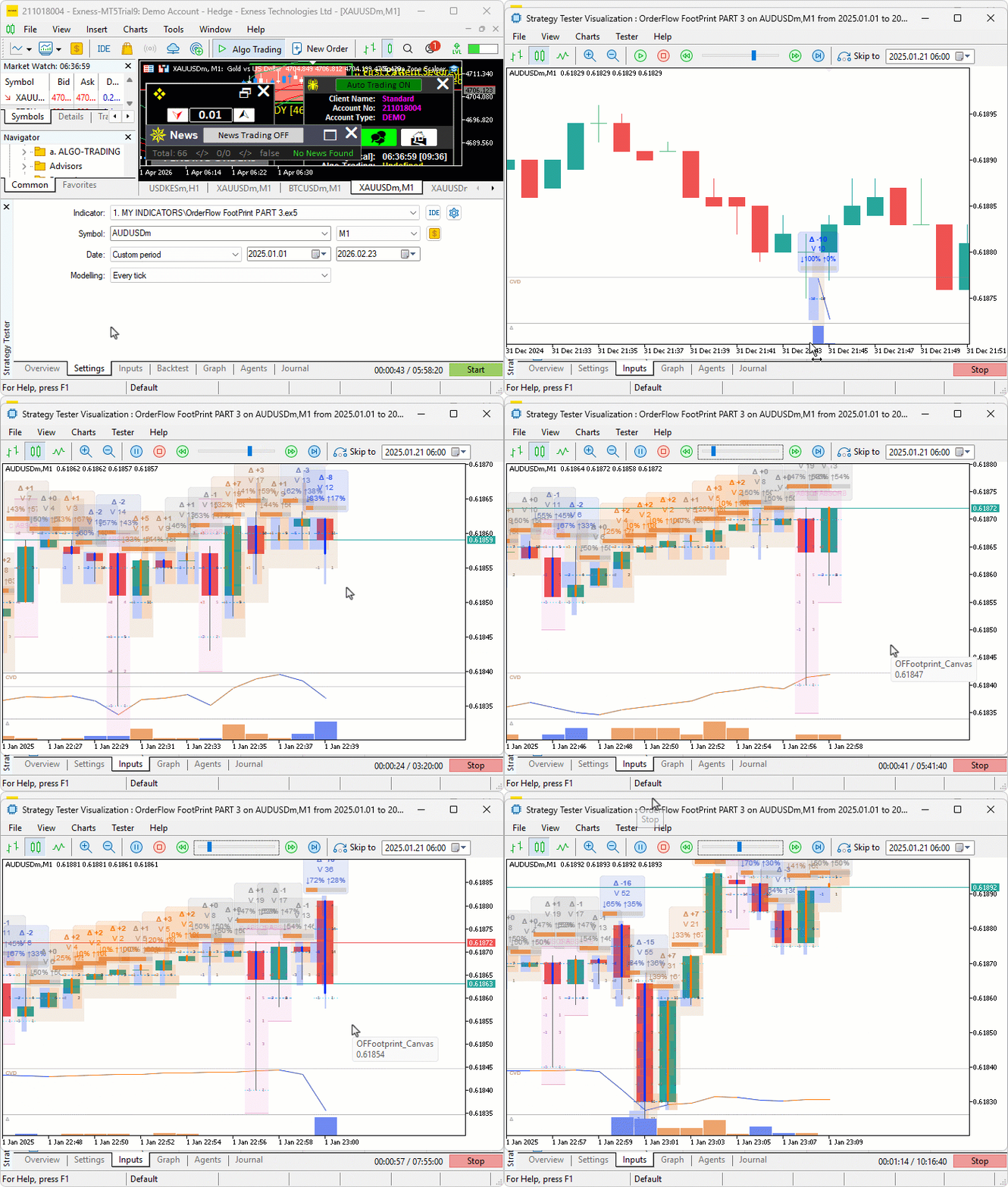
During testing, the value area and point of control updated on every tick as volume accumulated across price levels. Stacked imbalance highlights and directional icons appeared at the expected levels once the ratio and depth thresholds were met. The cumulative volume delta panel tracked the running net delta across session boundaries, and the delta histogram reflected per-bar directional dominance at the bottom of the chart.
Conclusion
We have enhanced the footprint chart indicator in MQL5 by adding twelve layered visual and analytical overlays, including a volume profile behind each bar, point of control and value area highlighting, stacked imbalance detection with directional icons, absorption zone classification, single print and unfinished business markers, a cumulative volume delta panel, and a per-bar delta histogram. The implementation covered the extended bar and price level structures, dedicated computation functions for point of control, value area expansion, imbalance streak detection, and absorption classification, a layered canvas redraw pipeline that draws each overlay in a defined sequence, and an updated calculation event handler that calls all new analytical functions and maintains the running cumulative delta on every tick. After reading this article, you will be able to:
- Use the point of control and value area overlay to identify the accepted price zone inside each bar, treating returns to the point of control from a deviation as mean-reversion reference points and using value area boundaries as support and resistance levels for the next bar's price action
- Identify stacked imbalance zones marked by the directional icons and use them as directional fuel indicators — entering in the direction of a stacked ask zone when price holds above it, or a stacked bid zone when price holds below it, and treating absorption bars at key levels as potential reversal candidates when the cumulative volume delta diverges from price direction
- Monitor the cumulative volume delta panel for sustained divergence from price direction as an early warning of exhaustion, and use the delta histogram to compare per-bar directional dominance across a sequence of bars before committing to a position
Warning: All rights to these materials are reserved by MetaQuotes Ltd. Copying or reprinting of these materials in whole or in part is prohibited.
This article was written by a user of the site and reflects their personal views. MetaQuotes Ltd is not responsible for the accuracy of the information presented, nor for any consequences resulting from the use of the solutions, strategies or recommendations described.


 Building a Volume Bubble Indicator in MQL5 Using Standard Deviation
 Developing a Multi-Currency Expert Advisor (Part 26): Informer for Trading Instruments
 From Simple Close Buttons to a Rule-Based Risk Dashboard in MQL5
 Building a Correlation-Aware Multi-EA Portfolio Scorer in MQL5

- Free trading apps
- Over 8,000 signals for copying
- Economic news for exploring financial markets
You agree to website policy and terms of use