

MQL5 Trading Tools (Part 26): Integrating Frequency Binning, Entropy, and Chi-Square in Visual Analyzer
 2 860
2 860
 0
0

Introduction
You have a multi-distribution graphing tool, but it models synthetic samples rather than actual market data, so you cannot see how closing prices distribute across levels, quantify how predictable the current market structure is, or test whether prices cluster or are uniformly distributed. This article is for MetaQuotes Language 5 (MQL5) developers and algorithmic traders looking to build a frequency analysis tool that operates directly on live price data for actionable statistical insights.
In our previous article (Part 25), we expanded the graphing tool to support seventeen statistical distributions with interactive cycling via a header switch icon. In Part 26, we build a frequency analysis tool that bins closing prices into a histogram, computes Shannon entropy, and runs a chi-square goodness-of-fit test. The tool also includes an auto-scrolling log panel, per-bar/per-tick modes, and supersampled rendering. We will cover the following topics:
- Understanding the Frequency Binning, Entropy, and Chi-Square FrameworkБ/фЮ
- Implementation in MQL5
- Backtesting
- Conclusion
By the end, you’ll have a comprehensive MQL5 frequency analysis tool, ready for customization—let’s dive in!
Understanding the Frequency Binning, Entropy, and Chi-Square Framework
Frequency binning divides a price range into equal-width intervals and counts how many closes fall into each bin. Dense bins indicate acceptance zones, while sparse bins indicate impulsive transitions. Shannon entropy quantifies how evenly spread the counts are across bins: a perfectly uniform distribution produces maximum entropy, while a histogram dominated by one or two bins produces low entropy, signaling strong clustering and potentially tradeable structure. The chi-square test formalizes this by comparing observed bin counts against the expected counts under a uniform distribution, producing a test statistic that rises as clustering intensifies, with degrees of freedom equal to the number of bins minus one.
In the market, use the frequency histogram to identify the highest-density bin as the current value area — price returning to that bin after a deviation is a mean-reversion candidate. Monitor entropy across sessions: a drop in entropy after a range period signals emerging structure and a potential directional breakout setup. Use the chi-square statistic as a filter — high values confirm non-random clustering worth trading, while values near zero suggest a random walk where frequency-based strategies lose edge.
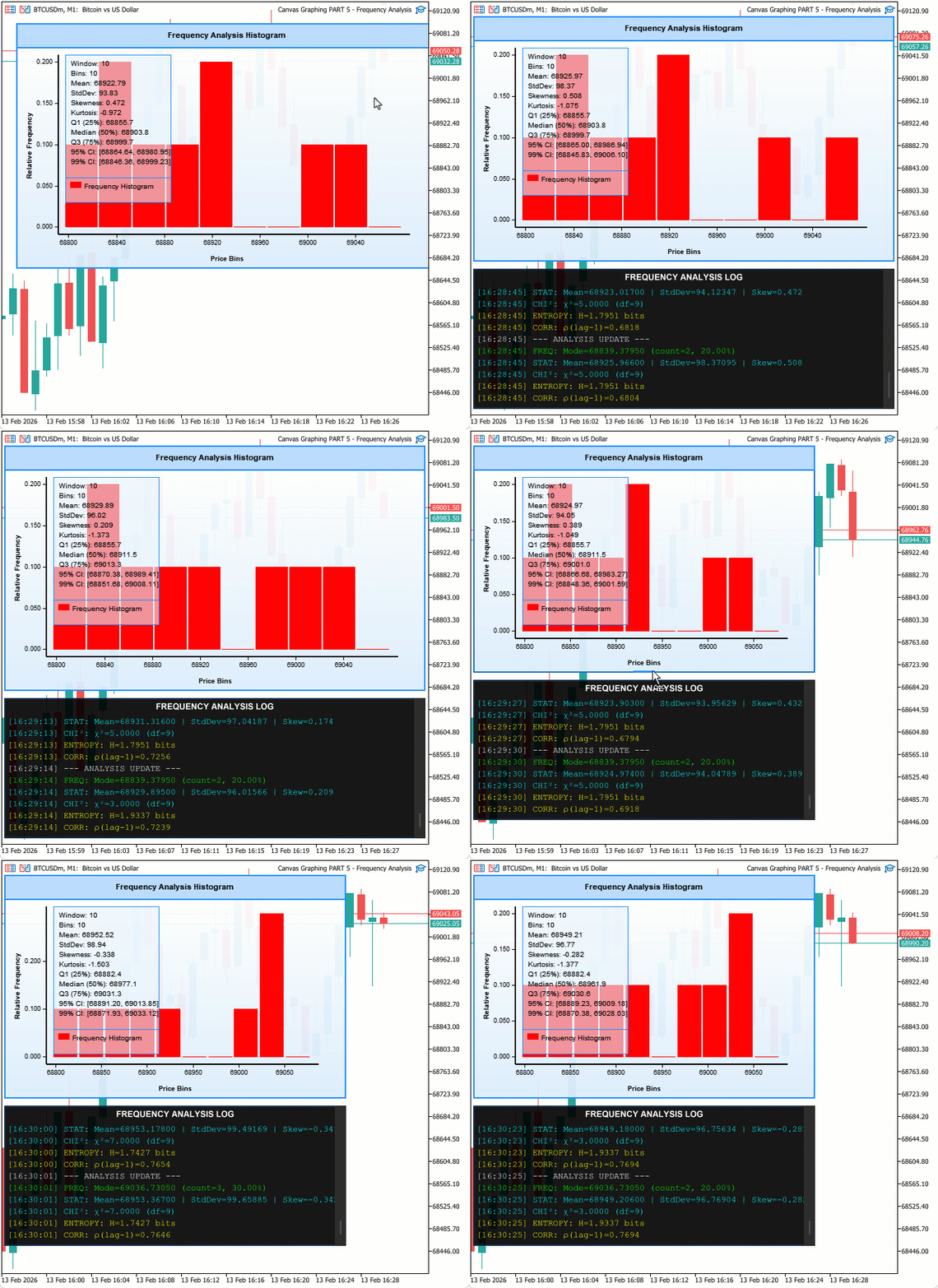
We load recent closing prices and bin them into user-defined intervals. We then compute relative frequencies, entropy (−∑p·log p), and the chi-square statistic. Results are displayed on a canvas with a statistics panel and a supersampled auto-scrolling log panel (per-bar or per-tick). In a nutshell, here is what we intend to achieve.
Implementation in MQL5
We begin the implementation by defining the enumerations, inputs, structures, and global variables that the frequency analysis system requires.
Defining Enumerations, Inputs, Structures, and Global Variables
To support typed logging, selectable computation modes, configurable analysis parameters, and a scrollable log panel, we define two enumerations for log entry types and computation modes, add input groups for frequency settings and log appearance, declare two structures for bin data and log entries, and initialize all global variables covering statistical metrics, scroll state, and supersampling constants.
//+------------------------------------------------------------------+
//|                  Canvas Graphing PART 5 - Frequency Analysis.mq5 |
//|                           Copyright 2026, Allan Munene Mutiiria. |
//|                                   https://t.me/Forex_Algo_Trader |
//+------------------------------------------------------------------+
#property copyright "Copyright 2026, Allan Munene Mutiiria."
#property link      "https://t.me/Forex_Algo_Trader"
#property version   "1.00"
#property strict

enum ENUM_LOG_TYPE
  {
   LOG_INFO,          // Info
   LOG_FREQUENCY,     // Frequency
   LOG_STATISTICAL,   // Statistical
   LOG_VECTOR_MATRIX, // Vector Matrix
   LOG_WARNING,       // Warning
   LOG_SUCCESS        // Success
  };

enum ENUM_COMPUTE_MODE
  {
   PER_BAR,  // Per Bar
   PER_TICK  // Per Tick
  };

input group "=== FREQUENCY ANALYSIS SETTINGS ==="
input int               frequencyBins             = 10;      // Frequency Analysis Bins
input int               analysisWindowSize         = 100;     // Analysis Window Size (bars)
input bool              enableChiSquareTest        = true;    // Enable Chi-Square Test
input bool              enableEntropyCalculation   = true;    // Enable Entropy Calculation
input bool              enableCorrelationAnalysis  = true;    // Enable Correlation Analysis
input int               logUpdateIntervalTicks     = 5;       // Log Update Interval (ticks)
input ENUM_COMPUTE_MODE computeMode                = PER_BAR; // Compute Mode (per bar or per tick)

input group "=== LOG PANEL COLORS ==="
input color             logBackgroundColor       = clrBlack;       // Log Background Color
input double            logBackgroundOpacity     = 0.91;           // Log Background Opacity (0-1)
input color             logFrequencyTextColor    = clrLime;        // Frequency Log Color
input color             logStatisticalTextColor  = clrCyan;        // Statistical Log Color
input color             logVectorMatrixTextColor = clrYellow;      // Vector/Matrix Log Color
input color             logWarningTextColor      = clrOrange;      // Warning Log Color
input color             logSuccessTextColor      = clrSpringGreen; // Success Log Color
input color             logInfoTextColor         = clrWhite;       // Info Log Color

input group "=== LOG SCROLL SETTINGS ==="
input bool              showLogScrollButtons           = false; // Show Log Up/Down Buttons
input int               logTriangleCornerRadius        = 1;     // Log Triangle Round Radius
input double            logTriangleBaseWidthPercent    = 65.0;  // Log Triangle Base Width Percent (of button size)
input double            logTriangleHeightPercent       = 70.0;  // Log Triangle Height Percent (of base width)


//+------------------------------------------------------------------+
//| Structures                                                       |
//+------------------------------------------------------------------+
struct FrequencyBinStruct
  {
   double rangeMinimum; // Minimum value of this bin's price range
   double rangeMaximum; // Maximum value of this bin's price range
   int    count;        // Number of data points that fall in this bin
   double frequency;    // Relative frequency (count / total samples)
  };

struct LogEntryStruct
  {
   string        message;   // Text content of the log entry
   ENUM_LOG_TYPE type;      // Log type controlling the display color
   datetime      timestamp; // Time the entry was recorded
  };

//+------------------------------------------------------------------+
//| Global Variables - Frequency Analysis                            |
//+------------------------------------------------------------------+
FrequencyBinStruct frequencyBinsTable[]; // Array of frequency bin descriptors
double             priceDataArray[];     // Array of close prices used for analysis
int                tickUpdateCounter = 0; // Counter of ticks since the last analysis update

double currentMeanValue          = 0.0; // Sample mean of the price data
double currentStandardDeviation  = 0.0; // Sample standard deviation of the price data
double currentSkewnessValue      = 0.0; // Sample skewness of the price data
double currentModeValue          = 0.0; // Modal bin midpoint value
int    modeFrequencyCount        = 0;   // Count of data points in the modal bin
double chiSquareTestStatistic    = 0.0; // Computed chi-square uniformity test statistic
double shannonEntropyValue       = 0.0; // Computed Shannon entropy of the frequency distribution
double correlationCoefficient    = 0.0; // Computed lag-1 autocorrelation coefficient

double dataMinimum             = 0.0;   // Minimum price value in the current window
double dataMaximum             = 0.0;   // Maximum price value in the current window
double maximumFrequency        = 0.0;   // Highest relative frequency across all bins
bool   dataLoadedSuccessfully  = false; // Flag indicating data was loaded without error

double sampleMeanValue                    = 0.0; // Advanced: sample mean
double sampleStandardDeviation            = 0.0; // Advanced: sample standard deviation
double sampleSkewnessValue                = 0.0; // Advanced: sample skewness
double sampleKurtosisValue                = 0.0; // Advanced: sample excess kurtosis
double percentile25Value                  = 0.0; // 25th percentile (Q1)
double percentile50Value                  = 0.0; // 50th percentile (median)
double percentile75Value                  = 0.0; // 75th percentile (Q3)
double confidenceInterval95LowerBound     = 0.0; // Lower bound of 95% confidence interval
double confidenceInterval95UpperBound     = 0.0; // Upper bound of 95% confidence interval
double confidenceInterval99LowerBound     = 0.0; // Lower bound of 99% confidence interval
double confidenceInterval99UpperBound     = 0.0; // Upper bound of 99% confidence interval

LogEntryStruct logEntriesArray[];    // Array storing all log entries
int  maximumLogEntries    = 100;     // Maximum number of retained log entries
int  logScrollPosition    = 0;       // Current scroll offset of the log panel
int  maximumLogScroll     = 0;       // Maximum scroll offset of the log panel
bool isHoveringOverLogPanel    = false; // Flag for mouse hovering over the log panel
bool isDraggingLogScrollbar    = false; // Flag for active scrollbar drag

//+------------------------------------------------------------------+
//| Log Scroll Constants and Globals                                 |
//+------------------------------------------------------------------+
const int supersamplingFactor       = 4;  // Supersampling multiplier for high-res log rendering
const int logScrollSmoothFactor     = 10; // Pixel multiplier applied to each scroll step
const int logScrollbarFullWidth     = 16; // Full scrollbar track width in pixels
const int logScrollbarThinWidth     = 2;  // Thin (collapsed) scrollbar width in pixels
const int logTrackWidth             = 16; // Width of the scrollbar track area
const int logScrollbarMargin        = 5;  // Inner margin around the scrollbar slider
const int logButtonSize             = 16; // Pixel size of up/down scroll buttons

color logTrackColor                    = C'45,45,45';   // Scrollbar track background color
color logButtonBackgroundColor         = C'60,60,60';   // Scroll button background color
color logButtonBackgroundHoverColor    = C'70,70,70';   // Scroll button hover background color
color logArrowColor                    = C'150,150,150'; // Arrow glyph normal color
color logArrowDisabledColor            = C'80,80,80';   // Arrow glyph color when scroll is at limit
color logArrowHoverColor               = C'100,100,100'; // Arrow glyph hover color
color logSliderBackgroundColor         = C'80,80,80';   // Scrollbar slider normal color
color logSliderBackgroundHoverColor    = C'100,100,100'; // Scrollbar slider hover color

int  logScrollCurrentPosition          = 0;     // Current scroll position in high-res pixels
int  logScrollMaximumPosition          = 0;     // Maximum scroll position in high-res pixels
int  logSliderHeight                   = 0;     // Computed height of the scrollbar slider in display pixels
bool isMovingLogSlider                 = false; // Flag for active slider drag
int  logMouseDownPositionYOnSlider     = 0;     // Local Y of mouse at slider drag start
int  logMouseDownDeltaYOnSlider        = 0;     // Slider top Y at drag start
int  logTotalContentHeight             = 0;     // Total scrollable content height in pixels
int  logVisibleContentHeight           = 0;     // Visible content height in pixels
bool isLogScrollbarVisible             = false; // Flag indicating the scrollbar is currently shown
bool isMouseInLogContentBody           = false; // Flag for mouse inside the log text area
bool previousMouseInLogContentBody     = false; // Previous frame's log body hover state
bool isLogScrollUpButtonHovered        = false; // Flag for mouse hovering over the up scroll button
bool isLogScrollDownButtonHovered      = false; // Flag for mouse hovering over the down scroll button
bool isLogScrollSliderHovered          = false; // Flag for mouse hovering over the slider thumb
bool isLogScrollAreaHovered            = false; // Flag for mouse hovering over the scrollbar track area
First, we define "ENUM_LOG_TYPE" to categorize log messages ("LOG_INFO", "LOG_FREQUENCY", "LOG_STATISTICAL", "LOG_VECTOR_MATRIX", "LOG_WARNING", "LOG_SUCCESS"). This enables color-coded logging. Next, we create the "ENUM_COMPUTE_MODE" enumeration with "PER_BAR" for bar-based updates and "PER_TICK" for tick-level, controlling analysis frequency. We add input groups for frequency settings like "frequencyBins" for histogram divisions, "analysisWindowSize" for data lookback, toggles for chi-square, entropy, and correlation, "logUpdateIntervalTicks" for tick mode pacing, and "computeMode" selecting the enum defaulting to "PER_BAR".
For log colors, we provide inputs to customize backgrounds and text per type, such as "logFrequencyTextColor" to lime, ensuring visual distinction. Scroll settings include toggles like "showLogScrollButtons" and parameters for triangle shapes in buttons, like "logTriangleCornerRadius". We define the "FrequencyBinStruct" structure to hold bin ranges, counts, and frequencies for histogram data.
The "LogEntryStruct" structure stores the message, the type from the enum, and the timestamp for each log entry. Globals include "frequencyBinsTable" array of the bin struct, "priceDataArray" for raw prices, "tickUpdateCounter" starting at 0 for timing. Statistical globals like "currentMeanValue" to 0.0 for mean, "currentStandardDeviation" for std dev, "currentSkewnessValue", "currentModeValue" with "modeFrequencyCount", "chiSquareTestStatistic", "shannonEntropyValue", "correlationCoefficient".
Advanced stats like "sampleMeanValue", "percentile25Value", and confidence bounds are all set to 0.0. Log system uses "logEntriesArray" of the entry struct, "maximumLogEntries" to 100, "logScrollPosition" to 0, "maximumLogScroll" to 0, hover and drag flags to false. Scroll constants define dimensions like "supersamplingFactor" to 4 for anti-aliasing, widths, colors for track, buttons, arrows, slider, with hovers and disabled states. Globals track positions, heights, and hovers for the interactive scrollbar. With the globals in place, we now define the log entry management function that feeds the scrollable log panel.
Managing the Log Entry Queue
To keep the log bounded in memory while always showing the most recent entries, we maintain a fixed-size array that shifts existing entries left when capacity is reached, appends the new entry at the end, and optionally flags a pending auto-scroll to the bottom so the next render pass brings the latest message into view without an immediate redraw.
//+------------------------------------------------------------------+
//| Add log entry                                                    |
//+------------------------------------------------------------------+
bool pendingAutoScrollToBottom = false; // Flag to scroll to the bottom on the next render

void AddLogEntry(string entryMessage, ENUM_LOG_TYPE entryType)
  {
   int currentSize = ArraySize(logEntriesArray);

   //--- If the log is full, evict the oldest entry by shifting the array
   if (currentSize >= maximumLogEntries)
     {
      for (int i = 0; i < currentSize - 1; i++)
         logEntriesArray[i] = logEntriesArray[i + 1];
      currentSize = maximumLogEntries - 1;
     }

   //--- Append the new entry at the end of the array
   ArrayResize(logEntriesArray, currentSize + 1);
   logEntriesArray[currentSize].message   = entryMessage;
   logEntriesArray[currentSize].type      = entryType;
   logEntriesArray[currentSize].timestamp = TimeCurrent();

   //--- Request an auto-scroll to the bottom on the next render if enabled
   if (enableLogAutoScroll)
      pendingAutoScrollToBottom = true;
  }
We define the "AddLogEntry" function to append a new log message to the "logEntriesArray" array, maintaining a capped size for efficiency. We first check the current array size with ArraySize, and if it meets or exceeds "maximumLogEntries", shift elements left by one to discard the oldest, reducing the size to make room. Then, we resize the array by one with ArrayResize, set the new entry's message, type from "ENUM_LOG_TYPE", and timestamp via the TimeCurrent function. If "enableLogAutoScroll" is true, we flag "pendingAutoScrollToBottom" to trigger scrolling in rendering, ensuring recent logs are visible without immediate redraw. This will help manage a FIFO queue for logs, preventing unbounded growth while supporting auto-scroll for user convenience. With the log queue ready, we now define the core function that bins the price data and computes relative frequencies.
Performing Frequency Binning on Price Data
This function fetches recent close prices into an array, determines the data range, divides it into equal-width bins, counts how many prices fall into each bin, computes relative frequencies, finds the maximum frequency for plot scaling, and identifies the mode bin, preparing all data structures that the histogram plot and statistical functions will consume.
//+------------------------------------------------------------------+
//| Perform frequency analysis                                       |
//+------------------------------------------------------------------+
void PerformFrequencyAnalysis()
  {
   //--- Collect close prices for the configured analysis window
   int dataPointsCount = MathMin(analysisWindowSize, Bars(_Symbol, PERIOD_CURRENT));
   ArrayResize(priceDataArray, dataPointsCount);
   for (int i = 0; i < dataPointsCount; i++)
      priceDataArray[i] = iClose(_Symbol, PERIOD_CURRENT, i);

   //--- Require at least two data points
   if (dataPointsCount < 2) return;

   //--- Find the price range across the window
   dataMinimum = priceDataArray[0];
   dataMaximum = priceDataArray[0];
   for (int i = 1; i < dataPointsCount; i++)
     {
      if (priceDataArray[i] < dataMinimum) dataMinimum = priceDataArray[i];
      if (priceDataArray[i] > dataMaximum) dataMaximum = priceDataArray[i];
     }

   //--- Guard against a zero-range window (all closes identical)
   double dataRange = dataMaximum - dataMinimum;
   if (dataRange == 0) dataRange = _Point;

   //--- Build and initialize all frequency bins
   ArrayResize(frequencyBinsTable, frequencyBins);
   double binWidth = dataRange / frequencyBins;
   for (int i = 0; i < frequencyBins; i++)
     {
      frequencyBinsTable[i].rangeMinimum = dataMinimum + i * binWidth;
      frequencyBinsTable[i].rangeMaximum = dataMinimum + (i + 1) * binWidth;
      frequencyBinsTable[i].count        = 0;
      frequencyBinsTable[i].frequency    = 0.0;
     }

   //--- Assign each data point to its bin using a linear scan
   for (int i = 0; i < dataPointsCount; i++)
      for (int j = 0; j < frequencyBins; j++)
         if (priceDataArray[i] >= frequencyBinsTable[j].rangeMinimum &&
             priceDataArray[i] <  frequencyBinsTable[j].rangeMaximum)
           {
            frequencyBinsTable[j].count++;
            break;
           }

   //--- Include the maximum value in the last bin to handle the closed right boundary
   if (priceDataArray[0] == dataMaximum)
      frequencyBinsTable[frequencyBins - 1].count++;

   //--- Compute relative frequency for each bin
   for (int i = 0; i < frequencyBins; i++)
      frequencyBinsTable[i].frequency = (double)frequencyBinsTable[i].count / dataPointsCount;

   //--- Find the maximum frequency for Y-axis scaling
   maximumFrequency = 0.0;
   for (int i = 0; i < frequencyBins; i++)
      if (frequencyBinsTable[i].frequency > maximumFrequency)
         maximumFrequency = frequencyBinsTable[i].frequency;

   //--- Identify the modal bin
   modeFrequencyCount = 0;
   int modeBinIndex   = 0;
   for (int i = 0; i < frequencyBins; i++)
      if (frequencyBinsTable[i].count > modeFrequencyCount)
        {
         modeFrequencyCount = frequencyBinsTable[i].count;
         modeBinIndex       = i;
        }
   //--- Set the mode value to the modal bin's midpoint
   currentModeValue = (frequencyBinsTable[modeBinIndex].rangeMinimum +
                       frequencyBinsTable[modeBinIndex].rangeMaximum) / 2.0;

   dataLoadedSuccessfully = true;
  }
Here, we define the "PerformFrequencyAnalysis" function to conduct the core binning and frequency computation on price data. We first determine the number of data points as the minimum of "analysisWindowSize" and available bars via Bars, resize "priceDataArray" with ArrayResize, and populate it by looping to fetch close prices using iClose from the current symbol and timeframe, starting from recent bars. If fewer than two points, we exit early. We find the data range by initializing "dataMinimum" and "dataMaximum" to the first value, then looping to update mins/maxes, adjusting zero range to "_Point" for minimal spread. To set up bins, we resize "frequencyBinsTable" to "frequencyBins", compute "binWidth" as range divided by bins, and loop to assign each bin's "rangeMinimum" and "rangeMaximum" as sequential intervals, resetting count and frequency to zero.
We count frequencies by nested loops: for each price, check against bin ranges and increment the matching bin's count, breaking on match. For edge cases where prices equal max, we increment the last bin. Next, we calculate relative frequencies by dividing each count by the total points. We find "maximumFrequency" by looping to get the highest frequency for plot scaling. For mode, we reset "modeFrequencyCount" and index, loop to find the bin with the max count, and set "currentModeValue" as its midpoint. Finally, flag "dataLoadedSuccessfully" true, completing the analysis, ready for visualization and statistics. With the bins populated, we now compute the statistical measures that accompany the histogram.
Calculating Basic Statistics, Chi-Square, Shannon Entropy, and Autocorrelation
Four dedicated functions cover the statistical layer: basic statistics derives the mean, standard deviation, and skewness directly from the price array; the chi-square test compares observed bin counts against a uniform expectation to quantify clustering; Shannon entropy sums negative frequency-log-frequency terms across bins to measure predictability; and lag-1 autocorrelation computes the ratio of consecutive-price covariance to variance to detect serial dependence.
//+------------------------------------------------------------------+
//| Calculate basic statistics                                       |
//+------------------------------------------------------------------+
void CalculateBasicStatistics()
  {
   int sampleSize = ArraySize(priceDataArray);
   if (sampleSize < 2) return;

   //--- Compute the arithmetic mean
   double sumTotal = 0.0;
   for (int i = 0; i < sampleSize; i++)
      sumTotal += priceDataArray[i];
   currentMeanValue = sumTotal / sampleSize;

   //--- Compute the sample standard deviation
   double sumSquaredDifferences = 0.0;
   for (int i = 0; i < sampleSize; i++)
     {
      double difference = priceDataArray[i] - currentMeanValue;
      sumSquaredDifferences += difference * difference;
     }
   currentStandardDeviation = MathSqrt(sumSquaredDifferences / (sampleSize - 1));

   //--- Compute the skewness only when standard deviation is nonzero
   if (currentStandardDeviation > 0)
     {
      double sumCubedDifferences = 0.0;
      for (int i = 0; i < sampleSize; i++)
        {
         double normalizedValue = (priceDataArray[i] - currentMeanValue) / currentStandardDeviation;
         sumCubedDifferences += normalizedValue * normalizedValue * normalizedValue;
        }
      currentSkewnessValue = (sampleSize / ((sampleSize - 1.0) * (sampleSize - 2.0))) * sumCubedDifferences;
     }
  }

//+------------------------------------------------------------------+
//| Calculate chi-square test                                        |
//+------------------------------------------------------------------+
void CalculateChiSquareTest()
  {
   if (!enableChiSquareTest) return;

   int sampleSize = ArraySize(priceDataArray);
   if (sampleSize < frequencyBins) return;

   //--- Under uniform distribution, each bin expects the same count
   double expectedFrequency    = (double)sampleSize / frequencyBins;
   chiSquareTestStatistic = 0.0;

   //--- Accumulate chi-square contributions from each bin
   for (int i = 0; i < frequencyBins; i++)
     {
      double difference = frequencyBinsTable[i].count - expectedFrequency;
      chiSquareTestStatistic += (difference * difference) / expectedFrequency;
     }
  }

//+------------------------------------------------------------------+
//| Calculate Shannon entropy                                        |
//+------------------------------------------------------------------+
void CalculateShannonEntropy()
  {
   if (!enableEntropyCalculation) return;

   shannonEntropyValue = 0.0;

   //--- Sum -p * log(p) over all non-empty bins
   for (int i = 0; i < frequencyBins; i++)
      if (frequencyBinsTable[i].frequency > 0)
         shannonEntropyValue -= frequencyBinsTable[i].frequency *
                                MathLog(frequencyBinsTable[i].frequency);
  }

//+------------------------------------------------------------------+
//| Calculate auto-correlation                                       |
//+------------------------------------------------------------------+
void CalculateAutoCorrelation()
  {
   if (!enableCorrelationAnalysis) return;

   int sampleSize = ArraySize(priceDataArray);
   if (sampleSize < 3) return;

   //--- Compute variance and lag-1 covariance using the sample mean
   double meanValue    = currentMeanValue;
   double varianceSum  = 0.0;
   double covarianceSum = 0.0;

   for (int i = 0; i < sampleSize; i++)
      varianceSum += (priceDataArray[i] - meanValue) * (priceDataArray[i] - meanValue);

   for (int i = 0; i < sampleSize - 1; i++)
      covarianceSum += (priceDataArray[i] - meanValue) * (priceDataArray[i + 1] - meanValue);

   //--- Divide covariance by variance to obtain the lag-1 autocorrelation
   if (varianceSum > 0)
      correlationCoefficient = covarianceSum / varianceSum;
  }
Here, we define the "CalculateBasicStatistics" function to derive core metrics from "priceDataArray". We first check if the size is at least 2, exiting early if not, then compute the mean by summing values and dividing by count, followed by standard deviation via sum of squared differences from mean divided by n-1 under MathSqrt, and skewness as adjusted sum of cubed normalized differences, providing foundational stats without advanced tools. Next, we implement the "CalculateChiSquareTest" function for goodness-of-fit, returning early if "enableChiSquareTest" is false or the sample is small. We set expected frequency as sample size over bins, reset "chiSquareTestStatistic", and loop to add (observed - expected)^2 / expected per bin, quantifying deviation from uniform.
For information measure, we create the "CalculateShannonEntropy" function, skipping if "enableEntropyCalculation" off, resetting "shannonEntropyValue", and accumulating negative frequency * log(frequency) for positive frequencies with "MathLog", yielding entropy in nats to assess data predictability. Finally, we define the "CalculateAutoCorrelation" function for lag-1 dependency, exiting if "enableCorrelationAnalysis" is false or small sample. We compute variance sum as squared deviations from mean, covariance as product of consecutive deviations, and set "correlationCoefficient" as covariance over variance if positive, detecting serial correlation in prices. With the statistical measures computed, we now render the frequency histogram on the main canvas.
Drawing the Frequency Histogram Plot
The histogram plot maps each bin's relative frequency to a bar height scaled against the maximum frequency, draws thickened X and Y axes with optimal tick marks and formatted labels, and writes fixed axis titles for price bins and relative frequency, producing a complete visual representation of the price distribution over the analysis window.
//+------------------------------------------------------------------+
//| Draw frequency histogram plot                                    |
//+------------------------------------------------------------------+
void DrawFrequencyHistogramPlot()
  {
   if (!dataLoadedSuccessfully) return;

   //--- Define the outer and inner (padded) plot area boundaries
   int plotAreaLeftEdge   = 60;
   int plotAreaRightEdge  = currentCanvasWidth  - 40;
   int plotAreaTopEdge    = headerBarHeight + 10;
   int plotAreaBottomEdge = currentCanvasHeight  - 50;

   int drawAreaLeftEdge   = plotAreaLeftEdge   + plotAreaPaddingPixels;
   int drawAreaRightEdge  = plotAreaRightEdge  - plotAreaPaddingPixels;
   int drawAreaTopEdge    = plotAreaTopEdge    + plotAreaPaddingPixels;
   int drawAreaBottomEdge = plotAreaBottomEdge - plotAreaPaddingPixels;

   int plotWidth  = drawAreaRightEdge - drawAreaLeftEdge;
   int plotHeight = drawAreaBottomEdge - drawAreaTopEdge;

   if (plotWidth <= 0 || plotHeight <= 0) return;

   //--- Compute axis ranges, guarding against degenerate zero values
   double xAxisRange = dataMaximum - dataMinimum;
   double yAxisRange = maximumFrequency;
   if (xAxisRange == 0) xAxisRange = 1;
   if (yAxisRange == 0) yAxisRange = 1;

   //--- Draw X and Y axes with a two-pixel stroke for visibility
   uint argbAxisColor = ColorToARGB(clrBlack, 255);
   for (int thickness = 0; thickness < 2; thickness++)
      mainDistributionCanvas.Line(plotAreaLeftEdge - thickness, plotAreaTopEdge,
                                  plotAreaLeftEdge - thickness, plotAreaBottomEdge, argbAxisColor);
   for (int thickness = 0; thickness < 2; thickness++)
      mainDistributionCanvas.Line(plotAreaLeftEdge, plotAreaBottomEdge + thickness,
                                  plotAreaRightEdge, plotAreaBottomEdge + thickness, argbAxisColor);

   //--- Draw Y-axis tick marks and labels
   mainDistributionCanvas.FontSet("Arial", axisLabelFontSize);
   uint argbTickLabelColor = ColorToARGB(clrBlack, 255);

   double yAxisTickValues[];
   int    yAxisTickCount = CalculateOptimalAxisTicks(0, yAxisRange, plotHeight, yAxisTickValues);
   for (int i = 0; i < yAxisTickCount; i++)
     {
      double yTickValue = yAxisTickValues[i];
      if (yTickValue < 0 || yTickValue > yAxisRange) continue;

      int yPosition = drawAreaBottomEdge - (int)((yTickValue / yAxisRange) * plotHeight);
      mainDistributionCanvas.Line(plotAreaLeftEdge - 5, yPosition,
                                  plotAreaLeftEdge,     yPosition, argbAxisColor);
      mainDistributionCanvas.TextOut(plotAreaLeftEdge - 8,
                                     yPosition - axisLabelFontSize / 2,
                                     FormatAxisTickLabel(yTickValue, yAxisRange),
                                     argbTickLabelColor, TA_RIGHT);
     }

   //--- Draw X-axis tick marks and labels
   double xAxisTickValues[];
   int    xAxisTickCount = CalculateOptimalAxisTicks(dataMinimum, dataMaximum, plotWidth, xAxisTickValues);
   for (int i = 0; i < xAxisTickCount; i++)
     {
      double xTickValue = xAxisTickValues[i];
      if (xTickValue < dataMinimum || xTickValue > dataMaximum) continue;

      int xPosition = drawAreaLeftEdge + (int)((xTickValue - dataMinimum) / xAxisRange * plotWidth);
      mainDistributionCanvas.Line(xPosition, plotAreaBottomEdge,
                                  xPosition, plotAreaBottomEdge + 5, argbAxisColor);
      mainDistributionCanvas.TextOut(xPosition, plotAreaBottomEdge + 7,
                                     FormatAxisTickLabel(xTickValue, xAxisRange),
                                     argbTickLabelColor, TA_CENTER);
     }

   //--- Draw histogram bars centered on each bin midpoint
   uint   argbHistogramColor = ColorToARGB(histogramBarColor, 255);
   double totalBarGaps       = (frequencyBins - 1) * histogramBarGapPixels;
   double barWidth           = (plotWidth - totalBarGaps) / frequencyBins;
   if (barWidth < 1) barWidth = 1; // Enforce a minimum bar width of one pixel

   for (int i = 0; i < frequencyBins; i++)
     {
      double binMidpoint     = (frequencyBinsTable[i].rangeMinimum + frequencyBinsTable[i].rangeMaximum) / 2.0;
      int    barLeftPosition = drawAreaLeftEdge +
                               (int)((binMidpoint - dataMinimum) / xAxisRange * plotWidth - barWidth / 2);
      int    barRightPosition = barLeftPosition + (int)barWidth - 1;
      int    barHeight        = (int)(frequencyBinsTable[i].frequency / yAxisRange * plotHeight);
      int    barTopPosition   = drawAreaBottomEdge - barHeight;

      if (barRightPosition >= barLeftPosition)
         mainDistributionCanvas.FillRectangle(barLeftPosition, barTopPosition,
                                              barRightPosition, drawAreaBottomEdge,
                                              argbHistogramColor);
     }

   //--- Draw X and Y axis labels
   mainDistributionCanvas.FontSet("Arial Bold", labelFontSize);
   uint argbAxisLabelColor = ColorToARGB(clrBlack, 255);

   mainDistributionCanvas.TextOut(currentCanvasWidth / 2, currentCanvasHeight - 20,
                                  "Price Bins", argbAxisLabelColor, TA_CENTER);

   //--- Rotate 90° to draw the Y axis label vertically
   mainDistributionCanvas.FontAngleSet(900);
   mainDistributionCanvas.TextOut(12, currentCanvasHeight / 2,
                                  "Relative Frequency", argbAxisLabelColor, TA_CENTER);
   mainDistributionCanvas.FontAngleSet(0);
  }
We define the "DrawFrequencyHistogramPlot" function to visualize the frequency bins as a histogram on the main canvas, returning early if "dataLoadedSuccessfully" is false to avoid errors. We set plot area edges with fixed margins, adjust draw boundaries by "plotAreaPaddingPixels", compute width and height, and exit if invalid. After determining X range from "dataMaximum" - "dataMinimum" and Y from "maximumFrequency" with minimum safeguards, we convert black to ARGB for axes and draw thickened Y/X lines via loops with the "Line" method. To label axes, we set the font with "FontSet" and prepare tick ARGB. For Y, we compute optimal ticks via "CalculateOptimalAxisTicks" from 0 to Y range, loop to position, draw short lines with "Line", format labels using "FormatAxisTickLabel", and place right-aligned via the TextOut method. Similarly, for X from "dataMinimum" to "dataMaximum", drawing downward ticks and centered labels.
For the histogram, we convert "histogramBarColor" to ARGB, calculate bar width accounting for "histogramBarGapPixels", and loop over bins: use midpoint for centering, position bars, scale height to Y range, and fill with FillRectangle if valid. Finally, we bolded the font, set axis labels as "Price Bins" for X centered at the bottom and "Relative Frequency" for Y rotated 90 degrees with FontAngleSet and centered left, resetting the angle to 0, completing the plot for frequency insights. With the histogram in place, we now build the log panel, which renders timestamped entries with color-coded types, a supersampled background, and an interactive scrollbar that expands on hover and collapses when idle.
Rendering the Log Panel with Supersampled Scrollbar
The log panel renders at four times the display resolution and downsamples the result for anti-aliased text and smooth rounded scrollbar caps. It draws a color-coded entry list clipped to the visible area, adjusts the scroll position when auto-scroll is pending, and renders the scrollbar as either a full-width interactive track with up and down arrow buttons and a rounded pill-shaped slider when hovered, or a narrow centered strip when idle.
//+------------------------------------------------------------------+
//| Get log entry text color                                         |
//+------------------------------------------------------------------+
color GetLogEntryTextColor(ENUM_LOG_TYPE entryType)
  {
   //--- Return the configured display color for each log category
   switch (entryType)
     {
      case LOG_FREQUENCY:    return logFrequencyTextColor;
      case LOG_STATISTICAL:  return logStatisticalTextColor;
      case LOG_VECTOR_MATRIX: return logVectorMatrixTextColor;
      case LOG_WARNING:      return logWarningTextColor;
      case LOG_SUCCESS:      return logSuccessTextColor;
      default:               return logInfoTextColor;
     }
  }

//+------------------------------------------------------------------+
//| Render log panel visualization                                   |
//+------------------------------------------------------------------+
void RenderLogPanelVisualization()
  {
   //--- Erase the high-resolution canvas before drawing
   logPanelHighResolutionCanvas.Erase(0);

   int highResolutionWidth  = currentCanvasWidth   * supersamplingFactor;
   int highResolutionHeight = currentLogPanelHeight * supersamplingFactor;

   //--- Fill the log background with the configured semi-transparent color
   uint argbBackgroundColor = ColorToARGB(logBackgroundColor,
                                          (uchar)(255 * logBackgroundOpacity));
   logPanelHighResolutionCanvas.FillRectangle(0, 0,
      highResolutionWidth - 1, highResolutionHeight - 1, argbBackgroundColor);

   //--- Draw the log panel border if enabled
   if (showBorderFrame)
     {
      uint argbBorderColor = ColorToARGB(masterThemeColor, 255);
      logPanelHighResolutionCanvas.Rectangle(0, 0,
         highResolutionWidth - 1, highResolutionHeight - 1, argbBorderColor);
      logPanelHighResolutionCanvas.Rectangle(
         supersamplingFactor, supersamplingFactor,
         highResolutionWidth  - supersamplingFactor - 1,
         highResolutionHeight - supersamplingFactor - 1, argbBorderColor);
     }

   //--- Draw the panel title
   logPanelHighResolutionCanvas.FontSet("Arial Bold", titleFontSize * supersamplingFactor);
   uint argbHeaderTextColor = ColorToARGB(clrWhite, 255);
   logPanelHighResolutionCanvas.TextOut(highResolutionWidth / 2,
      5 * supersamplingFactor,
      "FREQUENCY ANALYSIS LOG", argbHeaderTextColor, TA_CENTER);

   //--- Switch to the monospaced log font
   logPanelHighResolutionCanvas.FontSet("Courier New", logFontSize * supersamplingFactor);

   //--- Compute layout metrics for the scrollable log area
   int logLineHeightHighRes     = logPanelHighResolutionCanvas.TextHeight("A") + 4 * supersamplingFactor;
   int logStartPositionYHighRes = 35 * supersamplingFactor;
   int logVisibleHeightHighRes  = highResolutionHeight - logStartPositionYHighRes - 5 * supersamplingFactor;
   int logTotalHeightHighRes    = ArraySize(logEntriesArray) * logLineHeightHighRes;

   //--- Compute the maximum scroll position and honor a pending scroll-to-bottom request
   logScrollMaximumPosition = MathMax(0, logTotalHeightHighRes - logVisibleHeightHighRes);
   if (pendingAutoScrollToBottom)
     {
      logScrollCurrentPosition  = logScrollMaximumPosition;
      pendingAutoScrollToBottom = false;
     }
   logScrollCurrentPosition = MathMin(logScrollCurrentPosition, logScrollMaximumPosition);

   isLogScrollbarVisible = logScrollMaximumPosition > 0;

   //--- Determine which log entries are currently visible
   int scrollOffsetHighRes = logScrollCurrentPosition;
   int firstEntryIndex     = scrollOffsetHighRes / logLineHeightHighRes;
   int lastEntryIndex      = (scrollOffsetHighRes + logVisibleHeightHighRes) / logLineHeightHighRes + 1;
   lastEntryIndex  = MathMin(lastEntryIndex,  ArraySize(logEntriesArray) - 1);
   firstEntryIndex = MathMax(firstEntryIndex, 0);

   //--- Render each visible log entry
   for (int i = firstEntryIndex; i <= lastEntryIndex; i++)
     {
      color entryTextColor     = GetLogEntryTextColor(logEntriesArray[i].type);
      uint  argbEntryTextColor = ColorToARGB(entryTextColor, 255);
      string timestampString   = TimeToString(logEntriesArray[i].timestamp, TIME_SECONDS);
      string fullEntryMessage  = StringFormat("[%s] %s", timestampString, logEntriesArray[i].message);

      int yPositionHighRes = logStartPositionYHighRes + i * logLineHeightHighRes - scrollOffsetHighRes;

      //--- Skip entries that are fully outside the visible area
      if (yPositionHighRes + logLineHeightHighRes < logStartPositionYHighRes ||
          yPositionHighRes > logStartPositionYHighRes + logVisibleHeightHighRes) continue;

      logPanelHighResolutionCanvas.TextOut(5 * supersamplingFactor,
                                           yPositionHighRes,
                                           fullEntryMessage, argbEntryTextColor, TA_LEFT);
     }

   //--- Render the scrollbar only when content overflows
   if (isLogScrollbarVisible)
     {
      int logScrollbarPositionXHighRes = highResolutionWidth - (logTrackWidth * supersamplingFactor);
      int logScrollbarPositionYHighRes = 0;
      int logScrollbarHeightHighRes    = highResolutionHeight;

      //--- Fill the scrollbar track background
      uint argbTrackColor = ColorToARGB(logTrackColor, 255);
      logPanelHighResolutionCanvas.FillRectangle(
         logScrollbarPositionXHighRes, logScrollbarPositionYHighRes,
         logScrollbarPositionXHighRes + (logTrackWidth * supersamplingFactor) - 1,
         logScrollbarPositionYHighRes + logScrollbarHeightHighRes - 1, argbTrackColor);

      int logScrollAreaHeightHighRes = logScrollbarHeightHighRes - 2 * (logButtonSize * supersamplingFactor);

      //--- Compute the display-space slider height and position
      int logVisibleHeightDisplay  = currentLogPanelHeight - 25 - 5;
      int logTotalHeightDisplay    = ArraySize(logEntriesArray) * (logFontSize + 4);
      int logScrollAreaHeightDisplay = currentLogPanelHeight - 2 * logButtonSize;
      logSliderHeight = CalculateLogSliderHeight(logVisibleHeightDisplay, logTotalHeightDisplay,
                                                  logScrollAreaHeightDisplay, 20);

      int logSliderPositionYHighRes = logScrollbarPositionYHighRes +
                                      (logButtonSize * supersamplingFactor) +
                                      (int)(((double)logScrollCurrentPosition / logScrollMaximumPosition) *
                                            (logScrollAreaHeightHighRes - (logSliderHeight * supersamplingFactor)));

      if (isLogScrollAreaHovered)
        {
         //--- Draw full-width buttons and slider when the scrollbar is hovered
         color upButtonBg   = showLogScrollButtons
                              ? (isLogScrollUpButtonHovered
                                 ? logButtonBackgroundHoverColor : logButtonBackgroundColor)
                              : logTrackColor;
         logPanelHighResolutionCanvas.FillRectangle(
            logScrollbarPositionXHighRes, logScrollbarPositionYHighRes,
            logScrollbarPositionXHighRes + (logTrackWidth * supersamplingFactor) - 1,
            logScrollbarPositionYHighRes + (logButtonSize * supersamplingFactor) - 1,
            ColorToARGB(upButtonBg, 255));

         //--- Draw up arrow glyph
         color upArrowColor = (logScrollCurrentPosition == 0)
                              ? logArrowDisabledColor
                              : (isLogScrollUpButtonHovered ? logArrowHoverColor : logArrowColor);
         int   arrowPositionX  = logScrollbarPositionXHighRes + (logTrackWidth * supersamplingFactor) / 2;
         double baseWidth      = logButtonSize * (logTriangleBaseWidthPercent / 100.0) * supersamplingFactor;
         int   triangleHeight  = (int)(baseWidth * (logTriangleHeightPercent / 100.0));
         int   arrowPositionY  = logScrollbarPositionYHighRes +
                                 ((logButtonSize * supersamplingFactor) - triangleHeight) / 2;
         DrawRoundedTriangleArrow(logPanelHighResolutionCanvas,
                                  arrowPositionX, arrowPositionY,
                                  (int)baseWidth, triangleHeight, true,
                                  ColorToARGB(upArrowColor, 255));

         //--- Draw down button background
         int   downPositionYHighRes = logScrollbarPositionYHighRes + logScrollbarHeightHighRes -
                                      (logButtonSize * supersamplingFactor);
         color downButtonBg = showLogScrollButtons
                              ? (isLogScrollDownButtonHovered
                                 ? logButtonBackgroundHoverColor : logButtonBackgroundColor)
                              : logTrackColor;
         logPanelHighResolutionCanvas.FillRectangle(
            logScrollbarPositionXHighRes, downPositionYHighRes,
            logScrollbarPositionXHighRes + (logTrackWidth * supersamplingFactor) - 1,
            downPositionYHighRes + (logButtonSize * supersamplingFactor) - 1,
            ColorToARGB(downButtonBg, 255));

         //--- Draw down arrow glyph
         color downArrowColor = (logScrollCurrentPosition >= logScrollMaximumPosition)
                                ? logArrowDisabledColor
                                : (isLogScrollDownButtonHovered ? logArrowHoverColor : logArrowColor);
         int downArrowPositionX = logScrollbarPositionXHighRes + (logTrackWidth * supersamplingFactor) / 2;
         int downArrowPositionY = downPositionYHighRes +
                                  ((logButtonSize * supersamplingFactor) - triangleHeight) / 2;
         DrawRoundedTriangleArrow(logPanelHighResolutionCanvas,
                                  downArrowPositionX, downArrowPositionY,
                                  (int)baseWidth, triangleHeight, false,
                                  ColorToARGB(downArrowColor, 255));

         //--- Draw the full-width pill-shaped slider thumb
         int   sliderPositionXHighRes = logScrollbarPositionXHighRes + (logScrollbarMargin * supersamplingFactor);
         int   sliderWidthHighRes     = (logTrackWidth * supersamplingFactor) - 2 * (logScrollbarMargin * supersamplingFactor);
         int   capRadius              = sliderWidthHighRes / 2;
         color sliderBgColor = (isLogScrollSliderHovered || isMovingLogSlider)
                               ? logSliderBackgroundHoverColor : logSliderBackgroundColor;
         uint  argbSliderColor = ColorToARGB(sliderBgColor, 255);

         //--- Draw top cap, middle fill, and bottom cap of the slider
         logPanelHighResolutionCanvas.Arc(sliderPositionXHighRes + capRadius,
            logSliderPositionYHighRes + capRadius,
            capRadius, capRadius,
            ConvertDegreesToRadians(180), ConvertDegreesToRadians(90), argbSliderColor);
         logPanelHighResolutionCanvas.FillCircle(sliderPositionXHighRes + capRadius,
            logSliderPositionYHighRes + capRadius, capRadius, argbSliderColor);
         logPanelHighResolutionCanvas.Arc(sliderPositionXHighRes + capRadius,
            logSliderPositionYHighRes + (logSliderHeight * supersamplingFactor) - capRadius,
            capRadius, capRadius,
            ConvertDegreesToRadians(90), ConvertDegreesToRadians(90), argbSliderColor);
         logPanelHighResolutionCanvas.FillCircle(sliderPositionXHighRes + capRadius,
            logSliderPositionYHighRes + (logSliderHeight * supersamplingFactor) - capRadius,
            capRadius, argbSliderColor);
         logPanelHighResolutionCanvas.FillRectangle(
            sliderPositionXHighRes,
            logSliderPositionYHighRes + capRadius,
            sliderPositionXHighRes + sliderWidthHighRes,
            logSliderPositionYHighRes + (logSliderHeight * supersamplingFactor) - capRadius,
            argbSliderColor);
        }
      else
        {
         //--- Draw the thin (collapsed) slider when the scrollbar is not hovered
         int  thinWidthHighRes     = logScrollbarThinWidth * supersamplingFactor;
         int  thinPositionXHighRes = logScrollbarPositionXHighRes +
                                     ((logTrackWidth * supersamplingFactor) - thinWidthHighRes) / 2;
         int  capRadius            = thinWidthHighRes / 2;
         uint argbSliderColor      = ColorToARGB(logSliderBackgroundColor, 255);

         logPanelHighResolutionCanvas.Arc(thinPositionXHighRes + capRadius,
            logSliderPositionYHighRes + capRadius,
            capRadius, capRadius,
            ConvertDegreesToRadians(180), ConvertDegreesToRadians(90), argbSliderColor);
         logPanelHighResolutionCanvas.FillCircle(thinPositionXHighRes + capRadius,
            logSliderPositionYHighRes + capRadius, capRadius, argbSliderColor);
         logPanelHighResolutionCanvas.Arc(thinPositionXHighRes + capRadius,
            logSliderPositionYHighRes + (logSliderHeight * supersamplingFactor) - capRadius,
            capRadius, capRadius,
            ConvertDegreesToRadians(90), ConvertDegreesToRadians(90), argbSliderColor);
         logPanelHighResolutionCanvas.FillCircle(thinPositionXHighRes + capRadius,
            logSliderPositionYHighRes + (logSliderHeight * supersamplingFactor) - capRadius,
            capRadius, argbSliderColor);
         logPanelHighResolutionCanvas.FillRectangle(
            thinPositionXHighRes,
            logSliderPositionYHighRes + capRadius,
            thinPositionXHighRes + thinWidthHighRes,
            logSliderPositionYHighRes + (logSliderHeight * supersamplingFactor) - capRadius,
            argbSliderColor);
        }
     }

   //--- Downsample the high-res canvas to the display canvas and flush it
   DownsampleCanvasImage(logPanelCanvas, logPanelHighResolutionCanvas);
   logPanelCanvas.Update();
  }
First, we define the "GetLogEntryTextColor" helper function to retrieve the appropriate color for a log entry based on its type from "ENUM_LOG_TYPE". We use a switch statement to map each type to the corresponding input color, such as "logFrequencyTextColor" for frequency logs or "logSuccessTextColor" for success, defaulting to "logInfoTextColor" for others, ensuring color-coded differentiation in the display.
The log panel is rendered in "RenderLogPanelVisualization". The function clears the high-resolution canvas, draws the background and entries, updates the scrollbar state, downsamples the image, and flushes the result. We set a bold font for the title "FREQUENCY ANALYSIS LOG" centered with "TextOut", then switch to monospace for logs. We calculate line height from text height plus padding, visible area below title, total content from entry count times height, and max scroll as excess height. If "pendingAutoScrollToBottom" (set on new entries if auto-scroll enabled), jump to bottom and reset flag; clamp current position.
For visible scrollbar (if content overflows), we draw the track fill, and if hovered, add up/down buttons as rectangles with backgrounds (hover variants), arrows via "DrawRoundedTriangleArrow" in colors (disabled if at limits, hover adjusted), and a rounded slider with arcs via Arc and FillCircle plus middle fill, using colors for normal/hover/drag states. If not hovered, draw a thinner slider similarly. Finally, we downsample the high-res to the main log canvas with "DownsampleCanvasImage" for anti-aliased output and call "Update" to display, providing a smooth, interactive log view. With all rendering and analysis functions defined, we now wire everything together in the initialization event handler.
//+------------------------------------------------------------------+
//| Initialize expert advisor                                        |
//+------------------------------------------------------------------+
int OnInit()
  {
   //--- Restore canvas geometry to the configured initial values
   currentCanvasPositionX = initialCanvasPositionX;
   currentCanvasPositionY = initialCanvasPositionY;
   currentCanvasWidth     = initialCanvasWidth;
   currentCanvasHeight    = initialCanvasHeight;
   currentLogPanelHeight  = logPanelHeight;

   //--- Create the main distribution histogram canvas
   if (!mainDistributionCanvas.CreateBitmapLabel(0, 0, canvasObjectName,
       currentCanvasPositionX, currentCanvasPositionY,
       currentCanvasWidth, currentCanvasHeight,
       COLOR_FORMAT_ARGB_NORMALIZE))
     {
      Print("ERROR: Failed to create distribution canvas");
      return INIT_FAILED;
     }

   //--- Create the log panel canvas positioned below the main canvas
   int logPanelPositionY = currentCanvasPositionY + currentCanvasHeight + panelGap;
   if (!logPanelCanvas.CreateBitmapLabel(0, 0, logCanvasObjectName,
       currentCanvasPositionX, logPanelPositionY,
       currentCanvasWidth, currentLogPanelHeight,
       COLOR_FORMAT_ARGB_NORMALIZE))
     {
      Print("ERROR: Failed to create log panel canvas");
      return INIT_FAILED;
     }

   //--- Create the high-resolution canvas used for supersampled log rendering
   if (!logPanelHighResolutionCanvas.Create(logCanvasHighResolutionName,
       currentCanvasWidth   * supersamplingFactor,
       currentLogPanelHeight * supersamplingFactor,
       COLOR_FORMAT_ARGB_NORMALIZE))
     {
      Print("ERROR: Failed to create log panel high-res canvas");
      return INIT_FAILED;
     }

   //--- Initialize the log system and record startup messages
   ArrayResize(logEntriesArray, 0);
   AddLogEntry("=== FREQUENCY ANALYSIS SYSTEM INITIALIZED ===", LOG_SUCCESS);
   AddLogEntry(StringFormat("Window Size: %d bars | Bins: %d",
               analysisWindowSize, frequencyBins), LOG_INFO);

   //--- Run the initial analysis pipeline
   PerformFrequencyAnalysis();
   CalculateBasicStatistics();
   CalculateChiSquareTest();
   CalculateShannonEntropy();
   CalculateAutoCorrelation();
   CalculateAdvancedStatistics();

   AddLogEntry("Initial frequency analysis completed", LOG_SUCCESS);

   //--- Render both panels and enable mouse interaction
   RenderDistributionVisualization();
   RenderLogPanelVisualization();
   ChartSetInteger(0, CHART_EVENT_MOUSE_MOVE,  true);
   ChartSetInteger(0, CHART_EVENT_MOUSE_WHEEL, true);
   ChartRedraw();

   return INIT_SUCCEEDED;
  }
In the OnInit event handler, we assign input values to globals like "currentCanvasPositionX" from "initialCanvasPositionX" for canvas placement and size, including "currentLogPanelHeight" from "logPanelHeight", just like we did with the previous version. We create the main distribution canvas with CreateBitmapLabel using normalized ARGB, checking for failure to print error, and return INIT_FAILED. Similarly, compute log panel Y as canvas Y plus height plus "panelGap", create the log canvas, and a high-res version scaled by "supersamplingFactor" for anti-aliased rendering, handling errors. To initialize logs, we resize "logEntriesArray" to zero, add a success entry for system initialization, and another info entry formatting window size and bins with the StringFormat function.
We perform initial frequency analysis via "PerformFrequencyAnalysis", compute basics with "CalculateBasicStatistics", chi-square if enabled with "CalculateChiSquareTest", entropy with "CalculateShannonEntropy", correlation with "CalculateAutoCorrelation", and advanced stats with "CalculateAdvancedStatistics", then log completion as success. We render the distribution with "RenderDistributionVisualization" and the log panel with "RenderLogPanelVisualization". Finally, enable mouse move and wheel events with ChartSetInteger, redraw the chart via "ChartRedraw", and return INIT_SUCCEEDED to confirm ready state. With initialization complete, we now define the tick handler that drives real-time updates.
Driving Real-Time Analysis in the Tick Event Handler
The tick handler increments a counter and evaluates whether to run the analysis pipeline based on the selected computation mode: in per-bar mode it triggers on a new bar open, in per-tick mode it triggers every configured number of ticks. When triggered, it runs the full analysis suite, logs the key results for mode, mean, standard deviation, skewness, chi-square, entropy, and autocorrelation, then re-renders both canvases.
//+------------------------------------------------------------------+
//| Handle tick events                                               |
//+------------------------------------------------------------------+
void OnTick()
  {
   static datetime lastBarOpenTime = 0;
   datetime currentBarOpenTime = iTime(_Symbol, PERIOD_CURRENT, 0);

   tickUpdateCounter++;

   //--- Decide whether to run the analysis based on the configured compute mode
   bool performAnalysis = false;
   if (computeMode == PER_BAR)
     {
      //--- Trigger once per new bar
      if (currentBarOpenTime > lastBarOpenTime)
        {
         performAnalysis  = true;
         lastBarOpenTime  = currentBarOpenTime;
        }
     }
   else if (computeMode == PER_TICK)
     {
      //--- Trigger every N ticks according to the configured interval
      if (tickUpdateCounter >= logUpdateIntervalTicks)
        {
         performAnalysis      = true;
         tickUpdateCounter    = 0;
        }
     }

   if (performAnalysis)
     {
      AddLogEntry("--- ANALYSIS UPDATE ---", LOG_INFO);

      //--- Run the full analysis pipeline
      PerformFrequencyAnalysis();
      CalculateBasicStatistics();
      CalculateChiSquareTest();
      CalculateShannonEntropy();
      CalculateAutoCorrelation();
      CalculateAdvancedStatistics();

      //--- Log frequency results
      AddLogEntry(StringFormat("FREQ: Mode=%.5f (count=%d, %.2f%%)",
                  currentModeValue, modeFrequencyCount,
                  (double)modeFrequencyCount / ArraySize(priceDataArray) * 100),
                  LOG_FREQUENCY);

      //--- Log statistical summary
      AddLogEntry(StringFormat("STAT: Mean=%.5f | StdDev=%.5f | Skew=%.3f",
                  currentMeanValue, currentStandardDeviation, currentSkewnessValue),
                  LOG_STATISTICAL);

      //--- Log chi-square result if enabled
      if (enableChiSquareTest)
         AddLogEntry(StringFormat("CHI²: χ²=%.4f (df=%d)",
                     chiSquareTestStatistic, frequencyBins - 1),
                     LOG_STATISTICAL);

      //--- Log entropy result if enabled
      if (enableEntropyCalculation)
         AddLogEntry(StringFormat("ENTROPY: H=%.4f bits", shannonEntropyValue),
                     LOG_VECTOR_MATRIX);

      //--- Log autocorrelation result if enabled
      if (enableCorrelationAnalysis)
         AddLogEntry(StringFormat("CORR: ρ(lag-1)=%.4f", correlationCoefficient),
                     LOG_VECTOR_MATRIX);

      //--- Refresh both panels
      RenderDistributionVisualization();
      RenderLogPanelVisualization();
      ChartRedraw();
     }
  }
In the OnTick event handler, we increment "tickUpdateCounter" for tracking, then set a "performAnalysis" flag based on "computeMode": if "PER_BAR", check for a new bar by comparing timestamps and update if true; if "PER_TICK", analyze when counter reaches "logUpdateIntervalTicks" and reset it. If flagged, we add an info log entry for update, execute the full analysis suite—"PerformFrequencyAnalysis" for binning, "CalculateBasicStatistics" for mean/std/skew, "CalculateChiSquareTest" if enabled, "CalculateShannonEntropy" if on, "CalculateAutoCorrelation" if active, and "CalculateAdvancedStatistics" for percentiles/CI—then log key results like mode (with StringFormat for frequency percent), mean/std/skew as statistical, conditional chi-square with DF, entropy as vector-matrix, and correlation lag-1.
Finally, we re-render visualizations for distribution and log panels, redraw the chart with ChartRedraw, ensuring timely insights per mode without overload. In the de-initialization, we will need to include our new canvases for removal by calling the respective functions as follows.
//+------------------------------------------------------------------+
//| Deinitialize expert advisor                                      |
//+------------------------------------------------------------------+
void OnDeinit(const int reason)
  {
   //--- Release all canvas bitmap objects from the chart
   mainDistributionCanvas.Destroy();
   logPanelCanvas.Destroy();
   logPanelHighResolutionCanvas.Destroy();
   ChartRedraw();
  }
Upon compilation, we get the following outcome.

With the histogram, statistics panel, and scrollable log panel all rendering correctly, the implementation is complete. What remains is testing the system, covered in the next section.
Backtesting
We did the testing, and below is the compiled visualization in a single Graphics Interchange Format (GIF) image.
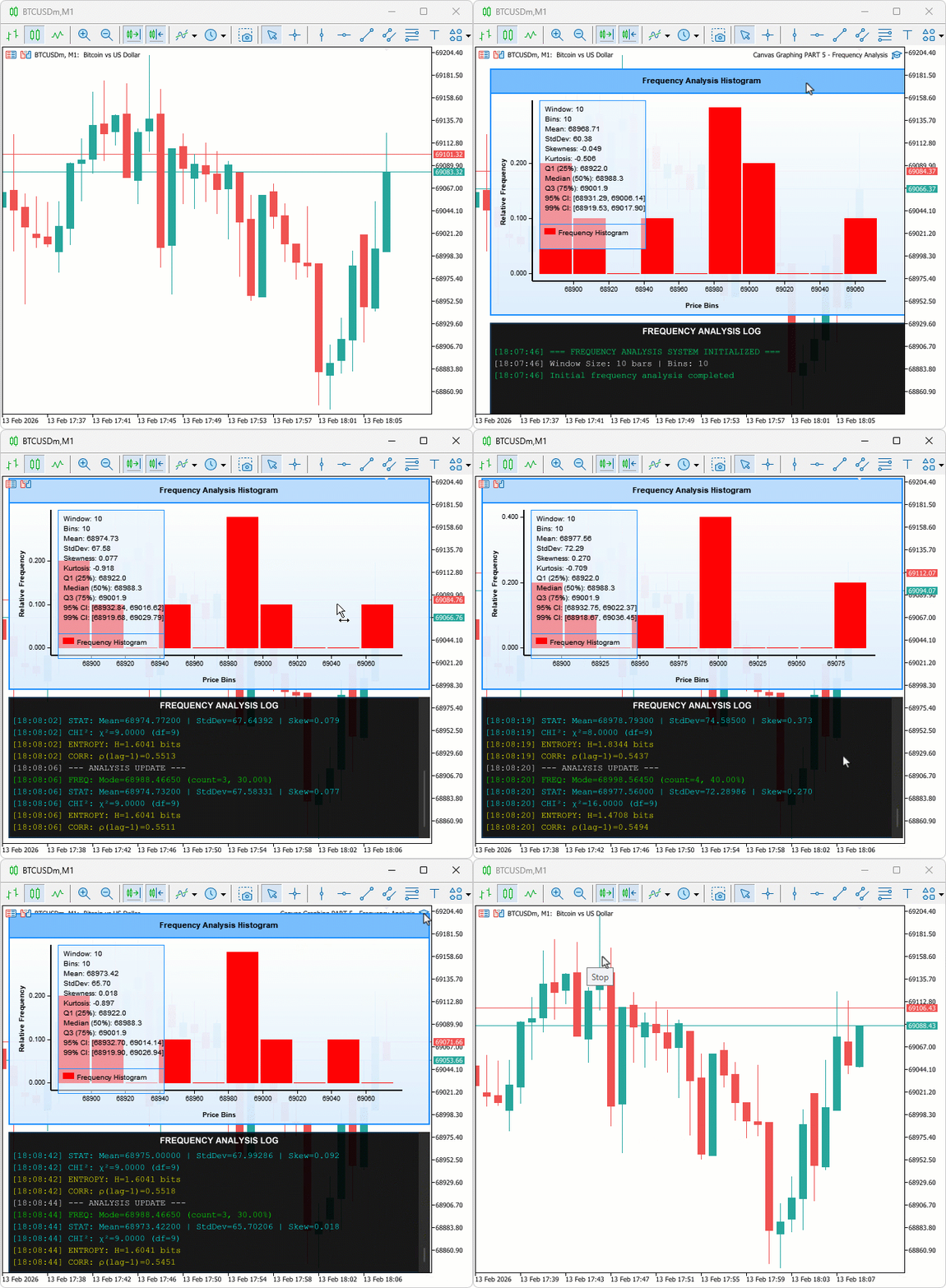
During testing, the frequency histogram updated correctly on each new bar in per-bar mode and on the configured tick interval in per-tick mode, Shannon entropy and chi-square values changed meaningfully across different market conditions, and the log panel auto-scrolled to the latest entry without layout disruption when the entry count exceeded the visible area.
Conclusion
In conclusion, we have developed a frequency analysis tool in MQL5 that bins closing prices into histograms, computes Shannon entropy to quantify market predictability, and applies chi-square tests to detect non-random price clustering. The implementation covered equal-width bin construction, relative frequency computation, basic and advanced statistics, a supersampled auto-scrolling log panel with a rounded interactive scrollbar, and per-bar or per-tick update modes. After reading this article, you will be able to:
- Read the frequency histogram to identify the highest-density bin as the current value area, treating price returns to that bin from a deviation as mean-reversion candidates
- Monitor Shannon entropy across sessions to detect drops that signal emerging directional structure, distinguishing range conditions worth fading from breakout conditions worth following
- Use the chi-square statistic as a pre-trade filter, entering frequency-based setups only when the value is high enough to confirm that clustering is statistically significant rather than random
That concludes the article.
Warning: All rights to these materials are reserved by MetaQuotes Ltd. Copying or reprinting of these materials in whole or in part is prohibited.
This article was written by a user of the site and reflects their personal views. MetaQuotes Ltd is not responsible for the accuracy of the information presented, nor for any consequences resulting from the use of the solutions, strategies or recommendations described.

 Using the MQL5 Economic Calendar for News Filter (Part 3): Surviving Terminal Restarts During News Window
 Neuro-Structural Trading Engine — NSTE (Part II): Jardine's Gate Six-Gate Quantum Filter
 Pair Trading: Algorithmic Trading with Auto Optimization Based on Z-Score Differences
 Trend Criteria. Conclusion

- Free trading apps
- Over 8,000 signals for copying
- Economic news for exploring financial markets
You agree to website policy and terms of use