

利用 MQL5 经济日历进行交易(第 8 部分):通过智能事件过滤和有针对性的日志来优化新闻驱动策略的回测
 559
559
 0
0

引言
在本文中,我们将通过优化交易系统,实现闪电般快速、直观可视化的回测,并将数据可视化无缝集成到实时和离线模式中,从而推进MQL5经济日历系列文章的深入发展。建立在第7部分“为策略测试器兼容性奠定基于资源的事件分析”基础之上,我们现在引入智能事件过滤和有针对性的日志记录,以提升性能,确保我们能够在实时和历史环境中高效地可视化和测试策略,并最大限度地减少干扰。我们将通过以下主题来构建文章结构:
让我们探索这些进步!
跨实时和离线领域的无缝新闻驱动交易可视化计时器
在实时和离线环境中对经济新闻事件进行可视化与分析,将彻底改变我们的工作方式,在本系列文章的这一部分,我们引入了一个可视化计时器——它是我们优化事件处理和日志系统的标志——这将赋予我们以精确和高效的方式驾驭新闻事件驱动交易的能力。
通过实现智能事件过滤,我们将显著减少策略测试器中的计算负载,预先筛选出用户定义日期范围内最相关的新闻事件,从而确保回测能在效果上接近实时交易的速度和清晰度。这种过滤机制类似于计时器的精确计时,将使我们能够专注于关键事件,而无需筛选无关数据,从而实现历史模拟和实时市场分析之间的无缝过渡。
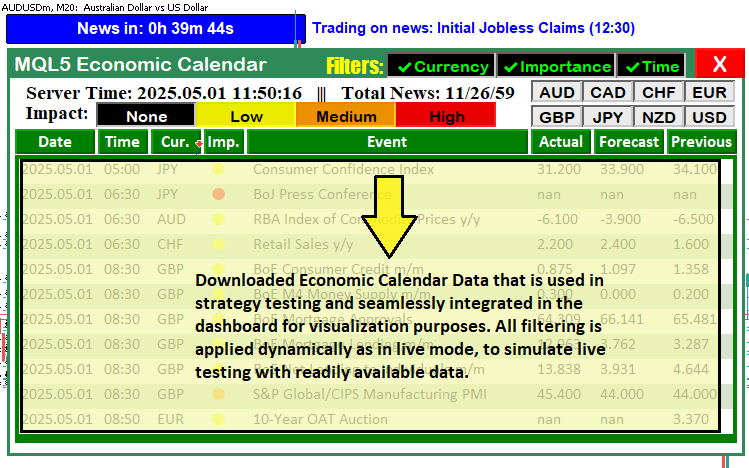
与此相辅相成的是,我们有针对性的系统将充当计时器的显示器,仅呈现关键信息——例如交易执行和仪表盘更新——同时抑制多余的日志,从而为实时和离线模式保持一个干净、无干扰的界面。这种双模式可视化能力将确保我们能够在策略测试器中使用历史数据测试策略,并在实时交易中应用同样直观的仪表盘,从而形成统一的工作流程,提升决策效率并优化策略,涵盖所有市场条件。这就是我们期望实现的可视化效果。
在MQL5中的实现
为了在MQL5中进行改进,我们首先需要声明一些变量,这些变量将用于跟踪已下载的事件,然后我们将在新闻仪表盘中以类似于前几篇文章中进行实时交易时使用的格式,无缝显示这些事件,但首先要包含我们存储数据的资源,如下所示。
//---- Include trading library
#include <Trade\Trade.mqh>
CTrade trade;

//---- Define resource for CSV
#resource "\\Files\\Database\\EconomicCalendar.csv" as string EconomicCalendarData
我们首先集成一个能够实现实时和离线模式下无缝交易执行的交易库。我们使用 #include <Trade\Trade.mqh> 指令来包含 MQL5 交易库,该库提供了用于管理交易操作的 CTrade 类。通过声明一个名为 "trade" 的 "CTrade" 对象,我们使程序能够自动执行买入和卖出订单。
然后,我们使用 "#resource" 指令将"\Files\Database\EconomicCalendar.csv"定义为名为"EconomicCalendarData"的字符串资源。这个通过 LoadEventsFromResource 函数加载的逗号分隔值 (CSV) 将提供事件详细信息,如日期、时间、货币和预测,从而提供统一的数据呈现,而无需依赖实时数据源。我们现在可以定义其余的控制变量。
//---- Event name tracking
string current_eventNames_data[];
string previous_eventNames_data[];
string last_dashboard_eventNames[]; // Added: Cache for last dashboard event names in tester mode
datetime last_dashboard_update = 0; // Added: Track last dashboard update time in tester mode

//---- Filter flags
bool enableCurrencyFilter = true;
bool enableImportanceFilter = true;
bool enableTimeFilter = true;
bool isDashboardUpdate = true;
bool filters_changed = true;        // Added: Flag to detect filter changes in tester mode

//---- Event counters
int totalEvents_Considered = 0;
int totalEvents_Filtered = 0;
int totalEvents_Displayable = 0;

//---- Input parameters (PART 6)
sinput group "General Calendar Settings"
input ENUM_TIMEFRAMES start_time = PERIOD_H12;
input ENUM_TIMEFRAMES end_time = PERIOD_H12;
input ENUM_TIMEFRAMES range_time = PERIOD_H8;
input bool updateServerTime = true; // Enable/Disable Server Time Update in Panel
input bool debugLogging = false;    // Added: Enable debug logging in tester mode

//---- Input parameters for tester mode (from PART 7, minimal)
sinput group "Strategy Tester CSV Settings"
input datetime StartDate = D'2025.03.01'; // Download Start Date
input datetime EndDate = D'2025.03.21';   // Download End Date

//---- Structure for CSV events (from PART 7)
struct EconomicEvent {
   string eventDate;       // Date of the event
   string eventTime;       // Time of the event
   string currency;        // Currency affected
   string event;           // Event description
   string importance;      // Importance level
   double actual;          // Actual value
   double forecast;        // Forecast value
   double previous;        // Previous value
   datetime eventDateTime; // Added: Store precomputed datetime for efficiency
};

//---- Global array for tester mode events
EconomicEvent allEvents[];
EconomicEvent filteredEvents[]; // Added: Filtered events for tester mode optimization

//---- Trade settings
enum ETradeMode {
   TRADE_BEFORE,
   TRADE_AFTER,
   NO_TRADE,
   PAUSE_TRADING
};
input ETradeMode tradeMode = TRADE_BEFORE;
input int tradeOffsetHours = 12;
input int tradeOffsetMinutes = 5;
input int tradeOffsetSeconds = 0;
input double tradeLotSize = 0.01;

//---- Trade control
bool tradeExecuted = false;
datetime tradedNewsTime = 0;
int triggeredNewsEvents[];
在这里,我们使用 “last_dashboard_eventNames” 来缓存测试器模式下的仪表盘更新,并使用 “last_dashboard_update” 来仅在需要时调度刷新,从而减少冗余处理,将事件名称存储在 “current_eventNames_data”、“previous_eventNames_data” 和 “last_dashboard_eventNames” 中。
我们通过 enableCurrencyFilter、enableImportanceFilter、enableTimeFilter 和 filters_changed 切换事件过滤,当 filters_changed 为真时重置过滤器以仅处理相关事件,并使用 sinput group 'General Calendar Settings' 下的 debugLogging 仅记录交易和更新。
我们在 sinput group 'Strategy Tester CSV Settings' 下使用 StartDate 和 EndDate 定义回测周期,在 EconomicEvent 中使用 eventDateTime 构建事件结构以便快速访问,并将 allEvents 过滤为 filteredEvents 以加快处理速度,同时设置 tradeMode 和相关变量以高效执行交易。现在我们能够选择测试周期,我们将从中下载数据并使用相同的时间范围进行测试。这是用户界面。
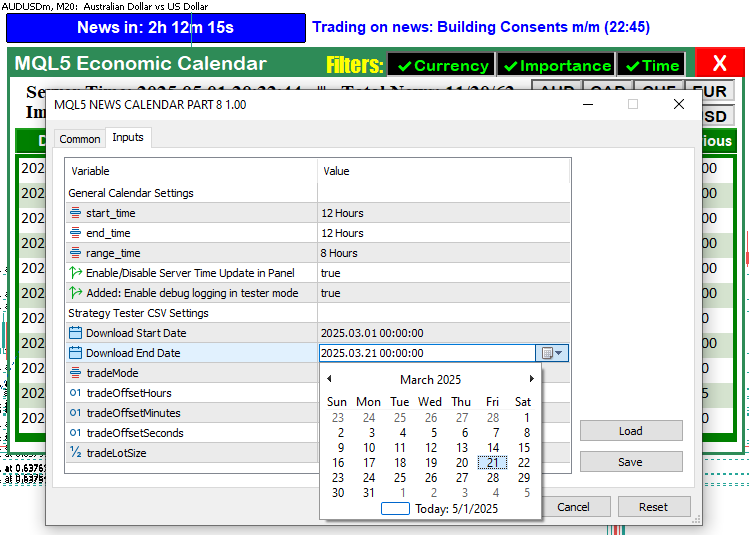
从图像中,我们可以看到我们有额外的输入来控制测试器模式下事件的显示,以及面板中时间的受控更新和日志记录。我们这样做是为了在回测时优化不必要的资源。接下来,我们需要定义一个函数来处理测试器事件过滤过程。
//+------------------------------------------------------------------+
//| Filter events for tester mode                                    | // Added: Function to pre-filter events by date range
//+------------------------------------------------------------------+
void FilterEventsForTester() {
   ArrayResize(filteredEvents, 0);
   int eventIndex = 0;
   for (int i = 0; i < ArraySize(allEvents); i++) {
      datetime eventDateTime = allEvents[i].eventDateTime;
      if (eventDateTime < StartDate || eventDateTime > EndDate) {
         if (debugLogging) Print("Event ", allEvents[i].event, " skipped in filter due to date range: ", TimeToString(eventDateTime)); // Modified: Conditional logging
         continue;
      }
      ArrayResize(filteredEvents, eventIndex + 1);
      filteredEvents[eventIndex] = allEvents[i];
      eventIndex++;
   }
   if (debugLogging) Print("Tester mode: Filtered ", eventIndex, " events."); // Modified: Conditional logging
   filters_changed = false;
}
在这里,我们实施智能事件过滤,通过减少策略测试器中处理的新闻事件数量来加速回测。我们使用 FilterEventsForTester 函数,通过 ArrayResize 函数清空 filteredEvents 数组,并利用 allEvents 中的相关事件重建它。对于每个事件,我们对照 StartDate 和 EndDate 检查其 eventDateTime,跳过超出范围的事件,并仅在 debugLogging 为真时使用 Print 函数记录跳过信息,从而确保日志保持最小程度的混乱。
我们将符合条件的事件复制到索引为 eventIndex 处的 filteredEvents 数组中,每次添加时递增索引,并使用 ArrayResize 函数动态分配空间。我们仅在启用 debugLogging 时通过 Print 记录总的 eventIndex 计数,保持测试器输出整洁,并将 filters_changed 设置为 false 以表示过滤已完成。这种有针对性的过滤操作缩小了事件集,加快了后续处理速度,并实现了离线模式下新闻事件的高效可视化。然后,我们在 OnInit 事件处理程序中调用此函数以预先过滤新闻数据。
//+------------------------------------------------------------------+
//| Expert initialization function                                   |
//+------------------------------------------------------------------+
int OnInit() {
   //---- Create dashboard UI
   createRecLabel(MAIN_REC,50,50,740,410,clrSeaGreen,1);
   createRecLabel(SUB_REC1,50+3,50+30,740-3-3,410-30-3,clrWhite,1);
   createRecLabel(SUB_REC2,50+3+5,50+30+50+27,740-3-3-5-5,410-30-3-50-27-10,clrGreen,1);
   createLabel(HEADER_LABEL,50+3+5,50+5,"MQL5 Economic Calendar",clrWhite,15);

   //---- Create calendar buttons
   int startX = 59;
   for (int i = 0; i < ArraySize(array_calendar); i++) {
      createButton(ARRAY_CALENDAR+IntegerToString(i),startX,132,buttons[i],25,
                   array_calendar[i],clrWhite,13,clrGreen,clrNONE,"Calibri Bold");
      startX += buttons[i]+3;
   }

   //---- Initialize for live mode (unchanged)
   int totalNews = 0;
   bool isNews = false;
   MqlCalendarValue values[];
   datetime startTime = TimeTradeServer() - PeriodSeconds(start_time);
   datetime endTime = TimeTradeServer() + PeriodSeconds(end_time);
   string country_code = "US";
   string currency_base = SymbolInfoString(_Symbol,SYMBOL_CURRENCY_BASE);
   int allValues = CalendarValueHistory(values,startTime,endTime,NULL,NULL);

   //---- Load CSV events for tester mode
   if (MQLInfoInteger(MQL_TESTER)) {
      if (!LoadEventsFromResource()) {
         Print("Failed to load events from CSV resource.");
         return(INIT_FAILED);
      }
      Print("Tester mode: Loaded ", ArraySize(allEvents), " events from CSV.");
      FilterEventsForTester(); // Added: Pre-filter events for tester mode
   }

   //---- Create UI elements
   createLabel(TIME_LABEL,70,85,"Server Time: "+TimeToString(TimeCurrent(),TIME_DATE|TIME_SECONDS)+
               "   |||   Total News: "+IntegerToString(allValues),clrBlack,14,"Times new roman bold");
   createLabel(IMPACT_LABEL,70,105,"Impact: ",clrBlack,14,"Times new roman bold");
   createLabel(FILTER_LABEL,370,55,"Filters:",clrYellow,16,"Impact");

   //---- Create filter buttons
   string filter_curr_text = enableCurrencyFilter ? ShortToString(0x2714)+"Currency" : ShortToString(0x274C)+"Currency";
   color filter_curr_txt_color = enableCurrencyFilter ? clrLime : clrRed;
   bool filter_curr_state = enableCurrencyFilter;
   createButton(FILTER_CURR_BTN,430,55,110,26,filter_curr_text,filter_curr_txt_color,12,clrBlack);
   ObjectSetInteger(0,FILTER_CURR_BTN,OBJPROP_STATE,filter_curr_state);

   string filter_imp_text = enableImportanceFilter ? ShortToString(0x2714)+"Importance" : ShortToString(0x274C)+"Importance";
   color filter_imp_txt_color = enableImportanceFilter ? clrLime : clrRed;
   bool filter_imp_state = enableImportanceFilter;
   createButton(FILTER_IMP_BTN,430+110,55,120,26,filter_imp_text,filter_imp_txt_color,12,clrBlack);
   ObjectSetInteger(0,FILTER_IMP_BTN,OBJPROP_STATE,filter_imp_state);

   string filter_time_text = enableTimeFilter ? ShortToString(0x2714)+"Time" : ShortToString(0x274C)+"Time";
   color filter_time_txt_color = enableTimeFilter ? clrLime : clrRed;
   bool filter_time_state = enableTimeFilter;
   createButton(FILTER_TIME_BTN,430+110+120,55,70,26,filter_time_text,filter_time_txt_color,12,clrBlack);
   ObjectSetInteger(0,FILTER_TIME_BTN,OBJPROP_STATE,filter_time_state);

   createButton(CANCEL_BTN,430+110+120+79,51,50,30,"X",clrWhite,17,clrRed,clrNONE);

   //---- Create impact buttons
   int impact_size = 100;
   for (int i = 0; i < ArraySize(impact_labels); i++) {
      color impact_color = clrBlack, label_color = clrBlack;
      if (impact_labels[i] == "None") label_color = clrWhite;
      else if (impact_labels[i] == "Low") impact_color = clrYellow;
      else if (impact_labels[i] == "Medium") impact_color = clrOrange;
      else if (impact_labels[i] == "High") impact_color = clrRed;
      createButton(IMPACT_LABEL+string(i),140+impact_size*i,105,impact_size,25,
                   impact_labels[i],label_color,12,impact_color,clrBlack);
   }

   //---- Create currency buttons
   int curr_size = 51, button_height = 22, spacing_x = 0, spacing_y = 3, max_columns = 4;
   for (int i = 0; i < ArraySize(curr_filter); i++) {
      int row = i / max_columns;
      int col = i % max_columns;
      int x_pos = 575 + col * (curr_size + spacing_x);
      int y_pos = 83 + row * (button_height + spacing_y);
      createButton(CURRENCY_BTNS+IntegerToString(i),x_pos,y_pos,curr_size,button_height,curr_filter[i],clrBlack);
   }

   //---- Initialize filters
   if (enableCurrencyFilter) {
      ArrayFree(curr_filter_selected);
      ArrayCopy(curr_filter_selected, curr_filter);
      Print("CURRENCY FILTER ENABLED");
      ArrayPrint(curr_filter_selected);
      for (int i = 0; i < ArraySize(curr_filter_selected); i++) {
         ObjectSetInteger(0, CURRENCY_BTNS+IntegerToString(i), OBJPROP_STATE, true);
      }
   }

   if (enableImportanceFilter) {
      ArrayFree(imp_filter_selected);
      ArrayCopy(imp_filter_selected, allowed_importance_levels);
      ArrayFree(impact_filter_selected);
      ArrayCopy(impact_filter_selected, impact_labels);
      Print("IMPORTANCE FILTER ENABLED");
      ArrayPrint(imp_filter_selected);
      ArrayPrint(impact_filter_selected);
      for (int i = 0; i < ArraySize(imp_filter_selected); i++) {
         string btn_name = IMPACT_LABEL+string(i);
         ObjectSetInteger(0, btn_name, OBJPROP_STATE, true);
         ObjectSetInteger(0, btn_name, OBJPROP_BORDER_COLOR, clrNONE);
      }
   }

   //---- Update dashboard
   update_dashboard_values(curr_filter_selected, imp_filter_selected);
   ChartRedraw(0);
   return(INIT_SUCCEEDED);
}
我们使用 createRecLabel 函数构建具有不同颜色和尺寸的仪表盘面板 “MAIN_REC”、“SUB_REC1” 和 “SUB_REC2”,并像之前一样使用 createLabel 函数添加显示 “MQL5 经济日历” 的 “HEADER_LABEL”。我们使用 createButton 和 ArraySize 函数从 array_calendar 动态创建日历按钮,并通过 startX 和 buttons 对它们进行定位,以便显示事件。
我们通过 CalendarValueHistory 函数将事件获取到 “values” 中来准备实时模式,使用通过 TimeTradeServer 和 PeriodSeconds 计算的 “startTime” 和 “endTime”;对于测试器模式,我们使用 MQLInfoInteger 函数检查 MQL_TESTER,并通过 "LoadEventsFromResource" 函数将 “EconomicCalendarData” 加载到 “allEvents” 中。我们使用 "FilterEventsForTester" 函数(这是最关键的函数)来填充 “filteredEvents”,从而优化事件处理。
我们使用 "createLabel" 添加 “TIME_LABEL”、“IMPACT_LABEL” 和 “FILTER_LABEL” 等 UI 元素,并使用 "createButton" 和 ObjectSetInteger 添加 “FILTER_CURR_BTN”、“FILTER_IMP_BTN”、“FILTER_TIME_BTN” 和 “CANCEL_BTN” 等过滤按钮,根据 “enableCurrencyFilter” 设置 “filter_curr_state” 等状态。我们使用 "createButton" 从 “impact_labels” 和 “curr_filter” 创建影响和货币按钮,使用 ArrayFree 和 ArrayCopy 初始化过滤器 “curr_filter_selected” 和 “imp_filter_selected”,并通过 "update_dashboard_values" 和 ChartRedraw 更新仪表盘,返回 "INIT_SUCCEEDED" 以确认设置完成。现在当我们初始化程序时,会得到以下结果。

由于我们现在可以在过滤后加载相关数据,因此在 OnTick 事件处理程序中,我们需要确保获取指定时间内的相关数据并将其填充到仪表盘中,而不是像以前那样仅加载所有数据,就像我们在实时模式下所做的那样。以下是我们采用的逻辑;另外值得一提的是,我们已在进行修改的关键更新部分添加了相应的注释。
//+------------------------------------------------------------------+
//| Expert tick function                                             |
//+------------------------------------------------------------------+
void OnTick() {
   UpdateFilterInfo();
   CheckForNewsTrade();
   if (isDashboardUpdate) {
      if (MQLInfoInteger(MQL_TESTER)) {
         datetime currentTime = TimeTradeServer();
         datetime timeRange = PeriodSeconds(range_time);
         datetime timeAfter = currentTime + timeRange;
         if (filters_changed || last_dashboard_update < timeAfter) { // Modified: Update on filter change or time range shift
            update_dashboard_values(curr_filter_selected, imp_filter_selected);
            ArrayFree(last_dashboard_eventNames);
            ArrayCopy(last_dashboard_eventNames, current_eventNames_data);
            last_dashboard_update = currentTime;
         }
      } else {
         update_dashboard_values(curr_filter_selected, imp_filter_selected);
      }
   }
}
在 OnTick 事件处理程序中,我们使用 UpdateFilterInfo 函数刷新过滤器设置,并使用 CheckForNewsTrade 函数根据新闻事件评估并执行交易。当 "isDashboardUpdate" 为真时,我们使用 MQLInfoInteger 函数检查 MQL_TESTER 以应用特定于测试器的逻辑,使用 TimeTradeServer 计算 "currentTime",基于 range_time 使用 PeriodSeconds 计算 "timeRange",并将 "timeAfter" 计算为 "currentTime" 加上 "timeRange"。
在测试器模式下,我们使用条件 "filters_changed" 或 "last_dashboard_update" 小于 "timeAfter" 来触发 "update_dashboard_values" 函数,并传入 "curr_filter_selected" 和 "imp_filter_selected",使用 ArrayFree 函数清空 "last_dashboard_eventNames",使用 ArrayCopy 将 "current_eventNames_data" 复制到其中,并将 "last_dashboard_update" 更新为 "currentTime",从而最大限度地减少刷新次数。在实时模式下,我们直接调用 "update_dashboard_values" 以进行持续更新,确保在这两种模式下都能实现优化、定向的仪表盘可视化。现在可以修改我们使用的函数,如下所示,确保它们包含相关的修改,特别是时间划分。
//+------------------------------------------------------------------+
//| Load events from CSV resource                                    |
//+------------------------------------------------------------------+
bool LoadEventsFromResource() {
   string fileData = EconomicCalendarData;
   Print("Raw resource content (size: ", StringLen(fileData), " bytes):\n", fileData);
   string lines[];
   int lineCount = StringSplit(fileData, '\n', lines);
   if (lineCount <= 1) {
      Print("Error: No data lines found in resource! Raw data: ", fileData);
      return false;
   }
   ArrayResize(allEvents, 0);
   int eventIndex = 0;
   for (int i = 1; i < lineCount; i++) {
      if (StringLen(lines[i]) == 0) {
         if (debugLogging) Print("Skipping empty line ", i); // Modified: Conditional logging
         continue;
      }
      string fields[];
      int fieldCount = StringSplit(lines[i], ',', fields);
      if (debugLogging) Print("Line ", i, ": ", lines[i], " (field count: ", fieldCount, ")"); // Modified: Conditional logging
      if (fieldCount < 8) {
         Print("Malformed line ", i, ": ", lines[i], " (field count: ", fieldCount, ")");
         continue;
      }
      string dateStr = fields[0];
      string timeStr = fields[1];
      string currency = fields[2];
      string event = fields[3];
      for (int j = 4; j < fieldCount - 4; j++) {
         event += "," + fields[j];
      }
      string importance = fields[fieldCount - 4];
      string actualStr = fields[fieldCount - 3];
      string forecastStr = fields[fieldCount - 2];
      string previousStr = fields[fieldCount - 1];
      datetime eventDateTime = StringToTime(dateStr + " " + timeStr);
      if (eventDateTime == 0) {
         Print("Error: Invalid datetime conversion for line ", i, ": ", dateStr, " ", timeStr);
         continue;
      }
      ArrayResize(allEvents, eventIndex + 1);
      allEvents[eventIndex].eventDate = dateStr;
      allEvents[eventIndex].eventTime = timeStr;
      allEvents[eventIndex].currency = currency;
      allEvents[eventIndex].event = event;
      allEvents[eventIndex].importance = importance;
      allEvents[eventIndex].actual = StringToDouble(actualStr);
      allEvents[eventIndex].forecast = StringToDouble(forecastStr);
      allEvents[eventIndex].previous = StringToDouble(previousStr);
      allEvents[eventIndex].eventDateTime = eventDateTime; // Added: Store precomputed datetime
      if (debugLogging) Print("Loaded event ", eventIndex, ": ", dateStr, " ", timeStr, ", ", currency, ", ", event); // Modified: Conditional logging
      eventIndex++;
   }
   Print("Loaded ", eventIndex, " events from resource into array.");
   return eventIndex > 0;
}
在这里,我们从 CSV 资源加载历史新闻事件,以通过优化的事件处理和有针对性的日志记录实现离线回测。我们使用 "LoadEventsFromResource" 函数将 "EconomicCalendarData" 读取到 fileData 中,并使用 Print 和 StringLen 函数记录其大小。使用 StringSplit 函数将 "fileData" 拆分为 "行",检查 "lineCount" 以确保数据存在,并使用 ArrayResize 函数清空 "allEvents"。
我们遍历 lines,使用 StringLen 函数跳过空行,并仅在 debugLogging 为真时记录跳过操作。使用 StringSplit 将每一行解析为 fields,验证 fieldCount,并提取 dateStr、timeStr、currency、event、importance、actualStr、forecastStr 和 previousStr,动态组合事件字段。
我们使用 StringToTime 函数将 dateStr 和 timeStr 转换为 eventDateTime,将其存储在 allEvents[eventIndex].eventDateTime 中以提高效率,使用 ArrayResize 和 StringToDouble 填充 allEvents,有条件地记录成功加载,并在 eventIndex 为正数时返回 true,从而确保用于回测的健壮事件数据集。我们现在仍然更新负责更新仪表盘值的函数,这对于可视化存储的事件数据至关重要,如下所示。
//+------------------------------------------------------------------+
//| Update dashboard values                                          |
//+------------------------------------------------------------------+
void update_dashboard_values(string &curr_filter_array[], ENUM_CALENDAR_EVENT_IMPORTANCE &imp_filter_array[]) {
   totalEvents_Considered = 0;
   totalEvents_Filtered = 0;
   totalEvents_Displayable = 0;
   ArrayFree(current_eventNames_data);

   datetime timeRange = PeriodSeconds(range_time);
   datetime timeBefore = TimeTradeServer() - timeRange;
   datetime timeAfter = TimeTradeServer() + timeRange;

   int startY = 162;

   if (MQLInfoInteger(MQL_TESTER)) {
      if (filters_changed) FilterEventsForTester(); // Added: Re-filter events if filters changed
      //---- Tester mode: Process filtered events
      for (int i = 0; i < ArraySize(filteredEvents); i++) {
         totalEvents_Considered++;
         datetime eventDateTime = filteredEvents[i].eventDateTime;
         if (eventDateTime < StartDate || eventDateTime > EndDate) {
            if (debugLogging) Print("Event ", filteredEvents[i].event, " skipped due to date range."); // Modified: Conditional logging
            continue;
         }

         bool timeMatch = !enableTimeFilter;
         if (enableTimeFilter) {
            if (eventDateTime <= TimeTradeServer() && eventDateTime >= timeBefore) timeMatch = true;
            else if (eventDateTime >= TimeTradeServer() && eventDateTime <= timeAfter) timeMatch = true;
         }
         if (!timeMatch) {
            if (debugLogging) Print("Event ", filteredEvents[i].event, " skipped due to time filter."); // Modified: Conditional logging
            continue;
         }

         bool currencyMatch = !enableCurrencyFilter;
         if (enableCurrencyFilter) {
            for (int j = 0; j < ArraySize(curr_filter_array); j++) {
               if (filteredEvents[i].currency == curr_filter_array[j]) {
                  currencyMatch = true;
                  break;
               }
            }
         }
         if (!currencyMatch) {
            if (debugLogging) Print("Event ", filteredEvents[i].event, " skipped due to currency filter."); // Modified: Conditional logging
            continue;
         }

         bool importanceMatch = !enableImportanceFilter;
         if (enableImportanceFilter) {
            string imp_str = filteredEvents[i].importance;
            ENUM_CALENDAR_EVENT_IMPORTANCE event_imp = (imp_str == "None") ? CALENDAR_IMPORTANCE_NONE :
                                                      (imp_str == "Low") ? CALENDAR_IMPORTANCE_LOW :
                                                      (imp_str == "Medium") ? CALENDAR_IMPORTANCE_MODERATE :
                                                      CALENDAR_IMPORTANCE_HIGH;
            for (int k = 0; k < ArraySize(imp_filter_array); k++) {
               if (event_imp == imp_filter_array[k]) {
                  importanceMatch = true;
                  break;
               }
            }
         }
         if (!importanceMatch) {
            if (debugLogging) Print("Event ", filteredEvents[i].event, " skipped due to importance filter."); // Modified: Conditional logging
            continue;
         }

         totalEvents_Filtered++;
         if (totalEvents_Displayable >= 11) continue;
         totalEvents_Displayable++;

         color holder_color = (totalEvents_Displayable % 2 == 0) ? C'213,227,207' : clrWhite;
         createRecLabel(DATA_HOLDERS+string(totalEvents_Displayable),62,startY-1,716,26+1,holder_color,1,clrNONE);

         int startX = 65;
         string news_data[ArraySize(array_calendar)];
         news_data[0] = filteredEvents[i].eventDate;
         news_data[1] = filteredEvents[i].eventTime;
         news_data[2] = filteredEvents[i].currency;
         color importance_color = clrBlack;
         if (filteredEvents[i].importance == "Low") importance_color = clrYellow;
         else if (filteredEvents[i].importance == "Medium") importance_color = clrOrange;
         else if (filteredEvents[i].importance == "High") importance_color = clrRed;
         news_data[3] = ShortToString(0x25CF);
         news_data[4] = filteredEvents[i].event;
         news_data[5] = DoubleToString(filteredEvents[i].actual, 3);
         news_data[6] = DoubleToString(filteredEvents[i].forecast, 3);
         news_data[7] = DoubleToString(filteredEvents[i].previous, 3);

         for (int k = 0; k < ArraySize(array_calendar); k++) {
            if (k == 3) {
               createLabel(ARRAY_NEWS+IntegerToString(i)+" "+array_calendar[k],startX,startY-(22-12),news_data[k],importance_color,22,"Calibri");
            } else {
               createLabel(ARRAY_NEWS+IntegerToString(i)+" "+array_calendar[k],startX,startY,news_data[k],clrBlack,12,"Calibri");
            }
            startX += buttons[k]+3;
         }

         ArrayResize(current_eventNames_data, ArraySize(current_eventNames_data)+1);
         current_eventNames_data[ArraySize(current_eventNames_data)-1] = filteredEvents[i].event;
         startY += 25;
      }
   } else {

      //---- Live mode: Unchanged

   }
}
为了高效显示过滤后的新闻事件,我们使用 update_dashboard_values 函数重置 totalEvents_Considered、totalEvents_Filtered、totalEvents_Displayable,并使用 ArrayFree 函数清空 current_eventNames_data,通过 PeriodSeconds 函数基于 range_time 设置 timeRange,并使用 TimeTradeServer 计算 timeBefore 和 timeAfter。我们使用 MQLInfoInteger 函数检查 MQL_TESTER,如果 filters_changed 为真,则使用我们之前完全定义的 FilterEventsForTester 函数来刷新 filteredEvents。
我们使用 ArraySize 函数遍历 filteredEvents,递增 totalEvents_Considered,并跳过超出 StartDate 或 EndDate 范围的事件,或未通过 enableTimeFilter、enableCurrencyFilter 或 enableImportanceFilter 检查的事件,仅当 debugLogging 为真时记录跳过操作。
对于多达 11 个匹配的事件,我们递增 totalEvents_Displayable,使用 createRecLabel 函数绘制 DATA_HOLDERS 行,并使用 createLabel 函数从 filteredEvents 字段(如 eventDate 和 event)填充 news_data,使用 importance_color 和 array_calendar 设置样式,使用 ArrayResize 调整 current_eventNames_data 的大小以存储事件名称,从而确保快速、清晰的仪表盘可视化。为了在测试器模式下进行交易,我们修改负责检查交易和开仓的函数,如下所示。
//+------------------------------------------------------------------+
//| Check for news trade (adapted for tester mode trading)           |
//+------------------------------------------------------------------+
void CheckForNewsTrade() {
   if (!MQLInfoInteger(MQL_TESTER) || debugLogging) Print("CheckForNewsTrade called at: ", TimeToString(TimeTradeServer(), TIME_SECONDS)); // Modified: Conditional logging
   if (tradeMode == NO_TRADE || tradeMode == PAUSE_TRADING) {
      if (ObjectFind(0, "NewsCountdown") >= 0) {
         ObjectDelete(0, "NewsCountdown");
         Print("Trading disabled. Countdown removed.");
      }
      return;
   }

   datetime currentTime = TimeTradeServer();
   int offsetSeconds = tradeOffsetHours * 3600 + tradeOffsetMinutes * 60 + tradeOffsetSeconds;

   if (tradeExecuted) {
      if (currentTime < tradedNewsTime) {
         int remainingSeconds = (int)(tradedNewsTime - currentTime);
         int hrs = remainingSeconds / 3600;
         int mins = (remainingSeconds % 3600) / 60;
         int secs = remainingSeconds % 60;
         string countdownText = "News in: " + IntegerToString(hrs) + "h " +
                               IntegerToString(mins) + "m " + IntegerToString(secs) + "s";
         if (ObjectFind(0, "NewsCountdown") < 0) {
            createButton1("NewsCountdown", 50, 17, 300, 30, countdownText, clrWhite, 12, clrBlue, clrBlack);
            Print("Post-trade countdown created: ", countdownText);
         } else {
            updateLabel1("NewsCountdown", countdownText);
            Print("Post-trade countdown updated: ", countdownText);
         }
      } else {
         int elapsed = (int)(currentTime - tradedNewsTime);
         if (elapsed < 15) {
            int remainingDelay = 15 - elapsed;
            string countdownText = "News Released, resetting in: " + IntegerToString(remainingDelay) + "s";
            if (ObjectFind(0, "NewsCountdown") < 0) {
               createButton1("NewsCountdown", 50, 17, 300, 30, countdownText, clrWhite, 12, clrRed, clrBlack);
               ObjectSetInteger(0,"NewsCountdown",OBJPROP_BGCOLOR,clrRed);
               Print("Post-trade reset countdown created: ", countdownText);
            } else {
               updateLabel1("NewsCountdown", countdownText);
               ObjectSetInteger(0,"NewsCountdown",OBJPROP_BGCOLOR,clrRed);
               Print("Post-trade reset countdown updated: ", countdownText);
            }
         } else {
            Print("News Released. Resetting trade status after 15 seconds.");
            if (ObjectFind(0, "NewsCountdown") >= 0) ObjectDelete(0, "NewsCountdown");
            tradeExecuted = false;
         }
      }
      return;
   }

   datetime lowerBound = currentTime - PeriodSeconds(start_time);
   datetime upperBound = currentTime + PeriodSeconds(end_time);
   if (debugLogging) Print("Event time range: ", TimeToString(lowerBound, TIME_SECONDS), " to ", TimeToString(upperBound, TIME_SECONDS)); // Modified: Conditional logging

   datetime candidateEventTime = 0;
   string candidateEventName = "";
   string candidateTradeSide = "";
   int candidateEventID = -1;

   if (MQLInfoInteger(MQL_TESTER)) {
      //---- Tester mode: Process filtered events
      int totalValues = ArraySize(filteredEvents);
      if (debugLogging) Print("Total events found: ", totalValues); // Modified: Conditional logging
      if (totalValues <= 0) {
         if (ObjectFind(0, "NewsCountdown") >= 0) ObjectDelete(0, "NewsCountdown");
         return;
      }

      for (int i = 0; i < totalValues; i++) {
         datetime eventTime = filteredEvents[i].eventDateTime;
         if (eventTime < lowerBound || eventTime > upperBound || eventTime < StartDate || eventTime > EndDate) {
            if (debugLogging) Print("Event ", filteredEvents[i].event, " skipped due to date range."); // Modified: Conditional logging
            continue;
         }

         bool currencyMatch = !enableCurrencyFilter;
         if (enableCurrencyFilter) {
            for (int k = 0; k < ArraySize(curr_filter_selected); k++) {
               if (filteredEvents[i].currency == curr_filter_selected[k]) {
                  currencyMatch = true;
                  break;
               }
            }
            if (!currencyMatch) {
               if (debugLogging) Print("Event ", filteredEvents[i].event, " skipped due to currency filter."); // Modified: Conditional logging
               continue;
            }
         }

         bool impactMatch = !enableImportanceFilter;
         if (enableImportanceFilter) {
            string imp_str = filteredEvents[i].importance;
            ENUM_CALENDAR_EVENT_IMPORTANCE event_imp = (imp_str == "None") ? CALENDAR_IMPORTANCE_NONE :
                                                      (imp_str == "Low") ? CALENDAR_IMPORTANCE_LOW :
                                                      (imp_str == "Medium") ? CALENDAR_IMPORTANCE_MODERATE :
                                                      CALENDAR_IMPORTANCE_HIGH;
            for (int k = 0; k < ArraySize(imp_filter_selected); k++) {
               if (event_imp == imp_filter_selected[k]) {
                  impactMatch = true;
                  break;
               }
            }
            if (!impactMatch) {
               if (debugLogging) Print("Event ", filteredEvents[i].event, " skipped due to impact filter."); // Modified: Conditional logging
               continue;
            }
         }

         bool alreadyTriggered = false;
         for (int j = 0; j < ArraySize(triggeredNewsEvents); j++) {
            if (triggeredNewsEvents[j] == i) {
               alreadyTriggered = true;
               break;
            }
         }
         if (alreadyTriggered) {
            if (debugLogging) Print("Event ", filteredEvents[i].event, " already triggered a trade. Skipping."); // Modified: Conditional logging
            continue;
         }

         if (tradeMode == TRADE_BEFORE) {
            if (currentTime >= (eventTime - offsetSeconds) && currentTime < eventTime) {
               double forecast = filteredEvents[i].forecast;
               double previous = filteredEvents[i].previous;
               if (forecast == 0.0 || previous == 0.0) {
                  if (debugLogging) Print("Skipping event ", filteredEvents[i].event, " because forecast or previous value is empty."); // Modified: Conditional logging
                  continue;
               }
               if (forecast == previous) {
                  if (debugLogging) Print("Skipping event ", filteredEvents[i].event, " because forecast equals previous."); // Modified: Conditional logging
                  continue;
               }
               if (candidateEventTime == 0 || eventTime < candidateEventTime) {
                  candidateEventTime = eventTime;
                  candidateEventName = filteredEvents[i].event;
                  candidateEventID = i;
                  candidateTradeSide = (forecast > previous) ? "BUY" : "SELL";
                  if (debugLogging) Print("Candidate event: ", filteredEvents[i].event, " with event time: ", TimeToString(eventTime, TIME_SECONDS), " Side: ", candidateTradeSide); // Modified: Conditional logging
               }
            }
         }
      }
   } else {

      //---- Live mode: Unchanged

   }
}
为了在测试器模式下评估和触发新闻驱动的交易,并通过优化后的事件过滤器和有针对性的日志记录,来实现高效的回测。我们从 CheckForNewsTrade 函数开始,仅当 debugLogging 为真时,才使用 Print 函数、TimeToString 和 TimeTradeServer 记录其执行情况以获取当前时间戳,从而保持测试器日志的简洁。如果 tradeMode 为 NO_TRADE 或 PAUSE_TRADING,我们退出,使用 ObjectFind 函数检查 NewsCountdown 并使用 ObjectDelete 将其删除,同时通过 Print 记录,并通过 TimeTradeServer 计算当前时间以及从 tradeOffsetHours、tradeOffsetMinutes 和 tradeOffsetSeconds 计算得出的 offsetSeconds 来管理交易后状态。
如果 tradeExecuted 为真,我们将处理 tradedNewsTime 的倒计时计时器,使用 IntegerToString 格式化 countdownText 以显示剩余时间或重置延迟,根据 ObjectFind 使用 createButton1 或 updateLabel1 创建或更新 NewsCountdown,使用 ObjectSetInteger 设置样式,并通过 Print 记录,在 15 秒后通过 ObjectDelete 和 Print 重置 tradeExecuted。
在测试器模式下,经检查 MQL_TESTER 的 MQLInfoInteger 确认,我们使用 ArraySize 处理 filteredEvents 以获取 totalValues,有条件地使用 Print 记录,如果为空则在清除 NewsCountdown 后退出。我们使用 TimeTradeServer 和基于 start_time 与 end_time 的 PeriodSeconds 设置 lowerBound 和 upperBound,如果 debugLogging 为真,则使用 Print 记录该范围,并初始化 candidateEventTime、candidateEventName、candidateEventID 和 candidateTradeSide 以进行交易选择。
我们遍历 filteredEvents,跳过超出 lowerBound、upperBound、StartDate 或 EndDate 范围的事件,或使用 ArraySize 检查未通过针对 curr_filter_selected 的 enableCurrencyFilter 或针对 imp_filter_selected 的 enableImportanceFilter 的事件,仅当启用 debugLogging 时才通过 Print 记录跳过操作。我们对 triggeredNewsEvents 使用 ArraySize 以排除已交易的事件,并有条件地记录。
对于 TRADE_BEFORE 模式,我们的目标是 eventDateTime 之前 offsetSeconds 内的事件,验证 forecast 和 previous,并将最早的事件选入 candidateEventTime、candidateEventName、candidateEventID 和 candidateTradeSide(如果 forecast 超过 previous 则为 “BUY”,否则为 “SELL”),如果 debugLogging 为真,则使用 Print 记录,从而以最少的日志记录确保高效的交易决策。实时模式的其余逻辑保持不变。编译后,我们得到以下交易确认的图像。
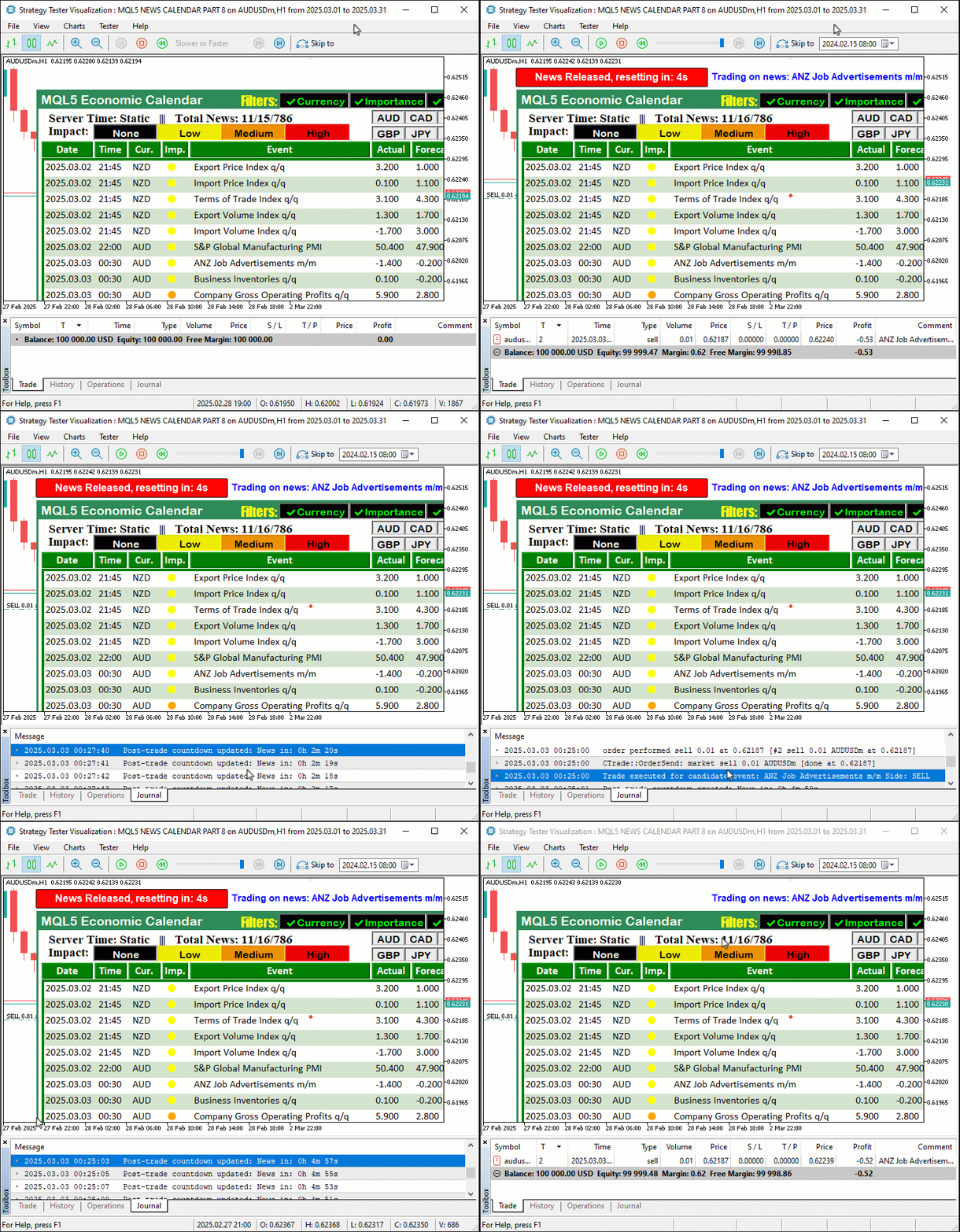
从图像中可以看到我们能够获取数据,对其进行过滤并将其填充到仪表盘中,在达到特定数据的相应时间范围时初始化倒计时,并交易新闻事件,精确模拟我们在实时交易环境中的情况,从而实现我们的集成目标。现在剩下的就是对系统进行彻底的回测,这将在下一节中处理。
测试和验证
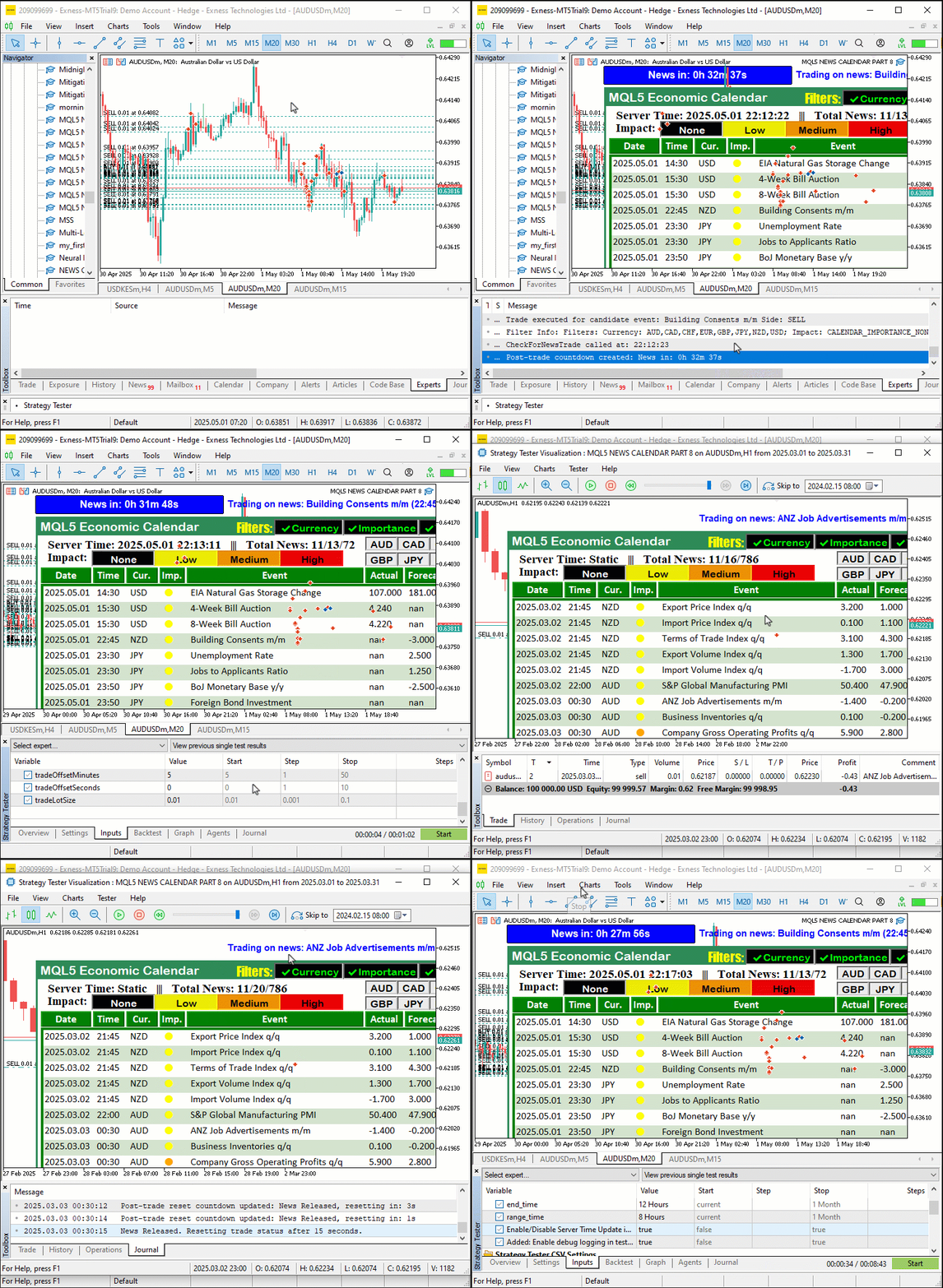
我们首先将程序加载到实时环境中,下载所需的新闻事件数据,然后在 MetaTrader 5 Strategy Tester 中运行它来测试程序,将 StartDate 设置为 ‘2025.03.01’,EndDate 设置为 ‘2025.03.21’,并禁用 debugLogging,使用 EconomicCalendarData 中的 Comma Separated Values (CSV) 文件通过 CheckForNewsTrade 在 filteredEvents 上模拟交易一个 GIF 展示了仪表盘,它仅在 filters_changed 或 last_dashboard_update 触发时通过 update_dashboard_values 更新,使用 createLabel 显示过滤后的事件,并提供干净的交易和更新日志。使用 CalendarValueHistory 函数的实时模式测试确认了可视化的一致性,验证了程序在两种模式下快速、清晰的性能。以下是可视化效果。
结论
总之,我们通过智能事件过滤和简化日志优化了策略回测,从而提升了 MQL5 经济日历 系列的功能,实现了快速且清晰的策略验证,同时保持了无缝的实时交易能力。这一进步将高效的离线测试与实时事件分析连接起来,为我们提供了一个强大的工具来完善新闻驱动的策略,正如我们的测试图像中所展示的那样。你可以将其作为基础,并进一步增强它以满足你的特定交易需求。
本文由MetaQuotes Ltd译自英文
原文地址: https://www.mql5.com/en/articles/17999
注意: MetaQuotes Ltd.将保留所有关于这些材料的权利。全部或部分复制或者转载这些材料将被禁止。
本文由网站的一位用户撰写,反映了他们的个人观点。MetaQuotes Ltd 不对所提供信息的准确性负责,也不对因使用所述解决方案、策略或建议而产生的任何后果负责。

 市场模拟(第八部分):套接字(二)
 价格行为分析工具包开发(第 22 部分):相关性仪表盘
 数据科学和机器学习(第 35 部分):MQL5 中的 NumPy — 用更少代码制作复杂算法的艺术
 您应当知道的 MQL5 向导技术(第 57 部分):搭配移动平均和随机振荡器的监督训练
