
Автоматизация торговых стратегий на MQL5 (Часть 16): Пробой полуночного диапазона посредством ценового действия Прорыв структуры (BoS)
 715
715
 7
7

Введение
В предыдущей статье (Часть 15) мы автоматизировали торговую стратегию, использующую гармонический паттерн «Шифр» для фиксирования разворотов рынка. Теперь, в Части 16, мы сосредоточимся на автоматизации пробоя полуночного диапазона с помощью стратегии Прорыв структуры (Break of Structure) на MetaQuotes Language 5 (MQL5), разработке советника, определяющего диапазон цен с полуночи до 6 часов утра, обнаруживает прорыв структуры (BoS) и совершает сделки. В статье рассмотрим следующие темы:
- Ознакомление с Пробоем полуночного диапазона со стратегией Прорыв структуры
- Реализация средствами MQL5
- Тестирование на истории
- Заключение
К концу настоящей статьи у вас будет полностью функциональная программа MQL5, которая визуализирует ключевые ценовые уровни, подтверждает пробои и совершает сделки с определенными параметрами риска — давайте начнем!
Ознакомление с Пробоем полуночного диапазона со стратегией Прорыв структуры
В стратегии «Пробой полуночного диапазона с прорывом структуры» используется ценовой диапазон с низкой волатильностью, сформированный между полуночью и 6 часами утра, применяя самые высокие и самые низкие цены в качестве уровней пробоя. При этом для подтверждения торговых сигналов требуется подтверждение Прорыва структуры. Прорыв структуры определяет изменения тренда, определяя, когда цена превышает максимум колебаний (бычий тренд) или падает ниже минимума колебаний (медвежий тренд), отфильтровывая ложные пробои и приводя сделки в соответствие с рыночным импульсом. Такой подход годится для рынков во время переходных сессий, таких как открытие Лондонской биржи, или любых других, которые вам нравятся. Тем не менее, он требует согласования часового пояса и осторожности во время важных новостных событий, чтобы избежать неожиданностей.
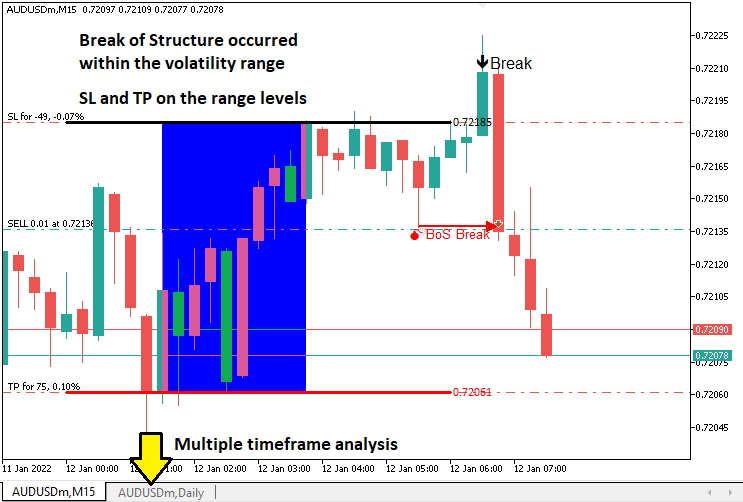
Наш план реализации будет включать в себя создание советника MQL5 для автоматизации стратегии путем расчета диапазона с полуночи до 6 утра, отслеживания пробоев в течение установленного временного интервала и подтверждения их Прорывом структуры на указанном таймфрейме, обычно это 5, 10 или 15 минут, это будет отражено в исходных данных и таким образом, пользователь может выбирать динамически. Система будет совершать сделки с уровнями стоп-лосса и тейк-профита, полученными на основе диапазона, визуализировать ключевые уровни на графике для наглядности и обеспечивать надежное управление рисками для поддержания стабильной работы в любых рыночных условиях. В двух словах, вот что мы имеем в виду.
Реализация средствами MQL5
Чтобы создать программу на MQL5, откройте MetaEditor, перейдите в Навигатор, найдите папку «Индикаторы» (Indicators), перейдите на вкладку "Создать" (New) и следуйте инструкциям по созданию файла. Как только это будет сделано, в среде программирования нам нужно будет объявить некоторые глобальные переменные, которые будем использовать во всей программе.
//+------------------------------------------------------------------+
//|                   Midnight Range Break of Structure Breakout.mq5 |
//|                           Copyright 2025, Allan Munene Mutiiria. |
//|                                   https://t.me/Forex_Algo_Trader |
//+------------------------------------------------------------------+
#property copyright "Copyright 2025, Allan Munene Mutiiria."
#property link      "https://t.me/Forex_Algo_Trader"
#property version   "1.00"

#include <Trade/Trade.mqh> //--- Include the Trade library for handling trade operations
CTrade obj_Trade;          //--- Create an instance of the CTrade class for trade execution

double maximum_price = -DBL_MAX;      //--- Initialize the maximum price variable to negative infinity
double minimum_price = DBL_MAX;       //--- Initialize the minimum price variable to positive infinity
datetime maximum_time, minimum_time;  //--- Declare variables to store the times of maximum and minimum prices
bool isHaveDailyRange_Prices = false; //--- Initialize flag to indicate if daily range prices are calculated
bool isHaveRangeBreak = false;        //--- Initialize flag to indicate if a range breakout has occurred
bool isTakenTrade = false;            //--- Initialize flag to indicate if a trade is taken for the current day

#define RECTANGLE_PREFIX "RANGE RECTANGLE " //--- Define a prefix for rectangle object names
#define UPPER_LINE_PREFIX "UPPER LINE "     //--- Define a prefix for upper line object names
#define LOWER_LINE_PREFIX "LOWER LINE "     //--- Define a prefix for lower line object names

// bos
input ENUM_TIMEFRAMES timeframe_bos = PERIOD_M5; // Input the timeframe for Break of Structure (BoS) analysis
Здесь мы начинаем реализацию стратегии с создания основополагающих компонентов программы. Включаем библиотеку <Trade/Trade.mqh>, чтобы разрешить торговые операции, и создаем экземпляр класса "CTrade" в качестве объекта "obj_Trade", который будет обрабатывать исполнение сделок, например, открытие позиций на покупку или продажу с заданными параметрами.
Определяем несколько глобальных переменных для отслеживания важных данных для стратегии. Переменные "maximum_price" и "minimum_price", инициализированные в -DBL_MAX и DBL_MAX соответственно, хранят самые высокие и самые низкие цены в диапазоне от полуночи до 6 утра, что позволяет нам определить границы диапазона. Переменные "maximum_time" и "minimum_time" типа datetime записывают время возникновения этих экстремальных цен, что важно для визуализации диапазона на графике. Мы также используем логические флаги: "isHaveDailyRange_Prices", чтобы указать, был ли рассчитан дневной диапазон, "isHaveRangeBreak", чтобы отслеживать, произошел ли пробой, и "isTakenTrade", чтобы гарантировать, что в день берется только одна сделка, что предотвращает чрезмерную торговлю.
Чтобы облегчить визуализацию диаграммы, определяем константы для именования объектов: "RECTANGLE_PREFIX" в качестве "RANGE RECTANGLE ", "UPPER_LINE_PREFIX" в качестве "UPPER LINE " и "LOWER_LINE_PREFIX" в качестве "LOWER LINE ". Эти префиксы обеспечивают уникальные названия для объектов графика, таких как прямоугольники и линии, которые будут обозначать диапазон и уровни пробоя, делая действия стратегии визуально понятными. Кроме того, вводим исходный параметр "timeframe_bos", значение которого по умолчанию равно PERIOD_M5, позволяющий трейдерам указывать таймфрейм для анализа Прорыва структуры, например, на 5-минутном графике, для определения максимумов и минимумов колебаний. После выполнения этих действий у нас выполнены все настройки. Что нужно сделать, так это определить две функции, которые позволят нам контролировать торговые экземпляры между новыми днями и новыми барами.
//+------------------------------------------------------------------+
//| Function to check for a new bar                                  |
//+------------------------------------------------------------------+
bool isNewBar(){ //--- Define a function to detect a new bar on the current timeframe
   static int prevBars = 0;                //--- Store the previous number of bars
   int currBars = iBars(_Symbol,_Period);  //--- Get the current number of bars
   if (prevBars==currBars) return (false); //--- Return false if no new bar has formed
   prevBars = currBars;                    //--- Update the previous bar count
   return (true);                          //--- Return true if a new bar has formed
}

//+------------------------------------------------------------------+
//| Function to check for a new day                                  |
//+------------------------------------------------------------------+
bool isNewDay(){ //--- Define a function to detect a new trading day
   bool newDay = false;  //--- Initialize the new day flag

   MqlDateTime Str_DateTime;                 //--- Declare a structure to hold date and time information
   TimeToStruct(TimeCurrent(),Str_DateTime); //--- Convert the current time to the structure

   static int prevDay = 0;         //--- Store the previous day's date
   int currDay = Str_DateTime.day; //--- Get the current day's date

   if (prevDay == currDay){ //--- Check if the current day is the same as the previous day
      newDay = false;       //--- Set the flag to false (no new day)
   }
   else if (prevDay != currDay){ //--- Check if a new day has started
      Print("WE HAVE A NEW DAY WITH DATE ",currDay); //--- Log the new day
      prevDay = currDay;                             //--- Update the previous day
      newDay = true;                                 //--- Set the flag to true (new day)
   }

   return (newDay); //--- Return the new day status
}
Здесь мы реализуем функции "isNewBar" и "isNewDay", чтобы синхронизировать наш пробой полуночного диапазона со стратегией Прорыва структуры на MQL5 и рыночным таймингом. В "isNewBar", мы отслеживаем количество баров, используя статические функции "prevBars" и iBars с _Symbol и _Period, возвращая значение true при формировании нового бара, чтобы вызвать обновления цен. В "isNewDay" используем структуру MqlDateTime, функцию TimeToStruct с TimeCurrent и статическую "prevDay", чтобы обнаруживать новые дни, сбрасывая расчеты диапазонов при изменении "currDay", регистрируя это посредством функции Print. Вооружившись этими функциями, мы можем определять логику непосредственно в обработчике событий OnTick.
//+------------------------------------------------------------------+
//| Expert tick function                                             |
//+------------------------------------------------------------------+
void OnTick(){
   //---
   static datetime midnight = iTime(_Symbol,PERIOD_D1,0);            //--- Store the current day's midnight time
   static datetime sixAM = midnight + 6 * 3600;                      //--- Calculate 6 AM time by adding 6 hours to midnight
   static datetime scanBarTime = sixAM + 1 * PeriodSeconds(_Period); //--- Set the time of the next bar after 6 AM for scanning
   static double midnight_price = iClose(_Symbol,PERIOD_D1,0);       //--- Store the closing price at midnight

   static datetime validBreakTime_start = scanBarTime;               //--- Set the start time for valid breakout detection
   static datetime validBreakTime_end = midnight + (6+5) * 3600;     //--- Set the end time for valid breakouts to 11 AM

   if (isNewDay()){ //--- Check if a new trading day has started
      midnight = iTime(_Symbol,PERIOD_D1,0);                          //--- Update midnight time for the new day
      sixAM = midnight + 6 * 3600;                                    //--- Recalculate 6 AM time for the new day
      scanBarTime = sixAM + 1 * PeriodSeconds(_Period);               //--- Update the scan bar time to the next bar after 6 AM
      midnight_price = iClose(_Symbol,PERIOD_D1,0);                   //--- Update the midnight closing price
      Print("Midnight price = ",midnight_price,", Time = ",midnight); //--- Log the midnight price and time

      validBreakTime_start = scanBarTime;           //--- Reset the start time for valid breakouts
      validBreakTime_end = midnight + (6+5) * 3600; //--- Reset the end time for valid breakouts to 11 AM

      maximum_price = -DBL_MAX; //--- Reset the maximum price to negative infinity
      minimum_price = DBL_MAX;  //--- Reset the minimum price to positive infinity

      isHaveDailyRange_Prices = false; //--- Reset the flag indicating daily range calculation
      isHaveRangeBreak = false;        //--- Reset the flag indicating a range breakout
      isTakenTrade = false;            //--- Reset the flag indicating a trade is taken
   }
}
Здесь мы разрабатываем основную логику нашей стратегии с помощью функции OnTick, главного обработчика событий в нашей программе, который запускается на каждом ценовом тике. Мы инициализируем статические переменные для отслеживания критических таймингов: "midnight" хранит время начала текущего дня с использованием функции iTime с _Symbol, PERIOD_D1 и индексом 0; "sixAM" рассчитывается путем сложения 6 часов (21 600 секунд) с параметром "midnight"; "scanBarTime" задает время следующего бара после 6 утра, используя функцию PeriodSeconds с "_Period"; и "midnight_price" собирает данные о цене закрытия текущего дня в полночь через функцию iClose. Также определяем "validBreakTime_start" как "scanBarTime", а "validBreakTime_end" как 11 утра (полночь плюс 11 часов), чтобы установить временное окно для действительных пробоев.
Когда начинается новый торговый день, определяемый нашей функцией "isNewDay", мы обновляем эти временные переменные, чтобы отразить данные за новый день, обеспечивая, что наши расчеты диапазона остаются актуальными. Выполняем сброс параметров "midnight", "sixAM", "scanBarTime" и "midnight_price" с помощью тех же функция iTime и iClose , а также регистрируем в логе подробные сведения о полночи с помощью функции Print для отладки. Также выполнили сброс значений "validBreakTime_start" и "validBreakTime_end" для нового окна пробоя и повторно инициализировали "maximum_price" в "-DBL_MAX", "minimum_price" в "DBL_MAX", а флаги "isHaveDailyRange_Prices", "isHaveRangeBreak" и "isTakenTrade" на false, подготовив советник к расчету нового диапазона от полуночи до 6 утра и отслеживаем новые пробои. Теперь можем проверить расчет временных диапазонов.
if (isNewBar()){ //--- Check if a new bar has formed on the current timeframe
   datetime currentBarTime = iTime(_Symbol,_Period,0); //--- Get the time of the current bar

   if (currentBarTime == scanBarTime && !isHaveDailyRange_Prices){              //--- Check if it's time to scan for daily range and range is not yet calculated
      Print("WE HAVE ENOUGH BARS DATA FOR DOCUMENTATION. MAKE THE EXTRACTION"); //--- Log that the scan for daily range is starting
      int total_bars = int((sixAM - midnight)/PeriodSeconds(_Period))+1;        //--- Calculate the number of bars from midnight to 6 AM
      Print("Total Bars for scan = ",total_bars);                               //--- Log the total number of bars to scan
      int highest_price_bar_index = -1;                                         //--- Initialize the index of the bar with the highest price
      int lowest_price_bar_index = -1;                                          //--- Initialize the index of the bar with the lowest price

      for (int i=1; i<=total_bars ; i++){ //--- Loop through each bar from midnight to 6 AM
         double open_i = open(i);   //--- Get the open price of the i-th bar
         double close_i = close(i); //--- Get the close price of the i-th bar

         double highest_price_i = (open_i > close_i) ? open_i : close_i; //--- Determine the highest price (open or close) of the bar
         double lowest_price_i = (open_i < close_i) ? open_i : close_i;  //--- Determine the lowest price (open or close) of the bar

         if (highest_price_i > maximum_price){ //--- Check if the bar's highest price exceeds the current maximum
            maximum_price = highest_price_i;   //--- Update the maximum price
            highest_price_bar_index = i;       //--- Store the bar index of the maximum price
            maximum_time = time(i);            //--- Store the time of the maximum price
         }
         if (lowest_price_i < minimum_price){ //--- Check if the bar's lowest price is below the current minimum
            minimum_price = lowest_price_i; //--- Update the minimum price
            lowest_price_bar_index = i;     //--- Store the bar index of the minimum price
            minimum_time = time(i);         //--- Store the time of the minimum price
         }
      }
      Print("Maximum Price = ",maximum_price,", Bar index = ",highest_price_bar_index,", Time = ",maximum_time); //--- Log the maximum price, its bar index, and time
      Print("Minimum Price = ",minimum_price,", Bar index = ",lowest_price_bar_index,", Time = ",minimum_time);  //--- Log the minimum price, its bar index, and time

      isHaveDailyRange_Prices = true; //--- Set the flag to indicate that the daily range is calculated
   }
}
Для расчета ценового диапазона от полуночи до 6 утра при формировании нового бара, используем функцию "isNewBar" для проверки нового бара, затем получаем время бара с помощью iTime для _Symbol, _Period, значение индекс равно 0, сохраняем его в "currentBarTime". Если значение "currentBarTime" равно "scanBarTime" и "isHaveDailyRange_Prices" имеет значение false, регистрируем диапазон сканирования, начиная с Print, вычисляем "total_bars", используя PeriodSeconds для _Period, и пройдем циклом по барам, чтобы найти максимумы и минимумы цен с помощью функций "open" и "close", обновляя "maximum_price", "minimum_price", "maximum_time", "minimum_time" и их индексы. Регистрируем в логе результаты и устанавливаем для параметра "isHaveDailyRange_Prices" значение true, что позволяет отслеживать пробой.
Для простоты мы использовали заранее определенные функции для получения цен, и они следующие.
//+------------------------------------------------------------------+
//| Helper functions for price and time data                         |
//+------------------------------------------------------------------+
double open(int index){return (iOpen(_Symbol,_Period,index));}   //--- Return the open price of the specified bar index on the current timeframe
double high(int index){return (iHigh(_Symbol,_Period,index));}   //--- Return the high price of the specified bar index on the current timeframe
double low(int index){return (iLow(_Symbol,_Period,index));}     //--- Return the low price of the specified bar index on the current timeframe
double close(int index){return (iClose(_Symbol,_Period,index));} //--- Return the close price of the specified bar index on the current timeframe
datetime time(int index){return (iTime(_Symbol,_Period,index));} //--- Return the time of the specified bar index on the current timeframe

double high(int index,ENUM_TIMEFRAMES tf_bos){return (iHigh(_Symbol,tf_bos,index));}   //--- Return the high price of the specified bar index on the BoS timeframe
double low(int index,ENUM_TIMEFRAMES tf_bos){return (iLow(_Symbol,tf_bos,index));}     //--- Return the low price of the specified bar index on the BoS timeframe
datetime time(int index,ENUM_TIMEFRAMES tf_bos){return (iTime(_Symbol,tf_bos,index));} //--- Return the time of the specified bar index on the BoS timeframe
Реализуем вспомогательные функции для эффективного извлечения данных о цене и времени, определяя функции "open", "high", "low", "close" и "time", каждая из которых принимает параметр "index" для извлечения данных за текущий таймфрейм с помощью iOpen, "iHigh", "iLow", "iClose" и iTime соответственно, с "_Symbol" и _Period в качестве входных данных, возвращающих соответствующую цену открытия, максимальную цену, минимальную цену, цену закрытия или время бара для указанного индекса бара.
Кроме того, перегружаем функции "high", "low" и "time", чтобы они принимали параметр ENUM_TIMEFRAMES "tf_bos", позволяющий нам извлекать максимальную цену, минимальную цену или время бара для таймфрейма Разрыв структуры, используя "iHigh", "iLow" и "iTime" с _Symbol и "tf_bos". Поскольку мы действительно определили диапазон, давайте визуализируем его на графике. Для этого нам также нужно будет определить некоторые дополнительные вспомогательные функции.
//+------------------------------------------------------------------+
//| Function to create a rectangle object                            |
//+------------------------------------------------------------------+
void create_Rectangle(string objName,datetime time1,double price1,
               datetime time2,double price2,color clr){ //--- Define a function to draw a rectangle on the chart
   if (ObjectFind(0,objName) < 0){                                       //--- Check if the rectangle object does not already exist
      ObjectCreate(0,objName,OBJ_RECTANGLE,0,time1,price1,time2,price2); //--- Create a rectangle object with specified coordinates

      ObjectSetInteger(0,objName,OBJPROP_TIME,0,time1);  //--- Set the first time coordinate of the rectangle
      ObjectSetDouble(0,objName,OBJPROP_PRICE,0,price1); //--- Set the first price coordinate of the rectangle
      ObjectSetInteger(0,objName,OBJPROP_TIME,1,time2);  //--- Set the second time coordinate of the rectangle
      ObjectSetDouble(0,objName,OBJPROP_PRICE,1,price2); //--- Set the second price coordinate of the rectangle
      ObjectSetInteger(0,objName,OBJPROP_FILL,true);     //--- Enable filling the rectangle with color
      ObjectSetInteger(0,objName,OBJPROP_COLOR,clr);     //--- Set the color of the rectangle
      ObjectSetInteger(0,objName,OBJPROP_BACK,false);    //--- Ensure the rectangle is drawn in the foreground

      ChartRedraw(0); //--- Redraw the chart to display the rectangle
   }
}

//+------------------------------------------------------------------+
//| Function to create a line object with text                       |
//+------------------------------------------------------------------+
void create_Line(string objName,datetime time1,double price1,
               datetime time2,double price2,int width,color clr,string text){ //--- Define a function to draw a trend line with text
   if (ObjectFind(0,objName) < 0){                                   //--- Check if the line object does not already exist
      ObjectCreate(0,objName,OBJ_TREND,0,time1,price1,time2,price2); //--- Create a trend line object with specified coordinates

      ObjectSetInteger(0,objName,OBJPROP_TIME,0,time1);  //--- Set the first time coordinate of the line
      ObjectSetDouble(0,objName,OBJPROP_PRICE,0,price1); //--- Set the first price coordinate of the line
      ObjectSetInteger(0,objName,OBJPROP_TIME,1,time2);  //--- Set the second time coordinate of the line
      ObjectSetDouble(0,objName,OBJPROP_PRICE,1,price2); //--- Set the second price coordinate of the line
      ObjectSetInteger(0,objName,OBJPROP_WIDTH,width);   //--- Set the width of the line
      ObjectSetInteger(0,objName,OBJPROP_COLOR,clr);     //--- Set the color of the line
      ObjectSetInteger(0,objName,OBJPROP_BACK,false);    //--- Ensure the line is drawn in the foreground

      long scale = 0; //--- Initialize a variable to store the chart scale
      if(!ChartGetInteger(0,CHART_SCALE,0,scale)){                                   //--- Attempt to get the chart scale
         Print("UNABLE TO GET THE CHART SCALE. DEFAULT OF ",scale," IS CONSIDERED"); //--- Log if the chart scale cannot be retrieved
      }

      int fontsize = 11; //--- Set the default font size for the text
      if (scale==0){fontsize=5;} //--- Adjust font size for minimized chart scale
      else if (scale==1){fontsize=6;}  //--- Adjust font size for scale 1
      else if (scale==2){fontsize=7;}  //--- Adjust font size for scale 2
      else if (scale==3){fontsize=9;}  //--- Adjust font size for scale 3
      else if (scale==4){fontsize=11;} //--- Adjust font size for scale 4
      else if (scale==5){fontsize=13;} //--- Adjust font size for maximized chart scale

      string txt = " Right Price";         //--- Define the text suffix for the price label
      string objNameDescr = objName + txt; //--- Create a unique name for the text object
      ObjectCreate(0,objNameDescr,OBJ_TEXT,0,time2,price2);        //--- Create a text object at the line's end
      ObjectSetInteger(0,objNameDescr,OBJPROP_COLOR,clr);          //--- Set the color of the text
      ObjectSetInteger(0,objNameDescr,OBJPROP_FONTSIZE,fontsize);  //--- Set the font size of the text
      ObjectSetInteger(0,objNameDescr,OBJPROP_ANCHOR,ANCHOR_LEFT); //--- Set the text anchor to the left
      ObjectSetString(0,objNameDescr,OBJPROP_TEXT," "+text);       //--- Set the text content (price value)
      ObjectSetString(0,objNameDescr,OBJPROP_FONT,"Calibri");      //--- Set the font type to Calibri

      ChartRedraw(0); //--- Redraw the chart to display the line and text
   }
}
Чтобы визуализировать диапазон, мы определяем две функции. В функции "create_Rectangle" рисуем заполненный прямоугольник, представляющий диапазон цен с полуночи до 6 утра, используем параметры "objName", "time1", "price1", "time2", "price2" и "clr" для настройки. Сначала проверяем, не существует ли объект, используя функцию ObjectFind с идентификатором графика, равным 0, чтобы избежать дубликатов.
Если отсутствует, создаём прямоугольник с ObjectCreate используя OBJ_RECTANGLE, задав его координаты с помощью ObjectSetInteger для OBJPROP_TIME и ObjectSetDouble для "OBJPROP_PRICE". Включаем цветовую заливку с помощью "ObjectSetInteger" для "OBJPROP_FILL", устанавливаем цвет прямоугольника и следим за тем, чтобы он отображался на переднем плане, установив для "OBJPROP_BACK" значение false, а затем с помощью ChartRedraw для обновления отображения графика.
В функции "create_Line" рисуем линию тренда с дескриптивной текстовой меткой для обозначения границ диапазона, принимая параметры "objName", "time1", "price1", "time2", "price2", "width", "clr" и "text". Проверяем отсутствие линии с помощью "ObjectFind", затем создаем ее с помощью "ObjectCreate" с помощью OBJ_TREND, настраивая координаты, ширину линии и цвет с помощью "ObjectSetInteger" и "ObjectSetDouble". Чтобы обеспечить удобочитаемость текста, извлекаем масштаб графика с помощью "ChartGetInteger", регистрируем любые сбои с помощью "Print" и динамически настраиваем размер шрифта в зависимости от масштаба (от 5 до 13).
Создаем текстовый объект с помощью "ObjectCreate", используя "OBJ_TEXT", с именем "objNameDescr" и задаем его свойства с помощью "ObjectSetInteger" для цвета, размера шрифта и левого якоря, а также ObjectSetString для шрифта "Calibri" и текста цены, прежде чем перерисовывать график с помощью "ChartRedraw". С помощью этих функций мы можем вызывать их при определении диапазонов.
create_Rectangle(RECTANGLE_PREFIX+TimeToString(maximum_time),maximum_time,maximum_price,minimum_time,minimum_price,clrBlue);                       //--- Draw a rectangle to mark the daily range
create_Line(UPPER_LINE_PREFIX+TimeToString(midnight),midnight,maximum_price,sixAM,maximum_price,3,clrBlack,DoubleToString(maximum_price,_Digits)); //--- Draw the upper line for the range
create_Line(LOWER_LINE_PREFIX+TimeToString(midnight),midnight,minimum_price,sixAM,minimum_price,3,clrRed,DoubleToString(minimum_price,_Digits));   //--- Draw the lower line for the range
Дополняем визуализацию ценового диапазона с полуночи до 6 утра, вызывая "create_Rectangle" с помощью "RECTANGLE_PREFIX+TimeToString(maximum_time)", "maximum_time", "maximum_price", "minimum_time", "minimum_price" и "clrBlue", чтобы нарисовать прямоугольник, обозначающий диапазон. Затем используем "create_Line" дважды: сначала для верхней строки с помощью "UPPER_LINE_PREFIX+TimeToString(midnight)", "midnight", "maximum_price", "sixAM", width 3, "clrBlack" и "DoubleToString(maximum_price,_Digits)"; а вторую - для нижней строки с помощью "LOWER_LINE_PREFIX", "minimum_price", "clrRed" и соответствующими параметрами. Ниже представлен текущий результат.
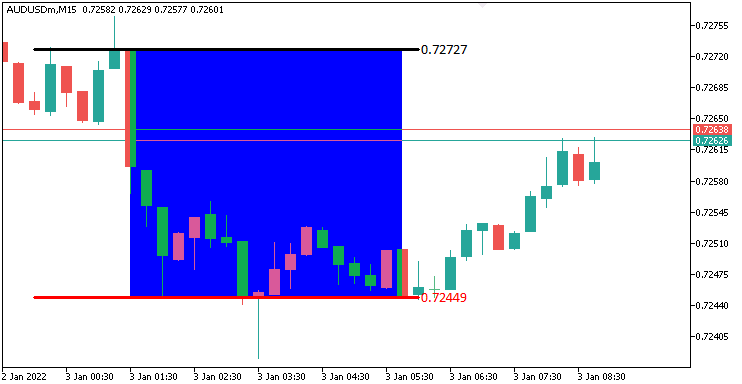
На изображении мы видим, что нам удалось точно визуализировать диапазон. Следующее, что нам нужно делать, это отслеживать наличие разрыва в течение заданного временного диапазона и также визуализировать его на графике. Для демонстарации разрыва на графике нам понадобится пользовательская функция.
//+------------------------------------------------------------------+
//| Function to draw a breakpoint marker                             |
//+------------------------------------------------------------------+
void drawBreakPoint(string objName,datetime time,double price,int arrCode,
   color clr,int direction){ //--- Define a function to draw a breakpoint marker
   if (ObjectFind(0,objName) < 0){ //--- Check if the breakpoint object does not already exist
      ObjectCreate(0,objName,OBJ_ARROW,0,time,price);        //--- Create an arrow object at the specified time and price
      ObjectSetInteger(0,objName,OBJPROP_ARROWCODE,arrCode); //--- Set the arrow code for the marker
      ObjectSetInteger(0,objName,OBJPROP_COLOR,clr);         //--- Set the color of the arrow
      ObjectSetInteger(0,objName,OBJPROP_FONTSIZE,12);       //--- Set the font size for the arrow
      if (direction > 0) ObjectSetInteger(0,objName,OBJPROP_ANCHOR,ANCHOR_TOP);    //--- Set the anchor to top for upward breaks
      if (direction < 0) ObjectSetInteger(0,objName,OBJPROP_ANCHOR,ANCHOR_BOTTOM); //--- Set the anchor to bottom for downward breaks

      string txt = " Break"; //--- Define the text suffix for the breakpoint label
      string objNameDescr = objName + txt; //--- Create a unique name for the text object
      ObjectCreate(0,objNameDescr,OBJ_TEXT,0,time,price);   //--- Create a text object at the breakpoint
      ObjectSetInteger(0,objNameDescr,OBJPROP_COLOR,clr);   //--- Set the color of the text
      ObjectSetInteger(0,objNameDescr,OBJPROP_FONTSIZE,12); //--- Set the font size of the text
      if (direction > 0) { //--- Check if the breakout is upward
         ObjectSetInteger(0,objNameDescr,OBJPROP_ANCHOR,ANCHOR_LEFT_UPPER); //--- Set the text anchor to left upper
         ObjectSetString(0,objNameDescr,OBJPROP_TEXT, " " + txt);           //--- Set the text content
      }
      if (direction < 0) { //--- Check if the breakout is downward
         ObjectSetInteger(0,objNameDescr,OBJPROP_ANCHOR,ANCHOR_LEFT_LOWER); //--- Set the text anchor to left lower
         ObjectSetString(0,objNameDescr,OBJPROP_TEXT, " " + txt);           //--- Set the text content
      }
   }
   ChartRedraw(0); //--- Redraw the chart to display the breakpoint
}
Здесь мы определяем функцию "drawBreakPoint", чтобы визуально отмечать точки пробоя. С помощью параметров "objName", "time", "price", "arrCode", "clr" и "direction" создаем стрелку с ObjectCreate и OBJ_ARROW при его отсутствии через ObjectFind, настраивая стиль, цвет и размер шрифта 12 с "ObjectSetInteger", с привязкой к "ANCHOR_TOP" или "ANCHOR_BOTTOM", в зависимости от параметра "direction".
Добавляем текстовую метку "Break" с помощью "ObjectCreate" и "OBJ_TEXT", с названием "objNameDescr", настраиваем цвет, размер шрифта и якорь (ANCHOR_LEFT_UPPER или ANCHOR_LEFT_LOWER), используя "ObjectSetInteger" и ObjectSetString. Завершаем работу с помощью "ChartRedraw", чтобы отобразить эти маркеры, обеспечивая четкую визуализацию пробоя. Теперь можем использовать эту функцию для визуализации точек останова на графике.
double barClose = close(1); //--- Get the closing price of the previous bar
datetime barTime = time(1); //--- Get the time of the previous bar

if (barClose > maximum_price && isHaveDailyRange_Prices && !isHaveRangeBreak
    && barTime >= validBreakTime_start && barTime <= validBreakTime_end
){ //--- Check for a breakout above the maximum price within the valid time window
   Print("CLOSE Price broke the HIGH range. ",barClose," > ",maximum_price); //--- Log the breakout above the high range
   isHaveRangeBreak = true;                                                //--- Set the flag to indicate a range breakout has occurred
   drawBreakPoint(TimeToString(barTime),barTime,barClose,234,clrBlack,-1); //--- Draw a breakpoint marker for the high breakout
}
else if (barClose < minimum_price && isHaveDailyRange_Prices && !isHaveRangeBreak
         && barTime >= validBreakTime_start && barTime <= validBreakTime_end
){ //--- Check for a breakout below the minimum price within the valid time window
   Print("CLOSE Price broke the LOW range. ",barClose," < ",minimum_price); //--- Log the breakout below the low range
   isHaveRangeBreak = true;                                              //--- Set the flag to indicate a range breakout has occurred
   drawBreakPoint(TimeToString(barTime),barTime,barClose,233,clrBlue,1); //--- Draw a breakpoint marker for the low breakout
}
Чтобы обнаружить и визуализировать действительные пробои, мы преобразуем закрытие предыдущего бара с помощью "close(1)" в "barClose", а время - с помощью "time(1)" в "barTime". Если значение "barClose" превышает значение "maximum_price", значение "isHaveDailyRange_Prices" равно true, значение "isHaveRangeBreak" равно false, а значение "barTime" находится в пределах от "validBreakTime_start" до "validBreakTime_end", регистрируем максимальное значение пробоя с помощью "Print", устанавливаем для "isHaveRangeBreak" значение true и вызываем "drawBreakPoint" с помощью "TimeToString(barTime)", "barClose", стрелка 234, "clrBlack" и -1.
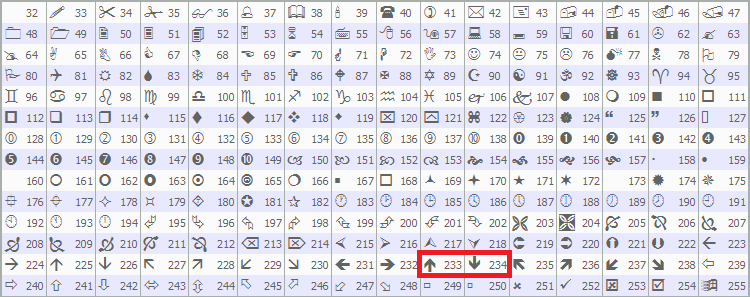
Если "barClose" ниже "minimum_price" при тех же условиях, регистрируем пробой минимума, устанавливаем "isHaveRangeBreak" и вызываем "drawBreakPoint" со стрелкой 233, "clrBlue" и 1. Это указывает на действительные пробои. Мы использовали заранее определенные стрелки MQL5, в частности 233 и 23, как видно ниже, но вы можете использовать любые на свой вкус.
При запуске программы мы получаем следующий результат.
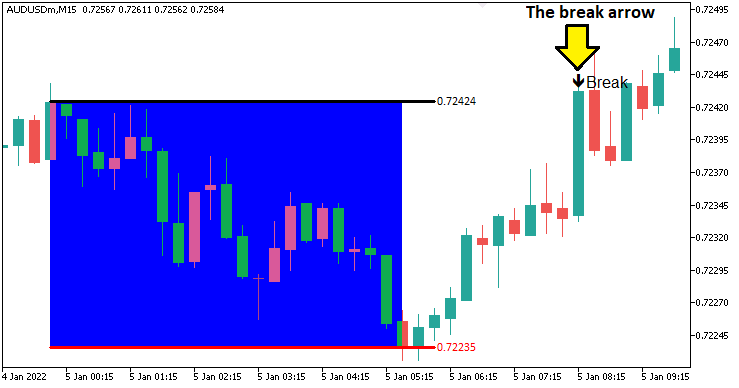
На изображении видно, что мы можем точно идентифицировать и графически представить разрыв. Что нам нужно сделать дальше, так это определить структурный сдвиг и логику его разрыва. Таким образом, нам понадобится функция для построения определенной точки поворота.
//+------------------------------------------------------------------+
//| Function to draw a swing point marker                            |
//+------------------------------------------------------------------+
void drawSwingPoint(string objName,datetime time,double price,int arrCode,
   color clr,int direction){ //--- Define a function to draw a swing point marker
   if (ObjectFind(0,objName) < 0){ //--- Check if the swing point object does not already exist
      ObjectCreate(0,objName,OBJ_ARROW,0,time,price);        //--- Create an arrow object at the specified time and price
      ObjectSetInteger(0,objName,OBJPROP_ARROWCODE,arrCode); //--- Set the arrow code for the marker
      ObjectSetInteger(0,objName,OBJPROP_COLOR,clr);         //--- Set the color of the arrow
      ObjectSetInteger(0,objName,OBJPROP_FONTSIZE,10);       //--- Set the font size for the arrow

      if (direction > 0) {ObjectSetInteger(0,objName,OBJPROP_ANCHOR,ANCHOR_TOP);}    //--- Set the anchor to top for swing lows
      if (direction < 0) {ObjectSetInteger(0,objName,OBJPROP_ANCHOR,ANCHOR_BOTTOM);} //--- Set the anchor to bottom for swing highs

      string text = "BoS";                   //--- Define the text label for Break of Structure
      string objName_Descr = objName + text; //--- Create a unique name for the text object
      ObjectCreate(0,objName_Descr,OBJ_TEXT,0,time,price);   //--- Create a text object at the swing point
      ObjectSetInteger(0,objName_Descr,OBJPROP_COLOR,clr);   //--- Set the color of the text
      ObjectSetInteger(0,objName_Descr,OBJPROP_FONTSIZE,10); //--- Set the font size of the text

      if (direction > 0) { //--- Check if the swing is a low
         ObjectSetString(0,objName_Descr,OBJPROP_TEXT,"  "+text);            //--- Set the text content
         ObjectSetInteger(0,objName_Descr,OBJPROP_ANCHOR,ANCHOR_LEFT_UPPER); //--- Set the text anchor to left upper
      }
      if (direction < 0) { //--- Check if the swing is a high
         ObjectSetString(0,objName_Descr,OBJPROP_TEXT,"  "+text);            //--- Set the text content
         ObjectSetInteger(0,objName_Descr,OBJPROP_ANCHOR,ANCHOR_LEFT_LOWER); //--- Set the text anchor to left lower
      }
   }
   ChartRedraw(0); //--- Redraw the chart to display the swing point
}
Реализуем функцию "drawSwingPoint", чтобы отмечать максимумы и минимумы колебаний, которые были идентифицированы. С помощью параметров "objName", "time", "price", "arrCode", "clr" и "direction" проверяем отсутствие с помощью ObjectFind, создаем стрелку с помощью ObjectCreate, используя OBJ_ARROW и настраиваем стиль, цвет и размер шрифта 10 посредством ObjectSetInteger, с привязкой к "ANCHOR_TOP" для минимумов или "ANCHOR_BOTTOM" для максимумов. Добавляем текстовую метку "BoS" с помощью "ObjectCreate", используя "OBJ_TEXT", настраиваем цвет, размер шрифта и якорь (ANCHOR_LEFT_UPPER или ANCHOR_LEFT_LOWER) посредством "ObjectSetInteger" и "ObjectSetString". Вызываем ChartRedraw, чтобы отобразить эти маркеры, выделяя ключевые точки поворота. Затем с помощью этой функции продолжаем структурировать логику для определения точки поворота.
// bos logic
if (isHaveDailyRange_Prices){ //--- Proceed with BoS logic only if the daily range is calculated
   static bool isNewBar_bos = false;            //--- Initialize flag to indicate a new bar on the BoS timeframe
   int currBars = iBars(_Symbol,timeframe_bos); //--- Get the current number of bars on the BoS timeframe
   static int prevBars = currBars;              //--- Store the previous number of bars for comparison

   if (prevBars == currBars){isNewBar_bos = false;}                          //--- Set flag to false if no new bar has formed
   else if (prevBars != currBars){isNewBar_bos = true; prevBars = currBars;} //--- Set flag to true and update prevBars if a new bar has formed

   const int length = 4;                         //--- Define the number of bars to check for swing high/low (must be > 2)
   int right_index, left_index;                  //--- Declare variables to store indices for bars to the right and left
   int curr_bar = length;                        //--- Set the current bar index for swing analysis
   bool isSwingHigh = true, isSwingLow = true;   //--- Initialize flags to determine if the current bar is a swing high or low
   static double swing_H = -1.0, swing_L = -1.0; //--- Initialize variables to store the latest swing high and low prices

   if (isNewBar_bos){ //--- Check if a new bar has formed on the BoS timeframe
      for (int a=1; a<=length; a++){ //--- Loop through the specified number of bars to check for swings
         right_index = curr_bar - a; //--- Calculate the right-side bar index
         left_index = curr_bar + a;  //--- Calculate the left-side bar index
         if ( (high(curr_bar,timeframe_bos) <= high(right_index,timeframe_bos)) || (high(curr_bar,timeframe_bos) < high(left_index,timeframe_bos)) ){ //--- Check if the current bar's high is not the highest
            isSwingHigh = false; //--- Set flag to false if the bar is not a swing high
         }
         if ( (low(curr_bar,timeframe_bos) >= low(right_index,timeframe_bos)) || (low(curr_bar,timeframe_bos) > low(left_index,timeframe_bos)) ){ //--- Check if the current bar's low is not the lowest
            isSwingLow = false; //--- Set flag to false if the bar is not a swing low
         }
      }

      if (isSwingHigh){ //--- Check if the current bar is a swing high
         swing_H = high(curr_bar,timeframe_bos); //--- Store the swing high price
         Print("WE DO HAVE A SWING HIGH @ BAR INDEX ",curr_bar," H: ",high(curr_bar,timeframe_bos)); //--- Log the swing high details
         drawSwingPoint(TimeToString(time(curr_bar,timeframe_bos)),time(curr_bar,timeframe_bos),high(curr_bar,timeframe_bos),77,clrBlue,-1); //--- Draw a marker for the swing high
      }
      if (isSwingLow){ //--- Check if the current bar is a swing low
         swing_L = low(curr_bar,timeframe_bos); //--- Store the swing low price
         Print("WE DO HAVE A SWING LOW @ BAR INDEX ",curr_bar," L: ",low(curr_bar,timeframe_bos)); //--- Log the swing low details
         drawSwingPoint(TimeToString(time(curr_bar,timeframe_bos)),time(curr_bar,timeframe_bos),low(curr_bar,timeframe_bos),77,clrRed,+1); //--- Draw a marker for the swing low
      }
   }
}
Если у нас есть дневные цены, то есть дневной диапазон уже определен, мы отслеживаем новые бары на таймфрейме Прорыв структуры (Break of Structure), используя статический флаг "isNewBar_bos", сравнивая текущее количество баров от iBars с помощью _Symbol и "timeframe_bos" со статическим "prevBars", обновляем значение "isNewBar_bos" до true и "prevBars" при формировании нового бара.
Когда значение "isNewBar_bos" равно true, мы анализируем бар с индексом "curr_bar" (настроенный на "length" = 4) на предмет колебаний, проверяя бар "length" с обеих сторон, используя "right_index" и "left_index". Используем функции "high" и "low" с "timeframe_bos" для сравнения максимума и минимума текущего бара с соседними барами, устанавливая для "isSwingHigh" или "isSwingLow" значение false, если это не самое высокое или самое низкое значение.
Если значение - "isSwingHigh", сохраняем цену в "swing_H", регистрируем ее с помощью "Print" и вызываем "drawSwingPoint" с помощью "TimeToString", время бара, его цена, код стрелки 77, "clrBlue" и -1; если значение - "isSwingLow", обновляем "swing_L", регистрируем в логе и вызываем "drawSwingPoint" с помощью "clrRed" и +1. После компиляции получаем следующий результат.
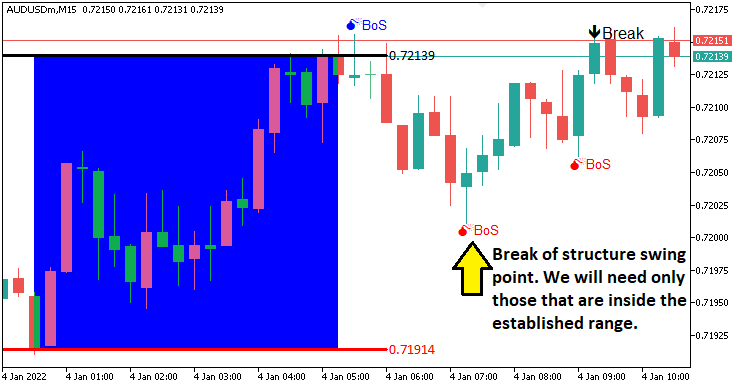
На изображении видно, что мы рисуем точки поворота. Следующее, что нам нужно сделать, - это отследить разрыв точек поворота, что означает сдвиг структуры и, следовательно, разрыв структуры. Чтобы снова визуально представить их, нам понадобится следующая пользовательская функция.
//+------------------------------------------------------------------+
//| Function to draw a break level line                              |
//+------------------------------------------------------------------+
void drawBreakLevel(string objName,datetime time1,double price1,
   datetime time2,double price2,color clr,int direction){ //--- Define a function to draw a break level line
   if (ObjectFind(0,objName) < 0){ //--- Check if the break level object does not already exist
      ObjectCreate(0,objName,OBJ_ARROWED_LINE,0,time1,price1,time2,price2); //--- Create an arrowed line object
      ObjectSetInteger(0,objName,OBJPROP_TIME,0,time1);                     //--- Set the first time coordinate of the line
      ObjectSetDouble(0,objName,OBJPROP_PRICE,0,price1);                    //--- Set the first price coordinate of the line
      ObjectSetInteger(0,objName,OBJPROP_TIME,1,time2);                     //--- Set the second time coordinate of the line
      ObjectSetDouble(0,objName,OBJPROP_PRICE,1,price2);                    //--- Set the second price coordinate of the line

      ObjectSetInteger(0,objName,OBJPROP_COLOR,clr); //--- Set the color of the line
      ObjectSetInteger(0,objName,OBJPROP_WIDTH,2);   //--- Set the width of the line

      string text = "Break";                 //--- Define the text label for the break
      string objName_Descr = objName + text; //--- Create a unique name for the text object
      ObjectCreate(0,objName_Descr,OBJ_TEXT,0,time2,price2); //--- Create a text object at the line's end
      ObjectSetInteger(0,objName_Descr,OBJPROP_COLOR,clr);   //--- Set the color of the text
      ObjectSetInteger(0,objName_Descr,OBJPROP_FONTSIZE,10); //--- Set the font size of the text

      if (direction > 0) { //--- Check if the break is upward
         ObjectSetString(0,objName_Descr,OBJPROP_TEXT,text+"  ");             //--- Set the text content
         ObjectSetInteger(0,objName_Descr,OBJPROP_ANCHOR,ANCHOR_RIGHT_UPPER); //--- Set the text anchor to right upper
      }
      if (direction < 0) { //--- Check if the break is downward
         ObjectSetString(0,objName_Descr,OBJPROP_TEXT,text+"  ");             //--- Set the text content
         ObjectSetInteger(0,objName_Descr,OBJPROP_ANCHOR,ANCHOR_RIGHT_LOWER); //--- Set the text anchor to right lower
      }
   }
   ChartRedraw(0); //--- Redraw the chart to display the break level
}
Просто определяем функцию "drawBreakLevel", чтобы визуализировать разрыв структуры. Используем аналогичную логику для визуализации, как и в случае с предыдущими функциями визуализации, поэтому мы не будем тратить много времени на объяснение того, что все это делает. Эту функцию мы будем использовать для визуализации уровней.
double Ask = NormalizeDouble(SymbolInfoDouble(_Symbol,SYMBOL_ASK),_Digits); //--- Get and normalize the current Ask price
double Bid = NormalizeDouble(SymbolInfoDouble(_Symbol,SYMBOL_BID),_Digits); //--- Get and normalize the current Bid price

if (swing_H > 0 && Ask > swing_H){ //--- Check if the Ask price breaks above the swing high
   Print("$$$$$$$$$ BUY SIGNAL NOW. BREAK OF SWING HIGH"); //--- Log a buy signal due to swing high breakout
   int swing_H_index = 0;                //--- Initialize the index of the swing high bar
   for (int i=0; i<=length*2+1000; i++){ //--- Loop through bars to find the swing high
      double high_sel = high(i,timeframe_bos); //--- Get the high price of the i-th bar
      if (high_sel == swing_H){ //--- Check if the high matches the swing high
         swing_H_index = i;     //--- Store the bar index
         Print("BREAK HIGH FOUND @ BAR INDEX ",swing_H_index); //--- Log the swing high bar index
         break;                 //--- Exit the loop once found
      }
   }
   drawBreakLevel(TimeToString(time(0,timeframe_bos)),time(swing_H_index,timeframe_bos),high(swing_H_index,timeframe_bos),
   time(0,timeframe_bos),high(swing_H_index,timeframe_bos),clrBlue,-1); //--- Draw a line to mark the swing high breakout

   if (isTakenTrade == false){                                     //--- Check if no trade is taken yet
      obj_Trade.Buy(0.01,_Symbol,Ask,minimum_price,maximum_price); //--- Execute a buy trade with 0.01 lots, using minimum price as SL and maximum as TP
      isTakenTrade = true;                                         //--- Set the flag to indicate a trade is taken
   }

   swing_H = -1.0; //--- Reset the swing high price
   return;         //--- Exit the OnTick function to avoid further processing
}
if (swing_L > 0 && Bid < swing_L){ //--- Check if the Bid price breaks below the swing low
   Print("$$$$$$$$$ SELL SIGNAL NOW. BREAK OF SWING LOW"); //--- Log a sell signal due to swing low breakout
   int swing_L_index = 0; //--- Initialize the index of the swing low bar
   for (int i=0; i<=length*2+1000; i++){ //--- Loop through bars to find the swing low
      double low_sel = low(i,timeframe_bos); //--- Get the low price of the i-th bar
      if (low_sel == swing_L){ //--- Check if the low matches the swing low
         swing_L_index = i;    //--- Store the bar index
         Print("BREAK LOW FOUND @ BAR INDEX ",swing_L_index); //--- Log the swing low bar index
         break;                //--- Exit the loop once found
      }
   }
   drawBreakLevel(TimeToString(time(0,timeframe_bos)),time(swing_L_index,timeframe_bos),low(swing_L_index,timeframe_bos),
   time(0,timeframe_bos),low(swing_L_index,timeframe_bos),clrRed,+1); //--- Draw a line to mark the swing low breakout

   if (isTakenTrade == false){ //--- Check if no trade is taken yet
      obj_Trade.Sell(0.01,_Symbol,Bid,maximum_price,minimum_price); //--- Execute a sell trade with 0.01 lots, using maximum price as SL and minimum as TP
      isTakenTrade = true;                                          //--- Set the flag to indicate a trade is taken
   }

   swing_L = -1.0; //--- Reset the swing low price
   return;         //--- Exit the OnTick function to avoid further processing
}
Здесь мы реализуем логику исполнения сделок при наличии действительного пробоя. Мы получаем нормализованные цены "Ask" и "Bid", используя SymbolInfoDouble и NormalizeDouble с помощью _Symbol и _Digits.
Если "swing_H" положительный, а "Ask" превышает "swing_H", регистрируем в логе с помощью "Print", находим индекс максимума колебаний с помощью "high" и "timeframe_bos", отмечаем его "drawBreakLevel", используя TimeToString и "time". Затем вызываем "obj_Trade.Buy" с 0,01 лотами, стоп-лоссом "minimum_price" и тейк-профитом "maximum_price", если значение "isTakenTrade" равно false, устанавливаем его в значение true и сбрасываем значение "swing_H".
Если "swing_L" положительный, а "Bid" падает ниже "swing_L", регистрируем влоге, находим индекс минимума колебаний с помощью "low", отмечаем с помощью "drawBreakLevel" и вызываем "obj_Trade.Sell", сбрасывая значение "swing_L". Выполняем выход с помощью "return" после каждой сделки для точной торговли на Прорыве структуры. Ниже представлен результат.
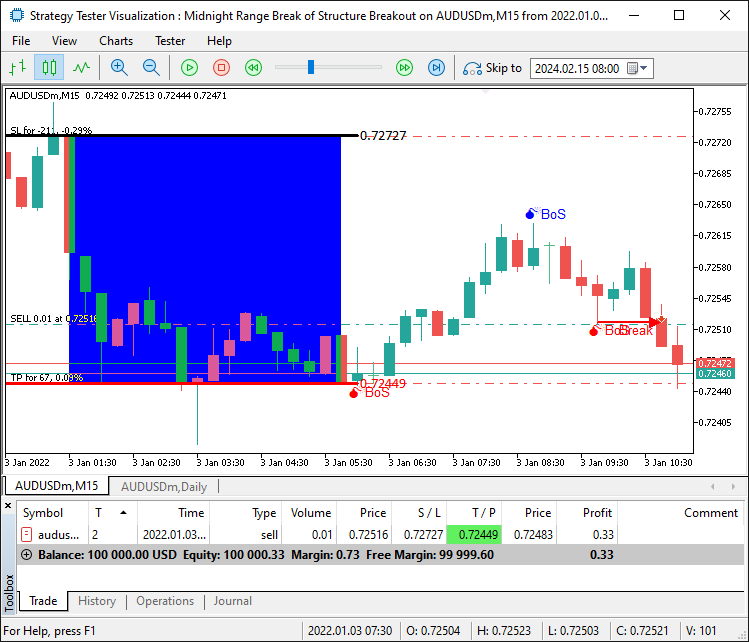
Теперь мы можем открывать сделки по подтвержденным настройкам. Однако как быть, когда происходит пробой, но он находится за пределами диапазона? То есть цена отодвигается выше или ниже границ диапазона. Нам нужно подождать, пока цена вернется в диапазон, чтобы мы могли считать разрыв действительным. Чтобы достичь этого, нам нужно будет получить максимальные и минимальные цены диапазона и добавить их для более жесткого ограничения, чтобы избежать ложных сигналов.
if (swing_H > 0 && Ask > swing_H && swing_H <= maximum_price && swing_H >= minimum_price){ //--- Check if the Ask price breaks above the swing high within the range
   Print("$$$$$$$$$ BUY SIGNAL NOW. BREAK OF SWING HIGH WITHIN RANGE"); //--- Log a buy signal due to swing high breakout
   int swing_H_index = 0;                                               //--- Initialize the index of the swing high bar
   for (int i=0; i<=length*2+1000; i++){                                //--- Loop through bars to find the swing high
      double high_sel = high(i,timeframe_bos); //--- Get the high price of the i-th bar
      if (high_sel == swing_H){                //--- Check if the high matches the swing high
         swing_H_index = i; //--- Store the bar index
         Print("BREAK HIGH FOUND @ BAR INDEX ",swing_H_index); //--- Log the swing high bar index
         break;             //--- Exit the loop once found
      }
   }
   drawBreakLevel(TimeToString(time(0,timeframe_bos)),time(swing_H_index,timeframe_bos),high(swing_H_index,timeframe_bos),
   time(0,timeframe_bos),high(swing_H_index,timeframe_bos),clrBlue,-1); //--- Draw a line to mark the swing high breakout

   if (isTakenTrade == false){ //--- Check if no trade is taken yet
      obj_Trade.Buy(0.01,_Symbol,Ask,minimum_price,maximum_price); //--- Execute a buy trade with 0.01 lots, using minimum price as SL and maximum as TP
      isTakenTrade = true;                                         //--- Set the flag to indicate a trade is taken
   }

   swing_H = -1.0; //--- Reset the swing high price
   return;         //--- Exit the OnTick function to avoid further processing
}
if (swing_L > 0 && Bid < swing_L && swing_L <= maximum_price && swing_L >= minimum_price){ //--- Check if the Bid price breaks below the swing low within the range
   Print("$$$$$$$$$ SELL SIGNAL NOW. BREAK OF SWING LOW WITHIN RANGE"); //--- Log a sell signal due to swing low breakout
   int swing_L_index = 0;                //--- Initialize the index of the swing low bar
   for (int i=0; i<=length*2+1000; i++){ //--- Loop through bars to find the swing low
      double low_sel = low(i,timeframe_bos); //--- Get the low price of the i-th bar
      if (low_sel == swing_L){ //--- Check if the low matches the swing low
         swing_L_index = i;    //--- Store the bar index
         Print("BREAK LOW FOUND @ BAR INDEX ",swing_L_index); //--- Log the swing low bar index
         break;                //--- Exit the loop once found
      }
   }
   drawBreakLevel(TimeToString(time(0,timeframe_bos)),time(swing_L_index,timeframe_bos),low(swing_L_index,timeframe_bos),
   time(0,timeframe_bos),low(swing_L_index,timeframe_bos),clrRed,+1); //--- Draw a line to mark the swing low breakout

   if (isTakenTrade == false){ //--- Check if no trade is taken yet
      obj_Trade.Sell(0.01,_Symbol,Bid,maximum_price,minimum_price); //--- Execute a sell trade with 0.01 lots, using maximum price as SL and maximum as TP
      isTakenTrade = true;                                          //--- Set the flag to indicate a trade is taken
   }

   swing_L = -1.0; //--- Reset the swing low price
   return;         //--- Exit the OnTick function to avoid further processing
}
Сохраняем порядок, отбрасывая ложные сигналы, и видим, что можем открывать сделки по подтвержденной настройке, тем самым достигая нашей цели по выявлению, визуализации и торговле в соответствии с настройкой стратегии. Осталось провести повторное тестирование программы, и это будет выполнено в следующем разделе.
Тестирование на истории
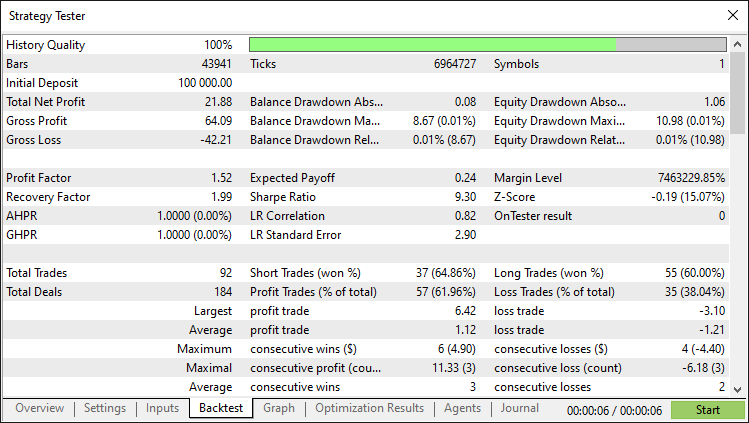
После тщательного тестирования на истории мы получили следующие результаты.
График тестирования на истории:
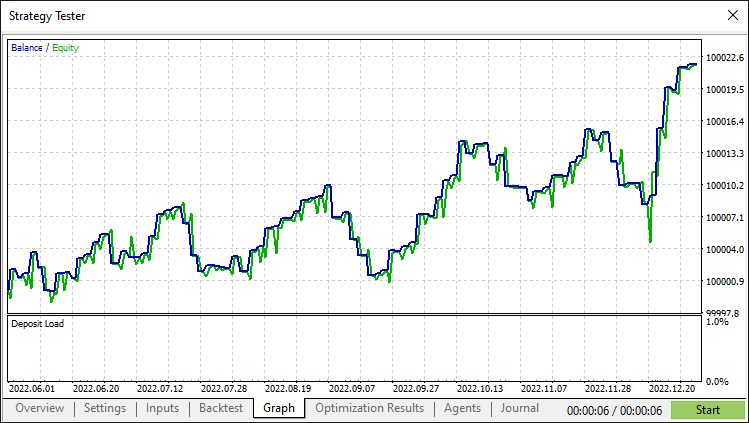
Отчет о тестировании на истории:
Заключение
В заключение отметим, что нами создан советник на MQL5, который автоматизирует Пробой полуночного диапазона с помощью стратегии Прорыв структуры, торгуя на пробоях в пределах полуночного диапазона, подтверждаемых точками колебания текущего дня. Благодаря точному определению диапазона и визуализации вы сможете еще больше усовершенствовать его и определить большее количество стратегий, которые сделают его надежным и адаптированным к вашему стилю торговли.
Отказ от ответственности: Содержание настоящей статьи предназначено только для целей обучения. Торговля сопряжена со значительными финансовыми рисками, а волатильность рынка может привести к убыткам. Перед использованием данного советника на реальных рынках, необходимо провести всестороннее тестирование на истории и надлежащим образом управлять рисками.
Овладев этими методами, вы сможете развивать свои навыки алгоритмической торговли и с большей уверенностью подходить к работе на рынках. Желаем удачи в вашем торговом путешествии!
Перевод с английского произведен MetaQuotes Ltd.
Оригинальная статья: https://www.mql5.com/en/articles/17876
Предупреждение: все права на данные материалы принадлежат MetaQuotes Ltd. Полная или частичная перепечатка запрещена.
Данная статья написана пользователем сайта и отражает его личную точку зрения. Компания MetaQuotes Ltd не несет ответственности за достоверность представленной информации, а также за возможные последствия использования описанных решений, стратегий или рекомендаций.

 Анализ влияния солнечных и лунных циклов на цены валют
 Нейросети в трейдинге: Адаптивное восприятие рыночной динамики (STE-FlowNet)
 Автоматизация торговых стратегий на MQL5 (Часть 5): Разработка стратегии Adaptive Crossover RSI Trading Suite
 От начального до среднего уровня: Struct (VI)

- Бесплатные приложения для трейдинга
- 8 000+ сигналов для копирования
- Экономические новости для анализа финансовых рынков
Вы принимаете политику сайта и условия использования
Привет, Аллан.
Я собираюсь загрузить вашу систему и начать тестирование. Интересно, что в отчете о тестировании стратегии не указана ни торговая пара, ни таймфрейм. Поскольку вы проиллюстрировали AUUSD M15, я предполагаю, что вы использовали именно ее, и я начну тестирование с нее. Есть ли у вас какие-либо рекомендации по использованию других пар или таймфреймов. Я подозреваю, что эта программа может лучше работать на азиатских торговых парах, я прав?
Будьте здоровы, CapeCoddah
Тестирование было неудачным. Я пробовал AUDUSD, AUDJPY и USDJPY, и все они принесли убытки с коэффициентами Шарпа от -3.00 до -5.00. Все, кроме USDJPY, сразу же ушли в минус и больше не восстановились. USDJPY имела 2 периода положительного прироста, но в итоге ушла в минус и больше не вернулась.
Adios
Отличная работа. Спасибо Аллану!
Конечно. Добро пожаловать. Спасибо за добрый отзыв.
Спасибо, Аллан! Вы лучший.