

MQL5 简介(第 14 部分):构建自定义指标的初学者指南(三)
 465
465
 6
6

概述
欢迎回到我们的 MQL5 系列!在本系列的前几篇文章中,我们探讨了如何使用缓冲区和绘图在 MQL5 中构建自定义指标。缓冲区允许我们存储指标值,而绘图则有助于在图表上可视化这些值。这些方法对许多指标都有效,但在创建复杂的视觉表示方面存在局限性。
在本文中,我们将采用一种新方法,使用 Meta Trader 5 图表对象创建指标。图表对象提供了额外的灵活性,它允许我们在图表上创建标签、形状和趋势线,而不需要指示缓冲区。这种技术非常适合开发需要独特图形组件、显示形态和识别重要价格水平的指标。
我们将创建一个类似于谐波形态的指标来实现这一点。我们将使用的逻辑可以进行修改,以识别和描绘不同的谐波形态,即使我们不会专注于任何特定的形态(例如加特利形态、蝙蝠形态或蝴蝶形态)。与其构建一个完全有效的谐波形态检测器,主要目标是学习如何在 MQL5 中使用图表对象来开发指标。 在本系列的第 9 部分中,我们探讨了如何在 MQL5 中构建和使用趋势线、矩形和标签等对象,这也是我们首次介绍如何使用图表对象。本文将基于这些知识,将其应用于指标的开发。到最后,你将牢牢掌握如何通过动态处理图表项目来开发独特的视觉指示。
在本文中,您将学习:
- 如何使用 MetaTrader 5 图表对象创建自定义指标,而不是依赖缓冲区和绘图。
- 理解谐波形态的结构以及如何在价格走势中识别它们。
- 如何识别市场中的关键波动点,从而形成潜在的谐波形态。
- 利用斐波那契回撤水平验证形态形成。
- 如何通过编程方式绘制几何形状(例如三角形和线条)以在图表上可视化形态。
- 如何过滤无效形态以提高交易信号的准确性。
1.谐波形态指标
1.1.理解谐波形态指标
谐波形态是一种价格结构,它利用特定的斐波那契比率来精确定位可能的市场反转区域。加特利形态、蝙蝠形态和蝴蝶形态等,都依赖于价格波动形成几何形状,这些形态预示着高概率的交易机会。
谐波形态需要识别关键价格点并使用斐波那契比率来验证其结构,而标准指标则使用缓冲区和绘图来创建信号。因此,与 RSI 或移动平均线等更传统的指标相比,它们更难识别和显示。
我们所使用的逻辑可以进行修改,以识别和描绘不同的谐波形态,即使我们不会专注于任何特定的形态(例如加特利形态、蝙蝠形态或蝴蝶形态)。与其构建一个完全有效的谐波形态检测器,主要目标是学习如何在 MQL5 中使用图表对象来开发指标。
为此,我们将在图表上标记重要的波动点(高点和低点),使用文本对象(XABCD)来指示重要的水平,用不同的对象来说明形态结构,并应用斐波那契水平来提高形态的准确性和验证性。
1.2.设置项目
正如我经常说的,在设计一个指标之前,你必须先设想一个指标将如何出现。确切知道指标应该如何设置,有助于开发过程,并保证最终产品满足我们的要求。
在这个项目中,我们将使用 MetaTrader 5 图表对象来构建看涨和看跌谐波形态。该指标将绘制多个图形元素来形成形态结构,定位重要的波动点,用文本对象(XABCD)标记它们,并添加斐波那契水平线来改善模式的呈现效果。
除了创建与谐波形态非常相似的指标外,该方法还将使我们获得 MQL5 图表对象的实践经验,这将有助于创建未来的自定义指标。除了讨论如何使用图表对象创建这些形态之外,我们还将探讨可能出现的潜在错误。可能会出现一些问题,例如对象错位、斐波那契水平线错位以及波动点检测不准确。为了保证形态的精确显示和指标的无缝操作,我们将分析这些问题并提供解决方案。
1.2.1.看涨形态
我们将采用系统的方法来确定构成该形态的重要波动点,从而开发看涨谐波形态指标。该过程包括确定具体的定价点,并确保它们符合谐波形态的指导原则。
确定波动低点 (X) 作为该形态的起点将是我们的第一步。接下来,我们将确定一个波动高点(A)和一个波动低点(B)。为了使该形态保持有效,B 需要回撤至 XA 段的 61.8% 到 78.6% 之间。然后我们将寻找波动高点 (C) 并验证波动低点 (D)。当最后一个点 D 低于 X 时,看涨形态的完整结构就形成了。
当满足这些条件时,我们将利用图表对象(例如连接波动点的趋势线、XABCD 点的标签和斐波那契回撤位)来确认结构,从而在图表上以图形方式描绘该形态。这将提供一种系统且透明的方法来识别可能的看涨反转区域。为了让您更容易识别形态中的重要交易区域,我们还将利用图表对象来指示可能的入场位置、止损 (SL) 和止盈 (TP) 水平。这将有助于交易决策,因为它提供了一种系统且透明的方法来识别可能的看涨反转区域。
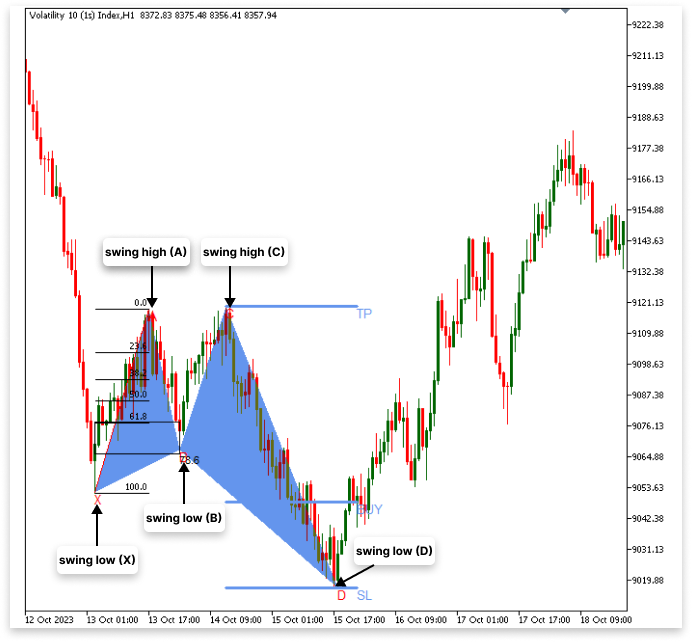
伪代码:
// 第一步:识别波动点
- 检测波动低点 (X)
- 识别 X 之后的高点 (A)。
- 检测 A 之后的波动低点 (B)。
如果 B 的回撤位不在 XA 的 61.8% 和 78.6% 之间
- 丢弃形态并重新开始检测
如果 B 的回撤位在 XA 的 61.8% 到 78.6% 之间
- 在 B 之后识别波动高点 (C)。
- C 之后检测波动低点 (D)。
如果 D 不低于 X
- 然后丢弃该形态并重新开始检测
// 第二步:绘制图表对象
- 绘制连接 X → A → B → C → D 的对象
- 使用文本对象标记点:X、A、B、C、D
- 绘制从 X 到 A 的斐波那契回撤线以进行验证
// 第三步:定义交易水平
- 创建图表对象以标记入场点、止损点和止盈点。
1.2.2.看跌形态
看跌谐波形态指标的结构与看涨形态类似,但方向相反。为了确保它们遵循谐波形态的指导原则,我们将找出重要的波动点。该模式将首先通过识别一个波动高点 (X) 来识别,然后通过识别一个波动低点 (A) 来识别。然后确定波动高点 (B),它需要回撤至 XA 段的 61.8% 到 78.6% 之间。当检测到波动低点 (C) 时,最终的波动高点 (D) 将被确认。D 必须高于 X,从而形成可能的看跌反转区域,以验证该形态。
在确认结构之后,我们将使用图表对象,如趋势线、XABCD 标签和斐波那契回撤位,以图形方式描绘该形态。为了帮助您找到形态中的重要交易区域,我们将进一步指出入场点、止损点(SL)和止盈点(TP)。
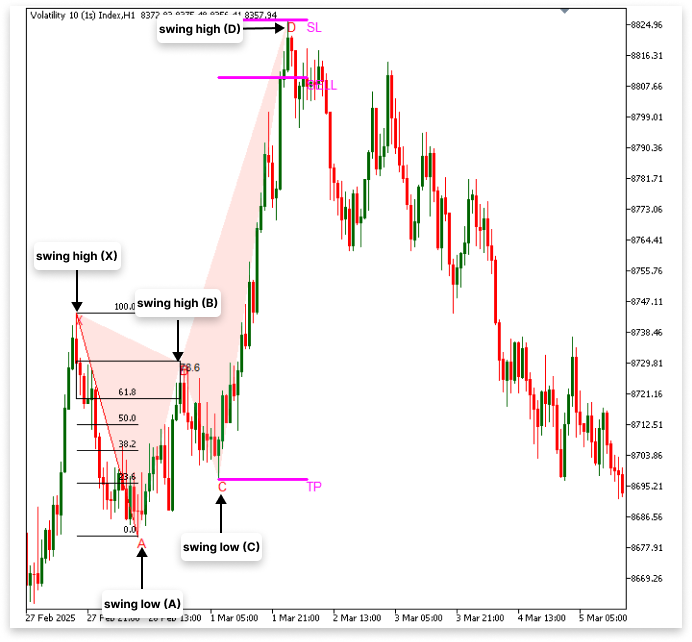
伪代码:
// 第一步:识别波动点
- 检测波动高点 (X)
- 检测 X 之后的波动低点 (A)。
- 检测 A 之后的波动高点 (B)。
如果 B 的回撤位不在 XA 的 61.8% 和 78.6% 之间
- 丢弃形态并重新开始检测
如果 B 的回撤位在 XA 的 61.8% 到 78.6% 之间
- 检测 B 之后的波动低点 (C)。
- 检测 C 之后的波动高点 (D)。
如果 D 不大于 X
- 丢弃形态并重新开始检测
// 第二步:绘制图表对象
- 绘制连接 X → A → B → C → D 的对象
- 使用文本对象标记点:X、A、B、C、D
- 绘制从 X 到 A 的斐波那契回撤线以进行验证
// 第三步:定义交易水平
- 创建图表对象以标记入场点、止损点和止盈点。
2.构建看涨谐波形态
本节我们将开始把谐波形态指标集成到 MQL5 中。我们将明确识别波动点、确认回撤位以及使用图表对象在图表上可视化模式所需的函数。此外,我们将对绘制对象的外观进行自定义,以提高清晰度和易用性。
2.1.识别波动高点和低点
在发现谐波形态之前,我们需要一种可靠的方法来定位图表上的波动高点和波动低点。XABCD 结构是以波动点为基础绘制的。我们通过判断一根烛形的最高价是否是附近一定范围内烛形中的最高价来识别波动高点。类似地,当一根烛形的最低价是某个范围内的最低价时,就称之为波动低点。该范围的大小决定了我们检测的灵敏度 —— 较大的值可以捕捉到较大的波动,而较小的值可以检测到较小的波动。下一步,我们将开发一种算法来扫描历史价格数据,定位关键波动点,并保证它们符合形态生成原则。
2.1.1.波动高点和低点函数
示例:
#property indicator_chart_window

//+------------------------------------------------------------------+
//| Custom indicator initialization function                         |
//+------------------------------------------------------------------+
int OnInit()
  {
//--- indicator buffers mapping

//---
   return(INIT_SUCCEEDED);
  }
//+------------------------------------------------------------------+
//| Custom indicator iteration function                              |
//+------------------------------------------------------------------+
int OnCalculate(const int rates_total,
                const int prev_calculated,
                const datetime &time[],
                const double &open[],
                const double &high[],
                const double &low[],
                const double &close[],
                const long &tick_volume[],
                const long &volume[],
                const int &spread[])
  {
//---

//--- return value of prev_calculated for next call
   return(rates_total);
  }

//+------------------------------------------------------------------+
//| FUNCTION FOR SWING LOW                                           |
//+------------------------------------------------------------------+
bool IsSwingLow(const double &low[], int index, int lookback)
  {
   for(int i = 1; i <= lookback; i++)
     {
      if(low[index] > low[index - i] || low[index] > low[index + i])
         return false;
     }
   return true;
  }

//+------------------------------------------------------------------+
//| FUNCTION FOR SWING HIGH                                          |
//+------------------------------------------------------------------+
bool IsSwingHigh(const double &high[], int index, int lookback)
  {
   for(int i = 1; i <= lookback; i++)
     {
      if(high[index] < high[index - i] || high[index] < high[index + i])
         return false;
     }
   return true;
  }
解释:
MetaTrader 5 通过指令 #property indicator_chart_window 获知,自定义指标需要显示在主价格图表上,而不是显示在不同的子窗口中。这在创建基于形态的指标(如谐波形态)或叠加价格活动的指标(如趋势线、支撑位和阻力位等)时非常有用。如果没有这种特性,该指标可能会默认绘制在不同的指标窗口中,就像 MACD 或 RSI 等振荡指标一样。
IsSwingLow 函数的目的是识别价格图表的波动低点。当一根烛形的最低价低于一定范围内周围烛形的最低价时,它被称为波动低点。该函数接受一个回溯值,用于确定应考虑前后多少根烛形;一个最低价格数组;以及正在评估的烛形的索引。它通过遍历附近的烛形来确定当前低点是否为最低点。如果在周围范围内发现更低的值,则返回 false,证明当前烛形不是波动低点。否则,返回 true,表示为确认的低点。
与此类似,波动高点(烛形最高价超过附近烛形最高价的点)是使用 IsSwingHigh 函数找到的。该函数使用与 IsSwingLow 相同的逻辑,但它确保指定索引处的最高值是回溯范围内的最高价,而不是搜索最低价。如果周围任何一根烛形的值更高,则该函数返回 false。否则,它确认了波动高点并返回 true 值。
检测重要的价格转折点(这是定义谐波形态的基础)需要同时具备这两种能力。在确定了波动高点和低点之后,可以通过将它们与趋势线连接起来,并使用斐波那契回撤进行确认,来绘制该形态的 XABCD 结构。通过这种方法,可以保证指标能够根据最新的价格信息动态调整,并适当地更新已识别的形态。
类比:
寻找山谷中的最低点是 IsSwingLow 函数的运行方式。假设你站在一条徒步小径上,试图找到这条小径最深的凹陷处。在回溯时间里,你向前迈几步,向后退几步。如果当前点低于该范围内的所有其他点,则该点被确认为最低点(波动低点)。您当前的位置只是斜坡的另一部分,而不是实际的最低点(如果有相邻的点更低的话)。利用此函数可以识别价格可能开始上涨的潜在反转区域。
使用 IsSwingHigh 函数类似于寻找山脉中的最高点。如果你站在一个地方,前后走几步,确保你当前的位置是该范围内的最高点,那么这个位置就被认为是波动高点。在宣布峰值或下跌之前,需要检查多长时间取决于回溯时间;如果回溯时间太短,轻微的变化可能会被误认为是重要的节点,如果回溯时间太长,你可能会错过较小但重要的趋势。这种均衡保证了确定的波动点是显著的,而不仅仅是价格的任意波动。
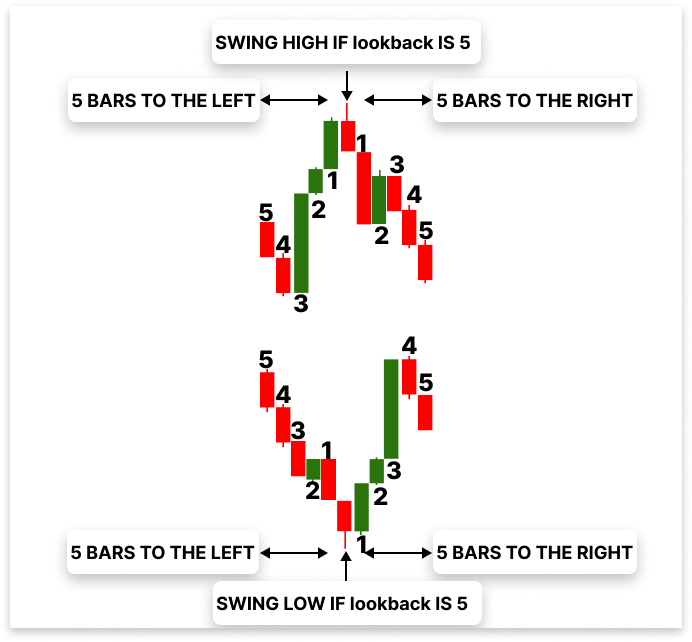
2.1.2.识别波动低点 (X)
下一步是在创建 IsSwingLow 和 IsSwingHigh 函数后,将它们合并到 OnCalculate 函数中。在此,实时价格数据将应用波动点检测逻辑。找到初始波动低点 (X),也就是谐波形态的起始点,是第一个挑战。利用我们创建的函数,我们可以迭代地检查 OnCalculate 价格历史中的每一根烛形,看看它是否符合波动低点的标准。
示例:
#property indicator_chart_window

// Input parameters
input int LookbackBars = 10; // Number of bars to look back/forward for swing points
input int bars_check  = 1000; // Number of bars to check for swing points

// CHART ID
long chart_id = ChartID(); // Get the ID of the current chart to manage objects (lines, text, etc.)

//X
double X; // Price of the swing low (X).
datetime X_time; // Time of the swing low (X).
string X_line; // Unique name for the trend line object.
string X_letter; // Unique name for the text label object.

//+------------------------------------------------------------------+
//| Custom indicator initialization function                         |
//+------------------------------------------------------------------+
int OnInit()
  {
//--- indicator buffers mapping

//---
   return(INIT_SUCCEEDED);
  }
//+------------------------------------------------------------------+
//| Custom indicator iteration function                              |
//+------------------------------------------------------------------+
int OnCalculate(const int rates_total,
                const int prev_calculated,
                const datetime &time[],
                const double &open[],
                const double &high[],
                const double &low[],
                const double &close[],
                const long &tick_volume[],
                const long &volume[],
                const int &spread[])
  {
//---

   if(rates_total >= bars_check)
     {

      for(int i = rates_total - bars_check; i < rates_total - LookbackBars; i++)
        {
         if(IsSwingLow(low, i, LookbackBars))
           {
            // If a swing low is found, store its price, time, and create a name for the objects to mark the X.
            X = low[i]; // Price of the swing low (X).
            X_time = time[i]; // Time of the swing low (X).
            X_line = StringFormat("XLow%d", i); // Unique name for the trend line object.
            X_letter = StringFormat("X%d", i); // Unique name for the text label object.

            ObjectCreate(chart_id, X_letter, OBJ_TEXT, 0, X_time, X); // Create text object for X
            ObjectSetString(chart_id, X_letter, OBJPROP_TEXT, "X"); // Set the text to "X".

            ObjectCreate(chart_id,X_line,OBJ_TREND,0,X_time,X,time[i+LookbackBars],X); // Create line to mark X
           }
        }
     }

//--- return value of prev_calculated for next call
   return(rates_total);
  }

//+------------------------------------------------------------------+
//| FUNCTION FOR SWING LOW                                           |
//+------------------------------------------------------------------+
bool IsSwingLow(const double &low[], int index, int lookback)
  {

   for(int i = 1; i <= lookback; i++)
     {
      if(low[index] > low[index - i] || low[index] > low[index + i])
         return false;
     }
   return true;
  }

//+------------------------------------------------------------------+
//| FUNCTION FOR SWING HIGH                                          |
//+------------------------------------------------------------------+
bool IsSwingHigh(const double &high[], int index, int lookback)
  {

   for(int i = 1; i <= lookback; i++)
     {
      if(high[index] < high[index - i] || high[index] < high[index + i])
         return false;
     }
   return true;
  }
//+------------------------------------------------------------------+
输出:
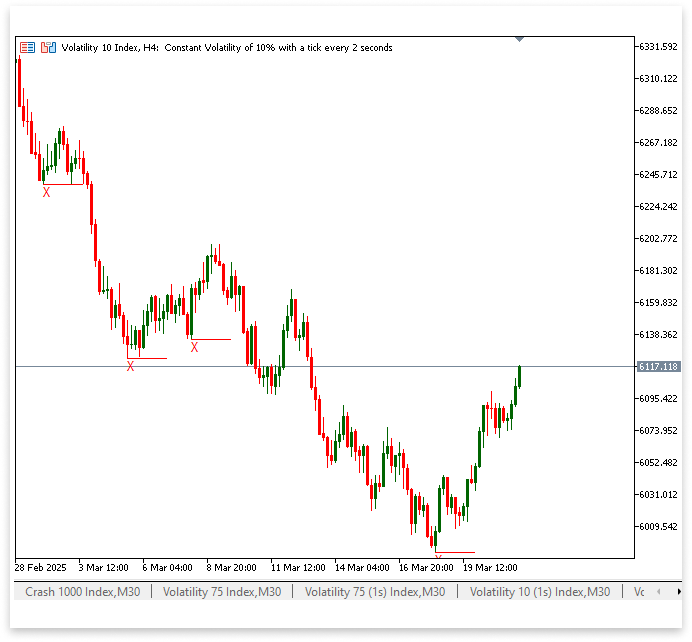
解释:
我们首先陈述一些关键的输入数据,因为确定波动低点 (X) 是找到看涨谐波形态的第一步。LookbackBars 变量决定了在特定点之前和之后应该检查的柱形数量,以确保该点是正确的波动点。这有助于消除不会导致明显低点的小幅价格波动。为了确保脚本只处理可控数量的历史柱形以保持效率,bars_check 参数指定要分析多少根柱形。
此外,我们使用 ChartID() 获取 chart_id,这使我们能够创建和管理图表对象,例如趋势线和文本标签。我们声明变量“X”来保存检测到的波动低点的价格(X),“X_time”来记录它发生的时间,“X_line”和“X_letter”为将用于在图表上识别此点的对象赋予不同的名称。将使用 X_letter 变量创建指示波动低点的文本标签,并使用 X_line 变量创建趋势线以改善显示效果。
然后,我们使用这些初步配置来确定 OnCalculate 函数中的波动低点 (X)。只有当有足够的价格数据可用时,我们才会开始检查,这要归功于条件 if(rates_total >= bars_check)。为了避免检查不完整的定价数据,循环遍历历史柱形图,从 rates_total - bars_check 开始,到 rates_total - LookbackBars 结束。循环中的 IsSwingLow 函数检测给定点是否为波动低点。当发现一个合格的低点时,我们会记录它的时间和价格,想出原创的对象名称,然后为图表生成可视组件。
使用 ObjectCreate(chart_id, X_letter, OBJ_TEXT, 0, X_time, X) 创建一个文本对象,用字母“X”表示波动低点。为了进一步说明已识别的波动低点,我们采用 ObjectCreate(chart_id, X_line, OBJ_TREND, 0, X_time, X, time[i+LookbackBars], X) 在 X 水平上构建趋势线。这保证了我们谐波形态结构中的第一个重要点能够被准确识别并显示在图表上,为确定形态的后续点奠定了基础。
2.1.3.识别波动高点 (A)
成功确定波动低点 (X) 之后,下一步就是找到波动高点 (A)。这一点对于谐波形态的形成至关重要,因为它是 X 点之后第一个显著的上升趋势。与我们发现 X 点的方式相同,我们将利用 IsSwingHigh 函数找到 A 点,但这次我们将寻找的是峰值而不是谷值。
我们将寻找价格数据中 X 点之后的某个点,该点的最高价超过了指定 LookbackBars 范围内周围柱形的最高价。在确定了合格的高点之后,我们将记录其价格和时间,给它起一个独特的名字,并使用图表对象来正确地描述它。
示例:
#property indicator_chart_window

// Input parameters
input int LookbackBars = 10; // Number of bars to look back/forward for swing points
input int bars_check  = 1000; // Number of bars to check for swing points

// CHART ID
long chart_id = ChartID(); // Get the ID of the current chart to manage objects (lines, text, etc.)

//X
double X; // Price of the swing low (X).
datetime X_time; // Time of the swing low (X).
string X_line; // Unique name for the trend line object.
string X_letter; // Unique name for the text label object.

//A
double A; // Price of the swing high (A).
datetime A_time; // Time of the swing high (A).
string A_line; // Unique name for the trend line object.
string A_letter; // Unique name for the text label object.

//+------------------------------------------------------------------+
//| Custom indicator initialization function                         |
//+------------------------------------------------------------------+
int OnInit()
  {
//--- indicator buffers mapping

//---
   return(INIT_SUCCEEDED);
  }
//+------------------------------------------------------------------+
//| Custom indicator iteration function                              |
//+------------------------------------------------------------------+
int OnCalculate(const int rates_total,
                const int prev_calculated,
                const datetime &time[],
                const double &open[],
                const double &high[],
                const double &low[],
                const double &close[],
                const long &tick_volume[],
                const long &volume[],
                const int &spread[])
  {
//---

   if(rates_total >= bars_check)
     {

      for(int i = rates_total - bars_check; i < rates_total - LookbackBars; i++)
        {
         if(IsSwingLow(low, i, LookbackBars))
           {
            // If a swing low is found, store its price, time, and create a name for the objects to mark the X.
            X = low[i]; // Price of the swing low (X).
            X_time = time[i]; // Time of the swing low (X).
            X_line = StringFormat("XLow%d", i); // Unique name for the trend line object.
            X_letter = StringFormat("X%d", i); // Unique name for the text label object.

            ObjectCreate(chart_id, X_letter, OBJ_TEXT, 0, X_time, X); // Create text object for X
            ObjectSetString(chart_id, X_letter, OBJPROP_TEXT, "X"); // Set the text to "X".
            ObjectCreate(chart_id,X_line,OBJ_TREND,0,X_time,X,time[i+LookbackBars],X); // Create line to mark X

            for(int j = i; j < rates_total - LookbackBars; j++)
              {
               if(IsSwingHigh(high, j, LookbackBars)  && time[j] > X_time)
                 {

                  A = high[j]; // Price of the swing high (A).
                  A_time = time[j]; // Time of the swing high (A).
                  A_line = StringFormat("AHigh%d", j); // Unique name for the trend line object.
                  A_letter = StringFormat("A%d", j); // Unique name for the text label object.

                  ObjectCreate(chart_id, A_letter, OBJ_TEXT, 0, A_time, A); // Create text object for A
                  ObjectSetString(chart_id, A_letter, OBJPROP_TEXT, "A"); // Set the text to "A".
                  ObjectSetInteger(chart_id,A_letter,OBJPROP_COLOR,clrGreen); // Set text color to green
                  ObjectCreate(chart_id,A_line,OBJ_TREND,0,A_time,A,time[j+LookbackBars],A); // Create line to mark A
                  ObjectSetInteger(chart_id,A_line,OBJPROP_COLOR,clrGreen); // Set line color to green

                  break;
                 }
              }
           }
        }
     }

//--- return value of prev_calculated for next call
   return(rates_total);
  }

//+------------------------------------------------------------------+
//| FUNCTION FOR SWING LOW                                           |
//+------------------------------------------------------------------+
bool IsSwingLow(const double &low[], int index, int lookback)
  {
   for(int i = 1; i <= lookback; i++)
     {
      if(low[index] > low[index - i] || low[index] > low[index + i])
         return false;
     }
   return true;
  }

//+------------------------------------------------------------------+
//| FUNCTION FOR SWING HIGH                                          |
//+------------------------------------------------------------------+
bool IsSwingHigh(const double &high[], int index, int lookback)
  {
   for(int i = 1; i <= lookback; i++)
     {
      if(high[index] < high[index - i] || high[index] < high[index + i])
         return false;
     }
   return true;
  }
//+------------------------------------------------------------------+
输出:
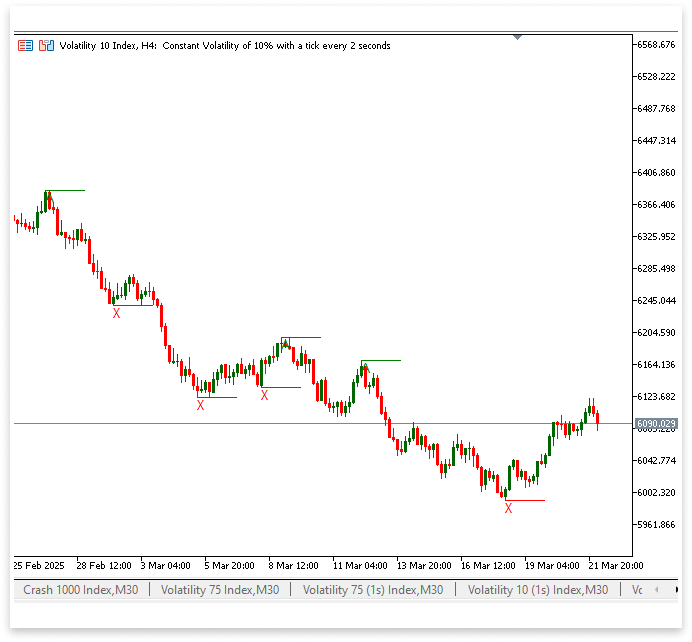
解释:
我们首先定义确定波动高点 (A) 所需的变量。A_time 记录波动高点发生的精确时刻,而 A 存储波动高点的价格值。我们使用 A_line 作为趋势线对象的名称,A_letter 作为文本标签,以确保每个检测到的 A 点都有不同的视觉表示。这些变量有助于创建突出显示 A 点的图表对象,从而便于可视化谐波形态的结构。
一旦确定了 X,代码就会从 X 的位置开始遍历价格数据,以找到 A。IsSwingHigh 函数用于确定一根柱形是否是指定 LookbackBars 范围内的局部高点,并用于检查每一根柱形。条件 time[j] > X_time 用于保证波动高点 A 出现在 X 之后。
这样就确保了谐波形态中正确的顺序得以保持,只有当 A 的时间戳大于 X_time 时才选择 A。如果发现合格的高点,则会记录其价格和时间,并赋予趋势线和文本标签对象独特的标识。绘制一条绿色趋势线来突出显示已识别的波动高点,并在那里放置一个带有字母“A”的文本标签。一旦确定了第一个合格的波动高点 (A),就使用 break; 表达式打破循环。循环会不断寻找更多的高点,而不会中断;可能会用稍后的高点覆盖 A。由于我们只想要 X 之后的第一个 A 实例,因此 break; 确保一旦检测到波动高点,循环就会结束迭代,从而保护第一个有效的 A 并避免无意义的计算。
2.1.4.识别波动低点 (B)
确定波动高点 A 之后,下一步是找到下一个波动低点 B。一旦确定了 A,寻找 B 的工作就立即开始,因为 B 必然出现在 A 之后。具体做法是,从 A 点开始遍历价格数据,并使用 IsSwingLow 函数将当前柱形与 LookbackBars 范围内的相邻柱形进行比较,以确定它是否为波动低点。此外,预计 B 点将落入谐波形态识别中 XA 的特定斐波那契回撤位。但是,我们目前不会讨论斐波那契数列的验证;我们只关心识别 B 点。
一旦识别出波动低点,其价格和时间将分别记录在 B 和 B_time 中。我们提供趋势线(B_line)和文本标签(B_letter)这两个独特的名称来指示图表上的这个位置。生成一条趋势线,以在视觉上连接和突出显示文本对象与在摆动低点创建的标签“B”。这一阶段保证了构成我们谐波形态结构框架的三个主要点—— X、A 和 B —— 已经到位。
示例:
#property indicator_chart_window

// Input parameters
input int LookbackBars = 10; // Number of bars to look back/forward for swing points
input int bars_check  = 1000; // Number of bars to check for swing points

// CHART ID
long chart_id = ChartID(); // Get the ID of the current chart to manage objects (lines, text, etc.)

//X
double X; // Price of the swing low (X).
datetime X_time; // Time of the swing low (X).
string X_line; // Unique name for the trend line object.
string X_letter; // Unique name for the text label object.

//A
double A; // Price of the swing high (A).
datetime A_time; // Time of the swing high (A).
string A_line; // Unique name for the trend line object.
string A_letter; // Unique name for the text label object.

//B
double B; // Price of the swing low (B).
datetime B_time; // Time of the swing low (B).
string B_line; // Unique name for the trend line object.
string B_letter; // Unique name for the text label object.

//+------------------------------------------------------------------+
//| Custom indicator initialization function                         |
//+------------------------------------------------------------------+
int OnInit()
  {
//--- indicator buffers mapping

//---
   return(INIT_SUCCEEDED);
  }
//+------------------------------------------------------------------+
//| Expert deinitialization function                                 |
//+------------------------------------------------------------------+
void OnDeinit(const int reason)
  {
// This function is called when the indicator is removed or the chart is closed.
// Delete all objects (lines, text, etc.) from the chart to clean up.
   ObjectsDeleteAll(chart_id);
  }
//+------------------------------------------------------------------+
//| Custom indicator iteration function                              |
//+------------------------------------------------------------------+
int OnCalculate(const int rates_total,
                const int prev_calculated,
                const datetime &time[],
                const double &open[],
                const double &high[],
                const double &low[],
                const double &close[],
                const long &tick_volume[],
                const long &volume[],
                const int &spread[])
  {
//---

   if(rates_total >= bars_check)
     {

      for(int i = rates_total - bars_check; i < rates_total - LookbackBars; i++)
        {
         if(IsSwingLow(low, i, LookbackBars))
           {
            // If a swing low is found, store its price, time, and create a name for the objects to mark the X.
            X = low[i]; // Price of the swing low (X).
            X_time = time[i]; // Time of the swing low (X).
            X_line = StringFormat("XLow%d", i); // Unique name for the trend line object.
            X_letter = StringFormat("X%d", i); // Unique name for the text label object.

            ObjectCreate(chart_id, X_letter, OBJ_TEXT, 0, X_time, X); // Create text object for X
            ObjectSetString(chart_id, X_letter, OBJPROP_TEXT, "X"); // Set the text to "X".
            ObjectCreate(chart_id,X_line,OBJ_TREND,0,X_time,X,time[i+LookbackBars],X); // Create line to mark X


            for(int j = i; j < rates_total - LookbackBars; j++)
              {
               if(IsSwingHigh(high, j, LookbackBars) && time[j] > X_time)
                 {

                  A = high[j]; // Price of the swing high (A).
                  A_time = time[j]; // Time of the swing high (A).
                  A_line = StringFormat("AHigh%d", j); // Unique name for the trend line object.
                  A_letter = StringFormat("A%d", j); // Unique name for the text label object.

                  ObjectCreate(chart_id, A_letter, OBJ_TEXT, 0, A_time, A); // Create text object for A
                  ObjectSetString(chart_id, A_letter, OBJPROP_TEXT, "A"); // Set the text to "A".
                  ObjectSetInteger(chart_id,A_letter,OBJPROP_COLOR,clrGreen); // Set text color to green
                  ObjectCreate(chart_id,A_line,OBJ_TREND,0,A_time,A,time[j+LookbackBars],A); // Create line to mark A
                  ObjectSetInteger(chart_id,A_line,OBJPROP_COLOR,clrGreen); // Set line color to green


                  for(int k = j; k < rates_total - LookbackBars; k++)
                    {
                     if(IsSwingLow(low, k, LookbackBars) && time[k] > A_time)
                       {

                        // If a swing low is found, store its price, time, and create a name for the object.
                        B = low[k]; // Price of the swing low (B).
                        B_time = time[k]; // Time of the swing low (B).
                        B_line = StringFormat("BLow%d", k); // Unique name for the trend line object.
                        B_letter = StringFormat("B%d", k); // Unique name for the text label object.

                        ObjectCreate(chart_id, B_letter, OBJ_TEXT, 0, B_time, B); // Create text object for B
                        ObjectSetString(chart_id, B_letter, OBJPROP_TEXT, "B"); // Set the text to "B".
                        ObjectSetInteger(chart_id,B_letter,OBJPROP_COLOR,clrGreen); // Set text color to green
                        ObjectCreate(chart_id,B_line,OBJ_TREND,0,B_time,B,time[k+LookbackBars],B); // Create line to mark B
                        ObjectSetInteger(chart_id,B_line,OBJPROP_COLOR,clrMidnightBlue); // Set line color to green


                        break;

                       }
                    }

                  break;
                 }
              }
           }
        }
     }

//--- return value of prev_calculated for next call
   return(rates_total);
  }

//+------------------------------------------------------------------+
//| FUNCTION FOR SWING LOW                                           |
//+------------------------------------------------------------------+
bool IsSwingLow(const double &low[], int index, int lookback)
  {
   for(int i = 1; i <= lookback; i++)
     {
      if(low[index] > low[index - i] || low[index] > low[index + i])
         return false;
     }
   return true;
  }

//+------------------------------------------------------------------+
//| FUNCTION FOR SWING HIGH                                          |
//+------------------------------------------------------------------+
bool IsSwingHigh(const double &high[], int index, int lookback)
  {

   for(int i = 1; i <= lookback; i++)
     {
      if(high[index] < high[index - i] || high[index] < high[index + i])
         return false;
     }
   return true;
  }
//+------------------------------------------------------------------+
输出:
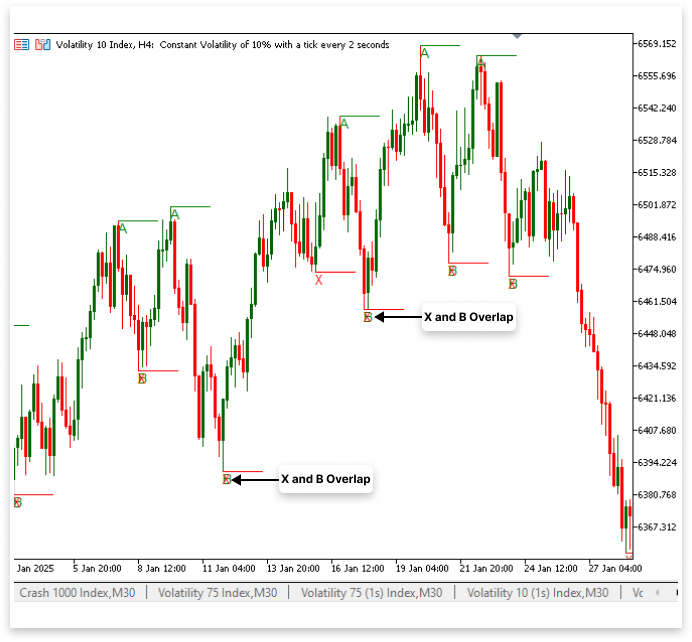
解释:
A 之后的波动低点的价格用变量 B 表示。使用从 A 点开始的循环,并利用 IsSwingLow 函数查找下一个波动低点,即可识别它。价格、时间以及趋势线和文本标签的不同名称在被识别后会被保存。然后,为了在图表上表示 B,计算机生成一条午夜蓝色的趋势线和一个绿色的文本标签(“B”)。为了保持形态生成的正确波动点序列,break 语句确保只选择第一个有效的 B。由于 X 和 B 在整个循环迭代过程中都被识别为波动低点,因此在当前的实现中它们可能会偶尔重叠。鉴于该程序会依次评估每个波动点,这种行为是可以预期的。但是,如果 X 和 B 相同,则可能会导致图表上出现冗余注释。
您可以添加一个条件,确保 B 是跟随 A 的单独低点,但如果您希望 X 和 B 不重叠,则 B 与 X 不相同。我会在代码中添加一个选项,让您可以选择 X 和 B 是否可以重叠。该指标将按现在的方式运行,如果允许重叠,则 X 和 B 可能为同一个波动低点。但是,如果禁止重叠,该指标将确保 B 与 X 是不同的波动低点。
因为 B 必须是一个单独的低点,而不是可能与 X 相同,所以防止重叠会导致发现的谐波形态减少。根据用户对形态识别的偏好,此选项提供了灵活性。
示例:
input bool overlap = false; //Allow Overlaping
for(int k = j; k < rates_total - LookbackBars; k++)
  {
   if(IsSwingLow(low, k, LookbackBars) && time[k] > A_time)
     {

      // If a swing low is found, store its price, time, and create a name for the object.
      B = low[k]; // Price of the swing low (B).
      B_time = time[k]; // Time of the swing low (B).
      B_line = StringFormat("BLow%d", k); // Unique name for the trend line object.
      B_letter = StringFormat("B%d", k); // Unique name for the text label object.

      ObjectCreate(chart_id, B_letter, OBJ_TEXT, 0, B_time, B); // Create text object for B
      ObjectSetString(chart_id, B_letter, OBJPROP_TEXT, "B"); // Set the text to "B".
      ObjectSetInteger(chart_id,B_letter,OBJPROP_COLOR,clrGreen); // Set text color to green
      ObjectCreate(chart_id,B_line,OBJ_TREND,0,B_time,B,time[k+LookbackBars],B); // Create line to mark B
      ObjectSetInteger(chart_id,B_line,OBJPROP_COLOR,clrMidnightBlue); // Set line color to green

      if(overlap == false)
        {
         i = k;
        }
      if(overlap == true)
        {
         i = i;
        }

      break;

     }
  }
输出:
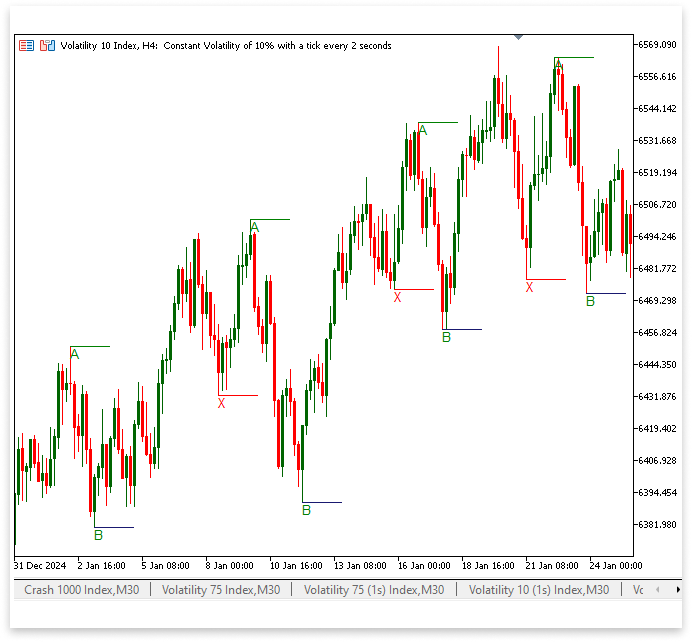
解释:
X 和 B 是否可以具有相同的波动低点取决于 overlap 输入参数。行 i = k; 保证一旦找到 B,迭代就会向前跳过,防止在 overlap 设置为 false 时 B 与 X 相同。这样既限制了可以识别的谐波形态的数量,又通过保持波动点之间的明显分离来最大限度地减少冗余。
然而,i = i; 这行代码表明,当 overlap 为 true 时,循环会定期进行,而无需跳过。这样一来,当 X 和 B 自然地出现在同一价格水平上时,允许它们重叠,从而可以发现更多谐波形态。然而,它也可能为形态标记造成一些重复。 通过成功防止 X 和 B 重叠,代码确保它们是不同的波动点。如图所示,B 现在独立于 X 而存在,保持了更清晰的形态结构。
2.1.5.识别波动高点 (C)
在确定波动低点 (X)、波动高点 (A) 和后续波动低点 (B) 之后,才能找到波动高点 (C)。这一点对于构建谐波形态的结构至关重要,因为它决定了形态的整体形状和可能的反转区域。
趋势线(C_line)和文本标签(C_letter)都赋予了不同的名称,以直观地指示这一点。趋势线用于在视觉上连接和突出显示图表上波动高点处带有标签“C”的文本项。这一阶段保证了构成谐波形态结构的四个主要点 —— X、A、B 和 C —— 现在已经就位。
示例:
//C
double C; // Price of the swing high (C).
datetime C_time; // Time of the swing high (C).
string C_line; // Unique name for the trend line object.
string C_letter; // Unique name for the text label object.
//+------------------------------------------------------------------+
//| Custom indicator iteration function                              |
//+------------------------------------------------------------------+
int OnCalculate(const int rates_total,
                const int prev_calculated,
                const datetime &time[],
                const double &open[],
                const double &high[],
                const double &low[],
                const double &close[],
                const long &tick_volume[],
                const long &volume[],
                const int &spread[])
  {
//---

   if(rates_total >= bars_check)
     {

      for(int i = rates_total - bars_check; i < rates_total - LookbackBars; i++)
        {
         if(IsSwingLow(low, i, LookbackBars))
           {
            // If a swing low is found, store its price, time, and create a name for the objects to mark the X.
            X = low[i]; // Price of the swing low (X).
            X_time = time[i]; // Time of the swing low (X).
            X_line = StringFormat("XLow%d", i); // Unique name for the trend line object.
            X_letter = StringFormat("X%d", i); // Unique name for the text label object.

            ObjectCreate(chart_id, X_letter, OBJ_TEXT, 0, X_time, X); // Create text object for X
            ObjectSetString(chart_id, X_letter, OBJPROP_TEXT, "X"); // Set the text to "X".
            ObjectCreate(chart_id,X_line,OBJ_TREND,0,X_time,X,time[i+LookbackBars],X); // Create line to mark X

            for(int j = i; j < rates_total - LookbackBars; j++)
              {
               if(IsSwingHigh(high, j, LookbackBars) && time[j] > X_time)
                 {

                  A = high[j]; // Price of the swing high (A).
                  A_time = time[j]; // Time of the swing high (A).
                  A_line = StringFormat("AHigh%d", j); // Unique name for the trend line object.
                  A_letter = StringFormat("A%d", j); // Unique name for the text label object.

                  ObjectCreate(chart_id, A_letter, OBJ_TEXT, 0, A_time, A); // Create text object for A
                  ObjectSetString(chart_id, A_letter, OBJPROP_TEXT, "A"); // Set the text to "A".
                  ObjectSetInteger(chart_id,A_letter,OBJPROP_COLOR,clrGreen); // Set text color to green
                  ObjectCreate(chart_id,A_line,OBJ_TREND,0,A_time,A,time[j+LookbackBars],A); // Create line to mark A
                  ObjectSetInteger(chart_id,A_line,OBJPROP_COLOR,clrGreen); // Set line color to green

                  for(int k = j; k < rates_total - LookbackBars; k++)
                    {
                     if(IsSwingLow(low, k, LookbackBars) && time[k] > A_time)
                       {

                        // If a swing low is found, store its price, time, and create a name for the object.
                        B = low[k]; // Price of the swing low (B).
                        B_time = time[k]; // Time of the swing low (B).
                        B_line = StringFormat("BLow%d", k); // Unique name for the trend line object.
                        B_letter = StringFormat("B%d", k); // Unique name for the text label object.

                        ObjectCreate(chart_id, B_letter, OBJ_TEXT, 0, B_time, B); // Create text object for B
                        ObjectSetString(chart_id, B_letter, OBJPROP_TEXT, "B"); // Set the text to "B".
                        ObjectSetInteger(chart_id,B_letter,OBJPROP_COLOR,clrGreen); // Set text color to green
                        ObjectCreate(chart_id,B_line,OBJ_TREND,0,B_time,B,time[k+LookbackBars],B); // Create line to mark B
                        ObjectSetInteger(chart_id,B_line,OBJPROP_COLOR,clrMidnightBlue); // Set line color to MidnightBlue

                        for(int l = j ; l < rates_total - LookbackBars; l++)
                          {
                           if(IsSwingHigh(high, l, LookbackBars) && time[l] > B_time)
                             {
                              C = high[l]; // Price of the swing high (C).
                              C_time = time[l]; // Time of the swing high (C).
                              C_line = StringFormat("CHigh%d", l); // Unique name for the trend line object.
                              C_letter = StringFormat("C%d", l); // Unique name for the text label object.

                              ObjectCreate(chart_id, C_letter, OBJ_TEXT, 0, C_time, C); // Create text object for C
                              ObjectSetString(chart_id, C_letter, OBJPROP_TEXT, "C"); // Set the text to "C".
                              ObjectSetInteger(chart_id,C_letter,OBJPROP_COLOR,clrGreen); // Set text color to green
                              ObjectCreate(chart_id,C_line,OBJ_TREND,0,C_time,C,time[l+LookbackBars],C); // Create line to mark C
                              ObjectSetInteger(chart_id,C_line,OBJPROP_COLOR,clrSaddleBrown); // Set line color to SaddleBrown

                              if(overlap == false)
                                {
                                 i = l;
                                }
                              if(overlap == true)
                                {
                                 i = i;
                                }

                              break;

                             }
                          }

                        break;

                       }
                    }

                  break;
                 }
              }
           }
        }
     }

//--- return value of prev_calculated for next call
   return(rates_total);
  }
输出:
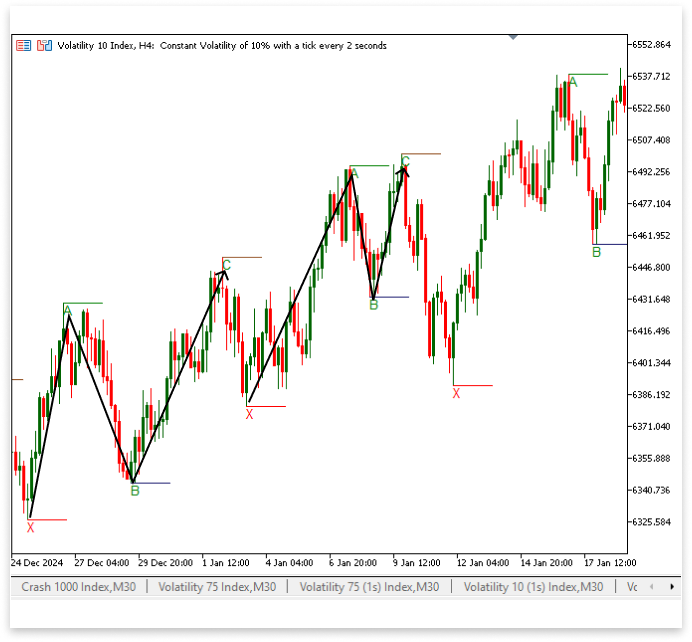
解释:
确定波动低点 (B) 后,代码的这一部分负责确定波动高点 (C),这是接下来的关键步骤。遍历价格数据,循环 for(int l = j; l < rates_total - LookbackBars; l++) 从索引 j 开始,前一个波动高点 (A) 就在这里找到。为了确保 C 在序列中位于 B 之后,它会一直查找,直到找到最新的柱形。为了保持形态的正确顺序,条件 if(IsSwingHigh(high, l, LookbackBars) && time[l] > B_time) 验证当前柱是否是指定回溯范围内的波动高点,并确保其时间戳晚于 B。
合格波动高点的价格和时间分别保存在 C 和 C_time 中,趋势线和文本标签对象被赋予不同的名称(C_line 和 C_letter)。使用 ObjectCreate(chart_id, C_line, OBJ_TREND, 0, C_time, C, time[l+LookbackBars], C),构建一条趋势线,以突出显示指定波动高点处的文本标签“C”。为了在视觉上将 C 趋势线与其他线段区分开来,ObjectSetInteger(chart_id, C_line, OBJPROP_COLOR, clrSaddleBrown); 将线条颜色设置为马鞍棕色。
最后一个条件块保证正确处理重叠模式:i = l; 如果 overlap 设置为 false,则阻止先前的波动点在另一个形态中使用。如果 overlap 为 true,则多个模式可以重叠,因为 i = i; 会保留当前值。确定第一个合格的波动高点 (C) 后,break;最终结束循环,避免不必要的重复,从而保证效率。
2.1.6.识别波动低点 (D)
确定波动高点 (C) 之后,才能确定波动低点 (D)。这样可以保证价格走势按正确的顺序进行,从而生成谐波形态。要按时间顺序找到 C 之后的下一个低点,寻找 D 的起点就是 C 所在的位置。要验证波动低点的合格性,必须满足两个条件。首先,在指定的回溯期间内,当前价格必须被视为一个波动低点。其次,为了保持正确的模式顺序,它的时间戳需要晚于 C 的时间戳。
记录合格低点的价格和时间,并为与之对应的趋势线和文本标签创建不同的标识符。为了使波动低点更容易在形态中被发现,绘制了一条趋势线来增强它,并在其位置插入了一个文本标签,以直观地指示它。
示例:
//D
double D; // Price of the swing low (D).
datetime D_time; // Time of the swing low (D).
string D_line; // Unique name for the trend line object.
string D_letter; // Unique name for the text label object.

//Trend
string XA_line; // Unique name for XA trend line object.
string AB_line; // Unique name for AB trend line object.
string BC_line; // Unique name for BC trend line object.
string CD_line; // Unique name for CD trend line object.

//+------------------------------------------------------------------+
//| Custom indicator iteration function                              |
//+------------------------------------------------------------------+
int OnCalculate(const int rates_total,
                const int prev_calculated,
                const datetime &time[],
                const double &open[],
                const double &high[],
                const double &low[],
                const double &close[],
                const long &tick_volume[],
                const long &volume[],
                const int &spread[])
  {
//---

   if(rates_total >= bars_check)
     {

      for(int i = rates_total - bars_check; i < rates_total - LookbackBars; i++)
        {
         if(IsSwingLow(low, i, LookbackBars))
           {
            // If a swing low is found, store its price, time, and create a name for the objects to mark the X.
            X = low[i]; // Price of the swing low (X).
            X_time = time[i]; // Time of the swing low (X).
            X_line = StringFormat("XLow%d", i); // Unique name for the trend line object.
            X_letter = StringFormat("X%d", i); // Unique name for the text label object.

            ObjectCreate(chart_id, X_letter, OBJ_TEXT, 0, X_time, X); // Create text object for X
            ObjectSetString(chart_id, X_letter, OBJPROP_TEXT, "X"); // Set the text to "X".
            ObjectCreate(chart_id,X_line,OBJ_TREND,0,X_time,X,time[i+LookbackBars],X); // Create line to mark X

            for(int j = i; j < rates_total - LookbackBars; j++)
              {
               if(IsSwingHigh(high, j, LookbackBars) && time[j] > X_time)
                 {

                  A = high[j]; // Price of the swing high (A).
                  A_time = time[j]; // Time of the swing high (A).
                  A_line = StringFormat("AHigh%d", j); // Unique name for the trend line object.
                  A_letter = StringFormat("A%d", j); // Unique name for the text label object.

                  ObjectCreate(chart_id, A_letter, OBJ_TEXT, 0, A_time, A); // Create text object for A
                  ObjectSetString(chart_id, A_letter, OBJPROP_TEXT, "A"); // Set the text to "A".
                  ObjectSetInteger(chart_id,A_letter,OBJPROP_COLOR,clrGreen); // Set text color to green
                  ObjectCreate(chart_id,A_line,OBJ_TREND,0,A_time,A,time[j+LookbackBars],A); // Create line to mark A
                  ObjectSetInteger(chart_id,A_line,OBJPROP_COLOR,clrGreen); // Set line color to green

                  for(int k = j; k < rates_total - LookbackBars; k++)
                    {
                     if(IsSwingLow(low, k, LookbackBars) && time[k] > A_time)
                       {

                        // If a swing low is found, store its price, time, and create a name for the object.
                        B = low[k]; // Price of the swing low (B).
                        B_time = time[k]; // Time of the swing low (B).
                        B_line = StringFormat("BLow%d", k); // Unique name for the trend line object.
                        B_letter = StringFormat("B%d", k); // Unique name for the text label object.

                        ObjectCreate(chart_id, B_letter, OBJ_TEXT, 0, B_time, B); // Create text object for B
                        ObjectSetString(chart_id, B_letter, OBJPROP_TEXT, "B"); // Set the text to "B".
                        ObjectSetInteger(chart_id,B_letter,OBJPROP_COLOR,clrGreen); // Set text color to green
                        ObjectCreate(chart_id,B_line,OBJ_TREND,0,B_time,B,time[k+LookbackBars],B); // Create line to mark B
                        ObjectSetInteger(chart_id,B_line,OBJPROP_COLOR,clrMidnightBlue); // Set line color to MidnightBlue

                        for(int l = j ; l < rates_total - LookbackBars; l++)
                          {
                           if(IsSwingHigh(high, l, LookbackBars) && time[l] > B_time)
                             {
                              C = high[l]; // Price of the swing high (C).
                              C_time = time[l]; // Time of the swing high (C).
                              C_line = StringFormat("CHigh%d", l); // Unique name for the trend line object.
                              C_letter = StringFormat("C%d", l); // Unique name for the text label object.

                              ObjectCreate(chart_id, C_letter, OBJ_TEXT, 0, C_time, C); // Create text object for C
                              ObjectSetString(chart_id, C_letter, OBJPROP_TEXT, "C"); // Set the text to "C".
                              ObjectSetInteger(chart_id,C_letter,OBJPROP_COLOR,clrGreen); // Set text color to green
                              ObjectCreate(chart_id,C_line,OBJ_TREND,0,C_time,C,time[l+LookbackBars],C); // Create line to mark C
                              ObjectSetInteger(chart_id,C_line,OBJPROP_COLOR,clrSaddleBrown); // Set line color to SaddleBrown

                              for(int m = l; m < rates_total - (LookbackBars / 2); m++)
                                {
                                 if(IsSwingLow(low, m, LookbackBars / 2) && time[m] > C_time)
                                   {
                                    D = low[m]; // Price of the swing low (D).
                                    D_time = time[m]; // Time of the swing low (D).
                                    D_line = StringFormat("DLow%d", m); // Unique name for the trend line object.
                                    D_letter = StringFormat("D%d", m); // Unique name for the text label object.

                                    ObjectCreate(chart_id, D_letter, OBJ_TEXT, 0, D_time, D); // Create text object for D
                                    ObjectSetString(chart_id, D_letter, OBJPROP_TEXT, "D"); // Set the text to "D".
                                    ObjectSetInteger(chart_id,D_letter,OBJPROP_COLOR,clrGreen); // Set text color to green
                                    ObjectCreate(chart_id,D_line,OBJ_TREND,0,D_time,D,time[m+LookbackBars],D); // Create line to mark D
                                    ObjectSetInteger(chart_id,D_line,OBJPROP_COLOR,clrSaddleBrown); // Set line color to SaddleBrown

                                    XA_line = StringFormat("XA Line%d", m); // Unique name for the XA line.
                                    ObjectCreate(chart_id,XA_line,OBJ_TREND,0,X_time,X,A_time,A); // Create line to connect XA
                                    ObjectSetInteger(chart_id,XA_line,OBJPROP_COLOR,clrSaddleBrown); // Set line color to SaddleBrown
                                    ObjectSetInteger(chart_id,XA_line,OBJPROP_WIDTH,3); // Line width

                                    AB_line = StringFormat("AB Line%d", m); // Unique name for the AB line.
                                    ObjectCreate(chart_id,AB_line,OBJ_TREND,0,A_time,A,B_time,B); // Create line to connect AB
                                    ObjectSetInteger(chart_id,AB_line,OBJPROP_COLOR,clrSaddleBrown); // Set line color to SaddleBrown
                                    ObjectSetInteger(chart_id,AB_line,OBJPROP_WIDTH,3); // Line width

                                    BC_line = StringFormat("BC Line%d", m); // Unique name for the BC line.
                                    ObjectCreate(chart_id,BC_line,OBJ_TREND,0,B_time,B,C_time,C); // Create line to connect BC
                                    ObjectSetInteger(chart_id,BC_line,OBJPROP_COLOR,clrSaddleBrown); // Set line color to SaddleBrown
                                    ObjectSetInteger(chart_id,BC_line,OBJPROP_WIDTH,3); // Line width

                                    CD_line = StringFormat("CD Line%d", m); // Unique name for the CD line.
                                    ObjectCreate(chart_id,CD_line,OBJ_TREND,0,C_time,C,D_time,D); // Create line to connect CD
                                    ObjectSetInteger(chart_id,CD_line,OBJPROP_COLOR,clrSaddleBrown); // Set line color to SaddleBrown
                                    ObjectSetInteger(chart_id,CD_line,OBJPROP_WIDTH,3); // Line width

                                    if(overlap == false)
                                      {
                                       i = m;
                                      }
                                    if(overlap == true)
                                      {
                                       i = i;
                                      }
                                    break;

                                   }
                                }

                              break;

                             }
                          }

                        break;

                       }
                    }

                  break;
                 }
              }
           }
        }
     }

//--- return value of prev_calculated for next call
   return(rates_total);
  }
输出:
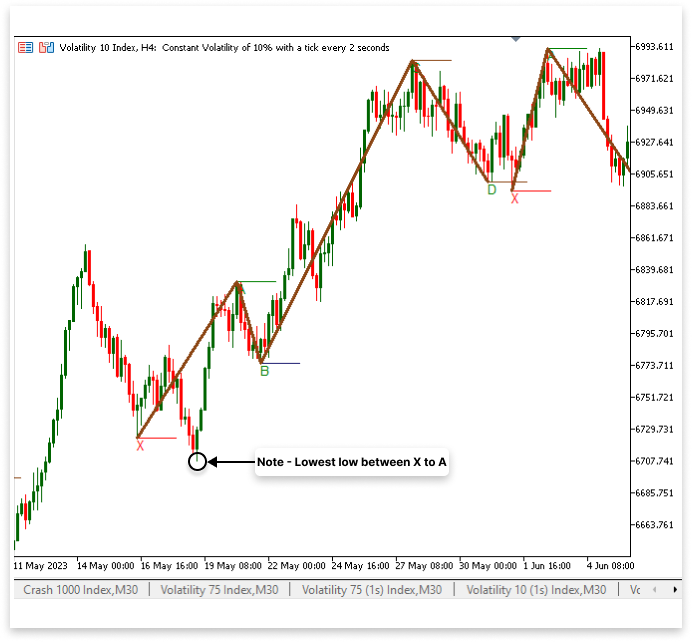
解释:
在已识别的形态中,D 点的波动低点价格用变量 D 表示。D 点是谐波形态交易中的一个关键点,价格走势可能在此发生反转并结束该形态。除了 D 之外,D_time 还记录了该低点出现的时间戳。为了直观地识别这个波动低点,图表上的趋势线和文本项也使用 D_line 和 D_letter 创建和标记。
该程序遍历定价数据,在以 for(int m = l; m < rates_total - (LookbackBars / 2); m++) 开头的循环中找到点 D。为了确定指数 m 的当前价格是否为波动低点,它使用 IsSwingLow() 函数,确保低点在时间点 C 之后。有效波动低点的价格和时间分别赋值为 D 和 D_time。
找到 D 点后,该指标会在图表上生成视觉元素。在波动最低点的位置,ObjectCreate() 函数会创建一个包含字母“D”的文本标签(D_letter),并为了方便起见将其着色为绿色。为了保持视觉表现的一致性,还在 D 点绘制了一条趋势线(D_line),延伸了 LookbackBars 的周期,并赋予其棕色(clrSaddleBrown)。
此时,该程序还会创建连接已识别出的波动点的趋势线。为了在视觉上连接相应的点(X 到 A,A 到 B,B 到 C,C 到 D),创建了 XA_line、AB_line、BC_line 和 CD_line 对象。这些线条通过勾勒出谐波形态,帮助交易者分析可能的价格变化。调整这些线条的宽度和颜色设置,以提高图表上的可见性。
成功识别出 XABCD 模式后,解决几个关键问题至关重要。该程序的逻辑是,在确定点 X 后,直到 ABCD 序列完成,才会更新 X。这意味着,如果 X 和 A 之间出现低于最初设定的 X 值的新低,该程序不会更改 X 的值。因此,这种形态可能无法准确反映真实的市场结构。
我们必须建立一个系统,不断确定 X 是否仍然是 X 和 A 之间的最低值,以保证该形态的有效性。如果在该范围内出现更低的低点,则需要动态更新 X。为了确保该区域内不遗漏任何高点,A 点应为 A 和 B 之间的最高点。同样,C 点应为 C 和 D 之间的最高点,B 点应为 B 和 C 之间的最低点。遵循这些要求,我们可以提高形态检测的准确率,并避免因严格的点选择而导致的误识别。该方法既能保持谐波形态结构的完整性,又能使指标保持适应性和对新价格走势的响应能力。
示例:
//X
int x_a_bars; // Number of bars between XA
int x_lowest_index; // Index of the lowest bar
double x_a_ll; // Price of the lowest bar
datetime x_a_ll_t; // Time of the lowest bar

//A
int a_b_bars; // Number of bars between AB
int a_highest_index; // Index of the highest bar
double a_b_hh; // Price of the highest bar
datetime a_b_hh_t; // Time of the highest bar

//B
int b_c_bars; // Number of bars between BC
int b_lowest_index; // Index of the lowest bar
double b_c_ll; // Price of the lowest bar
datetime b_c_ll_t; // Time of the lowest bar

//C
int c_d_bars; // Number of bars between CD
int c_highest_index; // Index of the highest bar
double c_d_hh; // Price of the highest bar
datetime c_d_hh_t; // Time of the highest bar

//+------------------------------------------------------------------+
//| Custom indicator iteration function                              |
//+------------------------------------------------------------------+
int OnCalculate(const int rates_total,
                const int prev_calculated,
                const datetime &time[],
                const double &open[],
                const double &high[],
                const double &low[],
                const double &close[],
                const long &tick_volume[],
                const long &volume[],
                const int &spread[])
  {

//---

   if(rates_total >= bars_check)
     {

      for(int i = rates_total - bars_check; i < rates_total - LookbackBars; i++)
        {
         if(IsSwingLow(low, i, LookbackBars))
           {
            // If a swing low is found, store its price, time, and create a name for the objects to mark the X.
            X = low[i]; // Price of the swing low (X).
            X_time = time[i]; // Time of the swing low (X).
            X_line = StringFormat("XLow%d", i); // Unique name for the trend line object.
            X_letter = StringFormat("X%d", i); // Unique name for the text label object.

            for(int j = i; j < rates_total - LookbackBars; j++)
              {
               if(IsSwingHigh(high, j, LookbackBars) && time[j] > X_time)
                 {

                  A = high[j]; // Price of the swing high (A).
                  A_time = time[j]; // Time of the swing high (A).
                  A_line = StringFormat("AHigh%d", j); // Unique name for the trend line object.
                  A_letter = StringFormat("A%d", j); // Unique name for the text label object.

                  for(int k = j; k < rates_total - LookbackBars; k++)
                    {
                     if(IsSwingLow(low, k, LookbackBars) && time[k] > A_time)
                       {

                        // If a swing low is found, store its price, time, and create a name for the object.
                        B = low[k]; // Price of the swing low (B).
                        B_time = time[k]; // Time of the swing low (B).
                        B_line = StringFormat("BLow%d", k); // Unique name for the trend line object.
                        B_letter = StringFormat("B%d", k); // Unique name for the text label object.

                        for(int l = j ; l < rates_total - LookbackBars; l++)
                          {
                           if(IsSwingHigh(high, l, LookbackBars) && time[l] > B_time)
                             {
                              C = high[l]; // Price of the swing high (C).
                              C_time = time[l]; // Time of the swing high (C).
                              C_line = StringFormat("CHigh%d", l); // Unique name for the trend line object.
                              C_letter = StringFormat("C%d", l); // Unique name for the text label object.

                              for(int m = l; m < rates_total - (LookbackBars / 2); m++)
                                {
                                 if(IsSwingLow(low, m, LookbackBars / 2) && time[m] > C_time)
                                   {
                                    D = low[m]; // Price of the swing low (D).
                                    D_time = time[m]; // Time of the swing low (D).
                                    D_line = StringFormat("DLow%d", m); // Unique name for the trend line object.
                                    D_letter = StringFormat("D%d", m); // Unique name for the text label object.

                                    //D
                                    ObjectCreate(chart_id, D_letter, OBJ_TEXT, 0, D_time, D); // Create text object for D
                                    ObjectSetString(chart_id, D_letter, OBJPROP_TEXT, "D"); // Set the text to "D".
                                    ObjectSetInteger(chart_id,D_letter,OBJPROP_COLOR,clrGreen); // Set text color to green
                                    ObjectCreate(chart_id,D_line,OBJ_TREND,0,D_time,D,time[m+LookbackBars],D); // Create line to mark D
                                    ObjectSetInteger(chart_id,D_line,OBJPROP_COLOR,clrSaddleBrown); // Set line color to SaddleBrown

                                    //C
                                    c_d_bars = Bars(_Symbol,PERIOD_CURRENT,C_time, D_time);
                                    c_highest_index = ArrayMaximum(high,l, c_d_bars);

                                    c_d_hh = high[c_highest_index]; //C - D Highest High and time
                                    c_d_hh_t = time[c_highest_index];

                                    ObjectCreate(chart_id, C_letter, OBJ_TEXT, 0, c_d_hh_t, c_d_hh); // Create text object for C
                                    ObjectSetString(chart_id, C_letter, OBJPROP_TEXT, "C"); // Set the text to "C".
                                    ObjectSetInteger(chart_id,C_letter,OBJPROP_COLOR,clrGreen); // Set text color to green
                                    ObjectCreate(chart_id,C_line,OBJ_TREND,0,c_d_hh_t,C,time[c_highest_index+LookbackBars],c_d_hh); // Create line to mark C
                                    ObjectSetInteger(chart_id,C_line,OBJPROP_COLOR,clrSaddleBrown); // Set line color to SaddleBrown

                                    //B
                                    b_c_bars = Bars(_Symbol,PERIOD_CURRENT,B_time, c_d_hh_t);
                                    b_lowest_index = ArrayMinimum(low,k, b_c_bars);

                                    b_c_ll = low[b_lowest_index]; //B - C Lowest Low and time
                                    b_c_ll_t = time[b_lowest_index];

                                    ObjectCreate(chart_id, B_letter, OBJ_TEXT, 0, b_c_ll_t, b_c_ll); // Create text object for B
                                    ObjectSetString(chart_id, B_letter, OBJPROP_TEXT, "B"); // Set the text to "B".
                                    ObjectSetInteger(chart_id,B_letter,OBJPROP_COLOR,clrGreen); // Set text color to green
                                    ObjectCreate(chart_id,B_line,OBJ_TREND,0,b_c_ll_t,b_c_ll,time[b_lowest_index+LookbackBars],b_c_ll); // Create line to mark B
                                    ObjectSetInteger(chart_id,B_line,OBJPROP_COLOR,clrMidnightBlue); // Set line color to MidnightBlue

                                    //A
                                    a_b_bars = Bars(_Symbol,PERIOD_CURRENT,A_time, b_c_ll_t);
                                    a_highest_index = ArrayMaximum(high,j, a_b_bars);

                                    a_b_hh = high[a_highest_index]; //A - B Highest High and time
                                    a_b_hh_t = time[a_highest_index];

                                    ObjectCreate(chart_id, A_letter, OBJ_TEXT, 0, a_b_hh_t, a_b_hh); // Create text object for A
                                    ObjectSetString(chart_id, A_letter, OBJPROP_TEXT, "A"); // Set the text to "A".
                                    ObjectSetInteger(chart_id,A_letter,OBJPROP_COLOR,clrGreen); // Set text color to green
                                    ObjectCreate(chart_id,A_line,OBJ_TREND,0,a_b_hh_t,a_b_hh,time[a_highest_index+LookbackBars],a_b_hh); // Create line to mark A
                                    ObjectSetInteger(chart_id,A_line,OBJPROP_COLOR,clrGreen); // Set line color to green

                                    //X
                                    x_a_bars = Bars(_Symbol,PERIOD_CURRENT,X_time, a_b_hh_t);
                                    x_lowest_index = ArrayMinimum(low,i, x_a_bars);

                                    x_a_ll = low[x_lowest_index]; //X - A Lowest Low and time
                                    x_a_ll_t = time[x_lowest_index];

                                    ObjectCreate(chart_id, X_letter, OBJ_TEXT, 0, x_a_ll_t, x_a_ll); // Create text object for X
                                    ObjectSetString(chart_id, X_letter, OBJPROP_TEXT, "X"); // Set the text to "X".
                                    ObjectCreate(chart_id,X_line,OBJ_TREND,0,x_a_ll_t,x_a_ll,time[x_lowest_index+LookbackBars],x_a_ll); // Create line to mark X

                                    XA_line = StringFormat("XA Line%d", m); // Unique name for the XA line.
                                    ObjectCreate(chart_id,XA_line,OBJ_TREND,0,x_a_ll_t,x_a_ll,a_b_hh_t,a_b_hh); // Create line to connect XA
                                    ObjectSetInteger(chart_id,XA_line,OBJPROP_COLOR,clrSaddleBrown); // Set line color to SaddleBrown
                                    ObjectSetInteger(chart_id,XA_line,OBJPROP_WIDTH,3); // Line width

                                    AB_line = StringFormat("AB Line%d", m); // Unique name for the AB line.
                                    ObjectCreate(chart_id,AB_line,OBJ_TREND,0,a_b_hh_t,a_b_hh,b_c_ll_t,b_c_ll); // Create line to connect AB
                                    ObjectSetInteger(chart_id,AB_line,OBJPROP_COLOR,clrSaddleBrown); // Set line color to SaddleBrown
                                    ObjectSetInteger(chart_id,AB_line,OBJPROP_WIDTH,3); // Line width

                                    BC_line = StringFormat("BC Line%d", m); // Unique name for the BC line.
                                    ObjectCreate(chart_id,BC_line,OBJ_TREND,0,b_c_ll_t,b_c_ll,c_d_hh_t,c_d_hh); // Create line to connect BC
                                    ObjectSetInteger(chart_id,BC_line,OBJPROP_COLOR,clrSaddleBrown); // Set line color to SaddleBrown
                                    ObjectSetInteger(chart_id,BC_line,OBJPROP_WIDTH,3); // Line width

                                    CD_line = StringFormat("CD Line%d", m); // Unique name for the CD line.
                                    ObjectCreate(chart_id,CD_line,OBJ_TREND,0,c_d_hh_t,c_d_hh,D_time,D); // Create line to connect CD
                                    ObjectSetInteger(chart_id,CD_line,OBJPROP_COLOR,clrSaddleBrown); // Set line color to SaddleBrown
                                    ObjectSetInteger(chart_id,CD_line,OBJPROP_WIDTH,3); // Line width

                                    if(overlap == false)
                                      {
                                       i = m;
                                      }
                                    if(overlap == true)
                                      {
                                       i = i;
                                      }
                                    break;

                                   }
                                }

                              break;

                             }
                          }

                        break;

                       }
                    }

                  break;
                 }
              }
           }
        }
     }

//--- return value of prev_calculated for next call
   return(rates_total);
  }
输出:
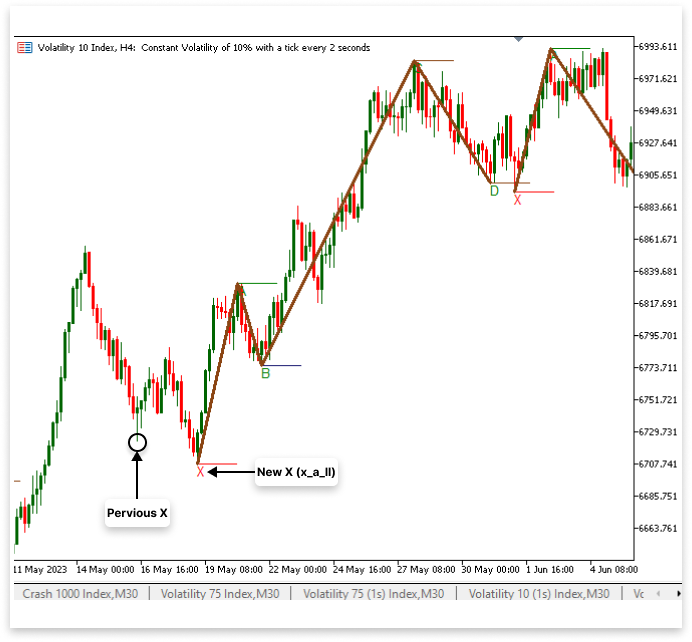
解释:
X 点是谐波形态交易中发现可能反转模式的初始参考点。在看涨形态中,它表示价格将大幅下跌;在看跌形态中,它表示价格将大幅上涨。因为它为测量斐波那契回撤和延伸奠定了基础 —— 这有助于确认谐波形态 —— 所以这一点至关重要。该代码的目的是识别 X,记录其时间和价格,并在图表上直观地显示出来。为了创建整个形态结构,它还将 X 连接到其他波动点(A、B、C 和 D)。
利用一些重要的变量来存储有关 X 的数据。变量 x_a_bars 记录 X 和 A 之间的柱形数量,这有助于确定形态之间的相对距离。为了精确定位 X 出现的柱形,变量 x_lowest_index 维护着该范围内最低价格的数组索引。最低价格对应的时间戳保存在 x_a_ll_t 中,而价格本身则赋值给 x_a_ll。
使用 Bars() 函数查找 X 和 A 之间的柱形数量是确定 X 的第一步。该函数提供分析所需的范围,它会计算这两个波动点之间的柱形数量。该程序利用 ArrayMinimum() 函数搜索指定的柱形,并在确定范围后返回最低价格的索引。然后,分别使用 low[x_lowest_index] 和 time[x_lowest_index] 数组,得到 X 的实际价格和时间。
一旦确定了 X,脚本就会使用 MetaTrader 的对象在图表上清晰地显示它。为了确保您能够快速识别这一关键时刻,ObjectCreate() 用于在 X 波动最低点生成文本标签 (X_letter)。为了清晰起见,文本标签设置为“X”,其位置对应 X 点的时间和价格。为了充分突出显示低点,还使用 ObjectCreate() 在 X 点创建了一条趋势线 (X_line)。该线会延长预定数量的柱形(LookbackBars)。
该程序在确定 X 之后,创建趋势线将 X 与其他重要位置(A、B、C 和 D)联系起来。借助这些趋势线,您可以更清楚地看到谐波形态。ObjectCreate() 函数用于绘制第一条连接线,即连接 X 和 A 的 XA 线。这条线宽为 3 像素,颜色为棕色 (clrSaddleBrown),以确保可见性。其余的形态底部 —— 连接 A 到 B 的 AB 线;连接 B 到 C 的 BC 线;以及连接 C 到 D 的 CD 线 —— 也用类似的方式用额外的趋势线来表示。为了产生统一的视觉效果,每条线都保持相同的宽度和颜色特征。
2.2.利用 XA 的斐波那契回撤线验证点 B
本节我们将验证波动低点 B,看看它是否保持在 78.6% 水平之上,并跌破 XA 的 61.8% 回撤水平。因为它保证了 B 点符合必要的斐波那契比率,这有助于定义形态的结构,所以这个验证阶段在看涨形态交易中至关重要。如果 B 在这个范围内,则更有可能形成合格的谐波分布。否则,如果 B 值过高或过低,则该形态可能不真实,或者需要更多确认。
我们首先确定 XA 段的斐波那契回撤位,以进行此验证。斐波那契回撤线是发现价格走势可能反转的一种常用技术分析方法。
我们将使用 MQL5 中的图形工具,在图表描述中添加斐波那契回撤对象,并验证 B。斐波那契工具将使用 ObjectCreate() 函数绘制,其中 X 为起点,A 为终点。对象创建完成后,我们将对其进行修改,添加 MetaTrader 5 默认不支持的斐波那契水平。这样可以保证显示所有相关的回撤区域。
示例:
//Fibo
string XA_fibo; // Unique name for XA fibo
double lvl_61_8; // Level 61.8
double lvl_78_6; // Level 78.6
string fibo_618_786; // Unique name for the object that marks 61.8 and 78.6.
string fibo_78_6_txt; // Unique name for text "78.6" cause its not available by default
for(int m = l; m < rates_total - (LookbackBars / 2); m++)
  {
   if(IsSwingLow(low, m, LookbackBars / 2) && time[m] > C_time)
     {
      D = low[m]; // Price of the swing low (D).
      D_time = time[m]; // Time of the swing low (D).
      D_line = StringFormat("DLow%d", m); // Unique name for the trend line object.
      D_letter = StringFormat("D%d", m); // Unique name for the text label object.

      //D
      ObjectCreate(chart_id, D_letter, OBJ_TEXT, 0, D_time, D); // Create text object for D
      ObjectSetString(chart_id, D_letter, OBJPROP_TEXT, "D"); // Set the text to "D".
      ObjectSetInteger(chart_id,D_letter,OBJPROP_COLOR,clrGreen); // Set text color to green
      ObjectCreate(chart_id,D_line,OBJ_TREND,0,D_time,D,time[m+LookbackBars],D); // Create line to mark D
      ObjectSetInteger(chart_id,D_line,OBJPROP_COLOR,clrSaddleBrown); // Set line color to SaddleBrown

      //C
      c_d_bars = Bars(_Symbol,PERIOD_CURRENT,C_time, D_time);
      c_highest_index = ArrayMaximum(high,l, c_d_bars);

      c_d_hh = high[c_highest_index]; //C - D Highest High and time
      c_d_hh_t = time[c_highest_index];

      ObjectCreate(chart_id, C_letter, OBJ_TEXT, 0, c_d_hh_t, c_d_hh); // Create text object for C
      ObjectSetString(chart_id, C_letter, OBJPROP_TEXT, "C"); // Set the text to "C".
      ObjectSetInteger(chart_id,C_letter,OBJPROP_COLOR,clrGreen); // Set text color to green
      ObjectCreate(chart_id,C_line,OBJ_TREND,0,c_d_hh_t,C,time[c_highest_index+LookbackBars],c_d_hh); // Create line to mark C
      ObjectSetInteger(chart_id,C_line,OBJPROP_COLOR,clrSaddleBrown); // Set line color to SaddleBrown

      //B
      b_c_bars = Bars(_Symbol,PERIOD_CURRENT,B_time, c_d_hh_t);
      b_lowest_index = ArrayMinimum(low,k, b_c_bars);

      b_c_ll = low[b_lowest_index]; //B - C Lowest Low and time
      b_c_ll_t = time[b_lowest_index];

      ObjectCreate(chart_id, B_letter, OBJ_TEXT, 0, b_c_ll_t, b_c_ll); // Create text object for B
      ObjectSetString(chart_id, B_letter, OBJPROP_TEXT, "B"); // Set the text to "B".
      ObjectSetInteger(chart_id,B_letter,OBJPROP_COLOR,clrGreen); // Set text color to green
      ObjectCreate(chart_id,B_line,OBJ_TREND,0,b_c_ll_t,b_c_ll,time[b_lowest_index+LookbackBars],b_c_ll); // Create line to mark B
      ObjectSetInteger(chart_id,B_line,OBJPROP_COLOR,clrMidnightBlue); // Set line color to MidnightBlue

      //A
      a_b_bars = Bars(_Symbol,PERIOD_CURRENT,A_time, b_c_ll_t);
      a_highest_index = ArrayMaximum(high,j, a_b_bars);

      a_b_hh = high[a_highest_index]; //A - B Highest High and time
      a_b_hh_t = time[a_highest_index];

      ObjectCreate(chart_id, A_letter, OBJ_TEXT, 0, a_b_hh_t, a_b_hh); // Create text object for A
      ObjectSetString(chart_id, A_letter, OBJPROP_TEXT, "A"); // Set the text to "A".
      ObjectSetInteger(chart_id,A_letter,OBJPROP_COLOR,clrGreen); // Set text color to green
      ObjectCreate(chart_id,A_line,OBJ_TREND,0,a_b_hh_t,a_b_hh,time[a_highest_index+LookbackBars],a_b_hh); // Create line to mark A
      ObjectSetInteger(chart_id,A_line,OBJPROP_COLOR,clrGreen); // Set line color to green

      //X
      x_a_bars = Bars(_Symbol,PERIOD_CURRENT,X_time, a_b_hh_t);
      x_lowest_index = ArrayMinimum(low,i, x_a_bars);

      x_a_ll = low[x_lowest_index]; //X - A Lowest Low and time
      x_a_ll_t = time[x_lowest_index];

      ObjectCreate(chart_id, X_letter, OBJ_TEXT, 0, x_a_ll_t, x_a_ll); // Create text object for X
      ObjectSetString(chart_id, X_letter, OBJPROP_TEXT, "X"); // Set the text to "X".
      ObjectCreate(chart_id,X_line,OBJ_TREND,0,x_a_ll_t,x_a_ll,time[x_lowest_index+LookbackBars],x_a_ll); // Create line to mark X

      XA_line = StringFormat("XA Line%d", m); // Unique name for the XA line.
      ObjectCreate(chart_id,XA_line,OBJ_TREND,0,x_a_ll_t,x_a_ll,a_b_hh_t,a_b_hh); // Create line to connect XA
      ObjectSetInteger(chart_id,XA_line,OBJPROP_COLOR,clrSaddleBrown); // Set line color to SaddleBrown
      ObjectSetInteger(chart_id,XA_line,OBJPROP_WIDTH,3); // Line width

      AB_line = StringFormat("AB Line%d", m); // Unique name for the AB line.
      ObjectCreate(chart_id,AB_line,OBJ_TREND,0,a_b_hh_t,a_b_hh,b_c_ll_t,b_c_ll); // Create line to connect AB
      ObjectSetInteger(chart_id,AB_line,OBJPROP_COLOR,clrSaddleBrown); // Set line color to SaddleBrown
      ObjectSetInteger(chart_id,AB_line,OBJPROP_WIDTH,3); // Line width

      BC_line = StringFormat("BC Line%d", m); // Unique name for the BC line.
      ObjectCreate(chart_id,BC_line,OBJ_TREND,0,b_c_ll_t,b_c_ll,c_d_hh_t,c_d_hh); // Create line to connect BC
      ObjectSetInteger(chart_id,BC_line,OBJPROP_COLOR,clrSaddleBrown); // Set line color to SaddleBrown
      ObjectSetInteger(chart_id,BC_line,OBJPROP_WIDTH,3); // Line width

      CD_line = StringFormat("CD Line%d", m); // Unique name for the CD line.
      ObjectCreate(chart_id,CD_line,OBJ_TREND,0,c_d_hh_t,c_d_hh,D_time,D); // Create line to connect CD
      ObjectSetInteger(chart_id,CD_line,OBJPROP_COLOR,clrSaddleBrown); // Set line color to SaddleBrown
      ObjectSetInteger(chart_id,CD_line,OBJPROP_WIDTH,3); // Line width

      lvl_61_8 = a_b_hh - ((61.8/100) * (a_b_hh - x_a_ll)); // Calculating level 61.8
      lvl_78_6 = a_b_hh - ((78.6/100) * (a_b_hh - x_a_ll)); // Calculating level 78.6

      //XA FIBO
      XA_fibo = StringFormat("XA FIB0 %d", i);
      ObjectCreate(chart_id,XA_fibo,OBJ_FIBO,0,x_a_ll_t,x_a_ll,a_b_hh_t,a_b_hh); // Create XA fibo
      ObjectSetInteger(chart_id,XA_fibo,OBJPROP_LEVELS,6); // Number of default levels
      for(int i = 1; i <= 6; i++)
        {

         ObjectSetInteger(chart_id,XA_fibo,OBJPROP_LEVELCOLOR,i,clrSaddleBrown); // Set each level color to SaddleBrown

        }

      fibo_618_786 = StringFormat("Fibo 78.6 - 61.8 %d", i);
      fibo_78_6_txt = StringFormat("Fibo 78.6 Text %d", i);

      ObjectCreate(chart_id,fibo_618_786,OBJ_RECTANGLE,0,x_a_ll_t, lvl_61_8,b_c_ll_t,lvl_78_6); // Create rectangle object marking 61.8 and 78.6
      ObjectSetInteger(chart_id,fibo_618_786,OBJPROP_COLOR,clrSaddleBrown); // Set color to clrSaddleBrown

      ObjectCreate(chart_id,fibo_78_6_txt,OBJ_TEXT,0,b_c_ll_t,lvl_78_6); // Create text for level 78.6
      ObjectSetString(chart_id,fibo_78_6_txt,OBJPROP_TEXT,"78.6"); // Text to be displayed
      ObjectSetInteger(chart_id,fibo_78_6_txt,OBJPROP_COLOR,clrSaddleBrown); // Set text color
      ObjectSetInteger(chart_id,fibo_78_6_txt,OBJPROP_FONTSIZE,8); // Set text size

      if(overlap == false)
        {
         i = m;
        }
      if(overlap == true)
        {
         i = i;
        }
      break;

     }
  }
输出:
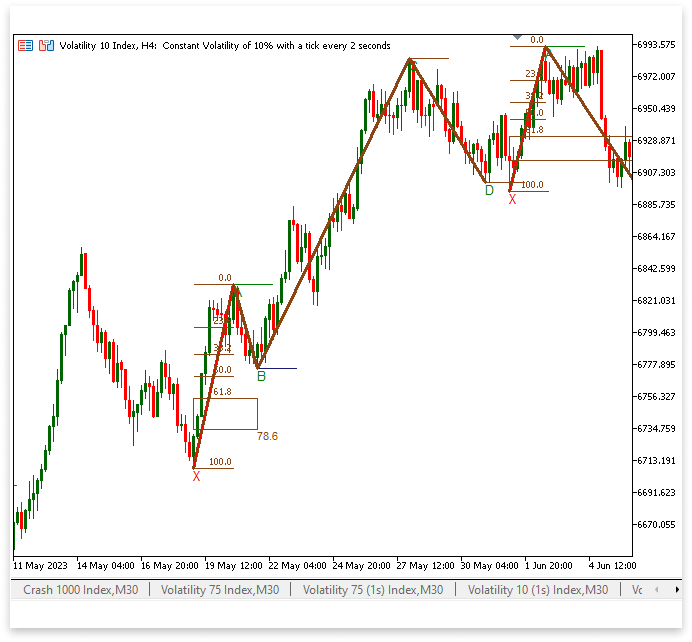
解释:
为了确认 B 点位于给定的范围内,我们对本节中的 XA 段应用斐波那契回撤。在技术分析中,斐波那契回撤线经常被用来确定可能的反转区域。验证点 B 是否与 XA 的预期回撤相对应至关重要。具体来说,B 的理想位置应该在 XA 的 61.8% 至 78.6% 回撤位范围内。如果我们构建一个斐波那契回撤对象并在图表上突出显示该区域,那么确定 B 点是否在可接受的范围内就会更容易。我们首先要确定几个重要的变量来实现这一目标。为了确保每个斐波那契数列图形都能被正确识别,变量 XA_fibo 为斐波那契数列回撤对象保存了一个唯一的名称。
在确定水平之后,使用 ObjectCreate() 函数创建 XA 上的斐波那契回撤对象。您可以通过观察这个从 X 点(低点)到 A 点(高点)的对象来了解价格如何与斐波那契水平相互作用。我们将斐波那契数列的水平数量设置为 6,并将其颜色更改为马鞍棕色,以提高可视化的清晰度,并确保每个水平都易于观察,并与其他图表元素区分开来。
我们进一步突出显示 61.8% 至 78.6% 的回撤区域,方法是绘制一个矩形对象来吸引人们的注意,因为这是一个重要的区域。很容易确定点 B 是否在预期范围内,因为矩形跨越了 61.8% 和 78.6% 的水平。这样可以快速验证形态,而无需进行费力的回撤水平检查。此外,矩形的颜色为鞍棕色,使图表的视觉概念保持一致。
我们还添加了 78.6% 回撤位的文本标签,这是另一个重大变化。我们手动生成一个文本对象,在相关的价格水平上显示“78.6”,因为 MetaTrader 5 的斐波那契工具默认情况下不包含此水平。这提高了识别谐波形态的精确度,保证了交易者可以观察到 78.6% 回撤位的精确位置。通过实施这些更改,我们可以更轻松地验证 B 点在谐波形态中是否合格。斐波那契回撤对象、标记的 61.8% – 78.6% 区域和额外的文本标签确保了验证谐波形态的精确且直观的技术。
现在我们已经拥有了所需的一切,我们必须确保只有在满足有效形态的要求时才绘制所有图表对象。具体来说,D 点必须低于 X 点,B 点必须位于 XA 的 61.8% 至 78.6% 回撤位内。如果这些要求不满足,则不应向图表中添加任何对象。
示例:
for(int m = l; m < rates_total - (LookbackBars / 2); m++)
  {
   if(IsSwingLow(low, m, LookbackBars / 2) && time[m] > C_time)
     {
      D = low[m]; // Price of the swing low (D).
      D_time = time[m]; // Time of the swing low (D).
      D_line = StringFormat("DLow%d", m); // Unique name for the trend line object.
      D_letter = StringFormat("D%d", m); // Unique name for the text label object.

      //C
      c_d_bars = Bars(_Symbol,PERIOD_CURRENT,C_time, D_time);
      c_highest_index = ArrayMaximum(high,l, c_d_bars);

      c_d_hh = high[c_highest_index]; //C - D Highest High and time
      c_d_hh_t = time[c_highest_index];

      //B
      b_c_bars = Bars(_Symbol,PERIOD_CURRENT,B_time, c_d_hh_t);
      b_lowest_index = ArrayMinimum(low,k, b_c_bars);

      b_c_ll = low[b_lowest_index]; //B - C Lowest Low and time
      b_c_ll_t = time[b_lowest_index];

      //A
      a_b_bars = Bars(_Symbol,PERIOD_CURRENT,A_time, b_c_ll_t);
      a_highest_index = ArrayMaximum(high,j, a_b_bars);

      a_b_hh = high[a_highest_index]; //A - B Highest High and time
      a_b_hh_t = time[a_highest_index];

      //X
      x_a_bars = Bars(_Symbol,PERIOD_CURRENT,X_time, a_b_hh_t);
      x_lowest_index = ArrayMinimum(low,i, x_a_bars);

      x_a_ll = low[x_lowest_index]; //X - A Lowest Low and time
      x_a_ll_t = time[x_lowest_index];

      lvl_61_8 = a_b_hh - ((61.8/100) * (a_b_hh - x_a_ll)); // Calculating level 61.8
      lvl_78_6 = a_b_hh - ((78.6/100) * (a_b_hh - x_a_ll)); // Calculating level 78.6

      if((b_c_ll <= lvl_61_8 && b_c_ll >= lvl_78_6) && (D < x_a_ll))
        {

         //D
         ObjectCreate(chart_id, D_letter, OBJ_TEXT, 0, D_time, D); // Create text object for D
         ObjectSetString(chart_id, D_letter, OBJPROP_TEXT, "D"); // Set the text to "D".
         ObjectSetInteger(chart_id,D_letter,OBJPROP_COLOR,clrGreen); // Set text color to green
         ObjectCreate(chart_id,D_line,OBJ_TREND,0,D_time,D,time[m+LookbackBars],D); // Create line to mark D
         ObjectSetInteger(chart_id,D_line,OBJPROP_COLOR,clrSaddleBrown); // Set line color to SaddleBrown

         //C
         ObjectCreate(chart_id, C_letter, OBJ_TEXT, 0, c_d_hh_t, c_d_hh); // Create text object for C
         ObjectSetString(chart_id, C_letter, OBJPROP_TEXT, "C"); // Set the text to "C".
         ObjectSetInteger(chart_id,C_letter,OBJPROP_COLOR,clrGreen); // Set text color to green
         ObjectCreate(chart_id,C_line,OBJ_TREND,0,c_d_hh_t,C,time[c_highest_index+LookbackBars],c_d_hh); // Create line to mark C
         ObjectSetInteger(chart_id,C_line,OBJPROP_COLOR,clrSaddleBrown); // Set line color to SaddleBrown

         //B
         ObjectCreate(chart_id, B_letter, OBJ_TEXT, 0, b_c_ll_t, b_c_ll); // Create text object for B
         ObjectSetString(chart_id, B_letter, OBJPROP_TEXT, "B"); // Set the text to "B".
         ObjectSetInteger(chart_id,B_letter,OBJPROP_COLOR,clrGreen); // Set text color to green
         ObjectCreate(chart_id,B_line,OBJ_TREND,0,b_c_ll_t,b_c_ll,time[b_lowest_index+LookbackBars],b_c_ll); // Create line to mark B
         ObjectSetInteger(chart_id,B_line,OBJPROP_COLOR,clrMidnightBlue); // Set line color to MidnightBlue

         //A
         ObjectCreate(chart_id, A_letter, OBJ_TEXT, 0, a_b_hh_t, a_b_hh); // Create text object for A
         ObjectSetString(chart_id, A_letter, OBJPROP_TEXT, "A"); // Set the text to "A".
         ObjectSetInteger(chart_id,A_letter,OBJPROP_COLOR,clrGreen); // Set text color to green
         ObjectCreate(chart_id,A_line,OBJ_TREND,0,a_b_hh_t,a_b_hh,time[a_highest_index+LookbackBars],a_b_hh); // Create line to mark A
         ObjectSetInteger(chart_id,A_line,OBJPROP_COLOR,clrGreen); // Set line color to green

         //X
         ObjectCreate(chart_id, X_letter, OBJ_TEXT, 0, x_a_ll_t, x_a_ll); // Create text object for X
         ObjectSetString(chart_id, X_letter, OBJPROP_TEXT, "X"); // Set the text to "X".
         ObjectCreate(chart_id,X_line,OBJ_TREND,0,x_a_ll_t,x_a_ll,time[x_lowest_index+LookbackBars],x_a_ll); // Create line to mark X

         XA_line = StringFormat("XA Line%d", m); // Unique name for the XA line.
         ObjectCreate(chart_id,XA_line,OBJ_TREND,0,x_a_ll_t,x_a_ll,a_b_hh_t,a_b_hh); // Create line to connect XA
         ObjectSetInteger(chart_id,XA_line,OBJPROP_COLOR,clrSaddleBrown); // Set line color to SaddleBrown
         ObjectSetInteger(chart_id,XA_line,OBJPROP_WIDTH,3); // Line width

         AB_line = StringFormat("AB Line%d", m); // Unique name for the AB line.
         ObjectCreate(chart_id,AB_line,OBJ_TREND,0,a_b_hh_t,a_b_hh,b_c_ll_t,b_c_ll); // Create line to connect AB
         ObjectSetInteger(chart_id,AB_line,OBJPROP_COLOR,clrSaddleBrown); // Set line color to SaddleBrown
         ObjectSetInteger(chart_id,AB_line,OBJPROP_WIDTH,3); // Line width

         BC_line = StringFormat("BC Line%d", m); // Unique name for the BC line.
         ObjectCreate(chart_id,BC_line,OBJ_TREND,0,b_c_ll_t,b_c_ll,c_d_hh_t,c_d_hh); // Create line to connect BC
         ObjectSetInteger(chart_id,BC_line,OBJPROP_COLOR,clrSaddleBrown); // Set line color to SaddleBrown
         ObjectSetInteger(chart_id,BC_line,OBJPROP_WIDTH,3); // Line width

         CD_line = StringFormat("CD Line%d", m); // Unique name for the CD line.
         ObjectCreate(chart_id,CD_line,OBJ_TREND,0,c_d_hh_t,c_d_hh,D_time,D); // Create line to connect CD
         ObjectSetInteger(chart_id,CD_line,OBJPROP_COLOR,clrSaddleBrown); // Set line color to SaddleBrown
         ObjectSetInteger(chart_id,CD_line,OBJPROP_WIDTH,3); // Line width

         //XA FIBO
         XA_fibo = StringFormat("XA FIB0 %d", i);
         ObjectCreate(chart_id,XA_fibo,OBJ_FIBO,0,x_a_ll_t,x_a_ll,a_b_hh_t,a_b_hh); // Create XA fibo
         ObjectSetInteger(chart_id,XA_fibo,OBJPROP_LEVELS,6); // Number of default levels
         for(int i = 1; i <= 6; i++)
           {
            ObjectSetInteger(chart_id,XA_fibo,OBJPROP_LEVELCOLOR,i,clrSaddleBrown); // Set each level color to SaddleBrown
           }

         fibo_618_786 = StringFormat("Fibo 78.6 - 61.8 %d", i);
         fibo_78_6_txt = StringFormat("Fibo 78.6 Text %d", i);

         ObjectCreate(chart_id,fibo_618_786,OBJ_RECTANGLE,0,x_a_ll_t, lvl_61_8,b_c_ll_t,lvl_78_6); // Create rectangle object marking 61.8 and 78.6
         ObjectSetInteger(chart_id,fibo_618_786,OBJPROP_COLOR,clrSaddleBrown); // Set color to clrSaddleBrown

         ObjectCreate(chart_id,fibo_78_6_txt,OBJ_TEXT,0,b_c_ll_t,lvl_78_6); // Create text for level 78.6
         ObjectSetString(chart_id,fibo_78_6_txt,OBJPROP_TEXT,"78.6"); // Text to be displayed
         ObjectSetInteger(chart_id,fibo_78_6_txt,OBJPROP_COLOR,clrSaddleBrown); // Set text color
         ObjectSetInteger(chart_id,fibo_78_6_txt,OBJPROP_FONTSIZE,8); // Set text size

        }

      if(overlap == false)
        {
         i = m;
        }
      if(overlap == true)
        {
         i = i;
        }
      break;
     }
  }
输出:
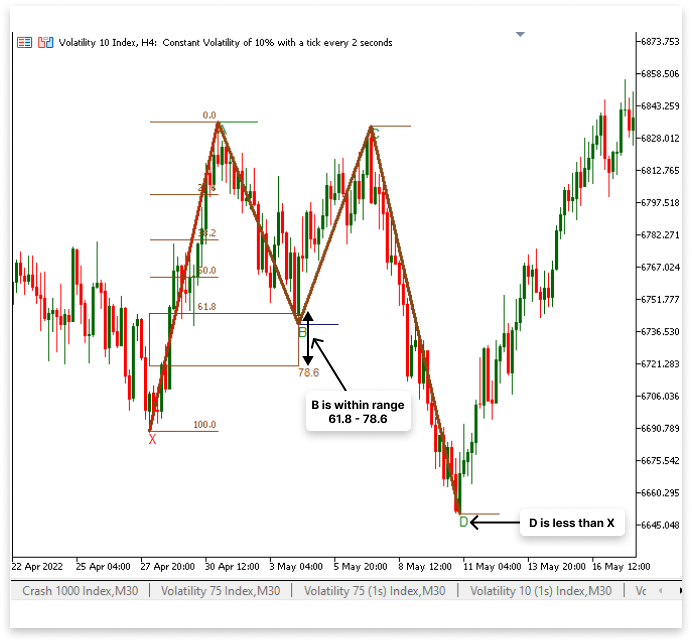
解释:
通过评估为 true,条件 if ((b_c_ll <= lvl_61_8 && b_c_ll >= lvl_78_6) && (D < x_a_ll)) 保证只有在找到合适的谐波x形态时才会绘制所有图表对象。这样可以防止无关项目因错误形态而使图表过于拥挤。当满足要求时,脚本会创建并显示所有必需的组件,例如斐波那契回撤位、连接 X、A、B、C 和 D 的趋势线以及标识每个重要点的文本标签。通过确保指标只显示正确形成的形态,该方法提高了准确性,并保持了清晰、信息丰富的图表显示。
2.3.可视化 XAB 和 BCD 三角形
为了更好地可视化谐波形态,我们将在本节中用三角形标记 XAB 和 BCD 形式。作为视觉辅助,这些三角形将使识别和检查图表上的形态结构变得更容易。
这将通过使用 OBJ_TRIANGLE 对象连接第一个三角形的 X、A 和 B 点以及第二个三角形的 B、C 和 D 点来实现。BCD 三角形将描绘出该形态的最后一段,加强通往 D 点(可能的反转区)的结构,而 XAB 三角形将强调第一段,确认 X、A 和 B 之间的关系。
示例:
string X_A_B;
string B_C_D;
if((b_c_ll <= lvl_61_8 && b_c_ll >= lvl_78_6) && (D < x_a_ll))
  {

//D
   ObjectCreate(chart_id, D_letter, OBJ_TEXT, 0, D_time, D); // Create text object for D
   ObjectSetString(chart_id, D_letter, OBJPROP_TEXT, "D"); // Set the text to "D".
   ObjectSetInteger(chart_id,D_letter,OBJPROP_COLOR,clrGreen); // Set text color to green
   ObjectCreate(chart_id,D_line,OBJ_TREND,0,D_time,D,time[m+LookbackBars],D); // Create line to mark D
   ObjectSetInteger(chart_id,D_line,OBJPROP_COLOR,clrSaddleBrown); // Set line color to SaddleBrown

//C
   ObjectCreate(chart_id, C_letter, OBJ_TEXT, 0, c_d_hh_t, c_d_hh); // Create text object for C
   ObjectSetString(chart_id, C_letter, OBJPROP_TEXT, "C"); // Set the text to "C".
   ObjectSetInteger(chart_id,C_letter,OBJPROP_COLOR,clrGreen); // Set text color to green
   ObjectCreate(chart_id,C_line,OBJ_TREND,0,c_d_hh_t,C,time[c_highest_index+LookbackBars],c_d_hh); // Create line to mark C
   ObjectSetInteger(chart_id,C_line,OBJPROP_COLOR,clrSaddleBrown); // Set line color to SaddleBrown

//B
   ObjectCreate(chart_id, B_letter, OBJ_TEXT, 0, b_c_ll_t, b_c_ll); // Create text object for B
   ObjectSetString(chart_id, B_letter, OBJPROP_TEXT, "B"); // Set the text to "B".
   ObjectSetInteger(chart_id,B_letter,OBJPROP_COLOR,clrGreen); // Set text color to green
   ObjectCreate(chart_id,B_line,OBJ_TREND,0,b_c_ll_t,b_c_ll,time[b_lowest_index+LookbackBars],b_c_ll); // Create line to mark B
   ObjectSetInteger(chart_id,B_line,OBJPROP_COLOR,clrMidnightBlue); // Set line color to MidnightBlue

//A
   ObjectCreate(chart_id, A_letter, OBJ_TEXT, 0, a_b_hh_t, a_b_hh); // Create text object for A
   ObjectSetString(chart_id, A_letter, OBJPROP_TEXT, "A"); // Set the text to "A".
   ObjectSetInteger(chart_id,A_letter,OBJPROP_COLOR,clrGreen); // Set text color to green
   ObjectCreate(chart_id,A_line,OBJ_TREND,0,a_b_hh_t,a_b_hh,time[a_highest_index+LookbackBars],a_b_hh); // Create line to mark A
   ObjectSetInteger(chart_id,A_line,OBJPROP_COLOR,clrGreen); // Set line color to green

//X
   ObjectCreate(chart_id, X_letter, OBJ_TEXT, 0, x_a_ll_t, x_a_ll); // Create text object for X
   ObjectSetString(chart_id, X_letter, OBJPROP_TEXT, "X"); // Set the text to "X".
   ObjectCreate(chart_id,X_line,OBJ_TREND,0,x_a_ll_t,x_a_ll,time[x_lowest_index+LookbackBars],x_a_ll); // Create line to mark X

   XA_line = StringFormat("XA Line%d", m); // Unique name for the XA line.
   ObjectCreate(chart_id,XA_line,OBJ_TREND,0,x_a_ll_t,x_a_ll,a_b_hh_t,a_b_hh); // Create line to connect XA
   ObjectSetInteger(chart_id,XA_line,OBJPROP_COLOR,clrSaddleBrown); // Set line color to SaddleBrown
   ObjectSetInteger(chart_id,XA_line,OBJPROP_WIDTH,3); // Line width

   AB_line = StringFormat("AB Line%d", m); // Unique name for the AB line.
   ObjectCreate(chart_id,AB_line,OBJ_TREND,0,a_b_hh_t,a_b_hh,b_c_ll_t,b_c_ll); // Create line to connect AB
   ObjectSetInteger(chart_id,AB_line,OBJPROP_COLOR,clrSaddleBrown); // Set line color to SaddleBrown
   ObjectSetInteger(chart_id,AB_line,OBJPROP_WIDTH,3); // Line width

   BC_line = StringFormat("BC Line%d", m); // Unique name for the BC line.
   ObjectCreate(chart_id,BC_line,OBJ_TREND,0,b_c_ll_t,b_c_ll,c_d_hh_t,c_d_hh); // Create line to connect BC
   ObjectSetInteger(chart_id,BC_line,OBJPROP_COLOR,clrSaddleBrown); // Set line color to SaddleBrown
   ObjectSetInteger(chart_id,BC_line,OBJPROP_WIDTH,3); // Line width

   CD_line = StringFormat("CD Line%d", m); // Unique name for the CD line.
   ObjectCreate(chart_id,CD_line,OBJ_TREND,0,c_d_hh_t,c_d_hh,D_time,D); // Create line to connect CD
   ObjectSetInteger(chart_id,CD_line,OBJPROP_COLOR,clrSaddleBrown); // Set line color to SaddleBrown
   ObjectSetInteger(chart_id,CD_line,OBJPROP_WIDTH,3); // Line width

//XA FIBO
   XA_fibo = StringFormat("XA FIB0 %d", i);
   ObjectCreate(chart_id,XA_fibo,OBJ_FIBO,0,x_a_ll_t,x_a_ll,a_b_hh_t,a_b_hh); // Create XA fibo
   ObjectSetInteger(chart_id,XA_fibo,OBJPROP_LEVELS,6); // Number of default levels
   for(int i = 1; i <= 6; i++)
     {
      ObjectSetInteger(chart_id,XA_fibo,OBJPROP_LEVELCOLOR,i,clrSaddleBrown); // Set each level color to SaddleBrown
     }

   fibo_618_786 = StringFormat("Fibo 78.6 - 61.8 %d", i);
   fibo_78_6_txt = StringFormat("Fibo 78.6 Text %d", i);

   ObjectCreate(chart_id,fibo_618_786,OBJ_RECTANGLE,0,x_a_ll_t, lvl_61_8,b_c_ll_t,lvl_78_6); // Create rectangle object marking 61.8 and 78.6
   ObjectSetInteger(chart_id,fibo_618_786,OBJPROP_COLOR,clrSaddleBrown); // Set color to clrSaddleBrown

   ObjectCreate(chart_id,fibo_78_6_txt,OBJ_TEXT,0,b_c_ll_t,lvl_78_6); // Create text for level 78.6
   ObjectSetString(chart_id,fibo_78_6_txt,OBJPROP_TEXT,"78.6"); // Text to be displayed
   ObjectSetInteger(chart_id,fibo_78_6_txt,OBJPROP_COLOR,clrSaddleBrown); // Set text color
   ObjectSetInteger(chart_id,fibo_78_6_txt,OBJPROP_FONTSIZE,8); // Set text size

   X_A_B = StringFormat("XAB %d", i);
   ObjectCreate(chart_id,X_A_B,OBJ_TRIANGLE,0,x_a_ll_t,x_a_ll, a_b_hh_t, a_b_hh, b_c_ll_t, b_c_ll);
   ObjectSetInteger(chart_id,X_A_B,OBJPROP_COLOR,clrCornflowerBlue);
   ObjectSetInteger(chart_id,X_A_B,OBJPROP_FILL,true);

   B_C_D = StringFormat("BCD %d", i);
   ObjectCreate(chart_id,B_C_D,OBJ_TRIANGLE,0,b_c_ll_t,b_c_ll, c_d_hh_t, c_d_hh, D_time, D);
   ObjectSetInteger(chart_id,B_C_D,OBJPROP_COLOR,clrCornflowerBlue);
   ObjectSetInteger(chart_id,B_C_D,OBJPROP_FILL,true);
  }
输出:
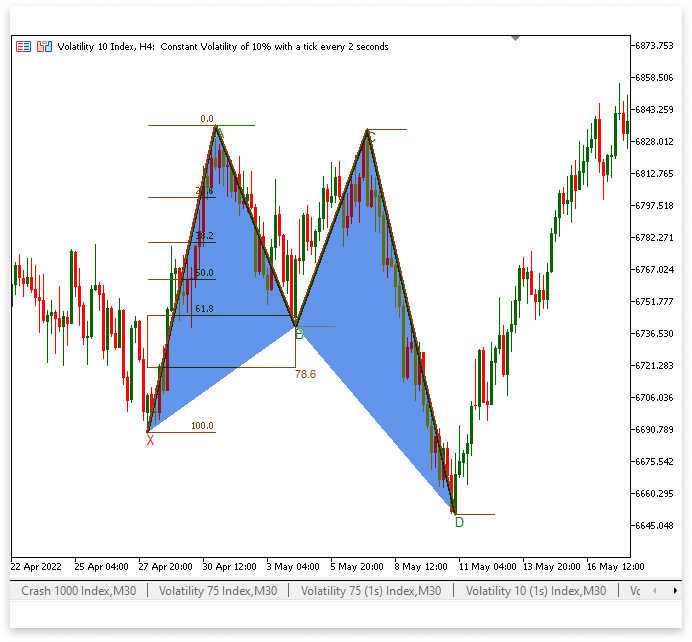
解释:
构成谐波形态的 XAB 和 BCD 段的三角形的唯一名称分别存储在 X_A_B 和 B_C_D 变量中。使用三个点 X、A 和 B 生成 X_A_B 三角形。这些点由各自的时间戳和价格值标识(x_a_ll_t、x_a_ll、a_b_hh_t、a_b_hh、b_c_ll_t、b_c_ll)。B_C_D 三角形使用 (b_c_ll_t, b_c_ll, c_d_hh_t, c_d_hh, D_time, D),同样地连接了 B、C 和 D。StringFormat() 用于为每个三角形赋予一个唯一的名称,从而可以绘制各种形态而不会出现命名问题。
ObjectSetInteger() 用于设置使用 ObjectCreate() 生成三角形后的三角形的视觉特征。OBJPROP_FILL 属性设置为 true,保证三角形填充而不是勾勒轮廓,并且两个三角形的颜色均为矢车菊蓝 (clrCornflowerBlue)。这些视觉元素通过增强清晰度,使验证可能的交易机会变得更加容易,从而帮助交易者快速识别形态结构。
2.4.标示入场点、止损点和止盈点
在本节中,我们将设置入场点、止损点(SL)和止盈点(TP),以确定已发现谐波形态的重要交易水平。D 点,即该形态的最低波动低点,是设置止损的位置。由于谐波形态预测价格反转,将止损位设在 D 可以最大限度地减少可能的损失,因为如果市场攀升到该水平以上,则保证该形态无效。
点 D 的索引加上 LookbackBars 的一半就是入场点。这样一来,在识别出 D 之后就存在一个较小的滞后,从而可以在进行交易之前确认价格走势。由于 C 点是预期上涨行情之前的波动高点,因此它可作为止盈点。图表上用标签和水平线标出止损位、入场位和止盈位,以表示这些价位。这些项目通过帮助交易者快速识别交易设置,确保基于形态进行交易时的清晰度。
示例:
//Signal
string buy_txt;
string sell_txt;
string entry_line;
string tp_line;
string sl_line;
string tp_txt;
string sl_txt;
buy_txt = StringFormat("Buy %d", i);

ObjectCreate(chart_id,buy_txt,OBJ_TEXT,0,time[m + (LookbackBars / 2)],open[m  + (LookbackBars / 2)]);
ObjectSetString(chart_id,buy_txt,OBJPROP_TEXT,"BUY");
ObjectSetInteger(chart_id,buy_txt,OBJPROP_COLOR,clrCornflowerBlue);
ObjectSetInteger(chart_id,buy_txt,OBJPROP_FONTSIZE,10);

entry_line = StringFormat("Buy Entry Line %d", i);
ObjectCreate(chart_id,entry_line,OBJ_TREND,0,time[m  + (LookbackBars / 2)],open[m  + (LookbackBars / 2)], c_d_hh_t,open[m  + (LookbackBars / 2)]);
ObjectSetInteger(chart_id,entry_line,OBJPROP_WIDTH,3);
ObjectSetInteger(chart_id,entry_line,OBJPROP_COLOR,clrCornflowerBlue);

sl_txt = StringFormat("Buy SL %d", i);
ObjectCreate(chart_id,sl_txt,OBJ_TEXT,0,time[m + (LookbackBars / 2)],D);
ObjectSetString(chart_id,sl_txt,OBJPROP_TEXT,"SL");
ObjectSetInteger(chart_id,sl_txt,OBJPROP_COLOR,clrCornflowerBlue);
ObjectSetInteger(chart_id,sl_txt,OBJPROP_FONTSIZE,10);

sl_line = StringFormat("Buy SL Line %d", i);
ObjectCreate(chart_id,sl_line,OBJ_TREND,0,time[m + (LookbackBars / 2)],D,c_d_hh_t,D);
ObjectSetInteger(chart_id,sl_line,OBJPROP_WIDTH,3);
ObjectSetInteger(chart_id,sl_line,OBJPROP_COLOR,clrCornflowerBlue);

tp_txt = StringFormat("Buy TP %d", i);
ObjectCreate(chart_id,tp_txt,OBJ_TEXT,0,time[m +(LookbackBars / 2)],c_d_hh);
ObjectSetString(chart_id,tp_txt,OBJPROP_TEXT,"TP");
ObjectSetInteger(chart_id,tp_txt,OBJPROP_COLOR,clrCornflowerBlue);
ObjectSetInteger(chart_id,tp_txt,OBJPROP_FONTSIZE,10);

tp_line = StringFormat("Buy TP Line %d", i);
ObjectCreate(chart_id,tp_line,OBJ_TREND,0,time[m + (LookbackBars / 2)],c_d_hh,c_d_hh_t,c_d_hh);
ObjectSetInteger(chart_id,tp_line,OBJPROP_WIDTH,3);
ObjectSetInteger(chart_id,tp_line,OBJPROP_COLOR,clrCornflowerBlue);
输出:
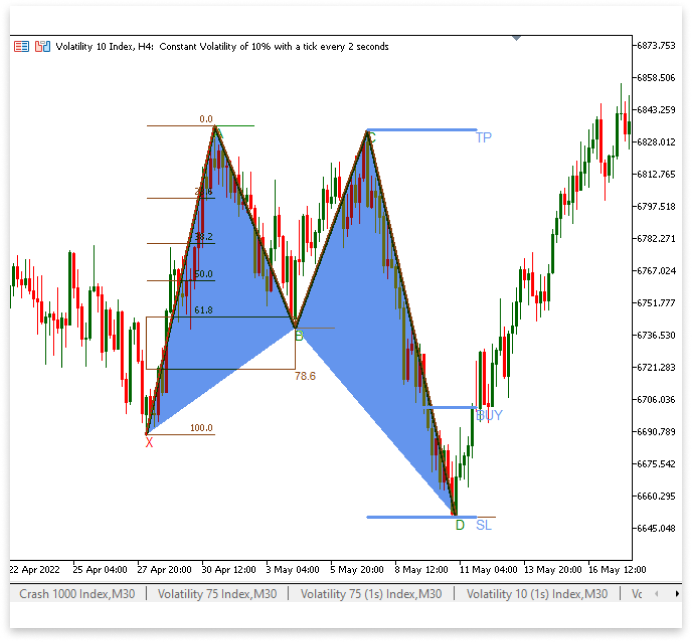
解释:
本节将定义谐波形态的买入信号、入场点、止损 (SL) 和止盈 (TP) 水平,并在图表上创建为可视对象。为了确保图表上的项目能够方便地维护和识别,变量 buy_txt、sell_txt、entry_line、tp_line、sl_line、tp_txt 和 sl_txt 存储了相应对象的唯一名称。在入场点,buy_txt 对象是一个文本标签,内容为 “BUY”,表示交易方向。通过 entry_line(一条水平趋势线,指示了位于 open[m + (LookbackBars / 2)] 处的入场价格)可以清晰地可视化交易设置。
同样,止损标签及其相关的趋势线分别用 sl_txt 和 sl_line 表示,并且都位于 D 点,即该形态的最低波动低点。止损点确保当价格上涨超过此阈值时,交易结束。位于前一个波动高点 c_d_hh 的 tp_txt 和 tp_line 指示止盈水平。这些图形元素被设置为独特的颜色(矢车菊蓝),以便您可以快速识别图表上的重要交易水平。这些组成部分支持基于谐波形态的有序、透明的交易策略的制定。
3.构建看跌谐波形态
本部分将沿用之前识别看涨谐波形态的逻辑,并将其修改为识别看跌形态的逻辑。无需过分强调每个特征,因为这正是看涨形态的反面。现在,高点用 X 表示,低点用 A 表示,高点用 B 表示,低点用 C 表示,最终高点用 D 表示。这就是主要区别。这保证了该形态准确地描绘了看跌情景,表明可能存在卖出时机。
B 点仍将使用斐波那契回撤位进行验证,以确保其相对于 XA 段处于适当的范围内。与此类似,该形态将由趋势线、三角形和其他图表元素勾勒出来,但它们的位置将被修改以符合看跌结构。入场点位设在 D 点加上一半的回溯柱形位置,止盈点位设在 C 点,止损点位设在 D 点。同样的逻辑也适用于此,因为这实际上是看涨形态的反向形态;因此我们不再赘述。
示例:
int x_highest_index;   // Stores the index of the highest price point (X) in the pattern
double x_a_hh;         // Holds the price value of the swing high at point X
datetime x_a_hh_t;     // Stores the timestamp of when the swing high at X occurred

int a_lowest_index;   // Stores the index of the lowest price point (A) in the pattern
double a_b_ll;        // Holds the price value of the swing low at point A
datetime a_b_ll_t;    // Stores the timestamp of when the swing low at A occurred

int b_highest_index;   // Stores the index of the highest price point (B) in the pattern
double b_c_hh;         // Holds the price value of the swing high at point B
datetime b_c_hh_t;     // Stores the timestamp of when the swing high at B occurred
int c_lowest_index;   // Stores the index of the lowest price point (C) in the pattern
double c_d_ll;        // Holds the price value of the swing low at point C
datetime c_d_ll_t;    // Stores the timestamp of when the swing low at C occurred
if(rates_total >= bars_check) { for(int i = rates_total - bars_check; i < rates_total - LookbackBars; i++) { if(IsSwingHigh(high, i, LookbackBars)) { X = high[i]; // Assign the highest price at index 'i' to X X_time = time[i]; // Assign the corresponding time value to X_time X_line = StringFormat("XHigh%d", i); // Create a unique string identifier for the X-high trendline X_letter = StringFormat("XB%d", i); // Create a unique string identifier for the X-high label for(int j = i; j < rates_total - LookbackBars; j++) { if(IsSwingLow(low, j, LookbackBars) && time[j] > X_time) { A = low[j]; // Assign the lowest price at index 'j' to A A_time = time[j]; // Assign the corresponding time value to A_time A_line = StringFormat("ALow%d", j); // Create a unique string identifier for the A-low trendline A_letter = StringFormat("AB%d", j); // Create a unique string identifier for the A-low label for(int k = j; k < rates_total - LookbackBars; k++) { if(IsSwingHigh(high, k, LookbackBars) && time[k] > A_time) { B = high[k]; // Assign the highest price at index 'k' to B B_time = time[k]; // Assign the corresponding time value to B_time B_line = StringFormat("BHigh%d", k); // Create a unique string identifier for the B-high trendline B_letter = StringFormat("BB%d", k); // Create a unique string identifier for the B-high label for(int l = k; l < rates_total - LookbackBars; l++) { if(IsSwingLow(low, l, LookbackBars) && time[l] > B_time) { C = low[l]; // Assign the lowest price at index 'l' to C C_time = time[l]; // Assign the corresponding time value to C_time C_line = StringFormat("CLow%d", l); // Create a unique string identifier for the C-low trendline C_letter = StringFormat("CB%d", l); // Create a unique string identifier for the C-low label for(int m = l; m < rates_total - (LookbackBars / 2); m++) { if(IsSwingHigh(high, m, LookbackBars / 2) && time[m] > C_time) { D = high[m]; // Assign the highest price at index 'm' to D D_time = time[m]; // Assign the corresponding time value to D_time D_line = StringFormat("DHigh%d", m); // Create a unique string identifier for the D-high trendline D_letter = StringFormat("DB%d", m); // Create a unique string identifier for the D-high label // C - D Segment: Find the lowest low between C and D c_d_bars = Bars(_Symbol, PERIOD_CURRENT, C_time, D_time); // Count the number of bars between C and D c_lowest_index = ArrayMinimum(low, l, c_d_bars); // Find the index of the lowest low in the range c_d_ll = low[c_lowest_index]; // Store the lowest low (C - D lowest point) c_d_ll_t = time[c_lowest_index]; // Store the corresponding time for C - D // B - C Segment: Find the highest high between B and C b_c_bars = Bars(_Symbol, PERIOD_CURRENT, B_time, c_d_ll_t); // Count the number of bars between B and C b_highest_index = ArrayMaximum(high, k, b_c_bars); // Find the index of the highest high in the range b_c_hh = high[b_highest_index]; // Store the highest high (B - C highest point) b_c_hh_t = time[b_highest_index]; // Store the corresponding time for B - C // A - B Segment: Find the lowest low between A and B a_b_bars = Bars(_Symbol, PERIOD_CURRENT, A_time, b_c_hh_t); // Count the number of bars between A and B a_lowest_index = ArrayMinimum(low, j, a_b_bars); // Find the index of the lowest low in the range a_b_ll = low[a_lowest_index]; // Store the lowest low (A - B lowest point) a_b_ll_t = time[a_lowest_index]; // Store the corresponding time for A - B // X - A Segment: Find the highest high between X and A x_a_bars = Bars(_Symbol, PERIOD_CURRENT, X_time, a_b_ll_t); // Count the number of bars between X and A x_highest_index = ArrayMaximum(high, i, x_a_bars); // Find the index of the highest high in the range x_a_hh = high[x_highest_index]; // Store the highest high (X - A highest point) x_a_hh_t = time[x_highest_index]; // Store the corresponding time for X - A // Fibonacci Retracement Levels: Calculate 61.8% and 78.6% retracement levels from X to A lvl_61_8 = a_b_ll + ((61.8 / 100) * (x_a_hh - a_b_ll)); // 61.8% retracement level lvl_78_6 = a_b_ll + ((78.6 / 100) * (x_a_hh - a_b_ll)); // 78.6% retracement level if((b_c_hh >= lvl_61_8 && b_c_hh <= lvl_78_6) && (D > x_a_hh)) { //D ObjectCreate(chart_id, D_letter, OBJ_TEXT, 0, D_time, D); // Create text object for D ObjectSetString(chart_id, D_letter, OBJPROP_TEXT, "D"); // Set the text to "D". ObjectSetInteger(chart_id,D_letter,OBJPROP_COLOR,clrGreen); // Set text color to green ObjectCreate(chart_id,D_line,OBJ_TREND,0,D_time,D,time[m+LookbackBars],D); // Create line to mark D ObjectSetInteger(chart_id,D_line,OBJPROP_COLOR,clrSaddleBrown); // Set line color to SaddleBrown //C ObjectCreate(chart_id, C_letter, OBJ_TEXT, 0, c_d_ll_t, c_d_ll); // Create text object for C ObjectSetString(chart_id, C_letter, OBJPROP_TEXT, "C"); // Set the text to "C". ObjectSetInteger(chart_id,C_letter,OBJPROP_COLOR,clrGreen); // Set text color to green ObjectCreate(chart_id,C_line,OBJ_TREND,0,c_d_ll_t,C,time[c_lowest_index+LookbackBars],c_d_ll); // Create line to mark C ObjectSetInteger(chart_id,C_line,OBJPROP_COLOR,clrSaddleBrown); // Set line color to SaddleBrown //B ObjectCreate(chart_id, B_letter, OBJ_TEXT, 0, b_c_hh_t, b_c_hh); // Create text object for B ObjectSetString(chart_id, B_letter, OBJPROP_TEXT, "B"); // Set the text to "B". ObjectSetInteger(chart_id,B_letter,OBJPROP_COLOR,clrGreen); // Set text color to green ObjectCreate(chart_id,B_line,OBJ_TREND,0,b_c_hh_t,b_c_hh,time[b_highest_index+LookbackBars],b_c_hh); // Create line to mark B ObjectSetInteger(chart_id,B_line,OBJPROP_COLOR,clrMidnightBlue); // Set line color to MidnightBlue //A ObjectCreate(chart_id, A_letter, OBJ_TEXT, 0, a_b_ll_t, a_b_ll); // Create text object for A ObjectSetString(chart_id, A_letter, OBJPROP_TEXT, "A"); // Set the text to "A". ObjectSetInteger(chart_id,A_letter,OBJPROP_COLOR,clrGreen); // Set text color to green ObjectCreate(chart_id,A_line,OBJ_TREND,0,a_b_ll_t,a_b_ll,time[a_lowest_index+LookbackBars],a_b_ll); // Create line to mark A ObjectSetInteger(chart_id,A_line,OBJPROP_COLOR,clrGreen); // Set line color to green //X ObjectCreate(chart_id, X_letter, OBJ_TEXT, 0, x_a_hh_t, x_a_hh); // Create text object for X ObjectSetString(chart_id, X_letter, OBJPROP_TEXT, "X"); // Set the text to "X". ObjectCreate(chart_id,X_line,OBJ_TREND,0,x_a_hh_t,x_a_hh,time[x_highest_index+LookbackBars],x_a_hh); // Create line to mark X XA_line = StringFormat("XA LineB%d", m); // Unique name for the XA line. ObjectCreate(chart_id,XA_line,OBJ_TREND,0,x_a_hh_t,x_a_hh,a_b_ll_t,a_b_ll); // Create line to connect XA ObjectSetInteger(chart_id,XA_line,OBJPROP_COLOR,clrSaddleBrown); // Set line color to SaddleBrown ObjectSetInteger(chart_id,XA_line,OBJPROP_WIDTH,3); // Line width AB_line = StringFormat("AB LineB%d", m); // Unique name for the AB line. ObjectCreate(chart_id,AB_line,OBJ_TREND,0,a_b_ll_t,a_b_ll,b_c_hh_t,b_c_hh); // Create line to connect AB ObjectSetInteger(chart_id,AB_line,OBJPROP_COLOR,clrSaddleBrown); // Set line color to SaddleBrown ObjectSetInteger(chart_id,AB_line,OBJPROP_WIDTH,3); // Line width BC_line = StringFormat("BC LineB%d", m); // Unique name for the BC line. ObjectCreate(chart_id,BC_line,OBJ_TREND,0,b_c_hh_t,b_c_hh,c_d_ll_t,c_d_ll); // Create line to connect BC ObjectSetInteger(chart_id,BC_line,OBJPROP_COLOR,clrSaddleBrown); // Set line color to SaddleBrown ObjectSetInteger(chart_id,BC_line,OBJPROP_WIDTH,3); // Line width CD_line = StringFormat("CD LineB%d", m); // Unique name for the CD line. ObjectCreate(chart_id,CD_line,OBJ_TREND,0,c_d_ll_t,c_d_ll,D_time,D); // Create line to connect CD ObjectSetInteger(chart_id,CD_line,OBJPROP_COLOR,clrSaddleBrown); // Set line color to SaddleBrown ObjectSetInteger(chart_id,CD_line,OBJPROP_WIDTH,3); // Line width //XA FIBO XA_fibo = StringFormat("XA FIB0 B%d", i); ObjectCreate(chart_id,XA_fibo,OBJ_FIBO,0,x_a_hh_t,x_a_hh,a_b_ll_t,a_b_ll); // Create XA fibo ObjectSetInteger(chart_id,XA_fibo,OBJPROP_LEVELS,6); // Number of default levels for(int i = 1; i <= 6; i++) { ObjectSetInteger(chart_id,XA_fibo,OBJPROP_LEVELCOLOR,i,clrSaddleBrown); // Set each level color to SaddleBrown } fibo_618_786 = StringFormat("Fibo 78.6 - 61.8 B%d", i); fibo_78_6_txt = StringFormat("Fibo 78.6 Text B%d", i); ObjectCreate(chart_id,fibo_618_786,OBJ_RECTANGLE,0,x_a_hh_t, lvl_61_8,b_c_hh_t,lvl_78_6); // Create rectangle object marking 61.8 and 78.6 ObjectSetInteger(chart_id,fibo_618_786,OBJPROP_COLOR,clrSaddleBrown); // Set color to clrSaddleBrown ObjectCreate(chart_id,fibo_78_6_txt,OBJ_TEXT,0,b_c_hh_t,lvl_78_6); // Create text for level 78.6 ObjectSetString(chart_id,fibo_78_6_txt,OBJPROP_TEXT,"78.6"); // Text to be displayed ObjectSetInteger(chart_id,fibo_78_6_txt,OBJPROP_COLOR,clrSaddleBrown); // Set text color ObjectSetInteger(chart_id,fibo_78_6_txt,OBJPROP_FONTSIZE,8); // Set text size // Create and format the first bearish harmonic pattern (XAB) X_A_B = StringFormat("XAB B%d", i); ObjectCreate(chart_id, X_A_B, OBJ_TRIANGLE, 0, x_a_hh_t, x_a_hh, a_b_ll_t, a_b_ll, b_c_hh_t, b_c_hh); ObjectSetInteger(chart_id, X_A_B, OBJPROP_COLOR, clrMistyRose); // Set color for the pattern ObjectSetInteger(chart_id, X_A_B, OBJPROP_FILL, true); // Fill the triangle shape // Create and format the second bearish harmonic pattern (BCD) B_C_D = StringFormat("BCD B%d", i); ObjectCreate(chart_id, B_C_D, OBJ_TRIANGLE, 0, b_c_hh_t, b_c_hh, c_d_ll_t, c_d_ll, D_time, D); ObjectSetInteger(chart_id, B_C_D, OBJPROP_COLOR, clrMistyRose); ObjectSetInteger(chart_id, B_C_D, OBJPROP_FILL, true); // Create and format the SELL text at the entry position sell_txt = StringFormat("Sell %d", i); ObjectCreate(chart_id, sell_txt, OBJ_TEXT, 0, time[m + (LookbackBars / 2)], open[m + (LookbackBars / 2)]); ObjectSetString(chart_id, sell_txt, OBJPROP_TEXT, "SELL"); ObjectSetInteger(chart_id, sell_txt, OBJPROP_COLOR, clrMagenta); // Set text color ObjectSetInteger(chart_id, sell_txt, OBJPROP_FONTSIZE, 10); // Set font size // Create and format the SELL entry line entry_line = StringFormat("Sell Entry Line %d", i); ObjectCreate(chart_id, entry_line, OBJ_TREND, 0, time[m + (LookbackBars / 2)], open[m + (LookbackBars / 2)], c_d_ll_t, open[m + (LookbackBars / 2)]); ObjectSetInteger(chart_id, entry_line, OBJPROP_WIDTH, 3); // Set line thickness ObjectSetInteger(chart_id, entry_line, OBJPROP_COLOR, clrMagenta); // Set line color // Create and format the Stop Loss (SL) text sl_txt = StringFormat("Sell SL %d", i); ObjectCreate(chart_id, sl_txt, OBJ_TEXT, 0, time[m + (LookbackBars / 2)], D); ObjectSetString(chart_id, sl_txt, OBJPROP_TEXT, "SL"); ObjectSetInteger(chart_id, sl_txt, OBJPROP_COLOR, clrMagenta); ObjectSetInteger(chart_id, sl_txt, OBJPROP_FONTSIZE, 10); // Create and format the Stop Loss (SL) line sl_line = StringFormat("Sell SL Line %d", i); ObjectCreate(chart_id, sl_line, OBJ_TREND, 0, time[m + (LookbackBars / 2)], D, c_d_ll_t, D); ObjectSetInteger(chart_id, sl_line, OBJPROP_WIDTH, 3); ObjectSetInteger(chart_id, sl_line, OBJPROP_COLOR, clrMagenta); // Create and format the Take Profit (TP) text tp_txt = StringFormat("Sell TP %d", i); ObjectCreate(chart_id, tp_txt, OBJ_TEXT, 0, time[m + (LookbackBars / 2)], c_d_ll); ObjectSetString(chart_id, tp_txt, OBJPROP_TEXT, "TP"); ObjectSetInteger(chart_id, tp_txt, OBJPROP_COLOR, clrMagenta); ObjectSetInteger(chart_id, tp_txt, OBJPROP_FONTSIZE, 10); // Create and format the Take Profit (TP) line tp_line = StringFormat("Sell TP Line %d", i); ObjectCreate(chart_id, tp_line, OBJ_TREND, 0, time[m + (LookbackBars / 2)], c_d_ll, c_d_ll_t, c_d_ll); ObjectSetInteger(chart_id, tp_line, OBJPROP_WIDTH, 3); ObjectSetInteger(chart_id, tp_line, OBJPROP_COLOR, clrMagenta); if(overlap == false) { i = m; } if(overlap == true) { i = i; } break; } break; } } break; } } break; } } break; } } } } }
输出:
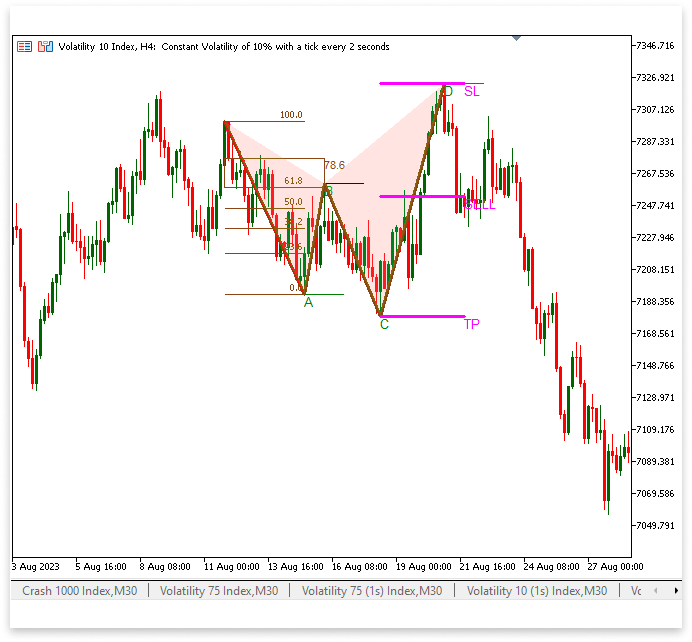
解释:
找到 X 处的波动高点,这标志着该形态的开始,是检测程序的第一步。接下来,它会寻找低点(A)、高点(B)、低点(C)和高点(D)。通过根据每个点相对于其前一个点的位置来验证每个点,从而确保形态结构的合格性。验证该形态主要取决于回撤位,特别是从 X 到 A 的 61.8% 和 78.6% 斐波那契回撤位。如果满足这些要求且 D 大于 X,则可能存在卖出形态。
由于看跌和看涨谐波形态相似,因此不再赘述。主要区别在于,这种形式的看涨形态预示着价格上涨,而这种形态预示着价格下跌。唯一的区别在于形态的方向和相关的交易方向。除此之外,基本思想是相同的。
结论
在本文中,我们探讨了如何使用 MetaTrader 5 图表对象构建类似谐波形态的指标。我们讲解了检测关键波动点、构建形态以及使用斐波那契回撤位验证模式背后的逻辑。通过运用看涨和看跌形态,我们展示了如何根据价格走势识别潜在的交易机会。通过这种方法,您可以直接在图表上可视化谐波形态,从而无需依赖传统的指标缓冲即可做出更好的决策。这种方法增强了灵活性,并为进一步定制和完善基于形态的交易策略奠定了坚实的基础。
本文由MetaQuotes Ltd译自英文
原文地址: https://www.mql5.com/en/articles/17574
注意: MetaQuotes Ltd.将保留所有关于这些材料的权利。全部或部分复制或者转载这些材料将被禁止。
本文由网站的一位用户撰写,反映了他们的个人观点。MetaQuotes Ltd 不对所提供信息的准确性负责,也不对因使用所述解决方案、策略或建议而产生的任何后果负责。

 MQL5交易策略自动化(第十六部分):基于结构突破(BoS)价格行为的午夜区间突破策略
 皇冠同花顺优化(RFO)
 在交易图表上通过资源驱动的双三次插值图像缩放技术创建动态 MQL5 图形界面
 MQL5 中的交易策略自动化(第十五部分):可视化价格行为的谐波形态模式

非常感谢你们在MQL5 系列 上的出色工作。
哇,这是我关注你的文章以来最好的一篇。继续努力
太棒了,你的文章写得很棒,向你致以最崇高的敬意
我们可以在节目播出时发出警报!
太棒了,你的文章写得很棒,向你致以最崇高的敬意
我们可以在节目播出时发出警报!
使用 "PlaySound() "函数可以做到这一点。