SimSim Expert Assistant

"SimSim Expert Assistant" утилита для сопровождению сделок трейдера в терминале МТ4. Утилита бесплатная, пользуйтесь.
Кроме того, утилита открывает сделки по сигналам индикаторов SimSim Trading (через глобальные). Параметр индикатора "Signal shaping for SimSim Expert Assistan" указывает на это.

Как работать с утилитой.
Expert Assistant работает в терминале МТ4 и устанавливается в папку Expert, в утилите нет ни одного параметра при старте.
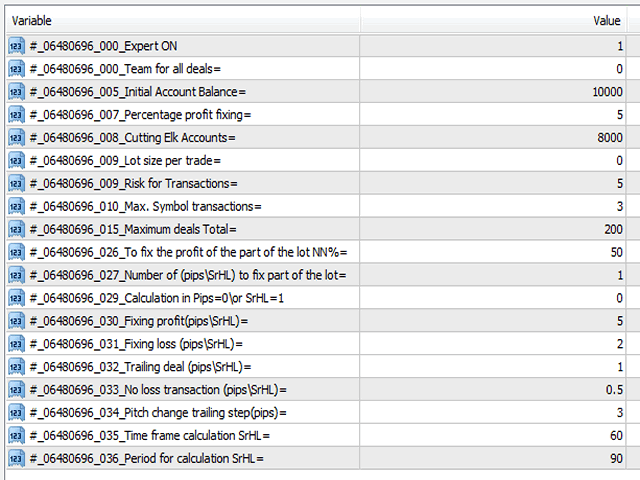
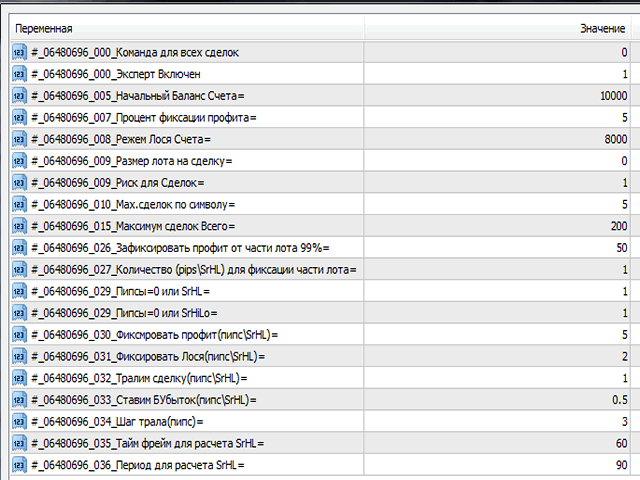
Все параметры находятся в списке глобальных переменных (меню сервис/глобальные переменные). Мне кажется хранить параметры в глобальных переменных более удобным, при изменении значения параметра, не происходит перезагрузка эксперта, он просто продолжает работу с измененным значением переменной.

Рассмотрим  глобальные переменные и их назначение.

1."Команда для всех сделок \\ Team for all deals="

   Под командой будем понимать цифровое значение переменной.
   Команда\\Team = 0 значение по умолчанию, эксперт просто работает.
   -//- = 55 эксперт закрывает все сделки в терминале и не работает, не открывает новые сделки, и не сопровождает.
   -//- = 77 эксперт закрывает все прибыльные сделки и оставляет в переменной команду = 0, эксперт продолжает нормальную работу.
   -//- = 88 эксперт закрывает все убыточные сделки и оставляет в переменной команду = 0, эксперт продолжает нормальную работу.
   -//- = 99 эксперт закрывает все сделки и оставляет в переменной команду = 0,  эксперт продолжает нормальную работу.
  Пока эксперт обрабатывает только эти команды, но в дальнейшем будем расширять спектр команд.

2."Эксперт Включен \\ Expert ON"

  Переменная = 1 когда эксперт готов работать, если переменная=0, эксперт переходит в состояние. "Эксперт Выключен \\ Expert OFF" и соответственно эксперт не работает. 

3.4. "Начальный Баланс Счета\\ Initial Account Balance=" и "Процент фиксации профита\\ Percentage profit fixing="
   Данные переменные для расчета и фиксации профита.     Расчеты: Сумма = Нач.Бал*Процент Фиксации/100+Нач.Бал. Как только Сумма будет больше текущего баланса + текущий профита, все ордера    закрываются. После закрытия, эксперт продолжит свою работу в обычном режиме. Если значение одной из переменных = 0, никакой  фиксации не будет. Добавлена переменная  фиксации, "Точность Процента" от 0 до 100%, т.е. фиксация с возможными отклонениями в пределах %%.  


5. "Режем Лося Счета\\ Cutting Elk Accounts=" 

Тут всё понятно, как только сумма баланса + профита достигнет указанного значения, будут закрыты все ордера и эксперт прекратит работу.
 

6. "Размер лота на сделку\\ Lot size per trade=" 

    Параметр = 0 (расчет лота) или фиксированный размер лота.

7. "Риск для Сделок\\ Risk for Transactions=" 

   Риск для расчете лота, когда размер лота на сделку = 0, выполняется расчет лота, иначе лот фиксированный. Риск от 0.01% до 100%

8. "Мах.сделок по символу\\ Max. Symbol transactions=" 

   Количество сделок по одному символу.

9. "Максимум сделок Всего\\ Maximum deals Total="  

   Максимум сделок можно открыть.  

10.11. "Закрыть часть лота\\Close part of the lot NN%=" и "Закрыть часть лота\\Close part (pips\\SrHL)=" 

  Параметры указывают возможность закрытия части сделки в NN%  от лота, когда профит будет больше указанного значения pips\SrHL.

12. "Пипсы=0 или SrHL=1\\ Calculation in Pips\\SrHL=" 

   Стопы и Профиты в пипсах или SrHL, если =0 то в пипсах, =1 тогда Стопы и профиты в единицах SrHL.
Например расчетов в SrHL: Тайм фрейм=240 период усреднения = 40
Рассчитанные SrHL: XAUUSD SrHL=7465, EURUSD SrHL=223
Допустим:
Уровень профита для XAUUSD в единицах SrHL = 5    Пересчет в пипсах 5*7465=37325
Уровень профита для EURUSD в единицах SrHL = 5    Пересчет в пипсах 5*223=1115

А если указать профит и стоп в фиксированных пипсах  (500,200 и.т.д) волатильность инструмента не учитывается.
Меняя Тайм фрейм и период усреднения, после смены параметров, в журнале эксперта появятся SrHL по всем инструментам терминала. "Фикс.профит\\Fixing profit(pips\\SrHL)="

14. "Фикс.Лося\\Fixing loss (pips\\SrHL)="
15. "Ставим БУбыток\\No loss transaction (pips\\SrHL)="
16. "Тралим сделку\\Trailing deal (pips\\SrHL)="
17. "Шаг трала\\Pitch change trailing step(pips)="
18. "Тайм фрейм расчета\\SrHL\\Time frame calculation="
19. "Период для расчета\\SrHL\\Period for calculation="
  
Recommended products
Free automatic Fibonacci is an indicator that automatically plots a Fibonacci retracement based on the number of bars you select on the BarsToScan setting in the indicator. The Fibonacci is automatically updated in real time as new highest and lowest values appears amongst the selected bars. You can select which level values to be displayed in the indicator settings. You can also select the color of the levels thus enabling the trader to be able to attach the indicator several times with differe
FREE
Night Scalper EA Lite
Robots4Forex Ltd
2.33 (3)
The Night Scalper EA Lite is a fully automated Expert Advisor that trades at night and relies on price reversion. The EA trades using market orders and has the option to use time averaging to improve performance. This EA works best on EURUSD using the M5 timeframe, but will also work on AUDUSD, GBPUSD, NZDUSD, USDCAD, USDCHF and likely many more. A VPS is advisable when trading this system and a low spread and commission based broker is best. Check the comments for back test results and optimiz
FREE
MerkaStudent is a basic version of an expert advisor that allows us to understand part of the behavior of a chart in historical time. It uses some basic parameters in trading, which allows us to understand mathematically how a chart moves and thus know what is our mathematical expectation in the historical period analyzed. Starting from a mathematical logic, we can create a strategy to evaluate its results.
FREE
Trend Analizer Bot
Pavel Predein
4.5 (2)
Automatic trading Advisor .This is a free version of the expert Advisor "Trend Analyzer Pro" https://www.mql5.com/ru/market/product/42792.В the robot is based on 2 strategies: at the intersection of moving averages and Bollinger bands indicator .In the paid version, three strategies are available, which increases profitability several times .Designed for the EURUSD H1 currency pair.It is possible to use it on other tools after optimization.Test only on tick data. ** Does not use such dangerous
FREE
Introductory Pricing for one month Brute force trader is specially designed to find the best entry point and exit point with the regular tested and proven indicators. The EA will automatically analyse the market and will follow trends with the right entry exit points. Since the timeframe it is using is 30 minutes, the chances that you are stuck into a long trade is very low. Thought it does not use stoploss but it has the
FREE
Harvest FX
Sayan Vandenhout
4.56 (9)
Harvest FX USES THE TREND WAVE INDICATOR AND IT CAN IDENTIFY THE BEGINNING AND THE END OF A NEW WAVE TREND MOVEMENT. AS AN OSCILLATOR, THE INDICATOR IDENTIFIES THE OVERBOUGHT AND OVERSOLD ZONES. IT WORKS GREAT TO CATCH THE SHORT TERM PRICE REVERSALS AND USES A MARTINGALE STRATEGY TO CLOSE ALL TRADES IN PROFIT. USE DEFAULT SETTINGS ON H1 OR HIGHER TIME FRAME ON ANY PAIR FOR MORE ACCURATE TRADES WHY THIS EA : Smart entries calculated by 3 great strategies The EA can be run on even a $30000 a
FREE
PZ Penta O MT4
PZ TRADING SLU
2.33 (3)
The Penta-O is a 6-point retracement harmonacci pattern which usually precedes big market movements. Penta-O patterns can expand and repaint quite a bit. To make things easier this indicator implements a twist: it waits for a donchian breakout in the right direction before signaling the trade. The end result is an otherwise repainting indicator with a very reliable trading signal. The donchian breakout period is entered as an input. [ Installation Guide | Update Guide | Troubleshooting | FAQ | A
FREE
Macd Martin
Roman Yablonskiy
2.5 (2)
Double Breakout   is an automatic expert advisor with two separate strateges that uses martingale. The MACD indicator with adjustable parameters is used as inputs for each flow of orders. The specified takeprofit and stoploss levels are used to exit the position.  General recommendation The minimum recommended deposit is 1000 cents. Spread is recommended not more than 3 points. It is better to use trend currency pairs. The martingale parameter can be set from 0.1 to any value. When martingale i
FREE
Trend Catcher EA Pro   —   Based on the Most loved Indicator   the Trend Catcher   and after so many requests, finally we have the trend catcher EA. A next-generation Expert Advisor that blends   Algorithm-driven automation   with   manual trader control   for total command of the market. It’s fast, adaptive, and built for traders who value   clarity, performance, and choice . Designed and optimized for   EURUSD   under real-tick (99.9%) data, Trend Catcher delivers consistent execution without
FREE
PZ Heiken Ashi EA
PZ TRADING SLU
4.8 (10)
This EA trades using the Heiken Ashi Smoothed Indicator. It offers many trading scenarios and flexible position management settings, plus many useful features like customizable trading sessions, a martingale and inverse martingale mode. [ Installation Guide | Update Guide | Troubleshooting | FAQ | All Products ] Easy to use and supervise It implements three different entry strategies Customizable break-even, SL, TP and trailing-stop Works for ECN/Non-ECN brokers Works for 2-3-4-5 digit symbols T
FREE
Wise Men Indicator demo
Bohdan Kasyanenko
3 (2)
The indicator displays signals according to the strategy of Bill Williams on the chart. Demo version of the indicator has the same features as the paid, except that it can work only on a demo account . Signal "First Wise Man" is formed when there is a divergent bar with angulation.  Bullish divergent bar - with lower minimum and closing price in the upper half. Bearish divergent bar - higher maximum and the closing price at the bottom half. Angulation is formed when all three lines of Alligator
FREE
Morning Luck
Pavel Predein
4.8 (5)
Automatic trading system based on the morning Flat indicator, puts pending orders on the borders of the night channel .All trades have a fixed stop loss and take profit .The traded pair GBPUSD H1, can be used on other instruments after optimization. The EA contains a switchable flat indicator . The robot's operating time in the input parameters corresponds to (+2GMT). when switching to daylight saving time,you need to adjust the time manually. * Use default settings  * Does not use dangerous
FREE
Greed Advisor
Vertex Investments LLC
4.75 (12)
Free version of Greed Advisor PRO . This is a flexible grid Expert Advisor, created specifically for greedy traders. Operation principle: set the desired daily profit, and the robot will attempt to achieve this result by any means possible. It uses the dangerous martingale principle to cope with drawdowns, because making the order chain profitable is the main purpose of the robot. Do not forget about the risks of martingale. In general, the EA is intended for those who understand why they need i
FREE
Follow The Line
Oliver Gideon Amofa Appiah
3.94 (16)
FOLLOW THE LINE GET THE FULL VERSION HERE: https://www.mql5.com/en/market/product/36024 This indicator obeys the popular maxim that: "THE TREND IS YOUR FRIEND" It paints a GREEN line for BUY and also paints a RED line for SELL.  It gives alarms and alerts of all kinds. IT DOES NOT REPAINT and can be used for all currency pairs and timeframes. Yes, as easy and simple as that. Even a newbie can use it to make great and reliable trades. NB: For best results, get my other premium indicators for more
FREE
RSI Signalz
Gabriel Beaird
RSI Signalz  ---------------------------------------------------------------------------------------------------------------------------------------------------------------------------------------------------------------------------------------------------------------------------------------------------------------------- NOW FREE FOR EVERYONE! TUNABLE IN THE INPUT SETTINGS - ENJOY :) (IT DOES NOT TRADE FOR YOU. THIS IS TOO JUST HELP WITH MANUAL TRADING)  Fully Automated EA for marking good en
FREE
Unleashed  False Breakout EA strategy trade idea is   Support & Resistance key level of price action. Price breakout  Support & Resistance  than reverse in the zone. Before execute order horizontal line will appear on the key level of  Support & Resistance .When there's open order and losses, it will automatically recover the amount of losses on the next execute order as profit. Blue (support) Pink (resistance) Timeframe: M30 H1 Currency: USDCAD EURUSD XAUUSD *Note on the input take profit in (
FREE
ReplicatorDemo
Aleksej Shcherbak
This is a free demo version of the Replicator utility ( https://www.mql5.com/en/market/product/23028 ), which trades the minimum lot and only on EURUSD. The program is designed for copying your successful orders. The price is often fluctuates within a channel. But there is no time to place the next orders, especially if it happens at night. Place an order, when it closed with profit, the program repeats your order as a pending limit order. This will continue until the order closes with a loss, o
FREE
Proftrader Free
Alexander Nikolaev
4 (3)
This Expert Advisor analyzes the last candles and determines whether there will be a reversal or a large correction. Also, the readings of some indicators are analyzed (their parameters can be adjusted). Is a free version of Proftrader . Unlike the full version, in the free version of the adviser the initial lot cannot be higher than 0.1, trading pair only EURUSD and also it has fewer configurable parameters. Input parameters Lots - lot size (at 0, the lot will be calculated from the percentage
FREE
Bollinger with WPR demo
Alexander Nikolaev
4.33 (3)
This Expert Advisor is the free version of "Bollinger with WPR scalper", which is based on the Bollinger bands and Williams' Percent Range indicators. Limitations of the free version: lot is fixed to 0.01, only the EURUSD currency pair is supported, trading time cannot be selected, trailing stop is not available. Nevertheless, it can make quite a lot of deals, so you do not have to wait for positions to be opened (with the appropriate settings and timeframes below H1). The EA can be used on time
FREE
Simple RSI Forex Trading Strategy
Victor Manuel Valderrama Zamora
4 (1)
Diversify the risk in your trading account by combining our Expert Advisors. Build your own custom trading system here:   Simple Forex Trading Strategies The expert advisor opens trades when RSI indicator enter in oversold or overbought areas. The Stop Loss, Take Profit, and Trailing Stop are calculated based on the ATR indicator. The recommended currency pair is EURGBP and the recommended timeframe to operate and to do backtests is H4. This Expert Advisor can be profitable in any TimeFrame an
FREE
Harmonic Patterns are utilized for predicting market turning points with precision. These patterns offer a high win rate and numerous trade opportunities within a single trading day. Our indicator identifies the most prominent Harmonic Patterns based on principles outlined in Harmonic Trading literature. **IMPORTANT NOTES:** - The indicator does not repaint, lag, or redraw. It accurately identifies patterns at the D point, ensuring reliability in pattern detection.    **HOW TO USE:** 1. Drag
FREE
Algorithmic FREE
Vladimir Gorbachev
5 (4)
Medium-term trading system that tries to profit during the price rollbacks after significant movements. The system automatically determines the current trading range, the price rollback levels. This is a demonstration version of the Algorithmic EA, which is optimized over the year 2016 for trading the EURUSD currency pair. It is possible to trade in manual mode using a simple on-screen panel or in fully automatic mode. Amount of trades per month is from 5 to 18 in automatic mode. The recommended
FREE
Update:ver1.53 (2023/08/16) ・概要と必要環境 手動発注もしくは他ツール等からの発注に対し、指値発注予約の複製を生成します。こちらは「発注操作の簡易化」に特化したものになります。発注判断となる分析は、資料を漁る、経験則を導く、他の分析ツールやEAを併用する等、利用者ご自身で頑張ってください。なお、ver1.28より、「決済後、自動で再発注する」機能が実装されました。(有償版でのみ有効化できます) ・導入と導入後の操作 導入そのものは簡単です。「自動売買可能なEA」として、適当なチャートにて動作させるだけです。(チャートの対象相場は問いません。このEAは、チャートを見ていません)。あとは、「このEAでのローカルコピー以外の発注」があれば、それに応じて「損失が出た場合に備えての追加取引の予約」という形で、指値発注が自動生成されます。 導入操作上の注意として、「本EAを、複数のチャートで動作」はできません。EAがチャート自体を見ておらず、注文状況だけを見ているため、複数のチャートで動かす意味もありません。また、ターミナルとEAの設定として「自動売買」を許可しない
FREE
Fibomathe for MT4
Almaquio Ferreira De Souza Junior
Fibomathe Indicator: Support and Resistance Tool for MT4 The Fibomathe Indicator is a technical analysis tool designed for MetaTrader 4 (MT4) that assists traders in identifying support and resistance levels, take-profit zones, and additional price projection areas. It is suitable for traders who use structured approaches to analyze price action and manage trades. Key Features Support and Resistance Levels: Allows users to define and adjust support and resistance levels directly on the chart. L
FREE
Vanda FX
Sayan Vandenhout
5 (2)
Vanda FX USES THE TREND WAVE INDICATOR AND IT CAN IDENTIFY THE BEGINNING AND THE END OF A NEW WAVE TREND MOVEMENT. AS AN OSCILLATOR, THE INDICATOR IDENTIFIES THE OVERBOUGHT AND OVERSOLD ZONES. IT WORKS GREAT TO CATCH THE SHORT TERM PRICE REVERSALS AND USES A MARTINGALE STRATEGY TO CLOSE ALL TRADES IN PROFIT. USE DEFAULT SETTINGS ON H1 OR HIGHER TIME FRAME ON ANY PAIR FOR MORE ACCURATE TRADES WHY THIS EA : Smart entries calculated by 4 great strategies The EA can be run on even a $20000 acc
FREE
Classic RangeBreakOut
Yajaira Thibisay Martinez Jaimes
Classic Range BreakOut Expert Advisor "The opening  range breakout strategy  is a logical and repeatable  strategy  that involves traders building firm market direction biases after price  breaks  above or below the market defined opening price  range  of a session" You can select the number of bars and width in pips.  Works in all pairs. RECOMMENDED: test first in a Demo account for 1 or 2 weeks. 
FREE
MT4持仓助手 由于限制 上传的版本是很老的版本  加载后 看EA的 " 关于 " 说明   PS: MT4持仓助手最新版 单文件 只能实现 部分功能  需要大量的指标辅助运行   使用前先打印EA快捷键说明文件 文件在网盘或Q群中 一般会在 助手安装包 的文件夹里 辅助性EA 订单半自动管理 自动设置止盈止损移动止损 分批平仓 划线模式 横线模式 布林带平仓 定时器追踪止盈止损等 同时有大量快捷键处理下单 改止盈止损 挂单等 省时省力。 新增了 副面板 有大量的指标 辅助订单管理  自动化相关的 程序 主要功能 1.6版本 加入了 复盘 测试模式下 可以模拟下单的功能 辅助性EA 订单半自动管理 自动设置止盈止损 移动止损 分批平仓   定时器追踪止盈止损等 划线模式   横线模式 短线追单 参考各种指标 执行一些操作 有大量快捷键处理下单 改止盈止损 挂单等 省时省力。 主要是解放双手,不用长时间盯盘 EA可以半自动的处理一些 订单 以后可能会增加自动化的功能 此代码是在GPL-3.0许可下发布的。 This code is released under the GPL
FREE
EA Scalping Expert
Gerard Valldosera Gomez
3 (1)
This is a fully automated scalping Expert Advisor that can be run successfully using EURUSD currency pair at H1 timeframe. This EA can't run in the same account. If you want an Expert Advisor that trades daily this is not because it requires patience to wait for a few days or weeks on the right opportunity for it to trade. It takes advantage of the volatility of the price movement.
FREE
Zigzag Extremum points
Oleg Popov
4.81 (32)
New version 8.00 is available. In this version, I tried to take into account the wishes of the user. Each of you can also take part in the improvement of this advisor. In the default settings, the adviser opens trades when the extremum point is broken       standard indicator       Zigzag. When the upper point of the zigzag extremum is broken, it opens a buy deal, and when the lower point of the zigzag extremum is broken, it opens a sell deal. In addition to the standard ZigZag indicator, which
FREE
CommunityPower MT4
Andrey Khatimlianskii
4.88 (40)
CommunityPower EA — is the Expert Advisor for MetaTrader 4/5, created by community and for community. It is free, versatile and very powerful, and allows to trade a wide range of strategies. The idea is simple Your suggestions + my code = a win-win for everyone! Is it a ready-to-use money-making machine? No, it is definitely not. It is a tool, which allows you to create and run your own trading strategy, and it is up to you to find profitable settings and take the responsibility for your tradi
FREE
Buyers of this product also purchase
Local Trade Copier EA MT4
Juvenille Emperor Limited
4.96 (104)
Experience exceptionally  fast trade copying with the Local Trade Copier EA MT4 . With its easy 1-minute setup, this trade copier allows you to copy trades between multiple MetaTrader terminals on the same Windows computer or Windows VPS with lightning-fast copying speeds of under 0.5 seconds. Whether you're a beginner or a professional trader, the Local Trade Copier EA MT4 offers a wide range of options to customize it to your specific needs. It's the ultimate solution for anyone looking to inc
Trade Assistant MT4
Evgeniy Kravchenko
4.42 (192)
It helps to calculate the risk per trade, the easy installation of a new order, order management with partial closing functions, trailing stop of 7 types and other useful functions. Additional materials and instructions Installation instructions   -   Application instructions   -   Trial version of the application for a demo account Line function -   shows on the chart the Opening line, Stop Loss, Take Profit. With this function it is easy to set a new order and see its additional characteris
Forex Trade Manager MT4
InvestSoft
4.98 (423)
Welcome to Trade Manager MT4 - the ultimate   risk management tool   designed to make trading more intuitive, precise, and efficient. This is not just an order placement tool; it's a comprehensive solution for seamless trade planning, position management, and enhanced control over risk. Whether you're a beginner taking your first steps, an advanced trader, or a scalper needing rapid executions, Trade Manager MT4 adapts to your needs, offering flexibility across all markets, from forex and indice
Copy Cat More Trade Copier MT4 is not just a simple local trade copier; it is a complete risk management and execution framework designed for today’s trading challenges. From prop firm challenges to personal portfolio management, it adapts to every situation with its blend of robust execution, capital protection, flexible configuration, and advanced trade handling. The copier works in both   Master (sender) and Slave (receiver)   modes, with real-time synchronization of market and pending orders
With this Expert Advisor, you can seamlessly integrate various channel, arrow, and reversal indicators. It offers the flexibility to use all popular channel trading strategies, while also providing powerful tools to customize your trading conditions and risk management system.   The Expert Advisor opens orders when the price crosses the channel boundaries. Multiple crossing conditions are available for customization: Price touches boundary on re-entry into the channel Price touches boundary on
TradePanel MT4
Alfiya Fazylova
4.84 (89)
Trade Panel is a multifunctional trading assistant. The application contains more than 50 trading functions for manual trading and allows you to automate most trading operations. Attention, the application does not work in the strategy tester. Before purchasing, you can test the demo version on a demo account. The demo version is here . Full instructions here . Trade. Allows you to perform trading operations in one click: Open pending orders and positions with automatic risk calculation. Open mu
VirtualTradePad mt4 Extra
Vladislav Andruschenko
4.86 (58)
Trading Panel for trading in 1 click.  Working with positions and orders!  Trading from the chart or the keyboard. Using our trading panel, you can trade in one click from the chart and perform trading operations 30 times faster than the standard MetaTrader control. Automatic calculations of parameters and functions that make life easier for a trader and help a trader conduct their trading activities much faster and more conveniently. Graphic tips and full information on trade deals on the chart
The product will copy all telegram signal to MT4   ( which you are member  ) , also it can work as remote copier.  Easy to set up, copy order instant, can work with almost signal formats, image signal, s upport to translate other language to English Work with all type of channel or group, even channel have "Restrict Saving Content", work with  multi channel, multi MT5 Work as remote copier: with signal have ticket number, it will copy exactly via ticket number. Support to backtest signal. How to
Copier->Convenient and fast interface interaction, users can use it right away   ->>>> Recommended to use on Windows computers or VPS Windows Features: Diversified and personalized copy trading settings: 1. Different lot modes can be set for different signal sources 2. Different signal sources can be set for forward and reverse copy trading 3. Signals can be set with comments 4. Whether to calibrate the lot according to the contract lot Diversified and personalized copy order settings 2: 1. Dif
MT4 to Telegram Signal Provider   turns your trading account into a signal provider. Every trade action, whether manual, by EA or from your phone, is instantly sent as a message to Telegram. You can fully customize the format or use a ready-made template for quick setup. [ Demo ] [ Manual ] [ MT5 Version ] [ Discord Version ]  New: [ Telegram To MT5 ] Setup A step by step user guide is available. Key Features Ability to customize order details sent to subscribers You can create a tiered subs
Trade copier MT4
Alfiya Fazylova
4.55 (31)
Trade Copier is a professional utility designed to copy and synchronize trades between trading accounts. Copying occurs from the account / terminal of the supplier to the account / terminal of the recipient, which are installed on the same computer or VPS . Before buying, you can test the demo version on a demo account. Demo version here . Full instruction here . Main functionality and benefits: Supports copying MT4> MT4, MT4> MT5, MT5> MT4, including MT5 netting accounts. * Supports copying Dem
LAUNCH OFFER 30% OFF! The Risk/Reward Tool is a professional-grade Expert Advisor designed to revolutionise the way you plan, visualise, and execute trades in MetaTrader 4. Whether you're a discretionary trader who values precise risk management or a strategy developer who needs to test trade setups visually, this tool provides everything you need in one elegant, intuitive interface. Unlike basic position calculators, the Risk/Reward Tool combines visual trade planning with instant execution ca
Exp COPYLOT CLIENT for MT4
Vladislav Andruschenko
4.69 (65)
Trade copier for MetaTrader 4.   It copies forex trades, positions, and orders from any accounts. It is one of the best trade copiers   MT4-MT4, MT5 - MT4   for the   COPYLOT MT4   version (or   MT4 - MT5 MT5 - MT5   for the   COPYLOT MT5   version).        MT5 version Full Description +DEMO +PDF   How To Buy    How To Install     How to get Log Files    How To Test and Optimize    All products from Expforex Copier  version for      MetaTrader 5  terminal ( МТ5 - МТ5, МТ4 - МТ5 )-  Copylot Cli
X2 Copy MT4
Liubov' Shkandrii
Discover Instant Trade Copying with the Revolutionary X2 Copy MT4. With just a 10-second setup, you'll get a powerful tool for syncing trades between MetaTrader terminals on a single Windows computer or VPS with unprecedented speed - under 0.1 seconds. Whether you're managing multiple accounts, following signals, or scaling your strategy, X2 Copy MT4 adapts to your workflow with unparalleled precision and control. Stop waiting — start copying with market-leading speed and reliability. Download t
Ultimate Extractor - Professional Trading Analytics for MT4 Ultimate Extractor transforms your MetaTrader 4 trading history into actionable insights with comprehensive analytics, interactive charts, and real-time performance tracking. Ability to combine multiple accounts and MT4 and MT5 into a single dashboard. What It Does Automatically analyzes your MT4 trading history across all Expert Advisors and generates detailed HTML reports with interactive visualizations. Tracks live performance metric
Trade Dashboard MT4
Fatemeh Ameri
4.89 (54)
Tired of complex order placement and manual calculations? Trade Dashboard is your solution. With its user-friendly interface, placing orders becomes effortless, by a single click, you can open trades, set stop loss and take profit levels, manage trade lot size, and calculate risk to reward ratios, allowing you to only focus on your strategy. Say goodbye to manual calculations and streamline your trading experience with Trade Dashboard. Download  Demo Version  right now. You can find  Details of
ManHedger MT4
Peter Mueller
5 (1)
THIS EA IS A SEMI-AUTO EA, IT NEEDS USER INPUT. Manual & Test Version Please   DON'T BUY   this product before   TESTING  and watching my video about it. Contact me for user support or bug reports, or if you want the MT5 version! MT5 Version I do not guarantee any profits or financial success using this EA. With this Expert Advisor, you can: Implement your own   Zone Recovery   strategy to capitalize on trending markets. Create   Grid   trading strategies, to profit from ranging markets. Place
MT4 Local Trade Copier Pro
Biswarup Banerjee
3.58 (12)
MT4 Local Trade Copier Pro is a MetaTrader 4 Expert Advisor designed to copy trades from a source MT4 or MT5 account to multiple MT4 or MT5 accounts on the same PC. This utility is ideal for replicating trades across client accounts or portfolios with customizable parameters, including lot sizes, stop-loss/take-profit, and reverse copying options. It streamlines trade management without executing trades based on market logic, offering flexible synchronization for diverse trading needs. Note : D
News Filter EA MT4
Rashed Samir
5 (9)
News Filter EA: Advanced Algo Trading Assistant News Filter EA is an advanced algo trading assistant designed to enhance your trading experience. By using the   News Filter EA , you can integrate a Forex economic news filter into your existing expert advisor, even if you do not have access to its source code. In addition to the news filter, you can also specify   trading days   and   hours   for your expert. The News Filter EA also includes   risk management   and   equity protection   features
The Ultimate Drawdown Recovery & Trade Protection EA for MT4! Your Trades Deserve a Second Chance. Give Them This Soldier. Struggling with floating losses or sudden drawdowns that threaten your account? Stop watching your trades drown in red and let the Ultimate Drawdown Recovery EA (UDR) recover, protect, and empower your trading strategy automatically. What Is UDR? UDR is an ultra-smart, lightning-fast MT4 Expert Advisor designed to recover drawdowns, secure break-even exits, manage trades wi
Equity Protect Pro: Your Comprehensive Account Protection Expert for Worry-Free Trading If you're looking for features like account protection, equity protection, portfolio protection, multi-strategy protection, profit protection, profit harvesting, trading security, risk control programs, automatic risk control, automatic liquidation, conditional liquidation, scheduled liquidation, dynamic liquidation, trailing stop loss, one-click close, one-click liquidation, and one-click restore, Equity P
Candlestick Pattern Scanner is a multi-timeframe and multi-symbol dashboard and alert system that checks all timeframes and currency pairs for different candlestick patterns that are formed in them. Scanner is integrated with support and resistance zones so you can check the candlestick patterns in the most important areas of the chart to find breakout and reversal patterns in the price chart. Download demo version   (works on M30,D1,W1 timeframes and 20 symbols of Market Watch window) Read the
Telegram To MT4 Receiver
Levi Dane Benjamin
4.2 (5)
Copy Signals from any channel that you are a member (including private and restricted) straight to your MT4.  This tool has been designed with the user in mind while offering many features you need to manage and monitor the trades. This product is presented in an easy-to-use and visually attractive graphical interface. Customise your settings and start using the product within minutes! User Guide + Demo  | MT5 Version | Discord Version If you want to try a demo please go to user guide. The Tel
Zone Trader MT4
LEE SAMSON
5 (1)
Trade support and resistance or supply and demand zones automatically once you have identified the key areas you want to trade from. This EA allows you to draw buy and sell zones with a single click and then place them exactly where you expect price to turn. The EA then monitors those zones and will automatically take trades based on price action you specify for the zones. Once the initial trade is taken, the EA will then get out in profit at the opposite zone you place, which becomes the target
Take a Break
Eric Emmrich
5 (30)
The most advanced news filter on MQL market - free demo available Take a Break has transformed from a basic news filter into a comprehensive account protection solution. It seamlessly pauses any other Expert Advisors during news events or based on your custom filters, all while safeguarding your EA settings - restoring them automatically when trading resumes for complete peace of mind. Typical use cases: A single news filter for all your EAs. Stop trading during news/high volatility (+ close all
The EA opens and closes new orders on time. It can be used to implement trading scenarios of any complexity by creating a list of tasks.   There are two options for completing the task The task is executed on the specified date and time - it is executed once and is removed from the list. The task is executed with repetition on the specified day of the week and time - the task with repetitions is not removed from the list.   Panel settings Symbol - select the symbol for the trade function. Time -
Telegram to MT4 Coppy
Sergey Batudayev
3.57 (7)
Telegram to MT4: The Ultimate Signal Copying Solution Streamline your trading with Telegram to MT4 , the cutting-edge utility designed to copy trading signals directly from Telegram channels and chats to your MetaTrader 4 platform—without the need for DLLs. This robust solution ensures seamless execution of signals with unparalleled precision and customization options, saving you time and boosting your efficiency. [ Instructions and DEMO ] Key Features Direct Telegram API Integration Authenticat
Seconds Chart is a unique tool for creating second-based charts in MetaTrader 4 . With Seconds Chart , you can construct charts with timeframes set in seconds, providing unparalleled flexibility and precision in analysis that is unavailable with standard minute or hourly charts. For example, the S15 timeframe indicates a chart with candles lasting 15 seconds. You can use any indicators, Expert Advisors (EAs), and scripts, operating as conveniently as with standard charts. Unlike standard tools,
The product will copy all  Discord  signal   to MT4   ( which you are member  ) , also it can work as remote copier.  Easy to set up. Work with almost signal formats, support to translate other language to English Work with multi channel, multi MT4. Work with Image signal. Copy order instant, auto detect symbol. Work as remote copier: with signal have ticket number, it will copy exactly via ticket number. How to setup and guide: Let read all details about setup and download Discord To MetaTrader
Trade Manager MT4 DaneTrades
Levi Dane Benjamin
4.09 (11)
Trade Manager to help you quickly enter and exit trades while automatically calculating your risk. Including features to help prevent you from Over Trading, Revenge Trading and Emotional Trading. Trades can be managed automatically and the account performance metrics can be visualised in a graph. These features make this panel ideal for all manual traders and it helps to enhance the MetaTrader 4 platform. Multi Language support. MT5 Version  |   User Guide + Demo The Trade Manager does not work
More from author
The utility works with horizontal lines: Prof1, Prof2, Loss1, Loss2. These lines, which have strictly fixed names, are drawn by the trader on any chart in his terminal. There are options to create all the lines at once or select any of the four. The purpose of the lines becomes obvious when looking at their names. The Prof1 and Prof2 lines indicate the Take Profit levels for the transaction, but are presented in a visual form, which makes it easier for the trader to perceive the information. Th
The utility opens trades based on signals from the "SimSim ARROW" series of indicators. Version for MetaTrader 4 The utility functions exclusively in tandem with the " SimSim ARROW " series indicators. Each of these indicators has a parameter: "Deals: No Deals, Buy and Sell, Buy only, Sell only." If this parameter is set to the value: "Buy and Sell or Buy only or Sell only", the indicator signals are sent to the utility via global variables, which allows it to open deals. Utility options. Pr_Fi
FREE
The utility opens trades based on signals from the "SimSim ARROW" series of indicators. MetaTrader 5 version The utility functions exclusively in tandem with the " SimSim ARROW " series indicators. Each of these indicators has a parameter: "Deals: No Deals, Buy and Sell, Buy only, Sell only." If this parameter is set to the value: "Buy and Sell or Buy only or Sell only", the signals of the indicators are sent to the utility via global variables, which allows it to open deals. Trades are open
FREE
SimSim arrow open up or down The indicator calculates and summarizes data from 23 standard indicators. What standard indicators to use, the trader chooses himself. As a result of the calculation, we obtain the current signal level. Positive values of the signal indicate a possible purchase, negative values indicate a sale.  The indicator implements a testing system that can be tested by downloading the demo version. An indicator can be a good addition to your trading strategy. The indicator
SimSim Histogram open up or down The indicator calculates and summarizes data from 25 standard indicators. What standard indicators to use, the trader determines for himself. As a result of the calculation, we obtain the current signal level, and color the histogram by color: buy, sell or neutral value. The indicator implements a testing system that can be tested by downloading the demo version. An indicator can be a good addition to your trading strategy. FIRST Trial on TRIAL - THEN RENT or
SimSim Tournament Currency Strength Table   This is a multi-currency indicator; it shows the relative strength of the currency and 28 major currency pairs. There are many similar indicators on the market, but let there be one more. In this indicator, unlike others, you can specify weighting factors for each timeframe. Weighting factors. Why are they? Each trader prefers to work with a specific time frame, which is the main one for him, and the signals from him are most important. Examples of s
The indicator calculates and summarizes data from 25 standard indicators. What standard indicators to use, the trader chooses himself. As a result of the calculation, we obtain the current signal level. Positive values of the signal indicate a possible purchase, negative values indicate a sale.  The indicator implements a testing system that can be tested by downloading the demo version. And the main user chooses the indicators necessary for him and indicates the parameters of these indicators
Indicator. "Indicator wave or Indicator Ma". Using 23 standard indicators and the author's algorithm, the levels of purchases (from 0 to +100) and sales (from 0 to -100) are calculated. Then, using the calculated levels, the "Wave Indicator" draws a wave with 21 moving averages. The wave number is equal to the averaging period of the calculated levels. Waves # 1 - 7 Fast Moving Averages Waves from No. 8 -14 moving averages Waves from No. 15-21 slow moving averages Looking at the figures drawn
Это стрелочный индикатор. Он выбирает данные от 23-х стандартных индикаторов и расчитывает уровень сигнала который показывает предполагаемое движение цены инструмента торговли. Минимальный уровень сигнала индикатора установлен в пределах -100 до +100%. Используйте усреднение для формирования сигнала. Как работать с индикаторам. Следим за сигналом и принимаем решения. Индикатор перерисовывается только на нулевой свечи, поэтому решения принимаются после закрытия свечи с новым сигналом, и сигнал
Это линейный индикатор. Он выбирает данные от 23-х стандартных индикаторов и рассчитывает уровень сигнала, который показывает предполагаемое движение цены инструмента торговли. Минимальный уровень сигнала индикатора установлен в пределах -100 до +100%. Используйте усреднение для формирования сигнала. Как работать с индикаторам. Следим за сигналом и принимаем решения. При пересечении нулевого уровня индикатора снизу вверх можно рассматривать покупки. При пересечении нулевого уровня сверху вни
Это индикатор гистограмма. Он выбирает данные от 23-х стандартных индикаторов и расчитывает уровень сигнала который показывает предполагаемое движение цены инструмента торговли. Минимальный уровень сигнала индикатора установлен в пределах -100 до +100%. Используйте усреднение для формирования сигнала. Как работать с индикаторам. Следим за сигналом и принимаем решения, цвета гистограммы показывают когда возможны покупки а когда продажи, или нейтральный цвет - сделать паузу. Индикатор перерисов
MT4 trend indicator works without redrawing. Provides signals for entering trades, works on charts of any instrument. Трендовый индикатор МТ4, работает без перерисовки.  Выдает сигналы для входа в сделки, работает на графиках любого инструмента. Input parameters are for styling and messages only. / Входные параметры только для оформления и сообщений. All original signal calculations do not need additional parameters. / Все оригинальные расчеты сигнала, не нуждаются в дополнительных параметрах.
A very simple but effective indicator. It is based on the KijunSen line of the Ichimoku indicator and the built average MA on this line. Buy or Sell signal: this is the intersection point of two lines!!! I myself often use the KijunSen line of the Ichimoku indicator for trading, if the price is HIGHER, I consider only PURCHASES, if only SALES are LOWER. And after averaging the KijunSen line and forming the KijunSen MA line, the intersection points of the two lines appeared, which can be interpr
SimSim Arrow CCI is a standard "Commodity Channel Index" indicator, but an arrow version. MetaTrader 5 version The indicator parameters are similar to the standard ones, plus one additional parameter Delta. Delta = 0 - 100 Deviations as of the Zero value. Changing the zero level of the indicator, Plus and minus are possible. The indicator generates a signal when the price crosses the zero level line +- Delta. Enable "CONTROL DEAL" for operation and trades based on the indicator signal will be
SimSim Arrow RSI is a standard "Relative Strength Index" indicator, but an arrow version. Version for MetaTrader 5 The indicator parameters are similar to the standard ones, plus one additional parameter Delta. Delta = 0 - 100 Deviations as of the 50 value. Changing the level of 50 indicator, Plus and minus are possible. The indicator generates a signal when the price crosses the level line = 50 +- Delta. Enable "CONTROL DEAL" for operation and trades based on the indicator signal will be op
SimSim Arrow BEAR is a standard "Bears Power" indicator, but an arrow version. Version for MetaTrader 5 The indicator parameters are similar to the standard ones, plus one additional parameter Delta. Delta = 0 - 100 Deviations as of the Zero value. Changing the zero level of the indicator, Plus and minus are possible. The indicator generates a signal when the price crosses the zero line +- Delta. Enable "CONTROL DEAL" for operation and trades based on the indicator signal will be opened autom
SimSim Arrow BULLS is a standard "Bulls Power" indicator, but an arrow version. Version for MetaTrader 5 The indicator parameters are similar to the standard ones, plus one additional parameter Delta. Delta = 0 - 100 Deviations as of the Zero value. Changing the zero level of the indicator, Plus and minus are possible. The indicator generates a signal when the price crosses the zero line +- Delta. Enable "CONTROL DEAL" for operation and trades based on the indicator signal will be opened aut
SimSim Arrow MACD is a standard "Moving Averages Convergence/Divergence" indicator, but an arrow version. MetaTrader 5 version The indicator parameters are similar to the standard ones, plus one additional parameter Delta. Delta = 0 - 100 Deviations as of the Zero value. Changing the zero level of the indicator, Plus and minus are possible. The indicator generates arrow signals 1 or 2: The Main_line line crosses the zero level +- Delta The Signal_line line crosses the zero level +- Delta Enab
SimSim Arrow Momentum is a standard "Momentum" indicator, but an arrow version. MetaTrader 5 version The indicator parameters are similar to the standard ones, plus one additional parameter Delta. Delta = 0 - 100 Deviations as of the 100 value. Changing the level of the 100 indicator, Plus and minus are possible. The indicator generates a signal when the price crosses the level line = 100 +- Delta. Enable "CONTROL DEAL" for operation and trades based on the indicator signal will be opened au
SimSim Arrow KijunSen Plus MA is a proprietary arrow indicator. A version of the original indicator with KijuSen and MA lines. MetaTrader 5 version The indicator generates a signal when the Kijun-sen line crosses the MA line. TEnable "CONTROL DEAL" for operation and trades based on the indicator signal will be opened automatically. You can use the indicator for its intended purpose, as a reliable signaler. However, its secondary purpose is to serve as a signal provider for the " CONTROL DEAL
SimSim Arrow 2MA is 2 standard MA indicators. The point of intersection of the arrows is a signal for a deal. Version for MetaTrader 5 The parameters of the indicators are similar to the standard MA indicators, one slow MA and the other fast MA. A signal for a deal appears at the intersection point. The indicators generate a signal when the fast MA line crosses the slow MA line. TEnable "CONTROL DEAL" for operation and trades based on the indicator signal will be opened automatically.. You
SimSim Arrow ADX is a standard "Average Directional Movement Index" indicator, but an arrow version. Version for MetaTrader 5 The indicator parameters are similar to the standard ones. Enable "CONTROL DEAL" for operation and trades based on the indicator signal will be opened automatically. You can use the indicator for its intended purpose, as a reliable signaler. However, its secondary purpose is to serve as a signal provider for the " CONTROL DEAL " utility. The symbiosis between the in
SimSim Arrow Simple Signal is a proprietary arrow indicator. MetaTrader 5 version This is a very simple indicator, it has only one parameter, the period for calculating the indicator. Enable "CONTROL DEAL" for operation and trades based on the indicator signal will be opened automatically. You can use the indicator for its intended purpose, as a reliable signaler. However, its secondary purpose is to serve as a signal provider for the " CONTROL DEAL " utility. The symbiosis between the indi
SimSim Arrow Stochastic is a standard "Stochastic Oscillator" indicator, but an arrow version. Version for MetaTrader 5 The indicator parameters are similar to the standard ones, plus one additional parameter Delta. Delta = 0 - 100 Deviations as of the 50 value. Changing the level of 50 indicator, Plus and minus are possible. The indicator generates a signal when the price crosses the level line = 50 +- Delta. Enable "CONTROL DEAL" for operation and trades based on the indicator signal will
The utility works with horizontal lines: Prof1, Prof2, Loss1, Loss2. These lines, which have strictly fixed names, are independently drawn by the trader on any chart in his terminal. There are options to create all the lines at once or select any of the four. The purpose of the lines becomes obvious when looking at their names. The Prof1 and Prof2 lines indicate the Take Profit levels for the transaction, but are presented in a visual form, which makes it easier for the trader to perceive the i
SimSim Arrow Ichimoku is a standard "Ichimoku Kinko Hyo" indicator, but an arrow version. Version for MetaTrader 5 The indicator generates signals 1 and 2. The Kijun-sen line crosses the price line. The Kijun-sen line crosses the Tenkan-sen line Enable "CONTROL DEAL" for operation and trades based on the indicator signal will be opened automatically. You can use the indicator for its intended purpose, as a reliable signaler. However, its secondary purpose is to serve as a signal provider for
SimSim Arrow 2MA is 2 standard MA indicators. The point of intersection of the arrows is a signal for a deal. Version for MetaTrader 4 The parameters of the indicators are similar to the standard MA indicators, one slow MA and the other fast MA. A signal for a deal appears at the intersection point. The indicators generate a signal when the fast MA line crosses the slow MA line. Enable "CONTROL DEAL" for operation and trades based on the indicator signal will be opened automatically.. You an
SimSim Arrow KijunSen Plus MA is a proprietary arrow indicator. A version of the original indicator with KijuSen and MA lines. Version for MetaTrader 4 The indicator generates a signal when the Kijun-sen line crosses the MA line. Enable "CONTROL DEAL" for operation and trades based on the indicator signal will be opened automatically. You an use the indicator for its intended purpose, as a reliable signaler. However, its secondary purpose is to serve as a signal provider for the " CONTROL DEAL
MT5 trend indicator works without redrawing. Provides signals for entering trades, works on charts of any instrument. Трендовый индикатор МТ5, работает без перерисовки.  Выдает сигналы для входа в сделки, работает на графиках любого инструмента. Input parameters are for styling and messages only. / Входные параметры только для оформления и сообщений. All original signal calculations do not need additional parameters. / Все оригинальные расчеты сигнала, не нуждаются в дополнительных параметрах.
AA very simple but effective indicator. It is based on the KijunSen line of the Ichimoku indicator, on which the moving average MA is built. Buy or sell signals occur at the moments of intersection of these two lines. I often use the KijunSen line of the indicator for my trading: when the price is ABOVE this line, I focus exclusively on BUYING, while when it is BELOW this line, I focus on SELLING. In addition, after averaging the KijunSen line and creating the KijunSen moving average, the main
Filter:
No reviews
Reply to review