Structured Anchored VWAP
- Indicators
-
Shipra Gupta
 I’m Shipra Gupta, a trader and quantitative strategy developer with a strong background in mathematics, economics, and algorithmic trading systems. Over the years, I’ve worked extensively across forex, gold, indices, commodities, and crypto markets, focusing on building data-driven trading
- Version: 1.10
Overview
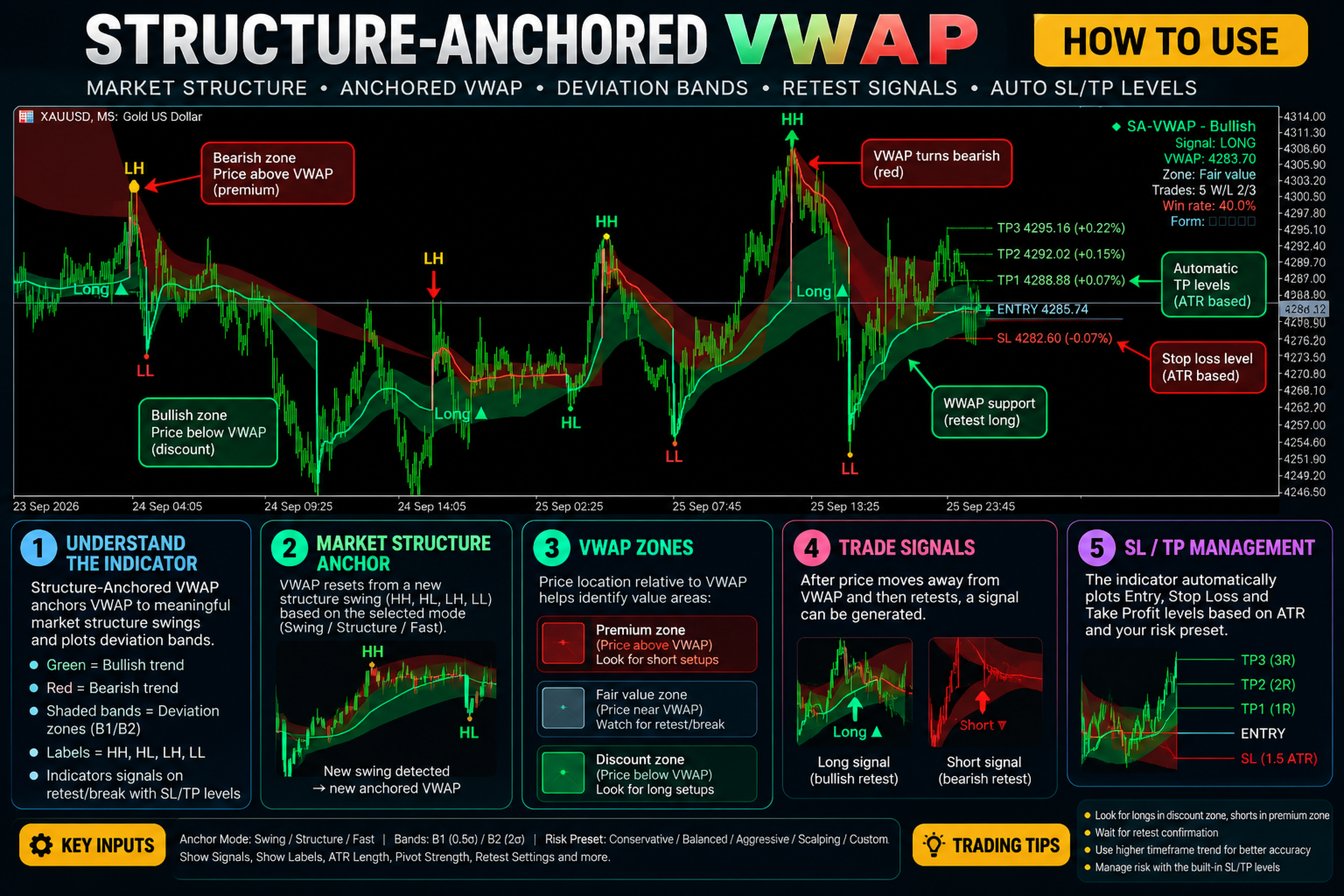
Structure-Anchored VWAP [WAT] is a market-structure-aware VWAP indicator for MetaTrader 5. It anchors Volume Weighted Average Price (VWAP) to relevant swing points and market-structure events rather than relying exclusively on fixed session resets.
The indicator combines market structure analysis, anchored VWAP, deviation bands, retest signals, and ATR-based trade-level calculations in one chart-based framework.
It is designed to help traders assess price relative to structural movements, identify potential VWAP retests, and review configurable stop-loss and take-profit levels.
MT5 Expert Advisor Collection
Explore automated systems built for Gold & Bitcoin, covering breakout, scalping, momentum and multi-horizon strategies.
Gold: Range Striker | Gold Flash | Vortex Pro | Neural Scalper | Titan Forge | Quantum Pulse | GoldGridBreakout | Gold Micro Account
Bitcoin: BTC Strike | Alpha Vault | Edge Pilot
How It Works
1. Market Structure Detection
The indicator identifies structural patterns, including higher highs (HH), higher lows (HL), lower highs (LH), lower lows (LL), equal highs (EQH), and equal lows (EQL).
These points provide the structural context used by the selected VWAP anchoring mode.
2. Structure-Anchored VWAP
Three anchor modes are available:
-
Swing: Anchors VWAP to identified swing points.
-
Structure: Uses market-structure events to determine the anchor.
-
Fast: Provides a faster anchoring approach.
The selected mode determines how VWAP follows the relevant price structure.
3. Deviation Bands and Price Zones
Optional standard-deviation bands help visualise price distance from the anchored VWAP. The indicator supports 0.5σ and 2σ bands.
Premium, Fair Value, and Discount zones provide additional context for assessing price location relative to the indicator's framework.
4. VWAP Retest Signals
The indicator monitors potential VWAP retests after a configurable displacement. These signals can help traders evaluate whether price is returning to a relevant reference level after moving away from it.
Bullish and bearish VWAP colouring provides a visual representation of the detected structural direction.
A volume-spike filter using median-volume comparison is available to help manage signal sensitivity during unusual volume conditions.
5. ATR-Based Trade Levels
The indicator can calculate stop-loss and take-profit reference levels using ATR-based risk settings.
The default balanced risk model uses a stop distance of 1.5 ATR, with target levels at 1R, 2R, and 3R. Break-even functionality is enabled by default and is configured to activate after TP1.
These levels provide visual trade-management references. Verify the indicator's exact break-even behaviour and execution assumptions before using them in a live trading plan.
Key Features
-
Three VWAP anchor modes: Swing, Structure, and Fast.
-
Market structure detection for HH, HL, LH, LL, EQH, and EQL.
-
VWAP anchored to relevant structural movements.
-
Optional 0.5σ and 2σ deviation bands.
-
Premium, Fair Value, and Discount zone display.
-
VWAP retest signals following configurable displacement.
-
Bullish and bearish VWAP colouring based on structure.
-
Median-volume filtering for volume-spike conditions.
-
ATR-based stop-loss and take-profit references.
-
TP1, TP2, and TP3 target levels.
-
Break-even functionality after TP1.
-
Live dashboard displaying trend, VWAP, signals, and trade statistics.
-
Conservative, Balanced, Aggressive, Scalping, and Custom risk presets.
Input Settings
Market Structure and Anchoring
Configure the structural detection settings and select the preferred VWAP anchor mode: Swing, Structure, or Fast. These settings control how the indicator identifies relevant price movements and determines its VWAP reference.
VWAP and Deviation Bands
Configure the anchored VWAP display and enable or disable the available deviation bands. Use the Premium, Fair Value, and Discount zones to customise the chart's structural context.
Retest Signals and Volume Filtering
Adjust the displacement requirement for potential VWAP retests. Configure the available signal and volume-filter settings to suit the instrument and timeframe.
Risk Management
Choose the preferred risk preset or use Custom settings.
The default Balanced preset uses:
| Setting | Default |
|---|---|
| Stop Loss | 1.5 ATR |
| TP1 | 1R |
| TP2 | 2R |
| TP3 | 3R |
| Break-Even | Enabled |
The Conservative, Aggressive, Scalping, and Custom presets provide alternative risk configurations. Review the selected preset and individual settings before trading.
Dashboard and Display
Use the available visual settings to configure the VWAP, structure markings, deviation bands, price zones, signal markers, and dashboard. The dashboard provides a consolidated view of the indicator's trend, VWAP, signals, and trade statistics.
Suggested Trading Workflow
-
Select an anchor mode that matches your approach to market structure.
-
Review the detected swing points and structural direction.
-
Assess the anchored VWAP, deviation bands, and relevant price zones.
-
Monitor price displacement and potential VWAP retests.
-
Evaluate any signal alongside broader market context and independent price-action confirmation.
-
Review the proposed stop-loss, target levels, and break-even settings.
-
Define acceptable risk and invalidation conditions before considering a trade.
Suitable For
-
Traders using VWAP and market-structure analysis.
-
Scalpers and intraday traders studying VWAP retests.
-
Swing traders assessing price relative to structural movements.
-
Traders who use deviation bands and volatility-adjusted risk references.
-
Traders seeking a combined view of market structure, VWAP, and trade levels.
Important Notes
Structure-Anchored VWAP [WAT] is a chart-based analytical indicator. Its signals, structural levels, and trade-management references do not guarantee future price direction or profitable outcomes.
Market structure can change, and VWAP retests can fail. Results depend on the instrument, timeframe, available price and volume data, anchor mode, and selected settings.
The plotted stop-loss and take-profit levels are references and do not necessarily correspond to actual broker execution prices. Break-even functionality should not be assumed to modify live positions unless the indicator's documented implementation explicitly supports order execution.
Use independent confirmation, test the selected settings, and apply appropriate risk management.