Meridian Flow Indicator
- Indicators
-
Shipra Gupta
 I’m Shipra Gupta, a trader and quantitative strategy developer with a strong background in mathematics, economics, and algorithmic trading systems. Over the years, I’ve worked extensively across forex, gold, indices, commodities, and crypto markets, focusing on building data-driven trading
 - Version: 2.0
Meridian Flow — Smart Money Structure Indicator for MT5
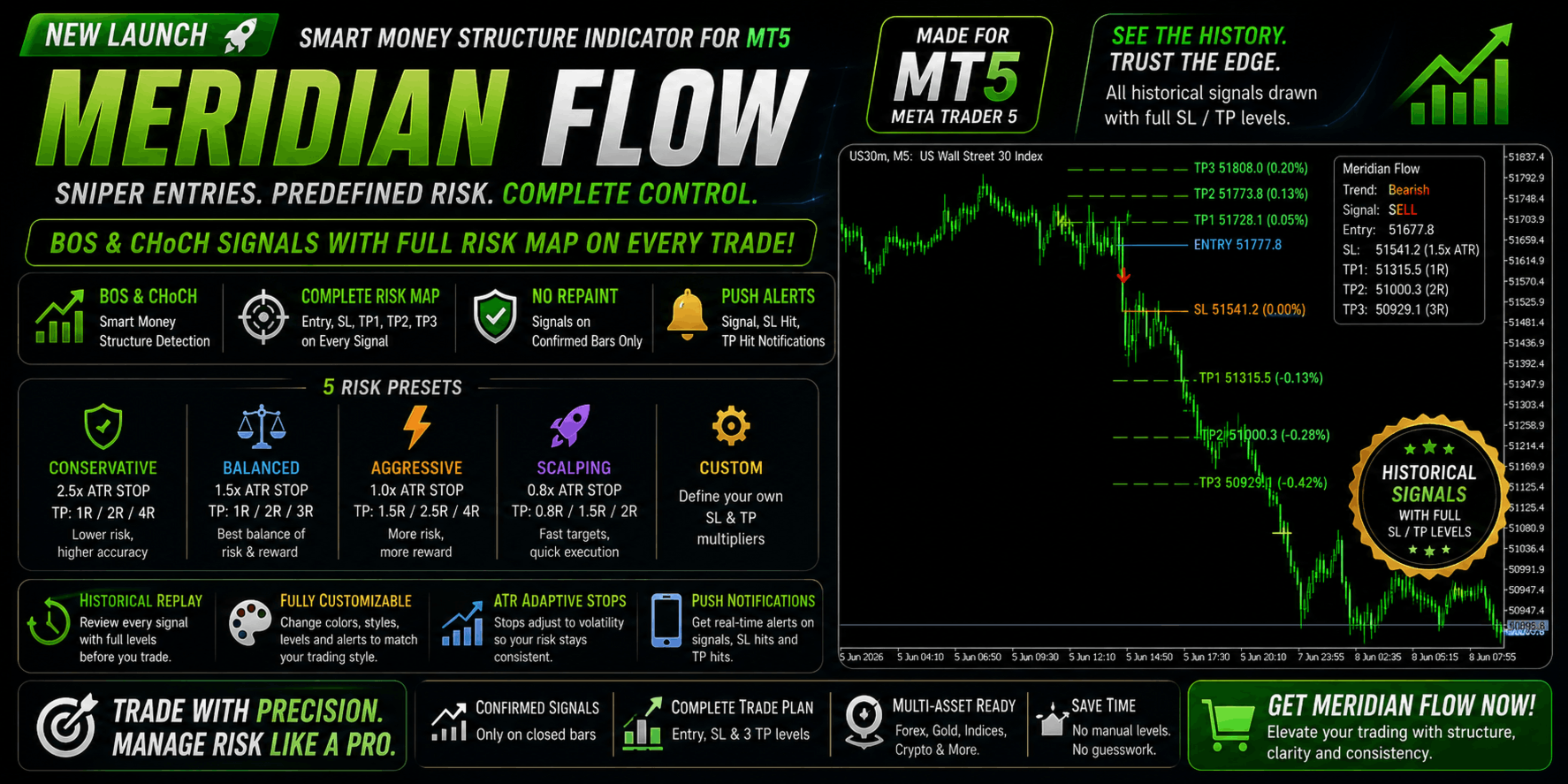
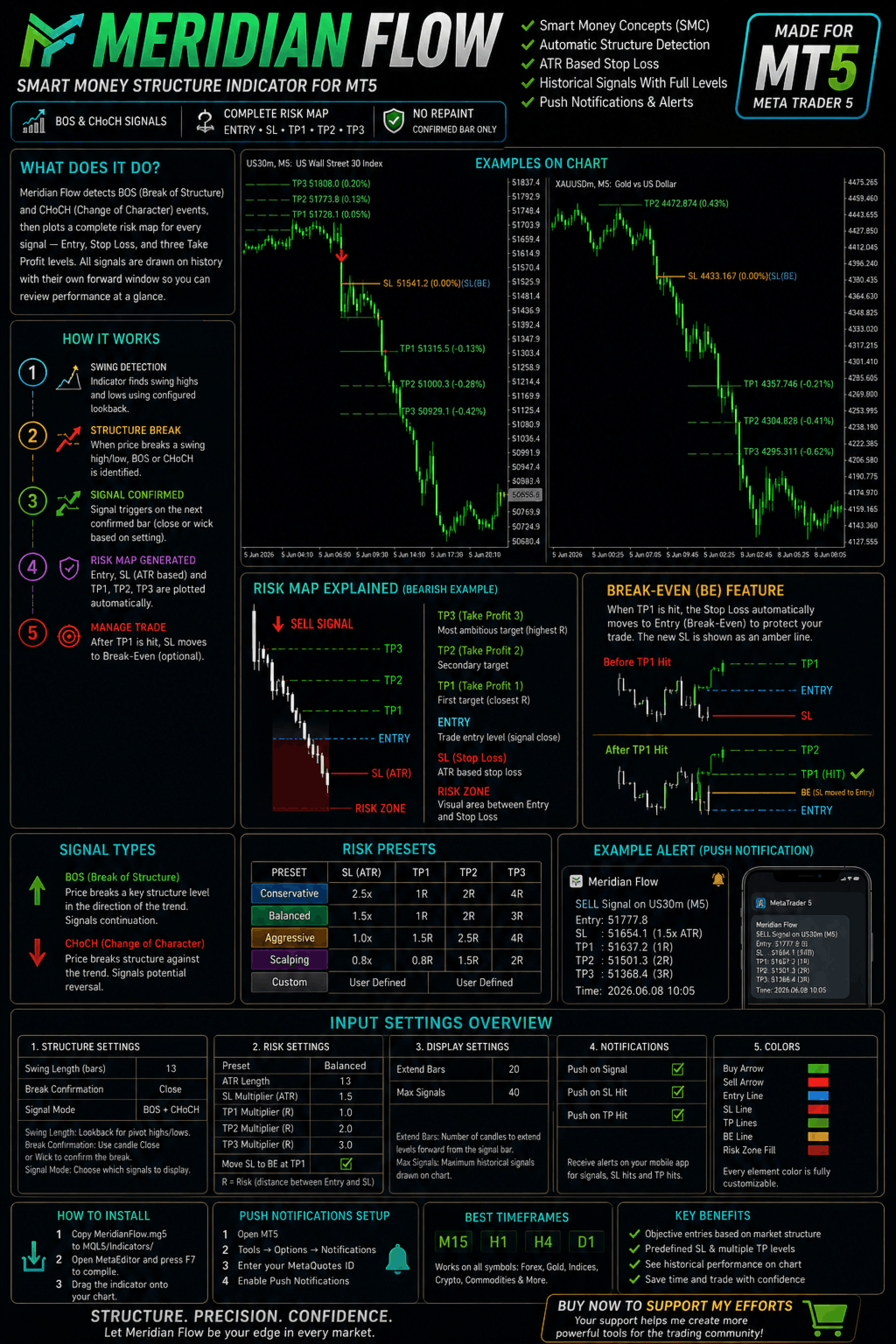
Meridian Flow is a MetaTrader 5 indicator built for traders who follow Smart Money Concepts (SMC) and ICT price action methodology. It automatically detects BOS (Break of Structure) and CHoCH (Change of Character) events on any symbol and timeframe, then plots a complete risk map — Entry, Stop Loss, TP1, TP2, and TP3 — for every signal, including historical ones.
Signals fire only on confirmed, closed bars. No repainting. No guesswork.
MT5 Expert Advisor Collection
Explore automated systems built for Gold & Bitcoin, covering breakout, scalping, momentum and multi-horizon strategies.
Gold: Range Striker | Gold Flash | Vortex Pro | Neural Scalper | Titan Forge | Quantum Pulse | GoldGridBreakout | Gold Micro Account
Bitcoin: BTC Strike | Alpha Vault | Edge Pilot
What Sets It Apart
Most structure indicators show only the current active trade. Meridian Flow draws SL and TP levels for every historical signal on your chart, each bounded to its own forward window of candles. This lets you visually audit how the indicator performs across different market conditions before committing real capital.
The Stop Loss is calculated from ATR (Average True Range), so it automatically adapts to the current volatility of your instrument. After TP1 is hit, the Stop Loss optionally moves to entry (Break-Even), shown as an amber line so you always know your floor.
Core Features
Market Structure Engine Detects confirmed swing highs and lows using a configurable pivot lookback. Every structural break is classified as either a BOS (trend continuation) or CHoCH (trend reversal). You can filter signals to show only reversals, only continuations, or both. Break confirmation works on close or wick — your choice.
Complete Risk Visualisation Every signal draws five price levels: a dotted Entry line, a solid Stop Loss line, and three Take Profit lines (TP1, TP2, TP3). A shaded rectangle fills the space between Entry and SL as a visual risk zone. TP lines are dashed while open and turn solid when hit. Labels show both the exact price and percentage distance from entry.
Five Risk Presets Switch between Conservative (2.5× ATR stop, 1R/2R/4R targets), Balanced (1.5× ATR, 1R/2R/3R), Aggressive (1× ATR, 1.5R/2.5R/4R), Scalping (0.8× ATR, 0.8R/1.5R/2R), or fully Custom where you define every multiplier yourself.
Historical Signal Replay All signals within the lookback window are drawn simultaneously. Each extends a user-defined number of bars forward (default 20). Maximum visible signals is capped at 40 by default to keep chart objects within MT5 limits — adjustable in settings.
Push Notifications Sends mobile alerts via the MetaTrader app on Buy/Sell signals (with Entry, SL, and all TP prices in the message), SL hits, and optional TP level notifications. Each alert fires once per bar close, never on every tick.
Full Color Control Every element — Entry, SL, TP lines, Break-Even line, risk zone fill, and Buy/Sell arrows — has an independent color input.
Supported Markets
Works on any symbol MT5 supports. Tested on Forex majors and exotics, Gold (XAUUSD), Silver, Crude Oil, US indices (NAS100, US30, SPX500), and crypto CFDs (BTCUSD, ETHUSD). Recommended timeframes are M15, H1, H4, and D1.
How It Works
On each closed bar, the indicator checks whether a confirmed swing high or low has been broken. If so, it classifies the break as BOS or CHoCH based on the prevailing trend, filters it through your chosen signal mode, then calculates ATR at that moment and places the SL at Entry ± (ATR × multiplier). The three TP levels are placed at your chosen R-multiples of that risk distance. All levels are drawn as bounded line segments tied to that signal's bar index — they never overwrite other signals.
Input Parameters
Structure: Swing Length (default 13), Break Confirmation (Close or Wick), Signal Mode (BOS+CHoCH / CHoCH only / BOS only).
Risk: Preset selection, ATR Length (default 13), custom SL/TP multipliers, Break-Even toggle.
Display: Extend Bars (default 20), Max Signals (default 40).
Notifications: Push on Signal, Push on SL Hit, Push on TP Hit (each toggleable independently).
Colors: Buy arrow, Sell arrow, Entry line, SL line, TP lines, Break-Even line, Risk zone fill.
Installation
Copy MeridianFlow.mq5 to your MQL5/Indicators/ folder, open MetaEditor and press F7 to compile, then drag the indicator onto any chart from the Navigator panel. For push notifications, set your MetaQuotes ID under Tools → Options → Notifications in MT5.
FAQ
Does it repaint? No — signals are generated exclusively on confirmed closed bars. The forming candle is never used.
Does it work on Gold and crypto? Yes — ATR-based stops adapt automatically to each instrument's volatility.
Can I define my own R:R? Yes — select the Custom preset and set SL, TP1, TP2, and TP3 multipliers independently.
Why do I see only 40 historical signals? MT5 has internal object limits. Increase Max Signals in the settings if needed, keeping in mind performance on very long histories.