Gold Range Striker
- Experts
-
Shipra Gupta
 I’m Shipra Gupta, a trader and quantitative strategy developer with a strong background in mathematics, economics, and algorithmic trading systems. Over the years, I’ve worked extensively across forex, gold, indices, commodities, and crypto markets, focusing on building data-driven trading
 - Version: 1.10
- Activations: 10
Gold Range Striker EA
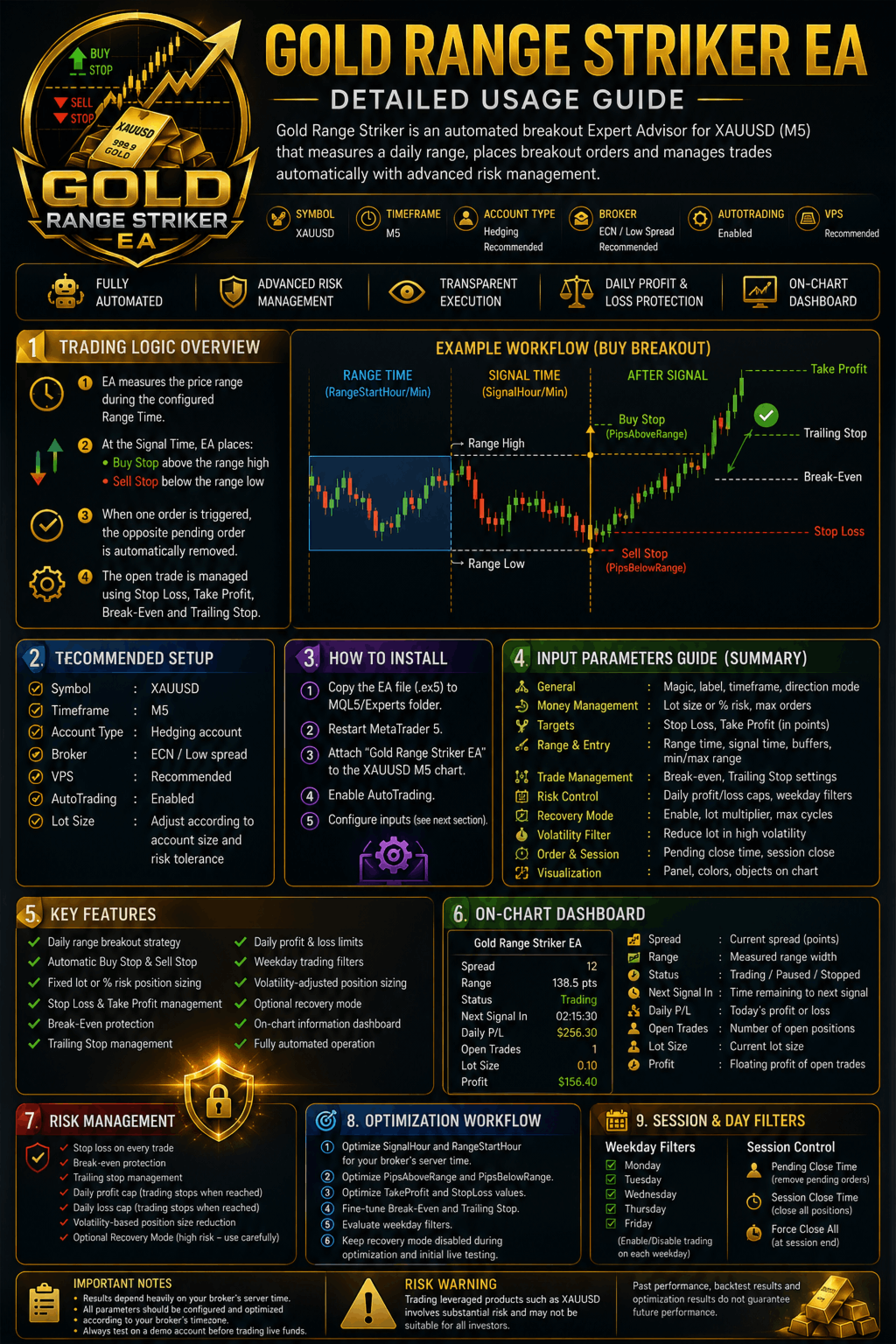
Gold Range Striker is an automated XAUUSD Expert Advisor for MetaTrader 5 built around a daily range breakout strategy. The EA measures a predefined trading range, places pending breakout orders above and below that range, and automatically manages trades using stop loss, take profit, break-even protection and trailing stops.
Designed for XAUUSD on the M5 timeframe, Gold Range Striker combines transparent trade execution, configurable risk management and session-based breakout logic in a fully automated trading system.
Important: Results depend heavily on your broker's server time. The range and signal timing parameters should be configured and optimized according to your broker's timezone.
Trading Logic
Gold Range Striker follows a straightforward breakout approach:
- The EA measures a predefined price range during the configured session.
- At the signal time, it places:
- A Buy Stop above the range high
- A Sell Stop below the range low
- When one pending order is triggered, the opposite pending order is automatically removed.
- The open trade is managed using:
- Stop Loss
- Take Profit
- Optional Break-Even Protection
- Optional Trailing Stop
- Untriggered orders can be automatically removed at a specified time.
- Optional daily profit and loss limits can stop trading for the remainder of the day once reached.
Key Features
- Daily range breakout strategy
- Automatic Buy Stop and Sell Stop placement
- Fixed lot or percentage-risk position sizing
- Automatic stop loss and take profit management
- Break-even protection
- Trailing stop management
- Daily profit and loss caps
- Weekday trading filters
- Volatility-adjusted position sizing
- Optional recovery mode
- On-chart information dashboard
- Fully automated operation
Recommended Setup
- Symbol: XAUUSD
- Timeframe: M5
- Account Type: Hedging account recommended
- Broker: ECN / low-spread broker recommended
- VPS: Recommended for uninterrupted execution
- AutoTrading: Enabled
- Lot Size: Adjust according to account size and risk tolerance
Always test on a demo account before trading live funds.
Risk Management
Gold Range Striker includes multiple risk-control mechanisms:
- Fixed lot or percentage-risk position sizing
- Stop loss protection on every trade
- Break-even functionality
- Trailing stop management
- Daily profit cap
- Daily loss cap
- Volatility-based position size reduction
Optional Recovery Mode
The EA includes an optional recovery mode that increases position size following losing trades.
Recovery mode is disabled by default.
This feature can significantly increase drawdown, account volatility and overall trading risk. Users should fully understand the risks associated with position-size scaling before enabling it.
Parameters & Tuning Guide
General
- InpOrderLabel – text tag on every order. Cosmetic.
- InpMagic – unique ID so the EA only manages its own trades. Change it if running multiple EAs on the same account.
- InpExecTF – execution timeframe. Recommended: M5.
- InpDirectionMode – trade both directions, buy-only or sell-only.
Money Management
- InpBaseVolume – fixed lot size per trade.
- InpAutoRiskPercent – if greater than zero, position size is calculated automatically based on account balance risk percentage and BaseVolume is ignored.
- InpMaxCycleOrders – maximum simultaneous filled trades.
Targets (1 pip = 0.01 on XAUUSD)
- InpTakeProfitPts – take profit distance.
- InpStopLossPts – stop loss distance.
Range & Entry Placement
- InpRangeStartHour/Min – range measurement start time.
- InpSignalHour/Min – breakout signal time.
- InpPipsAboveRange – Buy Stop buffer above range high.
- InpPipsBelowRange – Sell Stop buffer below range low.
- InpMinRangePts – minimum allowable range width.
- InpMaxRangePts – maximum allowable range width.
Break-Even Protection
- InpUseBreakEven – enable/disable break-even.
- InpBreakEvenTrigger – profit required before activation.
- InpBreakEvenLock – amount of profit locked in.
Trailing Stop
- InpUseTrailing – enable/disable trailing.
- InpTrailingActivation – profit required before trailing begins.
- InpTrailingDistance – trailing stop distance.
- InpTrailingStep – minimum movement before stop adjustment.
Recovery Mode
- InpCycleRecovery – enable/disable recovery mode.
- InpVolumeScaling – lot multiplier after losses.
- InpMaxRecoveryCycles – maximum recovery sequence length.
- InpRecoveryProtectF – recovery reset protection factor.
Volatility Adjustment
The volatility filter does not prevent trading. Instead, it reduces position size when market volatility exceeds the configured threshold.
- InpUseVolFilter – enable/disable filter.
- InpVolAvgPeriod – averaging period.
- InpVolMultiplier – high-volatility threshold.
- InpVRFLotReductionPct – percentage lot reduction.
Session & Day Filters
- InpTradeMonday – InpTradeFriday – enable or disable trading on individual weekdays.
Order & Session Control
- InpPendingCloseHour/Min – remove unfilled pending orders.
- InpForceCloseAll – close all positions at session end.
- InpSessionCloseHour/Min – session close time.
Daily Trading Limits
- InpDailyProfitCap – daily profit target before trading stops.
- InpDailyLossCap – daily loss limit before trading stops.
Execution Settings
- InpExecTolerancePts – maximum slippage.
- InpOrderExpirySecs – pending order expiry period.
Visual Settings
- InpShowPanel – show/hide dashboard.
- InpPanelX / InpPanelY – dashboard position.
- InpDrawObjects – display range and trade markers.
- InpApplyChartTheme – apply chart theme.
- InpAccentColor / InpBuyColor / InpSellColor – visual color settings.
Optimization Workflow
For best results:
- Optimize SignalHour and RangeStartHour for your broker's server time.
- Optimize PipsAboveRange and PipsBelowRange.
- Optimize TakeProfit and StopLoss values.
- Fine-tune Break-Even and Trailing Stop settings.
- Evaluate weekday filters.
- Keep recovery mode disabled during optimization and initial live testing.
Risk Warning: Trading leveraged products such as XAUUSD involves substantial risk and may not be suitable for all investors. Past performance, backtest results and optimization results do not guarantee future performance.