Universal Trade Copier MT4
- Experts
-
Andrei Strashko
 About Us
We are professional traders and experienced developers of Expert Advisors (EAs), trading indicators, and trading utilities for MetaTrader 4 and MetaTrader 5. - Version: 4.7
- Updated: 23 September 2026
- Activations: 15
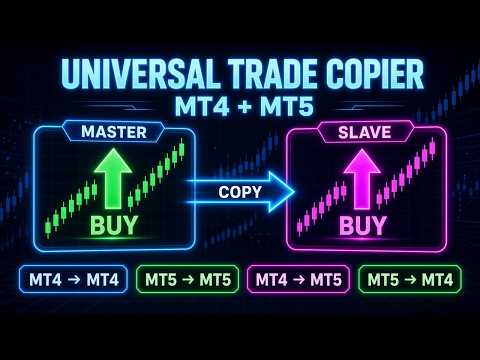
Universal Trade Copier MT4 is a professional local trade copying utility designed to copy trading operations between MetaTrader 4 and MetaTrader 5 terminals running on the same computer or VPS.
The product supports several copying directions:
MT4 → MT4
MT5 → MT5
MT4 → MT5
MT5 → MT4
This version is designed for MetaTrader 4. Copying trades involving a MetaTrader 5 terminal requires a separate compatible version for MT5.
The copier is suitable for traders who manage multiple accounts, use different MetaTrader terminals, work with different brokers, or need to copy trades between MT4 and MT5 accounts.
IMPORTANT — How to download and test
- Log in to your MQL5 account in the terminal: Tools → Options → Community (use your MQL5 login, not e-mail).
- Connect the terminal to any trading account (a demo account is fine).
- Open the Market tab → find the product → click Download / Buy.
- The demo version works only in the Strategy Tester (backtesting). It cannot be attached to a live or demo chart.
Main Features
Copying Buy and Sell market orders.
Copying Buy Limit, Sell Limit, Buy Stop, and Sell Stop pending orders.
Copying Stop Loss and Take Profit levels.
Copying SL/TP modifications.
Copying pending order modifications.
Copying trade closures.
Copying partial closures.
Lot multiplier mode.
Fixed lot mode.
Risk percentage lot calculation mode.
Symbol mapping for different brokers.
Slippage control.
Maximum number of trades limit.
Magic Number filter.
Current symbol only copying mode.
Local copying through the Common Files folder.
Flexible Copying Direction
The same product can be used as either a Master or a Slave. The copying direction is selected in the Expert Advisor settings.
For example:
An MT4 terminal can be the Master and an MT5 terminal can be the Slave.
An MT5 terminal can be the Master and an MT4 terminal can be the Slave.
An MT4 terminal can copy trades to another MT4 terminal.
An MT5 terminal can copy trades to another MT5 terminal.
Lot Management
The copier supports several lot calculation modes:
Lot Multiplier — copies the original lot size using a multiplier, such as 0.5x, 1x, or 2x.
Fixed Lot — all copied trades are opened using a fixed lot size.
Risk Percent — calculates the lot size based on the specified risk percentage.
Symbol Mapping
If different brokers use different names for the same trading instruments, symbol mapping can be configured manually.
Examples:
EURUSD=EURUSDm
GBPUSD=GBPUSD.pro
XAUUSD=XAUUSDm
This is useful when copying trades between different brokers or different account types.
Important Information
The copier works locally, so all terminals must be running on the same computer or VPS.
For MT5 accounts, hedging accounts are recommended. On netting accounts, positions for the same symbol may be combined.
Before using the copier on a live account, test it on demo accounts and carefully check all settings.
Who It Is Suitable For
Traders who manage multiple accounts.
Traders who use MT4 and MT5 simultaneously.
Account managers.
Trading signal providers.
Prop traders.
Users who need local trade copying between different MetaTrader terminals.