
Multi Currency Strength Dashboard PRO
- Indicators
-
Prime Horizon
 MT5 and MT4 developer. Market structure, Smart Money Concepts and risk management tools.
 - Version: 3.12
- Updated: 7 September 2026
- Activations: 10
Currency strength meter and dashboard for MetaTrader 5
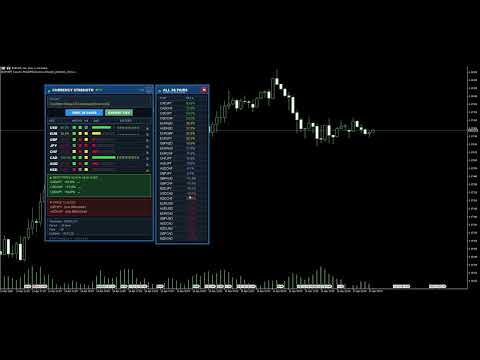
This currency strength indicator reads up to 28 forex pairs and turns them into one number per currency, for the 8 majors: USD, EUR, GBP, JPY, CHF, CAD, AUD and NZD. It combines a currency strength meter, a multi-timeframe agreement matrix, a strength history sparkline per currency, a best and worst pair finder, a 28 pairs differential panel, CSV export, one-click chart switching and configurable alerts, in a single dashboard on your MetaTrader 5 chart. Three calculation engines are available: price change, RSI momentum, and a hybrid of both.
What you see on the chart
- A ranked strength bar for each of the 8 currencies, with its percentage
- A multi-timeframe matrix: three timeframes per currency, side by side, so you see whether the short term agrees with the higher timeframe
- A strength history sparkline on every row: the last 15 readings, so a currency that is gaining is not confused with one that is giving back
- Best pairs: the widest strength differentials, ranked. Click one and its chart opens
- Pairs to avoid: two currencies moving together leave nothing to trade, and they are listed rather than hidden
- A 28 pairs panel, one click away, with every differential at once
- A CSV export of the current readings, written to your MQL5 Files folder
- A different alert sound per event, so you know whether a currency turned strong, turned weak or a pair appeared, without looking at the screen, and a compact mode that folds the panel down to its header
How to use it
- Drop the indicator on any chart. It reads the market, not the chart symbol
- Check the Pairs line at the bottom of the panel: it should read 28 on a broker offering the majors and minors
- Set the calculation timeframe and period to match how you trade: M15 to scalp, H1 intraday, H4 to swing
- Look for a wide gap between a strong currency and a weak one, then check that the three timeframe squares agree
- Take the setup to your own chart and your own rules: this panel filters, it does not trade
User guide included: ask for it by message in the MQL5 chat.
Settings
Calculation: CalculationMode (price change, RSI momentum or hybrid), CalculationTimeframe, CalculationPeriod, RSI_Period, UseMultiTimeframe, SmoothResults, SmoothingPeriod. Multi-timeframe matrix: ShowTFMatrix, TF1, TF2, TF3. History: ShowSparklines. Dashboard: ShowDashboard, PanelX, PanelY, PanelWidth, BarWidth, FontSize, colours for strong, medium and weak. Broker symbols: SymbolSuffix, SymbolPrefix. Display: UIScalePercent. Pairs: ShowBestPairs, MinStrengthDiff, ShowWorstPairs. Alerts: EnableAlerts, AlertOnStrongCurrency, AlertOnWeakCurrency, AlertOnBestPair, EnablePushNotifications, EnableSoundAlerts, SoundStrong, SoundWeak, SoundBestPair. DashboardMinimizable.
Compatibility
MetaTrader 5, any broker offering the major and minor forex pairs. Symbols carrying a suffix or a prefix, such as EURUSD+, EURUSD.raw, EURUSD.a or mEURUSD, are resolved automatically from your own chart symbol, and a SymbolSuffix input is there if a broker uses an unusual naming. The panel scales with the Windows display scaling, is dragged by its header and remembers where you put it. The indicator reads price data only: it places no orders. A native MetaTrader 4 version exists under the name Multi Currency Strength Dashboard PRO MT4.
Questions
Send me a message here on MQL5. I answer, with no time limit.
Trading involves risk of loss. This indicator is an analysis tool, not trading advice.












































This is an excellent trading indicator and a must have tool! The Author has been exceptionally helpful and quick to respond to any query. I give it 10 stars!!