SMC Signal Matrix MT5
- Indicators
-
Prime Horizon
 MT5 and MT4 developer. Market structure, Smart Money Concepts and risk management tools.
 - Version: 1.10
- Updated: 9 September 2026
- Activations: 5
Multi-symbol SMC scanner and dashboard for MetaTrader 5
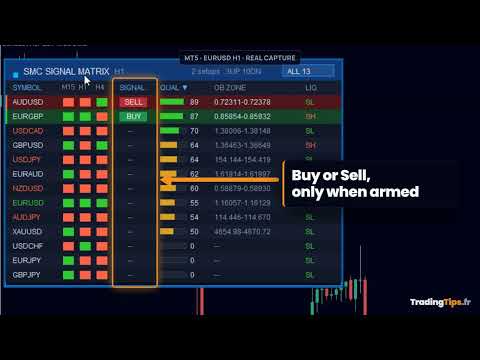
This Smart Money Concepts scanner reads your whole symbol list and puts one row per symbol on a single dashboard. For each symbol it runs the same SMC engine: market structure with break of structure and change of character, order blocks, fair value gaps and liquidity. Each row shows the structure trend on three timeframes, a Buy or Sell signal, a confluence score from 0 to 100, the nearest unmitigated order block and the latest liquidity sweep. Instead of loading one chart at a time, you read the market structure of your entire watchlist in one matrix, with sorting, filtering, one-click chart switching and alerts.
What you see on the panel
- One row per symbol, from your own list: forex, metals, indices or crypto
- A multi-timeframe trend strip: the structure trend on three timeframes of your choice, side by side, so you see whether the short term agrees with the higher one
- Signal: Buy or Sell, printed only when the confirmed trend and an order block align and price returns into the zone. An actionable setup, not a permanent bias, so most rows show nothing
- Quality: a confluence score from 0 to 100, built from order block strength, price proximity to the zone, structure freshness, timeframe alignment and liquidity
- OB Zone: the price of the nearest unmitigated order block in the trend direction
- Liquidity: the most recent sweep, high or low, on each symbol
- A filter button that shows how many rows it displays, and headers you can click to sort by symbol, by signal direction or by quality
- A live summary in the title bar: how many setups are armed, how many symbols are trending up and how many down
- Alerts when a symbol turns to Buy or Sell, on candle close: popup, push notification, email or sound
How to use it
- Drop the indicator on any chart. It reads your symbol list, not the chart symbol
- Check the row count on the filter button: it should match the number of symbols you configured
- Set the scan timeframe to match how you trade, and pick the three timeframes of the trend strip
- Sort by quality to bring the strongest setups to the top, or click the filter to keep only the symbols currently printing a signal
- Click a row to switch your chart to that symbol, then apply your own rules: this panel reads structure, it does not trade
User guide included: ask for it by message in the MQL5 chat.
Settings
Symbols and timeframe: InpSymbols (your own comma separated list), InpScanTF, InpSymbolSuffix, InpRefreshSec. Engine, matching the Market Structure Order Block Dashboard defaults: InpSwingStrength, InpMaxBars, InpMaxOB, InpFVGMinPips, InpEqualTolerance, InpMinTouchesLiq, InpMaxLiquidity, InpMaxFVG, InpSweepLookback, InpGMTOffset. Signal definition: InpSignalMaxAge (how many bars a break stays valid) and InpProximityATR (how close price must be to the zone). Display: InpUIScalePercent, InpDashX, InpDashY, InpFontSize, InpOnlySignals, InpSortBy. Alerts: InpEnableAlerts, InpPopup, InpPush, InpEmail, InpSound, InpSoundFile. Trend strip: InpShowMTFStrip, InpMTFa, InpMTFb, InpMTFc.
Compatibility
MetaTrader 5, any broker. Symbols carrying a suffix or a prefix, such as EURUSD+, EURUSD.raw, EURUSD.a or mEURUSD, are resolved automatically from your own chart symbol, and an InpSymbolSuffix input is there if a broker uses an unusual naming. The panel scales with the Windows display scaling, is dragged by its title bar and rebuilds itself after a terminal restart. All values are read on closed candles, so the panel does not repaint the current bar. This is a multi-symbol indicator: the Strategy Tester cannot supply history for every symbol at once, so run it on a live or demo chart, not in the tester. It reads price data only: it is not an automated trading robot, it places no orders and it does not predict price. For deep single-chart analysis of order blocks and structure, see Market Structure Order Block Dashboard MT5; for currency strength across 28 pairs, see Multi-Currency Strength Dashboard PRO MT5.
Questions
Support is through MQL5 messaging: send me a message here. I answer, with no time limit.
Trading involves risk of loss. This indicator is an analysis tool, not trading advice.