 MetaTrader 5
 Experts
 Indicators
 Libraries
 Utilities
 Widgets
 Rules
Rules
Watch the Market tutorial videos on YouTube
How to buy а trading robot or an indicator
Run your EA on
virtual hosting
virtual hosting
Test аn indicator/trading robot before buying
Want to earn in the Market?
How to present a product for a sell-through
New trading utilities for MetaTrader 5 - 68
 Below are trading programs simplifying trading in MetaTrader 5. Hover over a utility to read its description and purpose.
Introducing the Precision Data Extractor: LWMA , an MQL5 utility crafted for traders, analysts and quants who need accurate historical data to build robust datasets. This tool lets you selectively pull historical price and indicator data— Linear Weighted Moving Average ( LWMA )—from multiple applied prices, timeframes, and periods, then stores it in a CSV format, making it easy to feed into machine learning models , trading algorithms , or in-depth market analyses . Compatible with Fo
Introducing the Precision Data Extractor: SMMA , an MQL5 utility crafted for traders, analysts and quants who need accurate historical data to build robust datasets. This tool lets you selectively pull historical price and indicator data— Smoothed Moving Average ( SMMA )—from multiple applied prices, timeframes, and periods , then stores it in a CSV format, making it easy to feed into machine learning models, trading algorithms , or in-depth market analyses . Compatible with Forex , S
Introducing the Precision Data Extractor: RSI , an MQL5 utility crafted for traders, analysts and quants who need accurate historical data to build robust datasets. This tool lets you selectively pull historical price and indicator data— Relative Strength Index ( RSI )—from multiple applied prices, timeframes, and periods , then stores it in a CSV format, making it easy to feed into machine learning models, trading algorithms, or in-depth market analyses . Compatible with Forex, Stocks

Introducing the Precision Data Extractor: ATR , an MQL5 utility crafted for traders, analysts and quants who need accurate historical data to build robust datasets. This tool lets you selectively pull historical price and indicator data— Average True Range ( ATR )—from multiple timeframes and periods , then stores it in a CSV format, making it easy to feed into machine learning models , trading algorithms , or in-depth market analyses . Compatible with Forex , Stocks , and Commodit

Maximize or restore the main chart or indicator windows by double-clicking them.
Double-clicking a main chart window will hidden all the indicator windows and expand the main chart to the maximum. Double-clicking again to restore.
Double-clicking an indicator window will hide all the other indicator windows and expand the double-clicked indicator window to the free space. Double-clicking again to restore.
FREE

Hey, traders! Today, I’m excited to introduce the Trend Reversal Pro , an indicator designed to help you spot trend reversals quickly and efficiently. If you're looking to improve your market entries and exits, stick around to see how this powerful tool works. What is the Trend Reversal Pro? The Trend Reversal Pro analyzes market highs and lows to identify potential reversals. It does this by calculating a percentage average of previous highs and lows and comparing them to the current trend. Thi

G Spikes Trade Assistant G Spikes Trade Assistant is a MetaTrader 5 utility panel designed to help users manage manual trading actions more efficiently. It provides quick access to order execution, stop-loss settings, target-price settings, and position-management controls from the chart. Main features Buy and Sell market order buttons. Pending order options. Stop-loss and target-price management. Close All and selected close options. Customizable display settings and trade comments. Interface t
FREE

G Trade Broker Check – Instantly Evaluate Broker Performance Across Multiple Accounts and Leverage Settings
Take your trading to the next level by analyzing your broker’s performance in real time! With G Trade Broker Check , traders can effortlessly track their broker’s behavior over the past 24 hours on any symbol added to the Market Watch in MT5. Whether you’re comparing multiple brokers, testing different account types, or analyzing varying leverage setups, this powerful Expert Advisor prov
FREE

Custom Alerts: Monitor Multiple Markets and Never Miss a Key Setup Overview
Custom Alerts is a dynamic solution for traders who want a consolidated way to track potential setups across multiple instruments. By integrating data from our flagship tools—such as FX Power, FX Volume, FX Dynamic, FX Levels, and IX Power— Custom Alerts automatically notifies you of crucial market developments without juggling multiple charts or missing prime opportunities. With support for all asset classes your brok

Chart Buddy is an entertainment tool designed to add fun to your trading charts. A character moves along the right side of the chart, giving the impression that it's cheering on the price movement, adding a unique and enjoyable touch to your trading experience. While it doesn't affect your trades directly, the animations provide a lighthearted distraction and make it feel like you have a personal supporter. Key Features: Price Movement Supporter : The character moves in response to price directi
FREE
Prop Firm data: the most important information on the chart The indicator will help you to quickly monitor current and closed trades . Especially useful when you are not allowed to go beyond certain limits . The alerts option will help you to prevent unwanted results . Multifunctional utility : includes 66+ features | Contact me if you have any questions | MT4 version 6 categories of information that can be displayed Current market data : Swap, Spread, Average spread. Floating po

Order trailing: g et the best execution price as the market moves Trailing of pending orders will allow you to maintain the distance to the entry price at the specified distance. T he order will move if the market price moves away from it Multifunctional utility : 66+ features, including this tool | Contact me if you have any questions | MT4 version To activate the Order Trailing, you need to set the main 4 parameters (on the panel): 1. Symbol or Trade for which the trailing will be ap
Automatic SL and TP placement Levels will be created automatically for trades that do not yet have SL / TP levels set yet. It may be convenient if you execute trades from your mobile phone. Multifunctional utility : 65+ features, including this tool | Contact me if you have any questions | MT4 version To activate the Auto-Levels, you need to set the main 4 parameters (on the panel): 1. Symbol for which the function will be applied: for a specific [Symbol] / or for [ALL] symbols. 2. T

Trade Saver Service
Application Type: Service
Application Features: Automated search and saving of trading results for multiple systems into text files for further analysis About the Application The service automatically saves the results of closed positions for a list of trading systems into text files, creating a personalized file for each system. How to Use Parameters: LOG_LEVEL - Logging level in the terminal’s Experts section. DEBUG provides the most detailed logs, while ERROR provides m
FREE

Trade Panel – The Smart Trading Tool for Every Strategy Elevate your trading experience with Trade Panel , designed for traders of all levels. Whether you are a beginner or a seasoned professional, this platform simplifies trading with powerful features to efficiently manage your portfolio. Key Features Flexible Lot Size Adjustment Manually adjust lot sizes to suit your trading needs. Utilize the automatic lot sizing feature to align your trades with your desired risk percentage (% Risk) for

CoinMarketCap Price Fetcher- Real-Time Cryptocurrency Prices via CoinMarketCap
Overview:
The CoinMarketCap Price Fetcher is a powerful tool designed for traders and developers who want real-time access to cryptocurrency prices directly within the MetaTrader 5 (MT5) platform. It seamlessly integrates with the CoinMarketCap API to retrieve live cryptocurrency price data, including Bitcoin (BTC), Ethereum (ETH), and hundreds of other coins, with automatic updates at your chosen intervals (e.g.,

Gmail to MT5 is a tool that automates the process of transferring trading signals from your Gmail inbox directly to your MetaTrader 5 trading platform. It's a bridge that connects these two platforms, allowing you to receive and execute trades based on information sent via email. No DLL, no .exe, and no external software
Can receive TradingView signals Would you like more features? We'd be glad to implement them based on your needs How to set up: Create an app password at https://myaccount.googl
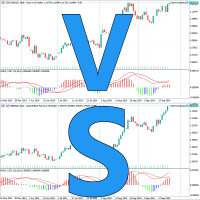
Introducing Chart Compare - Your Ultimate Multi-Chart Synchronization Tool Now on sale for $39 (regularly $59) Seamlessly synchronize multiple charts for instant insights. Key Features: Blazing-fast synchronization: Event-driven technology ensures smooth and immediate updates across all charts. Lightweight and efficient: Minimal system resource usage for optimal performance. Quick comparisons: Easily compare similar instruments side-by-side. Years of refinement: Proven reliability and continuous
Automatic trade copier between local terminals A variety of options will allow you to customize the utility according to your needs, while the configuration process is understandable even for a beginner. Multifunctional utility : includes 66+ features | Contact me if you have any questions This version is only for MT5 . To also copy between MT4 - you will need to buy the MT4 version There are 2 modes available : Send trades from the terminal; Receive and copy trades from other terminals
Track the current drawdown and history of closed trades for the selected period A variety of options will allow you to customize the indicator according to your needs Multifunctional utility : includes 66+ features | Contact me if you have any questions | MT4 version 2 values that can be displayed : Current drawdown ( or gain ) of open trades ; The result of all closed trades, for the selected time period ( statistics ) ; Available filters , e ach can optionally be turned
Write notes directly on the chart and use your observations when trading The option to synchronize reminders between S ymbols allows you to remember important information about the current market state Thus , this utility will help you avoid a situation where important information that you noticed earlier was missed when trading . Multifunctional utility : 66+ features, including this tool | Contact me if you have any questions | MT4 version Settings: The method of syncing notes : S

HiperCube Protector is here! Discount code for 20% off at Darwinex Zero: DWZ2328770MGM_20
HiperCube Protector is the simpliest and easy drawdown Limiter to get the control of your account!, this tools aim to protect your account in real time, use a Max drawdown or StopLoss setting.
Features: Control DrawDown by Percent or Money, based on Balace of your account Friendly and elegent interface to see data in real time Send Notifications to Telegram, Push up Notificiations on your MT5 app , and
FREE
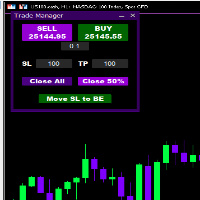
Introducing * *Trader Manager** for MetaTrader 5 - the most efficient tool for managing your trades and it's free! This smart assistant automatically sets **Stop Loss** and **Take Profit** immediately after opening a trade, saving you time and reducing the risk of errors.
With the ability to set a **Maximum Daily Loss** , you'll protect yourself from the dangers of **overtrading** and keep control of your finances.
Plus, you'll get a host of other features for easy position management: -
FREE
XC Trade Manager for MT5 Manage Your Trades with Precision and Ease
Welcome to XC Trade Manager, the ultimate solution for traders seeking efficient and intuitive trade management on the MT5 platform. Developed by xignalcoding.com, our seventh product in the MQL5 Market lineup, the XC Trade Manager is designed to streamline your trading experience, allowing you to focus on what truly matters—making informed trading decisions. Key Features 1. Orders Tab Effortlessly place and manage your trades
ENJOY FREE TESTING FROM OUR WEBSITE
DAILYTARGET_GUARD is a cutting-edge trading expert designed to maximize profits while minimizing risk through intelligent and automated position management. Perfect for traders seeking precision control over their operations, this bot offers advanced and customizable features tailored to fit your trading strategy. Key Features: Automated Position Management: Adjust your Stop Loss , Take Profit , and lot sizes to match your trading preferences. The bot manages

Simple Telegram Notification – Stay Informed on Your MT5 Trading Activity! Stay connected with your MetaTrader 5 trading activity using Simple Telegram Notification , the Expert Advisor that sends real-time notifications to your Telegram app whenever orders are opened, modified, or closed . Whether you're at your desk or on the move, you’ll always be up-to-date with critical trading information. Key Features: Order Notifications : Receive instant Telegram alerts whenever an order is opened, mod

Dobiforex AI Service is a specialized platform offering smart trading assistance for forex traders. This assistant leverages advanced real-time market analysis to help traders make more informed decisions in their trading strategies. By signing up on the Dobiforex website and accessing their dedicated panel, users can integrate this intelligent service into their trading platform. Dobiforex, using advanced algorithms and machine learning, processes market data in real-time, delivering accurate

Discover the Forex Unlimited Tool – Your Ultimate Position Manager for MT5 Ready to take your trading to the next level? With our Forex Unlimited Tool, you no longer have to manually calculate your risk or second-guess your capital allocation. We have developed an advanced, user-friendly position management tool available in two versions : one for MetaTrader 4 and one for MetaTrader 5 . Please make sure you select the correct version that matches your trading platform when making your purchase,

MULTI TIMEFRAME BREAK OUT SCANNER
This tool implements analysis of candle stick patterns to plot break out zones on multiple timeframes. It is key to be able to see the bigger picture when trading . Being able to view signals from this powerful in real time across multiple timeframes not only save in analysis but are also key indicators of current market conditions and can help a trader identify when the market is trending or ranging . When signals coincide across multiple timeframes big marke
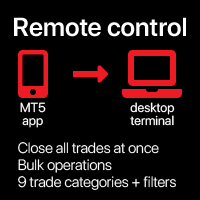
Close all trades at once , managing directly from your mobile MT5 app . This utility can close 9 different categories of trades. To activate the action , you just need to place a pending order at a predetermined price (can be done remotely via a mobile MT 5 app ).
After that , the utility will detect the order and close all necessary trades. This way you can manage a group of trades quickly. Multifunctional utility : includes 66+ features | Contact me if you have any questions |

Chart Link Auxiliary Tool: This tool acts as an interface between the open charts in MetaTrader and the expert on the main chart. Many multi-timeframe experts require this file to communicate with the open charts on the screen. You can easily connect your chart to the expert on the main chart by running this tool on your chart. The primary function of this file is to send all events that occur on the open chart to the expert on the main chart. For instance, if the main chart places a guideline o
FREE

This script is designed for traders who need to quickly place trades across multiple currency pairs during critical news releases, where every second counts. With this tool, you can pre-select your desired currency pairs and assign independent volumes for each one. When a major news event hits, such as Non-Farm Payroll (NFP) or PMI data releases, the script allows you to execute all your trades instantly without the need to open each pair manually. Key Features: Customizable Pairs : Choose from
FREE

This expert advisor automatically sets the stop loss and take profit for your position once you have opened it, with a point ratio that you define in advance. No more worrying about where to place your stops or not following your strategy. Problem solved, traders. You just need to enter your values in the ‘Input’ tab, and the parameters are set for execution. This Advisor does everything for you. Any recommendations or suggestions, we are open to a new version. ONLY HANDLE ONE POSITION AT A TIME

Position Limit Monitor: Efficient Control of Your Trading Operations Have you ever worried about having too many open trades simultaneously? Would you like precise control over the maximum number of positions in your account? Position Limit Monitor is the solution you need. Main Features: • Real-time monitoring: Constantly supervises the number of open positions in your account.
• Customizable limit: Easily set the maximum number of positions you want to keep open.
• Automatic closure: When the
Position Limit Monitor Full: Total Control of Your Trading Operations Are you looking for an efficient way to manage both your open positions and pending orders? Position Limit Monitor Full is the all-in-one solution you need to maintain total control over your trading activity. Key Features: Real-time Monitoring: Constantly tracks the number of open positions and pending orders in your account. Customizable Limits: Easily set the maximum number of open positions and pending orders you want to m

The instant trade risk click EA is aimed to help you get into the market as quickly as possible.
You give it your risk percentage, and your risk to reward you're hoping to get, then an option to set only stop loss and no take profit.
With that, every CTRL + Left Click events on the chart would instantly open a position, with the price on the clicked x and y axis as the stop loss, and the open price as the current markets bid/ask price. If you click above the price, it's a Sell position , if yo

Fun fact: Do you know that a 1:2 Risk to Reward earns you less? that is, if you risk $50 you win $100.
There's a better way to do this, if you split your stop loss into 3 and have pending orders with a total risk of the same $50 you can win up to $227.52.
Let's break it down, a GBPUSD 1:2 buy stop position @ 1.3, with 50 pip stop loss and a risk of $50 would win $100. Entry Stop Loss Pips Stop Loss Price Take Profit Pips Take Profit Price Risk Per Pair Volume Profit Entry 1 1.30000 500.00 1.29

GR-Calendar-Trading: Your Ally for Automated Economic Event Management GR-Calendar-Trading is an advanced Expert Advisor for MetaTrader 5 designed to manage your trading operations based on significant economic events, optimizing strategies and protecting your profits. This EA is tailored for traders who want to make the most of economic data without losing control over their trades. Uses the built-in Metatrader calendar. Key Features: Advance notification of important events
Receive a notifica
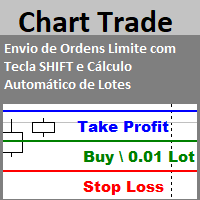
Envio de Ordens Limite com Tecla SHIFT (Cálculo Automático de Lotes) Funcionalidades: Definição de Níveis: Estabeleça os níveis de Stop Loss, Take Profit e o preço da ordem utilizando a tecla SHIFT e cliques do mouse. Cálculo Automático de Lotes: Os lotes são calculados automaticamente com base no risco da conta.(A opção também para usar volume fixo) Gerenciamento de Posições: Botão para fechar todas as posições abertas enviadas pelo EA. Botão para cancelar todas as ordens pendentes enviadas pe
FREE

Brekaut, a powerful and intuitive trading indicator designed to take your trading experience to the next level. Built to simplify market analysis and provide timely insights, Brekaut offers traders a reliable way to identify key breakout opportunities across various asset classes, including stocks, forex, and cryptocurrencies.
Brekaut cuts through the noise by highlighting potential breakout points where the market is poised for strong movement. This allows traders to make informed decisions a
FREE

Centage: Your Smart Trading Bot for Risk Management. Unlike typical trading bots, Centage prioritizes risk management by incorporating an essential feature: it closes all open trades when your account balance reaches a predefined threshold. This feature makes Centage ideal for traders who want to maintain a disciplined approach and avoid emotional decision-making. Let Centage be your reliable partner in the world of trading, while safeguarding your investments with smart balance-based exits. Ce

Enhance Your Trading with News Event Insights In the fast-paced world of trading, news events can significantly impact market prices. Understanding how these events influence price movements is crucial for managing your trades during volatile periods. The News Tool EA is designed to provide insights into both historical and upcoming news events, helping you make informed trading decisions.
This EA cannot run in the strategy tester.
USER GUIDE Key Features: Historical Impact Analysis Underst

EA auto take profit, auto buy/sell, volume manager, sideway trade, trailing open point 1 – Auto open buy/sell EA automatically opens buy or sell according to settings: profit, stoploss, volume. Volume management: total number of orders and fixed size 2 – Auto take profit: take profit with min profit according to settings, take profit button according to min and max profit 3 – Order processing: there are 3 levels of stoploss of position, according to the number of pips set in EA 4 – Side way tra
Simple Telegram Trade Alert
Overview: Simple Telegram Trade Alert is a simple yet effective Expert Advisor designed for MetaTrader 5 (MT5) users who want to receive real-time notifications about their trading activities directly on Telegram. With just a few easy steps, this EA sends alerts when positions are opened or closed, detailing key information like entry price, take profit (TP), stop loss (SL), profit/loss in the account's currency, balance change percentage and total balance. It is p

The Stop Loss Manger - SL Mange With the Stop Loss Manager you can finally sleep peacefully while it effectively manages your risk in stock market trading. Simply set your individual stop loss limits and let the manager trade for you. Never worry about losses again - the Stop Loss Manager takes care of it for you! Get the ultimate support for your trading now and maximize your profits with ease. Join the community of successful traders who swear by Stop Loss Manager today. Function overview: 1.
This Expert Advisor creates charts with seconds Time Frames, that can be customized to any value. Option to load history, allowing analysis of past candles. Can be used with indicators.
It can be used for any asset from any broker. The charts created are opened automatically and updated in real time. Inputs :
Seconds -> How many seconds will the Time Frame be.
Candles History -> How many candles will be loaded on the chart.
Custom Symbol Suffix -> The suffix for the chart to be generated.
Custo

This tool for the MetaTrader 5 trading platform allows setting the stop loss of open positions to breakeven (entry price) plus an adjustable distance in points. The stop loss is only adjusted if the position is already in profit.
Main functions:
Button: A button is displayed on the chart with the text "StopLoss to BreakEven". The color of the button can be customized, by default it is red.
User interaction: When you click the button, for all open positions that are in profit, the stop loss i
FREE

Equity Control expert advisor - this is a tool for controlling your account funds. It allows you to limit the general and daily drawdown, number of simultaneously existing positions, as well as the equity increase. The acceptable general drawdown can be set not only from the current account balance value, but also below this value. Which is convenient if you deal with Prop Firms. Daily drawdown is calculated from the balance value or equity if it is higher than the balance value. If the drawdown

GRInvest Breakeven Manager is an MT5 trade-management Expert Advisor designed to manage existing open positions after entry. Its purpose is to automate breakeven protection, staged partial closes, trailing stops and position management while still giving the trader full manual control over individual trades. The EA does not need to open trades itself . It can manage manual trades and trades opened by other Expert Advisors according to the selected symbol, direction and magic-number filters. The
FREE

Hello Traders. This product is for you who like to copy a signal on MQL5.
Before you go dive deeper, copy some signal and waste some money, it will be better if you know how the signal provider trading style, right?
Sometimes its hard to read history by list and table, it will be easier when you see the position on the chart.
So, this simple utility will help you to plot any history on MQL signal to your trading view. You can analyze how the signal works, and you are able to see how and when t

Flex One is able to open and manage orders based on any indicator. Flex One is ideal for you to automate trades with the signals of an indicator you have or even validate the signals received by an indicator are really profitable. In addition to Flex One opening a source based on any indicator you have, it also has numerous options to manage your trade, among these options you can count on: Partial • You can perform up to two partials. • Different volumes can be set for each partial, always resp

Copy trades locally between MetaTrader terminals with a simple interface and professional risk controls. Use it to mirror trades across accounts, brokers, and platforms in any MT4/MT5 combination. Designed for reliability : supports trade updates such as breakeven, trailing stop, partial closes, and more. User Guide + Demo | MT4 Version Important notes Local Trade Copier MT5 does not work in the Strategy Tester. For a demo, please use the User Guide + Demo link above. To copy to MT4, you will n
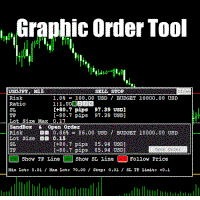
Graphic Order Tool
Graphic panel to help trader to make orders.
Drag TP line, SL line and/or ENTRY line with immediate calculation of the profit and loss in pips and USD.
Risk management: Set % of your balance you can risk in the order to make it safe for your money.
Automatically detect the type of possible order (BUY, SELL, BUY_STOP, SELL_LIMIT, BUY_LIMIT, SELL_STOP) depending on mode (BUY/SELL) and position of lines ENTRY , TP , SL .
Panel is semi-transparent, not to cover the main char

Build an HFT Bot with source code. This specialized algorithm in the bot will build an HFT bot for you, to alter, enhance and optimize to trade by. The algorithm in the bot is a special recipe to build an HFT program. One that you can enhance upon creation. Just follow the steps:
Load the bot on a chart Wait for it to load, could takes some time depending on computer, refresh chart if needed (USE DEMO SO IT WON'T MAKE REAL TRADES WHILE YOU BUILD). THIS IS BEING USED AS A BUILDER NOT AN EA A
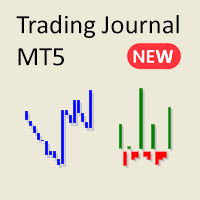
Tired of the cluttered, complex reports in MetaTrader? Say hello to a cleaner, more streamlined way to track your trades. My new Utility/Expert Advisor is designed to provide you with an easy-to-read, minimalist view of your trading performance.
This EA is currently available for free while I gather feedback and continue to improve its functionality. Although I am open to suggestions, please understand that development is proceeding alongside other commitments.
Key Features:
Account Balance
FREE

Master Close via Telegram can help you perform some management tasks on MT4/MT5 remotely via your Telegram by one click, easy to set up & use. Demo here (see more Master Notify Master Control ) ************************************************************************************ LIST OF COMMANDS: info_acc - Get account info info_pen - Get pending orders details info_pos - Get positions details info_pos_sum - Get positions summary
close_pen - Delete all pending orders close_pos_all -

This is a simple tool to display the maximum lot size permitted for any asset based on the size of your account (or more accurately the free margin), and the leverage. It will display the max lot size allowed, and then the script will naturally exit after 3 seconds which gives you enough time to see the information. When you have an active position, it will calculate the maximum number of lots that are left while a position of a certain lot size is already running. Before the script terminates
FREE

To achieve mutual support between MT4 and MT5, and to purchase the MT4 version, please click here>> Main follow-up function: 1. Reverse order capability 2. Cross platform follow-up, ignoring different names 3. Proportional order, magnification and reduction order 4. Compared to a specified currency pair, not compared to a specified currency pair 5. Can be ordered one to many, many to one, any order 6. Other unclear messages

Overview :
The Advanced News Trading Panel is a versatile tool designed for traders who rely on news-based trading strategies. This Expert Advisor (EA) provides an intuitive graphical interface that allows users to quickly set up pending orders and manage risk with ease. With the ability to automatically place Buy/Sell Stop orders based on your pre-set stop order distance from the bid/ask price, stop-loss and take-profit levels, the EA allows for precision trading during high-volatility news eve

Having more expert advisors running on the same account , eventually leads us to the question , which one of them are winners , or which are dragging down the account ? With this in mind I created this simple utility for displaying profits or losses taken by each expert advisor over time . This utility can be run as an expert advisor and can display up to 9 magic number results . If the inputs are left to zero , the results displayed are from the manually placed orders . It also displays deposi
FREE

METATRADER5 This program is designed to monitor and evaluate the market performance of 21 minor currency pairs by tracking key metrics such as maximum spread and the time of occurrence. For each selected currency pair, the program calculates the current spread and compares it against the highest recorded spread. If a new maximum spread is detected, it updates the maximum value and logs the time. The spread information is dynamically displayed, providing insights into market conditions.
Additio
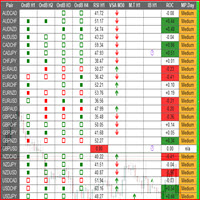
This is a multipurpose indicator and has the following indicators in it with dashboard ( scanner) and chart indicator on multi time frames .
Divergent Bar
Market Profile ( Daily Weekly Monthly Intraday and Custom Period , Market Profile Day type )
Order Block
Inside Bars
Higher High Higher Close and Lower Low and Lower Close
Imbalance Finder
Scalping
Currency Strength Meter
Momentum candles
VSA Setups
Much more See for your self Who am I? - https://www.linkedin.com/in/adnanreh

The trading limiter that stops you from breaking your own daily loss and trade limits.
• Please test the product in the Strategy Tester before purchasing to understand how it works.
• If you face any issues, contact me via private message—I’m always available to help.
• After purchase, send me a screenshot of your order to receive a FREE EA as a gift.
News is thirty seconds away. You have six positions open across four pairs, some long, some short. You do not want to close them — you have

• Please test the product in the Strategy Tester before purchasing to understand how it works.
• If you face any issues, contact me via private message—I’m always available to help.
• After purchase, send me a screenshot of your order to receive a FREE EA as a gift.
Introducing the ultimate Trade Management Panel designed to streamline your trading operations and boost your efficiency! Our advanced panel is packed with powerful features to simplify your trading tasks and provide real-time

More about ATR: www.atr-trading.com
Introducing the Trade Assistant EA, a comprehensive tool designed for traders seeking advanced control. With this manager, you can effortlessly set stop loss and take profit at preferred distances in Points or ATR (Average True Range), and conveniently determine Breakeven and Trailing sizes. Enjoy the flexibility of trailing on candle close or in real-time, utilizing trailing distances based on points or ATR. Adjust Preview SL and TP lines based on % or l

Introducing the SL Limiter Bot: Your Friendly Stop-Loss Management Solution! Take control of your trading like never before with the SL Limiter Bot, a powerful and intelligent tool designed to enhance your risk management strategy on MetaTrader 5 platforms. Say goodbye to manual monitoring and hello to automated precision! Whether manual trading, EA trading, or using Trade Signals, SL Limiter Pro will help you minimize your risk!
Another utility from the Trade Agent Toolbox! Key Features: Advan
FREE

Experience a new level of precision and control with the SL Limiter Pro , an enhanced version of the SL Limiter, now available on MetaTrader 5. Built for serious traders, SL Limiter Pro offers sophisticated features that allow you to manage your trades more effectively and with greater flexibility. Take your trading strategy to the next level with this powerful risk management tool! Whether manual trading, EA trading, or using Trade Signals, SL Limiter Pro will help you minimize your risk! Anoth

The Bot Father: Advanced Trading EA for MetaTrader 5 Unlock the power of automated trading with The Bot Father , an advanced Expert Advisor designed for MetaTrader 5. This sophisticated trading bot combines robust functionality with user-friendly features to help you navigate the forex market with confidence. Key Features: Automated Trading : The Bot Father automates your trading strategies, reducing the need for manual intervention. It continuously monitors the market and executes trades based

A simple script which will trigger a download of your broker's tick data for a specific trading instrument.
Simply add to your chart and it will start the process. You may add the script to multiple charts, enabling you to download tick data for more than one instrument at a time After a short period, the script will stop running and remove itself from your chart. Following this, it may take a few more minutes to finish downloading the tick data.
The Tick Data folder can be found via MetaTrad
FREE

Signal Anywhere is an advanced version of Panel Anywhere , featuring an additional panel called Signal panel. This panel allows you to copy trades from a Signal Anywhere Provider to a Signal Anywhere Subscriber seamlessly. With Signal Anywhere , you can view market symbols and copy signals simultaneously without the need to switch between Expert Advisors (EAs). Features of the Signal panel: Local and internet-based trade copying Searchable, request, and acceptance functionalities Support for mu
FREE
The MetaTrader Market is the best place to sell trading robots and technical indicators.
You only need to develop an application for the MetaTrader platform with an attractive design and a good description. We will explain you how to publish your product on the Market to offer it to millions of MetaTrader users.

You are missing trading opportunities:
- Free trading apps
- Over 8,000 signals for copying
- Economic news for exploring financial markets
Registration
Log in
You agree to website policy and terms of use
If you do not have an account, please register