 MetaTrader 5
 Experts
 지표
지표
 라이브러리
라이브러리
 유틸리티
유틸리티
 위젯
위젯
 규칙
규칙
MetaTrader 5용 새 트레이딩 유틸리티 - 68
 다음은 MetaTrader 5의 거래를 단순화하는 거래 프로그램입니다. 유틸리티의 설명과 목적을 읽으려면 유틸리티 위에 마우스를 놓으십시오.
Equity Control expert advisor - this is a tool for controlling your account funds. It allows you to limit the general and daily drawdown, number of simultaneously existing positions, as well as the equity increase. The acceptable general drawdown can be set not only from the current account balance value, but also below this value. Which is convenient if you deal with Prop Firms. Daily drawdown is calculated from the balance value or equity if it is higher than the balance value. If the drawdown

GRInvest Breakeven Manager is an MT5 trade-management Expert Advisor designed to manage existing open positions after entry. Its purpose is to automate breakeven protection, staged partial closes, trailing stops and position management while still giving the trader full manual control over individual trades. The EA does not need to open trades itself . It can manage manual trades and trades opened by other Expert Advisors according to the selected symbol, direction and magic-number filters. The
FREE

Hello Traders. This product is for you who like to copy a signal on MQL5.
Before you go dive deeper, copy some signal and waste some money, it will be better if you know how the signal provider trading style, right?
Sometimes its hard to read history by list and table, it will be easier when you see the position on the chart.
So, this simple utility will help you to plot any history on MQL signal to your trading view. You can analyze how the signal works, and you are able to see how and when t
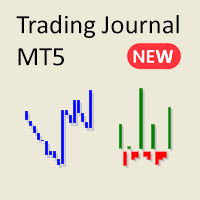
MetaTrader에서 복잡하고 혼란스러운 보고서에 지치셨나요? 이제 거래를 추적할 수 있는 더 깔끔하고 간결한 방법을 만나보세요. 저의 새로운 유틸리티/전문가 어드바이저는 거래 성과를 간단하게 읽을 수 있는 미니멀한 뷰를 제공합니다.
이 EA는 현재 피드백을 수집하고 기능을 개선하는 동안 무료로 제공됩니다. 제안은 열려 있지만, 개발이 다른 의무와 병행해서 진행되고 있음을 양해해 주시기 바랍니다.
주요 기능:
계좌 잔액 라인 차트 간단한 라인 차트를 통해 시간 경과에 따른 계좌 잔액의 변화를 추적할 수 있습니다. 계좌의 성과를 즉시 확인하고, 거래 기록에서 트렌드를 한눈에 파악할 수 있습니다.
승패 비율 막대 그래프 매일 거래 세션 별로 수익과 손실을 시각화합니다. 녹색 막대는 수익 거래를, 빨간색 막대는 손실 거래를 나타내어 좋은 거래일과 나쁜 거래일을 빠르게 식별할 수 있습니다. 거래를 마감하면 차트가 즉시 업데이트됩니다.
상세 통계 테이블 이 EA는 거래 성과를 분
FREE

Flex One is able to open and manage orders based on any indicator. Flex One is ideal for you to automate trades with the signals of an indicator you have or even validate the signals received by an indicator are really profitable. In addition to Flex One opening a source based on any indicator you have, it also has numerous options to manage your trade, among these options you can count on: Partial • You can perform up to two partials. • Different volumes can be set for each partial, always resp

Master Close via Telegram can help you perform some management tasks on MT4/MT5 remotely via your Telegram by one click, easy to set up & use. Demo here (see more Master Notify Master Control ) ************************************************************************************ LIST OF COMMANDS: info_acc - Get account info info_pen - Get pending orders details info_pos - Get positions details info_pos_sum - Get positions summary
close_pen - Delete all pending orders close_pos_all -

This is a simple tool to display the maximum lot size permitted for any asset based on the size of your account (or more accurately the free margin), and the leverage. It will display the max lot size allowed, and then the script will naturally exit after 3 seconds which gives you enough time to see the information. When you have an active position, it will calculate the maximum number of lots that are left while a position of a certain lot size is already running. Before the script terminates
FREE

Overview :
The Advanced News Trading Panel is a versatile tool designed for traders who rely on news-based trading strategies. This Expert Advisor (EA) provides an intuitive graphical interface that allows users to quickly set up pending orders and manage risk with ease. With the ability to automatically place Buy/Sell Stop orders based on your pre-set stop order distance from the bid/ask price, stop-loss and take-profit levels, the EA allows for precision trading during high-volatility news eve
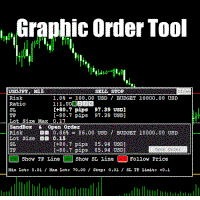
Graphic Order Tool
Graphic panel to help trader to make orders.
Drag TP line, SL line and/or ENTRY line with immediate calculation of the profit and loss in pips and USD.
Risk management: Set % of your balance you can risk in the order to make it safe for your money.
Automatically detect the type of possible order (BUY, SELL, BUY_STOP, SELL_LIMIT, BUY_LIMIT, SELL_STOP) depending on mode (BUY/SELL) and position of lines ENTRY , TP , SL .
Panel is semi-transparent, not to cover the main char

Build an HFT Bot with source code. This specialized algorithm in the bot will build an HFT bot for you, to alter, enhance and optimize to trade by. The algorithm in the bot is a special recipe to build an HFT program. One that you can enhance upon creation. Just follow the steps:
Load the bot on a chart Wait for it to load, could takes some time depending on computer, refresh chart if needed (USE DEMO SO IT WON'T MAKE REAL TRADES WHILE YOU BUILD). THIS IS BEING USED AS A BUILDER NOT AN EA A

More about ATR: www.atr-trading.com
Introducing the Trade Assistant EA, a comprehensive tool designed for traders seeking advanced control. With this manager, you can effortlessly set stop loss and take profit at preferred distances in Points or ATR (Average True Range), and conveniently determine Breakeven and Trailing sizes. Enjoy the flexibility of trailing on candle close or in real-time, utilizing trailing distances based on points or ATR. Adjust Preview SL and TP lines based on % or l

Introducing the SL Limiter Bot: Your Friendly Stop-Loss Management Solution! Take control of your trading like never before with the SL Limiter Bot, a powerful and intelligent tool designed to enhance your risk management strategy on MetaTrader 5 platforms. Say goodbye to manual monitoring and hello to automated precision! Whether manual trading, EA trading, or using Trade Signals, SL Limiter Pro will help you minimize your risk!
Another utility from the Trade Agent Toolbox! Key Features: Advan
FREE

Experience a new level of precision and control with the SL Limiter Pro , an enhanced version of the SL Limiter, now available on MetaTrader 5. Built for serious traders, SL Limiter Pro offers sophisticated features that allow you to manage your trades more effectively and with greater flexibility. Take your trading strategy to the next level with this powerful risk management tool! Whether manual trading, EA trading, or using Trade Signals, SL Limiter Pro will help you minimize your risk! Anoth

To achieve mutual support between MT4 and MT5, and to purchase the MT4 version, please click here>> Main follow-up function: 1. Reverse order capability 2. Cross platform follow-up, ignoring different names 3. Proportional order, magnification and reduction order 4. Compared to a specified currency pair, not compared to a specified currency pair 5. Can be ordered one to many, many to one, any order 6. Other unclear messages

Having more expert advisors running on the same account , eventually leads us to the question , which one of them are winners , or which are dragging down the account ? With this in mind I created this simple utility for displaying profits or losses taken by each expert advisor over time . This utility can be run as an expert advisor and can display up to 9 magic number results . If the inputs are left to zero , the results displayed are from the manually placed orders . It also displays deposi
FREE

METATRADER5 This program is designed to monitor and evaluate the market performance of 21 minor currency pairs by tracking key metrics such as maximum spread and the time of occurrence. For each selected currency pair, the program calculates the current spread and compares it against the highest recorded spread. If a new maximum spread is detected, it updates the maximum value and logs the time. The spread information is dynamically displayed, providing insights into market conditions.
Additio
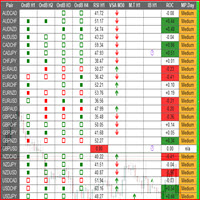
This is a multipurpose indicator and has the following indicators in it with dashboard ( scanner) and chart indicator on multi time frames .
Divergent Bar
Market Profile ( Daily Weekly Monthly Intraday and Custom Period , Market Profile Day type )
Order Block
Inside Bars
Higher High Higher Close and Lower Low and Lower Close
Imbalance Finder
Scalping
Currency Strength Meter
Momentum candles
VSA Setups
Much more See for your self Who am I? - https://www.linkedin.com/in/adnanreh

트레이딩은 불확실성으로 가득 차 있습니다. 심지어 최고 트레이더들도 예상치 못한 문제에 직면할 수 있습니다. 이런 상황이 발생하면 전략을 재평가할 시간이 필수적이지만, 이 시간은 종종 사치일 수 있습니다.
저희의 솔루션이 여기에 있습니다. 원클릭 유틸리티를 사용하면 포지션을 쉽게 헤지하고, 손실 거래를 닫지 않고도 드로우다운을 관리할 수 있습니다. 이렇게 하면 잠시 멈추고 신중한 결정을 내리거나 전문가의 조언을 받을 수 있는 시간을 확보할 수 있습니다.
기능은 다음과 같습니다:
- 단일 클릭으로 모든 포지션을 헤지합니다. - 드롭다운 메뉴에서 선택한 통화를 헤지합니다. - 계정에서 현재 열려 있는 통화를 헤지합니다.
유틸리티 사용 방법:
1. 유틸리티를 설치하고 거래 차트에 연결합니다. 2. 알고리즘 트레이딩 및 자동 트레이딩 기능을 활성화합니다. 3. 필요한 작업을 선택하면 도구가 나머지를 처리합니다. 4. 유틸리티 거래를 추적할 수 있는 마법의 숫자 필드가 제공됩니다

궁극의 **거래 관리 패널**을 소개합니다. 이 패널은 거래 작업을 간소화하고 효율성을 높이기 위해 설계되었습니다! 우리의 고급 패널은 강력한 기능을 갖추고 있어 거래 작업을 쉽게 관리하고 실시간 통찰력을 제공합니다:
- **원클릭 TP 및 SL 관리**: 전체 계정 또는 특정 통화 쌍의 모든 Take Profit (TP) 및 Stop Loss (SL) 레벨을 버튼 하나로 쉽게 삭제할 수 있습니다.
- **실시간 주문 추적**: 전체 계정과 개별 통화 쌍에 대한 총 주문 수, 매수/매도 수량, 및 수익/손실을 실시간으로 보여주는 업데이트로 거래 활동을 정확히 파악할 수 있습니다.
- **수익 및 손실 최적화**: 전체 계정 또는 선택한 통화 쌍에서 모든 수익성 있는 또는 손실이 발생한 주문을 신속하게 종료하여 시장 변화에 빠르게 대응할 수 있습니다.
- **자동 헤징**: 손실이 지정된 비율에 도달하면 자동 헤징을 설정할 수 있습니다. 패널은 SL 및 TP 삭제를 자동으로

다시 오신 것을 환영합니다! 다윈엑스 제로 20% 할인 코드: DWZ2328770MGM_20 오늘은 HiperCube SuperVisor라는 새로운 유용한 도구를 소개하고자 합니다. 이 도구는 동시에 여러 EA를 실행하고, 어려운 감독을 할 때 발생하는 문제를 해결했습니다. 덕분에 1개의 차트에서 최대 5개의 EA를 동시에 볼 수 있고, 각각이 개설된 포지션, 매수 수익, 매도 수익, 총 수익을 볼 수 있습니다.
기능 각 EA에 대한 사용자 정의 이름 원하는 대로 색상을 설정하고, 완벽하게 사용자 정의 가능! 1개의 차트에서 최대 5개의 EA 모니터링 정보 색상은 현재 수익에 따라 변경됩니다. Chat gpt와 AI를 사용하여 개발되었습니다.
지침 감독을 원하는 EA의 동일한 ID/MAGICNUMBER만 설정하면 됩니다. 이 번호는 "HiperCube SuperVisor"가 각 EA에 대한 정확한 정보를 개별적으로 얻는 데 도움이 되기 때문입니다.
FREE

This utility sets the same stop loss and take profit level on several open positions at the same time. It does not open, close or analyse any trade.
Modifying positions one by one in the terminal takes time, and while you are doing it the price can move away. This EA applies the levels you enter to all selected positions in one action, so the whole basket is protected in a single step.
Example
You hold five XAUUSD buy positions opened at 2510, 2508, 2506, 2504 and 2495. You enter 2530 as tak

The Bot Father: Advanced Trading EA for MetaTrader 5 Unlock the power of automated trading with The Bot Father , an advanced Expert Advisor designed for MetaTrader 5. This sophisticated trading bot combines robust functionality with user-friendly features to help you navigate the forex market with confidence. Key Features: Automated Trading : The Bot Father automates your trading strategies, reducing the need for manual intervention. It continuously monitors the market and executes trades based

A simple script which will trigger a download of your broker's tick data for a specific trading instrument.
Simply add to your chart and it will start the process. You may add the script to multiple charts, enabling you to download tick data for more than one instrument at a time After a short period, the script will stop running and remove itself from your chart. Following this, it may take a few more minutes to finish downloading the tick data.
The Tick Data folder can be found via MetaTrad
FREE

Signal Anywhere is an advanced version of Panel Anywhere , featuring an additional panel called Signal panel. This panel allows you to copy trades from a Signal Anywhere Provider to a Signal Anywhere Subscriber seamlessly. With Signal Anywhere , you can view market symbols and copy signals simultaneously without the need to switch between Expert Advisors (EAs). Features of the Signal panel: Local and internet-based trade copying Searchable, request, and acceptance functionalities Support for mu
FREE
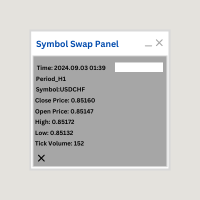
Symbol Swap Panel: Effortlessly switch the active symbol on your chart while simultaneously adding the new symbol to Market Watch. This tool ensures seamless integration and access to real-time market data, optimizing your trading workflow.
Description:
The "Symbol Swap Panel" is a versatile utility designed for traders seeking to manage their chart symbols and Market Watch more efficiently. This tool allows you to easily swap the current symbol on your chart while automatically adding the se
FREE

Signal Anywhere is an advanced version of Panel Anywhere , featuring an additional panel called Signal panel. This panel allows you to copy trades from a Signal Anywhere Provider to a Signal Anywhere Subscriber seamlessly. With Signal Anywhere , you can view market symbols and copy signals simultaneously without the need to switch between Expert Advisors (EAs). Features of the Signal panel: Local and internet-based trade copying Searchable, request, and acceptance functionalities Support for mu

Panel Anywhere with Server is similar to the free version of Panel Anywhere but includes server files and allows you to edit the host URL. In the free version, the host URL is set to "forex.chjonline.com" and cannot be changed. With this version, you can build a complete client-server system in your local environment without worrying about data being sent elsewhere. Additionally, you’ll experience faster internet response times since you won’t be connecting to a server on the other side of the

Turbo Close All is a powerful and versatile script designed to help traders quickly and efficiently manage their trading positions and pending orders on MetaTrader 5. With its advanced features and customizable settings, this script is an essential tool for traders who want to streamline their trading process and maintain control over their positions and orders.
Key Features: Comprehensive Closing Options: Turbo Close All allows you to close all market positions and/or delete pending orders bas

Overview: The TropangFX AutoMgmt is a versatile trading utility designed to enhance your averaging strategy by automatically placing take profit and stop loss orders. This utility empowers traders by integrating a risk calculator and lot-size customization, ensuring that each trade aligns with their risk management preferences and financial goals. Key Features: Automated Take Profit & Stop Loss: Automatically sets take profit and stop loss levels for each trade based on predefined criteria. Ens

Signal Anywhere is an advanced version of Panel Anywhere , featuring an additional panel called Signal panel. This panel allows you to copy trades from a Signal Anywhere Provider to a Signal Anywhere Subscriber seamlessly. With Signal Anywhere , you can view market symbols and copy signals simultaneously without the need to switch between Expert Advisors (EAs). Features of the Signal panel: Local and internet-based trade copying Searchable, request, and acceptance functionalities Support for mu

Automatic scale that shows the distance in pips on the chart, so the user can get a sense of the size of the bar. More options and features will be added over time and as requested by users. The software has been tested on many variables, if there are bugs or errors, please report it describing as best as possible what their cause is and if possible, with a screenshot attached so that I can understand how to fix it. Report it only in English language.

Description ea-PartialClose&VirtualTrailing – fully automated advisor for transaction support. Version = Multi = provides support for any BUY or SELL positions. The adviser almost perfectly averages profit and loss. In open positions, it is recommended to use Stop-Loss, and do not set TakeProfit, which limits profit during sharp surges of the symbol price. The trailing process is virtual, since each movement of the levels that are responsible for a certain part of the position does not modify th
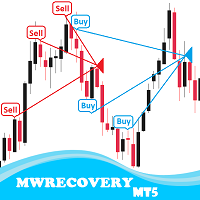
MWRecovery is a system designed to recover unprofitable positions.When the market moves by a certain amount against the direction of a trade and brings it to a loss, the system opens other trades in the same direction at specified intervals. Once these trades reach a certain profit, a magic trailing stop is activated to maximize your profit. How it works : The utility resets StopLoss levels for all processed orders. New trades will be placed if the conditions are met according to what you hav

BuySellClose Hotkeys provides an efficient and rapid way to manage trades with just a single keystroke on your keyboard. This feature allows you to assign specific hotkeys for Buy, Sell, and Close All actions, making your trading experience smoother and faster. Key Benefits: Instant Order Execution: Assign hotkeys to quickly execute buy and sell orders, enabling immediate trade entry without navigating through multiple menus or moving the mouse extensively. Easy Order Closure: Configure a hotke

Metatrader5 Trailing Stop Loss Program Platform Compatibility : This program is designed for the MetaTrader 5 platform. Functionality : The program scans all open Forex currency pair trades on MetaTrader 5 and adjusts their STOP LOSSES to a PROFIT position based on your specified input parameters. Parameters and Example : Example Trade : EURUSD Long (BUY) trade @ 1.0800 STOP LOSS (-50 pips) @ 1.0750 TAKE PROFIT (+50 pips) @ 1.0850 Program Settings : WhenToTrail = 20 PIPS (Pips profit amount to

The Day Trading Price Patterns Scanner is an EA that searches for all Day Trading Price Patterns on the all pairs and send to your Telegram Channel. Scan all the main Price Patterns are introduced in the Ebook Day Trading With Price Action - Galen Wood You won't never miss any potential trading setup.
[ Demo ] [ Manual ] [ Free Indicator ]
Setup
A step by step user guide is available. No knowledge of Telegram API is required; all you need is provided by the developer.
Free Day Trading

Quick Close 1S 는 빠르고 체계적인 거래 관리를 위해 설계된 유틸리티입니다. 깔끔한 컨트롤 패널을 통해 주문을 즉시 열거나 닫고, 유연한 SL/TP 설정을 적용하며, 바스켓 목표를 관리하고 전체 손익을 제어할 수 있습니다. 정확성, 효율성, 명확한 실행을 중시하는 트레이더에게 적합합니다. 주요 기능 간편한 거래 제어: 직관적인 패널에서 특정 주문 유형 또는 전체 주문을 열거나 닫기. 유연한 SL/TP 설정: 개별 주문 또는 전체 바스켓에 고정 또는 캔들 기반 SL/TP 적용. 바스켓 목표 & 트레일링 스탑: 포인트 기준 TP 설정 및 맞춤형 트레일링 스탑 유지. 글로벌 리스크 관리: 설정된 수익 또는 손실 수준(금액 또는 %)에 도달 시 모든 거래 자동 종료. 맞춤형 인터페이스: 매직 넘버, 슬리피지 한도, 클릭 사운드 설정 가능. 이 유틸리티를 사용해 주셔서 감사합니다. 유용하다고 느끼신다면, 개발자의 노력을 인정하는 긍정적인 평가를 남겨주시면 감사하겠습니다. 이 도구는
FREE
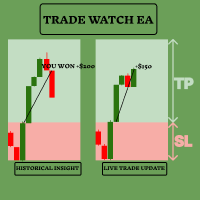
TradeWatch EA로 거래 전략을 향상시키세요 TradeWatch EA는 실시간 통찰력과 거래에 대한 제어를 제공하는 강력한 도구로, 거래 프로세스를 간소화하고 리스크 관리를 개선합니다. 주요 기능: 시각적 거래: 차트에 직접 Stop-Loss 및 Take-Profit 수준을 표시하여 쉽게 모니터링할 수 있습니다. 시각적 표현을 통해 신속한 의사결정을 돕고 리스크 관리를 개선합니다. 포지션 인덱스: 포지션 인덱스 번호를 설정하여 특정 포지션을 모니터링할 수 있습니다 (인덱스는 0부터 시작합니다). 여러 거래를 동시에 관리할 때 유용한 기능입니다. 종합 거래 개요: 하나의 차트에서 모든 거래 및 과거 데이터를 확인할 수 있습니다. 자세한 거래 정보를 쉽게 접근하여 과거 성과를 분석하고 미래 전략을 계획하는 데 도움이 됩니다. 실시간 수익 및 손실 추적: 거래의 수익 또는 손실에 대한 즉각적인 피드백을 제공합니다. 수익을 극대화하고 손실을 최소화하기 위해 적시에 결정을 내리는 데
FREE

Trade shot is a management tool. Automatically closes pending orders at X profit or Y loss. You define the $ you want to earn or lose per trade, the advantage in relation to take or stop loss is that here you define the money to be gained or lost and not based on points. Ideal for Scalp day trade strategies Your trades will easily be better managed based on what you want to win or lose, orders are closed automatically without worrying about managing money.
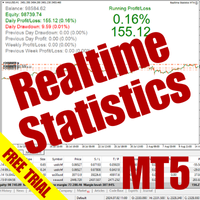
The Realtime Statistics MT5 is an innovative tool designed for traders who want to keep track of their trading performance in real-time. This MetaTrader 5 Expert Advisor (EA) is packed with customizable features that allow you to monitor crucial trading statistics directly on your chart, ensuring you always have the insights you need to make informed trading decisions. Check out the Realtime Statistics MT5 User Guide Here Try out the FREE Realtime Statistics MT5 Demo Here Key Features: Compr

A bot utility designed to streamline trade management. It offers auto lot calculation based on money, account risk, or fixed lot size, with order setup featuring draggable take profit, stop loss, and entry price to fit your plan. It supports Buy/Sell market, Buy/Sell limit, and Buy/Sell stop orders, with or without stop loss and take profit. Additional features include single-click breakeven, deleting positions/orders, and more, making trade management efficient and easy.
FREE

Make Trades in MetaTrader 5 with Profit Panel! If you are a MetaTrader 5 trader, you know how important it is to act quickly and accurately. With this in mind, we created the Profit Panel – an essential tool for negotiations What is the Profit Panel? Designed to make your daily trading easier. It offers a simplified and intuitive interface where you can open, manage and close transactions with just a few clicks. How does it work? The MT5 Trading Dashboard puts all the most important trading func

This custom indicator enhances your MetaTrader 5 trading experience by adding an intuitive crosshair tool that follows your mouse's movement across the chart. Here's what it does:
1. **Real-Time Mouse Tracking**: As you move your mouse over the chart, the indicator dynamically draws a crosshair on the exact point your cursor is hovering over. This crosshair consists of two lines—a horizontal and a vertical line—that intersect at the current mouse position.
2. **Precise Data Reference**: The c
FREE

Overview Custom Logic for Trading MT5 Mini is the free version that designed to execute trades based on custom indicator signals, with robust position management features with break-even settings. This script allows traders to implement their strategies with high precision and flexibility, enhancing their trading efficiency and profitability. Input Parameters Indicator Settings indicator_name : Name of the custom indicator to be used for generating signals. buy_signal : Signal value indicating a
FREE

OrderCalc opens a window in the chart with the data of your orders:
Position size, stop loss, take profit, profit/loss
Only the positions for this symbol are displayed. If several positions exist, these are totalled and displayed in the last line. If you work with pyramids, you can see at a glance how big the total profit or loss is.
M can be used to display information about the symbol: Margin, spread, minimum order size, increment etc. R opens the risk calculator. A click in the chart calc
FREE

Unlock the Power of Automated Trading with Human Intelligence and Advanced Technical Analysis in GOLD (XAUUSD)! Are you ready to take your trading to the next level? Introducing our cutting-edge trading bot, designed for MetaTrader 5 (MT5) users, that seamlessly integrates human intelligence with sophisticated technical analysis to deliver consistent and reliable trading signals in GOLD (XAUUSD) directly to your account. Why Choose Our Trading Bot? Automated Precision : Say goodbye to missed op
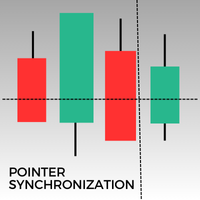
이 지표는 MetaTrader 5에서 동일 자산의 모든 열린 차트에서 포인터를 동기화합니다. 예를 들어, 한 차트에서 가격 34.45에 포인터를 놓으면 동일 자산의 다른 모든 차트에서도 동일한 가격에 포인터가 표시됩니다. 이를 통해 여러 창에서 일관되고 동기화된 분석이 가능합니다.
FREE

워터마크 MT4 버전: https://www.mql5.com/en/market/product/120783 MT5 버전: https://www.mql5.com/en/market/product/120784
로고 MT4 버전: https://www.mql5.com/en/market/product/121289 MT5 버전: https://www.mql5.com/en/market/product/121290
"워터마크" 스크립트는 차트 배경에 중요한 정보를 직접 표시하여 거래 차트를 더욱 돋보이게 하도록 설계되었습니다. 이 스크립트는 현재 거래 쌍, 시간대, 다양한 시간 지표와 같은 주요 정보를 명확하고 눈에 띄지 않게 추적할 수 있는 방법을 제공합니다.
기능:
거래 쌍 표시:
스크립트는 차트에 표시된 현재 거래 쌍(예: EUR/USD, BTC/USD)을 자동으로 감지하여 표시합니다. 이를 통해 트레이더는 분석 중인 자산을 항상 파악할 수 있어 잘못된 통화쌍을 기반으로 결정을 내릴
FREE

로고 MT4 버전: https://www.mql5.com/en/market/product/121289 MT5 버전: https://www.mql5.com/en/market/product/121290
워터마크 MT4 버전: https://www.mql5.com/en/market/product/120783 MT5 버전: https://www.mql5.com/en/market/product/120784
"로고" 스크립트는 MetaTrader 4(MT4)의 거래 차트에 사용자 지정 로고 또는 이미지를 배경으로 표시하도록 설계되었습니다. 이 스크립트를 사용하면 트레이더가 로고 또는 기타 원하는 이미지를 사용하여 차트를 개인화할 수 있습니다.
작동 방식:
이미지 준비: 먼저 차트에 로고로 표시할 이미지를 선택하세요. 이미지 편집 소프트웨어를 사용하여 이미지를 비트맵 파일 형식(.bmp)으로 변환하세요. 이미지 저장: 변환이 완료되면 .bmp 이미지 파일을 MT4 설치 경로의 다음 디렉
FREE

Proteção contra volatilidade durante eventos de notícias
Movimentos bruscos de mercado são comuns durante a divulgação de notícias econômicas. Esses eventos impactam significativamente as operações de negociação, volatilidade inesperada e podem resultar em perdas.
O Impacto das Notícias no Mercado
1. Volatilidade inesperada: notícias econômicas podem causar flutuações graves de preços, potencialmente levando a perdas. 2. Imprevisibilidade: A incerteza em torno do impacto das notícias pode in

Enhance Your Trading with the Support and Resistance Alert! Ready to take your trading to the next level? Introducing the Support and Resistance Alert—the ultimate tool to precisely identify market turning points! Key Features: Dynamic Support and Resistance Lines: The indicator automatically draws support and resistance levels based on local lows and highs, giving you clear guidance on where the market is likely to reverse. Real-Time Alerts: Stay ahead of the market with customizable alerts. G
FREE

SL Maestro - Forex Expert Advisor SL Maestro - Forex Expert Advisor with Advanced Stop-Loss Features Introducing SL Maestro , the ultimate Forex Expert Advisor (EA) designed to enhance your trading strategy by adding stop-losses to existing trades with precision and flexibility. SL Maestro is not just limited to simple pips-based stop-losses; it incorporates a variety of advanced techniques to ensure optimal protection for your trades. Key Features: Pips-Based Stop-Loss : Easily set a stop-loss
FREE

This MT5 Utility is designed to simplify the process of managing multiple trades. If you have several open positions, it can be time-consuming to close each one manually. With this tool, you can easily close all profit trades, losing trades, or just the trades that are linked to the chart you're currently viewing. It saves you time and effort by allowing you to manage your trades with just a few clicks, making your trading experience smoother and more efficient. Whether you're focusing on profit
FREE

Zone Trader is a professional semi-automated trading assistant designed to help manual traders execute precise grid strategies with built-in risk management. Instead of manually calculating lot sizes and placing individual pending orders, Zone Trader allows you to visually define your grid directly on the chart using drag-and-drop lines. With a single click, the EA calculates the risk, splits the volume across your specified layers, and places the necessary orders to fill the zone between your S

This is an EA that supports simple order closing on MT5. EA Close MT5 (Homemade ) - EA closes orders when profit >= x$ - EA closes orders when loss >= -x$ - EA closes orders when Equity >= x$ - EA closes orders when Equity <= x$ - EA closes orders for all currency pairs or pairs using EA If you have any questions, please contact me: https://t.me/EAForexFree_Channel

Hedge Assistant - Hedge Assistant는 헤지 거래를 단순화하도록 설계된 직관적인 Expert Advisor(EA)입니다. 이 EA는 단일 및 이중 두 가지 헤지 전략을 지원합니다. 이러한 전략에 대한 자세한 내용은 저희 YouTube 채널의 설명 동영상을 참조하십시오 (링크 및 이미지 첨부). 기능: 백테스트: 주문이 패널의 버튼을 통해 수동으로 실행되므로 백테스트는 불가능하며, 트레이더의 직접적인 개입이 필요합니다. 버튼: EA는 매수 또는 매도 주문을 열기 위한 세 개의 주요 버튼과 모든 주문을 닫기 위한 버튼을 제공합니다. 또한, 트레이더의 작업을 돕기 위해 차트 창에 유용한 정보를 표시합니다. 초기 실행 후 EA는 주문이 닫힐 때까지 자동으로 주문을 관리합니다. 버튼 위의 정보 색상은 설정에서 조정할 수 있습니다. 설정 데이터: EA Name - EA의 이름; Lot - 거래에 사용될 로트 크기; Lots_Martingale - 보류 중인 주문의 로트

수동 거래를 개선하세요: 빠르고 정확한 자동화된 위험 관리를 위한 Trade Manager Assistant 제공된 무료 데모 버전을 사용하여 전체 설정 지침을 받고 Trade Manager Assistant의 기능을 살펴보세요. 자세한 내용은 https://www.mql5.com/blogs/post/758625를 참조하세요. . 수동 거래에는 신중한 분석과 빠른 결정이 필요하지만, 거래 매개변수와 관련된 실행 오류, 불일치 및 혼란의 위험으로 인해 수익이 감소하고 불필요한 스트레스가 발생할 수 있습니다. 트레이딩 관리자 어시스턴트를 소개합니다. 이 필수 어시스턴트는 수동 트레이딩 프로세스를 간소화하고 차트에 정밀성, 통제력, 자동화된 효율성을 제공합니다. 느린 실행이나 잘못된 계산으로 인한 거래 손실과 작별하세요. 귀하의 보조 사업 관리자는 전문적인 속도와 정확성으로 귀하의 업무를 완료할 수 있도록 도와드리므로, 중요한 행정 업무를 우리가 처리하는 동안 귀하는
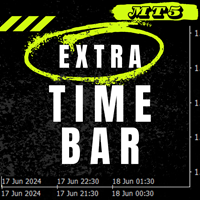
추가 시간 표시줄 / Extra Time Scale Bar MT4 version
차트에 개인화된 시간 표시줄을 추가하여 거래를 향상시키도록 설계된 도구입니다. 이 도구를 사용하면 더 이상 서버 시간에만 국한되지 않고 원하는 시간대를 표시하도록 차트를 설정할 수 있습니다. 현지 시간, 그리니치 표준시 또는 기타 시간과 같습니다.
추가 시간 표시줄의 기능: 1. 시간대 사용자 정의: 귀하의 거래 요구에 맞는 시간대를 선택하고 정확성을 높이기 위해 차트에 직접 표시하십시오.
2. 듀얼 타임 추적: 동일한 차트에서 두 가지 다른 시간 설정을 사용하여 시장 움직임을 쉽게 모니터링하여 보다 자세한 분석이 가능합니다.
3. 유연한 조정: 마우스 가운데 휠 버튼을 누르고 드래그하면 서버 시간과 함께 특정 캔들 시간을 볼 수 있습니다.
4. 다양한 디스플레이와의 원활한 작동 및 호환성: 이 도구는 다양한 화면 해상도와 배율 수준에서 원활하게 작동하도록 설계되었습니다.
5. 가시성 옵션

Universal EA — гибкий торговец для тех, кто ценит контроль Основные возможности Сигналы на основе структуры цены :
Торгует по бычьим и медвежьим импульсам с настраиваемой строгостью фильтрации. Интеллектуальный фильтр тренда :
Определяет направление и силу тренда в процентах. Возможность торговать только по тренду или в любом режиме . Двойной траллинг-стоп :
— Базовый трал — по ATR с динамическим множителем.
— Дополнительный трал на выбор: по свечам, фракталам, Parabolic SAR, скользящей
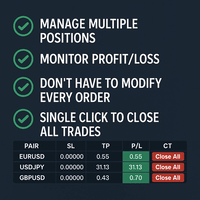
Tired of manually adjusting stop-loss and take-profit levels for multiple positions across different pairs? The Manage Multiple Positions Expert Advisor is your solution. MT4 Version - https://www.mql5.com/en/market/product/120916/ This powerful tool streamlines your trading experience by allowing you to manage multiple positions on a single pair with ease. Modify stop-loss and take-profit levels for all open positions on a specific pair with a single click. Plus, the EA provides clear visibili

Introducing our advanced Fast Trades Manager for MT5 Designed to seamlessly copy trades and provide comprehensive trade statistics. Link to MT4 version: Fast Trades Manager for MT4 Key features include: Fast Trade Copying: Efficiently copy trades from one broker to another, ensuring your strategies are implemented across different platforms. MT4 support: Fast copying between different terminal version, you copy trades from MT4 to MT5 or the opposite from MT5 to MT4 easier. Symbol Copying with

BreakEvan Utility Is a simple tool in a panel with this utilities: This utility will draw a Golden Line in the chart applied showing the breakeven price, considering all the positions opened for that specific symbol.
Also the information panel shows: Balance Breakeven Price for that chart Force Breakeven (for that symbol) as ON/OFF Force Breakeven Global (takes into account all trades opened) as ON/OFF Total Lots opened for Symbol Total Lots opened Global
And two buttons: Force Breakeven: Whe

This MetaTrader 5 (MT5) indicator script is designed to create a visual book representation of the market order book, displaying buy and sell orders directly on the chart. The indicator uses the following features: Customizable Width and Colors : The width of the visual book can be adjusted, and different colors can be set for buy and sell orders. Market Book Data Handling : It retrieves the current market order book data for the symbol and visualizes this data as rectangles overlaid on the char

This Utility is designed for price action strategies, trading flags and retests, such as Guerrilla Trading and similar strategies It allows to: place pending orders for retests (on the Retest line or x PIPs away from the retest line) place orders for flag formations calculate lotsizes based on account size, currency pair and risk percentage split trades and place multiple trades if lot size exceeds max lot size given by broker manage trades with a trailing SL/TP behind the most recent highs/lows
이 유틸리티 EA는 원하는 이익 값에 도달하거나 중지 이득이 활성화되면 모든 구매 또는 판매 주문을 마감합니다. 수동으로 또는 다른 로봇이 개설한 주문을 마감합니다. 급격한 가격 변동 시 이익을 보호하거나 보장하는 데 매우 효과적입니다. MT5에서 사용 가능한 모든 기간과 자산에서 작동합니다.
후행 시작: 예를 들어 가격이 70핍 상승하면 정지 이득이 활성화됩니다. Traling Stop: 또는 Traling Step: 가격이 Trailing Start 위에 정의된 금액만큼 이동하면 이익을 극대화하기 위해 중지 이득이 이동합니다.
손실 정지: 수동으로 배치해야 합니다.
이 제품은 항상 더 나은 업데이트를 받을 것입니다. 궁금하신 점은 채팅으로 직접 물어보셔도 됩니다.
개선을 위한 상담과 제안을 받을 수 있습니다.
FREE
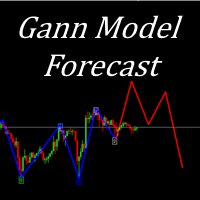
I present to your attention a powerful utility for predicting the future movement of an asset based on W.D. Ganna’s law of vibration. This utility analyzes the selected market model and provides codes for future possible market movement patterns. If you enter the selected code into the appropriate box, you will receive a forecast of the potential market movement. The utility has the ability to display several potential forecast models. The forecast is not yet tied to time and price and gives th

Program Features 1. Calculation of Margin Call and Liquidation Prices Monitoring all open positions: The program continuously analyzes all open positions on the trading account. Determining critical price levels: Margin Call Price: The price at which additional funds must be deposited to keep positions open. If this does not occur, liquidation follows. Liquidation Price: The price at which positions are automatically closed by the broker to prevent further losses. 2. Display of Prices on the Ch
FREE
Introduction to SWARM CALCULATOR The SWARM CALCULATOR is a revolutionary tool designed for traders who prioritize effective risk management and optimized trading strategies. With its advanced features and intuitive interface, the SWARM CALCULATOR enhances your trading experience, allowing you to make informed and precise decisions. Key Features: Customized Risk Management: Automatic Position Size Calculation: Automatically determine the optimal position size based on the percentage of risk you a

Hola Traders. By popular demand from my fellow traders, I am excited to announce the release of my newly developed tool for placing pending order grids. Many of you have already benefited from this tool, and several have requested a version for MT5. Now, it is available for everyone! This automatic grid trading placement tool is convenient, easy to use, and fast. It also includes quick action buttons for closing profits, losses, and pending orders. No matter how many pending orders you have, jus

Hola Traders. By popular demand from my fellow traders, I am excited to announce the release of my newly developed tool for placing pending order grids. Many of you have already benefited from this tool, and several have requested a version for MT5. Now, it is available for everyone! This automatic grid trading placement tool is convenient, easy to use, and fast. It also includes quick action buttons for closing profits, losses, and pending orders. No matter how many pending orders you have, jus
트레이딩 전략과 기술 지표를 판매하기에 가장 좋은 장소가 왜 MetaTrader 마켓인지 알고 계십니까? 광고나 소프트웨어 보호가 필요 없고, 지불 문제도 없습니다. 모든 것이 MetaTrader 마켓에서 제공됩니다.
