 MetaTrader 5
 专家
专家
 指标
指标
 程序库
程序库
 实用工具
实用工具
 窗口小部件
窗口小部件
 规则
规则
全新的MetaTrader 5 交易实用工具 - 68
 以下是可在MetaTrader 5中简化交易的交易程序。将鼠标悬停在一个工具上,阅读它的描述和用途。
Prop Firm 数据: 图表上 最 重要 的 信息 该指标 将帮助您 快速 监控 当前 和 已平仓 交易 。 特别 适用于 当您 被限制 超出 某些 限额 时。 警报 功能 可帮助 避免 不良 结果 。 多功能工具 : 包含66+功能 | 如有疑问请联系我 | MT4版本 6 类 可显示 的 信息 当前 市场数据 : 隔夜利息, 点差, 平均点差。 浮动 仓位: 未平仓交易 的浮动盈亏, 总手数, 交易数量; 挂单 : 交易数量, 总手数, 买单和卖单数量; 所有 已平仓 交易的 结果 ( 统计 ) ; 交易 的 平均 持仓时间, 分别统计买单和卖单; 资金负载 信息: 止损触发时的潜在亏损; 多种选项可让您根据需要自定义指标。
可用 过滤器 , 每个 可 单独 启用/ 禁用 : 交易品种 : 所有品种的交易 仅当前品种的交易(指标运行的品种) 魔术号码 (使用 EA时 方便): 所有魔术号码 排除指定号码 仅指定魔术号码 设置 : 计算 盈亏, 回撤和资金负载 的方法 : 账户 货币

订单追踪:随着市场变动获得最佳执行价格 挂单追踪将允许您保持与入场价格的指定距离。 如果市场价格远离订单,订单将会移动。 多功能工具 : 66+ 功能,包括此工具 | 如有问题请联系我 | MT4版本 要激活订单追踪,您需要设置面板上的4个主要参数: 1. 符号 或 交易 ,将应用追踪: 对于当前[Symbol] / 对于[ALL]符号,或对于特定交易[Ticket]。 除了[Symbol]或[ALL]规则外 - 您可以为特定交易设置单独规则,
通过其票号:单独[Ticket]的规则将优先。 2. 追踪挂单的激活时刻 :
[ 执行后立即 ]: 无延迟 当订单放置时; [如果挂单 > 比]:追踪将在 指定时间后 开始; 3. 当前市场价格与入场价格的距离 。 如果市场远离入场点,此距离将在追踪时保持:
但如果市场价格接近入场点,订单将不会移动。可以是: [ 自动 ]:将在追踪开始时确定(第2点)。 或者您可以[ 手动 ]设置:以点/百分比/市场价格百分比。 4. 移动SL / TP水平的规则 。 您可以禁用它们的移动,也可以启用其中每一个的移动。 从入场价格到水平的初始距离将始终被保持
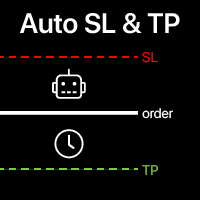
自动设置止损和止盈 对于尚未设置 SL / TP 水平的交易, 将自动创建这些水平。 如果您通过手机执行交易,这可能很方便。 多功能工具 : 66+ 功能,包括此工具 | 如有疑问请联系我 | MT4版本 要激活自动水平,需要设置以下4个主要参数(在面板上): 1. 符号 该功能将应用于: 特定 [Symbol] / 或所有 [ALL] 符号。 2. 交易类型: 如果[active position] / [pending order] / [active or pending trade]:
根据此值,该功能将仅应用于活跃交易、仅挂单或所有交易。 3. 接下来,您可以单独激活或停用 每个参数 : [SL = ]: 如果激活, SL 将在交易尚未设置SL时自动设置。 [TP = ]: 如果激活, TP 将在交易尚未设置TP时自动设置。 SL / TP计算方法 可以使用 [v] 选择器选择: 点/点值/价格百分比/货币金额/账户规模百分比; 使用R/R方法计算TP时:交易必须具有SL水平,否则 无法计算TP水平; 4. "Magic"数字规则 : [apply

程序 - 服务 实现将每个交易系统的已平仓头寸自动保存到文件中,按行的形式存储。这对于进一步与其他产品(例如Semyon Racheev的资本管理服务等)的集成是必要的。 它自动将结果保存到以下格式的文件中:
文件名:" <magicNumber>.csv"
文件中的每一行表示一个已平仓头寸,格式为 " <magicNumber>,<positionCloseTime>,<positionVolume>,<positionProfit>" 算法: 服务从终端数据库中为指定的 magicNumber 列表检索多个已平仓头寸。 服务定位到参数中指定目录下的对应 magicNumber 的文件(如果存在)。它检索文件中描述的头寸集。 服务将每个 magicNumber 的这些头寸集合合并,并将结果集重新保存到对应的 <magicNumber>.csv 文件中。 因此,在参数指定的目录中,我们有包含历史已平仓头寸当前结果的文件。这些结果还可以与回测结果相结合,以便在资本管理或其他Semyon Racheev的分析产品中进行更准确的计算
FREE

Trade Panel – The Smart Trading Tool for Every Strategy Elevate your trading experience with Trade Panel , designed for traders of all levels. Whether you are a beginner or a seasoned professional, this platform simplifies trading with powerful features to efficiently manage your portfolio. Key Features Flexible Lot Size Adjustment Manually adjust lot sizes to suit your trading needs. Utilize the automatic lot sizing feature to align your trades with your desired risk percentage (% Risk) for

CoinMarketCap Price Fetcher- Real-Time Cryptocurrency Prices via CoinMarketCap
Overview:
The CoinMarketCap Price Fetcher is a powerful tool designed for traders and developers who want real-time access to cryptocurrency prices directly within the MetaTrader 5 (MT5) platform. It seamlessly integrates with the CoinMarketCap API to retrieve live cryptocurrency price data, including Bitcoin (BTC), Ethereum (ETH), and hundreds of other coins, with automatic updates at your chosen intervals (e.g.,

Gmail to MT5 is a tool that automates the process of transferring trading signals from your Gmail inbox directly to your MetaTrader 5 trading platform. It's a bridge that connects these two platforms, allowing you to receive and execute trades based on information sent via email. No DLL, no .exe, and no external software
Can receive TradingView signals Would you like more features? We'd be glad to implement them based on your needs How to set up: Create an app password at https://myaccount.googl
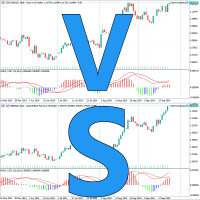
这是一个非常实用的图表同步对比工具,使多个品种图表保持一样的起始时间、 周期、缩放级别、 同时滚动。 促销价 $39→$59 特点 采用事件驱动,而不是OnTimer,同步非常快速
占用资源小 方便相似品种快速对比 有多年的使用并优化历史
参数 SyncPos 是否同步起始时间
使用 把Chart Compare加载到每一个图表,第一个图表会显示Main。
只需要操作Main图表,其它的图表都会同步成和Main图表一样。
建议使用窗口平铺,所有的图表都使用同一个模板。
Chart Compare,图表同步,多窗口工具,实用工具,图表对比,MT5货币强弱工具,货币交易盈利工具,日内交易实用工具,日内交易图表对比,日内交易盈利之路,快速对比盈利工具,图表交易工具,Forex Chart Compare.
本地终端之间的 自动交易复制器 多种选项可让您根据需要自定义工具,配置过程即使对初学者也很容易理解。 多功能工具 : 包含66+项功能 | 如有疑问请联系我 此版本 仅适用于 MT5 。如需在MT4之间复制交易,您需要购买 MT4版本 提供 2 种 模式 : 从终端 发送 交易; 接收 并 复制 来自其他终端的交易; 还有一个选项可以在原始终端中关闭交易时 自动关闭 复制的交易。 可用 过滤器 ( 在发送和接收交易时使用 ),每个都可以单独启用/禁用: 交易品种 : 复制所有交易品种的交易 仅复制当前交易品种(运行工具的终端) 魔术编号 ( 使用EA时 方便): 所有魔术编号 排除指定编号 仅复制指定魔术编号 交易类型 :所有交易 / 仅挂单 / 仅市价单。 交易方向 :双向 / 仅买入 / 仅卖出。 交易注释 :指定文本:将排除或仅复制包含此文本的交易。 可以指定工具的 工作时间 段 。 在 执行 接收到的 交易 时应用的设置: 最大 滑点 SL / TP 水平:可以禁用其复制,以便交易执行时不带这些水平
选项将 注释替换 为指定文本
选项将 魔术编号替换 为指定编号
跟踪 当前 回撤 和 历史 已关闭 交易 的 记录 在 选定 期间 多种选项将允许您根据您的需求自定义指标 多功能工具 : 包含66+功能 | 联系我 如有任何问题 | MT4版本 2 值 可以 显示 : 当前 回撤 ( 或 收益 ) 开放交易; 结果 所有 已关闭 交易, 在 选定 时间 段 ( 统计 ) ; 可用 过滤器 , 每个 可以 可选 打开/ 关闭 : 符号 : 所有符号的交易 仅在同一符号(指标运行处)的交易 魔法编号 (方便 使用 EA时) : 所有魔法编号 避免指定编号 仅指定魔法编号 设置 : 方法 计算 值 : 账户货币; 点差; 点数; 作为 一个 百分比 的 一个 值 : % / 账户 余额 ; % / 可用 保证金 ; % / 净值 ; % / 自定义 金额; 时间 间隔 ( 如果 历史 计算 启用 ):
当前 天; 当前周; 当前 月 (从1号开始);
最近30天; 或任何自定义时期; 可选 , 您 可以 启用 显示 总 手数 所有 交易; 可视化 设 置 : 文本位置; 字体
直接在图表上 做笔记 , 并在交易时 使用您的观察 同步提醒 功能 可 让您 记住 有关 当前 市场 状态 的 重要 信息 因此 , 此 工具 将 帮助 您 避免 在 交易时 遗漏 之前 注意到 的 重要 信息 。 多功能工具 :66+ 功能,包括此工具 | 如有疑问请联系我 | MT4版本 设置: 笔记同步 方式 : 在相同品种之间同步; 每个图表上的独特笔记; 所有地方相同的笔记 ; 可选 , 笔记 可以 关联 到 创建时 的 时间周期 ; 可视化 设置 : 文本位置; 字体:颜色、样式、大小; 要 编辑 笔记 , 只需 点击 右下角 的 按钮 [ e] : 将 出现 输入 框 。 程序文件应放在“ Indicators ”目录中。 //--------------------------- 多功能工具 :66+ 功能,包括此工具 | 如有疑问请联系我 | MT4版本

FREE
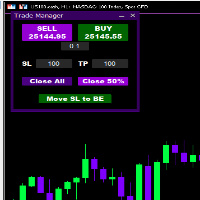
Introducing * *Trader Manager** for MetaTrader 5 - the most efficient tool for managing your trades and it's free! This smart assistant automatically sets **Stop Loss** and **Take Profit** immediately after opening a trade, saving you time and reducing the risk of errors.
With the ability to set a **Maximum Daily Loss** , you'll protect yourself from the dangers of **overtrading** and keep control of your finances.
Plus, you'll get a host of other features for easy position management: -
FREE
XC Trade Manager for MT5 Manage Your Trades with Precision and Ease
Welcome to XC Trade Manager, the ultimate solution for traders seeking efficient and intuitive trade management on the MT5 platform. Developed by xignalcoding.com, our seventh product in the MQL5 Market lineup, the XC Trade Manager is designed to streamline your trading experience, allowing you to focus on what truly matters—making informed trading decisions. Key Features 1. Orders Tab Effortlessly place and manage your trades
ENJOY FREE TESTING FROM OUR WEBSITE
DAILYTARGET_GUARD is a cutting-edge trading expert designed to maximize profits while minimizing risk through intelligent and automated position management. Perfect for traders seeking precision control over their operations, this bot offers advanced and customizable features tailored to fit your trading strategy. Key Features: Automated Position Management: Adjust your Stop Loss , Take Profit , and lot sizes to match your trading preferences. The bot manages

Simple Telegram Notification – Stay Informed on Your MT5 Trading Activity! Stay connected with your MetaTrader 5 trading activity using Simple Telegram Notification , the Expert Advisor that sends real-time notifications to your Telegram app whenever orders are opened, modified, or closed . Whether you're at your desk or on the move, you’ll always be up-to-date with critical trading information. Key Features: Order Notifications : Receive instant Telegram alerts whenever an order is opened, mod

Dobiforex AI服务是一个为外汇交易者提供智能交易支持的专业平台。该助手利用先进的实时市场分析,帮助交易者在其交易策略中做出更明智的决策。用户通过注册Dobiforex网站并访问其专用面板,可以将此智能服务集成到其交易平台中。Dobiforex使用高级算法和机器学习,实时处理市场数据,提供准确可靠的交易信号。这个强大的工具使交易者能够聪明地利用市场波动,同时优化他们的交易风险。 由AWS Amazon提供支持 该交易助手利用Amazon AWS云服务的高级计算基础设施,实时处理和分析交易数据。通过AWS,工具能够以高精度和速度处理大规模的金融市场数据。此交易助手的一个突出特点是其使用的实时机器学习技术。该技术使系统能够快速识别数据中的隐藏模式,并通过复杂的算法提供极为准确的市场走势预测。随着每次新分析和数据输入,机器学习模型不断改进,优化交易信号的性能。这让交易者能够做出更智能的实时决策,并改善他们的交易策略以获得更好的结果。 什么是AI服务? 来自Dobiforex的交易助手是一种在MetaTrader 5 (MT5)平台上运行的智能顾问(EA),用户可以在其个人系统上使用。

发现 Forex Unlimited 工具 – 您的 MT4 或 MT5 终极仓位管理工具 准备好将您的交易提升到新水平了吗?使用我们的 Forex Unlimited 工具,您再也不必手动计算风险或怀疑您的资本分配。我们开发了一个高级、用户友好的仓位管理工具,有 两个版本 :一个适用于 MetaTrader 4 ,另一个适用于 MetaTrader 5 。请确保在购买时选择与您的交易平台匹配的正确版本,无论是 MT4 还是 MT5,以充分利用该工具的所有功能。 Forex Unlimited 工具的强大功能: 完全控制订单
您可以选择三种订单类型: 限价单 、 止损单 或 市价执行 。 限价单 :在当前市场价格下方下单。 止损单 :在预定价格激活订单。 市价执行 :按当前市场价格立即执行。
灵活管理您的资金
您控制每笔交易的风险! 您可以选择 账户余额的百分比 ,固定的 每笔交易金额 (例如 $500),或使用 手数 完全控制您的仓位。
点差计算和快捷按钮 使用我们的工具预先计算点差,确保精确的交易。 速度至关重要,因此我们添加了方便的 新订单 和 全部删除 按钮。您甚至可以

多时间框架突破扫描仪
此工具可分析蜡烛图模式,绘制多个时间框架上的突破区域。交易时,能够看到更大的图景是关键。能够实时查看来自此强大工具的信号(跨多个时间框架)不仅可以节省分析时间,而且还是当前市场状况的关键指标,可以帮助交易者识别市场何时处于趋势或区间波动。当信号在多个时间框架上重合时,通常会发生或正在发生大市场波动
以下是此工具的摘要及其使用方法。
定义
此指标直接利用价格数据,不依赖指标来确定突破区域。
分析原始蜡烛图数据以确定可能出现或已经出现突破区域的价格。
它在图表上绘制一条支撑线和阻力线,显示当前突破区域。
看涨信号
绿色买入
这意味着当前价格已突破当前突破区域,波动性看涨。这是最新的牛市信号。
浅绿色买入
这意味着当前价格尚未突破当前突破区域,但之前的价格活动表明看涨趋势。
看跌信号
红色卖出
这意味着当前价格已突破当前突破区域,并具有看跌波动性。这是最新的熊市信号。
粉红色卖出
这意味着当前价格尚未突破当前突破区域,但之前的价格活动表明看跌趋势。
空白白色
未检测到突破区域
推荐设置
实用程序可以在 EURUSD、GBPUSD
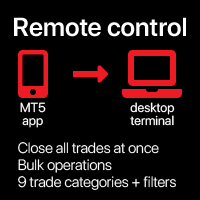
一次性 关闭 所有 交易 , 直接 通过 您的 移动 MT5 应用程序 管理 . 此 实用工具 可以 关闭 9 不同 类别 的 交易. 要 激活 操作 , 您 只需 需要 在 预定 价格 放置 挂单 (可通过 移动 MT5 应用程序 远程完成 ).
之后 , 实用工具 将 检测 订单 并 关闭 所有 必要的 交易. 通过 这种 方式 您 可以 快速 管理 一 组 交易 . 多功能实用工具 : 包含 66+ 功能 | 如有疑问请联系我 | MT4 版本 可用 交易 类别 : 所有交易 (活跃和挂单); 活跃头寸; 挂单; 利润; 亏损; 限价挂单 (Buy Limit / Sell Limit); 止单挂单 (Buy Stop / Sell Stop); 买入交易 (活跃买入和挂单卖出); 卖出交易 (活跃卖出和挂单卖出); 对于 每个 类别 , 您 应该 设置 一个 唯一的 挂单 价格 将 被 识别 以 执行 操作. 您 可以 设置 任何 订单 价格 ( 最好 远离 当前 市场 价格 , 以便 此 信号 订单 不会 被 激活).
附加过

图表链接辅助工具: 该工具充当MetaTrader中打开的图表与主图表上的专家之间的接口。许多多时间框架专家需要此文件与屏幕上的打开图表进行通信。您可以通过在图表上运行该工具,轻松将图表连接到主图表上的专家。 此文件的主要功能是将发生在打开图表上的所有事件发送到主图表上的专家。例如,如果主图表上放置了一个指导线,可能不会将这些指导线的更改反映在主面板中专家的参数上。通过拖放或运行此工具到图表上,您可以将它们连接在一起,确保图表上的更改会传达给主图表上的专家。 该工具还具有调试器和主图表专家的活动状态检查功能。如果与主图表上的专家的连接丢失,该工具将执行以下操作:首先,它会向MetaQuotes ID发送通知,然后通过Telegram提醒交易员,最后在当前图表上显示主面板上的专家已断开的警告。 要运行此专家,您需要在图表上执行或拖放它。在输入部分,您可以输入主图表ID号;如果您输入0,工具将自动处理,并且通常会在屏幕上显示。下一个参数允许您输入将警报发送到Telegram所需的信息。 如果在设置中定义了MetaQuotes ID,通知将发送到该ID
FREE

This script is designed for traders who need to quickly place trades across multiple currency pairs during critical news releases, where every second counts. With this tool, you can pre-select your desired currency pairs and assign independent volumes for each one. When a major news event hits, such as Non-Farm Payroll (NFP) or PMI data releases, the script allows you to execute all your trades instantly without the need to open each pair manually. Key Features: Customizable Pairs : Choose from
FREE

This expert advisor automatically sets the stop loss and take profit for your position once you have opened it, with a point ratio that you define in advance. No more worrying about where to place your stops or not following your strategy. Problem solved, traders. You just need to enter your values in the ‘Input’ tab, and the parameters are set for execution. This Advisor does everything for you. Any recommendations or suggestions, we are open to a new version. ONLY HANDLE ONE POSITION AT A TIME

Position Limit Monitor: Efficient Control of Your Trading Operations Have you ever worried about having too many open trades simultaneously? Would you like precise control over the maximum number of positions in your account? Position Limit Monitor is the solution you need. Main Features: • Real-time monitoring: Constantly supervises the number of open positions in your account.
• Customizable limit: Easily set the maximum number of positions you want to keep open.
• Automatic closure: When the

Position Limit Monitor Full: Total Control of Your Trading Operations Are you looking for an efficient way to manage both your open positions and pending orders? Position Limit Monitor Full is the all-in-one solution you need to maintain total control over your trading activity. Key Features: Real-time Monitoring: Constantly tracks the number of open positions and pending orders in your account. Customizable Limits: Easily set the maximum number of open positions and pending orders you want to m

The instant trade risk click EA is aimed to help you get into the market as quickly as possible.
You give it your risk percentage, and your risk to reward you're hoping to get, then an option to set only stop loss and no take profit.
With that, every CTRL + Left Click events on the chart would instantly open a position, with the price on the clicked x and y axis as the stop loss, and the open price as the current markets bid/ask price. If you click above the price, it's a Sell position , if yo

Fun fact: Do you know that a 1:2 Risk to Reward earns you less? that is, if you risk $50 you win $100.
There's a better way to do this, if you split your stop loss into 3 and have pending orders with a total risk of the same $50 you can win up to $227.52.
Let's break it down, a GBPUSD 1:2 buy stop position @ 1.3, with 50 pip stop loss and a risk of $50 would win $100. Entry Stop Loss Pips Stop Loss Price Take Profit Pips Take Profit Price Risk Per Pair Volume Profit Entry 1 1.30000 500.00 1.29

GR-Calendar-Trading: Your Ally for Automated Economic Event Management GR-Calendar-Trading is an advanced Expert Advisor for MetaTrader 5 designed to manage your trading operations based on significant economic events, optimizing strategies and protecting your profits. This EA is tailored for traders who want to make the most of economic data without losing control over their trades. Uses the built-in Metatrader calendar. Key Features: Advance notification of important events
Receive a notifica
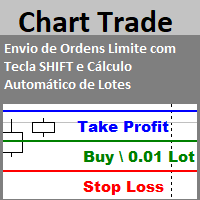
Envio de Ordens Limite com Tecla SHIFT (Cálculo Automático de Lotes) Funcionalidades: Definição de Níveis: Estabeleça os níveis de Stop Loss, Take Profit e o preço da ordem utilizando a tecla SHIFT e cliques do mouse. Cálculo Automático de Lotes: Os lotes são calculados automaticamente com base no risco da conta.(A opção também para usar volume fixo) Gerenciamento de Posições: Botão para fechar todas as posições abertas enviadas pelo EA. Botão para cancelar todas as ordens pendentes enviadas pe
FREE

Brekaut, a powerful and intuitive trading indicator designed to take your trading experience to the next level. Built to simplify market analysis and provide timely insights, Brekaut offers traders a reliable way to identify key breakout opportunities across various asset classes, including stocks, forex, and cryptocurrencies.
Brekaut cuts through the noise by highlighting potential breakout points where the market is poised for strong movement. This allows traders to make informed decisions a
FREE

Centage: Your Smart Trading Bot for Risk Management. Unlike typical trading bots, Centage prioritizes risk management by incorporating an essential feature: it closes all open trades when your account balance reaches a predefined threshold. This feature makes Centage ideal for traders who want to maintain a disciplined approach and avoid emotional decision-making. Let Centage be your reliable partner in the world of trading, while safeguarding your investments with smart balance-based exits. Ce

提升您的交易表现,通过新闻事件洞察
在快節奏的交易世界中,新聞事件可能會對市場價格產生重大影響。了解這些事件如何影響價格變動對於在波動時期管理交易至關重要。新聞工具 EA 旨在提供對歷史和即將發生的新聞事件的見解,幫助您做出明智的交易決策。 此EA无法在策略测试器中运行。 用户指南 主要功能:
历史影响分析 了解价格如何响应特定过去新闻事件的波动。分析事件是否通常伴随着看涨或看跌趋势,并查看平均价格影响,以点数或百分比形式,随时间框架的调整而变化。可视化图表帮助您观察新闻事件与价格反应的关系,从而获得更深入的市场见解。 实时新闻集成 在MT5中直接接收即将发生的新闻事件的实时更新。为特定事件或重要性级别设置提醒,并按货币和相关性筛选事件,以关注对您的交易策略至关重要的内容。 自动化EA管理 此工具帮助您在新闻事件期间管理专家顾问(EA),允许您在重大新闻事件之前暂停EA,并在事件后无缝重新应用。您可以自定义时间设置,确保EA恢复时保持相同的参数,避免中断。 用户友好界面 使用符号选择器轻松切换分析不同的市场工具。新闻事件以颜色编码的重要性级别和国家旗帜标记在图表上,便于快速识别。您

EA自动止盈,自动买入/卖出,交易量管理,横盘交易,追踪开仓点 1 – 自动开买入/卖出 EA根据设置自动开买入或卖出:盈利,止损,交易量。 交易量管理:订单总数和固定大小 2 – 自动止盈:根据设置以最小盈利止盈,根据最小和最大盈利止盈按钮 3 – 订单处理:仓位止损有3个级别,根据EA中设置的点数 4 – 横盘交易:在横盘峰值区域开卖单 – 在横盘底部区域开买单,横盘峰值和底部值在EA中设置。 5 – 追踪开仓:跟踪1个价格点,当价格运行到该点时开卖单并根据EA中的设置减少点数,当价格运行到买入观察点并且价格恢复到设置中的点数时开买单然后开仓 EA自动止盈,自动买入/卖出,交易量管理,横盘交易,追踪开仓点 1 – 自动开买入/卖出 EA根据设置自动开买入或卖出:盈利,止损,交易量。 交易量管理:订单总数和固定大小 2 – 自动止盈:根据设置以最小盈利止盈,根据最小和最大盈利止盈按钮 3 – 订单处理:仓位止损有3个级别,根据EA中设置的点数 4 – 横盘交易:在横盘峰值区域开卖单 – 在横盘底部区域开买单,横盘峰值和底部值在EA中设置。 5 – 追踪开仓:跟踪1个价格点,当价格运

Simple Telegram Trade Alert
概述:Simple Telegram Trade Alert 是为 MetaTrader 5 (MT5) 用户设计的简单但高效的专家顾问 (EA),旨在帮助用户通过 Telegram 实时接收交易活动通知。 通过简单几步,EA 在开仓或平仓时发送通知,提供关键信息,如入场价格、止盈 (TP)、止损 (SL)、账户货币的盈亏、余额变动百分比和总余额。 非常适合那些不想持续监控 MT5 平台但希望随时了解交易的交易者。
功能 : 开仓和平仓时即时发送 Telegram 通知。 提供以下信息: 订单类型(买入/卖出) 交易符号 开盘价格 止盈和止损 订单号(开仓和平仓时) 账户货币的盈亏 余额变动百分比 当前余额 设置方法 : 创建 Telegram 机器人: 打开 Telegram 并搜索 "BotFather"。 使用 /newbot 命令创建新机器人并按照步骤操作,您将获得一个稍后需要的机器人令牌。 记下该机器人令牌。 获取您的 Chat ID : 打开与新机器人的聊天并发送消息。 访问 https ://api .tele

The Stop Loss Manger - SL Mange With the Stop Loss Manager you can finally sleep peacefully while it effectively manages your risk in stock market trading. Simply set your individual stop loss limits and let the manager trade for you. Never worry about losses again - the Stop Loss Manager takes care of it for you! Get the ultimate support for your trading now and maximize your profits with ease. Join the community of successful traders who swear by Stop Loss Manager today. Function overview: 1.

This Expert Advisor creates charts with seconds Time Frames, that can be customized to any value. Option to load history, allowing analysis of past candles. Can be used with indicators.
It can be used for any asset from any broker. The charts created are opened automatically and updated in real time. Inputs :
Seconds -> How many seconds will the Time Frame be.
Candles History -> How many candles will be loaded on the chart.
Custom Symbol Suffix -> The suffix for the chart to be generated.
Custo

This tool for the MetaTrader 5 trading platform allows setting the stop loss of open positions to breakeven (entry price) plus an adjustable distance in points. The stop loss is only adjusted if the position is already in profit.
Main functions:
Button: A button is displayed on the chart with the text "StopLoss to BreakEven". The color of the button can be customized, by default it is red.
User interaction: When you click the button, for all open positions that are in profit, the stop loss i
FREE

Equity Control expert advisor - this is a tool for controlling your account funds. It allows you to limit the general and daily drawdown, number of simultaneously existing positions, as well as the equity increase. The acceptable general drawdown can be set not only from the current account balance value, but also below this value. Which is convenient if you deal with Prop Firms. Daily drawdown is calculated from the balance value or equity if it is higher than the balance value. If the drawdown

GRInvest Breakeven Manager is an MT5 trade-management Expert Advisor designed to manage existing open positions after entry. Its purpose is to automate breakeven protection, staged partial closes, trailing stops and position management while still giving the trader full manual control over individual trades. The EA does not need to open trades itself . It can manage manual trades and trades opened by other Expert Advisors according to the selected symbol, direction and magic-number filters. The
FREE

Hello Traders. This product is for you who like to copy a signal on MQL5.
Before you go dive deeper, copy some signal and waste some money, it will be better if you know how the signal provider trading style, right?
Sometimes its hard to read history by list and table, it will be easier when you see the position on the chart.
So, this simple utility will help you to plot any history on MQL signal to your trading view. You can analyze how the signal works, and you are able to see how and when t

Flex One is able to open and manage orders based on any indicator. Flex One is ideal for you to automate trades with the signals of an indicator you have or even validate the signals received by an indicator are really profitable. In addition to Flex One opening a source based on any indicator you have, it also has numerous options to manage your trade, among these options you can count on: Partial • You can perform up to two partials. • Different volumes can be set for each partial, always resp

Copy trades locally between MetaTrader terminals with a simple interface and professional risk controls. Use it to mirror trades across accounts, brokers, and platforms in any MT4/MT5 combination. Designed for reliability : supports trade updates such as breakeven, trailing stop, partial closes, and more. User Guide + Demo | MT4 Version Important notes Local Trade Copier MT5 does not work in the Strategy Tester. For a demo, please use the User Guide + Demo link above. To copy to MT4, you will n
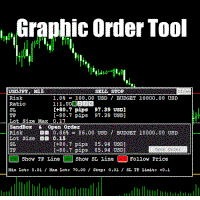
Graphic Order Tool
Graphic panel to help trader to make orders.
Drag TP line, SL line and/or ENTRY line with immediate calculation of the profit and loss in pips and USD.
Risk management: Set % of your balance you can risk in the order to make it safe for your money.
Automatically detect the type of possible order (BUY, SELL, BUY_STOP, SELL_LIMIT, BUY_LIMIT, SELL_STOP) depending on mode (BUY/SELL) and position of lines ENTRY , TP , SL .
Panel is semi-transparent, not to cover the main char

Build an HFT Bot with source code. This specialized algorithm in the bot will build an HFT bot for you, to alter, enhance and optimize to trade by. The algorithm in the bot is a special recipe to build an HFT program. One that you can enhance upon creation. Just follow the steps:
Load the bot on a chart Wait for it to load, could takes some time depending on computer, refresh chart if needed (USE DEMO SO IT WON'T MAKE REAL TRADES WHILE YOU BUILD). THIS IS BEING USED AS A BUILDER NOT AN EA A
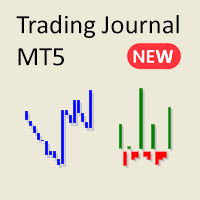
厌倦了 MetaTrader 中繁琐复杂的报告?欢迎使用一种更简洁、更直观的方式来跟踪您的交易。 我的新实用工具/专家顾问旨在为您提供一个简洁、易读的交易表现视图。
此EA目前免费提供,期间我将收集反馈并继续改进其功能。虽然我乐于接受建议,但请理解开发工作是与其他事务同时进行的。
主要功能:
账户余额折线图 通过简单的折线图追踪您的账户余额随时间的变化。轻松查看您的账户表现,一目了然地观察您的交易历史趋势。
盈亏比柱状图 每日交易会话的盈亏可视化。绿色柱状代表盈利交易,红色柱状代表亏损交易,帮助您快速识别交易的好坏天数。交易关闭后,图表立即更新。
详细统计表 EA 包含分析您的交易表现所需的所有关键指标:
净总利润 总交易数 盈亏比 盈利交易 亏损交易 止损/止盈比 投资回报率(账户余额百分比) 成功的空头交易 成功的多头交易 平均盈利交易 平均亏损交易 最大盈利交易 最大亏损交易
为什么选择这个 EA? 简洁且易于理解:没有令人不知所措的数据,只有帮助您掌控交易表现的必要信息。
即时可视化:快速发现趋势并查看交易表现,无需筛选大量报告。
适合: 希望拥有简化、直观交易
FREE

Master Close via Telegram can help you perform some management tasks on MT4/MT5 remotely via your Telegram by one click, easy to set up & use. Demo here (see more Master Notify Master Control ) ************************************************************************************ LIST OF COMMANDS: info_acc - Get account info info_pen - Get pending orders details info_pos - Get positions details info_pos_sum - Get positions summary
close_pen - Delete all pending orders close_pos_all -

This is a simple tool to display the maximum lot size permitted for any asset based on the size of your account (or more accurately the free margin), and the leverage. It will display the max lot size allowed, and then the script will naturally exit after 3 seconds which gives you enough time to see the information. When you have an active position, it will calculate the maximum number of lots that are left while a position of a certain lot size is already running. Before the script terminates
FREE

需要MT4、MT5互跟还需要购买MT4版本 点这里>>
主要跟单功能:
1、可反向跟单 2、跨平台跟单、无视名字不同 3、比例跟单,倍率放大缩小跟单 4、跟指定货币对,不跟指定货币对 5、可一对多_多对一 任意跟单 中英参数对照请查看截图!
主要跟单功能:
1、可反向跟单 2、跨平台跟单、无视名字不同 3、比例跟单,倍率放大缩小跟单 4、跟指定货币对,不跟指定货币对 5、可一对多_多对一 任意跟单 中英参数对照请查看截图!
主要跟单功能:
1、可反向跟单 2、跨平台跟单、无视名字不同 3、比例跟单,倍率放大缩小跟单 4、跟指定货币对,不跟指定货币对 5、可一对多_多对一 任意跟单 中英参数对照请查看截图!
主要跟单功能:
1、可反向跟单 2、跨平台跟单、无视名字不同 3、比例跟单,倍率放大缩小跟单 4、跟指定货币对,不跟指定货币对 5、可一对多_多对一 任意跟单
中英参数对照请查看截图!

Overview :
The Advanced News Trading Panel is a versatile tool designed for traders who rely on news-based trading strategies. This Expert Advisor (EA) provides an intuitive graphical interface that allows users to quickly set up pending orders and manage risk with ease. With the ability to automatically place Buy/Sell Stop orders based on your pre-set stop order distance from the bid/ask price, stop-loss and take-profit levels, the EA allows for precision trading during high-volatility news eve

Having more expert advisors running on the same account , eventually leads us to the question , which one of them are winners , or which are dragging down the account ? With this in mind I created this simple utility for displaying profits or losses taken by each expert advisor over time . This utility can be run as an expert advisor and can display up to 9 magic number results . If the inputs are left to zero , the results displayed are from the manually placed orders . It also displays deposi
FREE

METATRADER5 This program is designed to monitor and evaluate the market performance of 21 minor currency pairs by tracking key metrics such as maximum spread and the time of occurrence. For each selected currency pair, the program calculates the current spread and compares it against the highest recorded spread. If a new maximum spread is detected, it updates the maximum value and logs the time. The spread information is dynamically displayed, providing insights into market conditions.
Additio
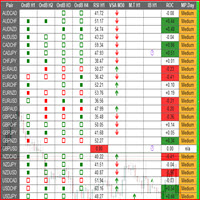
This is a multipurpose indicator and has the following indicators in it with dashboard ( scanner) and chart indicator on multi time frames .
Divergent Bar
Market Profile ( Daily Weekly Monthly Intraday and Custom Period , Market Profile Day type )
Order Block
Inside Bars
Higher High Higher Close and Lower Low and Lower Close
Imbalance Finder
Scalping
Currency Strength Meter
Momentum candles
VSA Setups
Much more See for your self Who am I? - https://www.linkedin.com/in/adnanreh

交易充满了不确定性。即使是顶级交易员也会遇到意外的问题。当这种情况发生时,时间对重新评估您的策略至关重要,但这往往是奢侈品,您可能没有。 我们的解决方案来了。使用我们的一键工具,您可以轻松对冲您的头寸,控制回撤而无需关闭亏损交易。这使您能够暂停并做出明智的决策或寻求专家建议。 功能包括: 一键对冲所有头寸。 从下拉菜单中对冲选定的货币。 对冲您账户中当前开放的货币。 使用该工具很简单: 安装并附加到您的交易图表上。 启用算法交易和自动交易功能。 选择您需要的操作,工具将处理其余部分。 使用“魔法数字”字段来跟踪工具进行的交易。 我们的工具简化了您的流程:它会为多个现有订单开一个相反的订单,从而减少混乱和工作量。虽然对冲不是永久解决方案,但它是为自己争取时间的有效方法。

介绍终极 **交易管理面板**,旨在简化您的交易操作并提升效率!我们的高级面板配备了强大的功能,简化您的交易任务,并提供实时洞察:
- **一键TP和SL管理**:轻松删除整个账户或特定货币对的所有止盈(TP)和止损(SL)水平,只需按下一个按钮即可完成。
- **实时订单追踪**:通过实时更新保持对交易活动的掌握,显示整个账户和单个货币对的订单总数、买卖数量以及利润/损失情况。
- **利润和亏损优化**:快速关闭账户或选定货币对上的所有盈利或亏损订单,确保您可以迅速应对市场变化。
- **自动对冲**:当您的回撤达到指定百分比时,设置自动对冲。面板将自动处理SL和TP的删除,无需额外确认,并提供清晰的通知。
- **一键手动对冲**:通过单击按钮轻松对冲所有持仓或选定货币,快速调整您的交易策略。
- **详细的掉期分析**:精确跟踪您的掉期费用,包括总掉期成本、买入和卖出。所有计算都考虑掉期,提供准确的净利润和损失。
- **可定制的操作排除**:选择特定货币以从计算或操作中排除,让您完全控制哪些货币对受到影响。
- **操作确认提示**:在执行任何重大操作之前

介绍 Trade Assistant EA,这是一款为寻求高级控制的交易者设计的综合工具。通过这个管理器,您可以轻松地在点数或 ATR(平均真实波幅)上设置止损和止盈,并方便地确定盈亏平衡和追踪止损的大小。享受在蜡烛收盘时或实时进行追踪的灵活性,利用基于点数或 ATR 的追踪距离。在进场之前,您可以根据百分比或手数调整止损和止盈的预览线,并使用自动或手动的盈亏平衡按钮来保障头寸。Trade Assistant EA 还可作为头寸管理器,完美集成了多种指标和时间框架,适合手动和自动交易,并允许个性化的交易时间和禁交易区设置,实现量身定制的交易策略。
该 EA 推荐给有经验的交易者,与技术分析相结合使用。
EA 的工作原理
EA 使用点数、ATR(平均真实波幅)、移动平均线(MA)、DEMA(双指数移动平均线)和 MACD(移动平均收敛发散)等技术指标组合来识别潜在的交易机会。用户可以为每个指标设置特定的输入值,以适应他们的交易风格和偏好。 止损、止盈、盈亏平衡和追踪止损可以基于点数距离和 ATR 测量来设置,所有这些都可以在输入菜单中配置。
所有交易的入场点都基于点数或 ATR

Introducing the SL Limiter Bot: Your Friendly Stop-Loss Management Solution! Take control of your trading like never before with the SL Limiter Bot, a powerful and intelligent tool designed to enhance your risk management strategy on MetaTrader 5 platforms. Say goodbye to manual monitoring and hello to automated precision! Whether manual trading, EA trading, or using Trade Signals, SL Limiter Pro will help you minimize your risk!
Another utility from the Trade Agent Toolbox! Key Features: Advan
FREE

Experience a new level of precision and control with the SL Limiter Pro , an enhanced version of the SL Limiter, now available on MetaTrader 5. Built for serious traders, SL Limiter Pro offers sophisticated features that allow you to manage your trades more effectively and with greater flexibility. Take your trading strategy to the next level with this powerful risk management tool! Whether manual trading, EA trading, or using Trade Signals, SL Limiter Pro will help you minimize your risk! Anoth

The Bot Father: Advanced Trading EA for MetaTrader 5 Unlock the power of automated trading with The Bot Father , an advanced Expert Advisor designed for MetaTrader 5. This sophisticated trading bot combines robust functionality with user-friendly features to help you navigate the forex market with confidence. Key Features: Automated Trading : The Bot Father automates your trading strategies, reducing the need for manual intervention. It continuously monitors the market and executes trades based

A simple script which will trigger a download of your broker's tick data for a specific trading instrument.
Simply add to your chart and it will start the process. You may add the script to multiple charts, enabling you to download tick data for more than one instrument at a time After a short period, the script will stop running and remove itself from your chart. Following this, it may take a few more minutes to finish downloading the tick data.
The Tick Data folder can be found via MetaTrad
FREE

Signal Anywhere is an advanced version of Panel Anywhere , featuring an additional panel called Signal panel. This panel allows you to copy trades from a Signal Anywhere Provider to a Signal Anywhere Subscriber seamlessly. With Signal Anywhere , you can view market symbols and copy signals simultaneously without the need to switch between Expert Advisors (EAs). Features of the Signal panel: Local and internet-based trade copying Searchable, request, and acceptance functionalities Support for mu
FREE
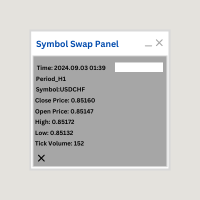
Symbol Swap Panel: Effortlessly switch the active symbol on your chart while simultaneously adding the new symbol to Market Watch. This tool ensures seamless integration and access to real-time market data, optimizing your trading workflow.
Description:
The "Symbol Swap Panel" is a versatile utility designed for traders seeking to manage their chart symbols and Market Watch more efficiently. This tool allows you to easily swap the current symbol on your chart while automatically adding the se
FREE

Signal Anywhere is an advanced version of Panel Anywhere , featuring an additional panel called Signal panel. This panel allows you to copy trades from a Signal Anywhere Provider to a Signal Anywhere Subscriber seamlessly. With Signal Anywhere , you can view market symbols and copy signals simultaneously without the need to switch between Expert Advisors (EAs). Features of the Signal panel: Local and internet-based trade copying Searchable, request, and acceptance functionalities Support for mu

Panel Anywhere with Server is similar to the free version of Panel Anywhere but includes server files and allows you to edit the host URL. In the free version, the host URL is set to "forex.chjonline.com" and cannot be changed. With this version, you can build a complete client-server system in your local environment without worrying about data being sent elsewhere. Additionally, you’ll experience faster internet response times since you won’t be connecting to a server on the other side of the

Overview: The TropangFX AutoMgmt is a versatile trading utility designed to enhance your averaging strategy by automatically placing take profit and stop loss orders. This utility empowers traders by integrating a risk calculator and lot-size customization, ensuring that each trade aligns with their risk management preferences and financial goals. Key Features: Automated Take Profit & Stop Loss: Automatically sets take profit and stop loss levels for each trade based on predefined criteria. Ens

Signal Anywhere is an advanced version of Panel Anywhere , featuring an additional panel called Signal panel. This panel allows you to copy trades from a Signal Anywhere Provider to a Signal Anywhere Subscriber seamlessly. With Signal Anywhere , you can view market symbols and copy signals simultaneously without the need to switch between Expert Advisors (EAs). Features of the Signal panel: Local and internet-based trade copying Searchable, request, and acceptance functionalities Support for mu

Automatic scale that shows the distance in pips on the chart, so the user can get a sense of the size of the bar. More options and features will be added over time and as requested by users. The software has been tested on many variables, if there are bugs or errors, please report it describing as best as possible what their cause is and if possible, with a screenshot attached so that I can understand how to fix it. Report it only in English language.

Welcome Again! Discount code for 20% off at Darwinex Zero: DWZ2328770MGM_20 Today we want present a new uselfull tool, HiperCube SuperVisor, this tool solved the problem that we have when run differents EAs at same time, doing the supervision of that something hard to do,Thanks to this we can see in 1 Chart up to 5 EAs at same time, we can if see each one of them have opened positions, profits in buy , profit in sell and total profits. Features
Custom names per each EA Set Colors as you wich,
FREE

Description ea-PartialClose&VirtualTrailing – fully automated advisor for transaction support. Version = Multi = provides support for any BUY or SELL positions. The adviser almost perfectly averages profit and loss. In open positions, it is recommended to use Stop-Loss, and do not set TakeProfit, which limits profit during sharp surges of the symbol price. The trailing process is virtual, since each movement of the levels that are responsible for a certain part of the position does not modify th

本工具用于批量把多笔持仓的止损和止盈修改到同一个价位。它不开仓、不平仓,也不做任何行情分析。
在终端里逐笔改止损止盈很花时间,改到一半行情可能已经走远。这个 EA 把你填好的价位一次性应用到所有选中的持仓,让整组订单在同一时间完成保护。
示例
你持有 5 笔 XAUUSD 多单,开仓价分别为 2510、2508、2506、2504、2495。填入止盈 2530、止损 2480 后运行,5 笔持仓的止盈统一变为 2530,止损统一变为 2480,与各自开仓价高低无关。
使用方法
1. 把 EA 挂到任意 MT5 图表,开启算法交易。 2. 填入目标止损价和目标止盈价。 3. 选择要修改的持仓范围:仅当前品种或全账户、全部魔术号或指定魔术号、全部持仓或仅多单/仅空单。 4. 选择执行方式:启动时执行一次,或持续执行以便新开的持仓也被自动更新。 5. 若希望按各自开仓价加减点数,而不是统一绝对价格,可改用点数字段。
输入参数(请替换为真实参数名)
- StopLossPrice:应用到所选持仓的止损价位 - TakeProfitPrice:应用到所选持仓的止盈价位 - UseM
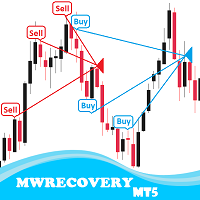
MWRecovery is a system designed to recover unprofitable positions.When the market moves by a certain amount against the direction of a trade and brings it to a loss, the system opens other trades in the same direction at specified intervals. Once these trades reach a certain profit, a magic trailing stop is activated to maximize your profit. How it works : The utility resets StopLoss levels for all processed orders. New trades will be placed if the conditions are met according to what you hav
您知道为什么MetaTrader市场是出售交易策略和技术指标的最佳场所吗?不需要广告或软件保护,没有支付的麻烦。一切都在MetaTrader市场提供。
