

MQL5交易工具(第六部分):带脉冲动画与控件的动态全息仪表盘
 691
691
 0
0

引言
在前一篇文章(第五部分)中,我们使用MQL5创建了一个滚动行情条,可以实时监控交易品种,滚动显示价格、点差和涨跌幅,帮助交易者高效地获取市场信息。在第六部分中,我们将开发一个动态全息仪表盘,用于展示多品种、多周期指标,例如相对强弱指数(RSI)和基于平均真实波幅 (ATR)的波动率,并集成脉冲动画、排序功能和交互控件,打造出极具视觉效果的实用分析工具。我们将涵盖以下主题:
到本文结束时,您将拥有一款可高度自定义的全息交易仪表盘,能够直接集成到您的交易环境中 —— 下面开始具体实现!
全息仪表盘架构解析
我们即将搭建的全息仪表盘是一款可视化工具,能够同时监控多个交易品种与时间周期,展示RSI和波动率等指标,并附带排序与预警功能,帮助我们快速地捕捉交易机会。这套架构设计至关重要。它将实时数据、交互控件与动画效果融为一体,即使在图表界面极为繁杂的环境中,也能让您更直观、更高效地进行分析。
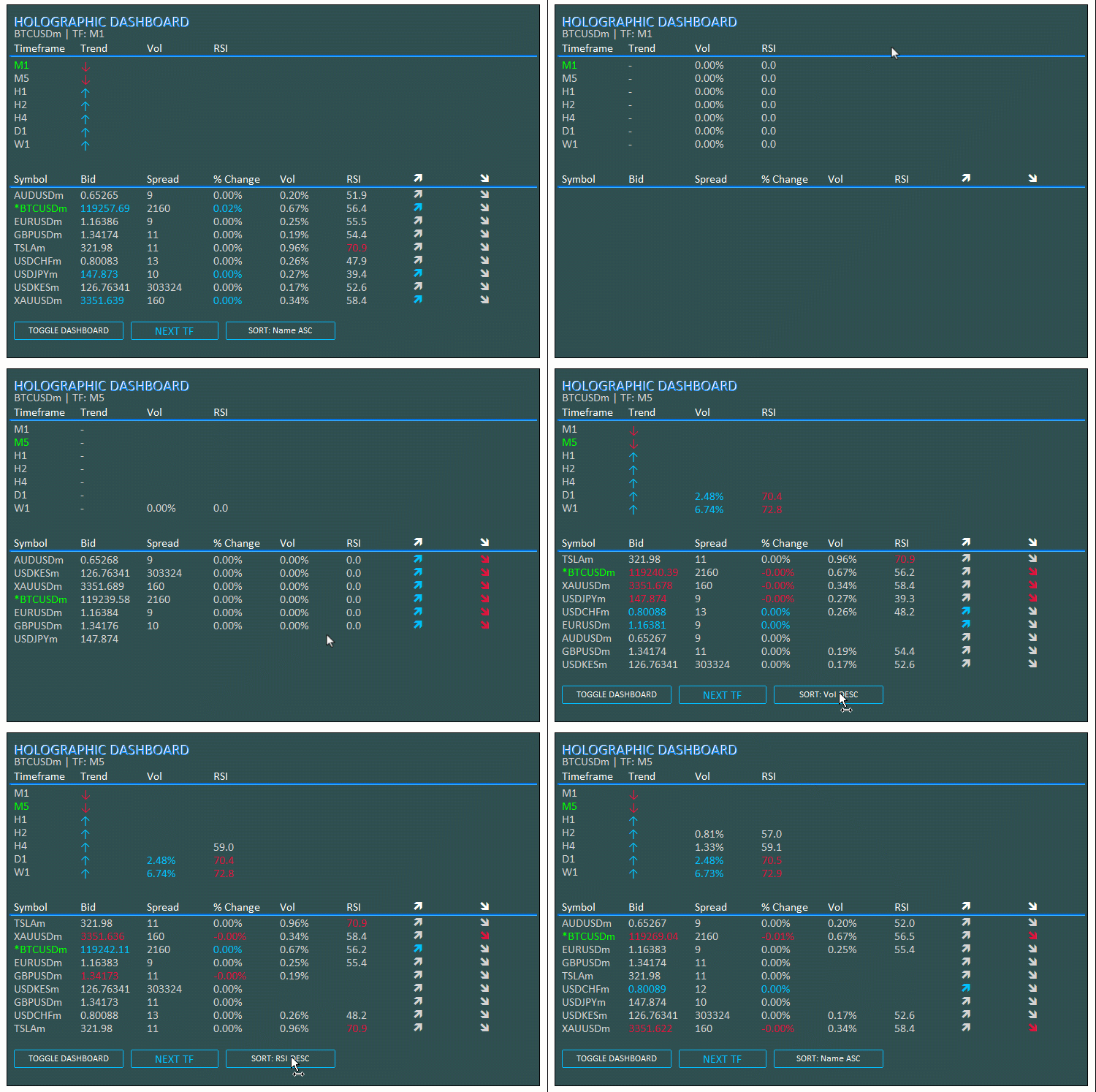
在数据管理方面,我们将使用数组,并为ATR和RSI等指标创建相应的句柄;同时编写实现排序与脉冲效果的函数,并搭配按钮来实现显示与视图的切换。我们计划将所有的更新逻辑集中在一个循环内,动态刷新用户界面(UI),确保仪表盘能够灵活适配、及时响应,从而为策略交易提供可靠的支持。在开始正式实现之前,可先查看下方的视觉效果,了解我们最终要实现的目标。
在MQL5中的实现
要在MQL5中新建该程序,我们首先需要定义程序的基础数据,然后设置一些输入参数。这些参数能让我们在不直接修改代码的情况下,轻松调整程序的运行逻辑。
//+------------------------------------------------------------------+
//|                                  Holographic Dashboard EA.mq5    |
//|                           Copyright 2025, Allan Munene Mutiiria. |
//|                                   https://t.me/Forex_Algo_Trader |
//+------------------------------------------------------------------+
#property copyright "Copyright 2025, Allan Munene Mutiiria."
#property link      "https://t.me/Forex_Algo_Trader"
#property version   "1.00"

#include <Arrays\ArrayString.mqh> //--- Include ArrayString library for string array operations
#include <Files\FileTxt.mqh>      //--- Include FileTxt library for text file operations

// Input Parameters
input int BaseFontSize = 9;           // Base Font Size
input string FontType = "Calibri";    // Font Type (Professional)
input int X_Offset = 30;              // X Offset
input int Y_Offset = 30;              // Y Offset
input color PanelColor = clrDarkSlateGray; // Panel Background Color
input color TitleColor = clrWhite;    // Title/Symbol Color
input color DataColor = clrLightGray; // Bid/Neutral Color
input color ActiveColor = clrLime;    // Active Timeframe/Symbol Color
input color UpColor = clrDeepSkyBlue; // Uptrend Color
input color DownColor = clrCrimson;   // Downtrend Color
input color LineColor = clrSilver;    // Grid Line Color
input bool EnableAnimations = true;   // Enable Pulse Animations
input int PanelWidth = 730;           // Panel Width (px)
input int ATR_Period = 14;            // ATR Period for Volatility
input int RSI_Period = 14;            // RSI Period
input double Vol_Alert_Threshold = 2.0; // Volatility Alert Threshold (%)
input color GlowColor = clrDodgerBlue; // Glow Color for holographic effect
input int AnimationSpeed = 30; // Animation delay in ms for pulse
input int PulseCycles = 3; // Number of pulse cycles for animations
我们首先引入用于字符串数组和文本日志的库文件,并设置输入参数,用于自定义用户界面和指标。我们引入"<Arrays\ArrayString.mqh>"处理交易品种列表,并引入"<Files\FileTxt.mqh>"将错误日志输出到文件。这些输入参数允许我们:将基础字体大小设置为9;选择Calibri等专业字体;将X和Y轴的偏移量均设置为30像素;自定义各类颜色(如面板背景为深瓦灰色、标题颜色为白色、数据颜色为浅灰色、激活元素为青柠色、上涨趋势为深天蓝色、下跌趋势为暗深红色、网格线为银色)。
我们默认启用脉冲动画,将面板宽度定义为730像素,ATR和RSI周期均设置为14(用于计算波动率和动量),设置波动率预警阈值为2.0%,选择道奇蓝作为全息发光效果颜色,并将动画速度配置为30毫秒、脉冲周期为3次。这些设置让仪表板在视觉效果和功能上都能高度适配个人的使用偏好。接下来,我们需要定义一些全局变量,在整个程序中使用。
// Global Variables
double prices_PrevArray[];            //--- Array for previous prices
double volatility_Array[];            //--- Array for volatility values
double bid_array[];                   //--- Array for bid prices
long spread_array[];                  //--- Array for spreads
double change_array[];                //--- Array for percentage changes
double vol_array[];                   //--- Array for volumes
double rsi_array[];                   //--- Array for RSI values
int indices[];                        //--- Array for sorted indices
ENUM_TIMEFRAMES periods[] = {PERIOD_M1, PERIOD_M5, PERIOD_H1, PERIOD_H2, PERIOD_H4, PERIOD_D1, PERIOD_W1}; //--- Array of timeframes
string logFileName = "Holographic_Dashboard_Log.txt"; //--- Log file name
int sortMode = 0;                     //--- Current sort mode
string sortNames[] = {"Name ASC", "Vol DESC", "Change ABS DESC", "RSI DESC"}; //--- Sort mode names
int atr_handles_sym[];                //--- ATR handles for symbols
int rsi_handles_sym[];                //--- RSI handles for symbols
int atr_handles_tf[];                 //--- ATR handles for timeframes
int rsi_handles_tf[];                 //--- RSI handles for timeframes
int totalSymbols;                     //--- Total number of symbols
bool dashboardVisible = true;         //--- Dashboard visibility flag
这里,我们定义全局变量来管理程序中的数据与指标,以支持实时监控、排序和动画功能。我们创建了以下数组:"prices_PrevArray"用于存储历史价格,以计算价格变动;"volatility_Array"用于存储波动率数值;"bid_array"用于存储当前bid价;"spread_array"以长整型存储点差;"change_array"用于存储涨跌幅百分比;"vol_array"用于存储波动率;"rsi_array"用于存储 RSI 指标数值;"indices"用于存储排序索引。我们完成以下设置:"periods"为时间周期数组,涵盖PERIOD_M1(1 分钟) 至PERIOD_W1(周线)的所有周期;"logFileName"为日志文件名,设为"Holographic_Dashboard_Log.txt",用于记录错误信息;"sortMode"表示当前排序模式,初始值为0;"sortNames"为排序模式选项名称,如"Name ASC"(按名称升序)或"Vol DESC"(按波动率降序);用于ATR和RSI句柄的数组(交易品种相关的"atr_handles_sym"和"rsi_handles_sym",时间周期相关的"atr_handles_tf"和"rsi_handles_tf")
整型变量"totalSymbols"用于记录交易品种的数量;布尔变量"dashboardVisible"的初始值设为true,用于控制仪表盘的显示与隐藏状态。为了更高效地管理图表对象,我们将构建一个类。
// Object Manager Class
class CObjectManager : public CArrayString {
public:
   void AddObject(string name) {      //--- Add object name to manager
      if (!Add(name)) {               //--- Check if add failed
         LogError(__FUNCTION__ + ": Failed to add object name: " + name); //--- Log error
      }
   }

   void DeleteAllObjects() {          //--- Delete all managed objects
      for (int i = Total() - 1; i >= 0; i--) { //--- Iterate through objects
         string name = At(i);         //--- Get object name
         if (ObjectFind(0, name) >= 0) { //--- Check if object exists
            if (!ObjectDelete(0, name)) { //--- Delete object
               LogError(__FUNCTION__ + ": Failed to delete object: " + name + ", Error: " + IntegerToString(GetLastError())); //--- Log deletion failure
            }
         }
         Delete(i);                   //--- Remove from array
      }
      ChartRedraw(0);                 //--- Redraw chart
   }
};
为了高效地管理仪表盘对象,我们创建"CObjectManager"类,继承自CArrayString类。在"AddObject"方法中,我们使用"Add"函数将对象名称"name"添加到数组中,如果添加失败,则通过"LogError"记录错误日志。我们使用"DeleteAllObjects"方法,通过"Total"对数组进行倒序遍历,借助"At"获取每个对象的名称,通过ObjectFind函数检查对象是否存在,再使用ObjectDelete删除对象(如果删除失败则记录错误),随后通过"Delete"将其从数组中移除,最后借助ChartRedraw函数刷新图表。通过类的继承扩展,我们可以构建一些工具函数,以便在整个程序中多次调用。
CObjectManager objManager;            //--- Object manager instance

//+------------------------------------------------------------------+
//| Utility Functions                                                |
//+------------------------------------------------------------------+
void LogError(string message) {
   CFileTxt file;                     //--- Create file object
   if (file.Open(logFileName, FILE_WRITE | FILE_TXT | FILE_COMMON, true) >= 0) { //--- Open log file
      file.WriteString(message + "\n"); //--- Write message
      file.Close();                   //--- Close file
   }
   Print(message);                    //--- Print message
}

string Ask(string symbol) {
   double value;                      //--- Variable for ask price
   if (SymbolInfoDouble(symbol, SYMBOL_ASK, value)) { //--- Get ask price
      return DoubleToString(value, (int)SymbolInfoInteger(symbol, SYMBOL_DIGITS)); //--- Return formatted ask
   }
   LogError(__FUNCTION__ + ": Failed to get ask price for " + symbol + ", Error: " + IntegerToString(GetLastError())); //--- Log error
   return "N/A";                      //--- Return N/A on failure
}

string Bid(string symbol) {
   double value;                      //--- Variable for bid price
   if (SymbolInfoDouble(symbol, SYMBOL_BID, value)) { //--- Get bid price
      return DoubleToString(value, (int)SymbolInfoInteger(symbol, SYMBOL_DIGITS)); //--- Return formatted bid
   }
   LogError(__FUNCTION__ + ": Failed to get bid price for " + symbol + ", Error: " + IntegerToString(GetLastError())); //--- Log error
   return "N/A";                      //--- Return N/A on failure
}

string Spread(string symbol) {
   long value;                        //--- Variable for spread
   if (SymbolInfoInteger(symbol, SYMBOL_SPREAD, value)) { //--- Get spread
      return IntegerToString(value);  //--- Return spread as string
   }
   LogError(__FUNCTION__ + ": Failed to get spread for " + symbol + ", Error: " + IntegerToString(GetLastError())); //--- Log error
   return "N/A";                      //--- Return N/A on failure
}

string PercentChange(double current, double previous) {
   if (previous == 0) return "0.00%"; //--- Handle zero previous value
   return StringFormat("%.2f%%", ((current - previous) / previous) * 100); //--- Calculate and format percentage
}

string TruncPeriod(ENUM_TIMEFRAMES period) {
   return StringSubstr(EnumToString(period), 7); //--- Truncate timeframe string
}
为了管理对象与数据,我们将"objManager"实例化为"CObjectManager"对象,用于跟踪所有UI元素。我们创建"LogError"函数来记录错误日志:通过"CFileTxt"以"FILE_WRITE | FILE_TXT | FILE_COMMON"模式打开日志文件"logFileName",使用"WriteString"写入错误信息,然后关闭文件并在终端打印消息。"Ask"函数通过SymbolInfoDouble获取指定"symbol"的ask价,利用DoubleToString并结合"SymbolInfoInteger"获取的小数位数进行格式化;如果获取失败则通过"LogError"记录错误,并返回"N/A"。与之类似,"Bid"函数用于获取、格式化bid价,并处理异常情况。
"Spread"函数通过"SymbolInfoInteger"获取点差数值,使用IntegerToString将其转为字符串返回,如果获取失败则返回"N/A"。"PercentChange"函数使用StringFormat计算"current"与"previous"价格之间的涨跌幅百分比,如果前期价格为0,则返回"0.00%"。"TruncPeriod"函数通过StringSubstr截取ENUM_TIMEFRAMES时间周期枚举字符串,实现简洁的周期显示,保证输出格式整洁清爽。现在,我们可以开始编写实现全息脉冲效果的函数。
//+------------------------------------------------------------------+
//| Holographic Animation Function                                   |
//+------------------------------------------------------------------+
void HolographicPulse(string objName, color mainClr, color glowClr) {
   if (!EnableAnimations) return;     //--- Exit if animations disabled
   int cycles = PulseCycles;          //--- Set pulse cycles
   int delay = AnimationSpeed;        //--- Set animation delay
   for (int i = 0; i < cycles; i++) { //--- Iterate through cycles
      ObjectSetInteger(0, objName, OBJPROP_COLOR, glowClr); //--- Set glow color
      ChartRedraw(0);                 //--- Redraw chart
      Sleep(delay);                   //--- Delay
      ObjectSetInteger(0, objName, OBJPROP_COLOR, mainClr); //--- Set main color
      ChartRedraw(0);                 //--- Redraw chart
      Sleep(delay / 2);               //--- Shorter delay
   }
}
这里,我们实现"HolographicPulse"函数,为仪表盘元素创建脉冲动画效果。如果"EnableAnimations"为false,则直接提前退出,跳过动画执行。我们将"cycles"设置为"PulseCycles","delay"设置为"AnimationSpeed",然后通过for循环遍历所有"cycles"。在每一次循环中,我们使用ObjectSetInteger函数将对象颜色OBJPROP_COLOR属性设置为"glowClr",通过ChartRedraw刷新图表,使用"Sleep"暂停"delay"时间,将颜色切换回主色"mainClr",再次刷新图表,并以更短的时间"delay / 2"暂停。这样就能为激活或预警元素添加全息脉冲效果,实现视觉高亮提醒。借助这些工具函数,我们就可以开始创建仪表盘的核心初始化功能。为此,我们还需要编写一些辅助函数,以保证程序的模块化结构。
//+------------------------------------------------------------------+
//| Create Text Label Function                                       |
//+------------------------------------------------------------------+
bool createText(string objName, string text, int x, int y, color clrTxt, int fontsize, string font, bool animate = false, double opacity = 1.0) {
   ResetLastError();                  //--- Reset error code
   if (ObjectFind(0, objName) < 0) {  //--- Check if object exists
      if (!ObjectCreate(0, objName, OBJ_LABEL, 0, 0, 0)) { //--- Create label
         LogError(__FUNCTION__ + ": Failed to create label: " + objName + ", Error: " + IntegerToString(GetLastError())); //--- Log error
         return false;                //--- Return failure
      }
      objManager.AddObject(objName);  //--- Add to manager
   }
   ObjectSetInteger(0, objName, OBJPROP_XDISTANCE, x); //--- Set x-coordinate
   ObjectSetInteger(0, objName, OBJPROP_YDISTANCE, y); //--- Set y-coordinate
   ObjectSetInteger(0, objName, OBJPROP_CORNER, CORNER_LEFT_UPPER); //--- Set corner
   ObjectSetString(0, objName, OBJPROP_TEXT, text); //--- Set text
   ObjectSetInteger(0, objName, OBJPROP_COLOR, clrTxt); //--- Set color
   ObjectSetInteger(0, objName, OBJPROP_FONTSIZE, fontsize); //--- Set font size
   ObjectSetString(0, objName, OBJPROP_FONT, font); //--- Set font
   ObjectSetInteger(0, objName, OBJPROP_BACK, false); //--- Set foreground
   ObjectSetInteger(0, objName, OBJPROP_SELECTABLE, false); //--- Disable selection
   ObjectSetInteger(0, objName, OBJPROP_ZORDER, StringFind(objName, "Glow") >= 0 ? -1 : 0); //--- Set z-order

   if (animate && EnableAnimations) { //--- Check for animation
      ObjectSetInteger(0, objName, OBJPROP_COLOR, DataColor); //--- Set temporary color
      ChartRedraw(0);                 //--- Redraw chart
      Sleep(50);                      //--- Delay
      ObjectSetInteger(0, objName, OBJPROP_COLOR, clrTxt); //--- Set final color
   }

   ChartRedraw(0);                    //--- Redraw chart
   return true;                       //--- Return success
}

//+------------------------------------------------------------------+
//| Create Button Function                                           |
//+------------------------------------------------------------------+
bool createButton(string objName, string text, int x, int y, int width, int height, color textColor, color bgColor, color borderColor, bool animate = false) {
   ResetLastError();                  //--- Reset error code
   if (ObjectFind(0, objName) < 0) {  //--- Check if object exists
      if (!ObjectCreate(0, objName, OBJ_BUTTON, 0, 0, 0)) { //--- Create button
         LogError(__FUNCTION__ + ": Failed to create button: " + objName + ", Error: " + IntegerToString(GetLastError())); //--- Log error
         return false;                //--- Return failure
      }
      objManager.AddObject(objName);  //--- Add to manager
   }
   ObjectSetInteger(0, objName, OBJPROP_XDISTANCE, x); //--- Set x-coordinate
   ObjectSetInteger(0, objName, OBJPROP_YDISTANCE, y); //--- Set y-coordinate
   ObjectSetInteger(0, objName, OBJPROP_XSIZE, width); //--- Set width
   ObjectSetInteger(0, objName, OBJPROP_YSIZE, height); //--- Set height
   ObjectSetString(0, objName, OBJPROP_TEXT, text); //--- Set text
   ObjectSetInteger(0, objName, OBJPROP_COLOR, textColor); //--- Set text color
   ObjectSetInteger(0, objName, OBJPROP_BGCOLOR, bgColor); //--- Set background color
   ObjectSetInteger(0, objName, OBJPROP_BORDER_COLOR, borderColor); //--- Set border color
   ObjectSetInteger(0, objName, OBJPROP_FONTSIZE, BaseFontSize + (StringFind(objName, "SwitchTFBtn") >= 0 ? 3 : 0)); //--- Set font size
   ObjectSetString(0, objName, OBJPROP_FONT, FontType); //--- Set font
   ObjectSetInteger(0, objName, OBJPROP_ZORDER, 1); //--- Set z-order
   ObjectSetInteger(0, objName, OBJPROP_STATE, false); //--- Reset state

   if (animate && EnableAnimations) { //--- Check for animation
      ObjectSetInteger(0, objName, OBJPROP_BGCOLOR, clrLightGray); //--- Set temporary background
      ChartRedraw(0);                 //--- Redraw chart
      Sleep(50);                      //--- Delay
      ObjectSetInteger(0, objName, OBJPROP_BGCOLOR, bgColor); //--- Set final background
   }

   ChartRedraw(0);                    //--- Redraw chart
   return true;                       //--- Return success
}

//+------------------------------------------------------------------+
//| Create Panel Function                                            |
//+------------------------------------------------------------------+
bool createPanel(string objName, int x, int y, int width, int height, color clr, double opacity = 1.0) {
   ResetLastError();                  //--- Reset error code
   if (ObjectFind(0, objName) < 0) {  //--- Check if object exists
      if (!ObjectCreate(0, objName, OBJ_RECTANGLE_LABEL, 0, 0, 0)) { //--- Create panel
         LogError(__FUNCTION__ + ": Failed to create panel: " + objName + ", Error: " + IntegerToString(GetLastError())); //--- Log error
         return false;                //--- Return failure
      }
      objManager.AddObject(objName);  //--- Add to manager
   }
   ObjectSetInteger(0, objName, OBJPROP_XDISTANCE, x); //--- Set x-coordinate
   ObjectSetInteger(0, objName, OBJPROP_YDISTANCE, y); //--- Set y-coordinate
   ObjectSetInteger(0, objName, OBJPROP_XSIZE, width); //--- Set width
   ObjectSetInteger(0, objName, OBJPROP_YSIZE, height); //--- Set height
   ObjectSetInteger(0, objName, OBJPROP_BGCOLOR, clr); //--- Set background color
   ObjectSetInteger(0, objName, OBJPROP_BORDER_TYPE, BORDER_FLAT); //--- Set border type
   ObjectSetInteger(0, objName, OBJPROP_ZORDER, -1); //--- Set z-order
   ChartRedraw(0);                    //--- Redraw chart
   return true;                       //--- Return success
}

//+------------------------------------------------------------------+
//| Create Line Function                                             |
//+------------------------------------------------------------------+
bool createLine(string objName, int x1, int y1, int x2, int y2, color clrLine, double opacity = 1.0) {
   ResetLastError();                  //--- Reset error code
   if (ObjectFind(0, objName) < 0) {  //--- Check if object exists
      if (!ObjectCreate(0, objName, OBJ_RECTANGLE_LABEL, 0, 0, 0)) { //--- Create line as rectangle
         LogError(__FUNCTION__ + ": Failed to create line: " + objName + ", Error: " + IntegerToString(GetLastError())); //--- Log error
         return false;                //--- Return failure
      }
      objManager.AddObject(objName);  //--- Add to manager
   }
   ObjectSetInteger(0, objName, OBJPROP_XDISTANCE, x1); //--- Set x1
   ObjectSetInteger(0, objName, OBJPROP_YDISTANCE, y1); //--- Set y1
   ObjectSetInteger(0, objName, OBJPROP_XSIZE, x2 - x1); //--- Set width
   ObjectSetInteger(0, objName, OBJPROP_YSIZE, StringFind(objName, "Glow") >= 0 ? 3 : 1); //--- Set height
   ObjectSetInteger(0, objName, OBJPROP_BGCOLOR, clrLine); //--- Set color
   ObjectSetInteger(0, objName, OBJPROP_ZORDER, StringFind(objName, "Glow") >= 0 ? -1 : 0); //--- Set z-order
   ChartRedraw(0);                    //--- Redraw chart
   return true;                       //--- Return success
}
这里,我们定义"createText"函数,用于创建文本标签。我们首先调用ResetLastError清除之前的错误信息。如果对象不存在(通过"ObjectFind(0, objName) < 0"判断),我们使用ObjectCreate创建类型为OBJ_LABEL的文本标签对象。如果创建失败,记录错误并返回false。通过"AddObject"将该对象添加到"objManager"中统一管理。将OBJPROP_XDISTANCE设为"x"坐标,"OBJPROP_YDISTANCE"设为"y"坐标,并按同样方式设置其他属性。如果"animate"和"EnableAnimations"均为true,则将"OBJPROP_COLOR"临时设置为"DataColor",重绘图表,通过"Sleep(50)"延时,然后再设置文本颜色。最后,刷新并返回true。
接下来,我们以类似的方式定义"createButton"函数:重置错误状态、检查对象是否存在,如果需要则使用 OBJ_BUTTON类型创建按钮,创建失败则记录日志,并将按钮添加到对象管理器中。随后我们设置对象属性;如果动画已启用,则临时将OBJPROP_BGCOLOR设置为"clrLightGray",重绘图表,暂停50毫秒,再恢复为目标背景色"bgColor"。刷新并返回true。对于"createPanel"函数,我们使用相似的方法实现。
最后,"createLine"函数也采用相似的逻辑:重置错误、检查对象、以OBJ_RECTANGLE_LABEL(用于模拟线条)类型创建,创建失败则记录日志,并添加到对象管理器中。设置属性如下:将"OBJPROP_XDISTANCE"设为"x1";"OBJPROP_YDISTANCE"设为"y1";"OBJPROP_XSIZE"设为"x2-x1";对于"OBJPROP_YSIZE",如果名称包含“Glow”则设为3,否则为1;"OBJPROP_BGCOLOR"设为 "clrLine";对于OBJPROP_ZORDER,如果名称包含“Glow”则设为 -1,否则为0。刷新并返回true。现在,我们使用这些工具函数来创建核心函数,以实现主仪表盘的绘制,具体如下:
//+------------------------------------------------------------------+
//| Dashboard Creation Function with Holographic Effects             |
//+------------------------------------------------------------------+
void InitDashboard() {
   // Get chart dimensions
   long chartWidth, chartHeight;      //--- Variables for chart dimensions
   if (!ChartGetInteger(0, CHART_WIDTH_IN_PIXELS, 0, chartWidth) || !ChartGetInteger(0, CHART_HEIGHT_IN_PIXELS, 0, chartHeight)) { //--- Get chart size
      LogError(__FUNCTION__ + ": Failed to get chart dimensions, Error: " + IntegerToString(GetLastError())); //--- Log error
      return;                         //--- Exit on failure
   }
   int fontSize = (int)(BaseFontSize * (chartWidth / 800.0)); //--- Calculate font size
   int cellWidth = PanelWidth / 8;    //--- Calculate cell width
   int cellHeight = 18;               //--- Set cell height
   int panelHeight = 70 + (ArraySize(periods) + 1) * cellHeight + 40 + (totalSymbols + 1) * cellHeight + 50; //--- Calculate panel height

   // Create Dark Panel
   createPanel("DashboardPanel", X_Offset, Y_Offset, PanelWidth, panelHeight, PanelColor); //--- Create dashboard panel

   // Create Header with Glow
   createText("Header", "HOLOGRAPHIC DASHBOARD", X_Offset + 10, Y_Offset + 10, TitleColor, fontSize + 4, FontType); //--- Create header text
   createText("HeaderGlow", "HOLOGRAPHIC DASHBOARD", X_Offset + 11, Y_Offset + 11, GlowColor, fontSize + 4, FontType, true); //--- Create header glow
   createText("SubHeader", StringFormat("%s | TF: %s", _Symbol, TruncPeriod(_Period)), X_Offset + 10, Y_Offset + 30, DataColor, fontSize, FontType); //--- Create subheader

   // Timeframe Grid
   int y = Y_Offset + 50;             //--- Set y-coordinate for timeframe grid
   createText("TF_Label", "Timeframe", X_Offset + 10, y, TitleColor, fontSize, FontType); //--- Create timeframe label
   createText("Trend_Label", "Trend", X_Offset + 10 + cellWidth, y, TitleColor, fontSize, FontType); //--- Create trend label
   createText("Vol_Label", "Vol", X_Offset + 10 + cellWidth * 2, y, TitleColor, fontSize, FontType); //--- Create vol label
   createText("RSI_Label", "RSI", X_Offset + 10 + cellWidth * 3, y, TitleColor, fontSize, FontType); //--- Create RSI label
   createLine("TF_Separator", X_Offset + 5, y + cellHeight + 2, X_Offset + PanelWidth - 5, y + cellHeight + 2, LineColor, 0.6); //--- Create separator line
   createLine("TF_Separator_Glow", X_Offset + 4, y + cellHeight + 1, X_Offset + PanelWidth - 4, y + cellHeight + 3, GlowColor, 0.3); //--- Create glow separator
   if (EnableAnimations) HolographicPulse("TF_Separator", LineColor, GlowColor); //--- Animate separator if enabled

   y += cellHeight + 5;               //--- Update y-coordinate
   for (int i = 0; i < ArraySize(periods); i++) { //--- Iterate through timeframes
      color periodColor = (periods[i] == _Period) ? ActiveColor : DataColor; //--- Set period color
      createText("Period_" + IntegerToString(i), TruncPeriod(periods[i]), X_Offset + 10, y, periodColor, fontSize, FontType); //--- Create period text
      createText("Trend_" + IntegerToString(i), "-", X_Offset + 10 + cellWidth, y, DataColor, fontSize, FontType); //--- Create trend text
      createText("Vol_" + IntegerToString(i), "0.00%", X_Offset + 10 + cellWidth * 2, y, DataColor, fontSize, FontType); //--- Create vol text
      createText("RSI_" + IntegerToString(i), "0.0", X_Offset + 10 + cellWidth * 3, y, DataColor, fontSize, FontType); //--- Create RSI text
      y += cellHeight;                //--- Update y-coordinate
   }

   // Symbol Grid
   y += 30;                           //--- Update y-coordinate for symbol grid
   createText("Symbol_Label", "Symbol", X_Offset + 10, y, TitleColor, fontSize, FontType); //--- Create symbol label
   createText("Bid_Label", "Bid", X_Offset + 10 + cellWidth, y, TitleColor, fontSize, FontType); //--- Create bid label
   createText("Spread_Label", "Spread", X_Offset + 10 + cellWidth * 2, y, TitleColor, fontSize, FontType); //--- Create spread label
   createText("Change_Label", "% Change", X_Offset + 10 + cellWidth * 3, y, TitleColor, fontSize, FontType); //--- Create change label
   createText("Vol_Label_Symbol", "Vol", X_Offset + 10 + cellWidth * 4, y, TitleColor, fontSize, FontType); //--- Create vol label
   createText("RSI_Label_Symbol", "RSI", X_Offset + 10 + cellWidth * 5, y, TitleColor, fontSize, FontType); //--- Create RSI label
   createText("UpArrow_Label", CharToString(236), X_Offset + 10 + cellWidth * 6, y, TitleColor, fontSize, "Wingdings"); //--- Create up arrow label
   createText("DownArrow_Label", CharToString(238), X_Offset + 10 + cellWidth * 7, y, TitleColor, fontSize, "Wingdings"); //--- Create down arrow label
   createLine("Symbol_Separator", X_Offset + 5, y + cellHeight + 2, X_Offset + PanelWidth - 5, y + cellHeight + 2, LineColor, 0.6); //--- Create separator line
   createLine("Symbol_Separator_Glow", X_Offset + 4, y + cellHeight + 1, X_Offset + PanelWidth - 4, y + cellHeight + 3, GlowColor, 0.3); //--- Create glow separator
   if (EnableAnimations) HolographicPulse("Symbol_Separator", LineColor, GlowColor); //--- Animate separator if enabled

   y += cellHeight + 5;               //--- Update y-coordinate
   for (int i = 0; i < totalSymbols; i++) { //--- Iterate through symbols
      string symbol = SymbolName(i, true); //--- Get symbol name
      string displaySymbol = (symbol == _Symbol) ? "*" + symbol : symbol; //--- Format display symbol
      color symbolColor = (symbol == _Symbol) ? ActiveColor : DataColor; //--- Set symbol color
      createText("Symbol_" + IntegerToString(i), displaySymbol, X_Offset + 10, y, symbolColor, fontSize, FontType); //--- Create symbol text
      createText("Bid_" + IntegerToString(i), Bid(symbol), X_Offset + 10 + cellWidth, y, DataColor, fontSize, FontType); //--- Create bid text
      createText("Spread_" + IntegerToString(i), Spread(symbol), X_Offset + 10 + cellWidth * 2, y, DataColor, fontSize, FontType); //--- Create spread text
      createText("Change_" + IntegerToString(i), "0.00%", X_Offset + 10 + cellWidth * 3, y, DataColor, fontSize, FontType); //--- Create change text
      createText("Vol_" + IntegerToString(i), "0.00%", X_Offset + 10 + cellWidth * 4, y, DataColor, fontSize, FontType); //--- Create vol text
      createText("RSI_" + IntegerToString(i), "0.0", X_Offset + 10 + cellWidth * 5, y, DataColor, fontSize, FontType); //--- Create RSI text
      createText("ArrowUp_" + IntegerToString(i), CharToString(236), X_Offset + 10 + cellWidth * 6, y, UpColor, fontSize, "Wingdings"); //--- Create up arrow
      createText("ArrowDown_" + IntegerToString(i), CharToString(238), X_Offset + 10 + cellWidth * 7, y, DownColor, fontSize, "Wingdings"); //--- Create down arrow
      y += cellHeight;                //--- Update y-coordinate
   }

   // Interactive Buttons with Pulse Animation
   createButton("ToggleBtn", "TOGGLE DASHBOARD", X_Offset + 10, y + 20, 150, 25, TitleColor, PanelColor, UpColor); //--- Create toggle button
   createButton("SwitchTFBtn", "NEXT TF", X_Offset + 170, y + 20, 120, 25, UpColor, PanelColor, UpColor); //--- Create switch TF button
   createButton("SortBtn", "SORT: " + sortNames[sortMode], X_Offset + 300, y + 20, 150, 25, TitleColor, PanelColor, UpColor); //--- Create sort button

   ChartRedraw(0);                    //--- Redraw chart
}
在这里,我们初始化仪表盘,首先通过"chartWidth"和"chartHeight"变量获取图表的尺寸。我们通过调用两次ChartGetInteger函数实现这一点:第一次使用CHART_WIDTH_IN_PIXELS获取宽度,第二次使用"CHART_HEIGHT_IN_PIXELS"获取高度。接下来,我们根据图表宽度与800像素的比例,缩放"BaseFontSize"来计算"fontSize",并将结果转换为整数。接下来,我们计算"cellWidth":将"PanelWidth"除以8;并将"cellHeight"设置为固定值18。"panelHeight"的计算公式为:70 + ("ArraySize(periods)"+ 1) * "cellHeight" + 40 + (totalSymbols + 1) * "cellHeight"+ 50,此计算涵盖了整体布局,包括时间周期和交易品种区域。
接下来,我们调用"createPanel"函数创建深色面板背景,命名为"DashboardPanel",位置在"X_Offset"和"Y_Offset",尺寸为"PanelWidth"和"panelHeight",颜色使用"PanelColor"。对于标题栏,我们使用"createText"函数创建主文本标签"Header",显示文字"HOLOGRAPHIC DASHBOARD",坐标为"X_Offset + 10"和"Y_Offset + 10",样式为"TitleColor",字体为"FontType"且大小为"fontSize + 4"。为了营造发光效果,我们再创建一个文本标签"HeaderGlow",文字内容保持不变,但在X、Y方向各偏移1个像素,将颜色设置为"GlowColor",字体大小和类型也保持一致,并启用动画效果。
接下来,我们添加副标题标签"SubHeader",通过"StringFormat"格式化显示当前_Symbol以及经过"TruncPeriod(_Period)"精简后的周期名称。该标签坐标为"X_Offset+ 10"和"Y_Offset + 30",颜色为"DataColor",字体为"FontType"且大小为"fontSize"。
进入时间周期网格区域,我们将纵坐标"y"设置为"Y_Offset + 50"。我们使用"createText"函数分别创建"Timeframe"、"Trend"、"Vol"和"RSI"四个标题标签,按照"cellWidth"横向依次排列,所有标签均使用"TitleColor"、"fontSize"和"FontType"。在这些标题下方,我们通过"createLine"函数绘制分隔线"TF_Separator",坐标从"X_Offset + 5"到"X_Offset + PanelWidth - 5",高度为"y + cellHeight + 2",颜色为"LineColor" ,透明度为0.6。为了营造发光效果,我们额外绘制了一条分隔线"TF_Separator_Glow",位置轻微偏移、宽度稍大,颜色为"GlowColor",透明度为0.3。如果"EnableAnimations"为true,则调用"HolographicPulse"函数,传入"LineColor"和"GlowColor"来应用脉冲动画。其他所有标签对象均采用相同逻辑来实现。
最后,我们创建交互式按钮:"ToggleBtn"显示文字"TOGGLE DASHBOARD",坐标为"X_Offset + 10"和"y + 20",尺寸为150x25,配色为"TitleColor"、"PanelColor"、"UpColor";"SwitchTFBtn"显示文字"NEXT TF",坐标为"X_Offset + 170"和同一纵坐标,尺寸为120x25,配色为"UpColor"、"PanelColor"、"UpColor";SortBtn显示文字"SORT: + sortNames[sortMode]",坐标为"X_Offset + 300"和同一纵坐标,尺寸为150x25,配色为"TitleColor"、"PanelColor"、 "UpColor"。完成绘制后,调用"ChartRedraw(0)"函数刷新图表。定义好该函数后,我们就可以在初始化事件处理器中调用它,繁琐的界面搭建工作就此完成。
//+------------------------------------------------------------------+
//| Expert Initialization Function                                   |
//+------------------------------------------------------------------+
int OnInit() {
   // Clear existing objects
   if (ObjectsDeleteAll(0, -1, -1) < 0) { //--- Delete all objects
      LogError(__FUNCTION__ + ": Failed to delete objects, Error: " + IntegerToString(GetLastError())); //--- Log error
   }
   objManager.DeleteAllObjects();     //--- Delete managed objects

   // Initialize arrays
   totalSymbols = SymbolsTotal(true); //--- Get total symbols
   if (totalSymbols == 0) {           //--- Check for symbols
      LogError(__FUNCTION__ + ": No symbols available"); //--- Log error
      return INIT_FAILED;             //--- Return failure
   }
   ArrayResize(prices_PrevArray, totalSymbols); //--- Resize previous prices array
   ArrayResize(volatility_Array, totalSymbols); //--- Resize volatility array
   ArrayResize(bid_array, totalSymbols); //--- Resize bid array
   ArrayResize(spread_array, totalSymbols); //--- Resize spread array
   ArrayResize(change_array, totalSymbols); //--- Resize change array
   ArrayResize(vol_array, totalSymbols); //--- Resize vol array
   ArrayResize(rsi_array, totalSymbols); //--- Resize RSI array
   ArrayResize(indices, totalSymbols);   //--- Resize indices array
   ArrayResize(atr_handles_sym, totalSymbols); //--- Resize ATR symbol handles
   ArrayResize(rsi_handles_sym, totalSymbols); //--- Resize RSI symbol handles
   ArrayResize(atr_handles_tf, ArraySize(periods)); //--- Resize ATR timeframe handles
   ArrayResize(rsi_handles_tf, ArraySize(periods)); //--- Resize RSI timeframe handles
   ArrayInitialize(prices_PrevArray, 0); //--- Initialize previous prices
   ArrayInitialize(volatility_Array, 0); //--- Initialize volatility

   // Create indicator handles for timeframes
   for (int i = 0; i < ArraySize(periods); i++) { //--- Iterate through timeframes
      atr_handles_tf[i] = iATR(_Symbol, periods[i], ATR_Period); //--- Create ATR handle
      if (atr_handles_tf[i] == INVALID_HANDLE) { //--- Check for invalid handle
         LogError(__FUNCTION__ + ": Failed to create ATR handle for TF " + EnumToString(periods[i])); //--- Log error
         return INIT_FAILED;          //--- Return failure
      }
      rsi_handles_tf[i] = iRSI(_Symbol, periods[i], RSI_Period, PRICE_CLOSE); //--- Create RSI handle
      if (rsi_handles_tf[i] == INVALID_HANDLE) { //--- Check for invalid handle
         LogError(__FUNCTION__ + ": Failed to create RSI handle for TF " + EnumToString(periods[i])); //--- Log error
         return INIT_FAILED;          //--- Return failure
      }
   }

   // Create indicator handles for symbols on H1
   for (int i = 0; i < totalSymbols; i++) { //--- Iterate through symbols
      string symbol = SymbolName(i, true); //--- Get symbol name
      atr_handles_sym[i] = iATR(symbol, PERIOD_H1, ATR_Period); //--- Create ATR handle
      if (atr_handles_sym[i] == INVALID_HANDLE) { //--- Check for invalid handle
         LogError(__FUNCTION__ + ": Failed to create ATR handle for symbol " + symbol); //--- Log error
         return INIT_FAILED;          //--- Return failure
      }
      rsi_handles_sym[i] = iRSI(symbol, PERIOD_H1, RSI_Period, PRICE_CLOSE); //--- Create RSI handle
      if (rsi_handles_sym[i] == INVALID_HANDLE) { //--- Check for invalid handle
         LogError(__FUNCTION__ + ": Failed to create RSI handle for symbol " + symbol); //--- Log error
         return INIT_FAILED;          //--- Return failure
      }
   }

   InitDashboard();                   //--- Initialize dashboard
   dashboardVisible = true;           //--- Set dashboard visible

   return INIT_SUCCEEDED;             //--- Return success
}
在OnInit函数中,我们使用ObjectsDeleteAll函数清除当前图表中的各类现有对象;如果清除失败,则通过"LogError"记录错误日志,同时调用"objManager.DeleteAllObjects"删除由管理器统一管理的对象。我们通过SymbolsTotal函数获取市场观察列表中的品种数量,并赋值给"totalSymbols",如果数量为0,则返回INIT_FAILED(初始化失败),并使用"LogError"记录日志。我们使用ArrayResize函数调整以下数组的大小,使其匹配"totalSymbols"或"ArraySize(periods)":"prices_PrevArray"、"volatility_Array"、"bid_array"、"spread_array"、"change_array"、"vol_array"、"rsi_array"、"indices"、"atr_handles_sym"、"rsi_handles_sym"、"atr_handles_tf"和"rsi_handles_tf",最后通过ArrayInitialize函数将"prices_PrevArray"和"volatility_Array"初始化为0。
对于时间周期,我们遍历"periods"数组,通过iATR函数创建"atr_handles_tf[i]"指标句柄,应用于当前"_Symbol"、"periods[i]"以及"ATR_Period",并且通过"iRSI"函数创建 rsi_handles_tf[i] 指标句柄,应用于_Symbol、"periods[i]"、"RSI_Period"以及"PRICE_CLOSE"。如果"INVALID_HANDLE",则记录错误并返回INIT_FAILED。同理,对于交易品种,我们遍历"totalSymbols",通过"SymbolName"和参数true获取"symbol",使用"iATR"函数创建"atr_handles_sym[i]"句柄,应用于当前"symbol"、"PERIOD_H1"以及"ATR_Period",并通过iRSI函数创建"rsi_handles_sym[i]"句柄,应用于"symbol"、"PERIOD_H1"、 "RSI_Period"以及"PRICE_CLOSE"。如果句柄无效,则记录错误并返回"INIT_FAILED"。我们调用"InitDashboard"函数创建UI,将"dashboardVisible"设置为true,最后返回初始化成功。运行程序后,效果如下:
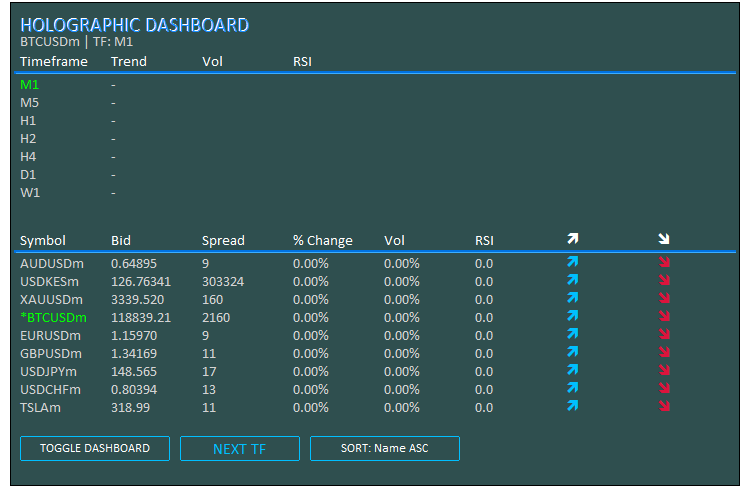
由图可见,程序已成功初始化。接下来我们处理程序的反初始化逻辑,在这一步中需要删除已创建的界面对象,并释放指标句柄资源。
//+------------------------------------------------------------------+
//| Expert Deinitialization Function                                 |
//+------------------------------------------------------------------+
void OnDeinit(const int reason) {
   if (ObjectsDeleteAll(0, -1, -1) < 0) { //--- Delete all objects
      LogError(__FUNCTION__ + ": Failed to delete objects, Error: " + IntegerToString(GetLastError())); //--- Log error
   }
   objManager.DeleteAllObjects();     //--- Delete managed objects

   // Release indicator handles
   for (int i = 0; i < ArraySize(atr_handles_tf); i++) { //--- Iterate through timeframe ATR handles
      if (atr_handles_tf[i] != INVALID_HANDLE) IndicatorRelease(atr_handles_tf[i]); //--- Release handle
      if (rsi_handles_tf[i] != INVALID_HANDLE) IndicatorRelease(rsi_handles_tf[i]); //--- Release handle
   }
   for (int i = 0; i < ArraySize(atr_handles_sym); i++) { //--- Iterate through symbol ATR handles
      if (atr_handles_sym[i] != INVALID_HANDLE) IndicatorRelease(atr_handles_sym[i]); //--- Release handle
      if (rsi_handles_sym[i] != INVALID_HANDLE) IndicatorRelease(rsi_handles_sym[i]); //--- Release handle
   }
}
在OnDeinit事件处理器中,我们会在移除EA时释放所有资源。我们使用 ObjectsDeleteAll函数删除所有图表与类型的对象(参数为-1),如果返回负值则通过"LogError"记录删除失败日志。调用"objManager.DeleteAllObjects"移除由管理器统一管理的对象。对于时间周期指标句柄,我们通过 ArraySize遍历"atr_handles_tf"和"rsi_handles_tf"数组,使用IndicatorRelease释放非"INVALID_HANDLE"的有效句柄。同理,对"atr_handles_sym"和"rsi_handles_sym"中的交易品种指标句柄执行相同的释放操作。这样确保能够完全清理所有界面对象与指标资源。图示如下:
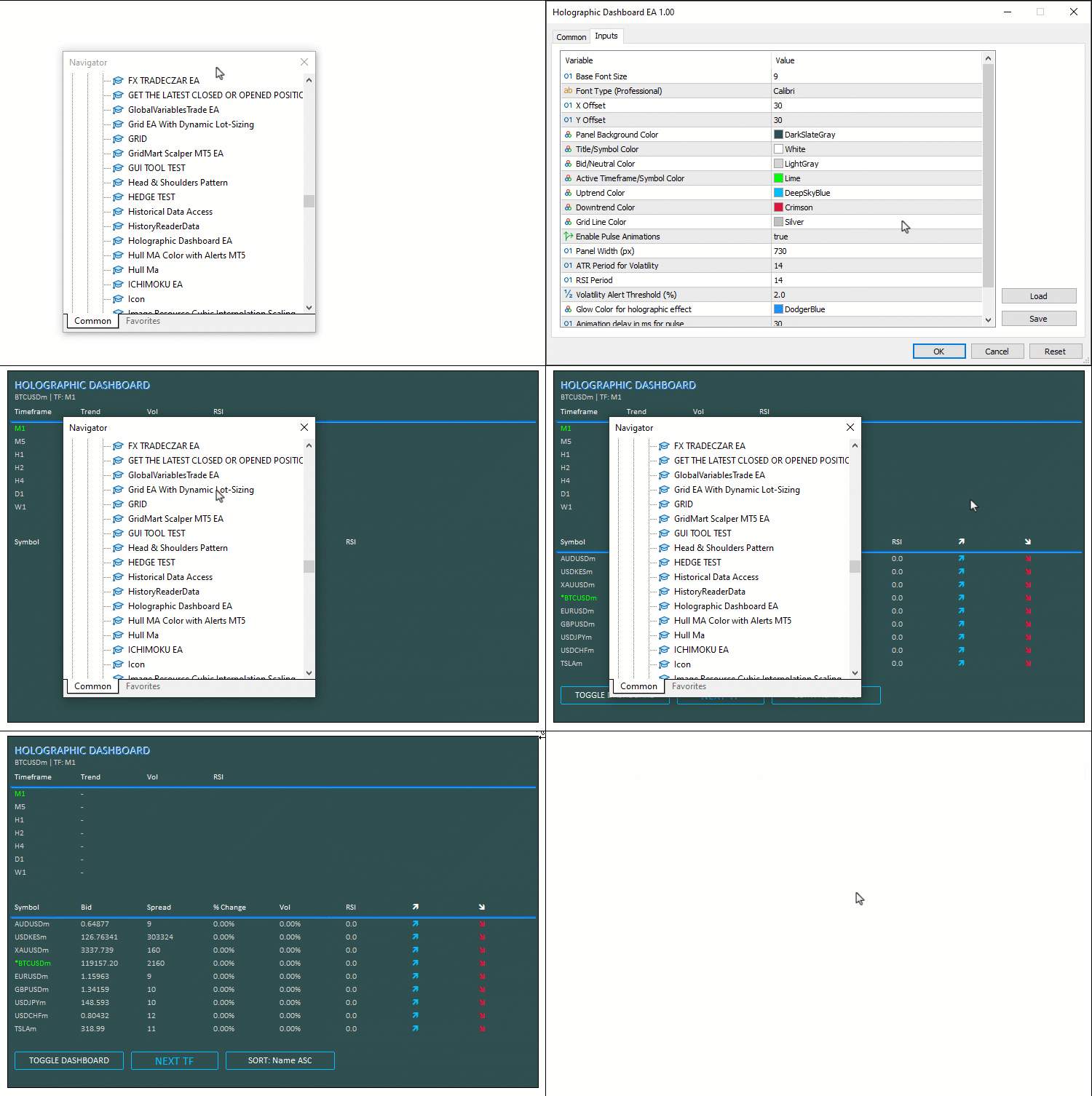
当所有创建的对象均已妥善清理完毕,我们现在可以开始处理数据更新逻辑。为了保持代码简洁,我们计划在OnTick事件处理器中执行所有的更新操作,当然,您也可以选择在OnTimer事件处理器中实现更新。我们首先从时间周期区域开始。
//+------------------------------------------------------------------+
//| Expert Tick Function with Holographic Updates                    |
//+------------------------------------------------------------------+
void OnTick() {
   if (!dashboardVisible) return;     //--- Exit if dashboard hidden

   long chartWidth;                   //--- Variable for chart width
   ChartGetInteger(0, CHART_WIDTH_IN_PIXELS, 0, chartWidth); //--- Get chart width
   int fontSize = (int)(BaseFontSize * (chartWidth / 800.0)); //--- Calculate font size
   int cellWidth = PanelWidth / 8;    //--- Calculate cell width
   int cellHeight = 18;               //--- Set cell height
   int y = Y_Offset + 75;             //--- Set y-coordinate for timeframe data

   // Update Timeframe Data with Pulse
   for (int i = 0; i < ArraySize(periods); i++) { //--- Iterate through timeframes
      double open = iOpen(_Symbol, periods[i], 0); //--- Get open price
      double close = iClose(_Symbol, periods[i], 0); //--- Get close price
      double atr_buf[1];              //--- Buffer for ATR
      if (CopyBuffer(atr_handles_tf[i], 0, 0, 1, atr_buf) != 1) { //--- Copy ATR data
         LogError(__FUNCTION__ + ": Failed to copy ATR buffer for TF " + EnumToString(periods[i])); //--- Log error
         continue;                    //--- Skip on failure
      }
      double vol = (close > 0) ? (atr_buf[0] / close) * 100 : 0.0; //--- Calculate volatility
      double rsi_buf[1];              //--- Buffer for RSI
      if (CopyBuffer(rsi_handles_tf[i], 0, 0, 1, rsi_buf) != 1) { //--- Copy RSI data
         LogError(__FUNCTION__ + ": Failed to copy RSI buffer for TF " + EnumToString(periods[i])); //--- Log error
         continue;                    //--- Skip on failure
      }
      double rsi = rsi_buf[0];        //--- Get RSI value
      color clr = DataColor;          //--- Set default color
      string trend = "-";             //--- Set default trend
      if (rsi > 50) { clr = UpColor; trend = "↑"; } //--- Set up trend
      else if (rsi < 50) { clr = DownColor; trend = "↓"; } //--- Set down trend
      createText("Trend_" + IntegerToString(i), trend, X_Offset + 10 + cellWidth, y, clr, fontSize, FontType, EnableAnimations); //--- Update trend text
      createText("Vol_" + IntegerToString(i), StringFormat("%.2f%%", vol), X_Offset + 10 + cellWidth * 2, y, vol > Vol_Alert_Threshold ? UpColor : DataColor, fontSize, FontType, vol > Vol_Alert_Threshold && EnableAnimations); //--- Update vol text
      color rsi_clr = (rsi > 70 ? DownColor : (rsi < 30 ? UpColor : DataColor)); //--- Set RSI color
      createText("RSI_" + IntegerToString(i), StringFormat("%.1f", rsi), X_Offset + 10 + cellWidth * 3, y, rsi_clr, fontSize, FontType, (rsi > 70 || rsi < 30) && EnableAnimations); //--- Update RSI text
      HolographicPulse("Period_" + IntegerToString(i), (periods[i] == _Period) ? ActiveColor : DataColor, GlowColor); //--- Pulse period text
      y += cellHeight;                //--- Update y-coordinate
   }

   // Update Symbol Data with Advanced Glow
   y += 50;                           //--- Update y-coordinate for symbol data
   for (int i = 0; i < totalSymbols; i++) { //--- Iterate through symbols
      string symbol = SymbolName(i, true); //--- Get symbol name
      double bidPrice;                //--- Variable for bid price
      if (!SymbolInfoDouble(symbol, SYMBOL_BID, bidPrice)) { //--- Get bid price
         LogError(__FUNCTION__ + ": Failed to get bid for " + symbol + ", Error: " + IntegerToString(GetLastError())); //--- Log error
         continue;                    //--- Skip on failure
      }
      long spread;                    //--- Variable for spread
      if (!SymbolInfoInteger(symbol, SYMBOL_SPREAD, spread)) { //--- Get spread
         LogError(__FUNCTION__ + ": Failed to get spread for " + symbol + ", Error: " + IntegerToString(GetLastError())); //--- Log error
         continue;                    //--- Skip on failure
      }
      double change = (prices_PrevArray[i] == 0 ? 0 : (bidPrice - prices_PrevArray[i]) / prices_PrevArray[i] * 100); //--- Calculate change
      double close = iClose(symbol, PERIOD_H1, 0); //--- Get close price
      double atr_buf[1];              //--- Buffer for ATR
      if (CopyBuffer(atr_handles_sym[i], 0, 0, 1, atr_buf) != 1) { //--- Copy ATR data
         LogError(__FUNCTION__ + ": Failed to copy ATR buffer for symbol " + symbol); //--- Log error
         continue;                    //--- Skip on failure
      }
      double vol = (close > 0) ? (atr_buf[0] / close) * 100 : 0.0; //--- Calculate volatility
      double rsi_buf[1];              //--- Buffer for RSI
      if (CopyBuffer(rsi_handles_sym[i], 0, 0, 1, rsi_buf) != 1) { //--- Copy RSI data
         LogError(__FUNCTION__ + ": Failed to copy RSI buffer for symbol " + symbol); //--- Log error
         continue;                    //--- Skip on failure
      }
      double rsi = rsi_buf[0];        //--- Get RSI value
      bid_array[i] = bidPrice;        //--- Store bid
      spread_array[i] = spread;       //--- Store spread
      change_array[i] = change;       //--- Store change
      vol_array[i] = vol;             //--- Store vol
      rsi_array[i] = rsi;             //--- Store RSI
      volatility_Array[i] = vol;      //--- Store volatility
      prices_PrevArray[i] = bidPrice; //--- Update previous price
   }
}
在OnTick函数中,我们处理每一次市场报价的更新,确保时间周期与交易品种的数据实现实时刷新。如果"dashboardVisible"为false,我们直接退出,跳过不必要的流程。我们通过ChartGetInteger函数并使用CHART_WIDTH_IN_PIXELS参数获取当前图表宽度"chartWidth",根据"chartWidth / 800.0"的比例计算自适应字体大小"fontSize",设置单元格宽度"cellWidth" = "PanelWidth / 8",单元格高度"cellHeight" = 18。我们将时间周期网格的纵坐标"y"设置为"Y_Offset + 75",并通过ArraySize函数遍历"periods"。针对每个时间周期,我们使用iOpen获取开盘价"open";使用 "iClose"获取收盘价"close"(偏移量0,即最新K线);通过CopyBuffer从指标句柄"atr_handles_tf[i]"中复制ATR数据到缓冲区"atr_buf";如果"close"为正值,波动率"vol"为ATR占当前收盘价的百分比。
我们从"rsi_handles_tf[i]"中复制"rsi_buf"缓冲区数据并获取当前"rsi",然后根据RSI设置颜色"clr"和趋势标识"trend":RSI > 50判定为上涨,显示"↑"并使用"UpColor";RSI < 50判定为下跌,显示"↓"并使用"DownColor"。我们原本也可以使用字体中的箭头符号,但这里直接使用字符箭头,视觉上更协调,也更符合全息风格。接下来通过"createText"更新以下文本:趋势方向、vol(如果大于"Vol_Alert_Threshold",则使用"UpColor"并播放动画)、RSI(根据超买/超卖状态设置颜色并播放动画),如果当前周期与_Period相匹配,则调用"HolographicPulse",通过"ActiveColor"高亮显示。最后将纵坐标"y"增加"cellHeight"(一行高度)。
我们将纵坐标"y"增加50,进入交易品种数据网格区域,并开始遍历全部品种"totalSymbols"。针对每个交易品种,通过SymbolName(参数为true)获取品种名称,之后通过"SymbolInfoDouble"结合"SYMBOL_BID"获取"bidPrice",并通过SymbolInfoInteger结合SYMBOL_SPREAD获取点差 "spread",如果获取失败则记录日志并跳过该品种。接下来,我们计算价格变动百分比"change"(相对于"prices_PrevArray[i]"),通过iClose获取该品种"PERIOD_H1"的"close",从"atr_handles_sym[i]"复制"atr_buf"计算"vol",并且从"rsi_handles_sym[i]"复制"rsi_buf"获取 "rsi"。将所有计算结果存入数组:"bid_array"、"spread_array"、"change_array"、"vol_array"、"rsi_array"和 "volatility_array",并将"prices_PrevArray[i]"更新为当前"bidPrice"。现在,我们可以进入交易品种列表展示模块,这里我们将对品种进行排序,并附带特效显示。
// Sort indices
for (int i = 0; i < totalSymbols; i++) indices[i] = i; //--- Initialize indices
bool swapped = true;               //--- Swap flag
while (swapped) {                  //--- Loop until no swaps
   swapped = false;                //--- Reset flag
   for (int j = 0; j < totalSymbols - 1; j++) { //--- Iterate through indices
      bool do_swap = false;        //--- Swap decision
      int a = indices[j], b = indices[j + 1]; //--- Get indices
      if (sortMode == 0) {         //--- Sort by name ASC
         string na = SymbolName(a, true), nb = SymbolName(b, true); //--- Get names
         if (na > nb) do_swap = true; //--- Swap if needed
      } else if (sortMode == 1) {  //--- Sort by vol DESC
         if (vol_array[a] < vol_array[b]) do_swap = true; //--- Swap if needed
      } else if (sortMode == 2) {  //--- Sort by change ABS DESC
         if (MathAbs(change_array[a]) < MathAbs(change_array[b])) do_swap = true; //--- Swap if needed
      } else if (sortMode == 3) {  //--- Sort by RSI DESC
         if (rsi_array[a] < rsi_array[b]) do_swap = true; //--- Swap if needed
      }
      if (do_swap) {               //--- Perform swap
         int temp = indices[j];    //--- Temporary store
         indices[j] = indices[j + 1]; //--- Swap
         indices[j + 1] = temp;    //--- Complete swap
         swapped = true;           //--- Set flag
      }
   }
}

// Display sorted symbols with pulse on high vol
for (int j = 0; j < totalSymbols; j++) { //--- Iterate through sorted indices
   int i = indices[j];                   //--- Get index
   string symbol = SymbolName(i, true);  //--- Get symbol
   double bidPrice = bid_array[i];       //--- Get bid
   long spread = spread_array[i];        //--- Get spread
   double change = change_array[i];      //--- Get change
   double vol = vol_array[i];            //--- Get vol
   double rsi = rsi_array[i];            //--- Get RSI
   color clr_s = (symbol == _Symbol) ? ActiveColor : DataColor; //--- Set symbol color
   color clr_p = DataColor, clr_sp = DataColor, clr_ch = DataColor, clr_vol = DataColor, clr_rsi = DataColor; //--- Set default colors
   color clr_a1 = DataColor, clr_a2 = DataColor; //--- Set arrow colors

   // Price Change
   if (change > 0) {               //--- Check positive change
      clr_p = UpColor; clr_ch = UpColor; clr_a1 = UpColor; clr_a2 = DataColor; //--- Set up colors
   } else if (change < 0) {        //--- Check negative change
      clr_p = DownColor; clr_ch = DownColor; clr_a1 = DataColor; clr_a2 = DownColor; //--- Set down colors
   }

   // Volatility Alert
   if (vol > Vol_Alert_Threshold) { //--- Check high volatility
      clr_vol = UpColor;            //--- Set vol color
      clr_s = (symbol == _Symbol) ? ActiveColor : UpColor; //--- Set symbol color
   }

   // RSI Color
   clr_rsi = (rsi > 70 ? DownColor : (rsi < 30 ? UpColor : DataColor)); //--- Set RSI color

   // Update Texts
   string displaySymbol = (symbol == _Symbol) ? "*" + symbol : symbol; //--- Format display symbol
   createText("Symbol_" + IntegerToString(j), displaySymbol, X_Offset + 10, y, clr_s, fontSize, FontType, vol > Vol_Alert_Threshold && EnableAnimations); //--- Update symbol text
   createText("Bid_" + IntegerToString(j), Bid(symbol), X_Offset + 10 + cellWidth, y, clr_p, fontSize, FontType, EnableAnimations); //--- Update bid text
   createText("Spread_" + IntegerToString(j), Spread(symbol), X_Offset + 10 + cellWidth * 2, y, clr_sp, fontSize, FontType); //--- Update spread text
   createText("Change_" + IntegerToString(j), StringFormat("%.2f%%", change), X_Offset + 10 + cellWidth * 3, y, clr_ch, fontSize, FontType); //--- Update change text
   createText("Vol_" + IntegerToString(j), StringFormat("%.2f%%", vol), X_Offset + 10 + cellWidth * 4, y, clr_vol, fontSize, FontType, vol > Vol_Alert_Threshold && EnableAnimations); //--- Update vol text
   createText("RSI_" + IntegerToString(j), StringFormat("%.1f", rsi), X_Offset + 10 + cellWidth * 5, y, clr_rsi, fontSize, FontType, (rsi > 70 || rsi < 30) && EnableAnimations); //--- Update RSI text
   createText("ArrowUp_" + IntegerToString(j), CharToString(236), X_Offset + 10 + cellWidth * 6, y, clr_a1, fontSize, "Wingdings"); //--- Update up arrow
   createText("ArrowDown_" + IntegerToString(j), CharToString(238), X_Offset + 10 + cellWidth * 7, y, clr_a2, fontSize, "Wingdings"); //--- Update down arrow

   // Pulse on high volatility
   if (vol > Vol_Alert_Threshold) { //--- Check high volatility
      HolographicPulse("Symbol_" + IntegerToString(j), clr_s, GlowColor); //--- Pulse symbol text
   }

   y += cellHeight;                //--- Update y-coordinate
}

ChartRedraw(0);                    //--- Redraw chart
}
这里,我们对索引进行排序:首先通过循环将"indices"数组初始化为0到"totalSymbols" - 1 的序号。我们使用冒泡排序法,先将"swapped"标识初始化为true,然后进入while循环,直到没有发生任何交换为止。在循环内部,我们重置"swapped"为false,之后从0遍历到"totalSymbols" - 2,将"do_swap"设置为false,获取"a"和"b"分别为当前索引"indices[j]"和"indices[j+1]"。根据"sortMode"判断:模式0(按名称升序):通过"SymbolName(a, true)"和 "SymbolName(b, true)"获取品种名,如果"na > nb"则交换;模式1(按波动率降序):如果 "vol_array[a] < vol_array[b]"则交换;模式2(按涨跌幅绝对值降序):如果"MathAbs(change_array[a]) < MathAbs(change_array[b])"则交换;模式3(按RSI降序):如果"rsi_array[a] < rsi_array[b]"则交换。如果满足"do_swap",使用临时变量"temp"交换"indices[j]"和"indices[j+1]",并将"swapped"设置为true。
接下来,我们遍历"totalSymbols"显示排序后的交易品种,将"i"设为排序后的索引"indices[j]",然后从“SymbolName(i, true)”读取“symbol”,从“bid_array[i]”中读取“bidPrice”,从“spread_array[i]”中读取“spread”,从“change_array[i]”读取“change”,从“vol_array[i]”中读取“vol”,以及从“rsi_array[i]”读取“rsi”。如果是当前"_Symbol",将"clr_s"设为"ActiveColor",否则为"DataColor";其他颜色默认使用"DataColor"。价格变动颜色:如果"change > 0"(上涨),将"clr_p"、"clr_ch"、"clr_a1"设置为"UpColor",并将"clr_a2"设置为"DataColor";如果"change < 0"(下跌):将"clr_a2"设为DownColor,并将"clr_a1"设置为"DataColor"。波动率预警:如果"vol > Vol_Alert_Threshold",将"clr_vol"设置为"UpColor";如果非当前品种,同步更新"clr_s"。RSI颜色:如果大于70(超买),将"clr_rsi"设置为"DownColor";如果小于30(超卖),将"clr_rsi"设置为"UpColor";其他情况设置为"DataColor"。
我们对品种名称进行格式化,如果与当前"_Symbol"匹配,则在"displaySymbol"前添加"*"标记。通过"createText"更新所有文本:对于品种名称(“Symbol_j”),显示为“displaySymbol”,颜色设为“clr_s”,如果处于高波动状态且已启用动画效果,则播放动画;对于bid价(“Bid_j”),显示为“Bid(symbol)”,颜色设为“clr_p”,如果已启用动画效果,则播放动画;对于点差(“Spread_j”),显示为“Spread(symbol)”,颜色设为“clr_sp”;对于涨跌幅(“Change_j”),使用“StringFormat”将其格式化为“%.2f%%”的形式,颜色设为“clr_ch”;对于波动率(“Vol_j”),将其格式化为“%.2f%%”的形式,颜色设为“clr_vol”,如果处于高波动状态且已启用动画效果,则播放动画;对于RSI(“RSI_j”),将其格式化为“%.1f”的形式,颜色设为“clr_rsi”,如果处于超买/超卖状态且已启用动画效果,则播放动画;对于上箭头(“ArrowUp_j”),显示为“CharToString(236)”,颜色设为“clr_a1”,字体为“Wingdings”;对于下箭头(“ArrowDown_j”),显示为“CharToString(238)”,颜色设为“clr_a2”,字体为“Wingdings”。如果处于高波动状态,则将"clr_s"和"GlowColor"作为参数,对品种名称文本调用"HolographicPulse"函数。每遍历一行,将纵坐标"y"增加"cellHeight",再重绘图表。编译代码后,运行效果如下:
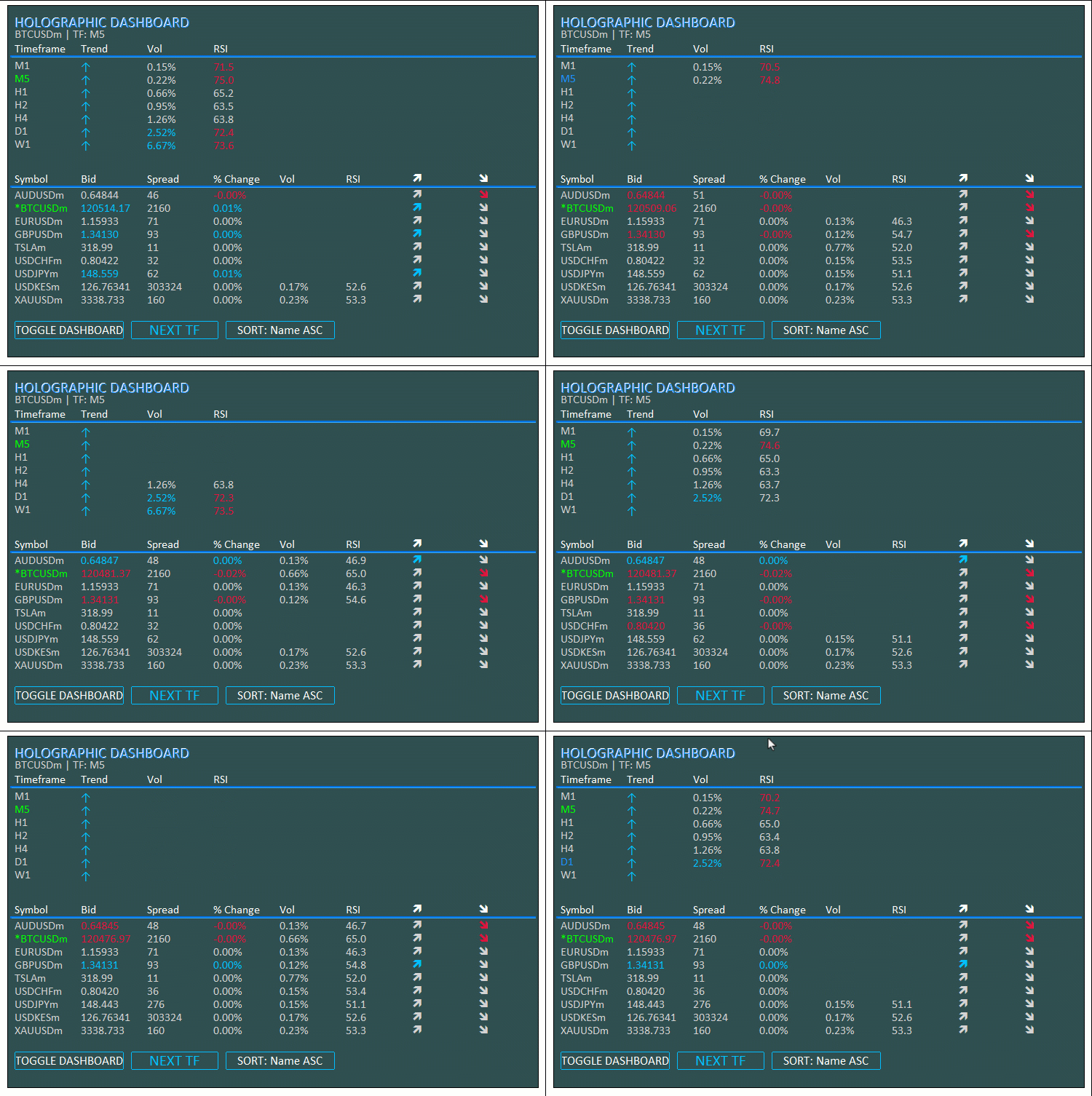
根据可视化效果,数据会随着每一次市场报价实时更新。现在,我们可以开始为我们创建好的按钮添加动画效果了。我们将通过OnChartEvent事件处理器来实现这一功能。
//+------------------------------------------------------------------+
//| Chart Event Handler                                              |
//+------------------------------------------------------------------+
void OnChartEvent(const int id, const long &lparam, const double &dparam, const string &sparam) {
   if (id == CHARTEVENT_OBJECT_CLICK) { //--- Handle click event
      if (sparam == "ToggleBtn") {    //--- Check toggle button
         dashboardVisible = !dashboardVisible; //--- Toggle visibility
         objManager.DeleteAllObjects(); //--- Delete objects
         if (dashboardVisible) {      //--- Check if visible
            InitDashboard();          //--- Reinitialize dashboard
         } else {
            createButton("ToggleBtn", "TOGGLE DASHBOARD", X_Offset + 10, Y_Offset + 10, 150, 25, TitleColor, PanelColor, UpColor); //--- Create toggle button
         }
      }
      else if (sparam == "SwitchTFBtn") { //--- Check switch TF button
         int currentIdx = -1;         //--- Initialize current index
         for (int i = 0; i < ArraySize(periods); i++) { //--- Find current timeframe
            if (periods[i] == _Period) { //--- Match found
               currentIdx = i;        //--- Set index
               break;                 //--- Exit loop
            }
         }
         int nextIdx = (currentIdx + 1) % ArraySize(periods); //--- Calculate next index
         if (!ChartSetSymbolPeriod(0, _Symbol, periods[nextIdx])) { //--- Switch timeframe
            LogError(__FUNCTION__ + ": Failed to switch timeframe, Error: " + IntegerToString(GetLastError())); //--- Log error
         }
         createButton("SwitchTFBtn", "NEXT TF", X_Offset + 170, (int)ObjectGetInteger(0, "SwitchTFBtn", OBJPROP_YDISTANCE), 120, 25, UpColor, PanelColor, UpColor, EnableAnimations); //--- Update button
      }
      else if (sparam == "SortBtn") { //--- Check sort button
         sortMode = (sortMode + 1) % 4; //--- Cycle sort mode
         createButton("SortBtn", "SORT: " + sortNames[sortMode], X_Offset + 300, (int)ObjectGetInteger(0, "SortBtn", OBJPROP_YDISTANCE), 150, 25, TitleColor, PanelColor, UpColor, EnableAnimations); //--- Update button
      }
      ObjectSetInteger(0, sparam, OBJPROP_STATE, false); //--- Reset button state
      ChartRedraw(0);                 //--- Redraw chart
   }
}
我们通过实现OnChartEvent事件处理器来处理交互事件,响应按钮点击操作,实现显示或隐藏面板、切换时间周期、循环切换排序模式等功能。当触发CHARTEVENT_OBJECT_CLICK时,我们将“sparam”与“ToggleBtn”进行比对:如果二者匹配,则切换“dashboardVisible”的值;通过“objManager.DeleteAllObjects”方法删除所有对象;如果仪表盘处于可见状态,则调用“InitDashboard”方法重新初始化仪表盘;如果仪表盘处于隐藏状态,则使用“createButton”方法创建一个新的“ToggleBtn”。如果“sparam”的值为“SwitchTFBtn”,我们通过循环在“periods”中查找当前时间周期的索引“currentIdx”;计算下一个时间周期的索引“nextIdx”,其值为“(currentIdx + 1) % ArraySize(periods)”(即当前索引加1后对数组长度取模);使用“ChartSetSymbolPeriod”方法,依据“periods[nextIdx]”来切换图表的时间周期;如果切换失败,则通过“LogError”方法记录错误信息;最后,使用“createButton”方法更新按钮,如果“EnableAnimations”为true,则包含动画效果。
对于"SortBtn",我们通过"(sortMode + 1) % 4"实现排序模式循环切换,并使用"createButton"更新按钮文字为"SORT: " + sortNames[sortMode]",同时应用动画效果。我们通过ObjectSetInteger函数将OBJPROP_STATE重置为false,并调用 ChartRedraw函数刷新图表。这使我们能够完全控制仪表盘的显示状态与数据组织方式。编译后,我们得到以下输出。
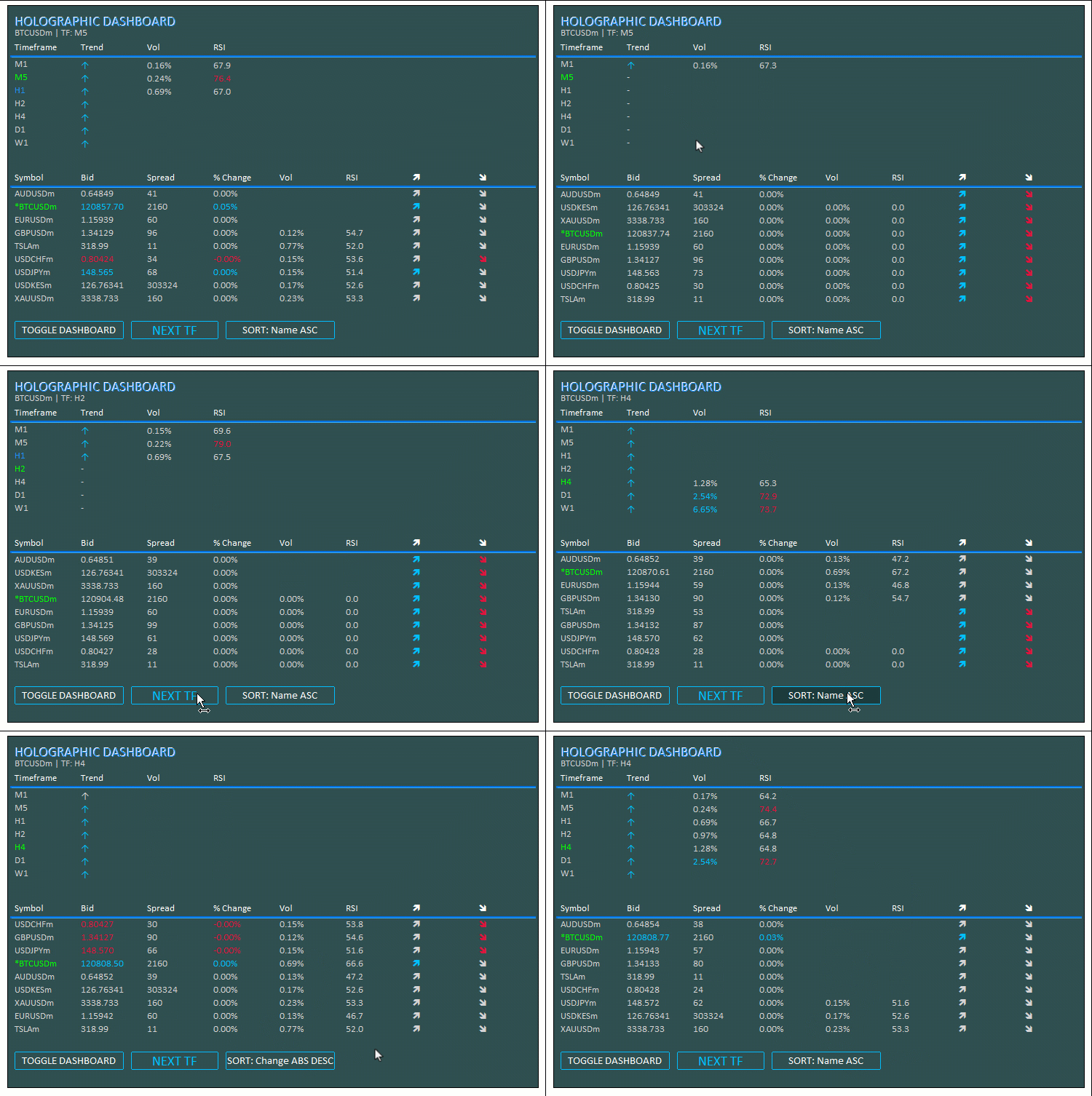
由此可见,系统能够在每一次市场报价到来时实时刷新仪表盘,同时响应按钮点击操作,包括切换仪表盘的显示或隐藏、切换时间周期、对品种指标数据进行索引排序。至此,我们已经完全实现了预期目标。当前仅需完成项目可操作性的测试工作,该部分内容已在前文章节中详细阐述。
回测
我们已完成测试,以下是整合后的可视化结果,以单一的GIF动图形式呈现。
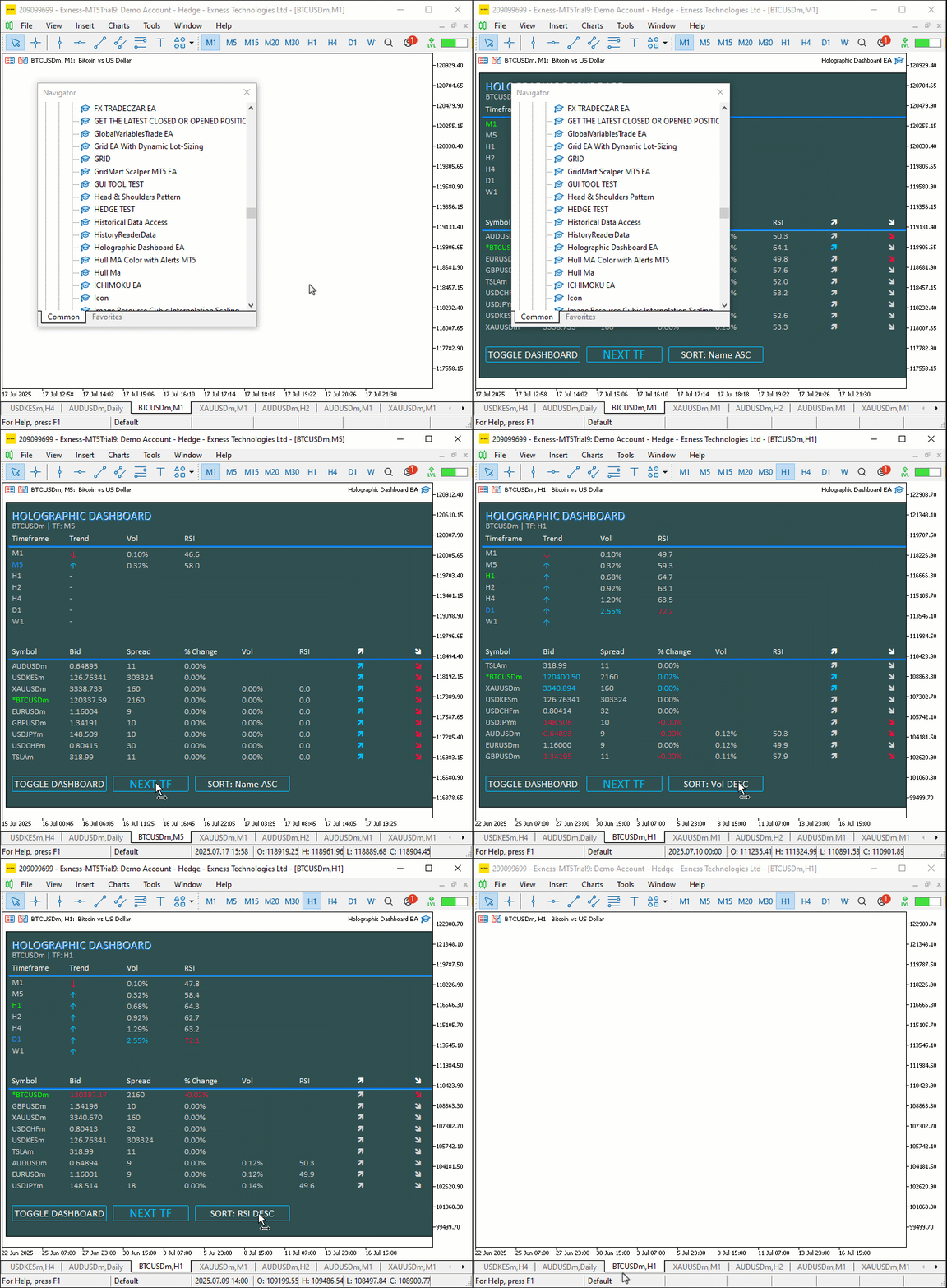
结论
综上所述,我们使用 MQL5开发了一款动态全息仪表盘,它能够监控交易品种与时间周期,集成RSI指标、波动率预警和数据排序功能,并搭载脉冲动画与交互式按钮,带来沉浸式的交易体验。我们详细讲解了程序架构与实现方式,通过"CObjectManager"等类组件,以及"HolographicPulse"等函数,提供了实时且视觉效果出色的数据分析界面。您可以根据自身交易需求自定义这款仪表盘,借助全息视觉效果与交互控制功能,提升您的行情分析水平。
本文由MetaQuotes Ltd译自英文
原文地址: https://www.mql5.com/en/articles/18880
注意: MetaQuotes Ltd.将保留所有关于这些材料的权利。全部或部分复制或者转载这些材料将被禁止。
本文由网站的一位用户撰写,反映了他们的个人观点。MetaQuotes Ltd 不对所提供信息的准确性负责,也不对因使用所述解决方案、策略或建议而产生的任何后果负责。

 价格行为分析工具包开发(第三十三部分):K线区间理论工具
 MQL5 交易策略自动化(第24篇):集成风险管理与移动止损的伦敦时段突破系统

 经典策略重构(第14部分):多策略分析
