

MQL5取引ツール(第6回):パルスアニメーションとコントロールを備えたダイナミックホログラフィックダッシュボード
 253
253
 0
0

はじめに
前回の記事(第5回)では、MetaQuotes Language 5 (MQL5)でローリングティッカーテープを作成し、価格やスプレッド、変動をリアルタイムで表示し、トレーダーが効率的に情報を把握できるようにしました。今回の第6回では、複数の銘柄と時間足のインジケーター(Relative Strength Index(相対力指数、RSI)やAverage True Range (ATR)に基づくボラティリティなどを表示する動的ホログラフィックダッシュボードを開発します。パルスアニメーション、ソート機能、インタラクティブコントロールを備えた、視覚的に魅力的な分析ツールを作成します。本記事では以下のトピックを扱います。
最終的には、カスタマイズ可能なホログラフィックダッシュボードを取引環境で使用できるようになります。それでは始めましょう。
ホログラフィックダッシュボードのアーキテクチャの理解
今回作成するホログラフィックダッシュボードは、複数の銘柄と時間足を監視する視覚的ツールです。RSIやボラティリティなどのインジケーターを表示し、ソートやアラート機能を組み合わせることで、取引機会を素早く把握できるようにします。このアーキテクチャは、リアルタイムデータとインタラクティブなコントロールやアニメーションを組み合わせるため、チャートが混雑している環境でも、効率的で魅力的な分析を可能にします。
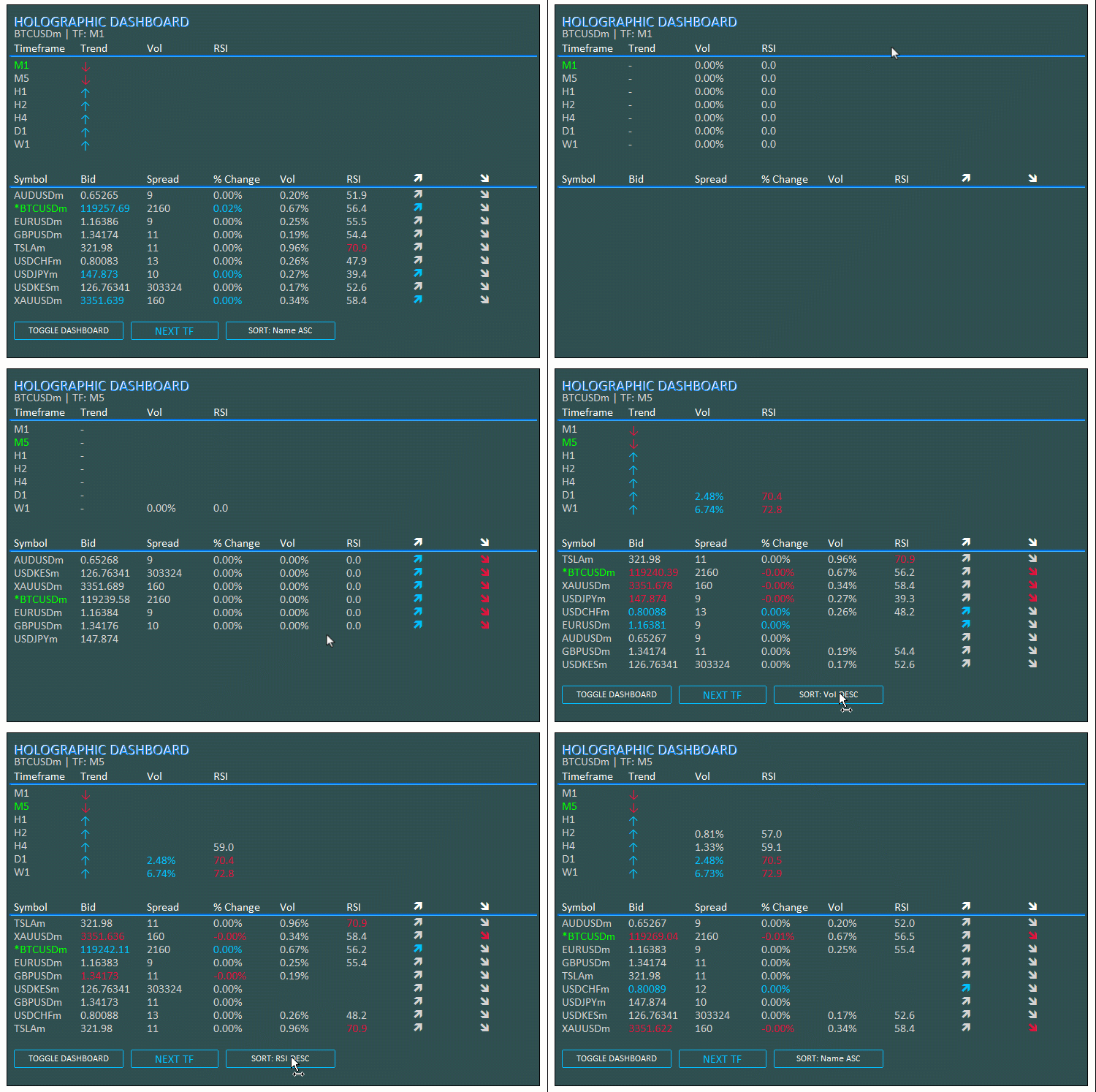
データ管理には配列を使用し、ATRやRSIなどのインジケーターにはハンドルを使用します。ソートやパルス効果のための関数、表示切替やビュー切替のためのボタンも導入します。また、ユーザーインターフェース(UI)を動的に更新するループで更新を集中管理することで、ダッシュボードを戦略的な取引に対応できる柔軟で反応の良いものにします。以下の可視化を参照して、実装前に目指すイメージを確認してください。
MQL5での実装
MQL5でプログラムを作成するには、まずプログラムのメタデータを定義し、その後、プログラムの動作を直接コードに触れずに簡単に変更できるようにする入力パラメータを定義する必要があります。
//+------------------------------------------------------------------+
//|                                  Holographic Dashboard EA.mq5    |
//|                           Copyright 2025, Allan Munene Mutiiria. |
//|                                   https://t.me/Forex_Algo_Trader |
//+------------------------------------------------------------------+
#property copyright "Copyright 2025, Allan Munene Mutiiria."
#property link      "https://t.me/Forex_Algo_Trader"
#property version   "1.00"

#include <Arrays\ArrayString.mqh> //--- Include ArrayString library for string array operations
#include <Files\FileTxt.mqh>      //--- Include FileTxt library for text file operations

// Input Parameters
input int BaseFontSize = 9;           // Base Font Size
input string FontType = "Calibri";    // Font Type (Professional)
input int X_Offset = 30;              // X Offset
input int Y_Offset = 30;              // Y Offset
input color PanelColor = clrDarkSlateGray; // Panel Background Color
input color TitleColor = clrWhite;    // Title/Symbol Color
input color DataColor = clrLightGray; // Bid/Neutral Color
input color ActiveColor = clrLime;    // Active Timeframe/Symbol Color
input color UpColor = clrDeepSkyBlue; // Uptrend Color
input color DownColor = clrCrimson;   // Downtrend Color
input color LineColor = clrSilver;    // Grid Line Color
input bool EnableAnimations = true;   // Enable Pulse Animations
input int PanelWidth = 730;           // Panel Width (px)
input int ATR_Period = 14;            // ATR Period for Volatility
input int RSI_Period = 14;            // RSI Period
input double Vol_Alert_Threshold = 2.0; // Volatility Alert Threshold (%)
input color GlowColor = clrDodgerBlue; // Glow Color for holographic effect
input int AnimationSpeed = 30; // Animation delay in ms for pulse
input int PulseCycles = 3; // Number of pulse cycles for animations
まず、文字列配列やテキストファイルへのログ記録のためのライブラリをインクルードし、UIやインジケーターをカスタマイズするための入力パラメータを設定します。銘柄リストを扱うために<Arrays\ArrayString.mqh>を、エラーをファイルに記録するために<Files\FileTxt.mqh>をインクルードします。入力パラメータにより、基本フォントサイズを9に調整したり、Calibriのようなプロフェッショナルフォントを選択したり、XおよびY位置のオフセットをそれぞれ30ピクセルに設定したり、パネル背景にダークスレートグレー、タイトルに白、データにライトグレー、アクティブ要素にライム、上昇トレンドにディープスカイブルー、下降トレンドにクリムゾン、グリッド線にシルバーなどの色を選択したりすることができます。
パルスアニメーションはデフォルトで有効にし、パネル幅を730ピクセルに設定します。また、ボラティリティやモメンタムの計算にはATRとRSIの期間をそれぞれ14に設定し、ボラティリティアラートの閾値を2.0%に設定します。ホログラフィックのグローにはドジャーブルーを選択し、アニメーション速度は30ms、パルスサイクルは3回に設定します。これらの設定により、ダッシュボードは視覚的および機能的な好みに応じて柔軟に適応できるようになります。その後、プログラム全体で使用するグローバル変数を定義する必要があります。
// Global Variables
double prices_PrevArray[];            //--- Array for previous prices
double volatility_Array[];            //--- Array for volatility values
double bid_array[];                   //--- Array for bid prices
long spread_array[];                  //--- Array for spreads
double change_array[];                //--- Array for percentage changes
double vol_array[];                   //--- Array for volumes
double rsi_array[];                   //--- Array for RSI values
int indices[];                        //--- Array for sorted indices
ENUM_TIMEFRAMES periods[] = {PERIOD_M1, PERIOD_M5, PERIOD_H1, PERIOD_H2, PERIOD_H4, PERIOD_D1, PERIOD_W1}; //--- Array of timeframes
string logFileName = "Holographic_Dashboard_Log.txt"; //--- Log file name
int sortMode = 0;                     //--- Current sort mode
string sortNames[] = {"Name ASC", "Vol DESC", "Change ABS DESC", "RSI DESC"}; //--- Sort mode names
int atr_handles_sym[];                //--- ATR handles for symbols
int rsi_handles_sym[];                //--- RSI handles for symbols
int atr_handles_tf[];                 //--- ATR handles for timeframes
int rsi_handles_tf[];                 //--- RSI handles for timeframes
int totalSymbols;                     //--- Total number of symbols
bool dashboardVisible = true;         //--- Dashboard visibility flag
ここでは、プログラム内でデータやインジケーターを管理するためのグローバル変数を定義し、リアルタイム監視、ソート、アニメーションに対応できるようにします。たとえば、前回の価格から変化を計算するためのprices_PrevArray、ボラティリティ値のvolatility_Array、現在のBid値のbid_array、スプレッドを格納するspread_array(long型)、変化率のchange_array、出来高のvol_array、RSI値のrsi_array、ソート用のインデックスindicesなどの配列を作成します。また、時間足をPERIOD_M1からPERIOD_W1まで配列periodsとして設定し、エラーログ用にlogFileNameを「Holographic_Dashboard_Log.txt」に設定します。初期ソートはsortModeを0に設定し、ソートオプションは「Name ASC」や「Vol DESC」などの文字列でsortNames配列に格納します。さらに、ATRおよびRSIのハンドル用配列として、シンボル用にatr_handles_symとrsi_handles_sym、時間足用にatr_handles_tfとrsi_handles_tfを作成します。
整数型のtotalSymbolsは銘柄の総数を追跡し、dashboardVisibleはダッシュボードの表示状態を制御するためにtrueに設定します。オブジェクト管理をより効率的におこなうために、クラスを作成する予定です。
// Object Manager Class
class CObjectManager : public CArrayString {
public:
   void AddObject(string name) {      //--- Add object name to manager
      if (!Add(name)) {               //--- Check if add failed
         LogError(__FUNCTION__ + ": Failed to add object name: " + name); //--- Log error
      }
   }

   void DeleteAllObjects() {          //--- Delete all managed objects
      for (int i = Total() - 1; i >= 0; i--) { //--- Iterate through objects
         string name = At(i);         //--- Get object name
         if (ObjectFind(0, name) >= 0) { //--- Check if object exists
            if (!ObjectDelete(0, name)) { //--- Delete object
               LogError(__FUNCTION__ + ": Failed to delete object: " + name + ", Error: " + IntegerToString(GetLastError())); //--- Log deletion failure
            }
         }
         Delete(i);                   //--- Remove from array
      }
      ChartRedraw(0);                 //--- Redraw chart
   }
};
ダッシュボードのオブジェクトを効率的に管理するために、CArrayStringクラスを継承したCObjectManagerクラスを作成します。AddObjectメソッドでは、オブジェクトのnameを配列にAddメソッドで追加し、追加に失敗した場合はLogErrorでログを記録します。DeleteAllObjectsメソッドでは、配列の後ろからループを回し(Total)、各要素のnameをAtで取得します。オブジェクトの存在はObjectFindで確認し、削除はObjectDeleteでおこない、失敗した場合はログを記録します。その後、配列からDeleteで削除し、ChartRedraw関数でチャートを再描画します。このクラスを拡張することで、プログラム全体で呼び出して再利用できるヘルパー関数をいくつか作成することが可能になります。
CObjectManager objManager;            //--- Object manager instance

//+------------------------------------------------------------------+
//| Utility Functions                                                |
//+------------------------------------------------------------------+
void LogError(string message) {
   CFileTxt file;                     //--- Create file object
   if (file.Open(logFileName, FILE_WRITE | FILE_TXT | FILE_COMMON, true) >= 0) { //--- Open log file
      file.WriteString(message + "\n"); //--- Write message
      file.Close();                   //--- Close file
   }
   Print(message);                    //--- Print message
}

string Ask(string symbol) {
   double value;                      //--- Variable for ask price
   if (SymbolInfoDouble(symbol, SYMBOL_ASK, value)) { //--- Get ask price
      return DoubleToString(value, (int)SymbolInfoInteger(symbol, SYMBOL_DIGITS)); //--- Return formatted ask
   }
   LogError(__FUNCTION__ + ": Failed to get ask price for " + symbol + ", Error: " + IntegerToString(GetLastError())); //--- Log error
   return "N/A";                      //--- Return N/A on failure
}

string Bid(string symbol) {
   double value;                      //--- Variable for bid price
   if (SymbolInfoDouble(symbol, SYMBOL_BID, value)) { //--- Get bid price
      return DoubleToString(value, (int)SymbolInfoInteger(symbol, SYMBOL_DIGITS)); //--- Return formatted bid
   }
   LogError(__FUNCTION__ + ": Failed to get bid price for " + symbol + ", Error: " + IntegerToString(GetLastError())); //--- Log error
   return "N/A";                      //--- Return N/A on failure
}

string Spread(string symbol) {
   long value;                        //--- Variable for spread
   if (SymbolInfoInteger(symbol, SYMBOL_SPREAD, value)) { //--- Get spread
      return IntegerToString(value);  //--- Return spread as string
   }
   LogError(__FUNCTION__ + ": Failed to get spread for " + symbol + ", Error: " + IntegerToString(GetLastError())); //--- Log error
   return "N/A";                      //--- Return N/A on failure
}

string PercentChange(double current, double previous) {
   if (previous == 0) return "0.00%"; //--- Handle zero previous value
   return StringFormat("%.2f%%", ((current - previous) / previous) * 100); //--- Calculate and format percentage
}

string TruncPeriod(ENUM_TIMEFRAMES period) {
   return StringSubstr(EnumToString(period), 7); //--- Truncate timeframe string
}
オブジェクトとデータを管理するために、UI要素を追跡するためのCObjectManagerのインスタンスobjManagerを作成します。LogError()関数では、エラーをログに記録します。CFileTxtを使用してlogFileNameをFILE_WRITE | FILE_TXT | FILE_COMMONモードで開き、WriteString()でmessageを書き込み、ファイルを閉じて画面にも出力します。Ask()関数は、指定したsymbolのAsk値をSymbolInfoDoubleで取得し、SymbolInfoInteger()で取得した桁数を用いてDoubleToStringで整形します。取得に失敗した場合はLogError()でエラーを記録し、「N/A」を返します。同様に、Bid()関数はBid値を取得し、整形とエラーハンドリングをおこないます。
Spread()関数では、SymbolInfoInteger()でスプレッドを取得し、IntegerToStringで文字列に変換して返します。失敗した場合は「N/A」を返します。PercentChange()関数は、currentとpreviousの価格差から変化率を計算し、StringFormatで整形します。previousがゼロの場合は「0.00%」を返します。TruncPeriod()関数では、ENUM_TIMEFRAMESの文字列をStringSubstrで切り詰め、時間足を簡潔に表示できるようにしています。これにより、整った出力を得ることができます。これで、ホログラフィックパルスのための関数を作成する準備が整いました。
//+------------------------------------------------------------------+
//| Holographic Animation Function                                   |
//+------------------------------------------------------------------+
void HolographicPulse(string objName, color mainClr, color glowClr) {
   if (!EnableAnimations) return;     //--- Exit if animations disabled
   int cycles = PulseCycles;          //--- Set pulse cycles
   int delay = AnimationSpeed;        //--- Set animation delay
   for (int i = 0; i < cycles; i++) { //--- Iterate through cycles
      ObjectSetInteger(0, objName, OBJPROP_COLOR, glowClr); //--- Set glow color
      ChartRedraw(0);                 //--- Redraw chart
      Sleep(delay);                   //--- Delay
      ObjectSetInteger(0, objName, OBJPROP_COLOR, mainClr); //--- Set main color
      ChartRedraw(0);                 //--- Redraw chart
      Sleep(delay / 2);               //--- Shorter delay
   }
}
ここでは、ダッシュボード要素にパルスアニメーション効果を付与するために、HolographicPulse()関数を実装します。EnableAnimationsがfalseの場合はアニメーションをスキップして早期に終了します。cyclesにPulseCyclesを、delayにAnimationSpeedを設定し、forループでcycles回繰り返します。各ループ内では、ObjectSetIntegerを使ってOBJPROP_COLORをglowClrに設定し、ChartRedrawでチャートを再描画します。その後、Sleep()でdelayだけ待機し、再び色をmainClrに戻してチャートを再描画し、「delay / 2」だけ待機して短いパルス効果を作ります。これにより、アクティブまたはアラート状態の要素を視覚的に強調するホログラフィックパルスを追加することができます。これらの関数が揃ったので、次にコアとなる初期化ダッシュボードを作成できます。その際、プログラムをモジュール化して管理しやすくするために、いくつかのヘルパー関数が必要になります。
//+------------------------------------------------------------------+
//| Create Text Label Function                                       |
//+------------------------------------------------------------------+
bool createText(string objName, string text, int x, int y, color clrTxt, int fontsize, string font, bool animate = false, double opacity = 1.0) {
   ResetLastError();                  //--- Reset error code
   if (ObjectFind(0, objName) < 0) {  //--- Check if object exists
      if (!ObjectCreate(0, objName, OBJ_LABEL, 0, 0, 0)) { //--- Create label
         LogError(__FUNCTION__ + ": Failed to create label: " + objName + ", Error: " + IntegerToString(GetLastError())); //--- Log error
         return false;                //--- Return failure
      }
      objManager.AddObject(objName);  //--- Add to manager
   }
   ObjectSetInteger(0, objName, OBJPROP_XDISTANCE, x); //--- Set x-coordinate
   ObjectSetInteger(0, objName, OBJPROP_YDISTANCE, y); //--- Set y-coordinate
   ObjectSetInteger(0, objName, OBJPROP_CORNER, CORNER_LEFT_UPPER); //--- Set corner
   ObjectSetString(0, objName, OBJPROP_TEXT, text); //--- Set text
   ObjectSetInteger(0, objName, OBJPROP_COLOR, clrTxt); //--- Set color
   ObjectSetInteger(0, objName, OBJPROP_FONTSIZE, fontsize); //--- Set font size
   ObjectSetString(0, objName, OBJPROP_FONT, font); //--- Set font
   ObjectSetInteger(0, objName, OBJPROP_BACK, false); //--- Set foreground
   ObjectSetInteger(0, objName, OBJPROP_SELECTABLE, false); //--- Disable selection
   ObjectSetInteger(0, objName, OBJPROP_ZORDER, StringFind(objName, "Glow") >= 0 ? -1 : 0); //--- Set z-order

   if (animate && EnableAnimations) { //--- Check for animation
      ObjectSetInteger(0, objName, OBJPROP_COLOR, DataColor); //--- Set temporary color
      ChartRedraw(0);                 //--- Redraw chart
      Sleep(50);                      //--- Delay
      ObjectSetInteger(0, objName, OBJPROP_COLOR, clrTxt); //--- Set final color
   }

   ChartRedraw(0);                    //--- Redraw chart
   return true;                       //--- Return success
}

//+------------------------------------------------------------------+
//| Create Button Function                                           |
//+------------------------------------------------------------------+
bool createButton(string objName, string text, int x, int y, int width, int height, color textColor, color bgColor, color borderColor, bool animate = false) {
   ResetLastError();                  //--- Reset error code
   if (ObjectFind(0, objName) < 0) {  //--- Check if object exists
      if (!ObjectCreate(0, objName, OBJ_BUTTON, 0, 0, 0)) { //--- Create button
         LogError(__FUNCTION__ + ": Failed to create button: " + objName + ", Error: " + IntegerToString(GetLastError())); //--- Log error
         return false;                //--- Return failure
      }
      objManager.AddObject(objName);  //--- Add to manager
   }
   ObjectSetInteger(0, objName, OBJPROP_XDISTANCE, x); //--- Set x-coordinate
   ObjectSetInteger(0, objName, OBJPROP_YDISTANCE, y); //--- Set y-coordinate
   ObjectSetInteger(0, objName, OBJPROP_XSIZE, width); //--- Set width
   ObjectSetInteger(0, objName, OBJPROP_YSIZE, height); //--- Set height
   ObjectSetString(0, objName, OBJPROP_TEXT, text); //--- Set text
   ObjectSetInteger(0, objName, OBJPROP_COLOR, textColor); //--- Set text color
   ObjectSetInteger(0, objName, OBJPROP_BGCOLOR, bgColor); //--- Set background color
   ObjectSetInteger(0, objName, OBJPROP_BORDER_COLOR, borderColor); //--- Set border color
   ObjectSetInteger(0, objName, OBJPROP_FONTSIZE, BaseFontSize + (StringFind(objName, "SwitchTFBtn") >= 0 ? 3 : 0)); //--- Set font size
   ObjectSetString(0, objName, OBJPROP_FONT, FontType); //--- Set font
   ObjectSetInteger(0, objName, OBJPROP_ZORDER, 1); //--- Set z-order
   ObjectSetInteger(0, objName, OBJPROP_STATE, false); //--- Reset state

   if (animate && EnableAnimations) { //--- Check for animation
      ObjectSetInteger(0, objName, OBJPROP_BGCOLOR, clrLightGray); //--- Set temporary background
      ChartRedraw(0);                 //--- Redraw chart
      Sleep(50);                      //--- Delay
      ObjectSetInteger(0, objName, OBJPROP_BGCOLOR, bgColor); //--- Set final background
   }

   ChartRedraw(0);                    //--- Redraw chart
   return true;                       //--- Return success
}

//+------------------------------------------------------------------+
//| Create Panel Function                                            |
//+------------------------------------------------------------------+
bool createPanel(string objName, int x, int y, int width, int height, color clr, double opacity = 1.0) {
   ResetLastError();                  //--- Reset error code
   if (ObjectFind(0, objName) < 0) {  //--- Check if object exists
      if (!ObjectCreate(0, objName, OBJ_RECTANGLE_LABEL, 0, 0, 0)) { //--- Create panel
         LogError(__FUNCTION__ + ": Failed to create panel: " + objName + ", Error: " + IntegerToString(GetLastError())); //--- Log error
         return false;                //--- Return failure
      }
      objManager.AddObject(objName);  //--- Add to manager
   }
   ObjectSetInteger(0, objName, OBJPROP_XDISTANCE, x); //--- Set x-coordinate
   ObjectSetInteger(0, objName, OBJPROP_YDISTANCE, y); //--- Set y-coordinate
   ObjectSetInteger(0, objName, OBJPROP_XSIZE, width); //--- Set width
   ObjectSetInteger(0, objName, OBJPROP_YSIZE, height); //--- Set height
   ObjectSetInteger(0, objName, OBJPROP_BGCOLOR, clr); //--- Set background color
   ObjectSetInteger(0, objName, OBJPROP_BORDER_TYPE, BORDER_FLAT); //--- Set border type
   ObjectSetInteger(0, objName, OBJPROP_ZORDER, -1); //--- Set z-order
   ChartRedraw(0);                    //--- Redraw chart
   return true;                       //--- Return success
}

//+------------------------------------------------------------------+
//| Create Line Function                                             |
//+------------------------------------------------------------------+
bool createLine(string objName, int x1, int y1, int x2, int y2, color clrLine, double opacity = 1.0) {
   ResetLastError();                  //--- Reset error code
   if (ObjectFind(0, objName) < 0) {  //--- Check if object exists
      if (!ObjectCreate(0, objName, OBJ_RECTANGLE_LABEL, 0, 0, 0)) { //--- Create line as rectangle
         LogError(__FUNCTION__ + ": Failed to create line: " + objName + ", Error: " + IntegerToString(GetLastError())); //--- Log error
         return false;                //--- Return failure
      }
      objManager.AddObject(objName);  //--- Add to manager
   }
   ObjectSetInteger(0, objName, OBJPROP_XDISTANCE, x1); //--- Set x1
   ObjectSetInteger(0, objName, OBJPROP_YDISTANCE, y1); //--- Set y1
   ObjectSetInteger(0, objName, OBJPROP_XSIZE, x2 - x1); //--- Set width
   ObjectSetInteger(0, objName, OBJPROP_YSIZE, StringFind(objName, "Glow") >= 0 ? 3 : 1); //--- Set height
   ObjectSetInteger(0, objName, OBJPROP_BGCOLOR, clrLine); //--- Set color
   ObjectSetInteger(0, objName, OBJPROP_ZORDER, StringFind(objName, "Glow") >= 0 ? -1 : 0); //--- Set z-order
   ChartRedraw(0);                    //--- Redraw chart
   return true;                       //--- Return success
}
ここでは、テキストラベルを生成するために、createText()関数を定義します。まず、ResetLastError()を呼び出して、以前のエラーをクリアします。オブジェクトが存在しない場合(ObjectFind(0, objName) < 0で確認)、ObjectCreateを使ってOBJ_LABELタイプで作成します。作成に失敗した場合は、エラーをログに記録し、falseを返します。その後、AddObject()でobjManagerに追加します。次に、オブジェクトのプロパティを設定します。OBJPROP_XDISTANCEをxに、OBJPROP_YDISTANCEをyに、その他のプロパティも同様に設定します。animateおよびEnableAnimationsがtrueの場合、一時的にOBJPROP_COLORをDataColorに設定し、ChartRedraw()で再描画、Sleep(50)で待機した後、テキストの色に戻します。最後に再描画してtrueを返します。
次に、createButton()関数も同様の手順で定義します。エラーをリセットし、存在を確認し、必要に応じてOBJ_BUTTONで作成し、失敗した場合はログに記録、objManagerに追加します。オブジェクトのプロパティを設定した後、アニメーションが有効な場合は一時的にOBJPROP_BGCOLORをclrLightGrayに設定し、再描画、50ms待機、bgColorに戻します。再描画してtrueを返します。createPanel()も同様のアプローチで作成します。
最後に、createLine()関数も同様のパターンで定義します。リセット、存在確認、OBJ_RECTANGLE_LABEL (線をシミュレート)で作成、失敗時にログを記録、objManagerに追加します。プロパティとして、OBJPROP_XDISTANCEをx1、OBJPROP_YDISTANCEをy1、OBJPROP_XSIZEをx2-x1、OBJPROP_YSIZEを名前にGlowが含まれる場合は3、それ以外は1、OBJPROP_BGCOLORをclrLine、OBJPROP_ZORDERをGlowの場合は-1、それ以外は0に設定します。再描画してtrueを返します。これらの関数を使用して、次にメインダッシュボードを作成するコア関数を作成します。
//+------------------------------------------------------------------+
//| Dashboard Creation Function with Holographic Effects             |
//+------------------------------------------------------------------+
void InitDashboard() {
   // Get chart dimensions
   long chartWidth, chartHeight;      //--- Variables for chart dimensions
   if (!ChartGetInteger(0, CHART_WIDTH_IN_PIXELS, 0, chartWidth) || !ChartGetInteger(0, CHART_HEIGHT_IN_PIXELS, 0, chartHeight)) { //--- Get chart size
      LogError(__FUNCTION__ + ": Failed to get chart dimensions, Error: " + IntegerToString(GetLastError())); //--- Log error
      return;                         //--- Exit on failure
   }
   int fontSize = (int)(BaseFontSize * (chartWidth / 800.0)); //--- Calculate font size
   int cellWidth = PanelWidth / 8;    //--- Calculate cell width
   int cellHeight = 18;               //--- Set cell height
   int panelHeight = 70 + (ArraySize(periods) + 1) * cellHeight + 40 + (totalSymbols + 1) * cellHeight + 50; //--- Calculate panel height

   // Create Dark Panel
   createPanel("DashboardPanel", X_Offset, Y_Offset, PanelWidth, panelHeight, PanelColor); //--- Create dashboard panel

   // Create Header with Glow
   createText("Header", "HOLOGRAPHIC DASHBOARD", X_Offset + 10, Y_Offset + 10, TitleColor, fontSize + 4, FontType); //--- Create header text
   createText("HeaderGlow", "HOLOGRAPHIC DASHBOARD", X_Offset + 11, Y_Offset + 11, GlowColor, fontSize + 4, FontType, true); //--- Create header glow
   createText("SubHeader", StringFormat("%s | TF: %s", _Symbol, TruncPeriod(_Period)), X_Offset + 10, Y_Offset + 30, DataColor, fontSize, FontType); //--- Create subheader

   // Timeframe Grid
   int y = Y_Offset + 50;             //--- Set y-coordinate for timeframe grid
   createText("TF_Label", "Timeframe", X_Offset + 10, y, TitleColor, fontSize, FontType); //--- Create timeframe label
   createText("Trend_Label", "Trend", X_Offset + 10 + cellWidth, y, TitleColor, fontSize, FontType); //--- Create trend label
   createText("Vol_Label", "Vol", X_Offset + 10 + cellWidth * 2, y, TitleColor, fontSize, FontType); //--- Create vol label
   createText("RSI_Label", "RSI", X_Offset + 10 + cellWidth * 3, y, TitleColor, fontSize, FontType); //--- Create RSI label
   createLine("TF_Separator", X_Offset + 5, y + cellHeight + 2, X_Offset + PanelWidth - 5, y + cellHeight + 2, LineColor, 0.6); //--- Create separator line
   createLine("TF_Separator_Glow", X_Offset + 4, y + cellHeight + 1, X_Offset + PanelWidth - 4, y + cellHeight + 3, GlowColor, 0.3); //--- Create glow separator
   if (EnableAnimations) HolographicPulse("TF_Separator", LineColor, GlowColor); //--- Animate separator if enabled

   y += cellHeight + 5;               //--- Update y-coordinate
   for (int i = 0; i < ArraySize(periods); i++) { //--- Iterate through timeframes
      color periodColor = (periods[i] == _Period) ? ActiveColor : DataColor; //--- Set period color
      createText("Period_" + IntegerToString(i), TruncPeriod(periods[i]), X_Offset + 10, y, periodColor, fontSize, FontType); //--- Create period text
      createText("Trend_" + IntegerToString(i), "-", X_Offset + 10 + cellWidth, y, DataColor, fontSize, FontType); //--- Create trend text
      createText("Vol_" + IntegerToString(i), "0.00%", X_Offset + 10 + cellWidth * 2, y, DataColor, fontSize, FontType); //--- Create vol text
      createText("RSI_" + IntegerToString(i), "0.0", X_Offset + 10 + cellWidth * 3, y, DataColor, fontSize, FontType); //--- Create RSI text
      y += cellHeight;                //--- Update y-coordinate
   }

   // Symbol Grid
   y += 30;                           //--- Update y-coordinate for symbol grid
   createText("Symbol_Label", "Symbol", X_Offset + 10, y, TitleColor, fontSize, FontType); //--- Create symbol label
   createText("Bid_Label", "Bid", X_Offset + 10 + cellWidth, y, TitleColor, fontSize, FontType); //--- Create bid label
   createText("Spread_Label", "Spread", X_Offset + 10 + cellWidth * 2, y, TitleColor, fontSize, FontType); //--- Create spread label
   createText("Change_Label", "% Change", X_Offset + 10 + cellWidth * 3, y, TitleColor, fontSize, FontType); //--- Create change label
   createText("Vol_Label_Symbol", "Vol", X_Offset + 10 + cellWidth * 4, y, TitleColor, fontSize, FontType); //--- Create vol label
   createText("RSI_Label_Symbol", "RSI", X_Offset + 10 + cellWidth * 5, y, TitleColor, fontSize, FontType); //--- Create RSI label
   createText("UpArrow_Label", CharToString(236), X_Offset + 10 + cellWidth * 6, y, TitleColor, fontSize, "Wingdings"); //--- Create up arrow label
   createText("DownArrow_Label", CharToString(238), X_Offset + 10 + cellWidth * 7, y, TitleColor, fontSize, "Wingdings"); //--- Create down arrow label
   createLine("Symbol_Separator", X_Offset + 5, y + cellHeight + 2, X_Offset + PanelWidth - 5, y + cellHeight + 2, LineColor, 0.6); //--- Create separator line
   createLine("Symbol_Separator_Glow", X_Offset + 4, y + cellHeight + 1, X_Offset + PanelWidth - 4, y + cellHeight + 3, GlowColor, 0.3); //--- Create glow separator
   if (EnableAnimations) HolographicPulse("Symbol_Separator", LineColor, GlowColor); //--- Animate separator if enabled

   y += cellHeight + 5;               //--- Update y-coordinate
   for (int i = 0; i < totalSymbols; i++) { //--- Iterate through symbols
      string symbol = SymbolName(i, true); //--- Get symbol name
      string displaySymbol = (symbol == _Symbol) ? "*" + symbol : symbol; //--- Format display symbol
      color symbolColor = (symbol == _Symbol) ? ActiveColor : DataColor; //--- Set symbol color
      createText("Symbol_" + IntegerToString(i), displaySymbol, X_Offset + 10, y, symbolColor, fontSize, FontType); //--- Create symbol text
      createText("Bid_" + IntegerToString(i), Bid(symbol), X_Offset + 10 + cellWidth, y, DataColor, fontSize, FontType); //--- Create bid text
      createText("Spread_" + IntegerToString(i), Spread(symbol), X_Offset + 10 + cellWidth * 2, y, DataColor, fontSize, FontType); //--- Create spread text
      createText("Change_" + IntegerToString(i), "0.00%", X_Offset + 10 + cellWidth * 3, y, DataColor, fontSize, FontType); //--- Create change text
      createText("Vol_" + IntegerToString(i), "0.00%", X_Offset + 10 + cellWidth * 4, y, DataColor, fontSize, FontType); //--- Create vol text
      createText("RSI_" + IntegerToString(i), "0.0", X_Offset + 10 + cellWidth * 5, y, DataColor, fontSize, FontType); //--- Create RSI text
      createText("ArrowUp_" + IntegerToString(i), CharToString(236), X_Offset + 10 + cellWidth * 6, y, UpColor, fontSize, "Wingdings"); //--- Create up arrow
      createText("ArrowDown_" + IntegerToString(i), CharToString(238), X_Offset + 10 + cellWidth * 7, y, DownColor, fontSize, "Wingdings"); //--- Create down arrow
      y += cellHeight;                //--- Update y-coordinate
   }

   // Interactive Buttons with Pulse Animation
   createButton("ToggleBtn", "TOGGLE DASHBOARD", X_Offset + 10, y + 20, 150, 25, TitleColor, PanelColor, UpColor); //--- Create toggle button
   createButton("SwitchTFBtn", "NEXT TF", X_Offset + 170, y + 20, 120, 25, UpColor, PanelColor, UpColor); //--- Create switch TF button
   createButton("SortBtn", "SORT: " + sortNames[sortMode], X_Offset + 300, y + 20, 150, 25, TitleColor, PanelColor, UpColor); //--- Create sort button

   ChartRedraw(0);                    //--- Redraw chart
}
ここでは、まずチャートの幅と高さを取得してダッシュボードを初期化します。chartWidthおよびchartHeight変数を使用して、ChartGetIntegerを2回呼び出し、CHART_WIDTH_IN_PIXELSで幅を、CHART_HEIGHT_IN_PIXELSで高さを取得します。次に、fontSizeを計算します。これは、BaseFontSizeをチャート幅に応じて800ピクセル基準でスケーリングし、結果を整数にキャストして求めます。cellWidthはPanelWidthを8で割って求め、cellHeightは固定値18に設定します。panelHeightは、70に(ArraySize(periods) + 1) * cellHeight、さらに40に(totalSymbols + 1) * cellHeight、最後に50を加えて計算します。これにより、時間足や銘柄を含む全体レイアウトを考慮した高さが決まります。
次に、ダークパネル背景を作成します。createPanel()関数を呼び出し、名前をDashboardPanel、位置をX_OffsetとY_Offset、サイズをPanelWidthとpanelHeight、色をPanelColorに設定します。ヘッダーには、メインテキストラベル「Header」をcreateText()で作成し、文字列は「HOLOGRAPHIC DASHBOARD」、位置は「X_Offset + 10、Y_Offset + 10」、色はTitleColor、フォントサイズは「fontSize + 4」、フォントはFontTypeに設定します。グロー効果を追加するために、別のテキストラベル「HeaderGlow」を作成し、文字列は同じ、xとyをそれぞれ1ピクセルずらして、色はGlowColor、フォントサイズとフォントは同じ、透明度フラグをtrueに設定します。
サブヘッダーにはSubHeaderラベルを作成し、現在の銘柄(_Symbol)とTruncPeriod(_Period)で整形した文字列をStringFormat()で設定します。位置は「X_Offset + 10、Y_Offset + 30」、色はDataColor、フォントサイズはfontSize、フォントはFontTypeです。
時間足グリッドセクションでは、yを「Y_Offset + 50」に設定します。Timeframe、Trend、Vol、RSIの各ラベルをcreateText()で作成し、水平位置はcellWidthに基づいてオフセットを設定し、すべてTitleColor、fontSize、FontTypeで表示します。ラベルの下には、createLine()で区切り線「TF_Separator」を描画します。X位置は「X_Offset + 5」から「X_Offset + PanelWidth - 5」、高さは「y + cellHeight + 2」、色はLineColor、透明度は0.6に設定します。グロー用に、少しオフセットして幅を広げた"TF_Separator_Glow"を作成し、色はGlowColor、透明度は0.3に設定します。EnableAnimationsがtrueの場合は、HolographicPulse()でアニメーションを適用します。他のラベルオブジェクトも同様のロジックで作成します。
最後に、インタラクティブボタンを作成します。ToggleBtnはTOGGLE DASHBOARD"として、位置は「X_Offset + 10、y + 20」、サイズは150×25、色はTitleColor、PanelColor、UpColorです。SwitchTFBtnはNEXT TFとして、X位置は「X_Offset + 170」、同じy、サイズ120×25、色はUpColor、PanelColor、UpColorです。SortBtnは「SORT: " + sortNames[sortMode]」として、X位置は「X_Offset + 300」、同じy、サイズ150×25、色はTitleColor、PanelColor、UpColorです。最後に、ChartRedraw(0)でチャートを再描画します。この関数を初期化イベントハンドラーで呼び出すことで、ダッシュボードの主要な初期設定をまとめて実行できます。
//+------------------------------------------------------------------+
//| Expert Initialization Function                                   |
//+------------------------------------------------------------------+
int OnInit() {
   // Clear existing objects
   if (ObjectsDeleteAll(0, -1, -1) < 0) { //--- Delete all objects
      LogError(__FUNCTION__ + ": Failed to delete objects, Error: " + IntegerToString(GetLastError())); //--- Log error
   }
   objManager.DeleteAllObjects();     //--- Delete managed objects

   // Initialize arrays
   totalSymbols = SymbolsTotal(true); //--- Get total symbols
   if (totalSymbols == 0) {           //--- Check for symbols
      LogError(__FUNCTION__ + ": No symbols available"); //--- Log error
      return INIT_FAILED;             //--- Return failure
   }
   ArrayResize(prices_PrevArray, totalSymbols); //--- Resize previous prices array
   ArrayResize(volatility_Array, totalSymbols); //--- Resize volatility array
   ArrayResize(bid_array, totalSymbols); //--- Resize bid array
   ArrayResize(spread_array, totalSymbols); //--- Resize spread array
   ArrayResize(change_array, totalSymbols); //--- Resize change array
   ArrayResize(vol_array, totalSymbols); //--- Resize vol array
   ArrayResize(rsi_array, totalSymbols); //--- Resize RSI array
   ArrayResize(indices, totalSymbols);   //--- Resize indices array
   ArrayResize(atr_handles_sym, totalSymbols); //--- Resize ATR symbol handles
   ArrayResize(rsi_handles_sym, totalSymbols); //--- Resize RSI symbol handles
   ArrayResize(atr_handles_tf, ArraySize(periods)); //--- Resize ATR timeframe handles
   ArrayResize(rsi_handles_tf, ArraySize(periods)); //--- Resize RSI timeframe handles
   ArrayInitialize(prices_PrevArray, 0); //--- Initialize previous prices
   ArrayInitialize(volatility_Array, 0); //--- Initialize volatility

   // Create indicator handles for timeframes
   for (int i = 0; i < ArraySize(periods); i++) { //--- Iterate through timeframes
      atr_handles_tf[i] = iATR(_Symbol, periods[i], ATR_Period); //--- Create ATR handle
      if (atr_handles_tf[i] == INVALID_HANDLE) { //--- Check for invalid handle
         LogError(__FUNCTION__ + ": Failed to create ATR handle for TF " + EnumToString(periods[i])); //--- Log error
         return INIT_FAILED;          //--- Return failure
      }
      rsi_handles_tf[i] = iRSI(_Symbol, periods[i], RSI_Period, PRICE_CLOSE); //--- Create RSI handle
      if (rsi_handles_tf[i] == INVALID_HANDLE) { //--- Check for invalid handle
         LogError(__FUNCTION__ + ": Failed to create RSI handle for TF " + EnumToString(periods[i])); //--- Log error
         return INIT_FAILED;          //--- Return failure
      }
   }

   // Create indicator handles for symbols on H1
   for (int i = 0; i < totalSymbols; i++) { //--- Iterate through symbols
      string symbol = SymbolName(i, true); //--- Get symbol name
      atr_handles_sym[i] = iATR(symbol, PERIOD_H1, ATR_Period); //--- Create ATR handle
      if (atr_handles_sym[i] == INVALID_HANDLE) { //--- Check for invalid handle
         LogError(__FUNCTION__ + ": Failed to create ATR handle for symbol " + symbol); //--- Log error
         return INIT_FAILED;          //--- Return failure
      }
      rsi_handles_sym[i] = iRSI(symbol, PERIOD_H1, RSI_Period, PRICE_CLOSE); //--- Create RSI handle
      if (rsi_handles_sym[i] == INVALID_HANDLE) { //--- Check for invalid handle
         LogError(__FUNCTION__ + ": Failed to create RSI handle for symbol " + symbol); //--- Log error
         return INIT_FAILED;          //--- Return failure
      }
   }

   InitDashboard();                   //--- Initialize dashboard
   dashboardVisible = true;           //--- Set dashboard visible

   return INIT_SUCCEEDED;             //--- Return success
}
OnInit関数では、まず既存のオブジェクトをすべて削除します。すべてのチャートとタイプに対してObjectsDeleteAllを呼び出し、失敗した場合はLogError()でログを記録します。その後、objManager.DeleteAllObjects()を呼び出して管理下のオブジェクトを削除します。次に、SymbolsTotalで気配値表示に表示されている銘柄の総数を取得し、totalSymbolsに代入します。もし0の場合はLogError()でエラーを記録し、INIT_FAILEDを返します。続いて、配列prices_PrevArray、volatility_Array、bid_array、spread_array、change_array、vol_array、rsi_array、indices、atr_handles_sym、rsi_handles_sym、atr_handles_tf、rsi_handles_tfをArrayResizeでtotalSymbolsまたはArraySize(periods)に合わせてリサイズします。また、ArrayInitializeを使用してprices_PrevArrayおよびvolatility_Arrayをゼロで初期化します。
時間足については、periodsをループし、それぞれに対してatr_handles_tf[i]をiATR(_Symbol, periods[i], ATR_Period)で、rsi_handles_tf[i]をiRSI(_Symbol, periods[i], RSI_Period, PRICE_CLOSE)で作成します。いずれかがINVALID_HANDLEの場合はログを記録し、INIT_FAILEDを返します。同様に、銘柄ごとにループしてsymbolをSymbolName(i, true)で取得し、「atr_handles_sym[i]をiATR(symbol, PERIOD_H1, ATR_Period)」で、rsi_handles_sym[i]を「iRSI(symbol, PERIOD_H1, RSI_Period, PRICE_CLOSE)」で作成します。これらが無効な場合も同様にLogError()で記録し、INIT_FAILEDを返します。すべての初期化が完了したら、InitDashboard()を呼び出してUIを構築し、dashboardVisibleをtrueに設定して成功を返します。プログラムを実行すると、以下の結果が得られます。
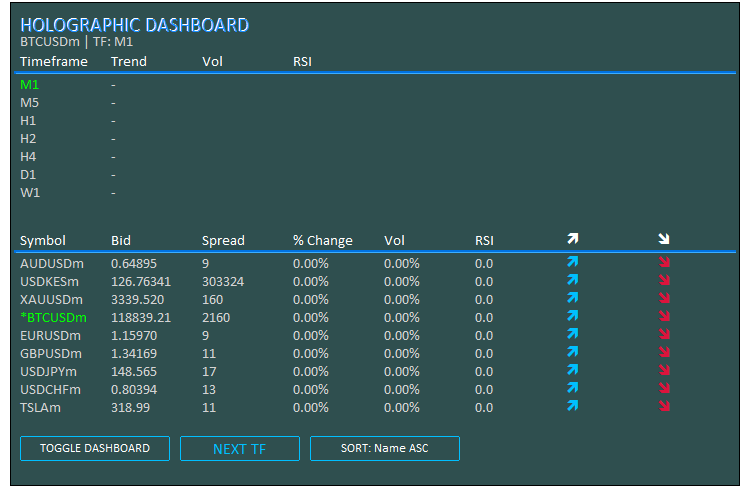
出力から、プログラムが正常に初期化されたことを確認できます。プログラムの初期化解除処理では、作成されたオブジェクトを削除し、インジケーターハンドルを解放する必要があります。
//+------------------------------------------------------------------+
//| Expert Deinitialization Function                                 |
//+------------------------------------------------------------------+
void OnDeinit(const int reason) {
   if (ObjectsDeleteAll(0, -1, -1) < 0) { //--- Delete all objects
      LogError(__FUNCTION__ + ": Failed to delete objects, Error: " + IntegerToString(GetLastError())); //--- Log error
   }
   objManager.DeleteAllObjects();     //--- Delete managed objects

   // Release indicator handles
   for (int i = 0; i < ArraySize(atr_handles_tf); i++) { //--- Iterate through timeframe ATR handles
      if (atr_handles_tf[i] != INVALID_HANDLE) IndicatorRelease(atr_handles_tf[i]); //--- Release handle
      if (rsi_handles_tf[i] != INVALID_HANDLE) IndicatorRelease(rsi_handles_tf[i]); //--- Release handle
   }
   for (int i = 0; i < ArraySize(atr_handles_sym); i++) { //--- Iterate through symbol ATR handles
      if (atr_handles_sym[i] != INVALID_HANDLE) IndicatorRelease(atr_handles_sym[i]); //--- Release handle
      if (rsi_handles_sym[i] != INVALID_HANDLE) IndicatorRelease(rsi_handles_sym[i]); //--- Release handle
   }
}
OnDeinitイベントハンドラでは、EAが削除された際に使用したリソースをクリーンアップします。まず、すべてのチャートおよびオブジェクトタイプに対して「ObjectsDeleteAll(-1, 0, 0)」を呼び出してチャートオブジェクトを削除します。結果が負の場合は、LogError()で削除失敗を記録します。その後、objManager.DeleteAllObjects()を呼び出し、管理下のオブジェクトをすべて削除します。時間足ハンドルについては、atr_handles_tfおよびrsi_handles_tfの配列をArraySizeでループし、各要素がINVALID_HANDLEでない場合はIndicatorReleaseを使用してハンドルを解放します。同様に、銘柄ごとのatr_handles_symおよびrsi_handles_symについても同じ手順で処理します。これにより、すべてのオブジェクトとインジケータが完全にクリーンアップされ、リソースのリークを防ぐことができます。以下はそのイメージ図です。
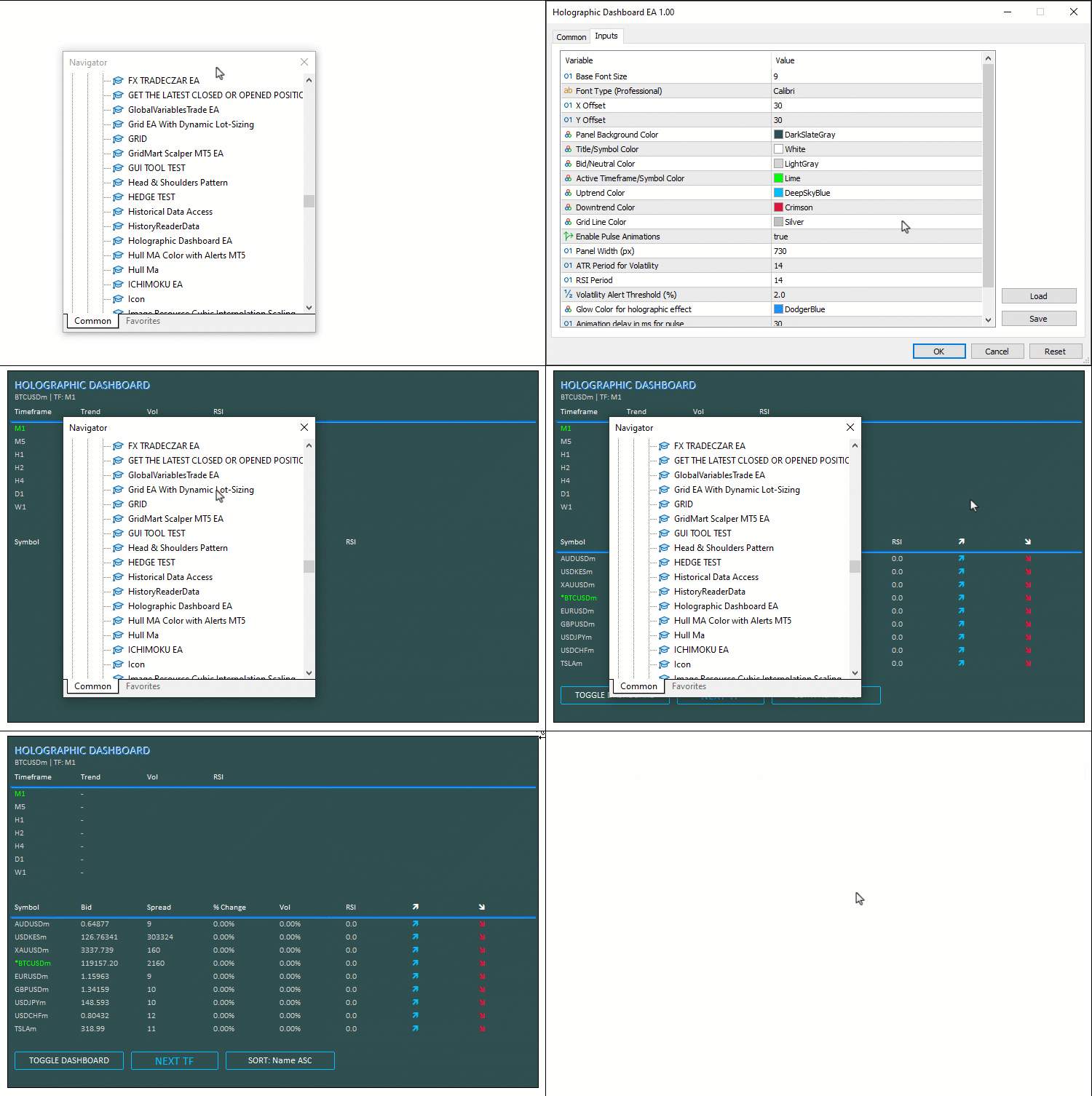
作成したオブジェクトの処理がすべて完了したので、次は更新処理に進みます。更新はシンプルに保つためにOnTick イベントハンドラ内でおこなう予定ですが、OnTimerイベントハンドラ内で実行することも可能です。まずは、時間足セクションから始めます。
//+------------------------------------------------------------------+
//| Expert Tick Function with Holographic Updates                    |
//+------------------------------------------------------------------+
void OnTick() {
   if (!dashboardVisible) return;     //--- Exit if dashboard hidden

   long chartWidth;                   //--- Variable for chart width
   ChartGetInteger(0, CHART_WIDTH_IN_PIXELS, 0, chartWidth); //--- Get chart width
   int fontSize = (int)(BaseFontSize * (chartWidth / 800.0)); //--- Calculate font size
   int cellWidth = PanelWidth / 8;    //--- Calculate cell width
   int cellHeight = 18;               //--- Set cell height
   int y = Y_Offset + 75;             //--- Set y-coordinate for timeframe data

   // Update Timeframe Data with Pulse
   for (int i = 0; i < ArraySize(periods); i++) { //--- Iterate through timeframes
      double open = iOpen(_Symbol, periods[i], 0); //--- Get open price
      double close = iClose(_Symbol, periods[i], 0); //--- Get close price
      double atr_buf[1];              //--- Buffer for ATR
      if (CopyBuffer(atr_handles_tf[i], 0, 0, 1, atr_buf) != 1) { //--- Copy ATR data
         LogError(__FUNCTION__ + ": Failed to copy ATR buffer for TF " + EnumToString(periods[i])); //--- Log error
         continue;                    //--- Skip on failure
      }
      double vol = (close > 0) ? (atr_buf[0] / close) * 100 : 0.0; //--- Calculate volatility
      double rsi_buf[1];              //--- Buffer for RSI
      if (CopyBuffer(rsi_handles_tf[i], 0, 0, 1, rsi_buf) != 1) { //--- Copy RSI data
         LogError(__FUNCTION__ + ": Failed to copy RSI buffer for TF " + EnumToString(periods[i])); //--- Log error
         continue;                    //--- Skip on failure
      }
      double rsi = rsi_buf[0];        //--- Get RSI value
      color clr = DataColor;          //--- Set default color
      string trend = "-";             //--- Set default trend
      if (rsi > 50) { clr = UpColor; trend = "↑"; } //--- Set up trend
      else if (rsi < 50) { clr = DownColor; trend = "↓"; } //--- Set down trend
      createText("Trend_" + IntegerToString(i), trend, X_Offset + 10 + cellWidth, y, clr, fontSize, FontType, EnableAnimations); //--- Update trend text
      createText("Vol_" + IntegerToString(i), StringFormat("%.2f%%", vol), X_Offset + 10 + cellWidth * 2, y, vol > Vol_Alert_Threshold ? UpColor : DataColor, fontSize, FontType, vol > Vol_Alert_Threshold && EnableAnimations); //--- Update vol text
      color rsi_clr = (rsi > 70 ? DownColor : (rsi < 30 ? UpColor : DataColor)); //--- Set RSI color
      createText("RSI_" + IntegerToString(i), StringFormat("%.1f", rsi), X_Offset + 10 + cellWidth * 3, y, rsi_clr, fontSize, FontType, (rsi > 70 || rsi < 30) && EnableAnimations); //--- Update RSI text
      HolographicPulse("Period_" + IntegerToString(i), (periods[i] == _Period) ? ActiveColor : DataColor, GlowColor); //--- Pulse period text
      y += cellHeight;                //--- Update y-coordinate
   }

   // Update Symbol Data with Advanced Glow
   y += 50;                           //--- Update y-coordinate for symbol data
   for (int i = 0; i < totalSymbols; i++) { //--- Iterate through symbols
      string symbol = SymbolName(i, true); //--- Get symbol name
      double bidPrice;                //--- Variable for bid price
      if (!SymbolInfoDouble(symbol, SYMBOL_BID, bidPrice)) { //--- Get bid price
         LogError(__FUNCTION__ + ": Failed to get bid for " + symbol + ", Error: " + IntegerToString(GetLastError())); //--- Log error
         continue;                    //--- Skip on failure
      }
      long spread;                    //--- Variable for spread
      if (!SymbolInfoInteger(symbol, SYMBOL_SPREAD, spread)) { //--- Get spread
         LogError(__FUNCTION__ + ": Failed to get spread for " + symbol + ", Error: " + IntegerToString(GetLastError())); //--- Log error
         continue;                    //--- Skip on failure
      }
      double change = (prices_PrevArray[i] == 0 ? 0 : (bidPrice - prices_PrevArray[i]) / prices_PrevArray[i] * 100); //--- Calculate change
      double close = iClose(symbol, PERIOD_H1, 0); //--- Get close price
      double atr_buf[1];              //--- Buffer for ATR
      if (CopyBuffer(atr_handles_sym[i], 0, 0, 1, atr_buf) != 1) { //--- Copy ATR data
         LogError(__FUNCTION__ + ": Failed to copy ATR buffer for symbol " + symbol); //--- Log error
         continue;                    //--- Skip on failure
      }
      double vol = (close > 0) ? (atr_buf[0] / close) * 100 : 0.0; //--- Calculate volatility
      double rsi_buf[1];              //--- Buffer for RSI
      if (CopyBuffer(rsi_handles_sym[i], 0, 0, 1, rsi_buf) != 1) { //--- Copy RSI data
         LogError(__FUNCTION__ + ": Failed to copy RSI buffer for symbol " + symbol); //--- Log error
         continue;                    //--- Skip on failure
      }
      double rsi = rsi_buf[0];        //--- Get RSI value
      bid_array[i] = bidPrice;        //--- Store bid
      spread_array[i] = spread;       //--- Store spread
      change_array[i] = change;       //--- Store change
      vol_array[i] = vol;             //--- Store vol
      rsi_array[i] = rsi;             //--- Store RSI
      volatility_Array[i] = vol;      //--- Store volatility
      prices_PrevArray[i] = bidPrice; //--- Update previous price
   }
}
OnTick関数では、市場のティックごとに更新処理をおこない、時間足および銘柄のリアルタイムデータをリフレッシュします。dashboardVisibleがfalseの場合は、不要な処理をスキップするために早期終了します。まず、ChartGetIntegerを使用してCHART_WIDTH_IN_PIXELSからchartWidthを取得します。次に、fontSizeを「chartWidth / 800.0」でスケーリングして計算し、cellWidthを「PanelWidth / 8」、cellHeightを18に設定します。時間足グリッドの開始位置として、yを「Y_Offset + 75」に設定し、ArraySize関数でperiodsをループ処理します。各時間足に対して、iOpen で始値を、iClose()で終値をそれぞれシフト0で取得します。さらに、CopyBufferを使用してatr_handles_tf[i]からatr_bufをコピーし、closeが正の場合はATRを終値で割ってパーセンテージボラティリティ(vol)を計算します。
同様に、CopyBuffer()でrsi_handles_tf[i]からrsi_bufを取得し、RSI値を計算します。RSIが50を上回る場合は上昇(↑)、下回る場合は下降(↓)とし、色をそれぞれUpColorまたはDownColorに設定します。フォントの矢印を使うことも可能ですが、ここではあえてコード内で矢印を定義することで、ホログラフィックな一体感を高めています。createText()を使って、トレンド、ボラティリティ(Vol_Alert_Thresholdを超えた場合はUpColorで色付けし、アニメーションを適用)、およびRSI(買われすぎ・売られすぎに応じて色分けとアニメーションを適用)の各テキストを更新します。現在の時間足が_Periodと一致する場合は、期間テキストに対してHolographicPulse()を呼び出し、ActiveColorでハイライトします。ループごとにyをcellHeight分インクリメントします。
次に、銘柄グリッドの更新に進みます。yをさらに50増加させ、totalSymbols分ループを回します。各銘柄について、SymbolName(i, true)でsymbolを取得し、「SymbolInfoDouble(symbol, SYMBOL_BID)」でbidPriceを、「SymbolInfoInteger(symbol, SYMBOL_SPREAD)」でspreadを取得します。取得に失敗した場合は記録して、その銘柄の処理をスキップします。prices_PrevArray[i]から変化率(change)を計算し、「iClose(symbol, PERIOD_H1, 0)」で終値を取得します。さらに、atr_handles_sym[i]からatr_bufをコピーしてボラティリティ(vol)を、rsi_handles_sym[i]からrsi_bufをコピーしてRSI(rsi)を取得します。取得したデータをbid_array、spread_array、change_array、vol_array、rsi_array、およびvolatility_arrayに格納し、prices_PrevArray[i]をbidPriceで更新します。これで、次は銘柄セクションに進み、ソート処理と視覚効果付きの表示をおこなう準備が整いました。
// Sort indices
for (int i = 0; i < totalSymbols; i++) indices[i] = i; //--- Initialize indices
bool swapped = true;               //--- Swap flag
while (swapped) {                  //--- Loop until no swaps
   swapped = false;                //--- Reset flag
   for (int j = 0; j < totalSymbols - 1; j++) { //--- Iterate through indices
      bool do_swap = false;        //--- Swap decision
      int a = indices[j], b = indices[j + 1]; //--- Get indices
      if (sortMode == 0) {         //--- Sort by name ASC
         string na = SymbolName(a, true), nb = SymbolName(b, true); //--- Get names
         if (na > nb) do_swap = true; //--- Swap if needed
      } else if (sortMode == 1) {  //--- Sort by vol DESC
         if (vol_array[a] < vol_array[b]) do_swap = true; //--- Swap if needed
      } else if (sortMode == 2) {  //--- Sort by change ABS DESC
         if (MathAbs(change_array[a]) < MathAbs(change_array[b])) do_swap = true; //--- Swap if needed
      } else if (sortMode == 3) {  //--- Sort by RSI DESC
         if (rsi_array[a] < rsi_array[b]) do_swap = true; //--- Swap if needed
      }
      if (do_swap) {               //--- Perform swap
         int temp = indices[j];    //--- Temporary store
         indices[j] = indices[j + 1]; //--- Swap
         indices[j + 1] = temp;    //--- Complete swap
         swapped = true;           //--- Set flag
      }
   }
}

// Display sorted symbols with pulse on high vol
for (int j = 0; j < totalSymbols; j++) { //--- Iterate through sorted indices
   int i = indices[j];                   //--- Get index
   string symbol = SymbolName(i, true);  //--- Get symbol
   double bidPrice = bid_array[i];       //--- Get bid
   long spread = spread_array[i];        //--- Get spread
   double change = change_array[i];      //--- Get change
   double vol = vol_array[i];            //--- Get vol
   double rsi = rsi_array[i];            //--- Get RSI
   color clr_s = (symbol == _Symbol) ? ActiveColor : DataColor; //--- Set symbol color
   color clr_p = DataColor, clr_sp = DataColor, clr_ch = DataColor, clr_vol = DataColor, clr_rsi = DataColor; //--- Set default colors
   color clr_a1 = DataColor, clr_a2 = DataColor; //--- Set arrow colors

   // Price Change
   if (change > 0) {               //--- Check positive change
      clr_p = UpColor; clr_ch = UpColor; clr_a1 = UpColor; clr_a2 = DataColor; //--- Set up colors
   } else if (change < 0) {        //--- Check negative change
      clr_p = DownColor; clr_ch = DownColor; clr_a1 = DataColor; clr_a2 = DownColor; //--- Set down colors
   }

   // Volatility Alert
   if (vol > Vol_Alert_Threshold) { //--- Check high volatility
      clr_vol = UpColor;            //--- Set vol color
      clr_s = (symbol == _Symbol) ? ActiveColor : UpColor; //--- Set symbol color
   }

   // RSI Color
   clr_rsi = (rsi > 70 ? DownColor : (rsi < 30 ? UpColor : DataColor)); //--- Set RSI color

   // Update Texts
   string displaySymbol = (symbol == _Symbol) ? "*" + symbol : symbol; //--- Format display symbol
   createText("Symbol_" + IntegerToString(j), displaySymbol, X_Offset + 10, y, clr_s, fontSize, FontType, vol > Vol_Alert_Threshold && EnableAnimations); //--- Update symbol text
   createText("Bid_" + IntegerToString(j), Bid(symbol), X_Offset + 10 + cellWidth, y, clr_p, fontSize, FontType, EnableAnimations); //--- Update bid text
   createText("Spread_" + IntegerToString(j), Spread(symbol), X_Offset + 10 + cellWidth * 2, y, clr_sp, fontSize, FontType); //--- Update spread text
   createText("Change_" + IntegerToString(j), StringFormat("%.2f%%", change), X_Offset + 10 + cellWidth * 3, y, clr_ch, fontSize, FontType); //--- Update change text
   createText("Vol_" + IntegerToString(j), StringFormat("%.2f%%", vol), X_Offset + 10 + cellWidth * 4, y, clr_vol, fontSize, FontType, vol > Vol_Alert_Threshold && EnableAnimations); //--- Update vol text
   createText("RSI_" + IntegerToString(j), StringFormat("%.1f", rsi), X_Offset + 10 + cellWidth * 5, y, clr_rsi, fontSize, FontType, (rsi > 70 || rsi < 30) && EnableAnimations); //--- Update RSI text
   createText("ArrowUp_" + IntegerToString(j), CharToString(236), X_Offset + 10 + cellWidth * 6, y, clr_a1, fontSize, "Wingdings"); //--- Update up arrow
   createText("ArrowDown_" + IntegerToString(j), CharToString(238), X_Offset + 10 + cellWidth * 7, y, clr_a2, fontSize, "Wingdings"); //--- Update down arrow

   // Pulse on high volatility
   if (vol > Vol_Alert_Threshold) { //--- Check high volatility
      HolographicPulse("Symbol_" + IntegerToString(j), clr_s, GlowColor); //--- Pulse symbol text
   }

   y += cellHeight;                //--- Update y-coordinate
}

ChartRedraw(0);                    //--- Redraw chart
}
ここでは、まずindices配列を0から「totalSymbols - 1」までループで初期化し、インデックスの並び替えをおこないます。ソートにはバブルソート方式を採用し、最初にswappedフラグをtrueに設定してwhileループに入ります。ループ内でswappedをfalseにリセットし、0から「totalSymbols - 2」までをforループで走査します。各反復で、do_swapをfalseに初期化し、「a = indices[j]」、「b = indices[j+1]」を取得します。sortModeの値に応じて処理を分けます。0 (name ASC)の場合は、「SymbolName(a, true)」と「SymbolName(b, true)」を取得し、「na > nb」ならばスワップします。1 (vol DESC)の場合は、「vol_array[a] < vol_array[b]」ならスワップします。2 (change ABS DESC)の場合は、「MathAbs(change_array[a]) < MathAbs(change_array[b])」ならスワップします。3 (RSI DESC)の場合は、「rsi_array[a] < rsi_array[b]」ならスワップします。do_swapがtrueの場合は、temp変数を使用してindices[j]とindices[j+1]を入れ替え、swappedをtrueに設定します。
次に、ソートされた銘柄を表示します。totalSymbols回ループし、各反復で「i = indices[j]」を取得します。その後、「SymbolName(i, true)」でsymbolを、bid_array[i]でbidPriceを、spread_array[i]でspreadを、change_array[i]でchangeを、vol_array[i]でvolを、rsi_array[i]でrsiをそれぞれ取得します。現在の銘柄が_Symbolと一致する場合はclr_sをActiveColorに、それ以外はDataColorに設定します。その他の色もデフォルトでDataColorに初期化します。価格変化については、「change > 0」の場合はclr_p、clr_ch、clr_a1をUpColorに、clr_a2をDataColorに設定します。「change < 0」の場合はそれらをDownColorに、clr_a1をDataColorに設定します。ボラティリティアラートは、「vol > Vol_Alert_Threshold」の場合にclr_volをUpColorにし、現在銘柄でない場合はclr_sも更新します。RSIについては、70を超える場合にclr_rsiをDownColor、30未満の場合にUpColor、それ以外はDataColorに設定します。
_Symbol(現在の銘柄)と一致する場合は、displaySymbolの先頭に「*」を付加して強調します。createText()を使用して各テキストを更新します。銘柄("Symbol_j")にはdisplaySymbolを表示し、clr_sで着色し、高ボラティリティかつアニメーション有効時はアニメーションを適用します。Bid値(Bid_j)にはBid(symbol)を表示し、clr_pで着色し、アニメーションが有効であればアニメーションを適用します。スプレッド(Spread_j)にはSpread(symbol)を表示し、clr_spで着色します。変化率(Change_j)には「StringFormat("%.2f%%", change)」で整形した文字列を表示し、clr_chで着色します。ボラティリティ(Vol_j)には「StringFormat("%.2f%%", vol)」を使用し、clr_volで着色し、高ボラティリティの場合はアニメーションを適用します。RSI (RSI_j)には「StringFormat("%.1f", rsi)」を表示し、clr_rsiで着色し、買われすぎ・売られすぎの場合はアニメーションを適用します。上向き矢印(ArrowUp_j)はCharToString(236)をWingdingsフォントで表示し、clr_a1で着色します。下向き矢印(ArrowDown_j)はCharToString(238)を同フォントで表示し、clr_a2で着色します。高ボラティリティの場合は、銘柄テキストに対してHolographicPulse()を呼び出し、clr_sとGlowColorでホログラフィックパルスを適用します。各ループの最後にyをcellHeight分増加させ、最後にChartRedraw(0)で再描画します。コンパイルすると、次の結果が得られます。
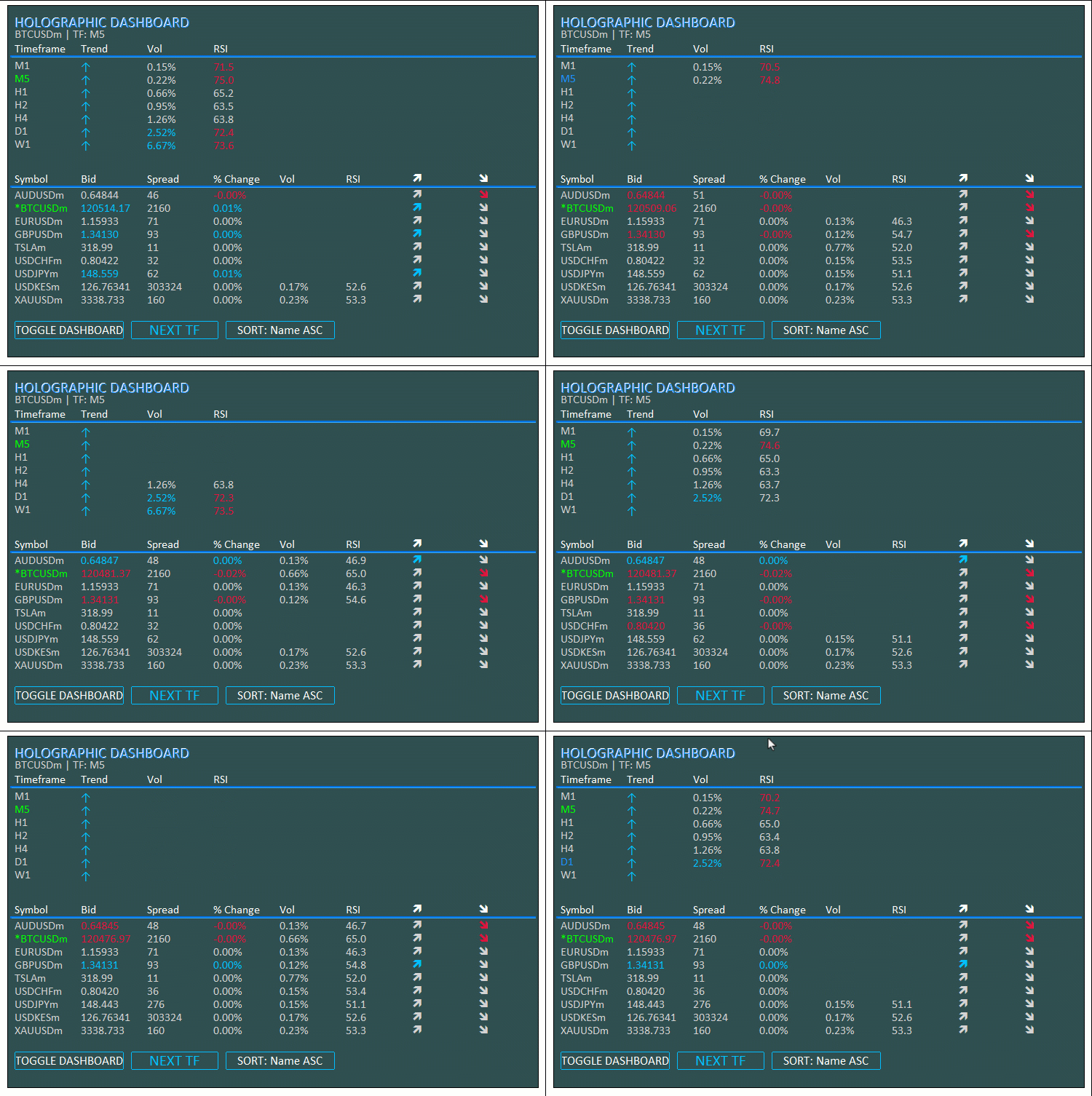
この可視化から、市場の各ティックで更新が正しく反映されていることが分かります。これで、次はボタンに動きを加える段階に進みます。この処理はOnChartEventイベントハンドラを使用して実現します。
//+------------------------------------------------------------------+
//| Chart Event Handler                                              |
//+------------------------------------------------------------------+
void OnChartEvent(const int id, const long &lparam, const double &dparam, const string &sparam) {
   if (id == CHARTEVENT_OBJECT_CLICK) { //--- Handle click event
      if (sparam == "ToggleBtn") {    //--- Check toggle button
         dashboardVisible = !dashboardVisible; //--- Toggle visibility
         objManager.DeleteAllObjects(); //--- Delete objects
         if (dashboardVisible) {      //--- Check if visible
            InitDashboard();          //--- Reinitialize dashboard
         } else {
            createButton("ToggleBtn", "TOGGLE DASHBOARD", X_Offset + 10, Y_Offset + 10, 150, 25, TitleColor, PanelColor, UpColor); //--- Create toggle button
         }
      }
      else if (sparam == "SwitchTFBtn") { //--- Check switch TF button
         int currentIdx = -1;         //--- Initialize current index
         for (int i = 0; i < ArraySize(periods); i++) { //--- Find current timeframe
            if (periods[i] == _Period) { //--- Match found
               currentIdx = i;        //--- Set index
               break;                 //--- Exit loop
            }
         }
         int nextIdx = (currentIdx + 1) % ArraySize(periods); //--- Calculate next index
         if (!ChartSetSymbolPeriod(0, _Symbol, periods[nextIdx])) { //--- Switch timeframe
            LogError(__FUNCTION__ + ": Failed to switch timeframe, Error: " + IntegerToString(GetLastError())); //--- Log error
         }
         createButton("SwitchTFBtn", "NEXT TF", X_Offset + 170, (int)ObjectGetInteger(0, "SwitchTFBtn", OBJPROP_YDISTANCE), 120, 25, UpColor, PanelColor, UpColor, EnableAnimations); //--- Update button
      }
      else if (sparam == "SortBtn") { //--- Check sort button
         sortMode = (sortMode + 1) % 4; //--- Cycle sort mode
         createButton("SortBtn", "SORT: " + sortNames[sortMode], X_Offset + 300, (int)ObjectGetInteger(0, "SortBtn", OBJPROP_YDISTANCE), 150, 25, TitleColor, PanelColor, UpColor, EnableAnimations); //--- Update button
      }
      ObjectSetInteger(0, sparam, OBJPROP_STATE, false); //--- Reset button state
      ChartRedraw(0);                 //--- Redraw chart
   }
}
OnChartEventイベントハンドラでは、インタラクティブなイベントを処理し、可視性の切り替え、時間足の変更、ソートモードの切り替えといったボタンクリックに対応します。CHARTEVENT_OBJECT_CLICKイベントの場合、sparamの値を確認します。sparamがToggleBtnの場合は、dashboardVisibleをトグルし、objManager.DeleteAllObjects()でオブジェクトを削除します。可視状態であればInitDashboard()を呼び出して再初期化し、非表示の場合はcreateButton()を使用して新しいToggleBtnを作成します。sparamがSwitchTFBtnの場合は、periods配列をループして現在の時間足インデックスを検索し、「(currentIdx + 1) % ArraySize(periods)」でnextIdxを計算します。次に、ChartSetSymbolPeriod()を使用してperiods[nextIdx]の時間足に切り替えます。失敗した場合はLogError()でエラーログを記録します。その後、createButton()を使ってボタンを更新し、EnableAnimationsがtrueの場合はアニメーションを適用します。
sparamがSortBtnの場合は、sortModeを「(sortMode + 1) % 4」で循環させ、「"SORT: " + sortNames[sortMode]」というテキストでボタンを更新します。この際もcreateButton()を呼び出し、アニメーションが有効であれば適用します。最後に、ObjectSetIntegerでOBJPROP_STATE tをfalseにリセットし、ChartRedrawでチャートを再描画します。これにより、ダッシュボードの表示やデータ構成を動的に制御できるようになります。コンパイルすると以下の出力が得られます。
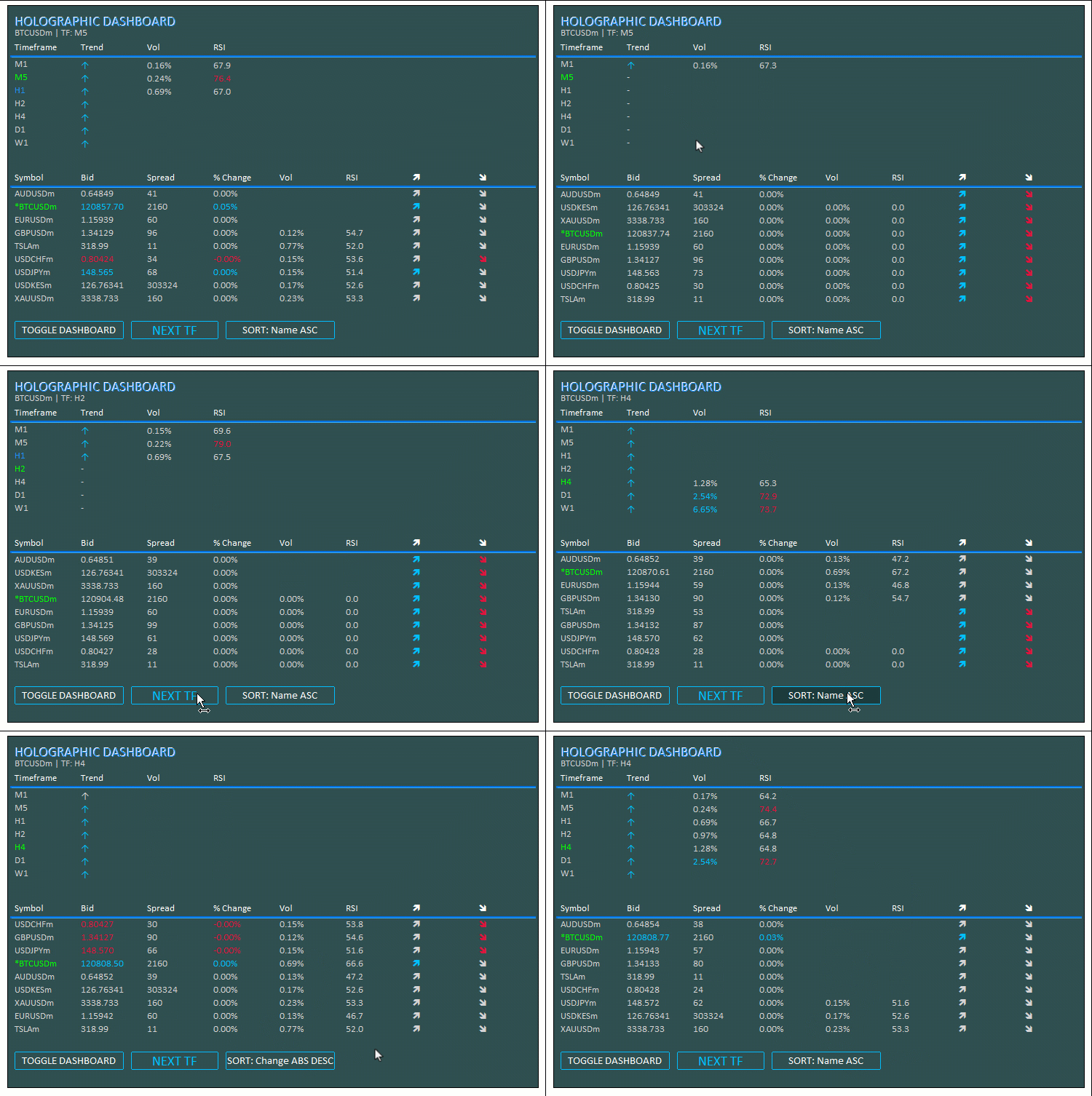
この結果から、各マーケットティックでダッシュボードを更新できること、さらにダッシュボードの表示切り替え、時間足の変更、銘柄メトリクスのインデックスソートといったボタンクリックにも正しく反応できることが確認できました。これにより、本プロジェクトで目標としていた機能をすべて達成したことになります。残されているのはプロジェクトの実用性をテストすることであり、それは次のセクションで扱います。
バックテスト
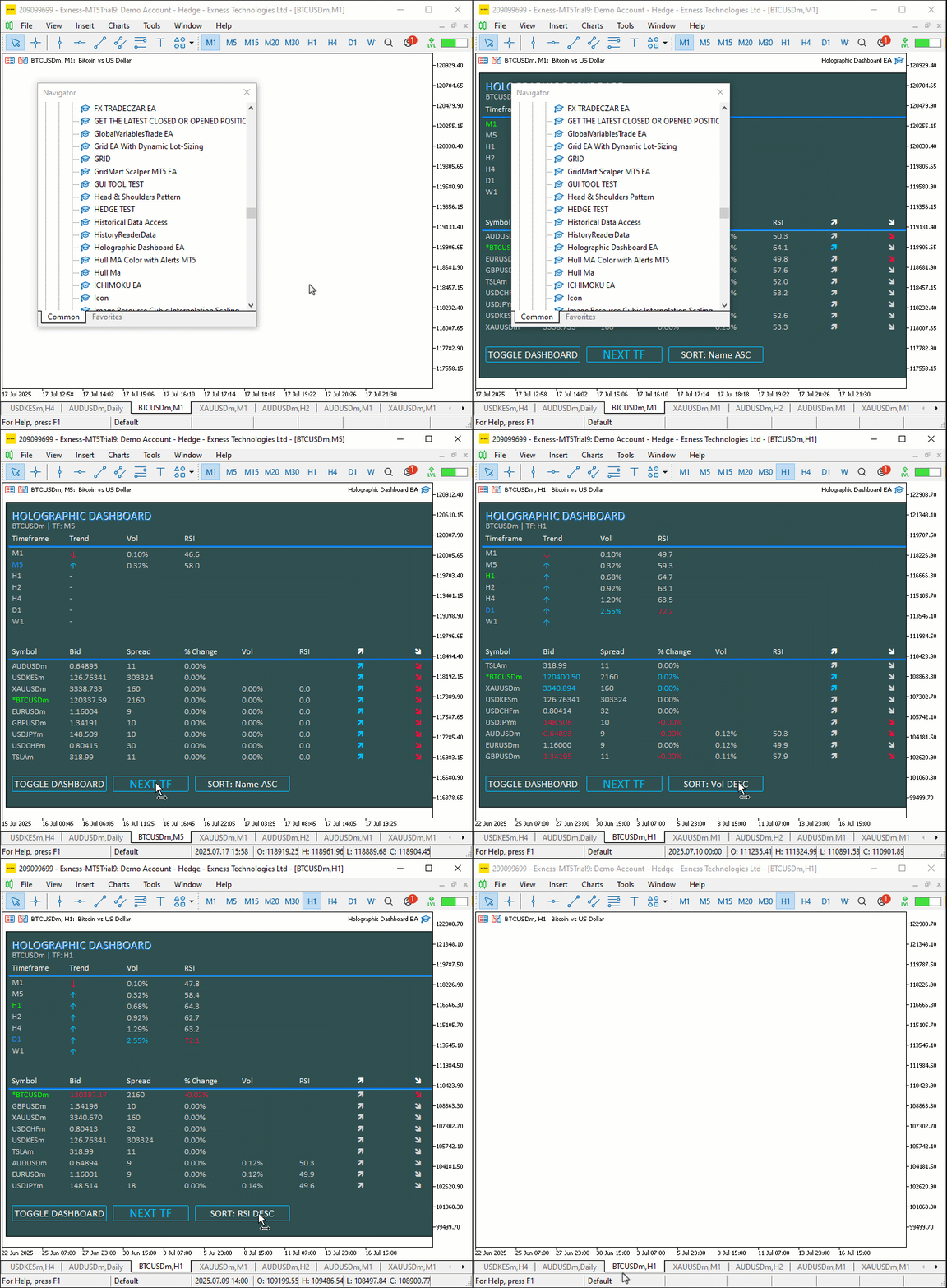
テストを実施しました。以下はコンパイル後の可視化を単一のGraphics Interchange Format (GIF)ビットマップ画像形式で示したものです。
結論
結論として、今回はMQL5で動的ホログラフィックダッシュボードを作成しました。このダッシュボードは、銘柄および時間足をRSIやボラティリティアラートとともに監視し、ソート機能を備えています。また、パルスアニメーションやインタラクティブボタンを組み合わせることで、没入感のある取引体験を実現しています。本記事では、アーキテクチャおよび実装の詳細を説明し、CObjectManagerクラスやHolographicPulse関数などのコンポーネントを活用して、リアルタイムかつ視覚的に魅力的な分析を実現しました。このダッシュボードは、トレーダーのニーズに合わせて自由にカスタマイズすることができ、ホログラフィックな演出と操作性により、分析体験をさらに高めることが可能です
MetaQuotes Ltdにより英語から翻訳されました。
元の記事: https://www.mql5.com/en/articles/18880
警告: これらの資料についてのすべての権利はMetaQuotes Ltd.が保有しています。これらの資料の全部または一部の複製や再プリントは禁じられています。
この記事はサイトのユーザーによって執筆されたものであり、著者の個人的な見解を反映しています。MetaQuotes Ltdは、提示された情報の正確性や、記載されているソリューション、戦略、または推奨事項の使用によって生じたいかなる結果についても責任を負いません。

 プライスアクション分析ツールキットの開発(第33回):Candle Range Theory Tool
 MQL5入門(第19回):ウォルフ波動の自動検出
 MQL5サービスからPythonアプリケーションへのMetaTraderティック情報アクセス(ソケット使用)
 MQL5での取引戦略の自動化(第24回):リスク管理とトレーリングストップを備えたロンドンセッションブレイクアウトシステム

- 無料取引アプリ
- 8千を超えるシグナルをコピー
- 金融ニュースで金融マーケットを探索