

MQL5取引ツール(第1回):インタラクティブで視覚的なペンディングオーダー取引アシスタントツールの構築
 362
362
 2
2

はじめに
効果的な取引ツールを開発することは、複雑なFX取引の作業を簡略化する上で不可欠です。しかし、意思決定を支援する直感的なインターフェースを作成することは依然として課題となっています。もし、MetaTrader 5内でペンディングオーダーの設置を視覚的かつインタラクティブで効率化できるツールを設計できるとしたらどうでしょうか。本記事では、MetaQuotes Language 5 (MQL5)で構築したカスタムエキスパートアドバイザー(EA)を紹介します。この取引アシスタントツール(Trade Assistant Tool)は、チャート上での視覚的な精度とユーザーフレンドリーな操作性を組み合わせ、Buy/Sell StopおよびBuy/Sell Limit注文を効率的に設置できるようにします。以下の順番で解説していきます。
この記事を読み終える頃には、このツールを構築・テストする方法について明確に理解でき、後続パートでの発展的な拡張に向けた準備が整うでしょう。
取引アシスタントツールの概念設計と目的
私たちが目指すのは、FX取引におけるペンディングオーダーの設置プロセスを簡略化し、スムーズで効率的な取引体験を実現する取引アシスタントツールの開発です。このツールはMetaTrader 5に直接統合されたグラフィカルユーザーインターフェース (GUI)として設計し、直感的なコントロールパネルを通じてBuy Stop、Sell Stop、Buy Limit、Sell Limitの各注文を簡単に設定できるように構想しています。デザインには、希望する注文タイプを選択するためのボタンと、ロットサイズを指定する入力フィールドを含めます。また、視覚的な操作性を重視し、チャート上のインタラクティブ要素をドラッグすることで、エントリープライス、ストップロス(SL)、テイクプロフィット(TP)を直感的に設定できるようにします。これにより、価格水準やそれらの差分(ポイント)を即座に確認できるフィードバックを実現します。
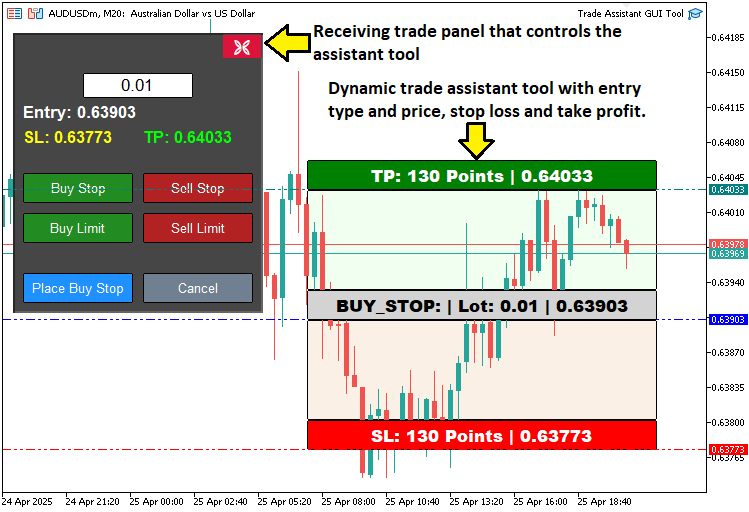
私たちの焦点は、ツールを使いやすく、応答性の高いものにすることです。インターフェースはレスポンシブに設計し、価格水準を正確に調整しながらワンクリックで注文を確定できるようにします。これにより、設定にかかる時間を最小限に抑えます。さらに、インターフェースをキャンセルまたは閉じるオプションも組み込み、市場状況の変化に柔軟に対応できるようにします。視覚的に分かりやすく、応答性の高いツールを構築することで、意思決定を強化し、注文設置時のエラーを減らすことを目指します。また、将来的には高度なリスク管理機能などを追加できる基盤を提供し、後続のイテレーションで探求していきます。以下に示すのは、私たちが目指すツールのビジョンです。
MQL5での実装
MQL5でプログラムを作成するには、まずプログラムのメタデータを定義し、次にオブジェクト名の定数を定義します。最後に、取引機能を実現するために必要なライブラリファイルをインクルードします。
//+------------------------------------------------------------------+
//|                                         TRADE ASSISTANT GUI TOOL |
//|      Copyright 2025, ALLAN MUNENE MUTIIRIA. #@Forex Algo-Trader. |
//|                           https://youtube.com/@ForexAlgo-Trader? |
//+------------------------------------------------------------------+
#property copyright "Copyright 2025, ALLAN MUNENE MUTIIRIA. #@Forex Algo-Trader"
#property link      "https://youtube.com/@ForexAlgo-Trader?"
#property version   "1.00"

#include <Trade/Trade.mqh> //--- Include the Trade library for trading operations

// Control panel object names
#define PANEL_BG       "PANEL_BG"         //--- Define constant for panel background object name
#define LOT_EDIT       "LOT_EDIT"         //--- Define constant for lot size edit field object name
#define PRICE_LABEL    "PRICE_LABEL"      //--- Define constant for price label object name
#define SL_LABEL       "SL_LABEL"         //--- Define constant for stop-loss label object name
#define TP_LABEL       "TP_LABEL"         //--- Define constant for take-profit label object name
#define BUY_STOP_BTN   "BUY_STOP_BTN"     //--- Define constant for buy stop button object name
#define SELL_STOP_BTN  "SELL_STOP_BTN"    //--- Define constant for sell stop button object name
#define BUY_LIMIT_BTN  "BUY_LIMIT_BTN"    //--- Define constant for buy limit button object name
#define SELL_LIMIT_BTN "SELL_LIMIT_BTN"   //--- Define constant for sell limit button object name
#define PLACE_ORDER_BTN "PLACE_ORDER_BTN" //--- Define constant for place order button object name
#define CANCEL_BTN     "CANCEL_BTN"       //--- Define constant for cancel button object name
#define CLOSE_BTN      "CLOSE_BTN"        //--- Define constant for close button object name

#define REC1 "REC1" //--- Define constant for rectangle 1 (TP) object name
#define REC2 "REC2" //--- Define constant for rectangle 2 object name
#define REC3 "REC3" //--- Define constant for rectangle 3 (Entry) object name
#define REC4 "REC4" //--- Define constant for rectangle 4 object name
#define REC5 "REC5" //--- Define constant for rectangle 5 (SL) object name

#define TP_HL "TP_HL" //--- Define constant for take-profit horizontal line object name
#define SL_HL "SL_HL" //--- Define constant for stop-loss horizontal line object name
#define PR_HL "PR_HL" //--- Define constant for price (entry) horizontal line object name

double Get_Price_d(string name) { return ObjectGetDouble(0, name, OBJPROP_PRICE); }                          //--- Function to get price as double for an object
string Get_Price_s(string name) { return DoubleToString(ObjectGetDouble(0, name, OBJPROP_PRICE), _Digits); } //--- Function to get price as string with proper digits
string update_Text(string name, string val) { return (string)ObjectSetString(0, name, OBJPROP_TEXT, val); }  //--- Function to update text of an object

int
   xd1, yd1, xs1, ys1, //--- Variables for rectangle 1 position and size
   xd2, yd2, xs2, ys2, //--- Variables for rectangle 2 position and size
   xd3, yd3, xs3, ys3, //--- Variables for rectangle 3 position and size
   xd4, yd4, xs4, ys4, //--- Variables for rectangle 4 position and size
   xd5, yd5, xs5, ys5; //--- Variables for rectangle 5 position and size

// Control panel variables
bool tool_visible = false;       //--- Flag to track if trading tool is visible
string selected_order_type = ""; //--- Variable to store selected order type
double lot_size = 0.01;          //--- Default lot size for trades
CTrade obj_Trade;                //--- Trade object for executing trading operations
int panel_x = 10, panel_y = 30;  //--- Panel position coordinates
ここでは、取引アシスタントツールの基盤を構築するために、ツールのグラフィカル機能および取引機能を実現する重要なコンポーネント、変数、関数を定義します。まず、「Trade.mqh」ライブラリをインクルードします。これにより、ペンディングオーダーの発注などの取引操作を実行するためのCTradeクラスが利用可能になります。次に、#defineを使って一連の定数を定義し、GUI要素に一意の名前を割り当てます。例として、コントロールパネルの背景にはPANEL_BG、ロットサイズ入力フィールドにはLOT_EDIT、注文タイプ選択用のボタンにはBUY_STOP_BTNやSELL_STOP_BTNなどがあります。
続いて、チャートオブジェクトのプロパティを管理するための3つのユーティリティ関数を実装します。Get_Price_d関数は、オブジェクトの価格をdouble型で取得します。Get_Price_s関数は、DoubleToString関数を使い、適切な小数桁数で文字列に変換します。update_Text関数は、ObjectSetString関数を使用して、オブジェクトのテキストを更新し、リアルタイムの価格情報を表示します。
インタラクティブな矩形の位置やサイズを管理するために、整数型変数のセットを宣言します。例えば、各矩形(REC1~REC5)に対して、x方向距離を表すxd1、y方向距離を表すyd1、x方向サイズを表すxs1、y方向サイズを表すys1などです。
最後に、コントロールパネルの主要変数を定義します。tool_visibleはツールの表示状態を管理するブール型変数で、selected_order_typeは選択された注文タイプを保持する文字列型変数です。lot_sizeは取引ロット数を表すdouble型で、初期値は0.01に設定しています。obj_Tradeは取引を実行するためのCTradeオブジェクトであり、panel_xとpanel_yはコントロールパネルを座標(10,30)に配置するための整数型変数です。
これらの要素により、ツールのインタラクティブなインターフェースおよび取引機能の構造的な骨組みが整います。これでコントロールパネルの作成に進むことができますが、その前にカスタムボタンを作成する関数が必要になります。
//+------------------------------------------------------------------+
//| Create button                                                    |
//+------------------------------------------------------------------+
bool createButton(string objName, string text, int xD, int yD, int xS, int yS,
                  color clrTxt, color clrBG, int fontsize = 12,
                  color clrBorder = clrNONE, bool isBack = false, string font = "Calibri") {
   ResetLastError();                                                               //--- Reset last error code
   if(!ObjectCreate(0, objName, OBJ_BUTTON, 0, 0, 0)) {                            //--- Create button object
      Print(__FUNCTION__, ": Failed to create Btn: Error Code: ", GetLastError()); //--- Print error message
      return false;                                                                //--- Return failure
   }
   ObjectSetInteger(0, objName, OBJPROP_XDISTANCE, xD);             //--- Set button x-position
   ObjectSetInteger(0, objName, OBJPROP_YDISTANCE, yD);             //--- Set button y-position
   ObjectSetInteger(0, objName, OBJPROP_XSIZE, xS);                 //--- Set button width
   ObjectSetInteger(0, objName, OBJPROP_YSIZE, yS);                 //--- Set button height
   ObjectSetInteger(0, objName, OBJPROP_CORNER, CORNER_LEFT_UPPER); //--- Set button corner
   ObjectSetString(0, objName, OBJPROP_TEXT, text);                 //--- Set button text
   ObjectSetInteger(0, objName, OBJPROP_FONTSIZE, fontsize);        //--- Set font size
   ObjectSetString(0, objName, OBJPROP_FONT, font);                 //--- Set font
   ObjectSetInteger(0, objName, OBJPROP_COLOR, clrTxt);             //--- Set text color
   ObjectSetInteger(0, objName, OBJPROP_BGCOLOR, clrBG);            //--- Set background color
   ObjectSetInteger(0, objName, OBJPROP_BORDER_COLOR, clrBorder);   //--- Set border color
   ObjectSetInteger(0, objName, OBJPROP_BACK, isBack);              //--- Set background/foreground
   ObjectSetInteger(0, objName, OBJPROP_STATE, false);              //--- Reset button state
   ObjectSetInteger(0, objName, OBJPROP_SELECTABLE, false);         //--- Disable selection
   ObjectSetInteger(0, objName, OBJPROP_SELECTED, false);           //--- Disable selected state

   ChartRedraw(0); //--- Redraw chart
   return true;    //--- Return success
}
createButton関数を定義して、ツール用のカスタマイズ可能なボタンを作成します。この関数は、ボタン名を指定するobjName、ラベルを指定するtext、位置を指定するxDとyD、サイズを指定するxSとyS、文字色と背景色を指定するclrTxtとclrBG、フォントサイズfontsize(デフォルト12)、枠線色clrBorder(デフォルトclrNONE)、背景ボタンかどうかを示すisBack(デフォルトfalse)、フォントfont(デフォルトCalibri)といったパラメータを受け取ります。
まず、ResetLastError関数を使用してエラーコードをクリアし、その後ObjectCreate関数でOBJ_BUTTONを作成します。作成に失敗した場合は、Print関数に__FUNCTION__とGetLastErrorを渡してエラーをログに出力し、falseを返します。
作成に成功した場合は、ObjectSetIntegerおよびObjectSetString関数を用いて位置、サイズ、色などのプロパティを設定し、状態や選択を無効化します。最後にChartRedraw関数でチャートを更新し、trueを返します。この関数により、インタラクティブなボタンを作成できるようになります。これを用いれば、次にコントロールパネルを作成する関数を作ることが可能です。
//+------------------------------------------------------------------+
//| Create control panel                                             |
//+------------------------------------------------------------------+
void createControlPanel() {
   // Background rectangle
   ObjectCreate(0, PANEL_BG, OBJ_RECTANGLE_LABEL, 0, 0, 0);        //--- Create panel background rectangle
   ObjectSetInteger(0, PANEL_BG, OBJPROP_XDISTANCE, panel_x);      //--- Set background x-position
   ObjectSetInteger(0, PANEL_BG, OBJPROP_YDISTANCE, panel_y);      //--- Set background y-position
   ObjectSetInteger(0, PANEL_BG, OBJPROP_XSIZE, 250);              //--- Set background width
   ObjectSetInteger(0, PANEL_BG, OBJPROP_YSIZE, 280);              //--- Set background height
   ObjectSetInteger(0, PANEL_BG, OBJPROP_BGCOLOR, C'070,070,070'); //--- Set background color
   ObjectSetInteger(0, PANEL_BG, OBJPROP_BORDER_COLOR, clrWhite);  //--- Set border color
   ObjectSetInteger(0, PANEL_BG, OBJPROP_BACK, false);             //--- Set background to foreground

   createButton(CLOSE_BTN, CharToString(203), panel_x + 209, panel_y + 1, 40, 25, clrWhite, clrCrimson, 12, C'070,070,070', false, "Wingdings"); //--- Create close button

   // Lot size input
   ObjectCreate(0, LOT_EDIT, OBJ_EDIT, 0, 0, 0); //--- Create lot size edit field
   ObjectSetInteger(0, LOT_EDIT, OBJPROP_XDISTANCE, panel_x + 70); //--- Set edit field x-position
   ObjectSetInteger(0, LOT_EDIT, OBJPROP_YDISTANCE, panel_y + 40); //--- Set edit field y-position
   ObjectSetInteger(0, LOT_EDIT, OBJPROP_XSIZE, 110);              //--- Set edit field width
   ObjectSetInteger(0, LOT_EDIT, OBJPROP_YSIZE, 25);               //--- Set edit field height
   ObjectSetString(0, LOT_EDIT, OBJPROP_TEXT, "0.01");             //--- Set default lot size text
   ObjectSetInteger(0, LOT_EDIT, OBJPROP_COLOR, clrBlack);         //--- Set text color
   ObjectSetInteger(0, LOT_EDIT, OBJPROP_BGCOLOR, clrWhite);       //--- Set background color
   ObjectSetInteger(0, LOT_EDIT, OBJPROP_BORDER_COLOR, clrBlack);  //--- Set border color
   ObjectSetInteger(0, LOT_EDIT, OBJPROP_ALIGN, ALIGN_CENTER);     //--- Center text
   ObjectSetString(0, LOT_EDIT, OBJPROP_FONT, "Arial");            //--- Set font
   ObjectSetInteger(0, LOT_EDIT, OBJPROP_FONTSIZE, 13);            //--- Set font size
   ObjectSetInteger(0, LOT_EDIT, OBJPROP_BACK, false);             //--- Set to foreground

   // Entry price label
   ObjectCreate(0, PRICE_LABEL, OBJ_LABEL, 0, 0, 0);                  //--- Create entry price label
   ObjectSetInteger(0, PRICE_LABEL, OBJPROP_XDISTANCE, panel_x + 10); //--- Set label x-position
   ObjectSetInteger(0, PRICE_LABEL, OBJPROP_YDISTANCE, panel_y + 70); //--- Set label y-position
   ObjectSetInteger(0, PRICE_LABEL, OBJPROP_XSIZE, 230);              //--- Set label width
   ObjectSetString(0, PRICE_LABEL, OBJPROP_TEXT, "Entry: -");         //--- Set default text
   ObjectSetString(0, PRICE_LABEL, OBJPROP_FONT, "Arial Bold");       //--- Set font
   ObjectSetInteger(0, PRICE_LABEL, OBJPROP_FONTSIZE, 13);            //--- Set font size
   ObjectSetInteger(0, PRICE_LABEL, OBJPROP_COLOR, clrWhite);         //--- Set text color
   ObjectSetInteger(0, PRICE_LABEL, OBJPROP_ALIGN, ALIGN_CENTER);     //--- Center text
   ObjectSetInteger(0, PRICE_LABEL, OBJPROP_BACK, false); //--- Set to foreground

   // SL and TP labels
   ObjectCreate(0, SL_LABEL, OBJ_LABEL, 0, 0, 0);                  //--- Create stop-loss label
   ObjectSetInteger(0, SL_LABEL, OBJPROP_XDISTANCE, panel_x + 10); //--- Set label x-position
   ObjectSetInteger(0, SL_LABEL, OBJPROP_YDISTANCE, panel_y + 95); //--- Set label y-position
   ObjectSetInteger(0, SL_LABEL, OBJPROP_XSIZE, 110);              //--- Set label width
   ObjectSetString(0, SL_LABEL, OBJPROP_TEXT, "SL: -");            //--- Set default text
   ObjectSetString(0, SL_LABEL, OBJPROP_FONT, "Arial Bold");       //--- Set font
   ObjectSetInteger(0, SL_LABEL, OBJPROP_FONTSIZE, 12);            //--- Set font size
   ObjectSetInteger(0, SL_LABEL, OBJPROP_COLOR, clrYellow);        //--- Set text color
   ObjectSetInteger(0, SL_LABEL, OBJPROP_ALIGN, ALIGN_CENTER);     //--- Center text
   ObjectSetInteger(0, SL_LABEL, OBJPROP_BACK, false);             //--- Set to foreground

   ObjectCreate(0, TP_LABEL, OBJ_LABEL, 0, 0, 0);                   //--- Create take-profit label
   ObjectSetInteger(0, TP_LABEL, OBJPROP_XDISTANCE, panel_x + 130); //--- Set label x-position
   ObjectSetInteger(0, TP_LABEL, OBJPROP_YDISTANCE, panel_y + 95);  //--- Set label y-position
   ObjectSetInteger(0, TP_LABEL, OBJPROP_XSIZE, 110);               //--- Set label width
   ObjectSetString(0, TP_LABEL, OBJPROP_TEXT, "TP: -");             //--- Set default text
   ObjectSetString(0, TP_LABEL, OBJPROP_FONT, "Arial Bold");        //--- Set font
   ObjectSetInteger(0, TP_LABEL, OBJPROP_FONTSIZE, 12);             //--- Set font size
   ObjectSetInteger(0, TP_LABEL, OBJPROP_COLOR, clrLime);           //--- Set text color
   ObjectSetInteger(0, TP_LABEL, OBJPROP_ALIGN, ALIGN_CENTER);      //--- Center text
   ObjectSetInteger(0, TP_LABEL, OBJPROP_BACK, false);              //--- Set to foreground

   // Order type buttons
   createButton(BUY_STOP_BTN, "Buy Stop", panel_x + 10, panel_y + 140, 110, 30, clrWhite, clrForestGreen, 10, clrBlack, false, "Arial");    //--- Create Buy Stop button
   createButton(SELL_STOP_BTN, "Sell Stop", panel_x + 130, panel_y + 140, 110, 30, clrWhite, clrFireBrick, 10, clrBlack, false, "Arial");   //--- Create Sell Stop button
   createButton(BUY_LIMIT_BTN, "Buy Limit", panel_x + 10, panel_y + 180, 110, 30, clrWhite, clrForestGreen, 10, clrBlack, false, "Arial");  //--- Create Buy Limit button
   createButton(SELL_LIMIT_BTN, "Sell Limit", panel_x + 130, panel_y + 180, 110, 30, clrWhite, clrFireBrick, 10, clrBlack, false, "Arial"); //--- Create Sell Limit button

   // Place Order and Cancel buttons
   createButton(PLACE_ORDER_BTN, "Place Order", panel_x + 10, panel_y + 240, 110, 30, clrWhite, clrDodgerBlue, 10, clrBlack, false, "Arial"); //--- Create Place Order button
   createButton(CANCEL_BTN, "Cancel", panel_x + 130, panel_y + 240, 110, 30, clrWhite, clrSlateGray, 10, clrBlack, false, "Arial");           //--- Create Cancel button
}
ここではcreateControlPanel関数を定義し、取引アシスタントツールのメイングラフィカルユーザーインターフェース(GUI)を構築します。まず、ObjectCreate関数を使用して、PANEL_BGという名前の背景用長方形を生成します。オブジェクトの種類はOBJ_RECTANGLE_LABELで、位置はpanel_x = 10、panel_y = 30に設定されます。サイズは250×280ピクセル、背景色はダークグレー(C'070,070,070')、枠線は白(clrWhite)、前面に配置されるように指定します(OBJPROP_BACK = false)。
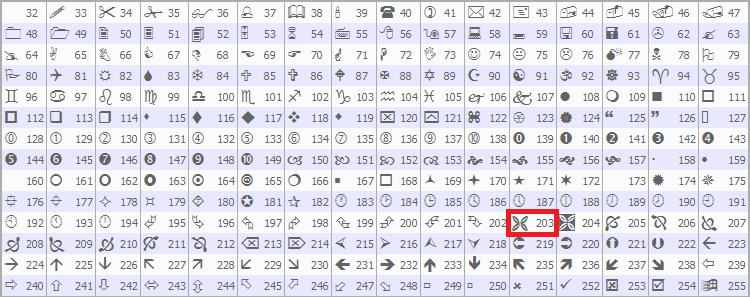
次に、「reateButton関数を呼び出し、右上に[閉じる]ボタン(CLOSE_BTN)を追加します。このボタンにはWingdingsフォントの文字203(十字記号×)が表示され、色はクリムゾンにスタイル設定されます。入力値はMQL5ドキュメントで定義されていますが、お好みのものを使用することもできます。
ロットサイズ入力のために、ObjectCreate関数を使用して編集フィールド(LOT_EDIT)を作成します。オブジェクトの種類はOBJ_EDITで、位置は(panel_x + 70, panel_y + 40)に設定され、サイズは110×25ピクセルです。初期値は0.01とし、テキストは黒、背景は白、中央揃えのArialフォントで表示されるようにObjectSetIntegerとObjectSetString関数を使ってスタイルを設定します。
次に、取引情報を表示するための3つのラベルをObjectCreate関数で作成します。PRICE_LABELはエントリー価格用で、位置は(panel_x + 10, panel_y + 70)、幅230ピクセル、デフォルトテキストは"Entry: -"です。SL_LABELはストップロス用で、位置は(panel_x + 10, panel_y + 95)、黄色のテキストでデフォルトは「SL: -」です。TP_LABELはテイクプロフィット用で、位置は(panel_x + 130, panel_y + 95)、ライム色のテキストでデフォルトは「TP: -」です。これらのラベルはすべてArialフォントの太字を使用し、テキストは中央揃えにします。
最後に、createButton関数を使って注文タイプ用のボタンを追加します。BUY_STOP_BTNとSELL_STOP_BTNはpanel_y + 140に配置し、それぞれ緑と赤で表示します。BUY_LIMIT_BTNとSELL_LIMIT_BTNはpanel_y + 180に配置し、それぞれ緑と赤で表示します。アクションボタンPLACE_ORDER_BTNとCANCEL_BTNはpanel_y + 240に配置し、それぞれ青とグレーで表示します。すべてのボタンは110×30ピクセルのサイズで、Arialフォントを使用します。この構成により、ツール用のインタラクティブなコントロールパネルが形成されます。パネルを初期化するには、OnInitイベントハンドラでこの関数を呼び出します。
//+------------------------------------------------------------------+
//| Expert initialization function                                   |
//+------------------------------------------------------------------+
int OnInit() {

// Create control panel
   createControlPanel();   //--- Call function to create the control panel
   ChartRedraw(0);         //--- Redraw chart to display panel
   return(INIT_SUCCEEDED); //--- Return successful initialization
}
OnInitイベントハンドラでは、createControlPanel関数を呼び出してグラフィカルユーザーインターフェースを構築し、ボタン、ラベル、入力フィールドを備えたコントロールパネルを設定します。次にChartRedraw関数を使用してチャートを更新し、パネルがすぐに表示されるようにします。最後にINIT_SUCCEEDEDを返して初期化が正常に完了したことを示します。コンパイルすると以下の出力が得られます。
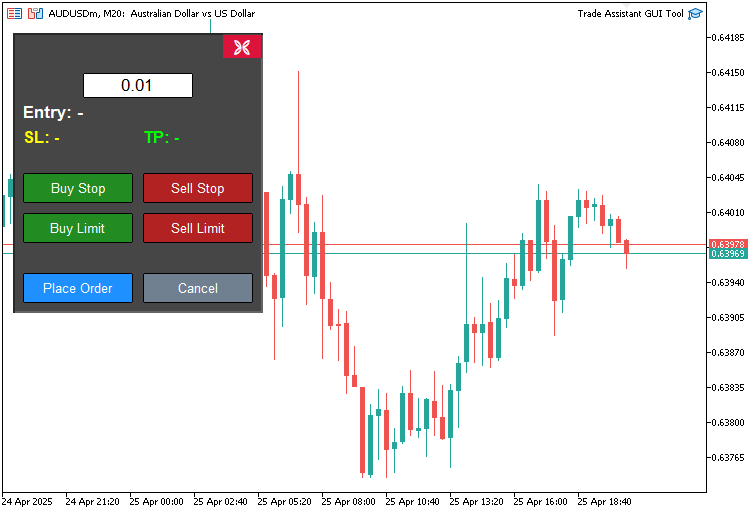
画像からわかるように、コントロールパネルは作成済みです。これから作成する必要があるのはアシスタントパネルで、チャートの価格を動的に取得し、それを自動的にコントロールパネルに反映させ、その価格に基づいて取引をおこなえるようにするものです。これにはチャートスケールと画面スケールの統合が必要ですが、その点はこちらで対応します。実装方法としては、すべてを1つの関数にまとめ、その後、コントロールボタンが操作されたときに対応する関数を呼び出すイベントリスナーを追加します。
//+------------------------------------------------------------------+
//| Expert onchart event function                                    |
//+------------------------------------------------------------------+
void OnChartEvent(
   const int id,         //--- Event ID
   const long& lparam,   //--- Long parameter (e.g., x-coordinate for mouse)
   const double& dparam, //--- Double parameter (e.g., y-coordinate for mouse)
   const string& sparam  //--- String parameter (e.g., object name)
) {
   if(id == CHARTEVENT_OBJECT_CLICK) {     //--- Handle object click events
      // Handle order type buttons
      if(sparam == BUY_STOP_BTN) {         //--- Check if Buy Stop button clicked
         selected_order_type = "BUY_STOP"; //--- Set order type to Buy Stop
      }
   }
}
ここではOnChartEventイベントハンドラを実装し、ツールに対するユーザー操作を処理します。この関数はパラメータを受け取ります。idはイベントの種類、lparamはx座標などのデータ、dparamはy座標などのデータ、sparamはオブジェクト名などの文字列データです。idがCHARTEVENT_OBJECT_CLICKと等しいかどうかを確認し、オブジェクトのクリックを検出します。そしてsparamがBUY_STOP_BTNと一致した場合、変数selected_order_typeをBUY_STOPに設定し、ユーザーによるBuy Stop注文の選択を登録できるようにします。その場合には、ツールを表示するための関数が必要になります。
//+------------------------------------------------------------------+
//| Show main tool                                                   |
//+------------------------------------------------------------------+
void showTool() {
   // Hide panel
   ObjectSetInteger(0, PANEL_BG, OBJPROP_BACK, false);        //--- Hide panel background
   ObjectSetInteger(0, LOT_EDIT, OBJPROP_BACK, false);        //--- Hide lot edit field
   ObjectSetInteger(0, PRICE_LABEL, OBJPROP_BACK, false);     //--- Hide price label
   ObjectSetInteger(0, SL_LABEL, OBJPROP_BACK, false);        //--- Hide SL label
   ObjectSetInteger(0, TP_LABEL, OBJPROP_BACK, false);        //--- Hide TP label
   ObjectSetInteger(0, BUY_STOP_BTN, OBJPROP_BACK, false);    //--- Hide Buy Stop button
   ObjectSetInteger(0, SELL_STOP_BTN, OBJPROP_BACK, false);   //--- Hide Sell Stop button
   ObjectSetInteger(0, BUY_LIMIT_BTN, OBJPROP_BACK, false);   //--- Hide Buy Limit button
   ObjectSetInteger(0, SELL_LIMIT_BTN, OBJPROP_BACK, false);  //--- Hide Sell Limit button
   ObjectSetInteger(0, PLACE_ORDER_BTN, OBJPROP_BACK, false); //--- Hide Place Order button
   ObjectSetInteger(0, CANCEL_BTN, OBJPROP_BACK, false);      //--- Hide Cancel button
   ObjectSetInteger(0, CLOSE_BTN, OBJPROP_BACK, false);       //--- Hide Close button

   // Create main tool 150 pixels from the right edge
   int chart_width = (int)ChartGetInteger(0, CHART_WIDTH_IN_PIXELS); //--- Get chart width
   int tool_x = chart_width - 400 - 50;                              //--- Calculate tool x-position (400 is REC1 width, 50 is margin)

   if(selected_order_type == "BUY_STOP" || selected_order_type == "BUY_LIMIT") { //--- Check for buy orders
      // Buy orders: TP at top, entry in middle, SL at bottom
      createButton(REC1, "", tool_x, 20, 350, 30, clrWhite, clrGreen, 13, clrBlack, false, "Arial Black"); //--- Create TP rectangle

      xd1 = (int)ObjectGetInteger(0, REC1, OBJPROP_XDISTANCE); //--- Get REC1 x-distance
      yd1 = (int)ObjectGetInteger(0, REC1, OBJPROP_YDISTANCE); //--- Get REC1 y-distance
      xs1 = (int)ObjectGetInteger(0, REC1, OBJPROP_XSIZE);     //--- Get REC1 x-size
      ys1 = (int)ObjectGetInteger(0, REC1, OBJPROP_YSIZE);     //--- Get REC1 y-size

      xd2 = xd1;       //--- Set REC2 x-distance
      yd2 = yd1 + ys1; //--- Set REC2 y-distance
      xs2 = xs1;       //--- Set REC2 x-size
      ys2 = 100;       //--- Set REC2 y-size

      xd3 = xd2;       //--- Set REC3 x-distance
      yd3 = yd2 + ys2; //--- Set REC3 y-distance
      xs3 = xs2;       //--- Set REC3 x-size
      ys3 = 30;        //--- Set REC3 y-size

      xd4 = xd3;       //--- Set REC4 x-distance
      yd4 = yd3 + ys3; //--- Set REC4 y-distance
      xs4 = xs3;       //--- Set REC4 x-size
      ys4 = 100;       //--- Set REC4 y-size

      xd5 = xd4;       //--- Set REC5 x-distance
      yd5 = yd4 + ys4; //--- Set REC5 y-distance
      xs5 = xs4;       //--- Set REC5 x-size
      ys5 = 30;        //--- Set REC5 y-size
   }
   else { //--- Handle sell orders
      // Sell orders: SL at top, entry in middle, TP at bottom
      createButton(REC5, "", tool_x, 20, 350, 30, clrWhite, clrRed, 13, clrBlack, false, "Arial Black"); //--- Create SL rectangle

      xd5 = (int)ObjectGetInteger(0, REC5, OBJPROP_XDISTANCE); //--- Get REC5 x-distance
      yd5 = (int)ObjectGetInteger(0, REC5, OBJPROP_YDISTANCE); //--- Get REC5 y-distance
      xs5 = (int)ObjectGetInteger(0, REC5, OBJPROP_XSIZE);     //--- Get REC5 x-size
      ys5 = (int)ObjectGetInteger(0, REC5, OBJPROP_YSIZE);     //--- Get REC5 y-size

      xd2 = xd5;       //--- Set REC2 x-distance
      yd2 = yd5 + ys5; //--- Set REC2 y-distance
      xs2 = xs5;       //--- Set REC2 x-size
      ys2 = 100;       //--- Set REC2 y-size

      xd3 = xd2;       //--- Set REC3 x-distance
      yd3 = yd2 + ys2; //--- Set REC3 y-distance
      xs3 = xs2;       //--- Set REC3 x-size
      ys3 = 30;        //--- Set REC3 y-size

      xd4 = xd3;       //--- Set REC4 x-distance
      yd4 = yd3 + ys3; //--- Set REC4 y-distance
      xs4 = xs3;       //--- Set REC4 x-size
      ys4 = 100;       //--- Set REC4 y-size

      xd1 = xd4;       //--- Set REC1 x-distance
      yd1 = yd4 + ys4; //--- Set REC1 y-distance
      xs1 = xs4;       //--- Set REC1 x-size
      ys1 = 30;        //--- Set REC1 y-size
   }

   datetime dt_tp = 0, dt_sl = 0, dt_prc = 0;        //--- Variables for time
   double price_tp = 0, price_sl = 0, price_prc = 0; //--- Variables for price
   int window = 0;                                   //--- Chart window

   ChartXYToTimePrice(0, xd1, yd1 + ys1, window, dt_tp, price_tp);   //--- Convert REC1 coordinates to time and price
   ChartXYToTimePrice(0, xd3, yd3 + ys3, window, dt_prc, price_prc); //--- Convert REC3 coordinates to time and price
   ChartXYToTimePrice(0, xd5, yd5 + ys5, window, dt_sl, price_sl);   //--- Convert REC5 coordinates to time and price

   createHL(TP_HL, dt_tp, price_tp, clrTeal);   //--- Create TP horizontal line
   createHL(PR_HL, dt_prc, price_prc, clrBlue); //--- Create entry horizontal line
   createHL(SL_HL, dt_sl, price_sl, clrRed);    //--- Create SL horizontal line

   if(selected_order_type == "BUY_STOP" || selected_order_type == "BUY_LIMIT") {                              //--- Check for buy orders
      createButton(REC2, "", xd2, yd2, xs2, ys2, clrWhite, clrHoneydew, 12, clrBlack, true);                  //--- Create REC2
      createButton(REC3, "", xd3, yd3, xs3, ys3, clrBlack, clrLightGray, 13, clrBlack, false, "Arial Black"); //--- Create REC3
      createButton(REC4, "", xd4, yd4, xs4, ys4, clrWhite, clrLinen, 12, clrBlack, true);                     //--- Create REC4
      createButton(REC5, "", xd5, yd5, xs5, ys5, clrWhite, clrRed, 13, clrBlack, false, "Arial Black");       //--- Create REC5
   }
   else { //--- Handle sell orders
      createButton(REC2, "", xd2, yd2, xs2, ys2, clrWhite, clrHoneydew, 12, clrBlack, true);                  //--- Create REC2
      createButton(REC3, "", xd3, yd3, xs3, ys3, clrBlack, clrLightGray, 13, clrBlack, false, "Arial Black"); //--- Create REC3
      createButton(REC4, "", xd4, yd4, xs4, ys4, clrWhite, clrLinen, 12, clrBlack, true);                     //--- Create REC4
      createButton(REC1, "", xd1, yd1, xs1, ys1, clrWhite, clrGreen, 13, clrBlack, false, "Arial Black");     //--- Create REC1
   }

   update_Text(REC1, "TP: " + DoubleToString(MathAbs((Get_Price_d(TP_HL) - Get_Price_d(PR_HL)) / _Point), 0) + " Points | " + Get_Price_s(TP_HL)); //--- Update REC1 text
   update_Text(REC3, selected_order_type + ": | Lot: " + DoubleToString(lot_size, 2) + " | " + Get_Price_s(PR_HL));                                //--- Update REC3 text
   update_Text(REC5, "SL: " + DoubleToString(MathAbs((Get_Price_d(PR_HL) - Get_Price_d(SL_HL)) / _Point), 0) + " Points | " + Get_Price_s(SL_HL)); //--- Update REC5 text
   update_Text(PRICE_LABEL, "Entry: " + Get_Price_s(PR_HL)); //--- Update entry label text
   update_Text(SL_LABEL, "SL: " + Get_Price_s(SL_HL));       //--- Update SL label text
   update_Text(TP_LABEL, "TP: " + Get_Price_s(TP_HL));       //--- Update TP label text

   tool_visible = true;                              //--- Set tool visibility flag
   ChartSetInteger(0, CHART_EVENT_MOUSE_MOVE, true); //--- Enable mouse move events
   ChartRedraw(0);                                   //--- Redraw chart
}
チャート価格ツールを表示するためにshowTool関数を実装します。最初にObjectSetInteger関数を使ってコントロールパネルを非表示にします。対象はPANEL_BG、LOT_EDIT、PRICE_LABEL、SL_LABEL、TP_LABEL、BUY_STOP_BTN、SELL_STOP_BTN、BUY_LIMIT_BTN、SELL_LIMIT_BTN、PLACE_ORDER_BTN、CANCEL_BTN、CLOSE_BTNで、OBJPROP_BACKをfalseに設定します。
次にChartGetInteger関数を使ってCHART_WIDTH_IN_PIXELSを取得し、右端から450ピクセルの位置にtool_xを設定してツールのx座標を計算します。注文タイプがBUY_STOPまたはBUY_LIMITの場合、createButton関数を使ってREC1(TP)をtool_xの位置、y=20に作成し、サイズは350×30ピクセル、色は緑に設定します。その後、ObjectGetIntegerで変数xd1、yd1、xs1、ys1を取得し、縦方向にREC2からREC5を(TP、entry、SLの順に)配置し、それぞれにxd2からxd5、yd2からyd5、xs2からxs5、ys2からys5を割り当てます。
売り注文の場合はREC5(SL)を赤色で作成し、REC2からREC1を(SL、entry、TPの順に)配置します。
時間用の変数dt_tp、dt_sl、dt_prcと価格用の変数price_tp、price_sl、price_prc、チャート用の変数windowを宣言し、ChartXYToTimePrice関数を使ってREC1、REC3、REC5の座標を価格と時間に変換します。さらにcreateHL関数を呼び出し、TP_HLをティール色、PR_HLを青、SL_HLを赤で描画します。
selected_order_typeに応じて、残りの矩形をcreateButtonで作成します。買い注文の場合はREC2、REC3、REC4、REC5、売り注文の場合はREC2、REC3、REC4、REC1を、それぞれ適切な色で描画します。テキスト更新にはupdate_Text関数を使い、REC1、REC3、REC5、PRICE_LABEL、SL_LABEL、TP_LABELの内容を更新します。この際、Get_Price_d、Get_Price_s、DoubleToString、MathAbsを用いてポイント差を計算します。
最後にtool_visibleをtrueに設定し、ChartSetIntegerでマウスイベントを有効化し、ChartRedrawを呼び出してツールを表示します。水平ラインを作成するには次の関数を使用します。
//+------------------------------------------------------------------+
//| Create horizontal line                                           |
//+------------------------------------------------------------------+
bool createHL(string objName, datetime time1, double price1, color clr) {
   ResetLastError();                                                              //--- Reset last error code
   if(!ObjectCreate(0, objName, OBJ_HLINE, 0, time1, price1)) {                   //--- Create horizontal line
      Print(__FUNCTION__, ": Failed to create HL: Error Code: ", GetLastError()); //--- Print error message
      return false; //--- Return failure
   }
   ObjectSetInteger(0, objName, OBJPROP_TIME, time1);             //--- Set line time
   ObjectSetDouble(0, objName, OBJPROP_PRICE, price1);            //--- Set line price
   ObjectSetInteger(0, objName, OBJPROP_COLOR, clr);              //--- Set line color
   ObjectSetInteger(0, objName, OBJPROP_BACK, false);             //--- Set to foreground
   ObjectSetInteger(0, objName, OBJPROP_STYLE, STYLE_DASHDOTDOT); //--- Set line style

   ChartRedraw(0); //--- Redraw chart
   return true;    //--- Return success
}
ここでは、OBJ_HLINEオブジェクトを作成し、先ほどのボタン作成関数と同様に必要なオブジェクトパラメータを設定します。また、以下のようにパネルを表示するための関数も必要になります。
//+------------------------------------------------------------------+
//| Show control panel                                               |
//+------------------------------------------------------------------+
void showPanel() {
   // Show panel
   ObjectSetInteger(0, PANEL_BG, OBJPROP_BACK, false);        //--- Show panel background
   ObjectSetInteger(0, LOT_EDIT, OBJPROP_BACK, false);        //--- Show lot edit field
   ObjectSetInteger(0, PRICE_LABEL, OBJPROP_BACK, false);     //--- Show price label
   ObjectSetInteger(0, SL_LABEL, OBJPROP_BACK, false);        //--- Show SL label
   ObjectSetInteger(0, TP_LABEL, OBJPROP_BACK, false);        //--- Show TP label
   ObjectSetInteger(0, BUY_STOP_BTN, OBJPROP_BACK, false);    //--- Show Buy Stop button
   ObjectSetInteger(0, SELL_STOP_BTN, OBJPROP_BACK, false);   //--- Show Sell Stop button
   ObjectSetInteger(0, BUY_LIMIT_BTN, OBJPROP_BACK, false);   //--- Show Buy Limit button
   ObjectSetInteger(0, SELL_LIMIT_BTN, OBJPROP_BACK, false);  //--- Show Sell Limit button
   ObjectSetInteger(0, PLACE_ORDER_BTN, OBJPROP_BACK, false); //--- Show Place Order button
   ObjectSetInteger(0, CANCEL_BTN, OBJPROP_BACK, false);      //--- Show Cancel button
   ObjectSetInteger(0, CLOSE_BTN, OBJPROP_BACK, false);       //--- Show Close button

   // Reset panel state
   update_Text(PRICE_LABEL, "Entry: -");              //--- Reset entry label text
   update_Text(SL_LABEL, "SL: -");                    //--- Reset SL label text
   update_Text(TP_LABEL, "TP: -");                    //--- Reset TP label text
   update_Text(PLACE_ORDER_BTN, "Place Order");       //--- Reset Place Order button text
   selected_order_type = "";                          //--- Clear selected order type
   tool_visible = false;                              //--- Hide tool
   ChartSetInteger(0, CHART_EVENT_MOUSE_MOVE, false); //--- Disable mouse move events
   ChartRedraw(0);                                    //--- Redraw chart
}
コントロールパネルを表示するためにshowPanel関数を定義します。ObjectSetInteger関数を使用してOBJPROP_BACKをfalseに設定し、PANEL_BG、LOT_EDIT、PRICE_LABEL、SL_LABEL、TP_LABEL、BUY_STOP_BTN、SELL_STOP_BTN、BUY_LIMIT_BTN、SELL_LIMIT_BTN、PLACE_ORDER_BTN、CANCEL_BTN、CLOSE_BTNを可視化します。
状態をリセットするためにupdate_Text関数を使用し、PRICE_LABELを「Entry: -」、SL_LABELを「SL: -」、TP_LABELを「TP: -」、PLACE_ORDER_BTNを「Place Order」に設定します。selected_order_typeをクリアし、tool_visibleをfalseに設定し、ChartSetIntegerでマウスイベントを無効化し、ChartRedrawを呼び出してチャートを更新します。
ツールとパネルを削除するには、ObjectDelete関数をそれぞれのオブジェクトに対して呼び出すことでおこないます。
//+------------------------------------------------------------------+
//| Delete main tool objects                                         |
//+------------------------------------------------------------------+
void deleteObjects() {
   ObjectDelete(0, REC1);  //--- Delete REC1 object
   ObjectDelete(0, REC2);  //--- Delete REC2 object
   ObjectDelete(0, REC3);  //--- Delete REC3 object
   ObjectDelete(0, REC4);  //--- Delete REC4 object
   ObjectDelete(0, REC5);  //--- Delete REC5 object
   ObjectDelete(0, TP_HL); //--- Delete TP horizontal line
   ObjectDelete(0, SL_HL); //--- Delete SL horizontal line
   ObjectDelete(0, PR_HL); //--- Delete entry horizontal line
   ChartRedraw(0);         //--- Redraw chart
}

//+------------------------------------------------------------------+
//| Delete control panel objects                                     |
//+------------------------------------------------------------------+
void deletePanel() {
   ObjectDelete(0, PANEL_BG);        //--- Delete panel background
   ObjectDelete(0, LOT_EDIT);        //--- Delete lot edit field
   ObjectDelete(0, PRICE_LABEL);     //--- Delete price label
   ObjectDelete(0, SL_LABEL);        //--- Delete SL label
   ObjectDelete(0, TP_LABEL);        //--- Delete TP label
   ObjectDelete(0, BUY_STOP_BTN);    //--- Delete Buy Stop button
   ObjectDelete(0, SELL_STOP_BTN);   //--- Delete Sell Stop button
   ObjectDelete(0, BUY_LIMIT_BTN);   //--- Delete Buy Limit button
   ObjectDelete(0, SELL_LIMIT_BTN);  //--- Delete Sell Limit button
   ObjectDelete(0, PLACE_ORDER_BTN); //--- Delete Place Order button
   ObjectDelete(0, CANCEL_BTN);      //--- Delete Cancel button
   ObjectDelete(0, CLOSE_BTN);       //--- Delete Close button
   ChartRedraw(0);                   //--- Redraw chart
}
それぞれのボタンがクリックされたときに注文を出すには、次の関数を使用します。
//+------------------------------------------------------------------+
//| Place order based on selected type                               |
//+------------------------------------------------------------------+
void placeOrder() {
   double price = Get_Price_d(PR_HL);               //--- Get entry price
   double sl = Get_Price_d(SL_HL);                  //--- Get stop-loss price
   double tp = Get_Price_d(TP_HL);                  //--- Get take-profit price
   string symbol = Symbol();                        //--- Get current symbol
   datetime expiration = TimeCurrent() + 3600 * 24; //--- Set 24-hour order expiration

   // Validate lot size
   if(lot_size <= 0) {                       //--- Check if lot size is valid
      Print("Invalid lot size: ", lot_size); //--- Print error message
      return;                                //--- Exit function
   }

   // Validate prices
   if(price <= 0 || sl <= 0 || tp <= 0) {                                                          //--- Check if prices are valid
      Print("Invalid prices: Entry=", price, ", SL=", sl, ", TP=", tp, " (all must be positive)"); //--- Print error message
      return;                                                                                      //--- Exit function
   }

   // Validate price relationships based on order type
   if(selected_order_type == "BUY_STOP" || selected_order_type == "BUY_LIMIT") {                     //--- Check for buy orders
      if(sl >= price) {                                                                              //--- Check if SL is below entry
         Print("Invalid SL for ", selected_order_type, ": SL=", sl, " must be below Entry=", price); //--- Print error message
         return;                                                                                     //--- Exit function
      }
      if(tp <= price) {                                                                              //--- Check if TP is above entry
         Print("Invalid TP for ", selected_order_type, ": TP=", tp, " must be above Entry=", price); //--- Print error message
         return;                                                                                     //--- Exit function
      }
   }
   else if(selected_order_type == "SELL_STOP" || selected_order_type == "SELL_LIMIT") {              //--- Check for sell orders
      if(sl <= price) {                                                                              //--- Check if SL is above entry
         Print("Invalid SL for ", selected_order_type, ": SL=", sl, " must be above Entry=", price); //--- Print error message
         return;                                                                                     //--- Exit function
      }
      if(tp >= price) {                                                                              //--- Check if TP is below entry
         Print("Invalid TP for ", selected_order_type, ": TP=", tp, " must be below Entry=", price); // AMPK--- Print error message
         return;                                                                                     //--- Exit function
      }
   }
   else {                                                 //--- Handle invalid order type
      Print("Invalid order type: ", selected_order_type); //--- Print error message
      return;                                             //--- Exit function
   }

   // Place the order
   if(selected_order_type == "BUY_STOP") {                                                              //--- Handle Buy Stop order
      if(!obj_Trade.BuyStop(lot_size, price, symbol, sl, tp, ORDER_TIME_DAY, expiration)) {             //--- Attempt to place Buy Stop order
         Print("Buy Stop failed: Entry=", price, ", SL=", sl, ", TP=", tp, ", Error=", GetLastError()); //--- Print error message
      }
      else {                                                                //--- Order placed successfully
         Print("Buy Stop placed: Entry=", price, ", SL=", sl, ", TP=", tp); //--- Print success message
      }
   }
   else if(selected_order_type == "SELL_STOP") {                                                         //--- Handle Sell Stop order
      if(!obj_Trade.SellStop(lot_size, price, symbol, sl, tp, ORDER_TIME_DAY, expiration)) {             //--- Attempt to place Sell Stop order
         Print("Sell Stop failed: Entry=", price, ", SL=", sl, ", TP=", tp, ", Error=", GetLastError()); //--- Print error message
      }
      else {                                                                 //--- Order placed successfully
         Print("Sell Stop placed: Entry=", price, ", SL=", sl, ", TP=", tp); //--- Print success message
      }
   }
   else if(selected_order_type == "BUY_LIMIT") {                                                         //--- Handle Buy Limit order
      if(!obj_Trade.BuyLimit(lot_size, price, symbol, sl, tp, ORDER_TIME_DAY, expiration)) {             //--- Attempt to place Buy Limit order
         Print("Buy Limit failed: Entry=", price, ", SL=", sl, ", TP=", tp, ", Error=", GetLastError()); //--- Print error message
      }
      else {                                                                 //--- Order placed successfully
         Print("Buy Limit placed: Entry=", price, ", SL=", sl, ", TP=", tp); //--- Print success message
      }
   }
   else if(selected_order_type == "SELL_LIMIT") {                                                         //--- Handle Sell Limit order
      if(!obj_Trade.SellLimit(lot_size, price, symbol, sl, tp, ORDER_TIME_DAY, expiration)) {             //--- Attempt to place Sell Limit order
         Print("Sell Limit failed: Entry=", price, ", SL=", sl, ", TP=", tp, ", Error=", GetLastError()); //--- Print error message
      }
      else {                                                                  //--- Order placed successfully
         Print("Sell Limit placed: Entry=", price, ", SL=", sl, ", TP=", tp); //--- Print success message
      }
   }
}
placeOrder関数を実装してツール用の注文を実行します。まず、Get_Price_d関数を使ってエントリープライス(price)、ストップロス(sl)、テイクプロフィット(tp)をPR_HL、SL_HL、TP_HLから取得し、Symbol関数で現在のsymbolを取得し、TimeCurrent関数で24時間後の有効期限を設定します。
lot_sizeが0より大きいこと、price、sl、tpが正の値であることを検証し、無効な場合はPrint関数でメッセージを表示して処理を終了します。注文タイプがBUY_STOPまたはBUY_LIMITの場合、slがpriceより下でtpが上であることを確認し、SELL_STOPまたはSELL_LIMITの場合はslが上でtpが下であることを確認します。条件に違反した場合はPrintでエラーを記録して処理を終了します。selected_order_typeが無効な場合もPrintメッセージを出して終了します。
その後、obj_Tradeのメソッド(BuyStop、SellStop、BuyLimit、SellLimit)を使用して注文を発注し、成功した場合はログを出力し、失敗した場合はPrintとGetLastErrorでエラーを記録します。これらの関数を使えば、各ボタンクリック時に呼び出して注文を実行できます。
if(id == CHARTEVENT_OBJECT_CLICK) {                    //--- Handle object click events
   // Handle order type buttons
   if(sparam == BUY_STOP_BTN) {                        //--- Check if Buy Stop button clicked
      selected_order_type = "BUY_STOP";                //--- Set order type to Buy Stop
      showTool();                                      //--- Show trading tool
      update_Text(PLACE_ORDER_BTN, "Place Buy Stop");  //--- Update place order button text
   }
   else if(sparam == SELL_STOP_BTN) {                  //--- Check if Sell Stop button clicked
      selected_order_type = "SELL_STOP";               //--- Set order type to Sell Stop
      showTool();                                      //--- Show trading tool
      update_Text(PLACE_ORDER_BTN, "Place Sell Stop"); //--- Update place order button text
   }
   else if(sparam == BUY_LIMIT_BTN) {                  //--- Check if Buy Limit button clicked
      selected_order_type = "BUY_LIMIT";               //--- Set order type to Buy Limit
      showTool();                                      //--- Show trading tool
      update_Text(PLACE_ORDER_BTN, "Place Buy Limit"); //--- Update place order button text
   }
   else if(sparam == SELL_LIMIT_BTN) {                 //--- Check if Sell Limit button clicked
      selected_order_type = "SELL_LIMIT";              //--- Set order type to Sell Limit
      showTool();                                      //--- Show trading tool
      update_Text(PLACE_ORDER_BTN, "Place Sell Limit");//--- Update place order button text
   }
   else if(sparam == PLACE_ORDER_BTN) {                //--- Check if Place Order button clicked
      placeOrder();                                    //--- Execute order placement
      deleteObjects();                                 //--- Delete tool objects
      showPanel();                                     //--- Show control panel
   }
   else if(sparam == CANCEL_BTN) {                     //--- Check if Cancel button clicked
      deleteObjects();                                 //--- Delete tool objects
      showPanel();                                     //--- Show control panel
   }
   else if(sparam == CLOSE_BTN) {                      //--- Check if Close button clicked
      deleteObjects();                                 //--- Delete tool objects
      deletePanel();                                   //--- Delete control panel
   }
   ObjectSetInteger(0, sparam, OBJPROP_STATE, false);  //--- Reset button state
   ChartRedraw(0);                                     //--- Redraw chart
}
コンパイルすると、次の結果が得られます。
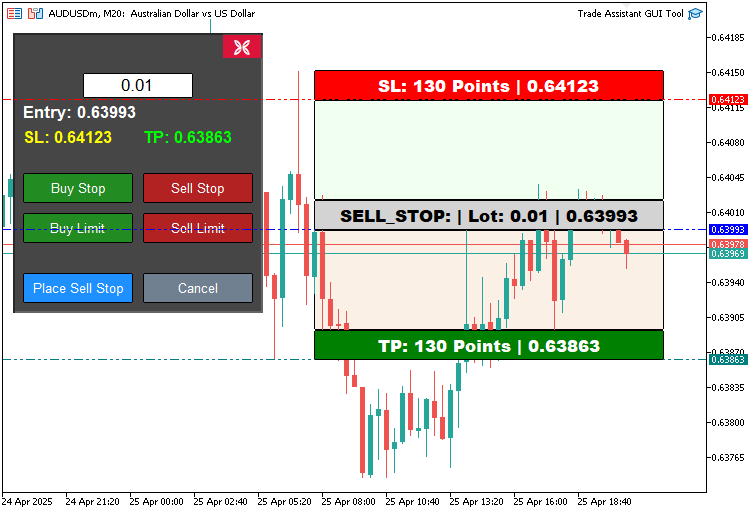
画像からわかるように、各価格チャートツールを動的に作成できることが確認できます。次におこなうべきことは、このツールをインタラクティブにし、チャート上で移動できるようにすることです。ここでのロジックはOnChartEventイベントハンドラ内で適用されます。
//+------------------------------------------------------------------+
//| Chart event handler                                              |
//+------------------------------------------------------------------+
int prevMouseState = 0; //--- Variable to track previous mouse state

int mlbDownX1 = 0, mlbDownY1 = 0, mlbDownXD_R1 = 0, mlbDownYD_R1 = 0; //--- Variables for mouse down coordinates for REC1
int mlbDownX2 = 0, mlbDownY2 = 0, mlbDownXD_R2 = 0, mlbDownYD_R2 = 0; //--- Variables for mouse down coordinates for REC2
int mlbDownX3 = 0, mlbDownY3 = 0, mlbDownXD_R3 = 0, mlbDownYD_R3 = 0; //--- Variables for mouse down coordinates for REC3
int mlbDownX4 = 0, mlbDownY4 = 0, mlbDownXD_R4 = 0, mlbDownYD_R4 = 0; //--- Variables for mouse down coordinates for REC4
int mlbDownX5 = 0, mlbDownY5 = 0, mlbDownXD_R5 = 0, mlbDownYD_R5 = 0; //--- Variables for mouse down coordinates for REC5

bool movingState_R1 = false; //--- Flag for REC1 movement state
bool movingState_R3 = false; //--- Flag for REC3 movement state
bool movingState_R5 = false; //--- Flag for REC5 movement state
まず、OnChartEvent関数で使用する変数を定義し、取引アシスタントツールでドラッグ&ドロップを可能にします。prevMouseStateはマウス状態の変化を追跡し、mlbDownX1、mlbDownY1、mlbDownXD_R1、mlbDownYD_R1(REC2~REC5も同様)は、クリック時のREC1(TP)、REC3(entry)、REC5(SL)のマウス座標と矩形座標を保存します。ブール型フラグmovingState_R1、movingState_R3、movingState_R5は、それぞれの矩形がドラッグ中であるかどうかを示します。これらの制御変数を使用して、価格ツールの移動動作を定義することができます。
if(id == CHARTEVENT_MOUSE_MOVE && tool_visible) { //--- Handle mouse move events when tool is visible
   int MouseD_X = (int)lparam; //--- Get mouse x-coordinate
   int MouseD_Y = (int)dparam; //--- Get mouse y-coordinate
   int MouseState = (int)sparam; //--- Get mouse state

   int XD_R1 = (int)ObjectGetInteger(0, REC1, OBJPROP_XDISTANCE); //--- Get REC1 x-distance
   int YD_R1 = (int)ObjectGetInteger(0, REC1, OBJPROP_YDISTANCE); //--- Get REC1 y-distance
   int XS_R1 = (int)ObjectGetInteger(0, REC1, OBJPROP_XSIZE);     //--- Get REC1 x-size
   int YS_R1 = (int)ObjectGetInteger(0, REC1, OBJPROP_YSIZE);     //--- Get REC1 y-size

   int XD_R2 = (int)ObjectGetInteger(0, REC2, OBJPROP_XDISTANCE); //--- Get REC2 x-distance
   int YD_R2 = (int)ObjectGetInteger(0, REC2, OBJPROP_YDISTANCE); //--- Get REC2 y-distance
   int XS_R2 = (int)ObjectGetInteger(0, REC2, OBJPROP_XSIZE);     //--- Get REC2 x-size
   int YS_R2 = (int)ObjectGetInteger(0, REC2, OBJPROP_YSIZE);     //--- Get REC2 y-size

   int XD_R3 = (int)ObjectGetInteger(0, REC3, OBJPROP_XDISTANCE); //--- Get REC3 x-distance
   int YD_R3 = (int)ObjectGetInteger(0, REC3, OBJPROP_YDISTANCE); //--- Get REC3 y-distance
   int XS_R3 = (int)ObjectGetInteger(0, REC3, OBJPROP_XSIZE);     //--- Get REC3 x-size
   int YS_R3 = (int)ObjectGetInteger(0, REC3, OBJPROP_YSIZE);     //--- Get REC3 y-size

   int XD_R4 = (int)ObjectGetInteger(0, REC4, OBJPROP_XDISTANCE); //--- Get REC4 x-distance
   int YD_R4 = (int)ObjectGetInteger(0, REC4, OBJPROP_YDISTANCE); //--- Get REC4 y-distance
   int XS_R4 = (int)ObjectGetInteger(0, REC4, OBJPROP_XSIZE);     //--- Get REC4 x-size
   int YS_R4 = (int)ObjectGetInteger(0, REC4, OBJPROP_YSIZE);     //--- Get REC4 y-size

   int XD_R5 = (int)ObjectGetInteger(0, REC5, OBJPROP_XDISTANCE); //--- Get REC5 x-distance
   int YD_R5 = (int)ObjectGetInteger(0, REC5, OBJPROP_YDISTANCE); //--- Get REC5 y-distance
   int XS_R5 = (int)ObjectGetInteger(0, REC5, OBJPROP_XSIZE);     //--- Get REC5 x-size
   int YS_R5 = (int)ObjectGetInteger(0, REC5, OBJPROP_YSIZE);     //--- Get REC5 y-size

   if(prevMouseState == 0 && MouseState == 1) { //--- Check for mouse button down
      mlbDownX1 = MouseD_X; //--- Store mouse x-coordinate for REC1
      mlbDownY1 = MouseD_Y; //--- Store mouse y-coordinate for REC1
      mlbDownXD_R1 = XD_R1; //--- Store REC1 x-distance
      mlbDownYD_R1 = YD_R1; //--- Store REC1 y-distance

      mlbDownX2 = MouseD_X; //--- Store mouse x-coordinate for REC2
      mlbDownY2 = MouseD_Y; //--- Store mouse y-coordinate for REC2
      mlbDownXD_R2 = XD_R2; //--- Store REC2 x-distance
      mlbDownYD_R2 = YD_R2; //--- Store REC2 y-distance

      mlbDownX3 = MouseD_X; //--- Store mouse x-coordinate for REC3
      mlbDownY3 = MouseD_Y; //--- Store mouse y-coordinate for REC3
      mlbDownXD_R3 = XD_R3; //--- Store REC3 x-distance
      mlbDownYD_R3 = YD_R3; //--- Store REC3 y-distance

      mlbDownX4 = MouseD_X; //--- Store mouse x-coordinate for REC4
      mlbDownY4 = MouseD_Y; //--- Store mouse y-coordinate for REC4
      mlbDownXD_R4 = XD_R4; //--- Store REC4 x-distance
      mlbDownYD_R4 = YD_R4; //--- Store REC4 y-distance

      mlbDownX5 = MouseD_X; //--- Store mouse x-coordinate for REC5
      mlbDownY5 = MouseD_Y; //--- Store mouse y-coordinate for REC5
      mlbDownXD_R5 = XD_R5; //--- Store REC5 x-distance
      mlbDownYD_R5 = YD_R5; //--- Store REC5 y-distance

      if(MouseD_X >= XD_R1 && MouseD_X <= XD_R1 + XS_R1 && //--- Check if mouse is within REC1 bounds
         MouseD_Y >= YD_R1 && MouseD_Y <= YD_R1 + YS_R1) {
         movingState_R1 = true;                            //--- Enable REC1 movement
      }
      if(MouseD_X >= XD_R3 && MouseD_X <= XD_R3 + XS_R3 && //--- Check if mouse is within REC3 bounds
         MouseD_Y >= YD_R3 && MouseD_Y <= YD_R3 + YS_R3) {
         movingState_R3 = true;                            //--- Enable REC3 movement
      }
      if(MouseD_X >= XD_R5 && MouseD_X <= XD_R5 + XS_R5 && //--- Check if mouse is within REC5 bounds
         MouseD_Y >= YD_R5 && MouseD_Y <= YD_R5 + YS_R5) {
         movingState_R5 = true;                            //--- Enable REC5 movement
      }
   }
   if(movingState_R1) {                                                                        //--- Handle REC1 (TP) movement
      ChartSetInteger(0, CHART_MOUSE_SCROLL, false);                                           //--- Disable chart scrolling
      bool canMove = false;                                                                    //--- Flag to check if movement is valid
      if(selected_order_type == "BUY_STOP" || selected_order_type == "BUY_LIMIT") {            //--- Check for buy orders
         if(YD_R1 + YS_R1 < YD_R3) {                                                           //--- Ensure TP is above entry for buy orders
            canMove = true;                                                                    //--- Allow movement
            ObjectSetInteger(0, REC1, OBJPROP_YDISTANCE, mlbDownYD_R1 + MouseD_Y - mlbDownY1); //--- Update REC1 y-position
            ObjectSetInteger(0, REC2, OBJPROP_YDISTANCE, YD_R1 + YS_R1);                       //--- Update REC2 y-position
            ObjectSetInteger(0, REC2, OBJPROP_YSIZE, YD_R3 - (YD_R1 + YS_R1));                 //--- Update REC2 y-size
         }
      }
      else {                                                                                   //--- Handle sell orders
         if(YD_R1 > YD_R3 + YS_R3) {                                                           //--- Ensure TP is below entry for sell orders
            canMove = true;                                                                    //--- Allow movement
            ObjectSetInteger(0, REC1, OBJPROP_YDISTANCE, mlbDownYD_R1 + MouseD_Y - mlbDownY1); //--- Update REC1 y-position
            ObjectSetInteger(0, REC4, OBJPROP_YDISTANCE, YD_R3 + YS_R3);                       //--- Update REC4 y-position
            ObjectSetInteger(0, REC4, OBJPROP_YSIZE, YD_R1 - (YD_R3 + YS_R3));                 //--- Update REC4 y-size
         }
      }

      if(canMove) {           //--- If movement is valid
         datetime dt_TP = 0;  //--- Variable for TP time
         double price_TP = 0; //--- Variable for TP price
         int window = 0;      //--- Chart window

         ChartXYToTimePrice(0, XD_R1, YD_R1 + YS_R1, window, dt_TP, price_TP); //--- Convert chart coordinates to time and price
         ObjectSetInteger(0, TP_HL, OBJPROP_TIME, dt_TP);                      //--- Update TP horizontal line time
         ObjectSetDouble(0, TP_HL, OBJPROP_PRICE, price_TP);                   //--- Update TP horizontal line price

         update_Text(REC1, "TP: " + DoubleToString(MathAbs((Get_Price_d(TP_HL) - Get_Price_d(PR_HL)) / _Point), 0) + " Points | " + Get_Price_s(TP_HL)); //--- Update REC1 text
         update_Text(TP_LABEL, "TP: " + Get_Price_s(TP_HL));                                                                                             //--- Update TP label text
      }

      ChartRedraw(0); //--- Redraw chart
   }

   if(movingState_R5) {                                                                        //--- Handle REC5 (SL) movement
      ChartSetInteger(0, CHART_MOUSE_SCROLL, false);                                           //--- Disable chart scrolling
      bool canMove = false;                                                                    //--- Flag to check if movement is valid
      if(selected_order_type == "BUY_STOP" || selected_order_type == "BUY_LIMIT") {            //--- Check for buy orders
         if(YD_R5 > YD_R4) {                                                                   //--- Ensure SL is below entry for buy orders
            canMove = true;                                                                    //--- Allow movement
            ObjectSetInteger(0, REC5, OBJPROP_YDISTANCE, mlbDownYD_R5 + MouseD_Y - mlbDownY5); //--- Update REC5 y-position
            ObjectSetInteger(0, REC4, OBJPROP_YDISTANCE, YD_R3 + YS_R3);                       //--- Update REC4 y-position
            ObjectSetInteger(0, REC4, OBJPROP_YSIZE, YD_R5 - (YD_R3 + YS_R3));                 //--- Update REC4 y-size
         }
      }
      else {                                                                                   //--- Handle sell orders
         if(YD_R5 + YS_R5 < YD_R3) {                                                           //--- Ensure SL is above entry for sell orders
            canMove = true;                                                                    //--- Allow movement
            ObjectSetInteger(0, REC5, OBJPROP_YDISTANCE, mlbDownYD_R5 + MouseD_Y - mlbDownY5); //--- Update REC5 y-position
            ObjectSetInteger(0, REC2, OBJPROP_YDISTANCE, YD_R5 + YS_R5);                       //--- Update REC2 y-position
            ObjectSetInteger(0, REC2, OBJPROP_YSIZE, YD_R3 - (YD_R5 + YS_R5));                 //--- Update REC2 y-size
         }
      }

      if(canMove) {           //--- If movement is valid
         datetime dt_SL = 0;  //--- Variable for SL time
         double price_SL = 0; //--- Variable for SL price
         int window = 0;      //--- Chart window

         ChartXYToTimePrice(0, XD_R5, YD_R5 + YS_R5, window, dt_SL, price_SL); //--- Convert chart coordinates to time and price
         ObjectSetInteger(0, SL_HL, OBJPROP_TIME, dt_SL);                      //--- Update SL horizontal line time
         ObjectSetDouble(0, SL_HL, OBJPROP_PRICE, price_SL);                   //--- Update SL horizontal line price

         update_Text(REC5, "SL: " + DoubleToString(MathAbs((Get_Price_d(PR_HL) - Get_Price_d(SL_HL)) / _Point), 0) + " Points | " + Get_Price_s(SL_HL)); //--- Update REC5 text
         update_Text(SL_LABEL, "SL: " + Get_Price_s(SL_HL));                                                                                             //--- Update SL label text
      }

      ChartRedraw(0); //--- Redraw chart
   }

   if(movingState_R3) {                                                                  //--- Handle REC3 (Entry) movement
      ChartSetInteger(0, CHART_MOUSE_SCROLL, false);                                     //--- Disable chart scrolling
      ObjectSetInteger(0, REC3, OBJPROP_XDISTANCE, mlbDownXD_R3 + MouseD_X - mlbDownX3); //--- Update REC3 x-position
      ObjectSetInteger(0, REC3, OBJPROP_YDISTANCE, mlbDownYD_R3 + MouseD_Y - mlbDownY3); //--- Update REC3 y-position

      ObjectSetInteger(0, REC1, OBJPROP_XDISTANCE, mlbDownXD_R1 + MouseD_X - mlbDownX1); //--- Update REC1 x-position
      ObjectSetInteger(0, REC1, OBJPROP_YDISTANCE, mlbDownYD_R1 + MouseD_Y - mlbDownY1); //--- Update REC1 y-position

      ObjectSetInteger(0, REC2, OBJPROP_XDISTANCE, mlbDownXD_R2 + MouseD_X - mlbDownX2); //--- Update REC2 x-position
      ObjectSetInteger(0, REC2, OBJPROP_YDISTANCE, mlbDownYD_R2 + MouseD_Y - mlbDownY2); //--- Update REC2 y-position

      ObjectSetInteger(0, REC4, OBJPROP_XDISTANCE, mlbDownXD_R4 + MouseD_X - mlbDownX4); //--- Update REC4 x-position
      ObjectSetInteger(0, REC4, OBJPROP_YDISTANCE, mlbDownYD_R4 + MouseD_Y - mlbDownY4); //--- Update REC4 y-position

      ObjectSetInteger(0, REC5, OBJPROP_XDISTANCE, mlbDownXD_R5 + MouseD_X - mlbDownX5); //--- Update REC5 x-position
      ObjectSetInteger(0, REC5, OBJPROP_YDISTANCE, mlbDownYD_R5 + MouseD_Y - mlbDownY5); //--- Update REC5 y-position

      datetime dt_PRC = 0, dt_SL1 = 0, dt_TP1 = 0;        //--- Variables for time
      double price_PRC = 0, price_SL1 = 0, price_TP1 = 0; //--- Variables for price
      int window = 0;                                     //--- Chart window

      ChartXYToTimePrice(0, XD_R3, YD_R3 + YS_R3, window, dt_PRC, price_PRC); //--- Convert REC3 coordinates to time and price
      ChartXYToTimePrice(0, XD_R5, YD_R5 + YS_R5, window, dt_SL1, price_SL1); //--- Convert REC5 coordinates to time and price
      ChartXYToTimePrice(0, XD_R1, YD_R1 + YS_R1, window, dt_TP1, price_TP1); //--- Convert REC1 coordinates to time and price

      ObjectSetInteger(0, PR_HL, OBJPROP_TIME, dt_PRC);    //--- Update entry horizontal line time
      ObjectSetDouble(0, PR_HL, OBJPROP_PRICE, price_PRC); //--- Update entry horizontal line price

      ObjectSetInteger(0, TP_HL, OBJPROP_TIME, dt_TP1);    //--- Update TP horizontal line time
      ObjectSetDouble(0, TP_HL, OBJPROP_PRICE, price_TP1); //--- Update TP horizontal line price

      ObjectSetInteger(0, SL_HL, OBJPROP_TIME, dt_SL1);    //--- Update SL horizontal line time
      ObjectSetDouble(0, SL_HL, OBJPROP_PRICE, price_SL1); //--- Update SL horizontal line price

      update_Text(REC1, "TP: " + DoubleToString(MathAbs((Get_Price_d(TP_HL) - Get_Price_d(PR_HL)) / _Point), 0) + " Points | " + Get_Price_s(TP_HL)); //--- Update REC1 text
      update_Text(REC3, selected_order_type + ": | Lot: " + DoubleToString(lot_size, 2) + " | " + Get_Price_s(PR_HL));                                //--- Update REC3 text
      update_Text(REC5, "SL: " + DoubleToString(MathAbs((Get_Price_d(PR_HL) - Get_Price_d(SL_HL)) / _Point), 0) + " Points | " + Get_Price_s(SL_HL)); //--- Update REC5 text
      update_Text(PRICE_LABEL, "Entry: " + Get_Price_s(PR_HL));                                                                                       //--- Update entry label text
      update_Text(SL_LABEL, "SL: " + Get_Price_s(SL_HL));                                                                                             //--- Update SL label text
      update_Text(TP_LABEL, "TP: " + Get_Price_s(TP_HL));                                                                                             //--- Update TP label text

      ChartRedraw(0); //--- Redraw chart
   }

   if(MouseState == 0) {                            //--- Check if mouse button is released
      movingState_R1 = false;                       //--- Disable REC1 movement
      movingState_R3 = false;                       //--- Disable REC3 movement
      movingState_R5 = false;                       //--- Disable REC5 movement
      ChartSetInteger(0, CHART_MOUSE_SCROLL, true); //--- Enable chart scrolling
   }
   prevMouseState = MouseState;                     //--- Update previous mouse state
}
ここではOnChartEvent関数を拡張し、tool_visibleがtrueでidがCHARTEVENT_MOUSE_MOVEの場合にチャートオブジェクトをドラッグするためのマウス移動を処理します。MouseD_X、MouseD_Y、MouseStateをそれぞれlparam、dparam、sparamから取得し、ObjectGetInteger関数を使って位置とサイズを取得します(XD_R1、YD_R1、XS_R1、YS_R1はREC1用、REC2からREC5も同様です)。
マウスクリック時(prevMouseStateが0からMouseStateが1に変化)には、マウス座標をmlbDownX1、mlbDownY1に、矩形位置をmlbDownXD_R1、mlbDownYD_R1に保存します(REC2からREC5も同様)。クリックがREC1、REC3、REC5の範囲内であれば、movingState_R1、movingState_R3、movingState_R5をtrueに設定します。
movingState_R1(TP)の場合、ChartSetIntegerでスクロールを無効化し、TPの位置を検証します(BUY_STOP/BUY_LIMITではエントリーより上、売り注文では下)。ObjectSetIntegerでREC1とREC2/REC4の位置とサイズを更新し、ChartXYToTimePriceで座標を価格に変換、TP_HLをObjectSetDoubleで更新し、update_Text、Get_Price_d、Get_Price_s、DoubleToString、MathAbsでテキストを更新します。
同様にmovingState_R5(SL)の場合は、REC5とREC4/REC2を調整し、SL_HLを更新してテキストを反映します。movingState_R3(entry)の場合は、すべての矩形を移動させ、PR_HL、TP_HL、SL_HLおよびテキストを更新します。
マウスリリース時(MouseStateが0)には、movingStateフラグをリセットし、スクロールを有効化、prevMouseStateを更新し、ChartRedrawで変更を反映します。最後に、プログラムを削除する際にはオブジェクトを完全に削除し、ティックごとにロットサイズを更新して変更を反映させる必要がありますが、これは必須ではないためそのままにしても構いません。
//+------------------------------------------------------------------+
//| Expert deinitialization function                                 |
//+------------------------------------------------------------------+
void OnDeinit(const int reason) {
   deleteObjects(); //--- Delete tool objects
   deletePanel();   //--- Delete control panel objects
}

//+------------------------------------------------------------------+
//| Expert tick function                                             |
//+------------------------------------------------------------------+
void OnTick() {
   // Update lot size from edit field
   string lot_text = ObjectGetString(0, LOT_EDIT, OBJPROP_TEXT); //--- Get lot size text from edit field
   double new_lot = StringToDouble(lot_text);                    //--- Convert lot size text to double
   if(new_lot > 0) lot_size = new_lot;                           //--- Update lot size if valid
}
ここでは、ツールに必要な2つのイベントハンドラ、OnDeinitとOnTickを実装します。OnDeinit関数はEAがチャートから削除されたときに呼び出され、deleteObjects関数でREC1からREC5、TP_HL、SL_HL、PR_HLなどのチャートオブジェクトを削除し、deletePanel関数でPANEL_BG、LOT_EDIT、BUY_STOP_BTNなどのコントロールパネルオブジェクトを削除して、クリーンに終了できるようにします。
OnTick関数は価格ティックごとに実行され、ObjectGetString関数でLOT_EDITフィールドのテキストを取得し、StringToDoubleで数値に変換します。取得した値が正の場合はlot_size変数を更新し、ツールのロットサイズをユーザー入力と同期させます。
コンパイルすると以下の出力が得られます。
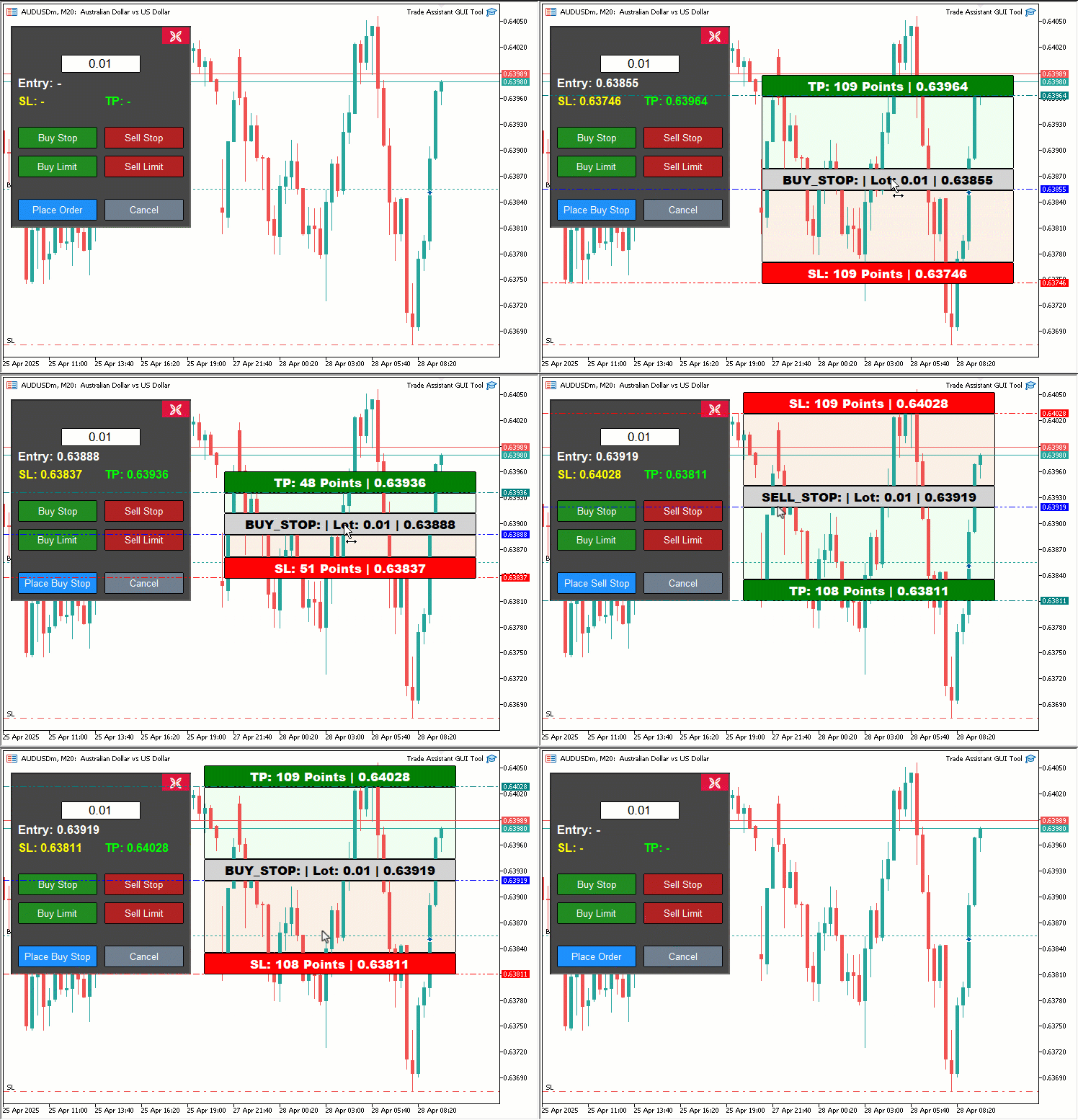
可視化から、いずれかの取引ボタンをクリックすると、対応する取引価格ツールが生成され、ドラッグするとリアルタイムで更新され、価格が取引パネルに反映されることが確認できます。取引ボタンをクリックすると、対応する取引が動的に発注されるため、取引にすぐ利用できる状態になります。これにより、目的を達成したことが検証でき、残る作業はパネルのテストで、これは次のセクションで扱います。
バックテスト
テストを実施しました。以下はコンパイル後の可視化を単一のGraphics Interchange Format (GIF)ビットマップ画像形式で示したものです。
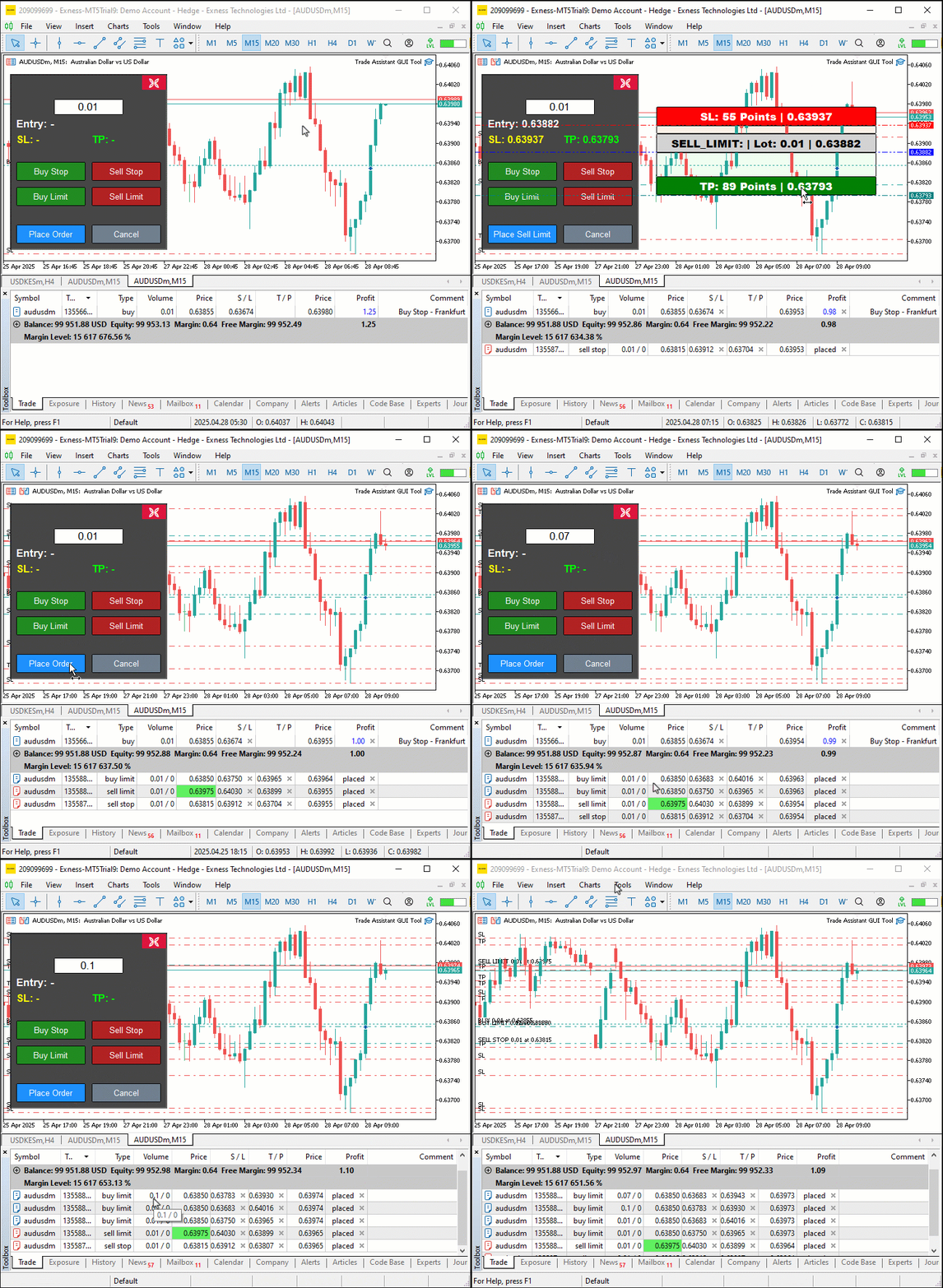
結論
まとめると、私たちはMQL5でインタラクティブな取引アシスタントツールを開発し、視覚的精度と直感的操作を組み合わせ、ペンディングオーダーの発注プロセスを効率化しました。ユーザーフレンドリーなGUIの設計方法、createControlPanelやplaceOrderといった関数を用いた実装、構造化された検証を通じた信頼性の確保を示しました。このツールは取引スタイルに応じてカスタマイズ可能で、発注の効率を高めることができます。次のセクションでは、リスク管理やドラッグ可能なパネルなどの高度な機能を紹介しますので、楽しみにしてください。
MetaQuotes Ltdにより英語から翻訳されました。
元の記事: https://www.mql5.com/en/articles/17931
警告: これらの資料についてのすべての権利はMetaQuotes Ltd.が保有しています。これらの資料の全部または一部の複製や再プリントは禁じられています。
この記事はサイトのユーザーによって執筆されたものであり、著者の個人的な見解を反映しています。MetaQuotes Ltdは、提示された情報の正確性や、記載されているソリューション、戦略、または推奨事項の使用によって生じたいかなる結果についても責任を負いません。

 MQL5取引ツール(第2回):インタラクティブな取引アシスタントの強化:動的視覚フィードバックの導入
 MQL5 Algo Forgeのご紹介
 知っておくべきMQL5ウィザードのテクニック(第65回):FrAMAとForce Indexのパターンを活用する
 知っておくべきMQL5ウィザードのテクニック(第64回):ホワイトノイズカーネルでDeMarkerとEnvelope Channelsのパターンを活用する

- 無料取引アプリ
- 8千を超えるシグナルをコピー
- 金融ニュースで金融マーケットを探索
新しい記事 MQL5 Trading Tools (Part 1): インタラクティブなビジュアル・ペンディング・オーダー・トレーディング・アシスタント・ツールの構築 を公開しました:
アラン・ムネネ・ムティリア 著
Bratt Generatorは、クリエイティブなテキストデザインをシンプルで楽しいものにします。大胆なスタイルとクリーンでユーザーフレンドリーな操作性で、自分の言葉を目立たせたい人に便利なツールです。