

MQL5での取引戦略の自動化(第34回):R²適合度を用いたトレンドラインブレイクアウトシステム
 453
453
 2
2

はじめに
前回の記事(第33回)では、MetaQuotes Language 5 (MQL5)でフィボナッチ比率を用いて弱気と強気のシャークパターンを検出し、カスタマイズ可能なストップロス(SL)、テイクプロフィット(TP)レベルで取引を自動化し、三角形やトレンドラインなどのチャートオブジェクトによってパターンを可視化するファイブドライブパターンシステムを開発しました。第34回では、トレンドラインブレイクアウトシステムを作成します。このシステムはスイングポイントを使ってサポートおよびレジスタンストレンドラインを特定し、R²(決定係数)による適合度と角度制約で検証した上で、ブレイクアウト時に取引を実行し、動的なチャート上で視覚化します。本記事では以下のトピックを扱います。
この記事を読み終える頃には、トレンドブレイクアウト取引のためのロバストなMQL5戦略を手に入れ、自由にカスタマイズできるようになります。それでは、さっそく始めましょう。
トレンドラインブレイクアウト戦略フレームワークを理解する
トレンドラインブレイクアウト戦略は、価格チャート上に斜めの線を引き、スイングハイ(レジスタンス)やスイングロー(サポート)を結ぶことで、市場が反転する可能性のある重要な価格レベルや、トレンドが継続する可能性のあるポイントを特定する手法です。価格がこれらのトレンドラインを突破した場合—レジスタンスラインを上抜ける、またはサポートラインを下抜ける—市場のモメンタムの変化の可能性を示すシグナルとなり、トレーダーはブレイク方向に取引をエントリーします。この際、リスクとリワードのパラメータを明確に設定します。このアプローチは、ブレイク後の強い価格変動を活用し、ストップロスやテイクプロフィットレベルを通じてリスクを管理しながら、重要なトレンドを捉えることを目指します。以下は下降トレンドラインブレイクアウトの例です。
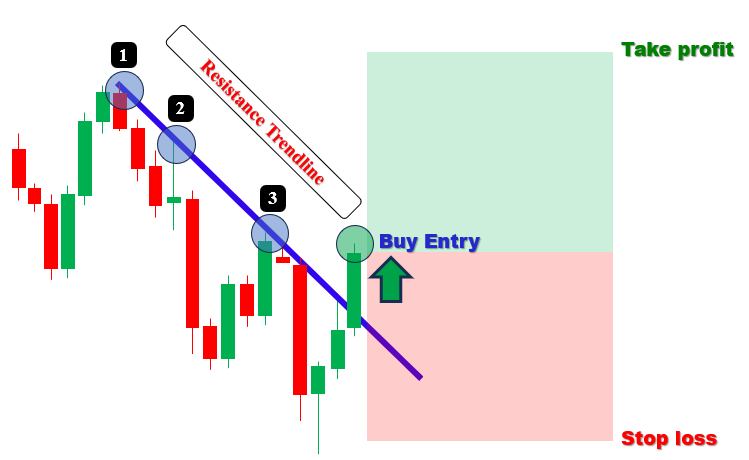
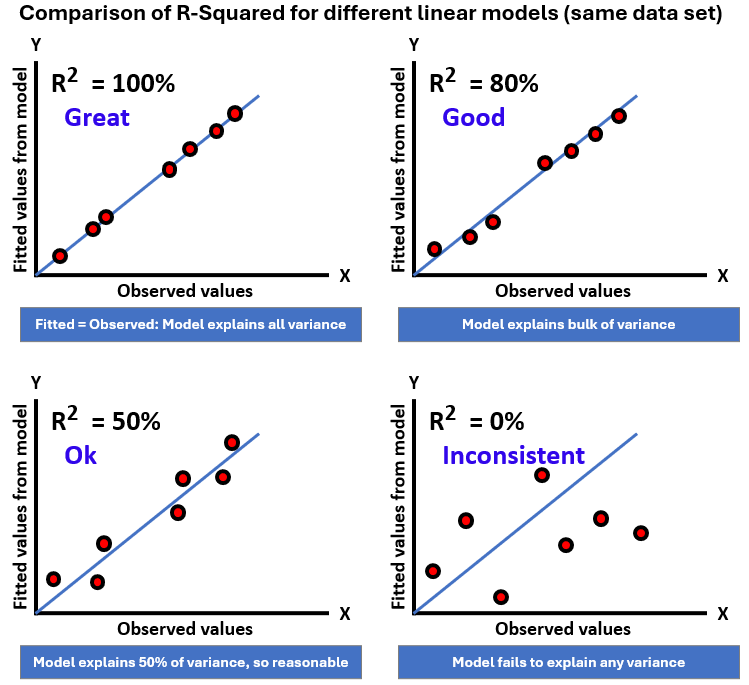
このシステムでは、指定された参照期間内でスイング高値と安値を検出し、最小接触ポイント数を満たすトレンドラインを作成し、R²(決定係数)と角度制約を用いて信頼性を検証します。なお、R²は回帰モデルが従属変数の変動を独立変数でどの程度説明できるかを示す統計指標です。モデルが結果の全体変動のどの割合を説明しているかを表し、値は0から1の範囲になります。以下はこのモデルの簡単な可視化です。
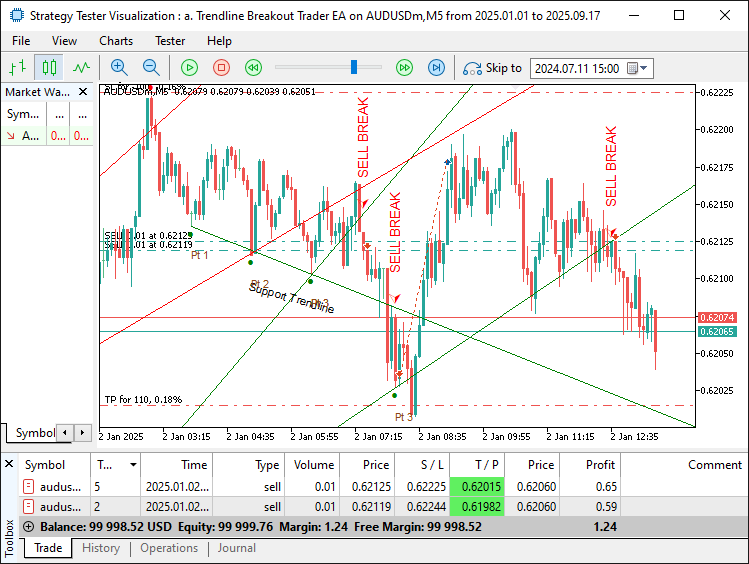
ブレイクアウト時の取引実行ロジックは、ローソク足の終値やローソク足全体がトレンドラインを越えたタイミングで発動させ、トレンドライン、矢印、ラベルなどの視覚的フィードバックを提供します。また、期限切れや破られたトレンドラインを削除してトレンドラインのライフサイクルを管理し、ブレイクアウト取引システムを構築します。目指す結果を確認してから実装に進みます。
MQL5での実装
MQL5でプログラムを作成するには、まずMetaEditorを開き、ナビゲータに移動して、Indicatorsフォルダを見つけ、[新規作成]タブをクリックして、表示される手順に従ってファイルを作成します。ファイルが作成されたら、コーディング環境でプログラムをより柔軟にするための入力パラメータや構造体を宣言していきます。
//+------------------------------------------------------------------+ //| Trendline Breakout Trader EA.mq5 | //| Copyright 2025, Allan Munene Mutiiria. | //| https://t.me/Forex_Algo_Trader | //+------------------------------------------------------------------+ #property copyright "Copyright 2025, Allan Munene Mutiiria." #property link "https://t.me/Forex_Algo_Trader" #property version "1.00" #property strict #include <Trade\Trade.mqh> //--- Include Trade library for trading operations CTrade obj_Trade; //--- Instantiate trade object //+------------------------------------------------------------------+ //| Breakout definition enumeration | //+------------------------------------------------------------------+ enum ENUM_BREAKOUT_TYPE { BREAKOUT_CLOSE = 0, // Breakout on close above/below line BREAKOUT_CANDLE = 1 // Breakout on entire candle above/below line }; //+------------------------------------------------------------------+ //| Swing point structure | //+------------------------------------------------------------------+ struct Swing { //--- Define swing point structure datetime time; //--- Store swing time double price; //--- Store swing price }; //+------------------------------------------------------------------+ //| Starting point structure | //+------------------------------------------------------------------+ struct StartingPoint { //--- Define starting point structure datetime time; //--- Store starting point time double price; //--- Store starting point price bool is_support; //--- Indicate support/resistance flag }; //+------------------------------------------------------------------+ //| Trendline storage structure | //+------------------------------------------------------------------+ struct TrendlineInfo { //--- Define trendline info structure string name; //--- Store trendline name datetime start_time; //--- Store start time datetime end_time; //--- Store end time double start_price; //--- Store start price double end_price; //--- Store end price double slope; //--- Store slope bool is_support; //--- Indicate support/resistance flag int touch_count; //--- Store number of touches datetime creation_time; //--- Store creation time int touch_indices[]; //--- Store touch indices array bool is_signaled; //--- Indicate signal flag }; //+------------------------------------------------------------------+ //| Forward declarations | //+------------------------------------------------------------------+ void DetectSwings(); //--- Declare swing detection function void SortSwings(Swing &swings[], int count); //--- Declare swing sorting function double CalculateAngle(datetime time1, double price1, datetime time2, double price2); //--- Declare angle calculation function bool ValidateTrendline(bool isSupport, datetime start_time, datetime ref_time, double ref_price, double slope, double tolerance_pen); //--- Declare trendline validation function void FindAndDrawTrendlines(bool isSupport); //--- Declare trendline finding/drawing function void UpdateTrendlines(); //--- Declare trendline update function void RemoveTrendlineFromStorage(int index); //--- Declare trendline removal function bool IsStartingPointUsed(datetime time, double price, bool is_support); //--- Declare starting point usage check function double CalculateRSquared(const datetime ×[], const double &prices[], int n, double slope, double intercept); //--- Declare R-squared calculation function //+------------------------------------------------------------------+ //| Inputs | //+------------------------------------------------------------------+ input ENUM_BREAKOUT_TYPE BreakoutType = BREAKOUT_CLOSE; // Breakout Definition input int LookbackBars = 200; // Set bars for swing detection lookback input double TouchTolerance = 10.0; // Set tolerance for touch points (points) input int MinTouches = 3; // Set minimum touch points for valid trendline input double PenetrationTolerance = 5.0; // Set allowance for bar penetration (points) input int ExtensionBars = 100; // Set bars to extend trendline right input int MinBarSpacing = 10; // Set minimum bar spacing between touches input double inpLot = 0.01; // Set lot size input double inpSLPoints = 100.0; // Set stop loss (points) input double inpRRRatio = 1.1; // Set risk:reward ratio input double MinAngle = 1.0; // Set minimum inclination angle (degrees) input double MaxAngle = 89.0; // Set maximum inclination angle (degrees) input double MinRSquared = 0.8; // Minimum R-squared for trendline acceptance input bool DeleteExpiredObjects = false; // Enable deletion of expired/broken objects input bool EnableTradingSignals = true; // Enable buy/sell signals and trades input bool DrawTouchArrows = true; // Enable drawing arrows at touch points input bool DrawLabels = true; // Enable drawing trendline/point labels input color SupportLineColor = clrGreen; // Set color for support trendlines input color ResistanceLineColor = clrRed; // Set color for resistance trendlines //+------------------------------------------------------------------+ //| Global variables | //+------------------------------------------------------------------+ Swing swingLows[]; //--- Store swing lows int numLows = 0; //--- Track number of swing lows Swing swingHighs[]; //--- Store swing highs int numHighs = 0; //--- Track number of swing highs TrendlineInfo trendlines[]; //--- Store trendlines int numTrendlines = 0; //--- Track number of trendlines StartingPoint startingPoints[]; //--- Store used starting points int numStartingPoints = 0; //--- Track number of starting points
トレンドラインブレイクアウトシステムの実装を、ブレイクアウトの検出と取引のための基礎的なコンポーネントの設定から始めます。まず、Trade.mqhライブラリをインクルードし、取引操作用に「obj_Trade」という名前のCTradeオブジェクトを生成します。次に、「ENUM_BREAKOUT_TYPE」という列挙型を定義し、オプションとして「BREAKOUT_CLOSE(ローソク足終値でのブレイクアウト)」と「BREAKOUT_CANDLE(ローソク足全体でのブレイクアウト)」を設定します。これにより、柔軟なブレイクアウト検出が可能になります。その後、スイングポイントの時間と価格を格納するSwing構造体、使用済みトレンドラインの開始点をサポート/レジスタンスのフラグ付きで追跡するStartingPoint構造体、そしてトレンドラインの名前、開始と終了時刻、価格、傾き、接触回数、作成時間、接触インデックス、シグナルステータスなどを格納するTrendlineInfo構造体を作成します。
コアロジック用にDetectSwings、SortSwings、CalculateAngleといった関数を先行宣言します。その後、入力パラメータを設定します。たとえば、BreakoutTypeはBREAKOUT_CLOSE、LookbackBarsは200に設定し、その他のパラメータも説明は自明です。最後に、スイングポイントやトレンドラインを管理するために、グローバル配列swingLows、swingHighs、trendlines、startingPointsを初期化し、それぞれのカウンタnumLows、numHighs、numTrendlines、numStartingPointsを設定します。これにより、ブレイクアウト取引に必要なトレンドラインの検出と検証の基盤が整います。すべて準備が整ったので、初期化時にストレージ配列を初期化することができます。
//+------------------------------------------------------------------+
//| Expert initialization function                                   |
//+------------------------------------------------------------------+
int OnInit() {
   ArrayResize(trendlines, 0);     //--- Resize trendlines array
   numTrendlines = 0;              //--- Reset trendlines count
   ArrayResize(startingPoints, 0); //--- Resize starting points array
   numStartingPoints = 0;          //--- Reset starting points count
   return(INIT_SUCCEEDED);         //--- Return success
}
//+------------------------------------------------------------------+
//| Expert deinitialization function                                 |
//+------------------------------------------------------------------+
void OnDeinit(const int reason) {
   ArrayResize(trendlines, 0);     //--- Resize trendlines array
   numTrendlines = 0;              //--- Reset trendlines count
   ArrayResize(startingPoints, 0); //--- Resize starting points array
   numStartingPoints = 0;          //--- Reset starting points count
}
リソースの適切なセットアップとクリーンアップを確実にするために、OnInit関数を実装します。まず、ArrayResizeを呼び出してtrendlines配列をゼロに設定し、numTrendlinesを0にリセットします。次に、startingPoints配列もゼロにリサイズし、numStartingPointsを0にリセットします。最後にINIT_SUCCEEDEDを返して、初期化が正常に完了したことを確認します。その後、OnDeinit関数では同じクリーンアップ処理をおこない、プログラム終了時にメモリリークが発生しないようにします。初期化が完了したので、次に戦略ロジックの定義に進むことができます。 ロジックをモジュール化するために関数を使用し、最初に定義するロジックはスイングポイントの検出です。これにより、基礎となるトレンドラインのポイントを取得できるようになります。
//+------------------------------------------------------------------+
//| Check for new bar                                                |
//+------------------------------------------------------------------+
bool IsNewBar() {
   static datetime lastTime = 0;                      //--- Store last bar time
   datetime currentTime = iTime(_Symbol, _Period, 0); //--- Get current bar time
   if (lastTime != currentTime) {                     //--- Check for new bar
      lastTime = currentTime;                         //--- Update last time
      return true;                                    //--- Indicate new bar
   }
   return false;                                      //--- Indicate no new bar
}
//+------------------------------------------------------------------+
//| Sort swings by time (ascending, oldest first)                    |
//+------------------------------------------------------------------+
void SortSwings(Swing &swings[], int count) {
   for (int i = 0; i < count - 1; i++) {            //--- Iterate through swings
      for (int j = 0; j < count - i - 1; j++) {     //--- Compare adjacent swings
         if (swings[j].time > swings[j + 1].time) { //--- Check time order
            Swing temp = swings[j];                 //--- Store temporary swing
            swings[j] = swings[j + 1];              //--- Swap swings
            swings[j + 1] = temp;                   //--- Complete swap
         }
      }
   }
}
//+------------------------------------------------------------------+
//| Detect swing highs and lows                                      |
//+------------------------------------------------------------------+
void DetectSwings() {
   numLows = 0;                                              //--- Reset lows count
   ArrayResize(swingLows, 0);                                //--- Resize lows array
   numHighs = 0;                                             //--- Reset highs count
   ArrayResize(swingHighs, 0);                               //--- Resize highs array
   int totalBars = iBars(_Symbol, _Period);                  //--- Get total bars
   int effectiveLookback = MathMin(LookbackBars, totalBars); //--- Calculate effective lookback
   if (effectiveLookback < 5) {                              //--- Check sufficient bars
      Print("Not enough bars for swing detection.");         //--- Log insufficient bars
      return;                                                //--- Exit function
   }
   for (int i = 2; i < effectiveLookback - 2; i++) {         //--- Iterate through bars
      double low_i = iLow(_Symbol, _Period, i);              //--- Get current low
      double low_im1 = iLow(_Symbol, _Period, i - 1);        //--- Get previous low
      double low_im2 = iLow(_Symbol, _Period, i - 2);        //--- Get two bars prior low
      double low_ip1 = iLow(_Symbol, _Period, i + 1);        //--- Get next low
      double low_ip2 = iLow(_Symbol, _Period, i + 2);        //--- Get two bars next low
      if (low_i < low_im1 && low_i < low_im2 && low_i < low_ip1 && low_i < low_ip2) { //--- Check for swing low
         Swing s;                                            //--- Create swing struct
         s.time = iTime(_Symbol, _Period, i);                //--- Set swing time
         s.price = low_i;                                    //--- Set swing price
         ArrayResize(swingLows, numLows + 1);                //--- Resize lows array
         swingLows[numLows] = s;                             //--- Add swing low
         numLows++;                                          //--- Increment lows count
      }
      double high_i = iHigh(_Symbol, _Period, i);       //--- Get current high
      double high_im1 = iHigh(_Symbol, _Period, i - 1); //--- Get previous high
      double high_im2 = iHigh(_Symbol, _Period, i - 2); //--- Get two bars prior high
      double high_ip1 = iHigh(_Symbol, _Period, i + 1); //--- Get next high
      double high_ip2 = iHigh(_Symbol, _Period, i + 2); //--- Get two bars next high
      if (high_i > high_im1 && high_i > high_im2 && high_i > high_ip1 && high_i > high_ip2) { //--- Check for swing high
         Swing s;                                       //--- Create swing struct
         s.time = iTime(_Symbol, _Period, i);           //--- Set swing time
         s.price = high_i;                              //--- Set swing price
         ArrayResize(swingHighs, numHighs + 1);         //--- Resize highs array
         swingHighs[numHighs] = s;                      //--- Add swing high
         numHighs++;                                    //--- Increment highs count
      }
   }
   if (numLows > 0) SortSwings(swingLows, numLows);     //--- Sort swing lows
   if (numHighs > 0) SortSwings(swingHighs, numHighs);  //--- Sort swing highs
}
基礎的なセットアップが完了したので、次にスイングポイントの検出とバー更新の管理に関するコアロジックを実装します。まず、IsNewBar関数を作成します。この関数ではstatic変数lastTimeを使用して前回のバーの時間を保持し、iTimeで取得した現在のバーの時間と比較します。時間が異なる場合はlastTimeを更新し、新しいバーであることを示すためにtrueを返し、そうでなければfalseを返します次に、SortSwings関数を実装します。この関数はSwing配列を時間の昇順で並べ替えます。バブルソートアルゴリズムを使用し、配列を二重ループで走査して隣接する要素のtimeフィールドを比較し、順序が逆であれば一時的なSwing構造体を使って交換します。
続いてDetectSwings関数を作成します。まずnumLowsとnumHighsを0にリセットし、swingLowsとswingHighs配列をゼロにリサイズします。次にLookbackBarsとiBarsで取得できる総バー数のMathMinを使って有効な参照期間を計算し、バーが5本未満の場合はPrintでエラーを出して終了します。その後、バーのインデックス2からeffectiveLookback-2までループし、スイングローは現在のバーの安値iLowを前後2本ずつのバーと比較して判定し、スイングハイは同様にiHighを用いて判定します。スイングが検出された場合はSwing構造体を作成し、timeにiTime、priceに安値または高値を設定します。次にArrayResizeでswingLowsまたはswingHighsに追加し、それぞれのカウンターを増加させます。最後に、swingLowsまたはswingHighsに要素がある場合はSortSwingsを呼び出し、トレンドライン作成のために時系列順に整列させます。 次に、トレンドラインの傾きに基づく制限計算と、その妥当性を確認する関数を定義していきます。
//+------------------------------------------------------------------+
//| Calculate visual inclination angle                               |
//+------------------------------------------------------------------+
double CalculateAngle(datetime time1, double price1, datetime time2, double price2) {
   int x1, y1, x2, y2; //--- Declare coordinate variables
   if (!ChartTimePriceToXY(0, 0, time1, price1, x1, y1)) return 0.0; //--- Convert time1/price1 to XY
   if (!ChartTimePriceToXY(0, 0, time2, price2, x2, y2)) return 0.0; //--- Convert time2/price2 to XY
   double dx = (double)(x2 - x1);                                    //--- Calculate x difference
   double dy = (double)(y2 - y1);                                    //--- Calculate y difference
   if (dx == 0.0) return (dy > 0.0 ? -90.0 : 90.0);                  //--- Handle vertical line case
   double angle = MathArctan(-dy / dx) * 180.0 / M_PI;               //--- Calculate angle in degrees
   return angle;                                                     //--- Return angle
}
//+------------------------------------------------------------------+
//| Validate trendline                                               |
//+------------------------------------------------------------------+
bool ValidateTrendline(bool isSupport, datetime start_time, datetime ref_time, double ref_price, double slope, double tolerance_pen) {
   int bar_start = iBarShift(_Symbol, _Period, start_time); //--- Get start bar index
   if (bar_start < 0) return false;                         //--- Check invalid bar index
   for (int bar = bar_start; bar >= 0; bar--) {             //--- Iterate through bars
      datetime bar_time = iTime(_Symbol, _Period, bar);     //--- Get bar time
      double dk = (double)(bar_time - ref_time);            //--- Calculate time difference
      double line_price = ref_price + slope * dk;           //--- Calculate line price
      if (isSupport) {                                      //--- Check support case
         double low = iLow(_Symbol, _Period, bar);          //--- Get bar low
         if (low < line_price - tolerance_pen) return false;//--- Check if broken
      } else {                                              //--- Handle resistance case
         double high = iHigh(_Symbol, _Period, bar);        //--- Get bar high
         if (high > line_price + tolerance_pen) return false;//--- Check if broken
      }
   }
   return true; //--- Return valid
}
ここでは、トレンドラインの角度を計算し、その整合性を検証する関数を実装します。まずCalculateAngle関数を作成します。この関数では、2つの時間と価格のポイントtime1とprice1、およびtime2とprice2を、ChartTimePriceToXYを使用してチャート座標x1とy1、x2とy2に変換します。いずれかの変換に失敗した場合は0.0を返します。その後、dxとdyの差分を計算し、dxが0の場合は垂直ラインとして扱い、dyの符号に応じて-90.0または90.0を返します。dxが0でない場合は、-dy÷dxのMathArctanに180÷M_PIを掛けて度数に変換し、視覚的な傾きを表す角度を計算します。
次にValidateTrendline関数を実装します。この関数では、iBarShiftを使用してstart_timeに対応するバーインデックスを取得し、無効な場合はfalseを返します。その後、このインデックスから現在までループし、各バーの時間iTimeに対して、「ref_price+slope×(bar_time-ref_time)」の式を用いてトレンドライン上の価格を計算します。サポートトレンドラインの場合はisSupportがtrueとなり、バーの安値(iLow)が「line_price-tolerance_pen」を下回った場合にブレイクと判断してfalseを返します。レジスタンストレンドラインの場合は、バーの高値iHighが「line_price+tolerance_pen」を上回った場合にfalseを返します。いずれにも該当しない場合はtrueを返し、角度制約を満たし、かつ未破壊のトレンドラインのみを有効とすることで、信頼性の高いブレイクアウト検出を可能にします。これで、R²による適合度モデルの関数を定義する準備が整いました。
//+------------------------------------------------------------------+ //| Calculate R-squared for goodness of fit | //+------------------------------------------------------------------+ double CalculateRSquared(const datetime ×[], const double &prices[], int n, double slope, double intercept) { double sum_y = 0.0; //--- Initialize sum of y for (int k = 0; k < n; k++) { //--- Iterate through points sum_y += prices[k]; //--- Accumulate y } double mean_y = sum_y / n; //--- Calculate mean y double ss_tot = 0.0, ss_res = 0.0; //--- Initialize sums of squares for (int k = 0; k < n; k++) { //--- Iterate through points double x = (double)times[k]; //--- Get x (time) double y_pred = intercept + slope * x; //--- Calculate predicted y double y = prices[k]; //--- Get actual y ss_res += (y - y_pred) * (y - y_pred); //--- Accumulate residual sum ss_tot += (y - mean_y) * (y - mean_y); //--- Accumulate total sum } if (ss_tot == 0.0) return 1.0; //--- Handle constant y case return 1.0 - ss_res / ss_tot; //--- Calculate and return R-squared }
ここではCalculateRSquared関数を作成します。この関数は、時間配列と価格配列、ポイント数n、そしてトレンドラインのslopeとinterceptを入力として受け取ります。まずsum_yを0に初期化し、prices配列をループして合計値を計算します。その後、sum_yをnで割ることで平均値mean_yを算出します。次に、全変動平方和と残差平方和を表すss_totとss_resを初期化します。再度ループ処理をおこない、「intercept + slope * time」の式を用いて予測価格y_predを計算します。実際の価格yとの差である残差「y - y_pred」の二乗をss_resに加算し、平均値からの偏差「y - mean_y」の二乗をss_totに加算します。ss_totが0の場合、価格が一定であることを意味するため1.0を返します。それ以外の場合は、「1.0 - ss_res / ss_tot」の式を用いてR²値を計算して返します。このR²の式を用いて、トレンドラインの有効性を評価します。次に、トレンドラインを管理する関数を定義していきます。
//+------------------------------------------------------------------+
//| Check if starting point is already used                          |
//+------------------------------------------------------------------+
bool IsStartingPointUsed(datetime time, double price, bool is_support) {
   for (int i = 0; i < numStartingPoints; i++) { //--- Iterate through starting points
      if (startingPoints[i].time == time && MathAbs(startingPoints[i].price - price) < TouchTolerance * _Point && startingPoints[i].is_support == is_support) { //--- Check match
         return true; //--- Return used
      }
   }
   return false; //--- Return not used
}
//+------------------------------------------------------------------+
//| Remove trendline from storage and optionally chart objects       |
//+------------------------------------------------------------------+
void RemoveTrendlineFromStorage(int index) {
   if (index < 0 || index >= numTrendlines) return;             //--- Check valid index
   Print("Removing trendline from storage: ", trendlines[index].name); //--- Log removal
   if (DeleteExpiredObjects) {                                  //--- Check deletion flag
      ObjectDelete(0, trendlines[index].name);                  //--- Delete trendline object
      for (int m = 0; m < trendlines[index].touch_count; m++) { //--- Iterate touches
         string arrow_name = trendlines[index].name + "_touch" + IntegerToString(m); //--- Generate arrow name
         ObjectDelete(0, arrow_name);                           //--- Delete touch arrow
         string text_name = trendlines[index].name + "_point_label" + IntegerToString(m); //--- Generate text name
         ObjectDelete(0, text_name);                            //--- Delete point label
      }
      string label_name = trendlines[index].name + "_label";    //--- Generate label name
      ObjectDelete(0, label_name);                              //--- Delete trendline label
      string signal_arrow = trendlines[index].name + "_signal_arrow"; //--- Generate signal arrow name
      ObjectDelete(0, signal_arrow);                            //--- Delete signal arrow
      string signal_text = trendlines[index].name + "_signal_text"; //--- Generate signal text name
      ObjectDelete(0, signal_text);                             //--- Delete signal text
   }
   for (int i = index; i < numTrendlines - 1; i++) {            //--- Shift array
      trendlines[i] = trendlines[i + 1];                        //--- Copy next trendline
   }
   ArrayResize(trendlines, numTrendlines - 1);                  //--- Resize trendlines array
   numTrendlines--;                                             //--- Decrement trendlines count
}
ここでは、トレンドラインの開始ポイントを管理し、そのクリーンアップをおこなう関数を実装します。まずIsStartingPointUsed関数を作成します。この関数はstartingPoints配列をループし、指定されたtime、price、is_supportが既存の開始ポイントと一致するかを確認します。この判定はMathAbsを用いて「TouchTolerance * _Point」以内かどうかでおこない、一致するポイントが見つかった場合はtrueを返し、見つからない場合はfalseを返します。これにより、1つのポイントから複数のトレンドラインが作成されないようにします。
次にRemoveTrendlineFromStorage関数を作成します。この関数では、入力されたindexがnumTrendlinesの範囲内かを検証します。その後、Printを使用して削除されるトレンドラインのnameをログに出力します。DeleteExpiredObjectsがtrueの場合は、ObjectDeleteを使ってチャートオブジェクトを削除します。削除対象はトレンドラインname、タッチ矢印name_touchindex、ポイントラベルname_point_labelindex、トレンドラインラベルname_label、シグナル矢印name_signal_arrow、シグナルテキストname_signal_textです。その後、index以降のtrendlines配列要素をループで左にシフトし、ArrayResizeを使用して配列サイズを1つ減らします。最後にnumTrendlinesをデクリメントします。これにより、トレンドライン開始ポイントの一意性を保ちつつ、無効になったトレンドラインとそれに対応するチャート表示を適切にクリーンアップできます。 次に、これまで定義したヘルパー関数を使って、トレンドラインを検索し描画する関数を定義していきます。
//+------------------------------------------------------------------+
//| Find and draw trendlines if no active one exists                 |
//+------------------------------------------------------------------+
void FindAndDrawTrendlines(bool isSupport) {
   bool has_active = false;                        //--- Initialize active flag
   for (int i = 0; i < numTrendlines; i++) {       //--- Iterate through trendlines
      if (trendlines[i].is_support == isSupport) { //--- Check type match
         has_active = true;                        //--- Set active flag
         break;                                    //--- Exit loop
      }
   }
   if (has_active) return;                          //--- Exit if active trendline exists
   Swing swings[];                                  //--- Initialize swings array
   int numSwings;                                   //--- Initialize swings count
   color lineColor;                                 //--- Initialize line color
   string prefix;                                   //--- Initialize prefix
   if (isSupport) {                                 //--- Handle support case
      numSwings = numLows;                          //--- Set number of lows
      ArrayResize(swings, numSwings);               //--- Resize swings array
      for (int i = 0; i < numSwings; i++) {         //--- Iterate through lows
         swings[i].time = swingLows[i].time;        //--- Copy low time
         swings[i].price = swingLows[i].price;      //--- Copy low price
      }
      lineColor = SupportLineColor;                 //--- Set support line color
      prefix = "Trendline_Support_";                //--- Set support prefix
   } else {                                         //--- Handle resistance case
      numSwings = numHighs;                         //--- Set number of highs
      ArrayResize(swings, numSwings);               //--- Resize swings array
      for (int i = 0; i < numSwings; i++) {         //--- Iterate through highs
         swings[i].time = swingHighs[i].time;       //--- Copy high time
         swings[i].price = swingHighs[i].price;     //--- Copy high price
      }
      lineColor = ResistanceLineColor;              //--- Set resistance line color
      prefix = "Trendline_Resistance_";             //--- Set resistance prefix
   }
   if (numSwings < 2) return;                       //--- Exit if insufficient swings
   double pointValue = _Point;                      //--- Get point value
   double touch_tolerance = TouchTolerance * pointValue; //--- Calculate touch tolerance
   double pen_tolerance = PenetrationTolerance * pointValue; //--- Calculate penetration tolerance
   int best_j = -1;                                 //--- Initialize best j index
   int max_touches = 0;                             //--- Initialize max touches
   double best_rsquared = -1.0;                     //--- Initialize best R-squared
   int best_touch_indices[];                        //--- Initialize best touch indices
   double best_slope = 0.0;                         //--- Initialize best slope
   double best_intercept = 0.0;                     //--- Initialize best intercept
   datetime best_min_time = 0;                      //--- Initialize best min time
   for (int i = 0; i < numSwings - 1; i++) {        //--- Iterate through first points
      for (int j = i + 1; j < numSwings; j++) {     //--- Iterate through second points
         datetime time1 = swings[i].time;           //--- Get first time
         double price1 = swings[i].price;           //--- Get first price
         datetime time2 = swings[j].time;           //--- Get second time
         double price2 = swings[j].price;           //--- Get second price
         double dt = (double)(time2 - time1);       //--- Calculate time difference
         if (dt <= 0) continue;                     //--- Skip invalid time difference
         double initial_slope = (price2 - price1) / dt; //--- Calculate initial slope
         int touch_indices[];                       //--- Initialize touch indices
         ArrayResize(touch_indices, 0);             //--- Resize touch indices
         int touches = 0;                           //--- Initialize touches count
         ArrayResize(touch_indices, touches + 1);   //--- Add first index
         touch_indices[touches] = i;                //--- Set first index
         touches++;                                 //--- Increment touches
         ArrayResize(touch_indices, touches + 1);   //--- Add second index
         touch_indices[touches] = j;                //--- Set second index
         touches++;                                 //--- Increment touches
         for (int k = 0; k < numSwings; k++) {      //--- Iterate through swings
            if (k == i || k == j) continue;         //--- Skip used indices
            datetime tk = swings[k].time;           //--- Get swing time
            double dk = (double)(tk - time1);       //--- Calculate time difference
            double expected = price1 + initial_slope * dk; //--- Calculate expected price
            double actual = swings[k].price;        //--- Get actual price
            if (MathAbs(expected - actual) <= touch_tolerance) { //--- Check touch within tolerance
               ArrayResize(touch_indices, touches + 1); //--- Add index
               touch_indices[touches] = k;          //--- Set index
               touches++;                           //--- Increment touches
            }
         }
         if (touches >= MinTouches) {               //--- Check minimum touches
            ArraySort(touch_indices);               //--- Sort touch indices
            bool valid_spacing = true;              //--- Initialize spacing flag
            for (int m = 0; m < touches - 1; m++) { //--- Iterate through touches
               int idx1 = touch_indices[m];         //--- Get first index
               int idx2 = touch_indices[m + 1];     //--- Get second index
               int bar1 = iBarShift(_Symbol, _Period, swings[idx1].time); //--- Get first bar
               int bar2 = iBarShift(_Symbol, _Period, swings[idx2].time); //--- Get second bar
               int diff = MathAbs(bar1 - bar2);     //--- Calculate bar difference
               if (diff < MinBarSpacing) {          //--- Check minimum spacing
                  valid_spacing = false;            //--- Mark invalid spacing
                  break;                            //--- Exit loop
               }
            }
            if (valid_spacing) {                        //--- Check valid spacing
               datetime touch_times[];                  //--- Initialize touch times
               double touch_prices[];                   //--- Initialize touch prices
               ArrayResize(touch_times, touches);       //--- Resize times array
               ArrayResize(touch_prices, touches);      //--- Resize prices array
               for (int m = 0; m < touches; m++) {      //--- Iterate through touches
                  int idx = touch_indices[m];           //--- Get index
                  touch_times[m] = swings[idx].time;    //--- Set time
                  touch_prices[m] = swings[idx].price;  //--- Set price
               }
               double slope = initial_slope;            //--- Use initial slope from two points
               double intercept = price1 - slope * (double)time1; //--- Calculate intercept
               double rsquared = CalculateRSquared(touch_times, touch_prices, touches, slope, intercept); //--- Calculate R-squared
               if (rsquared >= MinRSquared) {           //--- Check minimum R-squared
                  int adjusted_touch_indices[];         //--- Initialize adjusted indices
                  ArrayResize(adjusted_touch_indices, touches); //--- Resize to current touches
                  ArrayCopy(adjusted_touch_indices, touch_indices); //--- Copy indices
                  int adjusted_touches = touches;       //--- Set adjusted touches
                  if (adjusted_touches >= MinTouches) { //--- Check minimum adjusted touches
                     datetime temp_min_time = swings[adjusted_touch_indices[0]].time; //--- Get min time
                     double temp_ref_price = intercept + slope * (double)temp_min_time; //--- Calculate ref price
                     if (ValidateTrendline(isSupport, temp_min_time, temp_min_time, temp_ref_price, slope, pen_tolerance)) { //--- Validate trendline
                        datetime temp_max_time = swings[adjusted_touch_indices[adjusted_touches - 1]].time; //--- Get max time
                        double temp_max_price = intercept + slope * (double)temp_max_time; //--- Calculate max price
                        double angle = CalculateAngle(temp_min_time, temp_ref_price, temp_max_time, temp_max_price); //--- Calculate angle
                        double abs_angle = MathAbs(angle); //--- Get absolute angle
                        if (abs_angle >= MinAngle && abs_angle <= MaxAngle) { //--- Check angle range
                           if (adjusted_touches > max_touches || (adjusted_touches == max_touches && rsquared > best_rsquared)) { //--- Check better trendline
                              max_touches = adjusted_touches; //--- Update max touches
                              best_rsquared = rsquared;       //--- Update best R-squared
                              best_j = j;                     //--- Update best j
                              best_slope = slope;             //--- Update best slope
                              best_intercept = intercept;     //--- Update best intercept
                              best_min_time = temp_min_time;  //--- Update best min time
                              ArrayResize(best_touch_indices, adjusted_touches); //--- Resize best indices
                              ArrayCopy(best_touch_indices, adjusted_touch_indices); //--- Copy indices
                           }
                        }
                     }
                  }
               }
            }
         }
      }
   }
   if (max_touches < MinTouches) {                        //--- Check insufficient touches
      string type = isSupport ? "Support" : "Resistance"; //--- Set type string
      return;                                             //--- Exit function
   }
   int touch_indices[];                                   //--- Initialize touch indices
   ArrayResize(touch_indices, max_touches);               //--- Resize touch indices
   ArrayCopy(touch_indices, best_touch_indices);          //--- Copy best indices
   int touches = max_touches;                             //--- Set touches count
   datetime min_time = best_min_time;                     //--- Set min time
   double price_min = best_intercept + best_slope * (double)min_time; //--- Calculate min price
   datetime max_time = swings[touch_indices[touches - 1]].time; //--- Set max time
   double price_max = best_intercept + best_slope * (double)max_time; //--- Calculate max price
   datetime start_time_check = min_time;                  //--- Set start time check
   double start_price_check = price_min;                  //--- Set start price check (approximate if not exact)
   if (IsStartingPointUsed(start_time_check, start_price_check, isSupport)) { //--- Check used starting point
      return; //--- Skip if used
   }
   datetime time_end = iTime(_Symbol, _Period, 0) + PeriodSeconds(_Period) * ExtensionBars; //--- Calculate end time
   double dk_end = (double)(time_end - min_time);         //--- Calculate end time difference
   double price_end = price_min + best_slope * dk_end;    //--- Calculate end price
   string unique_name = prefix + TimeToString(TimeCurrent(), TIME_DATE|TIME_MINUTES|TIME_SECONDS); //--- Generate unique name
   if (ObjectFind(0, unique_name) < 0) {                  //--- Check if trendline exists
      ObjectCreate(0, unique_name, OBJ_TREND, 0, min_time, price_min, time_end, price_end); //--- Create trendline
      ObjectSetInteger(0, unique_name, OBJPROP_COLOR, lineColor); //--- Set color
      ObjectSetInteger(0, unique_name, OBJPROP_STYLE, STYLE_SOLID); //--- Set style
      ObjectSetInteger(0, unique_name, OBJPROP_WIDTH, 1);  //--- Set width
      ObjectSetInteger(0, unique_name, OBJPROP_RAY_RIGHT, false); //--- Disable right ray
      ObjectSetInteger(0, unique_name, OBJPROP_RAY_LEFT, false); //--- Disable left ray
      ObjectSetInteger(0, unique_name, OBJPROP_BACK, false); //--- Set to foreground
   }
   ArrayResize(trendlines, numTrendlines + 1);               //--- Resize trendlines array
   trendlines[numTrendlines].name = unique_name;             //--- Set trendline name
   trendlines[numTrendlines].start_time = min_time;          //--- Set start time
   trendlines[numTrendlines].end_time = time_end;            //--- Set end time
   trendlines[numTrendlines].start_price = price_min;        //--- Set start price
   trendlines[numTrendlines].end_price = price_end;          //--- Set end price
   trendlines[numTrendlines].slope = best_slope;             //--- Set slope
   trendlines[numTrendlines].is_support = isSupport;         //--- Set type
   trendlines[numTrendlines].touch_count = touches;          //--- Set touch count
   trendlines[numTrendlines].creation_time = TimeCurrent();  //--- Set creation time
   trendlines[numTrendlines].is_signaled = false;            //--- Set signaled flag
   ArrayResize(trendlines[numTrendlines].touch_indices, touches); //--- Resize touch indices
   ArrayCopy(trendlines[numTrendlines].touch_indices, touch_indices); //--- Copy touch indices
   numTrendlines++;                                          //--- Increment trendlines count
   ArrayResize(startingPoints, numStartingPoints + 1);       //--- Resize starting points array
   startingPoints[numStartingPoints].time = start_time_check;//--- Set starting point time
   startingPoints[numStartingPoints].price = start_price_check; //--- Set starting point price
   startingPoints[numStartingPoints].is_support = isSupport; //--- Set starting point type
   numStartingPoints++;                                      //--- Increment starting points count
   if (DrawTouchArrows) {                                    //--- Check draw arrows
      for (int m = 0; m < touches; m++) {                    //--- Iterate through touches
         int idx = touch_indices[m];                         //--- Get touch index
         datetime tk_time = swings[idx].time;                //--- Get touch time
         double tk_price = swings[idx].price;                //--- Get touch price
         string arrow_name = unique_name + "_touch" + IntegerToString(m); //--- Generate arrow name
         if (ObjectFind(0, arrow_name) < 0) { //--- Check if arrow exists
            ObjectCreate(0, arrow_name, OBJ_ARROW, 0, tk_time, tk_price); //--- Create touch arrow
            ObjectSetInteger(0, arrow_name, OBJPROP_ARROWCODE, 159); //--- Set arrow code
            ObjectSetInteger(0, arrow_name, OBJPROP_ANCHOR, isSupport ? ANCHOR_TOP : ANCHOR_BOTTOM); //--- Set anchor
            ObjectSetInteger(0, arrow_name, OBJPROP_COLOR, lineColor); //--- Set color
            ObjectSetInteger(0, arrow_name, OBJPROP_WIDTH, 1); //--- Set width
            ObjectSetInteger(0, arrow_name, OBJPROP_BACK, false); //--- Set to foreground
         }
      }
   }
   double angle = CalculateAngle(min_time, price_min, max_time, price_max); //--- Calculate angle
   string type = isSupport ? "Support" : "Resistance"; //--- Set type string
   Print(type + " Trendline " + unique_name + " drawn with " + IntegerToString(touches) + " touches. Inclination angle: " + DoubleToString(angle, 2) + " degrees."); //--- Log trendline
   if (DrawLabels) {                                            //--- Check draw labels
      datetime mid_time = min_time + (max_time - min_time) / 2; //--- Calculate mid time
      double dk_mid = (double)(mid_time - min_time);            //--- Calculate mid time difference
      double mid_price = price_min + best_slope * dk_mid;       //--- Calculate mid price
      double label_offset = 20 * _Point * (isSupport ? -1 : 1); //--- Calculate label offset
      double label_price = mid_price + label_offset;            //--- Calculate label price
      int label_anchor = isSupport ? ANCHOR_TOP : ANCHOR_BOTTOM;//--- Set label anchor
      string label_text = type + " Trendline";                  //--- Set label text
      string label_name = unique_name + "_label";               //--- Generate label name
      if (ObjectFind(0, label_name) < 0) {                      //--- Check if label exists
         ObjectCreate(0, label_name, OBJ_TEXT, 0, mid_time, label_price); //--- Create label
         ObjectSetString(0, label_name, OBJPROP_TEXT, label_text); //--- Set text
         ObjectSetInteger(0, label_name, OBJPROP_COLOR, clrBlack); //--- Set color
         ObjectSetInteger(0, label_name, OBJPROP_FONTSIZE, 8);  //--- Set font size
         ObjectSetInteger(0, label_name, OBJPROP_ANCHOR, label_anchor); //--- Set anchor
         ObjectSetDouble(0, label_name, OBJPROP_ANGLE, angle);  //--- Set angle
         ObjectSetInteger(0, label_name, OBJPROP_BACK, false);  //--- Set to foreground
      }
      color point_label_color = isSupport ? clrSaddleBrown : clrDarkGoldenrod; //--- Set point label color
      double point_text_offset = 20.0 * _Point;    //--- Set point text offset
      for (int m = 0; m < touches; m++) {          //--- Iterate through touches
         int idx = touch_indices[m];               //--- Get touch index
         datetime tk_time = swings[idx].time;      //--- Get touch time
         double tk_price = swings[idx].price;      //--- Get touch price
         double text_price;                        //--- Initialize text price
         int point_text_anchor;                    //--- Initialize text anchor
         if (isSupport) {                          //--- Handle support
            text_price = tk_price - point_text_offset; //--- Set text price below
            point_text_anchor = ANCHOR_LEFT;       //--- Set left anchor
         } else {                                  //--- Handle resistance
            text_price = tk_price + point_text_offset; //--- Set text price above
            point_text_anchor = ANCHOR_BOTTOM;     //--- Set bottom anchor
         }
         string text_name = unique_name + "_point_label" + IntegerToString(m); //--- Generate text name
         string point_text = "Pt " + IntegerToString(m + 1); //--- Set point text
         if (ObjectFind(0, text_name) < 0) { //--- Check if text exists
            ObjectCreate(0, text_name, OBJ_TEXT, 0, tk_time, text_price); //--- Create text
            ObjectSetString(0, text_name, OBJPROP_TEXT, point_text); //--- Set text
            ObjectSetInteger(0, text_name, OBJPROP_COLOR, point_label_color); //--- Set color
            ObjectSetInteger(0, text_name, OBJPROP_FONTSIZE, 8); //--- Set font size
            ObjectSetInteger(0, text_name, OBJPROP_ANCHOR, point_text_anchor); //--- Set anchor
            ObjectSetDouble(0, text_name, OBJPROP_ANGLE, 0); //--- Set angle
            ObjectSetInteger(0, text_name, OBJPROP_BACK, false); //--- Set to foreground
         }
      }
   }
}
ここでは、トレンドラインの検出と可視化ロジックを実装します。まずFindAndDrawTrendlines関数内で、trendlines配列を確認し、isSupportタイプの既存トレンドラインが存在するかをチェックします。存在する場合はhas_activeをtrueに設定して処理を終了します。次にswings配列を初期化し、isSupportがtrueの場合はswingLowsを、falseの場合はswingHighsをコピーします。同時に、lineColorをサポート用にはSupportLineColor、レジスタンス用にはResistanceLineColorに設定し、prefixをサポート用にはTrendline_Support_、レジスタンス用にはTrendline_Resistance_に設定します。スイングポイントが2つ未満の場合は処理を終了します。
続いてTouchToleranceとPenetrationToleranceを_Pointでスケーリングした許容値を計算し、スイングポイントのペアをループしてinitial_slopeを算出します。その後、touch_tolerance以内にあるタッチポイントを収集し、touch_indicesに格納します。MinTouchesとMinBarSpacingの条件を、iBarShiftとArraySortを用いて検証します。条件を満たした場合はslopeとinterceptを計算し、CalculateRSquaredとValidateTrendlineを評価します。max_touchesとbest_rsquaredを基準に、最適なトレンドラインを選択します。有効なトレンドラインが見つかった場合は、ObjectCreateを使用してOBJ_TRENDとして描画し、unique_nameを設定します。OBJPROP_COLORやOBJPROP_STYLEなどのプロパティを設定し、レイは無効化します。その後、trendlines配列にstart_time、end_time、touch_indicesなどの詳細情報を保存します。end_timeはExtensionBars分だけ延長します。次にIsStartingPointUsedを使用してstartingPointsを更新し、同一開始ポイントから複数のトレンドラインが作成されないようにします。DrawTouchArrowsがtrueの場合は、OBJ_ARROWを使用してタッチポイントに矢印を描画し、lineColorと適切なアンカーを設定します。
さらにDrawLabelsがtrueの場合は、OBJ_TEXTを使用してトレンドラインの中央にtype+Trendlineというラベルを追加し、CalculateAngleを使って角度を設定します。また、Pt1などのポイントラベルを追加し、色はサポートの場合はclrSaddleBrown、レジスタンスの場合はclrDarkGoldenrodを使用します。最後に、トレンドラインの詳細をログに出力します。 残る作業は、既存のトレンドラインを継続的に更新し、クロスをチェックしてシグナルを発生させる管理です。すべてのロジックを簡略化のため単一の関数に統合して実装します。
//+------------------------------------------------------------------+
//| Update trendlines and check for signals                          |
//+------------------------------------------------------------------+
void UpdateTrendlines() {
   datetime current_time = iTime(_Symbol, _Period, 0);     //--- Get current time
   double pointValue = _Point;                             //--- Get point value
   double pen_tolerance = PenetrationTolerance * pointValue; //--- Calculate penetration tolerance
   double touch_tolerance = TouchTolerance * pointValue;   //--- Calculate touch tolerance
   for (int i = numTrendlines - 1; i >= 0; i--) {          //--- Iterate trendlines backward
      string type = trendlines[i].is_support ? "Support" : "Resistance"; //--- Determine trendline type
      string name = trendlines[i].name;                    //--- Get trendline name
      if (current_time > trendlines[i].end_time) {         //--- Check if expired
         PrintFormat("%s trendline %s is no longer valid (expired). End time: %s, Current time: %s.", type, name, TimeToString(trendlines[i].end_time), TimeToString(current_time)); //--- Log expiration
         RemoveTrendlineFromStorage(i);                    //--- Remove trendline
         continue;                                         //--- Skip to next
      }
      datetime prev_bar_time = iTime(_Symbol, _Period, 1); //--- Get previous bar time
      double dk = (double)(prev_bar_time - trendlines[i].start_time); //--- Calculate time difference
      double line_price = trendlines[i].start_price + trendlines[i].slope * dk; //--- Calculate line price
      double prev_close = iClose(_Symbol, _Period, 1);     //--- Get previous bar close
      double prev_low = iLow(_Symbol, _Period, 1);         //--- Get previous bar low
      double prev_high = iHigh(_Symbol, _Period, 1);       //--- Get previous bar high
      bool broken = false;                                 //--- Initialize broken flag
      if (BreakoutType == BREAKOUT_CLOSE) {                //--- Check breakout on close
         if (trendlines[i].is_support && prev_close < line_price) { //--- Support break by close
            PrintFormat("%s trendline %s is no longer valid (broken by close). Line price: %.5f, Prev close: %.5f.", type, name, line_price, prev_close); //--- Log break
            broken = true;                                 //--- Set broken flag
         } else if (!trendlines[i].is_support && prev_close > line_price) { //--- Resistance break by close
            PrintFormat("%s trendline %s is no longer valid (broken by close). Line price: %.5f, Prev close: %.5f.", type, name, line_price, prev_close); //--- Log break
            broken = true;                                 //--- Set broken flag
         }
      } else if (BreakoutType == BREAKOUT_CANDLE) {        //--- Check breakout on entire candle
         if (trendlines[i].is_support && prev_high < line_price) { //--- Entire candle below support
            PrintFormat("%s trendline %s is no longer valid (entire candle below). Line price: %.5f, Prev high: %.5f.", type, name, line_price, prev_high); //--- Log break
            broken = true;                                 //--- Set broken flag
         } else if (!trendlines[i].is_support && prev_low > line_price) { //--- Entire candle above resistance
            PrintFormat("%s trendline %s is no longer valid (entire candle above). Line price: %.5f, Prev low: %.5f.", type, name, line_price, prev_low); //--- Log break
            broken = true;                                  //--- Set broken flag
         }
      }
      if (broken && EnableTradingSignals && !trendlines[i].is_signaled) { //--- Check for breakout signal
         bool signaled = false;                           //--- Initialize signaled flag
         string signal_type = "";                         //--- Initialize signal type
         color signal_color = clrNONE;                    //--- Initialize signal color
         int arrow_code = 0;                              //--- Initialize arrow code
         int anchor = 0;                                  //--- Initialize anchor
         double text_angle = 0.0;                         //--- Initialize text angle
         double text_offset = 0.0;                        //--- Initialize text offset
         double text_price = 0.0;                         //--- Initialize text price
         int text_anchor = 0;                             //--- Initialize text anchor
         if (trendlines[i].is_support) {                  //--- Support break: SELL
            signaled = true;                              //--- Set signaled flag
            signal_type = "SELL BREAK";                   //--- Set sell break signal
            signal_color = clrRed;                        //--- Set red color
            arrow_code = 218;                             //--- Set down arrow
            anchor = ANCHOR_BOTTOM;                       //--- Set bottom anchor
            text_angle = 90.0;                            //--- Set vertical downward
            text_offset = 20 * pointValue;                //--- Set text offset
            text_price = line_price + text_offset;        //--- Calculate text price
            text_anchor = ANCHOR_BOTTOM;                  //--- Set bottom anchor
            double Bid = NormalizeDouble(SymbolInfoDouble(_Symbol, SYMBOL_BID), _Digits); //--- Get bid price
            double SL = NormalizeDouble(line_price + inpSLPoints * _Point, _Digits); //--- SL above the line
            double risk = SL - Bid;                       //--- Calculate risk
            double TP = NormalizeDouble(Bid - risk * inpRRRatio, _Digits); //--- Calculate take profit
            obj_Trade.Sell(inpLot, _Symbol, Bid, SL, TP); //--- Execute sell trade
         } else {                                         //--- Resistance break: BUY
            signaled = true;                              //--- Set signaled flag
            signal_type = "BUY BREAK";                    //--- Set buy break signal
            signal_color = clrBlue;                       //--- Set blue color
            arrow_code = 217;                             //--- Set up arrow
            anchor = ANCHOR_TOP;                          //--- Set top anchor
            text_angle = -90.0;                           //--- Set vertical upward
            text_offset = -20 * pointValue;               //--- Set text offset
            text_price = line_price + text_offset;        //--- Calculate text price
            text_anchor = ANCHOR_LEFT;                    //--- Set left anchor
            double Ask = NormalizeDouble(SymbolInfoDouble(_Symbol, SYMBOL_ASK), _Digits); //--- Get ask price
            double SL = NormalizeDouble(line_price - inpSLPoints * _Point, _Digits); //--- SL below the line
            double risk = Ask - SL;                       //--- Calculate risk
            double TP = NormalizeDouble(Ask + risk * inpRRRatio, _Digits); //--- Calculate take profit
            obj_Trade.Buy(inpLot, _Symbol, Ask, SL, TP);  //--- Execute buy trade
         }
         if (signaled) { //--- Check if signaled
            PrintFormat("Breakout signal generated for %s trendline %s: %s at price %.5f, time %s.", type, name, signal_type, line_price, TimeToString(current_time)); //--- Log signal
            string arrow_name = name + "_signal_arrow"; //--- Generate signal arrow name
            if (ObjectFind(0, arrow_name) < 0) { //--- Check if arrow exists
               ObjectCreate(0, arrow_name, OBJ_ARROW, 0, prev_bar_time, line_price); //--- Create signal arrow
               ObjectSetInteger(0, arrow_name, OBJPROP_ARROWCODE, arrow_code); //--- Set arrow code
               ObjectSetInteger(0, arrow_name, OBJPROP_ANCHOR, anchor); //--- Set anchor
               ObjectSetInteger(0, arrow_name, OBJPROP_COLOR, signal_color); //--- Set color
               ObjectSetInteger(0, arrow_name, OBJPROP_WIDTH, 1); //--- Set width
               ObjectSetInteger(0, arrow_name, OBJPROP_BACK, false); //--- Set to foreground
            }
            string text_name = name + "_signal_text"; //--- Generate signal text name
            if (ObjectFind(0, text_name) < 0) { //--- Check if text exists
               ObjectCreate(0, text_name, OBJ_TEXT, 0, prev_bar_time, text_price); //--- Create signal text
               ObjectSetString(0, text_name, OBJPROP_TEXT, " " + signal_type); //--- Set text content
               ObjectSetInteger(0, text_name, OBJPROP_COLOR, signal_color); //--- Set color
               ObjectSetInteger(0, text_name, OBJPROP_FONTSIZE, 10); //--- Set font size
               ObjectSetInteger(0, text_name, OBJPROP_ANCHOR, text_anchor); //--- Set anchor
               ObjectSetDouble(0, text_name, OBJPROP_ANGLE, text_angle); //--- Set angle
               ObjectSetInteger(0, text_name, OBJPROP_BACK, false); //--- Set to foreground
            }
            trendlines[i].is_signaled = true; //--- Set signaled flag
         }
      }
      if (broken) {                           //--- Remove if broken
         RemoveTrendlineFromStorage(i);       //--- Remove trendline
      }
   }
}
トレンドラインの更新とブレイクアウト取引ロジックを実装するために、UpdateTrendlines関数を作成します。まずiTimeを使用して現在のバーの時間を取得し、pointValue、pen_toleranceとして「PenetrationTolerance * pointValue」、touch_toleranceとして「TouchTolerance * pointValue」を計算します。次にtrendlines配列を後ろからループし、トレンドラインのtypeがサポートかレジスタンスかを判定し、nameを取得します。その後current_timeがend_timeを超えているかを確認し、期限切れの場合はPrintFormatでログを出力し、RemoveTrendlineFromStorageを呼び出して削除します。
続いて、前のバーの時間prev_bar_timeをiTimeから取得し、「start_price + slope * (prev_bar_time - start_time)」の式を用いてトレンドライン上の価格を計算します。次にブレイクアウト判定をおこないます。BreakoutTypeがBREAKOUT_CLOSEの場合、サポートでは前バーの終値iCloseがline_priceを下回っているか、レジスタンスでは上回っているかを確認し、条件を満たした場合はPrintFormatでログを出力してbrokenをtrueに設定します。BreakoutTypeがBREAKOUT_CANDLEの場合は、サポートでは前バーの高値iHighがline_priceを下回っているか、レジスタンスでは前バーの安値iLowがline_priceを上回っているかを確認し、同様にログを出力してbrokenをtrueに設定します。
brokenがtrueで、EnableTradingSignalsがtrueかつis_signaledがfalseの場合は取引パラメータを設定します。サポートの場合は売りエントリーとなり、signal_typeをSELL BREAK、色を赤、下向き矢印218に設定します。SymbolInfoDoubleでbidを取得し、ストップロスを「line_price + inpSLPoints * _Point」で計算します。リスクを算出し、inpRRRatioを用いてテイクプロフィットを計算し、obj_Trade.Sellで注文を実行します。レジスタンスの場合は買いエントリーとなり、signal_typeをBUY BREAK、色を青、上向き矢印217に設定します。askを取得し、同様にストップロスとテイクプロフィットを計算してobj_Trade.Buyで注文を実行します。その後、ObjectCreateを使用してOBJ_ARROWでシグナル矢印を描画し、OBJ_TEXTでシグナルテキストを描画します。OBJPROP_ARROWCODE、OBJPROP_ANCHOR、OBJPROP_COLORなどのプロパティを設定し、PrintFormatでシグナル内容をログに出力します。最後にis_signaledをtrueに設定し、ブレイクされたトレンドラインをRemoveTrendlineFromStorageで削除します。 使用する矢印コードの選択は任意です。以下はMQL5で定義されたWingdingsコードから使用できるコードのリストです。
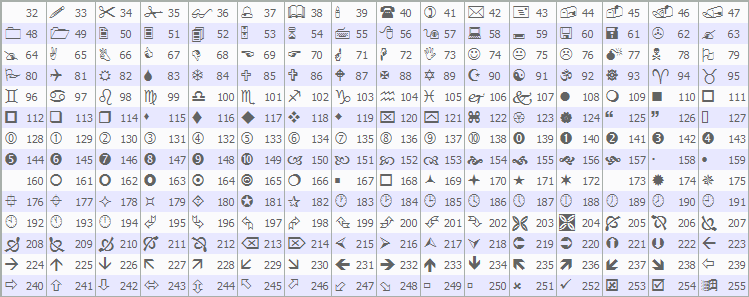
これで、これらの関数をOnTickイベントハンドラ内で呼び出すことができ、システムがティックごとにフィードバックを提供できるようになります。
//+------------------------------------------------------------------+
//| Expert tick function                                             |
//+------------------------------------------------------------------+
void OnTick() {
   if (!IsNewBar()) return;      //--- Exit if not new bar
   DetectSwings();               //--- Detect swings
   UpdateTrendlines();           //--- Update trendlines
   FindAndDrawTrendlines(true);  //--- Find/draw support trendlines
}
OnTick関数では、まずIsNewBarを呼び出して新しいバーかどうかを確認し、新しいバーでない場合はパフォーマンス最適化のために処理を終了します。新しいバーが検出された場合は、DetectSwingsを呼び出してスイングハイとスイングローを検出します。その後、UpdateTrendlinesを呼び出してブレイクアウトや期限切れのトレンドラインを確認し、条件を満たす場合は取引を実行します。次に、FindAndDrawTrendlinesにtrueを渡して呼び出し、サポートトレンドラインを検出および描画します。これにより、有効なトレンドラインのみがチャート上に可視化されるようになります。コンパイルすると、次の結果が得られます。
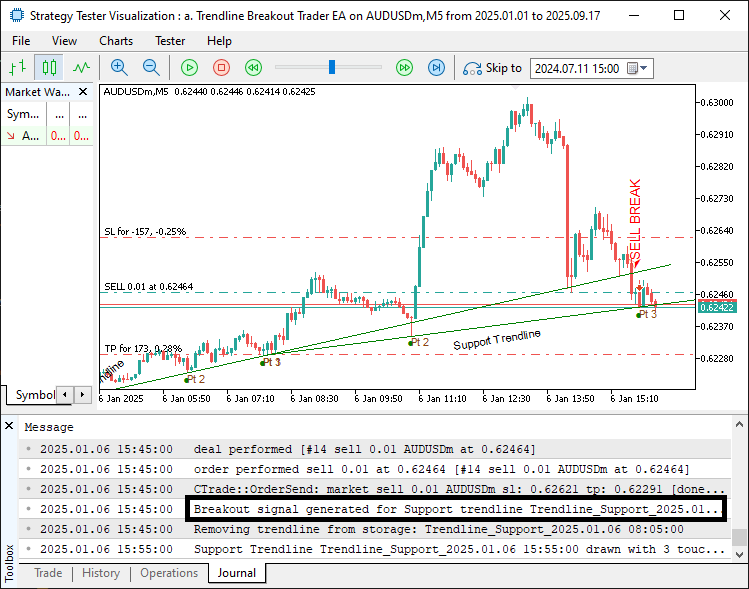
この画像から、トレンドラインを検出し、分析し、描画し、ブレイクアウト時に取引をおこなっていることが確認できます。期限切れのラインもストレージ配列から正常に削除されます。同じ関数をサポートのときと同様に呼び出し、入力パラメータをfalseにすることで、レジスタンストレンドラインについても同様の処理を実現できます。
//--- other ontick functions

FindAndDrawTrendlines(false);                   //--- Find/draw resistance trendlines

//---
コンパイルすると、次の結果が得られます。
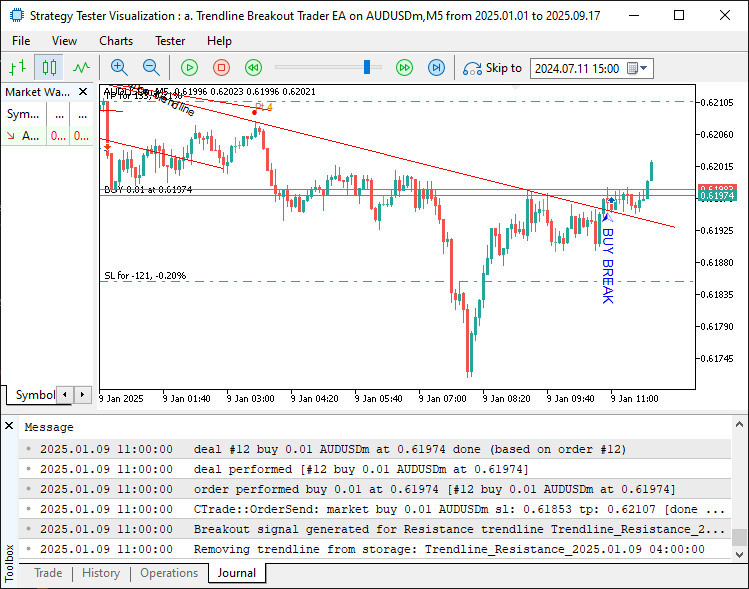
画像からわかるように、レジスタンストレンドラインも検出して取引することができます。すべてをテストして統合すると、次のような結果が得られます。
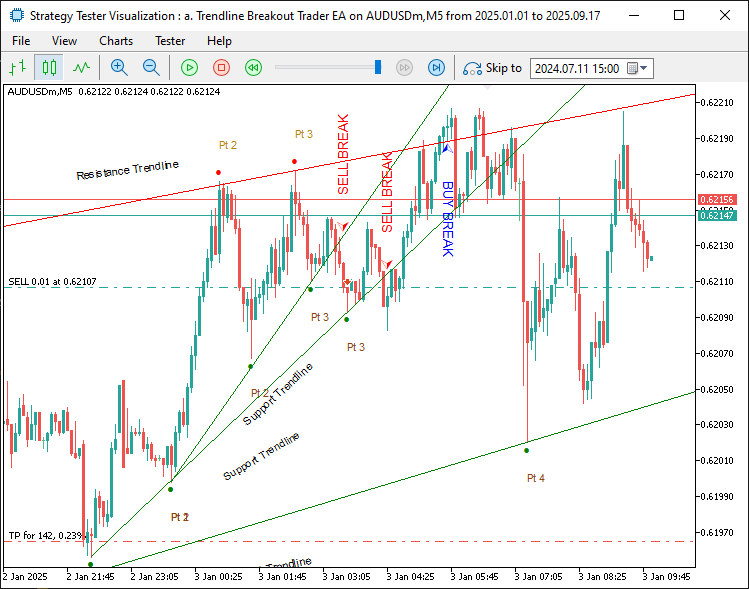
画像から分かるように、トレンドラインを検出し、それを可視化し、価格がトレンドラインをブレイクした際に取引を実行することで、当初の目的を達成できています。残っている作業は、このプログラムのバックテストをおこなうことです。バックテストについては次のセクションで扱います。
バックテスト
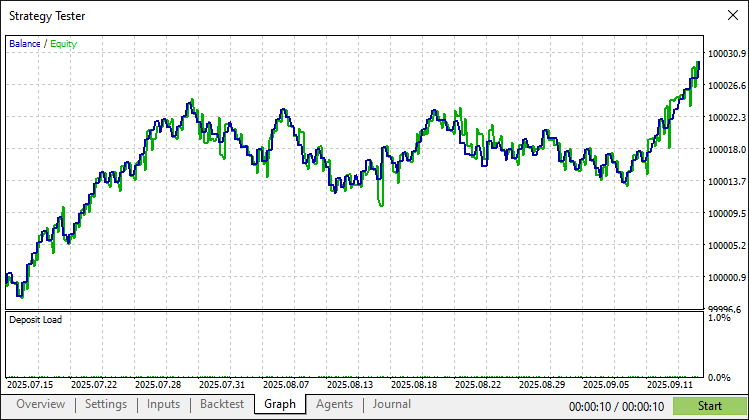
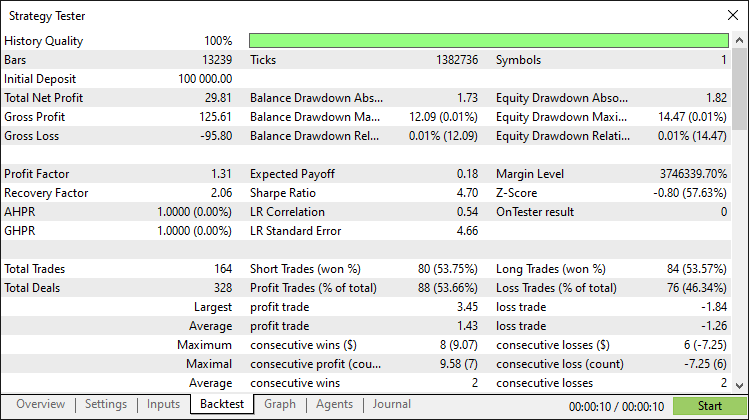
徹底的なバックテストによって、次の結果が得られました。
バックテストグラフ
バックテストレポート
結論
MQL5でスイングポイントを活用し、R²による適合度を用いてサポートおよびレジスタンストレンドラインを特定し検証するトレンドラインブレイクアウトシステムを開発しました。このシステムは、カスタマイズ可能なリスクパラメータを用いてブレイクアウト取引を実行し、トレンドライン、タッチポイントを示す矢印、ラベルなどの動的な可視化によって、明確な市場分析を可能にします。
免責条項:本記事は教育目的のみを意図したものです。取引には重大な財務リスクが伴い、市場の変動によって損失が生じる可能性があります。本プログラムを実際の市場で運用する前に、十分なバックテストと慎重なリスク管理が不可欠です。
本トレンドラインブレイクアウト戦略を実装することで、市場の値動きを捉えることが可能となり、今後の取引においてさらなるカスタマイズをおこなう土台が得られます。取引をお楽しみください。
MetaQuotes Ltdにより英語から翻訳されました。
元の記事: https://www.mql5.com/en/articles/19625
警告: これらの資料についてのすべての権利はMetaQuotes Ltd.が保有しています。これらの資料の全部または一部の複製や再プリントは禁じられています。
この記事はサイトのユーザーによって執筆されたものであり、著者の個人的な見解を反映しています。MetaQuotes Ltdは、提示された情報の正確性や、記載されているソリューション、戦略、または推奨事項の使用によって生じたいかなる結果についても責任を負いません。

 プライスアクション分析ツールキットの開発(第42回):ボタンロジックと統計レベルを用いたインタラクティブチャートの検証
 共和分株式による統計的裁定取引(第5回):スクリーニング
 MQL5での取引戦略の自動化(第35回):ブレーカーブロック取引システムの作成
 MQL5での取引戦略の自動化(第33回):プライスアクションに基づくシャークハーモニックパターンシステムの作成

- 無料取引アプリ
- 8千を超えるシグナルをコピー
- 金融ニュースで金融マーケットを探索
あなたのコードをすべて)共有してくれて本当にありがとう、堅牢でよくマークされたコード、そこから構築するための優れたテンプレート。自分でも作ろうとしたことがありますが、これほどうまくまとまってはいませんでした。