

多通貨エキスパートアドバイザーの開発(第24回):新しい戦略の追加(II)
 224
224
 19
19

はじめに
前の記事で始めた作業を再開します。プロジェクト全体のコードをライブラリ部分とプロジェクト部分に分割した後、SimpleVolumesモデルの取引戦略から別の戦略に移行する方法を確認することにしました。では、この移行をおこなうには何が必要でしょうか。また、どれくらい簡単にできるでしょうか。もちろん、新しい取引戦略用のクラスを作る必要があります。しかし、その後、いくつか予想外の複雑さが出てきました。
この複雑さの原因は、ライブラリ部分をプロジェクト部分から独立させたいという方針にありました。この新しいルールを破ったならば、特に問題はなかったでしょう。最終的には、コードの分離を維持したまま新しい取引戦略を統合する方法を見つけました。そのためには、ライブラリ側のファイルに変更を加える必要がありました。変更量は多くありませんが、変更の意味は大きいです。
その結果、新しい戦略「SimpleCandles」を使って第1ステージ最適化用EAをコンパイルし、実行することができました。次のステップは、これを自動最適化コンベアで動かすことです。前回の戦略では、CreateProject.mq5 EAを作り、自動最適化コンベア上で実行するためにタスク最適化データベースを生成できるようにしていました。EAのパラメータでは、最適化する銘柄や時間軸、EAステージの名前、その他必要な情報を指定できます。最適化データベースが存在しなければ、自動的に作成されます。
今回は、この仕組みを新しい取引戦略で機能させる方法を確認します。
道筋の整理
CreateProject.mq5 EAのコードを分析することから主な作業を開始します。 目的は、異なるプロジェクト間で共通、またはほぼ同じコードを特定することです。この共通コードはライブラリ部分に分離し、必要であれば複数のファイルに分割できます。一方、プロジェクトごとに異なるコードはプロジェクト部分に残し、どの部分を変更する必要があるかを整理します。
その前に、テスターのパス情報を最適化データベースに保存する際に発生するエラーを修正し、処理サイクル整理用マクロを改良し、さらに既存の取引戦略に新しいパラメータを追加する方法を確認します。
CDatabaseの修正
最近の記事では、最適化プロジェクトで比較的短いテスト間隔を使い始めました。以前は5年以上の長い間隔を使っていましたが、数か月程度の間隔に変更しました。これは、私たちの主な目的が自動最適化コンベアの動作確認であり、間隔を短くすることで、個々のテストパスの時間を大幅に短縮でき、結果として全体の最適化時間も短くなるためです。
最適化データベースにパス情報を保存するために、各テストエージェント(ローカル、リモート、クラウド)は、その情報をデータフレームとして、最適化プロセスが動作しているターミナルに送信します。このターミナルでは、最適化が開始されると、最適化対象のEAの追加インスタンスが特別なモード(データフレーム収集モード)で起動されます。このインスタンスはテスター上ではなく、別のターミナルチャート上で起動されます。ここで、テストエージェントから送られてくるすべての情報を受け取り、保存します。
テストエージェントからの新しいデータフレーム到着のイベントハンドラのコードには非同期処理は含まれていませんが、最適化中に、データベースが他の操作によってロックされていることに起因するデータベース挿入エラーのメッセージが出るようになりました。このエラーは比較的まれですが、数千回の実行のうち数十回は最終的に最適化データベースに結果を追加できませんでした。
原因は、複数のテストエージェントが同時に実行を終え、データフレームをメインターミナル上のEAに送信する状況が増えてきたことにあるようです。そしてEAがデータベース側で前の挿入操作が完了する前に、新しいレコードを追加しようとしてしまいます。
これを修正するために、この種類のこの種類のエラーに対応する専用ハンドラを追加します。エラーの原因がデータベースまたはテーブルが他の操作でロックされている場合に限り、一定時間後に失敗した操作を再実行すればよいです。一定回数の再挿入試行後も同じエラーが発生する場合は、試行を停止します。
挿入にはCDatabase::ExecuteTransaction()メソッドを使用しているので、このメソッドに変更を加えます。まず、メソッド引数にリクエスト試行カウンタを追加します。この種類のエラーが発生した場合、0~50ミリ秒のランダム時間だけ待機して、試行回数を増やした状態で同じ関数を呼び出します。
//+------------------------------------------------------------------+
//| Execute multiple DB queries in one transaction                   |
//+------------------------------------------------------------------+
bool CDatabase::ExecuteTransaction(string &queries[], int attempt = 0) {
// Open a transaction
   DatabaseTransactionBegin(s_db);

   s_res = true;
// Send all execution requests
   FOREACH(queries, {
      s_res &= DatabaseExecute(s_db, queries[i]);
      if(!s_res) break;
   });

// If an error occurred in any request, then
   if(!s_res) {
      // Cancel transaction
      DatabaseTransactionRollback(s_db);
      if((_LastError == ERR_DATABASE_LOCKED || _LastError == ERR_DATABASE_BUSY) && attempt < 20) {
         PrintFormat(__FUNCTION__" | ERROR: ERR_DATABASE_LOCKED. Repeat Transaction in DB [%s]",
                     s_fileName);
         Sleep(rand() % 50);
         ExecuteTransaction(queries, attempt + 1);

      } else {
         // Report it
         PrintFormat(__FUNCTION__" | ERROR: Transaction failed in DB [%s], error code=%d",
                     s_fileName, _LastError);
      }

   } else {
      // Otherwise, confirm transaction
      DatabaseTransactionCommit(s_db);
      //PrintFormat(__FUNCTION__" | Transaction done successfully");
   }
   return s_res;
}
念のため、トランザクションを使わずにSQLクエリを実行するCDatabase::Execute()メソッドにも同じ変更を加えます。
また、将来的に役立つ小さな変更として、CDatabaseクラスに静的なブール変数を追加しました。この変数は、リクエスト実行中にエラーが発生したことを記憶します。
//+------------------------------------------------------------------+
//| Class for handling the database                                  |
//+------------------------------------------------------------------+
class CDatabase {
   // ...
   static bool       s_res;         // Query execution result

public:
   static int        Id();          // Database connection handle
   static bool       Res();         // Query execution result

   // ...
};

bool   CDatabase::s_res      =  true;
ライブラリフォルダ内のDatabase/Database.mqhファイルに加えた変更を保存します。
Macros.hの修正
ここで、ずっと先延ばしになっていた変更について触れます。ご存じの通り、私たちは特定の配列内の全要素を順に処理するループのヘッダを簡単に書くためにFOREACH(A, D)マクロを作成しました。
#define FOREACH(A, D) { for(int i=0, im=ArraySize(A);i<im;i++) {D;} }
ここでAは配列名、Dはループの本体です。しかし、この実装には欠点がありました。デバッグ時にループ本体のコードのステップ実行を正しく追跡できないのです。必要なケースは稀でしたが、とても不便でした。ある日、ドキュメントを眺めていたところ、似たようなマクロを別の方法で実装している例を見つけました。このマクロはループヘッダだけを指定し、ループ本体はマクロの外に置きます。ただし、ループ変数の名前を指定する追加のパラメータが必要になります。
以前の実装では、ループ変数(配列要素のインデックス)の名前は固定でiでした。これまで特に問題はなく、二重ループが必要な場合でも、異なるスコープのおかげで同じ名前を使い回すことができました。そのため、新しい実装でも固定のインデックス名「i」を使い、マクロに渡すパラメータはループで処理する配列名だけになっています。
#define FOREACH(A) for(int i=0, im=ArraySize(A);i<im;i++)
この新しいバージョンに切り替えるためには、このマクロを使用しているすべての箇所を修正する必要がありました。例は以下の通りです。
//+------------------------------------------------------------------+
//| OnTick event handler                                             |
//+------------------------------------------------------------------+
void CAdvisor::Tick(void) {
// Call OnTick handling for all strategies
   //FOREACH(m_strategies, m_strategies[i].Tick();)
   FOREACH(m_strategies) m_strategies[i].Tick();
}
このマクロと合わせて、もう1つマクロを追加しました。こちらはループヘッダを作成する機能を提供します。このマクロでは、配列Aの各要素を順に配列Eに代入します(Eは事前に宣言しておく必要があります)。ループヘッダの前に、配列に要素が存在する場合は最初の要素をEに代入します。ループ変数には、iとEの変数名を組み合わせた変数を使います。 ループヘッダの3番目の部分では、ループ変数を増分し、同時にEにはインデックスを一つ増やしたA配列の要素を代入します。ループの最後で配列の範囲を超えないように、インデックスは配列要素数で剰余を取るようにしています。
#define FOREACH_AS(A, E) if(ArraySize(A)) E=A[0]; \
   for(int i##E=0, im=ArraySize(A);i##E<im;E=A[++i##E%im])
ライブラリフォルダ内のUtils/Macros.hファイルに変更を保存します。
取引戦略へのパラメータ追加
ほとんどのコードと同様に、取引戦略の実装も変更の対象になります。これらの変更が、取引戦略の単一インスタンスの入力パラメータの構成変更に関わる場合、取引戦略クラスだけでなく、他のいくつかの箇所も編集する必要があります。例を見て、何をおこなう必要があるか確認してみましょう。
たとえば、取引戦略に最大スプレッドパラメータを追加するとします。このパラメータの使い方は、ポジションを建てるシグナルを受け取った時点で現在のスプレッドがこのパラメータで設定した値を超えていた場合、ポジションを建てないというものです。
まず、第1ステージEAに入力パラメータを追加し、テスター実行時にこの値を設定できるようにします。その後、初期化文字列を生成する関数で、新しいパラメータ値を初期化文字列に置換する処理を追加します。
//+------------------------------------------------------------------+
//| 4. Strategy inputs                                               |
//+------------------------------------------------------------------+
sinput string     symbol_              = "";    // Symbol
sinput ENUM_TIMEFRAMES period_         = PERIOD_CURRENT;   // Timeframe for candles

input group "===  Opening signal parameters"
input int         signalSeqLen_        = 6;     // Number of unidirectional candles
input int         periodATR_           = 0;    // ATR period (if 0, then TP/SL in points)

input group "===  Pending order parameters"
input double      stopLevel_           = 25000;  // Stop Loss (in ATR fraction or points)
input double      takeLevel_           = 3630;   // Take Profit (in ATR fraction or points)

input group "===  Money management parameters"
input int         maxCountOfOrders_    = 9;     // Max number of simultaneously open orders
input int         maxSpread_           = 10;    // Max acceptable spread (in points)

//+------------------------------------------------------------------+
//| 5. Strategy initialization string generation function            |
//|    from the inputs                                               |
//+------------------------------------------------------------------+
string GetStrategyParams() {
   return StringFormat(
             "class CSimpleCandlesStrategy(\"%s\",%d,%d,%d,%.3f,%.3f,%d,%d)",
             (symbol_ == "" ? Symbol() : symbol_), period_,
             signalSeqLen_, periodATR_, stopLevel_, takeLevel_,
             maxCountOfOrders_, maxSpread_
          );
}
初期化文字列には、これまでより1つ多いパラメータが含まれることになります。次の変更としては、クラスに新しいプロパティを追加し、コンストラクタ内で初期化文字列からその値を読み込む処理を追加します。
//+------------------------------------------------------------------+
//| Trading strategy using unidirectional candlesticks               |
//+------------------------------------------------------------------+
class CSimpleCandlesStrategy : public CVirtualStrategy {
protected:
   // ...

   //---  Money management parameters
   int               m_maxCountOfOrders;  // Max number of simultaneously open positions
   int               m_maxSpread;         // Max acceptable spread (in points)

   // ...

};

//+------------------------------------------------------------------+
//| Constructor                                                      |
//+------------------------------------------------------------------+
CSimpleCandlesStrategy::CSimpleCandlesStrategy(string p_params) {
// Read the parameters from the initialization string
   m_params = p_params;
   m_symbol = ReadString(p_params);
   m_timeframe = (ENUM_TIMEFRAMES) ReadLong(p_params);
   m_signalSeqLen = (int) ReadLong(p_params);
   m_periodATR = (int) ReadLong(p_params);
   m_stopLevel = ReadDouble(p_params);
   m_takeLevel = ReadDouble(p_params);
   m_maxCountOfOrders = (int) ReadLong(p_params);
   m_maxSpread = (int) ReadLong(p_params);

   // ...
}
これで、新しいパラメータを取引戦略クラスの各メソッド内で自由に使用できるようになりました。その目的に応じて、次のコードをポジションを建てるためのシグナルを受け取るメソッドに追加できます。
//+------------------------------------------------------------------+
//| Signal for opening pending orders                                |
//+------------------------------------------------------------------+
int CSimpleCandlesStrategy::SignalForOpen() {
// By default, there is no signal
   int signal = 0;

   MqlRates rates[];
// Copy the quote values (candles) to the destination array.
// To check the signal we need m_signalSeqLen of closed candles and the current candle,
// so in total m_signalSeqLen + 1
   int res = CopyRates(m_symbol, m_timeframe, 0, m_signalSeqLen + 1, rates);

// If the required number of candles has been copied
   if(res == m_signalSeqLen + 1) {
      signal = 1; // buy signal

      // Go through all closed candles
      for(int i = 1; i <= m_signalSeqLen; i++) {
         // If at least one upward candle occurs, cancel the signal
         if(rates[i].open < rates[i].close ) {
            signal = 0;
            break;
         }
      }

      if(signal == 0) {
         signal = -1; // otherwise, sell signal

         // Go through all closed candles
         for(int i = 1; i <= m_signalSeqLen; i++) {
            // If at least one downward candle occurs, cancel the signal
            if(rates[i].open > rates[i].close ) {
               signal = 0;
               break;
            }
         }
      }
   }

// If there is a signal, then
   if(signal != 0) {
      // If the current spread is greater than the maximum allowed, then
      if(rates[0].spread > m_maxSpread) {
         PrintFormat(__FUNCTION__" | IGNORE %s Signal, spread is too big (%d > %d)",
                     (signal > 0 ? "BUY" : "SELL"),
                     rates[0].spread, m_maxSpread);
         signal = 0; // Cancel the signal
      }
   }

   return signal;
}
同様に、他の新しいパラメータを取引戦略に追加したり、不要になったパラメータを削除したりすることもできます。
CreateProject.mq5の分析
CreateProject.mq5プロジェクト作成用EAのコードの分析を始めます。初期化関数内では、すでにコードをいくつかの関数に分割しています。それぞれの関数の目的は、名前から明確に分かります。
//+------------------------------------------------------------------+
//| Expert initialization function                                   |
//+------------------------------------------------------------------+
int OnInit() {
// Connect to the database
   DB::Connect(fileName_);

// Create a project
   CreateProject(projectName_,
                 projectVersion_,
                 StringFormat("%s - %s",
                              TimeToString(fromDate_, TIME_DATE),
                              TimeToString(toDate_, TIME_DATE)
                             )
                );
// Create project stages
   CreateStages();

// Creating jobs and tasks
   CreateJobs();

// Queueing the project for execution
   QueueProject();

// Close the database
   DB::Close();

// Successful initialization
   return(INIT_SUCCEEDED);
}
この分割はあまり便利ではありません。というのも、選ばれた関数はどれもかなり大きく、しかも異なる問題をまとめて処理してしまっているためです。たとえば、CreateJobs()関数では、入力データの前処理、ジョブ用のパラメータテンプレートの生成、データベースへの情報挿入、さらに同様の処理で最適化タスクをデータベースに作成する、という流れをまとめておこなっています。理想的には、関数はよりシンプルにし、1つの小さな問題だけを扱うべきです。
現在の実装で新しい戦略を使う場合、第1ステージのパラメータテンプレートを変更する必要があります。また、場合によっては最適化条件付きタスクの数も調整する必要があるかもしれません。以前の取引戦略の第1ステージパラメータテンプレートは、グローバル変数paramsTemplate1に指定されていました。
// Template of optimization parameters at the first stage
string paramsTemplate1 =
   "; ===  Open signal parameters\n"
   "signalPeriod_=212||12||40||240||Y\n"
   "signalDeviation_=0.1||0.1||0.1||2.0||Y\n"
   "signaAddlDeviation_=0.8||0.1||0.1||2.0||Y\n"
   "; ===  Pending order parameters\n"
   "openDistance_=10||0||10||250||Y\n"
   "stopLevel_=16000||200.0||200.0||20000.0||Y\n"
   "takeLevel_=240||100||10||2000.0||Y\n"
   "ordersExpiration_=22000||1000||1000||60000||Y\n"
   "; ===  Capital management parameters\n"
   "maxCountOfOrders_=3||3||1||30||N\n";
幸い、以前の第1ステージの最適化ジョブではすべて同じでした。しかし、これは常にそうとは限りません。たとえば、新しい戦略では、パラメータに銘柄や戦略が動作する時間軸を含めました。つまり、異なる銘柄や時間軸に対して作成される第1ステージの最適化ジョブでは、パラメータテンプレートの可変部分が出てくることになります。しかし、それらの値を設定するには、タスク作成関数のコードの深い部分まで手を入れる必要があり、そうなるとライブラリ部分に移すことができなくなります。
さらに、現在の最適化プロジェクト作成EAは、3つの固定ステージでプロジェクトを作成する仕様になっています。このシンプルなステージ構成に至ったのは開発中の試行の結果であり、他のステージを追加することも試しました(例:第18回と第19回参照)。追加のステージでは最終結果に大きな改善は見られませんでしたが、他の取引戦略では異なる可能性もあります。そのため、現行コードをそのままライブラリ部分に移すと、将来的にステージ構成を変更することができなくなります。
つまり、少し手を抜いて済ませたい気持ちはあっても、後回しにするよりは、今このコードにしっかりとリファクタリングを施すほうが良いということです。そこで、プロジェクト作成EAのコードをいくつかのクラスに分割してみます。これらのクラスをライブラリ部分に移動し、プロジェクト部分ではそれらを使って、希望するステージ構成と内容のプロジェクトを作成できるようにします。同時に、これは将来的にコンベアの進捗情報を表示するテンプレートとしても利用できます。
まず、最終的なコードがどのような形になるかを試しに書いてみました。この暫定版は、最終版がリリースされるまでほとんど変更されていません。メソッド呼び出しに特定のパラメータ構成が追加された程度です。では、最適化プロジェクト作成EAの初期化関数の新しいバージョンを見てみましょう。小さな詳細に気を取られないよう、メソッドの引数は表示していません。
//+------------------------------------------------------------------+
//| Expert initialization function                                   |
//+------------------------------------------------------------------+
int OnInit() {
// Create an optimization project object for the given database
   COptimizationProject p;

// Create a new project in the database
   p.Create(...);


// Add the first stage
   p.AddStage(...);

// Adding the first stage jobs
   p.AddJobs(...);

// Add tasks for the first stage jobs
   p.AddTasks(...);


// Add the second stage
   p.AddStage(...);

// Add the second stage jobs
   p.AddJobs(...);

// Add tasks for the second stage jobs
   p.AddTasks(...);


// Add the third stage
   p.AddStage(...);

// Add the third stage job
   p.AddJobs(...);

// Add a task for the third stage job
   p.AddTasks(...);


// Put the project in the execution queue
   p.Queue();

// Delete the EA
   ExpertRemove();

// Successful initialization
   return(INIT_SUCCEEDED);
}
このコード構造により、新しいステージを簡単に追加でき、パラメータも柔軟に変更できるようになります。しかし、今のところ確実に必要になるのは1つの新しいクラス「COptimizationProject」(最適化プロジェクトクラス)だけです。では、そのコードを見てみましょう。
COptimizationProjectクラス
このクラスの開発を進める中で、最適化データベースに格納するすべての種類のエンティティに対して個別のクラスが必要になることがすぐに分かりました。そこで次に、プロジェクトステージ用のCOptimizationStageクラス、プロジェクトステージジョブ用のCOptimizationJobクラス、そして各プロジェクトステージジョブのタスク用のCOptimizationTaskクラスを作成します。
これらのクラスのオブジェクトは、本質的には最適化データベースの各テーブルのレコードを表現したものです。そのため、クラスのフィールド構成は対応するテーブルのフィールド構成を反映します。さらに、割り当てられたタスクを実行するために必要なフィールドやメソッドもこれらのクラスに追加します。
現時点では、簡潔化のために、作成するクラスのすべてのプロパティとメソッドをpublicにします。各クラスは、最適化データベースに新しいレコードを作成するための専用メソッドを持ちます。将来的には、既存レコードの変更やデータベースからの読み取り用のメソッドも追加する予定ですが、プロジェクト作成時には必要ありません。
以前使用していたテスターパラメータテンプレートの代わりに、テンプレートに従ってすでに値が設定されたパラメータを返す専用関数を作成します。これにより、パラメータテンプレートはこれらの関数内に移動します。関数はプロジェクトポインタをパラメータとして受け取り、テンプレートに代入するための必要なプロジェクト情報にアクセスできるようにします。これらの関数の宣言はプロジェクト部分に移動し、ライブラリ部分では新しい型の宣言だけをおこないます。次の型の関数ポインタです。
// Create a new type - a pointer to a string generation function
// for optimization job parameters (job) accepting the pointer
// to the optimization project object as an argument
typedef string (*TJobsTemplateFunc)(COptimizationProject*);
これにより、COptimizationProjectクラス内でステージのパラメータ生成関数を利用できるようになります。まだこれらの関数は存在していませんが、将来的には設計部分で必ず追加する必要があります。
このクラスの定義は以下のようになっています。
//+------------------------------------------------------------------+
//| Optimization project class                                       |
//+------------------------------------------------------------------+
class COptimizationProject {
public:
   string            m_fileName;    // Database name

   // Properties stored directly in the database
   ulong             id_project;    // Project ID
   string            name;          // Name
   string            version;       // Version
   string            description;   // Description
   string            status;        // Status

   // Arrays of all stages, jobs and tasks
   COptimizationStage* m_stages[];  // Project stages
   COptimizationJob*   m_jobs[];    // Jobs of all project stages
   COptimizationTask*  m_tasks[];   // Tasks of all jobs of project stages

   // Properties for the current state of the project creation
   string            m_symbol;      // Current symbol
   string            m_timeframe;   // Current timeframe

   COptimizationStage* m_stage;     // Last created stage (current stage)
   COptimizationJob*   m_job;       // Last created job (current job)
   COptimizationTask*  m_task;      // Last created task (current task)

   // Methods
                     COptimizationProject(string p_fileName);  // Constructor
                    ~COptimizationProject();                   // Destructor

   // Create a new project in the database
   COptimizationProject* COptimizationProject::Create(string p_name,
         string p_version = "", string p_description = "", string p_status = "Done");

   void              Insert();   // Insert an entry into the database
   void              Update();   // Update an entry in the database

   // Add a new stage to the database
   COptimizationProject* AddStage(COptimizationStage* parentStage, string stageName,
                                  string stageExpertName,
                                  string stageSymbol, string stageTimeframe,
                                  int stageOptimization, int stageModel,
                                  datetime stageFromDate, datetime stageToDate,
                                  int stageForwardMode, datetime stageForwardDate,
                                  int stageDeposit = 10000, string stageCurrency = "USD",
                                  int stageProfitInPips = 0, int stageLeverage = 200,
                                  int stageExecutionMode = 0, int stageOptimizationCriterion = 7,
                                  string stageStatus = "Done");

   // Add new jobs to the database for the specified symbols and timeframes
   COptimizationProject* AddJobs(string p_symbols, string p_timeframes,
                                 TJobsTemplateFunc p_templateFunc);
   COptimizationProject* AddJobs(string &p_symbols[], string &p_timeframes[],
                                 TJobsTemplateFunc p_templateFunc);

   // Add new tasks to the database for the specified optimization criteria
   COptimizationProject* AddTasks(string p_criterions);
   COptimizationProject* AddTasks(string &p_criterions[]);

   void              Queue();    // Put the project in the execution queue

   // Convert a string name to a timeframe
   static ENUM_TIMEFRAMES   StringToTimeframe(string s);
};
最初に、projectsテーブルの最適化データベースに直接格納されるプロパティが並びます。次に、プロジェクト内のすべてのステージ、ジョブ、タスクの配列が続き、さらにプロジェクト作成の現在の状態を管理するプロパティが続きます。
現在、このクラスが担当するタスクは最適化データベースにプロジェクトを作成することだけなので、コンストラクタで必要なデータベースに接続し、トランザクションを開始します。トランザクションの完了はデストラクタでおこないます。ここでCDatabase::s_res静的クラスフィールドが役立ちます。この値を使えば、プロジェクト作成時に最適化データベースへのレコード挿入でエラーが発生したかどうかを判定できます。エラーがなければトランザクションを確定し、エラーがあればキャンセルします。また、作成された動的オブジェクトのメモリもデストラクタで解放されます。
//+------------------------------------------------------------------+
//| Constructor                                                      |
//+------------------------------------------------------------------+
COptimizationProject::COptimizationProject(string p_fileName) :
   m_fileName(p_fileName), id_project(0) {
// Connect to the database
   if (DB::Connect(m_fileName)) {
      // Start a transaction
      DatabaseTransactionBegin(DB::Id());
   }
}

//+------------------------------------------------------------------+
//| Destructor                                                       |
//+------------------------------------------------------------------+
COptimizationProject::~COptimizationProject() {
// If no errors occurred, then
   if(DB::Res()) {
      // Confirm the transaction
      DatabaseTransactionCommit(DB::Id());
   } else {
      // Otherwise, cancel the transaction
      DatabaseTransactionRollback(DB::Id());
   }
// Close connection to the database
   DB::Close();

// Delete created task, job, and stage objects
   FOREACH(m_tasks)  {
      delete m_tasks[i];
   }
   FOREACH(m_jobs)   {
      delete m_jobs[i];
   }
   FOREACH(m_stages) {
      delete m_stages[i];
   }
}
ジョブやタスクを追加するメソッドは、2つのバリエーションで宣言されています。最初のバリエーションでは、銘柄、時間軸、条件のリストをカンマ区切りの文字列パラメータとして渡します。メソッド内部でこれらの文字列を値の配列に変換し、配列を受け取る第2のバリエーションのメソッドを呼び出す際の引数として渡します。
以下はジョブを追加するメソッドです。
//+------------------------------------------------------------------+
//| Add new jobs to the database for the specified                   |
//| symbols and timeframes in strings                                |
//+------------------------------------------------------------------+
COptimizationProject* COptimizationProject::AddJobs(string p_symbols, string p_timeframes,
                                                    TJobsTemplateFunc p_templateFunc) {
// Array of symbols for strategies
   string symbols[];
   StringReplace(p_symbols, ";", ",");
   StringSplit(p_symbols, ',', symbols);

// Array of timeframes for strategies
   string timeframes[];
   StringReplace(p_timeframes, ";", ",");
   StringSplit(p_timeframes, ',', timeframes);

   return AddJobs(symbols, timeframes, p_templateFunc);
}

//+------------------------------------------------------------------+
//| Add new jobs to the database for the specified                   |
//| symbols and timeframes in arrays                                 |
//+------------------------------------------------------------------+
COptimizationProject* COptimizationProject::AddJobs(string &p_symbols[], string &p_timeframes[],
                                                    TJobsTemplateFunc p_templateFunc) {
   // For each symbol
   FOREACH_AS(p_symbols, m_symbol) {
      // For each timeframe
      FOREACH_AS(p_timeframes, m_timeframe) {
         // Get the parameters for work for a given symbol and timeframe
         string params = p_templateFunc(&this);

         // Create a new job object
         m_job = new COptimizationJob(0, m_stage, m_symbol, m_timeframe, params);

         // Insert it into the optimization database
         m_job.Insert();

         // Add it to the array of all jobs
         APPEND(m_jobs, m_job);

         // Add it to the array of current stage jobs
         APPEND(m_stage.jobs, m_job);
      }
   }

   return &this;
}
3番目の引数は、ステージEA用の最適化パラメータを作成する関数へのポインタです。
COptimizationStageクラス
このクラスの定義には他のクラスと比べて多くのプロパティがありますが、これは最適化データベースのstagesテーブルに多くのフィールドがあるためです。テーブルの各フィールドに対応するプロパティがこのクラスにも用意されています。また、ステージコンストラクタには、所属するプロジェクトオブジェクトへのポインタと、前のステージオブジェクトへのポインタが渡されます。最初のステージには前のステージが存在しないため、このパラメータにはNULLを渡します。
//+------------------------------------------------------------------+
//| Optimization stage class                                         |
//+------------------------------------------------------------------+
class COptimizationStage {
public:
   ulong             id_stage;
   ulong             id_project;
   ulong             id_parent_stage;
   string            name;
   string            expert;
   string            symbol;
   string            period;
   int               optimization;
   int               model;
   datetime          from_date;
   datetime          to_date;
   int               forward_mode;
   datetime          forward_date;
   int               deposit;
   string            currency;
   int               profit_in_pips;
   int               leverage;
   int               execution_mode;
   int               optimization_criterion;
   string            status;

   COptimizationProject* project;
   COptimizationStage* parent_stage;
   COptimizationJob* jobs[];

                     COptimizationStage(ulong p_idStage, COptimizationProject* p_project,
                      COptimizationStage* parentStage,
                      string p_name, string p_expertName,
                      string p_symbol = "GBPUSD", string p_timeframe = "H1",
                      int p_optimization = 0, int p_model = 0,
                      datetime p_fromDate = 0, datetime p_toDate = 0,
                      int p_forwardMode = 0, datetime p_forwardDate = 0,
                      int p_deposit = 10000, string p_currency = "USD",
                      int p_profitInPips = 0, int p_leverage = 200,
                      int p_executionMode = 0, int p_optimizationCriterion = 7,
                      string p_status = "Done") :
                     id_stage(p_idStage),
                     project(p_project),
                     id_project(!!p_project ? p_project.id_project : 0),
                     parent_stage(parentStage),
                     id_parent_stage(!!parentStage ? parentStage.id_stage : 0),
                     name(p_name), expert(p_expertName), symbol(p_symbol),
                     period(p_timeframe), optimization(p_optimization), model(p_model),
                     from_date(p_fromDate), to_date(p_toDate), forward_mode(p_forwardMode),
                     forward_date(p_forwardDate), deposit(p_deposit), currency(p_currency),
                     profit_in_pips(p_profitInPips), leverage(p_leverage),
                     execution_mode(p_executionMode),
                     optimization_criterion(p_optimizationCriterion), status(p_status) {}

   // Create a stage in the database
   void              Insert();
};

//+------------------------------------------------------------------+
//| Create a stage in the database                                   |
//+------------------------------------------------------------------+
void COptimizationStage::Insert() {
   string query = StringFormat("INSERT INTO stages VALUES("
                               "%s,"  // id_stage
                               "%I64u," // id_project
                               "%s,"    // id_parent_stage
                               "'%s',"  // name
                               "'%s',"  // expert
                               "'%s',"  // symbol
                               "'%s',"  // period
                               "%d,"    // optimization
                               "%d,"    // model
                               "'%s',"  // from_date
                               "'%s',"  // to_date
                               "%d,"    // forward_mode
                               "%s,"    // forward_date
                               "%d,"    // deposit
                               "'%s',"  // currency
                               "%d,"    // profit_in_pips
                               "%d,"    // leverage
                               "%d,"    // execution_mode
                               "%d,"    // optimization_criterion
                               "'%s'"   // status
                               ");",
                               (id_stage == 0 ? "NULL" : (string) id_stage), // id_stage
                               id_project,                           // id_project
                               (id_parent_stage == 0 ?
                                "NULL" : (string) id_parent_stage),  // id_parent_stage
                               name,                            // name
                               expert,                          // expert
                               symbol,                          // symbol
                               period,                          // period
                               optimization,                    // optimization
                               model,                           // model
                               TimeToString(from_date, TIME_DATE),  // from_date
                               TimeToString(to_date, TIME_DATE),    // to_date
                               forward_mode,                    // forward_mode
                               (forward_mode == 4 ?
                                "'" + TimeToString(forward_date, TIME_DATE) + "'"
                                : "NULL"),                      // forward_date
                               deposit,                         // deposit
                               currency,                        // currency
                               profit_in_pips,                  // profit_in_pips
                               leverage,                        // leverage
                               execution_mode,                  // execution_mode
                               optimization_criterion,          // optimization_criterion
                               status                           // status
                              );
   PrintFormat(__FUNCTION__" | %s", query);
   id_stage = DB::Insert(query);
}
コンストラクタとstagesテーブルへの新規レコード挿入メソッドでおこなわれる処理は非常にシンプルです。渡された引数の値をオブジェクトのプロパティに記憶し、それを使って、目的の最適化データベーステーブルにレコードを挿入するSQLクエリを作成するだけです。
COptimizationJobクラス
このクラスの構造はCOptimizationStageクラスとほぼ同じです。コンストラクタでパラメータを記憶し、Insert()メソッドで最適化データベースのjobsテーブルに新しい行を挿入します。また、各ジョブオブジェクトの作成時には、このジョブを含むステージオブジェクトへのポインタも渡されます。
//+------------------------------------------------------------------+
//| Optimization job class                                           |
//+------------------------------------------------------------------+
class COptimizationJob {
public:
   ulong             id_job;     // job ID
   ulong             id_stage;   // stage ID
   string            symbol;     // Symbol
   string            timeframe;  // Timeframe
   string            params;     // Optimizer operation parameters
   string            status;     // Status

   COptimizationStage* stage;    // Stage a job belongs to
   COptimizationTask* tasks[];   // Array of tasks related to the job

   // Constructor
                     COptimizationJob(ulong p_jobId, COptimizationStage* p_stage,
                    string p_symbol, string p_timeframe,
                    string p_params, string p_status = "Done");

   // Create a job in the database
   void              Insert();
};

//+------------------------------------------------------------------+
//| Constructor                                                      |
//+------------------------------------------------------------------+
COptimizationJob::COptimizationJob(ulong p_jobId,
                                   COptimizationStage* p_stage,
                                   string p_symbol, string p_timeframe,
                                   string p_params, string p_status = "Done") :
   id_job(p_jobId),
   stage(p_stage),
   id_stage(!!p_stage ? p_stage.id_stage : 0),
   symbol(p_symbol),
   timeframe(p_timeframe),
   params(p_params),
   status(p_status) {}

//+------------------------------------------------------------------+
//| Create a job in the database                                     |
//+------------------------------------------------------------------+
void COptimizationJob::Insert() {
// Request to create a second stage job for a given symbol and timeframe
   string query = StringFormat("INSERT INTO jobs "
                               " VALUES (NULL,%I64u,'%s','%s','%s','%s');",
                               id_stage, symbol, timeframe, params, status);
   id_job = DB::Insert(query);
   PrintFormat(__FUNCTION__" | %s -> %I64u", query, id_job);
}
最後に残ったCOptimizationTaskクラスも同じ方法で構築されるため、ここではコードの提示は省略します。
CreateProject.mq5の書き直し
CreateProject.mq5ファイルに戻り、主なパラメータを見ていきます。このファイルはプロジェクト部分にあるため、各プロジェクトごとに必要なデフォルトパラメータの値をここで指定し、起動時に変更しなくても済むようにできます。
まず最初に、最適化データベースの名前を指定します。
input string fileName_ = "article.17328.db.sqlite"; // - Optimization database file
次のパラメータでは、EA最適化の第1ステージと第2ステージを実行する、カンマ区切りの銘柄と時間軸を指定します。
input string  symbols_ = "GBPUSD,EURUSD,EURGBP";     // - Symbols
input string  timeframes_ = "H1,M30";                // - Timeframes
この設定では、3つの銘柄と2つの時間軸のすべての組み合わせに対して、合計6つのジョブが作成されます。
次に、最適化を実施する期間の選択が続きます。
input group "::: Project parameters - Optimization interval"
input datetime fromDate_ = D'2022-09-01';             // - Start date
input datetime toDate_ = D'2023-01-01';               // - End date
口座パラメータグループでは、第3ステージでEAがテスター上で複数の銘柄を扱う際に使用するメイン銘柄を選択します。この選択は、銘柄の中に週末も取引が継続するもの(例:暗号通貨)が含まれている場合に重要になります。この場合、テスター実行時にすべての週末でティックを生成させるためには、必ずこの銘柄をメインとして選択する必要があります。
input group "::: Project parameters - Account"
input string   mainSymbol_ = "GBPUSD";                // - Main symbol
input int      deposit_ = 10000;                      // - Initial deposit
第1ステージのパラメータグループでは第1ステージEAの名前を指定します(ただし、変更する必要はない場合もあります)。次に、第1ステージの各ジョブで使用される最適化基準を指定します。これはカンマで区切られた数値です。値6はユーザー定義の最適化基準に対応しています。
input group "::: Stage 1. Search"
input string   stage1ExpertName_ = "Stage1.ex5";      // - Stage EA
input string   stage1Criterions_ = "6,6,6";           // - Optimization criteria for tasks
この例ではユーザー基準を3回指定しているので、各ジョブは指定された基準で3つの最適化問題を含むことになります。
第2ステージのパラメータグループでは、グループ内の戦略の名前や数だけでなく、第2ステージEAのすべてのパラメータを指定できるようにしました。これらのパラメータは、第1ステージでのパスの選択に影響し、そのパラメータを使って第2ステージでグループ分けがおこなわれます。
input group "::: Stage 2. Grouping"
input string   stage2ExpertName_ = "Stage2.ex5";      // - Stage EA
input string   stage2Criterion_  = "6";               // - Optimization criterion for tasks
//input bool     stage2UseClusters_= false;           // - Use clustering?
input double   stage2MinCustomOntester_ = 500;        // - Min value of norm. profit
input uint     stage2MinTrades_  = 20;                // - Min number of trades
input double   stage2MinSharpeRatio_ = 0.7;           // - Min Sharpe ratio
input uint     stage2Count_      = 8;                 // - Number of strategies in the group
たとえば、stage2MinTrades_ =20の場合、第1ステージで少なくとも20回取引を完了した取引戦略インスタンスだけがグループに参加できます。stage2UseClusters_パラメータは現在第2ステージ結果のクラスタリングを使用していないためコメントアウトしており、代わりにfalseを使うことになります。
第3ステージのパラメータグループにもいくつか追加しました。第3ステージEAの名前のほか、最終EAデータベースの名前の生成を制御する2つのパラメータを追加しました。最終EA本体では、この名前はCVirtualAdvisor::FileName()関数内で次のテンプレートに従って生成されます。
<Project name>-<Magic>.test.db.sqlite // To run in the tester
<Project name>-<Magic>.db.sqlite      // To run on a trading account
第3ステージEAでも同じテンプレートを使用します。<Project name>はprojectName_に、<Magic>はstage3Magic_に置き換えられます。「.test」サフィックスを追加するかどうかはstage3Tester_パラメータで制御されます。
input group "::: Stage 3. Result"
input string   stage3ExpertName_ = "Stage3.ex5";      // - Stage EA
input ulong    stage3Magic_      = 27183;             // - Magic
input bool     stage3Tester_     = true;              // - For the tester?
原理的には、最終EAデータベースのフルネームを指定する1つのパラメータにまとめることも可能です。第3ステージ完了後、このデータベースファイルは必要に応じて安全に名前変更できます。
次に、与えられたテンプレートを使ってステージEA用のパラメータを生成する関数を作成する必要があります。ステージは3つあるので、関数も3つ必要です。
第1ステージ用の関数は次のようになります。
// Template of optimization parameters at the first stage
string paramsTemplate1(COptimizationProject *p) {
   string params = StringFormat(
                      "symbol_=%s\n"
                      "period_=%d\n"
                      "; ===  Open signal parameters\n"
                      "signalSeqLen_=4||2||1||8||Y\n"
                      "periodATR_=21||7||2||48||Y\n"
                      "; ===  Pending order parameters\n"
                      "stopLevel_=2.34||0.01||0.01||5.0||Y\n"
                      "takeLevel_=4.55||0.01||0.01||5.0||Y\n"
                      "; ===  Capital management parameters\n"
                      "maxCountOfOrders_=15||1||1||30||Y\n",
                      p.m_symbol, p.StringToTimeframe(p.m_timeframe));
   return params;
}
この関数は、ストラテジーテスターからコピーした第1ステージEAの最適化パラメータに基づいており、個々の入力パラメータを反復処理する際の範囲が設定されています。この文字列には、関数呼び出し時にプロジェクト内でジョブオブジェクトを作成する対象の銘柄と時間軸の値が代入されます。たとえば、特定の時間軸に対して異なる入力の反復範囲を使用する必要がある場合、そのロジックはこの関数内で実装できます。
別の取引戦略を使ったプロジェクトに移行する場合は、この関数を新しい取引戦略とその入力セット用に書き換えた関数に置き換える必要があります。
第2ステージおよび第3ステージについても、これらの関数はCreateProject.mq5内で実装しています。ただし、別のプロジェクトに移行する際には、ほとんどの場合変更する必要はありません。しかし、すぐにライブラリ部分に移すのではなく、現時点ではここに残しておきます。
// Template of optimization parameters for the second stage
string paramsTemplate2(COptimizationProject *p) {

   // Find the parent job ID for the current job
   // by matching the symbol and timeframe at the current and parent stages
   int i;
   SEARCH(p.m_stage.parent_stage.jobs,
          (p.m_stage.parent_stage.jobs[i].symbol == p.m_symbol
           && p.m_stage.parent_stage.jobs[i].timeframe == p.m_timeframe),
          i);

   ulong parentJobId = p.m_stage.parent_stage.jobs[i].id_job;
   string params = StringFormat(
                      "idParentJob_=%I64u\n"
                      "useClusters_=%s\n"
                      "minCustomOntester_=%f\n"
                      "minTrades_=%u\n"
                      "minSharpeRatio_=%.2f\n"
                      "count_=%u\n",
                      parentJobId,
                      (string) false, //(string) stage2UseClusters_,
                      stage2MinCustomOntester_,
                      stage2MinTrades_,
                      stage2MinSharpeRatio_,
                      stage2Count_
                   );
   return params;
}

// Template of optimization parameters at the third stage
string paramsTemplate3(COptimizationProject *p) {
   string params = StringFormat(
                      "groupName_=%s\n"
                      "advFileName_=%s\n"
                      "passes_=\n",
                      StringFormat("%s_v.%s_%s",
                                   p.name, p.version, TimeToString(toDate_, TIME_DATE)),
                      StringFormat("%s-%I64u%s.db.sqlite",
                                   p.name, stage3Magic_, (stage3Tester_ ? ".test" : "")));
   return params;
}
次に、初期化関数のコードです。この関数がすべての作業をおこない、処理終了時にEAをチャートから削除します。ここでは、呼び出される関数のパラメータも含めて示します。
//+------------------------------------------------------------------+
//| Expert initialization function                                   |
//+------------------------------------------------------------------+
int OnInit() {
// Create an optimization project object for the given database
   COptimizationProject p(fileName_);

// Create a new project in the database
   p.Create(projectName_, projectVersion_,
            StringFormat("%s - %s",
                         TimeToString(fromDate_, TIME_DATE),
                         TimeToString(toDate_, TIME_DATE)));


// Add the first stage
   p.AddStage(NULL, "First", stage1ExpertName_, mainSymbol_, "H1", 2, 2,
              fromDate_, toDate_, 0, 0, deposit_);

// Adding the first stage jobs
   p.AddJobs(symbols_, timeframes_, paramsTemplate1);

// Add tasks for the first stage jobs
   p.AddTasks(stage1Criterions_);


// Add the second stage
   p.AddStage(p.m_stages[0], "Second", stage2ExpertName_, mainSymbol_, "H1", 2, 2,
              fromDate_, toDate_, 0, 0, deposit_);

// Add the second stage jobs
   p.AddJobs(symbols_, timeframes_, paramsTemplate2);

// Add tasks for the second stage jobs
   p.AddTasks(stage2Criterion_);


// Add the third stage
   p.AddStage(p.m_stages[1], "Save to library", stage3ExpertName_, mainSymbol_,
              "H1", 0, 2, fromDate_, toDate_, 0, 0, deposit_);

// Add the third stage job
   p.AddJobs(mainSymbol_, "H1", paramsTemplate3);

// Add a task for the third stage job
   p.AddTasks("0");


// Put the project in the execution queue
   p.Queue();

// Delete the EA
   ExpertRemove();

// Successful initialization
   return(INIT_SUCCEEDED);
}
このコード部分も、自動最適化コンベアのステージ構成を変更しない限り、別のプロジェクトに移行する際に変更する必要はありません。将来的にはここも改善していく予定です。たとえば、現在のコードには数値定数が直接書かれている部分があり、可読性向上のために名前付き定数に置き換えるべきです。もしこのコードが本当に変更不要であることが分かったら、ライブラリ部分に移すことになります。
これで、最適化プロジェクトをデータベースに作成するEAは完成です。次に、ステージEAを作成していきましょう。
ステージEA
前回の記事で既にStage1.mq5を実装しているので、今回は取引戦略に新しいmaxSpread_パラメータを追加する変更だけをおこないました。これらの変更については、すでに前述の通りです。
// 1. Define a constant with the EA name
#define  __NAME__ "SimpleCandles" + MQLInfoString(MQL_PROGRAM_NAME)

// 2. Connect the required strategy
#include "Strategies/SimpleCandlesStrategy.mqh";

// 3. Connect the general part of the first stage EA from the Advisor library
#include <antekov/Advisor/Experts/Stage1.mqh>

//+------------------------------------------------------------------+
//| 4. Strategy inputs                                               |
//+------------------------------------------------------------------+
sinput string     symbol_              = "";    // Symbol
sinput ENUM_TIMEFRAMES period_         = PERIOD_CURRENT;   // Timeframe for candles

input group "===  Opening signal parameters"
input int         signalSeqLen_        = 6;     // Number of unidirectional candles
input int         periodATR_           = 0;     // ATR period (if 0, then TP/SL in points)

input group "===  Pending order parameters"
input double      stopLevel_           = 25000; // Stop Loss (in ATR fraction or points)
input double      takeLevel_           = 3630;  // Take Profit (in ATR fraction or points)

input group "===  Money management parameters"
input int         maxCountOfOrders_    = 9;     // Max number of simultaneously open orders
input int         maxSpread_           = 10;    // Max acceptable spread (in points)


//+------------------------------------------------------------------+
//| 5. Strategy initialization string generation function            |
//|    from the inputs                                               |
//+------------------------------------------------------------------+
string GetStrategyParams() {
   return StringFormat(
             "class CSimpleCandlesStrategy(\"%s\",%d,%d,%d,%.3f,%.3f,%d,%d)",
             (symbol_ == "" ? Symbol() : symbol_), period_,
             signalSeqLen_, periodATR_, stopLevel_, takeLevel_,
             maxCountOfOrders_, maxSpread_
          );
}
第2ステージおよび第3ステージのEAでは、__NAME__定数にユニークなEA名を定義し、使用する取引戦略のファイルを接続するだけで十分です。残りのコードは、対応するステージのライブラリファイルから読み込まれます。第2ステージEA「Stage2.mq5」のコードは次のようになります。
// 1. Define a constant with the EA name
#define  __NAME__ "SimpleCandles" + MQLInfoString(MQL_PROGRAM_NAME)

// 2. Connect the required strategy
#include "Strategies/SimpleCandlesStrategy.mqh";

#include <antekov/Advisor/Experts/Stage2.mqh>
そして、以下は第3ステージEA「Stage3.mq5」です。
// 1. Define a constant with the EA name
#define  __NAME__ "SimpleCandles" + MQLInfoString(MQL_PROGRAM_NAME)

// 2. Connect the required strategy
#include "Strategies/SimpleCandlesStrategy.mqh";

#include <antekov/Advisor/Experts/Stage3.mqh>
最終EA
最終EAでは、使用する取引戦略の接続を追加するだけで十分です。ここで__NAME__定数を宣言する必要はありません。なぜなら、この場合、定数と初期化文字列を生成する関数の両方が、ライブラリ部分のインクルードファイル内で宣言されているからです。以下のコードでは、コメント内にこの場合のEA名と初期化文字列生成関数の例を示しています。
// 1. Define a constant with the EA name
//#define  __NAME__ MQLInfoString(MQL_PROGRAM_NAME)

// 2. Connect the required strategy
#include "Strategies/SimpleCandlesStrategy.mqh";

#include <antekov/Advisor/Experts/Expert.mqh>

//+------------------------------------------------------------------+
//| Function for generating the strategy initialization string       |
//| from the default inputs (if no name was specified).              |
//| Import the initialization string from the EA database            |
//| by the strategy group ID                                         |
//+------------------------------------------------------------------+
//string GetStrategyParams() {
//// Take the initialization string from the new library for the selected group
//// (from the EA database)
//   string strategiesParams = CVirtualAdvisor::Import(
//                                CVirtualAdvisor::FileName(__NAME__, magic_),
//                                groupId_
//                             );
//
//// If the strategy group from the library is not specified, then we interrupt the operation
//   if(strategiesParams == NULL && useAutoUpdate_) {
//      strategiesParams = "";
//   }
//
//   return strategiesParams;
//}
もしここから何か変更したい場合は、このコード内のコメントを外して、必要な修正を加えれば十分です。
こうして、プロジェクト部分には以下のファイルが含まれることになります。
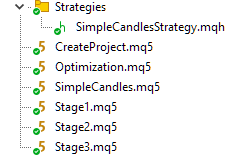
ププロジェクト部分のすべてのファイルをコンパイルし、拡張子がmq5のファイルごとに対応する、拡張子がex5のファイルを作成します。
まとめ
手順1:プロジェクトの作成
CreateProject.ex5 EAをターミナルの任意のチャートにドラッグします(このEAはテスターで実行する必要はありません!)。EAのソースコード内では、すでにすべての入力値を現在の値に設定してあるので、ダイアログでそのまま[OK]をクリックするだけで構いません。
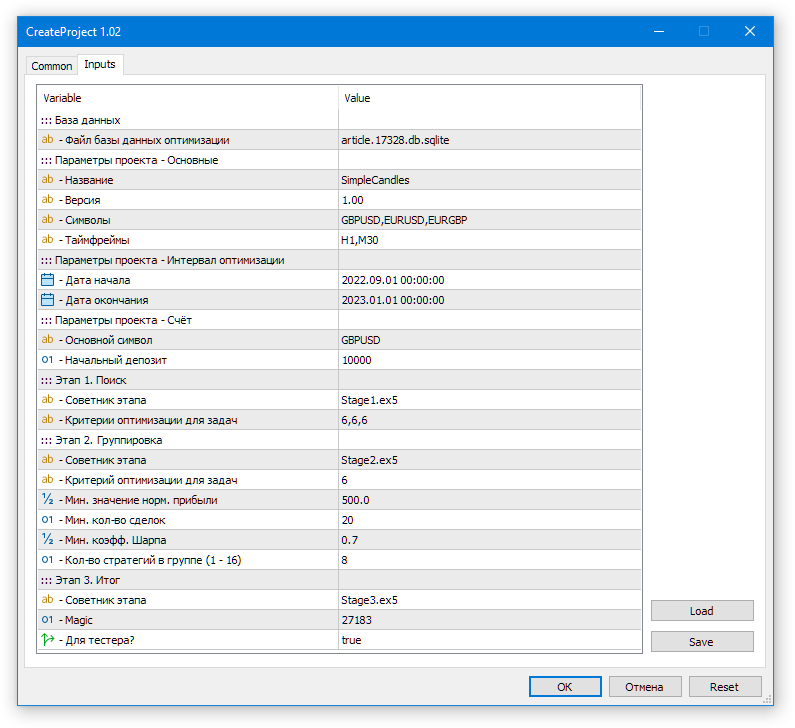
図1:最適化データベースにプロジェクト作成EAを起動する
果として、article.17328.db.sqliteという最適化データベースファイルが作成されます。
手順2:最適化の開始
Optimization.ex5 EAを任意のチャートにドラッグします(このEAもテスターで実行する必要はありません)。開いたダイアログでDLLの使用を有効にし、正しい最適化データベース名が指定されていることを確認します。
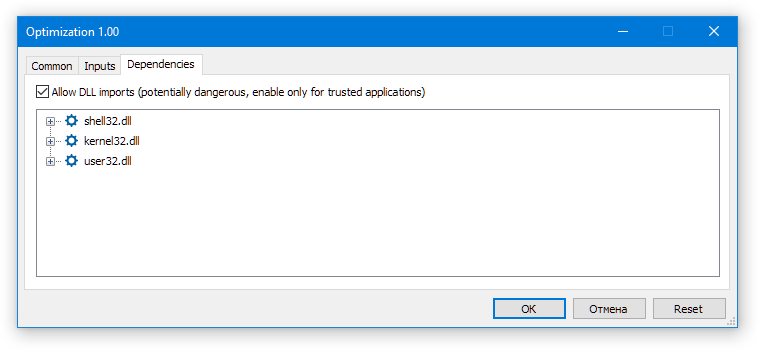
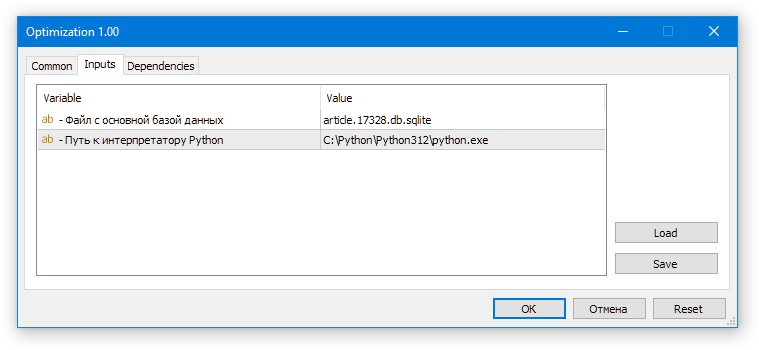
図2:自動最適化EAの起動
すべて正しく設定されていれば、テスターでは第1ステージEAの最適化が最初の銘柄-時間軸ペアで開始され、Optimization.ex5 EAのチャート上では「Total tasks in queue: ..., Current Task ID: ...」のように表示されます。
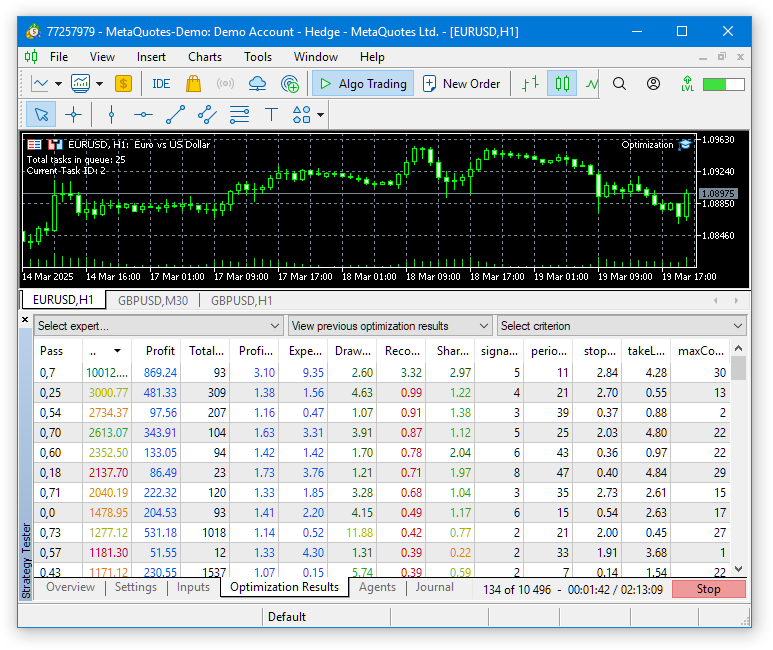
図3:自動最適化EAの動作
次に、すべての最適化タスクが完了するまでしばらく待ちます。テスト対象の期間が長く銘柄や時間軸の数が多い場合、この時間はかなり長くなることがあります。現在のデフォルト設定(33エージェント使用)では、全体の処理に約4時間かかりました。
最後のコンベアステージでは、最適化はおこなわれず、第3ステージEAの単一パスが実行されます。その結果、最終EA用のデータベースファイルが作成されます。プロジェクト作成時にプロジェクト名として「SimpleCandles」を指定し、マジックナンバーが27183でstage3Tester_=trueの場合、共有ターミナルにはSimpleCandles-27183.test.db.sqliteというファイルが作成されます。
手順3:最終EAをテスターで起動
テスター上で最終EAを実行してみましょう。最終EAのコードはすべてライブラリ部分から取得されているため、デフォルトのパラメータ値もそこで定義されています。そのため、SimpleCandles.ex5 EAをテスターで入力値を変更せずに起動すると、データベースSimpleCandles-27183.test.db.sqliteから最後に追加された戦略グループ(groupId_= 0)を、自動更新有効(useAutoUpdate_= true)で使用します(SimpleCandles EAのファイル名に、デフォルトのマジックナンバーmagic_= 27183を付加し、さらにテスターで実行するため「.test」接尾辞を加えたものです)。
残念ながら、現時点では最終EAのデータベース内で既存の戦略グループIDを表示する特別なツールは作成していません。ィタでデータベースを開き、strategy_groupsテーブルで確認するしかありません。
ただし、最適化プロジェクトが1回だけ作成されて実行された場合、最終EAデータベースにはID 1の戦略グループが1つだけ存在します。そのため、入力で特定のgroupId_= 1を指定するか、groupId_= 0のままにするかは、グループ選択の観点では違いがありません。いずれにしても唯一存在するグループが読み込まれます。同じプロジェクトを再度実行する場合(データベース上で直接プロジェクトのステータスを変更することで可能)や、別の類似プロジェクトを作成して実行した場合は、最終EAデータベースに新しい戦略グループが追加されます。この場合、異なるgroupId_パラメータ値で異なるグループが使用されます。
自動更新有効化パラメータ(useAutoUpdate_= true)にも注意が必要です。グループが1つしかない場合でも、このパラメータは最終EAの動作に影響します。自動更新が有効な場合、読み込まれる戦略グループは、出現日が現在のシミュレーション日より前のものに制限されます。
つまり、最適化に使用した同じ期間(例:2022.09.01~2023.01.01)で最終アドバイザーを実行すると、唯一の戦略グループは読み込まれません。なぜならその形成日が2023.01.01だからです。そのため、最終EAを起動する際には、自動更新を無効にして(useAutoUpdate_= false)、使用する取引戦略グループのID (groupId_= 1)を入力で指定するか、あるいは最適化期間の終了日以降の別の期間を選択する必要があります。
原則として、最終EAで使用する戦略が確定しておらず、定期的な再最適化の可否をテストする目標も未設定の場合、このパラメータはfalseに設定し、使用する戦略グループのIDを明示的に指定しておくのが安全です。
最後に、最終EAが使用するデータベース名を指定するパラメータがあります。デフォルト設定では、マジックナンバーはプロジェクト作成時に指定したものと同じです。また、最終EAファイル名もプロジェクト名と一致させています。プロジェクト作成時にstage3Tester_パラm-恵田が trueだったため、作成される最終EAデータベースのファイル名はSimpleCandles-27183.test.db.sqlite.となり、最終的にSimpleCandles.ex5が使用するファイル名と完全に一致します。
次に、最適化期間での最終EAの実行結果を見てみましょう。
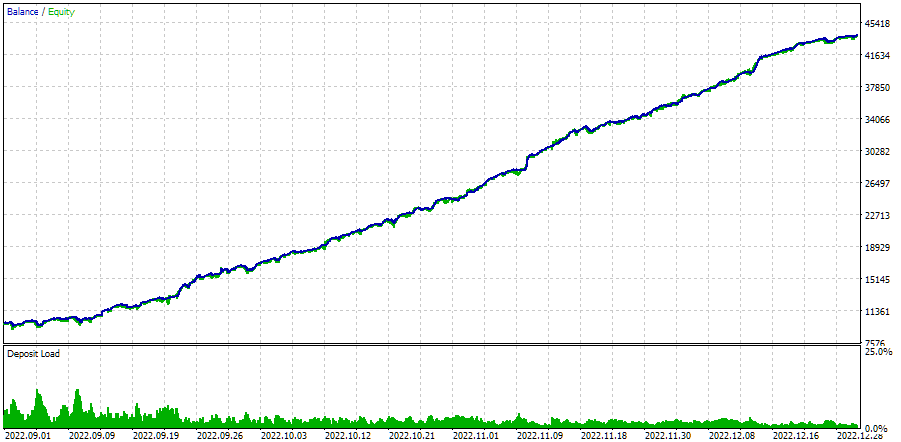
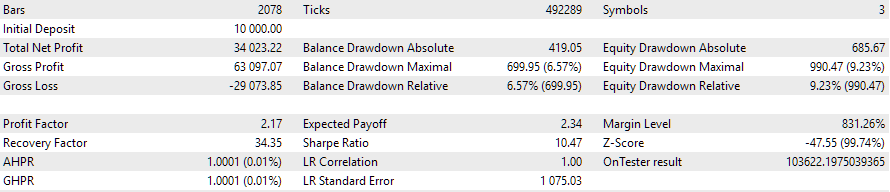
図4:2022.09.01~2023.01.01における自動最適化EAの動作
もし別の期間で実行した場合、結果はおそらくあまりきれいにはならないでしょう。
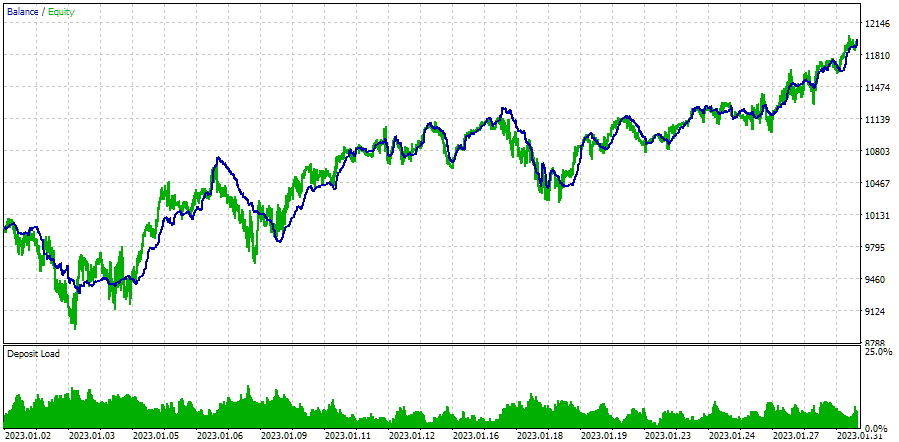
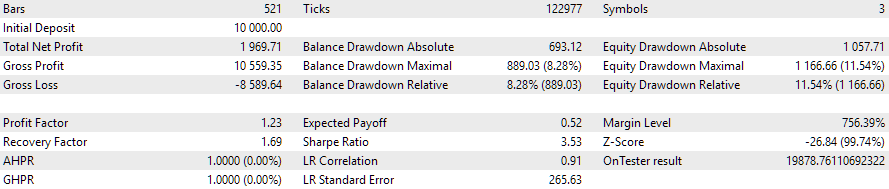
図5:2023.01.01~2023.02.01における自動最適化EAの動作
例として、最適化期間直後の1か月を取り上げました。確かにドローダウンは予想値の10%をわずかに超え、正規化利益は約5分の1に減少しています。最後の3か月で最適化を再実行し、翌月のEAの挙動を同様に再現できるかどうkは、現時点では未解決です。
手順4:最終EAを取引口座で起動する
最終EAを取引口座で実行するには、生成されたデータベースファイル名を調整する必要があります。「.test」接尾辞を削除します。つまり、SimpleCandles-27183.test.db.sqliteを単純にSimpleCandles-27183.db.sqliteに名前変更してコピーすればよく、場所は同じく共通ターミナルフォルダに置きます。
その後、最終EA SimpleCandles.ex5を任意のターミナルチャートにドラッグ&ドロップします。入力値はデフォルトのままで問題ありません。最後の戦略グループを読み込むするだけで十分であり、現在の日付はこのグループの作成日よりも当然後だからです。
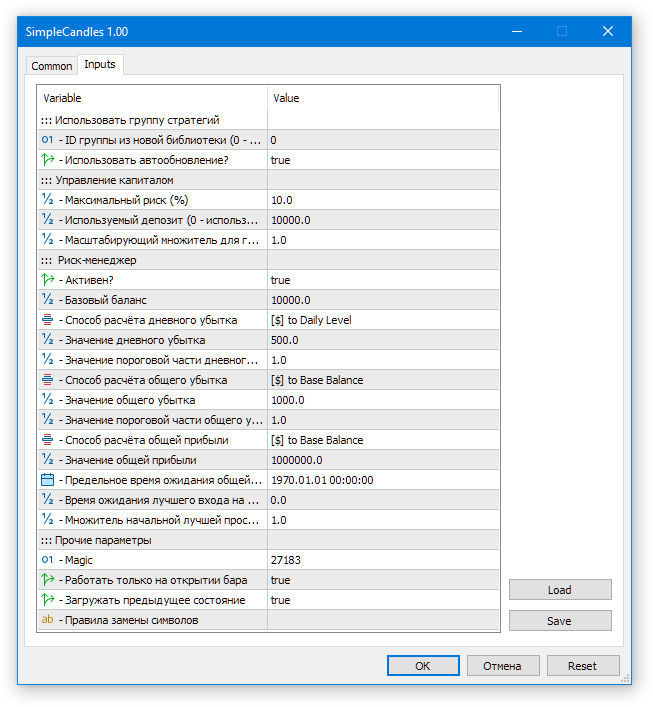
図6:最終EAのデフォルト入力
記事作成時、完成版EAはデモ口座で約1週間テストされ、以下の結果が得られました。
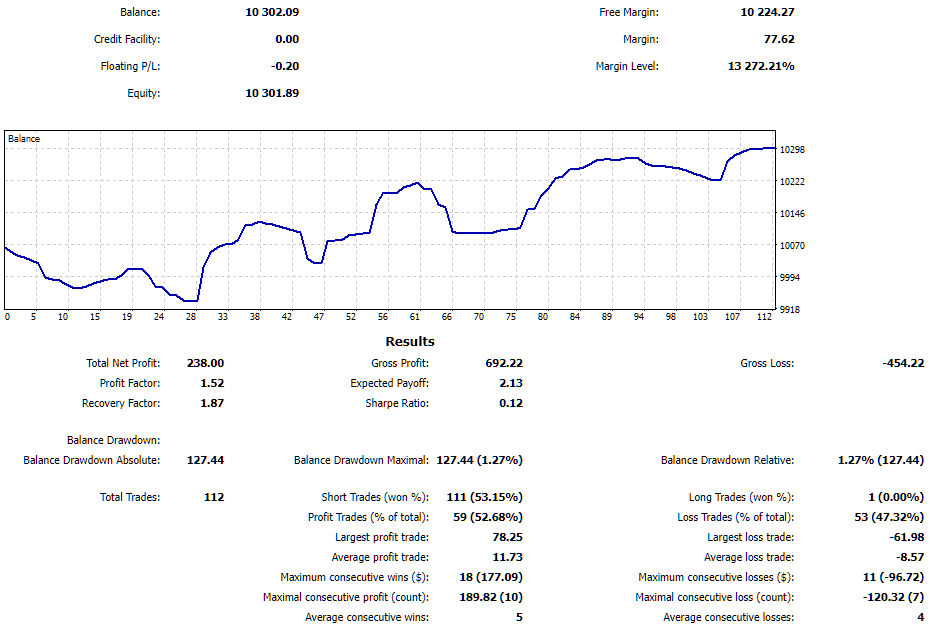
図7:取引口座における最終EAの動作結果
EAにとって非常に良い1週間でした。ドローダウンは1.27%、利益は約2%でした。PCの再起動によりEAは数回再起動しましたが、保有中の仮想ポジション情報を正常に復元し、作業を継続しました。
結論
ここまでで何を得たのかを振り返ってみましょう。かなり長期にわたる開発プロセスの結果を、ひとつのまとまったシステムに近い形でまとめることができました。今回完成した取引戦略の自動最適化およびテスト用ツールにより、単純な取引戦略であっても、異なる取引銘柄への分散を通じてテスト結果を大幅に改善することが可能になりました。
また、同じ目標を達成するために手作業でおこなう操作の数を大幅に減らすこともできます。これまでは、次の最適化を開始する前に前の最適化の完了を確認したり、中間結果を保存して後でEAに統合する方法を考えたりする必要がありましたが、今ではそうした作業に煩わされることなく、取引戦略のロジックそのものの開発に集中できます。
もちろん、このツールをさらに改善し、より便利にする余地はまだ多く残っています。完全なWebインターフェースを構築し、最適化プロジェクトの作成、起動、進行状況の監視だけでなく、複数のターミナルで稼働中のEAの操作や統計の閲覧まで管理できるようにするという構想は、まだ遠い未来の話です。これは非常に大きな課題ですが、振り返ってみると、今日すでにある程度まとまった形で解決できたタスクについても同じことが言えます。
ご精読ありがとうございました。またすぐにお会いしましょう。
重要な注意事項
この記事および連載のこれまでのすべての記事で提示された結果は、過去のテストデータのみに基づいており、将来の利益を保証するものではありません。このプロジェクトでの作業は研究的な性質のものであり、公開された結果はすべて、自己責任で使用されるべきです。
アーカイブ内容
| # | 名前 | バージョン | 詳細 | 最近の変更 |
|---|---|---|---|---|
| MQL5/Experts/Article.17328 | プロジェクト作業フォルダ | |||
| 1 | CreateProject.mq5 | 1.02 | ステージ、ジョブ、最適化タスクを含むプロジェクトを作成するためのEAスクリプト | 第25回 |
| 2 | Optimization.mq5 | 1.00 | プロジェクト自動最適化用EA | 第23回 |
| 3 | SimpleCandles.mq5 | 1.01 | 複数のモデル戦略グループを並列操作するための最終EA(パラメータは組み込みのグループライブラリから取得) | 第25回 |
| 4 | Stage1.mq5 | 1.02 | 取引戦略単一インスタンス最適化EA(第1ステージ) | 第25回 |
| 5 | Stage2.mq5 | 1.01 | 取引戦略単一インスタンス最適化EA(第2ステージ) | 第25回 |
| 6 | Stage3.mq5 | 1.01 | 生成された標準化された戦略グループを、指定された名前のEAデータベースに保存するEA | 第25回 |
| MQL5/Experts/Article.17328/Strategies | プロジェクト戦略フォルダ | |||
| 7 | SimpleCandlesStrategy.mqh | 1.01 | SimpleCandles取引戦略クラス | 第25回 |
| MQL5/Include/antekov/Advisor/Base | 他のプロジェクトクラスが継承する基本クラス | |||
| 8 | Advisor.mqh | 1.04 | EA基本クラス | 第10回 |
| 9 | Factorable.mqh | 1.05 | 文字列から作成されたオブジェクトの基本クラス | 第24回 |
| 10 | FactorableCreator.mqh | 1.00 | 第24回 | |
| 11 | Interface.mqh | 1.01 | さまざまなオブジェクトを視覚化するための基本クラス | 第4回 |
| 12 | Receiver.mqh | 1.04 | オープンボリュームを市場ポジションに変換するための基本クラス | 第12回 |
| 13 | Strategy.mqh | 1.04 | 取引戦略基本クラス | 第10回 |
| MQL5/Include/antekov/Advisor/Database | プロジェクトEAで使用されるすべての種類のデータベースを扱うファイル | |||
| 14 | Database.mqh | 1.12 | データベースを扱うクラス | 第25回 |
| 15 | db.adv.schema.sql | 1.00 | 最終EAのデータベース構造 | 第22回 |
| 16 | db.cut.schema.sql | 1.00 | 簡略化された最適化データベースの構造 | 第22回 |
| 17 | db.opt.schema.sql | 1.05 | 最適化データベース構造 | 第22回 |
| 18 | Storage.mqh | 1.01 | EAデータベース内の最終EAのキー値ストレージを扱うクラス | 第23回 |
| MQL5/Include/antekov/Advisor/Experts | 異なるタイプのEAで使用される共通部分のファイル | |||
| 19 | Expert.mqh | 1.22 | 最終EAのライブラリファイル(グループパラメータはEAデータベースから取得) | 第23回 |
| 20 | Optimization.mqh | 1.04 | 最適化タスクの起動を管理するEAのライブラリファイル | 第23回 |
| 21 | Stage1.mqh | 1.19 | 単一インスタンス取引戦略最適化EAのライブラリファイル(第1ステージ) | 第23回 |
| 22 | Stage2.mqh | 1.04 | 取引戦略インスタンスのグループを最適化するEAのライブラリファイル(第2ステージ) | 第23回 |
| 23 | Stage3.mqh | 1.04 | 生成された標準化された戦略グループを、指定された名前のEAデータベースに保存するEAのライブラリファイル | 第23回 |
| MQL5/Include/antekov/Advisor/Optimization | 自動最適化を担当するクラス | |||
| 24 | OptimizationJob.mqh | 1.00 | 最適化プロジェクトステージジョブクラス | 第25回 |
| 25 | OptimizationProject.mqh | 1.00 | 最適化プロジェクトクラス | 第25回 |
| 26 | OptimizationStage.mqh | 1.00 | 最適化プロジェクトステージクラス | 第25回 |
| 27 | OptimizationTask.mqh | 1.00 | 最適化タスククラス(作成) | 第25回 |
| 28 | Optimizer.mqh | 1.03 | プロジェクト自動最適化マネージャーのクラス | 第22回 |
| 29 | OptimizerTask.mqh | 1.03 | 最適化タスククラス(コンベア) | 第22回 |
| MQL5/Include/antekov/Advisor/Strategies | プロジェクトの動作を示すために使用される取引戦略の例 | |||
| 30 | HistoryStrategy.mqh | 1.00 | 取引履歴を再生するための取引戦略のクラス | 第16回 |
| 31 | SimpleVolumesStrategy.mqh | 1.11 | ティックボリュームを使用した取引戦略のクラス | 第22回 |
| MQL5/Include/antekov/Advisor/Utils | 補助ユーティリティ、コード削減用マクロ | |||
| 32 | ExpertHistory.mqh | 1.00 | 取引履歴をファイルにエクスポートするクラス | 第16回 |
| 33 | Macros.mqh | 1.06 | 配列操作に便利なマクロ | 第25回 |
| 34 | NewBarEvent.mqh | 1.00 | 特定の銘柄の新しいバーを定義するクラス | 第8回 |
| 35 | SymbolsMonitor.mqh | 1.00 | 取引商品(銘柄)に関する情報を取得するためのクラス | 第21回 |
| MQL5/Include/antekov/Advisor/Virtual | 仮想の取引注文やポジションのシステムを用いた各種オブジェクト作成用クラス | |||
| 36 | Money.mqh | 1.01 | 基本的なお金の管理クラス | 第12回 |
| 37 | TesterHandler.mqh | 1.07 | 最適化イベント処理クラス | 第23回 |
| 38 | VirtualAdvisor.mqh | 1.10 | 仮想ポジション(注文)を扱うEAのクラス | 第24回 |
| 39 | VirtualChartOrder.mqh | 1.01 | グラフィカル仮想ポジションクラス | 第18回 |
| 40 | VirtualHistoryAdvisor.mqh | 1.00 | トレード履歴再生EAクラス | 第16回 |
| 41 | VirtualInterface.mqh | 1.00 | EAGUIクラス | 第4回 |
| 42 | VirtualOrder.mqh | 1.09 | 仮想注文とポジションのクラス | 第22回 |
| 43 | VirtualReceiver.mqh | 1.04 | オープンボリュームを市場ポジションに変換するクラス(レシーバー) | 第23回 |
| 44 | VirtualRiskManager.mqh | 1.05 | リスクマネジメントクラス(リスクマネージャー) | 第24回 |
| 45 | VirtualStrategy.mqh | 1.09 | 仮想ポジションを使った取引戦略のクラス | 第23回 |
| 46 | VirtualStrategyGroup.mqh | 1.03 | 取引戦略グループのクラス | 第24回 |
| 47 | VirtualSymbolReceiver.mqh | 1.00 | 銘柄レシーバークラス | 第3回 |
MetaQuotes Ltdによってロシア語から翻訳されました。
元の記事: https://www.mql5.com/ru/articles/17328
警告: これらの資料についてのすべての権利はMetaQuotes Ltd.が保有しています。これらの資料の全部または一部の複製や再プリントは禁じられています。
この記事はサイトのユーザーによって執筆されたものであり、著者の個人的な見解を反映しています。MetaQuotes Ltdは、提示された情報の正確性や、記載されているソリューション、戦略、または推奨事項の使用によって生じたいかなる結果についても責任を負いません。

 中心力最適化(CFO)アルゴリズム
 初心者からエキスパートへ:MQL5での可視化による地理的市場認識の強化
 取引におけるニューラルネットワーク:ハイブリッドグラフシーケンスモデル(GSM++)
 MQL5 MVCパラダイムのテーブルのビューコンポーネント:基本グラフィック要素

- 無料取引アプリ
- 8千を超えるシグナルをコピー
- 金融ニュースで金融マーケットを探索
まず、これが何語なのか知りたい。
あなたのブラウザではなぜか表示されません。
あなたのブラウザでは表示されません。
その通りだ。2025.07.08というその日に、私はこのスレッドに何も投稿していない。スレッドへのリンクをたどると、違う日付の投稿が表示される。あなたの残りのプログラマーがついていけないのも、私のブラウザーのせいだろう。
その通りだ。その日、私はこのスレッドに何も投稿していない。このスレッドへのリンクをたどると、違う日付の投稿が表示される。あなたの残りのプログラマーがついていけないのも、私のブラウザーのせいだろう。
あなたの粘り強さに感謝します。
訂正してくれてありがとう。
しつこくてすみません。リンクはまだ私が書いたのではない奇妙なメッセージにつながっている。まあ、仮に私が書いたと仮定しても、なぜその横にロシア語のメッセージがないのか?それとも、英語は無理でも韓国語は勉強したし、楽しいから......とでも思っているのだろうか。
それが、異なる言語でのひとつの議論の違いなのだ。
これはリンク先から。
これがロシア語訳。
そしてこれがロシア語版の記事の中身。
だから、私はどの言語で書こうとしていたのか?
すべて1つのトピックに過ぎない。そして他のものを見ると、私が夢にも思わなかった言語で奇妙な由来のメッセージが書かれている。
過剰反応だったかもしれない。同じようなメッセージは他に1つしか見つからなかった。
すべての言語バージョンで上記のメッセージを削除してください。前回のように完全ではないかもしれませんが......。
取引、自動取引システム、取引戦略のテストに関するフォーラム
記事「多通貨エキスパート・アドバイザーの開発(第25回)」についての議論:新しいストラテジーのプラグイン(II)"
ラシッド・ウマロフ, 2025.07.06 14:04
ありがとうございます。
この問題はすでに解決しましたが、完全には解決していないよう です。