KeltnerBB Fade
- Experts
- Version: 1.34
- Updated: 16 September 2026

Overview
KeltnerBB Fade is a mean-reversion Expert Advisor for MetaTrader 5. It fades extreme volatility expansions by detecting when Bollinger Bands approach or cross Keltner Channels, then trades back toward the mean, using an ATR-based stop loss and dynamic position sizing on every trade.
How it works
Bollinger Bands and Keltner Channels are computed on the current timeframe. An entry fires when the Bollinger upper or lower band approaches or crosses the Keltner upper or lower band, using either a strict cross or a proximity threshold depending on the selected signal mode. Position size is calculated from account equity and the risk percent input, with an ATR-based stop loss. The exit is chosen from five configurable modes: mean revert to the middle band, band re-entry, squeeze inverse, opposite signal, or RSI momentum fade. An optional profit-protection layer adds an R-multiple partial-close ladder, a breakeven lock, a time-in-profit close, and a percent-of-balance trailing ladder. All exits and profit-protection triggers are evaluated on closed-bar high, low and close only, so behavior stays consistent between OHLC and Every Tick testing.
Inputs
General
- Magic Number: unique identifier for this EA's trades
- Risk Percent: risk per trade, % of account equity
- ATR Period Risk: ATR period used for stop loss sizing
- ATR SL Multiplier: stop loss distance as a multiple of ATR
- Margin Safety Factor: max margin usage relative to free margin, buffer against adverse gap moves
Bollinger
- BB Period
- BB Deviation
- BB Price: applied price for Bollinger calculation
Keltner
- KC EMA Period
- KC ATR Period
- KC ATR Multiplier
Signal Mode
- Signal Mode: strict cross or proximity threshold
- Signal Proximity Pct: % of Keltner channel width used as the approach buffer in proximity mode
Exit
- Exit Mode: mean revert, band re-entry, squeeze inverse, opposite signal, or momentum fade
- RSI Period
- RSI Upper
- RSI Lower
Profit Lock
- Lock Breakeven Enable: move stop loss to breakeven once triggered
- Lock Breakeven Trigger R: trigger level, in R-multiples of initial stop distance
- Lock Breakeven Buffer Points: buffer beyond entry price, in points
- Lock Ladder Enable: partial close on R-multiple tiers
- Lock Ladder R1 / R1 Pct: tier 1 trigger and close percentage
- Lock Ladder R2 / R2 Pct: tier 2 trigger and close percentage
- Lock Ladder R3 / R3 Pct: tier 3 trigger and close percentage
- Lock Time In Profit Enable: partial close after N consecutive bars in profit
- Lock Time In Profit Bars: bars required
- Lock Time In Profit Pct: close percentage
- Lock Pct Ladder Enable: full-close trailing ladder based on percent of account balance
- Lock Pct Ladder Activation Pct: floating profit percentage that arms the ladder
- Lock Pct Ladder Trail Step Pct: ladder step size, in percent
Optimizer Score
- Score Min Profit Factor: disqualification threshold
- Score Max Drawdown Pct: disqualification threshold
- Score Min Trades: disqualification threshold
- Score R2 Weight: weight of equity curve smoothness
- Score Slope Weight: weight of profit speed
- Score Split Penalty: penalty for temporal instability between first and second half of the test
- Score Skew Penalty: penalty for profit concentration in a single trade
- Score Ulcer Penalty: penalty for drawdown depth and duration
- Score MAR Weight: weight of net profit relative to max drawdown
- Score Trade Bonus Weight: weight of trade count reliability bonus
Optimizer scoring system
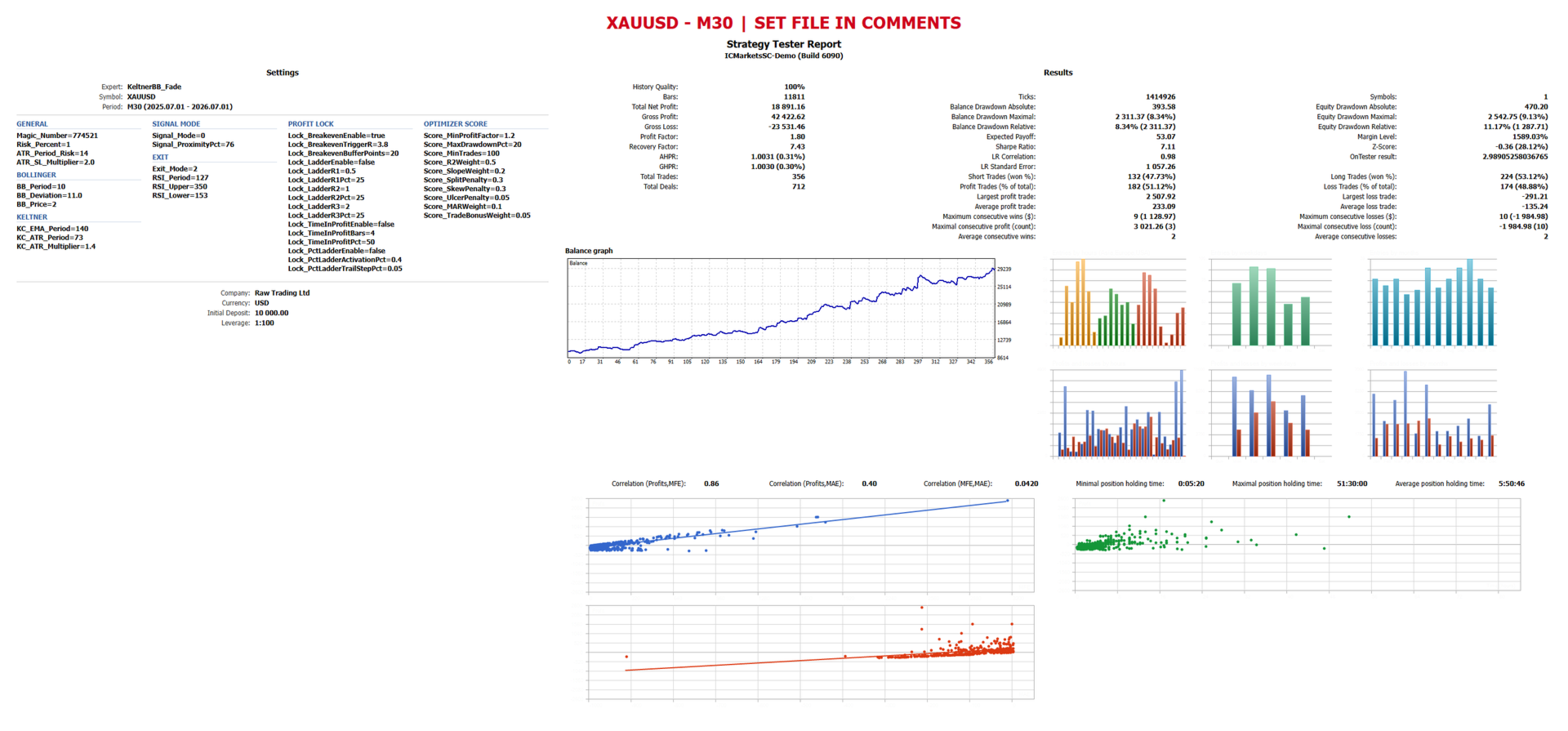
This EA includes a custom OnTester scoring function built to reduce curve-fitting during optimization. It ranks runs by equity curve smoothness, profit speed, temporal stability between the first and second half of the test, profit concentration in a single trade, drawdown depth and duration, capital efficiency relative to drawdown, and trade count reliability. Runs falling below the profit factor, drawdown or trade count thresholds are automatically scored zero. Set the Optimizer Criterion to Custom max when running the built-in optimizer.
Recommended setup
Test in Every Tick mode with real ticks, on the timeframe and symbol matching your target market. A broker with tight spreads and low stop or freeze levels is recommended, for cleaner breakeven and partial-close execution.
Screenshots
Recommended set files are provided in the comments section below.
Disclaimer
Past performance shown in backtests does not guarantee future results. Always test on a demo account before live use. Trading involves risk of loss.