Continuum EA
- Experts
- Version: 1.11
- Updated: 16 September 2026

Overview
Continuum is a fully automated trading robot built around continuous, disciplined money management rather than a single entry trick. A single Aggressiveness input, from 1 to 100, scales every risk and behavior parameter at once, so the same core logic runs conservatively or actively without touching a single line of code. Entries come from a weighted multi-timeframe confluence read across the M15, H1, H4 and D1 charts, combining trend, momentum and volatility indicators already built into MetaTrader 5. Risk is capped both per trade and in aggregate across all open positions, and every exit is handled by three independent, event-driven mechanisms rather than a single fixed take-profit level, so the stop-loss works as a catastrophic safety net rather than the primary way trades get closed.
How it works
- Every M15, H1, H4 and D1 bar close, the EA reads EMA trend direction, RSI momentum, MACD crossover state and ADX trend strength, and combines them into a single weighted confluence score, with higher timeframes weighted more heavily.
- New trades open on H1 bar close only, when the confluence score crosses the Aggressiveness-derived entry threshold, and only if price has not already run too far from the H1 trend average, to avoid chasing an extended move.
- Position size is calculated from ATR-based stop distance and account equity, so every trade risks a consistent percentage of the account, with total exposure across all open positions capped by a separate aggregate risk budget.
- Risk management runs every M15 close, four times more often than entries, and reacts through three separate mechanisms: an early exit when the confluence score turns against the position, a time-based exit when a trade shows no minimum progress within a set number of bars, and an ATR trailing stop once a position has already banked partial profit.
- When a position reaches a profit target expressed in risk multiples, part of the position is closed and the stop is moved to breakeven, letting the remaining size run under the trailing mechanism.
- The EA can add to a winning position in the same direction, up to a limit set by Aggressiveness, while the total risk budget across all tiers stays capped.
- A broker-side stop-loss is always attached to every position from the moment it opens. It is deliberately kept wide: it is not meant to be the normal way a trade closes, it exists purely to protect the account against a fast, abnormal move.
Inputs
General
- Magic Number: unique identifier for this EA's trades, so it can run alongside other EAs or instances on the same account without conflict.
- Aggressiveness: single scale from 1 to 100 that drives risk per trade, total risk budget, entry sensitivity, pyramiding depth, stop distance, and how quickly profit is banked.
Indicators
- MA Fast Period: fast moving average used in the trend component of the confluence score.
- MA Slow Period: slow moving average used in the trend component of the confluence score.
- RSI Period: RSI length used in the momentum component of the confluence score.
- MACD Fast: fast EMA length for the MACD component.
- MACD Slow: slow EMA length for the MACD component.
- MACD Signal: signal line length for the MACD component.
- ADX Period: ADX length used to weight confluence by trend strength.
- ADX Trend Min: minimum ADX value considered a genuine trending condition.
- ATR Period: ATR length used for stop distance and trailing calculations.
Exit Management
- Invalidation Score Mult: how far the confluence score has to reverse, relative to the entry threshold, before an open position is closed early.
- Stall Max Bars: maximum number of H1 bars a trade is allowed to run without reaching minimum progress.
- Stall Min Progress R: minimum profit, in risk multiples, a trade must show by Stall Max Bars or it gets closed.
- Entry Max Extension ATR: maximum distance, in ATR, price can already be from the H1 trend average for a new entry to be allowed.
Dashboard
- Dashboard Show: toggles the on-chart panel showing net profit by period, account drawdown and this EA's own floating drawdown.
Optimizer Score
- Score MinProfitFactor: minimum profit factor required for an optimization run to be scored at all.
- Score MaxDrawdownPct: maximum drawdown percentage allowed before a run is disqualified.
- Score MinTrades: minimum number of trades required for a run to be considered statistically meaningful.
- Score R2Weight: weight given to how smooth the equity curve is.
- Score SlopeWeight: weight given to how fast the equity curve grows.
- Score SplitPenalty: penalty for the equity curve behaving differently in the first half of the test versus the second half.
- Score SkewPenalty: penalty for profit being concentrated in a small number of outsized trades.
- Score UlcerPenalty: penalty for the depth and duration of drawdowns.
- Score MARWeight: weight given to net profit relative to maximum drawdown.
- Score TradeBonusWeight: small bonus for a higher trade count, with diminishing returns.
Optimizer scoring system
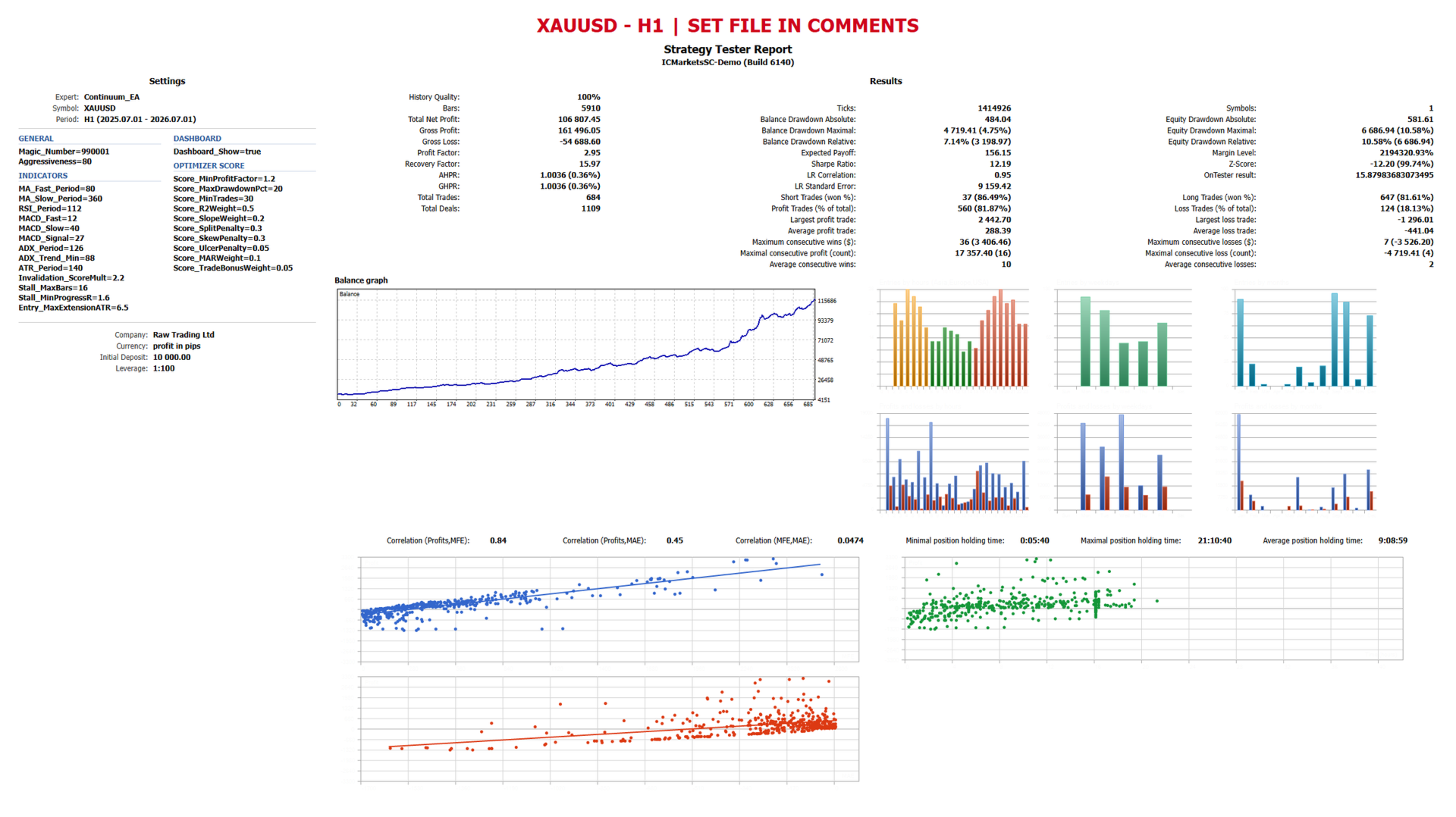
Continuum includes a built-in custom OnTester scoring function designed against curve-fitting rather than raw net profit. It disqualifies any optimization run with negative profit, a profit factor below the configured minimum, drawdown above the configured maximum, or too few trades to be statistically meaningful. Remaining runs are ranked on equity curve smoothness, growth rate, and capital efficiency, with penalties for temporal instability between the first and second half of the test, for profit concentrated in a single large trade, and for the depth and duration of drawdowns. To use it, set the Optimizer Criterion to Custom max before running an optimization.
Recommended setup
Any liquid Forex major or metal pair, H1 timeframe. Backtest and optimize using real tick data with Every Tick modeling for final validation; a coarse first pass in 1 Minute OHLC mode is suitable for narrowing down indicator and threshold ranges before a full-precision confirmation pass. A VPS is recommended for uninterrupted continuous operation, since the EA manages risk on every M15 close.
Screenshots
Recommended input sets (.set files) for the symbols and timeframes shown are provided in the comments section below.
Disclaimer
Past performance shown in any screenshot or backtest does not guarantee future results. Test thoroughly on a demo account before committing real funds, and use position sizing appropriate to your own risk tolerance. Trading leveraged instruments carries a risk of loss.