Renko subwindow
- Indicators
- Version: 1.0

Overview
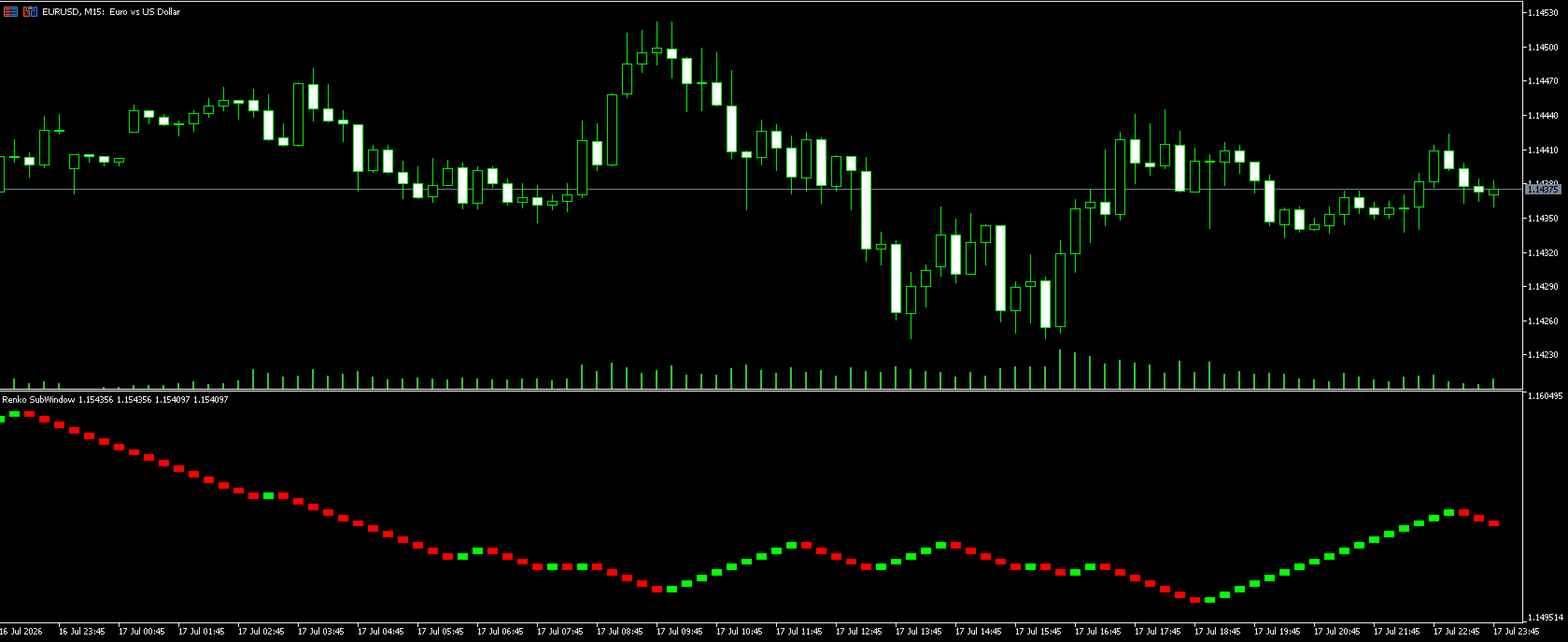
Renko SubWindow plots a Renko brick chart as colored candles inside a separate indicator window, without affecting the main chart. Brick size can be fixed in points or calculated dynamically from ATR for adaptive volatility-based bricks.
How it works
- Reconstructs Renko bricks from closing prices of the current symbol/timeframe history.
- Each brick forms once price moves beyond the defined brick size from the last brick's close.
- Bricks are rendered as colored candles: bullish (up) and bearish (down) colors are distinct.
- Recalculates only on new bar formation or timeframe/history change, keeping the chart light and stable.
Inputs
- Renko_BrickPoints: fixed brick size in points; set to 0 to use ATR instead
- Renko_ATR_Period: ATR period used when BrickPoints is 0
- Renko_MaxBricks: maximum number of bricks displayed in the window
Recommended setup
Works on any symbol and timeframe. For Forex majors, a brick size of 50-150 points is a reasonable starting point; for Gold/Silver or indices, prefer ATR mode to adapt to volatility.
Screenshots
Live example on chart with default settings, plus a screenshot of the input panel.
Disclaimer
This indicator is a visual/analysis tool only and does not place trades. Past performance shown in screenshots is not indicative of future results. Test on demo before any live use.