
Order Block Zones Auto Supply and Demand
- Indicators
-
Yuki Nakayama
 I am Yuki, an independent developer in Japan. I build indicators and utilities for MetaTrader 5 and publish them here on the MQL5 Market. Every tool has a free edition, so you can see how it behaves on your own charts before you consider the paid one.
 - Version: 1.48
- Updated: 10 October 2026
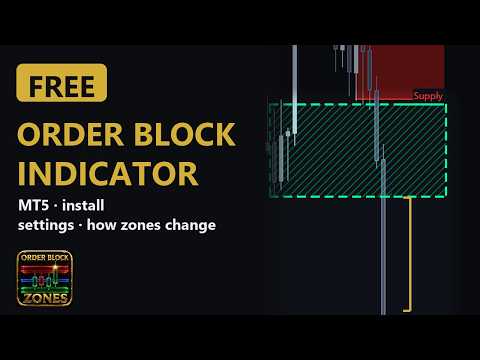
Order Block Zones is a free order block indicator for MetaTrader 5. It marks one specific candle pattern in your chart's price data, the last opposite-colour candle before a strong move that breaks structure, and draws it as a clean supply or demand zone on the timeframe you are watching. Traders who work with Smart Money Concepts (SMC) or the ICT approach call these order blocks; the tool finds them by a fixed rule on the candles, with the move measured against ATR, and does not see any actual institutional orders. It also shades the London and New York kill zones for the last five trading days by default, so you can see which session a zone formed in.
How a zone is found is transparent, not a black box. A bearish candle whose high is then broken upward by a displacement leg becomes a demand zone. A bullish candle whose low is then broken downward becomes a supply zone. Displacement is measured against ATR, so weak and noisy candles are ignored.
Mitigation tracking keeps the chart honest. A fresh zone that has never been retested is drawn bold with a bright proximal edge line. When price wicks back into it on a closed bar the zone becomes mitigated and fades. The zone is removed as soon as the current price is beyond its far edge, checked on every refresh; it can vanish inside a candle and return if that candle closes back inside, and once a candle has closed through it, it is gone for good. So your chart shows only zones the current price has not traded through, up to the number of zones the board keeps (5 by default, adjustable).
A compact dark panel — draggable, four sizes, English or Japanese — shows live counts of demand, supply and fresh zones, the nearest supply above and demand below (fresh or already tested) with the distance in points, and a legend. The free version has no notifications; zone-approach alerts are a PRO feature.
A History chip on the panel opens a sheet with the most recent twenty zone events, and the same events are written to the Experts log once per closed bar: a new zone on the board, its first touch while it is on the board, and the reason a zone left the chart. Each row shows the bar the event was observed on, the candle the zone formed on, the timeframe, the side and the price band, and hovering a row shows the full reason in words. The sheet says since when it has been watching and how many events it has seen, and a zone that drops off the board and comes back stays on one row with a repeat count. The reasons are told apart: "price broke through", "replaced by newer zone", "pushed off the board" and "left the scan window".
Only "price broke through" means the zone failed, judged against the current price at the next bar. "Pushed off the board" means the zone is still inside the scan range but lost its place on the board, most often because the board keeps only the newest zones (5 by default) and a newer one took its slot, so it can come back; "left the scan window" means the candle that formed it is now older than the bars the tool scans, so it cannot. The History list is kept in memory only and starts empty after every attach, timeframe change or settings change. The journal lets you run your own outcome tally over a few weeks instead of trusting a screenshot.
This is a display tool. There are no trade signals, no profit promises and no DLLs. Use the zones as context for your own method: for entries, for targets, or simply to see where not to chase.
Order Block Zones PRO
Order Block Zones PRO is a sister product that adds the higher-timeframe map most order-block strategies depend on: H4 and daily zone layers overlaid together on your execution chart, popup and push alerts as price approaches a fresh zone, with a log of recent alerts on the panel, and Fair Value Gaps drawn until they are filled. The user guide linked below compares the two.
Every input and every row of the panel is explained in the user guide on the author's blog: Order Block Zones user guide
Order Block Zones pairs naturally with Confluence Sniper, a free tool that only signals when its five checks agree and keeps its history in a local ledger file instead of recomputing it.
How a zone is found is transparent, not a black box. A bearish candle whose high is then broken upward by a displacement leg becomes a demand zone. A bullish candle whose low is then broken downward becomes a supply zone. Displacement is measured against ATR, so weak and noisy candles are ignored.
Mitigation tracking keeps the chart honest. A fresh zone that has never been retested is drawn bold with a bright proximal edge line. When price wicks back into it on a closed bar the zone becomes mitigated and fades. The zone is removed as soon as the current price is beyond its far edge, checked on every refresh; it can vanish inside a candle and return if that candle closes back inside, and once a candle has closed through it, it is gone for good. So your chart shows only zones the current price has not traded through, up to the number of zones the board keeps (5 by default, adjustable).
A compact dark panel — draggable, four sizes, English or Japanese — shows live counts of demand, supply and fresh zones, the nearest supply above and demand below (fresh or already tested) with the distance in points, and a legend. The free version has no notifications; zone-approach alerts are a PRO feature.
A History chip on the panel opens a sheet with the most recent twenty zone events, and the same events are written to the Experts log once per closed bar: a new zone on the board, its first touch while it is on the board, and the reason a zone left the chart. Each row shows the bar the event was observed on, the candle the zone formed on, the timeframe, the side and the price band, and hovering a row shows the full reason in words. The sheet says since when it has been watching and how many events it has seen, and a zone that drops off the board and comes back stays on one row with a repeat count. The reasons are told apart: "price broke through", "replaced by newer zone", "pushed off the board" and "left the scan window".
Only "price broke through" means the zone failed, judged against the current price at the next bar. "Pushed off the board" means the zone is still inside the scan range but lost its place on the board, most often because the board keeps only the newest zones (5 by default) and a newer one took its slot, so it can come back; "left the scan window" means the candle that formed it is now older than the bars the tool scans, so it cannot. The History list is kept in memory only and starts empty after every attach, timeframe change or settings change. The journal lets you run your own outcome tally over a few weeks instead of trusting a screenshot.
This is a display tool. There are no trade signals, no profit promises and no DLLs. Use the zones as context for your own method: for entries, for targets, or simply to see where not to chase.
Order Block Zones PRO
Order Block Zones PRO is a sister product that adds the higher-timeframe map most order-block strategies depend on: H4 and daily zone layers overlaid together on your execution chart, popup and push alerts as price approaches a fresh zone, with a log of recent alerts on the panel, and Fair Value Gaps drawn until they are filled. The user guide linked below compares the two.
Every input and every row of the panel is explained in the user guide on the author's blog: Order Block Zones user guide
Order Block Zones pairs naturally with Confluence Sniper, a free tool that only signals when its five checks agree and keeps its history in a local ledger file instead of recomputing it.






































very precise order block indicator