Gold Pulse Pro Alerts Sessions and Levels
- Indicators
-
Yuki Nakayama
 I am Yuki, an independent developer in Japan. I build indicators and utilities for MetaTrader 5 and publish them here on the MQL5 Market. Every tool has a free edition, so you can see how it behaves on your own charts before you consider the paid one.
- Version: 2.37
- Updated: 11 November 2026
- Activations: 5
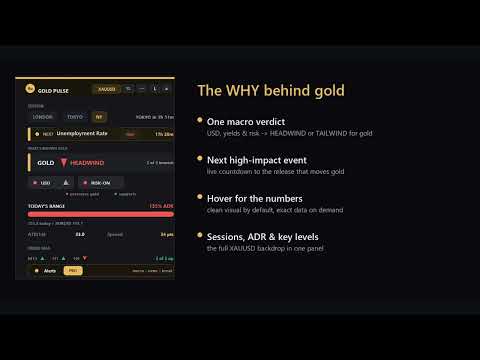
Gold Pulse PRO is a gold dashboard for MetaTrader 5 that watches gold while you cannot: it alerts you when a session opens, when today's range reaches your chosen share of the average day, when price comes near a key level, when the macro readout flips, and before high-impact US news. One panel shows which session you are in, how much of the average day's range is used, where the key levels are and how far price is from each, and whether the US dollar and risk markets read as a HEADWIND or a TAILWIND for gold. That macro line is read from the dollar and risk proxies found on your broker (plus a yield proxy if you enter its symbol), and it is a readout of those markets, not a diagnosis of why a particular move happened.
Built only for XAUUSD. Information dashboard: no signals, no martingale, no profit promises.
Why PRO
Free Gold Pulse shows you where gold stands the moment you look. PRO adds the alerts, so the panel watches the session while you cannot. There are five alert types. Session open fires when the panel's active session changes: Tokyo and London at their open, and New York when the London session hands over to it (18:00 server time with the default hours). ADR reached fires the first time today's range crosses your percent threshold (default 100 percent) and re-arms on the next daily bar. Key-level touch fires when price comes within your tolerance of a round number, the previous day's high or low, the daily open, the weekly open or the Asian range high or low; the Asian range is drawn while it forms and alerts only once the Tokyo session has closed and the range is final.
Macro shift fires when the HEADWIND or TAILWIND readout flips; it is judged once per new M1 bar of gold and only while every driver could be priced, so a closed market or a reconnect cannot flip it back and forth. Pre-news fires ahead of the next high-impact USD release. A key-level alert is remembered by the level's type and price and re-arms once price has moved more than twice your touch tolerance away and comes back. With the default tolerance of 30 points that band is narrow, so price swinging around a level can announce the same level more than once. A daily or weekly open is not announced at the moment it appears at the price. Alerts arrive as a terminal popup and, if you switch it on, as a push notification to your phone. You can let alerts fire every day, only Monday to Friday by server time, or only while your broker's gold session is open, and alerts held back are written to the Experts log.
PRO also adds the weekly open and the Asian range high and low, and the deeper macro view: the NEXT row opens a seven-day calendar of high-impact USD events with the forecast and previous values, and the macro bar opens a breakdown showing each driver's move, its weight in the readout and the currency pairs behind the dollar reading.
Everything in the free panel is included
The panel is draggable, comes in four sizes and speaks English or Japanese. It carries a session clock for Tokyo, London and New York with a countdown to the next session, today's range against ADR(20) as one percentage, ATR(14) and the live spread colour coded, and a multi-timeframe trend bias on M15, H1 and H4 shown by arrow colour and shape. On the chart it draws round numbers, the previous day's high and low, the daily open and the levels above, each with a right-edge price tag showing the level and its distance from price, plus a gold session band across the top. Tag and line weight are selectable from a panel button.
Switching from the free panel
Moving from the free Gold Pulse to PRO takes three steps: note the inputs you changed in the free panel, remove it from the chart, then attach Gold Pulse PRO and set them again. Nothing is carried over from the free panel. PRO does not read its saved panel position, size, corner or level-line thickness, and the terminal keeps the inputs of each indicator separately, so PRO starts from its own defaults. Every input of the free panel exists in PRO under the same name and default, so you re-enter only what you changed, such as the session hours, the risk and yield symbols and the level options. PRO adds thirteen inputs for the weekly open, the Asian range and the alerts, and the alerts are on by default with push off. Both editions open in the top-left corner at the same size, so to keep both on one chart set a different panel corner in one of them before attaching it.
What the numbers mean
ADR is today's range compared with the average of recent completed days. Reaching 100 percent means the day is average-sized so far; it is not a ceiling and not a reversal signal. Bias arrows and ATR are evaluated on closed bars only, so those readings do not change after the fact. Alerts watch the live price and the current day's range. The session clock, spread and today's range are live values and update with every tick, as they should. If a driver symbol is not offered by your broker, the macro readout works with the drivers that are available. If the economic calendar cannot be read, the NEXT row says calendar unavailable in amber instead of no high-impact events. If only a refresh fails after a good read, the last list stays on show without the events that have passed, and the NEXT row, its hover and the calendar sheet mark it as the list from the last successful read.
Works on any broker
Drop it on your broker's gold chart, whatever the symbol is called (GOLD, GOLD#, XAUUSDm, XAUUSD.pro): the panel reads the symbol of the chart it is attached to, so there is no symbol setup.
What this is not
It is not a signal generator and will not tell you when to buy or sell. It is not an EA and places no orders. It makes no promise about results. Trading involves risk; use it as context alongside your own method.
Compatibility
MT5, any broker, any account type. Built on standard MT5 functions with no DLLs and no external dependencies. Inputs cover the language toggle, panel corner and size, refresh seconds, ADR and ATR periods, EMA periods, level toggles, alert thresholds, alert days and the tag-collision gap.
If you find it useful, a review helps other traders find it and helps me keep building tools like this.
Shared foundation
Gold Pulse PRO is built on the same panel as the free Gold Pulse dashboard, whose listing is public on this Market. PRO keeps everything in that free panel and adds the alerts, the extra levels and the deeper macro view described above. Every input and every row of the panel is explained in the user guide on the author's blog: Gold Pulse user guide
Buy once and every future version is yours for free. This tool is actively maintained, and its roadmap is shaped directly by user feedback, so the features keep growing after you buy. Tell me in the comments what you would add or change and it goes on the list.