Volume Bubbles Order Flow Footprint

  • Utilities
  • Abdul Jalil
    Abdul Jalil
    4.5 (7)
    I am a multidisciplinary creator and market technician, combining the visual clarity of a graphics designer with the analytical depth of a trader and trading‑tools developer. My work lives at the intersection of design, technology, and financial markets.
  • Version: 20.90
  • Updated: 6 February 2026
  • Activations: 5

VOLUME BUBBLES ORDERFLOW FOOTPRINT PROFESSIONAL

Expert Advisor for MetaTrader 5

Complete Feature Documentation

Introduction:

Volume Bubbles OrderFlow Footprint Professional is an advanced order flow visualization tool designed for the MetaTrader 5 platform. It provides institutional-grade market analysis through real-time volume bubbles visualization, volume profiling, and sophisticated order flow analysis. This Expert Advisor transforms raw market data into actionable trading intelligence, helping traders identify high-probability trading opportunities by revealing the underlying market microstructure.

Main Interface Components:

Header Information Panel

The header panel displays critical market information at a glance, providing traders with essential data without cluttering the main chart area.

  • Symbol and Timeframe Display: Shows the current trading instrument and chart timeframe prominently in the top-left corner for quick reference.

  • Real-Time Price Information: Displays current Bid and Ask prices with color-coded directional indicators showing price movement.

  • Spread Monitor: Shows the current bid-ask spread in both points and pips, essential for scalping and high-frequency trading strategies.

  • Session Price Chart: A mini area chart displaying session price movement with gradient fill, providing visual context of the day's price action. Customizable bull and bear colors available.

  • Multi-Timeframe Trend Boxes: Color-coded boxes showing trend direction across M15, H1, H4, D1, and W1 timeframes, enabling traders to align with higher timeframe trends.


Volume Bubbles OrderFlow

The central volume bubbles is the core visualization tool, displaying order flow data in a bubble style format that reveals market liquidity and trading activity.

  • Real-Time Volume Visualization: Each cell represents volume traded at a specific price level during a time column, with color intensity indicating volume magnitude.

  • Configurable Columns: Supports up to 80 columns of historical data, configurable via InpHeatmapColumns parameter.

  • Price Level Resolution: Adjustable price levels (InpPriceLevels) and ticks per level (InpTicksPerLevel) for precise market depth visualization.

  • Column Update Frequency: Customizable update interval (InpColumnUpdateMs) allowing balance between detail and performance.

  • Auto-Scroll Feature: Automatically keeps current price centered in the visible area when enabled (InpAutoScroll), with configurable margin (InpScrollMargin).

  • Cell Background Coloring: Optional background coloring based on cumulative volume at each price level, showing areas of high trading activity.

  • Cell Flash Animation: Visual flash effect when trades occur at specific price levels, with configurable duration (InpCellFlashDuration) and intensity (InpCellFlashCount).


Volume Bubbles

Volume bubbles provide an intuitive visual representation of individual trades, with size proportional to trade volume.

  • Dynamic Sizing: Bubble size scales between minimum (InpBubbleMinSize) and maximum (InpBubbleMaxSize) based on trade volume relative to recent activity.

  • Volume Threshold: Only trades exceeding the minimum volume threshold (InpMinBubbleVolume) generate bubbles, filtering out noise.

  • Color Coding: Buy trades display in the theme's bull color; sell trades display in the bear color for instant directional recognition.

  • Transparency Control: Adjustable alpha transparency (InpBubbleAlpha) allows bubbles to overlay without obscuring underlying data.

  • Outline Enhancement: Configurable outline width (InpBubbleOutlineWidth) improves bubble visibility against varying backgrounds.

  • Flash Animation: New bubbles flash briefly when created (InpBubbleFlash), drawing attention to fresh market activity. Duration controlled by InpBubbleFlashDuration.

  • Smooth Scrolling: Bubbles scroll smoothly with sub-pixel positioning as new columns are added, maintaining visual continuity.


Big Order Detection and Alerts

Large institutional orders are highlighted with special visual treatments to help traders identify significant market participants.

  • Threshold Configuration: Define what constitutes a big order via InpBigOrderThreshold parameter, typically set based on the instrument's average trade size.

  • Visual Text Labels: Large orders display volume text directly on the chart when InpShowBigOrderText is enabled.

  • Flash Size Threshold: Separate threshold (InpBigOrderFlashSize) for triggering flash animations on medium-to-large orders.

  • Custom Font Settings: Big order labels use dedicated font (InpBigOrderFont) and size (InpBigOrderFontSize) for optimal visibility.

  • Large Buy/Sell Detection: System tracks when large buy or sell orders occur, displaying alerts in the DOM Info panel.


Depth of Market (DOM) Panel

The DOM panel provides a traditional order book view, showing pending orders and recent trading activity at each price level.

  • Price Ladder Display: Vertical price ladder showing configurable number of levels (InpDOMLevels) above and below current price.

  • Bid/Ask Volume Bars: Horizontal bars showing cumulative volume at each price level, with separate colors for bid and ask sides.

  • Volume Profile Integration: Mini volume profile bars overlaid on the DOM showing historical volume distribution.

  • Trade Flash Indication: Price levels flash briefly when trades occur (InpDOMFlashDuration), indicating active price levels.

  • Current Bid/Ask Highlighting: Special highlighting for the current bid and ask prices with horizontal separator line.

  • Panel Width Control: Adjustable panel width (InpDOMWidth) to balance detail with screen real estate.


DOM Information Panel

Positioned below the DOM, this panel provides real-time analysis of order book dynamics.

  • Bids Rising/Falling Indicator: Shows whether bid-side pressure is increasing or decreasing, with directional arrow and color coding.

  • Large Order Detection Display: Prominently displays when large buy or sell orders are detected in the market.

  • Market State Indicator: Shows current market conditions when no large orders are present.

Time and Sales Panel

The Time and Sales panel provides a real-time tape of all executed trades, essential for reading market momentum and identifying aggressive buyers or sellers.

  • Trade Tape Display: Scrolling list of recent trades showing time, price, and size with color coding for buy/sell direction.

  • Configurable Row Count: Adjustable number of visible trades (InpTimeSalesRows) to balance information density with readability.

  • Big Order Highlighting: Large trades are highlighted with special styling for quick identification.

  • Panel Width Control: Adjustable width (InpTimeSalesWidth) for optimal display on different screen sizes.

Time and Sales Information Panel

This panel summarizes Time and Sales data to show who currently controls the market.

  • Buyers/Sellers In Control: Displays whether buyers or sellers dominate recent trading activity, calculated from the last 20 trades using a rolling window for responsive updates.

  • Directional Arrow: Up arrow for buyer control, down arrow for seller control, with corresponding color coding.

  • Buy/Sell Volume Totals: Shows cumulative buy and sell volume from the Time and Sales data for the current session.


Bid and Ask Price Lines

Visual markers for current bid and ask prices help traders identify the current market spread and price location.

  • Bid Line: Horizontal line at current bid price, toggleable via InpShowBidLine.

  • Ask Line: Horizontal line at current ask price, toggleable via InpShowAskLine.

  • Line Thickness: Configurable line width (InpLineThickness) for visibility on different screen resolutions.

  • Theme-Based Colors: Lines automatically use the current theme's bull and bear colors.


Price Grid Overlay

Optional grid lines help with price level identification and chart readability.

  • Toggle Control: Grid can be enabled or disabled via InpShowGrid parameter.

  • Custom Color: Set a specific grid color (InpGridColor) or use clrNONE to use the theme default.

  • Alpha Transparency: Adjustable grid opacity (InpGridAlpha) to prevent grid lines from obscuring chart data.

  • Price Labels: Grid lines include price labels on the right side for easy reference.


Support and Resistance Zones

Automatically detected support and resistance zones based on high-volume price clusters.

  • Automatic Detection: Zones are identified by analyzing volume concentration at price levels.

  • Support Zones: Price areas below current market with significant historical buying interest.

  • Resistance Zones: Price areas above current market with significant historical selling interest.

  • Zone Flip Detection: System tracks when price breaks through a zone, potentially flipping support to resistance or vice versa.

  • Visual Display: Zones displayed as shaded areas with color indicating support (blue) or resistance (red) nature.

  • Toggle Control: Enable or disable via InpShowSRZones parameter.


Analysis and Signal Panels

Eight Indicator Dial Panel

Eight mini gauge dials provide quick visual reference for multiple technical indicators, showing bullish, bearish, or neutral conditions.

  • Triple Moving Average (3MA): Analyzes the alignment of fast (8), medium (21), and slow (50) period moving averages. Bullish when fast > medium > slow, bearish when reversed.

  • Standard Deviation (STD): Measures volatility breakout conditions. Shows stronger signals during high volatility periods.

  • SuperTrend (ST): ATR-based trend indicator. Bullish when price is above the upper band, bearish when below the lower band.

  • Average True Range (ATR): Shows volatility expansion or contraction combined with price direction.

  • Trend (TRD): Price action analysis comparing current price to H4 highs/lows and recent candle direction.

  • Relative Strength Index (RSI): Classic momentum oscillator. Bullish in oversold territory (<30), bearish in overbought (>70).

  • MACD (MCD): Moving Average Convergence Divergence. Analyzes histogram direction and MACD line position.

  • Commodity Channel Index (CCI): Momentum indicator. Strong signals above +100 or below -100.

  • Configurable Periods: Each indicator's period is adjustable via input parameters (InpMAPeriodFast, InpMAPeriodMid, InpMAPeriodSlow, InpRSIPeriod, etc.).

  • Needle Animation: Each dial features a needle that rotates based on signal strength, from -90 degrees (strong sell) to +90 degrees (strong buy).


Signal Analysis Panel

The signal panel synthesizes multiple data sources into a clear directional bias.

  • Overall Signal Display: Shows BULLISH, BEARISH, or NEUTRAL based on combined analysis of indicators, volume, and price action.

  • Confidence Arrows: Visual arrows below the signal meter indicating confidence level and direction.

  • Multi-Factor Analysis: Signal incorporates 8 indicator dials, volume pressure, price vs VWAP, and cumulative delta.


Market Advisor Panel

Text-based market analysis providing actionable trading guidance.

  • 5-Minute Delta Analysis: Shows recent delta trend with percentage change, indicating short-term buying or selling pressure.

  • Key Level Status: Reports price position relative to POC, VWAP, and Value Area boundaries.

  • Action Advice: Suggests trading actions based on current market conditions and indicator alignment.

  • Mini Volume Profile: Small volume profile display within the advisor panel showing recent volume distribution with POC line.


Bulls vs Bears Pressure Gauge

The bottom pressure bar provides a visual representation of the ongoing battle between buyers and sellers.

  • Real-Time Calculation: Calculates bull and bear pressure from visible heatmap columns' buy and sell volumes.

  • Percentage Display: Shows exact percentage of volume attributed to bulls (left side) and bears (right side).

  • Gradient Fill: Gradient color fill from bull color to bear color, with center marker showing the dividing line.

  • Control Indicator: Center text shows 'BULLS WINNING', 'BEARS WINNING', or 'BULLS vs BEARS' based on which side exceeds 55%.

  • Smoothed Movement: Gauge moves gradually based on order size - big orders cause bigger movement, small orders cause smaller movement. This prevents constant jittering and shows true control.


Themes and Visual Customization

Panel Theme

Choose between dark and light panel backgrounds to suit your trading environment and personal preference.

  • Dark Theme (PANEL_DARK): Dark background optimized for extended screen time, reducing eye strain during long trading sessions.

  • Light Theme (PANEL_LIGHT): Bright background suitable for well-lit environments or traders who prefer lighter interfaces.

Color Themes

Eight color themes provide different visual styles for bull and bear representation.

  • Classic: Traditional green for bullish, red for bearish.

  • Blue-Orange: Blue for bullish, orange for bearish.

  • Cyan-Magenta: Cyan for bullish, magenta for bearish.

  • Lime-Pink: Lime for bullish, pink for bearish.

  • Gold-Purple: Gold for bullish, purple for bearish.

  • Teal-Coral: Teal for bullish, coral for bearish.

  • Sky-Crimson: Sky blue for bullish, crimson for bearish.

  • Mint-Rose: Mint for bullish, rose for bearish.

Font Customization

Customize text appearance throughout the interface.

  • Font Name (InpFontName): Default is 'Segoe UI'. Any system-installed font can be used.

  • Font Size (InpFontSize): Base font size in points. Default is 9.

  • Font Color (InpFontColor): Override theme text color with a custom color, or use clrNONE for theme default.

Panel Layout

Control the size and position of the main panel.

  • Panel X Position (InpPanelX): Horizontal offset from chart left edge. Default is 10 pixels.

  • Panel Y Position (InpPanelY): Vertical offset from chart top edge. Default is 10 pixels.

  • Panel Width (InpPanelWidth): Total panel width in pixels. Default is 1500.

  • Panel Height (InpPanelHeight): Total panel height in pixels. Default is 850.


Session Management

Session Time Configuration

Configure the trading session boundaries for accurate volume profile and data analysis.

  • Session Start (InpSessionStart): Time when the trading session begins in HH:MM format. Default is '00:00'.

  • Session End (InpSessionEnd): Time when the trading session ends in HH:MM format. Default is '23:59'.

  • Automatic Reset: Volume Profile, session volumes, VWAP, cumulative delta, and Time and Sales tracking automatically reset at session start.


Technical Specifications

Performance Optimization

The Expert Advisor is optimized for efficient operation even on lower-specification hardware.

  • Rendering: Uses MQL5  library for efficient drawing, minimizing chart object overhead.

  • Strategy Tester Compatible:Functionality in Strategy Tester with manual indicator calculations when indicator handles are unavailable.

  • Memory Management: Efficient array management with configurable maximum sizes for bubbles, columns, and DOM levels.


Data Sources

The EA processes multiple data streams to generate its visualizations.

  • Tick Data: Real-time tick data for precise trade detection and price updates.

  • Trade Direction Detection: Analyzes tick flags and price movement to determine whether trades are buyer or seller initiated.

  • Volume Generation: Uses power-law distribution to generate realistic trade sizes from tick data when real volume is unavailable.


Calculated Metrics

The EA calculates numerous derived metrics for comprehensive market analysis.

  • Volume Weighted Average Price (VWAP): Session VWAP calculated from cumulative price-volume and total volume.

  • Cumulative Delta: Running total of buy volume minus sell volume for the session.

  • Delta Percentage: Five-minute delta as a percentage of total five-minute volume.

  • Value Area: Calculated as the price range containing 70% of session volume, centered on POC.


System Requirements

Platform Requirements

  • MetaTrader 5: Build 2500 or later recommended for full functionality.

  • Chart Mode: Works on any chart timeframe.

  • Allow DLL Imports: Not required - EA uses only native MQL5 functions.


Recommended Display

  • Minimum Resolution: 1920 x 1080 for full panel display at default size.

  • Optimal Resolution: 2560 x 1440 or higher for best visibility with additional chart space.

  • Panel Scaling: Adjust InpPanelWidth and InpPanelHeight for different screen sizes.

Strategy Tester Demo Download

Although the expert advisor works in strategy tester, it needs live data to perform and render as intended as seen in the videos and images. Please select every tick and have relevant historical data downloaded for your instrument or it might not load correctly. Also make sure its after market opens, optimal time when the markets opening times are in view and not in the rollover period in strategy tester. 


Videos available for EA in demonstration
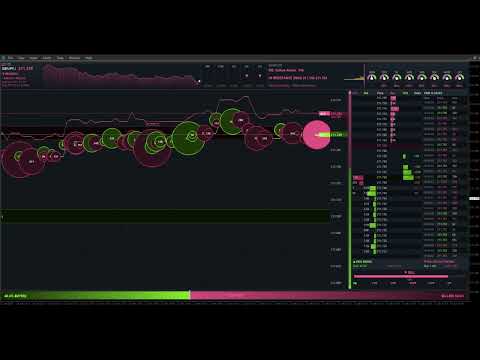
Recommended products
Painel Nelogica ChartTrading
Tiago Silvano Souza Felipe
Painel Profit is an operational trading panel for MetaTrader 5 created to make manual execution and visual order management easier directly on the chart. The operating principle is simple: the trader selects the symbol, timeframe, volume, entry type, and exit strategy. Based on these commands, the panel sends or organizes the trade through the interface, displaying the entry, take profit, and stop loss levels on the chart for visual monitoring. This product is not a signal robot and does not mak
ClusterSecondForex
Rafil Nurmukhametov
4.67 (3)
The utility allows you to build different types of graphs: Seconds chart from 1 second to 86400 seconds Tick chart from 1 tick and above The volume chart Delta chart Renko chart Range chart Product demo https://www.mql5.com/ru/channels/clustersecondforex Built-in indicators for volumetric analysis: daily market profile and market profile of the selected timeframe, Cluster Search Imbalance VWAP Dynamic POC, VAH, VAL the profile depth of the market vertical volume with various display options, del
Capital Management EA – Smart Risk Management & Profit Optimization for MT5 Take control of your trading capital with smart, automated strategies — fully optimized for MetaTrader 5 (MT5). Looking to protect your capital and maximize profits through automated money management strategies ? Capital Management EA is the all-in-one Expert Advisor for MetaTrader 5 (MT5) that helps you trade smarter, not harder. Core Features: 5-in-1 Capital Management Strategies – Built-in versatility Gr
ClusterSecond
Rafil Nurmukhametov
4.78 (32)
The utility allows you to build different types of graphs: Seconds chart from 1 second to 86400 seconds Tick chart from 1 tick and above The volume chart Delta chart Renko chart Range chart Demo version of the utility https://www.mql5.com/ru/channels/clustersecond Built-in indicators for volumetric analysis: daily market profile and market profile of the selected timeframe, Cluster Search Imbalance VWAP Dynamic POC, VAH, VAL the profile depth of the market vertical volume with various display op
Here   our more valuable tools SMC Trend Trading   ,  Easy SMC Trading  ,  Institutional SMC Architect Volume Analysis Tools  ,  Volume flow Profile  ,  Market volume profile  , FVG with Volume  , Liquidity Heatmap Profile  ,  Volume Spread Analysis 2. Key Features Dynamic Filtering : The core feature. As soon as the current price crosses a historical liquidity level, that level disappears. This reduces chart clutter and prevents you from trading off "dead" support/resistance. Liquidity Heatma
Trading Assistent is a multifunctional trading panel that combines all necessary tools for professional trading. The panel provides complete control over positions, in-depth risk analysis, and fast order execution. MAIN FUNCTIONAL BLOCKS Position Management: - Real-time viewing of all open positions - Sorting by symbol, profit, volume, and type - Visual indication of profitable and losing positions - Bulk closing operations - Breakeven function for profit protection Trading Operations: - I
The indicator builds current quotes, which can be compared with historical ones and on this basis make a price movement forecast. The indicator has a text field for quick navigation to the desired date. Options: Symbol - selection of the symbol that the indicator will display; SymbolPeriod - selection of the period from which the indicator will take data; IndicatorColor - indicator color; Inverse - true reverses quotes, false - original view; Next are the settings of the text field, in w
Trading Utility for Forex Currency Pairs Only not for Gold  Functions Auto Lot Calculation based on Risk Auto stoploss  Auto TakeProfit Breakeven Auto Close Half % Close in percentage with respect to the PIPs Pending Orders BuyLimit Sell Limit with distances BuyStop Sell Stop    with distances Trading Informations Risk in percentage For Multiple trades Combine Takeprofit and Combine Stoplosses
BoxChart MT5
Evgeny Shevtsov
5 (7)
The market is unfair if only because 10% of participants manage 90% of funds. An ordinary trader has slim changes to stand against these "vultures". This problem can be solved. You just need to be among these 10%, learn to predict their intentions and move with them. Volume is the only preemptive factor that faultlessly works on any timeframe and symbol. First, the volume appears and is accumulated, and only then the price moves. The price moves from one volume to another. Areas of volume accumu
TradePad
Ruslan Khasanov
5 (1)
TradePad is a tool for both manual and algorithmic trading. We present you a simple solution for fast trading operations and control of positions on several trading instruments. Attention, the application does not work in the strategy tester! Trial version of the application for a demo account and a description of all the tools The application interface is adapted for high-resolution monitors, simple and intuitive. For comfortable work, the trader is offered the following set of tools: A hot ke
You can see Binance Spot data instantly in Metatrader 5 and it allows you to use all the features that Metatrader has provided to you. You can access the data of all symbols listed on Binance Futures. Don't forget to set the timezone. Binance it's 00:00 UTC. You need to fix it according to your own country You need to install the free Binance Spot Symbol List plugin. https://www.mql5.com/tr/market/product/83507 After loading, it automatically downloads the data of the cryptos in the market obser
1. Overview If you are looking for a conditional trade entry functionality in metatrader 5, you found your solution now with the Smart Conditional Trader. The EA lets you define the price condition to automatically enter into the trade and takes over the position managements afterwards as well - fully customisable.  The Smart Conditional Trader is a manual-assistance Expert Advisor for MetaTrader 5. It automates trade execution based on price-level crossing conditions that you define visually o
Quick operation, quick purchase, sale, empty operation. Provide three buttons: Buy, Sell, empty. Buy: Quickly place more orders after clicking, default 1 hand, profit point and stop-loss point are 110 points, after successful order can be manually modified. Sell: Quickly place an empty order after clicking, default 1 hand, profit point and stop-loss point are 110 points, can be manually modified after the order is successful. Empty: Quickly clear all orders, including purchase and s
Order Book, known also as Market Book, market depth, Level 2, - is a dynamically updated table with current volumes of orders to buy and to sell specific financial instument at price levels near Bid and Ask. MetaTrader 5 provides the means for receiving market book from your broker, but in real time only, without access to its history. The indicator OrderBook Cumulative Indicator accumulates market book data online and visualizes them on the chart. In addition, the indicator can show the market
LT Trade Panel Pro 2 - Ultimate Risk Manager & Fast Execution Tool LT Trade Panel Pro   is the definitive tool for traders seeking precision, speed, and impeccable risk management in MetaTrader 5. Designed for   Scalpers   and   Day Traders , this panel transforms execution complexity into a seamless one-click experience. In the new   Version 2  the system has been fully refactored to deliver maximum performance, eliminating latency and adding exclusive capital protection features. Why use LT
Local Copy Trader Utility - Professional Copy Trading System Overview Local Copy Trader Utility is the complete solution for mirroring trades between MetaTrader 5 accounts. With both Master and Slave functionality in one powerful Expert Advisor, it delivers reliable, lightning-fast trade copying with zero external dependencies. Perfect for managing multiple accounts, following trading signals, or transferring trades between brokers, this system ensures your positions stay perfectly synchronized
EA Performance Monitor A utility for MetaTrader 5 that automatically detects all active Expert Advisors across open charts, maps each EA to its trading data, and displays real-time drawdown, profit, win rate, and open position metrics in a single panel. EA Performance Monitor is an automated tracking utility for MetaTrader 5. It scans all open charts at a configurable interval, identifies each running Expert Advisor by magic number and symbol, and displays their performance data in a structured
FREE
NRP Risk Manager Pro Institutional-Grade Trade Management & Prop Firm Protection Get the MetaTrader 4 Version Here: https://www.mql5.com/en/market/product/179888 Get the MetaTrader 5 Version Here: https://www.mql5.com/en/market/product/179885 Trading isn't just about finding the right entry; it is about flawlessly executing your edge while fiercely protecting your capital. NRP Risk Manager Pro is not an automated trading robot—it is a comprehensive, institutional-grade trade terminal d
Fundamentals Guru
Israr Hussain Shah
Here   our more valuable tools SMC Trend Trading   ,  Easy SMC Trading  ,  Institutional SMC Architect Volume Analysis Tools  ,  Volume flow Profile  ,  Market volume profile  , FVG with Volume  , Liquidity Heatmap Profile  ,  Volume Spread Analysis 1. What does this Terminal actually do? The   Guru Terminal   is designed to solve the "Retail Blindness" problem. Most traders only look at candles; this terminal gives you   Institutional Context . It helps you: Track Smart Money:   See what the l
FREE
Boleta de negociação, adiciona automáticamente as ordens Take Profit e Stop Loss quando excutada uma ordem de compra ou venda. Ao apertar as teclas de atalho (A, D, ou TAB), serão inseridas duas linhas de pre-visualização, representando as futuras ordens de take profit (azul) e stop loss (vermelho), as quais irão manter o distanciamento especificado pelo usuário. Ditas ordens só serão adicionadas ao ser executada a ordem inicial. Ao operar a mercado, as ordens pendentes de take profit, e stop lo
TradeInfoDisplay – Risk/Reward Visualiser Visualises profit/loss zones, RR ratio, Risk% and Reward% for all pending orders and positions directly on the chart. CPU-optimised. FULL DESCRIPTION TradeInfoDisplay draws colour-coded zones on the chart for every pen
Trade Manger
Israr Hussain Shah
Here   our more valuable tools SMC Trend Trading   ,  Easy SMC Trading  ,  Institutional SMC Architect Volume Analysis Tools  ,  Volume flow Profile  ,  Market volume profile  , FVG with Volume  , Liquidity Heatmap Profile  ,  Volume Spread Analysis You Give an Instruction: When you run the script, a window pops up with a dropdown menu. You choose exactly what you want it to do from the list (e.g., "Close Profit Only" or "Delete Pending Orders"). It Scans Your Positions: The script then reads
Tick Volume Chart is a unique tool for building charts based on tick volumes in MetaTrader 5 . With Tick Volume Chart , you can create charts where each candle is formed not by time, but by a specified number of ticks. This gives you perfect precision in analyzing market activity, which is unattainable on standard time-based charts. You can use any indicators and Expert Advisors that support custom symbols. Working with the resulting charts is just as convenient as with standard ones. Unlike sta
Overview Harmonic Patterns MT5 is a technical analysis indicator designed for the MetaTrader 5 platform. It identifies and displays harmonic price patterns, such as Butterfly, Cypher, Crab, Bat, Shark, and Gartley, in both bullish and bearish directions. The indicator calculates key price levels, including entry, stop loss, and three take-profit levels, to assist traders in analyzing market movements. Visual elements and customizable alerts enhance usability on the chart. Features Detects six ha
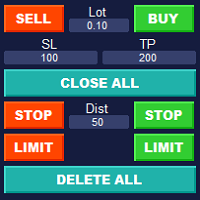
Simple Customizable Trade Panel — Fast and Easy One-Click Trading This lightweight and powerful panel is built for traders who value   speed ,   simplicity , and   full customization . With just one click, you can: Buy or Sell instantly Close all open positions Place pending orders with custom distance Delete all pending orders Adjustable parameters: • Lot size • Stop Loss (in points) • Take Profit (in points) • Distance to price for pending orders The panel is fully responsive and ad
Was: $249  Now: $99   Market Profile defines a number of day types that can help the trader to determine market behaviour. A key feature is the Value Area, representing the range of price action where 70% of trading took place. Understanding the Value Area can give traders valuable insight into market direction and establish the higher odds trade. It is an excellent addition to any system you may be using. Inspired by Jim Dalton’s book “Mind Over Markets”, this indicator is designed to suit the
Trade key pro
Lawrence Chiiambb Mkandawi
TradeKeys Pro – Keyboard Trading Assistant for MetaTrader 5 TradeKeys Pro is a lightweight, keyboard‑driven trading assistant for MetaTrader 5 that combines the speed of shortcut keys with a clean configuration panel. It is designed for traders who prefer to keep their chart uncluttered and execute trades with a single keystroke, while still having full control over risk parameters and position management. Core Concept The expert advisor places a compact graphical user interface (GUI) on the c

ALIEN Dashboard
Youssef Esseghaiar
ALIEN DASHBOARD FULL EDITION – Professional ICT & Precision Trading Dashboard for MT5 ( HYBRID ENGINE ) Overview The   Alien Dashboard Full Edition   is a comprehensive, all‑in‑one technical indicator for MetaTrader 5 that merges the most powerful concepts from Inner Circle Trader (ICT) methodology with advanced precision‑entry logic, multi‑timeframe analysis, and an intuitive on‑chart dashboard. Designed for serious traders who want to visualise institutional order flow, identify high‑probabili
Money Flow Profile MT4  HERE Here our more valuable tools SMC Trend Trading   ,  Easy SMC Trading  ,  Institutional SMC Architect Volume Analysis Tools  ,  Volume flow Profile  ,  Market volume profile  , FVG with Volume  , Liquidity Heatmap Profile  ,  Volume Spread Analysis  Master Edition is a professional-grade analytical tool designed to visualize market structure through the lens of volume and money flow. Unlike standard volume indicators, this tool displays a Daily Volume Profile
Footprint Chart Pro — Professional OrderFlow EA for MetaTrader 5 Version 6.34 | Professional tool for real traders | Institutional-Grade Visualization DEMO USERS - PLEASE SELECT EVERY TICK / REAL TICK WHEN TESTING AND YOU HAVE DOWNLOADED HISTORICAL DATA. IF YOU SEE A WAITING SCREEN AND IT IS NOT DOWNLOADING, IT MEANS YOU HAVE LOW HISTORICAL DATA. TRY 1 MIN AND 5 MIN FIRST ON 1 DAY DATA. ONE DAY DATA SHOULD BE THE NEWEST AND MOST CURRENT DATE. PLEASE WAIT UNTIL THE MARKET HAS ROLLED OVER PERIOD.
Buyers of this product also purchase
FarmedHedge Pair Trading Dashboard
Tanapisit Tepawarapruek
5 (3)
Farmed Hedge Yield Farming | All Markets (Manual - Hybrid - Semi/Automated EA) MULTI-ASSET SUPPORT Trade any asset available on your broker - Forex: Major, Minor, Exotic pairs - Crypto: BTC, ETH, XRP, SOL, BNB - Stocks: Apple, Tesla, Amazon, Google, etc. - Commodities: Gold, Silver, Oil, Gas - Indices: US30, NAS100, SPX500, DAX40 - Any CFD your broker offers VERIFIED TRADING RESULTS - Farmed Hedge Yield Axi Copy:  https://www.mql5.com/en/signals/2356376 - Farmed Hedge Yield Exn Copy:   https:/
YuClusters
Yury Kulikov
4.93 (43)
Attention: You can view the program operation in the free version  YuClusters DEMO .  YuClusters is a professional market analysis system. The trader has unique opportunities to analyze the flow of orders, trade volumes, price movements using various charts, profiles, indicators, and graphical objects. YuClusters operates on data based on Time&Sales or ticks information, depending on what is available in the quotes of a financial instrument. YuClusters allows you to build graphs by combining da


The product will copy all telegram signal to MT5 ( which you are member) , also it can work as remote copier.  Easy to set up, copy order instant, can work with almost signal formats, image signal,  s upport to translate other language to English Work with all type of channel or group, even channel have "Restrict Saving Content", work with  multi channel, multi MT5 Work as remote copier: with signal have ticket number, it will copy exactly via ticket number. Support to backtest signal. How to s
FUTURES ORDERFLOW FOOTPRINT CHART Professional OrderFlow EA for MetaTrader 5 Version 1.01| Professional tool for real traders | Institutional-Grade Visualization STRATEGY TESTER USERS - PLEASE SELECT EVERY REAL TICK WHEN TESTING AND YOU HAVE DOWNLOADED HISTORICAL DATA. IF YOU SEE A WAITING SCREEN AND IT IS NOT DOWNLOADING, IT MEANS YOU HAVE LOW HISTORICAL DATA. TRY 1 MIN AND 5 MIN FIRST ON 1 DAY DATA. ONE DAY DATA SHOULD BE THE NEWEST AND MOST CURRENT DATE. PLEASE WAIT UNTIL THE MARKET HAS ROL
HINN Lazy Trader
ALGOFLOW OÜ
5 (1)
LIMITED SUMMER SALE -40% ! ONLY $470 insead of $790!  Maximum real discount! ONLY UNTIL 08/22 The core idea: using the user interface, you configure the parameters the chart must meet before entering a position (or positions), choose which entry models to use, and set the rules for when trading and planning should end. Lazy Trader  handles the rest: it  takes over all the routine chart watching and execution! full description  :: 3 key videos [1] ->  [2]   ->  [3] What can it do? - Understand
Quant AI Agents
Ho Tuan Thang
5 (1)
Quant AI Agents are independent trading Expert Advisors. Instead of trading using a fixed strategy like other conventional EAs, Quant AI Agents   is a   multi-agent AI trading framework   that turns natural-language strategy prompts into live.  WANT THE SAME RESULTS AS MY LIVE SIGNAL?   Use the exact same brokers I do:   IC MARKETS , IC TRADING   .  Unlike the centralized stock market, Forex has no single, unified price feed.  Every broker sources liquidity from different providers, creating un
EasyInsight AIO MT5
Alain Verleyen
4.92 (12)
EASY Insight AIO – All-In-One Power for AI-Driven Trading Want to skip the setup and start scanning the entire market – Forex, Gold, Crypto, Indices, and even Stocks – in seconds? EASY Insight AIO is the complete plug-and-play solution for AI-powered trade analysis. It includes all core Stein Investments indicators built-in and automatically exports clean, structured CSV files – perfect for backtesting, AI prompts, and live market decision-making. No need to install or configure indicators manu
AI Agents Supervisor
Ho Tuan Thang
5 (1)
AI Agent Supervisor is NOT an Expert Advisor. AI Agent Supervisor   is a   multi-agent AI risk & portfolio supervisor   that watches every EA on your account and intervenes in real time.  WANT AN AI PORTFOLIO MANAGER WATCHING YOUR FLEET 24/7?   Run your fleet on the same brokers I do:   IC MARKETS , IC TRADING   .  Unlike the centralized stock market, Forex has no single, unified price feed.  Every broker sources liquidity from different providers, creating unique data streams. The Supervisor r
Telegram to mt5 pro
Janet Abu Khalil
4 (4)
Telegram to MT5 Pro — Advanced Telegram Signal Copier with Auto-Fix, Multi-TP, Risk Control and Full Trade Management Telegram to MT5 Pro — Professional Telegram Signal Copier Telegram to MT5 Pro is a high-performance trade copier that automatically executes signals from Telegram directly into your MetaTrader 5 account, with full control over risk, execution, and trade management. The system consists of two components: • The Expert Advisor (EA) running inside MetaTrader 5 • A companion desktop
MT5 Trading Deck
Manuel Michiels
5 (2)
One button. One trade. MT5 Trading Deck is a hotkey trading panel for MetaTrader 5 that turns the platform into a keyboard-driven execution cockpit. Stop loss, take profit and lot size are pre-calculated for every key; the moment you press, a market order is live on the broker. A complete technical user manual is attached in the product Comments section. It documents every input parameter, the full hotkey map, the recommended Stream Deck XL layout, and the advanced workflows for Pre-Limit orders
Royal Copier
Janet Abu Khalil
5 (1)
Royal Copier — Professional MT5 Trade Copier Royal Copier is a professional real-time local trade copier for MetaTrader 5. It now includes both functions inside one single MT5 Expert Advisor. From the inputs, you simply choose whether the EA will run in Master Mode or Client Mode . This means the same EA can be used on the source account or on the receiving account, while preserving the original copier behavior. Royal Copier supports copying between accounts in all common combinations: MT5 to MT
Custom Alerts AIO: All-in-One Market Scanner – No Setup Required Overview Custom Alerts AIO is the fastest and easiest way to monitor multiple markets for real-time trading signals—without any setup or extra licenses. It comes with all required Stein Investments indicators already embedded, making it the perfect plug-and-play solution for traders who value simplicity and performance. Just load it to any chart and start receiving alerts across Forex, Metals, Crypto, and Indices. Shares can be a
Prop Firm Os
Gayathiri Gopalakrishnan
5 (1)
PROP FIRM OS Structured Trading Assistant for MetaTrader 5 PROP FIRM OS is a structured trading assistant designed for MetaTrader 5 users who prefer rule-based market analysis and organized trading workflows. The Expert Advisor combines market analysis tools, scanner functions, dashboard monitoring, alerts, risk-control settings, and trade management features inside one system. PROP FIRM OS is designed to help traders follow selected rules, filters, and monitoring conditions during trading activ
QCML Assistant
Maxime Turcotte-lafreniere
QCML Assistant MT5 Your Trading. Our Assistant. Your Edge. Looking for a tool that completely transforms your experience on MetaTrader 5? QCML Assistant is the all-in-one solution built by traders, for traders. Just one tool installed on your chart, and you get access to an ultra-complete, ultra-fast, and ultra-simple trading platform. No more hours wasted setting up your workspace. No more complicated trade entries. With QCML Assistant, everything becomes simple, smooth, and efficient right fro
ManHedger MT5
Peter Mueller
4.83 (6)
THIS EA IS A SEMI-AUTO EA, IT NEEDS USER INPUT. Manual & Test Version Please TEST this product before BUYING  and watch my video about it. The price of the ManHedger will increase to 250$ after 20 copies sold. Contact me for user support or bug reports or if you want the MT4 version! MT4 Version  I do not guarantee any profits or financial success using this EA. With this Expert Advisor, you can: Implement your own Zone Recovery strategy to capitalize on trending markets. Create Grid trading s
Discord Signal Notifications — это мощный инструмент для трейдеров, проповодов и управляющих счетами, который автоматически отправляет все ваши торговые события в канал или чат Discord. Главное преимущество — Глобальный мониторинг. Вам не нужно устанавливать советник на каждый график. Достаточно запустить одну копию утилиты на одном любом окне, и она будет отслеживать действия по всем инструментам и всем счетам в вашем терминале одновременно. Основные возможности Глобальный мониторинг счёта Ути
Global Investing FX Terminal
Santiago Nicolas Pla Casuriaga
The Global Investing FX Terminal is an all-in-one FX dashboard for MetaTrader 5 — CB policy rates, CFTC COT positioning, carry rankings, economic surprises, options skew, retail sentiment, and correlations, thirteen panels in total — rendered on a single zero-flicker canvas overlay and refreshing every 10 seconds from one attached EA. No external software required. Professional FX analysis requires simultaneous access to data that normally lives in separate platforms: rate derivatives, governmen
RiskGuard Management
MONTORIO MICHELE
5 (22)
ATTENTION For a free trial version, visit my website. Manual QUANTUM RiskGuard Management — Your ultimate ally for uncompromising trading. Lot Calculator — Automatic lot size calculation. Quantum — Automatic risk to maximize profits and reduce drawdowns. Automatic Journal — Included and freely downloadable from my website. Automatic Screenshot — Two screenshots: one at entry and one at exit. Partial Profit — Smartly managed partial exits. Smartphone Trading — Place orders from your mobile, mana
Gamma Edge Pro MT5
Xuan Nam Diep
1 (1)
Gamma Edge Pro MT5 — GexBot Classic API Integration Gamma Edge Pro   brings institutional-grade   Gamma Exposure (GEX) data   directly onto your MetaTrader 5 chart — the same data used by professional options traders to anticipate price magnets, hedging flows, and dealer positioning. Powered by the   GexBot Classic API , this indicator automatically maps options market data from US-listed instruments onto any   MT5 CFD instrument   — Forex pairs, Gold, indices, and more — with intelligent price
# If you have any other requirements or are interested in collaboration, please contact  dev.quantech.london@gmail.com . Flash Trade (FT) Most friendly manual trading tool. Easy operation to secure your funds. Features of FT Click the chart to trade fast FT supports market orders and pending orders Click twice to complete the order and set SL and TP Click trice to complete the pending order and set SL and TP Automatically set the stop-loss amount of each order to a fixed percentage of the bala
Trend Cue Basket Manager
Mohammadreza Faghanimakrani
5 (1)
Trend Cue Basket Manager is a semi-automatic basket management utility for MT5 hedging accounts. After purchase, please send me a message.  I will send you the bonus package and basic setup guidance. The idea is very simple: You open the first trade manually. Trend Cue Basket Manager manages the basket after entry. It does not give buy or sell signals by itself. It does not choose the market direction for you. It does not open the first trade automatically. The first decision is always yours. Af
Crystal Trade Manager – Advanced MT5 Risk and Trade Control Utility Overview Crystal Trade Manager (CTM) is a professional MetaTrader 5 utility designed for risk management, trade automation, and instant execution control. It provides traders with an integrated system for protecting equity, managing daily drawdowns, controlling lot sizes, and applying automation features such as automatic SL/TP, break-even, and trailing stop. The tool is suitable for manual traders, prop-firm challenge particip
EA Performance Logger Telegram
Abdulqudus Tomiwa Akande-owoo
The Performance Logger is a utility for MetaTrader 5 designed to track and report account metrics. It identifies trades based on specific criteria and provides summaries of account activity. Main Functions Automated Reporting : Generates summaries of account performance and sends them to specified communication channels (Telegram or Discord) on a weekly, monthly, or yearly basis. Strategy Analysis : Organizes performance data based on the specific Expert Advisor or strategy used for each trade.
The product will copy all  Discord  signal   to MT5   ( which you are member  ) , also it can work as remote copier.  Easy to set up. Work with almost signal formats, support to translate other language to English Work with multi channel, multi MT5. Work with Image signal. Copy order instant, auto detect symbol. Work as remote copier: with signal have ticket number, it will copy exactly via ticket number. How to setup and guide: Let read all details about setup and download Discord To MetaTrader
What Exactly Is A Smart Trading Tool? Smart Trading Tool   was developed for fast and comfortable trading of the financial markets especially for   ORDER BLOCKS TRADERS .   It provides traders functionalities, such as: A Drawing Tool One-Click Trading Panel Automated Lot Sizes Calculation   based on your risk appetite & Money Management ( Watch this video , how this tool can help manage your risk per trade better!) Built in PRICE LEVELS (Fibonacci, Round Numbers, Daily hi-low, etc) Shows Trading
The real‑time view of what is happening inside the market. Footprint Secrets brings detailed analysis directly into MetaTrader 5. It shows where volume is trading, how buyers and sellers are interacting, and how liquidity shifts as the market evolves. Designed for traders who want a precise, real‑time understanding of market behavior. Check out the free preview version here:  https://www.mql5.com/en/market/product/172398 Benefits for the Trader See the real activity behind price . Footprint ch
Features   With MT5 to Interactive Brokers(IB) Trader, you can: 1. Load chart data from IB to MT5, and Analyze with all standard or customer Indicators. 2. Place Orders to IB Account Directly in MT5. 3. Make your Own EAs upon IB Securities by only making minus changes of the trading function. Usage 1) Installation Copy the "Mt5ToIBTraderEn.ex4" and sample files to [MT5 Data Folder]->MQL5->Experts.  2)  MT5 Settings Add the IP Address to the MT5 Allowed URLs in 'Tools->Options->Expert Adviso
Mt5 To InterativeBrokers Copier allows you to copy deals from MT5 account to Interactive Brokers. With this, you can run your EA strategy on a MT5 Demo/Real Account, then copy all the deals to Interactive Brokers account real time. Features: 1. Copy or Invert-Copy deals Realtime from MT5 to IB Account. 2. Synchronizing positions of both accounts periodicaly, in case any missing copying. 3. You can choose only Buy position or Sell position. Symbols Setup: General Format:  {MT Symbol} -> {IB S
Introduction Our system is more than just a tool—it’s your personal guide in the dynamic trading landscape. Expertly developed and optimized using advanced strategies, this groundbreaking predictor gives traders a powerful edge. It’s not just about the features; it’s about a trading journey that stands out from the crowd. Get ready for an enhanced trading experience like never before! What It Does Next Candle Prediction: Imagine gaining insights into the market’s next move before it happens. Our
Here is the corrected, MQL5-compliant version of your second product description. I have removed the custom bullet point symbols, cleaned up the list formatting to use standard markdown, and organized the setup guide into clean, numbered steps. PropFolio Command Manager Pro is an advanced, multi-symbol execution terminal designed to automate your custom arrow indicators. Simply enter the name of your arrow indicator into the settings, and the Command Manager will monitor up to 30 currency pairs
More from author
================================================================================ POC BREAKOUT - V20.72. Full Professional Grade Toolkit ================================================================================ POC Breakout is a full MetaTrader 5 trading dashboard for discretionary traders who want breakout signals, Point of Control (POC) context, volume profiles, order flow, market structure, news, alerts, and advanced trade planning in one professional workspace. Attached directly to you
Footprint Chart Pro — Professional OrderFlow EA for MetaTrader 5 Version 6.34 | Professional tool for real traders | Institutional-Grade Visualization DEMO USERS - PLEASE SELECT EVERY TICK / REAL TICK WHEN TESTING AND YOU HAVE DOWNLOADED HISTORICAL DATA. IF YOU SEE A WAITING SCREEN AND IT IS NOT DOWNLOADING, IT MEANS YOU HAVE LOW HISTORICAL DATA. TRY 1 MIN AND 5 MIN FIRST ON 1 DAY DATA. ONE DAY DATA SHOULD BE THE NEWEST AND MOST CURRENT DATE. PLEASE WAIT UNTIL THE MARKET HAS ROLLED OVER PERIOD.
FUTURES ORDERFLOW FOOTPRINT CHART Professional OrderFlow EA for MetaTrader 5 Version 1.01| Professional tool for real traders | Institutional-Grade Visualization STRATEGY TESTER USERS - PLEASE SELECT EVERY REAL TICK WHEN TESTING AND YOU HAVE DOWNLOADED HISTORICAL DATA. IF YOU SEE A WAITING SCREEN AND IT IS NOT DOWNLOADING, IT MEANS YOU HAVE LOW HISTORICAL DATA. TRY 1 MIN AND 5 MIN FIRST ON 1 DAY DATA. ONE DAY DATA SHOULD BE THE NEWEST AND MOST CURRENT DATE. PLEASE WAIT UNTIL THE MARKET HAS ROL
Filter:
No reviews
Reply to review