

MQL5自动化交易策略(第十四部分):基于MACD-RSI统计方法的交易分层策略
 1 438
1 438
 1
1

概述
在先前的文章(第十三部分)中,我们已在MetaQuotes Language 5(MQL5)中实现了一种头肩形态交易算法,用于自动化捕捉市场反转的经典反转形态。如今在第十四部分中,我们将转向开发一种结合移动平均线收敛发散指标 (MACD)与相对强弱指标(RSI)的交易分层策略,并通过统计方法加以增强,以在趋势市场中动态调整仓位规模。我们将涵盖以下主题:
读完本文后,您将拥有一款能够精准进行交易分层操作的强大智能交易系统(EA)——让我们开始吧!
策略架构
本文所探讨的交易分层策略旨在通过价格朝有利方向持续移动时逐步加仓,从而捕捉市场的持续性趋势,这种方法通常被称为级联式加仓法。与旨在实现固定目标位的传统单次入场策略不同,该策略通过每次达到盈利阈值时追加交易头寸来利用市场动能,在有效放大潜在收益的同时保持风险可控。该策略的核心在于将两种广为人知的技术指标——MACD和RSI——与统计叠加层相结合,确保入场时机既及时又稳健,使其特别适用于具有明确方向性走势的市场环境。
我们将借助MACD和相对RSI的优势,为交易信号构建坚实的基础,并制定明确的规则以确定何时启动分层加仓流程。我们的规划是利用MACD确认趋势方向与强度,确保仅在市场呈现明确偏向性时入场交易,同时通过RSI捕捉价格从极端水平反转的时机,精准定位最佳入场点。通过整合这两个指标,我们旨在构建一个可靠的触发机制来启动初始交易,该交易将成为级联加仓序列的起点,使我们能够随着趋势发展逐步建立仓位。以下是该策略的示意图:
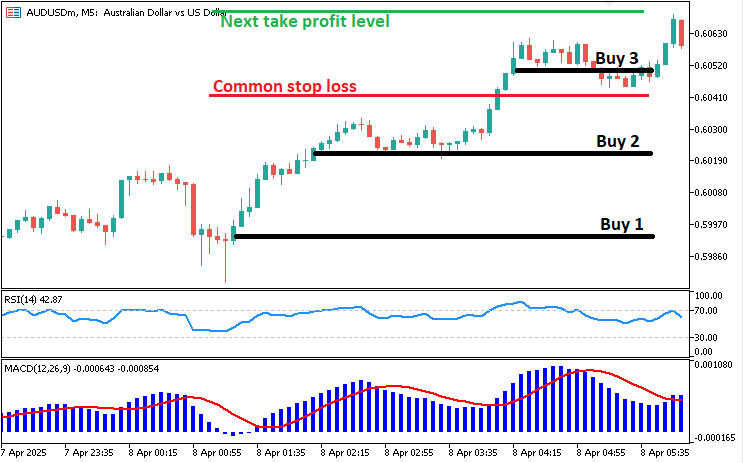
接下来,我们将通过引入统计方法进一步优化这一策略体系,提升入场精准度并指导分层加仓流程。我们将探讨如何运用统计筛选机制——例如分析RSI的历史表现特征——来验证交易信号,确保仅在具备统计显著性的条件下执行交易。随后,策略将延伸至定义分层加仓规则,具体说明当盈利目标达成时如何新增头寸,同时调整风险水平以保护既有收益,最终形成一套既能顺应市场动态、又能保持按规则执行的动态交易策略。那么,让我们开始吧。
在MQL5中的实现
要在MQL5中创建该程序,请打开MetaEditor,进入导航器,找到“指标”文件夹,点击“新建”选项卡,并按照提示创建文件。文件创建完成后,在编码环境中,我们需要声明一些将在整个程序中使用到的全局变量。
//+------------------------------------------------------------------+
//|                                  MACD-RSI LAYERING STRATEGY.mq5  |
//|      Copyright 2025, ALLAN MUNENE MUTIIRIA. #@Forex Algo-Trader. |
//|                           https://youtube.com/@ForexAlgo-Trader? |
//+------------------------------------------------------------------+
#property copyright "Copyright 2025, ALLAN MUNENE MUTIIRIA. #@Forex Algo-Trader"
#property link      "https://youtube.com/@ForexAlgo-Trader?"
#property description "MACD-RSI-based layering strategy with adjustable Risk:Reward and visual levels"
#property version   "1.0"

#include <Trade\Trade.mqh>//---- Includes the Trade.mqh library for trading operations
CTrade obj_Trade;//---- Declares a CTrade object for executing trade operations

int rsiHandle = INVALID_HANDLE;//---- Initializes RSI indicator handle as invalid
double rsiValues[];//---- Declares an array to store RSI values

int handleMACD = INVALID_HANDLE;//---- Initializes MACD indicator handle as invalid
double macdMAIN[];//---- Declares an array to store MACD main line values
double macdSIGNAL[];//---- Declares an array to store MACD signal line values

double takeProfitLevel = 0;//---- Initializes the take profit level variable
double stopLossLevel = 0;//---- Initializes the stop loss level variable
bool buySequenceActive = false;//---- Flag to track if a buy sequence is active
bool sellSequenceActive = false;//---- Flag to track if a sell sequence is active

// Inputs with clear names
input int stopLossPoints = 300;        // Initial Stop Loss (points)
input double tradeVolume = 0.01;       // Trade Volume (lots)
input int minStopLossPoints = 100;     // Minimum SL for cascading orders (points)
input int rsiLookbackPeriod = 14;      // RSI Lookback Period
input double rsiOverboughtLevel = 70.0; // RSI Overbought Threshold
input double rsiOversoldLevel = 30.0;   // RSI Oversold Threshold
input bool useStatisticalFilter = true; // Enable Statistical Filter
input int statAnalysisPeriod = 20;      // Statistical Analysis Period (bars)
input double statDeviationFactor = 1.0; // Statistical Deviation Factor
input double riskRewardRatio = 1.0;     // Risk:Reward Ratio

// Object names for visualization
string takeProfitLineName = "TakeProfitLine";//---- Name of the take profit line object for chart visualization
string takeProfitTextName = "TakeProfitText";//---- Name of the take profit text object for chart visualization
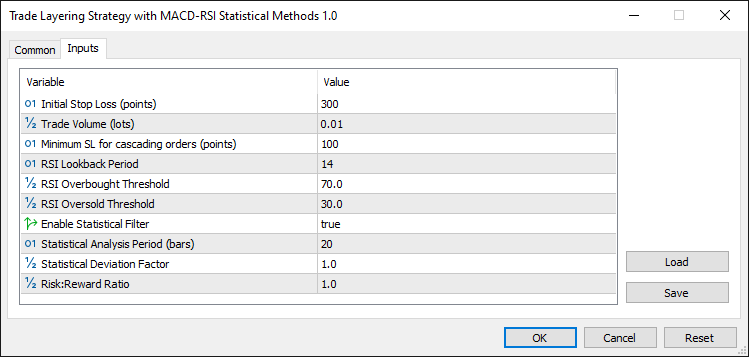
我们开始为交易分层策略搭建基础框架,首先引入“Trade.mqh”库,并声明一个名为“obj_Trade”的“CTrade”对象,用于处理所有交易操作。我们初始化关键指标句柄——用于RSI的"rsiHandle"和用于MACD的"handleMACD",两者初始值均设为无效句柄(INVALID_HANDLE),同时声明"rsiValues"、"macdMAIN"和"macdSIGNAL"等数组,用于存储相应的指标数据。为了跟踪策略状态,我们定义“止盈水平(takeProfitLevel)”和“止损水平(stopLossLevel)”等交易水平变量,以及布尔标识“买入序列激活中(buySequenceActive)”和“卖出序列激活中(sellSequenceActive)”,用于监控买入或卖出分层序列是否正在进行,确保系统知晓何时应进行级联加仓。
接下来,我们设置用户可配置的输入参数,使策略具备适应性,包括初始止损距离“止损点数(stopLossPoints)”、手数大小“交易量(tradeVolume)”以及级联交易中更紧凑的止损“最小止损点数(minStopLossPoints)”。对于指标参数,我们设置“RSI回溯周期(rsiLookbackPeriod)”以定义RSI计算窗口,设定“RSI超买水平(rsiOverboughtLevel)”和“RSI超卖水平(rsiOversoldLevel)”作为入场阈值,并设置“风险回报比(riskRewardRatio)”以控制相对于风险的盈利目标。为融入统计方法,我们引入“使用统计筛选(useStatisticalFilter)”作为开关,并搭配“统计分析周期(statAnalysisPeriod)”和“统计偏差因子(statDeviationFactor)”,这样能够基于RSI的统计行为优化信号,确保交易与显著的市场偏离情况保持一致。
最后,我们为可视化反馈做准备,定义“止盈线名称(takeProfitLineName)”和“止盈文本名称(takeProfitTextName)”作为图表上止盈线和标签的对象名称,增强交易者实时监控水平的能力。编译程序后,我们将看到以下输出。
接下来,我们进入初始化(OnInit)事件处理器,在该程序中处理各项初始化属性。
//+------------------------------------------------------------------+
//| Expert initialization function                                   |
//+------------------------------------------------------------------+
int OnInit(){//---- Expert advisor initialization function
   rsiHandle = iRSI(_Symbol, _Period, rsiLookbackPeriod, PRICE_CLOSE);//---- Creates RSI indicator handle with specified parameters
   handleMACD = iMACD(_Symbol,_Period,12,26,9,PRICE_CLOSE);//---- Creates MACD indicator handle with standard 12,26,9 settings

   if(rsiHandle == INVALID_HANDLE){//---- Checks if RSI handle creation failed
      Print("UNABLE TO LOAD RSI, REVERTING NOW");//---- Prints error message if RSI failed to load
      return(INIT_FAILED);//---- Returns initialization failure code
   }
   if(handleMACD == INVALID_HANDLE){//---- Checks if MACD handle creation failed
      Print("UNABLE TO LOAD MACD, REVERTING NOW");//---- Prints error message if MACD failed to load
      return(INIT_FAILED);//---- Returns initialization failure code
   }

   ArraySetAsSeries(rsiValues, true);//---- Sets RSI values array as a time series (latest data at index 0)

   ArraySetAsSeries(macdMAIN,true);//---- Sets MACD main line array as a time series
   ArraySetAsSeries(macdSIGNAL,true);//---- Sets MACD signal line array as a time series

   return(INIT_SUCCEEDED);//---- Returns successful initialization code
}
在此,我们于OnInit函数中开始实施交易分层策略,该函数是EA与市场数据交互前初始化关键组件的起点。我们通过iRSI函数设置RSI指标,将生成的句柄赋值给“rsiHandle”,参数依次为当前图表品种_Symbol、时间周期_Period、回溯周期“rsiLookbackPeriod”以及使用收盘价“PRICE_CLOSE”;随后通过iMACD函数设置MACD,将其句柄存储在“handleMACD”中,采用标准的12、26、9周期参数,并基于收盘价“PRICE_CLOSE”进行趋势分析。
为确保策略稳健性,我们检查“rsiHandle”是否等于无效句柄(INVALID_HANDLE),如果为无效句柄,则使用Print函数记录日志“无法加载RSI指标,立即回退”,并返回初始化失败(INIT_FAILED);对“handleMACD”执行相同检查,如果加载失败则记录“无法加载MACD指标,立即回退”并终止初始化。确认指标加载成功后,我们使用 ArraySetAsSeries函数将“rsiValues”、“macdMAIN”和“macdSIGNAL”数组配置为时间序列数组(参数设置为true),使最新数据对齐至索引零位,随后返回初始化成功(INIT_SUCCEEDED),表明策略已准备就绪可进入交易状态。接下来,我们可进入OnTick事件处理器,定义实际交易逻辑。
//+------------------------------------------------------------------+
//| Expert tick function                                             |
//+------------------------------------------------------------------+
void OnTick(){//---- Function called on each price tick
   double askPrice = NormalizeDouble(SymbolInfoDouble(_Symbol, SYMBOL_ASK), _Digits);//---- Gets and normalizes current ask price
   double bidPrice = NormalizeDouble(SymbolInfoDouble(_Symbol, SYMBOL_BID), _Digits);//---- Gets and normalizes current bid price

   if(CopyBuffer(rsiHandle, 0, 1, 3, rsiValues) < 3){//---- Copies 3 RSI values into array, checks if successful
      Print("INSUFFICIENT RSI DATA FOR ANALYSIS, SKIPPING TICK");//---- Prints error if insufficient RSI data
      return;//---- Exits function if data copy fails
   }

   if (!CopyBuffer(handleMACD,MAIN_LINE,0,3,macdMAIN))return;//---- Copies 3 MACD main line values, exits if fails
   if (!CopyBuffer(handleMACD,SIGNAL_LINE,0,3,macdSIGNAL))return;//---- Copies 3 MACD signal line values, exits if fails
}
在此,我们通过实现OnTick函数推进交易分层策略,该函数会在每次价格更新时触发,为EA提供实时决策支持。我们首先通过NormalizeDouble函数获取当前市场价格:使用SymbolInfoDouble函数获取当前品种_Symbol的“SYMBOL_ASK”,并调整至品种精度“_Digits”后赋值给“askPrice”;以同样方式获取“SYMBOL_BID”赋值给“bidPrice”,这一步骤确保交易计算所使用的价格数据精确可靠。此阶段为监控价格波动奠定了基础,后续将基于最新市场条件触发分层加仓逻辑。
接下来,我们收集指标数据以分析交易信号,首先处理RSI:使用CopyBuffer函数从“rsiHandle”句柄的0号缓冲区(主缓冲区)中,从索引1开始加载3个RSI值至“rsiValues”数组,并检查实际复制的数据量是否少于3个——如果不足,则通过“Print”函数记录日志“RSI分析数据不足,跳过当前报价”并直接返回,避免基于不完整的数据做出交易决策。随后,我们以相同方式处理MACD:使用“CopyBuffer”函数从“handleMACD”句柄的主线缓冲区(MAIN_LINE)中加载3个主线值至“macdMAIN”数组,从信号线缓冲区(SIGNAL_LINE)中加载信号线值至“macdSIGNAL”数组,如果任一数据加载失败,则立即返回,确保仅在同时获取完整的RSI和MACD数据集时才继续后续逻辑。然而,我们还需要获取统计数据并将其整合到此流程中。以下是相关函数的实现:
//+------------------------------------------------------------------+
//| Calculate RSI Average                                            |
//+------------------------------------------------------------------+
double CalculateRSIAverage(int bars){//---- Function to calculate RSI average
   double sum = 0;//---- Initializes sum variable
   double buffer[];//---- Declares buffer array for RSI values
   ArraySetAsSeries(buffer, true);//---- Sets buffer as time series
   if(CopyBuffer(rsiHandle, 0, 0, bars, buffer) < bars) return 0;//---- Copies RSI values, returns 0 if fails

   for(int i = 0; i < bars; i++){//---- Loops through specified number of bars
      sum += buffer[i];//---- Adds each RSI value to sum
   }
   return sum / bars;//---- Returns average RSI value
}

//+------------------------------------------------------------------+
//| Calculate RSI STDDev                                             |
//+------------------------------------------------------------------+
double CalculateRSIStandardDeviation(int bars){//---- Function to calculate RSI standard deviation
   double average = CalculateRSIAverage(bars);//---- Calculates RSI average
   double sumSquaredDiff = 0;//---- Initializes sum of squared differences
   double buffer[];//---- Declares buffer array for RSI values
   ArraySetAsSeries(buffer, true);//---- Sets buffer as time series
   if(CopyBuffer(rsiHandle, 0, 0, bars, buffer) < bars) return 0;//---- Copies RSI values, returns 0 if fails

   for(int i = 0; i < bars; i++){//---- Loops through specified number of bars
      double diff = buffer[i] - average;//---- Calculates difference from average
      sumSquaredDiff += diff * diff;//---- Adds squared difference to sum
   }
   return MathSqrt(sumSquaredDiff / bars);//---- Returns standard deviation
}
我们实现两个关键函数——“CalculateRSIAverage”(计算RSI均值)和“CalculateRSIStandardDeviation”(计算RSI标准差),以引入对RSI数据的统计分析,提升交易信号的精准度。在“CalculateRSIAverage”函数中,我们定义一个以“bars”为输入参数的函数,首先将“sum”初始化为0,并声明一个“buffer”数组,通过ArraySetAsSeries函数并将参数设置为true,从而把该数组配置为时间序列,确保最新的RSI值与索引0处对齐。随后,我们使用 CopyBuffer函数从“rsiHandle”句柄中加载指定"bars"数量的RSI值至“buffer”数组;如果实际复制的数据量少于“bars”,则直接返回0。接着遍历数组,将每个“buffer[i]”的值累加至“sum”,最终返回“sum/bars”作为RSI均值,该结果将用于后续的统计筛选逻辑。
接下来,在“CalculateRSIStandardDeviation”中,我们基于上述逻辑进一步计算相同“bars”周期内的RSI标准差。首先调用“CalculateRSIAverage”函数获取均值,将结果存储在“average”变量中,并将“sumSquaredDiff”(平方差总和)初始化为0。我们再次声明一个“buffer”数组,通过ArraySetAsSeries函数将其设置为时间序列模式,确保最新数据对齐至索引0位。随后使用“CopyBuffer”函数从“rsiHandle”句柄中获取RSI值,如果数据复制失败则返回0,以此保障数据完整性。遍历“buffer”数组时,我们计算每个数据点与均值的偏差“diff”(即“buffer[i] - average”),并将“diff * diff”(偏差平方)累加至“sumSquaredDiff”。最终,通过MathSqrt函数对“sumSquaredDiff/bars”取平方根,返回RSI标准差。这一统计指标将用于优化交易分层策略的决策逻辑。现在,我们可以将这些统计数据应用于分析,但需确保每根K线仅计算一次以避免产生歧义。因此,需要定义一个专门在每根K线触发时执行的函数。
//+------------------------------------------------------------------+
//| Is New Bar                                                       |
//+------------------------------------------------------------------+
bool IsNewBar(){//---- Function to detect a new bar
   static int previousBarCount = 0;//---- Stores the previous bar count
   int currentBarCount = iBars(_Symbol, _Period);//---- Gets current number of bars
   if(previousBarCount == currentBarCount) return false;//---- Returns false if no new bar
   previousBarCount = currentBarCount;//---- Updates previous bar count
   return true;//---- Returns true if new bar detected
}
在此,我们为策略添加“IsNewBar”函数,用于检测新K线的生成。该函数通过静态变量“previousBarCount”(初始化为0)记录上一次的K线数量,并使用iBars函数获取当前品种_Symbol在指定周期_Period下的“currentBarCount”。如果当前K线数量与上一次记录值相同,则返回false;如果检测到数量增加(即生成新K线),则更新“previousBarCount”并返回true。借助这一函数,我们现已具备定义交易规则的基础条件。
// Calculate statistical measures if enabled
double rsiAverage = useStatisticalFilter ? CalculateRSIAverage(statAnalysisPeriod) : 0;//---- Calculates RSI average if filter enabled
double rsiStdDeviation = useStatisticalFilter ? CalculateRSIStandardDeviation(statAnalysisPeriod) : 0;//---- Calculates RSI std dev if filter enabled
我们通过统计增强功能优化交易信号:如果“useStatisticalFilter”(启用统计过滤)为true,则调用“CalculateRSIAverage”函数基于“statAnalysisPeriod”计算“rsiAverage”,否则将其设置为0;同理,调用“CalculateRSIStandardDeviation”函数计算“rsiStdDeviation”,未启用时则设为0。这一设计使得策略在激活统计过滤时能基于更精细的波动范围进行信号筛选。接下来,我们利用这些统计结果定义交易条件。首先从买入条件开始。
if(PositionsTotal() == 0 && IsNewBar()){//---- Checks for no positions and new bar
   // Buy Signal
   bool buyCondition = rsiValues[1] <= rsiOversoldLevel && rsiValues[0] > rsiOversoldLevel;//---- Checks RSI crossing above oversold
   if(useStatisticalFilter){//---- Applies statistical filter if enabled
      buyCondition = buyCondition && (rsiValues[0] < (rsiAverage - statDeviationFactor * rsiStdDeviation));//---- Adds statistical condition
   }

   buyCondition = macdMAIN[0] < 0 && macdSIGNAL[0] < 0;//---- Confirms MACD below zero for buy signal
}
我们通过以下逻辑定义买入信号:首先检查PositionsTotal是否为0(确保无持仓),并调用“IsNewBar”函数确认生成新K线,保证交易仅在K线开盘且无持仓时触发。当“rsiValues[1]”(前一周期RSI值)低于“rsiOversoldLevel”(超卖阈值)且“rsiValues[0]”(当前周期RSI值)上穿该阈值时,初步设定“buyCondition”为true;如果启用了统计过滤(“useStatisticalFilter”),则进一步要求当前RSI值低于“rsiAverage - statDeviationFactor * rsiStdDeviation”(均值减去标准差倍数),通过统计区间增强信号可靠性。最后,我们通过MACD验证趋势方向:仅当“macdMAIN[0]”(主线)和“macdSIGNAL[0]”(信号线)均位于零轴下方(熊市区域)时,才确认买入信号,确保与趋势方向一致。如果所有条件均满足,则执行开仓操作,初始化跟踪变量,并在图表上绘制关键价位(如止盈水平)。为此,需要定义一个自定义函数来实现价位标注功能。
//+------------------------------------------------------------------+
//| Draw TrendLine                                                   |
//+------------------------------------------------------------------+
void DrawTradeLevelLine(double price, bool isBuy){//---- Function to draw take profit line on chart
   // Delete existing objects first
   DeleteTradeLevelObjects();//---- Removes existing trade level objects

   // Create horizontal line
   ObjectCreate(0, takeProfitLineName, OBJ_HLINE, 0, 0, price);//---- Creates a horizontal line at specified price
   ObjectSetInteger(0, takeProfitLineName, OBJPROP_COLOR, clrBlue);//---- Sets line color to blue
   ObjectSetInteger(0, takeProfitLineName, OBJPROP_WIDTH, 2);//---- Sets line width to 2
   ObjectSetInteger(0, takeProfitLineName, OBJPROP_STYLE, STYLE_SOLID);//---- Sets line style to solid

   // Create text, above for buy, below for sell with increased spacing
   datetime currentTime = TimeCurrent();//---- Gets current time
   double textOffset = 30.0 * _Point;//---- Sets text offset distance from line
   double textPrice = isBuy ? price + textOffset : price - textOffset;//---- Calculates text position based on buy/sell

   ObjectCreate(0, takeProfitTextName, OBJ_TEXT, 0, currentTime + PeriodSeconds(_Period) * 5, textPrice);//---- Creates text object
   ObjectSetString(0, takeProfitTextName, OBJPROP_TEXT, DoubleToString(price, _Digits));//---- Sets text to price value
   ObjectSetInteger(0, takeProfitTextName, OBJPROP_COLOR, clrBlue);//---- Sets text color to blue
   ObjectSetInteger(0, takeProfitTextName, OBJPROP_FONTSIZE, 10);//---- Sets text font size to 10
   ObjectSetInteger(0, takeProfitTextName, OBJPROP_ANCHOR, isBuy ? ANCHOR_BOTTOM : ANCHOR_TOP);//---- Sets text anchor based on buy/sell
}
这部分中,我们实现“DrawTradeLevelLine”函数以可视化止盈价位,首先调用“DeleteTradeLevelObjects”清除现有对象,然后使用ObjectCreate函数在“price”位置绘制一条水平线,对象名称为“takeProfitLineName”,类型为OBJ_HLINE,并通过ObjectSetInteger设置样式为蓝色“clrBlue”、线宽2和“STYLE_SOLID”实线。我们通过“TimeCurrent”获取当前时间“currentTime”来增加文本标签,设置“textOffset”为“30.0 * _Point”,并根据“isBuy”参数在“price”上方或下方计算“textPrice”,进而使用“ObjectCreate”创建文本标签对象“takeProfitTextName”,类型为“OBJ_TEXT”。我们借助ObjectSetString配置文本内容,使用DoubleToString将“price”转换为字符串并保留“_Digits”位小数,同时通过“ObjectSetInteger”设置文本颜色为蓝色“clrBlue”、字号10,并根据“isBuy”选择“ANCHOR_BOTTOM”或“ANCHOR_TOP”锚点方向,以提升图表的可读性。现在,我们可以借助该函数可视化目标价位。
if(buyCondition){//---- Executes if buy conditions are met
   Print("BUY SIGNAL - RSI: ", rsiValues[0],//---- Prints buy signal details
         useStatisticalFilter ? " Avg: " + DoubleToString(rsiAverage, 2) + " StdDev: " + DoubleToString(rsiStdDeviation, 2) : "");
   stopLossLevel = askPrice - stopLossPoints * _Point;//---- Calculates stop loss level for buy
   takeProfitLevel = askPrice + (stopLossPoints * riskRewardRatio) * _Point;//---- Calculates take profit level for buy
   obj_Trade.Buy(tradeVolume, _Symbol, askPrice, stopLossLevel, 0,"Signal Position");//---- Places buy order
   buySequenceActive = true;//---- Activates buy sequence flag
   DrawTradeLevelLine(takeProfitLevel, true);//---- Draws take profit line for buy
}
这部分中,当“buyCondition”为true时,我们执行买入交易:首先使用Print函数记录日志信息“BUY SIGNAL - RSI: ”并输出当前RSI值“rsiValues[0]”;如果启用“useStatisticalFilter”,则通过DoubleToString函数追加显示RSI均值“rsiAverage”与标准差“rsiStdDeviation”,以提供详细反馈。我们计算止损价位“stopLossLevel”为当前卖出价“askPrice”减去“stopLossPoints * _Point”(点值乘数),并计算止盈价位“takeProfitLevel”为“askPrice”加上“stopLossPoints * riskRewardRatio * _Point”(风险回报比调整后的点值乘数)。随后,调用“obj_Trade.Buy”方法提交买入订单,参数包括交易量“tradeVolume”、品种代码_Symbol、卖出价“askPrice”、止损价“stopLossLevel”和止盈价“takeProLevel”,订单标签为“Signal Position”。最后,将“buySequenceActive”设为true,并调用“DrawTradeLevelLine”函数,传入“takeProfitLevel”与布尔值true,在图表上绘制止盈水平线。运行程序后,我们得到以下结果:
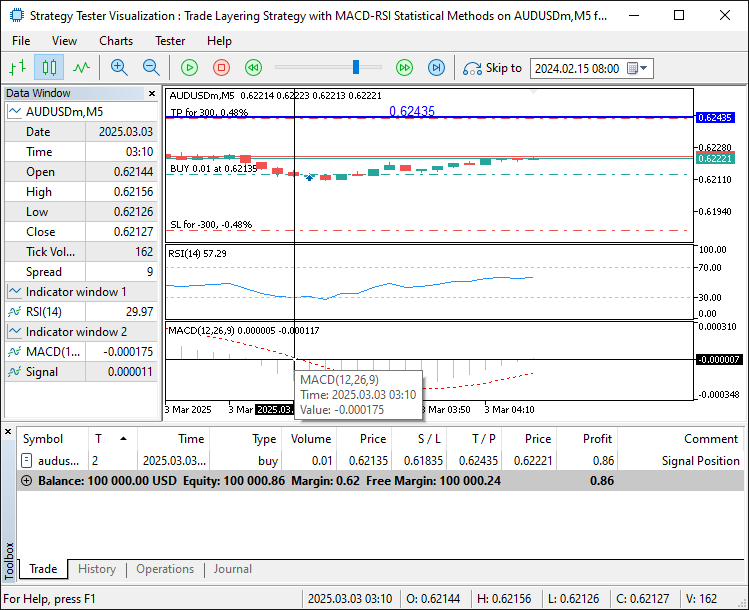
由图可见,所有买入信号条件均已满足,系统已自动在图上标记下一目标价位。基于此逻辑,我们可对卖出信号执行相同操作。
// Sell Signal
bool sellCondition = rsiValues[1] >= rsiOverboughtLevel && rsiValues[0] < rsiOverboughtLevel;//---- Checks RSI crossing below overbought
if(useStatisticalFilter){//---- Applies statistical filter if enabled
   sellCondition = sellCondition && (rsiValues[0] > (rsiAverage + statDeviationFactor * rsiStdDeviation));//---- Adds statistical condition
}

sellCondition = macdMAIN[0] > 0 && macdSIGNAL[0] > 0;//---- Confirms MACD above zero for sell signal

if(sellCondition){//---- Executes if sell conditions are met
   Print("SELL SIGNAL - RSI: ", rsiValues[0],//---- Prints sell signal details
         useStatisticalFilter ? " Avg: " + DoubleToString(rsiAverage, 2) + " StdDev: " + DoubleToString(rsiStdDeviation, 2) : "");
   stopLossLevel = bidPrice + stopLossPoints * _Point;//---- Calculates stop loss level for sell
   takeProfitLevel = bidPrice - (stopLossPoints * riskRewardRatio) * _Point;//---- Calculates take profit level for sell
   obj_Trade.Sell(tradeVolume, _Symbol, bidPrice, stopLossLevel, 0,"Signal Position");//---- Places sell order
   sellSequenceActive = true;//---- Activates sell sequence flag
   DrawTradeLevelLine(takeProfitLevel, false);//---- Draws take profit line for sell
}
我们实现与买入逻辑相反的卖出信号判断:当RSI前一根K线值“rsiValues[1]”上穿超买线“rsiOverboughtLevel”,且当前RSI值“rsiValues[0]”下穿该超买线时,触发卖出条件;如果启用“useStatisticalFilter”,则进一步验证当前RSI值是否低于“rsiAverage + statDeviationFactor * rsiStdDeviation”(均值加N倍标准差),同时确认MACD主线“macdMAIN[0]”与信号线“macdSIGNAL[0]”均位于零轴下方。如果上述条件全部满足,则通过“Print”函数输出日志“SELL SIGNAL - RSI: ”及当前RSI值“rsiValues[0]”,并通过 DoubleToString追加统计数据,计算止损价位“stopLossLevel”为当前买入价“bidPrice”加上“stopLossPoints * _Point”,止盈价位“takeProfitLevel”为买入价减去“(stopLossPoints * riskRewardRatio) * _Point”(风险回报比调整后的点值乘数),随后调用“obj_Trade.Sell”方法提交卖出订单,并调用“DrawTradeLevelLine”函数(参数设置为false表示做空方向)绘制止盈线,同时激活“sellSequenceActive”标识位。开仓后,我们需通过趋势跟踪策略对盈利仓位进行加仓处理。以下是实现仓位调整的函数代码:
//+------------------------------------------------------------------+
//| Modify Trades                                                    |
//+------------------------------------------------------------------+
void ModifyTrades(ENUM_POSITION_TYPE positionType, double newStopLoss){//---- Function to modify open trades
   for(int i = 0; i < PositionsTotal(); i++){//---- Loops through all open positions
      ulong ticket = PositionGetTicket(i);//---- Gets ticket number of position
      if(ticket > 0 && PositionSelectByTicket(ticket)){//---- Checks if ticket is valid and selectable
         ENUM_POSITION_TYPE type = (ENUM_POSITION_TYPE)PositionGetInteger(POSITION_TYPE);//---- Gets position type
         if(type == positionType){//---- Checks if position matches specified type
            obj_Trade.PositionModify(ticket, newStopLoss, PositionGetDouble(POSITION_TP));//---- Modifies position with new stop loss
         }
      }
   }
}
这部分中,我们实现ModifyTrades函数以更新已开仓位,该函数接收"positionType"(仓位类型)与"newStopLoss"(新止损价)作为输入参数,随后通过PositionsTotal函数获取当前持仓总数,并使用for循环遍历所有仓位(索引i从0开始)。对于每个仓位,调用 PositionGetTicket获取其唯一标识符"ticket"(订单编号),使用PositionSelectByTicket验证该订单是否存在且可操作,通过"PositionGetInteger"以ENUM_POSITION_TYPE类型获取仓位方向(多头/空头),并与"positionType"进行匹配。如果仓位方向匹配,则调用"obj_Trade.PositionModify"方法,将该仓位的止损价调整为"newStopLoss",同时通过PositionGetDouble函数以"POSITION_TP"参数获取原有止盈价并保持不变,从而实现精准的仓位管理。此函数可用于加仓操作。
else {//---- Handles cascading logic when positions exist
   // Cascading Buy Logic
   if(buySequenceActive && askPrice >= takeProfitLevel){//---- Checks if buy sequence active and price hit take profit
      double previousTakeProfit = takeProfitLevel;//---- Stores previous take profit level
      takeProfitLevel = previousTakeProfit + (stopLossPoints * riskRewardRatio) * _Point;//---- Sets new take profit level
      stopLossLevel = askPrice - minStopLossPoints * _Point;//---- Sets new stop loss level
      obj_Trade.Buy(tradeVolume, _Symbol, askPrice, stopLossLevel, 0,"Cascade Position");//---- Places new buy order
      ModifyTrades(POSITION_TYPE_BUY, stopLossLevel);//---- Modifies existing buy trades with new stop loss
      Print("CASCADING BUY - New TP: ", takeProfitLevel, " New SL: ", stopLossLevel);//---- Prints cascading buy details
      DrawTradeLevelLine(takeProfitLevel, true);//---- Updates take profit line for buy
   }
   // Cascading Sell Logic
   else if(sellSequenceActive && bidPrice <= takeProfitLevel){//---- Checks if sell sequence active and price hit take profit
      double previousTakeProfit = takeProfitLevel;//---- Stores previous take profit level
      takeProfitLevel = previousTakeProfit - (stopLossPoints * riskRewardRatio) * _Point;//---- Sets new take profit level
      stopLossLevel = bidPrice + minStopLossPoints * _Point;//---- Sets new stop loss level
      obj_Trade.Sell(tradeVolume, _Symbol, bidPrice, stopLossLevel, 0,"Cascade Position");//---- Places new sell order
      ModifyTrades(POSITION_TYPE_SELL, stopLossLevel);//---- Modifies existing sell trades with new stop loss
      Print("CASCADING SELL - New TP: ", takeProfitLevel, " New SL: ", stopLossLevel);//---- Prints cascading sell details
      DrawTradeLevelLine(takeProfitLevel, false);//---- Updates take profit line for sell
   }
}
这部分中,我们处理存在持仓时的加仓逻辑,检查"buySequenceActive"是否为true且"askPrice"触及"takeProfitLevel";随后,存储"previousTakeProfit";设置新的"takeProfitLevel"为"previousTakeProfit + (stopLossPoints * riskRewardRatio * _Point)",并且设置"stopLossLevel"为"askPrice - minStopLossPoints * _Point";使用"obj_Trade.Buy"提交新订单;调用"ModifyTrades"更新所有POSITION_TYPE_BUY仓位的止损;通过"Print"记录"CASCADING BUY"详细信息;使用"DrawTradeLevelLine"刷新买入趋势线。
对于卖出操作,如果 "sellSequenceActive"为true且"bidPrice" 触及"takeProfitLevel",则执行以下镜像操作:从"previousTakeProfit"中减去计算值以确定新的"takeProfitLevel";设置"stopLossLevel"为"bidPrice + minStopLossPoints * _Point";使用"obj_Trade.Sell"提交新空单,调用"ModifyTrades"更新所有POSITION_TYPE_SELL;通过"Print"记录日志;使用"DrawTradeLevelLine"更新卖出趋势线。运行系统后,我们得到以下输出结果:
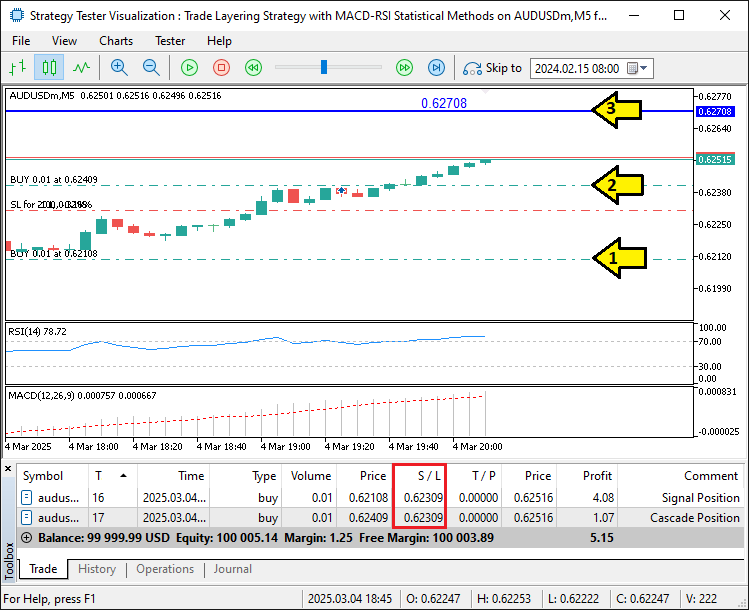
由图可见,当前持仓已触发加仓逻辑,且所有持仓的止损均已按规则调整。当我们不再需要该系统时,确保清理干净所有对象。我们可以通过OnDeinit事件处理器完成清理,但首先需要定义一个清理函数。
//+------------------------------------------------------------------+
//| Delete Level Objects                                             |
//+------------------------------------------------------------------+
void DeleteTradeLevelObjects(){//---- Function to delete trade level objects
   ObjectDelete(0, takeProfitLineName);//---- Deletes take profit line object
   ObjectDelete(0, takeProfitTextName);//---- Deletes take profit text object
}
这部分中,我们实现DeleteTradeLevelObjects"函数,用来清理可视化图表元素,通过ObjectDelete函数删除"takeProfitLineName"行对象和"takeProfitTextName"文本对象,确保在绘制新的止盈水平前,彻底清除旧的止盈标记。我们现在将该函数集成至OnDeinit事件处理器中。
//+------------------------------------------------------------------+
//| Expert deinitialization function                                 |
//+------------------------------------------------------------------+
void OnDeinit(const int reason){//---- Expert advisor deinitialization function
   DeleteTradeLevelObjects();//---- Removes trade level visualization objects from chart
}
这部分中,我们直接调用图表对象删除函数,确保在移除程序时自动清理所有相关图表元素,从而达成目标。接下来需完成的工作是程序回测,相关内容将在下一章节详细阐述。
回测
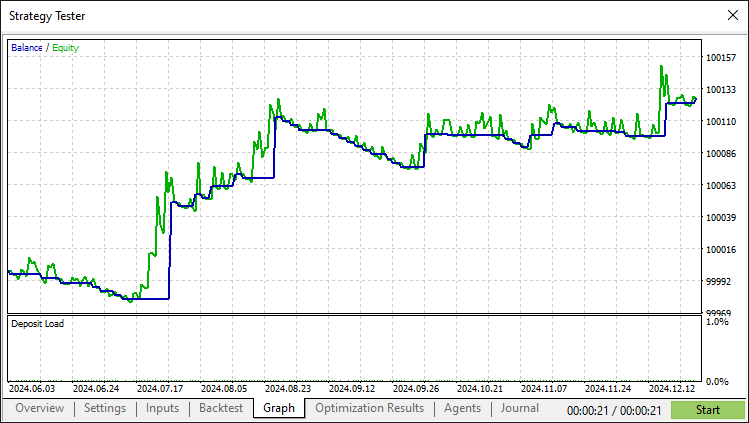
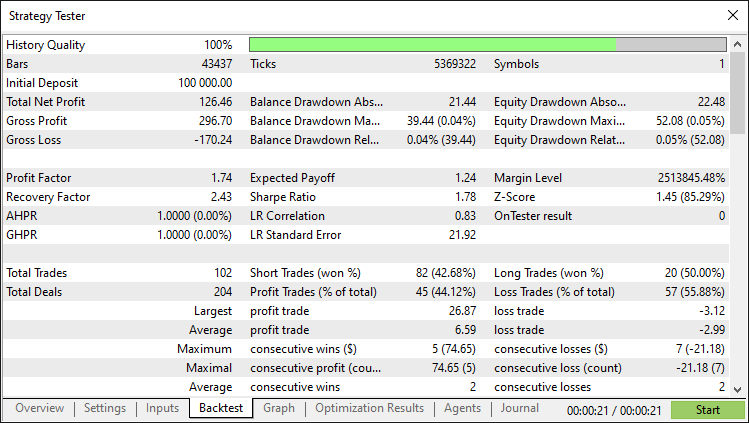
经过全面回测后,我们得到以下结果:
回测图:
回测报告:
结论
总之,我们已经成功地在MQL5中构建了一套趋势跟踪型持仓叠加策略,该策略通过融合MACD与RSI指标,并结合统计方法,实现了趋势市场中持仓规模的动态自动化调整。其核心功能亮点包括:信号识别、加仓逻辑、可视化止盈水平和动量精准自适应机制。您在此基础上通过优化"rsiLookbackPeriod"或调整"riskRewardRatio"进一步提升,以获得更好的性能。
免责声明:本文仅用于教学目的。交易涉及重大财务风险,市场行为具有高度的不确定性。在实盘操作之前,全面回测和风险管理至关重要。
通过本案例,您可以提升自动化技能并完善策略。请自行实践和优化。祝您交易顺利!
本文由MetaQuotes Ltd译自英文
原文地址: https://www.mql5.com/en/articles/17741
注意: MetaQuotes Ltd.将保留所有关于这些材料的权利。全部或部分复制或者转载这些材料将被禁止。
本文由网站的一位用户撰写,反映了他们的个人观点。MetaQuotes Ltd 不对所提供信息的准确性负责,也不对因使用所述解决方案、策略或建议而产生的任何后果负责。

 将您自己的 LLM 集成到 EA 中(第 5 部分):使用 LLM 开发和测试交易策略(四) —— 测试交易策略
 在 MQL5 中创建交易管理面板(第九部分):代码组织(三):通信模块
 JSON 从入门到精通: 创建自己的 MQL5 版本 JSON 解读器


随着趋势的发展而增加仓位的想法是有道理的,但我想这需要相当多的纪律,以免在强势波动时过度杠杆化。 你在横盘市场中尝试过这种策略吗?我想知道当趋势减弱时它的表现如何。