

MQL5交易策略自动化(第八部分):构建基于蝴蝶谐波形态的智能交易系统(EA)
 1 376
1 376
 2
2

概述
在前一篇文章(第七部分)中,我们使用MetaQuotes Language 5(MQL5)开发了一个具备动态手数缩放功能的网格交易EA,以优化风险与回报。现在,在第八部分中,我们将关注点转向蝴蝶谐波形态——这是一种利用精确的斐波那契比率来确定市场潜在转折点的反转形态。这种方法不仅有助于识别清晰的入场和出场信号,还能通过自动化可视化和执行来增强您的交易策略。在本文中,我们将涵盖以下内容:
最后,您将拥有一个功能完备的EA,能够识别蝴蝶谐波形态并进行相应的交易操作。让我们开始吧!
策略设计方案
蝴蝶形态是一种精确的几何形态,由五个关键转折点或枢轴点——X、A、B、C 和 D——构成,主要分为两种类型:看跌形态和看涨形态。在看跌蝴蝶形态中,结构呈现高-低-高-低-高的序列,其中枢轴点X是波段高点,枢轴点A是波段低点,枢轴点B是波段高点,枢轴点C是波段低点,枢轴点D是波段高点(且D点位于X点上方)。相反,看涨蝴蝶形态则呈现低-高-低-高-低的序列,其中枢轴点X是波段低点,枢轴点D位于X点下方。以下是这两种形态的直观图示。
看跌蝴蝶谐波形态:

看涨蝴蝶谐波形态:
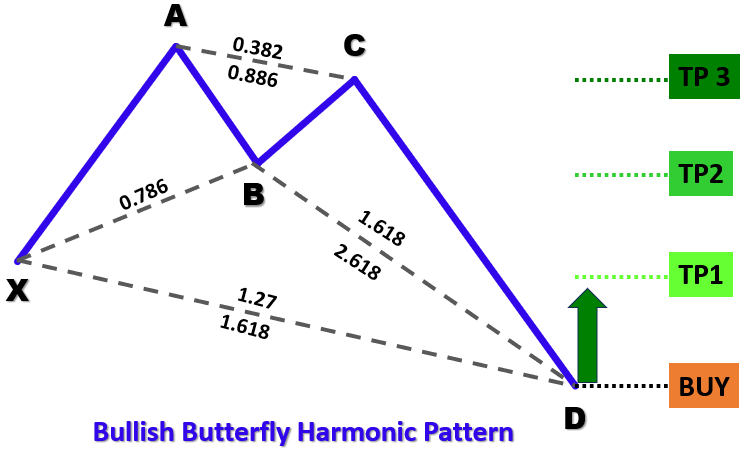
为识别这些形态,我们将采用以下结构化方法:
- 确定"XA"段:从枢轴点X到A的初始走势将为我们确定该形态的参考距离。
- 确定"AB"段:对于这两种形态类型,枢轴点B应理想地出现在XA段走势约78.6%的回撤位置,从而确认价格已反转了初始走势的相当大一部分。
- 分析"BC"段:该段走势应对XA段距离进行38.2%至88.6%的回撤,确保在最终走势前形成稳定的盘整。
- 确定"CD"段:最后一段走势应延伸至XA段走势的127%至161.8%,完成形态并指示反转点。
通过应用这些基于几何和斐波那契的判定标准,我们的EA将能够在历史价格数据中系统性地识别出有效的蝴蝶形态。一旦形态得到确认,程序将在图表上以标注三角形和趋势线的方式可视化该形态,随后根据计算得出的入场点、止损点和止盈点自动执行交易。
在MQL5中的实现
要在MQL5中创建该程序,请打开MetaEditor,进入导航器,找到“指标”文件夹,点击“新建”选项卡,并按照提示创建文件。文件创建完成后,在编码环境中,我们需要声明一些将在整个程序中使用到的全局变量。
//+------------------------------------------------------------------+
//|                        Copyright 2025, Forex Algo-Trader, Allan. |
//|                                 "https://t.me/Forex_Algo_Trader" |
//+------------------------------------------------------------------+
#property copyright "Forex Algo-Trader, Allan"
#property link      "https://t.me/Forex_Algo_Trader"
#property version   "1.00"
#property description "This EA trades based on Butterfly Strategy"
#property strict

//--- Include the trading library for order functions
#include <Trade\Trade.mqh>  //--- Include Trade library
CTrade obj_Trade;  //--- Instantiate a obj_Trade object

//--- Input parameters for user configuration
input int    PivotLeft    = 5;      //--- Number of bars to the left for pivot check
input int    PivotRight   = 5;      //--- Number of bars to the right for pivot check
input double Tolerance    = 0.10;   //--- Allowed deviation (10% of XA move)
input double LotSize      = 0.01;   //--- Lot size for new orders
input bool   AllowTrading = true;   //--- Enable or disable trading

//---------------------------------------------------------------------------
//--- Butterfly pattern definition:
//
//--- Bullish Butterfly:
//---   Pivots (X-A-B-C-D): X swing high, A swing low, B swing high, C swing low, D swing high.
//---   Normally XA > 0; Ideal B = A + 0.786*(X-A); Legs within specified ranges.
//
//--- Bearish Butterfly:
//---   Pivots (X-A-B-C-D): X swing low, A swing high, B swing low, C swing high, D swing low.
//---   Normally XA > 0; Ideal B = A - 0.786*(A-X); Legs within specified ranges.
//---------------------------------------------------------------------------

//--- Structure for a pivot point
struct Pivot {
   datetime time;   //--- Bar time of the pivot
   double   price;  //--- Pivot price (High for swing high, low for swing low)
   bool     isHigh; //--- True if swing high; false if swing low
};

//--- Global dynamic array for storing pivots in chronological order
Pivot pivots[];  //--- Declare a dynamic array to hold identified pivot points

//--- Global variables to lock in a pattern (avoid trading on repaint)
int      g_patternFormationBar = -1;  //--- Bar index where the pattern was formed (-1 means none)
datetime g_lockedPatternX      = 0;   //--- The key X pivot time for the locked pattern
这里,我们引入了"Trade\Trade.mqh" 库,以便访问交易功能,并实例化"obj_Trade"对象来执行订单。我们定义了输入参数,例如用于识别转折点的"PivotLeft"(左侧转折点数量)和"PivotRight"(右侧转折点数量)、用于谐波比率验证的"Tolerance"(容差)、用于交易量的"LotSize"(手数),以及用于启用或禁用交易的 "AllowTrading"(允许交易)。
为了追踪市场结构,我们使用一个由结构体(struct)定义的"Pivot"(转折点)结构,该结构体存储“时间”、“价格”以及“是否为高点”(isHigh,高点为true,低点为false)。这些转折点会被保存在一个全局动态数组“pivots[]”中,以便作为历史参考。最后,我们定义全局变量"g_patternFormationBar"(模式形成时的K线序号)和"g_lockedPatternX"(锁定的已检测模式X点),以防止因重复检测到同一模式而进行重复交易。接下来,我们可以定义一些函数,有助于在图表上可视化这些形态。
//+------------------------------------------------------------------+
//| Helper: Draw a filled triangle                                   |
//+------------------------------------------------------------------+
void DrawTriangle(string name, datetime t1, double p1, datetime t2, double p2, datetime t3, double p3, color cl, int width, bool fill, bool back) {
   //--- Attempt to create a triangle object with three coordinate points
   if(ObjectCreate(0, name, OBJ_TRIANGLE, 0, t1, p1, t2, p2, t3, p3)) {
      //--- Set the triangle's color
      ObjectSetInteger(0, name, OBJPROP_COLOR, cl);
      //--- Set the triangle's line style to solid
      ObjectSetInteger(0, name, OBJPROP_STYLE, STYLE_SOLID);
      //--- Set the line width of the triangle
      ObjectSetInteger(0, name, OBJPROP_WIDTH, width);
      //--- Determine if the triangle should be filled
      ObjectSetInteger(0, name, OBJPROP_FILL, fill);
      //--- Set whether the object is drawn in the background
      ObjectSetInteger(0, name, OBJPROP_BACK, back);
   }
}

//+------------------------------------------------------------------+
//| Helper: Draw a trend line                                        |
//+------------------------------------------------------------------+
void DrawTrendLine(string name, datetime t1, double p1, datetime t2, double p2, color cl, int width, int style) {
   //--- Create a trend line object connecting two points
   if(ObjectCreate(0, name, OBJ_TREND, 0, t1, p1, t2, p2)) {
      //--- Set the trend line's color
      ObjectSetInteger(0, name, OBJPROP_COLOR, cl);
      //--- Set the trend line's style (solid, dotted, etc.)
      ObjectSetInteger(0, name, OBJPROP_STYLE, style);
      //--- Set the width of the trend line
      ObjectSetInteger(0, name, OBJPROP_WIDTH, width);
   }
}

//+------------------------------------------------------------------+
//| Helper: Draw a dotted trend line                                 |
//+------------------------------------------------------------------+
void DrawDottedLine(string name, datetime t1, double p, datetime t2, color lineColor) {
   //--- Create a horizontal trend line at a fixed price level with dotted style
   if(ObjectCreate(0, name, OBJ_TREND, 0, t1, p, t2, p)) {
      //--- Set the dotted line's color
      ObjectSetInteger(0, name, OBJPROP_COLOR, lineColor);
      //--- Set the line style to dotted
      ObjectSetInteger(0, name, OBJPROP_STYLE, STYLE_DOT);
      //--- Set the line width to 1
      ObjectSetInteger(0, name, OBJPROP_WIDTH, 1);
   }
}

//+------------------------------------------------------------------+
//| Helper: Draw anchored text label (for pivots)                    |
//| If isHigh is true, anchor at the bottom (label appears above);   |
//| if false, anchor at the top (label appears below).               |
//+------------------------------------------------------------------+
void DrawTextEx(string name, string text, datetime t, double p, color cl, int fontsize, bool isHigh) {
   //--- Create a text label object at the specified time and price
   if(ObjectCreate(0, name, OBJ_TEXT, 0, t, p)) {
      //--- Set the text of the label
      ObjectSetString(0, name, OBJPROP_TEXT, text);
      //--- Set the color of the text
      ObjectSetInteger(0, name, OBJPROP_COLOR, cl);
      //--- Set the font size for the text
      ObjectSetInteger(0, name, OBJPROP_FONTSIZE, fontsize);
      //--- Set the font type and style
      ObjectSetString(0, name, OBJPROP_FONT, "Arial Bold");
      //--- Anchor the text depending on whether it's a swing high or low
      if(isHigh)
         ObjectSetInteger(0, name, OBJPROP_ANCHOR, ANCHOR_BOTTOM);
      else
         ObjectSetInteger(0, name, OBJPROP_ANCHOR, ANCHOR_TOP);
      //--- Center-align the text
      ObjectSetInteger(0, name, OBJPROP_ALIGN, ALIGN_CENTER);
   }
}
我们定义了一组辅助函数,用于通过在图表上绘制三角形、趋势线、虚线和文本标签来可视化价格走势结构。这些函数将有助于标记关键点、趋势方向和潜在的转折点水平。"DrawTriangle"函数会创建一个连接三个价格点的三角形对象。其首先使用ObjectCreate函数定义一个类型为OBJ_TRIANGLE的对象,然后使用ObjectSetInteger函数为其分配颜色、线宽和填充属性。该函数在标记谐波形态和价格走势模式时非常有用。
"DrawTrendLine"函数在两个价格点之间绘制趋势线,用于界定谐波形态结构。调用ObjectCreate创建类型为OBJ_TREND的趋势线对象,随后自定义其颜色、线宽和样式。"DrawDottedLine"函数则在两个时间点之间的指定价格水平绘制水平虚线。这样有助于标记入场与出场水平,突出关键的价格区域。该函数将线型设置为 STYLE_DOT以方便区分。"DrawTextEx"函数在特定转折点放置文本标签。其为标签指定名称、颜色、字号和对齐方式,根据高低点位置将文本置于价格的上方或下方。还可以标注关键转折水平,提升形态识别度。
借助这些变量与函数,我们就能触发 OnTick事件处理器,并且开始形态识别。然而,我们无需在每个tick到来时都进行处理,因此需要定义一套逻辑,确保每根K线只识别一次。
//+------------------------------------------------------------------+
//| Expert tick function                                             |
//+------------------------------------------------------------------+
void OnTick() {
   //--- Declare a static variable to store the time of the last processed bar
   static datetime lastBarTime = 0;
   //--- Get the time of the current confirmed bar
   datetime currentBarTime = iTime(_Symbol, _Period, 1);
   //--- If the current bar time is the same as the last processed, exit
   if(currentBarTime == lastBarTime)
      return;
   //--- Update the last processed bar time
   lastBarTime = currentBarTime;

}
为了确保只在出现新 K 线时才执行主逻辑,从而避免重复计算,我们使用static变量"lastBarTime"来保存上一根已处理K线的时间戳。在每个tick到来时,用 iTime函数获取最新确认的K线时间。若该时间与"lastBarTime"相同,则立即使用return退出,防止重复处理。否则,我们将更新"lastBarTime"变量以标记新K线为已处理状态,随后可以继续准备存储数组以接收待处理的数据。
//--- Clear the pivot array for fresh analysis
ArrayResize(pivots, 0);
//--- Get the total number of bars available on the chart
int barsCount = Bars(_Symbol, _Period);
//--- Define the starting index for pivot detection (ensuring enough left bars)
int start = PivotLeft;
//--- Define the ending index for pivot detection (ensuring enough right bars)
int end = barsCount - PivotRight;

//--- Loop through bars from 'end-1' down to 'start' to find pivot points
for(int i = end - 1; i >= start; i--) {
   //--- Assume current bar is both a potential swing high and swing low
   bool isPivotHigh = true;
   bool isPivotLow = true;
   //--- Get the high and low of the current bar
   double currentHigh = iHigh(_Symbol, _Period, i);
   double currentLow = iLow(_Symbol, _Period, i);
   //--- Loop through the window of bars around the current bar
   for(int j = i - PivotLeft; j <= i + PivotRight; j++) {
      //--- Skip if the index is out of bounds
      if(j < 0 || j >= barsCount)
         continue;
      //--- Skip comparing the bar with itself
      if(j == i)
         continue;
      //--- If any bar in the window has a higher high, it's not a swing high
      if(iHigh(_Symbol, _Period, j) > currentHigh)
         isPivotHigh = false;
      //--- If any bar in the window has a lower low, it's not a swing low
      if(iLow(_Symbol, _Period, j) < currentLow)
         isPivotLow = false;
   }
   //--- If the current bar qualifies as either a swing high or swing low
   if(isPivotHigh || isPivotLow) {
      //--- Create a new pivot structure
      Pivot p;
      //--- Set the pivot's time
      p.time = iTime(_Symbol, _Period, i);
      //--- Set the pivot's price depending on whether it is a high or low
      p.price = isPivotHigh ? currentHigh : currentLow;
      //--- Set the pivot type (true for swing high, false for swing low)
      p.isHigh = isPivotHigh;
      //--- Get the current size of the pivots array
      int size = ArraySize(pivots);
      //--- Increase the size of the pivots array by one
      ArrayResize(pivots, size + 1);
      //--- Add the new pivot to the array
      pivots[size] = p;
   }
}
这里,我们通过分析历史价格数据来识别图表中摆动高点和摆动低点的转折点。首先,我们使用ArrayResize函数重置"pivots"数组,以确保进行重新分析。随后,我们通过Bars函数获取K线总数,并定义转折点检测范围,确保左右两侧有足够数量的K线用于比较。
接下来,我们使用for循环从"end-1"到"start"遍历所有K线,假设每根K线都可能是潜在转折点。通过iHigh和iLow函数提取当前K线的最高价和最低价。然后在"PivotLeft"和"PivotRight"范围内,将当前K线与相邻K线进行比较。如果该范围内存在更高的最高价,则当前K线不是摆动高点;反之,如果存在更低的最低价,则当前K线不是摆动低点。如果某根K线符合转折点条件,那么我们需要:创建一个"Pivot"结构体;用iTime函数记录其时间戳;根据高点或低点设置价格;标记类型(true表示摆动高点,false表示摆动低点)。最后,通过ArrayResize调整"pivots"数组大小并添加识别出的转折点。使用ArrayPrint函数输出数据时,将得到如下结果:
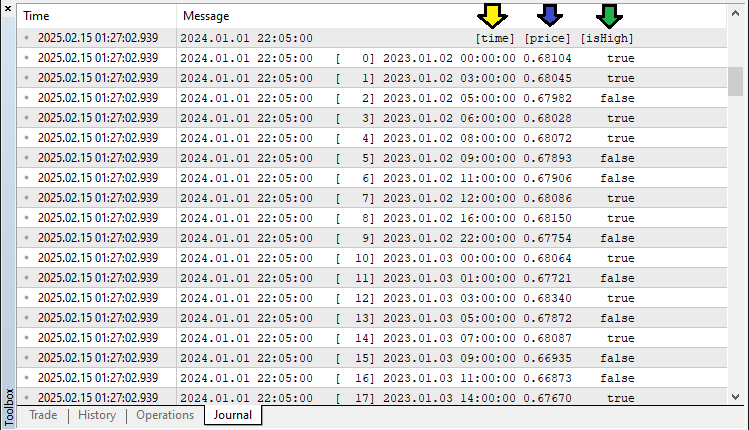
基于这些数据,我们可提取出转折点信息,当有效转折点数量充足时,即可进行模式分析与识别。以下是实现该功能的完整逻辑:
//--- Determine the total number of pivots found
int pivotCount = ArraySize(pivots);
//--- If fewer than five pivots are found, the pattern cannot be formed
if(pivotCount < 5) {
   //--- Reset pattern lock variables
   g_patternFormationBar = -1;
   g_lockedPatternX = 0;
   //--- Exit the OnTick function
   return;
}

//--- Extract the last five pivots as X, A, B, C, and D
Pivot X = pivots[pivotCount - 5];
Pivot A = pivots[pivotCount - 4];
Pivot B = pivots[pivotCount - 3];
Pivot C = pivots[pivotCount - 2];
Pivot D = pivots[pivotCount - 1];

//--- Initialize a flag to indicate if a valid Butterfly pattern is found
bool patternFound = false;
//--- Check for the high-low-high-low-high (Bearish reversal) structure
if(X.isHigh && (!A.isHigh) && B.isHigh && (!C.isHigh) && D.isHigh) {
   //--- Calculate the difference between pivot X and A
   double diff = X.price - A.price;
   //--- Ensure the difference is positive
   if(diff > 0) {
      //--- Calculate the ideal position for pivot B based on Fibonacci ratio
      double idealB = A.price + 0.786 * diff;
      //--- Check if actual B is within tolerance of the ideal position
      if(MathAbs(B.price - idealB) <= Tolerance * diff) {
         //--- Calculate the BC leg length
         double BC = B.price - C.price;
         //--- Verify that BC is within the acceptable Fibonacci range
         if((BC >= 0.382 * diff) && (BC <= 0.886 * diff)) {
            //--- Calculate the CD leg length
            double CD = D.price - C.price;
            //--- Verify that CD is within the acceptable Fibonacci range and that D is above X
            if((CD >= 1.27 * diff) && (CD <= 1.618 * diff) && (D.price > X.price))
               patternFound = true;
         }
      }
   }
}
这里,我们通过分析最近识别的五个转折点,验证是否存在蝴蝶形谐波模式。首先,使用ArraySize函数确定转折点总数。如果数量不足五个,则重置模式锁定变量("g_patternFormationBar"和"g_lockedPatternX"),并退出OnTick函数以避免虚假信号。接下来,提取最近五个转折点并依次标记为"X"、"A"、"B"、"C"、"D",对应模式的几何结构。初始化"patternFound"标识为false,用于跟踪是否满足有效蝴蝶模式的条件。
对于看跌反转模式,我们验证转折点序列是否符合:X(高点)→ A(低点)→ B(高点)→ C(低点)→ D(高点)。如果结构成立,计算"XA"波段差值,并应用斐波那契比率验证"B"、"C"、"D"的预期位置。其中,"B"点必须位于"XA"的0.786回撤位附近;"BC"波段应当为"XA"的"0.382"至"0.886"倍;"CD"波段应扩展至"XA"的"1.27"至"1.618"倍,且确保"D"点高于"X"点。当以上全部条件满足时,将"patternFound"设置为true确认模式成立。我们使用相似的方式验证看涨反转模式。
//--- Check for the low-high-low-high-low (Bullish reversal) structure
if((!X.isHigh) && A.isHigh && (!B.isHigh) && C.isHigh && (!D.isHigh)) {
   //--- Calculate the difference between pivot A and X
   double diff = A.price - X.price;
   //--- Ensure the difference is positive
   if(diff > 0) {
      //--- Calculate the ideal position for pivot B based on Fibonacci ratio
      double idealB = A.price - 0.786 * diff;
      //--- Check if actual B is within tolerance of the ideal position
      if(MathAbs(B.price - idealB) <= Tolerance * diff) {
         //--- Calculate the BC leg length
         double BC = C.price - B.price;
         //--- Verify that BC is within the acceptable Fibonacci range
         if((BC >= 0.382 * diff) && (BC <= 0.886 * diff)) {
            //--- Calculate the CD leg length
            double CD = C.price - D.price;
            //--- Verify that CD is within the acceptable Fibonacci range and that D is below X
            if((CD >= 1.27 * diff) && (CD <= 1.618 * diff) && (D.price < X.price))
               patternFound = true;
         }
      }
   }
}
如果检测到符合条件的谐波模式,即可在图表上进行可视化标注。
//--- Initialize a string to store the type of pattern detected
string patternType = "";
//--- If a valid pattern is found, determine its type based on the relationship between D and X
if(patternFound) {
   if(D.price > X.price)
      patternType = "Bearish";  //--- Bearish Butterfly indicates a SELL signal
   else if(D.price < X.price)
      patternType = "Bullish";  //--- Bullish Butterfly indicates a BUY signal
}

//--- If a valid Butterfly pattern is detected
if(patternFound) {
   //--- Print a message indicating the pattern type and detection time
   Print(patternType, " Butterfly pattern detected at ", TimeToString(D.time, TIME_DATE|TIME_MINUTES|TIME_SECONDS));

   //--- Create a unique prefix for all graphical objects related to this pattern
   string signalPrefix = "BF_" + IntegerToString(X.time);

   //--- Choose triangle color based on the pattern type
   color triangleColor = (patternType=="Bullish") ? clrBlue : clrRed;

   //--- Draw the first triangle connecting pivots X, A, and B
   DrawTriangle(signalPrefix+"_Triangle1", X.time, X.price, A.time, A.price, B.time, B.price,
                triangleColor, 2, true, true);
   //--- Draw the second triangle connecting pivots B, C, and D
   DrawTriangle(signalPrefix+"_Triangle2", B.time, B.price, C.time, C.price, D.time, D.price,
                triangleColor, 2, true, true);

   //--- Draw boundary trend lines connecting the pivots for clarity
   DrawTrendLine(signalPrefix+"_TL_XA", X.time, X.price, A.time, A.price, clrBlack, 2, STYLE_SOLID);
   DrawTrendLine(signalPrefix+"_TL_AB", A.time, A.price, B.time, B.price, clrBlack, 2, STYLE_SOLID);
   DrawTrendLine(signalPrefix+"_TL_BC", B.time, B.price, C.time, C.price, clrBlack, 2, STYLE_SOLID);
   DrawTrendLine(signalPrefix+"_TL_CD", C.time, C.price, D.time, D.price, clrBlack, 2, STYLE_SOLID);
   DrawTrendLine(signalPrefix+"_TL_XB", X.time, X.price, B.time, B.price, clrBlack, 2, STYLE_SOLID);
   DrawTrendLine(signalPrefix+"_TL_BD", B.time, B.price, D.time, D.price, clrBlack, 2, STYLE_SOLID);
}
在此阶段,我们通过判定蝴蝶形态为看涨或看跌类型完成最终识别,并在图表上进行可视化标注。首先,初始化"patternType"字符串,用于存储检测到的形态类型("看涨"或"看跌")。当"patternFound"为true时,我们比较关键点"D"与"X"的"price"属性。如果"D"点价格高于"X"点,则判定为"看跌"蝴蝶形态,预示着潜在的做空机会。相反,如果"D"点价格低于"X"点,则判定为"看涨"蝴蝶形态,预示着潜在的做多机会。
当检测到形态时,我们使用Print函数输出日志信息,记录形态类型及检测时间。通过IntegerToString函数与"X.time"生成唯一的"signalPrefix",确保每个形态的图形对象标识唯一。随后调用"DrawTriangle"函数,高亮显示构成蝴蝶形态的两个三角形区域。看涨形态使用蓝色(clrBlue)填充,看跌形态使用红色("clrRed")填充。第一个三角形的连接点是:X-A-B;第二个三角形的的连接点是:B-C-D。
为提升形态的辨识度,使用"DrawTrendLine"函数绘制黑色实线连接关键转折点:X-A、A-B、B-C、C-D、X-B以及B-D。这些线条可清晰呈现谐波形态的结构对称性。编译运行后,我们得到的结果如下:
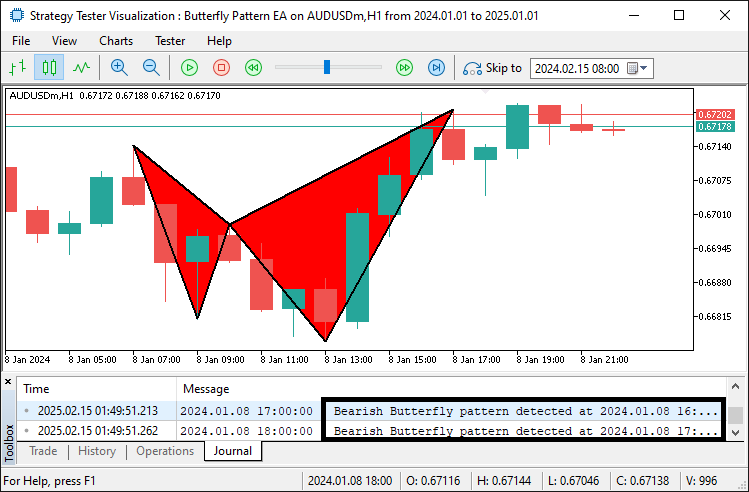
由图表可见,我们不仅能够识别出谐波形态,还能将其以可视化形式呈现。随后,我们可通过添加标注信息来进一步提升图形的视觉清晰度。
//--- Retrieve the symbol's point size to calculate offsets for text positioning
double point = SymbolInfoDouble(_Symbol, SYMBOL_POINT);
//--- Calculate an offset (15 points) for positioning text above or below pivots
double offset = 15 * point;

//--- Determine the Y coordinate for each pivot label based on its type
double textY_X = (X.isHigh ? X.price + offset : X.price - offset);
double textY_A = (A.isHigh ? A.price + offset : A.price - offset);
double textY_B = (B.isHigh ? B.price + offset : B.price - offset);
double textY_C = (C.isHigh ? C.price + offset : C.price - offset);
double textY_D = (D.isHigh ? D.price + offset : D.price - offset);

//--- Draw text labels for each pivot with appropriate anchoring
DrawTextEx(signalPrefix+"_Text_X", "X", X.time, textY_X, clrBlack, 11, X.isHigh);
DrawTextEx(signalPrefix+"_Text_A", "A", A.time, textY_A, clrBlack, 11, A.isHigh);
DrawTextEx(signalPrefix+"_Text_B", "B", B.time, textY_B, clrBlack, 11, B.isHigh);
DrawTextEx(signalPrefix+"_Text_C", "C", C.time, textY_C, clrBlack, 11, C.isHigh);
DrawTextEx(signalPrefix+"_Text_D", "D", D.time, textY_D, clrBlack, 11, D.isHigh);

//--- Calculate the central label's time as the midpoint between pivots X and B
datetime centralTime = (X.time + B.time) / 2;
//--- Set the central label's price at pivot D's price
double centralPrice = D.price;
//--- Create the central text label indicating the pattern type
if(ObjectCreate(0, signalPrefix+"_Text_Center", OBJ_TEXT, 0, centralTime, centralPrice)) {
   ObjectSetString(0, signalPrefix+"_Text_Center", OBJPROP_TEXT,
      (patternType=="Bullish") ? "Bullish Butterfly" : "Bearish Butterfly");
   ObjectSetInteger(0, signalPrefix+"_Text_Center", OBJPROP_COLOR, clrBlack);
   ObjectSetInteger(0, signalPrefix+"_Text_Center", OBJPROP_FONTSIZE, 11);
   ObjectSetString(0, signalPrefix+"_Text_Center", OBJPROP_FONT, "Arial Bold");
   ObjectSetInteger(0, signalPrefix+"_Text_Center", OBJPROP_ALIGN, ALIGN_CENTER);
}
在此步骤中,我们通过将文本标签添加到图表上标注蝴蝶形态。首先,使用SymbolInfoDouble函数获取交易品种的SYMBOL_POINT(点值),并据此计算文本定位所需的偏移量。对于转折点("X"、"A"、"B"、"C"、"D")的标签,根据其是高点还是低点,自动将标签放置在价格K线的上方或下方。通过"DrawTextEx"函数绘制这些标签,采用黑色字体、11号字号确保可读性。同时,在"X"与"B"的中点位置创建中心标签,显示"看涨蝴蝶形态"或"看跌蝴蝶形态"。该标签通过ObjectCreate、ObjectSetString和ObjectSetInteger函数设置文本内容、颜色、字号及对齐方式,以实现最优视觉效果。程序运行后,图表呈现效果如下:
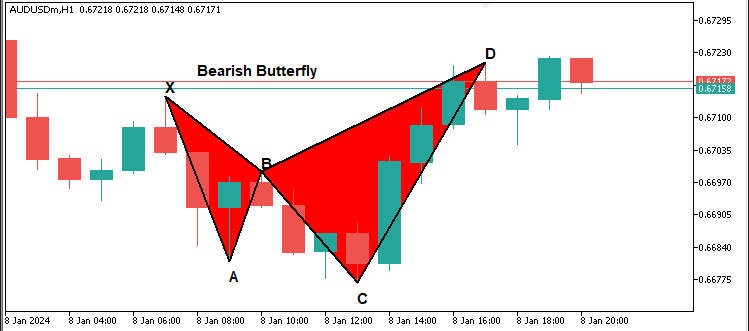
既然我们已经完成了形态标签的标注,接下来可以进一步添加标记入场点和出场点的。
//--- Define start and end times for drawing horizontal dotted lines for obj_Trade levels
datetime lineStart = D.time;
datetime lineEnd = D.time + PeriodSeconds(_Period)*2;

//--- Declare variables for entry price and take profit levels
double entryPriceLevel, TP1Level, TP2Level, TP3Level, tradeDiff;
//--- Calculate obj_Trade levels based on whether the pattern is Bullish or Bearish
if(patternType=="Bullish") { //--- Bullish → BUY signal
   //--- Use the current ASK price as the entry
   entryPriceLevel = SymbolInfoDouble(_Symbol, SYMBOL_ASK);
   //--- Set TP3 at pivot C's price
   TP3Level = C.price;
   //--- Calculate the total distance to be covered by the obj_Trade
   tradeDiff = TP3Level - entryPriceLevel;
   //--- Set TP1 at one-third of the total move
   TP1Level = entryPriceLevel + tradeDiff/3;
   //--- Set TP2 at two-thirds of the total move
   TP2Level = entryPriceLevel + 2*tradeDiff/3;
} else { //--- Bearish → SELL signal
   //--- Use the current BID price as the entry
   entryPriceLevel = SymbolInfoDouble(_Symbol, SYMBOL_BID);
   //--- Set TP3 at pivot C's price
   TP3Level = C.price;
   //--- Calculate the total distance to be covered by the obj_Trade
   tradeDiff = entryPriceLevel - TP3Level;
   //--- Set TP1 at one-third of the total move
   TP1Level = entryPriceLevel - tradeDiff/3;
   //--- Set TP2 at two-thirds of the total move
   TP2Level = entryPriceLevel - 2*tradeDiff/3;
}

//--- Draw dotted horizontal lines to represent the entry and TP levels
DrawDottedLine(signalPrefix+"_EntryLine", lineStart, entryPriceLevel, lineEnd, clrMagenta);
DrawDottedLine(signalPrefix+"_TP1Line", lineStart, TP1Level, lineEnd, clrForestGreen);
DrawDottedLine(signalPrefix+"_TP2Line", lineStart, TP2Level, lineEnd, clrGreen);
DrawDottedLine(signalPrefix+"_TP3Line", lineStart, TP3Level, lineEnd, clrDarkGreen);

//--- Define a label time coordinate positioned just to the right of the dotted lines
datetime labelTime = lineEnd + PeriodSeconds(_Period)/2;

//--- Construct the entry label text with the price
string entryLabel = (patternType=="Bullish") ? "BUY (" : "SELL (";
entryLabel += DoubleToString(entryPriceLevel, _Digits) + ")";
//--- Draw the entry label on the chart
DrawTextEx(signalPrefix+"_EntryLabel", entryLabel, labelTime, entryPriceLevel, clrMagenta, 11, true);

//--- Construct and draw the TP1 label
string tp1Label = "TP1 (" + DoubleToString(TP1Level, _Digits) + ")";
DrawTextEx(signalPrefix+"_TP1Label", tp1Label, labelTime, TP1Level, clrForestGreen, 11, true);

//--- Construct and draw the TP2 label
string tp2Label = "TP2 (" + DoubleToString(TP2Level, _Digits) + ")";
DrawTextEx(signalPrefix+"_TP2Label", tp2Label, labelTime, TP2Level, clrGreen, 11, true);

//--- Construct and draw the TP3 label
string tp3Label = "TP3 (" + DoubleToString(TP3Level, _Digits) + ")";
DrawTextEx(signalPrefix+"_TP3Label", tp3Label, labelTime, TP3Level, clrDarkGreen, 11, true);
这里,我们根据检测到的形态计算交易入场位和止盈(TP)位。首先,使用PeriodSeconds函数确定绘制水平交易位的时间周期跨度。接着,通过 SymbolInfoDouble函数获取入场价格:买入时使用SYMBOL_ASK ,卖出时使用SYMBOL_BID。我们用"C.price"变量设定第三止盈目标(TP3),并计算整个交易区间范围。将该区间按三等分比例划分,分别计算第一止盈目标(TP1)和第二止盈目标(TP2)。使用"DrawDottedLine"函数以不同颜色绘制入场位和止盈位水平线。随后,通过PeriodSeconds函数确定标签的时间坐标,以优化显示位置。利用DoubleToString函数将价格数值格式化,构建入场标签文本。最后,调用"DrawTextEx"函数在图表上显示入场位和止盈位标签。编译后,呈现如下效果:
看跌形态:
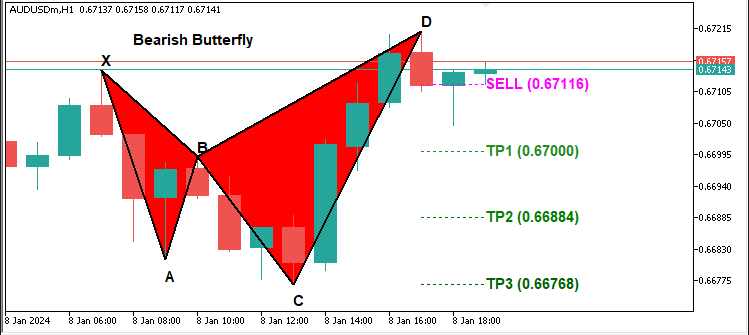
看涨形态
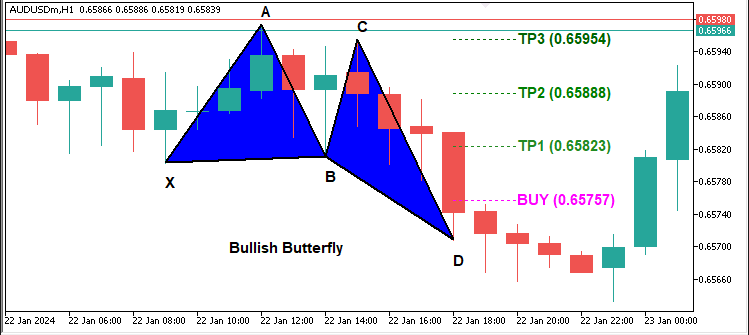
由上图可见,我们既能准确识别各类技术形态,又能将其正确绘制。当前需要实现的功能是:等待K线收盘后的形态确认,如果形态在K线收盘后依然存在(即未发生重绘),则说明该形态有效,此时可按既定入场位开立相应头寸。以下是实现该功能的完整逻辑:
//--- Retrieve the index of the current bar
int currentBarIndex = Bars(_Symbol, _Period) - 1;
//--- If no pattern has been previously locked, lock the current pattern formation
if(g_patternFormationBar == -1) {
   g_patternFormationBar = currentBarIndex;
   g_lockedPatternX = X.time;
   //--- Print a message that the pattern is detected and waiting for confirmation
   Print("Pattern detected on bar ", currentBarIndex, ". Waiting for confirmation on next bar.");
   return;
}
//--- If still on the same formation bar, the pattern is considered to be repainting
if(currentBarIndex == g_patternFormationBar) {
   Print("Pattern is repainting; still on locked formation bar ", currentBarIndex, ". No obj_Trade yet.");
   return;
}
//--- If we are on a new bar compared to the locked formation
if(currentBarIndex > g_patternFormationBar) {
   //--- Check if the locked pattern still corresponds to the same X pivot
   if(g_lockedPatternX == X.time) {
      Print("Confirmed pattern (locked on bar ", g_patternFormationBar, "). Opening obj_Trade on bar ", currentBarIndex, ".");
      //--- Update the pattern formation bar to the current bar
      g_patternFormationBar = currentBarIndex;
      //--- Only proceed with trading if allowed and if there is no existing position
      if(AllowTrading && !PositionSelect(_Symbol)) {
         double entryPriceTrade = 0, stopLoss = 0, takeProfit = 0;
         point = SymbolInfoDouble(_Symbol, SYMBOL_POINT);
         bool tradeResult = false;
         //--- For a Bullish pattern, execute a BUY obj_Trade
         if(patternType=="Bullish") {  //--- BUY signal
            entryPriceTrade = SymbolInfoDouble(_Symbol, SYMBOL_ASK);
            double diffTrade = TP2Level - entryPriceTrade;
            stopLoss = entryPriceTrade - diffTrade * 3;
            takeProfit = TP2Level;
            tradeResult = obj_Trade.Buy(LotSize, _Symbol, entryPriceTrade, stopLoss, takeProfit, "Butterfly Signal");
            if(tradeResult)
               Print("Buy order opened successfully.");
            else
               Print("Buy order failed: ", obj_Trade.ResultRetcodeDescription());
         }
         //--- For a Bearish pattern, execute a SELL obj_Trade
         else if(patternType=="Bearish") {  //--- SELL signal
            entryPriceTrade = SymbolInfoDouble(_Symbol, SYMBOL_BID);
            double diffTrade = entryPriceTrade - TP2Level;
            stopLoss = entryPriceTrade + diffTrade * 3;
            takeProfit = TP2Level;
            tradeResult = obj_Trade.Sell(LotSize, _Symbol, entryPriceTrade, stopLoss, takeProfit, "Butterfly Signal");
            if(tradeResult)
               Print("Sell order opened successfully.");
            else
               Print("Sell order failed: ", obj_Trade.ResultRetcodeDescription());
         }
      }
      else {
         //--- If a position is already open, do not execute a new obj_Trade
         Print("A position is already open for ", _Symbol, ". No new obj_Trade executed.");
      }
   }
   else {
      //--- If the pattern has changed, update the lock with the new formation bar and X pivot
      g_patternFormationBar = currentBarIndex;
      g_lockedPatternX = X.time;
      Print("Pattern has changed; updating lock on bar ", currentBarIndex, ". Waiting for confirmation.");
      return;
   }
}
}
else {
//--- If no valid Butterfly pattern is detected, reset the pattern lock variables
g_patternFormationBar = -1;
g_lockedPatternX = 0;
}
本模块负责技术形态锁定与交易执行逻辑。首先我们使用Bars函数获取当前K线柱索引,并赋值给变量"currentBarIndex"。如果全局变量 "g_patternFormationBar"值为-1(表示未锁定任何形态),那么我们将 "currentBarIndex"赋值给"g_patternFormationBar",标记形态起始K线,并将X轴关键点时间存入 "g_lockedPatternX"中,再通过"Print"函数打印输出提示信息:已检测到待确认形态。如果检测到形态仍在同一根K线上更新(即发生重绘),那么我们使用Print函数输出警告信息:形态重绘中,暂不执行交易。并且跳过交易执行环节。
当最新K线推进至形态锁定K线之后时,系统通过比较全局变量"g_lockedPatternX"与当前X轴关键点时间,验证形态是否仍然有效。如果两者时间匹配(即形态关键点未发生移动),则确认形态有效,并进入交易执行准备阶段。在执行交易前,我们使用PositionSelect函数确认当前品种无持仓,并且检查 "AllowTrading"。如果确认形态为“看涨”,则使用SymbolInfoDouble函数获取当前SYMBOL_ASK(卖出价),根据预设参数"TP2Level"计算止损和止盈价位,并且调用"obj_Trade.Buy"函数执行买入订单。如果订单成功成交,那么我们通过"Print"函数输出成交确认信息;反之,如果订单失败,则通过"obj_Trade.ResultRetcodeDescription"函数获取并打印错误原因。
对于”看跌“形态,我们通过SymbolInfoDouble函数获取当前SYMBOL_BID(买入价),计算交易关键价位,并调用"obj_Trade.Sell"函数执行卖出订单。交易结果通过Print函数输出成功或失败信息。如果检测到当前品种已有持仓,那么系统不执行新交易,并通过"Print"函数输出提示信息。当锁定的X轴关键点时间发生变化时,系统更新全局变量"g_patternFormationBar"和"g_lockedPatternX",标记形态已变更并需要重新确认。如果未检测到有效形态,系统将重置"g_patternFormationBar"和"g_lockedPatternX" ,以清除之前的锁定状态。
编译后,呈现如下效果:
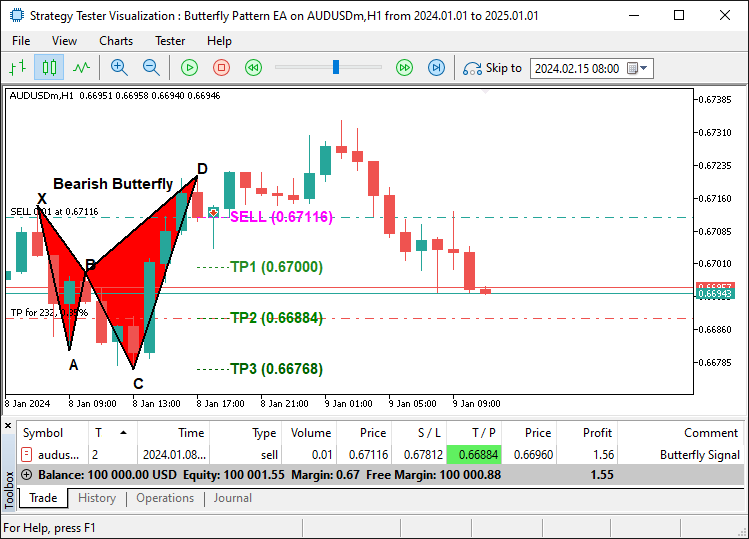
从图可见,我们已成功绘制出蝴蝶形态,并在确认其稳定性后据此执行交易。这表明我们已达成既定目标:识别、绘制并交易该形态。接下来需完成的工作是程序回测,相关内容将在下一章节详细阐述。
回测与优化
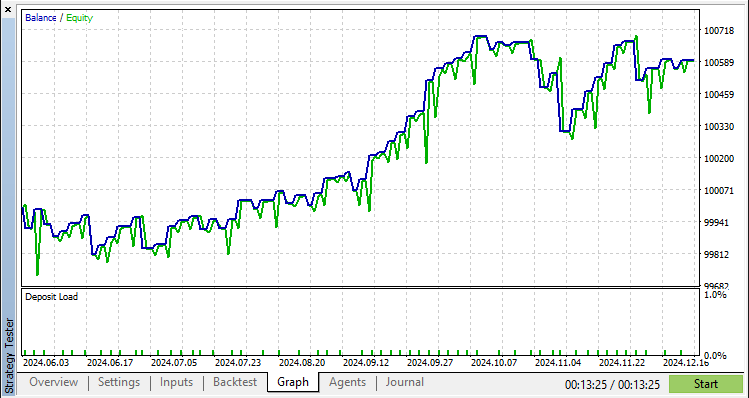
经过全面回测后,我们得到以下结果:
回测图:
回测报告:
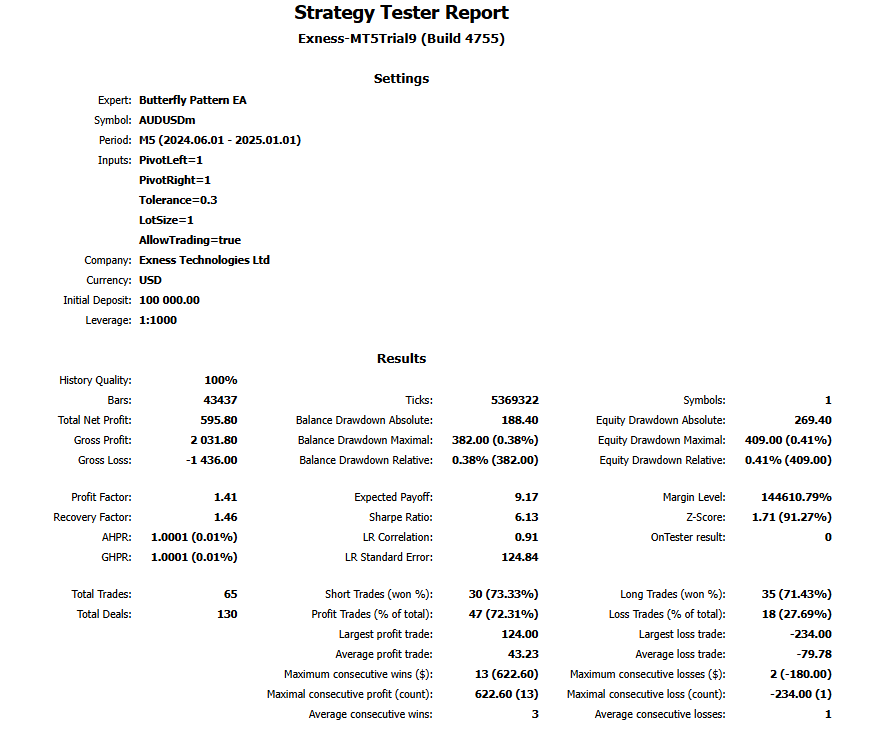
在5分钟K线图上进行为期半年的测试(共产生65笔交易),结果显示蝴蝶形态的出现频率较低,且容差百分比越高,产生的交易信号数量越多。
结论
我们已成功开发出一款基于MQL5 EA,可精准识别并交易蝴蝶谐波形态。该系统通过形态识别、关键点验证与自动化交易执行,实现了对市场条件的动态适配。
免责声明:本文仅用于教学目的。交易涉及重大财务风险,且市场行情具有不可预测性。尽管所述策略为谐波交易提供了结构化框架,但无法保证盈利。在实盘环境中部署此程序前,必须进行全面的回测并实施严格的风险管理。
通过应用上述技术,您可提升谐波形态交易技能、优化技术分析能力,并完善算法交易策略。祝您交易顺利!
本文由MetaQuotes Ltd译自英文
原文地址: https://www.mql5.com/en/articles/17223
注意: MetaQuotes Ltd.将保留所有关于这些材料的权利。全部或部分复制或者转载这些材料将被禁止。
本文由网站的一位用户撰写,反映了他们的个人观点。MetaQuotes Ltd 不对所提供信息的准确性负责,也不对因使用所述解决方案、策略或建议而产生的任何后果负责。

 市场模拟(第一部分):跨期订单(一)
 在 MQL5 中构建自优化智能交易系统(第六部分):防止爆仓
 使用MQL5经济日历进行交易(第六部分):利用新闻事件分析和倒计时器实现交易入场自动化
 算法交易中的神经符号化系统:结合符号化规则和神经网络

查看新文章:在 MQL5 中自动执行交易策略(第 8 部分):使用蝴蝶谐波形态构建智能交易系统。
作者: Allan Munene MutiiriaAllan Munene Mutiiria
查看新文章:在 MQL5 中自动执行交易策略(第 8 部分):使用蝴蝶谐波形态构建智能交易系统。
作者: Allan Munene MutiiriaAllan Munene Mutiiria