

让手动回测变得简单:为MQL5策略测试器构建自定义工具包
 983
983
 6
6

引言
回测交易策略是成功交易的基石,但将每个想法都自动化可能会让人感到束缚,而手动测试又往往缺乏结构和精度。如果您能将手动交易的控制力与 MetaTrader 5 策略测试器的强大功能结合起来呢?在本文中,我们介绍一个自定义的 MetaQuotes Language 5 (MQL5) EA,它能将手动回测转变为一个直观、高效的过程——为您配备一个工具包,让您按照自己的方式测试策略。我们将按以下顺序涵盖这些步骤:
到文末,您将获得一个实用的解决方案,能够在策略测试器中快速、自信地回测和完善您的交易策略。
计划:设计手动回测工具包
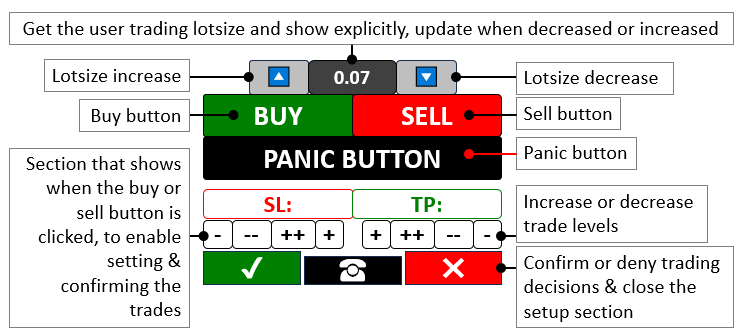
我们的目标是创建一个工具包,它将手动控制与MetaTrader 5中策略测试器的快速回测速度相结合,从而避开传统手动测试时缓慢的实时报价。我们将设计一个带有图表按钮的程序,用于触发买入或卖出交易、调整手数、设置止损(SL)和止盈(TP)水平,并通过一个“恐慌(Panic)按钮”关闭所有持仓——该程序可与任何策略完全集成,无论是指标、K线形态还是价格行为策略,所有这些都能以测试器的加速速度运行。这个灵活的设置将使我们能够以速度和精度交互式地测试任何交易方法,在模拟环境中简化策略的完善过程。简而言之,这是我们所实现的目标的图形展示:
在MQL5中实现:让工具包变为现实
要在MQL5中创建该程序,我们需要定义程序的基础数据,然后定义一些用户输入参数,最后,我们需要包含一些能够执行交易的库文件。
//+------------------------------------------------------------------+
//|                       Manual backtest toolkit in Strategy Tester |
//|                        Copyright 2025, Forex Algo-Trader, Allan. |
//|                                 "https://t.me/Forex_Algo_Trader" |
//+------------------------------------------------------------------+
#property copyright "Forex Algo-Trader, Allan"
#property link      "https://t.me/Forex_Algo_Trader"
#property version   "1.00"
#property description "This EA Enables manual backtest in the strategy tester"
#property strict //--- Enforce strict coding rules to catch errors early

#define BTN_BUY "BTN BUY" //--- Define the name for the Buy button
#define BTN_SELL "BTN SELL" //--- Define the name for the Sell button
#define BTN_P "BTN P" //--- Define the name for the button that increase lot size
#define BTN_M "BTN M" //--- Define the name for the button that decrease lot size
#define BTN_LOT "BTN LOT" //--- Define the name for the lot size display button
#define BTN_CLOSE "BTN CLOSE" //--- Define the name for the button that close all positions
#define BTN_SL "BTN SL" //--- Define the name for the Stop Loss display button
#define BTN_SL1M "BTN SL1M" //--- Define the name for the button that slightly lower Stop Loss
#define BTN_SL2M "BTN SL2M" //--- Define the name for the button that greatly lower Stop Loss
#define BTN_SL1P "BTN SL1P" //--- Define the name for the button that slightly raise Stop Loss
#define BTN_SL2P "BTN SL2P" //--- Define the name for the button that greatly raise Stop Loss
#define BTN_TP "BTN TP" //--- Define the name for the Take Profit display button
#define BTN_TP1M "BTN TP1M" //--- Define the name for the button that slightly lower Take Profit
#define BTN_TP2M "BTN TP2M" //--- Define the name for the button that greatly lower Take Profit
#define BTN_TP1P "BTN TP1P" //--- Define the name for the button that slightly raise Take Profit
#define BTN_TP2P "BTN TP2P" //--- Define the name for the button that greatly raise Take Profit
#define BTN_YES "BTN YES" //--- Define the name for the button that confirm a trade
#define BTN_NO "BTN NO" //--- Define the name for the button that cancel a trade
#define BTN_IDLE "BTN IDLE" //--- Define the name for the idle button between Yes and No
#define HL_SL "HL SL" //--- Define the name for the Stop Loss horizontal line
#define HL_TP "HL TP" //--- Define the name for the Take Profit horizontal line

#include <Trade/Trade.mqh> //--- Bring in the Trade library needed for trading functions
CTrade obj_Trade; //--- Create a trading object to handle trade operations

bool tradeInAction = false; //--- Track whether a trade setup is currently active
bool isHaveTradeLevels = false; //--- Track whether Stop Loss and Take Profit levels are shown

input double init_lot = 0.03;
input int slow_pts = 10;
input int fast_pts = 100;
在这里,我们首先使用 #define 关键字定义一组交互式按钮,如“BTN_BUY”(买入)和“BTN_SELL”(卖出),以便在我们想要的时候启动交易,让我们能直接控制入场点;同时,“BTN_P”和“BTN_M”按钮则允许我们微调“init_lot”(初始手数)的大小——初始设置为0.03——以匹配我们的风险偏好。我们还加入了“BTN_CLOSE”作为我们的紧急出口,这是一种快速一键关闭所有持仓的方式;同时,我们依赖“tradeInAction”来跟踪我们是否正在设置交易,并依靠“isHaveTradeLevels”来在止损和止盈的图形元素激活时发出信号。
接着,我们调用来自“<Trade/Trade.mqh>”的“CTrade”类,创建一个“obj_Trade”对象,以流畅高效地处理交易执行。为了给我们提供更大的灵活性,我们添加了可调整的 输入参数,例如将“slow_pts”设置为10,“fast_pts”设置为100,这样我们就可以即时微调我们的止损和止盈水平,确保我们的工具包能够适应我们正在测试的任何策略。现在,由于我们需要创建面板按钮,让我们来创建一个函数,该函数包含所有可能的输入参数,以实现代码的可重用性和自定义。
//+------------------------------------------------------------------+
//| Create button function                                           |
//+------------------------------------------------------------------+
void CreateBtn(string objName,int xD,int yD,int xS,int yS,string txt,
               int fs=13,color clrTxt=clrWhite,color clrBg=clrBlack,
               color clrBd=clrBlack,string font="Calibri"){
   ObjectCreate(0,objName,OBJ_BUTTON,0,0,0); //--- Create a new button object on the chart
   ObjectSetInteger(0,objName,OBJPROP_XDISTANCE, xD); //--- Set the button's horizontal position
   ObjectSetInteger(0,objName,OBJPROP_YDISTANCE, yD); //--- Set the button's vertical position
   ObjectSetInteger(0,objName,OBJPROP_XSIZE, xS); //--- Set the button's width
   ObjectSetInteger(0,objName,OBJPROP_YSIZE, yS); //--- Set the button's height
   ObjectSetInteger(0,objName,OBJPROP_CORNER, CORNER_LEFT_UPPER); //--- Position the button from the top-left corner
   ObjectSetString(0,objName,OBJPROP_TEXT, txt); //--- Set the text displayed on the button
   ObjectSetInteger(0,objName,OBJPROP_FONTSIZE, fs); //--- Set the font size of the button text
   ObjectSetInteger(0,objName,OBJPROP_COLOR, clrTxt); //--- Set the color of the button text
   ObjectSetInteger(0,objName,OBJPROP_BGCOLOR, clrBg); //--- Set the background color of the button
   ObjectSetInteger(0,objName,OBJPROP_BORDER_COLOR,clrBd); //--- Set the border color of the button
   ObjectSetString(0,objName,OBJPROP_FONT,font); //--- Set the font style of the button text

   ChartRedraw(0); //--- Refresh the chart to show the new button
}
在这里,我们定义了“CreateBtn”函数,用于在图表上构建每一个按钮——例如“BTN_BUY”或“BTN_SELL”。该函数接收诸如“objName”(用于标识按钮)、“xD”和“yD”(用于定义水平和垂直位置)、“xS”和“yS”(用于定义宽度和高度)以及“txt”(用于显示我们想要的标签,如“BUY”或“SELL”)等输入参数。为实现此功能,我们使用 ObjectCreate 函数在图表上放置一个新的 OBJ_BUTTON 对象,为简单起见,将其基准坐标设置为 (0,0,0)。然后,我们使用 ObjectSetInteger 函数精确地定位它,将“OBJPROP_XDISTANCE”设置为“xD”,将“OBJPROP_YDISTANCE”设置为“yD”,确保它恰好位于我们需要的位置;同时,我们使用“OBJPROP_XSIZE”(对应“xS”)和“OBJPROP_YSIZE”(对应“yS”)来设置其大小,以适应我们的设计。
我们通过将“OBJPROP_CORNER”设置为 CORNER_LEFT_UPPER,将其锚定在左上角,使布局保持一致;并使用 ObjectSetString 将“OBJPROP_TEXT”设置为“txt”,使按钮能清晰地显示其用途。在样式方面,我们将“OBJPROP_FONTSIZE”调整为“fs”(默认为13),文本颜色“OBJPROP_COLOR”调整为“clrTxt”(默认为白色),背景色 OBJPROP_BGCOLOR 调整为“clrBg”(默认为黑色),边框颜色“OBJPROP_BORDER_COLOR”调整为“clrBd”(默认为黑色),同时将“OBJPROP_FONT”设置为“font”(默认为“Calibri”),以获得简洁的外观。最后,我们使用 ChartRedraw 函数刷新图表,窗口ID为“0”,从而立即显示我们的新按钮,以便我们可以在策略测试器中与之交互。现在,无论何时我们想创建一个按钮,都可以调用此函数,我们将首先在 OnInit 事件处理程序中调用它。
//+------------------------------------------------------------------+
//| Expert initialization function                                   |
//+------------------------------------------------------------------+
int OnInit(){
   CreateBtn(BTN_P,150,45,40,25,CharToString(217),15,clrBlack,clrWhite,clrBlack,"Wingdings"); //--- Make the button to increase lot size with an up arrow
   CreateBtn(BTN_LOT,190,45,60,25,string(init_lot),12,clrWhite,clrGray,clrBlack); //--- Make the button showing the current lot size
   CreateBtn(BTN_M,250,45,40,25,CharToString(218),15,clrBlack,clrWhite,clrBlack,"Wingdings"); //--- Make the button to decrease lot size with a down arrow
   CreateBtn(BTN_BUY,110,70,110,30,"BUY",15,clrWhite,clrGreen,clrBlack); //--- Make the Buy button with a green background
   CreateBtn(BTN_SELL,220,70,110,30,"SELL",15,clrWhite,clrRed,clrBlack); //--- Make the Sell button with a red background
   CreateBtn(BTN_CLOSE,110,100,220,30,"PANIC BUTTON (X)",15,clrWhite,clrBlack,clrBlack); //--- Make the emergency button to close all trades

   return(INIT_SUCCEEDED); //--- Tell the system the EA start up successfully
}
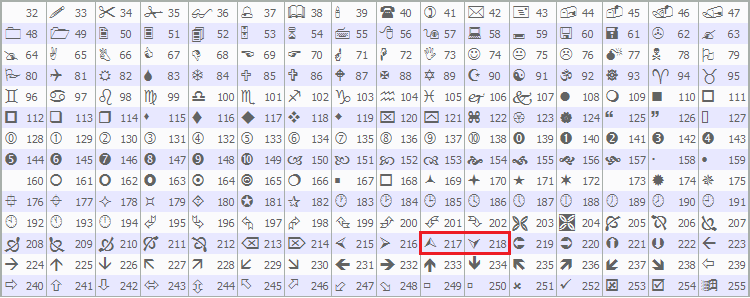
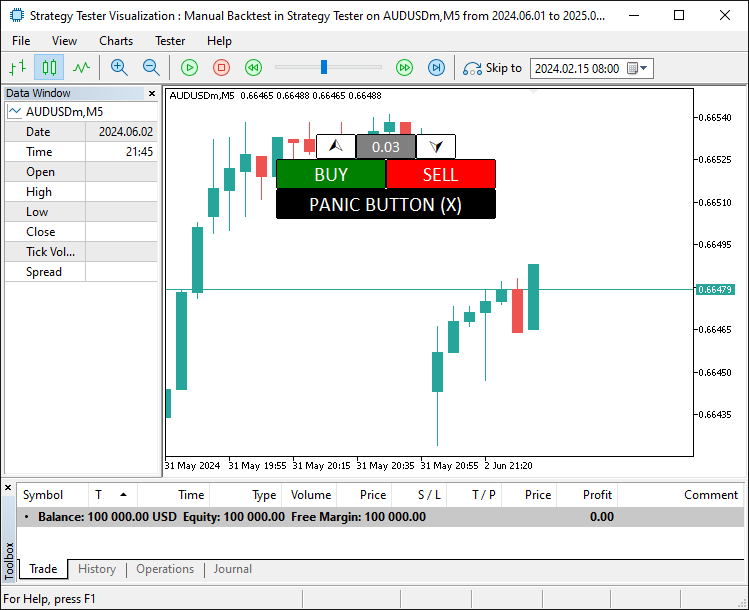
在这里,我们通过 OnInit 事件处理程序启动我们的手动回测工具包,在策略测试器中设置其界面。我们使用“CreateBtn”函数将“BTN_P”放置在“xD”为150、“yD”为45的位置,并使用来自 CharToString(217) 的“Wingdings”向上箭头;将“BTN_LOT”放置在“xD”为190的位置,显示“init_lot”;将“BTN_M”放置在“xD”为250的位置,并使用来自“CharToString(218)”的向下箭头——所有这些都为手数控制而设计。然后,我们添加“BTN_BUY”在“xD”为110、“yD”为70的位置,标签为“BUY”,背景色为“clrGreen”;添加“BTN_SELL”在“xD”为220的位置,标签为“SELL”,背景色为“clrRed”;以及“BTN_CLOSE”在“xD”为110、“yD”为100的位置,标签为“PANIC BUTTON (X)”,背景色为“clrBlack”;最后通过 return 和 INIT_SUCCEEDED 信号表示初始化成功。我们用于图标的“Wingdings”字体来自MQL5已定义的字符表,如下所示。
当我们运行程序时,得到如下输出。
既然我们已经设定了基础背景,就需要读取按钮的状态和值,以便将它们用于交易。因此,我们也需要相关的实现函数。
int GetState(string Name){return (int)ObjectGetInteger(0,Name,OBJPROP_STATE);} //--- Get whether a button is pressed or not
string GetValue(string Name){return ObjectGetString(0,Name,OBJPROP_TEXT);} //--- Get the text shown on an object
double GetValueHL(string Name){return ObjectGetDouble(0,Name,OBJPROP_PRICE);} //--- Get the price level of a horizontal line
在这里,我们定义了“GetState”函数来检查按钮点击,其中我们使用 ObjectGetInteger 函数和“OBJPROP_STATE”属性来返回“Name”是否被按下;使用“GetValue”函数通过 ObjectGetString 和“OBJPROP_TEXT”从“Name”获取文本;以及使用“GetValueHL”函数通过 ObjectGetDouble 和 OBJPROP_PRICE 获取“Name”的价格水平,以实现精确的交易控制。现在,我们可以在 OnTick 事件处理程序中使用这些函数来获取按钮状态,因为我们无法在策略测试器中直接使用 OnChartEvent 事件处理程序。以下是我们实现这一点的方法。
//+------------------------------------------------------------------+
//| Expert tick function                                             |
//+------------------------------------------------------------------+
void OnTick(){
   double Ask = NormalizeDouble(SymbolInfoDouble(_Symbol,SYMBOL_ASK),_Digits); //--- Get the current Ask price and adjust it to the right decimal places
   double Bid = NormalizeDouble(SymbolInfoDouble(_Symbol,SYMBOL_BID),_Digits); //--- Get the current Bid price and adjust it to the right decimal places

   if (GetState(BTN_BUY)==true || GetState(BTN_SELL)){ //--- Check if either the Buy or Sell button is clicked
      tradeInAction = true; //--- Set trade setup to active
   }
}
在这里,我们使用 OnTick 事件处理程序来驱动我们工具包在策略测试器中的实时操作。我们使用 NormalizeDouble 函数和 SymbolInfoDouble 将“Ask”设置为当前的 SYMBOL_ASK 价格,将“Bid”设置为当前的 SYMBOL_BID 价格,两者都通过 _Digits 进行调整以确保精度。如果“GetState”显示“BTN_BUY”或“BTN_SELL”为真,我们就将“tradeInAction”设置为true,以开始我们的交易设置。至此,我们需要额外的交易级别功能,使我们能够设置级别并进行动态调整。让我们为此创建一个函数。
//+------------------------------------------------------------------+
//| Create high low function                                         |
//+------------------------------------------------------------------+
void createHL(string objName,datetime time1,double price1,color clr){
   if (ObjectFind(0,objName) < 0){ //--- Check if the horizontal line doesn’t already exist
      ObjectCreate(0,objName,OBJ_HLINE,0,time1,price1); //--- Create a new horizontal line at the specified price
      ObjectSetInteger(0,objName,OBJPROP_TIME,time1); //--- Set the time property (though not critical for HLINE)
      ObjectSetDouble(0,objName,OBJPROP_PRICE,price1); //--- Set the price level of the horizontal line
      ObjectSetInteger(0,objName,OBJPROP_COLOR,clr); //--- Set the color of the line (red for SL, green for TP)
      ObjectSetInteger(0,objName,OBJPROP_STYLE,STYLE_DASHDOTDOT); //--- Set the line style to dash-dot-dot
      ChartRedraw(0); //--- Refresh the chart to display the new line
   }
}
首先,我们定义了“createHL”函数,用于在策略测试器中为我们的工具包绘制水平线。在该函数中,我们使用 ObjectFind 函数检查“objName”是否存在,如果返回值小于0(即对象不存在),我们就使用 ObjectCreate 函数在“time1”和“price1”位置创建一个“OBJ_HLINE”对象。接着,我们使用 ObjectSetInteger 函数将“OBJPROP_TIME”设置为“time1”,将“OBJPROP_COLOR”设置为“clr”,并将“OBJPROP_STYLE”设置为“STYLE_DASHDOTDOT”;我们使用 ObjectSetDouble 函数将“OBJPROP_PRICE”设置为“price1”;最后,我们使用 ChartRedraw 函数并以“0”为窗口ID来刷新图表,从而将其显示出来。然后,我们将此函数集成到另一个函数中,以无缝地创建交易级别,如下所示。
//+------------------------------------------------------------------+
//| Create trade levels function                                     |
//+------------------------------------------------------------------+
void CreateTradeLevels(){
   double Ask = NormalizeDouble(SymbolInfoDouble(_Symbol,SYMBOL_ASK),_Digits); //--- Get unnoticed the current Ask price, adjusted for digits
   double Bid = NormalizeDouble(SymbolInfoDouble(_Symbol,SYMBOL_BID),_Digits); //--- Get the current Bid price, adjusted for digits

   string level_SL,level_TP; //--- Declare variables to hold SL and TP levels as strings
   if (GetState(BTN_BUY)==true){ //--- Check if the Buy button is active
      level_SL = string(Bid-100*_Point); //--- Set initial Stop Loss 100 points below Bid for Buy
      level_TP = string(Bid+100*_Point); //--- Set initial Take Profit 100 points above Bid for Buy
   }
   else if (GetState(BTN_SELL)==true){ //--- Check if the Sell button is active
      level_SL = string(Ask+100*_Point); //--- Set initial Stop Loss 100 points above Ask for Sell
      level_TP = string(Ask-100*_Point); //--- Set initial Take Profit 100 points below Ask for Sell
   }

   createHL(HL_SL,0,double(level_SL),clrRed); //--- Create a red Stop Loss line at the calculated level
   createHL(HL_TP,0,double(level_TP),clrGreen); //--- Create a green Take Profit line at the calculated level

   CreateBtn(BTN_SL,110,135,110,23,"SL: "+GetValue(HL_SL),13,clrRed,clrWhite,clrRed); //--- Make a button showing the Stop Loss level
   CreateBtn(BTN_TP,220,135,110,23,"TP: "+GetValue(HL_TP),13,clrGreen,clrWhite,clrGreen); //--- Make a button showing the Take Profit level

   CreateBtn(BTN_SL1M,110,158,27,20,"-",17,clrBlack,clrWhite,clrGray); //--- Make a button to slightly lower Stop Loss
   CreateBtn(BTN_SL2M,137,158,27,20,"--",17,clrBlack,clrWhite,clrGray); //--- Make a button to greatly lower Stop Loss
   CreateBtn(BTN_SL2P,164,158,27,20,"++",17,clrBlack,clrWhite,clrGray); //--- Make a button to greatly raise Stop Loss
   CreateBtn(BTN_SL1P,191,158,27,20,"+",17,clrBlack,clrWhite,clrGray); //--- Make a button to slightly raise Stop Loss

   CreateBtn(BTN_TP1P,222,158,27,20,"+",17,clrBlack,clrWhite,clrGray); //--- Make a button to slightly raise Take Profit
   CreateBtn(BTN_TP2P,249,158,27,20,"++",17,clrBlack,clrWhite,clrGray); //--- Make a button to greatly raise Take Profit
   CreateBtn(BTN_TP2M,276,158,27,20,"--",17,clrBlack,clrWhite,clrGray); //--- Make a button to greatly lower Take Profit
   CreateBtn(BTN_TP1M,303,158,27,20,"-",17,clrBlack,clrWhite,clrGray); //--- Make a button to slightly lower Take Profit

   CreateBtn(BTN_YES,110,178,70,30,CharToString(254),20,clrWhite,clrDarkGreen,clrWhite,"Wingdings"); //--- Make a green checkmark button to confirm the trade
   CreateBtn(BTN_NO,260,178,70,30,CharToString(253),20,clrWhite,clrDarkRed,clrWhite,"Wingdings"); //--- Make a red X button to cancel the trade
   CreateBtn(BTN_IDLE,180,183,80,25,CharToString(40),20,clrWhite,clrBlack,clrWhite,"Wingdings"); //--- Make a neutral button between Yes and No
}
在这里,我们定义了“CreateTradeLevels”函数来设置我们的交易级别。在该函数中,我们使用 NormalizeDouble 函数配合 SymbolInfoDouble 将“Ask”设置为“SYMBOL_ASK”,将“Bid”设置为“SYMBOL_BID”,并通过 _Digits 进行精度调整,同时将“level_SL”和“level_TP”声明为字符串类型。如果“GetState”显示“BTN_BUY”为真,我们将“level_SL”设置为“Bid-100_Point”,将“level_TP”设置为“Bid+100_Point”;但如果“BTN_SELL”为真,我们将“level_SL”设置为“Ask+100_Point”,将“level_TP”设置为“AsK-100_Point”。
我们使用“createHL”函数,在“clrRed”颜色下绘制位于“double(level_SL)”价格的“HL_SL”线,在“clrGreen”颜色下绘制位于“double(level_TP)”价格的“HL_TP”线。然后,我们使用“CreateBtn”函数创建多个按钮:例如,文本为“GetValue(HL_SL)”的“BTN_SL”按钮,文本为“GetValue(HL_TP)”的“BTN_TP”按钮,以及带有“-”和“+”等符号的调整按钮“BTN_SL1M”、“BTN_SL2M”、“BTN_SL2P”、“BTN_SL1P”、“BTN_TP1P”、“BTN_TP2P”、“BTN_TP2M”和“BTN_TP1M”。此外,还使用 CharToString 在“Wingdings”字体中创建了用于确认、取消和中立选项的“BTN_YES”、“BTN_NO”和“BTN_IDLE”按钮。通过这个函数,我们可以在买入或卖出按钮被点击时调用它,以初始化交易级别的设置。
if (!isHaveTradeLevels){ //--- Check if trade levels aren't already on the chart
   CreateTradeLevels(); //--- Add Stop Loss and Take Profit levels and controls to the chart
   isHaveTradeLevels = true; //--- Mark that trade levels are now present
}
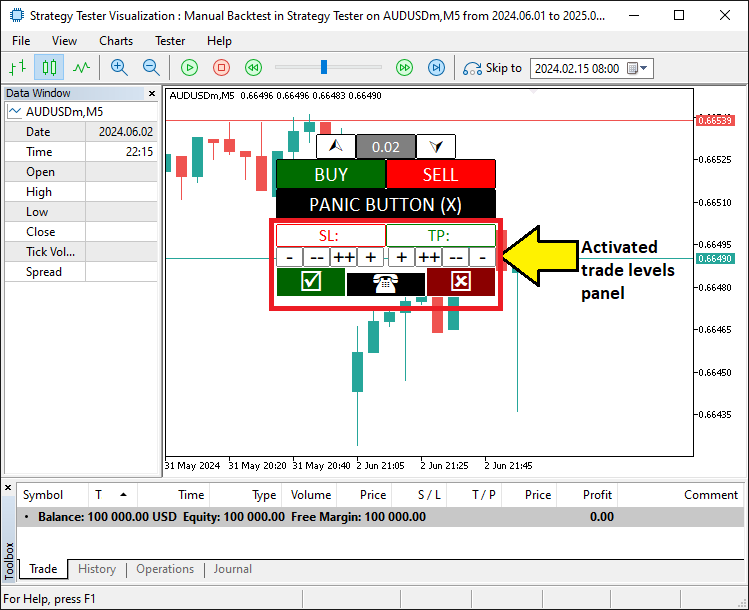
在这里,我们设置了一个检查,通过“!isHaveTradeLevels”测试“isHaveTradeLevels”是否为假。当为假时,我们使用“CreateTradeLevels”函数在图表上放置止损和止盈控件,然后将“isHaveTradeLevels”更新为真,以表示它们现在是活动状态。编译完成后,我们得到了以下结果。
接下来,我们需要让这些交易按钮“活”起来,使它们能够响应并执行相关的功能。以下是我们实现这一点的方法。
if (tradeInAction){ //--- Continue if a trade setup is active

   // SL SLOW/FAST BUTTONS
   if (GetState(BTN_SL1M)){ //--- Check if the small Stop Loss decrease button is clicked
      ObjectSetDouble(0,HL_SL,OBJPROP_PRICE,GetValueHL(HL_SL)-slow_pts*_Point); //--- Move the Stop Loss down by a small amount
      ObjectSetInteger(0,BTN_SL1M,OBJPROP_STATE,false); //--- Turn off the button press state
      ChartRedraw(0); //--- Refresh the chart to show the change
   }
   if (GetState(BTN_SL2M)){ //--- Check if the large Stop Loss decrease button is clicked
      ObjectSetDouble(0,HL_SL,OBJPROP_PRICE,GetValueHL(HL_SL)-fast_pts*_Point); //--- Move the Stop Loss down by a large amount
      ObjectSetInteger(0,BTN_SL2M,OBJPROP_STATE,false); //--- Turn off the button press state
      ChartRedraw(0); //--- Refresh the chart to show the change
   }
   if (GetState(BTN_SL1P)){ //--- Check if the small Stop Loss increase button is clicked
      ObjectSetDouble(0,HL_SL,OBJPROP_PRICE,GetValueHL(HL_SL)+slow_pts*_Point); //--- Move the Stop Loss up by a small amount
      ObjectSetInteger(0,BTN_SL1P,OBJPROP_STATE,false); //--- Turn off the button press state
      ChartRedraw(0); //--- Refresh the chart to show the change
   }
   if (GetState(BTN_SL2P)){ //--- Check if the large Stop Loss increase button is clicked
      ObjectSetDouble(0,HL_SL,OBJPROP_PRICE,GetValueHL(HL_SL)+fast_pts*_Point); //--- Move the Stop Loss up by a large amount
      ObjectSetInteger(0,BTN_SL2P,OBJPROP_STATE,false); //--- Turn off the button press state
      ChartRedraw(0); //--- Refresh the chart to show the change
   }

   // TP SLOW/FAST BUTTONS
   if (GetState(BTN_TP1M)){ //--- Check if the small Take Profit decrease button is clicked
      ObjectSetDouble(0,HL_TP,OBJPROP_PRICE,GetValueHL(HL_TP)-slow_pts*_Point); //--- Move the Take Profit down by a small amount
      ObjectSetInteger(0,BTN_TP1M,OBJPROP_STATE,false); //--- Turn off the button press state
      ChartRedraw(0); //--- Refresh the chart to show the change
   }
   if (GetState(BTN_TP2M)){ //--- Check if the large Take Profit decrease button is clicked
      ObjectSetDouble(0,HL_TP,OBJPROP_PRICE,GetValueHL(HL_TP)-fast_pts*_Point); //--- Move the Take Profit down by a large amount
      ObjectSetInteger(0,BTN_TP2M,OBJPROP_STATE,false); //--- Turn off the button press state
      ChartRedraw(0); //--- Refresh the chart to show the change
   }
   if (GetState(BTN_TP1P)){ //--- Check if the small Take Profit increase button is clicked
      ObjectSetDouble(0,HL_TP,OBJPROP_PRICE,GetValueHL(HL_TP)+slow_pts*_Point); //--- Move the Take Profit up by a small amount
      ObjectSetInteger(0,BTN_TP1P,OBJPROP_STATE,false); //--- Turn off the button press state
      ChartRedraw(0); //--- Refresh the chart to show the change
   }
   if (GetState(BTN_TP2P)){ //--- Check if the large Take Profit increase button is clicked
      ObjectSetDouble(0,HL_TP,OBJPROP_PRICE,GetValueHL(HL_TP)+fast_pts*_Point); //--- Move the Take Profit up by a large amount
      ObjectSetInteger(0,BTN_TP2P,OBJPROP_STATE,false); //--- Turn off the button press state
      ChartRedraw(0); //--- Refresh the chart to show the change
   }

}
在这里,当“tradeInAction”为真时,我们在工具包中管理止损和止盈的调整。我们使用“GetState”函数来检查“BTN_SL1M”、“BTN_SL2M”、“BTN_SL1P”或“BTN_SL2P”等按钮是否被点击,然后通过 ObjectSetDouble 函数、配合“OBJPROP_PRICE”属性和“GetValueHL”函数获取的当前值,以“slow_pts_Point”或“fast_pts_Point”的幅度来调整“HL_SL”线。之后,我们使用 ObjectSetInteger 函数将 OBJPROP_STATE 重置为假,并使用 ChartRedraw 函数更新图表。对于“HL_TP”的调整,我们以类似的方式处理“BTN_TP1M”、“BTN_TP2M”、“BTN_TP1P”或“BTN_TP2P”这些按钮。最后,一旦设置完成,我们就可以确认其位置并开立相应的持仓,然后清理掉交易设置面板。但首先,我们需要一个函数来删除这个设置面板。
//+------------------------------------------------------------------+
//| Delete objects function                                          |
//+------------------------------------------------------------------+
void DeleteObjects_SLTP(){
   ObjectDelete(0,HL_SL); //--- Remove the Stop Loss line from the chart
   ObjectDelete(0,HL_TP); //--- Remove the Take Profit line from the chart
   ObjectDelete(0,BTN_SL); //--- Remove the Stop Loss display button
   ObjectDelete(0,BTN_TP); //--- Remove the Take Profit display button
   ObjectDelete(0,BTN_SL1M); //--- Remove the small Stop Loss decrease button
   ObjectDelete(0,BTN_SL2M); //--- Remove the large Stop Loss decrease button
   ObjectDelete(0,BTN_SL1P); //--- Remove the small Stop Loss increase button
   ObjectDelete(0,BTN_SL2P); //--- Remove the large Stop Loss increase button
   ObjectDelete(0,BTN_TP1P); //--- Remove the small Take Profit increase button
   ObjectDelete(0,BTN_TP2P); //--- Remove the large Take Profit increase button
   ObjectDelete(0,BTN_TP2M); //--- Remove the large Take Profit decrease button
   ObjectDelete(0,BTN_TP1M); //--- Remove the small Take Profit decrease button
   ObjectDelete(0,BTN_YES); //--- Remove the confirm trade button
   ObjectDelete(0,BTN_NO); //--- Remove the cancel trade button
   ObjectDelete(0,BTN_IDLE); //--- Remove the idle button

   ChartRedraw(0); //--- Refresh the chart to show all objects removed
}
在这里,我们通过“DeleteObjects_SLTP”函数来处理工具包中的清理工作。在该函数中,我们使用 ObjectDelete 函数从图表上移除“HL_SL”、“HL_TP”、“BTN_SL”、“BTN_TP”、“BTN_SL1M”、“BTN_SL2M”、“BTN_SL1P”、“BTN_SL2P”、“BTN_TP1P”、“BTN_TP2P”、“BTN_TP2M”、“BTN_TP1M”、“BTN_YES”、“BTN_NO”和“BTN_IDLE”这些对象,然后使用 ChartRedraw 函数并以“0”为窗口ID来刷新图表,显示所有内容已被清除。现在,我们可以在下单程序中使用这个函数了。
// BUY ORDER PLACEMENT
if (GetState(BTN_BUY) && GetState(BTN_YES)){ //--- Check if both Buy and Yes buttons are clicked
   obj_Trade.Buy(double(GetValue(BTN_LOT)),_Symbol,Ask,GetValueHL(HL_SL),GetValueHL(HL_TP)); //--- Place a Buy order with set lot size, SL, and TP
   DeleteObjects_SLTP(); //--- Remove all trade level objects from the chart
   isHaveTradeLevels = false; //--- Mark that trade levels are no longer present
   ObjectSetInteger(0,BTN_YES,OBJPROP_STATE,false); //--- Turn off the Yes button press state
   ObjectSetInteger(0,BTN_BUY,OBJPROP_STATE,false); //--- Turn off the Buy button press state
   tradeInAction = false; //--- Mark the trade setup as complete
   ChartRedraw(0); //--- Refresh the chart to reflect changes
}
// SELL ORDER PLACEMENT
else if (GetState(BTN_SELL) && GetState(BTN_YES)){ //--- Check if both Sell and Yes buttons are clicked
   obj_Trade.Sell(double(GetValue(BTN_LOT)),_Symbol,Bid,GetValueHL(HL_SL),GetValueHL(HL_TP)); //--- Place a Sell order with set lot size, SL, and TP
   DeleteObjects_SLTP(); //--- Remove all trade level objects from the chart
   isHaveTradeLevels = false; //--- Mark that trade levels are no longer present
   ObjectSetInteger(0,BTN_YES,OBJPROP_STATE,false); //--- Turn off the Yes button press state
   ObjectSetInteger(0,BTN_SELL,OBJPROP_STATE,false); //--- Turn off the Sell button press state
   tradeInAction = false; //--- Mark the trade setup as complete
   ChartRedraw(0); //--- Refresh the chart to reflect changes
}
else if (GetState(BTN_NO)){ //--- Check if the No button is clicked to cancel
   DeleteObjects_SLTP(); //--- Remove all trade level objects from the chart
   isHaveTradeLevels = false; //--- Mark that trade levels are no longer present
   ObjectSetInteger(0,BTN_NO,OBJPROP_STATE,false); //--- Turn off the No button press state
   ObjectSetInteger(0,BTN_BUY,OBJPROP_STATE,false); //--- Turn off the Buy button press state
   ObjectSetInteger(0,BTN_SELL,OBJPROP_STATE,false); //--- Turn off the Sell button press state
   tradeInAction = false; //--- Mark the trade setup as canceled
   ChartRedraw(0); //--- Refresh the chart to reflect changes
}
我们在策略测试器中的工具包里执行交易。我们使用“GetState”函数检查“BTN_BUY”和“BTN_YES”是否为真,如果是,则使用“obj_Trade.Buy”方法,并传入“double(GetValue(BTN_LOT))”(手数)、_Symbol(交易品种)、“Ask”(价格)、“GetValueHL(HL_SL)”(止损)和“GetValueHL(HL_TP)”(止盈)来下达买单。或者,如果“BTN_SELL”和“BTN_YES”为真,我们则使用“obj_Trade.Sell”方法,并将价格替换为“Bid”。在任何一种情况下,我们都使用“DeleteObjects_SLTP”函数来清除对象,将“isHaveTradeLevels”和“tradeInAction”设置为假,使用 ObjectSetInteger 函数将“BTN_YES”、“BTN_BUY”或“BTN_SELL”的 OBJPROP_STATE 状态重置为假,并使用 ChartRedraw 函数来更新图表。但如果“BTN_NO”为真,我们则通过类似地清除对象和重置状态来取消操作。同样地,我们按如下方式处理交易手数增加或减少的按钮。
if (GetState(BTN_P)==true){ //--- Check if the lot size increase button is clicked
   double newLot = (double)GetValue(BTN_LOT); //--- Get the current lot size as a number
   double lotStep = SymbolInfoDouble(_Symbol,SYMBOL_VOLUME_STEP); //--- Get the minimum lot size change allowed
   newLot += lotStep; //--- Increase the lot size by one step
   newLot = NormalizeDouble(newLot,2); //--- Round the new lot size to 2 decimal places
   newLot = newLot > 0.1 ? lotStep : newLot; //--- Ensure lot size doesn't exceed 0.1, otherwise reset to step
   ObjectSetString(0,BTN_LOT,OBJPROP_TEXT,string(newLot)); //--- Update the lot size display with the new value
   ObjectSetInteger(0,BTN_P,OBJPROP_STATE,false); //--- Turn off the increase button press state
   ChartRedraw(0); //--- Refresh the chart to show the new lot size
}
if (GetState(BTN_M)==true){ //--- Check if the lot size decrease button is clicked
   double newLot = (double)GetValue(BTN_LOT); //--- Get the current lot size as a number
   double lotStep = SymbolInfoDouble(_Symbol,SYMBOL_VOLUME_STEP); //--- Get the minimum lot size change allowed
   newLot -= lotStep; //--- Decrease the lot size by one step
   newLot = NormalizeDouble(newLot,2); //--- Round the new lot size to 2 decimal places
   newLot = newLot < lotStep ? lotStep : newLot; //--- Ensure lot size doesn't go below minimum, otherwise set to step
   ObjectSetString(0,BTN_LOT,OBJPROP_TEXT,string(newLot)); //--- Update the lot size display with the new value
   ObjectSetInteger(0,BTN_M,OBJPROP_STATE,false); //--- Turn off the decrease button press state
   ChartRedraw(0); //--- Refresh the chart to show the new lot size
}
在这里,我们从增加手数开始调整。我们使用“GetState”函数检查“BTN_P”是否为真,然后使用“GetValue”从“BTN_LOT”获取值来设置“newLot”,使用 SymbolInfoDouble 从 SYMBOL_VOLUME_STEP 获取“lotStep”(最小手数变化量),将“lotStep”加到“newLot”上,并使用 NormalizeDouble 将其四舍五入到2位小数,如果结果超过0.1,则将其限制为0.1。之后,使用 ObjectSetString 更新“BTN_LOT”的“OBJPROP_TEXT”属性,使用“ObjectSetInteger”将“BTN_P”的“OBJPROP_STATE”重置为假,最后通过 ChartRedraw 刷新图表。
对于减少手数,我们使用“GetState”检查“BTN_M”,以相同的方式获取“newLot”后从中减去“lotStep”,确保其值不小于“lotStep”,并应用相同的 ObjectSetString、“ObjectSetInteger”和“ChartRedraw”函数步骤来更新“BTN_LOT”并重置“BTN_M”的状态。至于“恐慌”按钮,我们需要定义一个函数,在它被点击时关闭所有开仓。
//+------------------------------------------------------------------+
//| Close all positions function                                     |
//+------------------------------------------------------------------+
void closeAllPositions(){
   for (int i=PositionsTotal()-1; i>=0; i--){ //--- Loop through all open positions, starting from the last one
      ulong ticket = PositionGetTicket(i); //--- Get the ticket number of the current position
      if (ticket > 0){ //--- Check if the ticket is valid
         if (PositionSelectByTicket(ticket)){ //--- Select the position by its ticket number
            if (PositionGetString(POSITION_SYMBOL)==_Symbol){ //--- Check if the position is for the current chart symbol
               obj_Trade.PositionClose(ticket); //--- Close the selected position
            }
         }
      }
   }
}
我们通过“closeAllPositions”函数来处理关闭所有持仓。在该函数中,我们使用 PositionsTotal 函数从最后一个持仓(索引为总数减1)开始向下循环到0,使用 PositionGetTicket 函数获取每个索引“i”对应的“ticket”(订单号)。如果“ticket”有效,我们使用 PositionSelectByTicket 选中该持仓,然后使用 PositionGetString 检查 POSITION_SYMBOL(交易品种)是否与 _Symbol(当前图表品种)匹配,匹配则使用“obj_Trade.PositionClose”方法通过“ticket”关闭该持仓。然后,我们可以在“恐慌”按钮被点击时调用此函数来关闭所有持仓。
if (GetState(BTN_CLOSE)==true){ //--- Check if the close all positions button is clicked
   closeAllPositions(); //--- Close all open trades
   ObjectSetInteger(0,BTN_CLOSE,OBJPROP_STATE,false); //--- Turn off the close button press state
   ChartRedraw(0); //--- Refresh the chart to reflect closed positions
}
为了管理关闭所有交易的功能,我们使用“GetState”函数检查“BTN_CLOSE”是否为真。如果是,我们使用“closeAllPositions”函数关闭所有开仓,然后使用 ObjectSetInteger 函数将“BTN_CLOSE”的 OBJPROP_STATE 设置为假,并使用 ChartRedraw 函数(以“0”为参数)来更新图表。在编译并运行程序后,我们得到以下结果。
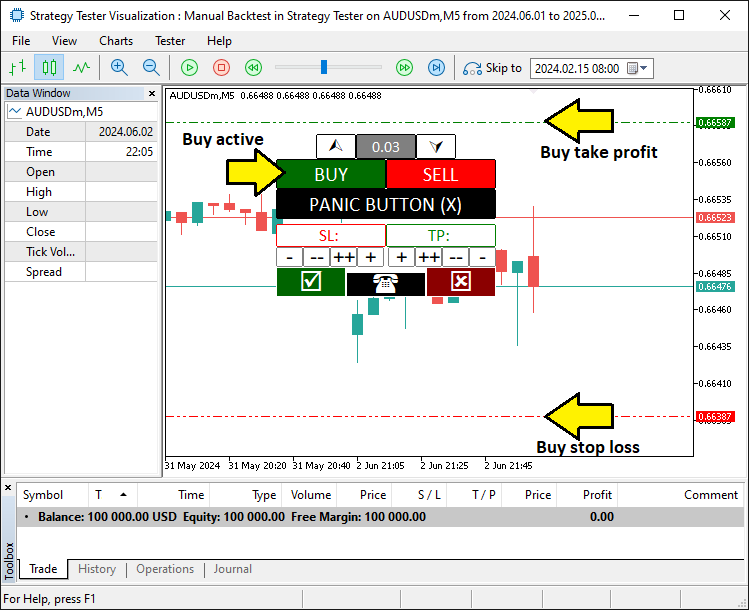
从图中我们可以看到,我们设置了交易级别,并且可以动态开仓,实现了我们的目标。现在剩下的是对程序进行彻底的测试,这将在接下来的部分中讨论。
实战回测:使用工具包
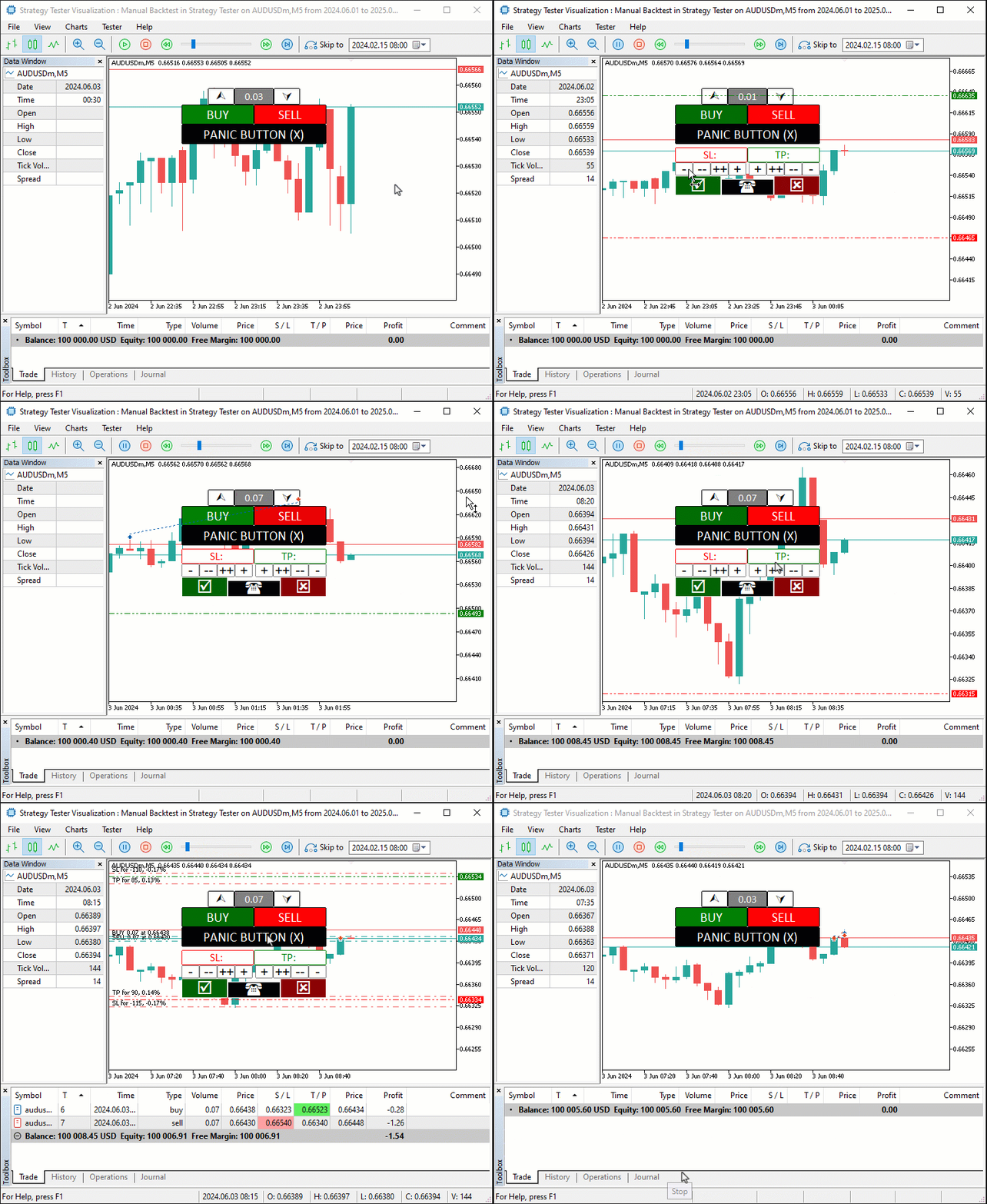
我们在 MetaTrader 5的策略测试器 中测试我们的工具包:加载程序,选择我们的设置,然后启动它——观看下面的 图形交换格式 (GIF) 图像,可以看到买入、卖出和调整按钮以闪电般的速度运行。点击买入或卖出,微调止损、止盈和手数,然后用“是”确认或用“否”取消,“恐慌”按钮随时准备快速关闭所有交易。如下所示。
结论
总之,我们打造了一个手动回测工具包,它将手动控制与MQL5中 策略测试器 的速度相结合,简化了我们测试交易策略的方式。我们已经展示了如何设计它、编码它,以及如何通过按钮来调整交易——所有这些都为快速、精确的模拟量身定制。您可以根据自己的需求调整此工具包,并用它来增强您的回测体验。
本文由MetaQuotes Ltd译自英文
原文地址: https://www.mql5.com/en/articles/17751
注意: MetaQuotes Ltd.将保留所有关于这些材料的权利。全部或部分复制或者转载这些材料将被禁止。
本文由网站的一位用户撰写,反映了他们的个人观点。MetaQuotes Ltd 不对所提供信息的准确性负责,也不对因使用所述解决方案、策略或建议而产生的任何后果负责。

 交易中的神经网络:具有预测编码的混合交易框架(StockFormer)
 市场模拟(第五部分):创建 C_Orders 类(二)
 市场模拟(第六部分):将信息从 MetaTrader 5 传输到 Excel
 探索达瓦斯箱体突破策略中的高级机器学习技术

不同的时间框架
您好。目前只有一个时间框架。也许在不久的将来可以试试。
谢谢,这是一个有用的工具
当然,欢迎并感谢您的反馈。
想知道如何将 mq4 指标转换为 mq5 指标
查看新文章:轻松进行手动回溯测试:在 MQL5 中为策略测试器构建自定义工具包。
作者:Allan Munene MutiiriaAllan Munene Mutiiria