

使用MQL5经济日历进行交易(第六部分):利用新闻事件分析和倒计时器实现交易入场自动化
 765
765
 3
3

概述
在本文中,我们针对MQL5经济日历系列推进一步,基于实时新闻分析实现交易入场自动化。在前一篇仪表盘功能增强(第五部分)的基础上,我们现在集成了一种交易逻辑,该逻辑使用用户自定义的筛选条件和时差偏移量来扫描新闻事件,对比预测值和先前值,并根据市场预期自动执行买入或卖出订单。我们还实现了动态倒计时器,用于显示距离新闻发布剩余的时间,并在订单执行后重置系统,确保我们的交易策略能够及时响应不断变化的市场状况。本文将通过以下主题展开论述:
- 理解交易逻辑需求
- 在MQL5中实现交易逻辑
- 创建并管理倒计时器
- 测试交易逻辑
- 结论
让我们深入探究,看看这些组件如何协同作用,以精准且可靠的方式实现自从化入场交易。
理解交易逻辑需求
对于我们的自动化交易系统而言,第一步是确定哪些新闻事件适合作为交易候选对象。我们将把符合以下条件的新闻事件定义为候选事件:该事件处于相对于其预定发布时间的特定时间窗口内,这个时间窗口由用户自定义的偏移量输入值确定。接下来,我们会设置交易模式输入项,例如在新闻发布前进行交易。以“新闻发布前交易”模式为例,只有在当前时间处于事件预定发布时间减去偏移量(例如5分钟)与事件实际发布时间之间时,该事件才符合条件。也就是说,我们会在实际发布前5分钟进行交易。
筛选环节至关重要,这样能确保我们只关注相关新闻。因此,我们的系统将采用多种筛选条件——货币筛选条件:用于聚焦选定的货币对;影响程度筛选条件:用于将事件限定在所选重要级别范围内;时间筛选条件:用于将事件限制在预设的总体时间范围内。用户可从仪表盘上进行选择。这种分层筛选方式有助于减少干扰信息,确保只处理最相关的新闻事件。
一旦某个事件通过了筛选条件,交易逻辑就会对比该新闻事件的关键数据点,具体来说,就是预测值与先前值。如果这两个值都存在且不为0,并且预测值高于先前值,系统将开立买入订单;如果预测值低于先前值,系统将开立卖出订单。如果任一值缺失或两者相等,则跳过该事件。这一决策过程将使得EA能够把原始新闻数据转化为清晰的交易信号,从而精准自动地执行交易入场操作。这里的决策过程和交易方向完全取决于用户,但为了本文和演示目的,我们将采用上述方案。
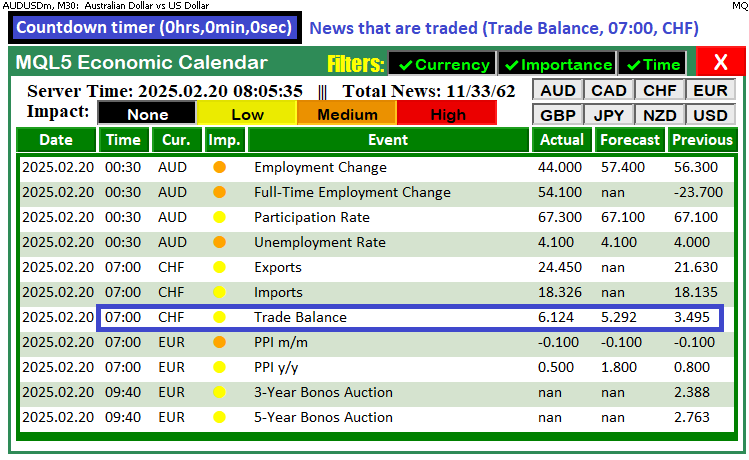
为了直观展示这些流程,我们将使用调试输出信息,并在图表上仪表盘上方创建按钮和标签,用于显示正在交易的新闻以及距离其发布剩余的时间。完整方案如下:
在MQL5中实现交易逻辑
要在MQL5中实现交易逻辑,我们必须纳入包含交易方法的交易文件,并定义一些输入参数,以便允许用户控制系统,同时定义一些将在整个程序中重复使用的全局变量。为实现这一点,我们在全局作用域内定义参数。
#include <Trade\Trade.mqh> // Trading library for order execution
CTrade trade;             // Global trade object


//================== Trade Settings ==================//
// Trade mode options:
enum ETradeMode {
   TRADE_BEFORE,     // Trade before the news event occurs
   TRADE_AFTER,      // Trade after the news event occurs
   NO_TRADE,         // Do not trade
   PAUSE_TRADING     // Pause trading activity (no trades until resumed)
};
input ETradeMode tradeMode      = TRADE_BEFORE; // Choose the trade mode

// Trade offset inputs:
input int        tradeOffsetHours   = 12;         // Offset hours (e.g., 12 hours)
input int        tradeOffsetMinutes = 5;          // Offset minutes (e.g., 5 minutes before)
input int        tradeOffsetSeconds = 0;          // Offset seconds
input double     tradeLotSize       = 0.01;       // Lot size for the trade

//================== Global Trade Control ==================//
// Once a trade is executed for one news event, no further trades occur.
bool tradeExecuted = false;
// Store the traded event’s scheduled news time for the post–trade countdown.
datetime tradedNewsTime = 0;
// Global array to store event IDs that have already triggered a trade.
int triggeredNewsEvents[];
在全局作用域中,我们使用#include指令引入“Trade\Trade.mqh”库,以实现订单执行功能,并声明一个名为“trade”的全局“CTrade”对象,用于处理交易。我们定义了一个枚举类型“ETradeMode”,其选项包括“TRADE_BEFORE”(新闻发布前交易)、“TRADE_AFTER”(新闻发布后交易)、“NO_TRADE”(不交易)和“PAUSE_TRADING”(暂停交易),并使用输入变量“tradeMode”(默认值为“TRADE_BEFORE”,程序将采用此默认值)来确定相对于新闻事件应在何时开立交易。此外,我们设置了“input”类型的变量“tradeOffsetHours”(交易偏移小时数)、“tradeOffsetMinutes”(交易偏移分钟数)、“tradeOffsetSeconds”(交易偏移秒数)和“tradeLotSize”(交易手数),用于指定时间偏移量和交易规模。同时,全局变量“tradeExecuted”(布尔型)、“tradedNewsTime”( 日期时间型)和数组“triggeredNewsEvents”(整型数组)有助于我们管理交易控制,并防止对同一新闻事件进行重复交易。随后,我们可以将交易逻辑整合到一个函数中。
//--- Function to scan for news events and execute trades based on selected criteria
//--- It handles both pre-trade candidate selection and post-trade countdown updates
void CheckForNewsTrade() {
   //--- Log the call to CheckForNewsTrade with the current server time
   Print("CheckForNewsTrade called at: ", TimeToString(TimeTradeServer(), TIME_SECONDS));

   //--- If trading is disabled (either NO_TRADE or PAUSE_TRADING), remove countdown objects and exit
   if(tradeMode == NO_TRADE || tradeMode == PAUSE_TRADING) {
      //--- Check if a countdown object exists on the chart
      if(ObjectFind(0, "NewsCountdown") >= 0) {
         //--- Delete the countdown object from the chart
         ObjectDelete(0, "NewsCountdown");
         //--- Log that the trading is disabled and the countdown has been removed
         Print("Trading disabled. Countdown removed.");
      }
      //--- Exit the function since trading is not allowed
      return;
   }
   //--- Begin pre-trade candidate selection section

   //--- Define the lower bound of the event time range based on the user-defined start time offset
   datetime lowerBound = currentTime - PeriodSeconds(start_time);
   //--- Define the upper bound of the event time range based on the user-defined end time offset
   datetime upperBound = currentTime + PeriodSeconds(end_time);
   //--- Log the overall event time range for debugging purposes
   Print("Event time range: ", TimeToString(lowerBound, TIME_SECONDS), " to ", TimeToString(upperBound, TIME_SECONDS));

   //--- Retrieve historical calendar values (news events) within the defined time range
   MqlCalendarValue values[];
   int totalValues = CalendarValueHistory(values, lowerBound, upperBound, NULL, NULL);
   //--- Log the total number of events found in the specified time range
   Print("Total events found: ", totalValues);
   //--- If no events are found, delete any existing countdown and exit the function
   if(totalValues <= 0) {
      if(ObjectFind(0, "NewsCountdown") >= 0)
         ObjectDelete(0, "NewsCountdown");
      return;
   }
}
这里,我们定义了“CheckForNewsTrade”函数,该函数会扫描新闻事件,并根据我们选定的标准执行交易。我们首先使用Print函数记录该函数的调用情况,并显示通过TimeTradeServer函数获取的当前服务器时间。接下来,我们检查交易是否被禁用,方法是将“tradeMode”变量与“NO_TRADE”(不交易)或“PAUSE_TRADING”(暂停交易)模式进行比较;如果交易被禁用,我们使用ObjectFind函数来确定是否存在一个名为“NewsCountdown”的倒计时对象,如果存在,则使用ObjectDelete函数将其删除,然后退出该函数。
接下来,该函数通过以下方式计算整体事件时间范围:将“lowerBound”(下限)设置为当前时间减去从“start_time”(起始时间)输入值转换而来的秒数(通过PeriodSeconds函数进行转换),将“upperBound”(上限)设置为当前时间加上从“end_time”(结束时间)输入值转换而来的秒数。然后,使用Print函数记录这个整体时间范围。最后,该函数调用CalendarValueHistory来检索定义的时间范围内的所有新闻事件;如果未找到任何事件,会清理任何现有的倒计时对象并退出,从而为后续候选事件的选择和交易执行做好系统准备。
//--- Initialize candidate event variables for trade selection
datetime candidateEventTime = 0;
string candidateEventName = "";
string candidateTradeSide = "";
int candidateEventID = -1;

//--- Loop through all retrieved events to evaluate each candidate for trading
for(int i = 0; i < totalValues; i++) {
   //--- Declare an event structure to hold event details
   MqlCalendarEvent event;
   //--- Attempt to populate the event structure by its ID; if it fails, skip to the next event
   if(!CalendarEventById(values[i].event_id, event))
      continue;

   //----- Apply Filters -----

   //--- If currency filtering is enabled, check if the event's currency matches the selected filters
   if(enableCurrencyFilter) {
      //--- Declare a country structure to hold country details
      MqlCalendarCountry country;
      //--- Populate the country structure based on the event's country ID
      CalendarCountryById(event.country_id, country);
      //--- Initialize a flag to determine if there is a matching currency
      bool currencyMatch = false;
      //--- Loop through each selected currency filter
      for(int k = 0; k < ArraySize(curr_filter_selected); k++) {
         //--- Check if the event's country currency matches the current filter selection
         if(country.currency == curr_filter_selected[k]) {
            //--- Set flag to true if a match is found and break out of the loop
            currencyMatch = true;
            break;
         }
      }
      //--- If no matching currency is found, log the skip and continue to the next event
      if(!currencyMatch) {
         Print("Event ", event.name, " skipped due to currency filter.");
         continue;
      }
   }

   //--- If importance filtering is enabled, check if the event's impact matches the selected filters
   if(enableImportanceFilter) {
      //--- Initialize a flag to determine if the event's impact matches any filter selection
      bool impactMatch = false;
      //--- Loop through each selected impact filter option
      for(int k = 0; k < ArraySize(imp_filter_selected); k++) {
         //--- Check if the event's importance matches the current filter selection
         if(event.importance == imp_filter_selected[k]) {
            //--- Set flag to true if a match is found and break out of the loop
            impactMatch = true;
            break;
         }
      }
      //--- If no matching impact is found, log the skip and continue to the next event
      if(!impactMatch) {
         Print("Event ", event.name, " skipped due to impact filter.");
         continue;
      }
   }

   //--- If time filtering is enabled and the event time exceeds the upper bound, skip the event
   if(enableTimeFilter && values[i].time > upperBound) {
      Print("Event ", event.name, " skipped due to time filter.");
      continue;
   }

   //--- Check if the event has already triggered a trade by comparing its ID to recorded events
   bool alreadyTriggered = false;
   //--- Loop through the list of already triggered news events
   for(int j = 0; j < ArraySize(triggeredNewsEvents); j++) {
      //--- If the event ID matches one that has been triggered, mark it and break out of the loop
      if(triggeredNewsEvents[j] == values[i].event_id) {
         alreadyTriggered = true;
         break;
      }
   }
   //--- If the event has already triggered a trade, log the skip and continue to the next event
   if(alreadyTriggered) {
      Print("Event ", event.name, " already triggered a trade. Skipping.");
      continue;
   }
这里,我们使用一个日期时间型变量(“candidateEventTime”,候选事件时间)、两个“string”类型变量(“candidateEventName”,候选事件名称;“candidateTradeSide”,候选交易方向)以及一个初始值设为 -1的“整型”变量(“candidateEventID”,候选事件ID)来初始化候选事件变量。然后,我们通过循环遍历由CalendarValueHistory函数检索到的每个事件(这些事件存储在由MqlCalendarValue结构体组成的数组中),并使用CalendarEventById函数将事件的详细信息填充到一个MqlCalendarEvent结构体中。
接下来,我们应用筛选条件:如果启用了货币筛选,我们会通过CalendarCountryById获取事件对应的MqlCalendarCountry结构体,并检查其“currency”字段是否与“curr_filter_selected”数组中的任一选项匹配;如果不匹配,我们会记录一条提示信息并跳过该事件。同样地,如果启用了重要性筛选,我们会遍历“imp_filter_selected”数组,以确保事件的重要性等级与所选等级之一匹配,如果不匹配,则记录信息并跳过。
最后,我们通过将事件ID与“triggeredNewsEvents”(已触发新闻事件)数组中存储的ID进行比较,来检查该事件是否已经触发过交易;如果已触发,我们会记录信息并跳过。该循环确保只有满足所有条件——货币、影响程度、时间范围以及唯一性——的事件才会被视为交易执行的候选事件。如果所有条件均通过且存在符合条件的事件,就可以根据用户允许的时间范围对事件进行进一步地筛选。
//--- For TRADE_BEFORE mode, check if the current time is within the valid window (event time minus offset to event time)
if(tradeMode == TRADE_BEFORE) {
   if(currentTime >= (values[i].time - offsetSeconds) && currentTime < values[i].time) {
      //--- Retrieve the forecast and previous values for the event
      MqlCalendarValue calValue;
      //--- If unable to retrieve calendar values, log the error and skip this event
      if(!CalendarValueById(values[i].id, calValue)) {
         Print("Error retrieving calendar value for event: ", event.name);
         continue;
      }
      //--- Get the forecast value from the calendar data
      double forecast = calValue.GetForecastValue();
      //--- Get the previous value from the calendar data
      double previous = calValue.GetPreviousValue();
      //--- If either forecast or previous is zero, log the skip and continue to the next event
      if(forecast == 0.0 || previous == 0.0) {
         Print("Skipping event ", event.name, " because forecast or previous value is empty.");
         continue;
      }
      //--- If forecast equals previous, log the skip and continue to the next event
      if(forecast == previous) {
         Print("Skipping event ", event.name, " because forecast equals previous.");
         continue;
      }
      //--- If this candidate event is earlier than any previously found candidate, record its details
      if(candidateEventTime == 0 || values[i].time < candidateEventTime) {
         candidateEventTime = values[i].time;
         candidateEventName = event.name;
         candidateEventID = (int)values[i].event_id;
         candidateTradeSide = (forecast > previous) ? "BUY" : "SELL";
         //--- Log the candidate event details including its time and trade side
         Print("Candidate event: ", event.name, " with event time: ", TimeToString(values[i].time, TIME_SECONDS), " Side: ", candidateTradeSide);
      }
   }
}
以下是在“TRADE_BEFORE”模式下对候选新闻事件进行评估的步骤:我们通过TimeTradeServer函数获取当前时间,并检查该时间是否处于有效的交易窗口内。该交易窗口从事件预定时间减去用户自定义的偏移量(“offsetSeconds”,即偏移秒数)开始,直至事件发生的精确时间为止,具体逻辑如下:
//--- Get the current trading server time
datetime currentTime = TimeTradeServer();
//--- Calculate the offset in seconds based on trade offset hours, minutes, and seconds
int offsetSeconds = tradeOffsetHours * 3600 + tradeOffsetMinutes * 60 + tradeOffsetSeconds;
如果满足上述时间条件,我们将通过CalendarValueById函数获取该事件的预测值和前值,并将其填充至MqlCalendarValue结构体中。如果数据获取失败,我们将记录错误信息并跳过该事件。 随后,我们分别使用"GetForecastValue"和"GetPreviousValue"方法提取预测值和先前值。如果任一值为零,或两者相等,我们将记录提示信息并转向下一个事件,以确保仅处理包含有效数据的事件。
如果该事件符合条件且发生时间早于此前已识别的任何候选事件,我们将更新候选变量:"candidateEventTime"记录事件时间,"candidateEventName"存储事件名称,"candidateEventID"记录事件ID,而"candidateTradeSide"则根据预测值与先前值的比较结果确定交易方向——如果预测值大于先前值,则为"买入"订单;如果预测值小于先前值,则为"卖出"订单。最后,我们将记录所选候选事件的详细信息,以确保跟踪最早的有效事件用于交易执行。随后,我们即可选定该事件执行交易。
//--- If a candidate event has been selected and the trade mode is TRADE_BEFORE, attempt to execute the trade
if(tradeMode == TRADE_BEFORE && candidateEventTime > 0) {
   //--- Calculate the target time to start trading by subtracting the offset from the candidate event time
   datetime targetTime = candidateEventTime - offsetSeconds;
   //--- Log the candidate target time for debugging purposes
   Print("Candidate target time: ", TimeToString(targetTime, TIME_SECONDS));
   //--- Check if the current time falls within the trading window (target time to candidate event time)
   if(currentTime >= targetTime && currentTime < candidateEventTime) {
      //--- Loop through events again to get detailed information for the candidate event
      for(int i = 0; i < totalValues; i++) {
         //--- Identify the candidate event by matching its time
         if(values[i].time == candidateEventTime) {
            //--- Declare an event structure to store event details
            MqlCalendarEvent event;

         }
      }
   }
}
我们首先检查是否已选定候选事件且交易模式为“TRADE_BEFORE”,具体通过验证“candidateEventTime”是否大于0来实现。接着,我们从候选事件的预定时间中减去用户自定义的偏移量(“offsetSeconds”),计算出“targetTime”,并使用Print函数记录该目标时间以供调试。随后,我们判断当前时间是否处于有效的交易窗口内——即介于“targetTime”与候选事件时间之间。如果当前时间在此范围内,我们便遍历事件数组,通过匹配时间来定位候选事件,进而获取更多详细信息并执行交易。
//--- Attempt to retrieve the event details; if it fails, skip to the next event
if(!CalendarEventById(values[i].event_id, event))
   continue;
//--- If the current time is past the event time, log the skip and continue
if(currentTime >= values[i].time) {
   Print("Skipping candidate ", event.name, " because current time is past event time.");
   continue;
}
//--- Retrieve detailed calendar values for the candidate event
MqlCalendarValue calValue;
//--- If retrieval fails, log the error and skip the candidate
if(!CalendarValueById(values[i].id, calValue)) {
   Print("Error retrieving calendar value for candidate event: ", event.name);
   continue;
}
//--- Get the forecast value for the candidate event
double forecast = calValue.GetForecastValue();
//--- Get the previous value for the candidate event
double previous = calValue.GetPreviousValue();
//--- If forecast or previous is zero, or if they are equal, log the skip and continue
if(forecast == 0.0 || previous == 0.0 || forecast == previous) {
   Print("Skipping candidate ", event.name, " due to invalid forecast/previous values.");
   continue;
}
//--- Construct a news information string for the candidate event
string newsInfo = "Trading on news: " + event.name +
                  " (Time: " + TimeToString(values[i].time, TIME_SECONDS)+")";
//--- Log the news trading information
Print(newsInfo);
//--- Create a label on the chart to display the news trading information
createLabel1("NewsTradeInfo", 355, 22, newsInfo, clrBlue, 11);
在开立交易之前,我们尝试使用CalendarEventById函数获取候选事件的详细信息,并将其填充至MqlCalendarEvent结构体中;如果数据获取失败,我们则立即跳过该事件,转而处理下一个事件。随后,我们检查通过TimeTradeServer函数获取的当前时间是否已超过候选事件的预定时间——如果已超过,我们将记录一条提示信息,并跳过对该事件的处理。
接下来,我们使用CalendarValueById函数获取该事件的详细日历数据,并将其填充至MqlCalendarValue结构体中。随后,分别通过"GetForecastValue"和"GetPreviousValue"方法提取"预测值"和"先前值;如果任一值为0或两者相等,我们将记录原因并跳过该候选事件。最后,我们构建一个包含关键新闻信息的字符串并记录日志,同时使用"createLabel1"函数在图表上显示该信息。 该函数的代码段如下:
//--- Function to create a label on the chart with specified properties
bool createLabel1(string objName, int x, int y, string text, color txtColor, int fontSize) {
   //--- Attempt to create the label object; if it fails, log the error and return false
   if(!ObjectCreate(0, objName, OBJ_LABEL, 0, 0, 0)) {
      //--- Print error message with the label name and the error code
      Print("Error creating label ", objName, " : ", GetLastError());
      //--- Return false to indicate label creation failure
      return false;
   }
   //--- Set the horizontal distance (X coordinate) for the label
   ObjectSetInteger(0, objName, OBJPROP_XDISTANCE, x);
   //--- Set the vertical distance (Y coordinate) for the label
   ObjectSetInteger(0, objName, OBJPROP_YDISTANCE, y);
   //--- Set the text that will appear on the label
   ObjectSetString(0, objName, OBJPROP_TEXT, text);
   //--- Set the color of the label's text
   ObjectSetInteger(0, objName, OBJPROP_COLOR, txtColor);
   //--- Set the font size for the label text
   ObjectSetInteger(0, objName, OBJPROP_FONTSIZE, fontSize);
   //--- Set the font style to "Arial Bold" for the label text
   ObjectSetString(0, objName, OBJPROP_FONT, "Arial Bold");
   //--- Set the label's anchor corner to the top left of the chart
   ObjectSetInteger(0, objName, OBJPROP_CORNER, CORNER_LEFT_UPPER);
   //--- Redraw the chart to reflect the new label
   ChartRedraw();
   //--- Return true indicating that the label was created successfully
   return true;
}
该函数的逻辑并非新内容,且由于我们在创建仪表盘时已详细解释过,此处无需过多赘述。因此,我们直接进入根据接收到的值开立交易的环节。
//--- Initialize a flag to store the result of the trade execution
bool tradeResult = false;
//--- If the candidate trade side is BUY, attempt to execute a buy order
if(candidateTradeSide == "BUY") {
   tradeResult = trade.Buy(tradeLotSize, _Symbol, 0, 0, 0, event.name);
}
//--- Otherwise, if the candidate trade side is SELL, attempt to execute a sell order
else if(candidateTradeSide == "SELL") {
   tradeResult = trade.Sell(tradeLotSize, _Symbol, 0, 0, 0, event.name);
}
//--- If the trade was executed successfully, update the triggered events and trade flags
if(tradeResult) {
   Print("Trade executed for candidate event: ", event.name, " Side: ", candidateTradeSide);
   int size = ArraySize(triggeredNewsEvents);
   ArrayResize(triggeredNewsEvents, size + 1);
   triggeredNewsEvents[size] = (int)values[i].event_id;
   tradeExecuted = true;
   tradedNewsTime = values[i].time;
} else {
   //--- If trade execution failed, log the error message with the error code
   Print("Trade execution failed for candidate event: ", event.name, " Error: ", GetLastError());
}
//--- Break out of the loop after processing the candidate event
break;
首先,我们初始化一个布尔型标识变量“tradeResult”,用于存储尝试交易的结果。接下来,我们检查“candidateTradeSide”(候选交易方向)——如果是“买入”,则调用“trade.Buy”函数,传入指定的“tradeLotSize”(交易手数)、交易品种(_Symbol),并将事件名称作为备注(以确保唯一性并便于识别);如果“candidateTradeSide”是“卖出”,则同样调用“trade.Sell”函数。如果交易成功执行(即“tradeResult”为true),我们记录执行详情,使用ArrayResize函数调整“triggeredNewsEvents”数组的大小,并追加事件ID,将“tradeExecuted”标识设置为true,同时将事件的预定时间记录在“tradedNewsTime”中;如果交易执行失败,则使用“GetLastError”函数记录错误信息,并跳出循环,以避免处理任何进一步的候选事件。以下是一个基于事件范围开立订单的示例。
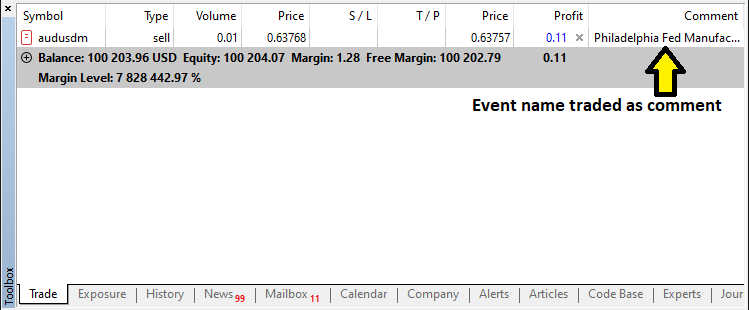
完成开立订单后,接下来我们只需初始化事件倒计时逻辑,这部分内容将在下一节中阐述。
创建并管理倒计时器
为创建并管理倒计时器,我们需要编写一些辅助函数:用于创建显示时间的按钮,以及在需要时更新标签内容。
//--- Function to create a button on the chart with specified properties
bool createButton1(string objName, int x, int y, int width, int height,
                   string text, color txtColor, int fontSize, color bgColor, color borderColor) {
   //--- Attempt to create the button object; if it fails, log the error and return false
   if(!ObjectCreate(0, objName, OBJ_BUTTON, 0, 0, 0)) {
      //--- Print error message with the button name and the error code
      Print("Error creating button ", objName, " : ", GetLastError());
      //--- Return false to indicate button creation failure
      return false;
   }
   //--- Set the horizontal distance (X coordinate) for the button
   ObjectSetInteger(0, objName, OBJPROP_XDISTANCE, x);
   //--- Set the vertical distance (Y coordinate) for the button
   ObjectSetInteger(0, objName, OBJPROP_YDISTANCE, y);
   //--- Set the width of the button
   ObjectSetInteger(0, objName, OBJPROP_XSIZE, width);
   //--- Set the height of the button
   ObjectSetInteger(0, objName, OBJPROP_YSIZE, height);
   //--- Set the text that will appear on the button
   ObjectSetString(0, objName, OBJPROP_TEXT, text);
   //--- Set the color of the button's text
   ObjectSetInteger(0, objName, OBJPROP_COLOR, txtColor);
   //--- Set the font size for the button text
   ObjectSetInteger(0, objName, OBJPROP_FONTSIZE, fontSize);
   //--- Set the font style to "Arial Bold" for the button text
   ObjectSetString(0, objName, OBJPROP_FONT, "Arial Bold");
   //--- Set the background color of the button
   ObjectSetInteger(0, objName, OBJPROP_BGCOLOR, bgColor);
   //--- Set the border color of the button
   ObjectSetInteger(0, objName, OBJPROP_BORDER_COLOR, borderColor);
   //--- Set the button's anchor corner to the top left of the chart
   ObjectSetInteger(0, objName, OBJPROP_CORNER, CORNER_LEFT_UPPER);
   //--- Enable the background display for the button
   ObjectSetInteger(0, objName, OBJPROP_BACK, true);
   //--- Redraw the chart to reflect the new button
   ChartRedraw();
   //--- Return true indicating that the button was created successfully
   return true;
}
//--- Function to update the text of an existing label
bool updateLabel1(string objName, string text) {
   //--- Check if the label exists on the chart; if not, log the error and return false
   if(ObjectFind(0, objName) < 0) {
      //--- Print error message indicating that the label was not found
      Print("updateLabel1: Object ", objName, " not found.");
      //--- Return false because the label does not exist
      return false;
   }
   //--- Update the label's text property with the new text
   ObjectSetString(0, objName, OBJPROP_TEXT, text);
   //--- Redraw the chart to update the label display
   ChartRedraw();
   //--- Return true indicating that the label was updated successfully
   return true;
}

//--- Function to update the text of an existing label
bool updateLabel1(string objName, string text) {
   //--- Check if the label exists on the chart; if not, log the error and return false
   if(ObjectFind(0, objName) < 0) {
      //--- Print error message indicating that the label was not found
      Print("updateLabel1: Object ", objName, " not found.");
      //--- Return false because the label does not exist
      return false;
   }
   //--- Update the label's text property with the new text
   ObjectSetString(0, objName, OBJPROP_TEXT, text);
   //--- Redraw the chart to update the label display
   ChartRedraw();
   //--- Return true indicating that the label was updated successfully
   return true;
}
这部分中,我们仅需创建辅助函数,这些函数将用于创建计时器按钮,以及提供更新标签内容的更新函数。由于我们在本系列的前几部分中已详细解释过类似函数的逻辑,因此这里无需再进行赘述。接下来,我们直接进入实现环节。
//--- Begin handling the post-trade countdown scenario
if(tradeExecuted) {
   //--- If the current time is before the traded news time, display the countdown until news release
   if(currentTime < tradedNewsTime) {
      //--- Calculate the remaining seconds until the traded news time
      int remainingSeconds = (int)(tradedNewsTime - currentTime);
      //--- Calculate hours from the remaining seconds
      int hrs = remainingSeconds / 3600;
      //--- Calculate minutes from the remaining seconds
      int mins = (remainingSeconds % 3600) / 60;
      //--- Calculate seconds remainder
      int secs = remainingSeconds % 60;
      //--- Construct the countdown text string
      string countdownText = "News in: " + IntegerToString(hrs) + "h " +
                             IntegerToString(mins) + "m " +
                             IntegerToString(secs) + "s";
      //--- If the countdown object does not exist, create it with a blue background
      if(ObjectFind(0, "NewsCountdown") < 0) {
         createButton1("NewsCountdown", 50, 17, 300, 30, countdownText, clrWhite, 12, clrBlue, clrBlack);
         //--- Log that the post-trade countdown was created
         Print("Post-trade countdown created: ", countdownText);
      } else {
         //--- If the countdown object exists, update its text
         updateLabel1("NewsCountdown", countdownText);
         //--- Log that the post-trade countdown was updated
         Print("Post-trade countdown updated: ", countdownText);
      }
   } else {
      //--- If current time is past the traded news time, calculate elapsed time since trade
      int elapsed = (int)(currentTime - tradedNewsTime);
      //--- If less than 15 seconds have elapsed, show a reset countdown
      if(elapsed < 15) {
         //--- Calculate the remaining delay for reset
         int remainingDelay = 15 - elapsed;
         //--- Construct the reset countdown text
         string countdownText = "News Released, resetting in: " + IntegerToString(remainingDelay) + "s";
         //--- If the countdown object does not exist, create it with a red background
         if(ObjectFind(0, "NewsCountdown") < 0) {
            createButton1("NewsCountdown", 50, 17, 300, 30, countdownText, clrWhite, 12, clrRed, clrBlack);
            //--- Set the background color property explicitly to red
            ObjectSetInteger(0,"NewsCountdown",OBJPROP_BGCOLOR,clrRed);
            //--- Log that the post-trade reset countdown was created
            Print("Post-trade reset countdown created: ", countdownText);
         } else {
            //--- If the countdown object exists, update its text and background color
            updateLabel1("NewsCountdown", countdownText);
            ObjectSetInteger(0,"NewsCountdown",OBJPROP_BGCOLOR,clrRed);
            //--- Log that the post-trade reset countdown was updated
            Print("Post-trade reset countdown updated: ", countdownText);
         }
      } else {
         //--- If 15 seconds have elapsed since traded news time, log the reset action
         Print("News Released. Resetting trade status after 15 seconds.");

         //--- If the countdown object exists, delete it from the chart
         if(ObjectFind(0, "NewsCountdown") >= 0)
            ObjectDelete(0, "NewsCountdown");
         //--- Reset the tradeExecuted flag to allow new trades
         tradeExecuted = false;
      }
   }
   //--- Exit the function as post-trade processing is complete
   return;
}
以下我们一步步处理交易执行后的倒计时场景。执行交易后,我们首先使用TimeTradeServer函数获取当前服务器时间,并将其与存储候选事件预定发布时间的"tradedNewsTime"进行对比。如果当前时间仍早于"tradedNewsTime",那么我们计算剩余秒数,并将其转换为小时、分钟和秒,随后使用IntegerToString函数构建格式为"新闻倒计时:__小时 __分钟 __秒"(News in: __h __m __s)的倒计时字符串。
随后,我们通过ObjectFind检查"NewsCountdown"对象是否存在。如果不存在,则使用自定义的"createButton1"函数在坐标X=50、Y=17处创建该对象,设置宽度为300、高度为30,并赋予蓝色背景;如果对象已存在,则通过"updateLabel1"更新其内容。然而,如果当前时间已超过"tradedNewsTime",那么我们计算超过的时间;如果该时间不足15秒,则在倒计时对象中显示重置消息——"新闻已发布,XX秒后重置"("News Released, resetting in: XXs"),并使用ObjectSetInteger函数将其背景色设置为红色。
15秒重置期结束后,我们将删除"NewsCountdown"对象,并重置"tradeExecuted"标识从而允许新交易,从而确保系统能够动态响应新闻时间的变化,并维持受控的交易执行。此外,如果已经开立订单但新闻尚未发布,我们还需显示倒计时信息。我们可通过以下逻辑实现。
if(currentTime >= targetTime && currentTime < candidateEventTime) {

        //---

}
else {
   //--- If current time is before the candidate event window, show a pre-trade countdown
   int remainingSeconds = (int)(candidateEventTime - currentTime);
   int hrs = remainingSeconds / 3600;
   int mins = (remainingSeconds % 3600) / 60;
   int secs = remainingSeconds % 60;
   //--- Construct the pre-trade countdown text
   string countdownText = "News in: " + IntegerToString(hrs) + "h " +
                          IntegerToString(mins) + "m " +
                          IntegerToString(secs) + "s";
   //--- If the countdown object does not exist, create it with specified dimensions and blue background
   if(ObjectFind(0, "NewsCountdown") < 0) {
      createButton1("NewsCountdown", 50, 17, 300, 30, countdownText, clrWhite, 12, clrBlue, clrBlack);
      //--- Log that the pre-trade countdown was created
      Print("Pre-trade countdown created: ", countdownText);
   } else {
      //--- If the countdown object exists, update its text
      updateLabel1("NewsCountdown", countdownText);
      //--- Log that the pre-trade countdown was updated
      Print("Pre-trade countdown updated: ", countdownText);
   }
}
如果当前时间未处于候选事件的交易窗口内——即当前时间既不大于或等于“targetTime”(计算方式为候选事件预定时间减去偏移量),也未小于候选事件预定时间,则我们假定当前时间仍处于交易窗口开启前。此时,通过将当前时间从候选事件预定时间中减去,计算出距离候选事件发生的剩余时间,并将该时间差转换为小时、分钟和秒。
我们使用IntegerToString函数,构建格式为“新闻倒计时:__小时 __分钟 __秒”的倒计时文本字符串。随后,我们使用ObjectFind函数检查“NewsCountdown”对象是否已存在;如果不存在,则使用“createButton1”函数创建该对象,设置其坐标(X=50、Y=17,宽度为300、高度为30),并赋予蓝色背景,同时记录日志表明已创建交易前倒计时;如果对象已存在,则通过“updateLabel1”函数更新其文本内容,并记录更新日志。最后,如果分析后未选中任何事件,我们则直接删除相关对象。
//--- If no candidate event is selected, delete any existing countdown and trade info objects
if(ObjectFind(0, "NewsCountdown") >= 0) {
   ObjectDelete(0, "NewsCountdown");
   ObjectDelete(0, "NewsTradeInfo");
   //--- Log that the pre-trade countdown was deleted
   Print("Pre-trade countdown deleted.");
}
如果未选中任何候选事件(即没有事件满足交易执行条件),我们使用ObjectFind函数检查图表中是否存在"NewsCountdown"对象。如果该对象存在,则通过调用ObjectDelete函数,同时从图表中移除"NewsCountdown"和"NewsTradeInfo"这两个对象,确保不显示任何过期的倒计时或交易信息。
然而,用户可能明确终止程序运行,这意味着我们仍需在程序退出时清理图表内容。因此,我们可以定义一个专用函数来轻松处理这类清理操作。
//--- Function to delete trade-related objects from the chart and redraw the chart
void deleteTradeObjects(){
   //--- Delete the countdown object from the chart
   ObjectDelete(0, "NewsCountdown");
   //--- Delete the news trade information label from the chart
   ObjectDelete(0, "NewsTradeInfo");
   //--- Redraw the chart to reflect the deletion of objects
   ChartRedraw();
}
定义该函数后,我们只需在OnDeinit事件处理器中调用,同时在此处销毁现有仪表盘,确保实现彻底清理(如下方黄色高亮部分所示)。
//+------------------------------------------------------------------+
//| Expert deinitialization function                                 |
//+------------------------------------------------------------------+
void OnDeinit(const int reason){
//---

   destroy_Dashboard();
   deleteTradeObjects();
}
此外,还有一件事需要处理:当用户点击仪表盘时,需实时跟踪更新后的筛选信息,以确保始终使用的是最新数据。这意味着我们需要在OnChartEvent事件处理器中监控相关事件。为此,我们将创建一个专用函数来简化这一实现过程。
//--- Function to log active filter selections in the Experts log
void UpdateFilterInfo() {
   //--- Initialize the filter information string with the prefix "Filters: "
   string filterInfo = "Filters: ";
   //--- Check if the currency filter is enabled
   if(enableCurrencyFilter) {
      //--- Append the currency filter label to the string
      filterInfo += "Currency: ";
      //--- Loop through each selected currency filter option
      for(int i = 0; i < ArraySize(curr_filter_selected); i++) {
         //--- Append the current currency filter value
         filterInfo += curr_filter_selected[i];
         //--- If not the last element, add a comma separator
         if(i < ArraySize(curr_filter_selected) - 1)
            filterInfo += ",";
      }
      //--- Append a semicolon to separate this filter's information
      filterInfo += "; ";
   } else {
      //--- Indicate that the currency filter is turned off
      filterInfo += "Currency: Off; ";
   }
   //--- Check if the importance filter is enabled
   if(enableImportanceFilter) {
      //--- Append the impact filter label to the string
      filterInfo += "Impact: ";
      //--- Loop through each selected impact filter option
      for(int i = 0; i < ArraySize(imp_filter_selected); i++) {
         //--- Append the string representation of the current importance filter value
         filterInfo += EnumToString(imp_filter_selected[i]);
         //--- If not the last element, add a comma separator
         if(i < ArraySize(imp_filter_selected) - 1)
            filterInfo += ",";
      }
      //--- Append a semicolon to separate this filter's information
      filterInfo += "; ";
   } else {
      //--- Indicate that the impact filter is turned off
      filterInfo += "Impact: Off; ";
   }
   //--- Check if the time filter is enabled
   if(enableTimeFilter) {
      //--- Append the time filter information with the upper limit
      filterInfo += "Time: Up to " + EnumToString(end_time);
   } else {
      //--- Indicate that the time filter is turned off
      filterInfo += "Time: Off";
   }
   //--- Print the complete filter information to the Experts log
   Print("Filter Info: ", filterInfo);
}
我们创建一个名为 "UpdateFilterInfo" 的无返回值函数。首先,我们初始化一个字符串,前缀为 "Filters: "。接着检查货币过滤器是否启用——如果启用,则追加"Currency: ",并使用"ArraySize"遍历"curr_filter_selected"数组,将每个选中的货币(用逗号分隔)添加到字符串中,最后以分号结尾;如果未启用,则简单记录为"Currency: Off; "。接下来,我们对影响级别过滤器执行类似操作:如果启用,则追加"Impact: ",并遍历"imp_filter_selected"数组,使用EnumToString将每个选中的影响级别转换为字符串后追加,如果未启用,记录为"Impact: Off "。
我们创建一个名为 "UpdateFilterInfo" 的无返回值函数(void function)。将所有片段拼接完成后,我们使用Print函数将完整的筛选信息输出至Experts日志,从而为故障排查和验证提供清晰、实时的筛选器状态快照。随后,我们在OnChartEvent事件处理器以及OnTick事件中调用这些函数。
//+------------------------------------------------------------------+
//|    OnChartEvent handler function                                 |
//+------------------------------------------------------------------+
void  OnChartEvent(
   const int       id,       // event ID
   const long&     lparam,   // long type event parameter
   const double&   dparam,   // double type event parameter
   const string&   sparam    // string type event parameter
){

   if (id == CHARTEVENT_OBJECT_CLICK){ //--- Check if the event is a click on an object
      UpdateFilterInfo();
      CheckForNewsTrade();
   }
}

//+------------------------------------------------------------------+
//| Expert tick function                                             |
//+------------------------------------------------------------------+
void OnTick(){
//---
UpdateFilterInfo();
CheckForNewsTrade();
   if (isDashboardUpdate){
      update_dashboard_values(curr_filter_selected,imp_filter_selected);
   }

}
运行程序后,我们得到以下结果:
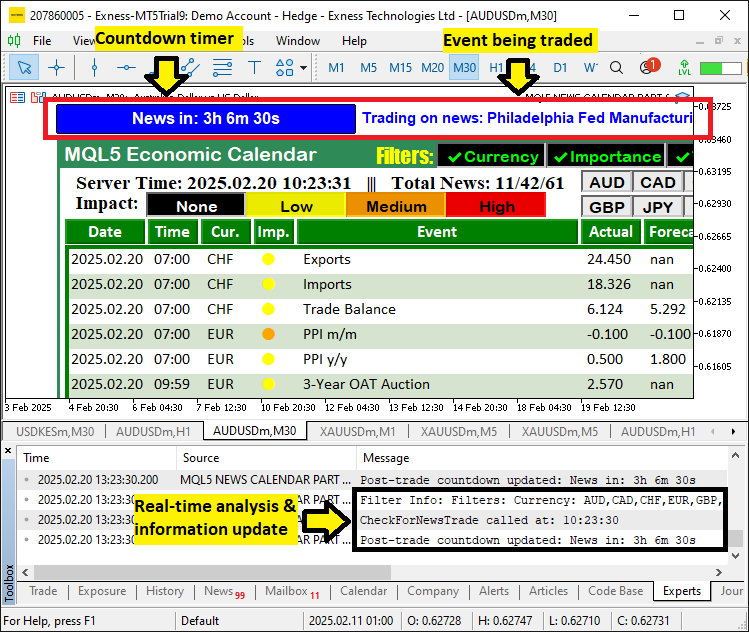
由图可见,我们能够根据用户选择的设置开立订单,当新闻事件触发交易时,会创建倒计时计时器和标签来显示并更新相关信息,同时记录更新日志,从而实现了我们的目标。目前唯一余下的工作就是测试我们的逻辑,这部分内容将在下一节中展开。
测试交易逻辑
至于回测环节,我们等待实盘新闻事件的发生,经测试后,结果如下方视频所示:
结论
综上所述,我们通过用户自定义筛选条件、精确的时间偏移设置以及动态倒计时功能,成功将自动化交易下单功能集成到了MQL5经济日历 系统中。我们的解决方案能够扫描新闻事件,对比预测值与先前值,并根据清晰的日历信号自动执行买入或卖出订单。
然而,为使系统更适应实际交易环境,仍需进一步优化改进。我们鼓励持续开展开发与测试工作——特别是在强化风险管理及优化筛选条件方面——以确保系统达到最优性能。祝您交易顺利!
本文由MetaQuotes Ltd译自英文
原文地址: https://www.mql5.com/en/articles/17271
注意: MetaQuotes Ltd.将保留所有关于这些材料的权利。全部或部分复制或者转载这些材料将被禁止。
本文由网站的一位用户撰写,反映了他们的个人观点。MetaQuotes Ltd 不对所提供信息的准确性负责,也不对因使用所述解决方案、策略或建议而产生的任何后果负责。

 价格行为分析工具包开发(第十五部分):引入四分位理论(1)——四分位绘图脚本
 市场模拟(第一部分):跨期订单(一)
 MQL5自动化交易策略(第九部分):构建亚洲盘突破策略的智能交易系统(EA)
 MQL5交易策略自动化(第八部分):构建基于蝴蝶谐波形态的智能交易系统(EA)

你好!感谢你们所做的工作。
我在 2K 显示器上的表格显示有问题。
你好!感谢您所做的工作。
我在 2K 显示器上的表格显示有问题。
您好。欢迎光临。这需要您修改字体大小,以便一切都能完美匹配。