

Herramientas de trading de MQL5 (Parte 2): Mejora del asistente interactivo de trading con retroalimentación visual dinámica
 322
322
 2
2

Introducción
En nuestro artículo anterior, la primera parte, creamos una herramienta de asistencia para el trading en MetaQuotes Language 5 (MQL5) para MetaTrader 5 con el fin de simplificar la colocación de órdenes pendientes. Ahora, vamos un paso más allá mejorando su interactividad con retroalimentación visual dinámica. Introducimos funciones como un panel de control arrastrable, efectos al pasar el cursor para una navegación intuitiva y validación de órdenes en tiempo real para garantizar que nuestras configuraciones de trading sean precisas y acordes al mercado. Abordamos estos avances a través de los siguientes subtemas:
Estas secciones nos acercan a una herramienta de trading más intuitiva, ágil y fácil de usar.
Mejoras conceptuales para una mayor interactividad
Nos esforzamos por mejorar nuestra herramienta de asistencia al trading haciéndola más intuitiva y adaptable. Comenzamos con un panel de control que podemos arrastrar y posicionar libremente en el gráfico de trading. Esta flexibilidad nos permitirá personalizar la interfaz para adaptarla a nuestro flujo de trabajo, ya sea que estemos gestionando varios gráficos o centrándonos en una única configuración de trading. Además, integraremos efectos al pasar el cursor para resaltar los botones y los elementos del gráfico a medida que el cursor se desplace sobre ellos, proporcionando una retroalimentación visual instantánea que agiliza la navegación y minimiza los errores.
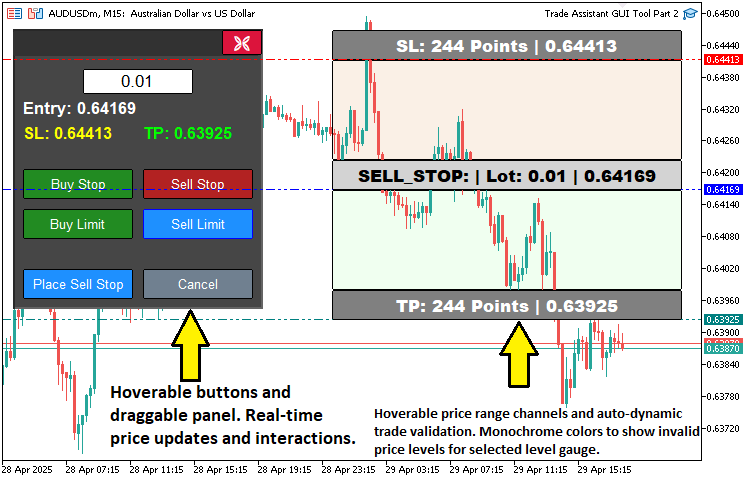
La validación de órdenes en tiempo real será otra mejora clave, que garantizará que nuestros niveles de entrada, stop-loss y take-profit estén lógicamente alineados con los precios actuales del mercado antes de la ejecución. Esta función aumentará nuestra confianza al evitar configuraciones de órdenes no válidas y al mantener la simplicidad a la vez que mejora la precisión. En conjunto, estas mejoras crearán una herramienta intuitiva y centrada en el usuario que respaldará nuestras decisiones de trading y sentará las bases para futuros avances, como las funciones de gestión de riesgos. En resumen, a continuación se muestra una representación visual de lo que pretendemos lograr.
Implementación en MQL5
Para alcanzar nuestros objetivos en MQL5, primero tendremos que definir algunos objetos de panel adicionales, así como variables de estado para el arrastre y el paso del ratón, que utilizaremos para realizar un seguimiento de las interacciones del usuario con el panel o con la herramienta de precios, tal y como se muestra a continuación.
// Control panel object names
#define PANEL_BG        "PANEL_BG"        //--- Define constant for panel background object name
#define PANEL_HEADER    "PANEL_HEADER"    //--- Define constant for panel header object name
#define LOT_EDIT        "LOT_EDIT"        //--- Define constant for lot size edit field object name
#define PRICE_LABEL     "PRICE_LABEL"     //--- Define constant for price label object name
#define SL_LABEL        "SL_LABEL"        //--- Define constant for stop-loss label object name
#define TP_LABEL        "TP_LABEL"        //--- Define constant for take-profit label object name
#define BUY_STOP_BTN    "BUY_STOP_BTN"    //--- Define constant for buy stop button object name
#define SELL_STOP_BTN   "SELL_STOP_BTN"   //--- Define constant for sell stop button object name
#define BUY_LIMIT_BTN   "BUY_LIMIT_BTN"   //--- Define constant for buy limit button object name
#define SELL_LIMIT_BTN  "SELL_LIMIT_BTN"  //--- Define constant for sell limit button object name
#define PLACE_ORDER_BTN "PLACE_ORDER_BTN" //--- Define constant for place order button object name
#define CANCEL_BTN      "CANCEL_BTN"      //--- Define constant for cancel button object name
#define CLOSE_BTN       "CLOSE_BTN"       //--- Define constant for close button object name

// Variables for dragging panel
bool panel_dragging   = false;            //--- Flag to track if panel is being dragged
int  panel_drag_x     = 0,
     panel_drag_y     = 0;                //--- Mouse coordinates when drag starts
int  panel_start_x    = 0,
     panel_start_y    = 0;                //--- Panel coordinates when drag starts

// Button and rectangle hover states
bool buy_stop_hovered    = false;         //--- Buy Stop button hover state
bool sell_stop_hovered   = false;         //--- Sell Stop button hover state
bool buy_limit_hovered   = false;         //--- Buy Limit button hover state
bool sell_limit_hovered  = false;         //--- Sell Limit button hover state
bool place_order_hovered = false;         //--- Place Order button hover state
bool cancel_hovered      = false;         //--- Cancel button hover state
bool close_hovered       = false;         //--- Close button hover state
bool header_hovered      = false;         //--- Header hover state
bool rec1_hovered        = false;         //--- REC1 (TP) hover state
bool rec3_hovered        = false;         //--- REC3 (Entry) hover state
bool rec5_hovered        = false;         //--- REC5 (SL) hover state
Comenzamos a implementar las funciones de interactividad mejoradas de nuestra herramienta definiendo las variables clave que permiten arrastrar paneles y aplicar efectos al pasar el cursor en la interfaz de MetaTrader 5. Utilizamos la directiva #define para crear una constante «PANEL_HEADER» para el objeto de encabezado del panel, que actúa como la zona arrastrable del panel de control. Para permitir el arrastre, declaramos «panel_dragging» como un indicador booleano para detectar cuándo se está moviendo el panel, y las variables enteras «panel_drag_x» y «panel_drag_y» para almacenar las coordenadas del ratón al inicio del arrastre, así como «panel_start_x» y «panel_start_y» para registrar la posición inicial del panel, lo que nos permite calcular su nueva posición durante el movimiento.
También introducimos variables booleanas para gestionar los estados al pasar el cursor sobre los botones y los rectángulos de los gráficos, entre las que se incluyen «buy_stop_hovered», «sell_stop_hovered», «buy_limit_hovered», «sell_limit_hovered», «place_order_hovered», «cancel_hovered», «close_hovered» y «header_hovered» para los botones y el encabezado del panel respectivos, así como «rec1_hovered», «rec3_hovered» y «rec5_hovered» para los rectángulos de take-profit, entrada y stop-loss. Estas variables nos permitirán detectar cuándo el cursor pasa por encima de estos elementos, lo que activará una respuesta visual, como cambios de color, para mejorar la navegación y la interacción dentro de la interfaz de la herramienta. A continuación, necesitamos obtener los valores de la herramienta de precios y validarlos para operar.
//+------------------------------------------------------------------+
//| Check if order setup is valid                                    |
//+------------------------------------------------------------------+
bool isOrderValid() {
   if(!tool_visible) return true;                                     //--- No validation needed if tool is not visible
   double current_price = SymbolInfoDouble(Symbol(), SYMBOL_BID);     //--- Get current bid price
   double entry_price   = Get_Price_d(PR_HL);                         //--- Get entry price
   double sl_price      = Get_Price_d(SL_HL);                         //--- Get stop-loss price
   double tp_price      = Get_Price_d(TP_HL);                         //--- Get take-profit price

   if(selected_order_type == "BUY_STOP") {
      //--- Buy Stop: Entry must be above current price, TP above entry, SL below entry
      if(entry_price <= current_price || tp_price <= entry_price || sl_price >= entry_price) {
         return false;
      }
   }
   else if(selected_order_type == "SELL_STOP") {
      //--- Sell Stop: Entry must be below current price, TP below entry, SL above entry
      if(entry_price >= current_price || tp_price >= entry_price || sl_price <= entry_price) {
         return false;
      }
   }
   else if(selected_order_type == "BUY_LIMIT") {
      //--- Buy Limit: Entry must be below current price, TP above entry, SL below entry
      if(entry_price >= current_price || tp_price <= entry_price || sl_price >= entry_price) {
         return false;
      }
   }
   else if(selected_order_type == "SELL_LIMIT") {
      //--- Sell Limit: Entry must be above current price, TP below entry, SL above entry
      if(entry_price <= current_price || tp_price >= entry_price || sl_price <= entry_price) {
         return false;
      }
   }
   return true;                                                       //--- Order setup is valid
}
En este caso, implementamos la función «isOrderValid» para mejorar nuestra herramienta mediante la validación de la configuración de la orden en tiempo real, garantizando así que nuestras operaciones se ajusten a las condiciones del mercado. Empezamos comprobando si «tool_visible» es falso, devolviendo «true» para omitir la validación cuando la herramienta no está activa. Recuperamos el precio de mercado actual mediante la función SymbolInfoDouble con SYMBOL_BID, y obtenemos los precios de entrada («entry_price»), stop-loss («sl_price») y take-profit («tp_price») mediante la función «Get_Price_d» para «PR_HL», «SL_HL» y «TP_HL».
Para «BUY_STOP», verificamos que «entry_price» sea superior a «current_price», que «tp_price» sea superior a «entry_price» y que «sl_price» sea inferior a «entry_price»; para «SELL_STOP», que «entry_price» sea inferior a «current_price», que «tp_price» sea inferior a «entry_price» y que «sl_price» sea superior a «entry_price»; para «BUY_LIMIT», que «entry_price» sea inferior a «current_price», que «tp_price» sea superior a «entry_price» y que «sl_price» sea inferior a «entry_price»; y para «SELL_LIMIT», que «entry_price» sea superior a «current_price», que «tp_price» sea inferior a «entry_price» y que «sl_price» sea superior a «entry_price», devolviendo falso si falla alguna condición, o verdadero si la configuración es válida. De este modo, podremos actualizar los colores de los rectángulos según la validez de la orden.
//+------------------------------------------------------------------+
//| Update rectangle colors based on order validity and hover        |
//+------------------------------------------------------------------+
void updateRectangleColors() {
   if(!tool_visible) return;                                                             //--- Skip if tool is not visible
   bool is_valid = isOrderValid();                                                       //--- Check order validity

   if(!is_valid) {
      //--- Gray out REC1 and REC5 if order is invalid, with hover effect
      ObjectSetInteger(0, REC1, OBJPROP_BGCOLOR, rec1_hovered ? C'100,100,100' : clrGray);
      ObjectSetInteger(0, REC5, OBJPROP_BGCOLOR, rec5_hovered ? C'100,100,100' : clrGray);
   }
   else {
      //--- Restore original colors based on order type and hover state
      if(selected_order_type == "BUY_STOP" || selected_order_type == "BUY_LIMIT") {
         ObjectSetInteger(0, REC1, OBJPROP_BGCOLOR, rec1_hovered ? C'0,100,0'   : clrGreen); //--- TP rectangle (dark green on hover)
         ObjectSetInteger(0, REC5, OBJPROP_BGCOLOR, rec5_hovered ? C'139,0,0'   : clrRed);   //--- SL rectangle (dark red on hover)
      }
      else {
         ObjectSetInteger(0, REC1, OBJPROP_BGCOLOR, rec1_hovered ? C'0,100,0'   : clrGreen); //--- TP rectangle (dark green on hover)
         ObjectSetInteger(0, REC5, OBJPROP_BGCOLOR, rec5_hovered ? C'139,0,0'   : clrRed);   //--- SL rectangle (dark red on hover)
      }
   }

   ObjectSetInteger(0, REC3, OBJPROP_BGCOLOR, rec3_hovered ? C'105,105,105' : clrLightGray); //--- Entry rectangle (darker gray on hover)
   ChartRedraw(0);                                                                          //--- Redraw chart
}
Implementamos la función «updateRectangleColors» para mejorar la retroalimentación visual de nuestra herramienta, actualizando los colores de los rectángulos del gráfico en función de la validez de la orden y los estados al pasar el cursor por encima. Si «tool_visible» es falso, nos saltamos este paso; a continuación, comprobamos la validez mediante la función «isOrderValid» y utilizamos la función ObjectSetInteger para establecer «REC1» (TP) y «REC5» (SL) en gris («clrGray» o «C'100,100,100'» si «rec1_hovered»/«rec5_hovered») si no es válido, o en verde/rojo («clrGreen»/«clrRed» o «C'0,100,0'»/«C'139,0,0'» al pasar el cursor) si la orden es válida, para órdenes «BUY_STOP», «BUY_LIMIT» y de venta, y «REC3» (entrada) a gris claro («clrLightGray» o «C'105,105,105'» si «rec3_hovered»), llamando a ChartRedraw para actualizar el gráfico.
A continuación, debemos configurar los estados al pasar el cursor por encima de los botones tal y como se muestra a continuación.
//+------------------------------------------------------------------+
//| Update button and header hover state                             |
//+------------------------------------------------------------------+
void updateButtonHoverState(int mouse_x, int mouse_y) {
   // Define button names and their properties
   string buttons[] = {BUY_STOP_BTN, SELL_STOP_BTN, BUY_LIMIT_BTN, SELL_LIMIT_BTN, PLACE_ORDER_BTN, CANCEL_BTN, CLOSE_BTN};
   bool hover_states[] = {buy_stop_hovered, sell_stop_hovered, buy_limit_hovered, sell_limit_hovered, place_order_hovered, cancel_hovered, close_hovered};
   color normal_colors[] = {clrForestGreen, clrFireBrick, clrForestGreen, clrFireBrick, clrDodgerBlue, clrSlateGray, clrCrimson};
   color hover_color = clrDodgerBlue;                      //--- Bluish color for hover
   color hover_border = clrBlue;                           //--- Bluish border for hover

   for(int i = 0; i < ArraySize(buttons); i++) {
      int x = (int)ObjectGetInteger(0, buttons[i], OBJPROP_XDISTANCE);
      int y = (int)ObjectGetInteger(0, buttons[i], OBJPROP_YDISTANCE);
      int width = (int)ObjectGetInteger(0, buttons[i], OBJPROP_XSIZE);
      int height = (int)ObjectGetInteger(0, buttons[i], OBJPROP_YSIZE);

      bool is_hovered = (mouse_x >= x && mouse_x <= x + width && mouse_y >= y && mouse_y <= y + height);

      if(is_hovered && !hover_states[i]) {
         // Mouse entered button
         ObjectSetInteger(0, buttons[i], OBJPROP_BGCOLOR, hover_color);
         ObjectSetInteger(0, buttons[i], OBJPROP_BORDER_COLOR, hover_border);
         hover_states[i] = true;
      }
      else if(!is_hovered && hover_states[i]) {
         // Mouse left button
         ObjectSetInteger(0, buttons[i], OBJPROP_BGCOLOR, normal_colors[i]);
         ObjectSetInteger(0, buttons[i], OBJPROP_BORDER_COLOR, clrBlack);
         hover_states[i] = false;
      }
   }

   // Update header hover state
   int header_x = (int)ObjectGetInteger(0, PANEL_HEADER, OBJPROP_XDISTANCE);
   int header_y = (int)ObjectGetInteger(0, PANEL_HEADER, OBJPROP_YDISTANCE);
   int header_width = (int)ObjectGetInteger(0, PANEL_HEADER, OBJPROP_XSIZE);
   int header_height = (int)ObjectGetInteger(0, PANEL_HEADER, OBJPROP_YSIZE);

   bool is_header_hovered = (mouse_x >= header_x && mouse_x <= header_x + header_width && mouse_y >= header_y && mouse_y <= header_y + header_height);

   if(is_header_hovered && !header_hovered) {
      ObjectSetInteger(0, PANEL_HEADER, OBJPROP_BGCOLOR, C'030,030,030'); //--- Darken header
      header_hovered = true;
   }
   else if(!is_header_hovered && header_hovered) {
      ObjectSetInteger(0, PANEL_HEADER, OBJPROP_BGCOLOR, C'050,050,050'); //--- Restore header color
      header_hovered = false;
   }

   // Update tool rectangle hover states
   if(tool_visible) {
      int x1 = (int)ObjectGetInteger(0, REC1, OBJPROP_XDISTANCE);
      int y1 = (int)ObjectGetInteger(0, REC1, OBJPROP_YDISTANCE);
      int width1 = (int)ObjectGetInteger(0, REC1, OBJPROP_XSIZE);
      int height1 = (int)ObjectGetInteger(0, REC1, OBJPROP_YSIZE);

      int x3 = (int)ObjectGetInteger(0, REC3, OBJPROP_XDISTANCE);
      int y3 = (int)ObjectGetInteger(0, REC3, OBJPROP_YDISTANCE);
      int width3 = (int)ObjectGetInteger(0, REC3, OBJPROP_XSIZE);
      int height3 = (int)ObjectGetInteger(0, REC3, OBJPROP_YSIZE);

      int x5 = (int)ObjectGetInteger(0, REC5, OBJPROP_XDISTANCE);
      int y5 = (int)ObjectGetInteger(0, REC5, OBJPROP_YDISTANCE);
      int width5 = (int)ObjectGetInteger(0, REC5, OBJPROP_XSIZE);
      int height5 = (int)ObjectGetInteger(0, REC5, OBJPROP_YSIZE);

      bool is_rec1_hovered = (mouse_x >= x1 && mouse_x <= x1 + width1 && mouse_y >= y1 && mouse_y <= y1 + height1);
      bool is_rec3_hovered = (mouse_x >= x3 && mouse_x <= x3 + width3 && mouse_y >= y3 && mouse_y <= y3 + height3);
      bool is_rec5_hovered = (mouse_x >= x5 && mouse_x <= x5 + width5 && mouse_y >= y5 && mouse_y <= y5 + height5);

      if(is_rec1_hovered != rec1_hovered || is_rec3_hovered != rec3_hovered || is_rec5_hovered != rec5_hovered) {
         rec1_hovered = is_rec1_hovered;
         rec3_hovered = is_rec3_hovered;
         rec5_hovered = is_rec5_hovered;
         updateRectangleColors();                            //--- Update colors based on hover state
      }
   }

   // Update hover state variables
   buy_stop_hovered = hover_states[0];
   sell_stop_hovered = hover_states[1];
   buy_limit_hovered = hover_states[2];
   sell_limit_hovered = hover_states[3];
   place_order_hovered = hover_states[4];
   cancel_hovered = hover_states[5];
   close_hovered = hover_states[6];

   ChartRedraw(0);                                           //--- Redraw chart
}
Para mejorar la interactividad de nuestra herramienta mediante la gestión de los efectos al pasar el cursor por los botones y los elementos de los gráficos, implementamos la función «updateButtonHoverState». Definimos las matrices «buttons» para los nombres de los botones («BUY_STOP_BTN» a «CLOSE_BTN»), «hover_states» para sus indicadores de estado al pasar el cursor («buy_stop_hovered» a «close_hovered») y «normal_colors» para los colores predeterminados, con «hover_color» (clrDodgerBlue) y «hover_border» («clrBlue») para los estados al pasar el cursor.
Para cada botón, utilizamos la función ObjectGetInteger para obtener la posición y el tamaño, comprobamos si «mouse_x» y «mouse_y» se encuentran dentro de los límites, y actualizamos «OBJPROP_BGCOLOR» y «OBJPROP_BORDER_COLOR» a «hover_color» o «normal_colors» mediante ObjectSetInteger, activando o desactivando «hover_states».
En el caso del «PANEL_HEADER», comprobamos igualmente el estado al pasar el cursor por encima, oscureciéndolo a «C'030,030,030» o restableciéndolo a «C'050,050,050» mediante ObjectSetInteger. Cuando «tool_visible» está activado, comprobamos los límites de «REC1», «REC3» y «REC5», actualizamos «rec1_hovered», «rec3_hovered» y «rec5_hovered», y llamamos a «updateRectangleColors» si se han producido cambios. Sincronizamos los estados de «buy_stop_hovered» a «close_hovered» mediante «hover_states» y llamamos a ChartRedraw para actualizar el gráfico. A continuación, podemos llamar a estas funciones dentro del controlador de eventos OnChartEvent para obtener actualizaciones en tiempo real.
//+------------------------------------------------------------------+ //| Expert onchart event function | //+------------------------------------------------------------------+ void OnChartEvent( const int id, //--- Event ID const long& lparam, //--- Long parameter (e.g., x-coordinate for mouse) const double& dparam, //--- Double parameter (e.g., y-coordinate for mouse) const string& sparam //--- String parameter (e.g., object name) ) { if(id == CHARTEVENT_OBJECT_CLICK) { //--- Handle object click events // Handle order type buttons if(sparam == BUY_STOP_BTN) { //--- Check if Buy Stop button clicked selected_order_type = "BUY_STOP"; //--- Set order type to Buy Stop showTool(); //--- Show trading tool update_Text(PLACE_ORDER_BTN, "Place Buy Stop"); //--- Update place order button text updateRectangleColors(); //--- Update rectangle colors } else if(sparam == SELL_STOP_BTN) { //--- Check if Sell Stop button clicked selected_order_type = "SELL_STOP"; //--- Set order type to Sell Stop showTool(); //--- Show trading tool update_Text(PLACE_ORDER_BTN, "Place Sell Stop"); //--- Update place order button text updateRectangleColors(); //--- Update rectangle colors } else if(sparam == BUY_LIMIT_BTN) { //--- Check if Buy Limit button clicked selected_order_type = "BUY_LIMIT"; //--- Set order type to Buy Limit showTool(); //--- Show trading tool update_Text(PLACE_ORDER_BTN, "Place Buy Limit"); //--- Update place order button text updateRectangleColors(); //--- Update rectangle colors } else if(sparam == SELL_LIMIT_BTN) { //--- Check if Sell Limit button clicked selected_order_type = "SELL_LIMIT"; //--- Set order type to Sell Limit showTool(); //--- Show trading tool update_Text(PLACE_ORDER_BTN, "Place Sell Limit"); //--- Update place order button text updateRectangleColors(); //--- Update rectangle colors } else if(sparam == PLACE_ORDER_BTN) { //--- Check if Place Order button clicked if(isOrderValid()) { placeOrder(); //--- Execute order placement deleteObjects(); //--- Delete tool objects showPanel(); //--- Show control panel } else { Print("Cannot place order: Invalid price setup for ", selected_order_type); } } else if(sparam == CANCEL_BTN) { //--- Check if Cancel button clicked deleteObjects(); //--- Delete tool objects showPanel(); //--- Show control panel } else if(sparam == CLOSE_BTN) { //--- Check if Close button clicked deleteObjects(); //--- Delete tool objects deletePanel(); //--- Delete control panel ChartSetInteger(0, CHART_EVENT_MOUSE_MOVE, false); //--- Disable mouse move events } ObjectSetInteger(0, sparam, OBJPROP_STATE, false); //--- Reset button state click ChartRedraw(0); //--- Redraw chart } if(id == CHARTEVENT_MOUSE_MOVE) { //--- Handle mouse move events int MouseD_X = (int)lparam; //--- Get mouse x-coordinate int MouseD_Y = (int)dparam; //--- Get mouse y-coordinate int MouseState = (int)sparam; //--- Get mouse state // Update button and rectangle hover states updateButtonHoverState(MouseD_X, MouseD_Y); // Handle panel dragging int header_xd = (int)ObjectGetInteger(0, PANEL_HEADER, OBJPROP_XDISTANCE); int header_yd = (int)ObjectGetInteger(0, PANEL_HEADER, OBJPROP_YDISTANCE); int header_xs = (int)ObjectGetInteger(0, PANEL_HEADER, OBJPROP_XSIZE); int header_ys = (int)ObjectGetInteger(0, PANEL_HEADER, OBJPROP_YSIZE); if(prevMouseState == 0 && MouseState == 1) { //--- Mouse button down if(MouseD_X >= header_xd && MouseD_X <= header_xd + header_xs && MouseD_Y >= header_yd && MouseD_Y <= header_yd + header_ys) { panel_dragging = true; //--- Start dragging panel_drag_x = MouseD_X; //--- Store mouse x-coordinate panel_drag_y = MouseD_Y; //--- Store mouse y-coordinate panel_start_x = header_xd; //--- Store panel x-coordinate panel_start_y = header_yd; //--- Store panel y-coordinate ChartSetInteger(0, CHART_MOUSE_SCROLL, false); //--- Disable chart scrolling } } if(panel_dragging && MouseState == 1) { //--- Dragging panel int dx = MouseD_X - panel_drag_x; //--- Calculate x displacement int dy = MouseD_Y - panel_drag_y; //--- Calculate y displacement panel_x = panel_start_x + dx; //--- Update panel x-position panel_y = panel_start_y + dy; //--- Update panel y-position // Update all panel objects' positions ObjectSetInteger(0, PANEL_BG, OBJPROP_XDISTANCE, panel_x); ObjectSetInteger(0, PANEL_BG, OBJPROP_YDISTANCE, panel_y); ObjectSetInteger(0, PANEL_HEADER, OBJPROP_XDISTANCE, panel_x); ObjectSetInteger(0, PANEL_HEADER, OBJPROP_YDISTANCE, panel_y+2); ObjectSetInteger(0, CLOSE_BTN, OBJPROP_XDISTANCE, panel_x + 209); ObjectSetInteger(0, CLOSE_BTN, OBJPROP_YDISTANCE, panel_y + 1); ObjectSetInteger(0, LOT_EDIT, OBJPROP_XDISTANCE, panel_x + 70); ObjectSetInteger(0, LOT_EDIT, OBJPROP_YDISTANCE, panel_y + 40); ObjectSetInteger(0, PRICE_LABEL, OBJPROP_XDISTANCE, panel_x + 10); ObjectSetInteger(0, PRICE_LABEL, OBJPROP_YDISTANCE, panel_y + 70); ObjectSetInteger(0, SL_LABEL, OBJPROP_XDISTANCE, panel_x + 10); ObjectSetInteger(0, SL_LABEL, OBJPROP_YDISTANCE, panel_y + 95); ObjectSetInteger(0, TP_LABEL, OBJPROP_XDISTANCE, panel_x + 130); ObjectSetInteger(0, TP_LABEL, OBJPROP_YDISTANCE, panel_y + 95); ObjectSetInteger(0, BUY_STOP_BTN, OBJPROP_XDISTANCE, panel_x + 10); ObjectSetInteger(0, BUY_STOP_BTN, OBJPROP_YDISTANCE, panel_y + 140); ObjectSetInteger(0, SELL_STOP_BTN, OBJPROP_XDISTANCE, panel_x + 130); ObjectSetInteger(0, SELL_STOP_BTN, OBJPROP_YDISTANCE, panel_y + 140); ObjectSetInteger(0, BUY_LIMIT_BTN, OBJPROP_XDISTANCE, panel_x + 10); ObjectSetInteger(0, BUY_LIMIT_BTN, OBJPROP_YDISTANCE, panel_y + 180); ObjectSetInteger(0, SELL_LIMIT_BTN, OBJPROP_XDISTANCE, panel_x + 130); ObjectSetInteger(0, SELL_LIMIT_BTN, OBJPROP_YDISTANCE, panel_y + 180); ObjectSetInteger(0, PLACE_ORDER_BTN, OBJPROP_XDISTANCE, panel_x + 10); ObjectSetInteger(0, PLACE_ORDER_BTN, OBJPROP_YDISTANCE, panel_y + 240); ObjectSetInteger(0, CANCEL_BTN, OBJPROP_XDISTANCE, panel_x + 130); ObjectSetInteger(0, CANCEL_BTN, OBJPROP_YDISTANCE, panel_y + 240); ChartRedraw(0); //--- Redraw chart } if(MouseState == 0) { //--- Mouse button released if(panel_dragging) { panel_dragging = false; //--- Stop dragging ChartSetInteger(0, CHART_MOUSE_SCROLL, true); //--- Re-enable chart scrolling } } if(tool_visible) { //--- Handle tool movement int XD_R1 = (int)ObjectGetInteger(0, REC1, OBJPROP_XDISTANCE); //--- Get REC1 x-distance int YD_R1 = (int)ObjectGetInteger(0, REC1, OBJPROP_YDISTANCE); //--- Get REC1 y-distance int XS_R1 = (int)ObjectGetInteger(0, REC1, OBJPROP_XSIZE); //--- Get REC1 x-size int YS_R1 = (int)ObjectGetInteger(0, REC1, OBJPROP_YSIZE); //--- Get REC1 y-size int XD_R2 = (int)ObjectGetInteger(0, REC2, OBJPROP_XDISTANCE); //--- Get REC2 x-distance int YD_R2 = (int)ObjectGetInteger(0, REC2, OBJPROP_YDISTANCE); //--- Get REC2 y-distance int XS_R2 = (int)ObjectGetInteger(0, REC2, OBJPROP_XSIZE); //--- Get REC2 x-size int YS_R2 = (int)ObjectGetInteger(0, REC2, OBJPROP_YSIZE); //--- Get REC2 y-size int XD_R3 = (int)ObjectGetInteger(0, REC3, OBJPROP_XDISTANCE); //--- Get REC3 x-distance int YD_R3 = (int)ObjectGetInteger(0, REC3, OBJPROP_YDISTANCE); //--- Get REC3 y-distance int XS_R3 = (int)ObjectGetInteger(0, REC3, OBJPROP_XSIZE); //--- Get REC3 x-size int YS_R3 = (int)ObjectGetInteger(0, REC3, OBJPROP_YSIZE); //--- Get REC3 y-size int XD_R4 = (int)ObjectGetInteger(0, REC4, OBJPROP_XDISTANCE); //--- Get REC4 x-distance int YD_R4 = (int)ObjectGetInteger(0, REC4, OBJPROP_YDISTANCE); //--- Get REC4 y-distance int XS_R4 = (int)ObjectGetInteger(0, REC4, OBJPROP_XSIZE); //--- Get REC4 x-size int YS_R4 = (int)ObjectGetInteger(0, REC4, OBJPROP_YSIZE); //--- Get REC4 y-size int XD_R5 = (int)ObjectGetInteger(0, REC5, OBJPROP_XDISTANCE); //--- Get REC5 x-distance int YD_R5 = (int)ObjectGetInteger(0, REC5, OBJPROP_YDISTANCE); //--- Get REC5 y-distance int XS_R5 = (int)ObjectGetInteger(0, REC5, OBJPROP_XSIZE); //--- Get REC5 x-size int YS_R5 = (int)ObjectGetInteger(0, REC5, OBJPROP_YSIZE); //--- Get REC5 y-size if(prevMouseState == 0 && MouseState == 1 && !panel_dragging) { //--- Check for mouse button down, avoid dragging conflict mlbDownX1 = MouseD_X; //--- Store mouse x-coordinate for REC1 mlbDownY1 = MouseD_Y; //--- Store mouse y-coordinate for REC1 mlbDownXD_R1 = XD_R1; //--- Store REC1 x-distance mlbDownYD_R1 = YD_R1; //--- Store REC1 y-distance mlbDownX2 = MouseD_X; //--- Store mouse x-coordinate for REC2 mlbDownY2 = MouseD_Y; //--- Store mouse y-coordinate for REC2 mlbDownXD_R2 = XD_R2; //--- Store REC2 x-distance mlbDownYD_R2 = YD_R2; //--- Store REC2 y-distance mlbDownX3 = MouseD_X; //--- Store mouse x-coordinate for REC3 mlbDownY3 = MouseD_Y; //--- Store mouse y-coordinate for REC3 mlbDownXD_R3 = XD_R3; //--- Store REC3 x-distance mlbDownYD_R3 = YD_R3; //--- Store REC3 y-distance mlbDownX4 = MouseD_X; //--- Store mouse x-coordinate for REC4 mlbDownY4 = MouseD_Y; //--- Store mouse y-coordinate for REC4 mlbDownXD_R4 = XD_R4; //--- Store REC4 x-distance mlbDownYD_R4 = YD_R4; //--- Store REC4 y-distance mlbDownX5 = MouseD_X; //--- Store mouse x-coordinate for REC5 mlbDownY5 = MouseD_Y; //--- Store mouse y-coordinate for REC5 mlbDownXD_R5 = XD_R5; //--- Store REC5 x-distance mlbDownYD_R5 = YD_R5; //--- Store REC5 y-distance if(MouseD_X >= XD_R1 && MouseD_X <= XD_R1 + XS_R1 && //--- Check if mouse is within REC1 bounds MouseD_Y >= YD_R1 && MouseD_Y <= YD_R1 + YS_R1) { movingState_R1 = true; //--- Enable REC1 movement ChartSetInteger(0, CHART_MOUSE_SCROLL, false); //--- Disable chart scrolling } if(MouseD_X >= XD_R3 && MouseD_X <= XD_R3 + XS_R3 && //--- Check if mouse is within REC3 bounds MouseD_Y >= YD_R3 && MouseD_Y <= YD_R3 + YS_R3) { movingState_R3 = true; //--- Enable REC3 movement ChartSetInteger(0, CHART_MOUSE_SCROLL, false); //--- Disable chart scrolling } if(MouseD_X >= XD_R5 && MouseD_X <= XD_R5 + XS_R5 && //--- Check if mouse is within REC5 bounds MouseD_Y >= YD_R5 && MouseD_Y <= YD_R5 + YS_R5) { movingState_R5 = true; //--- Enable REC5 movement ChartSetInteger(0, CHART_MOUSE_SCROLL, false); //--- Disable chart scrolling } } if(movingState_R1) { //--- Handle REC1 (TP) movement bool canMove = false; //--- Flag to check if movement is valid if(selected_order_type == "BUY_STOP" || selected_order_type == "BUY_LIMIT") { //--- Check for buy orders if(YD_R1 + YS_R1 < YD_R3) { //--- Ensure TP is above entry for buy orders canMove = true; //--- Allow movement ObjectSetInteger(0, REC1, OBJPROP_YDISTANCE, mlbDownYD_R1 + MouseD_Y - mlbDownY1); //--- Update REC1 y-position ObjectSetInteger(0, REC2, OBJPROP_YDISTANCE, YD_R1 + YS_R1); //--- Update REC2 y-position ObjectSetInteger(0, REC2, OBJPROP_YSIZE, YD_R3 - (YD_R1 + YS_R1)); //--- Update REC2 y-size } } else { //--- Handle sell orders if(YD_R1 > YD_R3 + YS_R3) { //--- Ensure TP is below entry for sell orders canMove = true; //--- Allow movement ObjectSetInteger(0, REC1, OBJPROP_YDISTANCE, mlbDownYD_R1 + MouseD_Y - mlbDownY1); //--- Update REC1 y-position ObjectSetInteger(0, REC4, OBJPROP_YDISTANCE, YD_R3 + YS_R3); //--- Update REC4 y-position ObjectSetInteger(0, REC4, OBJPROP_YSIZE, YD_R1 - (YD_R3 + YS_R3)); //--- Update REC4 y-size } } if(canMove) { //--- If movement is valid datetime dt_TP = 0; //--- Variable for TP time double price_TP = 0; //--- Variable for TP price int window = 0; //--- Chart window ChartXYToTimePrice(0, XD_R1, YD_R1 + YS_R1, window, dt_TP, price_TP); //--- Convert chart coordinates to time and price ObjectSetInteger(0, TP_HL, OBJPROP_TIME, dt_TP); //--- Update TP horizontal line time ObjectSetDouble(0, TP_HL, OBJPROP_PRICE, price_TP); //--- Update TP horizontal line price update_Text(REC1, "TP: " + DoubleToString(MathAbs((Get_Price_d(TP_HL) - Get_Price_d(PR_HL)) / _Point), 0) + " Points | " + Get_Price_s(TP_HL)); //--- Update REC1 text update_Text(TP_LABEL, "TP: " + Get_Price_s(TP_HL)); //--- Update TP label text } updateRectangleColors(); //--- Update rectangle colors ChartRedraw(0); //--- Redraw chart } if(movingState_R5) { //--- Handle REC5 (SL) movement bool canMove = false; //--- Flag to check if movement is valid if(selected_order_type == "BUY_STOP" || selected_order_type == "BUY_LIMIT") { //--- Check for buy orders if(YD_R5 > YD_R4) { //--- Ensure SL is below entry for buy orders canMove = true; //--- Allow movement ObjectSetInteger(0, REC5, OBJPROP_YDISTANCE, mlbDownYD_R5 + MouseD_Y - mlbDownY5); //--- Update REC5 y-position ObjectSetInteger(0, REC4, OBJPROP_YDISTANCE, YD_R3 + YS_R3); //--- Update REC4 y-position ObjectSetInteger(0, REC4, OBJPROP_YSIZE, YD_R5 - (YD_R3 + YS_R3)); //--- Update REC4 y-size } } else { //--- Handle sell orders if(YD_R5 + YS_R5 < YD_R3) { //--- Ensure SL is above entry for sell orders canMove = true; //--- Allow movement ObjectSetInteger(0, REC5, OBJPROP_YDISTANCE, mlbDownYD_R5 + MouseD_Y - mlbDownY5); //--- Update REC5 y-position ObjectSetInteger(0, REC2, OBJPROP_YDISTANCE, YD_R5 + YS_R5); //--- Update REC2 y-position ObjectSetInteger(0, REC2, OBJPROP_YSIZE, YD_R3 - (YD_R5 + YS_R5)); //--- Update REC2 y-size } } if(canMove) { //--- If movement is valid datetime dt_SL = 0; //--- Variable for SL time double price_SL = 0; //--- Variable for SL price int window = 0; //--- Chart window ChartXYToTimePrice(0, XD_R5, YD_R5 + YS_R5, window, dt_SL, price_SL); //--- Convert chart coordinates to time and price ObjectSetInteger(0, SL_HL, OBJPROP_TIME, dt_SL); //--- Update SL horizontal line time ObjectSetDouble(0, SL_HL, OBJPROP_PRICE, price_SL); //--- Update SL horizontal line price update_Text(REC5, "SL: " + DoubleToString(MathAbs((Get_Price_d(PR_HL) - Get_Price_d(SL_HL)) / _Point), 0) + " Points | " + Get_Price_s(SL_HL)); //--- Update REC5 text update_Text(SL_LABEL, "SL: " + Get_Price_s(SL_HL)); //--- Update SL label text } updateRectangleColors(); //--- Update rectangle colors ChartRedraw(0); //--- Redraw chart } if(movingState_R3) { //--- Handle REC3 (Entry) movement ObjectSetInteger(0, REC3, OBJPROP_XDISTANCE, mlbDownXD_R3 + MouseD_X - mlbDownX3); //--- Update REC3 x-position ObjectSetInteger(0, REC3, OBJPROP_YDISTANCE, mlbDownYD_R3 + MouseD_Y - mlbDownY3); //--- Update REC3 y-position ObjectSetInteger(0, REC1, OBJPROP_XDISTANCE, mlbDownXD_R1 + MouseD_X - mlbDownX1); //--- Update REC1 x-position ObjectSetInteger(0, REC1, OBJPROP_YDISTANCE, mlbDownYD_R1 + MouseD_Y - mlbDownY1); //--- Update REC1 y-position ObjectSetInteger(0, REC2, OBJPROP_XDISTANCE, mlbDownXD_R2 + MouseD_X - mlbDownX2); //--- Update REC2 x-position ObjectSetInteger(0, REC2, OBJPROP_YDISTANCE, mlbDownYD_R2 + MouseD_Y - mlbDownY2); //--- Update REC2 y-position ObjectSetInteger(0, REC4, OBJPROP_XDISTANCE, mlbDownXD_R4 + MouseD_X - mlbDownX4); //--- Update REC4 x-position ObjectSetInteger(0, REC4, OBJPROP_YDISTANCE, mlbDownYD_R4 + MouseD_Y - mlbDownY4); //--- Update REC4 y-position ObjectSetInteger(0, REC5, OBJPROP_XDISTANCE, mlbDownXD_R5 + MouseD_X - mlbDownX5); //--- Update REC5 x-position ObjectSetInteger(0, REC5, OBJPROP_YDISTANCE, mlbDownYD_R5 + MouseD_Y - mlbDownY5); //--- Update REC5 y-position datetime dt_PRC = 0, dt_SL1 = 0, dt_TP1 = 0; //--- Variables for time double price_PRC = 0, price_SL1 = 0, price_TP1 = 0; //--- Variables for price int window = 0; //--- Chart window ChartXYToTimePrice(0, XD_R3, YD_R3 + YS_R3, window, dt_PRC, price_PRC); //--- Convert REC3 coordinates to time and price ChartXYToTimePrice(0, XD_R5, YD_R5 + YS_R5, window, dt_SL1, price_SL1); //--- Convert REC5 coordinates to time and price ChartXYToTimePrice(0, XD_R1, YD_R1 + YS_R1, window, dt_TP1, price_TP1); //--- Convert REC1 coordinates to time and price ObjectSetInteger(0, PR_HL, OBJPROP_TIME, dt_PRC); //--- Update entry horizontal line time ObjectSetDouble(0, PR_HL, OBJPROP_PRICE, price_PRC); //--- Update entry horizontal line price ObjectSetInteger(0, TP_HL, OBJPROP_TIME, dt_TP1); //--- Update TP horizontal line time ObjectSetDouble(0, TP_HL, OBJPROP_PRICE, price_TP1); //--- Update TP horizontal line price ObjectSetInteger(0, SL_HL, OBJPROP_TIME, dt_SL1); //--- Update SL horizontal line time ObjectSetDouble(0, SL_HL, OBJPROP_PRICE, price_SL1); //--- Update SL horizontal line price update_Text(REC1, "TP: " + DoubleToString(MathAbs((Get_Price_d(TP_HL) - Get_Price_d(PR_HL)) / _Point), 0) + " Points | " + Get_Price_s(TP_HL)); //--- Update REC1 text update_Text(REC3, selected_order_type + ": | Lot: " + DoubleToString(lot_size, 2) + " | " + Get_Price_s(PR_HL)); //--- Update REC3 text update_Text(REC5, "SL: " + DoubleToString(MathAbs((Get_Price_d(PR_HL) - Get_Price_d(SL_HL)) / _Point), 0) + " Points | " + Get_Price_s(SL_HL)); //--- Update REC5 text update_Text(PRICE_LABEL, "Entry: " + Get_Price_s(PR_HL)); //--- Update entry label text update_Text(SL_LABEL, "SL: " + Get_Price_s(SL_HL)); //--- Update SL label text update_Text(TP_LABEL, "TP: " + Get_Price_s(TP_HL)); //--- Update TP label text updateRectangleColors(); //--- Update rectangle colors ChartRedraw(0); //--- Redraw chart } if(MouseState == 0) { //--- Check if mouse button is released movingState_R1 = false; //--- Disable REC1 movement movingState_R3 = false; //--- Disable REC3 movement movingState_R5 = false; //--- Disable REC5 movement ChartSetInteger(0, CHART_MOUSE_SCROLL, true); //--- Enable chart scrolling } } prevMouseState = MouseState; //--- Update previous mouse state } }
Dado que ya habíamos definido la función OnChartEvent, nos centraremos únicamente en señalar la lógica mejorada que hemos añadido para incorporar las nuevas funciones de interactividad, tales como el arrastre de paneles, las actualizaciones del estado al pasar el cursor y la validación de pedidos. Para CHARTEVENT_OBJECT_CLICK, ampliamos el manejo de los clics en los botones «BUY_STOP_BTN», «SELL_STOP_BTN», «BUY_LIMIT_BTN» y «SELL_LIMIT_BTN» llamando a la función «updateRectangleColors» para reflejar visualmente la validez de la orden, y para «PLACE_ORDER_BTN», añadimos una comprobación con la función «isOrderValid», registrando un error mediante la función Print si no es válida, lo que evita operaciones erróneas, tal y como se muestra a continuación.
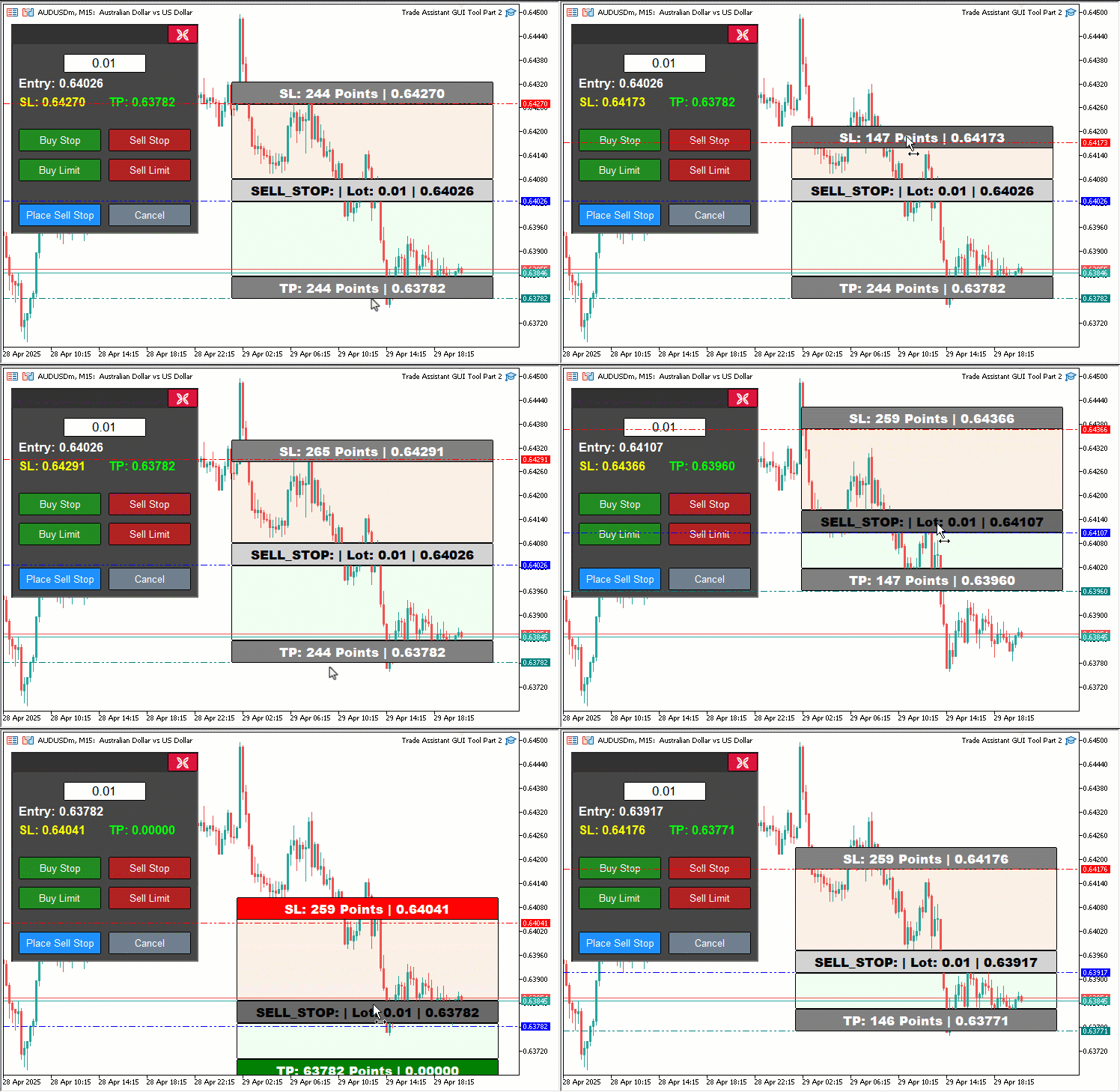
También incorporamos la función «updateButtonHoverState» tras los clics para actualizar los efectos al pasar el cursor, utilizando «lparam» y «dparam» para las coordenadas del ratón. Para CHARTEVENT_MOUSE_MOVE, añadimos la función de arrastre del panel comprobando si el clic del ratón se produce dentro de los límites de «PANEL_HEADER» (obtenidos mediante ObjectGetInteger), estableciendo «panel_dragging» en «true», almacenando las coordenadas en «panel_drag_x», «panel_drag_y», «panel_start_x» y «panel_start_y», y desactivando el desplazamiento con ChartSetInteger.
Mientras se arrastra («panel_dragging» y «MouseState» = 1), calculamos el desplazamiento («dx», «dy»), actualizamos «panel_x» y «panel_y», y reposicionamos todos los objetos del panel («PANEL_BG», «PANEL_HEADER», «CLOSE_BTN», «LOT_EDIT», etc.) utilizando ObjectSetInteger, y llamamos a ChartRedraw para actualizar el gráfico. Al soltar el botón del ratón, restablecemos «panel_dragging» y volvemos a habilitar el desplazamiento. Nos aseguramos de que el arrastre de rectángulos (para «REC1», «REC3» y «REC5») no entre en conflicto con el arrastre de paneles comprobando «!panel_dragging», y actualizamos los colores con «updateRectangleColors» durante «movingState_R1», «movingState_R5» y «movingState_R3» para reflejar los estados de desplazamiento del cursor y de validez.
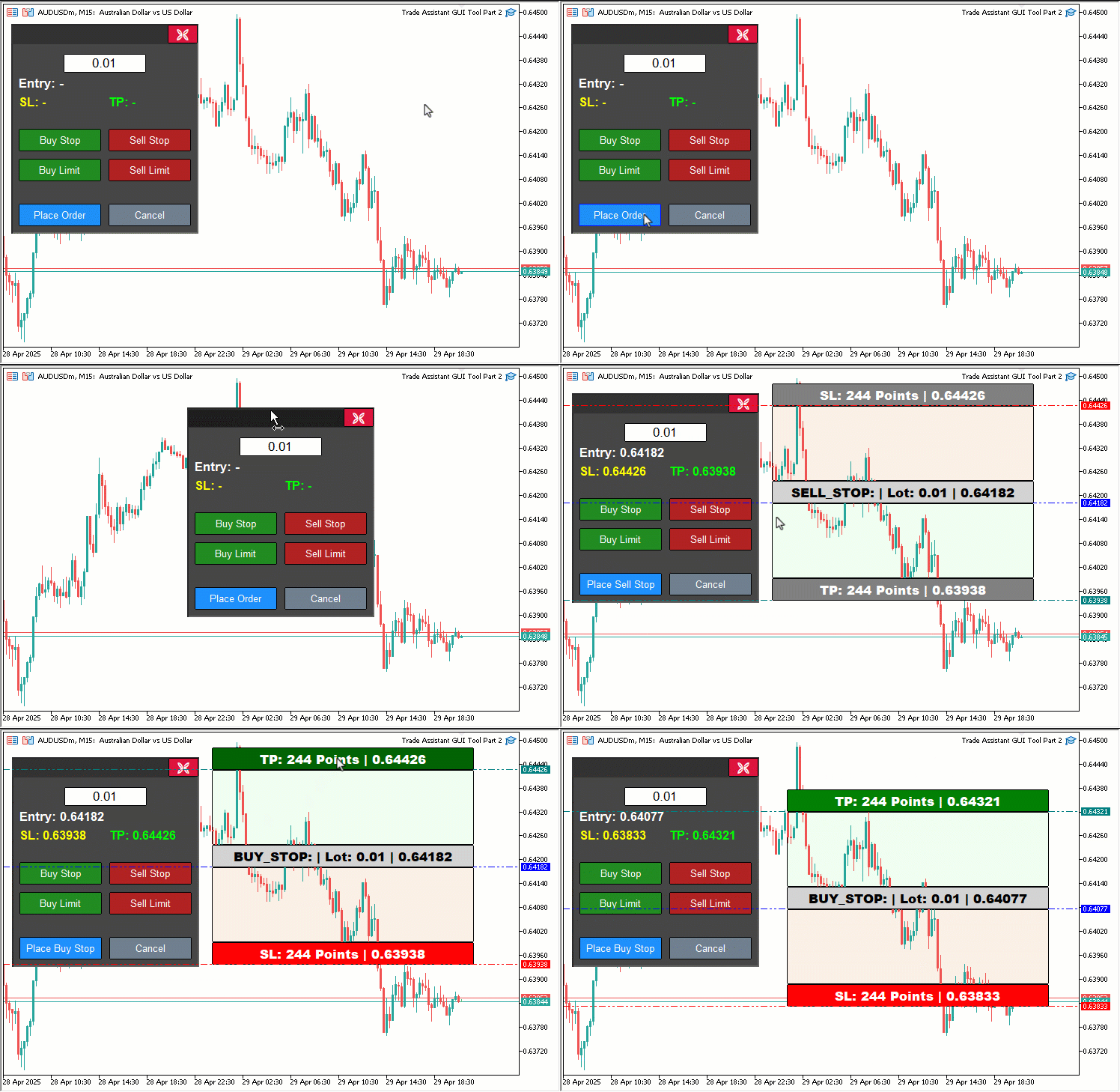
Hemos destacado algunos de los fragmentos que es fundamental tener en cuenta. Aquí tiene una representación gráfica.
Además, dado que hemos utilizado el objeto del panel de cabecera, a continuación le mostramos cómo crearlo.
//+------------------------------------------------------------------+
//| Create control panel                                             |
//+------------------------------------------------------------------+
void createControlPanel() {
   // Background rectangle
   ObjectCreate(0, PANEL_BG, OBJ_RECTANGLE_LABEL, 0, 0, 0);                   //--- Create panel background rectangle
   ObjectSetInteger(0, PANEL_BG, OBJPROP_XDISTANCE, panel_x);                 //--- Set background x-position
   ObjectSetInteger(0, PANEL_BG, OBJPROP_YDISTANCE, panel_y);                 //--- Set background y-position
   ObjectSetInteger(0, PANEL_BG, OBJPROP_XSIZE, 250);                         //--- Set background width
   ObjectSetInteger(0, PANEL_BG, OBJPROP_YSIZE, 280);                         //--- Set background height
   ObjectSetInteger(0, PANEL_BG, OBJPROP_BGCOLOR, C'070,070,070');            //--- Set background color
   ObjectSetInteger(0, PANEL_BG, OBJPROP_BORDER_COLOR, clrWhite);             //--- Set border color
   ObjectSetInteger(0, PANEL_BG, OBJPROP_BACK, false);                        //--- Set background to foreground

   // Header rectangle (inside panel)

   createButton(PANEL_HEADER,"",panel_x+2,panel_y+2,250-4,28-3,clrBlue,C'050,050,050',12,C'050,050,050',false);

   createButton(CLOSE_BTN, CharToString(203), panel_x + 209, panel_y + 1, 40, 25, clrWhite, clrCrimson, 12, clrBlack, false, "Wingdings"); //--- Create close button

//---

}
En la función «createControlPanel», añadimos un botón «PANEL_HEADER» al panel de control de nuestra herramienta mediante la función «createButton», situado en «panel_x+2», «panel_y+2» con un tamaño de 246x25, con texto azul (clrBlue), fondo y borde gris oscuro («C'050,050,050'») y sin etiqueta, lo que permite arrastrar el panel en OnChartEvent. Otra cosa que debemos hacer es desmontar el panel tal y como se indica a continuación.
//+------------------------------------------------------------------+
//| Delete control panel objects                                     |
//+------------------------------------------------------------------+
void deletePanel() {
   ObjectDelete(0, PANEL_BG);        //--- Delete panel background
   ObjectDelete(0, PANEL_HEADER);    //--- Delete panel header
   ObjectDelete(0, LOT_EDIT);        //--- Delete lot edit field
   ObjectDelete(0, PRICE_LABEL);     //--- Delete price label
   ObjectDelete(0, SL_LABEL);        //--- Delete SL label
   ObjectDelete(0, TP_LABEL);        //--- Delete TP label
   ObjectDelete(0, BUY_STOP_BTN);    //--- Delete Buy Stop button
   ObjectDelete(0, SELL_STOP_BTN);   //--- Delete Sell Stop button
   ObjectDelete(0, BUY_LIMIT_BTN);   //--- Delete Buy Limit button
   ObjectDelete(0, SELL_LIMIT_BTN);  //--- Delete Sell Limit button
   ObjectDelete(0, PLACE_ORDER_BTN); //--- Delete Place Order button
   ObjectDelete(0, CANCEL_BTN);      //--- Delete Cancel button
   ObjectDelete(0, CLOSE_BTN);       //--- Delete Close button
   ChartRedraw(0);                   //--- Redraw chart
}
En este punto, actualizamos la función «deletePanel» para garantizar que el panel de control de nuestra herramienta se limpie correctamente, eliminando todos los objetos asociados, incluido el nuevo encabezado que hemos introducido recientemente. Utilizamos la función ObjectDelete para eliminar el fondo del panel («PANEL_BG»), el encabezado recién añadido («PANEL_HEADER»), el campo de introducción del tamaño del lote («LOT_EDIT»), las etiquetas («PRICE_LABEL», «SL_LABEL», «TP_LABEL») y los botones («BUY_STOP_BTN», «SELL_STOP_BTN», «BUY_LIMIT_BTN», «SELL_LIMIT_BTN», «PLACE_ORDER_BTN», «CANCEL_BTN» y «CLOSE_BTN») del gráfico de MetaTrader 5.
Por último, llamamos a la función ChartRedraw para actualizar el gráfico, garantizando así una interfaz limpia tras la eliminación. Además, al mostrar la herramienta, debemos tener en cuenta los efectos al pasar el cursor para garantizar que sigan siendo visibles, tal y como se muestra a continuación.
//+------------------------------------------------------------------+
//| Show control panel                                               |
//+------------------------------------------------------------------+
void showPanel() {
   // Ensure panel is in foreground
   ObjectSetInteger(0, PANEL_BG,        OBJPROP_BACK, false); //--- Show panel background
   ObjectSetInteger(0, PANEL_HEADER,    OBJPROP_BACK, false); //--- Show panel header
   ObjectSetInteger(0, LOT_EDIT,        OBJPROP_BACK, false); //--- Show lot edit field
   ObjectSetInteger(0, PRICE_LABEL,     OBJPROP_BACK, false); //--- Show price label
   ObjectSetInteger(0, SL_LABEL,        OBJPROP_BACK, false); //--- Show SL label
   ObjectSetInteger(0, TP_LABEL,        OBJPROP_BACK, false); //--- Show TP label
   ObjectSetInteger(0, BUY_STOP_BTN,    OBJPROP_BACK, false); //--- Show Buy Stop button
   ObjectSetInteger(0, SELL_STOP_BTN,   OBJPROP_BACK, false); //--- Show Sell Stop button
   ObjectSetInteger(0, BUY_LIMIT_BTN,   OBJPROP_BACK, false); //--- Show Buy Limit button
   ObjectSetInteger(0, SELL_LIMIT_BTN,  OBJPROP_BACK, false); //--- Show Sell Limit button
   ObjectSetInteger(0, PLACE_ORDER_BTN, OBJPROP_BACK, false); //--- Show Place Order button
   ObjectSetInteger(0, CANCEL_BTN,      OBJPROP_BACK, false); //--- Show Cancel button
   ObjectSetInteger(0, CLOSE_BTN,       OBJPROP_BACK, false); //--- Show Close button

   // Reset button hover states
   buy_stop_hovered     = false;
   sell_stop_hovered    = false;
   buy_limit_hovered    = false;
   sell_limit_hovered   = false;
   place_order_hovered  = false;
   cancel_hovered       = false;
   close_hovered        = false;
   header_hovered       = false;

   // Reset button colors
   ObjectSetInteger(0, BUY_STOP_BTN,    OBJPROP_BGCOLOR,       clrForestGreen);
   ObjectSetInteger(0, BUY_STOP_BTN,    OBJPROP_BORDER_COLOR,  clrBlack);
   ObjectSetInteger(0, SELL_STOP_BTN,   OBJPROP_BGCOLOR,       clrFireBrick);
   ObjectSetInteger(0, SELL_STOP_BTN,   OBJPROP_BORDER_COLOR,  clrBlack);
   ObjectSetInteger(0, BUY_LIMIT_BTN,   OBJPROP_BGCOLOR,       clrForestGreen);
   ObjectSetInteger(0, BUY_LIMIT_BTN,   OBJPROP_BORDER_COLOR,  clrBlack);
   ObjectSetInteger(0, SELL_LIMIT_BTN,  OBJPROP_BGCOLOR,       clrFireBrick);
   ObjectSetInteger(0, SELL_LIMIT_BTN,  OBJPROP_BORDER_COLOR,  clrBlack);
   ObjectSetInteger(0, PLACE_ORDER_BTN, OBJPROP_BGCOLOR,       clrDodgerBlue);
   ObjectSetInteger(0, PLACE_ORDER_BTN, OBJPROP_BORDER_COLOR,  clrBlack);
   ObjectSetInteger(0, CANCEL_BTN,      OBJPROP_BGCOLOR,       clrSlateGray);
   ObjectSetInteger(0, CANCEL_BTN,      OBJPROP_BORDER_COLOR,  clrBlack);
   ObjectSetInteger(0, CLOSE_BTN,       OBJPROP_BGCOLOR,       clrCrimson);
   ObjectSetInteger(0, CLOSE_BTN,       OBJPROP_BORDER_COLOR,  clrBlack);
   ObjectSetInteger(0, PANEL_HEADER,    OBJPROP_BGCOLOR,       C'050,050,050');

   // Reset panel state
   update_Text(PRICE_LABEL,     "Entry: -");        //--- Reset entry label text
   update_Text(SL_LABEL,        "SL: -");           //--- Reset SL label text
   update_Text(TP_LABEL,        "TP: -");           //--- Reset TP label text
   update_Text(PLACE_ORDER_BTN, "Place Order");     //--- Reset Place Order button text
   selected_order_type = "";                        //--- Clear selected order type
   tool_visible        = false;                     //--- Hide tool
   ChartSetInteger(0, CHART_EVENT_MOUSE_MOVE, true); //--- Ensure mouse move events are enabled
   ChartRedraw(0);                                   //--- Redraw chart
}
Hemos mejorado la función «showPanel» para gestionar la visualización y el restablecimiento del estado del panel de control de nuestra herramienta, incorporando el nuevo «PANEL_HEADER» y la gestión del estado al pasar el cursor, introducidos para mejorar la interactividad de la herramienta. Comenzamos por asegurarnos de que todos los elementos del panel estén visibles utilizando la función ObjectSetInteger para establecer la propiedad OBJPROP_BACK en «false» para el fondo del panel («PANEL_BG»), el encabezado recién añadido («PANEL_HEADER»), el campo de introducción del tamaño del lote («LOT_EDIT»), las etiquetas relacionadas con el precio («PRICE_LABEL», «SL_LABEL», «TP_LABEL») y todos los botones («BUY_STOP_BTN», «SELL_STOP_BTN», «BUY_LIMIT_BTN», «SELL_LIMIT_BTN», «PLACE_ORDER_BTN», «CANCEL_BTN» y «CLOSE_BTN»), situándolos en primer plano en el gráfico.
Para mantener una interfaz clara y predecible, restablecemos los estados de desplazamiento del cursor estableciendo las variables booleanas «buy_stop_hovered», «sell_stop_hovered», «buy_limit_hovered», «sell_limit_hovered», «place_order_hovered», «cancel_hovered», «close_hovered» y «header_hovered» en «false», lo que garantiza que no persistan efectos residuales de desplazamiento al pasar el cursor cuando se muestra el panel.
A continuación, restablecemos el aspecto visual predeterminado de los botones y el encabezado utilizando la función «ObjectSetInteger» para establecer OBJPROP_BGCOLOR en sus colores originales: «clrForestGreen» para «BUY_STOP_BTN» y «BUY_LIMIT_BTN», «clrFireBrick» para «SELL_STOP_BTN» y «SELL_LIMIT_BTN», «clrDodgerBlue» para «PLACE_ORDER_BTN», «clrSlateGray» para «CANCEL_BTN», «clrCrimson» para «CLOSE_BTN» y un gris oscuro («C'050,050,050'») para «PANEL_HEADER».
Además, hemos establecido OBJPROP_BORDER_COLOR en «clrBlack» para todos los botones, con el fin de garantizar un aspecto uniforme cuando no se pasa el cursor por encima.
Para restablecer el estado funcional del panel, llamamos a la función «update_Text» para establecer «PRICE_LABEL» en «Entry: -», «SL_LABEL» en «SL: -», «TP_LABEL» en «TP: -» y «PLACE_ORDER_BTN» en «Realizar pedido», borrando así cualquier información previa sobre la configuración de la operación. Borramos la variable «selected_order_type» para asegurarnos de que no haya ningún tipo de orden preseleccionado, establecemos «tool_visible» en «false» para ocultar la herramienta del gráfico y utilizamos la función ChartSetInteger para habilitar los eventos CHART_EVENT_MOUSE_MOVE, garantizando así que el panel esté listo para las interacciones de desplazamiento del cursor y arrastre.
Por último, llamamos a la función ChartRedraw para actualizar el gráfico, lo que devuelve el panel a su estado predeterminado, totalmente preparado para nuestra próxima interacción. Tras la compilación, este es el resultado.
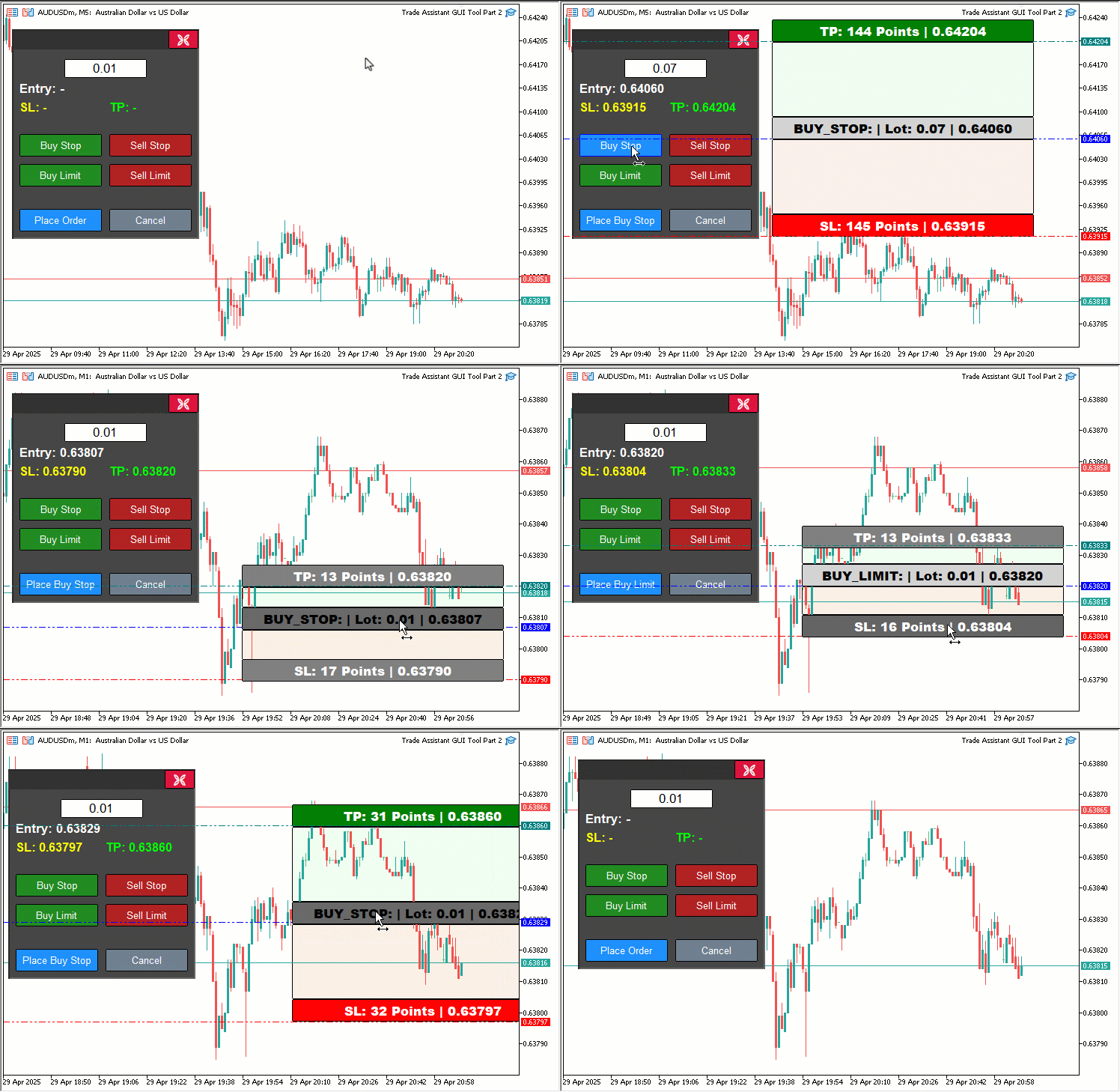
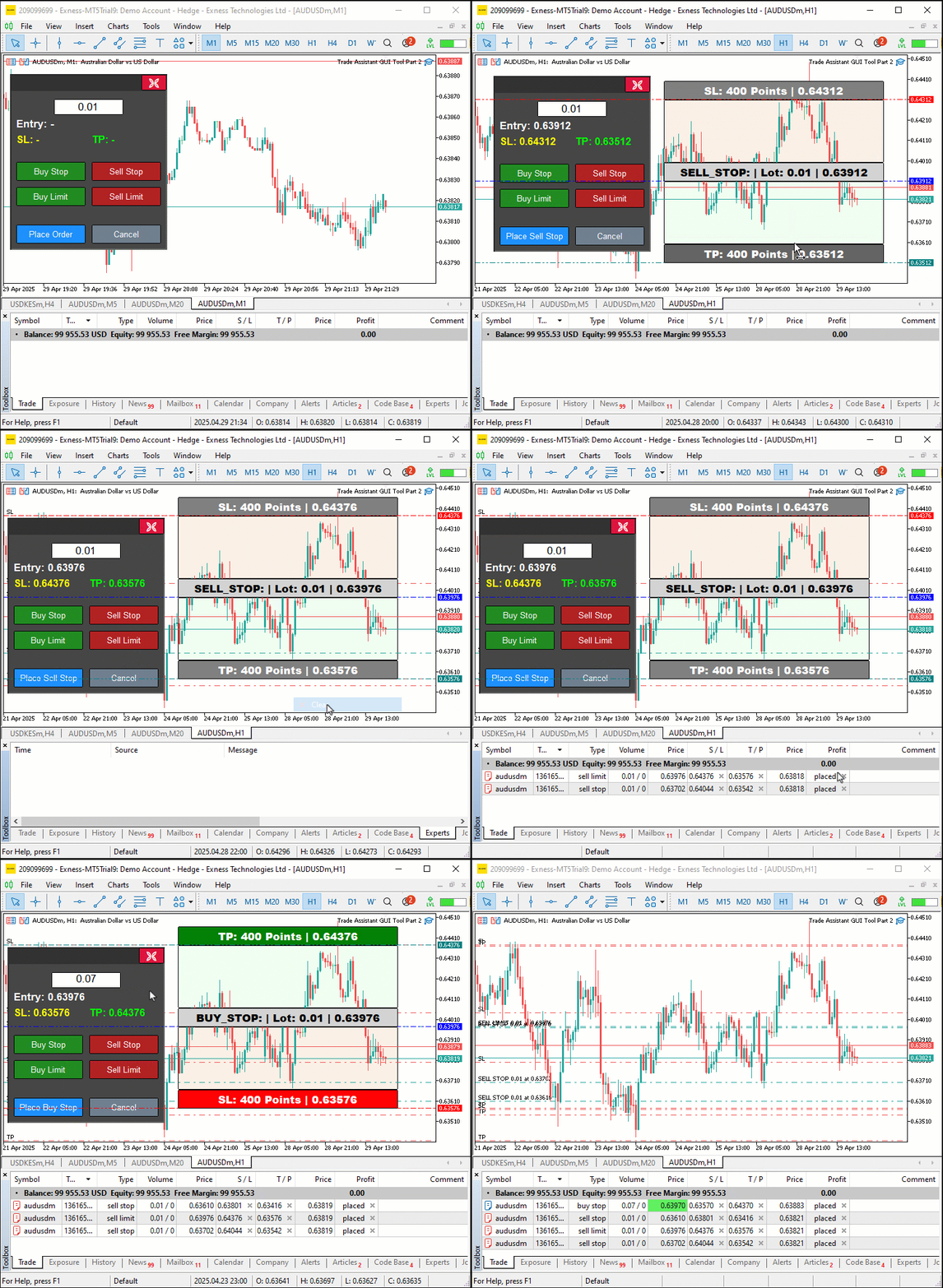
A partir de la visualización, podemos observar que es posible validar dinámicamente los pedidos mediante la herramienta de precios y cambiar sus colores para alertar al usuario de que los precios se salen de los límites establecidos. Además, podemos observar que es posible arrastrar el panel y la herramienta de precios de forma dinámica y que, al pasar el cursor por encima de los botones, se muestran sus rangos y los colores cambian dinámicamente en función de dichos rangos, con lo que se logra nuestro objetivo. Ahora solo queda comprobar la interactividad del proyecto, lo cual se aborda en la sección anterior.
Backtesting
Hemos realizado las pruebas y a continuación se muestra la visualización recopilada en un único formato de imagen de mapa de bits Graphics Interchange Format (GIF).
Conclusión
En conclusión, hemos mejorado nuestra herramienta Trade Assistant en MQL5 con indicaciones visuales dinámicas, incorporando un panel arrastrable, efectos al pasar el cursor y validación de órdenes en tiempo real para que la colocación de nuestras órdenes pendientes resulte más intuitiva y precisa. Hemos demostrado el diseño y la implementación de estas mejoras, garantizando su fiabilidad mediante exhaustivas pruebas retrospectivas adaptadas a nuestras necesidades de negociación. Puede personalizar esta herramienta para adaptarla a su estilo, lo que mejorará considerablemente la eficiencia al colocar órdenes en los gráficos.
Traducción del inglés realizada por MetaQuotes Ltd.
Artículo original: https://www.mql5.com/en/articles/17972
Advertencia: todos los derechos de estos materiales pertenecen a MetaQuotes Ltd. Queda totalmente prohibido el copiado total o parcial.
Este artículo ha sido escrito por un usuario del sitio web y refleja su punto de vista personal. MetaQuotes Ltd. no se responsabiliza de la exactitud de la información ofrecida, ni de las posibles consecuencias del uso de las soluciones, estrategias o recomendaciones descritas.

 Características del Wizard MQL5 que debe conocer (Parte 63): Uso de los patrones de DeMarker y los canales de envolvente
 Simulación de mercado: Iniciando SQL en MQL5 (III)
 Características del Wizard MQL5 que debe conocer (Parte 64): Uso de los patrones de DeMarker y los canales de envolvente con el núcleo de ruido blanco
 Del básico al intermedio: Objetos (III)

- Aplicaciones de trading gratuitas
- 8 000+ señales para copiar
- Noticias económicas para analizar los mercados financieros
Usted acepta la política del sitio web y las condiciones de uso
He encontrado un bug, cuando tp o sl está cerca del borde de entrada, ya no se puede mover, esto es un gran bug, ¿ha encontrado el autor este problema?

He encontrado un error, cuando tp o sl se acerca al borde de la entrada, no puede moverse más allá, esto es un gran error, ¿ha encontrado el autor este problema?